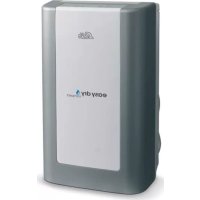
Easy Dry Compact 708 - Humidifier Solis - Free user manual and instructions
Find the device manual for free Easy Dry Compact 708 Solis in PDF.



User questions about Easy Dry Compact 708 Solis
0 question about this device. Answer the ones you know or ask your own.
Ask a new question about this device
Download the instructions for your Humidifier in PDF format for free! Find your manual Easy Dry Compact 708 - Solis and take your electronic device back in hand. On this page are published all the documents necessary for the use of your device. Easy Dry Compact 708 by Solis.
USER MANUAL Easy Dry Compact 708 Solis
Safety instructions ....Side 25
Placement / Parts ....Side 27
Operation....Side 28
Cleaning....Side 29
Disposal....Side 30
Trouble shooting ....Side 31
D
DANKE
natural_image
Line drawing of a portable electronic device with control panel and buttons (no text or symbols)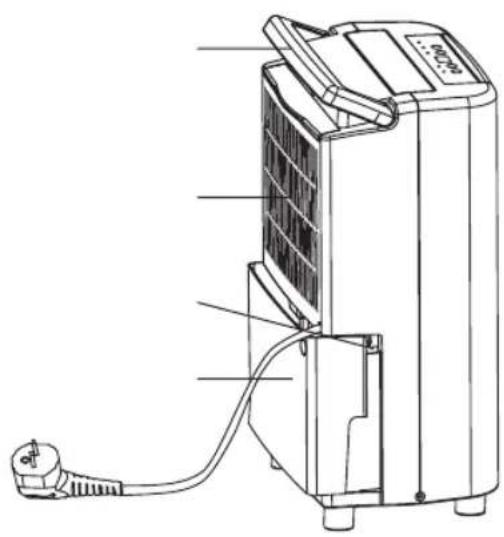
natural_image
Technical line drawing of a portable air conditioner unit with attached plug (no text or symbols)natural_image
Technical line drawing of a mechanical component with ventilation grilles and mounting holes (no text or symbols)text_image
Technical diagram of a device with labeled components A and B, showing internal structure and wiring connections.ENTLEEREN DES WASSERTANKS
text_image
Technical diagram illustrating three-step cleaning or disassembly process with arrows indicating direction and droplet behaviorLAGERUNG
natural_image
Technical line drawing of a portable air conditioner unit with attached battery pack and cable (no text or symbols)
natural_image
Abstract black-and-white geometric pattern with diagonal lines and a central emblem (no text or symbols)natural_image
Silhouette of a dog and a cat crossed by diagonal lines, no text or symbols presentnatural_image
Simple line drawing of a campfire with no text or symbolsnatural_image
Abstract geometric pattern with intersecting diagonal lines and shaded shapes (no text or symbols)natural_image
Simple line drawing of a spray bottle over a block, crossed by two diagonal lines (no text or symbols)natural_image
Simple line drawing of a double-framed window with diagonal lines and a shaded bottom panel (no text or symbols)natural_image
Black and white icon of a faucet with droplets falling, enclosed in a diagonally divided rectangle (no text or symbols)natural_image
Pure electrical circuit symbols without any text or labelsnatural_image
Abstract geometric line drawing with intersecting curves and a central symbol (no text or labels)natural_image
Diagram showing a hand using a tool to cut a rectangular object with diagonal lines (no text or symbols)natural_image
Line drawing of a portable electronic device with control panel and buttons (no text or symbols)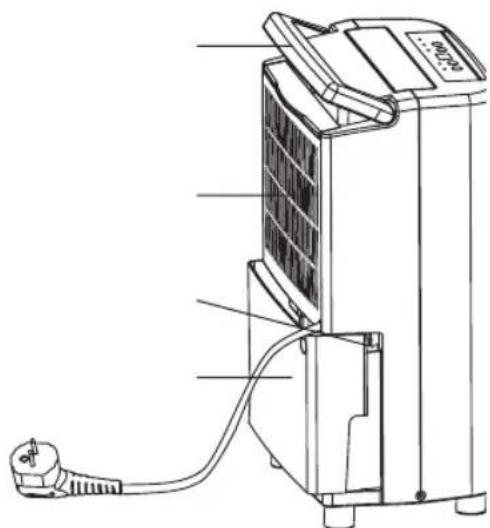
text_image
Technical diagram of a portable electronic device with labeled components and wiring connectionsnatural_image
Technical line drawing of a mechanical component with internal grid structure and two arrows indicating upward and downward motion (no text or symbols)
text_image
FVIDANGE EN CONTINU
text_image
Technical diagram of a device with labeled parts A and B, showing internal components and connections.VIDANGE DU RÉSERVOIR D'EAU
natural_image
Technical diagram of a mechanical assembly with directional arrows indicating movement (no text or symbols)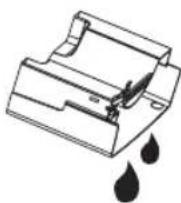
F
Avertissement:
natural_image
Technical line drawing of a portable air conditioner unit with attached battery pack and wiring (no text or symbols)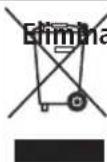
on de l'appareil:
natural_image
Solid black rectangle with a small white vertical line in the top-left corner (no text or symbols)natural_image
Solid black rectangle with a small white vertical line in the top right corner (no text or symbols)PARTS
natural_image
Line drawing of a portable air purifier device with control panel and ventilation slots (no text or symbols)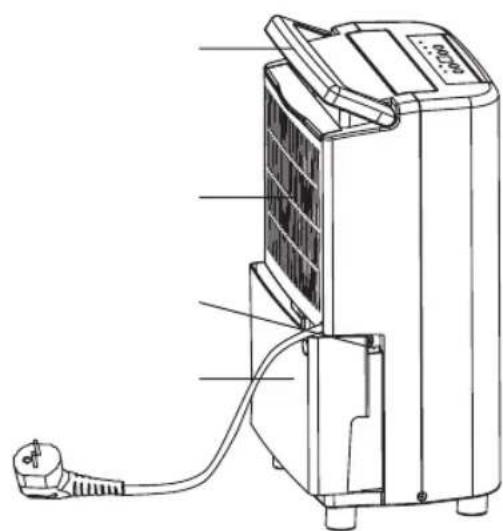
text_image
Technical diagram of a portable air conditioner unit with labeled components and wiring connectionsCOMANDI: Spie LED e display
text_image
7 6 5 4 3 2 1 D C B Anatural_image
Technical line drawing of a mechanical component with internal grid structure and two upward arrows indicating motion (no text or symbols)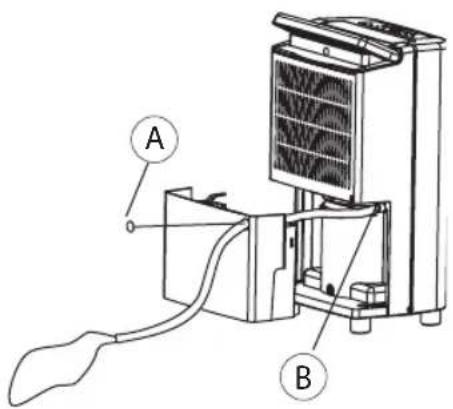
text_image
Technical diagram of a device with labeled parts A and B, showing internal components and wiring connections.COME VUOTARE IL SERBATOIO DELL'ACQUA
natural_image
Technical line drawing of a portable air conditioner unit with attached battery pack and cable (no text or symbols)

natural_image
Solid black rectangle with a small white vertical line in the top-left corner (no text or symbols)Thank you for choosing this innovative Home Dehumidifer. We suggest that you keep this manual in a safe place for future reference. It describes the many benefits and advanced features this unique product has to offer. Before you use your new dehumidifier you should carefully read these instructions to maximise this product's performance.
IMPORTANT SAFETY INSTRUCTIONS
Before any installation, use and maintenance operation, read the safety instructions in this manual carefully.
Remove all packaging materials from the unit, keep it away from babies and small children to avoid the danger of suffocation.
Before inserting the power plug make sure that the voltage is within the range indicated on the rating label on the unit.
The dehumidifier is intended exclusively for the use for which it was created. SOLIS is not responsible for any damage caused by improper use.
The dehumidifier is safe, however as with other electrical appliances, use it with care.
The first time that you use the unit please ensure that it has been standing for 2 hours in an upright position before it is switched on.
NOTE: The unit is not to be used in temperatures under 5 °C.
IMPORTANT!
- The unit is designed for indoor operation.
- Rating: This unit must be connected to a 220-240 V / 50Hz earthed outlet.
-
The installation must be in accordance with regulations of the country where the unit is used.
If you are in any doubt about the electrical installation, have it checked and if necessary modified by a qualified electrician. -
Unplug when not in use. Do not unplug by pulling the cord.
- Do not operate this product with wet hands.
- Keep out of the reach of children.
- Do not clean the unit by spraying it or immersing it in water.
- Disconnect it from the mains before cleaning the unit or any of its components.
• Always unplug before changing the filter. - Do not connect the unit to an electrical outlet using an extension cord. If an outlet is not available, one should be installed by a licensed electrician.
If the supply cord is damaged, it must be replaced by an approved service
representative or a similar qualified person in order to avoid any hazard.
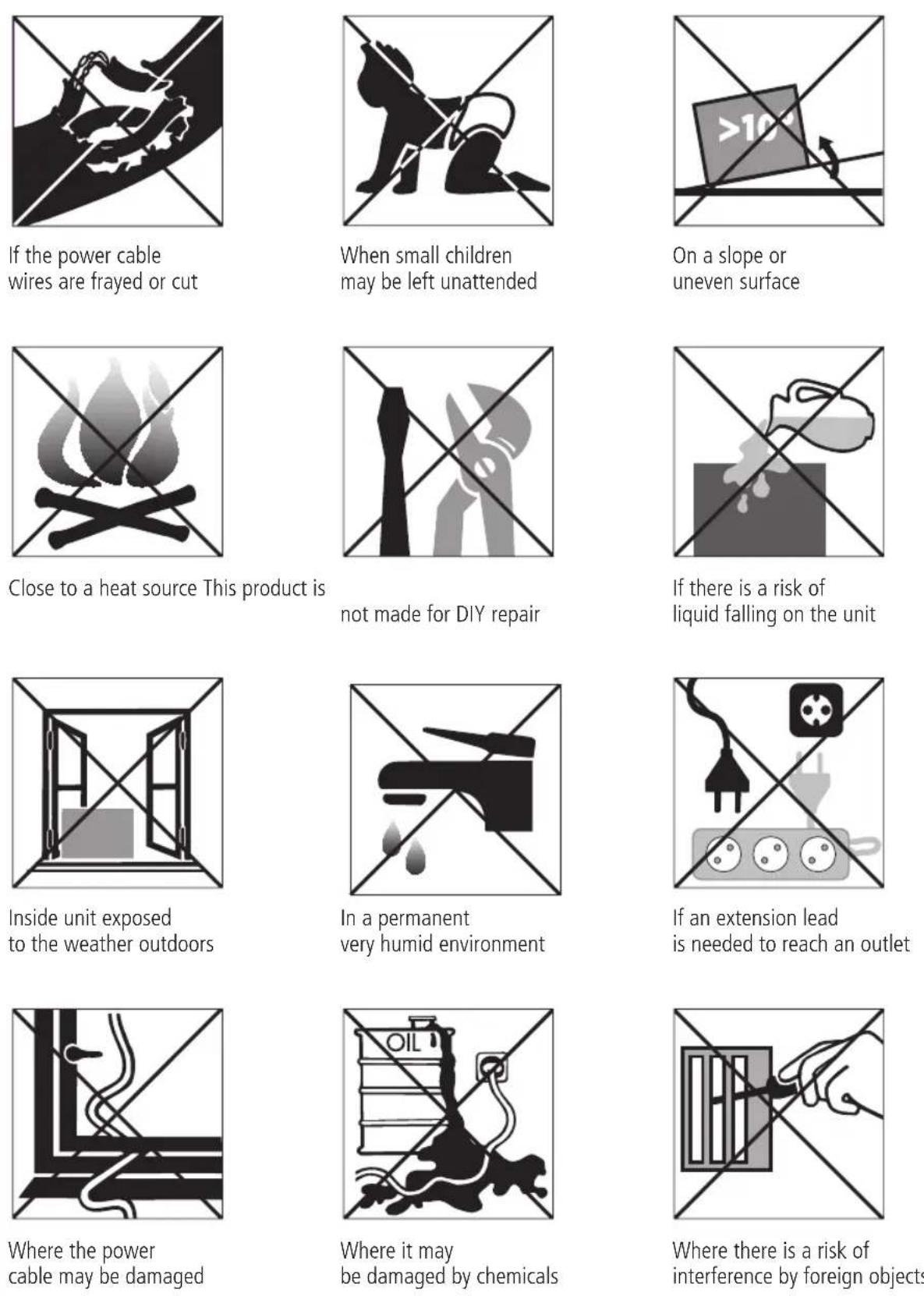
Do not use your dehumidifier under the following conditions:

text_image
EPLACEMENT
Your SOLIS dehumidifier will begin to protect your home from the harmful effects of excessive moisture as soon as it is turned on.
Excess moisture travels throughout your home, in the same way cooking smells spread to every room in the house. For this reason, the dehumidifier should be positioned in a central and clear location so that it can draw the moist air towards it from all over the home. A warm hallway or landing is an excellent position for your dehumidifier. If possible, leave interior doors ajar to allow air circulation. Alternatively, if you have a serious problem in one area you can begin by positioning the dehumidifier there and later moving it to a more central point.
For the most effective use, run your dehumidifier with external doors and windows kept closed when the dehumidifier is operating. Please note the unit should not be placed directly against a radiator or other heat source.
When positioning your SOLIS dehumidifier, ensure that it is placed securely on a level surface clear of any obstacle that may limit the air movement.
Before you move the unit, switch it off and empty the water tank.
IMPORTANT:
Keep a minimal 0.2 m safety distance between the appliance and an electrical heater or any inflammable surface.
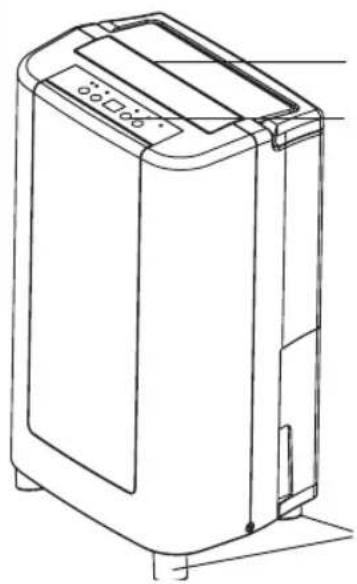
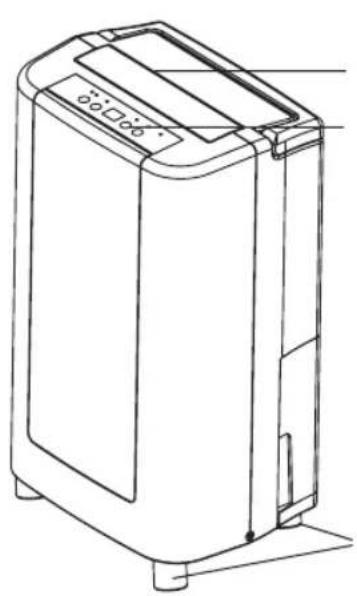
PARTS
natural_image
Line drawing of a portable air purifier device with control panel and base mount (no text or symbols)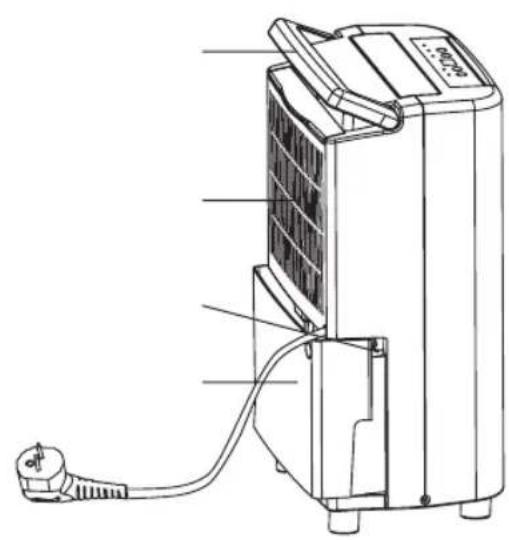
text_image
Technical diagram of a portable air conditioner unit with labeled components and wiring connections
text_image
EOPERATION
text_image
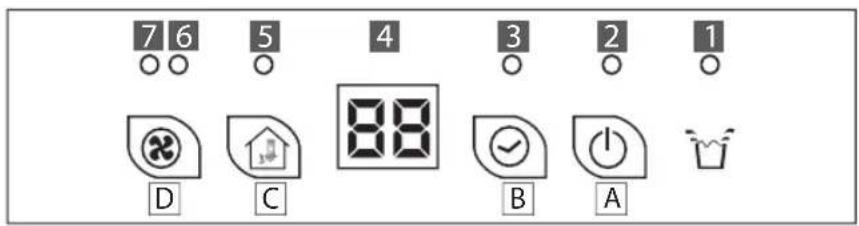
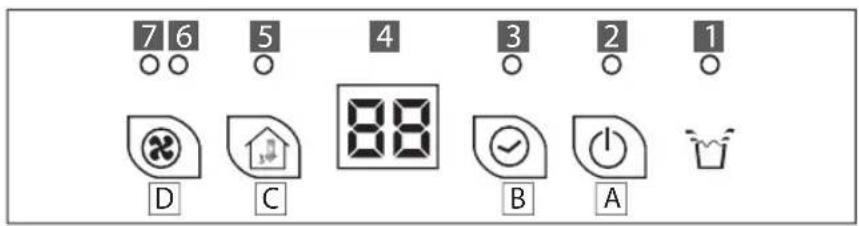
7 6 5 4 3 2 1 D C 88 B A- Water tank full
- Dehumidifying
- Timer is set
- Display
- Setting humidity level
- Low fan speed
- High fan speed
Buttons: A - ON/OFF; B - Timer; C - Humidity level; D - Fan speed
Switching the unit ON and OFF [A]
When the unit is plugged in, a buzzer will beep and the display will show the room humidity.
Push the ON/OFF button once to start operation at the default humidity level of 60% with low fan speed, LED [2] and LED [6] will light.
Push the button again to switch the unit off.
Setting the Timer [B]
The timer switches the unit on and off automatically within 24 hours. When the TIMER is set, the LED [3] will light up.
Programming the timer for ON - when the unit is OFF
When the unit is plugged in but not running, push the TIMER button repeatedly to desired hour when the unit will switch ON.
Programming the timer for OFF - when the unit is ON
When the unit is running, push the TIMER button repeatedly to desired hour when the unit will switch OFF.

text_image
ECancelling the timer
In order to cancel the timer setting, push the TIMER button to adjust the timer to 00, the LED [3] will go off.
Setting the Humidity level [C]
The humidistat range for this unit is 40% to 80%. Push the HUMIDITY button to set the desired humidity level, (the humidity can be set in steps of 5%) the display will show the circle as: 60, 65...80, 40, 45...60. LED [5] will light during the setting. When the dehumidify function is operating, the LED [2] will light.
If the room humidity is lower than 40%, the unit will stop dehumidify automatically, the fan only circulates the air.
Setting the fan speed [D]
Push the FAN SPEED button the change the desired fan speed, the low speed LED [6] and high speed LED [7] will light accordingly.
Automatic defrosting
When this unit is running in a room temperature between 5 °C to 12 °C, it will stop to defrost every 30 minutes.
When this unit is running in a room temperature between 12 °C to 20 °C, it will stop to defrost every 45 minutes.
If the humidity of the air is lower than 40%, the unit will automatically stop dehumidifying but the fan will continue circulating the air.
If the humidity of the air is below 35%, the announcement L0 appears on the display.
ROUTINE SERVICE AND CLEANING
Always unplug the unit from the mains before carrying out any maintenance or cleaning the unit.
Cleaning the body
Use only a soft cloth to wipe the unit clean. Do not use volatile chemicals, petrol, detergents, chemically treated cloths or other harmful cleansing solutions. These could all possibly damage the cabinet.
Cleaning the washable air filter
This dehumidifier is equipped with a washable filter. This will capture most airborne pollutants like dust, smoke, animal dander, mould spores and pollen to create a less irritating living environment. It is advisable to check the filter on a regular basis (at least monthly and after storage) and clean as necessary:
- Extract the filter holder
- Use a vacuum cleaner or tap the filter lightly.
If the filter is particularly dirty, use lukewarm water with a small amount of medium strength detergent and rinse thoroughly under the cold water tap. Make sure the filter is completely dry before replacing. Do not expose the filter to sunlight or other sources of direct heat as this may cause the filter and frame to warp.

natural_image
Technical line drawing of a mechanical component with internal grid structure and directional arrows (no text or symbols)STORAGE
When the unit is not being used for long period of time and you want to store it, note the following steps:
- Empty any water left in the water tank.
- Fold up the power supply cord and put it in the water tank.
- Clean the air filter.
- Store in a cool and dry place.
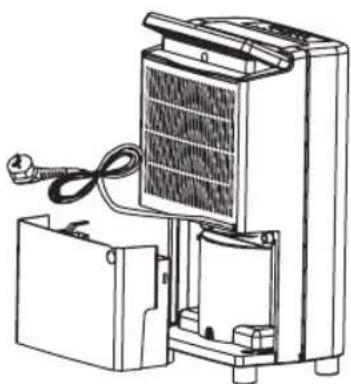
natural_image
Line drawing of a portable air conditioner unit with attached battery pack and coiled cable (no text or symbols)EMPTYING THE WATER TANK
When the water tank is full, the unit will switch off automatically and beep 15 times, the LED [1] of water tank full on the control panel will light up. The tank needs to be emptied:
- Lightly press on the sides of the tank with both hands and pull out gently.
- After discarding the water, gently push the tank back into its place. The LED light will go off.
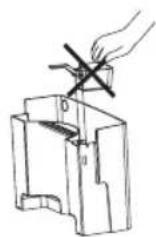
Warning:
- Do not remove the float from the water tank, the water tank full sensor will no longer be able to detect the water level correctly without the float and water may leak from the water tank.
- If the tank is dirty, wash it with cold or lukewarm water. Do not use detergent, scouring pads, chemically treated dust cloths, gasoline, benzene, thinner or other solvents, as these can scratch and damage the tank and cause water leakage.
- When replacing the water tank, press the tank firmly into place with both hands. If the tank is not positioned properly, the water tank full sensor will be activated and the dehumidifier will not operate.
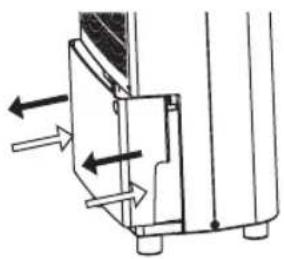
natural_image
Technical diagram of a mechanical assembly with directional arrows indicating movement (no text or symbols)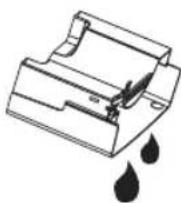
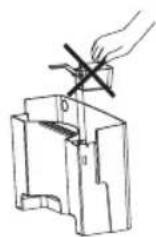
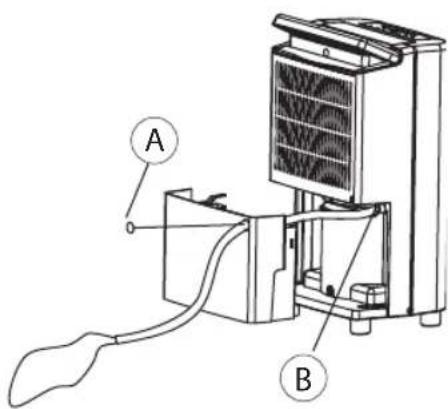
CONTINUOUS DRAINAGE
For the continuous drainage please refer to the following instructions and the picture.
- Switch off the unit and remove the plug from the electrical outlet.
- Create an opening (remove part A) for the drainage tube on the tank.
- Push a drain tube (14 mm outer diameter, 10 mm inner diameter) through the hole and connect to the continuous drainage port (part B).
- Place the other end in a drain. Make sure the tube is free from twists and bends.
text_image
Technical diagram of a device with labeled components A and B, showing internal structure and wiring connections.Note:
The water tank has to remain in place during continuous drainage.
In conformity with Directive 2002/96/EC on waste electrical and electronic equipment (WEEE), at the end of its life the unit should be taken to an electrical appliance collection point for its environmentally friendly disposal.
Please note that the dehumidification performance of your SOLIS EASY DRY COMPACT strongly depends on room temperature and relative air humidity. The colder the air, the less moisture it is able to absorb. Accordingly, the appliance will also be able to extract less moisture. To increase the dehumidification capacity, it is recommended that the room be heated. Approximate figures are set out in the following table.
| APPROXIMATE DEHUMIDIFICATION CAPACITIES IN LITRES PER 24 HOURS | |||||
| Room temperature | Relative air humidity | ||||
| 50% | 60% | 70% | 80% | 90% | |
| 5°C | 0,5 | 0,8 | 1 | 1,2 | 1,5 |
| 10°C | 0,5 | 1 | 1,5 | 3 | 4 |
| 15°C | 1 | 1,5 | 3 | 5 | 8 |
| 20°C | 2 | 4 | 8 | 10 | 12 |
| 25°C | 4,5 | 8 | 11 | 13,5 | 15,5 |
| 30°C | 8,5 | 11 | 14 | 17 | 19 |
| 35°C | 10,5 | 14 | 17,5 | 20 | 22,5 |
TROUBLE SHOOTING
| Never try to repair or dismantle the unit yourself. Before calling for assistance, please check the points below. | ||
| Problem Possible cause Solution | ||
| The unit does not Has the operate. | power cord been disconnected? Plug the power cord in a working outlet. | |
| Is the water tank full indicator flashing? Empty the water tank and The tank is full and/or in a wrong position. position correctly. | ||
| Is the room temperature above 35 °C or The protective device is activated, below 5 °C? the unit can not be started. | ||
| The dehumidifying Is the air function does not work. | air filter clogged? Clean the filter as instructed under «Cleaning». | |
| Is the air inlet or air outlet | obstructed? Remove any obstacle. | |
| No air is discharged. under «Cleaning». | Is the air filter clogged? | Clean the filter as instructed |
| Operation is noisy. | Is the unit tilted or unsteady? | Move the unit to a stable, sturdy location. |
| Is the air filter clogged? under «Cleaning». | Clean the filter as instructed | |
| The display shows LO. | The humidity of the air is lower than 35%. | |
| This product contains fluorinated gases covered by the Kyoto Protocol | |
| Chemical Name of the Gas | R134A |
| Global Warning Potential (GWP) of the Gas | 1300 |

text_image
SINCE 1908 SolisSolis of Switzerland AG
Solis-Haus • CH-8152 Glattbrugg-Zürich • Schweiz Telefon +41 44 874 64 54 • Telefax +41 44 874 64 99 info@solis.ch • www.solis.ch • www.solis.com