EasyManual
Fujinon XF90mm F2 R LM WR - Lens FUJIFILM - Free user manual and instructions
Find the device manual for free Fujinon XF90mm F2 R LM WR FUJIFILM in PDF.



User questions about Fujinon XF90mm F2 R LM WR FUJIFILM
0 question about this device. Answer the ones you know or ask your own.
Ask a new question about this device
Download the instructions for your Lens in PDF format for free! Find your manual Fujinon XF90mm F2 R LM WR - FUJIFILM and take your electronic device back in hand. On this page are published all the documents necessary for the use of your device. Fujinon XF90mm F2 R LM WR by FUJIFILM.
USER MANUAL Fujinon XF90mm F2 R LM WR FUJIFILM
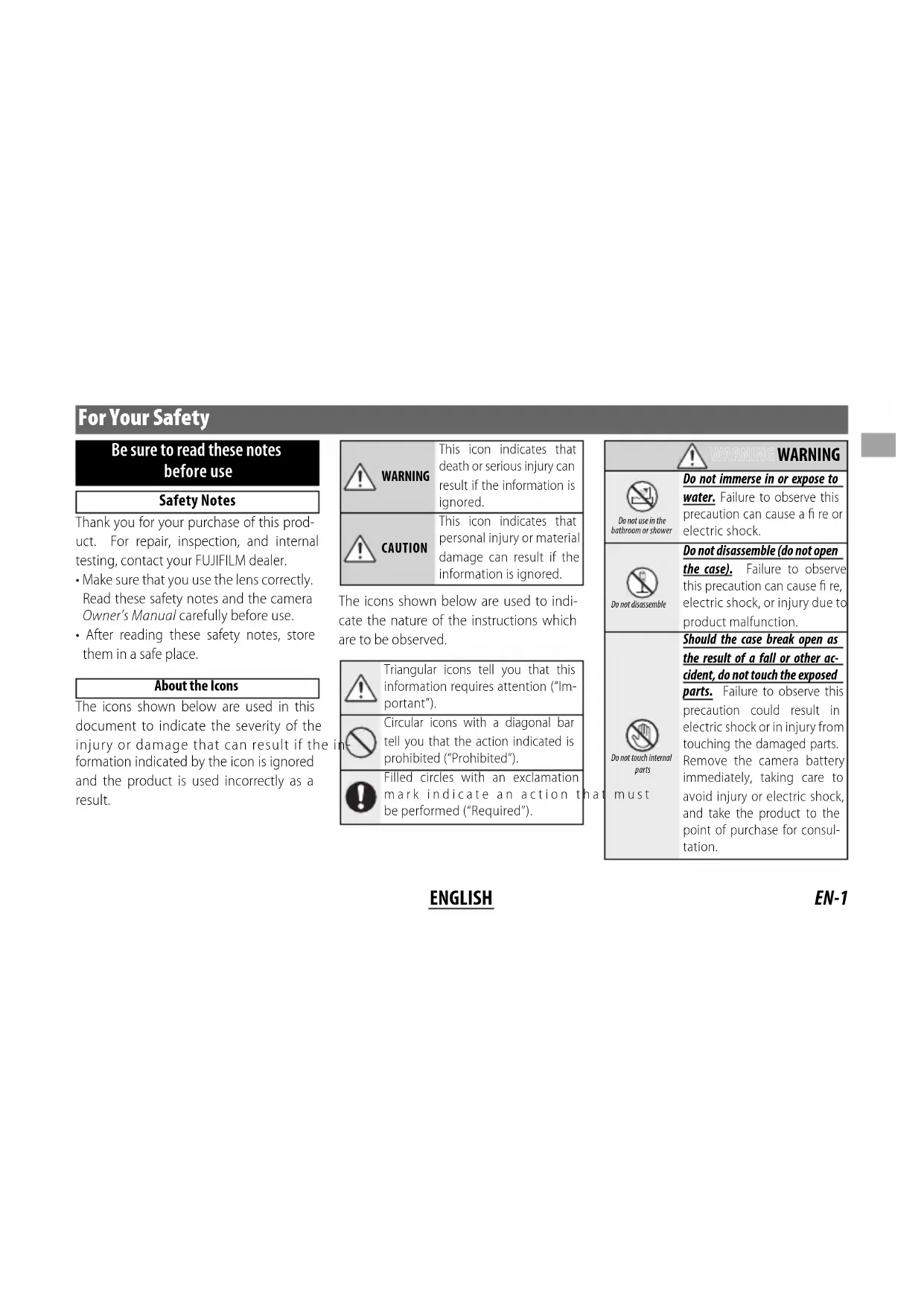
Be sure to read these notes before use
Safety Notes
Thank you for your purchase of this product. For repair, inspection, and internal testing, contact your FUJIFILM dealer.
Make sure that you use the lens correctly. Read these safety notes and the camera Owner's Manual carefully before use.
After reading these safety notes, store them in a safe place.
About the Icons
The icons shown below are used in this document to indicate the severity of the injury or damage that can result if the formation indicated by the icon is ignored and the product is used incorrectly as a result.
| WARNING | This icon indicates that death or serious injury can result if the information is ignored. |
| CAUTION | This icon indicates that personal injury or material damage can result if the information is ignored. |
The icons shown below are used to indicate the nature of the instructions which are to be observed.
| Triangular icons tell you that this information requires attention ("Important"). | |
| Circular icons with a diagonal bar tell you that the action indicated is prohibited ("Prohibited"). | |
| Filled circles with an exclamation mark indicate an action to be performed ("Required"). |
| WARNING | |
| Do not use in the bathroom or shower | Do not immerse in or expose to water. Failure to observe this precaution can cause a fire or electric shock. |
| Do not disassemble | Do not disassemble (do not open the case). Failure to observe this precaution can cause fire, electric shock, or injury due to product malfunction. |
| Do not touch internal parts must | Should the case break open as the result of a fall or other accident, do not touch the exposed parts. Failure to observe this precaution could result in electric shock or in injury from touching the damaged parts. Remove the camera battery immediately, taking care to avoid injury or electric shock, and take the product to the point of purchase for consultation. |
| Do not place on unstable surfaces. The product may fall, causing injury. | |
| Do not view the sun through the lens or camera view fi nd Failure to observe this precaution can cause permanent visual impairment. | |
| CAUTION | |
| Do not use or store in locations that are exposed to steam, or smoke or are very humid or extremely dusty. Failure to observe this precaution can cause fire or electric shock. | |
| Do not leave in direct sunlight or in locations subject to very high temperatures, such as in a closed vehicle on a sunny day. Failure to observe this precaution can cause fire. | |
| CAUTION | |
| Keep out of the reach of small children. This product could cause injury in the hands of a child. | |
| Do not handle with wet hands. Failure to observe this precaution can cause electric shock. | |
| Keep the sun out of the frame when shooting backlit subjects. Sunlight focused into the camera when the sun is in or close to the frame can cause fire or burns. | |
| When the product is not in use, replace the lens caps and store out of direct sunlight. Sunlight focused by the lens can cause fire or burns. | |
| Do not carry the camera or lens while they are attached to a tripod. The product can fall or strike other objects, causing injury. |
For customers in the U.S.A. For Customers in the U.S.A.
Tested To Comply With FCC Standards
FOR HOME OR OFFICE USE
FCC Statement: This device complies with Part 15 of the FCC Rules. Operation is subject to the following two conditions: (1) This device may not cause harmful interference, and (2) this device must accept any interference received, including interference that may cause undesired operation.
CAUTION: This equipment has been tested and found to comply with the limits for a Class B digital device, pursuant to Part 15 of the FCC Rules. These limits are designed to provide reasonable protection against harmful interference in a residential installation. This equipment generates, uses, and can radiate radio frequency energy and, if not installed and used in accordance with the instructions, may cause harmful interference to radio communications. However, there is no guarantee that interference will not occur in a particular installation. If this equipment does cause harmful interference to radio or television reception, which can be determined by turning the equipment off and on, the user is encouraged to try to correct the interference by one or more of the following measures:
Reorient or relocate the receiving antenna.
- Increase the separation between the equipment and receiver.

EN-2
ENGLISH
- Connect the equipment into an outlet on a circuit different from that to which the receiver is connected.
- Consult the dealer or an experienced radio/TV technician for help.
- You are cautioned that any changes or modifications not expressly approved in this manual could void the user's authority to operate the equipment.
Notes on the Grant: To comply with Part 15 of the FCC Rules, this product must be used with a Fujii Im-specific ed ferrite-core A/V cable, USB cable, and DC supply cord.
For Customers in Canada
CANICES-3B/NMB-3B
CAUTION: This Class B digital apparatus complies with Canadian ICES-003.
IMPORTANT SAFETY INSTRUCTIONS
Read these instructions.
- Keep these instructions.
Heed all warnings.
- Follow all instructions.
- Do not use this apparatus near water (excluding waterproof products).
Clean only with a dry cloth.
- Do not block any ventilation openings. Install in accordance with the manufacturer's instructions.
- Do not install near any heat sources such as ra
diators, heat registers, stoves, or other apparatus (including amplifiers) that produce heat.
- Protect the power cord from being walked on or pinched particularly at plugs, convenience receptacles, and the point where they exit from the apparatus.
- Only use attachments/accessories specified by the manufacturer.
- Unplug this apparatus during lightning storms or when unused for long periods of time.
Refer all servicing to qualified service personal. Servicing is required when the apparatus has been damaged in any way, such as power supply cord or plug is damaged, liquid has been spilled or objects have fallen into the apparatus, the apparatus has been exposed to rain or moisture, does not operate normally, or has been dropped.
Disposal of Electrical and Electronic Equipment in Private Households Private Households
In the European Union, Norway, Iceland and Liechtenstein: This symbol on the product, or in the manual and in the warranty, and/or on its packaging indicates that this product shall not be treated as household waste. Instead it should be taken to an applicable collection point for the recycling of electrical and electronic equipment.

By ensuring this product is disposed of correctly, you will help prevent potential negative consequences to the environment and human health, which could otherwise be caused by inappropriate waste handling of this product.
The recycling of materials will help to conserve natural resources. For more detailed information about recycling this product, please contact your local city office, your household waste disposal service or the shop where you purchased the product.
In Countries Outside the European Union, Norway, Iceland and Liechtenstein: If you wish to discard this product, including the batteries or accumulators, please contact your local authorities and ask for the correct way of disposal.
Australian RCM

Before Using This Product
Some lens features are not available with older versions of the camera firmware. Be sure to update the camera firmware to the latest version. Instructions on viewing the camera firmware version and updating camera firmware are available from the following website:
http://www.fujifilm.com/support/digital Cameras/software/#firmware
If you do not have access to a computer, support is available from the local distributor listed in the "FUJIFILM Worldwide Network" material provided with your camera.
Product Care
- When using a lens hood, do not pick up or hold the camera using only the hood.
-
Keep the lens signal contacts clean.
-
Use a blower to remove dust and lint from the glass surfaces of the lens or fi Iter. To remove smudges and fi ngerprints, apply a small amount of lens cleaner to a soft, clean cotton cloth or lens-cleaning tissue and clean from the center outwards using a circular motion, taking care not to leave smears or touch the glass with your fi ngers.
- Never use organic solvents such as paint thinner or benzene to clean the lens.
- Attach the front and rear caps when the lens is not in use.
- Store the lens and filiter in cool, dry locations to prevent mold and rust. Do not store in direct sunlight or with naphtha or camphoc moth balls.
- Keep the lens dry. Rusting can cause irreparable damage. Wipe off rain and water droplets.
- Leaving the lens in extremely hot locations could cause damage or warping.
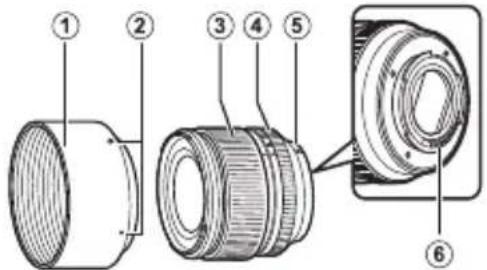
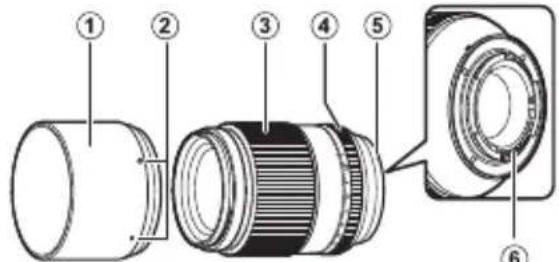
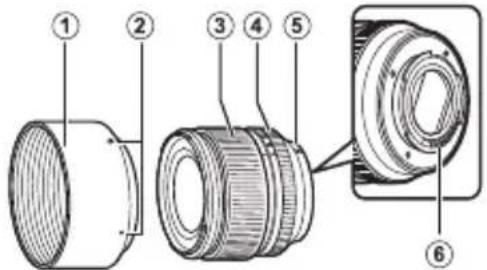
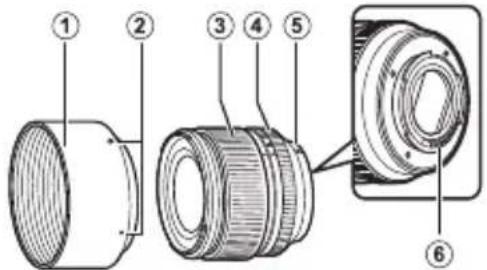
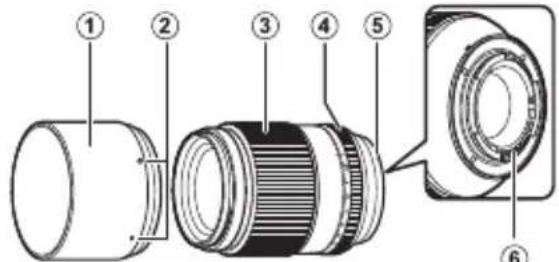
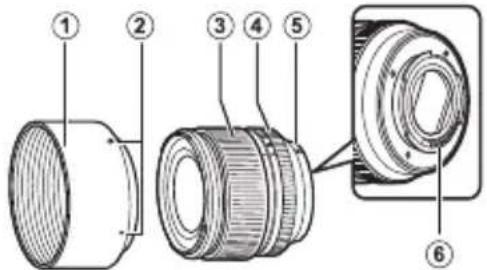
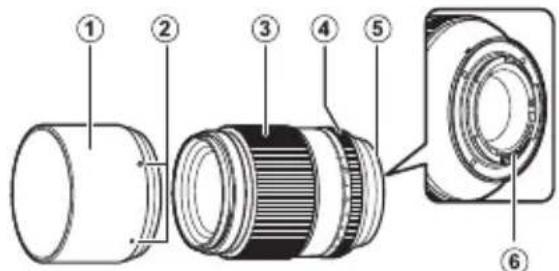
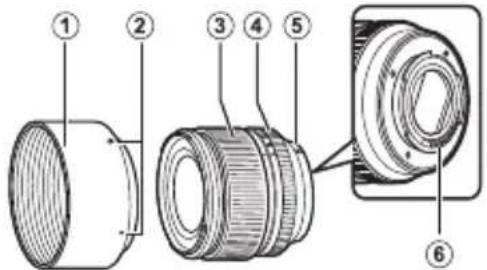
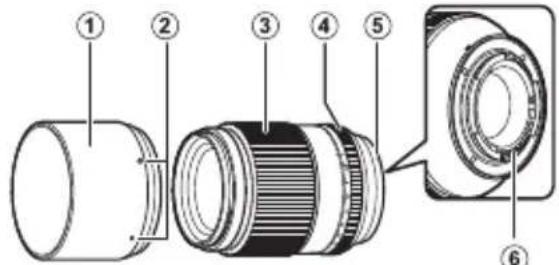
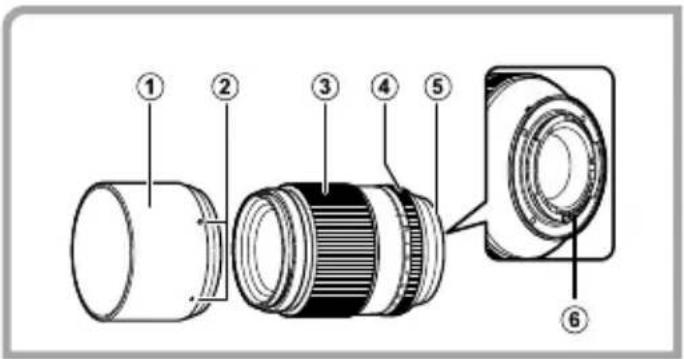
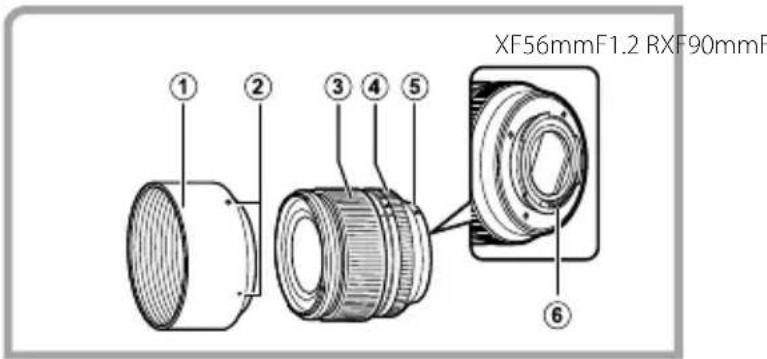
Parts of the Lens
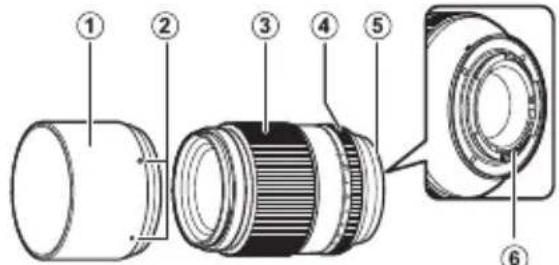
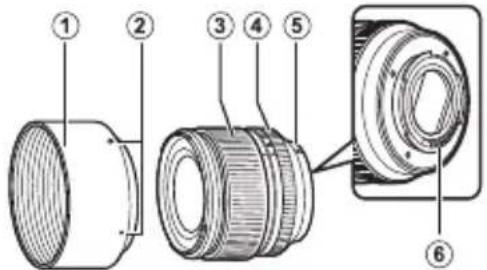
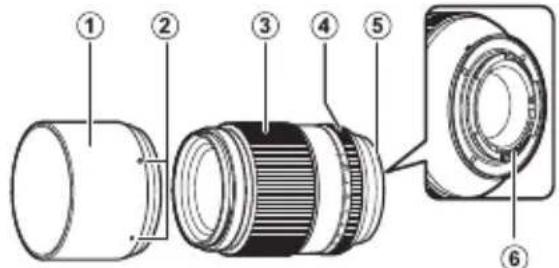
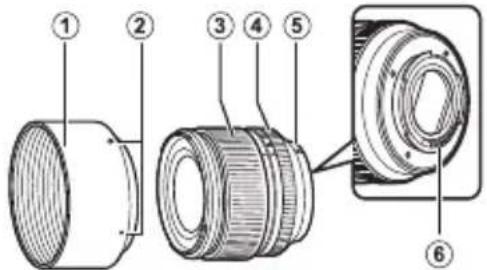
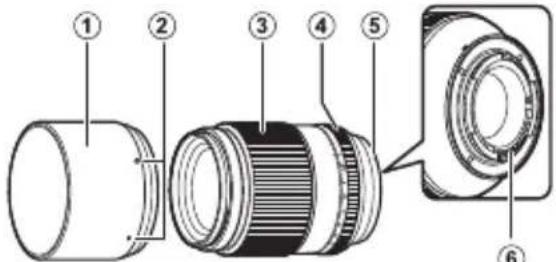
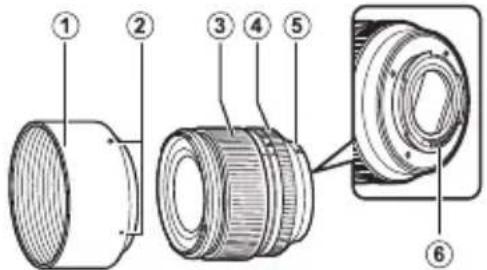
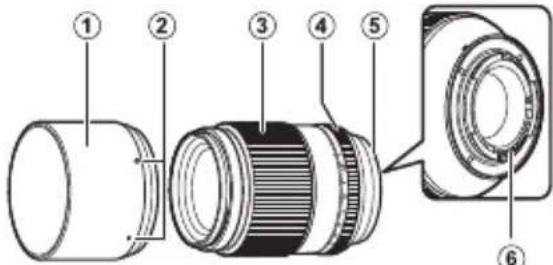
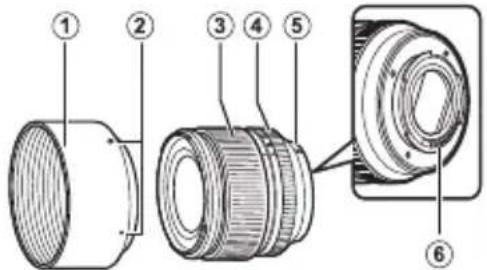
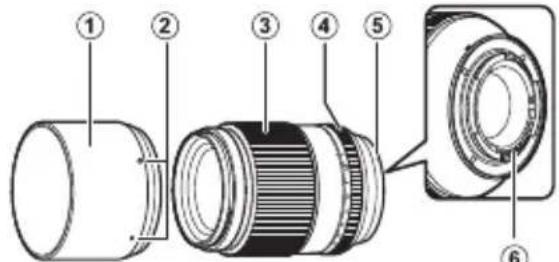
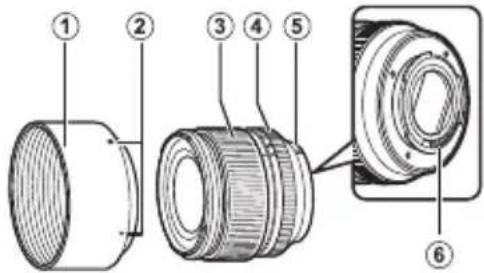
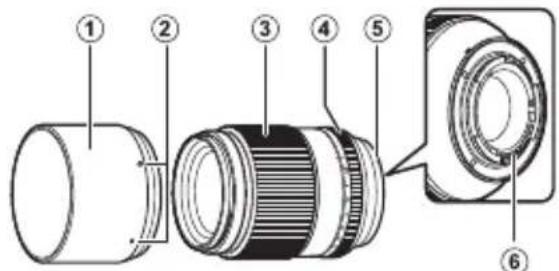
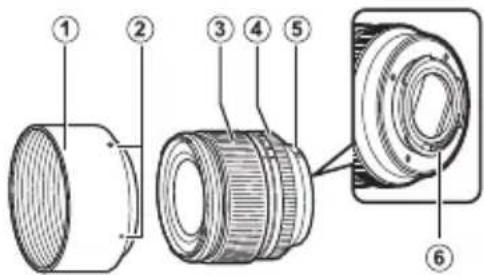
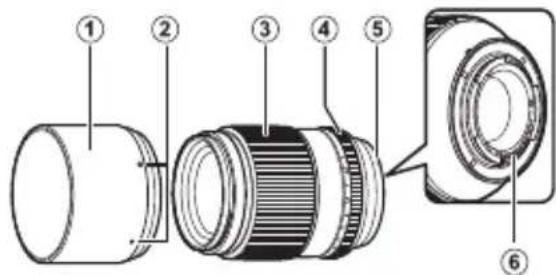
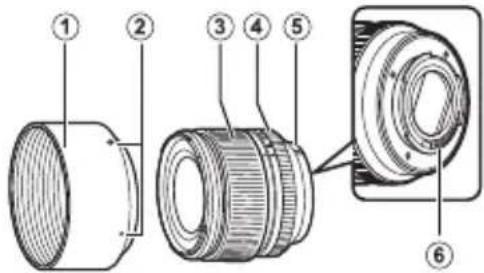
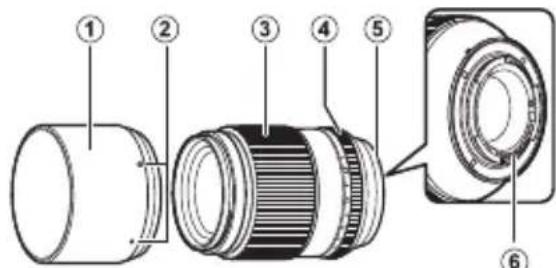
XF56mmF1.2 R XF90mmF2 R LM WR
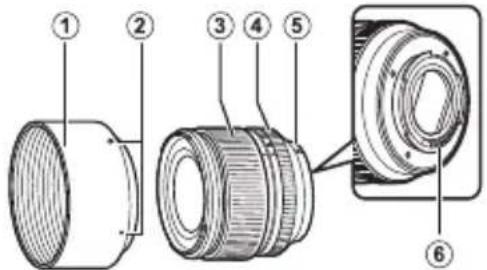
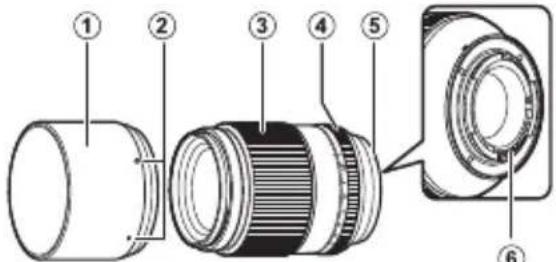
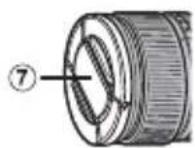
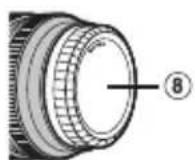
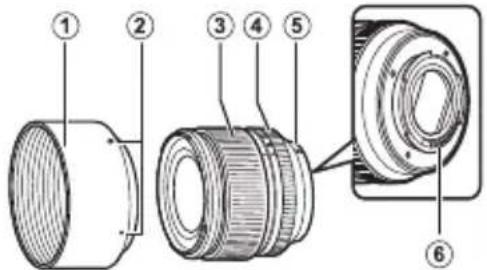
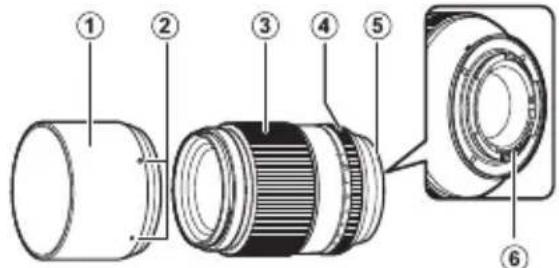
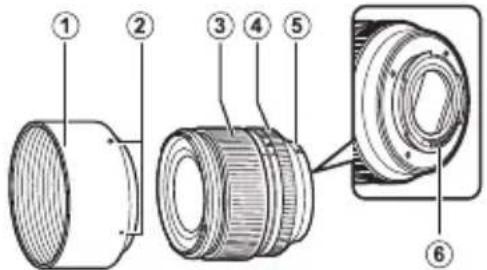
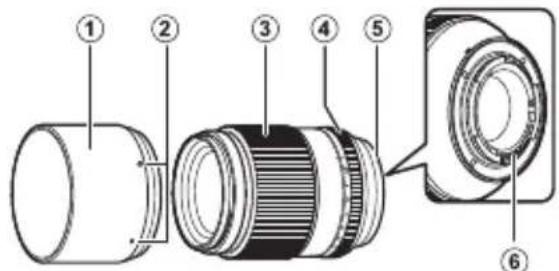
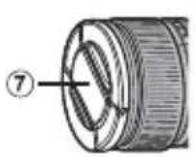
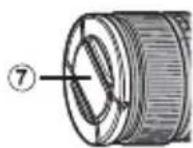
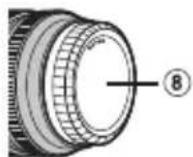
① Lens hood
② Mounting marks
③ Focus ring
④ Aperture ring
⑤ Mounting marks (focal length)
(6) Lens signal contacts
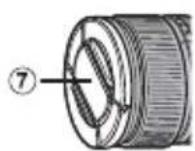
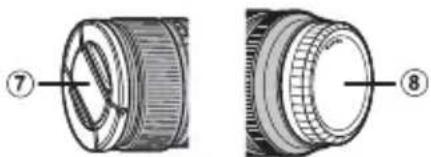
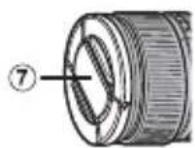
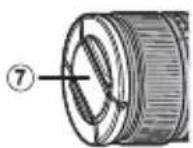
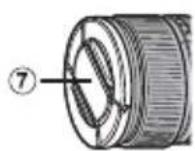
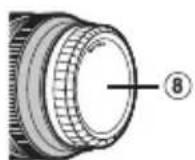
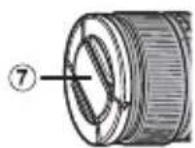
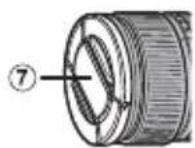
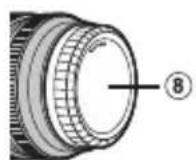
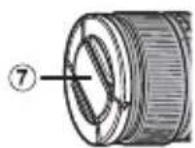
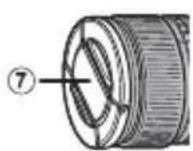
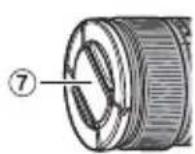
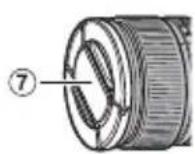
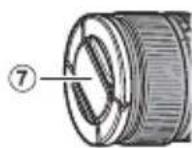
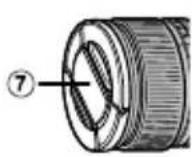
⑦ Front lens cap
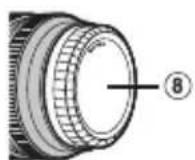
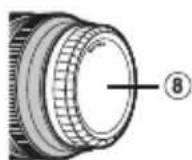
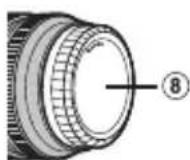
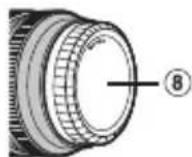
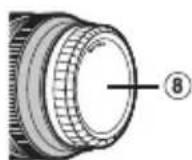
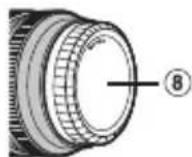
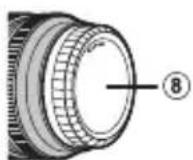
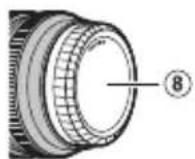
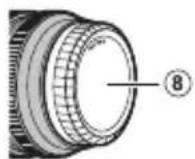
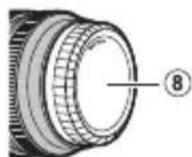
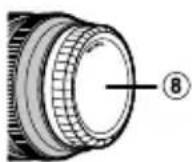
⑧ Rear lens cap
The lens mount includes a rubber ring to ensure that the lens remains dust- and splash-proof. The ring can be replaced for a fee at any FUJIFILM service center (XF90mmF2 R LM WR only).
Supplied Accessories
-
Front lens cap
Rear lens cap -
Lens hood
- Cloth wrapping
ENGLISH
EN-5
Attaching the Lens
See the camera manual for information on attaching and removing lenses. Note that this product is not compatible with X mount fi lm cameras.
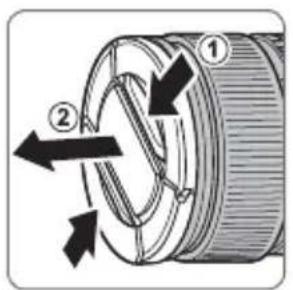
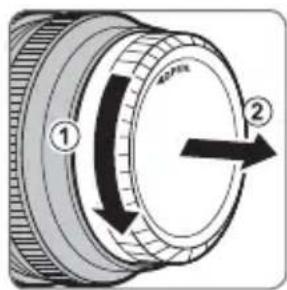
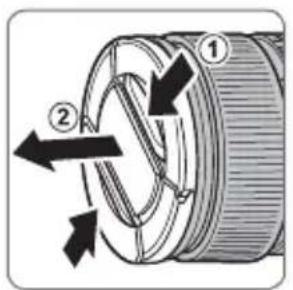
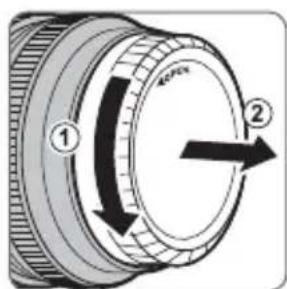
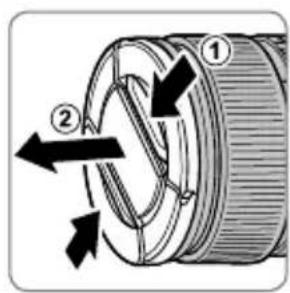
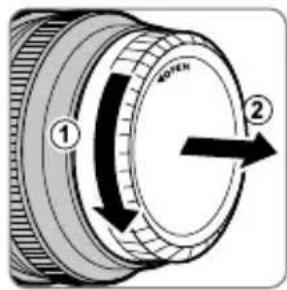
Removing the Caps
Remove the caps as shown.
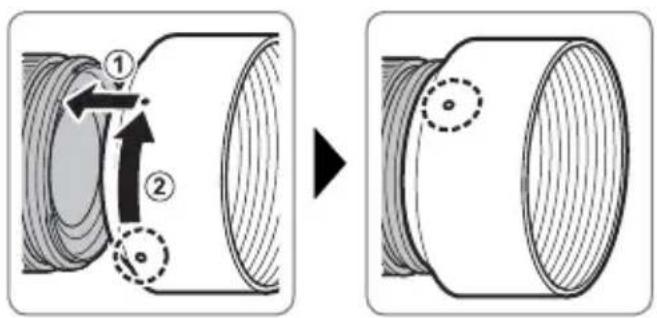
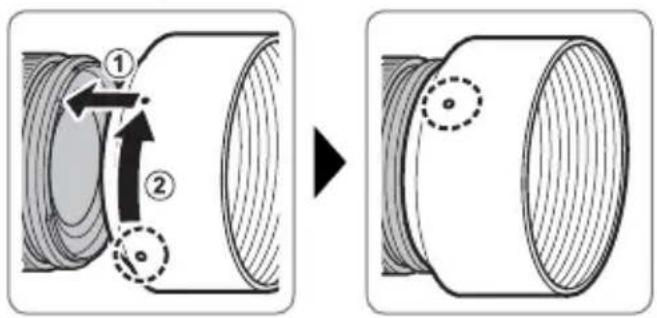
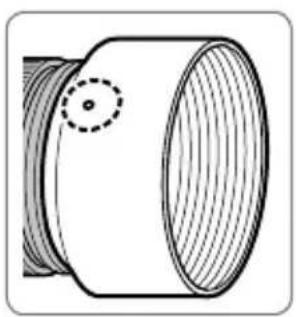
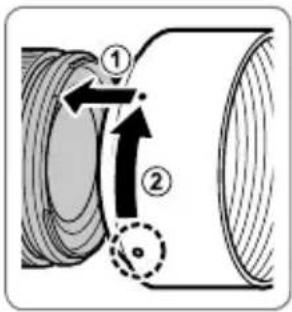
Attaching the Hood
When attached, lens hoods reduce glare and protect the front lens element.
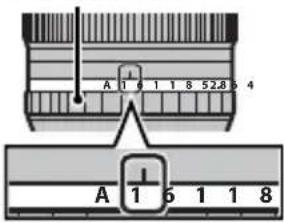
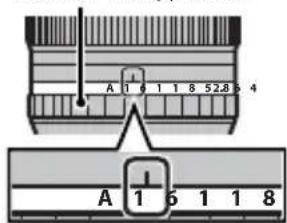
Aperture ring
At settings other than A , you can adjust aperture by rotating the lens aperture ring (exposure modes A and M ).
Aperture ring
EN-7ENGLI
Specifications
| Type XF56mmF1.2 R XF90mmF2 R LM WR | ||
| Lens construction 11 elements in 8 groups (incl.udes 1 aspherical and 2 extra low dispersion elements) | 11 elements in 8 groups (includes 3 extra low dispersion elements) | |
| Focal length (35 mm format equivalent) | f=56 mm (85 mm) | f=90 mm (137 mm) |
| Angle of view 28.5° 17.9° | ||
| Max. aperture f/1.2 f/2 | ||
| Min. aperture f/16 f/16 | ||
| Aperture control | ||
| Number of blades | 7 (rounded diaphragm opening) | 7 (rounded diaphragm opening) |
| Stop size | 1/3 EV (%EV for last stop to maximum aperture only; total 23 stops) | 1/3 EV (total 19 stops) |
| Focus range | Normal: 0.7 m – infinity | Normal: 0.6 m – infinity |
| Macro: 0.7 m – 3 m | Macro: 0.6 m – infinity | |
| Max. magnification | 0.09× | 0.20× |
| External dimensions: Diameter × Length* (approx.) * distance from camera lens mount flange | ø73.2 × 69.7 mm | ø75.0 × 105.0 mm |
| Weight* (approx.) * excluding caps and hoods | 405 g | 540 g |
| Filter size | ø62 mmø62 mm | |
① Improvements may result in unannounced changes to specifications and appearance.
Owing to how this lens is constructed, the "Distance indicator" displayed by the camera may in some cases differ from the actual focus distance. Use the "Distance indicator" as a guide only.
Pour vous sécurité
http://www.fujifilm.com/support/digital Cameras/software/#firmware
XF56mmF1.2 R XF90mmF2 R LM WR
http://www.fujifilm.com/support/digital Cameras/software/#firmware
XF56mmF1.2 R XF90mmF2 R LM WR
http://www.fujifilm.com/support/digital Cameras/software/#firmware
XF56mmF1.2 R XF90mmF2 R LM WR
http://www.fujifilm.com/support/digital Cameras/software/#firmware
XF56mmF1.2 R XF90mmF2 R LM WR
① Zonnekap
② Bevestigingsmarkeringen
③ Scherpstelring
④ Diafragmaring
⑤ Bevestigingsmarkeringen (brandpuntsafstand)
(6) Lenssignaalcontacten
⑦ Voorste lensdop
⑧ Achterste lensdop
http://www.fujifilm.com/support/digital Cameras/software/#firmware
XF56mmF1.2 R XF90mmF2 R LM WR
① Motljusskydd
② Monteringsmarkeringar
③ Fokusring
④ Blandarring
⑤ Monteringsmarkeringar (brännvidd)
⑥ Objektivsignkontakter
⑦ Främre objektivlock
⑧ Bakre objektivlock
http://www.fujifilm.com/support/digital Cameras/software/#firmware
XF56mmF1.2 R XF90mmF2 R LM WR
① Solblender
② Monteringsmerker
③ Fokusring
④ Blenderring
⑤ Monteringsmerker (brennvidde)
⑥ Objektivets signalkontakter
⑦Fremre objektivdeksel
⑧ Bakre objektivdeksel
© Objektivfestet har en gummiring som sikrer at objektiv holder seg stov- og sprutsikkert. Ringen kan byttes ut mot en avgift paethvert FUJIFILM servicesenter (kun XF90mmF2 R LM WR).
http://www.fujifilm.com/support/digital Cameras/software/#firmware
XF56mmF1.2 R XF90mmF2 R LM WR
He octanolyl 8
ammonium nitro 4
syringene
He nozpykaum 6 body u He nodepzauim 6o3deumuO 60dbI. HebblnoJIHeHne DaHHoro Tpe6oBaHnM MoKet npBecTN K Bo3ropaHIO NIN NopaxeHIO 3JKeKtpn-ueCKIM TOKOM.
| ПЕДУПЕЖDEHNE | |
| He pa36bpaïme | He p36bpaïme (He ombpáïmae koprnyc). Hecobniode- нe éTOI Меры пededocpoхною мokjet ппвеси К BO3ropaиMu, поженио ол ektrочим токOM Или BO3NKHOBENIO TpavM ИЗ-3a He npabuBHyо rabotи ИЗдени. |
| He p36bpaïme | E cIu Koprnyc pa36bucra 8 pe3y dpy2020чрзбчauhnozo npoucueembu. He mpozai- me omkpbltie demanu. HecobniodeHne 3ToI Меры пседocpoхноCTM мokjet ппвеси К пожени- эл ektrочим токOM Или BO3NKHOBENIO TpavM, ecnI Bbl dotponetechь до nobpeckdehhix DeTanei. HemeJIENH OByHbTe bataeio photokampeby, co- бюдя OCTOPOKHOCTb, уTObIи 3bexkaTb polyuehny ТравM Или пожени Oel ektrочим TOKOM, И OTHECITE ИЗдени в MectO prnoobpehenia對於 KOH- cylbTaUH. |
| He p36bpaïme bny- mpenHne demanu | He knaDume Na Heycmouchbte nopexhoctmu. ИЗдени MOKET ynpactb, ВьЗВВ ТравM. |
| He smompu ha connue chepes obekmua skamenu φofokampeby. HecobniodeHneданHоМеры прedlyocpoxnoCTM мokjet ппвеси К пожени My hapuShenIO 3peHnI. | |

IPEIOCTEPEKHEHNE
Ymunuaaue 3nekmpuueckzo u 3nekmpoHHzo o6opyoabaHg e domauhux

Ko2da u3denue He Ucnno3yemc, 3akpoime Kpbuku o6bekmua, u xpanume u3denue mam, 2e Ha Hezo he nadaem npmaou connehbu cem. CoHneHb CBT, cOOKycnpoBaHHb O6bekTINBOM, MOXET Bbl3BaT BO3- ropaHne mN OXORN.

He nepenocme fomokamepy unu obekmue, kozda onu ymanobnebl ha umamue. H3dene MoKeT ynaCTb nIy dapntBcO npyTne IpeDMeTb, Bb3BaB TpaBMy.
BCTPAAEXEponeKOROco3a,HopberHHNcnaHnHnIHXTeHTHe:
HaHHbCMBOHnHA3dennBpykoBDCTBE,Ha rapaHTNHOM TaHOHE
H/NNHnAynakOBKcYkA3bBAET HaTO,TO daHHoo 3d0NE HcHs8yTN
HIMPOBt BMeCTe C6bTOBBMn OxODAMn.BMeCTo ETO ETO HYKHO
OTHECN B pInEMHnIpyHKT NO c6opy,nepepaOtke IN BTOpHOMy
HCNOB3OBAHmO2NeKtpueckoro NNeKTPOHOrOobopyoBaHn.

PpabnBna ytnn3aIINOMOXETnpoTbPAITb nToENHnBHe HeratNBHe NoCneCTBnI dNOKpyKaIOUe Cpebl N3DOPOBb HcnoBeka, KOtOpble Moryr Bo3HHKyHTB pOyNbTaTOCCOTBCTCTByIOUeYtnn3aUN DaHHO rNDeJNA.
IOBTOHOC MIOIb3OBAHNC MaTePmAnOB NOMOKCT COXpAHnB IpnpOaHbc pccypcb.
IIINIOIyHeH NIOIHTeBHO INHOpMaUN 06ytNIMaUN daHHORIO 3DENNA
ObaaAteCb B MeCTHe B OPAHb BlACTN, B CNYKb NO C6opy, nepepaBOTKe I BTOPH HOMY NCIOBAAHIO OTXoOB IMN B Mara3MH, TBe BB npNo6peHN 3dENNE.
BCTPAAH3a npedenAmn Ebponeckoro coo3a,HopberHH,NCanHmN JnxTeHHTeHa:ECnn HeobxOIMmo yTmNImpoBaTa daHHe N3deHne,BKIOHaa Batape nNN AKKMyrAToPi bCBKATCtCB C MCCThbIM BnactAmu yTOCHNTnpabNn yTINN3aUHN.
IpeepncnoB3OBaHnem daHHoro n3delen
HeKoTOpBie FyHKcIMN O6BeKtNBa HeNoCTyINHbI C 60Jee paHHMn BercnMn PPOuINBKn FOToKa-Mepbl. O63aTeNbHO O6HOBnTe PPOuINBky FOToKaMepbl Do nocJeDHeBercnN. HnCTpyKcnn No npOCMOTpy BercnN PPOuINBKn FOToKaMepbl N 6OBHneHIO PPOuINBKn FOToKaMepbl DOCTyINHbI Ha cIeNyIOUeM Be6-caITe:
http://www.fujifilm.com/support/digital Cameras/software/#firmware
B cnyuae, ecn y Bac HeT doctyna K KOMnbIOTepy, 6bpatntecb 3a noDpeKko K MeCTHOMy DnCTPn6bIOTopy n3 cncka "FUJIFILM Worldwide Network", noCTabHeHHoro c Baueh oToKaMepoi.
yxo3a n3eennem
- Пи IncnoIb3OBAHn6JIeHDbI OSeBekTnBa He 6e-puTeCb 3a foToKamepy n He DepeXnTe ee TOnbko 3a 6JIeHny.
He donycka Te 3aarpna Hennn CnHbH NIOXeBbIX KaneIb IIN6pbI3r BOblnx CneTakTOB o6bekTNBa. dyet BblTepeTb.
-Пользунтушей дя удалися полл и -Еспо obъektв OCTabintb B Mectax, подевраю -пуна секлаянны поberpxносте оььektub -инхся BO3deиCTBnIO BBICOKnx Tempeatype, TO -лл Фильста. Дя удалися полги OTneuat- -эTO может NOВрети NBлд eфорmpobatб erо. - Bepernte obBeKTHB OT Bnarn. Koppo3nMoKTe HaHeCTn HeNoonpaBmbl yUeep6. Ppr nonaHaH NIOXDeBbIX KaneJIb nIIu 6pbI3r BOJb Ix CneDyET BbITepetb.
- Ecnn OBeKTHB OCTaBtB B MeCTax, NOBepraIOUxCBAO3DeIcTBIO BbICOKNX Tempeatyp, TO 3TO MOKeT IOBpeNTb ININ DeOpMnpoBaTb erO.
RU-4
PYCCKM
KOB NaIbceB HaHecuTe He6oJbUoe KOINueCTBO XnDKOCTN DnA YnCTKn OBeKTNUOB Ha MmRkyIO, YnCTyIO XnONuATObymaxHyIO TKAH Nn Can-ΦETKy DnA YnCTKn OBeKTNUOB I IpOTpnte OBeKTNB OT UeHTpa K pKaM KpyROBbIMN DBNKeHNMa, CO6JIoua OToPOxHOcTb, He OCTaBJIpa3BODoB n He KaCaeCb CTekla NaIbuaMn.
- Hukorda He nCnoB3yIe IJy NCTKN O6bekTnBa opraHueckne pactBopnten, TaKne KaK pa36aBNTel Jn KpaCKn nn 6EH3nH.
3aKpOte KpbIuKy 06bEeKTuBa u KpbIuKy 6aNoHeTa 06bEeKTuBa, KOrDa 06bEeKTuB He UcNoJIb3yETcR.
XpaHnTe o6bekTnB n fNtBp B npoxnaIhbx, cyxnx MeCTax, yTO6bl npeDoTbpaTntb 6pa3oBaHne nnecen H Koppo3nn. He xpaHnTe B MeCTax, rDe Ha Hero nonaAet npraMoN cOnHeuHbIN CBET, INI PAnOM C HaOtaJIHOBbIMN INI KaMΦOpHbIMN WaPnKaMn OT MOIn.
Yactn o6bekTnBa
XF56mmF1.2 R XF90mmF2 R LM WR
① bneHda oBekmuBa
② Memku ∫yycmaHOBku
③ΦOKyCuPO8OuHoeKoJIbUO
④KoJIbUOduaΦpa2Mbi
⑤ Memku dny ycmahOBku (fokychoe paccmoHue)
⑥CuZHaJIbHbIe KOHmKmbI O6BeKmUba
⑦ Kpbiuuka obbekmuva
⑧ Kpbwiuka bauohema obbekmuBa
① KpernneHne 06bekTnBa NMeet pe3NHOoe KOJIbO, KOtOpoe 06cIeunBaet 3aunTy 06bekTnBa OT bINu 6pblr. KoJIbIO MoXHO 3aMEnHb B IIO6OM cepBnCHOM ueHTpe FUJIFILM 3a OTeNbHyo nAty (ToIbKO XF90mmF2 R LM WR).
Ppnilaraemblpe npHaadJeXHocTn
Kpbioka o6beKeTnBa
Kpbiuka 6aioHeTa o6bekTnBa
-Блениа obbekeTиBa
Tkaheba ynaKOBka
Pycckn
RU-5
YcTaHOBka 06beKTnBa
Cm.pykoBODCTBO NOIb3OBaTeNIA FOToKa-MepoI IJIPOJUeHIN HOpMaunn O6yCTaHOBKe n ChrTUN ObekTtBa. ImeITe B BVdy, YTO DaHHoe N3DeJIne HeCOBMeCTHMOC FOToKAMepamn C 6aNoHETOM X.
ChyTne KpbIweK
Chnmte KpbIshK, KaK NOKa3aHo Ha pu-cyHKe.
yctahOBka6IeHdbI
Pn noDCoeHHeHn 6JeHdbI oBbeKTHBa yMeHbHaOT 6nKn n 3aunuaT nepeHIO JINH3y.
KoIbUO dHaΦparMbI
Пи Habстpoикх, OTлчьх OT A, Bbl можete HabстpoNTb ДnaфparMy, NOворачИВая Кольцо ДnaфparMbI (peЖIMbl эКспОЗицIN A nM).
KoIbuO duaΦpa2MbI
TexHHueckNeXapaKTepeNCTUKN
http://www.fujifilm.com/support/digital Cameras/software/#firmware
XF56mmF1.2 R XF90mmF2 R LM WR
① Paraluce
http://www.fujifilm.com/support/digital Cameras/software/#firmware
XF56mmF1.2 R XF90mmF2 R LM WR
① Modlysblande
② Monteringsmaerker
③ Fokusring
④ Blaendering
http://www.fujifilm.com/support/digital Cameras/software/#firmware
XF56mmF1.2 R XF90mmF2 R LM WR
http://www.fujifilm.com/support/digital Cameras/ software/#firmware
XF56mmF1.2 R XF90mmF2 R LM WR
http://www.fujifilm.com/support/digital Cameras/ software/#firmware
XF56mmF1.2 R XF90mmF2 R LM WR
An instant chagoharh
http://www.fujifilm.com/support/digital Cameras/software/#firmware
CouyTeRto sAsonghul SuEoUre, KaMaLaWoHJtJe CoQnOe "FUJIFLMWorldwideNetwork" Juaoe 0fJFjIiM FIOI Worldwide Network
新晋北
XF56mmF1.2 R XF90mmF2 R LM WR
a a a a a a a a a a a a a a a a a a a a
.(MgA
AR-7
231gJyU
naic Goo gogg no Ls s jis d Ausell U
.

zssy1s
aJg cJg JcogxJg aJgaxJg
1y
Xo
1,2,3,4,5,6\
2.25 = 2.25 × 100% = 99%
an + 1 = 2an2a_n + 1 = 12
(s)
a#yjlaJl#
(7)
8
aWJyI aB1g ①
x^2 + 5x - 1 = 0
3^
a_0a + b = 1 ④
a0sblc1gssy
.FUJFILM a 150000000000000000000000000000000000000000000
glll lll gaglll jlll g aalall b
15g 15g
J
J
J
J
J
J
J
J
J
J
J
J
J
J
J
J
J
J
J
J
J
J
J
J
J
J
J
J
J
J
J
J
J
J
J
J
J
J
J
J
J
J
J
J
J
J
J
J
J
J
J
J
J
J
J
J
J
J
J
J
J
J
J
J
J
J
J
J
J
J
J
J
J
J
J
J
J
J
J
J
J
J
J
J
J

goggl jyll iia y: ylaaayy g aayy ggyggyggyggy
aagabla aalllgall ae de alauu gail no gaaal allalall no sall
yulio jkay gialj no yalall agxj ad yllg jluyll aoog ayall
Jgclagablnoa baaal yglg bsig blalde pall algld yel
clalabnl no valall ao gdlpall glblly lalgl 1r ggl
Joo Jooaill uo C5 1:uuaauy g uuuu yg uuyu yu uu yu jue JUw g aal l uoyu Uy

yIaIyI,101o de iiau 1g13 aaiyI g11qalvI,baoy I

a1 = 2,a2 = - 4,

10y 100000000000000000000000000000000000000000