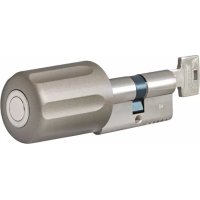
FUKE53030 - Alarm system ABUS - Free user manual and instructions
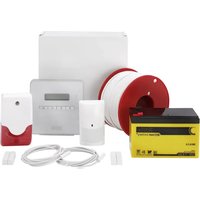
Find the device manual for free FUKE53030 ABUS in PDF.



| Product type | Wireless activation cylinder for alarm system |
| Brand | ABUS |
| Model | FUKE53030 |
| Power supply | 3 V DC, CR2 lithium battery |
| Battery service life | Approx. 12 months |
| Temperature range | -10 °C to +55 °C |
| Environmental class | II |
| Radio frequency | 868.6625 MHz, FM |
| Transmission power | Max. 10 mW |
| Construction standard | DIN 18252 |
| Compatibility | Secvest control panels (FUAA50xxx) firmware ≥ v2.00.05 |
| Main functions | Activation and deactivation of the alarm system by locking/unlocking the door |
| Security technology | Anti-copy rolling code |
| Settings | DIP switches for tones and door stop |
| Calibration | Possible after installation via button on the cap |
| Installation | Replaces a standard cylinder, fixing by set screw |
| Maintenance and cleaning | Clean with a soft, dry cloth |
| Weight | Approx. 150 g (estimated) |
| Dimensions (L x W x H) | Approx. 30 x 30 x 100 mm (estimated) |
Frequently Asked Questions - FUKE53030 ABUS
User questions about FUKE53030 ABUS
0 question about this device. Answer the ones you know or ask your own.
Ask a new question about this device
Download the instructions for your Alarm system in PDF format for free! Find your manual FUKE53030 - ABUS and take your electronic device back in hand. On this page are published all the documents necessary for the use of your device. FUKE53030 by ABUS.
USER MANUAL FUKE53030 ABUS
Installation and Operating Instructions
Cylindre sans fil Secvest Key
Peace of Mind and Security - Thanks to the Rolling Code
We are constantly developing our product range in order to provide our customers with optimal, safe products incorporating state-of-the-art technology. This control panel uses secure rolling code technology to provide optimum protection against code scanning and code grabbing and thereby preventing unauthorized access.

The rolling code procedure is compatible with all Secvest (FUAA50xxx) that have up-to-date firmware (>= 2.00.05) . The Secvest 2WAY and the wireless universal module are no longer supported.
Preface
Dear customers,
Many thanks for your purchase of this wireless activation cylinder. In choosing our product, you now have a piece of equipment that is built according to state-of-the-art technology. This product complies with current domestic and European regulations. Conformity has been proven, and all related certifications are available from the manufacturer on request. To maintain this status and to guarantee safe operation, it is your obligation to observe these operating instructions! In the event of questions, please contact your local specialist dealer. The wireless activation cylinder is used for activating and deactivating alarm systems.

Observe the notes and instructions in this guide! If you do not follow these instructions, your guarantee claim becomes invalid! No liability can be accepted for resulting damages!
The electronic part of the product must not be changed or modified in any way.
Installation
- The wireless cylinder has been produced according to DIN 18252 and is suitable for use in DIN-approved mortise locks. Please note: Self-assembly may not be possible on safety doors!
- Remove the old cylinder. To do this, open the door and unscrew the fixing screw (see fig. 1). Completely remove the fixing screw.
- Insert a key into the old cylinder and turn the cam with the key so that you can remove the cylinder. The cam prevents the cylinder from being removed when in the normal cylinder position.
- Insert the wireless cylinder so that the knob is on the inner side of the door. The cam position must be set accordingly here by turning the knob. If the cylinder becomes jammed in the hole, then the hole or cylinder clamps need to be reworked. Never use a hammer to force the cylinder into the hole.
- Fasten the wireless cylinder using the fixing screw and check that it locks properly.
Programming
Remove the grip cover from the wireless cylinder by completely unscrewing both hexagon socket screws and then carefully pulling off the cover.
(Caution: the grip cover is connected to the cylinder by a short cable).
Set the DIP switch or switches according to your requirements.
Settings of the DIP switches
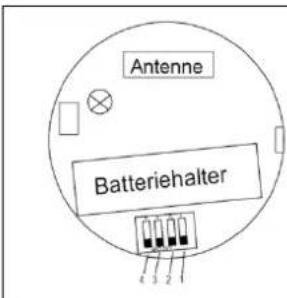
| Switch | Position | Meaning |
| 1 | ON | Reserved (has to be set to ON) |
| 2 | ON | No acoustic transmission confirmation |
| OFF | Acoustic transmission confirmation | |
| 3 | ON | Left door hinge (DIN L) |
| OFF | Right door hinge (DIN R) | |
| 4 | ON/OFF | Not used |
Explanation of DIN left/right and installation
| DIN right | DIN left | Installation of wireless cylinder |
Operation
Training in Secvest
Setup Mode Other Devices Door Locks / Secvest Key Add/Del Door Lock / Key
Select a Key (Key1, Key2, Key3 or Key4). "Please insert battery" then appears in the display.
Insert the battery. The Secvest Key sends a training signal to the alarm centre. After the Secvest Key has been trained successfully, a symbol appears next to the selected device.
Assigning the partitions
Setup Mode Other Devices Door Locks / Secvest Key Edit Key / Door Lock
Select the trained Secvest Key (Key1, Key2, Key3 or Key4). You can then define the partitions that should be switched by the Secvest Key.
Testing
Setup Mode Test Door Locks / Secvest Key
Select the trained Secvest Key (Key1, Key2, Key3 or Key4).
The Secvest Key functions and correct positioning of DIP switch 3 to the door hinge can be tested here.
"Unlocked" is shown when the door is unlocked.
"Locked" is shown when the button is pressed and the door is then locked.
The received signal strength is also shown.
Operation
Meaning of the tones
Beep After pressing a button and after transmission (DIP 2 = OFF)
Double beep System is activated
Long beep System is deactivated and after pressing the Timeout (30 s) button
8 beeps "System cannot be activated" (zone open) and no feedback received
Activating the alarm system
Press the button (a beep tone is heard). You can then lock the door once or twice within the following 30 seconds. The Secvest Key sends the activation signal to the alarm centre.
The alarm system is now activated.
Deactivating the alarm system
Unlock the door. The Secvest Key then immediately sends a deactivation signal to the alarm centre. The alarm system is now deactivated.
User scenarios
Press button, lock once Panel activated
Unlock once Panel deactivated
Press button, lock twice Panel activated
Unlock twice Panel deactivated
Door only closed, not locked Panel activated elsewhere
Pull back latch to open door Panel deactivated
Lock once Panel activated elsewhere
Unlock Panel deactivated
Lock twice Panel activated elsewhere
Unlock Panel deactivated
Button not pressed, lock once Panel not activated
Button not pressed, lock twice Panel not activated
Calibration
When it is delivered, the knob is calibrated so that the user scenarios listed above can be carried out. If these do not work (for example if the cylinder is installed upside-down), you can recalibrate the knob after mounting it.
This requires the following actions:
- Mount the cylinder on the door.
- Press the button on the cap of the knob for 20 seconds until you hear three beeps.
- Then lock the cylinder again and pull out the key.
- After a two-second continuous tone, the cylinder is recalibrated.
Note: Calibration has no effect on the cylinder's direction of rotation. This is defined using DIP switch 3.
Technical data
| Power supply | 3V DC Lithium |
| Battery type | CR2 |
| Service cycle | ca. 12 month |
| Temperature range | -10°C bis +55°C |
| Environmental class | II |
| Wireless transmission | 868,6625 MHz, FM |
| Transmission power | Max. 10mW |
Everything possible has been done to ensure that the contents of these instructions are correct. However, neither the author nor ABUS Security-Center GmbH & Co. KG can be held liable for loss or damages caused directly or indirectly by these instructions, whether real or alleged. We reserve the right to make changes to these instructions without prior notice.
ABUS Security-Center GmbH & Co. KG hereby declares that this type of wireless system, item number FUKE5xxxx, complies with Directive 2014/53/EU. The full EU Declaration of Conformity text can be found at www.abus.com, Item search FUKExxxx/Downloads.
Chere cliente, cher client,


- Peace of Mind and Security - Thanks to the Rolling Code
- Preface
- Installation
- Programming
- Settings of the DIP switches
- Explanation of DIN left/right and installation
- Operation
- Training in Secvest
- Assigning the partitions
- Testing
- Meaning of the tones
- Activating the alarm system
- Deactivating the alarm system
- User scenarios
- Calibration
Brand : ABUS
Model : FUKE53030
Category : Alarm system