VT5101W - Alarm system ABUS - Free user manual and instructions
Find the device manual for free VT5101W ABUS in PDF.


Pick your language and provide your email: we'll send you a specifically translated version.
| Product Type | Wireless Alarm System |
| Brand | ABUS |
| Model | VT5101W |
| Dimensions (Main Unit) | Approx. 120 x 80 x 30 mm |
| Weight (Main Unit) | Approx. 150 g |
| Power Supply | AC 100-240V, 50/60 Hz, backup battery included |
| Battery Type | Rechargeable lithium-ion, 3.7V, 2000 mAh |
| Alarm Sound Level | 105 dB at 1 meter |
| Wireless Protocol | 433 MHz or 868 MHz (depending on region) |
| Number of Zones | Up to 8 wireless zones |
| Motion Sensor Range | 12 meters, 110° detection angle |
| Door/Window Sensor Type | Magnetic contact, wireless |
| Remote Control Range | Up to 100 meters (open field) |
| Operating Temperature | -10°C to 50°C |
| Main Functions | Arm/Disarm, Panic Alarm, Tamper Alert, Low Battery Notification |
| Installation | Wall mountable, DIY friendly with adhesive pads |
| Maintenance | Wipe with dry cloth; replace batteries when low |
| Safety Certifications | CE, RoHS |
| Spare Parts & Repairability | Sensors and remote available separately; professional repair recommended |
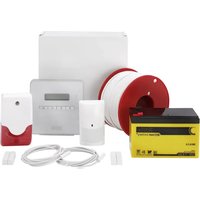
| General Information | Includes central alarm panel, motion sensor, door sensor, remote control, power adapter, mounting kit |
Frequently Asked Questions - VT5101W ABUS
How do I set up the ABUS VT5101W alarm system?
Unbox the system and plug the main unit into a power outlet. Install the batteries in the sensors and remote. Pair the sensors by pressing the 'Learn' button on the main unit and activating the sensor. Follow the detailed steps in the user manual.
What should I do if the alarm keeps false triggering?
Check the placement of motion sensors: avoid areas with pets, curtains, or heaters. Adjust sensitivity settings via the control panel. Ensure doors/windows sensors are aligned and not loose.
How do I change the backup battery in the main unit?
Disconnect the power adapter. Open the battery compartment on the back of the main unit. Replace the old lithium-ion battery with a compatible model (3.7V, 2000 mAh). Reconnect power.
Can I add extra sensors to the VT5101W?
Yes, the system supports up to 8 wireless zones. Additional ABUS sensors (motion, door/window, smoke, etc.) can be purchased separately and paired using the same learning procedure.
What do the different beeps and LED lights mean?
Refer to the manual's LED indicator table. Typically: steady green = armed; flashing red = alarm triggered; rapid beeps = entry delay; slow beeps = low battery.
How do I reset the alarm system to factory settings?
Press and hold the 'Reset' button inside the main unit for 10 seconds using a paperclip. All paired devices will be erased. Re-pair everything afterwards.
Is the ABUS VT5101W compatible with security cameras?
No, the VT5101W is a standalone alarm system without camera integration. For video surveillance, consider ABUS' SmartCam series or use separate cameras.
What is the warranty period for the VT5101W?
ABUS typically offers a 2-year warranty from the date of purchase. Register your product on the ABUS website to extend coverage.
Can I control the alarm via smartphone?
The standard VT5101W does not have app support. It is controlled via the included remote and keypad. For smart integration, look at ABUS' WLAN alarm systems.
Where can I find the user manual for download?
The manual is available for free on notice-facile.com in PDF format. You can also request a translated version via email.
User questions about VT5101W ABUS
0 question about this device. Answer the ones you know or ask your own.
Ask a new question about this device
No questions yet. Be the first to ask one.
Download the instructions for your Alarm system in PDF format for free! Find your manual VT5101W - ABUS and take your electronic device back in hand. On this page are published all the documents necessary for the use of your device. VT5101W by ABUS.
USER MANUAL VT5101W ABUS
natural_image
Three white electrical box blocks with black and gray casing, arranged side by side (no text or symbols visible)Vážení zákazníci,