
EY45A2 - Slicer PANASONIC - Free user manual and instructions
Find the device manual for free EY45A2 PANASONIC in PDF.
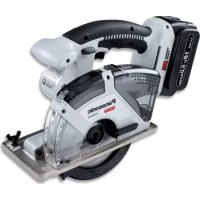


| Product Type | Versatile Cordless Circular Saw |
| Brand | Panasonic |
| Model | EY45A2 |
| Motor Voltage | DC 14.4 V / DC 18 V (depending on battery) |
| No-Load Speed | 3600 rpm (14.4 V) / 4500 rpm (18 V) |
| Blade Outer Diameter | 135 mm |
| Arbor Size | 20 mm |
| Maximum Cutting Depth | 0 - 46 mm |
| Maximum Torque | 5.4 N·m (14.4 V) / 6.7 N·m (18 V) |
| Total Length | 292 mm (main unit) |
| Weight | 2.05 kg (main unit) |
| Compatible Batteries | Li-ion EY9L42 (14.4 V), EY9L44, EY9L45, EY9L50, EY9L51 (18 V) |
| Charger | EY0L82 (voltage per nameplate) |
| Materials That Can Be Cut | Wood, non-hardened ferrous metals, non-ferrous metals, plastic |
| Main Functions | Straight cutting, plunge cutting, bevel cutting, dust collection with integrated box or vacuum |
| Lighting | Integrated LED lamp |
| Control Panel | Overheat indicator, low battery indicator |
| Safety Protection | Lower blade guard, spindle lock, overheat and excessive discharge protection |
| Maintenance and Cleaning | Empty dust box, clean front cover, wipe with a dry cloth |
| Optional Accessories | Carbide blades for metal (EY9PM13E), wood (EY9PW13C), plastic (EY9PP13C), cutting guide (EY3500B7727), vacuum adapter (EY9X012E) |
| Repairability | Original Panasonic parts, repair at authorized center |
Frequently Asked Questions - EY45A2 PANASONIC
User questions about EY45A2 PANASONIC
0 question about this device. Answer the ones you know or ask your own.
Ask a new question about this device
Download the instructions for your Slicer in PDF format for free! Find your manual EY45A2 - PANASONIC and take your electronic device back in hand. On this page are published all the documents necessary for the use of your device. EY45A2 by PANASONIC.
USER MANUAL EY45A2 PANASONIC
Cordless Multi Purpose Cutter
Cordless Multi-Purpose Saw
Cordless Multi-Purpose Circular Saw
Cordless Multi-Purpose Saw
Cordless Universal Saw
Before operating this unit, please read these instructions completely and save this manual for future use.
Never use blades rated for speeds below that of the main unit's RPM.
Original instructions: English. Translation of the original instructions: Other languages.
Read the "Safety Instructions" booklet and the following before using.
I. INTRODUCTION
This tool is a Multi Purpose Cutter. By changing the blade, it can be used to cut wood, metal, and plastic. Dust can be collected by an integrated dust case or via a connected vacuum (by attaching the hose to the tool).
DANGER
This product is a cutting tool, designed to cut through metal and wood. It has a rotating blade which is capable of cutting you deeply, causing serious injury or death. As a result, please read this manual and the cautionary markings on the tool carefully, and obey all of the Safety Instructions to avoid such injury.
WARNING
To avoid injury, never insert your finger or any other object into any opening of the tool.
WARNING
Read all safety warnings and all instructions.
Failure to follow the warnings and instructions may result in electric shock, fire and/or serious injury.
How to Use This Manual
- Please read this manual completely before starting to cut with your tool. If you let someone else use the tool, make sure they either read this manual or are fully instructed in the proper use and all safety precautions concerning the tool.
- Please keep this manual for future reference. It contains important safety information that you must follow to use the tool safely.
- This manual and product use the following signal words:
NOTE
Notes provide additional information that you should know about the tool.
CAUTION
Caution indicates a potentially hazardous situation, which could result in minor or moderate injury if not avoided. Cautions also alert you to unsafe practices to be avoided.
WARNING
Warning indicates a potentially hazardous situation, which could result in serious injury or death if not avoided.
DANGER
Danger indicates an imminent hazard which will result in serious injury or death if not avoided.
Read the "Safety Instructions" booklet and the following before using.
II. ADDITIONAL SAFETY RULES
Safety instructions for all saws
DANGER
1) Keep hands away from cutting area and the blade. Keep your second hand on auxiliary handle, or motor housing. If both hands are holding the saw, they cannot be cut by the blade. 2) Do not reach underneath the workpiece.
The guard cannot protect you from the blade below the workpiece.
3) Adjust the cutting depth to the thickness of the workpiece. Less than a full tooth of the blade teeth should be visible below the workpiece. 4) Never hold piece being cut in your hands or across your leg. Secure the workpiece to a stable platform. It is important to support the work properly to minimize body exposure, blade binding, or loss of control. 5) Hold power tool by insulated gripping surfaces when performing an operation where the cutting tool may contact hidden wiring or its own cord. Contact with a "live" wire will also make exposed metal parts of the power tool "live" and shock the operator. 6) When ripping always use a rip fence or straight edge guide. This improves the accuracy of cut and reduces the chance of blade binding. 7) Always use blades with correct size and shape (diamond versus round) of arbour holes. Blades that do not match the mounting hardware of the saw will run eccentrically, causing loss of control. 8) Never use damaged or incorrect blade washers or bolt. The blade washers and bolt were specially designed for your saw for optimum performance and safety of operation.
Further safety instructions for all saws
Causes and operator prevention of kickback:
- Kickback is a sudden reaction to a pinched, bound or misaligned saw blade, causing an uncontrolled saw to lift up and out of the workpiece toward the operator;
- When the blade is pinched or bound tightly by the kerf closing down, the blade stalls and the motor reaction drives the unit rapidly back toward the operator;
- If the blade becomes twisted or misaligned in the cut, the teeth at the back edge of the blade can dig into the top surface of the wood causing the blade to climb out of the kerf and jump back toward the operator.
Kickback is the result of saw misuse and/or incorrect operating procedures or conditions and can be avoided by taking proper precautions as given below.
1) Maintain a firm grip with both hands on the saw and position your arms to resist kickback forces. Position your body to
either side of the blade, but not in line with the blade.
Kickback could cause the saw to jump backwards, but kickback forces can be controlled by the operator, if proper precautions are taken.
2) When blade is binding, or when interrupting a cut for any reason, release the trigger and hold the saw motionless in the material until the blade comes to a complete stop. Never attempt to remove the saw from the work or pull the saw backward while the blade is in motion or kickback may occur. Investigate and take corrective actions to eliminate the cause of blade binding. 3) When restarting a saw in the workpiece, center the saw blade in the kerf and check that saw teeth are not engaged into the material. If saw blade is binding, it may walk up or kickback from the workpiece as the saw is restarted. 4) Support large panels to minimize the risk of blade pinching and kickback. Large panels tend to sag under their own weight. Supports must be placed under the panel on both sides, near the line of cut and near the edge of the panel. 5) Do not use dull or damaged blades. Unsharpened or improperly set blades produce narrow kerf causing excessive friction, blade binding and kickback. 6) Blade depth and bevel adjusting locking levers must be tight and secure before making cut. If blade adjustment shifts while cutting, it may cause binding and kickback. 7) Use extra caution when making a "plunge cut" into existing walls or other blind areas. The protruding blade may cut objects that can cause kickback.
Safety instructions for this saw
1) Check lower guard for proper closing before each use. Do not operate the saw if lower guard does not move freely and close instantly. Never clamp or tie the lower guard into the open position.
If saw is accidentally dropped, lower guard may be bent. Raise the lower guard with the retracting handle and make sure it moves freely and does not touch the blade or any other part, in all angles and depths of cut.
2) Check the operation of the lower guard spring. If the guard and the spring are not operating properly, they must be serviced before use. Lower guard may operate sluggishly due to damaged parts, gummy deposits, or a buildup of debris. 3) Lower guard should be retracted manually only for special cuts such as "plunge cuts" and "compound cuts." Raise lower guard by retracting handle and as soon as blade enters the material, the lower guard must be released. For all other sawing, the lower guard should operate automatically. 4) Always observe that the lower guard is covering the blade before placing saw down on bench or floor. An unprotected, coasting blade will cause the saw to walk backwards, cutting whatever is in its path. Be aware of the time it takes for the blade to stop after switch is released. 5) Do not use any abrasive wheels. 6) Wear a dust mask, if the work causes dust. 7) Use saw blades recommended by Manufacture. 8) Wear ear protectors when using the tool for extended periods. 9) The risk of kickback increases as the battery pack discharges. 10) Be sure to inspect material. Avoid cutting other different material. 11) Be careful not to drop the tool. 12) Never swing the tool. 13) Never cover the ventilation slots, and keep them free from dust or other material. 14) Do not clamp the tool in a vise. Never cut with the tool held upside down in a vise. This is extremely dangerous and can lead to serious accidents. 15) Never wear knitted gloves. 16) Be sure no one is below when using the tool in high locations. 17) Do not touch the blade immediately after operation. It may be hot and could burn your skin. 18) Do not touch material after it has been cut. Cut material may be very hot. 19) Do not use cutting oil. This use of cutting oil may cause a fire. 20) Do not cut workpieces covered or stained with gas, oil, solvents, thinners, etc.
Exposure to these materials may damage the transparent guard.
21) Do not remove the transparent and lower guards. If the transparent and lower guards is damaged or missing, return tool to authorized service center for replacement. 22) Do not start the blade when in contact with workpiece. Wait for blade to reach full speed before beginning cut.
Symbol
| Symbol | Meaning |
| V | Volts |
| —— | Direct current |
| ηb | No load speed |
| ···min-1 | Revolutions or reciprocations |
| A | Amperes |
| To reduce the risk of injury, user must read and understand instruction manual. | |
| For indoor use only. |
WARNING
- Do not use other than the Panasonic battery packs that are designed for use with this rechargeable tool.
- Panasonic is not responsible for any age or accident caused by the use of the recycled battery pack and the counterfeit battery pack.
- Do not dispose of the battery pack in a fire, or expose it to excessive heat.
- Do not drive the likes of nails into the battery pack, subject it to shocks, dismantle it, or attempt to modify it.
- Do not allow metal objects to touch the battery pack terminals.
- Do not carry or store the battery the same container as nails or similar metal objects.
- Do not charge the battery pack in a high-temperature location, such as next to a fire or in direct sunlight. Otherwise, the battery may overheat, catch fire, or explode.
pack in
- Never use other than the dedicated charge to charge the battery pack. Otherwise, the battery may leak, overheat, or explode. After removing the battery pack from the tool or the charger, always reattach the pack cover. Otherwise, the battery contacts could be shorted, leading to a risk of fire.
- When the Battery Pack Has Deteriorated, Replace It with a New One. Continued use of a damaged battery pack may result in heat generation, ignition or battery rupture.
III. ASSEMBLY
Attaching or Removing Battery Pack
CAUTION:
Before inserting battery pack, check that the power switch in the tool actuates properly and returns to the "OFF" position when released.
- To connect the battery pack (See Fig. 2) Align the highlighted marker points and attach battery pack.
- Slide the battery pack until it locks into position.
Fig. 2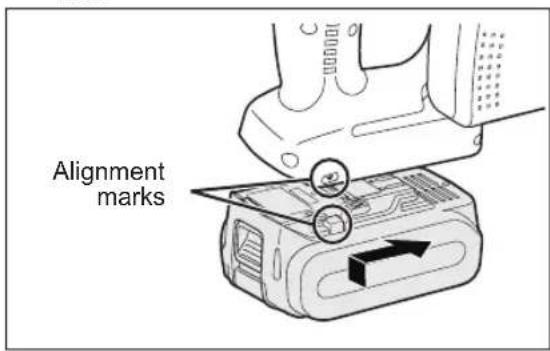
- To remove the battery pack (See Fig. 3) Push down the button and slide the battery pack forward.
Fig. 3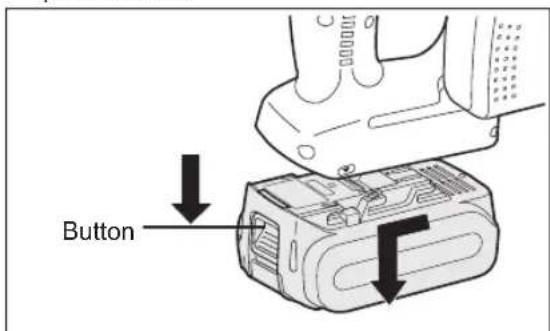
IV. OPERATION
Before Using the Tool
This tool is intended to cut unhardened ferrous metal, nonferrous metal, wood, and plastic. Refer to the "Accessories" section for a list of blades to be used for the proper applications of this tool. The following precautions must be followed to reduce the risk of injury:
- Do not cut stacked materials. Cut one piece at a time.
- Do not cut hardened steel.
- Cut materials with the wider edge of the shoe over the clamped side of the material.
- Do not touch the saw blade, workpiece, or cutting chips with bare hands immediately after cutting; they may be hot and could burn skin.
Each time you use the tool, you must make sure it is in good operating condition.
Use the following checklist:
- Is the blade installed in the correct direction? The arrow on the blade must point in the same direction as the arrow on the upper blade cover.
- Is the blade installed properly? Make sure the hex bolt is tightened securely. (See Fig. 6)
- Does the blade look alright? Replace the blade immediately if there are any cracks in it or if any teeth are broken.
- Does the lower guard close properly?
WARNING
To avoid injury, do not use the tool if the lower guard does not close quickly over the blade.
- Is the transparent guard securely installed?
- Is the battery pack charged and inserted firmly into the tool?
- Is the depth adjustment nut for cutting securely tightened?
- Is the workpiece securely clamped on a saw horse or bench?
- Is the dust case or front cover clogged with dust?
- Only use the blade rated at higher speed than that of the main unit.
The blade may be damaged if the blade is used at a speed lower than the rated speed of the main unit. Disengage the front cover lock button and remove any dust that has become clogged inside the cover. If the cover is clogged, use a long object such as a manual screwdriver to unclog it. After doing so, close the front cover. (See Fig. 4)
Fig. 4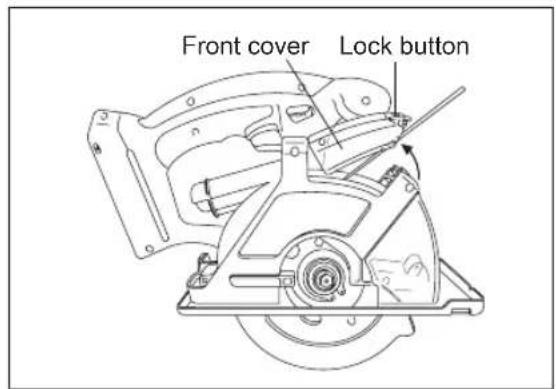
If there is dust inside the dust case, disengage the dust case lock button, detach the dust case, and remove the dust. After doing so, reattach the dust case. (See Fig. 5)
Fig. 5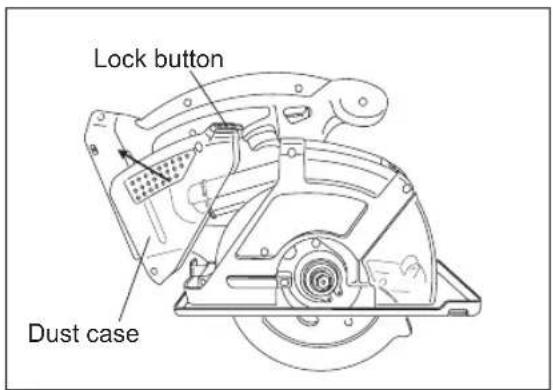
Installing Blade
Follow these steps:
- Remove the battery pack from the tool.
- Remove any cutting debris from the blade area.
- Use the retracting handle to retract (open) the lower guard.
- Install the blade as illustrated. (See Fig. 6) Make sure that both the direction arrow on the blade and the direction arrow on the transparent guard point in the same direction.
- Set the outer washer in place.
- Insert the hex bolt.
- Hold the spindle lock button down. This prevents the blade from rotating.
- Tighten the hex bolt securely with the provided hex wrench. Store the hex wrench.
NOTE:
Keep the hex wrench in the storage slot on the tool's body when not using it.
WARNING
Failure to follow these instructions can result in serious personal injury.
Removing Blade
CAUTION:
The blade will be hot right after cutting. Be sure to let the blade cool down before removing it.
Follow these steps:
- Remove the battery pack from the tool.
- Hold the spindle lock button down. This prevents the blade from rotating.
- Use the provided hex wrench to loosen the hex bolt.
NOTE:
Keep the hex wrench in the storage slot on the tool's body when not using it.
- Remove the hex bolt and outer washer.
- Use the retracting handle to retract (open) the lower guard.
- Carefully remove the blade.
- Clean the tool if necessary.
CAUTION:
Be careful to avoid cutting your hands on the blade.
- When disposing of a blade, secure it inside heavy or corrugated paper. This will help prevent anyone from being cut by the discarded blade.
Fig. 6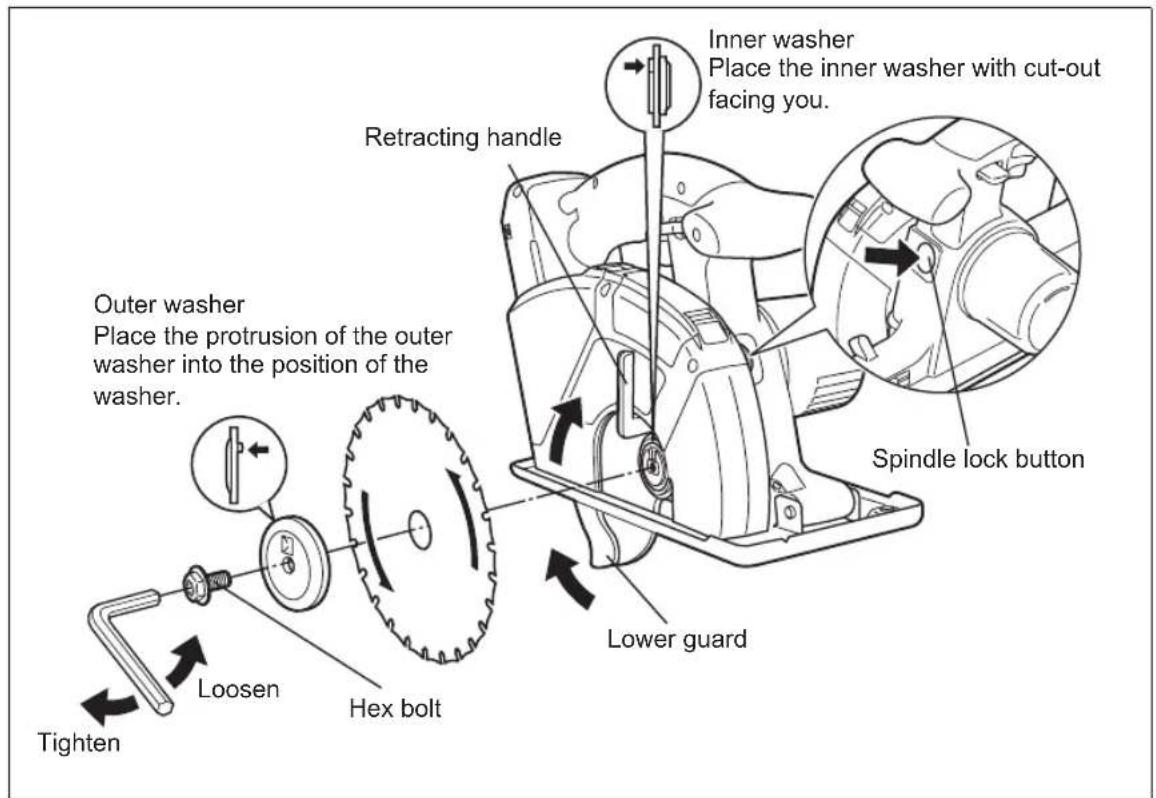
Using the Tool
CAUTION:
To reduce the risk of injury read the Safety Instructions at the front of this manual before using the tool.
WARNING
To reduce the risk of injury, wear safety goggles or glasses with side shields while using the tool. Additionally, wear a dust mask when cutting materials that generate excessive particulate matter. Do not use the tool in the rain. Doing so may result in electric shock or cause the tool to emit smoke.
Do not cut materials on which there is any paint thinner, gasoline, oil, or similar build-up. Doing so may cause the dust case to crack, resulting in injury.
Follow these steps:
Hold the tool with both hands. (See Fig. 8) Do not attempt to remove cut material when the blade is moving.
- Line up the sight line on the shoe with your cutting line. (See Fig. 7)
Alignment with cutting line
- Position the notch on the shoe over the cutting line, aligning the top and bottom corners of the diamond-shaped opening with the line. As the cutting position may differ depending on the blade, do a trial cut beforehand.
Fig. 7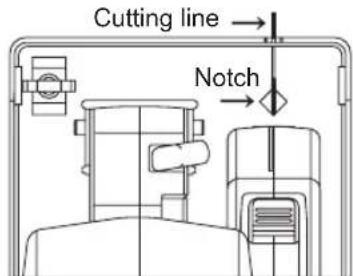
- Press the switch lock lever down, then squeeze the power switch to start the motor, and then release the switch lock lever.
Fig. 8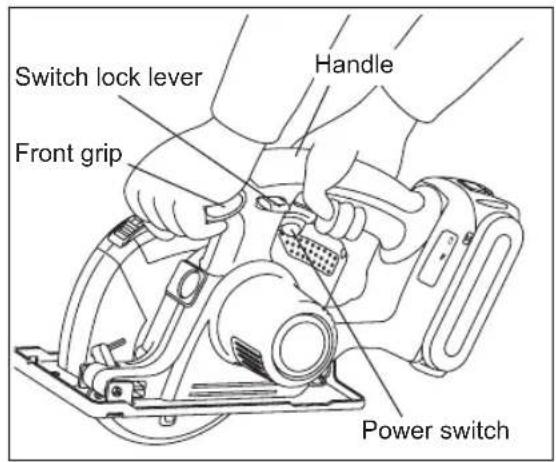
CAUTION:
- Check that the switch lock lever works. If the power switch can be activated without depressing the switch lock lever, discontinue use immediately. Take the tool to an authorized service center. Always hold the handle with one hand and the front grip with the other. (See Fig. 8) Maintain a firm grip and depress the switch fully.
- The blade should not touch the cutting material before you start the motor. Wait until the blade reaches full speed before starting a cut.
- This tool has no provision to lock the switch in the "ON" position, and you must not attempt to secure it in the "ON" position.
- Start cutting when the blade reaches full speed.
CAUTION:
- To prevent reaction when starting operation, the blade starts at reduced speed. (Soft start)
- During cutting, keep your cutting line straight. Move the tool forward at a steady speed, while looking at the tip of the blade through the transparent guard.
WARNING
To prevent dangerous kickback, keep shoe of the tool flat on the surface of the material being cut. - Never force the tool. Use light and continuous pressure.
- If the motor becomes too warm, stop cutting. Let the tool cool down before continuing work.
- It is always a safe practice to remove the battery pack after use and before storing the tool.
Cutting depth adjustment
- Remove battery pack.
- Loosen the depth adjustment nut and adjust the cutting depth, using the graduations on the lower guard to gauge the depth. Once finished adjusting the depth, tighten the depth adjustment nut securely.
- When wood material is 10 mm (3/8") or less thick, adjust the cutting depth so that the blade protrudes approx. 5 mm (3/16") from the bottom of the material.
Fig. 9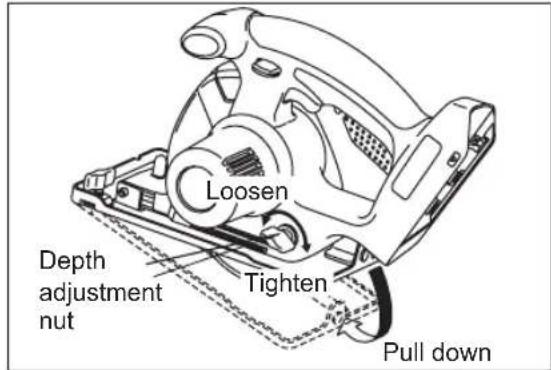
Rip fence (EY3500B7727)
(Available as an accessory, not included)
The rip fence is convenient for rip cuts and repeated cuts of uniform width.
- Remove battery pack.
- Insert rip fence and adjust cutting width. (See Fig. 10)
- Fasten screw securely to fix rip fence.
Fig. 10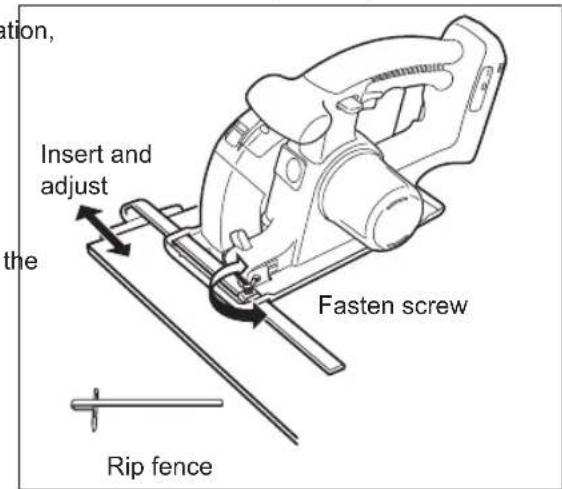
Collecting Dust
WARNING
- Before cutting metal materials, always empty the dust case, open the front cover and remove the dust.
- Use the tool with the flammable in the dust case to cut metal materials may result in fire.
- When cutting metal materials, always use the tool with the dust case attached.
Flying sparks and metal chips may injury.
- When cutting metal materials, do not attach a vacuum cleaner.
Sparks and hot metal chips may cause the vacuum to catch fire. Operate the vacuum cleaner in accordance with its instructions.
(1) Collect dust in the dust case.
- Empty the dust case when it is filled with dust.
- Empty the dust case before storing the tool.
- Dust case capacity
- When cutting electrical conduit with diameter of 25 mm (1"), approximately 130 cuts
- When cutting 45 mm (1-25/32") x 45 (1-25/32") lumber, approximately 150 cuts
NOTE:
Some materials may cause dust to become clogged inside the front cover when cutting those materials.
Fig. 11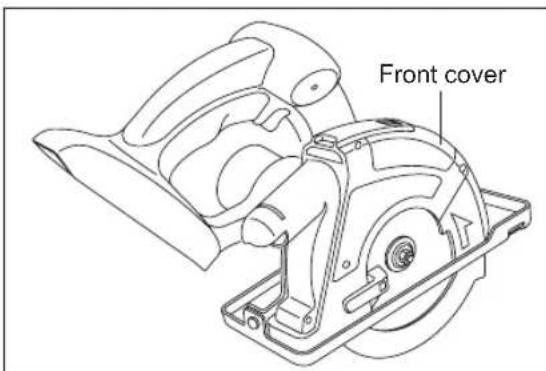
(2) Use with vacuum cleaner to collect dust.
- Connect the tool to the hose using the EY9X012E vacuum cleaner hose adapter (sold separately). Compatible hose inner diameter: 25 mm (1") to 38 mm (1-1/2"). Operate the vacuum cleaner obeying its instructions.
Fig. 12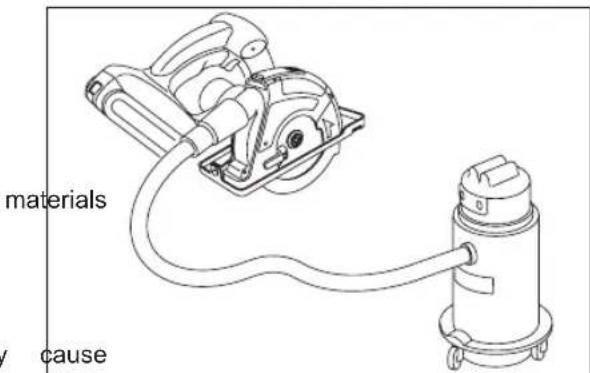
NOTE:
When the tool has difficulty in ejecting or collecting dust, the dust outlet may be clogged with dust. Open the front cover and remove any dust.
LED light Fig. 13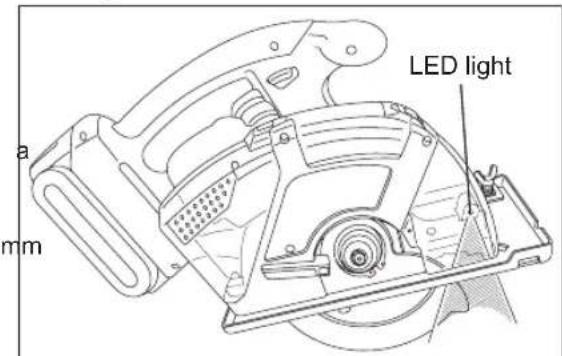
LED light illuminates when the power switch is depressed and turns off when the power switch is released.
- The light illuminates with very low current, and it does not adversely affect the performance of the tool during use or its battery capacity.
CAUTION:
The built-in LED light is designed to illuminate the small work area temporarily. - Do not use it as a substitute for a regular flashlight, since it does not have enough brightness.
Caution: DO NOT STARE INTO BEAM.
Use of controls or adjustments or performance of procedures other than those specified herein may result in hazardous radiation exposure.
Control Panel
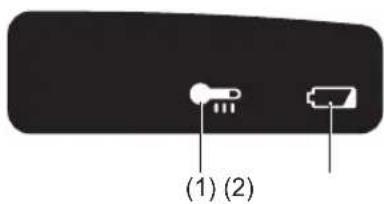
(1) Overheat warning lamp
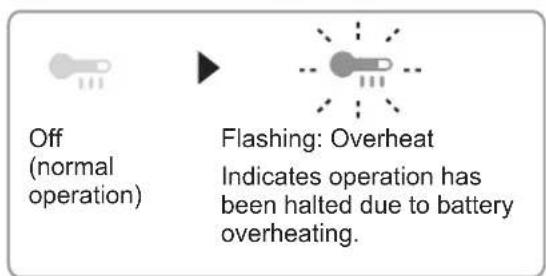
The overheating protection feature halts tool operation to protect the battery pack in the event of overheating. The overheat warning lamp on the control panel flashes when this feature is active.
- If the overheating protection feature activates, allow the tool to cool thoroughly (at least 30 minutes). The tool is ready for use when the overheat warning lamp goes out.
- Avoid using the tool in a way that causes the overheating protection feature to activate repeatedly.
- If the tool is used in cold-temperature conditions (such as during winter) or if it is frequently stopped during use, the overheating protection feature may not activate.
The performance of the EY9L42 deteriorates significantly at and below 10°C due to work conditions and other factors.
The ambient temperature range is between 0°C (32°F) and 40°C (104°F). If the battery pack is used when the battery temperature is below 0°C (32°F), the tool may fail to function properly. - When charging a cool battery pack (below 0°C (32°F)) in a warm place, leave the battery pack at the place and wait for more than one hour to warm up the battery to the level of the ambient temperature.
(2) Battery low warning lamp
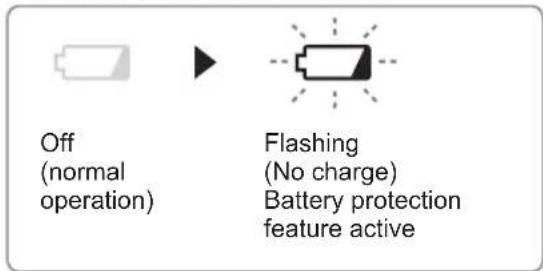
Excessive (complete) discharging of lithium ion batteries shortens their service life dramatically. The tool includes a battery protection feature designed to prevent excessive discharging of the battery pack.
- The battery protection feature activates immediately before the battery loses its charge, causing the battery low warning lamp to flash. If you notice the battery low warning lamp flashing, charge the battery pack immediately.
- If it is started with too little battery power remaining, the tool may stop operating without the battery low warning lamp flashing first. This indicates that there is too little battery power remaining to use the tool, and the battery pack should be charged before further use.
- If the tool is subject to a sudden load during use that causes the motor to lock up, the over-discharge prevention sensor may be triggered, and the battery low warning lamp may flash. The lamp will stop flashing once you address the cause of the motor's locking up and cycle the trigger.
CAUTION:
The over-discharge protection function works even when both the battery low warning lamp and LED light are flashing.
Charge the battery pack immediately as the battery power is getting low.
- When charging a cool battery pack (below 0°C (32°F)) in a warm place, leave the battery pack at the place and wait for more than one hour to warm up the battery to the level of the ambient temperature.
- Weaken and cut off the power applied as the voltage of the battery is plummeting due to the high load acting on the motor. Do not carry out operations that will repeatedly cause the over-discharge prevention function to be activated.
For Proper Use (Further Detail)
▲ WARNING
To prevent the risk of serious personal injury:
It is important to use an appropriate device to hold the material being cut properly, and to hold the tool firmly with both hands to prevent loss of control which could cause personal injury. Figure 14 shows proper cutting position. Note that hands are kept away from cutting area. Make sure bystanders are away from work area and from underneath of workpiece. - When cutting, do not try to hold the material with your hand.
Cutting large sheets;
Support large sheets. Be sure to set the depth of the cut so that you only cut through the workpiece, not through the supports. (See Fig. 15)
Large sheets sag or bend if they are not correctly supported. If you attempt to cut without levelling and properly supporting the workpiece, the blade will tend to bind, causing kickback. (See Fig. 16)
- Don't support the material away from the cut.
Cutting thin or corrugated materials;
Cut thin and corrugated materials at least 25 mm (1") from the edge of the workpiece to avoid injury or damage to the tool caused by thin strips of metal being pulled into the upper guard. - Use sharp blades only. Clean and sharp blades minimize stalling and kickback.
Fig. 14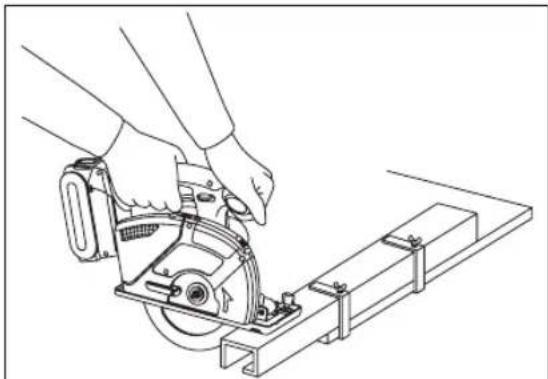
Fig. 15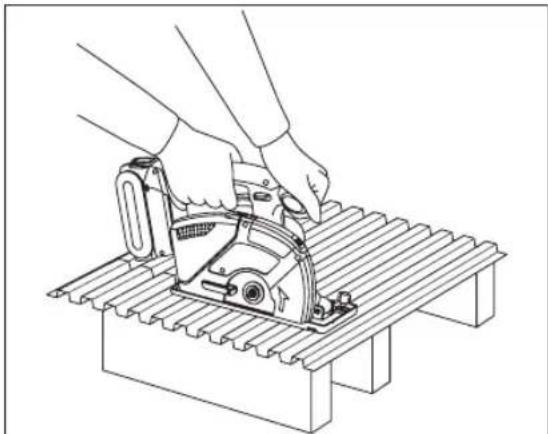
Fig. 16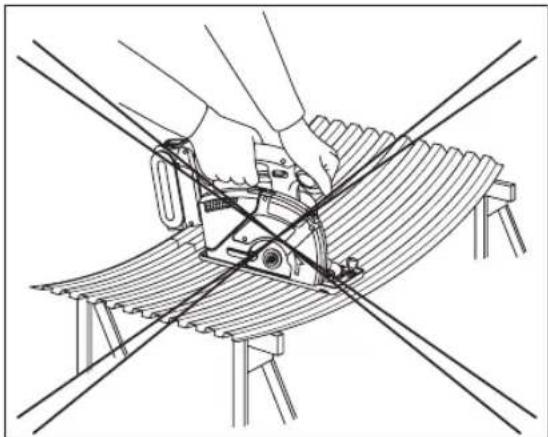
WARNING
To prevent the risk of serious personal injury:
- When making an incomplete cut or cutting is interrupted, or blade is binding or tool is stalling; release the power switch immediately and hold the tool motionless in the material until the blade comes to a complete stop.
- To avoid kickback, never attempt to remove the tool from the work or pull the tool backward while the blade is in motion. Make sure the blade has come to a complete stop, then remove tool from cut. To resume cutting, start tool, allow the blade to reach full speed, reenter the cut slowly and resume cutting.
- Place the wider part of the shoe on the part of the work piece which is solidly supported (See Fig. 17), never on the section that will fall off when the cut is made. (See Fig. 18)
Hold the tool firmly to prevent loss of control. Working carelessly can cause severe personal injury.
Fig. 17 Fig. 18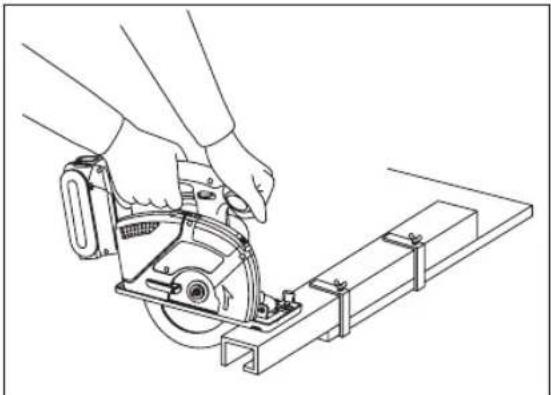
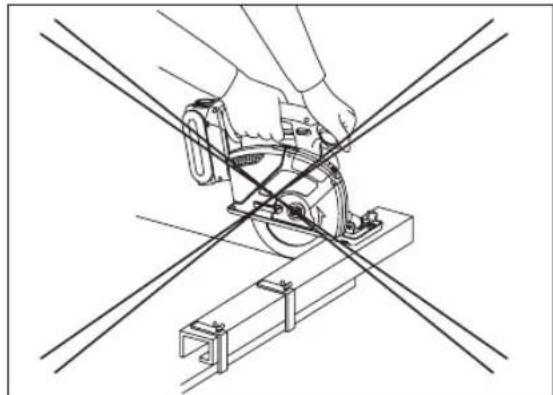
- Make sure the blade stops.
Even though your tool has a brake, before setting the tool down, make sure the blade has come to a complete stop and the lower guard has closed.
- Do not use if anything seems unusual. Remove battery pack immediately.
If the tool body becomes very hot, or does not work properly, remove the battery pack and do not use. Have it checked by an authorized service center.
WARNING
To prevent the risk of serious personal injury or fire, do not try to repair the tool by yourself. Never disassemble or modify the tool body. There are no user-repairable parts inside.
- NEVER ALLOW THE TOOL TO COME IN CONTACT WITH YOUR BODY.
After completing a cut, do not allow the tool to brush against your leg or side.
Since the lower guard is retractable, it could catch on your clothing and expose the blade. Keep clothing away from tool. Be aware of the exposed blade sections that exist in both the upper and lower guard areas.
WARNING
Because cutting metal creates sparks;
Always use safety goggles. - Do not use tool near any flammable substance or in an area where flammable substances are used. Fire and burn injury could result.
- Never engage the spindle lock while blade is running, or engage in an effort to stop the tool. Never turn the switch on when the spindle lock is engaged. Serious damage to your tool will result.
[Battery Pack]
For Appropriate Use of Battery Pack
Li-ion Battery Pack
- For optimum battery life, store the Li-ion battery pack following use without charging it.
- When charging the battery pack, ensure that the terminals on the battery charger are free of foreign substances such as dust and water. Clean the terminals before charging the battery pack if any foreign substances are found on the terminals.
The life of the battery pack terminals may be affected by foreign substances such as dust and water during operation.
- When the battery pack is not in use, keep it away from other metal objects like paper clips, coins, keys, nails, screws, or other small metal objects that can make a connection from one terminal to another. Shorting the battery terminals together may cause sparks, burns, or a fire.
- When operating the battery pack, make sure the work place is well ventilated.
- When the battery pack is removed from the main body of the tool, replace the battery pack cover immediately in order to prevent dust or dirt from contaminating the battery terminals and causing a short circuit.
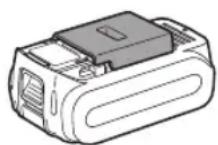
Battery Pack Life
The rechargeable batteries have a limited life. If the operation time becomes extremely short after recharging, replace the battery pack with a new one.
Battery Recycling
ATTENTION:
For environmental protection and recycling of materials, be sure that it is disposed of at an officially assigned location, if there is one in your country.
Recommendations for use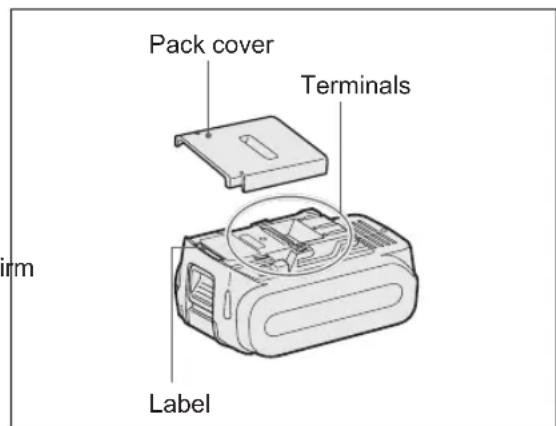
Be sure to use the battery pack cover.
- When the battery pack is not being used, store the battery in a way that foreign substances such as dust and water etc. do not contaminate the terminals. Be sure to attach the battery pack cover to protect the battery terminals.
- When charging the battery pack, confirm the terminals on the battery charger are free of foreign substances such as dust and water etc. Clean the terminals before charging the battery pack if any foreign substances are found on the terminals.
The life of the battery pack terminals may be affected by foreign substances such as dust and water etc. during operation.
CAUTION:
To protect the motor or battery, be sure to note the following when carrying out operation.
- If the battery becomes hot, the protection function will be activated and the battery will stop operating.
The overheat warning lamp on the control panel illuminates or flashes when this feature is active.
For safe use
- The battery pack is designed to be installed by proceeding two steps for safety. Make sure the battery pack is installed properly to the main unit before use.
- If the battery pack is not connected firmly when the switch is switched on, the overheat warning lamp and the battery low warning lamp will flash to indicate that safe operation is not possible, and the main unit will not rotate normally. Connect the battery pack into the unit of the tool until the red or yellow label disappears.
[Battery Charger]
Charging
CAUTION:
The charger is designed to operate standard domestic electrical power only as stated in the rating plate. Charge only on the voltage indicated on the rating plate of unit. e.g.230V / 50Hz. - Do not attempt to use it on any other voltage or frequency rating! - If the temperature of the battery pack falls approximately below -10°C (14°F), charging will automatically stop to prevent degradation of the battery. - Do not charge the battery pack whose temperature is below 0°C (32°F). - When charging a cool battery pack 0°C (32°F) in a warm place, leave the battery pack at the place and wait for more than one hour to warm up the battery to the level of the ambient temperature. Otherwise battery pack may not be fully charged. Cool down the charger when charging more than two battery packs consecutively. - Do not insert your fingers into contact hole, when holding charger or any other occasions.
CAUTION:
To prevent the risk of fire or damage to the battery charger.
- Do not cover vent holes on the charger and the battery pack.
- Unplug the charger when not in use.
NOTE:
Your battery pack is not fully charged at the time of purchase. Be sure to charge the battery before use.
How to charge
- Plug the charger into the AC outlet.
NOTE:
Sparks may be produced when the plug is inserted into the AC power supply, but this is not a problem in terms of safety.
- Connect the battery pack firmly into the charger.
1. Line up the alignment marks and place the battery onto the dock on the charger. 2. Slide forward in the direction of the arrow.
Alignment marks
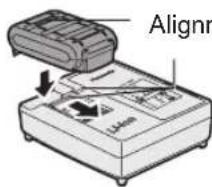
3. During charging, the charging lamp will be illuminated. When charging is completed, an internal electronic switch will automatically be triggered to prevent overcharging. - Charging will not start if the battery pack is warm (for example, immediately after heavy-duty operation). The orange standby lamp will be flashing until the battery cools down. Charging will then begin automatically. 4. The charge lamp (green) will flash slowly once the battery is approximately 80% charged. 5. When charging is completed, the charging lamp in green color will turn off. 6. If the temperature of the battery pack is 0°C or less, charging takes longer to fully charge the battery pack than the standard charging time. Even when the battery is fully charged, it will have approximately 50% of the power of a fully charged battery at normal operating temperature. 7. Consult an authorized dealer if the charging lamp (green) does not turn off. 8. If a fully charged battery pack is inserted into the charger again, the charging lamp lights up. After several minutes, the charging lamp in green color will turn off.
Lamp Indications
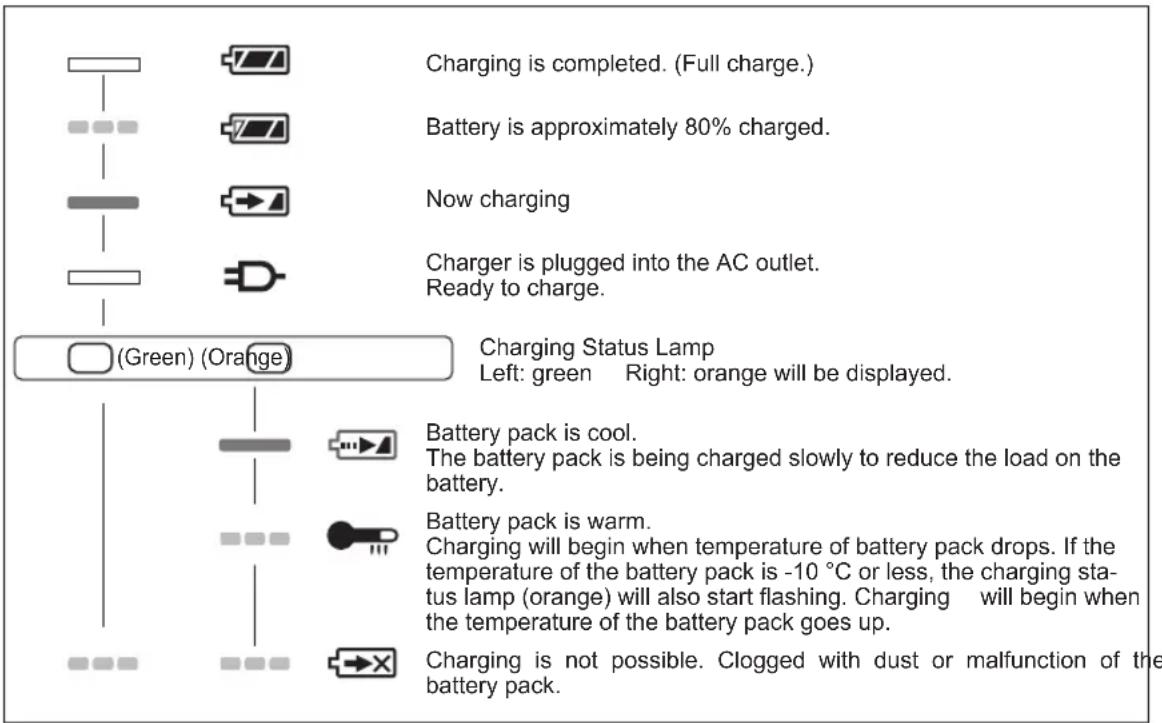

Turn off
Illuminated
- Flashing

Information for Users on Collection and Disposal of Old Equipment and used Batteries
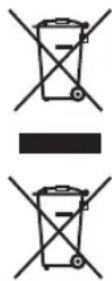
These symbols on the products, packaging, and/or accompanying documents mean that used electrical and electronic products and batteries should not be mixed with general household waste.
For proper treatment, recovery and recycling of old products and used batteries, please take them to applicable collection points, in accordance with your national legislation and the Directives 2002/96/EC and 2006/66/EC.
By disposing of these products and batteries correctly, you will help to save valuable resources and prevent any potential negative effects on human health and the environment which could otherwise arise from inappropriate waste handling.
For more information about collection and recycling of old products and batteries, please contact your local municipality, your waste disposal service or the point of sale where you purchased the items.
Penalties may be applicable for incorrect disposal of this waste, in accordance with national legislation.
For business users in the European Union
If you wish to discard electrical and electronic equipment, please contact your dealer or supplier for further information.
[Information on Disposal in other Countries outside the European Union]
These symbols are only valid in the European Union. If you wish to discard these items, please contact your local authorities or dealer and ask for the correct method of disposal.
V. MAINTENANCE
WARNING
To avoid severe personal injury, always remove the battery pack from the tool before starting any maintenance procedure.
CAUTION:
To assure product SAFETY and RELIABILITY, servicing should be performed by an authorized service center. Always insist on genuine Panasonic replacement parts.
Cleaning Tool
Keep your tool clean for good cutting performance, and to help keep it safe to use.
Follow these steps:
- Remove the battery pack from the tool.
- Wipe the tool with a dry, soft cloth. Do not use a wet cloth or cleaning liquids. They could damage the tool's finish.
- Be sure to rub off any oil or grease which could make the tool slippery or hard to handle.
- Remove the blade and brush off any dust.
CAUTION:
- To avoid injury or damage to the unit, never immerse any part of the tool in a liquid.
- In the event that the inside of the tool or battery pack is exposed to water, drain and allow to dry as soon as possible. Carefully remove any dust or iron filings that collect inside the tool. If you experience any problems operating the tool, consult with a repair shop.
Transparent Guard
WARNING
If the guard is cracked or broken, take the tool to an authorized service center for replacement. Do not attempt to operate the tool. It could result in serious personal injury.
Never use your tool with a damaged transparent guard or without the transparent guard installed. Flying chips could result in serious injury.
VI. ACCESSORIES
WARNING
- The use of any accessories not specified in this manual may result in fire, electric shock, or personal injury. Use recommended accessories only.
- Use of a blade on material that is thicker or thinner than that recommended for that blade will result in a rough cut, and could increase the risk of "kickback" or other injury.
Carbide-tipped Blade for Metal
- EY9PM13E
For cutting unhardened ferrous material
Thickness of material
0.5mm-6.0mm
Carbide-tipped Blade for Thin Metal (Optional accessory)
- EY9PM13F
For cutting unhardened thin ferrous material that requires a clean cutting edge
Thickness of material
0.5 mm - 6.0 mm
Carbide-tipped Blade for Wood (Optional accessory)
- EY9PW13C
For cutting wood in general
Carbide-tipped Blade for Thin Wood (Optional accessory)
- EY9PW13D
For cutting thin wood that requires a clean cutting edge
Recommended thickness of material up to 12
mm
Carbide-tipped Blade for Plastic (Optional accessory)
- EY9PP13C
For cutting plastic
Recommended thickness of material: acrylic and vinyl chloride plates:
2.0 mm - 5.0 mm
corrugated plates, pipes
0.8mm - 5.0mm
Vacuum hose adaptor (Optional accessory)
- EY9X012E
Rip Fence (Optional accessory)
·EY3500B7727
For convenience of rip cuts and repeated cut of uniform width
VII. SPECIFICATIONS
NOTE:
Weight indication
Greater than or equal to 1kg : indicated by 0.05kg.
Less than 1kg : indicated by 0.01kg
MAIN UNIT
| Model No. EY45A2 | ||||
| Motor voltage DC 14.4 V | DC 18 V | |||
| Rated no load speed 360 | 0 rpm (min -1) 4500 rpm (min -1) | |||
| Blade size Outside diameter Arbor size | 135 mm 20 mm | |||
| Maximum cutting depth 0 | -46 mm (Φ135 mm blade) | |||
| Maximum torque 5.4 N·m | 6.7 N·m | |||
| Overall length 292 mm (main unit only) | ||||
| Weight 2.05 kg (main unit only) | ||||
| Battery packs | Li-ion battery packs | |||
| EY9L42 EY9L44 EY9L45 EY9L50 EY9L51 | ||||
| DC 14.4 V DC 18 V | ||||
| Noise, Vibration | See the included sheet | |||
BATTERY CHARGER
| Model No. | EY0L82 | |||||
| Electrical rating | See the rating plate on the bottom of the charger | |||||
| Weight | 0.93 kg | |||||
| Charging time | Model No. | EY9L42 EY9L44 EY9L45 EY9L50 EY9L51 | ||||
| Usable | 30 min. | 40 min. | 50 min. | 40 min. | 55 min. | |
| Full | 35 min. | 55 min. | 60 min. | 55 min. | 70 min. | |
NOTE: This chart may include models that are not available in your area.
Please refer to the latest general catalogue.
For the dealer name and address, please see the included warranty card.
VIII. APPENDIX
WARRANTY SUPPLEMENT
- The breakdown and damage caused by usage consistent for a long time (e.g.: factory work on the assembly line, etc.) is out of warranty.
- Damage or failure caused by use of accessories that are not specified in this manual will not be covered by warranty.
ONLY FOR U.K.
ELECTRICAL PLUG INFORMATION
FOR YOUR SAFETY PLEASE READ THE FOLLOWING TEXT CAREFULLY
This appliance is supplied with a moulded three pin mains plug for your safety and convenience.
A 5 amp fuse is fitted in this plug.
Should the fuse need to be replaced please ensure that the replacement fuse has a rating of 5 amp and that it is approved by ASTA or BSI to BS1362.
Check for the ASTA mark or the BSI mark on the body of the fuse.
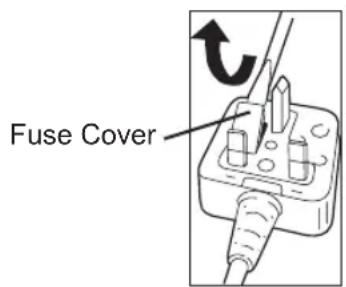
If the plug contains a removable fuse cover you must ensure that it is refitted when the fuse is replaced.
If you lose the fuse cover the plug must not be used until a replacement cover is obtained.
A replacement fuse cover can be purchased from your local Panasonic Dealer.
IF THE FITTED MOULDED PLUG IS UNSUITABLE FOR THE SOCKET OUTLET IN YOUR HOME THEN THE FUSE SHOULD BE REMOVED AND THE PLUG CUT OFF AND DISPOSED OF SAFELY.
THERE IS A DANGER OF SEVERE ELECTRICAL SHOCK IF THE CUT OFF PLUG IS INSERTED INTO ANY 13 AMP SOCKET.
If a new plug is to be fitted please observe the wiring code as shown below.
If in any doubt please consult a qualified electrician.
IMPORTANT:
The wires in this mains lead are coloured in accordance with the following code:
Blue: Neutral
Brown: Live
As the colours of the wire in the mains lead of this appliance may not correspond with the coloured markings identifying the terminals in your plug, proceed as follows.
The wire which is coloured BLUE must be connected to the terminal in the plug which is marked with the letter N or coloured BLACK.
The wire which is coloured BROWN must be connected to the terminal in the plug which is marked with the letter L or coloured RED. Under no circumstances should either of these wires be connected to the earth terminal of the three pin plug, marked with the letter E or the Earth Symbol
How to replace the fuse: Open the fuse compartment with a screwdriver and replace the fuse and fuse cover if it is removable.
This apparatus was produced to BS800.
has stopped due to
Panasonic Testing Center
Winsbergring 15,
22525 Hamburg,
Germany
Panasonic Corporation
1006, Kadoma, Osaka 571-8501, Japan
http://panasonic.net
EN. DE. FR. IT. NL. ES. DA. SV. NO. FI
EY971245A202 2014.2 Printed in Japan
- INTRODUCTION
- DANGER
- WARNING
- HOW TO USE THIS MANUAL
- NOTE
- CAUTION
- ADDITIONAL SAFETY RULES
- SAFETY INSTRUCTIONS FOR ALL SAWS
- FURTHER SAFETY INSTRUCTIONS FOR ALL SAWS
- CAUSES AND OPERATOR PREVENTION OF KICKBACK
- SAFETY INSTRUCTIONS FOR THIS SAW
- ASSEMBLY
- ATTACHING OR REMOVING BATTERY PACK
- OPERATION
- BEFORE USING THE TOOL
- INSTALLING BLADE
- FOLLOW THESE STEPS
- REMOVING BLADE
- USING THE TOOL
- ALIGNMENT WITH CUTTING LINE
- CUTTING DEPTH ADJUSTMENT
- RIP FENCE (EY3500B7727)
- COLLECTING DUST
- CONTROL PANEL
- OVERHEAT WARNING LAMP
- BATTERY LOW WARNING LAMP
- FOR PROPER USE (FURTHER DETAIL)
- ▲ WARNING
- CUTTING LARGE SHEETS
- CUTTING THIN OR CORRUGATED MATERIALS
- [BATTERY PACK]
- FOR APPROPRIATE USE OF BATTERY PACK
- LI-ION BATTERY PACK
- BATTERY PACK LIFE
- BATTERY RECYCLING
- ATTENTION
- BE SURE TO USE THE BATTERY PACK COVER
- FOR SAFE USE
- [BATTERY CHARGER]
- CHARGING
- HOW TO CHARGE
- LAMP INDICATIONS
- INFORMATION FOR USERS ON COLLECTION AND DISPOSAL OF OLD EQUIPMENT AND USED BATTERIES
- FOR BUSINESS USERS IN THE EUROPEAN UNION
- [INFORMATION ON DISPOSAL IN OTHER COUNTRIES OUTSIDE THE EUROPEAN UNION]
- MAINTENANCE
- CLEANING TOOL
- TRANSPARENT GUARD
- ACCESSORIES
- SPECIFICATIONS
- APPENDIX
- WARRANTY SUPPLEMENT
- ONLY FOR U.K
- ELECTRICAL PLUG INFORMATION
- FOR YOUR SAFETY PLEASE READ THE FOLLOWING TEXT CAREFULLY
- IMPORTANT
Brand : PANASONIC
Model : EY45A2
Category : Slicer