
Smart Water Control 19031 - Irrigation timer GARDENA - Free user manual and instructions
Find the device manual for free Smart Water Control 19031 GARDENA in PDF.
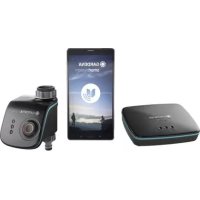

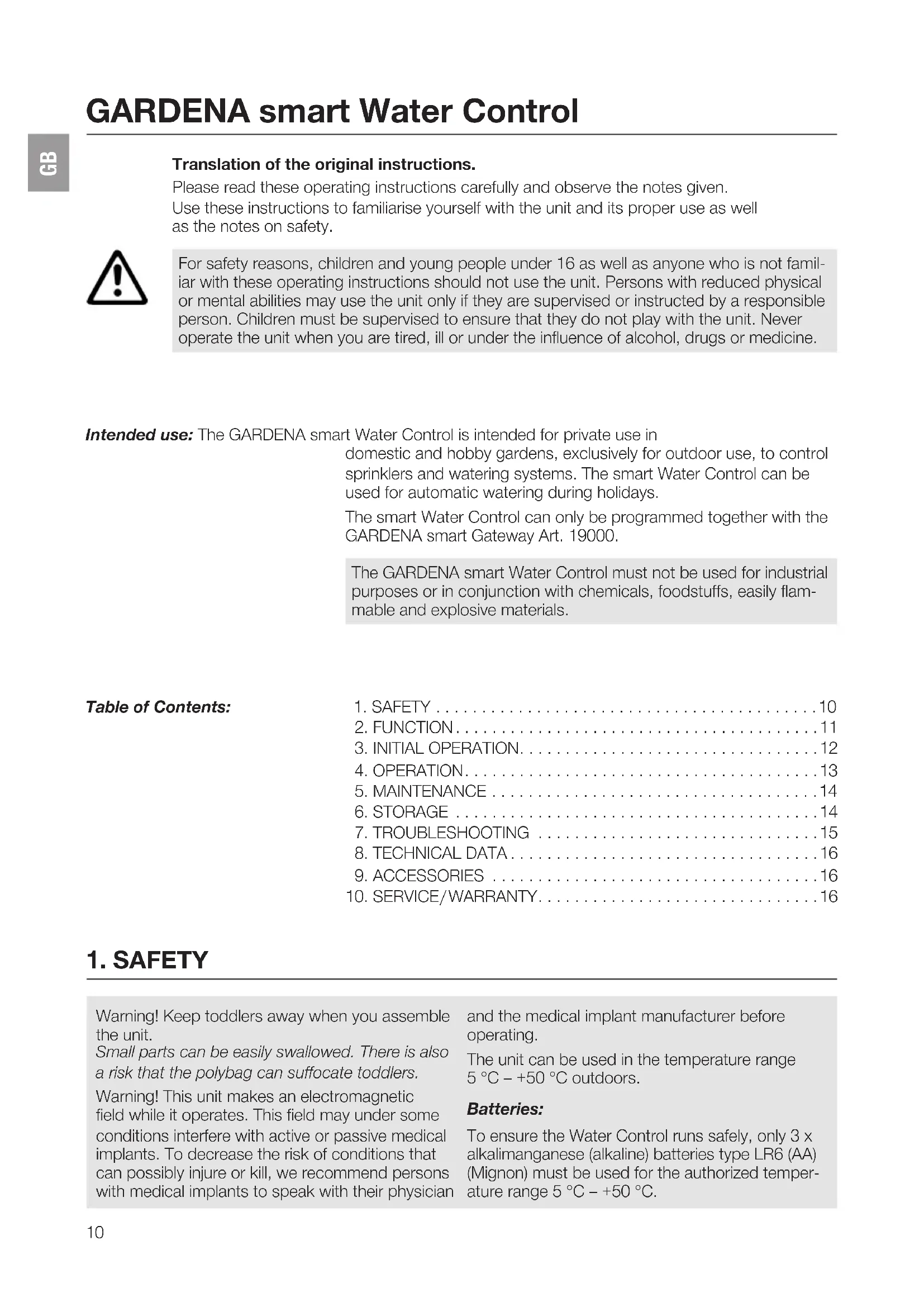


| Product type | Smart watering timer |
| Brand | GARDENA |
| Model | Smart Water Control 19031 |
| Power supply | 3 LR6 (AA) alkaline batteries 1.5 V (not included) |
| Battery life | Approximately 6 months (normal use, 2 App consultations/day) |
| Operating temperature | 5 °C to 50 °C |
| Operating pressure | 0.5 bar to 12 bar |
| Minimum flow rate | 20 to 30 l/h |
| Max. water temperature | 40 °C |
| Connection | G 1" (33.3 mm) connection nut, G 3/4" (26.5 mm) adapter included |
| Radio frequency | 863 – 870 MHz |
| Radio range in open field | Approximately 100 m |
| Main functions | Automatic control via GARDENA smart App, manual watering, scheduling, compatibility with humidity sensors |
| LED indicators | Connection (green/yellow/red), active watering (green), battery status (green/yellow/red) |
| Maintenance and cleaning | Clean the filter regularly, use a damp cloth, no solvents or abrasive cleaners |
| Safety | Outdoor use only, do not use rechargeable batteries, anti-theft protection possible (accessory ref. 1815-00.791.00) |
| Spare parts and accessories | G 3/4" adapter, anti-theft security (ref. 1815-00.791.00) |
| Warranty | 2 years, subject to proper use and no third-party repairs |
Frequently Asked Questions - Smart Water Control 19031 GARDENA
User questions about Smart Water Control 19031 GARDENA
0 question about this device. Answer the ones you know or ask your own.
Ask a new question about this device
Download the instructions for your Irrigation timer in PDF format for free! Find your manual Smart Water Control 19031 - GARDENA and take your electronic device back in hand. On this page are published all the documents necessary for the use of your device. Smart Water Control 19031 by GARDENA.
USER MANUAL Smart Water Control 19031 GARDENA
smart Water Control Art.19031
D Betriebsanleitung
Smart Water Control
GB Operator's Manual
smart Water Control
F Mode d'emploi
smart Water Control
Operation Instructions
Smart Water Control
Translation of the original instructions.
Please read these operating instructions carefully and observe the notes given.
Use these instructions to familiarise yourself with the unit and its proper use as well as the notes on safety.

For safety reasons, children and young people under 16 as well as anyone who is not familiar with these operating instructions should not use the unit. Persons with reduced physical or mental abilities may use the unit only if they are supervised or instructed by a responsible person. Children must be supervised to ensure that they do not play with the unit. Never operate the unit when you are tired, ill or under the influence of alcohol, drugs or medicine.
Intended use: The GARDENA smart Water Control is intended for private use in
domestic and hobby gardens, exclusively for outdoor use, to control sprinklers and watering systems. The smart Water Control can be used for automatic watering during holidays.
The smart Water Control can only be programmed together with the GARDENA smart Gateway Art. 19000.
The GARDENA smart Water Control must not be used for industrial purposes or in conjunction with chemicals, foodstuffs, easily flammable and explosive materials.
Table of Contents:
1. SAFETY 10 2. FUNCTION 11 3. INITIAL OPERATION 12 4. OPERATION 13 5. MAINTENANCE 14 6. STORAGE 14 7. TROUBLESHOOTING 15 8. TECHNICAL DATA 16 9. ACCESSORIES 16 10. SERVICE/WARRANTY 16
1. SAFETY
Warning! Keep toddlers away when you assemble the unit.
Small parts can be easily swallowed. There is also a risk that the polybag can suffocate toddlers.
Warning! This unit makes an electromagnetic field while it operates. This field may under some conditions interfere with active or passive medical implants. To decrease the risk of conditions that can possibly injure or kill, we recommend persons with medical implants to speak with their physician
and the medical implant manufacturer before operating.
The unit can be used in the temperature range 5°C to +50°C outdoors.
Batteries:
To ensure the Water Control runs safely, only 3 x alkalimanganese (alkaline) batteries type LR6 (AA) (Mignon) must be used for the authorized temperature range 5°C to +50°C.

DANGER!
There is a risk of explosion if batteries are not replaced in the proper manner.
See 6. STORAGE for information on how to dispose of used batteries.
Do not use rechargeable batteries.
To prevent the Water Control from failing due to a weak battery when you are away for a long time, replace the battery when the battery indicator flashes yellow.
Do not remove the batteries while watering (this would cause continuous watering).
Setup

WARNING!
The Water Control must not be used indoors.
Only use the Water Control outdoors.
The Water Control may only be set up vertically with the sleeve nut at the top to prevent water from entering the battery compartment.
The minimum water flow rate to ensure proper operation of the Water Control is 20-30 l/h. For example, at least 10-15 x 2-litre drip heads are required to control the Micro-Drip-System.
The maximum water temperature is 40°C.
Only use clear fresh water.
The minimum operating pressure is 0.5 bar, and the maximum operating pressure is 12 bar.
Avoid tensile strain.
Do not pull the hose connected to the Water Computer.
2. FUNCTION
Water Control: The Water Control is controlled automatically with the GARDENA
smart App. Sprinklers, a sprinkler system or a drip head watering system can be used for watering.
The Water Control carries out watering fully automatically according to the set program and can therefore also be used during holidays. Early in the morning or late in the evening, evaporation and therefore water consumption is lowest.
Controls/Display: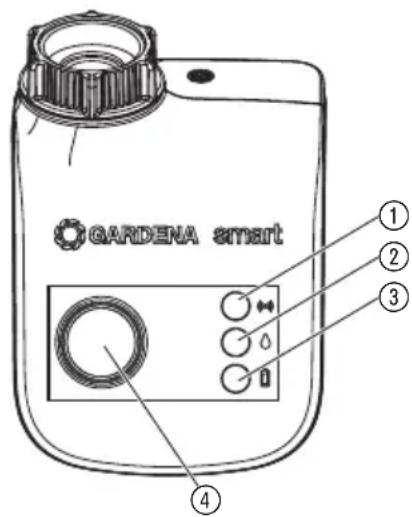
① LED Connection display/Signal:
Green flashing: While connecting
Green for 10 sec: Signal strength high
Yellow for 10 sec: Signal strength medium
Red for 10 sec: Signal strength low
② LED Active watering:
Green for 10 sec.
③ LED Battery display:
Green for 20 sec: Capacity > 4 weeks
Yellow flashing: Capacity < 4 weeks
Red flashing: Capacity < 2 weeks
Red lightning: battery flat
If the LED lights red, the valve is no longer opened. A valve opened by the program will also close again if the battery is flat. The battery display is reset when the batteries are changed.
Replace batteries (see 3. INSTALLATION "To insert batteries").
④ Man. Button:
For switching the water throughput on or off manually.
To insert batteries: The batteries are not included in the scope of delivery.
The Water Control must only be operated with 3 × alkalimanganese (alkaline) batteries type LR6 (AA) (Mignon).
Under normal conditions of use, the service life is six months (2 x app query per day).
CAUTION! Rechargeable batteries should not be used!
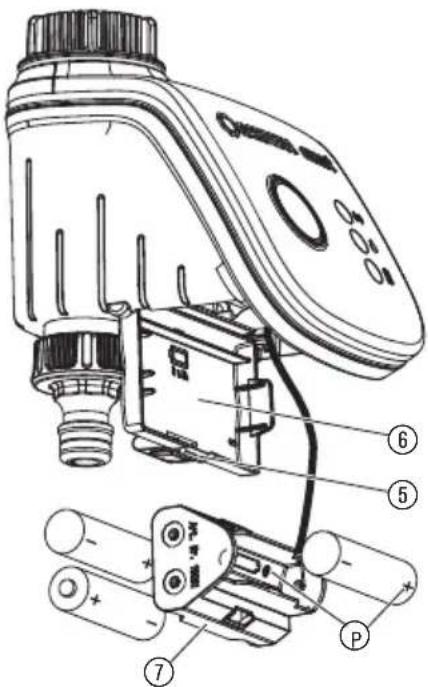
- Press the tab ⑤ and open the cover ⑥.
- Remove the battery holder ⑦.
- Insert batteries into the battery holder ⑦. In doing so, ensure that the polarity ⑨ is correct.
- Push the battery holder ⑦ back into the battery compartment.
- Close the cover ⑥.
To connect the Water Control: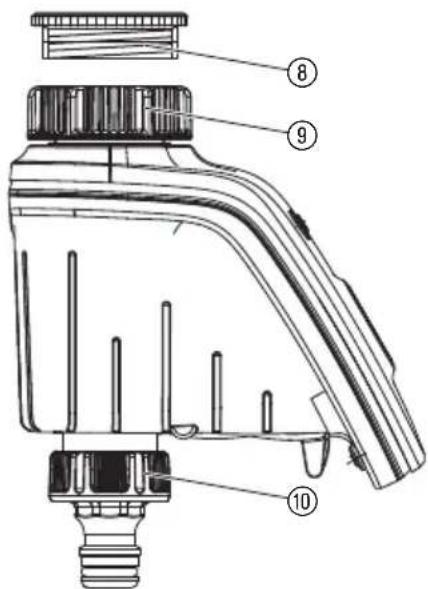
The Water Control is fitted with a sleeve nut for taps with (G 1") (33.3 mm) thread. The adaptor supplied allows the Water Control to be connected to taps with a (G 3/4") (26.5 mm) thread.
- For tap with a G 3/4" (26.5 mm) thread:
Screw adaptor ⑧ on to the tap manually (do not use pliers).
- Screw sleeve nut ⑨ of the Water Control on to the adaptor thread by hand (do not use pliers).
- Screw tap connector ⑩ on to the Water Control.
To fit anti-theft device (optional):
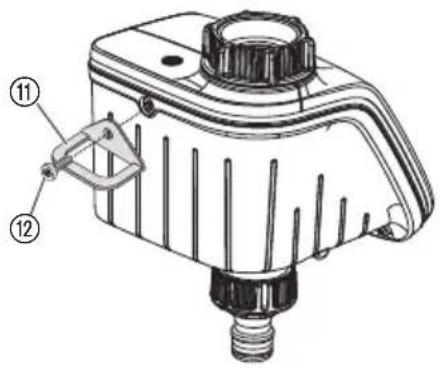
To secure your Water Control against theft, you can obtain the GARDENA Anti-theft device Art. 1815-00.791.00 from GARDENA Service.
- Screw clamp ① with screw ⑫ firmly to the back of the Water Control.
- Use clamp e.g. for fixing a chain.
It is no longer possible to remove the screw after it has been screwed in.
4. OPERATION
Operation with the GARDENA smart App:
A connected smart Gateway is required for the operation of the smart Water Control.
The smart Water Control must be connected via the GARDENA smart App.
The smart Water Control is operated by the GARDENA smart App.
The GARDENA smart App can be downloaded from the Apple App Store or the Google Play Store.
Settings of the Water Control:
watering start time / end time, watering cycle (day/frequency), watering dependent on sensor, manual operation by App
Factory Reset:
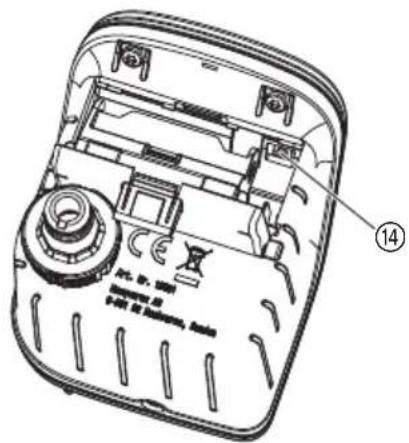
The smart Water Control will be reset to the factory settings.
Push the factory reset button 14.
Manual operation by Water Control:
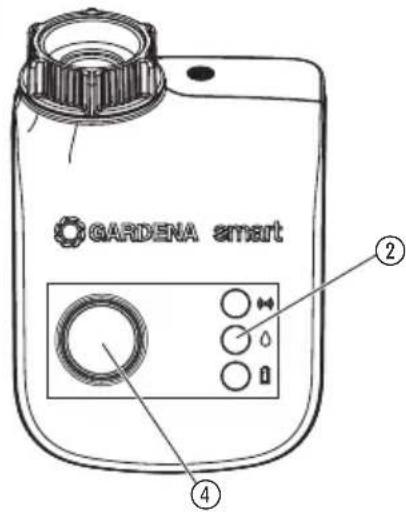
The valve can be opened or closed manually at any time (only during the pairing process is no manual irrigation possible). A program-controlled open valve can also be closed early without changing the program data.
- Press the Man. button to open the valve manually (or to close an open valve).
The LED Active Watering ② lights green for 10 sec.
- Press the Man. button to close the valve early.
If the Water Control is in "Sleep Mode", press the Man. button 2 times.
The watering duration (0 to 59 min.) is according to the parameter of the GARDENA smart App.
If a program-controlled watering has been stopped manually, this program-controlled watering cannot start again.
If the valve has been opened manually and a programmed start of a watering period overlaps the manual opening period, the programmed starting time is suppressed.
Example:
The valve is opened at 9.00 a.m. manually, the opening period is 30 minutes. A program with a start time (START) between 9.00 and 9.30 a.m. will not be undertaken in this case.
5. MAINTENANCE
To clean the filter:

The filter 13 should be checked regularly and cleaned when necessary.
- Unscrew sleeve nut ⑨ of the Water Control by hand from the tap thread (do not use pliers).
- If necessary unscrew the adaptor ⑧
- Remove filter 13 from sleeve nut 9 and clean.
- Fit the Water Control again (see 3. INITIAL OPERATION "To connect the Water Control").
To clean Water Control: No caustic / abrasive cleaning agents should be used.
→ Clean Water Control with a damp cloth (do not use solvent).
6. STORAGE
To put into storage: The unit must be stowed away from children.
- To preserve the batteries, these should be removed (see 3. INITIAL OPERATION).
- Stow the Water Control in a dry area where it has protection from frost.
Disposing of flat batteries: Please return flat batteries to a GARDENA dealer or dispose of them properly at your nearest recycling centre.
Only dispose of batteries when they are flat.
7. TROUBLESHOOTING
Problem Possible Cause Remedy
| No LED-display appears Battery inserted incorrectly. → Check polarity markings match (+/-). | |
| Flat battery. → Insert new (alkaline) battery. | |
| Manual watering is not possible using the Man. button | Water Control in Sleep Mode. → Press Man. button. |
| Battery flat (LED Batterie display lights red). → Insert new (alkaline) battery. | |
| Tap turned off. → Turn tap on. | |
| Watering program is not being undertaken (no watering) | Valve was opened manually previously. → Avoid possible program overlaps. |
| Tap turned off. → Turn tap on. | |
| Sensor registers damp. → If dry, check setting / location of the sensor. | |
| Battery flat (LED Batterie display lights red). → Insert new (alkaline) battery. | |
| Water Computer does not close | Minimum quantity of water drawn → Connect more drip heads. is less than 20 l/h. |
8. TECHNICAL DATA

| smart Water Control (Art. 19031-20) | |
| Operation temperature range (outdoors) | 5 °C – 50 °C |
| SRD: Frequency range 863 – 870 MHz | |
| Maximum power 25 mW | |
| free field radio range approx. 100 m | |
| Min./max. operating pressure 0.5 bar / 12 bar | |
| Flow medium Clear fresh water | |
| Max. liquid temperature 40 °C | |
| Watering duration 1 min. to 10 h | |
| Batteries required 3 x alkalimanganese (alkaline) batteries type LR6 (AA) Mignon | |
| Operating time of the batteries approx. 6 months with alkaline batteries (min. 2000 mAh) | |
| CE Declaration: The complete Declaration of Conformity can be found at: www.gardena.com/de/smart-ce | |
9. ACCESSORIES
GARDENA Anti-theft device Art. 1815-00.791.00
(from GARDENA Service)
10. SERVICE/WARRANTY
Service: Please contact the address on the back page.
Guarantee:
GARDENA Manufacturing GmbH guarantees this unit for 2 years (from date of purchase). This guarantee includes all important defects of the unit that can be proved to be material or manufacturing faults. Under warranty we will replace the unit or repair it for no cost if these conditions are applicable:
- The unit must have been used properly and in keeping with the requirements of the operation instructions.
- Neither the purchaser or a not approved third party have tried to repair the unit.
- Faults which occur as a result of incorrectly installed or leaking batteries are not covered by the guarantee.
- Damage caused by frost is not covered by the warranty.
This manufacturer's guarantee does not have an effect on the user's existing warranty claims against the dealer/seller.
If you have problems with this unit, please contact our Service.
GARDENA smart Water Control
(C1428ARP) Buenos Aires
Phone: (+54) 11 5194 5000
info.gardena@
ar.husqvarma.com
Armenia
Garden Land Ltd
61 Tigran Mets
0005 Yerevan
Australia
Husqvarna Australia Pty. Ltd.
Locked Bag 5
Central Coast BC
NSW 2252
Phone: (+61) (0) 243527400
customer.service@
husqvarna.com.au
Austria / Österreich
Husqvarna Austria GmbH
Industriezeile 36
4010 Linz
Tel.: (+43) 732 77 01 01-485
service.gardena@
husqvarnagroup.com
Azerbaijan
Firm Progress
a. Aliyev Str. 26A
1052 Baku
Belgium
GARDENA Belgium NV/SA
Brampton, Ontario L6T 4X3
Phone: (+1) 905 79293 30
info@gardenacadana.com
Chile
Maquinarias Agroforestales
Ltda. (Maga Ltda.)
Santiago, Chile
Avda. Chesterton
8355 comuna Las Condes
Phone: (+56) 2 202 4417
Dalton@maga.cl
Zipcode: 7560330
Temuco, Chile
Ayda. Valparaiso # 01466
Phone: (+56) 45222126
Zipcode: 4780441
China
Husqvarna (China) Machinery
Manufacturing Co., Ltd.
No.1355, Jia Xin Rd
Ma Lu Zhen, Jia Ding Dist.,
Shanghai
20180
Phone: (+86) 21 59159629
Domestic Sales
www.gardena.com.cn
Colombia
Husqvarna Colombia S.A
Calle 18 No.68 D-31, zona
Industrial de Montevides
Bogotá, Cundinamarca
Tel. 571 2922700 ext. 105
jairosalazar@
husqvarna.com.co
Costa Rica
Compania Exim
Euroiberoamericana S.A.
LosColegios,Moravia
Consumer Outdoor Products
Consumer Outdoor Products
Consumer Outdoor Products
Lautatarhankatu 8 B / P.O. Box 3
00581 HELSINKI
Info@gardena.ti
France
Husqvarna France
Aycliffe Industrial Park
Newton Aycliffe
County Durham
DL56UF
info.gardena@
husqvarna.co.uk
Greece
II.ⅡAANAOYAOZAEBE
AewΦ, Aθnyωv 92
Aenva
T.K.104 42
Greece
Tel. (+30) 210 5193100
info@papadopoulos.com.gr
Hungary
Aycliffe Industrial Park
Newton Aycliffe
County Durham
DL56UF
info.gardena@
husqvarna.co.uk
Italy
Husqvarna Italia S.p.A.
Via Como 72
23868 VALMADRERA (LC)
Phone: (+39) 0341.203.111
info@gardenaitalia.it
Japan
KAKUICHI Co. Ltd.
Sumitomo Realty &
Development Kojimachi
BLDG.,8F
5-1 Nibanncyo
Chiyoda-ku
Tokyo 102-0084
Phone: (+81) 33 264 4721
m_ishihara@kaku-ichi.co.jp
Kazakhstan
LAMED Ltd.
155/1. Tazhibayeyoi Str.
050060 Almaty
IP Schmidt
Abay Avenue 3B
110 005 Kostanay
Korea
Kyung Jin Trading CO.,LTD.
107-4, SunDuk Bld.,
YangJae-dong,
Seocho-gu
Seoul, (zipcode: 137-891)
Phone: (+82) (0)2 574-6300
Kyrgyzstan
Alive Maki
av. Moladayaguardir J 3
720014
Bishkek
Latvia
Husqvarna Latvija
Consumer Outdoor Products
Bakuzu iela 6
LV-1024 Riga
info@husqvarna.lv
Lithuania
UAB Husqvarna Lietuva
Consumer Outdoor Products
Ateities pl. 77C
LT-52104 Kaunas
centras@husqvarna.it
Luxembourg
Magasins Jules Neuberg
Husqvarna New Zealand
PO Box 76-437
Manukau City 2241
Phone: (+64) (0) 9 9202410
support.nz@husqvarna.co.nz
Norway
GARDENA
Husqvarna Consumer
Outdoor Products
Sales Office Norway
Kleverveien 6
1540 Vestby
info@gardena.no
Peru
Husqvarna Peru S.A.
Jr. Ramón Cárcamo 710
Lima
Tel: (+51) 13320400 ext. 416
juan.remuzqo@
husqvarna.com
Poland
Husqvarna
Poland Spolka z 0.o.
ul. Wysockiego 15
03-371 Warszawa
Phone: (+48) 22 330 96 00
gardena@husqvarna.com.p
Portugal
Husqvarna Portugal, SA
Lagoa-Albarraque
02-08 Tat Ann Building
Singapore 577185
Phone: (+65) 6253 2277
shiying@hyr.com
Slovak Republic
Husqvarna Cesko s.r.o
Turkova 2319/5b
149 00 Praha 4 - Chodov
Toll-free information line:
800154044
servis@sk.husqvarna.com
Slovenia
Husqvarna Austria GmbH
Industriezeile 36
4010 Linz
Tel.: (+43) 732 77 01 01-485
service.gardena@husqvarmagroup.com
husqvarmagroup.com
South Africa
Husqvarna
South Africa (Pty) Ltd
Postnet Suite 250
Private Bag X6,
Cascades, 3202
South Africa
Phone: (+27) 33 846 9700
info@gardena.co.za
Spain
Husqvarna Espana S.A.
Calle de Rivas n°10
28052 Madrid
Phone: (+34) 917080500


- D BETRIEBSANLEITUNG
- GB OPERATOR'S MANUAL
- F MODE D'EMPLOI
- OPERATION INSTRUCTIONS
- TRANSLATION OF THE ORIGINAL INSTRUCTIONS
- TABLE OF CONTENTS
- SAFETY
- BATTERIES
- DANGER
- SETUP
- WARNING
- FUNCTION
- CAUTION! RECHARGEABLE BATTERIES SHOULD NOT BE USED
- TO FIT ANTI-THEFT DEVICE (OPTIONAL)
- OPERATION
- OPERATION WITH THE GARDENA SMART APP
- SETTINGS OF THE WATER CONTROL
- FACTORY RESET
- MANUAL OPERATION BY WATER CONTROL
- EXAMPLE
- MAINTENANCE
- TO CLEAN THE FILTER
- STORAGE
- TROUBLESHOOTING
- TECHNICAL DATA
- ACCESSORIES
- SERVICE/WARRANTY
- GUARANTEE
- GARDENA SMART WATER CONTROL
Brand : GARDENA
Model : Smart Water Control 19031
Category : Irrigation timer