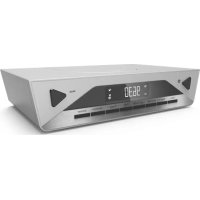
UR2040 - Radio Soundmaster - Free user manual and instructions
Find the device manual for free UR2040 Soundmaster in PDF.


| Product type | Digital DAB+/FM/Bluetooth alarm clock radio |
| Brand | Soundmaster |
| Model | UR2040 |
| Power supply | 5.5 V DC, 2 A (AC adapter included) |
| Power consumption | 12 W |
| FM frequency range | 87.5 - 108.0 MHz (50 kHz steps) |
| DAB frequency range | Band III: 174.928 - 239.2 MHz |
| Number of presets | 20 DAB + 20 FM |
| Radio functions | Auto/manual search, AMS (auto memory), RDS |
| Bluetooth | Yes, for audio streaming and hands-free calls |
| Alarms | Dual, 4 modes (daily, weekday, weekend, one day), sources: DAB, FM, buzzer |
| Special date alarm (SDA) | 10 programmable alarms |
| Sleep timer | Up to 90 minutes, adjustable in 5 min steps |
| Kitchen timer | Preset durations (10, 15, 30, 40, 60 min) or custom |
| LED lamp | Yes, auto-off after 120 minutes |
| Display | Backlit LCD with clock, calendar, station information |
| Time formats | 12H or 24H, auto-update via DAB signal |
| Volume control | Electronic, 32 levels |
| Remote control | Included |
| Storage temperature | -10 °C to +65 °C |
| Operating temperature | 0 °C to +35 °C |
| Care and cleaning | Clean with a dry cloth, do not use detergents or abrasive cloths |
| Safety | Do not open, risk of electric shock; use a grounded outlet; keep away from heat sources and moisture |
| Environmental information | Do not dispose of with household waste, recycle at a WEEE collection point; batteries to be disposed of separately |
Frequently Asked Questions - UR2040 Soundmaster
User questions about UR2040 Soundmaster
0 question about this device. Answer the ones you know or ask your own.
Ask a new question about this device
Download the instructions for your Radio in PDF format for free! Find your manual UR2040 - Soundmaster and take your electronic device back in hand. On this page are published all the documents necessary for the use of your device. UR2040 by Soundmaster.
USER MANUAL UR2040 Soundmaster
text_image
2:08 Mode Volume > Timer MSM Light C=0/F Press > Menu 30/5 Sleep AMS Info EnterDEUTSCH
ENGLISH
FRANÇAIS
NEDERLANDS
ITALANIO
DANISH
NORSK
SVENSK
Hersteller
natural_image
Symbol of a trash bin crossed with no text or numbers, representing waste sorting or disposal (no text present)text_image
DAB DT MEM MEM 05text_image
DAB DT MEM MEM 05Lager Temperatur: -10° to +65°
Do not dispose of this product with the normal household waste at the end of its life cycle. Return it to a collection point for the recycling of electrical and electronic devices. This is indicated by the symbol on the product, user manual or packaging.
The materials are reusable according to their markings. By reusing, recycling or other forms of utilization of old devices you make an important contribution to the protection of our environment.
Please contact your local authorities for details about collection points.

WARNING
Risk of electric shock Do not open!

Caution: To reduce the risk of electric shock, do not remove the cover (or back). There are no user serviceable parts inside. Refer servicing to qualified service personnel.

This symbol indicates the presence of dangerous voltage inside the enclosure, sufficient enough to cause electric shock.

This symbol indicates the presence of important operating and maintenance instructions for the device.
Safety, Environmental and Setup Instructions
- Use the device in dry indoor environments only.
- Protect the device from humidity.
- Do not open the device. RISK OF ELECTRIC SHOCK! Refer opening and servicing to qualified personnel.
- Connect this device to a properly installed and earthed wall outlet only. Make sure the mains voltage corresponds with the specifications on the rating plate.
• Make sure the mains cable stays dry during operation. Do not pinch or damage the mains cable in any way. - A damaged mains cable or plug must immediately be replaced by an authorized service center.
- In case of lightning, immediately disconnect the device from the mains supply.
- Children should be supervised by parents when using the device.
- Clean the device with a dry cloth only.
Do NOT use CLEANING AGENTS or ABRASIVE CLOTHS!
- Do not expose the device to direct sunlight or other heat sources.
• Install the device at a location with sufficient ventilation in order to prevent heat accumulation. - Do not cover the ventilation openings!
• Install the device at a safe and vibration-free location. - Install the device as far away as possible from computers and microwave units; otherwise radio reception may be disturbed.
- Do not open or repair the enclosure. It is not safe to do so and will void your warranty. Repairs only by authorized service/ customer center.
- Only use mercury and cadmium-free batteries.
- Used batteries are hazardous waste and NOT to be disposed of with the household waste!!! Return the batteries to your dealer or to collection points in your community.
- Keep batteries away from children. Children might swallow batteries. Contact a physician immediately if a battery was swallowed.
- Check your batteries regularly to avoid battery leakage.
- Batteries shall not be exposed to excessive heat such as sunshine, fire or the like.
- CAUTION: Danger of explosion if battery is incorrectly replaced Replace only with the same or equivalent type

Used batteries are hazardous waste and NOT to be disposed of with the household waste! As a consumer you are legally obligated to return all batteries for environmentally responsible recycling - no matter whether or not the batteries contain harmful substances *).
Return batteries free of charge to public collection points in your community or to shops selling batteries of the respective kind.
Only return fully discharged batteries.
*) marked Cd = cadmium, Hg = mercury, Pb = lead
Before start, please Read this first
1 General Description
● DAB&FM Digital Tuning System (20DAB+20FM Preset Stations by manual)
● AMS function (Automatic Memory System)
● RDS feature provide radio station name display & automatic time up-date
● Precise crystal is used for system operation
● Real time clock display with day-flag
● 12|24 Hour clock display
● Built in calendar with auto leap year handling within 2000-2099
● 4 mode dual alarms can be set to daily, weekday, week-end and single day independently
● Alarm output can be set to DAB, FM or Buzzer sound
● Automatic or Manual search and Up, Down features are provided
● Electronic Volume Control (32 level)
- Sleep function up to 90 minutes.
● 10 SDA(Special Date Alarm)
● Automatic change to standby mode after 15 minutes if not any sources playing.
- LED Lighting function
- Bluetooth function
● Radio Frequency range:
• FM: 87.5 \~ 108.0 MHz, 50kHz | Step
• DAB Band III 174.928-239.2 MHz
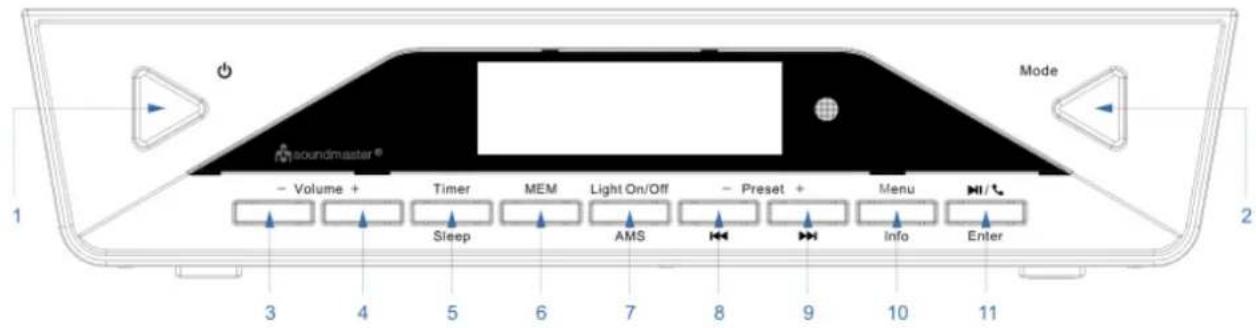
Key List
text_image
1 2 3 4 5 6 7 8 9 10 11 Soundmaster® - Volume + Timer MEM Light On/Off - Preset + Menu - Sleep AMS - Info Enter- :Turn on or turn off the unit
- Mode: BT, FM, DAB mode selector
- Volume -:Decrease the volume
- Volume+: Increase the volume
- Timer|Sleep: Cooking timer setting and review|Sleep function
- MEM:Station Memory entry/Preset station review
- Light On/Off|AMS: Turn ON/Off the Light|Auto Memory Stored for radio station
- Preset-| 🖼️ :Call back preset station for down| Tune down radio station ,tune the number to last one
- Preset+| ▶: Call back preset station for up | Tune up radio station, tune the number to next one
- MenuInfo: Entry to all the basic setting, such as time, date ,alarm and so on | Press to show information of station
- |Enter: Pause, Free of hand|Function setup, Exit setting, enter and Confirm
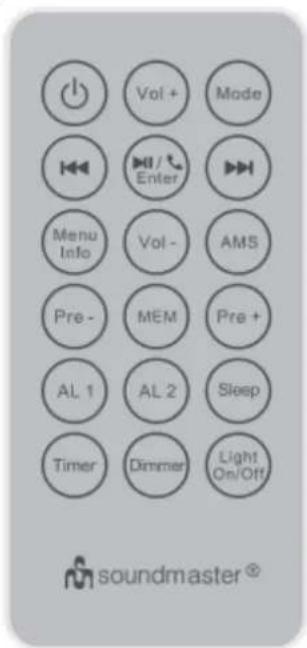
Remote Control key list
| Key Mark | Function |
| Device power On /Off | |
| VOL+ | Volume increase |
| VOL- | Volume decrease |
| Mode | DAB、FM、BT selector |
| Tune down radio station ,tune the number to last one | |
| |Enter | Pause, Free of hand | Function setup, Exit setting, enter and Confirm |
| Tune up radio station ,tune the number to next one | |
| Menu|Info | Entry to all the basic setting, such as time, date ,alarm and so on| Press to show information of station |
| AMS | Auto Memory System for radio station |
| Pre- | Call back preset station for down |
| MEM | Station Memory entry/Preset station review |
| Pre+ | Call back preset station for up |
| AL1 | Review Alarm1 |
| AL2 | Review Alarm2 |
| Sleep | Automatic OFF Timer |
| Timer | Operate for timer function |
| Dimmer | Adjust the brightness of the display to be high or low |
| Light On/Off | Turn ON/Off the Light |
text_image
Vol + Mode Menu Info Vol - AMS Pre - MEM Pre + AL 1 AL 2 Sleep Timer Dimmer Light On/Off soundmaster®Assembly Drawing
text_image
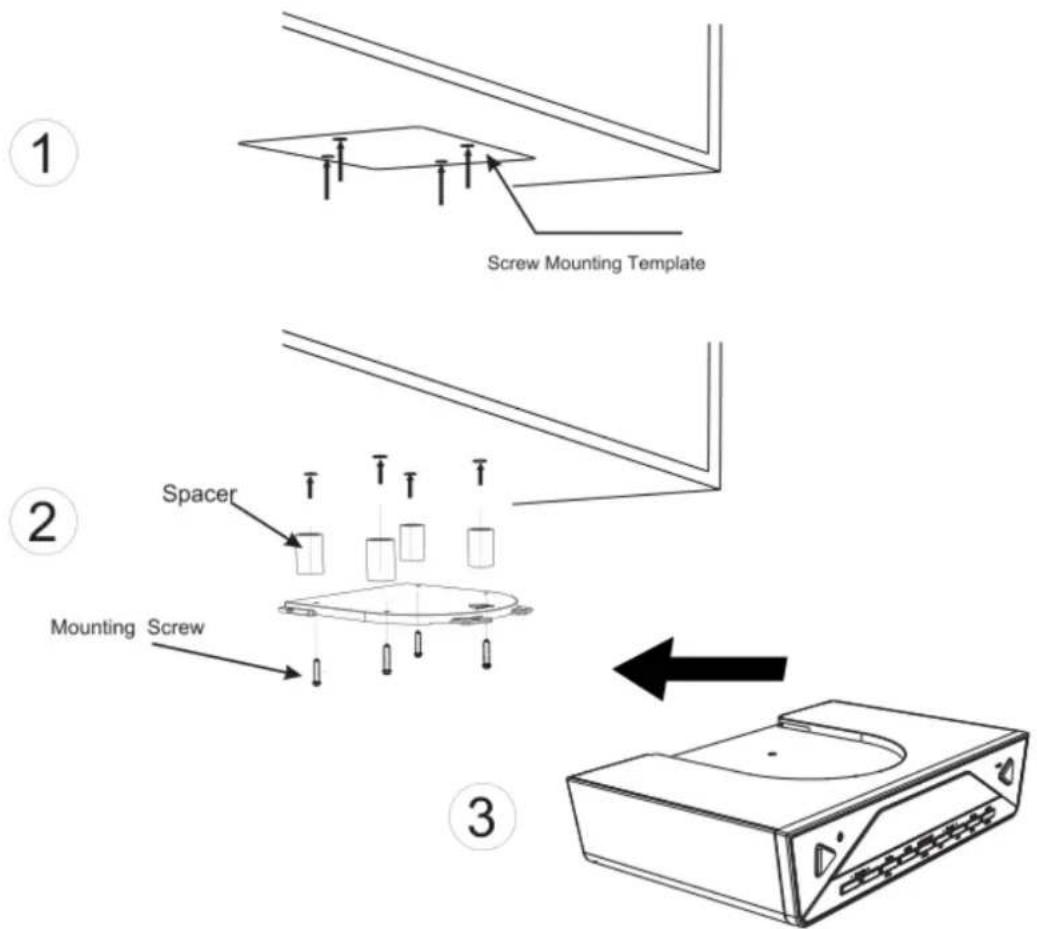
Screw Mounting Template Spacer Mounting Screw ① ② ③Install the unit as below 3 steps:
- Place the mounting/drill template under the cabinet with tape, so the unit will be located where you want to, and drill four holes with diameter 1/16 inch drill bit
- Fasten the screw as the above drawing with supplied Spacer+ mounting bracket+ long screw or mounting bracket + short screw
- Push the unit to the mounting bracket
Warning: To prevent damage, do not place any heating or cooking appliance beneath the unit, install the unit as far as possible from a source of noise such as fridge, microwave oven etc.
2 Getting start
Power Up
- When device connect to power and it's powered up first time, Automatic update function will start automatically and scrolling text "UPDATE" is display on LCD, it may need few minutes depends signal strength and device working environment, when signal was received, the right time should be displayed on LCD accordingly. To terminate it, press any key during the period
- When the automatic system setting had been terminate by user or update un-succeed, the date and clock are defaulted to 01.01.2015, 0:00
• The all alarms are defaulted to 0:00
• The unit is switched to clock auto-run mode - Default back light automatically set to dim from 23:00 to 05:59 unless you switch the auto dimmer to OFF
Setup Device
When Auto-Run Mode, Press
- Press <> or <> to set Clock when set menu mode
- Press
to enter Set Clock. - Press < ◀◀> or < ▶▶> to set value of hour.
- Press
to Confirm hour. - Same as the hour to set the minute.
Set Calendar
- Press <> or <> to set Calendar when set menu mode.
- Press
to setup value of calendar. - Press <> or <> to set value of dates.
- Press
to Confirm date value
• Same as the date to set the month and year.
Set the SDA (Special Date Alarm)
When you plan to do something such as you plan to visit somebody but maybe you can't remember, then you can set the SDA to remind you on that day.
- Press < ◀◀> or < ▶▶> to set SDA when device stay on setting menu mode.
- Press
• There are total 10 SDA for select.
- Press <> or <> to select number of SDA.
- Press
- Press <> or <> to set value of date.
- Press
• Same as the date to set the month and year.
- when the SDA active, the Beep will sound every hour for 10 minutes from 8:00 to 23:00 if not any key pressed.
- If want to cancel or turn off the SDA, please set the SDA is any of the past days, such as yesterday.
Select Clock format 12 or 24H
- Press < ◀◀> or < ▶▶◀> to select 12/24 hour format when set menu mode.
- Press
to enter set 12/24 hour format - Press <> or <> to select 12 or 24 hour format.
- Press
to Confirm select and return to set menu.
Set the alarm
- Press < ◀◀> or < ▶▶> to Set Alarm when stay on the setting menu
- Press
to enter to be start setup alarm : - Press <> or <> to select number of alarm.
- Press
to confirm selected number and enter to hour of alarm selection - Press <> or <> to setup value of hour
- Press
to confirm selected hour value
• Same as the hour to set minute and enter to select output of alarm active: - there are four kinds of choices, it is respectively as table 1
| Kinds | Means | Alarm duration time |
| OFF | Alarm is disable (default) | 0 |
| DAB | DAB sound for alarm active | 10 minutes |
| FM | FM sound for alarm active | 10 minutes |
| Buzzer | Buzzer sound for alarm active | 10 minutes |
Table (1)
- Press <> or <> to select the kind of output
- Press
to Confirm it and enter to days selection, - There are ten kinds of choices, it is respectively as table 2
| Kinds Means | |
| Daily Alarm work in every day | |
| Weekday Alarm work in weekday | |
| Weekend Alarm work in weekend | |
| Sun, Mon ... Sat Alarm work in one day of week | |
Table 2
- Press < ◀◀◀ > or < ▶▶◀◀> to select the kind alarm active arrangement
- Press
to Confirm the select and return to set menu.
Select Auto Dimmer
- Press <◀◀> or <▶◀◀> to select 'Auto Dim' when stay on setup menu stage.
- Press
to enter set auto dimmer - Press < ◀◀> or < ▶▶> to select ON or OFF. Default is On
- Press
to confirm selection and return to set up menu. - When you choose On,, the default back light automatically set to dim from 23:00 to 05:59
- When you choose Off, the device won't dim the back light automatically.
Select Update time
If you need the device update the time everyday, please set it to be ON, if you don't like it update the time, please set it to be OFF
- Press < ◀◀> or < ▶▶> to select ' Update time ' when stay on setup menu stage.
- Press
to enter set update time. - Press < ◀◀> or < ▶▶> to select ON or OFF. Default is OFF.
- Press
to Confirm selection and return to set up menu.
• If select ON, the device will update the time at 2:00 AM everyday.
• If select OFF, the device will not update the time.
Set factory reset ( Be careful to use this action )
- press <> or <> to select "Reset"
- Make sure you want delete all setup and reset the device to factory default, Press
to confirm it.
3 Using Device
Once Automatic done or finish all setup, Device ready for use now.
3.1 Listen the radio DAB
- Press < > once to turn on the radio.
- Press
to select device work mode to DAB
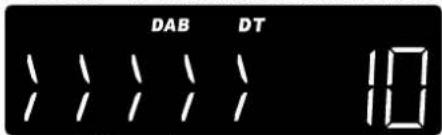
text_image
DAB DT 10• How to listen DAB station
a. When device first to using DAB, Automatic Scan function will start automatically
b. Till the action finish, Select DAB station
c. Press <> or <> once to select DAB station list.
d. Press < Enter > once to confirm and tune to the station.
• How to Store station into preset station
a. Press
b. Press <> or <> to change location.
c. Press and hold < Enter > to store value of station into current location.
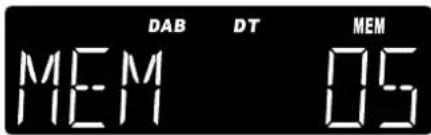
- Recall the preset station
a. Press
text_image
DAB DT MEM MEM 05b. Press <> or <> to change location.
c. Press
• How to use AMS
a. Press and hold
b. At the moment, the device will automatically scan the DAB station and store the station that had been scanned until scan up all the frequency or stored all the memory station, it will exit automatically.
• Review AMS stored station
a. Press < ◀◀◀ > or < ▶▶◀> to select station.
b. Press
- When play DAB station, Press and hold
a. SCAN>>>Local scan\Auto \Manual for choosing.
b. Menu>>>Reset\Version\Prune for choosing. (Version means review the software version)
- Review the information of station
a) Press
b) There are Seven kinds of choices, it is respectively:
- Station frequency and block number
- Data rate
- Station RSSI (Station Received Signal Strength Indicator)
- Signal error Rate
- DLS (Scrolling text)
- Program type
- Station name
3.2 Listen the Radio FM
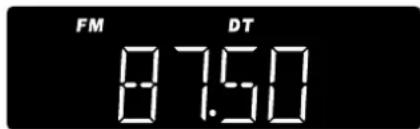
Press <⏻>key to turn device on, press
text_image
FM DT 87.50• How to search station
- When the radio is ON, press <▶> once to change the receiving frequency up by 1 step
- Press < ◀◀> once to change the receiving frequency down by 1 step.
- Press and hold <▶> to search the next radio station automatically by moving the receiving frequency up.
- Press and hold <◀> to search the next radio station automatically by moving the receiving frequency down.
- How to store station into preset location
- Press
once to select location of preset mode. - Press <> or <> to change location.
- Press and hold
to store value of station into The current location.
- Recall the presented station
- Press
once to select location of preset. - Press <> or <> to change location.
- Press
to Confirm select and recall the frequency.
• How to set up station by AMS (Automatic Memory Setup)
- Press and hold
for 2 seconds to active AMS mode. - In this mode, the radio will automatically scan the radio station and store the station that had been scanned until scan up all the frequency or stored all the memory station, it will exit automatically.
• How to Review stored station:
-
Press and hold
to enter select list of AMS store mode. -
Press <> or <> to select station.
-
Press
to confirm select and tune to new frequency
- When play FM station, Press and hold
-
Audio>>>Audio\Mono for choosing.
-
Menu>>>Reset\Version for choosing. (Version means review the software version)
• Review information of station
-
Press
to review information of station. -
There are three kinds of choices, it is respectively:
√ Station text
√ Station Program type
√ Station RSSI(Station Received Signal Strength Indicator)
3.3 Use Bluetooth function
- Press <⏻>key to turn device on, press

text_image
BT BT- the icon of BT flashing, press
- When you want to play music, you can use <▶> to pause, use the <◀> and <▶> to choose the last track or next track.
- When you want to answer the telephone, when listen the telephone ring ,press
- When you want to dial someone, dial the telephone number with your cellphone, then speak in the front of the device.
Note: The device will search the last connected cellphone automatically.
3.4 Using Cooking Timer
- Press
- Press <|◀|> or <▶▶|> to choose the five value (00:10 or 00:15 or 00:30 or 00:40 or 1:00), press
- if you want to set any time you need, press
- When the timer is running press
- Press and hold
- Beep sound alarm is selected,
a. Sound of beep toggles at the Speaker
b. The duration of alarm is 10 minutes
- Press any key to terminate the currently active alarm.
3.5 Using the LED lamp
Press "Light on/off" once, the lamp will on, press again will off, when lamp on and not off by user, it's will automatic off for 120 minutes.
3.6 Using Sleep function
The function let user setup a timer to let device automatic power off
- Press
for 2 seconds to active sleep function, if device stay on the standby, will turn on the device. - Press the key every time will change each 5 minutes, value of timer since 90 to OFF.
- Press other key to start its corresponding function with the sleep timer is run at background
- When no key has been pressed for 15 seconds, the system exit sleep timer display mode, but the sleep timer is run at background, and the icon of bed showed on the display.
- Once
was pressed for 2 seconds, The current sleep value will be shown on display. - If want to cancel the sleep, press
several times until it to OFF.
3.7 Electronic Volume Control
- Press
- Press
once, to decrease speaker volume by one step. Hold for continually. - Adjust Volume control sound output to a comfortable level, don't make it too loud.
Technical Data
Input voltage, current: DC5.5V,2A
Power consumption: 12W
Radio Frequency range: FM: 87.5 \~ 108.0 MHz, 50kHz | Step
DAB Band III 174.928-239.2 MHz
Store temperature: -10^ to +65^
Operating temperature:
0^ to +35^
Specifications are subject to change without further notice.
Copyright by Wörlein GmbH, D 90556 Cadolzburg.

PROTECTION DE L'ENVIRONNEMENT

text_image
DAB DT MEM MEM 05text_image
DAB DT MEM MEM 05 MEM 06natural_image
Silhouette of a person using a ladder to lift a flag, enclosed in a circular frame (no text or symbols)Impostare SDA (Special Date Alarm)
text_image
DAB DT MEM MEM 05 MEM 05text_image
Screw Mounting Template Spacer Mounting Screw ① ② ③text_image
DAB DT MEM MEM 05Stille inn SDA (Special Date Alarm)
text_image
DAB DT MEM MEM 05√ Stasjon RSSI(Station Received Signal Strength Indicator)
*) markerade Cd = kadmium, Hg = kvicksilver, Pb = bly
text_image
Screw Mounting Template Spacer Mounting Screw ① ② ③text_image
DAB DT MEM MEM 05• Granska AMS-lagrad station
Hereby, Wörlein GmbH declares that this Bluetooth device is in compliance with the essential requirements and other relevant provisions of Directive 1999/5/EC.
A copy of the Declaration of Conformity may be obtained at the following location: Wörlein GmbH, Gewerbestrasse 12, D 90556 Cadolzburg, Germany
