WP950 - Interdental brush Waterpik - Free user manual and instructions
Find the device manual for free WP950 Waterpik in PDF.



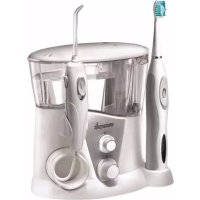
| Product type | Water flosser and sonic toothbrush combined |
| Brand | Waterpik |
| Model | WP950 |
| Power supply | Electric mains (voltage depends on country) |
| Pressure adjustment | 10 levels (1 to 10) |
| Reservoir capacity | Approximately 600 ml (not exactly specified) |
| Main functions | Water jet + sonic brushing with 2 speeds, 2-minute timer, pause every 30 seconds |
| Included accessories | Classic jet tip, orthodontic tip, Plaque Seeker tip, Pik Pocket tip, tongue scraper, standard brush head, compact brush head |
| Battery type (toothbrush) | Rechargeable nickel-metal hydride (NiMH), non-replaceable |
| Charging time (toothbrush) | 24 hours for the first charge |
| Battery life (toothbrush) | About 1 week of normal use (2 two-minute brushings per day) |
| Maintenance | Removable reservoir and storage case dishwasher-safe (top rack); descaling with white vinegar every 1 to 3 months |
| Safety | Do not immerse; do not use in bath; not recommended for pacemaker users without medical advice |
| Warranty | 2-year limited (excluding accessories) |
| Spare parts and repairability | Tips and brush heads sold separately; no user-serviceable parts (except battery removal at end of life) |
Frequently Asked Questions - WP950 Waterpik
User questions about WP950 Waterpik
0 question about this device. Answer the ones you know or ask your own.
Ask a new question about this device
Download the instructions for your Interdental brush in PDF format for free! Find your manual WP950 - Waterpik and take your electronic device back in hand. On this page are published all the documents necessary for the use of your device. WP950 by Waterpik.
USER MANUAL WP950 Waterpik
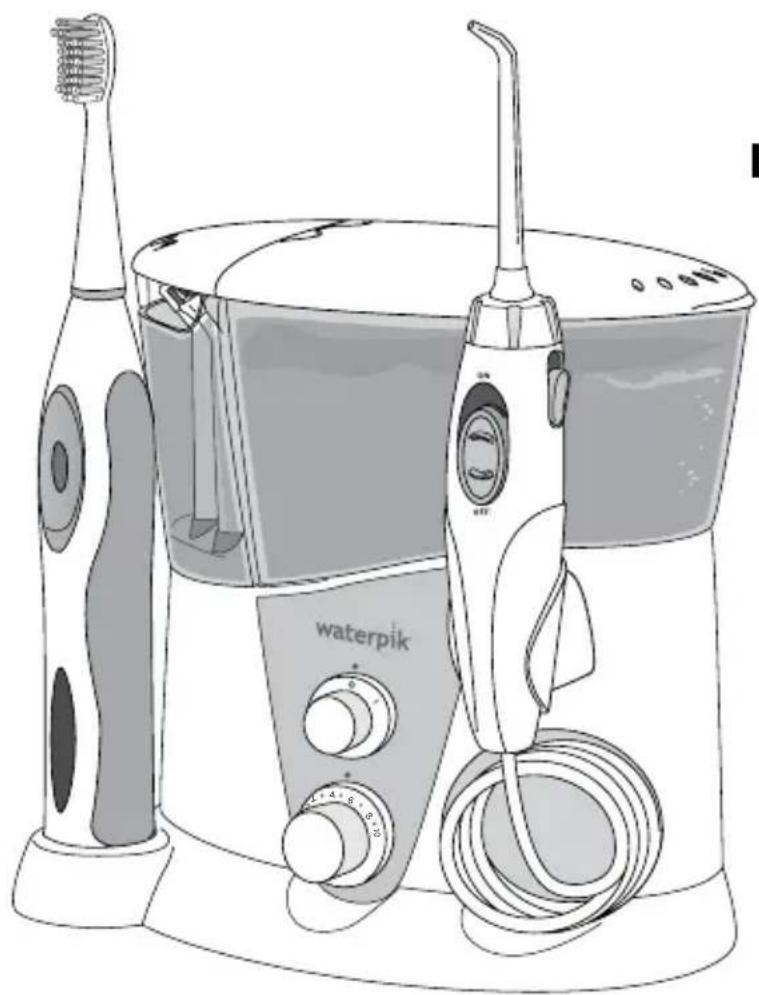
Waterpik Water Flosser plus Sonic Toothbrush Model WP-950
Important Safeguards 3
Product Description 5
Getting Started With Your Water Flosser 6
Cleaning and Troubleshooting Your Waterpik Water Flosser 8
Getting Started With Your Sensonic® Professional Plus Toothbrush 9
Care of Your Sensonic Professional Plus Toothbrush 10
Water Flosser and Sensonic Professional Plus Toothbrush Limited Two-Year Warranty 11
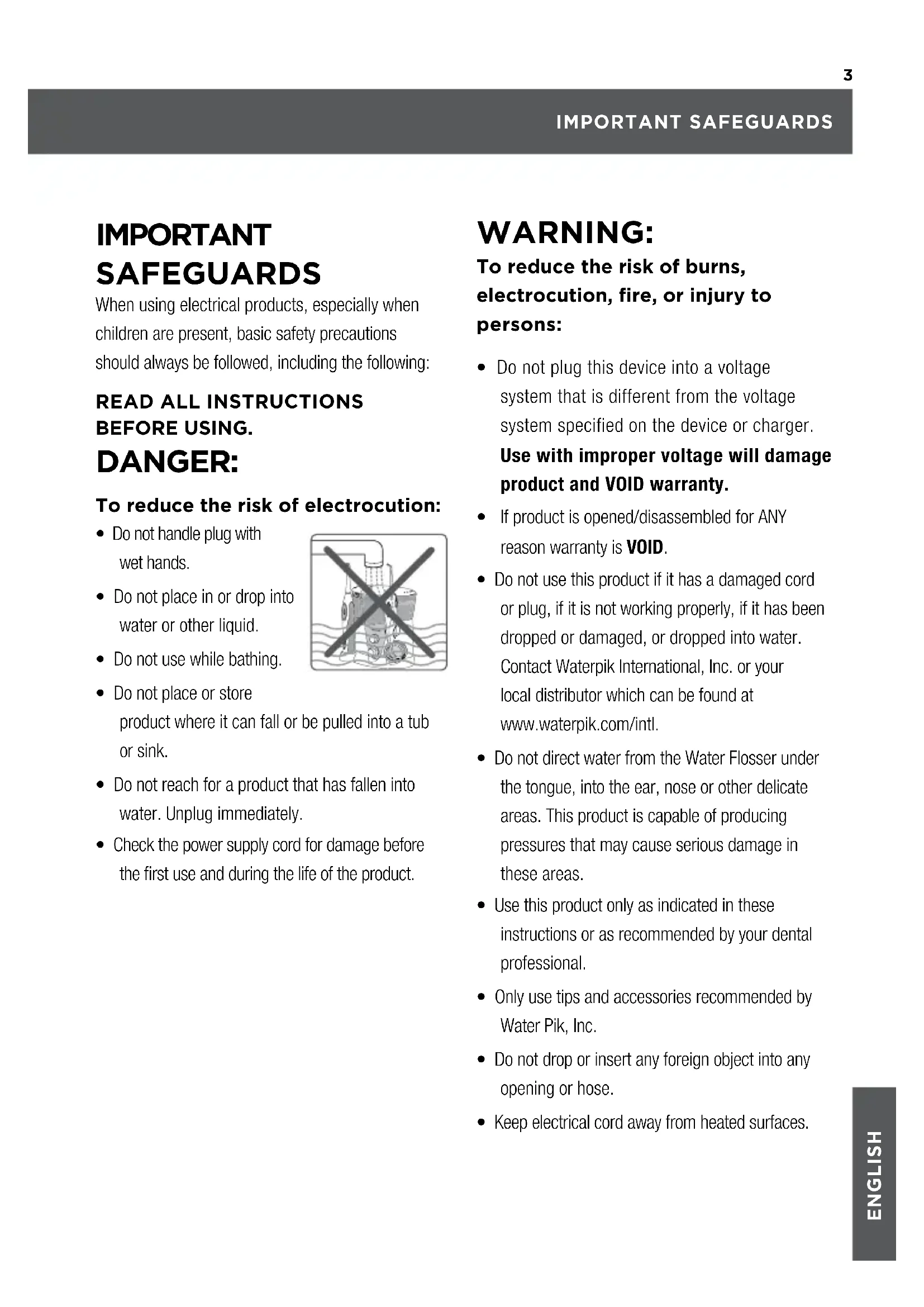
IMPORTANT SAFEGUARDS
When using electrical products, especially when children are present, basic safety precautions should always be followed, including the following:
READ ALL INSTRUCTIONS BEFORE USING.
DANGER:
To reduce the risk of electrocution:
- Do not handle plug with wet hands.
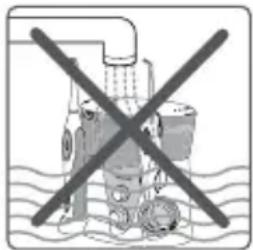
- Do not place in or drop into water or other liquid.
- Do not use while bathing.
- Do not place or store product where it can fall or be pulled into a tub or sink.
- Do not reach for a product that has fallen into water. Unplug immediately.
- Check the power supply cord for damage before the first use and during the life of the product.
WARNING:
To reduce the risk of burns, electrocution, fire, or injury to persons:
- Do not plug this device into a voltage system that is different from the voltage system specified on the device or charger. Use with improper voltage will damage product and VOID warranty.
If product is opened/disassembled for ANY reason warranty is VOID. - Do not use this product if it has a damaged cord or plug, if it is not working properly, if it has been dropped or damaged, or dropped into water. Contact Waterpik International, Inc. or your local distributor which can be found at www.waterpik.com/intl.
- Do not direct water from the Water Flosser under the tongue, into the ear, nose or other delicate areas. This product is capable of producing pressures that may cause serious damage in these areas.
- Use this product only as indicated in these instructions or as recommended by your dental professional.
- Only use tips and accessories recommended by Water Pik, Inc.
- Do not drop or insert any foreign object into any opening or hose.
-
Keep electrical cord away from heated surfaces.
-
Do not use Water Flosser or Sonic Toothbrush outdoors or operate where aerosol (spray) products are being used or where oxygen is being administered.
- Do not use iodine, or water insoluble concentrated essential oils in the Water Flosser. Use of these can reduce product performance and will shorten the life of the product.
- Remove any oral jewelry prior to use of the Water Flosser or Sonic Toothbrush.
- Do not use either the Water Flosser or Sonic Toothbrush if you have an open wound on your tongue or in your mouth.
- If your physician or cardiologist has advised you to receive antibiotic premedication before dental procedures, you should consult your dentist and/or medical professional before using the Water Flosser or Sonic Toothbrush or any other oral hygiene aid.
- This product complies with the safety standards for electromagnetic devices. If you have a pacemaker or other implanted device containing magnets or electronics, contact your physician or the device manufacturer prior to using the Sonic Toothbrush.
- If the Pik Pocket™ tip (not included in all models) separates from the shaft for any reason, discard tip and shaft and replace with new Pik Pocket™ tip.
- Do not use the Water Flosser for more than 5 minutes in each two-hour period.
-
This product does not contain any user serviceable parts in the toothbrush handle or Water Flosser unit. Do not attempt to open either component except for battery disposal. See page 10-11, "Battery Removal."
-
Using toothpastes containing baking soda or peroxide, abrasive or chemical cleaners may damage the plastic housing of this product.
- Closely instruct and supervise children 8 years and above and individuals with special needs in the proper use of the Water Flosser and Sonic Toothbrush.
- Children should be supervised to ensure that they do not play with the appliance.
- There are no consumer serviceable parts in this appliance and it does not require maintenance.
- Fill Water Flosser reservoir with warm water or other dental professional recommended solutions only.
SAVE THESE INSTRUCTIONS.
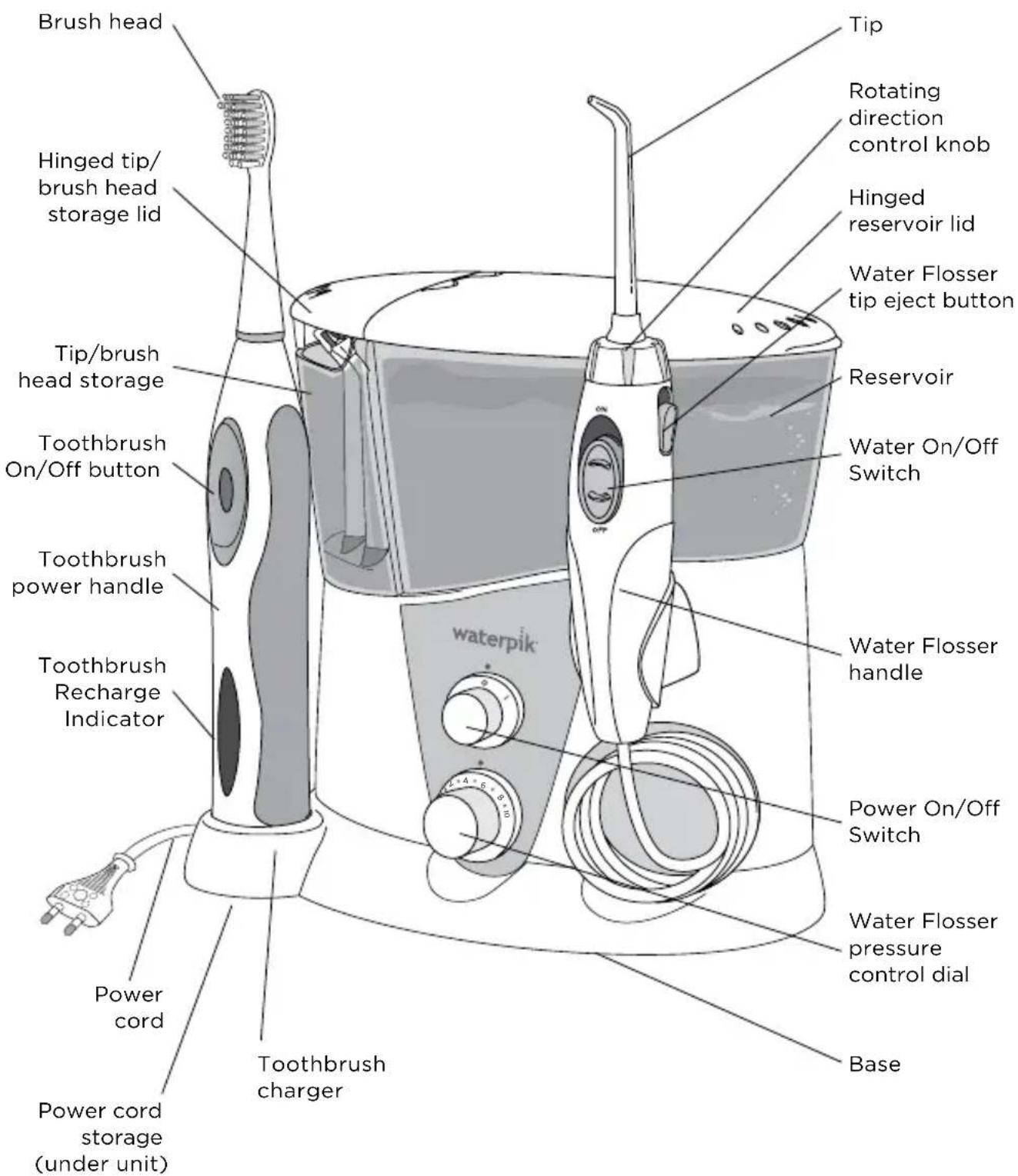
NOTE: All tips and brush heads not included in all models.
| Replace Every 3 Months | Replace Every 6 Months | ||
| BEST FOROrthodontic Tip Classic Jet Tip BEST FOR | |||
| Braces General Use | General Use | ||
| BEST FORPik Pocket™ Tip Tongue Cleaner BEST FOR | |||
| Periodontal Pockets Furcations | Fresher Breath | ||
| Plaque Seeker® Tip EEST FOR Replacement tips can be purchased from your local distributor, which can be found at www.waterpik.com/intl. | |||
| Sensonic® Standard Brush Head | BEST FOR Plaque Removal | ||
| Sensonic® Compact Brush Head | BEST FOR Plaque Removal | ||
Powering the Unit
Plug the cord into an electrical outlet. If the outlet
is controlled by a wall switch, be sure it is turned on.
Preparing the Reservoir
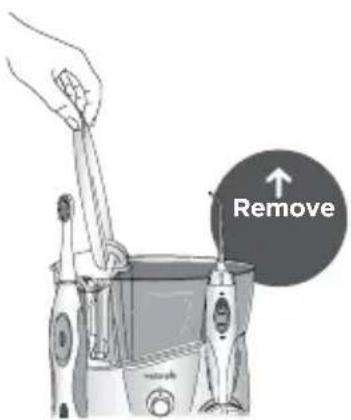
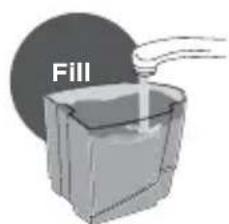
Lift the reservoir lid, remove the reservoir, and fill with lukewarm water. Replace the reservoir over the base and press down firmly and close the lid.
Inserting and Removing Tips
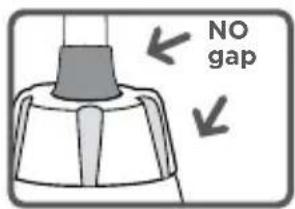
Insert tip into the center of the Water Flosser handle, pressing down firmly until tip clicks into place. The colored ring will be flush with the top of the handle if the tip is correctly locked into place.
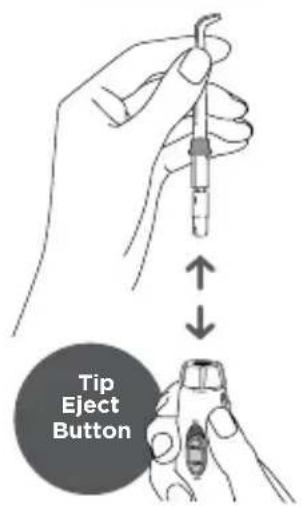
To remove tip from the handle push the tip eject button on the handle.
CAUTION: Do not press tip eject button while unit is running.
Prime Unit (First Time Use Only)
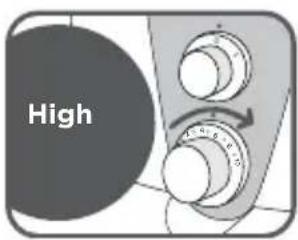
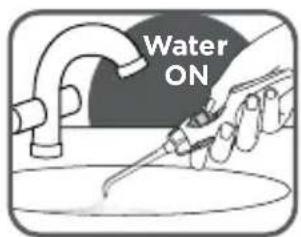
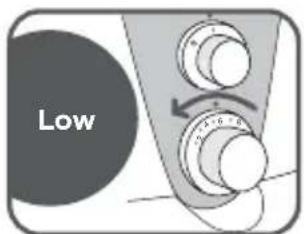
Set pressure control dial on base to high (pressure setting No. 10), point the handle and tip into sink. Turn unit ON (I). Turn water ON until water flows from the tip. Turn the unit OFF (O).
Adjusting the Pressure Setting
Turn the pressure control dial on the base of the unit to the lowest setting (pressure setting No. 1) for first-time use.
Gradually increase pressure over time to the setting you prefer - or as instructed by your dental professional.
Recommended Technique
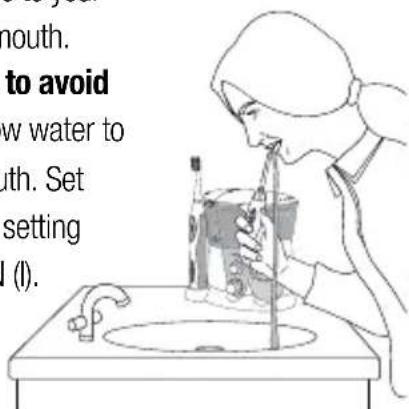
For best results, start with the back teeth and work toward the front teeth.

Glide tip along gumline and pause briefly between teeth. Continue until you have cleaned the inside and outside of both the upper and lower teeth.
Lean over sink. Direct the stream at a 90-degree angle to your gumline with tip in mouth.
Slightly close lips to avoid splashing, but allow water to flow freely from mouth. Set pressure at desired setting and turn the unit ON (I).
Turn water ON. Begin cleaning.
When Finished
Turn the unit OFF (0). Empty any liquid left in the reservoir. Unplug the unit.
NOTE: If you used mouthwash or other solution besides water, see "Using Mouthwash and Other Solutions" section.
TIP USAGE
Pik Pocket™ Tip
The Pik Pocket™ tip is specifically designed to deliver water or antibacterial solutions deep into periodontal pockets.
To use the Pik Pocket™ tip, set the unit to the lowest pressure setting only.

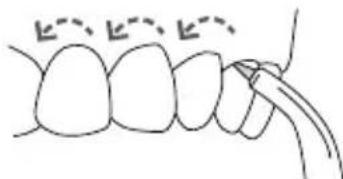
Place the soft tip against a tooth at a 45-degree angle and gently place the tip under the gumline, into the pocket. Turn the unit on and continue tracing along the gumline.
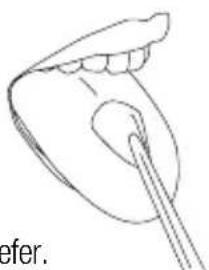
Tongue Cleaner Tip
To use the tongue cleaner tip, set to lowest pressure setting, place tip in the center/middle of your tongue about half way back and start the Water Flosser. Pull forward with light pressure. Increase pressure as you prefer.
Orthodontic Tip
To use the orthodontic tip, gently glide tip along gumline, pausing briefly to lightly brush area
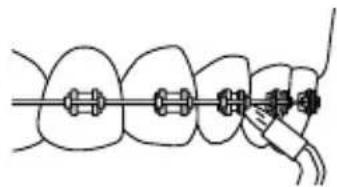
between teeth and all around orthodontic bracket, before proceeding to the next tooth.
Plaque Seeker Tip
To use the Plaque Seeker tip, place the tip close to the teeth so that the
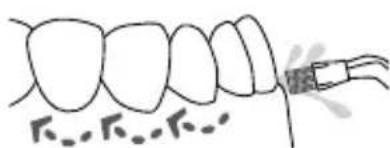
bristles are gently touching the teeth. Gently glide tip along gumline, pausing briefly between teeth to gently brush and allow the water to flow between the teeth.
Using Mouthwash and Other Solutions
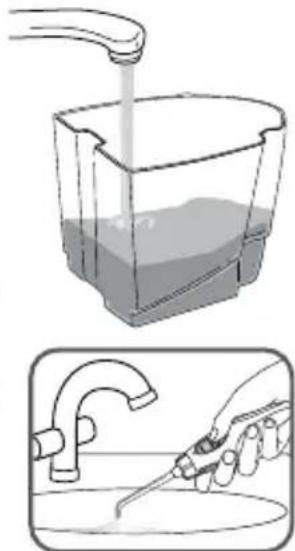
Your Waterpik® Water Flosser can be used to deliver mouthwash and antibacterial solutions. After using any special solution, rinse unit to prevent clogging by partially filling reservoir with warm water and running unit with tip pointed into sink until unit is empty.
Cleaning
Before cleaning, unplug from the electrical outlet. Clean the product when necessary by using a soft cloth and mild non-abrasive cleanser.
The accessory storage container and the water reservoir are removable for easy cleaning and are top rack dishwasher safe.
Removing Hard Water Deposits
Hard water deposits may build up in your unit, depending on the mineral content of your water. If left unattended, it can hinder performance.
Cleaning internal parts: add 2 tablespoons of white vinegar to a full reservoir of warm water. Point the handle and tip into sink. Turn unit ON and run until reservoir is empty. Rinse by repeating with a full reservoir of clean warm water.
This process should be done every 1 to 3 months to ensure optimal performance.
Leakage
If leaking due to a damaged hose, replacement hoses and handles can be purchased from your local distributor, which can be found at www.waterpik.com/intl.
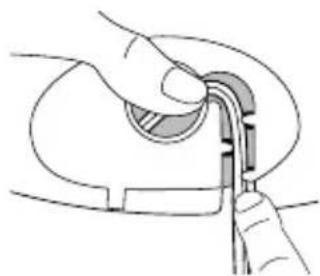
Excess Power Cord Storage
After determining the length of power cord necessary, push extra cord into the cavity on the bottom of the unit and insert cord into the retention slots.
Service Maintenance
Waterpik® Water Flossers have no consumer serviceable electrical items and do not require routine service maintenance. For all your service needs go to www.waterpik.com/intl to find your local distributor. Please do not ship product to Waterpik International, Inc. offices, this will delay service. Refer to the serial and model numbers in all correspondence. These numbers are located on the bottom of your unit.
Still have questions? Go to www.waterpik.com/intl to find your local distributor.
Charging the Sensonic Professional Plus Toothbrush
Charge for 24 hours before first use. All 3
charge indicator lights will stay on continuously when the unit is fully charged. A full charge will last for approximately 1 week of typical use (2 minutes of brushing twice a day).
If the toothbrush is to be stored for an extended period of time (six months or more), be sure to fully charge it prior to storage.
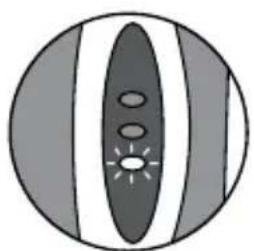
Recharge Indicator Lights
Charge indicator lights will indicate level of battery charge for approximately 10 seconds after use and after removal from the charging base, and will then turn off.
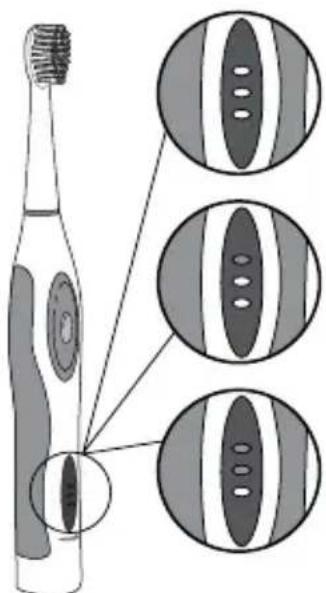
Fully charged
2 / 3 charged
13 charge life (recommend recharge)
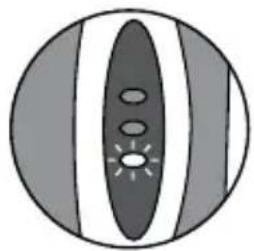
Unit will not operate if the bottom LED begins to blink rapidly.
In order for the toothbrush to begin to work again, it must be placed on the charger for approximately 1 hour.
CARE OF YOUR SENSONIC PROFESSIONAL PLUS TOOTHBRUSH
Sonic brushing
- Slide the brush head onto handle and push it down firmly.
- Place the brush head into your mouth before turning the unit on.
- Press button once for low speed, and twice for high speed.
If you hold the on/off button down briefly while in the low speed position the brush will shut off. - For best results, position brush along gumline at a 45-degree angle.
Use light pressure with a small, slow back and forth motion covering one or two teeth at a time. - Quad Timer: Your Sensonic® Professional Plus Toothbrush will create a short pause every 30 seconds, to remind you to move to the next quadrant of your mouth.
- 2-Minute Timer: The brush will automatically shut off after 2 minutes of run time.
Cleaning
- After each use, turn off unit, remove the brush head from the handle and rinse brush head under running water.
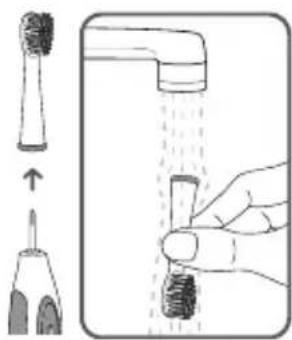
- Wipe the handle dry after each use.
Service
Waterpik® toothbrushes have no consumer serviceable or replaceable electrical items and do not require routine service maintenance. For all your warranty and accessory needs, please visit www.waterpik.com/intl to find your local distributor. Please do not ship product to Waterpik International, Inc. offices, this will delay service. Refer to serial number and model number in all correspondence. These numbers are located on the bottom of your charger.
Disposal
This product contains rechargeable Nickle Metal Hydride batteries. The batteries are not replaceable. Please do not dispose of the unit in the household waste. Remove the batteries per the instructions below and recycle at your local recycling center.
Battery Removal
Note: This process is not reversible.
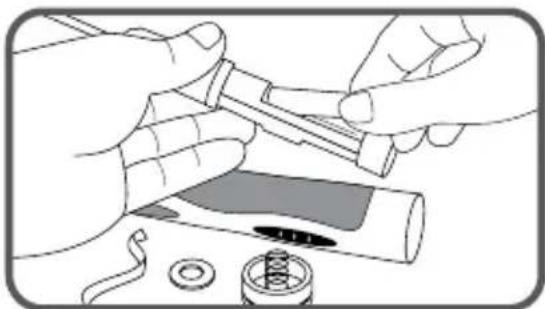
Remove the battery only at the end of the product's life for recycling. Doing so earlier will destroy the product. Deplete the battery charge until the brush no longer operates. Observe basic safety precautions. Remove the batteries as shown and recycle them and the rest of the product according to local regulations.
WATER FLOSSER AND SENSONIC PROFESSIONAL PLUS TOOTHBRUSH LIMITED TWO-YEAR WARRANTY
- Use coin or washer to rotate cap counterclockwise until cap protrudes.
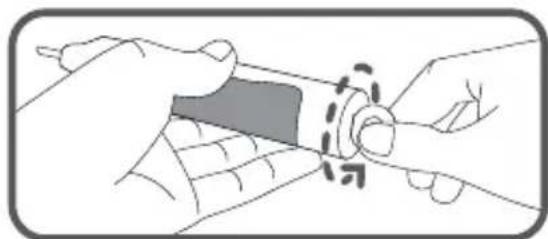
- Push down hard with shaft on hard surface.
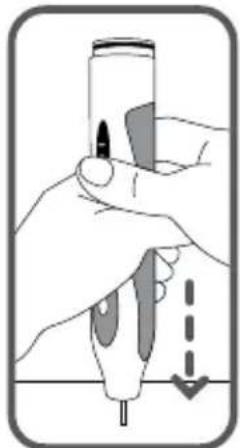
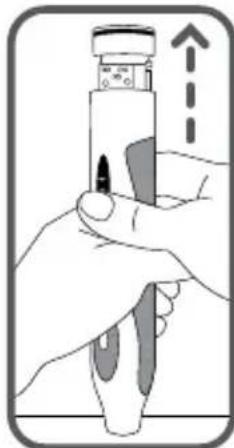
- Remove cap and pull internal body out. Cut tape and remove.
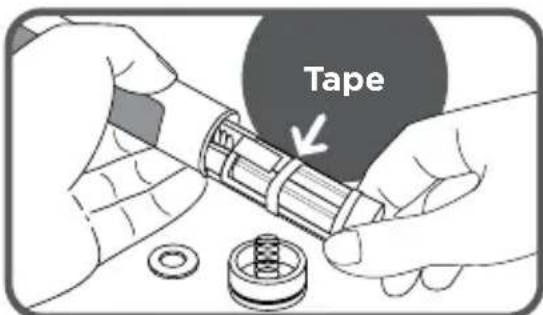
- Lift battery pack up and cut battery wires, one at a time, to free from circuit board.
Water Pik, Inc. warrants to the original purchaser/owner of this product that it is free from defects in materials and workmanship for two years from date of purchase. Save your receipt as your proof of purchase date. Water Pik, Inc. reserves the right to request the product to be returned for analysis to confirm the claim falls within our warranty policy. We will replace any part of the product, which in our opinion is defective, provided the product has not been abused, misused, altered or damaged after purchase and was used according to these instructions. Repair or replacement services provided for by the guarantee will be carried out by the local distributor, whose details may be found on [www.waterpik.com/intl]. Upon request of the consumer, a copy of the guarantee complete with the local distributor's information will be provided by email or mail. This limited warranty excludes accessories or consumable parts such as tips, brush heads, etc.
This warranty gives you specific legal rights. You may also have other rights that vary depending on the law in your place of residence.
To locate your local distributor, go to www.waterpik.com/intl.
INHALTSVERZEICHNIS
WATERPIK -MUNDDUSCHE
Zungenreiniger
Technique recommende
Embout Plaque Seeker
1/3 de charge restante (recharge recommandee)
Beccuccio Plaque Seeker
Perutilizzareil
beccuccio Plaque
1730 East Prospect Road
Fort Collins, CO 80553-0001 USA
www.waterpik.com
Waterpik is a trademark of Water Pik, Inc.
registered in Argentina, Australia, Benelux, Brazil, Canada, Chile, China, Czech Republic, Denmark, EU, Finland, France, Germany, Hong Kong, Hungary, India, Israel, Italy, Japan, Korea, Mexico, New Zealand, Norway, Pakistan, Poland, Russian Federation, Saudi Arabia, Singapore, South Africa, Spain, Sweden, Switzerland, Taiwan, Turkey, Ukraine, United Kingdom, and the United States.
Waterpik (stylized) is a trademark of Water Pik, Inc. registered in Australia, Brazil, Canada, China, EU, Hong Kong, Israel, Japan, Mexico, Korea, Russian Federation, Saudi Arabia, South Africa, Switzerland, Taiwan, Trinidad & Tobago, and the United States.
Sensonic® is a trademark of Water Pik, Inc. registered in Canada, China, EU, Japan, Switzerland, and the United States.
Pik Pocket™ is a trademark of Water Pik, Inc.
Plaque Seeker is a trademark of Water Pik, Inc. registered in Canada, China, EU, and the United States.
Made in CHINA.
Castle Court, 41 London Road
Reigate, Surrey RH2 9RJ United Kingdom