WP-583 - Interdental brush Waterpik - Free user manual and instructions
Find the device manual for free WP-583 Waterpik in PDF.


User questions about WP-583 Waterpik
0 question about this device. Answer the ones you know or ask your own.
Ask a new question about this device
Download the instructions for your Interdental brush in PDF format for free! Find your manual WP-583 - Waterpik and take your electronic device back in hand. On this page are published all the documents necessary for the use of your device. WP-583 by Waterpik.
USER MANUAL WP-583 Waterpik
When using electrical products, especially when children are present, basic safety precautions should always be followed, including the following:
READ ALL INSTRUCTIONS BEFORE USING.
DANGER:
To reduce the risk of electrocution:
- Do not handle charger with wet hands.
- Do not place charger in or drop charger into water or other liquid.
- Check the charger cord for damage before the first use and during the life of the product.
WARNING:
To reduce the risk of burns, electrocution, fire, or injury to persons:
- Do not plug this device into a voltage system that is different from the voltage system specified on the device or charger.
- If product is opened/disassembled for ANY reason, warranty is VOID.
- Do not use this product if it has a damaged cord or plug, if it is not working properly, if it has been dropped or damaged, or dropped into water. Contact Water Pik, Inc. via email at InternationalService@waterpik.com.
- Do not direct water under the tongue, into the ear, nose or other delicate areas. This product is capable of producing pressures that may cause serious damage in these areas.
- Use this product only as indicated in these instructions or as recommended by your dental professional.
-
Magnetic field: Pacemakers and similar implanted medical devices may be affected by magnet.
-
Only use tips and accessories that are recommended by Water Pik, Inc.
- Do not drop or insert any foreign object into any opening on the product.
- Keep charging unit and cord away from heated surfaces.
- Do not use this product outdoors or operate where aerosol (spray) products are being used or where oxygen is being administered.
- Do not use iodine, saline (salt solution), or water insoluble concentrated essential oils in this product. Use of these can reduce product performance and will shorten the life of the product. Use of these products may void warranty.
- Remove any oral jewelry prior to use of this product.
- Do not use if you have an open wound on your tongue or in your mouth.
-
If your physician advised you to receive antibiotic premedication before dental procedures, you should consult your dentist before using this instrument or any other oral hygiene aid.
-
Closely instruct and supervise children 8 years and above and individuals with special needs in the proper use of this product.
• Children should be supervised to ensure that they do not play with the appliance.
• There are no consumer serviceable parts in this appliance and it does not require maintenance. - Fill reservoir with warm water or other dental professional recommended solution only.
SAVE THESE INSTRUCTIONS.
TABLE OF CONTENTS
Product Description 5
Getting Started 6
Cleaning and Troubleshooting Your Waterpik® Water Flosser 8
Limited Two-Year Warranty 9
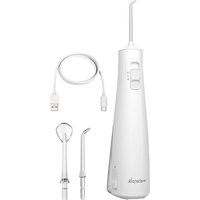
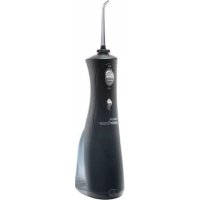
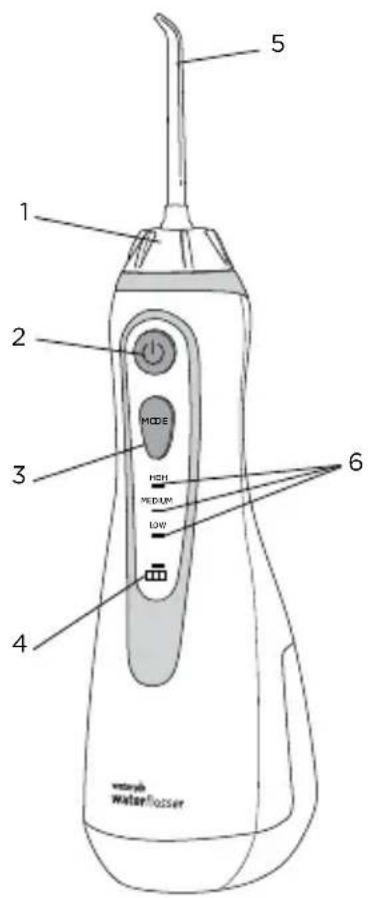
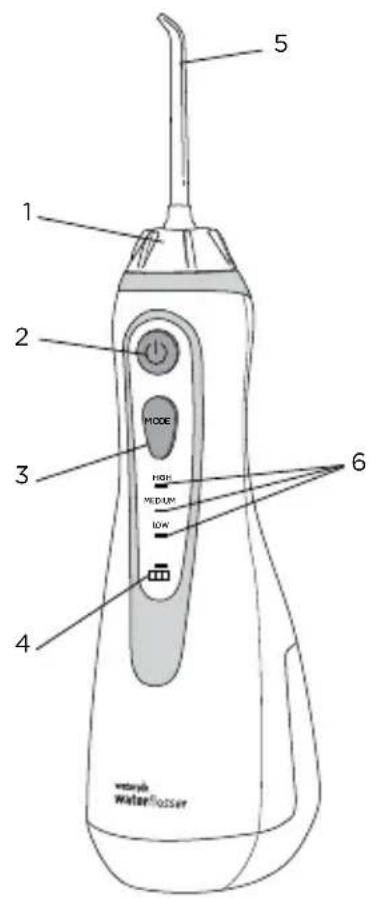
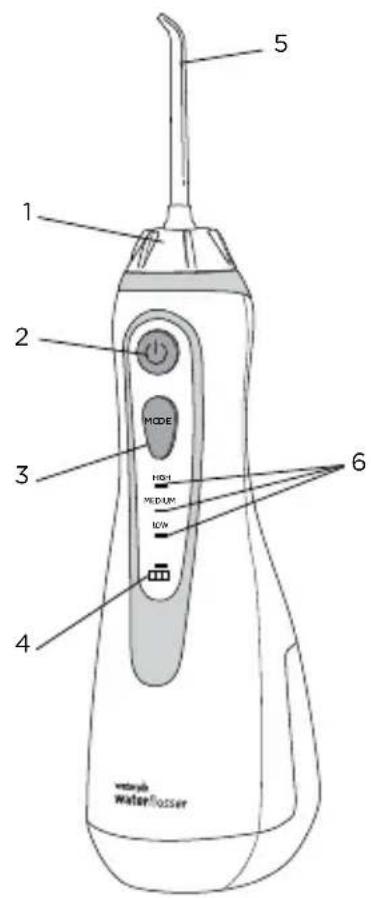
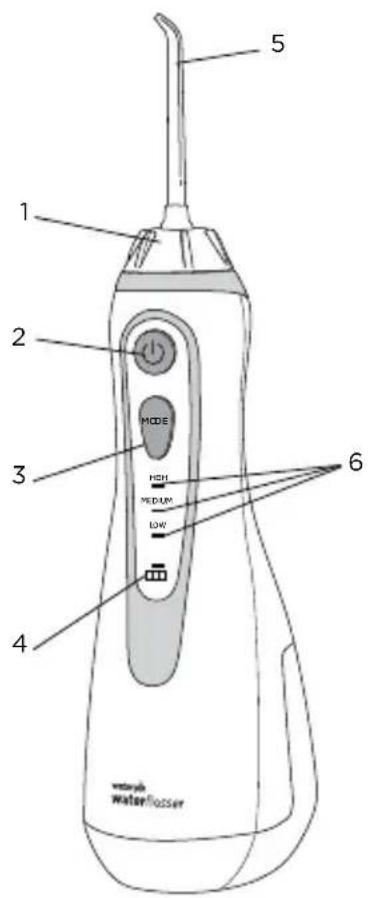
- Tip rotator
- Power button
- Mode/pressure button
- Battery charge indicator
- Tip
- LED pressure indicators
- Reservoir
- Tip eject button
- Reservoir fill door
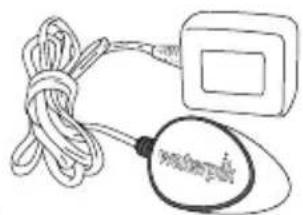
natural_image
Simple line drawing of a cord tied with a square object and a magnifying glass (no text or symbols)Charger
20018701-2, WP-560E, WP-569E, White
20018701-5, WP-562E, Black
20018701-21 WP-563E, Blue
20018701-9, WP-564E, Pink
20018701-22, WP-565E, Orchid
20018701-10, WP-566E, Teal
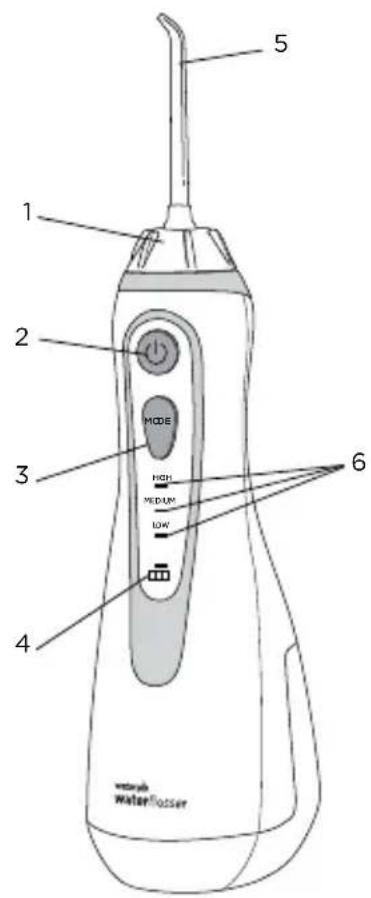
text_image
1 2 MODE 3 HIGH MEDIUM LOW 4 5 6 waterflosser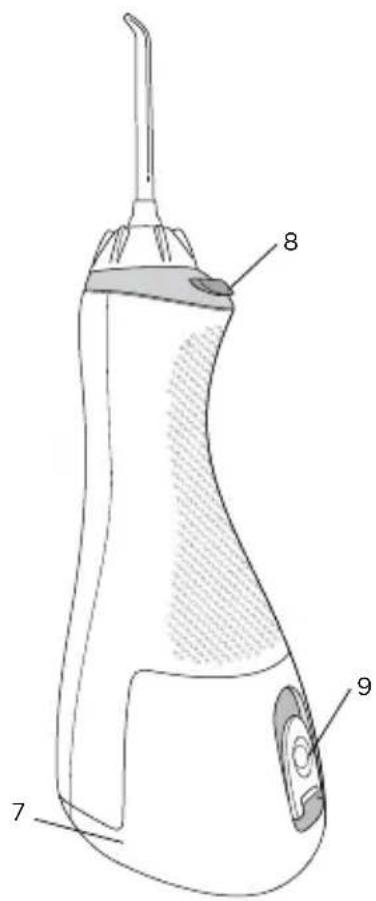
text_image
Technical diagram of a medical or laboratory device with numbered parts labeled 7, 8, and 9.TIPS
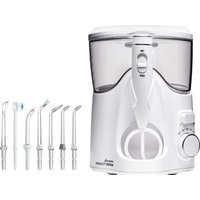
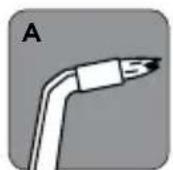
A. Orthodontic Tip*
- Braces/General Use
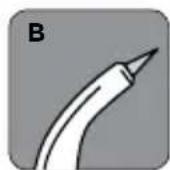
B. Pik Pocket ^® Tip*
- Periodontal Pockets/Furcations
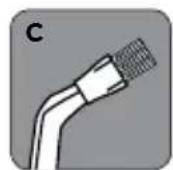
C. Plaque Seeker® Tip*
- Implants/Crowns/Bridges/Retainers/General Use
D. Toothbrush Tip*
-General Use
E. Classic Jet Tip**
-General Use
F. Tongue Cleaner**
- Fresher Breath
G. Travel Plug
- Keeps excess water from draining out while traveling
NOT ALL TIPS INCLUDED IN ALL MODELS
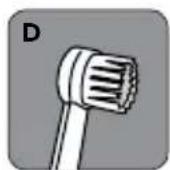
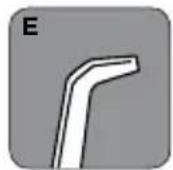
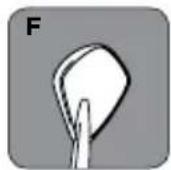
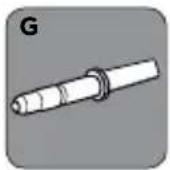
*Replace Every 3 months
**Replace Every 6 months

text_image
Diagram showing a medical device with labeled components and an arrow pointing to a device labeled 'mRNA' (mRNA-1)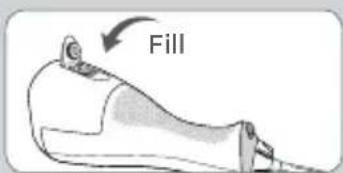
text_image
Fill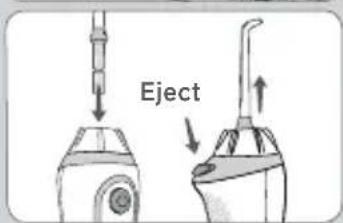
text_image
Eject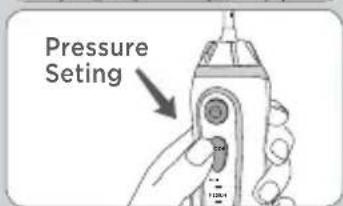
text_image
Pressure Setting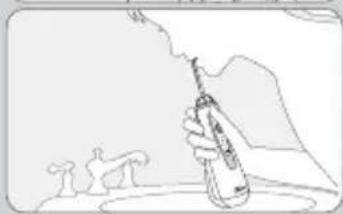
natural_image
Illustration of a hand holding a pen with abstract shapes in the background (no text or symbols)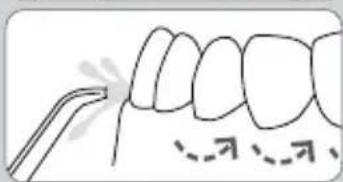
natural_image
Diagram of human teeth with dental tool tip, showing tooth alignment (no text or labels)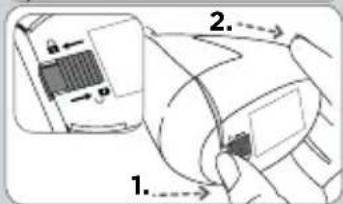
text_image
Diagram showing a device with labeled parts and directional arrows, likely illustrating a mechanical or electrical assembly.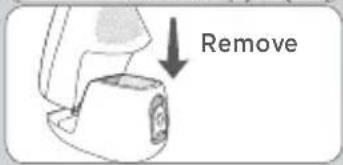
text_image
RemoveCharging Unit Prior to First Use
Plug the power cord into the wall and place the magnetic charger on the front of the unit for approximately 4 hours (see image). The charge indicator on the handle will flash when charging and will stay on continuously when the unit is fully charged. A full charge will last for approximately 1 week of typical use. When the batteries are in need of charging (approximately 30% charge left) the charge indicator light will blink 8 times quickly after use to indicate that you should recharge the unit. A complete recharge will take 3-4 hours. If you use your Water Flosser once a day or less, it is recommended you charge it once a week. If you use it twice a day or more, charge the unit more frequently.
Filling the Reservoir
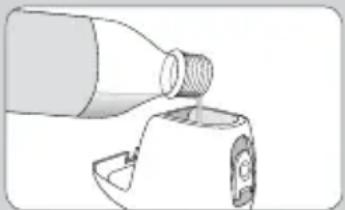
Remove the magnetic charger from the unit prior to filling reservoir and product use. Lift flip top on reservoir and fill the reservoir with lukewarm water.
Inserting and Remove Tips
Insert tip into the center of the knob at the top of the Water Flosser handle. Press firmly until the tip clicks into place. To remove the tip from the handle, press the tip eject button and pull tip from the handle.
CAUTION: Do not press tip eject button while unit is running.
Adjusting the Pressure Setting
You can adjust the pressure setting on your Water Flosser by pressing the mode button on the handle. Start with the lowest setting and increase to your liking.
Recommended Technique
Lean low over sink and place tip in mouth. Aim the tip toward gumline, and turn the unit ON (I).
For best results, start with the back teeth and work toward the front teeth. Glide tip along gumline and pause briefly between teeth. Continue until you have cleaned the inside and outside of both the upper and lower teeth.
Direct the jet stream at a 90-degree angle to your gumline. Slightly close
Tips to avoid splashing but allow water to flow freely from mouth into the sink.
Keep unit upright during use for best results.
When Finished
Turn the unit off. Empty any liquid left in the reservoir.
If desired, the reservoir may be removed from the power handle by sliding the reservoir release latch to the unlock position(1) sliding the reservoir release latch to the unlock position and then (2) sliding the reservoir down toward the base of the unit.
NOTE: NOT ALL TIPS INCLUDED WITH ALL MODELS.
TIP USAGE
Pik Pocket® Tip
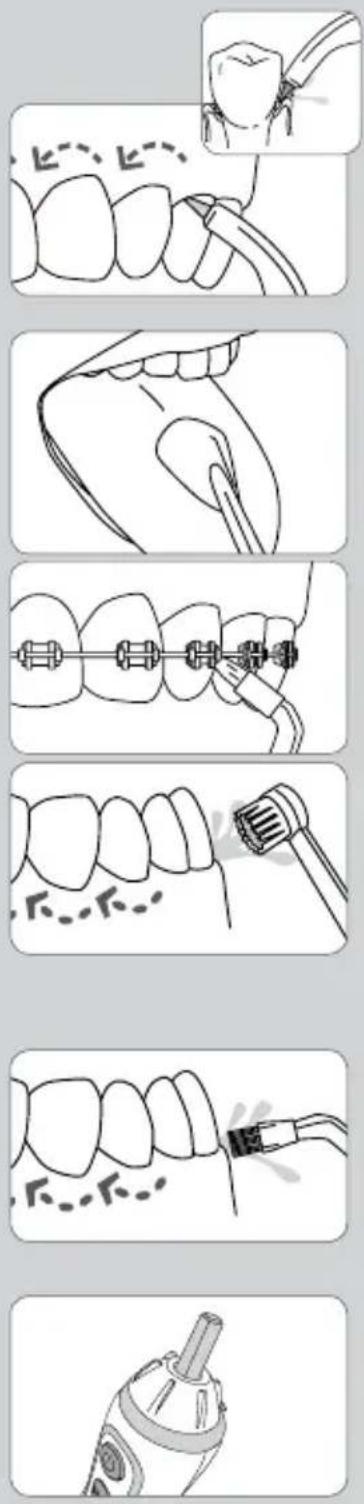
The Pik Pocket ^® tip is specifically designed to deliver water or antibacterial solutions deep into periodontal pockets.
To use the Pik Pocket ^® tip, set the unit to the lowest pressure
setting. Place the soft tip against a tooth at a 45-degree angle and gently place the tip under the gumline, into the pocket.
Tongue Cleaner Tip
Set to lowest pressure setting, place tip in the center/middle of your tongue about half way back. Pull forward with light pressure. Increase pressure as you prefer.
Orthodontic Tip
To use the orthodontic tip, gently glide tip along gumline, pausing briefly to lightly brush area between teeth and all around orthodontic bracket, before proceeding to the next tooth.
Toothbrush Tip
Place the toothbrush tip in mouth with the brush head on the tooth at the gumline. The toothbrush tip can be used with or without toothpaste.
Using a light pressure (bristles should not bend) massage the brush back and forth with very short strokes – much like you would with a manual toothbrush.
Plaque Seeker® Tip
To use the Plaque Seeker ^® tip, place the tip close to the teeth so that the bristles are gently touching the teeth. Gently glide tip along gumline, pausing briefly between teeth to gently brush and allow the water to flow between the teeth.
Travel Plug
When traveling, place travel plug in unit to keep excess water from draining out.
NOTE: Do NOT run unit while travel plug is in unit.
natural_image
Illustration of a bottle pouring liquid into a container (no text or symbols)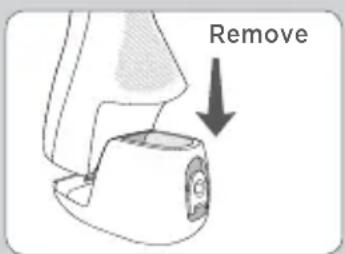
text_image
RemoveUsing Mouthwash and Other Solutions
Your Waterpik® Water Flosser can be used to deliver mouthwash and antibacterial solutions. For ease of adding other solutions remove the reservoir (see "When Finished" section) and add from top opening on reservoir. If you are adding additional water you may replace the reservoir and fill reservoir fully with the fill door. After using any special solution, rinse unit to prevent clogging by partially filling reservoir with warm water and running unit with tip pointed into sink until unit is empty.
Cleaning
Never immerse unit in water. Before cleaning, unplug from the electrical outlet. Clean the product when necessary by using a soft cloth and mild non-abrasive cleanser to wipe exterior.
The water reservoir is removable for easy cleaning and is top rack dishwasher safe.
It is recommended that the reservoir is removed and cleaned weekly.
Removing Hard Water Deposits / General Cleaning
Hard water deposits may build up in your unit, depending on the mineral content of your water. If left unattended, it can hinder performance. Cleaning internal parts: add 1 tablespoon of white vinegar to a full reservoir of warm water. Point the handle and tip into sink. Turn unit ON and run until reservoir is empty. Rinse by repeating with a full reservoir of clean warm water.
This process should be done every 1 to 3 months to ensure optimal performance.
Battery Care and Disposal
If the Water Flosser is to be stored for an extended period of time (six months or more), be sure to fully charge it prior to storage. The unit contains a Nickel Metal Hydride battery. At the end of the battery life, please recycle the unit at your nearest recycle center per local or state requirements. The battery is not replaceable.
Service Maintenance
Waterpik® Water Flossers have no consumer serviceable electrical items and do not require routine service maintenance. For all your warranty and accessory needs, please email InternationalService@Waterpik.com. Please do not ship product to Waterpik International, Inc. offices, this will delay service. Refer to the serial and model numbers in all correspondence. These numbers are located on the back of the handle and bottom of the reservoir respectively.
Still have questions? Email us at InternationalService@Waterpik.com
Water Pik, Inc. warrants to the original purchaser/ owner of this product that it is free from defects in materials and workmanship for two years from date of purchase. Save your receipt as your proof of purchase date. Water Pik, Inc. reserves the right to request the product to be returned for analysis to confirm the claim falls within our warranty policy. We will replace the product provided the product has not been abused, misused, altered or damaged after purchase and was used according to these instructions. For repair or replacement services provided for by the guarantee, please contact, via email, InternationalService@Waterpik.com. Upon request of the consumer, a copy of the guarantee will be provided by email or mail. This limited warranty excludes accessories or consumable parts such as tips, brush heads, etc.
This warranty gives you specific legal rights. You may also have other rights that vary depending on the law in your place of residence. Contact Water Pik, Inc. via email at InternationalService@Waterpik.com
WICHTIGE
natural_image
Simple line drawing of a rope tied with a magnifying glass, next to a rectangular object (no text or symbols)Ladegerät
20018701-2, WP-560E, WP-569E, Weiß
20018701-5, WP-562E, Schwarz
20018701-21 WP-563E, Blau
20018701-9, WP-564E, Pink
20018701-22, WP-565E, Orchidee
20018701-10, WP-566E, Türkis
text_image
1 2 MODE 3 HIGH MEDIUM LOW 4 5 6 waterflosser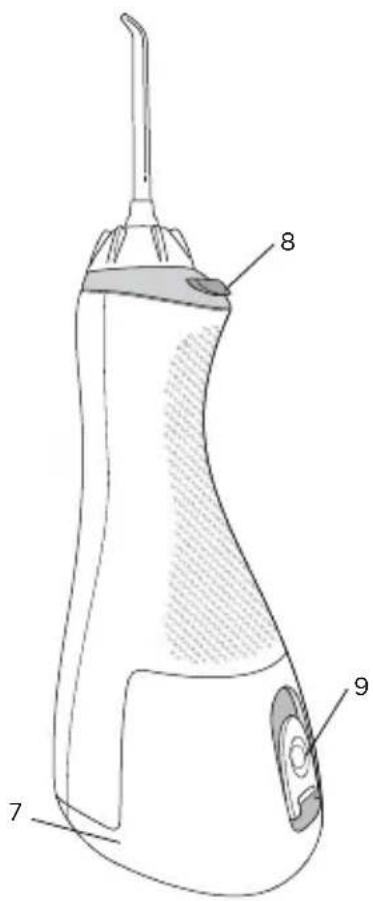
text_image
Technical diagram of a dental implant with labeled parts 7, 8, and 9DÜSEN
A. Orthodontic-Düse\*
text_image
Diagram showing a dental implant device with labeled components and an arrow pointing to the component.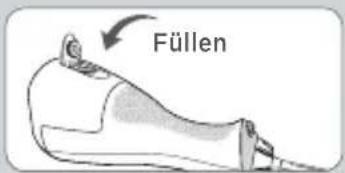
text_image
Füllen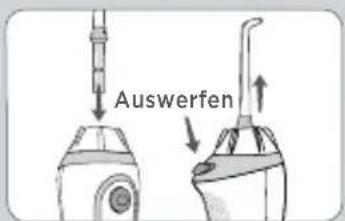
text_image
Auswerfen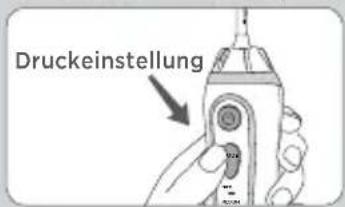
natural_image
Illustration of a hand holding a pen with smoke rising, surrounded by small figures (no text or symbols)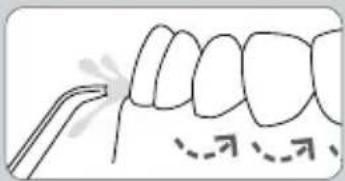
text_image
Diagram showing dental alignment with labeled tooth positions and a tool interacting with the teeth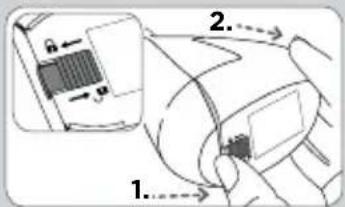
text_image
Diagram showing a device with labeled parts and directional arrows, likely illustrating a mechanical or electrical component assembly.text_image
Medical illustration showing dental procedure with labeled anatomical features and magnified detail view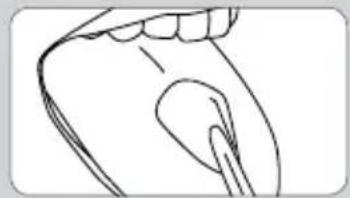
natural_image
Line drawing of a human mouth and jaw with teeth (no text or symbols)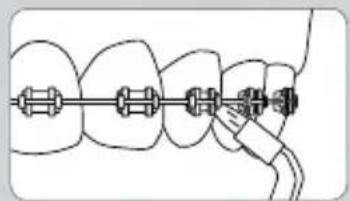
natural_image
Diagram of dental braces with a hand connecting them to a tooth (no text or symbols present)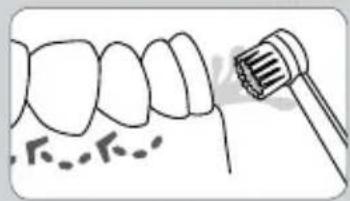
natural_image
Illustration of a dental tool interacting with teeth (no text or symbols)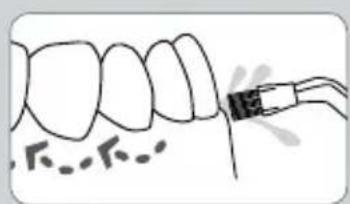
natural_image
Illustration of a dental procedure showing tooth alignment and root canal (no text or symbols)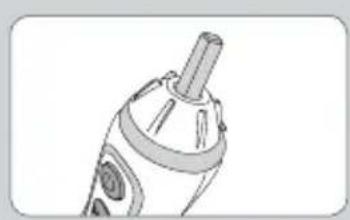
natural_image
Line drawing of a handheld device with a cylindrical handle and circular base (no text or symbols)natural_image
Illustration of a bottle pouring liquid into a container (no text or symbols)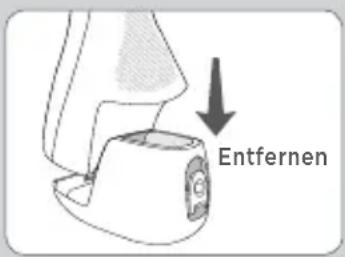
text_image
Entfernennatural_image
Simple line drawing of a cord tied with a magnifying glass, no text or symbols presentChargeur
20018701-2, WP-560E, WP-569E, blanc
text_image
Technical diagram of a dental implant with labeled parts 7, 8, and 9EMBOUTS
A. Embout orthodontique*
C. Embout Plaque Seeker®*
text_image
Diagram showing a medical device with labeled components and an arrow pointing to a device labeled 'materiya'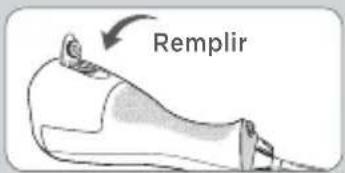
text_image
Remplir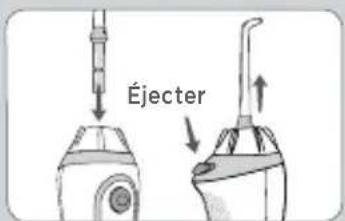
text_image
Éjecter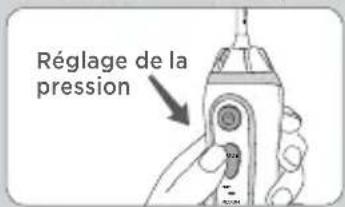
text_image
Réglage de la pression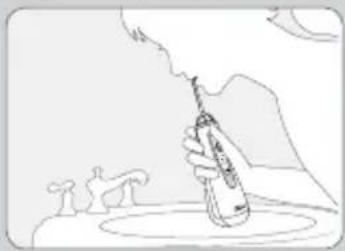
natural_image
Illustration of a hand holding a pen with smoke, emitting vapor, against a mountainous background (no text or symbols)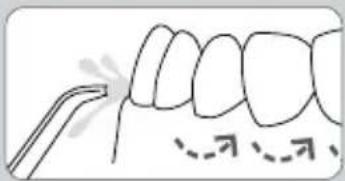
text_image
Diagram showing dental alignment with labeled tooth positions and surgical tools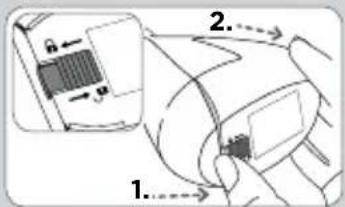
text_image
Diagram showing a device with labeled parts and directional arrows, likely illustrating a mechanical or electrical component assembly.text_image
Diagram illustrating dental procedure with labeled arrows and magnified detail view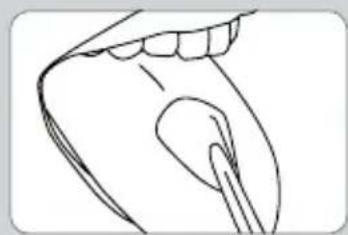
natural_image
Line drawing of a human mouth and jaw with a toothbrush (no text or symbols)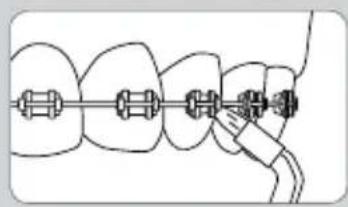
natural_image
Diagram of dental arching technique showing tooth arrangement and connecting tool (no text or labels)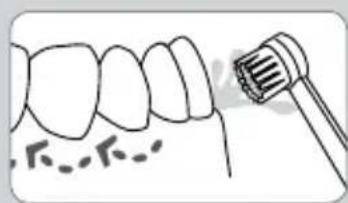
natural_image
Illustration of a tooth with a dental tool inserted, showing teeth and gum structure (no text or symbols)
natural_image
Diagram of a dental procedure showing tooth alignment and tooth penetration (no text or labels)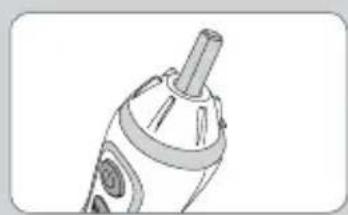
natural_image
Line drawing of a handheld device with a cylindrical handle and circular base (no text or symbols)Embout Plaque Seeker®
natural_image
Illustration of a bottle pouring liquid into a container (no text or symbols)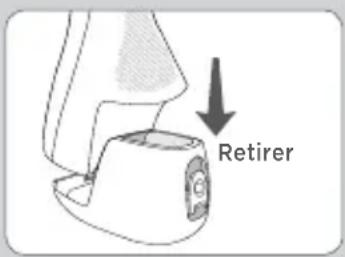
text_image
Retirernatural_image
Simple line drawing of a rope tied with a magnifying glass (no text or symbols)Caricatore
20018701-2, WP-560E, WP-569E, bianco
20018701-5, WP-562E, nero
20018701-21 WP-563E, blu
20018701-9, WP-564E, rosa
20018701-22, WP-565E, viola
20018701-10, WP-566E, verde ottanio
text_image
1 2 3 4 5 MODE HIGH MEDIUM LOW 6 waterflosser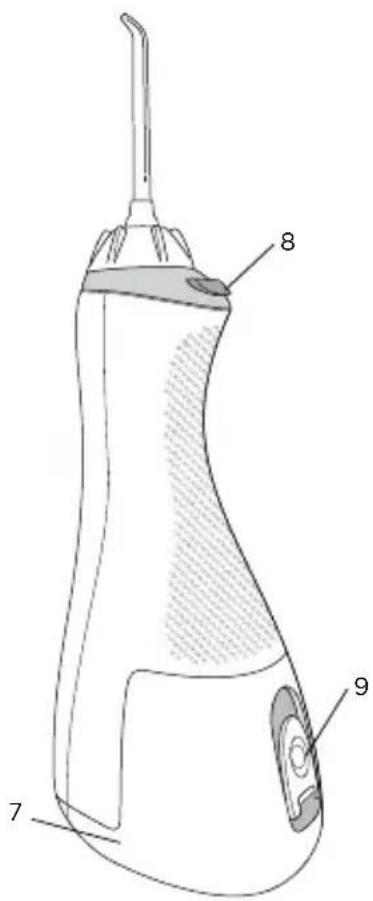
text_image
Technical diagram of a dental implant with labeled parts 7, 8, and 9NOTA: NON TUTTI I BECCUCCI SONO FORNITI CON TUTTI I MODELLI.
BECCUCCI
A. Beccuccio ortodontico*
text_image
Diagram showing a dental implant device with labeled components and an arrow indicating insertion or disassembly.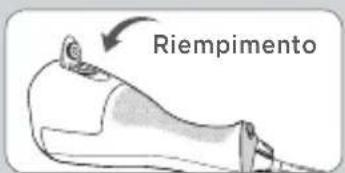
text_image
Riempimento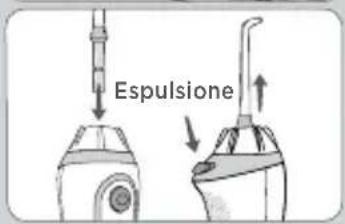
text_image
Espulsione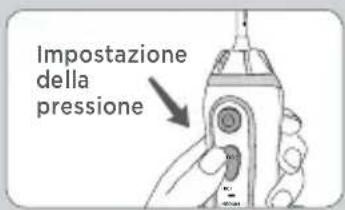
natural_image
Illustration of a hand holding a pen with smoke rising, next to small figures on a platform (no text or symbols)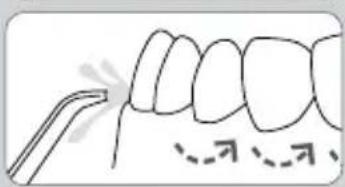
text_image
Diagram showing dental alignment with labeled arrows and a tool, likely illustrating tooth alignment or dental procedure.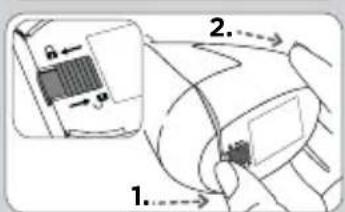
text_image
Diagram showing a device with labeled parts and directional arrows, likely illustrating a mechanical or electrical component assembly.text_image
Diagram illustrating dental procedure with labeled tooth positions and magnified detail view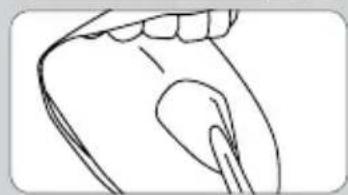
natural_image
Line drawing of a human hand and jaw with teeth (no text or symbols)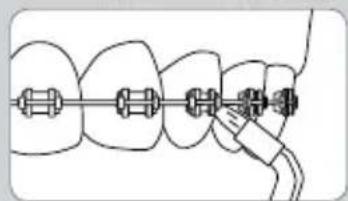
natural_image
Diagram of dental braces with a connecting rod (no text or labels)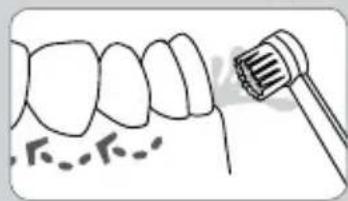
natural_image
Illustration of a tooth with a dental tool inserted, showing teeth and gum structure (no text or symbols)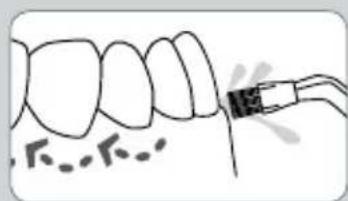
natural_image
Illustration of a tooth with a dental tool inserted, showing tooth structure and tooth density (no text or symbols)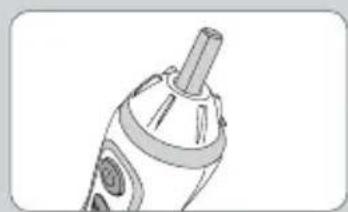
natural_image
Line drawing of a handheld electronic device with a cylindrical port and circular ports (no text or symbols)Beccuccio Plaque Seeker®
natural_image
Illustration of a bottle pouring liquid into a container (no text or symbols)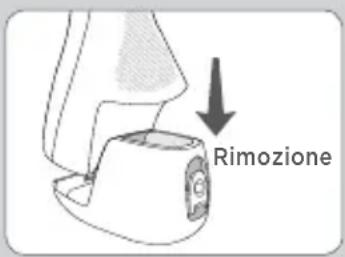
natural_image
Simple line drawing of a rope tied with a small rectangular object and a magnifying glass (no text or symbols)Cargador
20018701-2, WP-560E, WP-569E, blanco
20018701-5, WP-562E, negro
20018701-21 WP-563E, azul
20018701-9, WP-564E, rosa
20018701-22, WP-565E, orquídea
20018701-10, WP-566E, verde azulado
text_image
1 2 MODE 3 HIGH MEDIUM LOW 4 5 6 waterflosser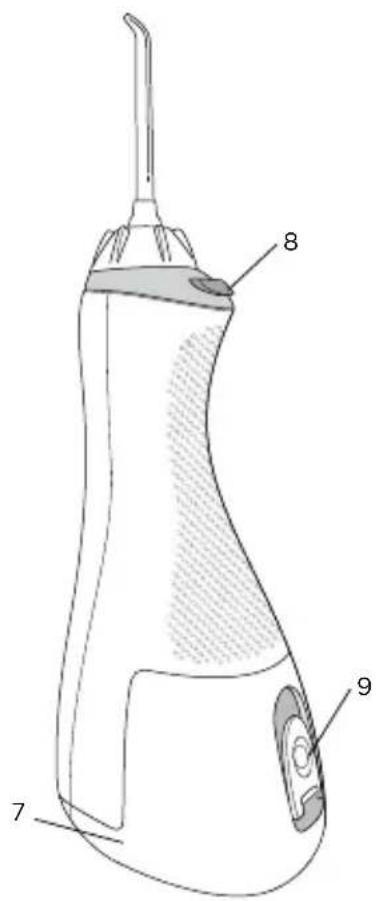
text_image
Technical diagram of a handheld electric shaver with labeled parts 7, 8, and 9BOQUILLAS
A- Boquilla para ortodoncia*
- Frenos / uso general
B. Boquilla Pik Pocket ® *
C. Boquilla Plaque Seeker®*
text_image
Diagram showing a dental implant device with labeled components and an arrow indicating the insertion point.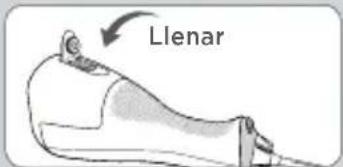
text_image
Llenar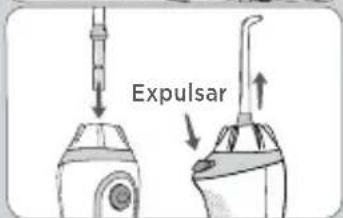
text_image
Expulsar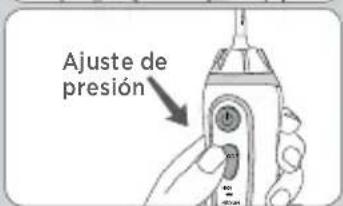
natural_image
Illustration of a hand holding a bottle with smoke rising, set against a mountainous background (no text or symbols)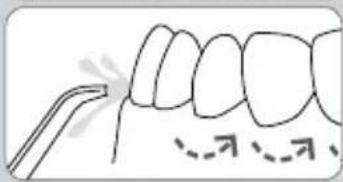
text_image
Diagram showing dental alignment with a tool and dashed arrows indicating specific tooth positions or measurement points.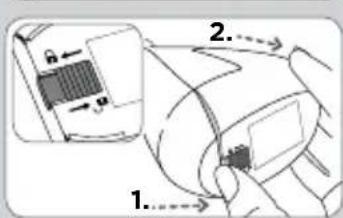
text_image
Diagram showing a device with labeled parts and directional arrows, likely illustrating a mechanical or electrical component assembly.text_image
Diagram illustrating dental procedure with labeled steps and magnified detail view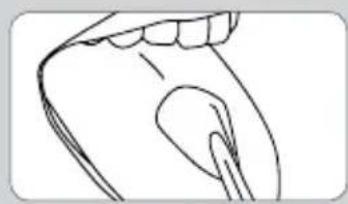
natural_image
Line drawing of a human mouth and jaw (no text or symbols)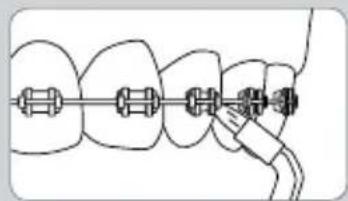
natural_image
Diagram of dental arching technique showing tooth arrangement and connecting tool (no text or labels)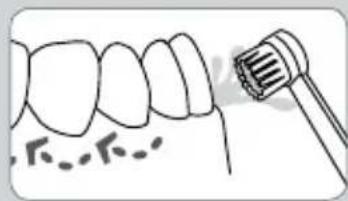
natural_image
Illustration of a dental tool interacting with teeth (no text or symbols)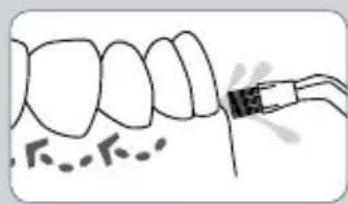
natural_image
Illustration of a tooth with a dental tool inserted, showing tooth structure and surrounding bone (no text or symbols)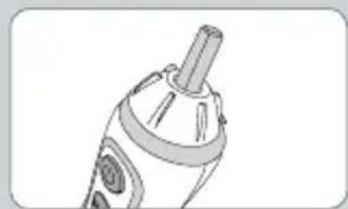
natural_image
Illustration of a handheld electric shaver with a cylindrical tip and circular base (no text or symbols)natural_image
Illustration of a bottle pouring liquid into a container (no text or symbols)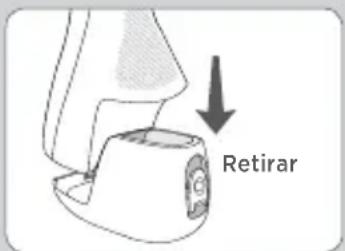
text_image
Retirarnatural_image
Simple line drawing of a rope tied with a square object and a magnifying glass (no text or symbols)Laadapparaat
20018701-2, WP-560E, WP-569E, Wit
20018701-5, WP-562E, Zwart
20018701-21 WP-563E, Blauw
20018701-9, WP-564E, Lila
20018701-22, WP-565E, Purper
text_image
1 2 3 4 5 6 MODE HIGH MEDIUM LOW water water/flower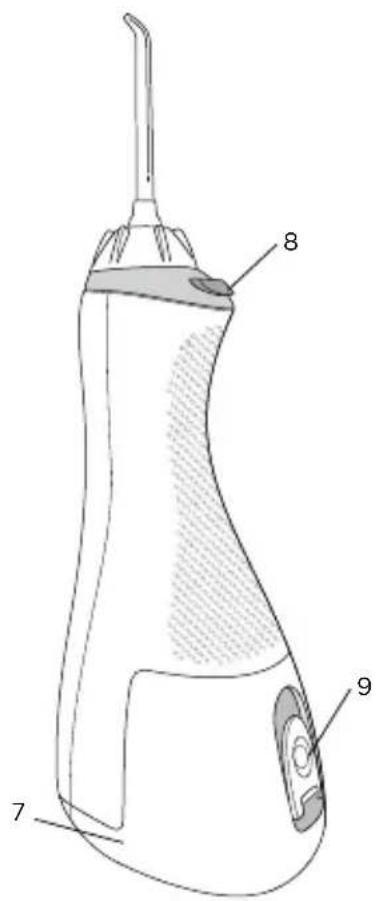
text_image
Technical diagram of a medical or laboratory device with numbered parts labeled 7, 8, and 9.TIPS
text_image
Diagram showing a medical device with labeled components and an arrow pointing to a device labeled 'mucoside'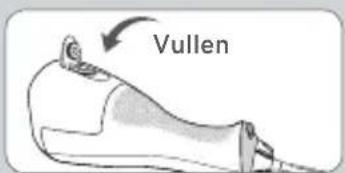
text_image
Vullen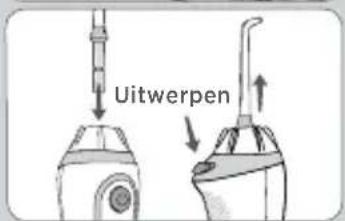
text_image
Uitwerpen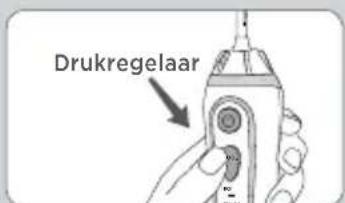
text_image
Drukregelaar
natural_image
Illustration of a hand holding a tool emitting smoke from a surface, with abstract human figures nearby (no text or symbols)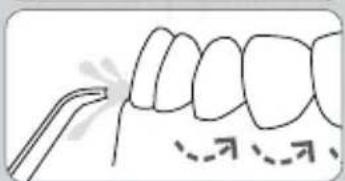
natural_image
Diagram of a tooth with dental tool application, showing teeth and jawbone structure (no text or labels)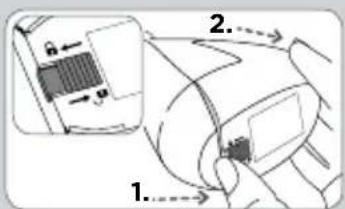
text_image
Diagram showing a device with labeled parts and directional arrows, likely illustrating a mechanical or electrical component assembly.natural_image
Illustration of a bottle pouring liquid into a container (no text or symbols)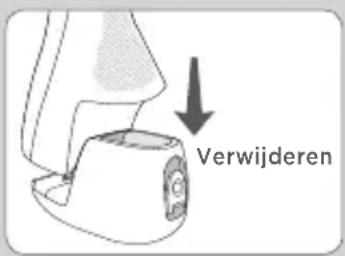
natural_image
Simple line drawing of a cord tied with a magnifying glass, no text or symbols presentCharger
20018701-2, WP-560E, WP-569E, Branco 20018701-5, WP-562E, Preto 20018701-21 WP-563E, Azul 20018701-9, WP-564E, Rosa 20018701-22, WP-565E, Violeta 20018701-10, WP-566E, Azul Petróleo
text_image
1 2 MODE 3 HIGH MEDIUM LOW 4 5 6 waterflosser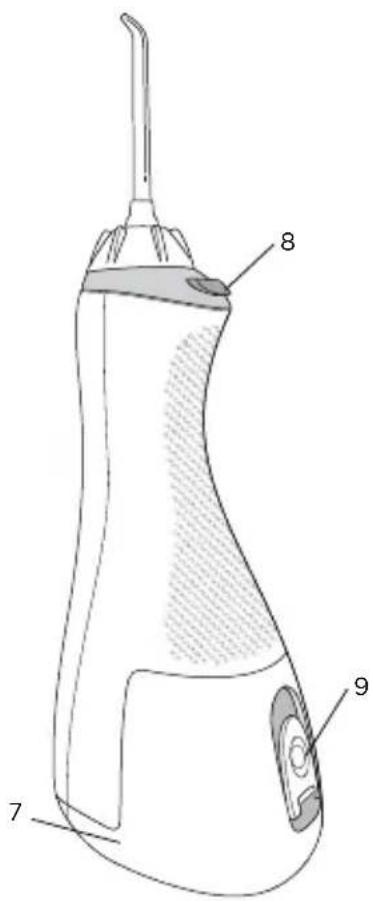
text_image
Technical diagram of a medical or dental device with numbered parts labeled 7, 8, and 9.PONTAS
A. Ponta ortodôntica*
C. Ponta Plaque Seeker ®*
text_image
Diagram showing a medical device with labeled parts and an arrow pointing to a device labeled 'miceylyx'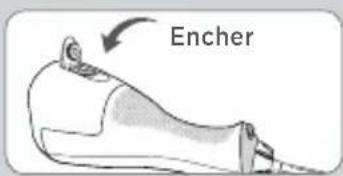
text_image
Encher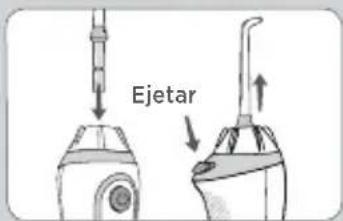
text_image
Ejetar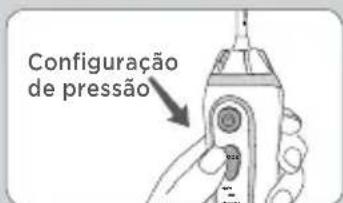
natural_image
Illustration of a hand holding a tool with smoke rising, set against a mountainous background (no text or symbols)
natural_image
Diagram of a tooth with dental tool, showing teeth and surrounding bone structure (no text or labels)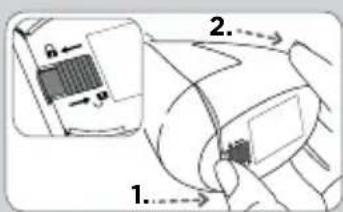
text_image
Diagram showing a device with labeled parts and directional arrows, likely illustrating a mechanical or electrical component assembly.text_image
Medical diagram showing dental procedure with labeled anatomical features and magnified detail view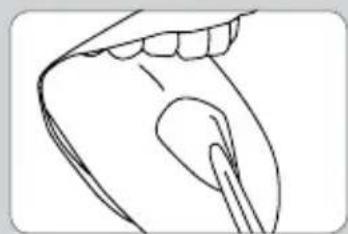
natural_image
Line drawing of a human mouth with teeth and a toothbrush (no text or symbols)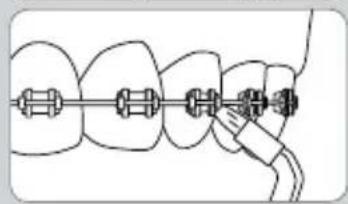
natural_image
Diagram of dental braces with a finger, showing alignment and alignment process (no text or symbols)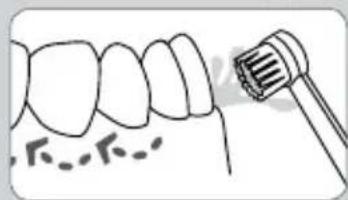
natural_image
Illustration of a tooth with a dental tool near the crown (no text or symbols)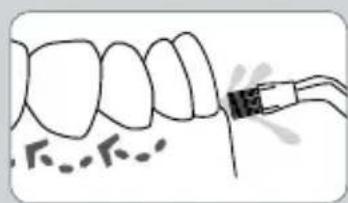
natural_image
Illustration of a tooth with a dental implant, showing teeth and surrounding bone structure (no text or symbols)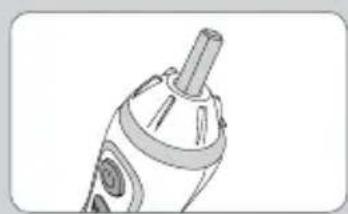
natural_image
Line drawing of a handheld device with a cylindrical handle and circular base (no text or symbols)Ponta Plaque Seeker®
natural_image
Illustration of a bottle pouring liquid into a container (no text or symbols)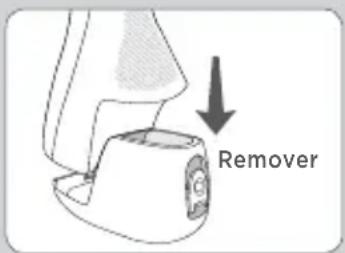
text_image
Removernatural_image
Simple line drawing of a cord tied with a magnifying glass, next to a rectangular device (no text or symbols)Зарядное устройство
20018701-2, WP-560E, WP-569E, белый
text_image
Technical diagram of a dental implant device with labeled parts 7, 8, and 9НАСАДКИ
text_image
Diagram showing a medical device with a labeled connector and an arrow pointing to it, likely indicating a procedure or measurement.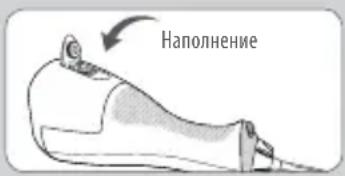
natural_image
Illustration of a hand holding a tool emitting smoke, with abstract landscape elements and no visible text or symbols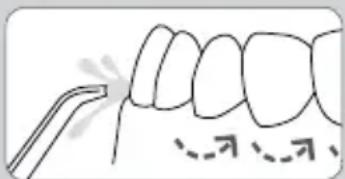
natural_image
Diagram of a tooth with a dental tool, showing teeth and jaw structure (no text or labels)text_image
Diagram showing a device with labeled parts and directional arrows, likely illustrating a mechanical or electrical component.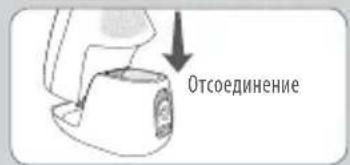
text_image
Diagram illustrating dental procedure with labeled arrows and magnified detail view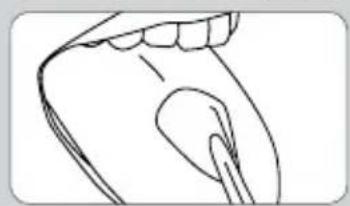
natural_image
Line drawing of a human mouth and jaw (no text or symbols)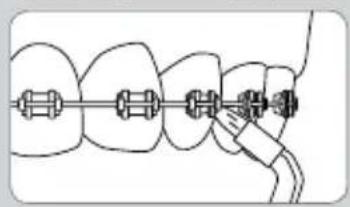
natural_image
Diagram of dental alignment with a tool, showing teeth and jawbone arrangement (no text or labels)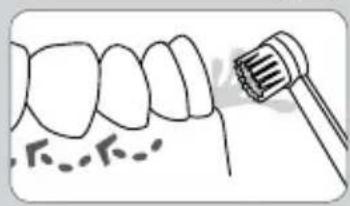
natural_image
Illustration of a tooth with a dental tool near the crown (no text or symbols)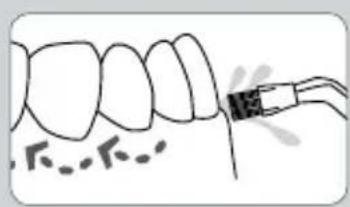
natural_image
Illustration of a tooth with a dental tool inserted, showing teeth and tooth alignment (no text or symbols)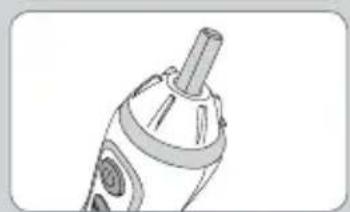
natural_image
Line drawing of a handheld device with a cylindrical handle and circular button (no text or symbols)natural_image
Illustration of a bottle pouring liquid into a container (no text or symbols)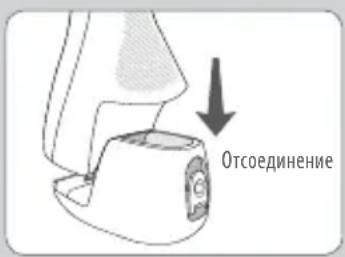
1730 East Prospect Road
Fort Collins, CO 80553-0001 USA
844-821-4873
www.waterpik.com
Waterpik, International, Inc.
Castle Court,
41 London Road Reigate,
Surrey RH2 9RJ
United Kingdom
Waterpik ^® is a trademark of Water Pik, Inc. registered in Argentina, Australia, Benelux, Brazil, Canada, Chile, China, Czech Republic, Denmark, EU, Finland, France, Germany, Hong Kong, Hungary, India, Israel, Italy, Japan, Kazakhstan, Korea, Malaysia, Mexico, New Zealand, Norway, Pakistan, Philippines, Poland, Russian Federation, Saudi Arabia, Singapore, South Africa, Spain, Sweden, Switzerland, Taiwan, Turkey, Ukraine, United Kingdom, United States and Vietnam.
Waterpik ^® (stylized) is a trademark of Water Pik, Inc. registered in Australia, Brazil, Canada, China, EU, Hong Kong, India, Israel, Japan, Korea, Malaysia, Mexico, Philippines, Russian Federation, Saudi Arabia, South Africa, Switzerland, Taiwan, Thailand, Trinidad & Tobago, Ukraine, United States, and Vietnam.
waterflosser® (stylized) is a trademark of Water Pik, Inc. registered in Brazil, Canada, China, Mexico, Switzerland and the United States.
Pik Pocket ^® is a trademark of Water Pik, Inc. registered in Canada and the United States.
Plaque Seeker ^® is a trademark of Water Pik, Inc. registered in Canada, China, EU, and the United States. Designed and Tested in the USA. Made in China.