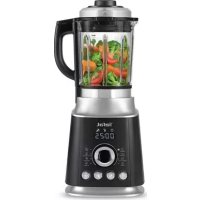
Ultrablend Cook BL962B - Blender TEFAL - Free user manual and instructions
Find the device manual for free Ultrablend Cook BL962B TEFAL in PDF.



| Product type | Heating blender |
| Brand | Tefal |
| Model | Ultrablend Cook BL962B |
| Maximum capacity (cold preparation) | 1750 ml |
| Maximum capacity (hot preparation) | 1400 ml |
| Number of automatic programs | 8 (soup, compote, coulis, hot sauce, multi-grain milk, crushed ice, green smoothie, milkshake) |
| Heating function | Yes, adjustable from 40 to 100 °C |
| Blending speeds | 9 speeds + maximum speed (H) |
| Timer | Blending: up to 3 minutes; Heating: up to 90 minutes |
| Pulse function | Yes |
| Automatic cleaning function | Yes |
| Safety | Bowl and lid locking, overload protection |
| Cleaning | Parts in contact with food: hand wash; not dishwasher safe |
| Removable parts | Cap, lid, silicone seal, measuring cup |
| Included accessories | Measuring cup, cleaning brush |
| Power supply | Mains (220-240 V) |
| Screen type | LED |
| Weight | 5 kg (estimated) |
| Dimensions (L x W x H) | 25 x 20 x 40 cm (estimated) |
Frequently Asked Questions - Ultrablend Cook BL962B TEFAL
User questions about Ultrablend Cook BL962B TEFAL
0 question about this device. Answer the ones you know or ask your own.
Ask a new question about this device
Download the instructions for your Blender in PDF format for free! Find your manual Ultrablend Cook BL962B - TEFAL and take your electronic device back in hand. On this page are published all the documents necessary for the use of your device. Ultrablend Cook BL962B by TEFAL.
USER MANUAL Ultrablend Cook BL962B TEFAL
natural_image
Line drawing of a kitchen blender with handle and control panel (no text or symbols)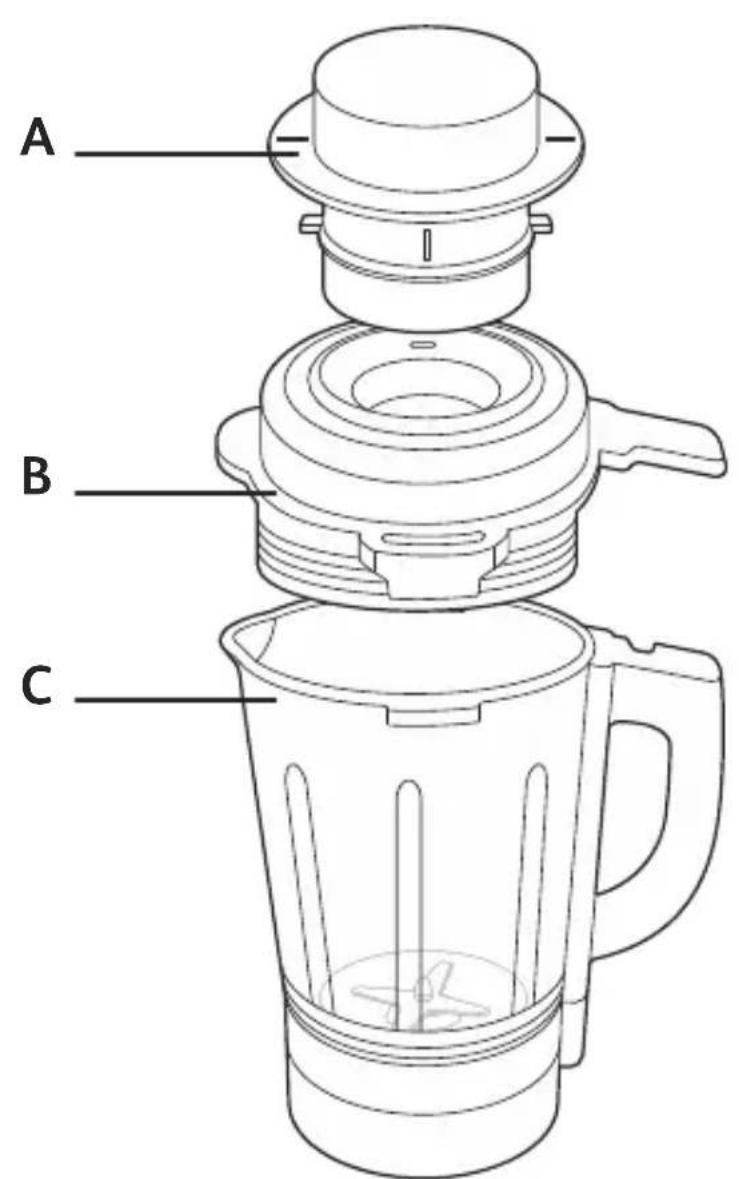
natural_image
Simple line drawing of a cleaning tool with a curved blade and labeled force F (no text or symbols on the tool itself)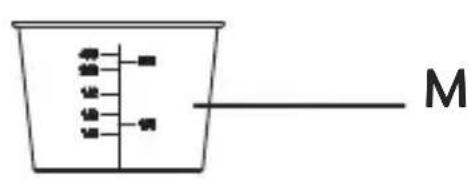
DESCRIPTION OF THE APPLIANCE
A. Lid cap
B. Lid
C. Jug
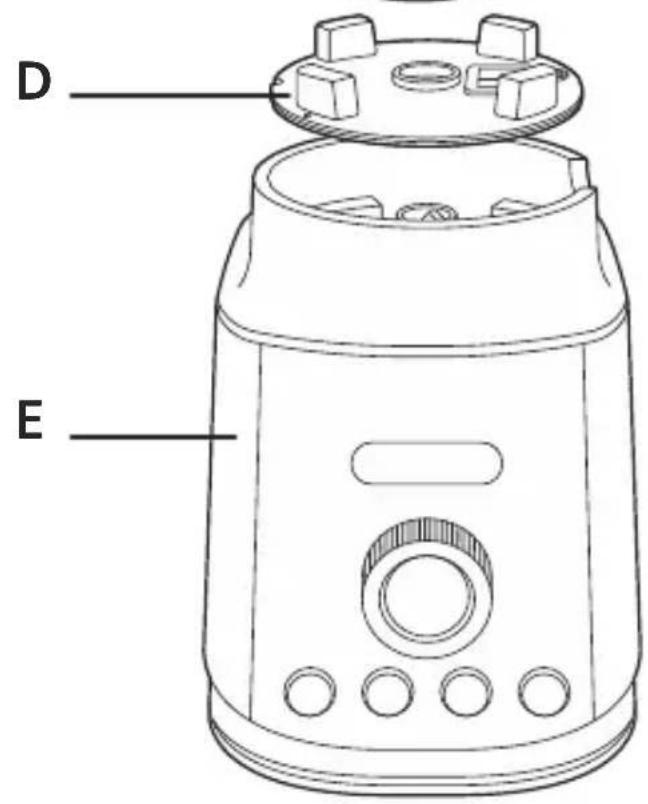
D. Removable silicone gasket
E. Motor unit
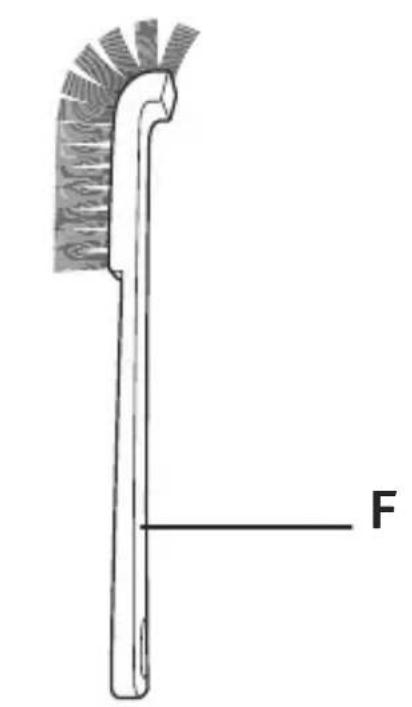
F. Brush
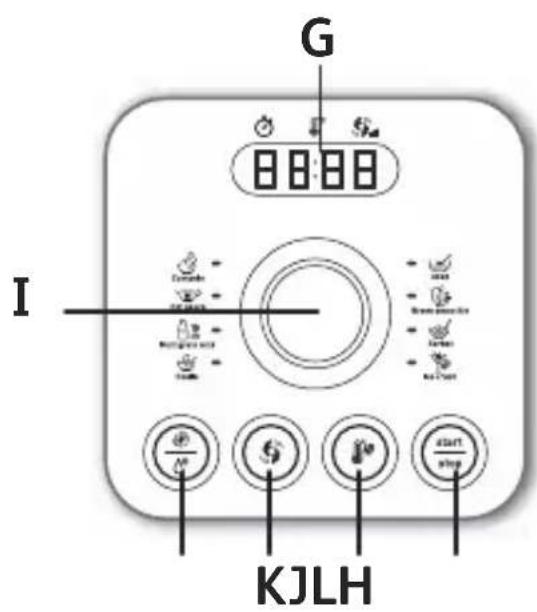
G. Screen
H. Start/Stop button
I. Program selector
J. Pulse/Clean button
K. Blend/Pause button
L. Heat button
M. Measuring cap
CAUTION: The safety precautions are part of the appliance. Read them carefully before using your new appliance for the first time. Keep them in a place where you can find and refer to them later on.
The appliance will only start if the jug is correctly positioned on the motor unit (E) and the lid locked on the jug.
BEFORE USING YOUR APPLIANCE FOR THE FIRST TIME
- Before using your appliance for the first time, rinse the parts that come into contact with food (jug, lid and measuring cap) with soapy water
CAUTION : Do not immerse the appliance in water (neither the motor unit nor the jug base). Never put the motor unit (E) under running
water. Clean with a damp cloth and dry it carefully.
The blades are extremely sharp and not removable.
- Make sure all the packaging has been removed before operating the appliance.
USING YOUR APPLIANCE
- Put the appliance on a flat, stable, heat-resistant surface away from sources of heat or water splashes.
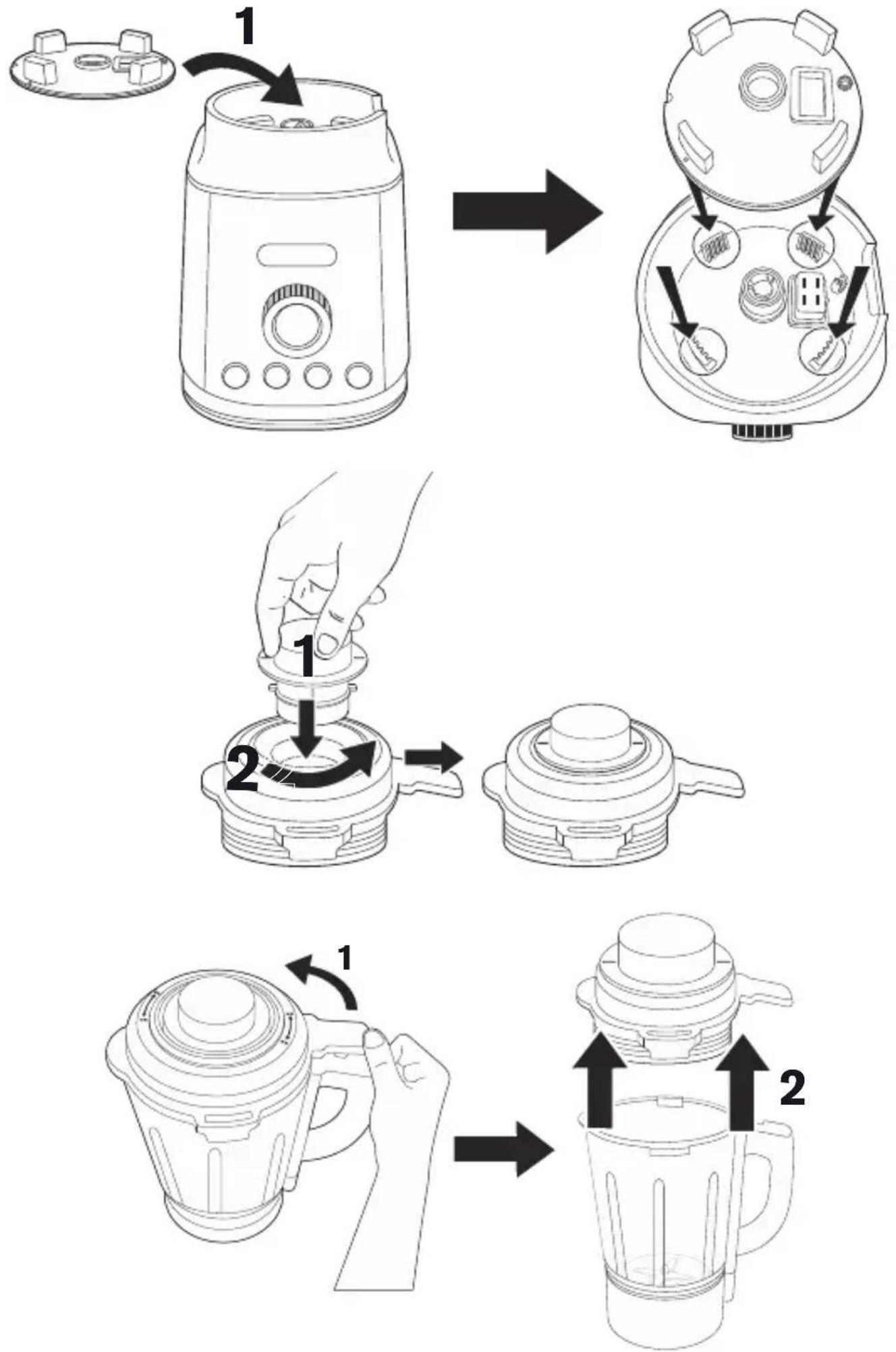
- Make sure the silicone gasket (D) is in place on the motor unit (E). Position the jug (C) correctly on the motor unit Fig. 1 and 2.
- Add the ingredients into the assembled jug without exceeding the maximum level indicated:
- 1 ^2 /50 ml max for cold preparation
- 1400 ml max for hot preparation
AUTOMATIC FUNCTION:
How to use :
- Lock the lid on the jug and place the lid cap in position on the lid and lock it by rotating it. The appliance only starts up once the jug and lid are correctly in place.
- Plug in the blender. The product makes a beep and the screen lights up.
- The product will be immediately in standby mode. At this stage you can select a program by turning the program selector (I). The led will turn on the selected program. The recipe time information will be displayed. For hot programs, please note that the time indicated does not take into account
the pre-heating time needed which may vary according to the initial temperature and quantity of your ingredients (between 5 and 15 minutes).
- Press the start/stop button. Then the appliance starts to work automatically.
- The pre-heat animation appears on the display during pre-heating time for hot recipes
Example:

natural_image
Three abstract black rectangular panels with white dashed lines, no text or symbols presentOnce the pre-heating phase is completed, the recipe cooking time countdown will start.
- At the end of the recipe, the blender stops automatically. The appliance bips 5 times.
-
You can also stop the blending during the cycle:
-
within 1 minute of working, press the start/stop button
- more than 1 minute of working, press and hold the start/stop button for 3 seconds
- To add ingredients while blending for cold preparation only, remove the lid cap (A) from the lid (B) and add the ingredients through the feeder hole. Beware of the risk of spatter.
CAUTION : We recommend not to add ingredients while blending hot preparations. (risk of splashing). Do not remove the lid cap (A) from the lid (B) during hot preparations. It can reach high temperature and cause burns.
- Do not shake the motor unit or the jug when the blender is in use.
CAUTION: After running one program, especially long recipe, let the blender rest for minimum 5 minutes before operating it again.
8 programs :
These programs are predifined on a standard basis. You can freely add extra heating/blending thanks to the manual settings at your convenience.
Hot programs : Soup, Compote, Coulis, Hot sauce, Mutligrain milk.
 Soupsoup Soupsoup | 600g pumpkin, 120g potato, 80g onion, 600g water. | Select Soup programPress Start/Stop button |
 CompoteCompote CompoteCompote | 700g golden apple, 50g water. | Select Compote programPress Start/Stop button |
 CoulisCoulis CoulisCoulis | 60g lemon juice, 100g sugar, 250g blueberry, 250g strawberry. | Select Coulis programPress Start/Stop button |
 Hot sauce Hot sauce | 500g milk, 45g butter, 45g flour, nugmeg (1 pinch) | Select Hot soup programPress Start/Stop button |
 MultigrainMultigrain milkmilk MultigrainMultigrain milkmilk | 100g almond, 1L water.Select | Select Multigrain milk programPress Start/Stop button |
 Ice crushIce crush Ice crushIce crush | 8x Ice cube 30x30x40 mm | Select Ice crush programPress Start/Stop button |
 Green smoothie smoothie Green smoothie smoothie | 200g cucumber, 150g water, 2 kiwi, 150g pineapple, 60g cabbage, 50g fresh spinach leaves, 50g celery stalks, 100g water | Select Green smoothie programPress Start/Stop button |
 Milk shakeMilk shake Milk shakeMilk shake | 100g vanilla ice cream, 1 banana, 25cl milk | Select Milk shake programPress Start/Stop button |
MANUAL FUNCTIONS:
- Pulse: Press the pulse/clean button to let the appliance run for only a few seconds at a
time. To stop it, release the button. Press the pulse/clean button as often as it is necessary.
- Clean : allows to pulse/clean your appliance with soapy water. Press and hold the pulse/clean button until the letter H (maximum speed) appear on the screen. Release the button to stop after 15 to 30 seconds to complete the cleaning sequence.
The longest working time can not be more than 3 minutes.
- Blend/Pause : allows to freely control the way you want to blend. Press the blend/pause button, the screen indicates « 5 » but you can choose the blending speed from 1 up to 9 by turning program selector (I). « H » is the maximum speed. Then press start/stop button. You can set up the working time by turning program selector, between 10secondes and 3 minutes. The remaining time appears on the screen. Wait for the blender to stop automatically. The appliance bips 5 times.
You can also stop the blending during the cycle :
- within 1 minute of working, press the start/stop button
- more than 1 minute of working, press and hold the start/stop button for 3 seconds
• Heat : allows to freely control the way you want to heat. Press the heat button, the screen indicates « 60 » but you can choose the heating temperature from 40° up to 100° by turning program selector (I). Then press start/stop button. You can set up the working time by turning program selector, between 5 minutes and 90 minutes. The remaining time appears on the screen. Wait for the blender to stop automatically. The appliance beeps 5 times.
You can also stop the blending during the cycle :
- within 1 minute of working, press the start/stop button
- more than 1 minute of working, press and hold the start/stop button for 3 seconds
OTHER FUNCTIONS
• start stop button.
Start/Stop : allows to stop any blending or heating program before the end by pressing this You can also stop the blending during the cycle :
- within 1 minute of working, press the start/stop button
- more than 1 minute of working, press and hold the start/stop button for 3 seconds
Overload protection
- The appliance is equipped with overload protection. This prevents the motor from being damaged by overloading.
If the appliance switches off during operation, proceed as follows : - Switch the appliance off using the power button, unplug and leave it to cool down for approximately 15-20 minutes.
- Reconnect the appliance to the power supply and resume blending.
CLEANING
- Clean the jug immediately after use.
- For easy cleaning, you can use the Pulse/Clean button :
- Put 150ml of water and 1 drop of washing up liquid in the jug. Press the Pulse/Clean button.
An excess of washing up liquid creates more foam and consequently can lead to overflowing. Finish cleaning the jug with the aid of a sponge.
- Rinse the inside of the jug and the lid under running water.
- In the event of the heated part of the jug getting extremely dirty, fill in the jar with a mix of water and washing up liquid and let it soaked for a few hours to help get it clean.
- Use a damp cloth to clean the motor unit (E). Dry it carefully.
- The detachable parts (lid, lid cap, carrier seal, seal, measuring cap) can be cleaned with a sponge and hot soapy water. You can also use the brush to clean the inside of the jug.
Caution:
- Empty the preparation, the jug is not meant for storing food in the refrigerator or freezer.
- To clean the outside of the motor unit and the walls of the jug, use a damp cloth.
- Do not immerse the appliance in water (neither the motor unit nor the jug base). Never put the motor unit (E) under running water.
- The jug, lid cap and removable silicone gasket must not go in the dishwasher.
| Problems Causes Solutions | ||
| Appliance does not work | The plug is not connected. | Connect the appliance to a socket with the same voltage as indicated on the rating plate of the appliance. |
| The blender jug is not positioned correctly on the motor unit or the jug and lid are correctly in place and are not locked onto the motor unit. | Check that the blender jug and the lid are positioned properly on the motor unit as explained in the instructions. | |
| Appliance, keyboard or program not responding | Unplug the appliance, wait for 1 minute and plug in again. | |
| In case of overheating | Switch the appliance off using the power button, unplug and leave it to cool down for approx. 15-20 minutes. | |
| The appliance stopped while in use | Overload or overheating | Switch the appliance off using the power button, unplug and leave it to cool down for approx. 15-20 minutes.Reconnect the appliance to the power supply and resume blending. |
| Excessive vibrations | The product is not placed on a flat surface. | Place the appliance on a flat surface. |
| Volume of ingredients is too high. | Reduce the quantity of ingredients processed. | |
| The silicon gasket (D) is missing or not correctly positioned. | Place the silicone gasket correctly on the motor unit. | |
| Leak or overflow from the lid | Volume of ingredients is too high. | Reduce the quantity of ingredients processed. |
| The lid is not correctly positioned. | Place the lid correctly on the blender jug. | |
| Leak from the bottom of the blender jug | Deterioration of the watertightness of the appliance. | Caution: the blades are not removable.Contact the consumer service, see contact information in the warranty leaflet. |
| The blades do not turn easily | Pieces of food too large or too hard. | Reduce the size or quantity of ingredients processed. |
| The blended liquid is too hot and distorted the silicon gasket. | Contact the consumer service, see contact information in the warranty leaflet. | |
| Cooking problem | The food is not cooked enough or / The food is overcooked | use manual function to adapt time of use and heating temperature |
| Food sticks to the bottom | use manual function to adapt time of use and heating temperature. And see cleaning instructions | |
If your appliance is still not running properly, please contact the customer service department for your country.
DESCRIPTION DE L'APPAREIL
FONCTIONS MANUELLES:

natural_image
Three abstract black rectangular panels with white dashed and solid lines, no text or symbols present.natural_image
Three black rectangular panels with white dashed lines, no text or symbols presentnatural_image
Three abstract black rectangular panels with white dashed lines, no text or symbols presentBESCHRIJVING VAN HET APPARAAT
A. Dop
B. Deksel
c. Kan
D. Afneembare silicone pakking
E. Motoreenheid
F. Borstel
G. Scherm
H. Start/Stop knop
I. Programmakiezer
J. Puls/Reinigen knop
K. Mengen/Pauze knop
L. Verwarmen knop
M. Maatbeker
natural_image
Simple icon of a thermometer with steam inside a circle (no text or symbols)natural_image
Simple line drawing of a syringe above a droplet with sparkles, enclosed in a circle (no text or symbols)natural_image
Abstract circular logo with swirling grayscale patterns (no text or symbols)natural_image
Gel electrophoresis image showing DNA or protein bands (no visible text or labels)الساخنة.
: مثال
natural_image
Thermometer icon with steam lines inside a circle (no text or symbols)لهید
حفاظت اضافه بار
natural_image
Simple line drawing of a droplet with concentric circles and sparkles, no text or symbols present.natural_image
Abstract circular logo with a stylized spiral design and motion lines (no text or symbols)natural_image
Gel electrophoresis result showing DNA or protein bands (no visible text or labels): مثال