EasyManual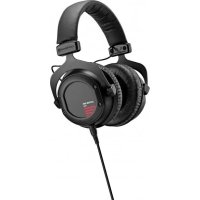
Custom One Pro Plus - Earphones BEYERDYNAMIC - Free user manual and instructions
Find the device manual for free Custom One Pro Plus BEYERDYNAMIC in PDF.


User questions about Custom One Pro Plus BEYERDYNAMIC
0 question about this device. Answer the ones you know or ask your own.
Ask a new question about this device
Download the instructions for your Earphones in PDF format for free! Find your manual Custom One Pro Plus - BEYERDYNAMIC and take your electronic device back in hand. On this page are published all the documents necessary for the use of your device. Custom One Pro Plus by BEYERDYNAMIC.
USER MANUAL Custom One Pro Plus BEYERDYNAMIC
- When connecting the headphones, make sure the volume is turned to mini- mum. Only adjust the volume after putting the headphones on. Do not turn the volume up too loud. You could cause permanent damage to your hearing.
- When using cabled headphones please avoid any extreme movements which may cause the headphones to fall off. You could sustain serious injury, especially if you have piercings or are wearing earrings or glasses etc. The cable could become wound around the neck and cause strangulation. Characteristics and Use The CUSTOM series represents an entirely new concept which transforms the experience of listening to music via headphones into an interactive event. Thanks to CUSTOM sound, CUSTOM style and the CUSTOM cable, the headphones can be adapted at any given time to any given requirements – providing an all-in-one solution for almost any scenario. CUSTOM Sound Slider The CUSTOM sound sliders ensure that your listening experience couldn’t be more individual. Variable bass reflex vents on the side of the housing shells incrementally alter the audio characteristics of the headphones in four stages. The following settings are possible using the CUSTOM sound slider on the right and left housing shell: Pos. 1: “Light Bass” Pos. 2: “Linear” Pos. 3: “Vibrant Bass” Pos. 4: “Heavy Bass”english 6 | 7 CUSTOM ONE PRO – Sound Patterns CUSTOM Noise Isolation A further feature of the innovative CUSTOM sound slider: closing the headphones gradually increases sound isolation. Ambient noise such as the humming of aeroplane engines or street noise is attenuated considerably. CUSTOM Style The headphones are not only interactive in terms of sound but also design. The rings, covers and ear pads of the headphone shells can be exchanged just as easily as the headband pad. All accessories can be found at: www.beyerdynamic.com/custom Changing covers and/or rings
1. Unscrew the four screws on the ring using the Allen key included with the
headphones and remove the ring, the cover and the inlay.
2. Place the new cover and inlay in position and screw the ring back in place.
to damage the cable.
2. Place the new opened headband pad on the underside of the headband. Make
sure to lay the cable in the crease of the pad on the outer edge of the band. Tip: to do this, splay the headphones slightly, over both knees, for example.
3. First close the middle Velcro fastening and then the two outer ones.
Changing the Ear Pads
1. Place the lip of the ear pad in the notch at the top of the headphone casing.
2. Then turn the ear pad on the right-hand casing clockwise and the left-hand
casing anti-clockwise until the lip of the entire pad is sitting outside the casing.
Notch Notch CUSTOM Cable The cable couldn’t be more flexible – and just like the headphones, can be modified with ease. Various cable options and headsets can be found at: www.beyerdynamic.com/custom Changing the Cable
1. Pull the cable, which is connected at one side, out of the headphones.
2. When inserting the new cable, make sure that the slot in the connector
housing is turned towards the detent in the housing shell.