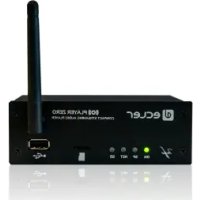
PLAYER ZERO - Music receiver Ecler - Free user manual and instructions
Find the device manual for free PLAYER ZERO Ecler in PDF.


| Product type | Music receiver / compact stereo audio player |
| Supported audio formats | MP3, OGG, WAV, AIFF, FLAC |
| Local storage media | USB 2.0 port (up to 2 TB, FAT16/32 or NTFS) and MicroSD/SDHC card reader (up to 2 TB) |
| Audio outputs | Unbalanced stereo on RCA and mini-jack connectors (stereo/mono selection) |
| Network connectivity | Ethernet RJ45 (10/100 Mbps) and Wi-Fi 2.4 GHz (client mode or access point) |
| Streaming | Internet radio, DLNA, AirPlay |
| Configuration | Built-in web interface accessible via browser (Ethernet or Wi-Fi) |
| Control inputs | 2 GPI ports (general-purpose inputs) on Euroblock connector, for event triggering |
| Programmable functions | 20 presets, 24 calendar events, 20 LUA scripts, silence detection, Cloud synchronization (rsync) |
| Internal clock | Up to 240 h autonomy without power, NTP synchronization |
| Power supply | External AC 100-240 V, 50-60 Hz source |
| Consumption | Very low, no forced ventilation required |
| Mounting | Desktop or 19" rack (optional VEO-RACK19 kit) |
| Operating temperature | Avoid extreme temperatures, dry and dust-free environment |
| Cleaning | Soft, dry cloth, or slightly dampened with water and neutral detergent; do not use alcohol, benzene, or abrasive solvents |
| Safety | Do not expose to rain or moisture; mandatory grounding; mains disconnection by unplugging the cord |
| Repairability | Maintenance by Ecler authorized technical services; no user-serviceable internal parts |
| Warranty | See included warranty card or www.ecler.com |
| Firmware | Modular, update via web interface or Fail Safe button |
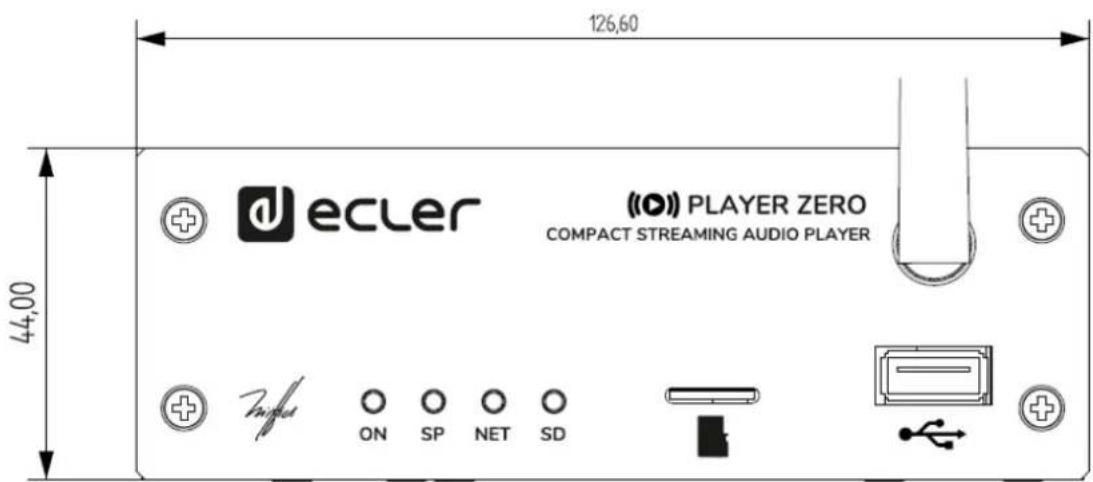
| Front panel LED indicators | ON (power), SP (audio signal), NET (network reception), SD (MicroSD card activity) |
Frequently Asked Questions - PLAYER ZERO Ecler
User questions about PLAYER ZERO Ecler
0 question about this device. Answer the ones you know or ask your own.
Ask a new question about this device
Download the instructions for your Music receiver in PDF format for free! Find your manual PLAYER ZERO - Ecler and take your electronic device back in hand. On this page are published all the documents necessary for the use of your device. PLAYER ZERO by Ecler.
USER MANUAL PLAYER ZERO Ecler
8. JSON Commands PRODUCT OVERVIEW 86
8.1 Player Commands.. 86
8.2 Configurations Commands 89
8.3 Preset Commands 90
8.4 Event Commands 90
8.5 Calendar Commands 90
8.6 Store and Forward Commands 90
8.7 Script Commands.. 91
8.8 Register Commands 91
8.9 Device Commands 91
8.10 Panel Commands 92
9. PLAYER LUA SDK Introduction 93
9.1 PLAYER LUA SDK V1.02 94
9.1.1 Changelist 94
9.2 How to use PLAYER module 94
9.2.1 Conventions 95
9.2.2 Player Functions 95
9.2.3 Config. (CFG) Functions 98
9.2.4 Preset Functions 99
9.2.5 Event Functions 101
9.2.6 Event Variables 101
9.2.7 Calendar (CAL) Functions 102
9.2.8 Store and Forward (SAF) Functions 103
9.2.9 Register (LOG) Functions 103
9.2.10 Device (DEV) Functions 104
9.2.11 Panel Functions 106
9.2.12 Finder Functions 106
9.2.13 LCD Functions 107
1. PRECAUTIONS
1.1 REMARQUE IMPORTANTE


RNING: SHOCK HAZARD -DO NOT OPEN
AVIS: RISQUE DE CHOC ÉLECTRIQUE - NE PAS OUVRIR

| DIGITAL ENGINE | |
| Processor | MIPS Single Core 64bits 580MHz |
| AUDIO CONVERTERS | |
| Sampling rate | 48kHz |
| Resolution | 16bit |
| Bit rate | 32~320kbps |
| Frequency response | 5Hz - 24kHz (-3dB) |
| MEDIA PLAYER | |
| Audio sources | Local storage (USB & microSD), Internet radio, AirPlay, DLNA |
| Dynamic range | From -80 dB to 0 dB |
| THD + Noise | < 0.008% (1kHz, 1Vrms) |
| ANALOGUE AUDIO OUTPUTS | |
| Number of outputs | 2 x Stereo output (unbalanced) |
| Connection type | RCA estéreo, minijack 3,5mm |
| Max output level | 6dBV / 5k ohm |
| Output impedance | 460 ohm |
| Dynamic range | TBC |
| Crosstalk | TBC |
| CONNECTIVITY | |
| Ethernet | RJ45 10/100Mbps |
| Wi-Fi | 2.4GHz Wi-Fi, 802.11 b/g/n |
| Wi-Fi antenna | Front panel |
| Programming and control | Web Application, RePlayer & Gallery. Third party integration: JSON |
| REMOTE CONTROL CONNECTIONS | |
| GPIs | 2 ports, Dry contact to ground, 3 pin Terminal block |
REAL-TIME CLOCK
| Retention time | 240 hours aprox. |
| Accuracy | ±1 minute / month |
| MONITORING AND CONTROL | |
| Display | No |
| LED indicators | Front panel: NET, SP, SD, Power Rear panel: Wifi |
| Buttons | Rear panel: Factoty Defaults / Fail Safe (pin-hole) |
| LOCAL STORAGE | |
| Micro SD | Front panel micro SD slot Supports micro SD SDXC |
| USB | Front panel USB female connector Support USB 2.0 High Speed (480 Mbps) |
| Capacity | Up to 2TB |
| File system | Supports FAT16, FAT 32, VFAT and NTFS (read-only) Multi-partition up to 1 |
| Playable audio files | mp3, ogg, WAV, FLAC, AIFF, m3u, pls |
| Files analysis | 65354 playable folders 65354 playable folders within each folder 65354 playable files within each folder |
| Folder hierarchy | Up to 8 containing the root directory |
| Sorting | UNICODE Up to 100 folders, 100 files by folder (Folders/files over 100 sorted in the FAT order) |
| ELECTRICAL | |
| Power supply | External, universal, 5VDC (included) |
| AC mains requirement | 90-264VCA 50-60Hz |
| AC mains connector | International AC plugs set |
| Power consumption | 4.5 VA / 2.2 W |
| Ventilation | Passive |
| PHYSICAL | |
| Operating temperature | Min 0°C, +32°F Max +35°C, +95°F |
| Operating humidity | < 85% HR |
| Storage temperature | Min -10°C, +14°F Max +50°C, +122°F |
| Storage humidity | < 90% HR |
| Installation options | Desktop, rack (1/3 of 1UR) |
| Included accessories | AD/DC Power Supply, WiFi antenna, adhesive rubber feet, rack tray screws , GPI connector, warranty card and standard user guide |
| Optional accessories | VEO-RACK19 Compatible |
| Dimensions (WxHxD) | 126.5 x 44 x 132 mm / 4.98" x 1.73" x 5.19" |
| Weight | 0.6 Kg / 1.32 lb |
| Shipping dimensions | 450 x 220 x 60 mm / 17.71" x 8.66" x 2.36" |
| Shipping weight | 0.8 Kg / 1.76 lb |
| SRS-SSR | TOLCON | SRS | SRS | XVHNNN | SRS | SNOIXENNO | SRS | CGR | SNOW | RES |
| IN999999 | NOI | NOI |
6.2 SCHEMA MECANIQUE
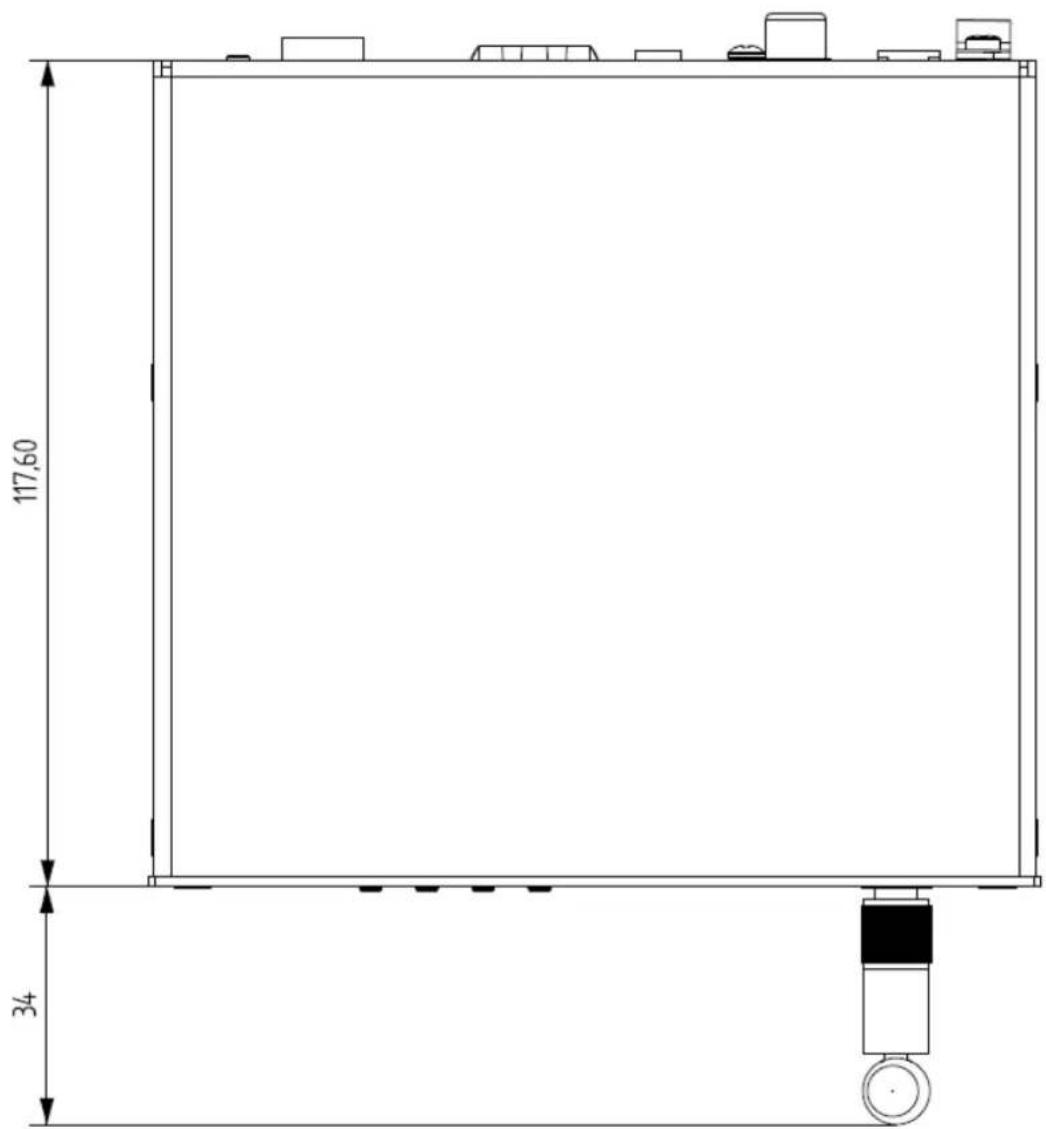
| INSEE | OFFLINE | SNS | SNS | XVANNNVd seP NOIENONONN | SNOIXENNO a NOIENVATVSLNI | SNS | SNOLNNVDA C FRONNN | SNOLNNVDA C FRONNN | SNS | SNOLNNVDA C FRONNN | SNS |
PLAYER ONE et PLAYER ZERO – Interface graphique Web (v1.00r0)
LECTEURS AUDIO
7.2.3 EVENTS (EVENEMENTS)
7.2.4.4 TARGET (CIBLE)
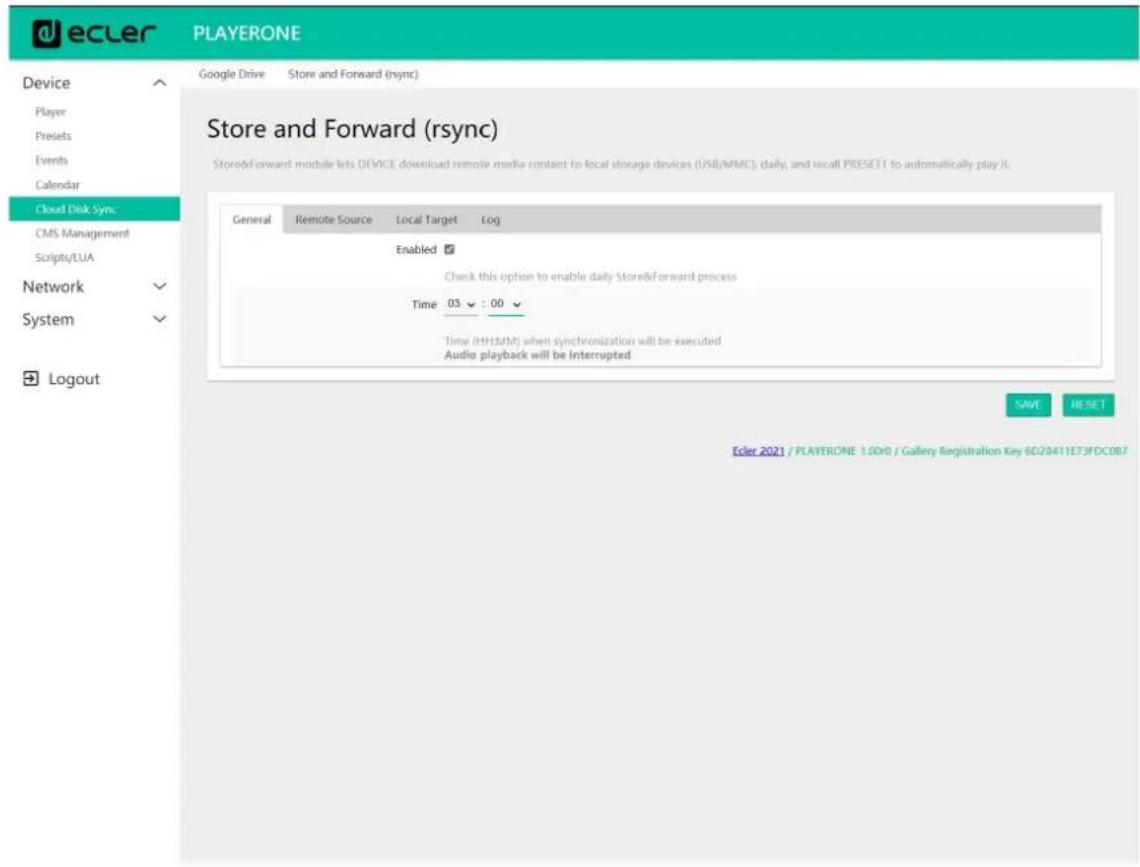
Figure 45: Store and Forward, onglet General
7.2.6.2 REMOTE SOURCE (SOURCE DISTANTE)
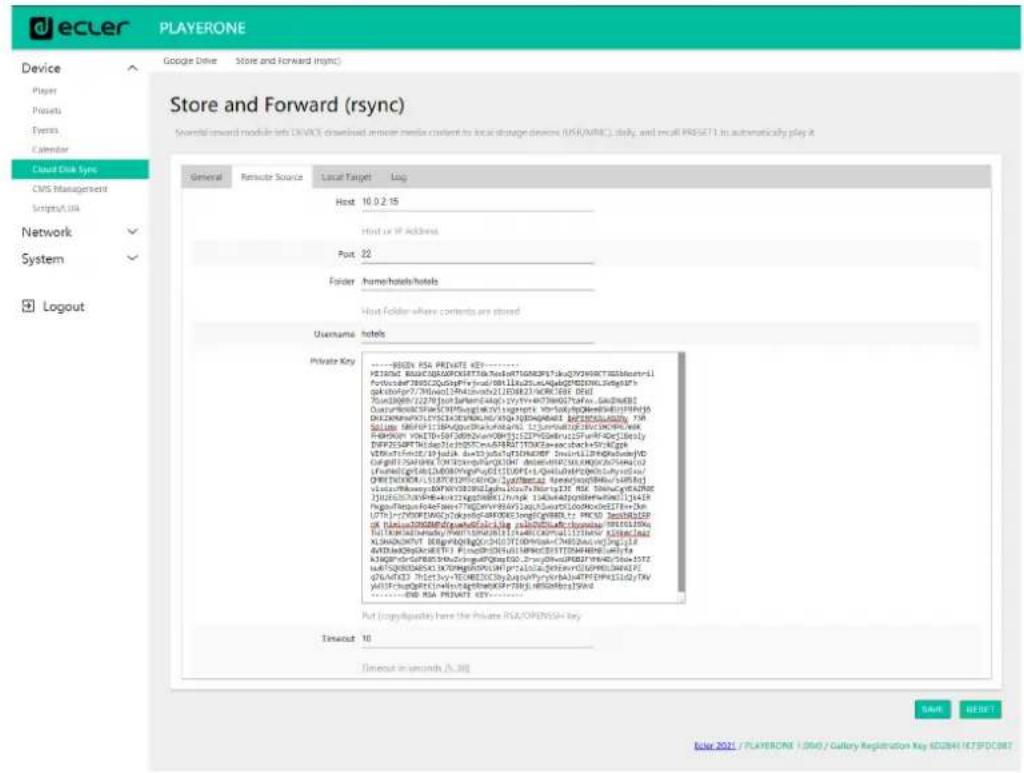
Figure 46 : Store and Forward, onglet Remote source
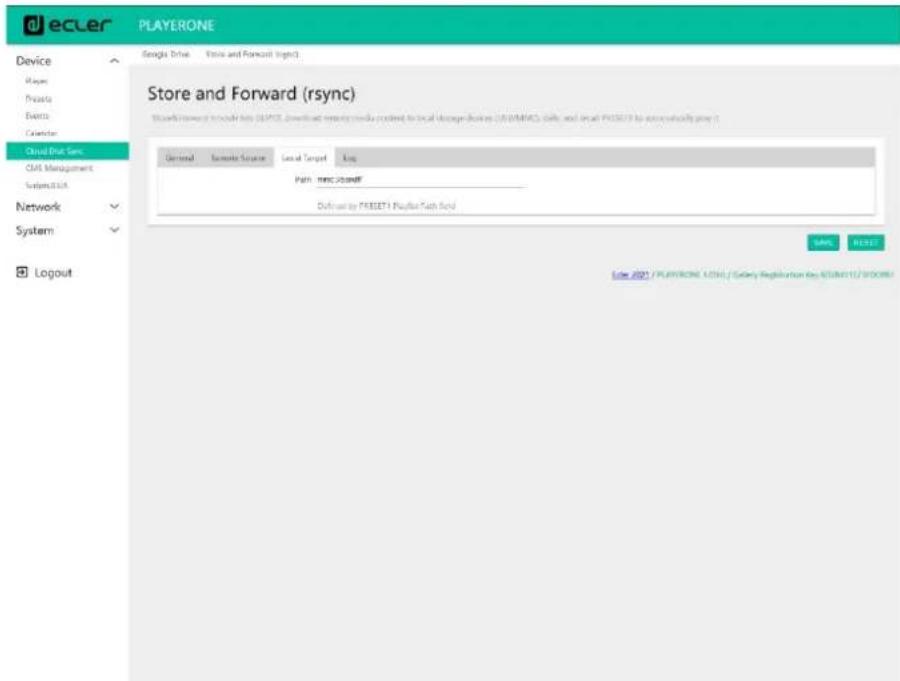
Figure 47:Store and Forward, onglet Local target
7.2.6.4 LOG (JOURNAL)
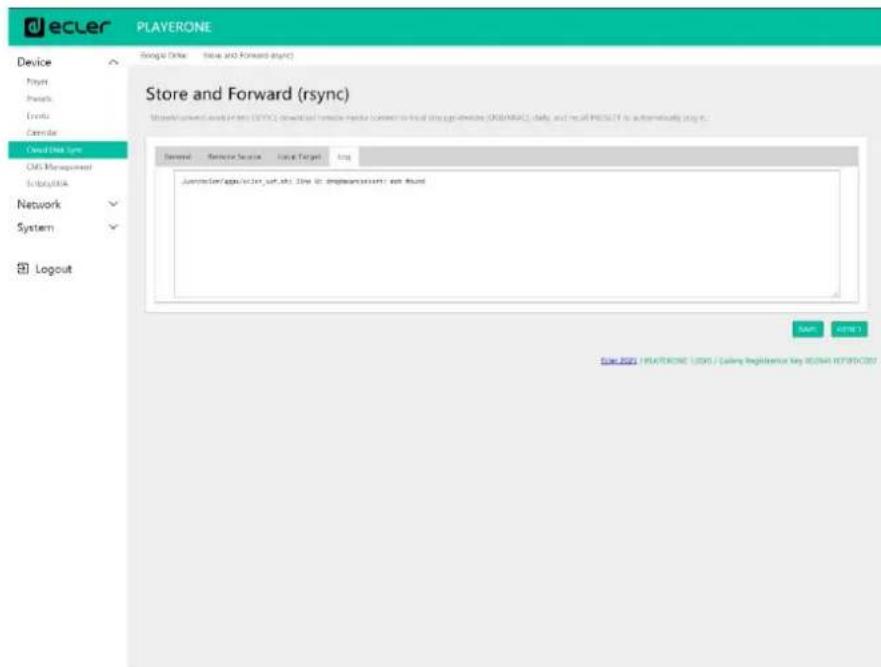
Figure 48:Store and Forward, onglet Log
Clicking the 'Start' button executes the script once (to test it).
Script Output Returned value: 0
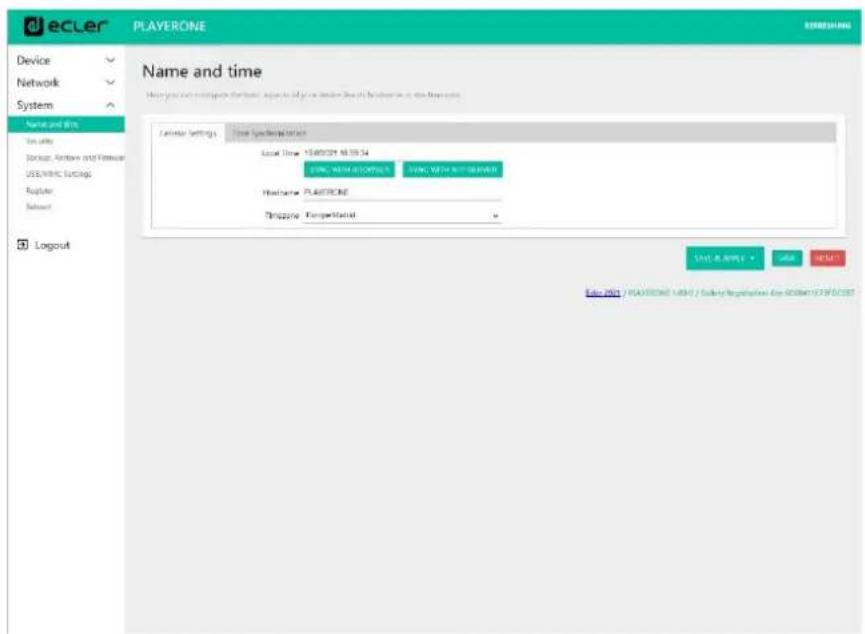
Figure 72: Name and Time, onglet General settings
7.4.1.1 GENERAL SETTINGS (RéGLAGES GÉNÉRAUX)
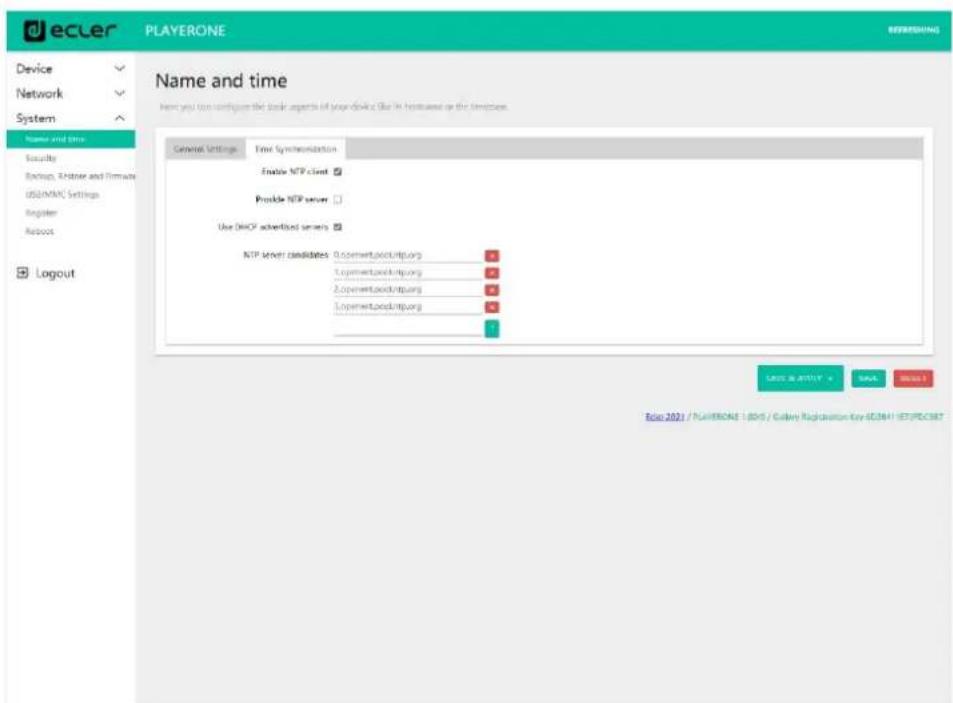
Figure 73: Name and time, onglet Time synchronization
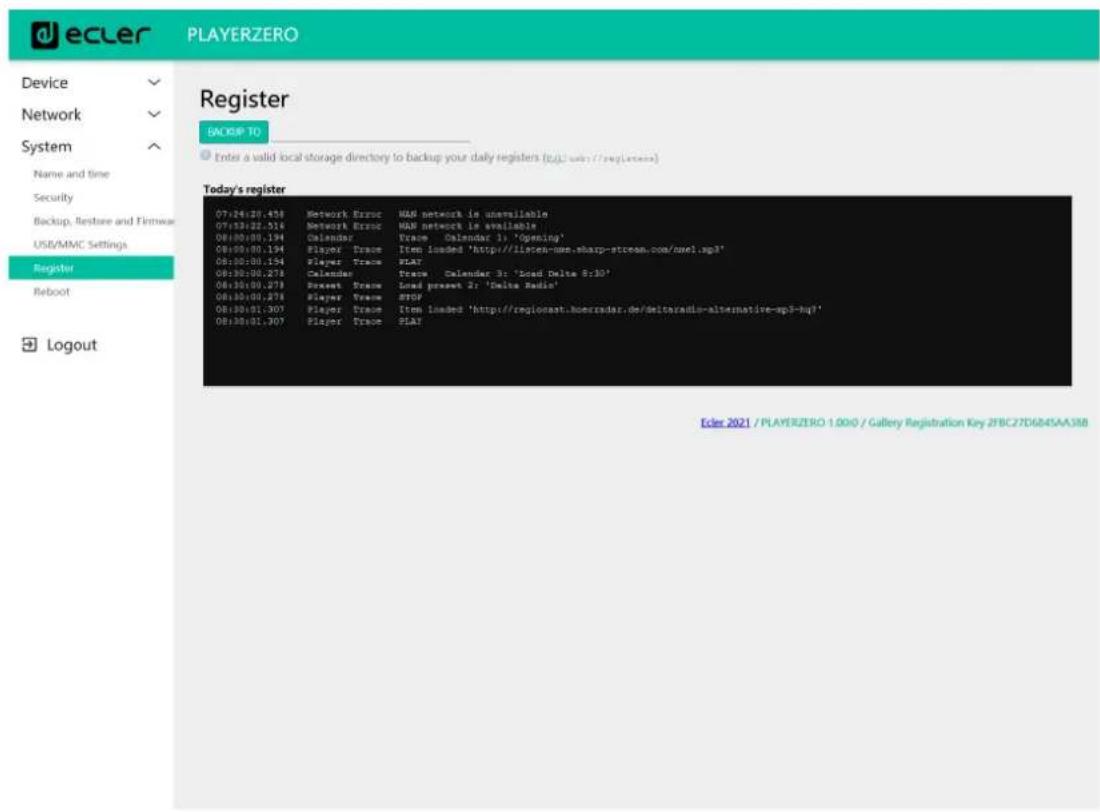
Figure 84: Register (register)
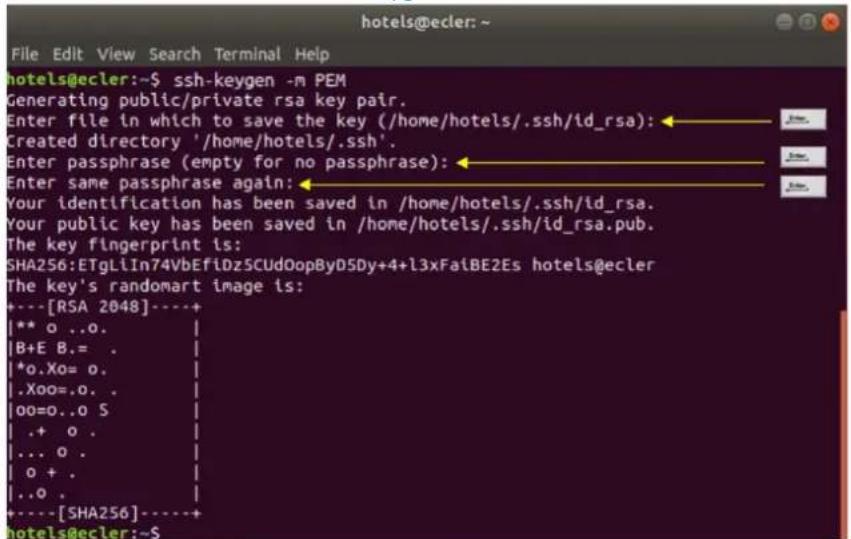
ssh-keygen -m PEM
Figure 91
cat .ssh/id_rsa.pub >> .ssh/authorized_keys
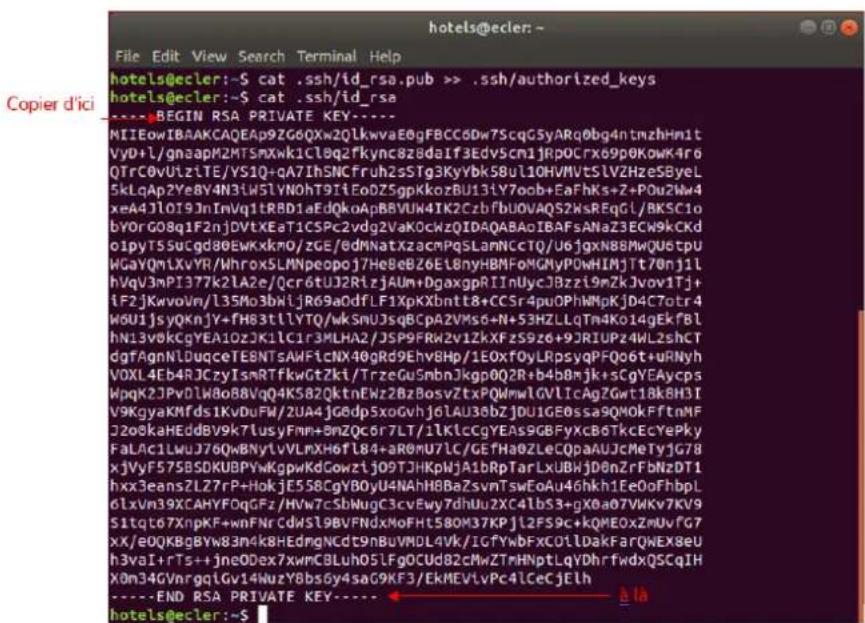
cat .ssh/id_rsa
Figure 92
7.5.5 AJOUT DE CONTENU AUDIO AU SERVEUR SSH
8. JSON Commands PRODUCT OVERVIEW
JSON (JavaScript Object Notation) is a lightweight data-interchange format that allows PLAYER ONE to communicate with third-party devices and platforms, such as EclerNet Manager. JSON is a text format that is completely language independent but uses conventions that are familiar to programmers of the C-family of languages. Visit the official website for more information: https://www.json.org.
- The communication with can be established using Ethernet or WiFi and the TCP/IP transport protocol, always by means of the 2003 TCP port.
- To check IP address, hold ENTER button for 2-3 seconds to enter admin menu.
- To let some control systems (like CRESTRON®, EXTRON®, AMX®, RTI®, VITY®, MEDIALON®, etc.) process the messages more easily, PLAYER ONE allows to the end of each message with a CR ( n ) -line feed, character 10-.
- All commands answer {"result":true} (success) or {"result":false} (something failed)
8.1 PLAYER COMMANDS
SET PLAYER STEREO/MONO
Mono mode {"jsonrpc":"2.0","method":"Player.Stereo","Stereo":false} Stereo mode {"jsonrpc":"2.0","method":"Player.Stereo","Stereo":true}
SET PLAYER FADE
No fade
{"jsonrpc":"2.0","method":"Player.Fade","Fade":0}
Cross Fade
{"jsonrpc":"2.0","method":"Player.Fade","Fade":1}
Fade
{"jsonrpc":"2.0","method":"Player.Fade","Fade":2}
SETPLAYERMODE
Player mode Sequential
{"jsonrpc":"2.0","method":"Player.Mode","PlayMode":0}
Player mode Random
{"jsonrpc":"2.0","method":"Player.Mode","PlayMode":1}
SET PLAYER REPEAT
Play all
{"jsonrpc":"2.0","method":"Player.Repeat","Repeat":0}
Play one
{"jsonrpc":"2.0","method":"Player.Repeat","Repeat":1}
Repeat all
{"jsonrpc":"2.0","method":"Player.Repeat","Repeat":2}
Repeat one
{"jsonrpc":"2.0","method":"Player.Repeat","Repeat":3}
GET SHORT PLAYER INFORMATION
{"jsonrpc":"2.0","method":"Player.GetStats"}
{"title":"Brian Hyland - Sealed With a
"counter":"19:30","txtSource":"NET","status":1}
GET FULL PLAYER INFORMATION
{"jsonrpc":"2.0","method":"Player.GetStatsEx"}
{"title":"Elvis Presley -
"Judy","counter":"07:02","txtSource":"NET","status":1,"SourceList":
["","MMC","USB UNAVAILABLE", "DLNA", "AIRPLAY", "JVL
PLAYLIST", "MUSICUP"], "source": 6, "preset": 1, "volume": 100, "txtVolume": "0dB", "stereo": 1, "repeat":
2,"playmode":0,"fade":1,"bootreset1":0,"sp":1,"bitrate":"128","duration":
---:---,"freq":"44.1","playlist_index":"0006/0056"}

<h1 id="player-add-next-playlist-item">PLAYER ADD NEXT PLAYLIST ITEM</h1>

With this function user can manage device playlist simply inserting next item before the end of current item.

set next item to "next_item.mp3"

{"jsonrpc":"2.0","method":"Player.QueueNextElem","url":"mmc://next_item.mp3"}

<h1 id="player-insert-prority-item">PLAYER INSERT PRORITY ITEM</h1>

With this function user can insert a priority item that will be played "over" the actual playing item. Current playing item will be fade.

set next item to "priority_item.mp3"

{"jsonrpc":"2.0","method":"Player.PrioritySetElem","url":"usb://priority_i tem.mp3"}

<h1 id="player-play">PLAYER PLAY</h1>

If the player is paused or stopped use this function to start current loaded item reproduction, otherwise the player is paused.

{"jsonrpc":"2.0","method":"Player.Play"}

<h1 id="player-stop">PLAYER STOP</h1>

{"jsonrpc":"2.0","method":"Player.Stop"}

<h1 id="player-next">PLAYER NEXT</h1>

{"jsonrpc":"2.0","method":"Player.Next"}

PLAYER PREVIOUS

{"jsonrpc":"2.0","method":"Player.Prev"}

INIncrement VOLUME

Increment volume just one dB

{"jsonrpc":"2.0","method":"Player.Volume","Action":"inc"}

DECREMENT VOLUME

Decrement volume just one dB

{"jsonrpc":"2.0","method":"Player.Volume","Action":"dec"}

SET VOLUME

Param volume is expressed in % . To set volume to 50% use next command.

{"jsonrpc":"2.0","method":"Player.Volume","Volume":50}

OPEN PLAYLIST URL

Url param must be any valid device url.

{"jsonrpc":"2.0","method":"Player.Open","Url":"http://50.7.181.186:8060"}

OPEN PRESET INDEX 10

Preset param must be a valid preset index 1 to 20

{"jsonrpc":"2.0","method":"Player.Open","Preset":10}

OPEN SOURCE INDEX 4 AIRPLAY (FROM AVAILABLE SOURCES LIST)

Source must be a valid player source index. Please check "Get of list available sources" to know all valid sources.

{"jsonrpc":"2.0","method":"Player.Open","Source":4}

GET LIST OF AVAILABLE SOURCES

This command returns the list of available sources.

{"jsonrpc":"2.0","method":"Source.GetList"}

{"SourceList": ["", "MMC", "USB UNAVAILABLE", "DLNA", "AIRPLAY", "ROCK 80s", "DISCO

80s"]]}

<h1 id="82-configurations-commands">8.2 CONFIGURATIONS COMMANDS</h1>

<h1 id="reset-device-settings">RESET DEVICE SETTINGS</h1>

Restore device factory default settings. All your settings will be lost. {"jsonrpc":"2.0","method":"Settings Reset"}

<h1 id="restore-device-settings-from-url">RESTORE DEVICE SETTINGS FROM URL</h1>

Restore device settings to values in url file.

{"jsonrpc":"2.0","method":"Settings.Restore","url":"http://ecler.com/my_pl ayer config.config"}

<h1 id="backup-current-device-configuration">BACKUP CURRENT DEVICE CONFIGURATION</h1>

Backup device settings to url. Available configurations: user, admin or gallery.

{"jsonrpc":"2.0","method":"Settings.Backup","url":"mmc://backups/gim.config","user":"admin"}

<h1 id="getting-device-variable-value">GETTING DEVICE VARIABLE VALUE</h1>

This function returns a device variable value. Please check the Player LUA manual in order to check all the interface.Settings(variable values.

In order to retrieve preset01.Settings.bname (preset name) user should send next command to the PLAYER ONE:

{"jsonrpc":"2.0","method":"CFG.get","interface":"preset01","section":"settings","variable":"bname"}

{"value":"AFTERNOON PRESET"}

<h1 id="setting-device-variable-value">SETTING DEVICE VARIABLE VALUE</h1>

This function set a device variable value. Please check the Player LUA manual in order to check all the interface.Settings(variable values.

In order to set preset01.Settings.bname (preset name) user should send next command to the PLAYER ONE:

{"jsonrpc":"2.0","method":"CFG.set","interface":"preset01","section":"settings","variable":"bname","value":"MIDNIGHT PRESET"}

<h1 id="store-changes-in-device-internal-memory">STORE CHANGES IN DEVICE INTERNAL MEMORY</h1>

This function stores all interface variables to the internal device memory. Should be called after set all the changes. PLAYER ONE must reload the data using reload functions.

{"jsonrpc":"2.0","method":"CFG.commit","interface":"preset01"}

<h1 id="83-preset-commands">8.3 PRESET COMMANDS</h1>

Preset variables for GFG.get and CFG.set. Please check Player LUA manual._Preset variables.

<h1 id="reload-preset">RELOAD PRESET</h1>

Reload indicated preset index. Index should be a valid preset index 1..20. Must be called after modifying preset variables and call commit command

{"jsonrpc":"2.0","method":"Preset.Reload","Index":1}

<h1 id="84-event-commands">8.4 EVENT COMMANDS</h1>

Event variables for GFG.get and CFG.set. Please check Player LUA manual. Event variables.

<h1 id="reload-event">RELOAD EVENT</h1>

Reload indicated event. Name should be: GPI1, GPI2 or SILENCE. Must be called after modifying event variables and call commit command.

{"jsonrpc":"2.0","method":"Event.Reload","Name":"GPI1"}

<h1 id="85calendar-commands">8.5CALENDAR COMMANDS</h1>

Calendar variables for GFG.get and CFG.set. Please check Player LUA manual. Preset variables

<h1 id="reloadcalendar">RELOADCALENDAR</h1>

Reload indicated calendar. Calendar index should be a number 1..24. Must be called after modifying calendar variables and call commit command. Reload calendar 24 example:

{"jsonrpc":"2.0","method":"Calendar.Reload","Index":24}

<h1 id="86-store-and-forward-commands">8.6 STORE AND FORWARD COMMANDS</h1>

SAF variables for GFG.get and CFG.set. Please check Player LUA manual. SAF variables

<h1 id="reload-saf">RELOAD SAF</h1>

Reload SAF configuration. Must be called after modifying SAF variables and call commit command.

{"jsonrpc":"2.0","method":"SAF.Reload"}

<h1 id="87scriptcommands">8.7SCRIPTCOMMANDS</h1>

Script variables for GFG.get and CFG.set. Please check Player LUA manual. Script variables.

<h1 id="reloadscript">RELOADSCRIPT</h1>

Reload script configuration. Index should be script index 1 to 20. Must be called after modifying Script variables and call commit command. Reload script 7 example:

{"jsonrpc":"2.0","method":"Script.Reload","Index":7}

<h1 id="executescript6">EXECUTESCRIPT6</h1>

```json
{"jsonrpc":"2.0","method":"Script.Command","Index":6,"Command":"Start"}
KILLSCRIPT3
{"jsonrpc":"2.0","method":"Script.Command","Index":3,"Command":"Stop"}
QUERYSCRIPT11STATUS
{"jsonrpc":"2.0","method":"Script.Status","Index":11} {"status":"Idle"}
8.8 REGISTER COMMANDS
ADD REGISTER LINE
Add line to device LOG. Possible line values are: Trace, Warning, Error.
Add a warning line example:
{"jsonrpc":"2.0","method":"Device.Log","Severity":"Trace","Message":"This is a warning message"}
8.9 DEVICE COMMANDS
DEVICE REBOOT
{"jsonrpc":"2.0","method":"Device.Reboot"}
GET DEVICE VERSION
{"jsonrpc":"2.0","method":"Device.GetVersion"} {"version":"3.04r0"}
DEVICE UPDATE FIRMWARE
With this function user could update device firmware to an specific version. User must provide firmware url. Device setting will be saved.
{"jsonrpc":"2.0","method":"Device.Update","url":"https://www.ecler.com/new_firmware.bin"}
DEVICE BOOT CONFIG COMMAND
Available BootPreset1 options are: 1 - PRESET1, 2 - keep status
{"jsonrpc":"2.0","method":"Device.BootPreset1","BootPreset1":2}
DEVICEGETMAC
{"jsonrpc":"2.0","method":"Device.GetMac"}
{"mac":"324141204042"}
DEVICE GET GALLERY REGISTRATION KEY
{"jsonrpc":"2.0","method":"Device.GetRegkey"}
{"regkey":"2E1BB146B2DB2WA1"}
8.10 PANEL COMMANDS
PANEL SET LOCK SETTINGS
Set panel Lock to "UNLOCK ALL" "UNLOCK USER" "LOCK ALL". Set panel password to Pass.
{"jsonrpc":"2.0","method":"Device.Panel","Lock":"LOCK ALL","Pass":"1234"}
PANELGETLOCK SETTINGS
{"jsonrpc":"2.0","method":"Device.GetPanel"}
{"Lock":"UNLOCKALL","Pass:"}\n\n
FINDER COMMANDS
Start/stop finder operation
{"jsonrpc":"2.0","method":"Device.Finder","Finder":true}
LCD FUNCTIONS
Print text on device frontal display. Two lines are available and aligned centre if Centre variable is true. Is possible to specify the display timeout in seconds.
{"jsonrpc":"2.0","method":"Device.Print","Line1":"Hi","Line2":"Bye","Center":true,"Timeout":3}
9. PLAYER LUA SDK Introduction
PLAYER is a Lua extension library that acts as interface between Lua and PLAYER firmware using the well-known PLAYER JSON protocol.
Basically is composed by different kind of objects:
- PLAYER - access player functions
- CFG - access configuration. With this object you can access all the PLAYER configuration.
- PRESET - PRESET settings. There are 20 presets that act as memories where you can store all the PLAYER player settings like url, play mode, repeat mode, fade mode, etc.
- EVENT - Event configuration lets PLAYER execute automated functions. There are 3 possibilities GPI1, GPI2 and SILENCE settings.
- CAL - Calendar configuration lets PLAYER execute automated functions on date event. There are up to 24 different calendar.
SAF-Store and Forward settings - SCRIPT - Manage PLAYER scripts. Is possible to execute scripts based on different kind of triggers like BOOT, EVENT, LOAD PRESET,CALENDAR, NETWORK,etc.
- LOG - Register functions that allows the user to write to the PLAYER internal REGISTER
DEV - Device status and other setups (like install new firmware) - PANEL - Panel lock mode settings and status
- FINDER - use FINDER settings to discover your PLAYER.
- LCD - Allow access to PLAYER LCD display
9.1 PLAYER LUA SDK V1.02
9.1.1 CHANGELIST
v1.02-xxxxxx
Added DEV_reboot function
Added CFG Backup2 function with type parameter: user, admin and gallery
Bug fix CFG Backup was calling to Device.Backup instead Settings.Backup
Tipo, Calendar general-enabled changed to bEnabled
Tipo, Scripts enabled change to bEnabled
v1.01-2018/03/14
Added DEV_mac function
Added DEV_regkey function
v1.00-2018/02/08
First version of the document also named "Preliminary version"
9.2 HOW TO USE PLAYER MODULE
In order to use PLAYER module you must include it in your source code using require statement. PLAYER automates this function for you, but you can also include PLAYER module manually and create your PLAYER object as you need using the next two lines of code:
require "PLAYER"
mydev = PLAYER.new()
In this case you can program actions directly to your PLAYER device, but also it is possible to access PLAYER directly from your PC (in this case it is recommended to use some LUA development tool like Eclipse/LUA)
If you want to use PLAYER directly from your PC you can call "new" function with IP and PORT parameters as shown next:
require "PLAYER"
mydev = PLAYER.new("10.120.120.4", 2003)
Where 10.120.120.4 is the PLAYER IP address, that you can check by pressing ENTER button for 10 seconds and going to WIFI or ETHERNET menu. 2003 is the JSON port.
One time PLAYER object is created is possible to access all functions in it.
Let see what you can do.
9.2.1 CONVENTIONS
n indicates number
- b indicates Boolean
- txt indicates text
9.2.2 PLAYER FUNCTIONS
Access player functions like repeat, fade, etc.
Functions
Function:
PLAYER stereo(bStereo)
Description:
Set the player output mode to stereo or mono
Parameters:
bStereo - boolean, set to true for stereo output, otherwise mono output is selected
Function:
PLAYER_fade(nFade)
Description:
Set the player fade mode
Arguments:
nFade - integer 0-OFF, 1-XFADE, 2-FADE
Function:
PLAYER_mode(nPlayMode)
Description:
Set the player playlist sequence mode
Arguments:
nPlayMode - integer 0-SEQUENTIAL, 1-RANDOM
Function:
PLAYERrepeat(nRepeat)
Description:
Set the player repeat mode
Arguments:
nRepeat - integer 0-PLAY ALL, 1-PLAY ONE, 2-REPEAT ALL, 3-REPEAT ONE
Function:
PLAYER_getStats()
Description:
Get the player statistics and status
Return:
String - xml string containing all the player status
In the next example you could see how to obtain the player stats and how to parse it using cjson library.
require "PLAYER"
ep=PLAYER.new() json_text ep.PLAYER_getStats() printjson_text) cjson require "cjson" value = cjson.decodejson_text) print("SourceList[3] = "..
output
{"title":"The White Stripes - Seven Nation
Army", "counter":"52:52", "txtSource":"NET", "status":1, "SourceList":
["","MMC","USB","DLNA","AIRPLAY","rock
alternative"], "source": 5, "preset": 1, "volume": 100, "txtVolume": "0dB", "stereo": 1, "repeat": 2, "playmode": 0, "fade": 1,
bootreset1":0,"sp":1,"bitrate":"192","duration":"----","freq":"44.1","playlist_index":"0001/
0001", "plist_url": "mmc://radiobob-alternativerock-mp3-hq?
sABC=5n6s2sr8%230%23no8617362n29q2o435p17n54928n16s5%23gharva&amsparams playerid:tune in;skey:15 17236200", "priority":"}}
SourceList[3]=USB
Function:
PLAYER_queue(urlNextElem)
Description:
Add next playlist item. Using this function you can compose your own playlist. In order to do a continuous play it is necessary to queue next item prior to the end of the current one.
Arguments:
urlNextElem - url of the item to add
Function:
PLAYERpriority(urlElemepriority)
Description:
Use this function to play priority sounds over the normal playlist. It apply
Return:
String - url of the priority element
Function:
PLAYER PLAY()
Description:
If the player is paused or stopped use this function to start current loaded item reproduction, otherwise the player is paused.
Function:
PLAYER_stop()
Description:
Use this function to stop the current player reproduction.
Function:
PLAYER_next()
Description:
Use this function to advance to the next item. It retains the play state after advance is done.
Function:
PLAYERprevious()
Description:
Use this function to move back to the previous item. It retains the play state.
Function:
PLAYER_incvol = function()
Description:
Use this function to increase the player volume 3dB.
Function:
PLAYER_decvol = function()
Description:
Use this function to decrease the player volume 3dB.
Function:
PLAYER_setvol = function(perc)
Description:
Use this function to set the current player volume
Arguments:
nVolume - integer 0 to 100
Function:
PLAYER_setvol = function(perc)
Description:
Call this function to set the mute player parameter.
Arguments:
bMute - boolean set to true to mute the player, otherwise unmute the player.
Function:
PLAYER_open = function(options)
Description:
Call this function to open/load a preset or source or url
Arguments:
url (optional) — String of the url you want to open e.g.MMC://my-music/ http://my.server/musicmp3 preset (optional) – integer from 1 to 20. Indicates the preset you want to open source (optional) – integer from 1 to 24 representing MMC, USB, DLNA, AIRPLAY and presets from PRESET1 to PRESET 20 (preset must be configured properly)
How to load "PRESET 12"?
require "PLAYER"
ep = PLAYER.new()
ep.PLAYER_open({preset=12})
How to load url "http://my.server/music.mp3"?
require "PLAYER"
ep = PLAYER.new()
ep.PLAYER_open({url "http://my.server/music-mp3"})
How to load source "AIRPLAY"?
require "PLAYER"
ep = PLAYER.new()
ep.PLAYER_open({source=4})
*note the {} around the parameter which indicates optional arguments
9.2.3 CONFIG. (CFG) FUNCTIONS
Set and get PLAYER parameters: PRESET, SAF, CAL, EVENT, SCRIPT and LOG. Please refer to the corresponding section to check how to set/get each parameter.
Functions
Function:
CFG reset()
Description:
Restore PLAYER configuration to its initial state (factory defaults). Please note that using this function you will lost all your changes.
Function:
CFGRESTORE(urlRestore)
Description:
Restore PLAYER settings from the urlRestore file e.g.
mmc://good-settings.config http://my.server/PLAYER/mycompany.Settings
Arguments:
urlRestore - String indicating the url where settings you want to restore
Note:
If you want to apply all settings you must call DEV_reboot or call every XXX_reload function to apply changes one per one.
Function:
CFG Backup(urlBackup, bUser)
Description:
Backups PLAYER settings to urlBackup.
Arguments:
urlBackup - String indicating the url where settings are stored e.g.mmc://good- settings.config http://my.server/PLAYER/mycompany.Settings bUser - Boolean set to true for user settings only, otherwise all the settings are backed up to the target destination
Function:
CFG Backup2(urlBackup, type)
Description:
Backups PLAYER settings to urlBackup.
Arguments:
urlBackup - String indicating the url where settings are stored e.g.mmc://good-settings.config http://my.server/PLAYER/mycompany.Settings
type - String available possibilities are: user, admin and gallery. Select gallery for Player, Events, Scripts, Player Profile and Network settings. Select user for Player, Presets, Events, Calendar, Cloud Disk and Scripts. Select Admin for all the available settings.
Function:
CFG_get = function(interface, section, variable)
Description:
Return the value of the selected variable "interface.section(variable"
Arguments:
interface - must be a valid interface: preset, saf, calendar(01..24), event (gpio1,gpi2, silence),
script and log.
section - variable's section. Most of the cases is "settings" variable - variable's name.
Return:
String with the variable value.
Function:
CFG_set = function(interface, section, variable, value)
Description:
Set the value of the selected variable "interface.section(variable" to "value"
Arguments:
interface - must be a valid interface: preset, saf, calendar(01..24), event (gpio1,gpio2,
silence),
script and log.
section - variable's section. Most of the cases is "settings"
variable - variable's name.
value - variable's value.
Function:
CFG_commit = function(interface)
Description:
Commit interface changes. After changes all variables in one interface it's necessary to dump changes to PLAYER internal memory. Do it one time for each modified interface.
Arguments:
interface - must be a valid interface: network, wireless, preset, saf, calendar(01..24), event (gpio1, gpio2, silence), script and log.
9.2.4 PRESET FUNCTIONS
Set and get PLAYER PRESET parameters. There are 20 presets available. Each preset can configure: name, events enabled, playlist, media alias, play status, volume, mute, play mode, repeat mode, fade mode, stereo/mono.
Functions
Function:
PRESETReload(index)
Description:
Reload preset configuration. Call it after modify the preset configuration using CFG_set and CFG_commit
Arguments:
index - number indicating the preset number (from 1 to 20)
9.2.4.1 PRESET VARIABLES
| presetNN.Settings.bname Preset name | |
| presetNN.Settings.eventList | List of enabled events separated by % (GPI1%GPI2%SILENCE) |
| presetNN.Settings.bPlaylist | 1 to overwrite playlist |
| presetNN.Settings.loadPlaylist | url of the playlist. Must be enabled using presetNN.Settings.bPlaylist |
| presetNN.Settings.mediaAlias | Alias of the enabled playlist. It appears as source |
| presetNN.Settings.bStatus | 1 to overwrite status |
| presetNN.Settings.status Preset status must be PLAY or STOP | |
| presetNN.Settings.bVolume 1 to overwrite preset volume | |
| presetNN.Settings.volume | Preset volume in % (from 0 to 100) |
| presetNN.Settings.mute 1 indicates mute, 0 to unmute | |
| presetNN.Settings.bPlayMode | 1 to overwrite play mode |
| presetNN.Settings.playMode RANDOM | DOM orSEQUENTIAL |
| presetNN.Settings.bRepeatMode | 1 to overwrite repeat mode |
| presetNN.SettingsrepeatMode | PLAY ALL, PLAY ONE, REPEAT ALL or REPEAT ONE |
| presetNN.Settings.bFadeMode | 1 to overwrite fade mode |
| presetNN.Settings.fadeMode | OFF, XFADE or FADE |
| presetNN.Settings.bStereo | 1 to overwrite stereo/mono mode |
| presetNN.Settings.stereo | MONO or STEREO |

All variables are optional.
- NN indicates a number 01 to 20
require "PLAYER"
ep = PLAYER.new()
ep.CFG_set("preset03", "settings", "bname", "My first preset")
ep.CFG_set("preset03", "settings", "bPlaylist", 1)
ep.CFG_set("preset03", "settings", "mediaAlias", "Alias of my first preset")
ep.CFG_set("preset03", "settings", "bVolume", 1)
ep.CFG_set("preset03", "settings", "volume", 100)
ep.CFG_set("preset03", "settings", "loadPlaylist", "mmc://")
ep.CFG_set("preset03", "settings", "eventList", "GPI1%SILENCE")
ep.CFG_commit("preset03")
ep.PRESET Reload(3)
9.2.4.2 PRESET EXAMPLES
At this moment you can load the configured preset with this instruction:
ep.PLAYER_open({preset=3})
9.2.5 EVENT FUNCTIONS
Event functions lets PLAYER execute automated functions. There are 3 possibilities GPI1, GPI2 and SILENCE settings.
Functions
Function: EVENTReload(txtEvent)
Description: Reload event configuration. Call it after modify the preset configuration using CFG_set and CFG_commit
Arguments: txtEvent - String indicating the event to reload (GPI1, GPI2 or SILENCE)
9.2.6 EVENT VARIABLES
When programmaing GPI1 or GPI2 these variables are available
| gpio设置了ource_polarity | Event polarity DIRECT or REVERSE |
| gpio_settings.target_type | INTERNAL, PRESET RECALL, TRANSPORT CONTROL,LOAD & PLAY SOURCE or PRIORITY SOURCE |
| gpio_settings.target_preset | If target_type=PRESET RECALL put here the preset number 1 to 20 |
| gpio_settings.target_TRANport | If target_type=TRANSPORT CONTROL enter here one of this options: STOP, PLAY, PREV/RW, NEXT/FW |
| gpio_settings.target_loadsource | if target_type=LOAD & PLAY SOURCE or target=PRIORITY SOURCE put here the url you want to load and play |
| gpio_settings.target_priomode | If target_type=PRIORITY SOURCE enter here the priority mode. Choose between HOLD or PULSE |
| gpio_settings.target_prio_retrigger | If target_priomode=PULSE set to 1 to active retrigger option. 0 to disable it |
| gpio_settings.target_prio_pulse_time | If target_prio_retrigger=1 put here the playback duration |

N should be 1 or 2 (for GPI1 or GPI2)
While programming SILENCE these variables are available
| silence.Settings.sourcedetecttime | Put here the detection time in seconds |
| silence.Settings.target_type | INTERNAL, PRESET RECALL, LOAD & PLAY SOURCE |
| silence.Settings.target_preset | If target_type=PRESET RECALL put here the preset number 1 tc 20 |
| silence.Settings.target_loadsource | if target_type=LOAD & PLAY SOURCE or target=PRIORITY SOURCE put here the url you want to load and play |
9.2.7 CALENDAR (CAL) FUNCTIONS
Calendar functions lets PLAYER execute automated functions on a date/time. There are 24 different calendar events available.
Functions
Function:
CAL Reload(nIndex)
Description:
Reload calendar configuration. Call it after modify the calendar configuration using
CFG set and CFG commit
Arguments:
nIndex - number indicating the calendar to reload (1 to 24)
9.2.7.1CALENDAR VARIABLES
| calendarNN.Settingsgeneral_description | Calendar name or description |
| calendar01.Settings.bEnabled | Set to 1 to enable this calendar |
| calendarNN.Settings.source_start_date | Start date (YYYY/MM/DD). Could be blank |
| calendarNN.Settings.source_start_time | Start time (HH:MM). Could be blank. |
| calendar.Settings.source_end_enable | Could be FOREVER or CUSTOM END DATE |
| calendarNN.Settings.source_end_date | If CUSTOM END DATE is selected put here the calendar end date (YYYY/MM/DD) |
| calendarNN.Settings.source_end_time | If CUSTOM END DATE is selected put here the calendar end |
| time (HH:MM) | |
| calendarNN.Settings.source Week_nonactive | Week mask where calendar is not active. Should be a string of days. Each day is represented by his 2 first letters (MoTuWeThFrSaSu) |
| calendarNN.Settings.sourcerepeat_enable | 1 indicates that the calendar must repeat the selected interval time up to the number indicated in times variable. 0 no repetition |
| calendarNN.Settings.sourcerepeat_interval | If repeat is enabled this parameter indicates the repetition time |
| calendarNN.Settings.sourcerepeat-times | If repeat is enabled this parameter indicates the repetition's number |
| calendarNN.Settings.target_type | INTERNAL, PRESET RECALL, TRANSPORT CONTROL, LOAD & PLAY SOURCE or PRIORITY SOURCE |
| calendarNN.Settings.target_preset | If target_type=PRESET RECALL put here the preset number 1 to 20 |
| calendarNN.Settings.target transporting | If target_type=TRANSPORT CONTROL enter here one of this options: STOP, PLAY, PREV/RW, NEXT/FW |
| calendarNN.Settings.target_loadsource | if target_type=LOAD & PLAY SOURCE or target=PRIORITY SOURCE put here the url you want to load and play |
9.2.8 STORE AND FORWARD (SAF) FUNCTIONS
Store and Forward module let PLAYER download remote media content from a rsync/ssh server to local storage devices (same as PRESET1), daily, and recall PRESET1 to automatically play it.
Functions
Function:
SAF_load()
Description:
Reload Store and Forward configuration. Call it after modify the Store and Forward configuration using CFG_set and CFG_commit
9.2.8.1 STORE AND FORWARD VARIABLES
| saf-settings.bEnabled | Set to 1 to enable daily Store and Forware synchronization |
| saf_settings.timeparam | Enter here the synchronization hour (HH:MM) |
| saf_settings.host | Put here the rsync/ssh server address |
| saf_settings.port | Enter here the rync/ssh port (default 22) |
| saf_settings.source_path | Enter here the server folder where the contents are stored |
| saf_settings.source_user | SSH/rsync username parameter |
| saf_settings.source_key | Enter here your private SSH/rsync key |
| saf_settings.source_timeout | Enter here the SSH/rsync operation timeout (in seconds) |
9.2.9 REGISTER (LOG) FUNCTIONS
Register functions that allows the user to write to the PLAYER internal REGISTER
Functions
Function:
LOG_trace(xtLog)
Description:
Add to PLAYER LOG register a trace line
Arguments:
txtLog - String containing the text you want to add. The source of the register line will be equal to "ScriptNN" where NN represents the script calling LOG_trace
Function:
LOGwarning(txtLog)
Description:
Add to PLAYER LOG register a warning line
Arguments:
txtLog - String containing the text you want to add. The source of the register line will be equal to "ScriptNN" where NN represents the script calling LOG-warning
Function:
LOG_error(xtLog)
Description:
Add to PLAYER LOG register a error line
Arguments:
txtLog - String containing the text you want to add. The source of the register line will be equal to "ScriptNN" where NN represents the script calling LOG_error
9.2.10 DEVICE (DEV) FUNCTIONS
Device functions allows the user to setup firmware and general PLAYER configurations.
Functions
Function: DEV_reboot()
Description: Reboot the PLAYER immediately.
Function: txtVersion = DEV_version()
Description: Get the PLAYER firmware version
Return: txtVersion - string containing PLAYER firmware version formatted
Function: DEV_update(urlFirmware)
Description:
Installs a new PLAYER firmware version. After installation device is rebooted automatically.
Arguments:
urlFirmware -Url containing the path where PLAYER firmware resides. Must be a local storage device or http/https url.
Function: total, used, percent = DEV_get(devUrl)
Description: Get the PLAYER firmware version
Arguments: devUrl - url of local storage device. Must beMMC://or usb://
Return: total - number representing total number of bytes of external storage device used - number of bytes representing the used size percent - number parameter representing the used percentage
Example:
require "PLAYER"
ep=PLAYER.new()
print("usb", ep.DEV_get("usb: //"))
total, user, percent = ep.DEV_get("mmc: //")
print("mmc", total, user, percent)
usb 7823420 4223365
mmc 15629312 68912 0
Description:
Function: DEV.boot(nBoot)
Set device boot mode to nBoot
Arguments: nBoot - number indicating load PRESET1 (bBoot=2) or keep settings (nBoot=1)
Function: bEncrypt = DEV_isEncrypted(devUrl)
Description:
Get local storage encrypted flag
Arguments:
devUrl - string must be mmc:// or usb://
Return:
bEncrypt - boolean, true, if local storage is encrypted
Function:
bEncrypt = DEV_isEncrypted(devUrl)
Description:
Get local storage encrypted flag
Arguments:
devUrl - string must be mmc:// or usb://
Return:
bEncrypt - boolean, true, if local storage is encrypted
Function:
bEncrypt = DEV_mac()
Description:
Get device MAC address
Return:
jsonMAC - json string representing MAC address value
require "PLAYER"
device PLAYER.ne
w()
{"mac":"A840411647D6"}
Function:
bEncrypt = DEV_regkey()
Description:
Get device Registration Key code
Return:
jsonMAC - json string representing Registration Key code
require "PLAYER" device PLAYER.new()
print(device.DEV_regkey())
{"regkey":"A269FCEAB4F1C20B"}
9.2.11 PANEL FUNCTIONS
Panel functions allows the user to setup firmware and general PLAYER configurations.
Functions
Function:
PANEL_set function lockMode, password)
Description:
Set the panel lock mode and password
Arguments:
lockMode - string indicating lock mode. Possible options are UNLOCK ALL, UNLOCK USER, LOCK ALL password - string with the LOCK/UNLOCK password. Max length is 8. Valid characters are: 0-9 A-Z
+ -
Function:
lockMode, password = PANEL_get()
Description:
Set the panel lock mode and password
Return:
lockMode - string representing lock mode. Possible values are UNLOCK ALL, UNLOCK USER, LOCK ALL password - string with the LOCK/UNLOCK password
9.2.12 FINDER FUNCTIONS
Finder functions allows the user to run finder operation on PLAYER.
Functions
Function: FINDER_set(bLigth)
Description: Start or Stop finder operation. If finder is active, PLAYER display blinks..
Arguments: bLigth -boolean,set to true to start finder operation (display blink). Set to 0 to stop finder operation (normal state)
9.2.13 LCD FUNCTIONS
LCD functions allows the user to show messages on PLAYER LCD display. The texts are limited to LCD physical dimensions: 2 lines per 16 columns.
Functions
Function:
LCD_print(txtLine1, txtLine2, center, timeout)
Description:
This functions shows a message on the PLAYER LCD display
Arguments:
txtLine1 - String corresponding to the text on the first
LCD line txtLine2 - String corresponding to the text
on the second LCD line center - Booelan, set to true
to center the text on the LCD display
timeout - Number of seconds that message is showed in PLAYER
LCD display Function:
LCD_print2({txtLine1, txtLine2, bCenter, nTimeout})
Description:
This functions shows a message on the PLAYER LCD display. Parameters are optional.
Arguments:
txtLine1 (optional) - String corresponding to the text on the first
LCD line txtLine2 (optional) String corresponding to the text on
the second LCD line center (optional) - Booelan, set to true to
center the text on the LCD display
nTimeout (optional) - Number of seconds that message is showed in PLAYER LCD
display

ecler



- JSON Commands PRODUCT OVERVIEW 86
- PLAYER LUA SDK Introduction 93
- PRECAUTIONS
- REMARQUE IMPORTANTE
- SCHEMA MECANIQUE
- PLAYER ONE et PLAYER ZERO – Interface graphique Web (v1.00r0)
- EVENTS (EVENEMENTS)
- TARGET (CIBLE)
- REMOTE SOURCE (SOURCE DISTANTE)
- LOG (JOURNAL)
- GENERAL SETTINGS (RéGLAGES GÉNÉRAUX)
- AJOUT DE CONTENU AUDIO AU SERVEUR SSH
- JSON Commands PRODUCT OVERVIEW
- PLAYER COMMANDS
- GET SHORT PLAYER INFORMATION
- GET FULL PLAYER INFORMATION
- KILLSCRIPT3
- QUERYSCRIPT11STATUS
- REGISTER COMMANDS
- ADD REGISTER LINE
- DEVICE COMMANDS
- DEVICE REBOOT
- GET DEVICE VERSION
- DEVICE UPDATE FIRMWARE
- DEVICE BOOT CONFIG COMMAND
- DEVICEGETMAC
- DEVICE GET GALLERY REGISTRATION KEY
- PANEL COMMANDS
- PANEL SET LOCK SETTINGS
- PANELGETLOCK SETTINGS
- FINDER COMMANDS
- LCD FUNCTIONS
- PLAYER LUA SDK Introduction
- PLAYER LUA SDK V1.02
- CHANGELIST
- HOW TO USE PLAYER MODULE
- CONVENTIONS
- PLAYER FUNCTIONS
- Functions
- output
- Function:
- Description:
- Arguments:
- Return:
- CONFIG. (CFG) FUNCTIONS
- PRESET FUNCTIONS
- PRESET VARIABLES
- PRESET EXAMPLES
- EVENT FUNCTIONS
- EVENT VARIABLES
- CALENDAR (CAL) FUNCTIONS
- 9.2.7.1CALENDAR VARIABLES
- STORE AND FORWARD (SAF) FUNCTIONS
- STORE AND FORWARD VARIABLES
- REGISTER (LOG) FUNCTIONS
- DEVICE (DEV) FUNCTIONS
- PANEL FUNCTIONS
- FINDER FUNCTIONS
- LCD FUNCTIONS
- ecler
Brand : Ecler
Model : PLAYER ZERO
Category : Music receiver