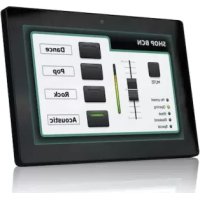
WPNETTOUCH - Touch remote Ecler - Free user manual and instructions
Find the device manual for free WPNETTOUCH Ecler in PDF.


| Product Type | Touch Remote / EclerNet Control Screen |
| Brand | Ecler |
| Model | WPNETTOUCH |
| Screen | IPS 10.1" (25.4 cm), 1280x800 pixels resolution, 16:9 format |
| Touch Technology | Multi-point Capacitive |
| Power Supply | PoE (Ethernet) or external 12V DC, 2A power adapter |
| Network Interface | Ethernet Base-Tx 10/100 Mbps, RJ45 connector |
| Mounting | Wall (VESA75) or desk (stand rod included) |
| Use | Indoor only |
| Main Functions | Control of EclerNet devices via programmable UCP panels, integrated UCP server, UCP client |
| Configuration | Local via touch screen or remote via EclerNet Manager |
| Operating Temperature | Not specified, indoor use |
| Package Contents | WPNETTOUCH, power adapter with pins, VESA75 wall mount, table stand, quick start guide, warranty card |
| Maintenance and Cleaning | Clean with a dry cloth only |
| Safety | Do not expose to water or humidity, unplug during storms, repair by qualified personnel |
| Repairability | Entrust all repairs to a qualified technician |
| Compatibility | EclerNet devices: MIMO, NXA, NZA, NPA, DUO-NET, etc. |
| Configuration Software | EclerNet Manager (downloadable at www.ecler.com) |
| Firmware | Update via EclerNet Manager |
| Warranty | Refer to warranty card or www.ecler.com |
Frequently Asked Questions - WPNETTOUCH Ecler
User questions about WPNETTOUCH Ecler
0 question about this device. Answer the ones you know or ask your own.
Ask a new question about this device
Download the instructions for your Touch remote in PDF format for free! Find your manual WPNETTOUCH - Ecler and take your electronic device back in hand. On this page are published all the documents necessary for the use of your device. WPNETTOUCH by Ecler.
USER MANUAL WPNETTOUCH Ecler
Warning: this action will replace the current project with a default (blank) one, losing all the configuration and user data in the current project. Are you sure?

Warning: this action will bring back this device to its factory defaults. This involves losing your current network configuration, general setup and current project data. Are you sure?

This action will reboot this device, losing network connection for a while and recovering normal performance after the reboot. Are you sure?

8 CONNEXIONÀUN SERVEUR UCP
| System | |
| CPU | RK3128 quad core processor, clocked 1.6G |
| RAM | 1GB |
| ROM | 8GB |
| Screen | |
| Size | 10,1" IPS |
| Resolution | 1280x800 |
| Contrast ratio | 1300 |
| Brightness | 300cdm2 |
| Screen scale / Display area | 16:9 / 218x135mm |
| Backlight | LED |
| Touch-panel | Capacitive multi-touch |
| Network & Connectivity | |
| Ethernet | Supports PoE |
| Ethernet port | Ethernet Base-Tx 10/100Mb / 1GB CAT5e or better up to 100m. |
| Power | |
| External power supply voltage | 12VDC |
| DC current (max) | 350mA from 12V External Power Supply Voltage |
| Mains power consumption | 125mA from PoE |
| 6W | |
| General | |
| Bracket mounting holes | VESA 75mm |
| Dimensions WxHxD | 260x178x28 mm / 10.2"x7.0"x1.1" |
| Weight | 700 gr / 1.54 lb. |
| Accessories included | |
| AC power adapter | 100-240VAC 50-60Hz 12V / 2A, multi-plug VESA75 and desktop |
| Mounting systems | |
TP-NET PROTOCOL
SOFTWARE
Third-Party NET
13 TP-NET PROTOCOL INTRODUCTION
The TP-NET protocol lets a client device (control device) get and/or set the values of several parameters of the EclerNet compatible devices (MIMO and MIMO SG series digital matrices, DUO-NET PLAYER, NXA digital audio manager series, NZA amplifier series, NPA amplifier series, etc.), like volumes, mutes, alarms, etc. It's as well available for eMIMO1616 digital matrix, HUB series digital zone, MIMO7272DN and MIMO4040CDN digital matrix.
The communication with these digital audio devices can be established using Ethernet and the UDP/IP transport protocol, always by means of the 5800 UDP port.
A second option for this communication is using the RS-232 interface that some of these compatible devices do also have (MIMO series, DUO-NET PLAYER, NXA series, etc.). In this case, the serial connection must fulfil the following specifications:
- Baud rate: 57600 (fixed, no autonegotiation) for all the devices, except for DUO-NET PLAYER, eMIMO1616, HUB series and MIMO4040CDN, which use 115200 baud rate)
Data bits: 8 - Parity: None
- Stop bits: 1
- Flow control: None
In case the Ecler device has an Euroblock connector for the RS-232 interface, the serial cable wiring, from the device's connector to a standard DB9 serial interface connector, must be the following:
| WIRING RS232 - DB9 | |
| RS232 | DB9 |
| Tx | Pin 2 (RxD) |
| Rx | Pin 3 (TxD) |
| Gnd | Pin 5 (Signal Gnd) |
The protocol is simple and direct, making it easy to read, write and modify the generated code. It is based on messages with no begin and end delimiter: each message is self-delimited by the UDP packet size, which is defined with a maximum of 80 characters. All the messages must be written in capital letters.
To let some control systems (like CRESTRON®, EXTRON®, AMX®, RTI®, VITY®, MEDIALON®, etc.) process the messages more easily, the EclerNet device adds the character LF (0x0A) to the end of each message. This way the client can buffer the
messages to process them, if it's required. The EclerNet device can also handle several messages received in a single message packet by using the LF delimiter.
The available messages are built with one or more fields separated with blank spaces ( = blank space):
The first field (TYPE) defines the message type and then, the required parameters for it (each kind of message requires a given number of parameters). The field TYPE can have these values:
SYSTEM
GET
- SET
INC
DEC
- SUBSCRIBE
- UNSUBSCRIBE
DATA
- ERROR
At the end of this document you'll find all the available messages and their parameters for each model of the EclerNet compatible devices.
The SYSTEM, GET, SET, INC, DEC, SUBSCRIBE & UNSUBSCRIBE messages can be sent from the client to the EclerNet device. The DATA & ERROR messages can be sent from the device to the client. The only exception is the SYSTEM PING message, that is a SYSTEM type message that is sent from the EclerNet device when the initial message from the client to the device was SYSTEM CONNECT PINGPONG.
The communication (using UDP or RS-232) starts when a client sends the message SYSTEM CONNECT to the EclerNet device. As far as the UDP communication requires no connection (unlike the TCP), the EclerNet device stores this client's IP address, and then uses it as the destination IP address for the messages that it generates (DATA & ERROR). After receiving the SYSTEM CONNECT message, the device dumps its entire configuration using several consecutive DATA messages.
The communication can be terminated by two methods:
- Manually: when the client sends the SYSTEM DISCONNECT message, cancelling all the subscriptions and stopping the DATA & ERROR messages
- Automatically: in case the initial message was SYSTEM CONNECT PINGPONG and the client didn't get any SYSTEM PONG message in a period longer than 10 seconds (presuming a communication breakdown)
The SET messages don't have an automatic acknowledgement with a DATA message sent from the EclerNet device after it has processed the SET command. The client must update the values itself and must send the needed GET message if it requires confirmation from the device.
NOTES:
- The numerical values are always integer numbers without +, - , comma or dot symbols.
- [PINGPONG] is an optional parameter used to configure the device-client communication with a periodical check, to see whether the client or the device have terminated it. When configured this way, the device sends a SYSTEM PING once per second, and the client must answer with a SYSTEM PONG message. If anyone doesn't get these messages along a 10 seconds period, the communication will be considered terminated
- &
- It can be within a [1..8] range for MIMO88 single units (8x8 matrix masters), and [1..16] for MIMO88 couples configured as 16x16 matrix masters
- It can be within a [1..8] range for MIMO88SG units
It can be within a [1..12] range for MIMO1212SG units - For the NPA series,
- For the NXA and NZA series it can be within the [1..4] or [1..6] range, for 4 or 6 channel amplifiers
- It can be within a [1..16] range for eMIMO1616 units
It can be within a [1...40] range for MIMO7272DN and MIMO4040CDN is a numerical value that identifies one available Preset stored in the EclerNet device's memory: - For the MIMO series it can be within the [1..99] range
- For the DUO-NET PLAYER it can be within the [1..20] range
- For the NPA series it can be within the [1..10] range
- For the NXA and NZA series it can be within the [1..5] range
-
, y
are numerical values in the [0..100] range that define values in a scale equivalent to [-inf..0] dB -
& are numerical values within the [1..8] range for the MIMO88 configured as 8x8 matrix masters (single units), and [1..16] for MIMO88 couples configured as 16x16 matrix masters. For the NXA series GPI values can be within the [1..4] or [1..6] range, depending on model. For the MIMO7272DN and MIMO4040CDN GPI and GPO values can be within [1..8] is a numerical value within the [0..100] range that indicates the value of an analogue GPI input. For a digital input only 0 or 100 are the possible values is a numerical value within the [0..1] range: it can only be 0 or 1 (opened or closed GPO) is a numerical value within the [1..10] range that sets the VU-meter refresh rate, or the number of times the vumeters' values are sent per second (by default = 3) - "Device Name" is the device name inside double quotation marks, to allow for names with blank spaces
is a numerical value for an error code - “
” is a text chain inside double quotation marks, containing an error description is a numerical value that identifies a Virtual Control in a MIMO or NXA device:
It can be within a [1A..4A] or [1B..4B] range for NXA 4 ch. Models
It can be within a [1A..6A] or [1B..6B] range for NXA 6 ch. models- It can be within a [1..64] range for MIMO88, MIMO88CONF, MIMO88SG, MIMO88SGCONF, MIMO1616, MIMO1616CONF, MIMO1212SG and MIMO1212SGCONF models
It can be within a [1..80] range for MIMO40CDN model
It can be within a [1..160] range for MIMO7272DN model
14 NXA DIGITAL AUDIO MANAGER SERIES
IMPORTANT NOTE: The communication must be started with the client sending the first message SYSTEM CONNECT to the EclerNet device. Otherwise, the commands from the client to the EclerNet device will be ignored. See TP-NET PROTOCOL INTRODUCTION chapter for additional information.
| TYPE | PARAM1 | PARAM2 | PARAM3 | PARAM4 | DESCRIPTION |
| SYSTEM | CONNECT | [PINGPONG] | Saves the client IP address for responses and then dumps current device status (with DATA messages) | ||
| DISCONNECT | Cancel subscriptions and terminates communication | ||||
| SUBSCRIPTION_RATE | Alive message from device | ||||
| PING | Alive message from device | ||||
| PONG | Alive ACK message from client | ||||
| GET | ALL | Dumps current device status (with DATA messages) | |||
| POWER | Gets the Device Power status | ||||
| PRESET | Gets the current PRESET | ||||
| OLEVEL | Gets the current LEVEL of an Output Channel | ||||
| XLEVEL | Gets the current LEVEL of a Matrix point | ||||
| OMUTE | Gets the current MUTE status of an Output Channel | ||||
| XMUTE | Gets the current MUTE status of a Matrix Point | ||||
| OVU | Gets the VU-meter value of an Output Channel | ||||
| ALARM_PROTECT | Gets the Protect alarm status of an Output Channel | ||||
| ALARM_FAULT | Gets the self-diagnosis system alarm status of an Output Channel |

ecler
| INFO_NAME | Gets the Device Name | ||||
| INFO_MODEL | Gets the Device Model | ||||
| INFO_VERSION | Gets the Firmware Version | ||||
| INFO_MAC | Gets the Device MAC address | ||||
| VIRTUAL_CONTROL | Gets the Virtual Control value | ||||
| TYPE | PARAM1 | PARAM2 | PARAM3 | PARAM4 | DESCRIPTION |
| SET | POWER | ON/OFF | Sets the Device Power status | ||
| PRESENT | Sets the current PRESET | ||||
| OLEVEL | Sets the current LEVEL of an Output Channel | ||||
| XLEVEL | Sets the current LEVEL of a Matrix point | ||||
| OMUTE | YES/NO | Sets the current MUTE status of an Output Channel | |||
| XMUTE | Sets the current MUTE status of a Matrix Point | ||||
| VIRTUAL_CONTROL | Sets the Virtual Control value (Value can range from 1 to 100) | ||||
| INC | OLEVEL | Increases the current LEVEL of an Output Channel by Value (Value can range from ±1 to ±100) | |||
| XLEVEL | Increases the current LEVEL of a Matrix point by Value (Value can range from ±1 to ±100) | ||||
| DEC | OLEVEL | Decreases the current LEVEL of an Output Channel by Value (Value can range from ±1 to ±100) | |||
| XLEVEL | Decreases the current LEVEL of a Matrix point by Value (Value can range from ±1 to ±100) | ||||
| SUBSCRIBE | ALL | Subscribed to all VU-meters | |||
| OVU | Subscribed to an Output Channel VU-meter | ||||
| UNSUBSCRIBE | ALL | Unsubscribe to all VU-meters | |||
| OVU | Unsubscribe to an Output Channel VU-meter | ||||
| DATA | POWER | ON/OFF | Shows the Device Power status | ||
| PRESENT | Shows the current PRESET | ||||
| OLEVEL | Shows the current LEVEL of an Output Channel | ||||
| XLEVEL | <Input Channel> | <Output Channel> | <Level> | Shows the current LEVEL of a Matrix point | |
| OMUTE | <Output Channel> | YES/NO | Shows the current MUTE status of an Output Channel | ||
| XMUTE | <Input Channel> | <Output Channel> | YES/NO | Shows the current MUTE status of a Matrix point | |
| VIRTUAL_CONTROL | <Virtual Control> | <Value> | Shows the Virtual Control value | ||
| OVU | <Output Channel> | <Pre Vumeter Level> | <Post Vumeter Level> | Shows the VU-meter value of an Output Channel | |
| ALARM_PROTECT | <Output Channel> | ON/OFF | Shows the Protect alarm status of an Output Channel | ||
| ALARM_FAULT | <Output Channel> | ON/OFF | Shows the self-diagnosis system alarm status of an Output Channel | ||
| INFO_NAME | " <Device Name>" | Shows the Device Name | |||
| INFO_MODEL | <Device Model> | Shows the Device Model | |||
| INFO_VERSION | <Firmware Version> | Shows the Firmware Version | |||
| INFO_MAC | <Device MAC address> | Shows the Device MAC address | |||
| ERROR | <Error ID> | " <Error Description>" | Informs about an error |
Note: INC and DEC commands are replied with a DATA command from the device with the resulting LEVEL value, after it has been increased or decreased. When the INC or DEC command tries to adjust a LEVEL value beyond its minimum or maximum limits, no reply (DATA command) will be produced.
15 NZA MULTICHANNEL AMPLIFIER SERIES
IMPORTANT NOTE: The communication must be started with the client sending the first message SYSTEM CONNECT to the EclerNet device. Otherwise, the commands from the client to the EclerNet device will be ignored. See TP-NET PROTOCOL INTRODUCTION chapter for additional information.
| TYPE | PARAM1 | PARAM2 | PARAM3 | PARAM4 | DESCRIPTION |
| SET | POWER | ON/OFF | Sets the Device Power status | ||
| PRESENT | Sets the current PRESET | ||||
| OLEVEL | Sets the current LEVEL of an Output Channel | ||||
| OMUTE | <Level> | Sets the current MUTE status of an Output Channel | |||
| SUBSCRIBE | ALL | Subscribes to all VU-meters | |||
| OVU | Subscribes to an Output Channel VU-meter | ||||
| UNSUBSCRIBE | ALL | Unsubscribe to all VU-meters | |||
| OVU | Unsubscribe to an Output Channel VU-meter | ||||
| DATA | POWER | ON/OFF | Shows the Device Power status | ||
| PRESENT | Shows the current PRESET | ||||
| OLEVEL | Shows the current LEVEL of an Output Channel | ||||
| OMUTE | <Level> | Shows the current MUTE status of an Output Channel | |||
| OVU | <Output Channel> | Shows the current MUTE status of an Output Channel | |||
| ALARM_PROTECT | Shows the VU-meter value of an Output Channel | ||||
| INFO_NAME | <Pre Vumeter Level> | Shows the Protect alarm status of an Output Channel | |||
| INFO_MODEL | Shows the Device Name | ||||
| INFO_VERSION | Shows the Device Model | ||||
| INFO_MAC | Shows the Firmware Version | ||||
| ERROR | Shows the Device MAC address | ||||
| Informs about an error |
16 NPA STEREO AMPLIFIER SERIES
IMPORTANT NOTE: The communication must be started with the client sending the first message SYSTEM CONNECT to the EclerNet device. Otherwise, the commands from the client to the EclerNet device will be ignored. See TP-NET PROTOCOL INTRODUCTION chapter for additional information.
| TYPE | PARAM1 | PARAM2 | PARAM3 | PARAM4 | DESCRIPTION |
| SYSTEM | CONNECT | [PINGPONG] | Saves the client IP address for responses and then dumps current device status (with DATA messages) | ||
| DISCONNECT | Cancel subscriptions and terminates communication | ||||
| SUBSCRIPTION_RATE | <Rate> | Alive message from device | |||
| PING | Alive message from device | ||||
| PONG | Alice ACK message from client | ||||
| GET | ALL | Dumps current device status (with DATA messages) | |||
| POWER | Gets the Device Power status | ||||
| PRESET | Gets the current PRESET | ||||
| OLEVEL | <Output Channel> | Gets the current LEVEL of an Output Channel | |||
| OMUTE | <Output Channel> | Gets the current MUTE status of an Output Channel | |||
| OVU | <Output Channel> | Gets the VU-meter value of an Output Channel | |||
| ALARM_PROTECT | <Output Channel> | Gets the Protect alarm status of an Output Channel | |||
| ALARM_THERMAL | <Output Channel> | Gets the Thermal alarm status of an Output Channel | |||
| ALARM_LOAD | <Output Channel> | Gets the Load alarm status of an Output Channel | |||
| ALARM_VOLTAGE | Gets the Voltage alarm status of the Device | ||||
| INFO_NAME | Gets the Device Name | ||||
| INFO_MODEL | Gets the Device Model | ||||
| INFO_VERSION | Gets the Firmware Version | ||||
| INFO_MAC | Gets the Device MAC address |
| TYPE | PARAM1 | PARAM2 | PARAM3 | PARAM4 | DESCRIPTION |
| SET | POWER | ON/OFF | Sets the Device Power status | ||
| PRESET | Sets the current PRESET | ||||
| OLEVEL | Sets the current LEVEL of an Output Channel | ||||
| OMUTE | <Level> | Sets the current MUTE status of an Output Channel | |||
| SUBSCRIBE | ALL | Subscribes to all VU-meters | |||
| OVU | Subscribes to an Output Channel VU-meter | ||||
| UNSUBSCRIBE | ALL | Unsubscribe to all VU-meters | |||
| OVU | Unsubscribe to an Output Channel VU-meter | ||||
| DATA | POWER | ON/OFF | Shows the Device Power status | ||
| PRESET | Shows the current PRESET | ||||
| OLEVEL | Shows the current LEVEL of an Output Channel | ||||
| OMUTE | <Level> | Shows the current MUTE status of an Output Channel | |||
| OVU | <Pre Vumeter Level> | Shows the VU-meter value of an Output Channel | |||
| ALARM_PROTECT | ON/OFF | Shows the Protect alarm status of an Output Channel | |||
| ALARM_THERMAL | ON/OFF | Shows the Thermal alarm status of an Output Channel | |||
| ALARM_LOAD | ON/OFF | Shows the Load alarm status of an Output Channel | |||
| ALARM_VOLTAGE | ON/OFF | Shows the Voltage alarm status of the Device |

| INFO_NAME | "Device Name" | Shows the Device Name | |||
| INFO_MODEL | "Model" | Shows the Device Model | |||
| INFO_VERSION | "Firmware Version" | Shows the Firmware Version | |||
| INFO_MAC | MAC address" | Shows the Device MAC address | |||
| ERROR | Informs about an error |
17 MIMO88 / MIMO88 CONFERENCE / MIMO88SG / MIMO1212SG (SINGLE) DIGITAL MATRIX
IMPORTANT NOTE: The communication must be started with the client sending the first message SYSTEM CONNECT to the EclerNet device. Otherwise, the commands from the client to the EclerNet device will be ignored. See TP-NET PROTOCOL INTRODUCTION chapter for additional information.
| TYPE | PARAM1 | PARAM2 | PARAM3 | PARAM4 | DESCRIPTION |
| SYSTEM | CONNECT | [PINGPONG] | Saves the client IP address for responses and then dumps current device status (with DATA messages) | ||
| DISCONNECT | Cancel subscriptions and terminates communication | ||||
| SUBSCRIPTION_RATE | Alive message from device | ||||
| PING | Alive message from device | ||||
| PONG | Alive ACK message from client | ||||
| GET | ALL | Dumps current device status (with DATA messages) | |||
| PRESET | Gets the current PRESET | ||||
| ILEVEL | Gets the current LEVEL of an Input Channel | ||||
| OLEVEL | Gets the current LEVEL of an Output Channel | ||||
| XLEVEL | Gets the current LEVEL of a Matrix point | ||||
| IMUTE | Gets the current MUTE status of an Input Channel | ||||
| OMUTE | Gets the current MUTE status of an Output Channel | ||||
| XMUTE | Gets the current MUTE status of a Matrix Point | ||||
| IVU | Gets the VU-meter value of an Input Channel |

ecler
| OVU | <Output Channel> | Gets the VU-meter value of an Output Channel | |||
| GPI | <Input> | Gets the current value of a General Purpose Input | |||
| GPO | <Output> | Gets the current value of a General Purpose Output (not valid for MIMO88SG / MIMO1212SG) | |||
| INFO_NAME | Gets the Device Name | ||||
| INFO_MODEL | Gets the Device Model | ||||
| INFO_VERSION | Gets the Firmware Version | ||||
| INFO_MAC | Gets the Device MAC address | ||||
| VIRTUAL_CONTROL | <Virtual Control> | Gets the Virtual Control value | |||
| TYPE | PARAM1 | PARAM2 | PARAM3 | PARAM4 | DESCRIPTION |
| SET | PRESET | Sets the current PRESET | |||
| ILEVEL | Sets the current LEVEL of an Input Channel | ||||
| OLEVEL | Sets the current LEVEL of an Output Channel | ||||
| XLEVEL | Sets the current LEVEL for a Matrix point | ||||
| IMUTE | YES/NO | Sets the current MUTE status of an Input Channel | |||
| OMUTE | YES/NO | Sets the current MUTE status of an Output Channel | |||
| XMUTE | YES/NO | Sets the current MUTE status for a Matrix Point | |||
| GPO | Sets the current value for a General Purpose Output (not valid for MIMO88SG) | ||||
| VIRTUAL_CONTROL | Sets the Virtual Control value (Value can range from 1 to 100) | ||||
| INC | ILEVEL | Increases the current LEVEL of an Input Channel by Value (Value can range from ±1 to ±100) | |||
| OLEVEL | Increases the current LEVEL of an Output Channel by Value (Value can range from ±1 to ±100) | ||||
| XLEVEL | Increases the current LEVEL of a Matrix point by Value (Value can range from ±1 to ±100) | ||||
| DEC | ILEVEL | Decreases the current LEVEL of an Input Channel by Value (Value can range from ±1 to ±100) | |||
| OLEVEL | Decreases the current LEVEL of an Output Channel by Value (Value can range from ±1 to ±100) |

| XLEVEL | <Input Channel> | <Output Channel> | <Value> | Decreases the current LEVEL of a Matrix point by Value (Value can range from ±1 to ±100) | |
| SUBSCRIBE | ALL | Subscribes to all VU-meters | |||
| IVU | <Input Channel> | Subscribes to an Input Channel VU-meter | |||
| OVU | <Output Channel> | Subscribes to an Output Channel VU-meter | |||
| UNSUBSCRIBE | ALL | Unsubscribe to all VU-meters | |||
| IVU | <Input Channel> | Unsubscribe to an Input Channel VU-meter | |||
| OVU | <Output Channel> | Unsubscribe to an Output Channel VU-meter |
Note: INC and DEC commands are replied with a DATA command from the device with the resulting LEVEL value, after it has been increased or decreased. When the INC or DEC command tries to adjust a LEVEL value beyond its minimum or maximum limits, no reply (DATA command) will be produced.
| TYPE | PARAM1 | PARAM2 | PARAM3 | PARAM4 | DESCRIPTION |
| DATA | PRESENT | <Preset Number> | Shows the current PRESET | ||
| ILEVEL | <Input Channel> | <Level> | Shows the current LEVEL of an Input Channel | ||
| OLEVEL | <Output Channel> | <Level> | Shows the current LEVEL of an Output Channel | ||
| XLEVEL | <Input Channel> | <Output Channel> | <Level> | Shows the current LEVEL for a Matrix point | |
| IMUTE | <Input Channel> | YES/NO | Shows the current MUTE status of an Input Channel | ||
| OMUTE | <Output Channel> | YES/NO | Shows the current MUTE status of an Output Channel | ||
| XMUTE | <Input Channel> | <Output Channel> | YES/NO | Shows the current MUTE status for a Matrix Point | |
| VIRTUAL_CONTROL | <Virtual Control> | <Value> | Shows the Virtual Control value (Value can range from 1 to 100) | ||
| IVU | <Input Channel> | <Pre Vumeter Level> | <Post Vumeter Level> | Shows the VU-meter value of an Input Channel | |
| OVU | <Output Channel> | <Pre Vumeter Level> | <Post Vumeter Level> | Shows the VU-meter value of an Output Channel | |
| GPI | <Input> | <GPI Value> | Shows the current value of a General Purpose Input | ||
| GPO | <Output> | <GPO Value) | Shows the current value of a General Purpose Output (not valid for MIMO88SG) | ||
| INFO_NAME | <Device Name>" | Shows the Device Name | |||
| INFO_MODEL | <Device Model> | Shows the Device Model | |||
| INFO_VERSION | <Firmware Version> | Shows the Firmware Version | |||
| INFO_MAC | <Device MAC address> | Shows the Device MAC address | |||
| ERROR | <Error ID> | <Error Description>" | Informs about an error |
18 MIMO88SG CONFERENCE DIGITAL MATRIX
IMPORTANT NOTE: The communication must be started with the client sending the first message SYSTEM CONNECT to the EclerNet device. Otherwise, the commands from the client to the EclerNet device will be ignored. See TP-NET PROTOCOL INTRODUCTION chapter for additional information.
This MIMO88SG CONFERENCE firmware version shares the same hardware with the standard MIMO88SG unit, just uploading the CONFERENCE firmware version to it, and shares as well the same TP-NET commands in the above table, adding to them these new ones:
| TYPE | PARAM1 | PARAM2 | PARAM3 | PARAM4 | DESCRIPTION |
| GET | GATE | Gets the current status of the NOISE GATE for inputs 1 to 8 | |||
| AUTOMIXER | Gets the current status of the AUTOMIXER function for inputs 1 to 8 | ||||
| SUBSCRIBE | GATE | Subscribes to the status of the NOISE GATE for inputs 1 to 8 | |||
| AUTOMIXER | Subscribes to the status of the AUTOMIXER function for inputs 1 to 8 | ||||
| UNSUSSCRIBE | GATE | Unsubscribed to the status of the NOISE GATE for inputs 1 to 8 | |||
| AUTOMIXER | Unsubscribed to the status of the AUTOMIXER function for inputs 1 to 8 | ||||
| DATA | GATE | s1 s2 s3 s4 s5 s6 s7 s8 | Shows the current NOISE GATE status (0 = open / 1 = closed) for the 8 inputs channels (s1 to s8, status of the gate for inputs 1 to 8) | ||
| AUTOMIXER | s1 s2 s3 s4 s5 s6 s7 s8 | Shows the current status for input channels in the Automixer section (0 = disabled or bellow threshold in the automixer / 1 = enabled and beyond threshold, but queued, not in the automatic mix / 2 = enabled, beyond threshold and into the automatic mix) for the 8 inputs channels (s1 to s8, status of the automixer function for inputs 1 to 8) |
19 MIMO 7272DN / MIMO4040CDN DIGITAL MATRIX
IMPORTANT NOTE: The communication must be started with the client sending the first message SYSTEM CONNECT to the EclerNet device. Otherwise, the commands from the client to the EclerNet device will be ignored. See TP-NET PROTOCOL INTRODUCTION chapter for additional information.
| TYPE | PARAM1 | PARAM2 | PARAM3 | PARAM4 | DESCRIPTION |
| SYSTEM | CONNECT | [MASTER] | [PINGPONG] | [ONCE] | Saves the client IP address for responses and then dumps current device status (with DATA messages) |
| DISCONNECT | Cancel subscriptions and terminates communication | ||||
| SUBSCRIPTION_RATE | Alive message from device | ||||
| PING | Alive message from device | ||||
| PONG | Alive ACK message from client | ||||
| PING INTERVAL | <1-1000> | Ping Interval, in seconds | |||
| GET | ALL | Dumps current device status (with DATA messages) | |||
| PRESET | Gets the current PRESET | ||||
| ILEVEL | Gets the current LEVEL of an Input Channel | ||||
| OLEVEL | Gets the current LEVEL of an Output Channel | ||||
| XLEVEL | Gets the current LEVEL of a Matrix point | ||||
| IMUTE | Gets the current MUTE status of an Input Channel | ||||
| XMUTE | Gets the current MUTE status of a Matrix Point | ||||
| IVU | Gets the VU-meter value of an Input Channel | ||||
| OVU | Gets the VU-meter value of an Output Channel |

| GPI | <Input> | Gets the current value of a General Purpose Input | |||
| GPO | <Output> | Gets the current value of a General Purpose Output | |||
| INFO_NAME | Gets the Device Name | ||||
| INFO_MODEL | Gets the Device Model | ||||
| INFO_VERSION | Gets the Firmware Version | ||||
| INFO_MAC | Gets the Device MAC address | ||||
| VIRTUAL_CONTROL | <Virtual Control> | Gets the Virtual Control value | |||
| TYPE | PARAM1 | PARAM2 | PARAM3 | PARAM4 | DESCRIPTION |
| SET | PRESET | Sets the current PRESET | |||
| ILEVEL | Sets the current LEVEL of an Input Channel | ||||
| OLEVEL | Sets the current LEVEL of an Output Channel | ||||
| XLEVEL | Sets the current LEVEL for a Matrix point | ||||
| IMUTE | YES/NO | Sets the current MUTE status of an Input Channel | |||
| XMUTE | YES/NO | Sets the current MUTE status for a Matrix Point | |||
| GPO | Sets the current value for a General Purpose Output | ||||
| VIRTUAL_CONTROL | Sets the Virtual Control value (Value can range from 1 to 100) | ||||
| INC | ILEVEL | Increases the current LEVEL of an Input Channel by Value (Value can range from ±1 to ±100) | |||
| OLEVEL | Increases the current LEVEL of an Output Channel by Value (Value can range from ±1 to ±100) | ||||
| XLEVEL | Increases the current LEVEL of a Matrix point by Value (Value can range from ±1 to ±100) | ||||
| DEC | ILEVEL | Decreases the current LEVEL of an Input Channel by Value (Value can range from ±1 to ±100) | |||
| OLEVEL | Decreases the current LEVEL of an Output Channel by Value (Value can range from ±1 to ±100) | ||||
| XLEVEL | Decreases the current LEVEL of a Matrix point by Value (Value can range from ±1 to ±100) | ||||
| SUBSCRIBE | ALL | Subscribes to all VU-meters | |||
| IVU | Subscribes to an Input Channel VU-meter |

| OVU | <Output Channel> | Subscribers to an Output Channel VU-meter | |||
| UNSUBSCRIBE | ALL | Unsubscribe to all VU-meters | |||
| IVU | <Input Channel> | Unsubscribe to an Input Channel VU-meter | |||
| OVU | <Output Channel> | Unsubscribe to an Output Channel VU-meter |
Note: INC and DEC commands are replied with a DATA command from the device with the resulting LEVEL value, after it has been increased or decreased. When the INC or DEC command tries to adjust a LEVEL value beyond its minimum or maximum limits, no reply (DATA command) will be produced.
| TYPE | PARAM1 | PARAM2 | PARAM3 | PARAM4 | DESCRIPTION |
| DATA | PRESET | Shows the current PRESET | |||
| ILEVEL | Shows the current LEVEL of an Input Channel | ||||
| OLEVEL | Shows the current LEVEL of an Output Channel | ||||
| XLEVEL | Shows the current LEVEL for a Matrix point | ||||
| IMUTE | YES/NO | Shows the current MUTE status of an Input Channel | |||
| XMUTE | YES/NO | Shows the current MUTE status for a Matrix Point | |||
| VIRTUAL_CONTROL | Shows the Virtual Control value (Value can range from 1 to 100) | ||||
| IVU | Shows the VU-meter value of an Input Channel | ||||
| OVU | Shows the VU-meter value of an Output Channel | ||||
| GPI | Shows the current value of a General Purpose Input | ||||
| GPO | Shows the current value of a General Purpose Output. | ||||
| INFO_NAME | Shows the Device Name | ||||
| INFO_MODEL | Shows the Device Model | ||||
| INFO_VERSION | Shows the Firmware Version | ||||
| INFO_MAC | Shows the Device MAC address | ||||
| INFO_IPLIST | Shows the list of clients connected to the Device. The message will contain a list including ClientNumber ClientIP Client Port (separated by blank characters) |
19.1 MIMO4040CDN: AEC MANAGEMENT
| TYPE | PARAM1 | PARAM2 | PARAM3 | PARAM4 | DESCRIPTION |
| GET | AEC_MIC_LEVEL | <Room> | <Mic> | Gets the current LEVEL of a local mic from a given AEC room | |
| AEC_MIC_MUTE | <Room> | <Mic> | YES/NO | Gets the current MUTE status of a local mic from a given AEC room | |
| AEC_MIC_VU | <Room> | <Mic> | Gets the VU-meter value of a of a local mic from a given AEC room. It returns the Pre Fader and Post Fader values | ||
| AEC_SPK_LEVEL | <Room> | <Speaker> | Gets the current LEVEL of a local loudspeaker from a given AEC room | ||
| AEC_SPK_MUTE | <Room> | <Speaker> | YES/NO | Gets the current MUTE status of a local loudspeaker from a given AEC room | |
| AEC_SPK_VU | <Room> | <Speaker> | Gets the VU-meter value of a local loudspeaker from a given AEC room. It returns the Pre Fader and Post Fader values | ||
| SET | AEC_MIC_LEVEL | <Room> | <Mic> | <Value> | Sets the current LEVEL of a local mic from a given AEC room |
| AEC_MIC_MUTE | <Room> | <Mic> | YES/NO | Sets the current MUTE status of a local mic from a given AEC room | |
| AEC_SPK_LEVEL | <Room> | <Speaker> | <Value> | Sets the current LEVEL of a local loudspeaker from a given AEC room | |
| AEC_SPK_MUTE | <Room> | <Speaker> | YES/NO | Sets the current MUTE status of a local loudspeaker from a given AEC room | |
| AEC_RESET | <Room> | Reset the AEC algorithm (default parameters) from a given AEC room | |||
| INC | AEC_MIC_LEVEL | <Room> | <Mic> | <Value> | Increases the current LEVEL of a local mic from a given AEC room (Value can range from \( \pm 1 \) to \( \pm {100} \) ) |
| AEC_SPK_LEVEL | <Room> | <Speaker> | <Value> | Increases the current LEVEL of a local loudspeaker from a given AEC room (Value can range from \( \pm 1 \) to \( \pm {100} \) ) | |
| DEC | AEC_MIC_LEVEL | <Room> | <Mic> | <Value> | Decreases the current LEVEL of a local mic from a given AEC room (Value can range from \( \pm 1 \) to \( \pm {100} \) ) |
| AEC_SPK_LEVEL | <Room> | <Speaker> | <Value> | Decreases the current LEVEL of a local loudspeaker from a given AEC room (Value can range from \( \pm 1 \) to \( \pm {100} \) ) | |
| SUBSCRIBE | AEC_MIC_VU | <Room> | <Mic> | Subscribe to all VU-meters of a local mic from a given AEC room | |
| AEC_SPK_VU | <Room> | <Speaker> | Subscribe to all VU-meters of a local loudspeaker from a given AEC room | ||
| UNSUBSCRIBE | AEC_MIC_VU | <Room> | <Mic> | Unsubscribe to all VU-meters of a local mic from a given AEC room | |
| AEC_SPK_VU | <Room> | <Speaker> | Unsubscribe to all VU-meters of a local loudspeaker from a given AEC room |
20 DUO-NET PLAYER AUDIO PLAYER & STREAMING RECEIVER
IMPORTANT NOTE: The communication must be started with the client sending the first message SYSTEM CONNECT to the EclerNet device. Otherwise, the commands from the client to the EclerNet device will be ignored. See TP-NET PROTOCOL INTRODUCTION chapter for additional information.
| TYPE | PARAM1 | PARAM2 | PARAM3 | PARAM4 | DESCRIPTION |
| SYSTEM | CONNECT | [PINGPONG] | Saves the client IP address for responses and then dumps current device status (with DATA messages) | ||
| DISCONNECT | Cancel subscriptions and terminates communication | ||||
| SUBSCRIPTION_RATE | Alive message from device | ||||
| PING | Alive message from device | ||||
| PONG | Alive ACK message from client | ||||
| PING_interval | |||||
| GET | ALL | Dumps current device status (with DATA messages) | |||
| PRESET_INDEX | Gets the current PRESET number | ||||
| PRESET_NAME | Gets the current PRESET name | ||||
| DEVICE_NAME | Gets the Device Name | ||||
| INFO_MODEL | Gets the Device Model | ||||
| INFO_VERSION | Gets the Firmware Version | ||||
| INFO_MAC | Gets the Device MAC address | ||||
| INFO_IPLIST | Gets the IP parameters of the connected client devices | ||||
| IP_CONFIG | Shows the DUO-NET unit's current IP configuration | ||||
| PLAYER_NAME | Gets the PLAYER A or B NAME | ||||
| PLAYER_MUTE | Gets the MUTE status of PLAYER A or B | ||||
| PLAYER_volume | Gets the VOLUME level of PLAYER A or B |

| PLAYER_VUMETER | <PLAYER:A/B> | Gets the VUMETER level of PLAYER A or B | |||
| PLAYER_TIME | <PLAYER:A/B> | Gets PLAYER A or B elapsed, remaining and total time of the current media playback | |||
| PLAYER_TRANSPORT_STATUS | <PLAYER:A/B> | Gets PLAYER A or B current playback status | |||
| PLAYER.PlayLIST_INDEX | Gets PLAYER A or B loaded playlist number, from the 99 available in the playlist bank | ||||
| PLAYER.PlayLIST_NAME | <PLAYER:A/B> | Gets PLAYER A or B loaded playlist name, from the 99 available in the playlist bank | |||
| PLAYER_queue_INFO | <PLAYER:A/B> | Gets PLAYER A or B current playback queue position (index) and total number of items in it (count) | |||
| PLAYERPlay_MODE | <PLAYER:A/B> | Gets PLAYER A or B current playback order mode | |||
| PLAYER_REPEAT_MODE | <PLAYER:A/B> | Gets PLAYER A or B current playback repeat mode | |||
| PLAYER_FADE_MODE | <PLAYER:A/B> | Gets PLAYER A or B current tracks playback transition mode | |||
| PLAYER_VARISPEED | <PLAYER:A/B> | Gets PLAYER A or B current playback tempo variation value | |||
| PRIORITY_STATUS | <PRIORITY:1/2> | Gets PRIORITY MODULE 1 or 2 status | |||
| PLAYER_ITEMTAGS | <PLAYER:A/B> | Gets PLAYER A or B current playback ALIAS, TITLE, ARTIST, ALBUM and NAME tags |
| SET | PRESET_INDEX | <1..20> | Sets the current PRESET number | |||
| PLAYER_MUTE | <PLAYER:A/B> | <YES/NO> | Sets the MUTE status of PLAYER A or B | |||
| PLAYER_VOLUME | <PLAYER:A/B> | <0..100> | Sets the VOLUME level of PLAYER A or B | |||
| PLAYER_TRANSPORT_CONTROL | <PLAYER:A/B> | <STOP/PLAY/P AUSE/NEXT/PR EV> | Sets PLAYER A or B transport controls | |||
| PLAYER.PlayLIST_INDEX | <PLAYER:A/B> | <1..99> | Sets (loads) PLAYER A or B playlist number, from the 99 available in the playlist bank | |||
| PLAYER.Play_MODE | <PLAYER:A/B> | <SEQUENTIAL/RANDOM> | Sets PLAYER A or B playback order mode | |||
| PLAYER_REPEAT_MODE | <PLAYER:A/B> | <PLAY_ALL/PL AY_ONE/REPE AT_ALL/REPEA T_ONE> | Sets PLAYER A or B current playback repeat mode | |||
| PLAYER_FADE_MODE | <PLAYER:A/B> | <NONE/XFADE/ FADE/HFADE> | Sets PLAYER A or B current tracks playback transition mode | |||
| PLAYER_VARISPEED | <PLAYER:A/B> | <VARISPEED:- 50..50> | Sets the current Varispeed (track's tempo) variation value, from -50% to +50% | |||
| INC | PLAYER_VOLUME | PLAYER:A/B> | <0..100> | INCREASEs the current VOLUME of a PLAYER, a value from ±1 to ±100 | ||
| PLAYER_VARISPEED | PLAYER:A/B> | <VARISPEED:- 50..50> | INCrements the current Varispeed (track's tempo) variation value, from -50% to +50% | |||
| DEC | PLAYER_VOLUME | PLAYER:A/B> | <0..100> | DECreases the current VOLUME of a PLAYER, a value from ±1 to ±100 | ||
| PLAYER_VARISPEED | PLAYER:A/B> | <VARISPEED:- 50..50> | DECrements the current Varispeed (track's tempo) variation value, from -50% to +50% | |||
| SUBSCRIBE | ALL | Subscribes to all VU-meters and player times | ||||
| PLAYER_VUMETER | PLAYER:A/B> | Subscribes to the VUMETER level of PLAYER A or B | ||||
| PLAYER_TIME | PLAYER:A/B> | Subscribers to the TIME values ( elapsed, remaining, total) of PLAYER A or B | ||||
| UNSUBSCRIBE | ALL | Unsubscribers to all VU-meters and player times | ||||

ecler
| PLAYER_VUMETER | PLAYER:A/B> | Unsubscribers to the VUMETER level of PLAYER A or B | |||
| PLAYER_TIME | PLAYER:A/B> | Unsubscribers to the TIME values ( elapsed, remaining, total) of PLAYER A or B |
| DATA | PRESET_INDEX | <1..20> | Shows the current PRESET number | ||
| PRESET_NAME | "\"NAME\" | Shows the current PRESET name | |||
| DEVICE_NAME | "\"NAME\" | Shows the Device Name | |||
| INFO_MODEL | <Device Model> | Shows the Device Model | |||
| INFO_VERSION | <Firmware Version> | Shows the Firmware Version | |||
| INFO_MAC | <Device MAC address> | Shows the Device MAC address | |||
| INFO_IPLIST | <N> | <IP> | <PORT> | Shows the IP parameters of the connected client devices, where N is an incremental number assigned to each one, followed by the IP:port it has Example with 2 clients : DATA INFO_IPLIST 1 192.168.1.2 55229 DATA INFO_IPLIST 2 192.168.1.2 55231 |

ecler
| IP_CONFIG | IP> | <PORT> | <NETMASK> | <GATEWAY> | Shows the DUO-NET unit's current IP configuration. Example: DATA IP_CONFIG 192.168.0.6 5000 255.255.0.0 192.168.0.1 | |
| PLAYER_NAME | <PLAYER:A/B> | "NAME" | Shows the PLAYER A or B NAME | |||
| PLAYER_MUTE | <PLAYER:A/B> | "MUTE:YES/NO" | Shows the MUTE status of PLAYER A or B | |||
| PLAYER_VOLUME | <PLAYER:A/B> | <VOL:0..100> | Shows the VOLUME level of PLAYER A or B | |||
| PLAYER_VUMETER | <PLAYER:A/B> | <VOL:0..100> | Shows the VUMETER level of PLAYER A or B | |||
| PLAYER_TIME | <PLAYER:A/B> | <ELAPSED> | <REMAIN> | <TOTAL> | Shows PLAYER A or B elapsed, remaining and total time of the current media playback | |
| PLAYER_TRANSPORT_STATUS | <PLAYER:A/B> | <STATUS:STOPPED/PLAYING/PAUSE> | Shows PLAYER A or B current playback status | |||
| PLAYER.PlayLIST_INDEX | <PLAYER:A/B> | <INDEX:1..99> | Shows PLAYER A or B loaded playlist number, from the 99 available in the playlist bank | |||
| PLAYER.PlayLIST_NAME | <PLAYER:A/B> | "NAME" | Shows PLAYER A or B loaded playlist name, from the 99 available in the playlist bank | |||
| PLAYER Queue_INFO | <PLAYER:A/B> | <QUEUE_INDEX> | <QUEUE_COUNT> | Shows PLAYER A or B current playback queue position (index) and total number of items in it (count) | ||

| PLAYER.Play_MODE | <PLAYER:A/B> | <MODE:SEQUENTIAL/RANDOM> | Shows PLAYER A or B current playback order mode | ||
| PLAYER_REPEAT_MODE | <PLAYER:A/B> | <MODE:PLAY_ALL/PLAY_ONE/REPEAT_ALL/REPEAT_ONE> | Shows PLAYER A or B current playback repeat mode | ||
| PLAYER_FADE_MODE | <PLAYER:A/B> | <MODE:NONE/XFADE/FADE/HFADE> | Shows PLAYER A or B current tracks playback transition mode | ||
| PLAYER_VARISPEED | <PLAYER:A/B> | <VALUE:-50..50> | Shows PLAYER A or B current playback tempo variation value | ||
| PRIORITY_STATUS | <PRIORITY:1/2> | <STATUS:RUNNING/STOPPED> | Shows PRIORITY MODULE 1 or 2 status | ||
| PLAYER_ITEM_TAG_ALIAS | <PLAYER:A/B> | "\"ALIAS\" | Shows PLAYER A or B current playlist ALIAS field | ||
| PLAYER_ITEM_TAG TITLE | <PLAYER:A/B> | "\"TITLE\" | Shows PLAYER A or B current playback title tag | ||
| PLAYER_ITEM_TAG_ARTIST | <PLAYER:A/B> | "\"ARTIST\" | Shows PLAYER A or B current playback artist tag | ||
| PLAYER_ITEM_TAG_ALBUM | <PLAYER:A/B> | "\"ALBUM\" | Shows PLAYER A or B current playback album tag | ||
| PLAYER_ITEM_TAG_NAME | <PLAYER:A/B> | "\"NAME\" | Shows PLAYER A or B current playback name tag | ||
21 ERROR CODES FOR ECLERNET DEVICES

21.1 COMMON ERROR CODES (to all EclerNet - TP-NET compatible devices)
| ERROR ID | DESCRIPTION |
| 0 | TPNET_ERROR_NONE = 0, |
| 1 | TPNET_ERROR_INVALID_FIELD_TYPE, |
| 2 | TPNET_ERROR_INVALID_FIELD_PARAM1, |
| 3 | TPNET_ERROR_INVALID_FIELD_PARAM2, |
| 4 | TPNET_ERROR_INVALID_FIELD_PARAM3, |
| 5 | TPNET_ERROR_INVALID_FIELD_PARAM4, |
21.2 NXA SERIES SPECIFIC ERROR CODES
| ERROR ID | DESCRIPTION |
| 6 | UDP_ERROR_TIMEOUT_PONG, |
| 7 | UDP_ERROR_connect_while_CONNECTED, |
| 8 | UDP_ERROR_DISCONNECT_WHILE_UNCONNECTED, |
| 9 | UDP_ERROR_INVALID_CLIENT_IP, |
| 10 | UDP_ERRORMESSAGE_TOO_long, |
| 11 | UDP_ERROR_UN SUPPORTED_MESSAGE, |
| 12 | UDP_ERROR_UN SUPPORTED_PRESET_NUMBER, |
| 13 | UDP_ERROR_UN SUPPORTED_INPUT_CHANNEL_NUMBER, |
| 14 | UDP_ERROR_UN SUPPORTED_OUTPUT_CHANNEL_NUMBER, |
| 15 | UDP_ERROR_UN SUPPORTED_GPI_NUMBER, |
| 16 | UDP_ERROR_UN SUPPORTED_GPO_NUMBER, |
| 17 | UDP_ERROR_INVALID_LEVEL_VALUE, |
| 18 | UDP_ERROR_INVALID_RATE_VALUE, |
| 19 | UDP_ERROR_GPO_VALUE, |
| 20 | UDP_ERROR_MAX_clients_REACHED, |
| 21 | UDP_ERRORMASTER_MODE, |
21.3 NZA SERIES SPECIFIC ERROR CODES
| ERROR ID | DESCRIPTION |
| 6 | UDP_ERROR_TIMEOUT_PONG, |
| 7 | UDP_ERROR_connect_while_CONNECTED, |
| 8 | UDP_ERROR_DISCONNECT_WHILE_UNCONNECTED, |
| 9 | UDP_ERROR_INVALID_CLIENT_IP, |
| 10 | UDP_ERRORMESSAGE_TOO_long, |
| 11 | UDP_ERROR_UN SUPPORTED_MESSAGE, |
| 12 | UDP_ERROR_UN SUPPORTED_PRESET_NUMBER, |
| 13 | UDP_ERROR_UN SUPPORTED_INPUT_CHANNEL_NUMBER, |
| 14 | UDP_ERROR_UN SUPPORTED_OUTPUT_CHANNEL_NUMBER, |
| 15 | UDP_ERROR_UN SUPPORTED_GPI_NUMBER, |
| 16 | UDP_ERROR_UN SUPPORTED_GPO_NUMBER, |
| 17 | UDP_ERROR_INVALID_LEVEL_VALUE, |
| 18 | UDP_ERROR_INVALID_RATE_VALUE, |
| 19 | UDP_ERROR_GPO_VALUE, |
| 20 | UDP_ERROR_UN SUPPORTED_INPUT_SELECT_VALUE, |
21.4 NPA, MIMO7272DN, MIMO4040CDN, MIMO88 & MIMO88 CONFERENCE SERIES SPECIFIC ERROR CODES
| ERROR ID | DESCRIPTION |
| 6 | UDP_ERROR_TIMEOUT_PONG, |
| 7 | UDP_ERROR_connect_while_CONNECTED, |
| 8 | UDP_ERROR_DISCONNECT_WHILE_UNCONNECTED, |
| 9 | UDP_ERROR_INVALID_client_IP, |
| 10 | UDP_ERRORMESSAGE_TOO_long, |
| 11 | UDP_ERROR_UN SUPPORTED_MESSAGE, |
| 12 | UDP_ERROR_UN SUPPORTED_PRESET_NUMBER, |
| 13 | UDP_ERROR_UN SUPPORTED_INPUT_CHANNEL_NUMBER, |
| 14 | UDP_ERROR_UN SUPPORTED_OUTPUT_CHANNEL_NUMBER, |
| 15 | UDP_ERROR_UN SUPPORTED_GPI_NUMBER, |
| 16 | UDP_ERROR_UN SUPPORTED_GPO_NUMBER, |
| 17 | UDP_ERROR_INVALID_LEVEL_VALUE, |
| 18 | UDP_ERROR_INVALID_RATE_VALUE, |
| 19 | UDP_ERROR_GPO_VALUE, |
21.5 MIMO88SG, MIMO1212SG, MIMO88SG CONFERENCE & MIMO1212SG CONFERENCE SERIES SPECIFIC ERROR CODES
| ERROR ID | DESCRIPTION |
| 6 | UDP_ERROR_TIMEOUT_PONG, |
| 7 | UDP_ERROR_connect_while_CONNECTED, |
| 8 | UDP_ERROR_DISCONNECT WHILE_UNCONNECTED, |
| 9 | UDP_ERROR_INVALID_CLIENT_IP, |
| 10 | UDP_ERRORMESSAGE_TOO_long, |
| 11 | UDP_ERROR_UN SUPPORTED_MESSAGE, |
| 12 | UDP_ERROR_UN SUPPORTED_PRESET_NUMBER, |
| 13 | UDP_ERROR_UN SUPPORTED_INPUT_CHANNEL_NUMBER, |
| 14 | UDP_ERROR_UN SUPPORTED_OUTPUT_CHANNEL_NUMBER, |
| 15 | UDP_ERROR_UN SUPPORTED_GPI_NUMBER, |
| 16 | UDP_ERROR_INVALID_LEVEL_VALUE, |
| 17 | UDP_ERROR_INVALID_RATE_VALUE, |
21.6 DUO-NET PLAYER SPECIFIC ERROR CODES
| ERROR ID | DESCRIPTION |
| 6 | TPNET_ERROR_INVALID_FIELD_PARAMETER5, |
| 7 | TPNET_ERROR_TIMEOUT_PONG, |
| 8 | TPNET_ERROR_connect_while_CONNECTED, |
| 9 | TPNET_ERROR_DISCONNECT WHILE_UNCONNECTED, |
| 10 | TPNET_ERROR_INVALID_CLIENT_IP, |
| 11 | TPNET_ERROR_MESSAGE_TOO_long, |
| 12 | TPNET_ERROR_UN SUPPORTED_MESSAGE, |
| 13 | TPNET_ERROR_INVALID_RATE_VALUE, |
| 14 | TPNET_ERROR_MAX_USERS_REACHED, |
| 15 | TPNET_ERRORMASTER_MODE, |
22 eMIMO1616 DIGITAL MATRIX
IMPORTANT NOTE: The communication must be started with the client sending the first message SYSTEM CONNECT to the device. Otherwise, the commands from the client to the EclerNet device will be ignored. See TP-NET PROTOCOL INTRODUCTION chapter for additional information.
| TYPE | PARAM1 | PARAM2 | PARAM3 | PARAM4 | DESCRIPTION |
| SYSTEM | CONNECT | [PINGPONG] | Saves the client IP address for responses and then dumps current device status (with DATA messages) | ||
| DISCONNECT | Cancel subscriptions and terminates communication | ||||
| SUBSCRIPTION_RATE | Alive message from device | ||||
| PING_interval | <1-1000> | Ping Interval, in seconds | |||
| PING | Alive message from device | ||||
| PONG | Alive ACK message from client | ||||
| GET | ALL | Dumps current device status (with DATA messages) | |||
| INFO_NAME | Gets the Device Name | ||||
| INFO_MODEL | Gets the Device Model | ||||
| INFO_VERSION | Gets the Firmware Version | ||||
| INFO_MAC | Gets the Device MAC address | ||||
| IP_CONFIG | Gets the Device network configuration | ||||
| INFO_IPLIST | Gets the list of clients connected to the Device | ||||
| INAME | Gets the NAME (label) of an Input Channel | ||||
| ILEVEL | Gets the current LEVEL of an Input Channel | ||||
| IMUTE | Gets the current MUTE status of an Input Channel | ||||
| IBASSGAIN | Gets the current BASS EQ filter GAIN of an Input Channel | ||||
| IMIDGAIN | Gets the current MID EQ filter GAIN of an Input Channel |

| ITREBLEGAIN | <Input Channel> | Gets the current TREBLE EQ filter GAIN of an Input Channel | |||
| IVU | <Input Channel> | Gets the VU-meter value of an Input Channel | |||
| ONAME | <Output Channel> | Gets the NAME (label) of an Output Channel | |||
| OLEVEL | <Output Channel> | Gets the current LEVEL of an Output Channel | |||
| OMUTE | <Output Channel> | Gets the current MUTE status of an Output Channel | |||
| OBASSGAIN | <Output Channel> | Gets the current BASS EQ filter GAIN of an Output Channel | |||
| OMIDGAIN | <Output Channel> | Gets the current MID EQ filter GAIN of an Output Channel | |||
| OTREBLEGAIN | <Output Channel> | Gets the current TREBLE EQ filter GAIN of an Output Channel | |||
| OVU | <Output Channel> | Gets the VU-meter value of an Output Channel | |||
| OSOURCESEL | <Output Channel> | Gets the current selected source (input) of an Output Channel | |||
| TYPE | PARAM1 | PARAM2 | PARAM3 | PARAM4 | DESCRIPTION |
| SET | IMUTE | YES/NO | Sets the current MUTE status of an Input Channel | ||
| ILEVEL | Sets the current LEVEL of an Input Channel (Level can range from 1 to 100) | ||||
| IBASSGAIN | Sets the current BASS EQ filter GAIN of an Input Channel (Gain can range from ±1 to ±100) | ||||
| IMIDGAIN | Sets the current MID EQ filter GAIN of an Input Channel (Gain can range from ±1 to ±100) | ||||
| ITREBLEGAIN | Sets the current TREBLE EQ filter GAIN of an Input Channel (Gain can range from ±1 to ±100) | ||||
| OMUTE | YES/NO | Sets the current MUTE status of an Output Channel | |||
| OLEVEL | Sets the current LEVEL of an Output Channel (Level can range from 1 to 100) | ||||
| OBASSGAIN | Sets the current BASS EQ filter GAIN of an Output Channel (Gain can range from ±1 to ±100) | ||||
| OMIDGAIN | Sets the current MID EQ filter GAIN of an Output Channel (Gain can range from ±1 to ±100) | ||||
| OTREBLEGAIN | Sets the current TREBLE EQ filter GAIN of an Output Channel (Gain can range from ±1 to ±100) | ||||
| OSOURCESEL | Sets the selected source (input) for an Output Channel (Input (source) can range from 0 to 16, meaning 0 = no source (silence)) | ||||
| INC | ILEVEL | Increases the current LEVEL of an Input Channel by Value (Value can range from ±1 to ±100) | |||
| IBASSGAIN | Increases the current BASS EQ filter GAIN of an Input Channel by Value (Value can range from ±1 to ±200, where 200 means 20.0 -> values are steps like nn.n, with decimal fraction) | ||||
| IMIDGAIN | Increases the current MID EQ filter GAIN of an Input Channel by Value (Value can range from ±1 to ±200, where 200 means 20.0 -> values are steps like nn.n, with decimal fraction) |

| ITREBLEGAIN | <Input Channel> | <Value> | Increases the current TREBLE EQ filter GAIN of an Input Channel by Value (Value can range from ±1 to ±200, where 200 means 20.0 -> values are steps like nn.n, with decimal fraction) | ||
| OLEVEL | <Output Channel> | <Value> | Increases the current LEVEL of an Output Channel by Value (Value can range from ±1 to ±100) | ||
| OBASSGAIN | <Input Channel> | <Value> | Increases the current BASS EQ filter GAIN of an Output Channel by Value (Value can range from ±1 to ±200, where 200 means 20.0 -> values are steps like nn.n, with decimal fraction) | ||
| OMIDGAIN | <Input Channel> | <Value> | Increases the current MID EQ filter GAIN of an Output Channel by Value (Value can range from ±1 to ±200, where 200 means 20.0 -> values are steps like nn.n, with decimal fraction) | ||
| OTREBLEGAIN | <Input Channel> | <Value> | Increases the current TREBLE EQ filter GAIN of an Output Channel by Value (Value can range from ±1 to ±200, where 200 means 20.0 -> values are steps like nn.n, with decimal fraction) | ||
| DEC | ILEVEL | <Input Channel> | <Value> | Decreases the current LEVEL of an Input Channel by Value (Value can range from ±1 to ±100) | |
| IBASSGAIN | <Input Channel> | <Value> | Decreases the current BASS EQ filter GAIN of an Input Channel by Value (Value can range from ±1 to ±200, where 200 means 20.0 -> values are steps like nn.n, with decimal fraction) | ||
| IMIDGAIN | <Input Channel> | <Value> | Decreases the current MID EQ filter GAIN of an Input Channel by Value (Value can range from ±1 to ±200, where 200 means 20.0 -> values are steps like nn.n, with decimal fraction) | ||
| ITREBLEGAIN | <Input Channel> | <Value> | Decreases the current TREBLE EQ filter GAIN of an Input Channel by Value (Value can range from ±1 to ±200, where 200 means 20.0 -> values are steps like nn.n, with decimal fraction) |

| OLEVEL | <Output Channel> | <Value> | Decreases the current LEVEL of an Output Channel by Value (Value can range from ±1 to ±100) | ||
| OBASSGAIN | <Input Channel> | <Value> | Decreases the current BASS EQ filter GAIN of an Output Channel by Value (Value can range from ±1 to ±200, where 200 means 20.0 -> values are steps like nn.n, with decimal fraction) | ||
| OMIDGAIN | <Input Channel> | <Value> | Decreases the current MID EQ filter GAIN of an Output Channel by Value (Value can range from ±1 to ±200, where 200 means 20.0 -> values are steps like nn.n, with decimal fraction) | ||
| OTREBLEGAIN | <Input Channel> | <Value> | Decreases the current TREBLE EQ filter GAIN of an Output Channel by Value (Value can range from ±1 to ±200, where 200 means 20.0 -> values are steps like nn.n, with decimal fraction) | ||
| SUBSCRIBE | ALL | Subscribers to all VU-meters | |||
| IVU | <Input Channel> | Subscribers to an Input Channel VU-meter | |||
| OVU | <Output Channel> | Subscribers to an Output Channel VU-meter | |||
| UNSUBSCRIBE | ALL | Unsubscribe to all VU-meters | |||
| IVU | <Input Channel> | Unsubscribe to an Input Channel VU-meter | |||
| OVU | <Output Channel> | Unsubscribe to an Output Channel VU-meter |
Note: INC and DEC commands are replied with a DATA command from the device with the resulting LEVEL value, after it has been increased or decreased. When the INC or DEC command tries to adjust a LEVEL value beyond its minimum or maximum limits, no reply (DATA command) will be produced.
| TYPE | PARAM1 | PARAM2 | PARAM3 | PARAM4 | DESCRIPTION |
| DATA | INFO_NAME | " <Device Name>" | Shows the Device Name | ||
| INFO_MODEL | <Device Model> | Shows the Device Model | |||
| INFO_VERSION | <Firmware Version> | Shows the Firmware Version | |||
| INFO_MAC | <Device MAC address> | Shows the Device MAC address | |||
| IP_CONFIG | Shows the Device network configuration. The message will contain DeviceIP DeviceMask DeviceGateway (separated by blank characters) | ||||
| INFO_IPLIST | Shows the list of clients connected to the Device. The message will contain a list including ClientNumber ClientIP Client Port (separated by blank characters) | ||||
| INAME | <Input Channel> | <Name> | Shows the NAME (label) of an Input Channel | ||
| ILEVEL | <Input Channel> | <Level> | Shows the current LEVEL of an Input Channel | ||
| IMUTE | <Input Channel> | YES/NO | Shows the current MUTE status of an Input Channel | ||
| IBASSGAIN | <Input Channel> | <Gain> | Shows the current BASS EQ filter GAIN of an Input Channel | ||
| IMIDGAIN | <Input Channel> | <Gain> | Shows the current MID EQ filter GAIN of an Input Channel | ||
| ITREBLEGAIN | <Input Channel> | <Gain> | Shows the current TREBLE EQ filter GAIN of an Input Channel | ||
| IVU | <Input Channel> | <Post Vumeter Level> | Shows the VU-meter value of an Input Channel | ||
| ONAME | <Output Channel> | <Name> | Shows the NAME (label) of an Output Channel | ||
| OLEVEL | <Output Channel> | <Level> | Shows the current LEVEL of an Output Channel |

| OMUTE | <Output Channel> | YES/NO | Shows the current MUTE status of an Output Channel | ||
| OBASSGAIN | <Input Channel> | <Gain> | Shows the current BASS EQ filter GAIN of an Output Channel | ||
| OMIDGAIN | <Input Channel> | <Gain> | Shows the current MID EQ filter GAIN of an Output Channel | ||
| OTREBLEGAIN | <Input Channel> | <Gain> | Shows the current TREBLE EQ filter GAIN of an Output Channel | ||
| OVU | <Output Channel> | <Post Vumeter Level> | Shows the VU-meter value of an Output Channel | ||
| OSOURCESEL | <Output Channel> | <Input> | Shows the current selected source (input) of an Output Channel. (Input (source) can range from 0 to 16, meaning 0 = no source (silence)) | ||
| ERROR | <Error ID> | "<Error Description>" | Informs about an error |
23 eMIMO1616 ERROR CODES
| ERROR ID | DESCRIPTION |
| 0 | No error. Depending on scenario, can report any of the following:Device is in TEST MODEDevice is in FACTORY MODELast loaded project was incompleteNow Disconnected |
| 1 | Invalid Field MSG |
| 2 | Depending on scenario, can report any of the following:Invalid Field DATAInvalid Field VALUEInvalid Field PARAM1 |
| 3 | Invalid Field CHANNEL |
| 4 | Invalid Field VALUE |
| 7 | Timeout Waiting PONG |
| 8 | CONNECT received while connected |
| 9 | DISCONNECT received while unconnected |
| 10 | Invalid client (client not connected) |
| 11 | Message too long (more than 80 characters) |
| 12 | Message with invalid format |
| 13 | Depending on scenario, can report any of the following:Invalid Ping Interval valueInvalid Subscription Interval value |
| 14 | Maximum number of clients reached |
| 15 | Master Mode active |
24 HUB SERIES DIGITAL ZONER
IMPORTANT NOTE: The communication must be started with the client sending the first message SYSTEM CONNECT to the device. Otherwise, the commands from the client to the EclerNet device will be ignored. See TP-NET PROTOCOL INTRODUCTION chapter for additional information.
| TYPE | PARAM1 | PARAM2 | PARAM3 | PARAM4 | DESCRIPTION |
| SYSTEM | CONNECT | [PINGPONG] | Saves the client IP address for responses and then dumps current device status (with DATA messages) | ||
| DISCONNECT | Cancel subscriptions and terminates communication | ||||
| SUBSCRIPTION_RATE | Alive message from device | ||||
| PING_interval | <1-1000> | Ping Interval, in seconds | |||
| PING | Alive message from device | ||||
| PONG | Alive ACK message from client | ||||
| GET | ALL | Dumps current device status (with DATA messages) | |||
| INFO_NAME | Gets the Device Name | ||||
| INFO_MODEL | Gets the Device Model | ||||
| INFO_VERSION | Gets the Firmware Version | ||||
| INFO_MAC | Gets the Device MAC address | ||||
| IP_CONFIG | Gets the Device network configuration | ||||
| INFO_IPLIST | Gets the list of clients connected to the Device | ||||
| INAME | Gets the NAME (label) of an Input Channel | ||||
| ILEVEL | Gets the current LEVEL of an Input Channel | ||||
| IMUTE | Gets the current MUTE status of an Input Channel | ||||
| IBASSGAIN | Gets the current BASS EQ filter GAIN of an Input Channel | ||||
| IMIDGAIN | Gets the current MID EQ filter GAIN of an Input Channel |

| ITREBLEGAIN | <Input Channel> | Gets the current TREBLE EQ filter GAIN of an Input Channel | |||
| IVU | <Input Channel> | Gets the VU-meter value of an Input Channel | |||
| ONAME | <Output Channel> | Gets the NAME (label) of an Output Channel | |||
| OLEVEL | <Output Channel> | Gets the current LEVEL of an Output Channel | |||
| OMUTE | <Output Channel> | Gets the current MUTE status of an Output Channel | |||
| OGENVOL | Gets the current LEVEL of the General Volume | ||||
| OMUTEGENVOL | Gets the current MUTE status of the General Volume | ||||
| OBASSGAIN | <Output Channel> | Gets the current BASS EQ filter GAIN of an Output Channel | |||
| OMIDGAIN | <Output Channel> | Gets the current MID EQ filter GAIN of an Output Channel | |||
| OTREBLEGAIN | <Output Channel> | Gets the current TREBLE EQ filter GAIN of an Output Channel | |||
| OVU | <Output Channel> | Gets the VU-meter value of an Output Channel | |||
| OSOURCESEL | <Output Channel> | Gets the current selected source (input) of an Output Channel |
| TYPE | PARAM1 | PARAM2 | PARAM3 | PARAM4 | DESCRIPTION |
| SET | IMUTE | YES/NO | Sets the current MUTE status of an Input Channel | ||
| ILEVEL | Sets the current LEVEL of an Input Channel (Level can range from 1 to 100) | ||||
| IBASSGAIN | Sets the current BASS EQ filter GAIN of an Input Channel (Gain can range from ±1 to ±100) | ||||
| IMIDGAIN | Sets the current MID EQ filter GAIN of an Input Channel (Gain can range from ±1 to ±100) | ||||
| ITREBLEGAIN | Sets the current TREBLE EQ filter GAIN of an Input Channel (Gain can range from ±1 to ±100) | ||||
| OMUTE | YES/NO | Sets the current MUTE status of an Output Channel | |||
| OLEVEL | <Output Channel> | <Level> | Sets the current LEVEL of an Output Channel (Level can range from 1 to 100) | ||
| OGENVOL | <Level> | Sets the current LEVEL of the General Volume (Level can range from 1 to 100) | |||
| OMUTEGENVOL | YES/NO | Sets the current MUTE status of the General Volume | |||
| OBASSGAIN | <Output Channel> | <Gain> | Sets the current BASS EQ filter GAIN of an Output Channel (Gain can range from ±1 to ±100) | ||
| OMIDGAIN | <Output Channel> | <Gain> | Sets the current MID EQ filter GAIN of an Output Channel (Gain can range from ±1 to ±100) | ||
| OTREBLEGAIN | <Output Channel> | <Gain> | Sets the current TREBLE EQ filter GAIN of an Output Channel (Gain can range from ±1 to ±100) | ||
| OSOURCESEL | <Output Channel> | <Input> | Sets the selected source (input) for an Output Channel (Input (source) can range from 0 to 16, meaning 0 = no source (silence)) | ||
| INC | ILEVEL | <Input Channel> | <Value> | Increases the current LEVEL of an Input Channel by Value (Value can range from ±1 to ±100) | |
| IBASSGAIN | <Input Channel> | <Value> | Increases the current BASS EQ filter GAIN of an Input Channel by Value (Value can range from ±1 to ±200, where 200 means 20.0 -> values are steps like nn.n, with decimal fraction) | ||
| IMIDGAIN | <Input Channel> | <Value> | Increases the current MID EQ filter GAIN of an Input Channel by Value (Value can range from ±1 to ±200, where 200 means 20.0 -> values are steps like nn.n, with decimal fraction) | ||
| ITREBLEGAIN | <Input Channel> | <Value> | Increases the current TREBLE EQ filter GAIN of an Input Channel by Value (Value can range from ±1 to ±200, where 200 means 20.0 -> values are steps like nn.n, with decimal fraction) | ||
| OLEVEL | <Output Channel> | <Value> | Increases the current LEVEL of an Output Channel by Value (Value can range from ±1 to ±100) |

| OGENVOL | <Value> | Increases the current LEVEL of the General Volume by Value (Value can range from ±1 to ±100) | |||
| OBASSGAIN | <Input Channel> | <Value> | Increases the current BASS EQ filter GAIN of an Output Channel by Value (Value can range from ±1 to ±200, where 200 means 20.0 -> values are steps like nn.n, with decimal fraction) | ||
| OMIDGAIN | <Input Channel> | <Value> | Increases the current MID EQ filter GAIN of an Output Channel by Value (Value can range from ±1 to ±200, where 200 means 20.0 -> values are steps like nn.n, with decimal fraction) | ||
| OTREBLEGAIN | <Input Channel> | <Value> | Increases the current TREBLE EQ filter GAIN of an Output Channel by Value (Value can range from ±1 to ±200, where 200 means 20.0 -> values are steps like nn.n, with decimal fraction) | ||
| DEC | ILEVEL | <Input Channel> | <Value> | Decreases the current LEVEL of an Input Channel by Value (Value can range from ±1 to ±100) | |
| IBASSGAIN | <Input Channel> | <Value> | Decreases the current BASS EQ filter GAIN of an Input Channel by Value (Value can range from ±1 to ±200, where 200 means 20.0 -> values are steps like nn.n, with decimal fraction) | ||
| IMIDGAIN | <Input Channel> | <Value> | Decreases the current MID EQ filter GAIN of an Input Channel by Value (Value can range from ±1 to ±200, where 200 means 20.0 -> values are steps like nn.n, with decimal fraction) | ||
| ITREBLEGAIN | <Input Channel> | <Value> | Decreases the current TREBLE EQ filter GAIN of an Input Channel by Value (Value can range from ±1 to ±200, where 200 means 20.0 -> values are steps like nn.n, with decimal fraction) | ||
| OLEVEL | <Output Channel> | <Value> | Decreases the current LEVEL of an Output Channel by Value (Value can range from ±1 to ±100) |

| OGENVOL | <Value> | Decreases the current LEVEL of the General Volume by Value (Value can range from ±1 to ±100) | |||
| OBASSGAIN | <Input Channel> | <Value> | Decreases the current BASS EQ filter GAIN of an Output Channel by Value (Value can range from ±1 to ±200, where 200 means 20.0 -> values are steps like nn.n, with decimal fraction) | ||
| OMIDGAIN | <Input Channel> | <Value> | Decreases the current MID EQ filter GAIN of an Output Channel by Value (Value can range from ±1 to ±200, where 200 means 20.0 -> values are steps like nn.n, with decimal fraction) | ||
| OTREBLEGAIN | <Input Channel> | <Value> | Decreases the current TREBLE EQ filter GAIN of an Output Channel by Value (Value can range from ±1 to ±200, where 200 means 20.0 -> values are steps like nn.n, with decimal fraction) | ||
| SUBSCRIBE | ALL | Subscribers to all VU-meters | |||
| IVU | <Input Channel> | Subscribers to an Input Channel VU-meter | |||
| OVU | <Output Channel> | Subscribers to an Output Channel VU-meter | |||
| UNSUBSCRIBE | ALL | Unsubscribe to all VU-meters | |||
| IVU | <Input Channel> | Unsubscribe to an Input Channel VU-meter | |||
| OVU | <Output Channel> | Unsubscribe to an Output Channel VU-meter |
Note: INC and DEC commands are replied with a DATA command from the device with the resulting LEVEL value, after it has been increased or decreased. When the INC or DEC command tries to adjust a LEVEL value beyond its minimum or maximum limits, no reply (DATA command) will be produced.
| TYPE | PARAM1 | PARAM2 | PARAM3 | PARAM4 | DESCRIPTION |
| DATA | INFO_NAME | " <Device Name>" | Shows the Device Name | ||
| INFO_MODEL | <Device Model> | Shows the Device Model | |||
| INFO_VERSION | <Firmware Version> | Shows the Firmware Version | |||
| INFO_MAC | <Device MAC address> | Shows the Device MAC address | |||
| IP_CONFIG | Shows the Device network configuration. The message will contain DeviceIP DeviceMask DeviceGateway (separated by blank characters) | ||||
| INFO_IPLIST | Shows the list of clients connected to the Device. The message will contain a list including ClientNumber ClientIP Client Port (separated by blank characters) | ||||
| INAME | <Input Channel> | <Name> | Shows the NAME (label) of an Input Channel | ||
| ILEVEL | <Input Channel> | <Level> | Shows the current LEVEL of an Input Channel | ||
| IMUTE | <Input Channel> | YES/NO | Shows the current MUTE status of an Input Channel | ||
| IBASSGAIN | <Input Channel> | <Gain> | Shows the current BASS EQ filter GAIN of an Input Channel | ||
| IMIDGAIN | <Input Channel> | <Gain> | Shows the current MID EQ filter GAIN of an Input Channel | ||
| ITREBLEGAIN | <Input Channel> | <Gain> | Shows the current TREBLE EQ filter GAIN of an Input Channel | ||
| IVU | <Input Channel> | <Post Vumeter Level> | Shows the VU-meter value of an Input Channel | ||
| ONAME | <Output Channel> | <Name> | Shows the NAME (label) of an Output Channel | ||
| OLEVEL | <Output Channel> | <Level> | Shows the current LEVEL of an Output Channel |

| OMUTE | <Output Channel> | YES/NO | Shows the current MUTE status of an Output Channel | ||
| OGENVOL | <Level> | Shows the current LEVEL of the General Volume | |||
| OMUTEGENVOL | YES/NO | Shows the current MUTE status of the General Volume | |||
| OBASSGAIN | <Input Channel> | <Gain> | Shows the current BASS EQ filter GAIN of an Output Channel | ||
| OMIDGAIN | <Input Channel> | <Gain> | Shows the current MID EQ filter GAIN of an Output Channel | ||
| OTREBLEGAIN | <Input Channel> | <Gain> | Shows the current TREBLE EQ filter GAIN of an Output Channel | ||
| OVU | <Output Channel> | <Post Vumeter Level> | Shows the VU-meter value of an Output Channel | ||
| OSOURCESEL | <Output Channel> | <Input> | Shows the current selected source (input) of an Output Channel. (Input (source) can range from 0 to 16, meaning 0 = no source (silence)) | ||
| ERROR | <Error ID> | <“<Error Description>" | Informs about an error |
25 HUB SERIES ERROR CODES
| ERROR ID | DESCRIPTION |
| 0 | No error. Depending on scenario, can report any of the following:Device is in TEST MODEDevice is in FACTORY MODELast loaded project was incompleteNow Disconnected |
| 1 | Invalid Field MSG |
| 2 | Depending on scenario, can report any of the following:Invalid Field DATAInvalid Field VALUEInvalid Field PARAM1 |
| 3 | Invalid Field CHANNEL |
| 4 | Invalid Field VALUE |
| 7 | Timeout Waiting PONG |
| 8 | CONNECT received while connected |
| 9 | DISCONNECT received while unconnected |
| 10 | Invalid client (client not connected) |
| 11 | Message too long (more than 80 characters) |
| 12 | Message with invalid format |
| 13 | Depending on scenario, can report any of the following:Invalid Ping Interval valueInvalid Subscription Interval value |
| 14 | Maximum number of clients reached |
| 15 | Master Mode active |



- CONNEXIONÀUN SERVEUR UCP
- TP-NET PROTOCOL
- TP-NET PROTOCOL INTRODUCTION
- NOTES:
- NXA DIGITAL AUDIO MANAGER SERIES
- NZA MULTICHANNEL AMPLIFIER SERIES
- NPA STEREO AMPLIFIER SERIES
- MIMO88 / MIMO88 CONFERENCE / MIMO88SG / MIMO1212SG (SINGLE) DIGITAL MATRIX
- MIMO88SG CONFERENCE DIGITAL MATRIX
- MIMO 7272DN / MIMO4040CDN DIGITAL MATRIX
- MIMO4040CDN: AEC MANAGEMENT
- DUO-NET PLAYER AUDIO PLAYER & STREAMING RECEIVER
- ERROR CODES FOR ECLERNET DEVICES
- COMMON ERROR CODES (to all EclerNet - TP-NET compatible devices)
- NXA SERIES SPECIFIC ERROR CODES
- NZA SERIES SPECIFIC ERROR CODES
- eMIMO1616 DIGITAL MATRIX
- eMIMO1616 ERROR CODES
- HUB SERIES DIGITAL ZONER
- HUB SERIES ERROR CODES
Brand : Ecler
Model : WPNETTOUCH
Category : Touch remote