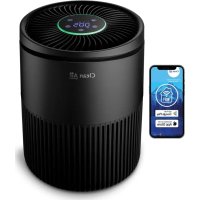
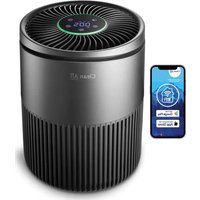
USER MANUAL CA503B Compact Smart Clean Air Optima
Clean Air Optima Air Purifier CA-503B Compact Smart
(EN) User manual
(DE) Gebrauchsanweisung
(NL) Gebruiksaanwijzing
(FR) Moded'emploi
(ES) Manual del usuario
(PL) Instrukcja obstugi
(CZ) Uživatelská prífručka
(RO) Manual de utiliser
(LT) Naudotojo vadovas
(EE) Kasutusjuhend
(LV) Lietosanas pamacita
Find more languages on: www.cleanairoptima.com/ info/manuals
(RU)PykoBoDCTBO NOIb3OBATeJIa
Read these instructions carefully before you start using the Air Purifier and keep the manual for future reference
Clean Air Optima
Table of contents
English 3
German 17
Dutch 31
French 45
Spanish 59
Polish 73
Czech 87
Romanian 101
Lithuanian 115
Estonian 129
Latvian 143
Russian 157
Macedonian 171
English
Thank you for purchasing the Clean Air Optima Air Purifier CA-503B Compact Smart. We wish you many years of healthy indoor air with this efficient and effective product.
Ensure that all safety precautions are followed when using this electrical appliance for the proper operation of the device. These instructions describe the safety precautions to be observed during operation. They are meant to prevent injuries and to avoid damaging the device.
Before using your new Clean Air Optima Air Purifier CA-503B Compact Smart. Remove the sealing from the filters first, see page 17. How to use.
CA-503B Compact Smart / Description of the appliance
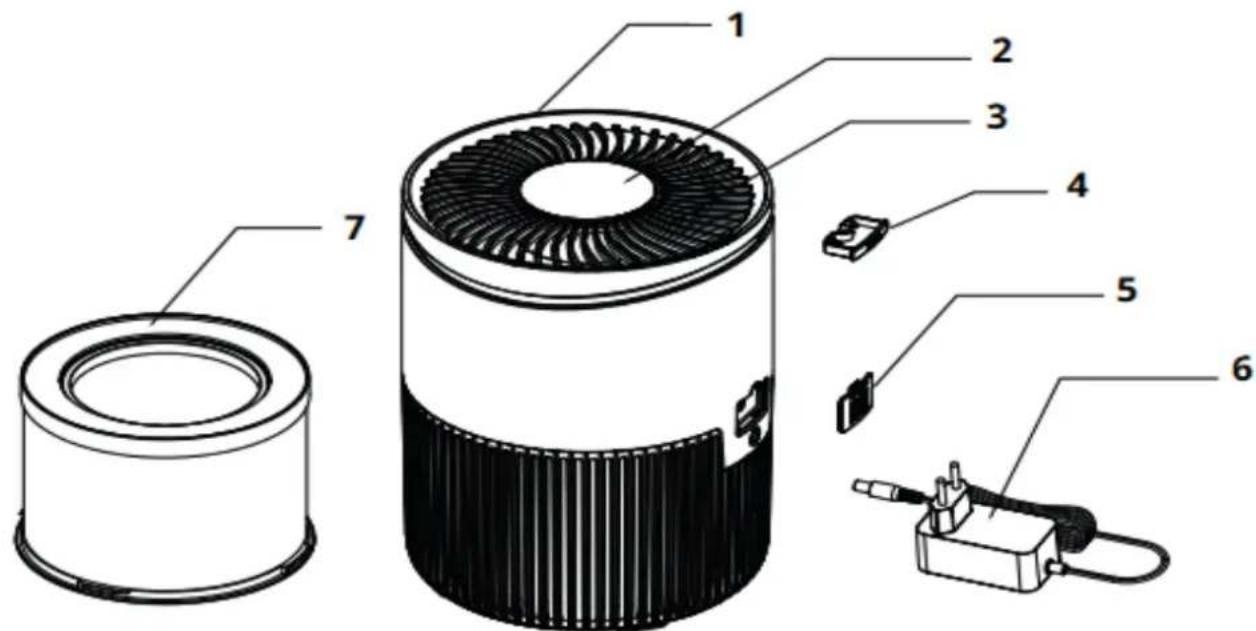
- Main part of the air purifier
- Control panel
- Air Outlet
- Aroma box
- Protective plate PM sensor
- Power adapter
- True HEPA H13 filter, active carbon filter, photocatalytic filter and pré filter
Clean Air Optima
Safety warnings
This device may only be used in accordance with this safety instructions. Take the following steps to minimize the risk of personal injury caused by for example electric shocks or fire.
- Only for indoor use. Do not use or store outdoors.
- The appliance is not intended to be used by children or persons with reduced physical, sensory or mental capabilities, unless they are supervised by a person responsible for their safety.
- Do not use the device when there is visible damage on the electrical cord or on the device itself. Do not repair the device yourself in case of damage. Never pull the device by its cord. If the power cord is damaged, then it must be replaced by an authorized service person to prevent electric shock or fire.
- Repairs may only be performed by authorized service personal. Do not try to repair the device yourself to prevent electric shock or fire.
- Always remove the plug from the cord when the device is not being used.
- Only use power power adapters and cords provided. Check if adapter voltage matches local voltage.
- Pull the plug when you do not use the device or when you clean internal or external parts of it.
- For safety use put the device in a steady, horizontal position. Do not move while using.
- Do not use the device in rooms where inflammable liquids or gases are stored, close to heat sources or in particular humid rooms like the bathroom.
- Never insert any other object into the body to avoid breakdown.
- Never cover the air inlet and air outlet grid.
- Never disassemble or replace the device's inner parts.
- When the device is running, do not touch the air inlet and outlet grilles, and do not insert the handle or any object into the air outlet to avoid injury or damage to the air purifier.
- To keep the inlet and outlet air grille of the air purifier unimpeded, do not place objects above or near the front cover of the air purifier.
- Do not put heavy objects on the unit.
- Please avoid places with direct sunlight. There is a risk that the device discolors.
- Never immerse the unit in water or other liquids.
- Do not touch the power cord with wet hands.
- Clean the Pre-filter regularly, if the Pre-filter is saturated with dust, it will lead to poor purifying effect. The power consumption will increase, it can cause failure.
- The normal operating environment of the device is 10^ to 45^ degrees.
- Use, maintain and clean the device as described in this manual.
How to use
- Turn open the bottom plate. 2. Remove the HEPA filter.
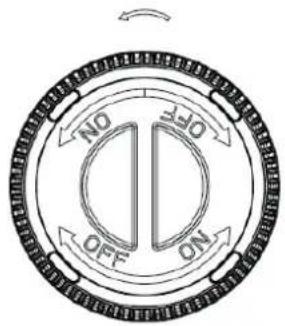
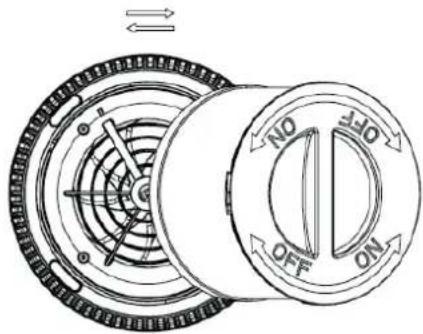
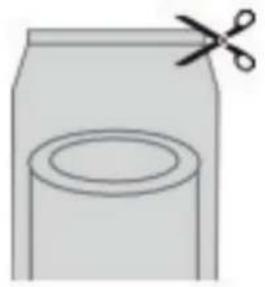
- Remove the packaging from the filter. 4. Place the filter back in the device.
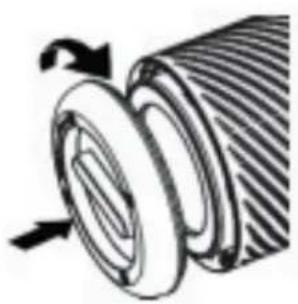
- Tighten the bottom plate.

Do not use the device with the filter removed.
The device needs to be positioned at least 30~cm from walls and furniture to obtain a good air flow. Make sure that the air in-and outlets are not blocked.
Clean Air Optima
Control Panel / Operation Instruction
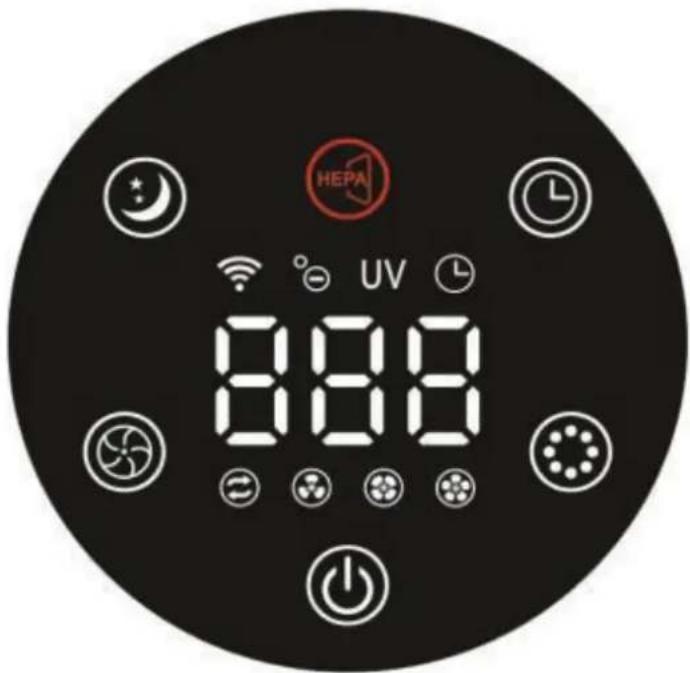

Using the Power button you turn the device on and off.
fault is Auto mode after turning on the device).
The PM2.5 value "000" flashes at the beginning and 10 seconds later the display shows the actual PM value.

beed mode
By pressing the Speed button, you can change the speed level. There are several fan
eds available. You can choose the auto mode, speed 1, 2 or 3. Touch the fan speed
button repeatedly to select the mode.
In the setting Auto the integrated smart sensor (Intelligent Particle Sensor™) measures and regulates air quality automatically. The fan, controlled by a sensor anticipates automatically to what extent indoor air is polluted by particles size PM2.5 and adapting to the 3 different speeds accordingly.

V and ION
After pressing once, the ION function is switched on.
After pressing twice, the ION and UV functions are switched on.
After pressing three times, the UV function is switched on.
After pressing four times, the UV and ION functions are switched off.
UV sterilization technology is accepted for more than fifty years and it has been proven that it can considerably reduce the number of bacteria and polluting substances in the air safely.

mer
Pressing the Timer Button sets the timer. The timer function determines how many
Hours the air purifier will operate. You can set the timer simply by pressing it once for each hour that you would like to run the device.
The timer can be set from 1 hour to 12 hours. As time passes, the time value decreases until it goes to 00:00 and the device shuts off.
To turn off the timer function, press and hold the Timer Button for 3 seconds.

leep
When the sleep mode is activated, the display will turn off. Only the sleep mode light is on. The fan speed goes to the lowest setting. Touch any button to illuminate the display, after which you can operate other functions. Touch the sleep button twice for full operation.

filter replacement
If the indicator light is on, the composite filter (HEPA and Activated Carbon Filter) must be replaced. The composite filter has a lifespan of 1700 hours. Press the filter change button after the filter is replaced. The filter change timer will be reset in this way.
The display will light up for 1 second and the device will then go into stand-by mode. Pressing the Power button turns the device back on.
Digital Monitor
The digital monitor on the top of the air purifier CA-503B Compact Smart indicates automatically and exactly current air quality by measuring the level of Particle measurement PM2.5.
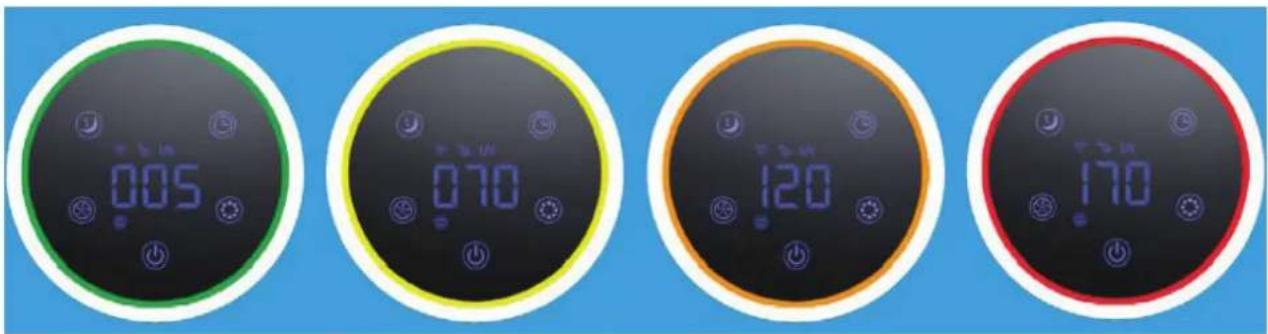
Green-Good:0-50ug/
Yellow - Average: 51-100ug/m³
Orange-Bad:101-150ug/m3
Red - Very bad: 150 ug/m³ or more
Particulate matter of 10um (PM10) and smaller 2,5 um (PM2.5) can get into the lungs and belongs to the top 10 threats for human health. These small particles develop through typical indoor processes such as cooking, baking, frying, smoking, as well as heating or are also transported in big quantities into indoor air because of transportation, industry, construction, biological material (pollen, bacteria, mites, and viruses), imported particles from other regains such as (airplane) exhaust gases and volcano eruptions.
Allergens such as pollen and dust cause serious and long-term health threats to millions of persons each spring: the numbers are increasing constantly.
Measurement of relative humidity and temperature
Important aspects for effective air purification: relative humidity between 45 - 60% and room temperature of about 20 - 23 °C.
Clean Air Optima
Operation with Clean Air Optima® App
Connectivity
Compatibility with smartphone and tablet:
iPhone, iPad and Android devices
Device connets via WiFi with App:
CleanAirOptima
Attention: The router must be set to the 2.4 GHz broadband. If the router is set to the 5.0 GHz, it is impossible to establish a connection.
Setup up WiFi connection
- Download and install the Clean Air Optima App in the App Store or Google Play Store.
- Make an account and log in.
- Plug the device into the power socket and switch it on. The WiFi indicator will blink.
- The router must be set to the 2.4 GHz broadband. If the router is set to the 5.0 GHz, no connection can be established.
- Make sure Bluetooth is enabled on your smartphone.
- Make sure that your smartphone or tablet is successfully connected to your WiFi network.
- Open the Clean Air Optima App and click on 'Add device'. Your device is listed and you can select it. If not choose 'Auto Scan'. Follow the on-screen instructions to connect the device to your network.
- Choose to add the Clean Air Optima device on the App, follow the instructions in the App.
- When the device is paired, the WiFi indicator might stays on constantly.
- After the configuration is successful, you can use the Clean Air Optima App to operate the device.
Note:
- If your default network has changed, reset the WiFi connection, follow step 3 to 8 in the 'Set up WiFi connection' section.
If you want to pair multiple devices to your smartphone or tablet, you have to do this one after the other.
- Make sure that the distance between your smartphone or tablet and the device is less than 5 meters and there are no obstacles. Also make sure you are in the same room as the device.
Reset the WiFi function:
- Reset the WiFi by pressing the 'Power' button for 10 seconds, the indicator light of the WiFi will blink rapidly.
Connect devices to multiple phones
Note: First the other person needs to install the Clean Air Optima® App on his/her phone and create a new account.
Share the device with limited access:
You can choose to share 1 device with several persons.
This person will then have access, but will not be able to manage all the settings.
Follow the instructions below to share the device with several persons:
- Go to the relevant device.
- Go to the pencil or three dots in the top right.
- Select 'Share device.'
- Choose 'Add sharing'.
- Choose the sharing method e.g. via email, Whatsapp, sms etc. and continue.
- The device will automatically appear in the Clean Air Optima App with the other account.
Share device with full access:
You can add a person or several persons to your home management.
That person will then have access to all your devices that are already linked and has full rights and permissions. You will always remain the main administrator.
Follow the instructions below to add someone to your home management:
- Open the Clean Air Optima App and go to 'Me'.
- Then choose 'Home Management'.
- Choose 'Create a home'
- Select the relevant 'Home' and 'Add member'.
- Choose the sharing method e.g. via email, Whatsapp, sms etc. and continue.
- The corresponding 'Home' will automatically appear in the Clean Air Optima App of the person with whom you have shared your 'Home'.
- On the other account:
Go to the home screen from the Clean Air Optima® App. Go to the top left and select the 'Home'.
Clean Air Optima
Maintenance
Cleaning the outside of the air purifier
- Switch off the device and pull the plug.
- Use a soft and humid piece of cloth to clean the device from dust and dirt.
- Make sure that no water gets into the device.
Cleaning of the Intelligent Particle SensorTM
Clean the air quality sensor every 6 to 8 weeks.
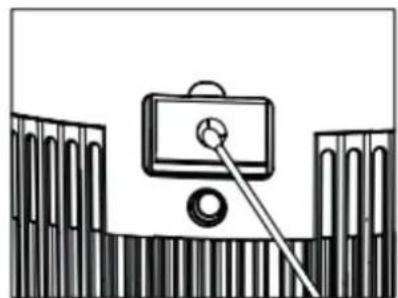
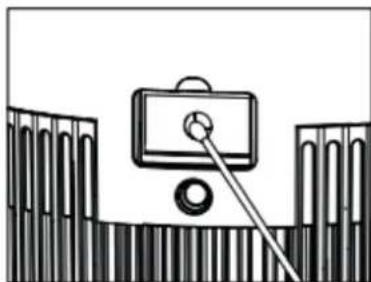
When the value of PM 2.5 is displayed incorrectly, a cotton swab can be used to clean the sensor lens.
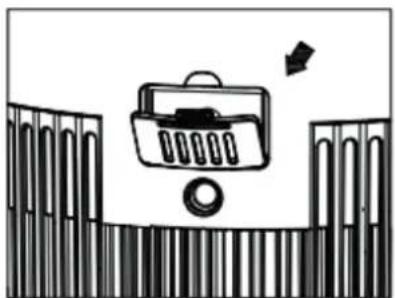
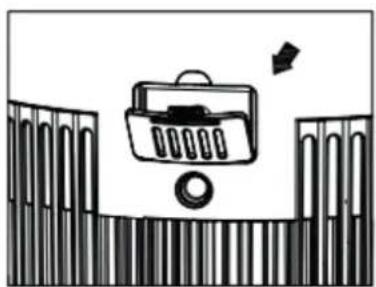
- Remove the cover of sensor.
- Clean the sensor lens with a cotton swab and water as indicated by the arrow. Then dry the lens with a clean cotton swab.
- Install the cover of sensor.
- Do not wipe the sensor lens with alcohol or other organic solvent.
Attention! If the humidity in the room is very high, there is a risk of condensation on the air quality sensor. This may cause the air quality indicator (Digital Display - Particle Measurement) to indicate that the air quality is poor, while this should not be the case. In this case, we recommend that you clean the air quality sensor or do not use the air purifier in automatic mode.

Replacing of filters
The Clean Air Optima Air Purifier CA-503B Compact Smart is equipped with a filter lifespan surveillance mechanism that signals that the filters have to be replaced after 1700 working hours. To show that the composite filters (HEPA + Activated Carbon Filter) need to be replaced, the indicator light will light up. Press the filter change button after the filter is replaced. The filter change timer will be reset in this way.
The display will light up for 1 second and the device will then go into stand-by mode. Pressing the Power button turns the device back on.
Depending on the use, the composite filters (HEPA + Activated Carbon Filter) has a lifespan of approx. 4-5 months.
Filter cleaning
The best effect is reached by cleaning the filters once a month. If indoor air is extremely polluted, more cleaning can be required.
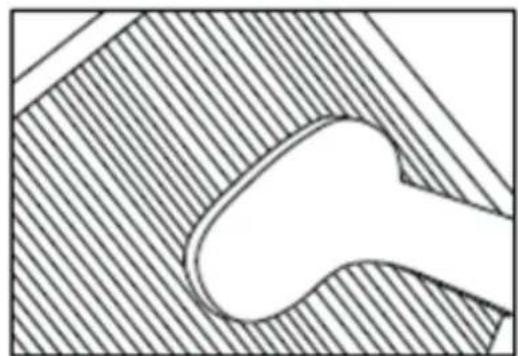
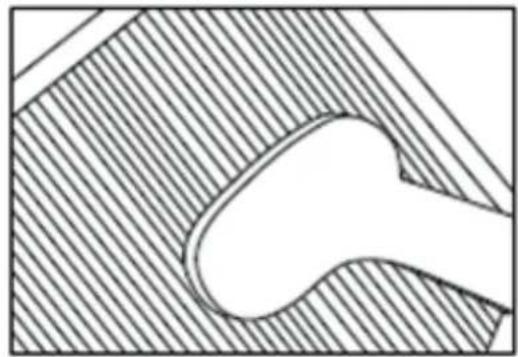
Clean the Pre-filter and the HEPA filter with a brush or your vacuum cleaner. That way bigger dust particles like lint, hair and dander of pets can be removed from the filter.
Warning! Do never wet or rinse the composite filters (HEPA + Activated Carbon Filter) with water.
Signs for used up filters
Increased sound, reduced air flow, congested filters, rising presence of smells. The filter needs to be replaced by a new one when the HEPA filter changes its color from white to grey or black. If the HEPA filter remains white, there is NO need to replace the filter.
How to order filters:
Contact Clean Air Optima Customer Service tel. +31 (0) 742670145 or visit our webshop: https://www.cleanairoptima.com/accessoires/mg/44/
Aromatherapy
Activating the aroma function:
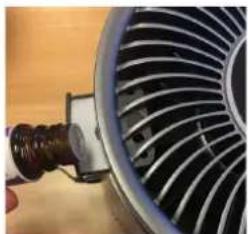
- Pull the aroma box out of the top part (top ring).
- Pour 5-10 drops of Clean Air Optima® essential oil onto the sponge.
- Put the aroma tray back into the bracket.
- When you turn on your air purifier, the aroma function will be activated.
- If you want to deactivate the aroma function, or should the device not be in use for extended periods of time, remove the aroma sponge from the compartment and wash it with a little of mild soap water. Let it dry completely before placing it back in the aroma compartment. Basically the aroma sponge is reusable.
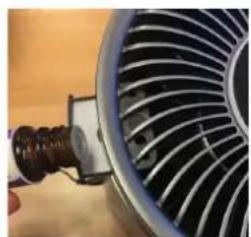
Important
In order to reach the best results and to enjoy your air purifier as much as possible, we advise to read carefully the following instructions regarding the use of essential oils in the air purifier CA-503B Compact Smart.
Use of essential oils in the CA-503B Compact Smart
Use our high quality essential oils and enjoy your personal aromatherapy! A scent sensation at its highest level!!
You can find high quality essential oils with many different scents in our assortment. They perfectly fit to the air purifier CA-503B Compact Smart and have been specially developed for the use with this air purifier:
You can order the Essential Oils in our online store at www.cleanairoptima.com.

Warning!
The use of other essential oils not made for this air purifier or other additives (for example: fragrances and water purification products) can damage the air purifier and must NOT be used!
Devices that are damaged through additives are excluded from the guarantee.
Troubleshooting
The following is a troubling shooting guide to help you solve any issues that you may have using the Clean Air Optima Air Purifier CA-503B Compact Smart.
| Problem Possible | Cause Solution | |
| Device does not switch on | The power cord does not connect correctly | Connect the power plug and power socket correctly |
| The power cord is broken | Replace the power cord |
| The front or back panel is not installed correctly | Install the panel correctly. See chapter: How to use |
| The air outlet smells foul | The filter traps too much odor or dust | Replace the composite filters |
| The lifetime of the filters has expired | Replace the composite filters |
| Poor purification effect | Check if the humidity in the room is too dry | Increase the humidity |
| The device is placed in an unventilated room or surrounded by obstacles | Remove the obstacles |
| No air is blowing out of the device | The airinlet or airoutlet is being blocked | Remove the obstacles |
WARNING!
If the above recommended solutions do not work, please contact Clean Air Optima technical support at the telephone number for your region. Do not attempt to disassemble, reassemble, or repair the device as this may void the warranty.
Clean Air Optima
Specifications
Model CA-503B Compact Smart
For rooms up to 30m^2 /75m^3 /322ft^2
Adapter rated voltage 220V - 240V, 50Hz/60Hz
Rated power Max. 22W
Fan capacity (CADR) 140m^3 /h
Filter performance 99,97%
Sterilization rate 99.9%
Negative ion 3.000.000 ions/cm³
Sound level 10dB(A) Silent Sleepmode/15dB(A) Low 1/25dB(A) Middle 2/
50dB(A) High 3
Dimensions 206 x 206 x 274mm
Weight
1.89kg
Colour
Black
Complies with EU
regulations CE/WEEE/RoHS
Ask your retailer or your municipality for updated information regarding the disposal of the packaging and of the device.
Service
Warranty Certificate for the Clean Air Optima Air Purifier CA-503B Compact Smart.
Date of purchase:
Customers name:
Address:
Telephone:
Email:
Seller's name:
Address:
- Please fill in completely this Warranty Certificate. Send it with the invoice and the unit, postage pre-paid and using the original packing box, to your distributor. Make sure to include the appropriate return postage for the package.
- Please enclose a short description of the damage, fault or malfunction, and the circumstances under which these problems arose.
The Clean Air Optima Air Purifier CA-503B Compact Smart is subjected to strict testing procedures before leaving the factory. If within 2 years from the date of purchase the product does not perform according to the specifications, because of factory defects, the purchaser is entitled to free repairs or replacement of parts upon presentation of this warranty (provided that the malfunction or damage to the device and/or parts occurred under normal operating conditions). What is covered: All parts defective in material and workmanship. For how long: two years from purchase date. What we will do: Repair or replace any defective parts. Exclusions: Regular replacement filters.
Other Conditions
The provisions of this warranty are in lieu of any other written warranty whether express or implied, written or oral, including any warranty of merchantability or fitness for a particular purpose. The manufacturer's maximum liability shall not exceed the actual purchase price paid by you for the product. In no event shall the manufacturer be liable for special, incidental, consequential, or indirect damages. This warranty does not cover a defect that has resulted from improper or unreasonable use or maintenance, faulty assembly, accident, natural catastrophes, improper packing, or unauthorized tampering, alteration, or modification as determined solely by us. This warranty is void if the label bearing the serial number has been removed or defaced.
Thank you for reading!

Share your feedback about the Clean Air Optima Air Purifier CA-503B Compact Smart on: www.cleanairoptima.com

For frequently asked questions about the CA-503B Compact Smart go to: www.cleanairoptima.com and search for the CA-503B Compact Smart.

Download PDF instruction manual on: www.cleanairoptima.com/info/manuals

Watch all Clean Air Optima Product animation video's on: www.youtube.com
Clean Air Optima International B.V. | David Ricardostraat 9-7 / 9-9 | 7559 SH Hengelo (ov) The Netherlands | Phone: +31 (0) 74 - 2670145
Clean Air Optima Germany GmbH | Enschedestraße 14 | 48529 Nordhorn | Germany Phone: +49 (0) 5921 879-121
E-mail: info@cleanairoptima.com Internet: www.cleanairoptima.com
Deutsch
Reset the WiFi function:
Reset the WiFi function:
Model CA-503B Compact Smart
Voor kamers tot 30m^2 /75m^3 /322ft^2
Nominate spanning adapter 220V - 240V, 50 Hz/60 Hz
Nominal vermogen Max. 22 W
Ventilatorcapaciteit (CADR) 140m^3 /h
Filterprestaties 99,97%
Sterilisatiegraad 99,9%
Model CA-503B Compact Smart
Maksymalne wymiary
pomieszczén 30m^2 /75m^3 /322st^2
Model CA-503B Compact Smart
Pro mînstosti do velikosti 30m^2 /75m^3 /322ft^2
Jmenovite napeti adaptéru 220 V-240 V, 50 Hz / 60 Hz
Jmenovity vykon Max. 22 W
Kapacita ventilatoru (CADR) 140 m³/h
Vykon filtru 99,97%
Model CA-503B Compact Smart
Pentru incaperi de pana la 30m^2 /75m^3 /322ft^2
Mudel CA-503B Compact Smart
Sobiv ruumidele
suurusega kuni 30m^2 /75m^3 /322ft^2
Nimpinge adapter 220-240 V, 50/60 Hz
Nimivāimsus Kuni 22 W
Ventilaatori joudlus
(CADR) 140m^3 /h
Filtrite joudlus 99,97%
E-posti aaddress: info@cleanairoptima.com
Internet: www.cleanairoptima.com
Latviešu valoda
Paldies, ka iegadajaties gaisa attiritaju Clean Air Optima Air Purifier CA-503B Compact Smart!
Ceram, ka varesit ilgstoizi zbaudit veseligu iekestelpu gaisu, pateicoties sim efektivajam un lietderigajam izstradajumam.
PpeoCTaBbTe noHbI doctyn K yCTpoiCTBy.
BbMOKeTe npedocTaBtB DoCTyn K ynpaBHeHIO BaUM DOMOM IJRA ODHORI IN HeCKOJIbKINX NOJIb3OBaTeJeN.
Takoi noIb3oBaTeIb noIyuae TIOCTyn KO BcEM BaIIM yCTpOiCTBaM, KOTOpBie yXe CBa3aHbI Mexdy c60o, a TAKKe emy npedocTabJIaHTcnoIhble npaba n pa3peuHn. Bb I Bcerda OCTaTeCb rIaHBiM aDMHNCTpaTOPOM.
YTo6bI Do6aBnTb Nolb3OBaTeJI K ynpabHeHIO BaUIM DcEyIe IpnBeDeHHbIM HIXe INCTpyKUINM.
- OtkpoTe npiloxeHne Clean Air Optima® n nepeiDnte B Me (Я).
- 3aTeM Bb6epuTe Home Management (UnpaBHeHne DoMOM).
- Bb6epnTe Create a home (Co3daTb DOM).
- Bb6epnte cooTBeTCTBvHouuHm Home (Dom) n Add member (O6aBnTb noIb3ObaTeJI).
- BbI6epnte cnoc06 npedocTableny o6uero doctya, Hanpimep nocpecdtBOM 3JeKtpoHHo nOHTbl,Whatsapp,smS N T.D.N PPOdoJXnTe.
- COOTBeTCTByHouzni Home (Dom) aBtOMaTHueCKn NOBHTcB npUIOxehnn Clean Air Optima® N0JIb3OBAteJRA, KOTOPOMy Bbl PpeDOCTaBUNI DOCTYK CBOemy Home (Domy).
- B pyroynueyetno3a nncn: nepeiDnte Ha NaaHbN 3KpaH B npJIOKeHN Clean Air Optima®. BBepy cIeBa Bbl6epTe Home (Dom).
Clean Air Optima
TexHHueckoe 6cIyKbHaHne
OuNCTka BHeUHeN NOBepxHOCTN BO3dyXooHCTnTeJIa
- BbIKHouHTe yCTPOINBIO IN BBiHbTe BNkY n3 PO3eTKN.
2.ИспобутмягкюиВлжнуТkaHbДЯ OчNTKN yCTpoICTBA OT nbIN ngp3n.
- Y6eINTEcB, UTO B yCTpOJCTBO He nonaJaET BOJa.
OuNCTka nHTeJIeKtyaJIbHOro daTUnKa qaCTnUc (Intelligent Particle SensorTM) OunIaIte daTUnK kaueCTBa BO3dYxa KaKdIbe 6-8 HeIeIb.
Ecn 3haeHne PM 2,5 oTo6paXaetc HnpaBnIbHO, nH3y daTynKa MoXHO OuNCTNTb BaTHbIM TAMNOHOM.
- CHIMITE KpbIUKy DaTUnKa.
- OuHCTnTe IIN3y DaTcNkBaTHbIM TaMNoHOM N BDOJ, KaYka3aHO CTpeKoJ. 3aTeM Hacyxo BBITPte IIN3y YIcTbIM BaTHbIM TaMNOHOM.
- YCTaHOBtTe KpbIuKy DaTuNka.
- He npotupaIte IIN3y DaTnka CnIPTOM IIN DpyrIM OPraHueckm pACTBOpNTeJIem
BhimaHne! Ecn BnaXHOCTb B NOMEeHN OyeH BbICOKa, cyIeCTByeT pNCK KOHdeHCaUN Ha daTnke kaeeCTBa BO3dyxa. 3TO MOxET npINBeCTN K TOMy, yTO INHdkaTOP kaeeCTBa BO3dyxa (Digital Display - Particle Measurement (LnpoBoi Incnne - I3Mepntel coepxAHn TaNTu)) 6ydt Noka3bIBaTb, 4TO KAeCTBO BO3dyxa IIIOXoe, B TO Bpem KaK 3TO He TAK. B 3TOM clyae Mbl peKomeHdyem OunchTb DaTnK KaeeCTBa BO3dyxa NN He NCNoJb3OBaTb OuycHTteJI B03dyxa BA bTOMaTNUeCKOM peXime.
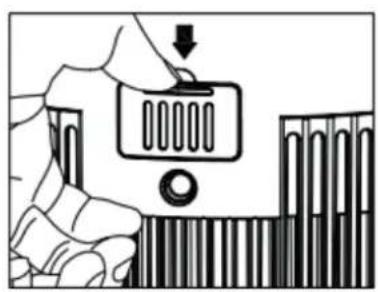
3aMeHaΦnIbTpOВ
Bo3dyxoouchTeIb Clean Air Optima Air Purifier CA-503B Compact Smart ochaueH MexaHn3MOM Ha6IIOJeHn 3a pa6oTOcNOcO6HOCTbIO fNJIbTpA, KOToPbI CNrHaJIN3uPyET O Heo6XODIMOCTH 3aMeHbI fNJIbTpOB nO npOweCTBUN 1700 YacOB pa6oTbI. CBeTaunCnIHnKATOp yKa3bIBaet Ha Heo6XODIMOCtB 3aMeHbI KOMNo3HTHO TPO (HEPA + fNJIbTp cAKTNBPObAHhBIM yIeM). HaxMtE KONky 3aMeHbI fNJIbTpA NOcNe 3aMeHbI fNJIbTpA. TaKIM o6pa3OM 6ydt c6poWeH TaMep CMeHbI fNJIbTpA. DIncPne 3arOpNTcRa 1 CekHy, nocLe yero yCTpOCTBO nepeiDeT B pexm OxUdAHn. HaxTne KHNKn NITaHn CHOBa BKlIOuaeYCTpOCTBO.
B 3aBnCmOCTN O T NcNoJIb3OBAHnKOMNo3nTHbIe ΦnJIbTpbl (HEPA + ΦnJIbTp c AKTNBnIpOBaHHbIM yrJEM) IMeOT cPOK cIyX6bl OKoJ0 4-5 MecaJeB.
OuNTkaΦnIbTpα
Hannyunn 3000K T DoCTnraeTc npn OuncTe KnnbTpoB Odn H pa3 B MecaU. Ecnn Bo3dyx B nOmeuHn Upe3MepHO 3aRpa3HeN, MoXe NOTpe6oBaTbc DOONHHTeNbHa aOnctKa.
OuHCTIte fHbTp npedBapnteHbHO ouHCTKn Hn bTp HEPA TeKoN nnn nbHeCOCOM. TaKIM cno6oM n3 fHbtpa moXHO ydaNTb 60nbWne qactuNb, TaKne KaK TeKCTnHbHa nbl, BOLOcbl INepxOTb DOMaWHNX XNBOTHbIX.
Ipeynpexdene! HkoRa He MoHTe H He OOnaCKBaTe KOMNo3nTHbIe fNJIbTpbl (HEPA ^+ 0nNbTp cakTNBnPoBAHHbIM yrJem) BOIOJ.
3HaKnIy nCnOJb3OBaHHbIX ΦnJIbTpO8
yBHeIuHbI yM, yMeHbIeHHbI nOTOK Bo3dyxa, 3acOpEHbIe fNtbpI, NOBblIeHHoe npCytCTBne 3aIaxOB. fNtBp HEPA Heo6xOIMo 3aMeHnTb HObIM, eCIn OH N3MeHnI cBeT c 6eNoRo Ha cepBn IIN ueHbI. EcIn fNtBp HEPA ocTaetc8eblm, HET Heo6xOIMocTn 3aMeHrTb erO.
KaK 3aKa3bBaTb ΦNJIbTpbl:
CbXnTecb co cnyx6oN noDepkK NIneHTOB KOMNaHn Clean Air Optima no TeJefoHy + 31 (0) 742670145 nn NoceTe Haaw nHTepHeT-Mara3nH: https://www.cleanairoptima.com/accessoires/mg/44/
Apomatepannia
AKTINBaCnIyHKcNn apOMaTn3aCnN:
- BbItaunTe apomatnueckyU Kopo6ky u3 BepxHeu qactn (BepxHee KoIbzo).
- HaneiTe 5—10 kaneIb eHnpHoro macna Clean Air Optima® Ha ry6ky.
- Bctabbte apomatnueckn loTOK o6paTHo B kpoHtTeH.
-ПиВКЛЮЧЕНNOUCTINTEJIЯBO3dYxAФyHKLЯ apOMaTn3aUN6yTe aKTNbIpOBAHa.
- EcIn Heo6xOdmo OTKlnouHb yHKUHO apOMaTHaUu NJIe cIn npi6Op He nCnOJb3yeTcB TeueHne dIINTeJbHOro BpeMeHN, BbIHbTe apOMaTHueCKyU r6Ky U3 KopnyCa I npomOIte ee He6OJIbShm KOJIueCTBOM MrgKoM MbJbHO BODbl. DaIte eN NOHOCbIO BbICoxHyTb, IpexKeJe Yem NOMEcHTb 6paTHo BOTCEk DnA apOMaTHueCKNX BeUeCTB. B npHcUHe, apOMaTHuecka r6ka JRAJIeTcMHoropa3OB0B.
BaxHo!
UTo6bI DoCTnHb HaJIyUxN Xpe3yJIbTaTOB IN MaKcImMaJIbHO 0f0eKTHIBHO NcNoJIb3OBA Tb OuchTeJIb BO3dYxa, peKOMeHNdyEM BHNMaTeJIbHO IpOueCTb CNeJyUOuNE IHCTpyKcN OTHOCInTeJIb HO NcNoJIb3OBAHnR 0fOpHBIX MaceJI B OChCTInTeJIe BO3dYxa MoJeJI CA-503B Compact Smart.
IcnoJIb3OBAHnE əΦnHbIX MaceJ BycTpoiCtBe CA-503B Compact Smart
Ponpo6ynte Haun BbICOKKaueCTBeHHbIe 3Hn HacnaNHaCnaxJaTecb CBOe JInHO apomatepaann! Ouyuene apomata Tepeb Ha BBicwem ypOBHe!
Haia komnaHnnpedlaeT wipokn accoptmert
(CTaHdapnHO e noctabeH BO aBTOMaTcKn pexm NO BKnyBaHaTeTo Ha ypeIOT).
BpeHocTa PM2.5,000" TpeNka Ha noyeToKOT n 10 cekyHn nooUHa Ha ekpaHot ce npKaJyBa BnCTnHcKaTbpeHocT Ha PM.

p3nHa
Co npntnckaHe Ha KonueTo „Speed" (Bp3nHa), MoKeTe Da ro npomeHnte HNBOTO Ha
6p3nHa. DocTaNHe Ce HeKoJIky 6p3Hn Ha BeHTnlaTopoT. MoKeTe Da n36epeTe
aBtOMaTcN peKIM, 6p3nHa 1, 2 nIi 3. DOnnpajTe ro konyeTo 3a 6p3nHa Ha BeHTnlaTopoT
noBeKeNaTn 3a Da ro n36peTe peXIMOT.
Co noctabkata Auto (aBTOMatckn) BrpaedHnot nHTeJIureHteH ceH3op (Intelligent Particle
SensorTM) aBToMaTcKn rO mepn n rO peryIina kBaJInteTOT Ha BO3dyXoT. BeHTnlaTopoT, KOHTpOIInpaH oD cEH3Op, aBToMaTcKn npEiBnIyBa Do Koj CTeNeH BHaTpeuHnOt BO3dyx e 3araJeH co yeCTNuKn co rOJIeMnHa PM2.5 n COODBeTHo ce npInaIroDyBa Ha 3 pa3nUHn 6p3HH.

BUNIOH
eHaaw npntnckahe, yHKunjata ION ce BknyuBa.
Дванатиnpитиckeны,функципte IONи UV ce ВклучыаT.
IIO TpInaTn npNTsckAHe, fYHKunjaTa UV ce BknyuBa.
Ioo etnpn nata npntnckahe, yHKunnte UV n ION ce ncknybaaT.
Texholorjata 3a ctepuiu3aunja co YB e npiaTeHa nobeke od peceT roHHn i DokkaHo e deKa MoKe 3NaHTeHNo da r Ho HamaN 6pojoT Ha 6akTepu N 3araYBaUKN MaTepu BO B03dyXOT 6e36eHNo.

ajmep
IpyTnCKaHbHa KOnyTeO 3a TajMep ce NoCTaByBa TajMepOT.ФункиJaTa Ha TajMep OdpeDyBa KOLky uaca Ke pa60Tu npouNCTyBaUOT Ha BO3dyx.MoXeTe da ro noCTaBtE
TajmepOT eHOCaBHO Co npNTnCKaHe eHa3a cekoJ yac ITO caKaTe da ro BKnyuTe ypeDTo.
Tajmepot moxe da ce noctabn od 1 yac do 12 yaca. KaKo ITO MNHyBa BpeMeTo, BpeHocTa Ha BpeMeTo ce HamaIyBa Iodeka He OTnde BO 00:00 yacot n ypeDoT He ce NCKnyu. 3a da ja ncklyuTe FyHKuJaTa Ha Tajmepot, npITncHe Te n 3aApxTe ro KonueTo 3a Tajmep 3 cekyHdN.

eKIM Ha cNneHe
Kora Ke ce aKTbBnpa pexnMOT Ha MnpyBaHe, ekpaHOT Ke ce Ncknyu. CaMo CBeTlOTo Ha peKIMOT Ha MnpyBaHe e BknyeHo. Bp3nHaTa Ha BeHTnlaTopoT Ond Do Hajnckata NoCTaBA. DOnpe Te Koe 6nlo Konue 3a da ro ocBeTInTe ekpaHOT, no To MoKeTe da paKyBaTe co dpyrN fynKcun. DOnpeTe ro KonueTo 3a MnpyBaHe dBanatn 3a ueNocho pa6oTeHe.

SamaHa HaΦnITePoT
Ako nHdkaTOpckata cnjaiuka e BklyueHo, Toa 3Haun deKa Mopa da ro 3aMeHInTe KOMno3HTNtOp TnIeP (HEPA nnItepot n nnItepot co akTbUpaH jaJIepoD). Komno3HTNtOp TnIeP mma XnBOTeH BEK od 1700 uaca. Tpe6a da ce 3aMeHaT, INdikatopckata cnjaiuka ke 3acBETn. PnITncheTe ro konyeTo 3a npomeHa ha nnItepot OTkako nnItepot Ke ce 3aMeHn. TajmePot 3a npomeHa ha nnItepot Ke ce peceTnpa Ha OBOJ NaHH. EkpaHot Ke cBeThe 1 cekyHda n ypeDot noToa Ke npemHe BO pexmHa noDrTOBeHocT. Co npNTscKaHe Ha KOJeTo 3a BkLyuyBaHbe, ypeDot NOBTOpHo Ce BkLyuyBa.
AnrntaJIeH MOHTOp
Дигпалнnot монитор на горнnot дел поочувот на BO3dxyot CA-503B Compact Smart automobile и точно пokожа мосталnot KBaIITet Ha BO3dxyot co Mepebe Ha HBOTO на четчк PM2.5.
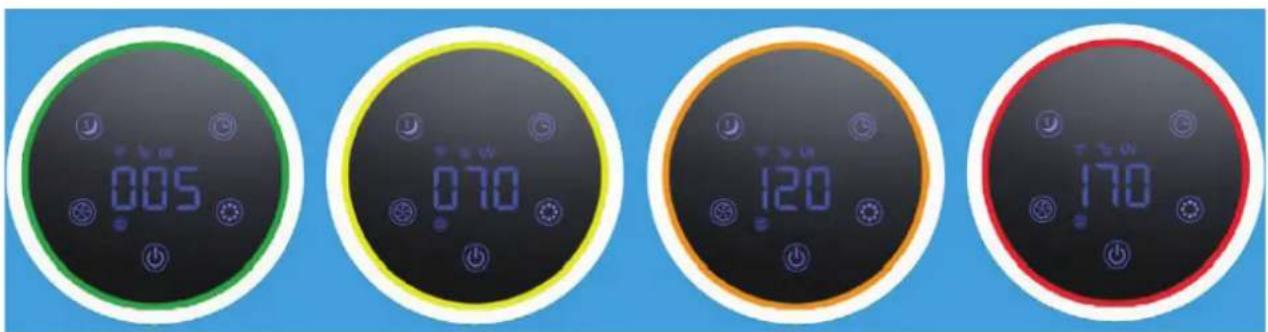
3eHa - Do6po: 0-50ug/m³
KoIra - PpOceuHa: 51-100ug/m³
IopToKaIOnBa-JIoYo:101-150ug/m³ UpBeHo-MHory loo:150 ug/m³ nnn noBeke
YeCTnukTe od 10 um (PM10) n nomann o od 2,5 um (PM2.5), moXaT da Bne3at Bo 6eInTe npobov n cnaaat BO 10-te hajrolemn 3akHn no 3dpabjeTo Ha lyreTo. Obne mAnueCTnckn ce pa3BnBaat npeky TnnuHn npoecn wTo ce OdBnBaat BO 3aTBopeH npocToP, kaKo WTo ce rotBeHe, neeHe, npxeHe, nyWeHe, Ho n rpeHbe, nIi HABLeyBaAT BO rOleMn KOJIuHHN BO BaWnte npocToPnnpedn3BnKaHo OD coo6paKaJOT, INdycTpniJaT, rpaedxHnSTBoto, 6noNoKn MaTepnjann (noJeH, bakTeepn, MmKpocKn 6b6aKn N BvpyC), yBe3EHn CheTnKn OD dpYr peHOnH, kako wTo ce n3dyBn (abNOHcKn) raCoBn n epynuHa BykAHn.
Aleprente, kao 7to ce nolheot npaunHaTa, npedn3BkyBaat cepno3Hn IdoIropouHn 3dpabCTBeHH 3akaHn 3a MmnoHn lyre ckoja npolet: 6poknte noctojaHo ce 3roJeMybaaT.
MepehepeIaTnBHa BnaXHoCT n TeMnepaTypa
Baxn acnekn 3a eKacno npocTyBaHe Ha BO3dyxOT: peJatNBHa BlaxHocT nomery 45-60% n co6Ha TempepaTypa od okoly 20-23 ^ C
Pa6ota co anlinajata Clean Air Optima
Pobp3yBaHe
KoMaTn6uHocTo naMeTeH TeJefoH nTa6NeT:
iPhone, iPad u Android ypeu
UpeoT ce nobp3yBa npeky Wi-Fi co anlkaunja:
CleanAirOptima
BHHMaHHe: PyTePoT Mopa da 6nIe nocTaBeH ha shIpokOnoJaceH
nHTepHET od 2,4 GHz. Ako pyTepoTe nocTaBeH ha 5,0 GHz,
HeB03MOXHO e Da Ce BocNoCTaBn Bpcka.
NoctaBeTe Wi-Fi Bpcka
- Празимею щ и салларJTе щалkaцида
"CleanAirOptima" ВО App Store и Google Play Store.
- Co3daite cmetka n HajaBete ce.
3.Пиклучete ro anapatot BO uTekep n Bklyuche ro.ИнdkaTopoT 3a Wi-Fi ke Tpenka.
- pytepot mopa da 6nnde noctabeh Ha wnpokonojaceh nHTepheT od 2,4 GHz. Ako pytepot e noctabeh Ha 5,0 GHz, He moxe da ce Bocnoctabn Bpcka.
- Поверете дд e Вклуен Bluteoth Ha Baшnot nameTeH TeJefoH.
- Поберета Ддп Вашиот паметен Телфон Илл Таблет ecneшн noBp3aH co Baшata Wi-Fi Мржа.
- OTbopete ja annkaunjata „CleanAirOptima" n knkheTe ha „Add device" (Dojaj ype) BaHnot ype d e HabeDen mOke da ro n36epete. Ako He e, n36epete „Auto Scan" (ABTOMATCKO cKeHnpaHe). CneDeTe rN INHCTpyKcUnTe Ha ekpaHOT 3a da ro noBp3eTe ypeDo co BaWata MpeKa.
- Дожаные урет Clean Air Optima® BO anлкauида и сдente Гу rat CBata BO anlkauijata.
- Kora ypeIOT e cnapeH, INdNkaTopoT 3a Wi-Fi octaHyBa BklyueH noctojaHO.
- OTKAKO KOHΦnIpyaunjata Ke 6nIe ycneuHa, MoKe Da ja KaKpIcTnTe aIINkauJata Clean Air Optima3a da ynpabByate co ypeDoT.
3a6eileuka:
Ako BaWata cTaNdapnHa MpeXa e npomeHeta, pceTpajte ja WiFi KoHeKunjaTa, cneTe rNueKopnte 3 do 8 Bo DeIot ,PiocTabu WiFi KoHeKunja".
Ako cakate da cnapnte noBeke ypei co Baunot nameTeH TeJeOH nn Tablet, Mopa da ro HnpaBNTe OBA NO DpyrNOT.
- Поберете далп pactодану посяву вшиотnamетен телфон ninn Tabnetи уретot e nomano od 5metpn Иема НИКАВИ пpeкn. Истота,бидerte сигунда КЕСТВОИСТАnpocstориca co ypeД.
Pecetnpajte ja yHKunjaTa WiFi:
- Pecetnapjte ro WiFi co npntnckaHe Ha konyeTo ,HanojyBaHe" 10 cekyn, noka3HOTo CBeTno HaWiFi6p3oKe Tpenka.
HOMHaHa MOKHOCT MaKc. 22 W
Kanaunet
HaBeHTnlaTopoT(CADR) 140m³/ua
PepopmaHcna houTepeo99,97%
CtankaHa cTeepnna3aunja 99,9%
HeraTnBn john 3.000.000 john/cm³
HnBO Ha 3Byk 10dB(A) TnBOK peXIM Ha cPneHe / 15 dB(A) Hncko 1/
25 dB(A) cpeiNo 2 / 50 dB(A) Bucoko 3
ДиMuH3n 206x206x274mm
TexinHa 1,89 kg
Boja UrhoHa
Bo cornacnoct
co nponncnte Ha EY CE/WEEE/RoHS
Ipaawajre ro npodabayot nIOnTnHaTa 3a HajHOBn HOpMaun BO Bpcka co nCpPnaheTo Ha am6anakata n Ha ypeoT Bo OTnA.
CepBnC
TapaHTeN cepTnФИKaT 3a npOuIncTyBaU Ha Bo3dUx Clean Air Optima 503B Compact Smart.
Датун Ha Кунваьe:
ImeHaKynyBa:
Ampca:
TelefoH:
E-nowTa:
ImeHa npoDabayot:
Ampesa:
1.ПононеTe ro ueLocho OBOJ rapaHTeH cepTuKaT.NcnpaTeTe ro Do Baunot nuctp6yTepe3aedno co foaktypata uypeDoT,IIaTeHa nouTapnHa N BO opurHaJIHaTa kyTuJa 3a naKyBaHe.FleajTe da ja BkIyuHte ceHaTa 3a nouTapnHa Ha NaKeToT.
2. Пилхete КраToK OnIc Ha WTeTaTа, ГeшkaTа Ил DeФeKTOT N OKOLHOCrTe NOd KOn ce nojabuna npo6JIemnte.
IpouchTyBaHbO3dyx Clean Air Optima CA-503B Compact Smart ce noDIOxyBaHa cTporn NOCTaIKN 3a TeCTnpaBe nped Da 3amHe od fabPKaTa. Ako Bo pok od 2 roDNn OD DeHot Ha kynyBaBeTo npo3BOoT He pa6OT CnopeD CneuNfkaunTe nopAin fabpnuKn DeEeKTN, KnyBaOT mHa npabo Ha beCnLaTHn NoppaBkn nn 3aMeHa Ha JeLoBN OTkako Ke ja npINOxN OBaa rapaHcjuJa (dOKoKy deEeKTOT nnn OwTeTyBaBeTo Ha ypeDT N/nn DEnOBnTe ce cnuyIno npn HopMaHN yCNOBn Ha pa6To). LTo e onPateHo: Cnte deEeKtn BO norLeH ha MaTepnjAnot IN 3pa60KaTa. Kolky doJIro: DBe roDNn OD daTymOT Ha kynyBaHe. LTo Ke cTOpIMe: IOnpaBA Ka nn 3aMeHa Ha deEeKTHnTE deLOBn.
Icknyo:3aMeHa Ha peoBn FInTpn.
DpyuyncnoBn
Odp6nte od Obaa rapaHnja rna 3ameHybaat kon 6nilo dpyr nncMeHn rapaHn, 6e3 pa3nka daIi Tne ce n3pa3eHN IIN NIMIIuPapH, NcMehn IIN yCHN, BklyyBajKn I KaKBa 6nilo rapaHnja 3a npodaxHnot kapaTep nll cooBteHOCTa 3a ODpeHa HameHa. MakcImaHata ODROBOPHOCT Ha npoIN3BOIDTeJOT He Tpe6a da ja HAdmHbYBa BVCTINHCKaTa KynOBHa ZeHa STO KnyBaOH ja INaTn 3a npoIN3BOIoT. Bo hkoj clyuaj npoIN3BOIDTeJOT He ODROBa 3a Noce6Hn, ClyuajHn, NocJeIOBaTeHN IIN INHdIpEeKTHN WTeHn. Obaa rapaHua Jne NOKpINA BeΦeKTH ITO npoIN3JIeYBaAT OD HecooDBeTHA IIN Hepa3ymHa YnoTpe6a IIN ODPXyBaHe, NorpeShO CKIOnyBaHe, HecpeKa, npipOAnn KaTAcTpoFh, HecooDBeTHO NaKyBaHe IIN HeOBlaCTeHO MeShaBe, MeHyBaBe IIN MOInΦnKAuJa Ha DeIOBtE, OHaKa KaO To e ONpeDeIeHo CaMO OJ Hac. Obaa rapaHnja e HeBaXeUka aKO etIKeTata co cepNCK bproj e OTcPaHeta IIIN OWTeTeHa.
A guarantee for healthy indoor air quality!