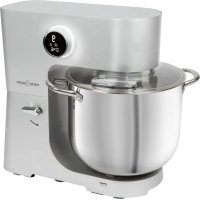
PCKM 1254 - Food Processor PROFICOOK - Free user manual and instructions
Find the device manual for free PCKM 1254 PROFICOOK in PDF.



| Product type | Food processor |
| Brand | ProfiCook |
| Model | PCKM 1254 (PC-KM 1254) |
| Power supply | 220-240 V ~, 50-60 Hz |
| Electric power | 2500 W |
| Net weight | Approx. 11,8 kg |
| Speeds | 1 to 12, electronic adjustment |
| Bowl capacity (max.) | 8,5 litres (light dough) |
| Included accessories | Whisk, dough hook (2 pieces), mixing hook, splash guard |
| Functions | Kneading, mixing, whisking, beating |
| Automatic timer | Automatic shut-off after 20 minutes |
| Safety features | Safety switch, overload protection, motor stop when lifting arm |
| Display usage | Displays speed level, time, selected tool |
| Dough types | Heavy dough (max 6,5 kg), medium dough (max 7,5 L), light dough (max 8,5 L), cream, egg whites |
| Max operating time per cycle | 10 minutes for heavy dough, then 10 minutes cooling |
| Maintenance and cleaning | Housing: damp cloth; accessories: hand wash (not dishwasher) |
| Spare parts and repairability | Contact an authorized service center |
| Protection class | I |
| Color | Not specified (probably white or silver) |
Frequently Asked Questions - PCKM 1254 PROFICOOK
User questions about PCKM 1254 PROFICOOK
0 question about this device. Answer the ones you know or ask your own.
Ask a new question about this device
Download the instructions for your Food Processor in PDF format for free! Find your manual PCKM 1254 - PROFICOOK and take your electronic device back in hand. On this page are published all the documents necessary for the use of your device. PCKM 1254 by PROFICOOK.
USER MANUAL PCKM 1254 PROFICOOK
Be sure to read the separately enclosed safety instructions first.
Instruction Manual
Thank you for choosing our product. We hope you will enjoy using the appliance.
Read the instruction manual and the separately enclosed safety instructions very carefully before using this appliance. Keep these documents, including the warranty certificate, receipt and, if possible, the box with the inner packaging in a safe place. If you pass the appliance on to a third party, always include all the relevant documents.
Symbols in this Instruction Manual
Important information for your safety is specially marked. It is essential to comply with these instructions in order to avoid accidents and prevent damage to the appliance:
WARNING:
This warns you of dangers to your health and indicates possible injury risks.
CAUTION:
This refers to possible hazards to the appliance or other objects.
Content
Overview of the Components 3
Unpacking the Appliance 9
Overview of the Components/ Scope of Delivery 9
Warnings for the Use of the Appliance 9
Electric Connection 9
Functionality of the Appliance 9
Installation and Operation of the Kneading Machine 10
Recipes 11
Cleaning 12
Storage. 12
Troubleshooting 12
Technical Data. 12
Disposal. 13
Unpacking the Appliance
- Remove the appliance from its packaging.
- Remove all packaging material, such as foils, filling material, cable ties and cardboard packaging.
- Check the scope of delivery for completeness.
-
If the contents of the packaging are incomplete or if damage can be detected, do not operate the appliance. Return it to the dealer immediately.
-
There may still be dust or production residues on the appliance. We recommend that you clean the appliance as described under "Cleaning".
Overview of the Components / Scope of Delivery
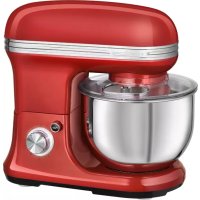
1 Swivel arm
2 Control dial with integrated display
3 Operation indicator lamp
4 Ventilation slots
5 Lever for lowering / raising the arm
6 Motor housing
7 Mixing bowl
8 Mixing bowl handle
9 Splash guard
10 Filling opening with lid
11 Whisk
12 Dough hook (2-piece)
13 Mixing hook
Warnings for the Use of the Appliance
WARNING: Danger of Injury!
- Before switching on, make sure that the tool is correctly attached and firmly seated.
- Do not touch moving parts.
- Do not manipulate any of the safety switches.
- Pull the mains plug out of the socket when you want to change the tool.
Always wait for the tool to come to a standstill! - If you activate the lever during operation to raise the arm, a safety switch deactivates the motor.
Electric Connection
Check that the mains voltage to be used matches the voltage of the appliance. Refer to the rating label for detailed specifications.
Functionality of the Appliance
Protective Features
- The appliance is equipped with a safety switch. The appliance can only be operated if the following is observed:
- The swivel arm is locked in place in the lowest position.
- The electronic speed regulation prohibits a motor drive overload automatically. The revolutions per minute are automatically regulated in the case of an overload.
Turning the Appliance On
- After you have connected the appliance with the power supply and closed the safety switch on the swivel arm, the appliance is ready for operation.
- All symbols light up briefly in the display and "0" appears.
- Turn the control dial clockwise to select the desired speed level. The appliance starts to operate. The illumination on the control dial lights up.
Display
The display shows the following:
- Speed level
- Running time
- Tools (dough hook, mixing hook, whisk)
Note that the symbol for the dough hook goes out from level 4. Therefore, only use the dough hook from level 1-3
Turning the Appliance Off
- Turn the control dial to the left as far as it will go to switch off the appliance. The display and the illumination go out.
- Disconnect the mains plug from the socket.
Installation and Operation of the Kneading Machine
Turn on the appliance with the mixing bowl in place only!
- Opening the swivel arm:
Swivel the lever in the direction of the arrow and hold it in position. Move the swivel arm by hand to the top position and release the lever.
- If you need the splash guard, attach it now to the swivel arm from below. Make sure that it is firmly seated.
- Use of an attachment:
On the top of the attachment, you can see a recess for the drive shaft and a recess for the splint. Push the tool onto one of the drive shafts. If you use the dough hooks, use both drive shafts. Push down and at the same time turn the accessory anticlockwise in order for the splint of the drive shaft to lock into the accessory.
- Mixing bowl:
Place the mixing bowl in the holder so that the symbol on the bowl and the symbol on the housing are aligned. Turn the bowl in the direction indicated on the housing as far as it will go.
-
Fill your ingredients into the mixing bowl.
-
If you knead heavy doughs, do not put all the ingredients at once into the mixing bowl. Start the kneading with flour, sugar and eggs. Add fluids slowly during the kneading.
-
Check that the control dial is turned to the left as far as it will go.
- Hold the swivel arm firmly. Swivel the lever in the direction of the arrow and hold it in position. At the same time, slowly lower the arm with your hand. Release the lever.
- Insert the power plug into a suitable socket.
- Select a speed using the table below.
Table Dough Types and Tools
| Dough Type Attachment Levels Quantity | Max. Operating Time | |||
| Heavy dough (e.g. bread or short pastry) | Dough hook | 1-3 | max. 6.5kg | 3-10 minutes |
| Medium dough (e.g. batter) | Mixing hook | 1-12 | max. 7.5 litre | 2-10 minutes |
| Light dough (e.g. waffle or crêpes dough, pudding) | Whisk | 1-12 | max. 8.5 litre | 2-10 minutes |
| Cream | Whisk | 12 | min. 200ml max. 5 litre | 3-10minutes |
| Egg whites | Whisk | 12 | 5-30 egg whites | 3-10 minutes |
- Once the appliance is turned on, the operation indicator lamp lights up.
The appliance switches off automatically after 20 minutes. - Short time operation: With heavy dough, do not operate the appliance longer than 10 minutes and then let it cool down for 10 minutes.
Pause Operation
- Always turn the control dial to the far left when you want to interrupt the work.
- Pull the mains plug out of the socket when you want to change the tool.
-
Wait for the attachment to come to a complete stop!
-
If you activate the lever during operation to raise the arm, a safety switch deactivates the motor.
-
Lower the swivel arm again.
-
" -- " flashes in the display if you have opened the swivel arm during operation. Otherwise the display shows "0".
- To be able to operate the appliance again, the control dial must first be turned to the left as far as it will go. Then select the desired speed level.
End Operation and Remove the Bowl
- After work, turn the control dial to the left as far as it will go. Pull the power plug.
- Swivel the lever in the direction of the arrow and hold it in position. Move the swivel arm by hand to the top position and release the lever.
- Remove the attachment.
- If you have used the splash guard, remove it.
- Turn the mixing bowl clockwise a short turn to remove it.
- You can loosen the finished dough with a scraper and remove it from the mixing bowl.
- Clean all used components as described in the chapter "Cleaning".
Recipes
Sponge Mixture (Basic Recipe) Position 6-7
Ingredients:
250 g soft butter or margarine, 250 g sugar, 1 package of vanilla sugar or 1 package Citro-Back, 1 pinch of salt, 4 eggs, 500 g wheat flour, 1 package of baking powder, approx. 18 litre milk.
Preparation:
Place wheat flour with the other ingredients in the mixing bowl, use the mixing hook to mix for 30 seconds at position 6, then approx. 3 minutes at position 7. Grease the form or line it with baking paper, fill in the dough, and bake. Before the cake is removed from the oven, test to see if it is done: With a sharp wooden stick, pierce the centre of the cake. If no dough sticks to it, it's done. Place the cake on a baking grid to let it cool.
Conventional Oven:
Tray slot: 2
Heating: Electric oven upper and lower heat
175-200°C, gasoven: Speed2-3
Bakingtime:50-60minutes
You can modify this recipe according to your taste, e. g. with 100 g raisins or 100 g nuts or 100 g grated chocolate. Let your imagination run wild.
LinseedRollsPosition2-3
Ingredients:
500 - 550 g wheat flour, 50 g linseed, 3% litre water, 1 cube yeast (40 g), 100 g low-fat curd (well drained), 1 teaspoon salt. For brushing: 2 tablespoons water.
Preparation:
Soak linseed in 18 litre of lukewarm water. Place the remaining lukewarm water ( 14 . litre) in the mixing bowl, crumble the yeast into it, add curd and mix well with the dough hook on position 2. The yeast must be completely dissolved. Add the flour with the soaked linseeds and salt into the mixing bowl. Knead on position 2, then switch to position 3 and knead another 3 to 5 minutes. Cover the dough and let it rise in a warm place for 45 - 60 minutes. Knead again, take it out of mixing bowl, and form 16 rolls from it. Cover a baking tray with wet baking paper. Place the rolls on it, let them rise for 15 minutes, brush with lukewarm water, and bake.
Conventional Oven:
Tray slot: 2
Heating: Electric oven: Upper and lower heat
200 - 220 °C (preheat for 5 minutes), gas oven: Speed 2 - 3
Bakingtime:30-40minutes
Chocolate Cream Position 11-12
Ingredients:
200 ml sweet cream, 150 g dark chocolate, 3 eggs, 50 - 60 g sugar, 1 pinch of salt, 1 package of vanilla sugar, 1 tablespoon cognac or rum, leaf chocolate.
Preparation:
Whip the cream stiff in the mixing bowl with the whisk, remove it from the mixing bowl, and keep it cool. Melt the chocolate according to the instructions on the package or heat it for 3 minutes in the microwave at 600W . In the meantime, beat eggs, sugar, vanilla sugar, brandy or rum and salt with the whisk in the mixing bowl on position 11 until foamy. Add and evenly stir in the molten chocolate coating on position 11 - 12. Keep some of the whipped cream for garnishing. Add the remaining cream to the creamy mixture and stir in briefly at any speed. Garnish the chocolate cream and serve it well cooled.
Cleaning

WARNING:
- Always disconnect the mains plug from the socket before cleaning.
- Never immerse the appliance in water for cleaning. This might result in an electric shock or fire.
#
CAUTION:
- Do not use a wire brush or abrasives for cleaning.
- Do not use acid or abrasive cleaning agents.
Motor Housing
Clean the housing only with a damp cloth and a squirt of detergent.
Mixing Bowl, Splash Guard, Protective Disk, Kneading and Mixing Attachments

CAUTION:
The attachments are not suitable for cleaning in a dishwasher. Heat and aggressive cleaning agents may warp or discolour the attachments.
- Parts that have come into contact with food can be rinsed with water.
- Dry all components well before re-attaching them to the appliance.
Storage
- Clean the appliance as described. Let the accessories dry completely.
We recommend that you keep the appliance in the original packaging, if you do not want to use it for a longer period.
Always store the appliance out of reach of children in a well ventilated, dry place.
Troubleshooting
| Problem Possible Cause Remedy | ||
| The appliance cannot be switched on or stops operation. | Appliance without power supply. | Check the socket with another appliance. |
| Connect the power plug properly. | ||
| Check the fuse. | ||
| The swivel arm is not locked in the lowest position. A safety switch prevents operation. | - Check the proper position of the swivellingarm. - Turn the control dial to the left as far as it will go. Then select the desired speed setting. | |
| The overheating protection has been activated. The motor is too hot. | Let the appliance cool down for at least 15 minutes before switching it on again. | |
| The appliance is defective. | Contact our service centre or a specialist. | |
Technical Data
Model: PC-KM 1254
Power supply: 220 - 240 V~, 50 - 60 Hz
Power consumption: 2500 W
Protection class: I
Net weight: approx. 11.8kg
The right to make technical and design modifications in the course of continuous product development remains reserved.
This appliance has been tested according to all applicable, current CE directives and built according to the latest safety regulations.
Disposal
Meaning of the "Dustbin" Symbol
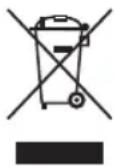
Protect our environment: do not dispose of electrical equipment in the domestic waste.
Please return any electrical equipment that you will no longer use to the collection points provided for their disposal.
This helps avoid the potential effects of incorrect disposal on the environment and human health.
This will contribute to the recycling and other forms of re-utilisation of electrical and electronic equipment.
Information concerning where the equipment can be disposed of can be obtained from your local authority. Your dealer and contractual partner is also obliged to take back the old appliance free of charge.
BELANGRIJK:
WAARSCHUWING: Risico op letsell
Yka3bIbaeT Ha BO3MOxHyO ONaCHOCTb In3dEInna n dpynx OKpyKaHOuX INpeDMETOB.
CoapedkaHne
Ob3op deTanei np6opa 3
PacnaKOBka yCTpoiCtBa 44
O63op Detanei npnbopa/KomnneKt noCTaBKn. 44
IpeDynpexKdHnno nCnObl3oBaHnU yctpoiCTBa.44
3JIeKtpnueckoe coeINHeHne. 45
Bo3moXhoCTn np6opa 45
YCTAHOBKa N3KcNpyataaTnRA TECTOMecINbHOI MaunHbI...45
Peuentbl 46
UncTka 47
XpaHHeIe. 47
UcTpaHHe HncnPaBHOCTe 47
TexHHueckne daHHbIe. 48
Ytunnaia 48
PacnaKOBka yctpoNCTBa
1.ИЗБЕКТЕ yСТРОДСТВО ИЗ yЯКOBКИ.
2. YdaJInte BCE ynaKOBOHyIbe MaTePnAJIbI, TAKHe KaK foJIbra, HanoNHTeJIb, Ka6eJIbHbIe CTaXKn I KapToHHaY naKOBka.
3.Поберп Te KOMЛJEKT NOCTaBKN Ha KOMJIeKTHOCTb.
4. Ecnn coepxmoe ynaKOBn HenoHoe nnn ecnn MOXHO 6hapyknb NobpeKdEHHa, He 3KcNpyaTnpyTe ycTpoI CTBO. HeMeDHeHOb BepHte erO dInepy.
5. Ha yctpoiCTBe MoKTe OCTaBaTbCn PbIb NIN OCTaTKn Ipn3BOIDCTBa.Mbl peKOMeHdyem OUYuTaB yctpoiCTBO, KaK ONuCAHO B pa3dene «UInCTka»
O63op DeTanei npnbopa / KomnJIeKT noCTaBKn
1 Nobopothoe nneyo
2 Lufep6nat ynpaBneHnco BCTpoeHHbIM DnCnJIeEM
3 INdikaTopHaJaMaMoNouka pa6oTbI
4BeHTnIaIOHHbEOTBepCTnI
5 Pbyar onyckanra / nojbema npeya
6KoJyX MoTopa
7 KyBUnH CMeunBaHnA
8PykaaunDcmeunBaHn
9 3aunTHa KpbIuKa oT pa36pbI3nBaHn
10 3arpy3o4Hoe OTBepCTne C KpbIiKoI
11 BeHnK
12 KpokdnyTeCTa(2-).
13 KpOKДЯ CmEuINBaHn
IpeDynpexdHnno nCNoJb3OBAHnU yCTpoiCTBa

NPEyNPExEHHE:
OnachocTh nonyehn TpaBmbl!
- PeneB BKIOHcHHeM y6eINTEcB, YTO INCTpyMeHT npaBnIbHO 3aKpeIIeH H aDexHO 3aΦNKCuPOBaH.
- 3anpeuataeTc npkacatbck KDbNjxuymcmca TaCTM.
- He mehraTe coctoHme 3aunTHbIX nepeKIOUcATEneI.
- BbItacknBaIte cTeByIO BnIKy n3 po3eTKN, KOrdaXOTITE CMeHHTb IHCTpMEnT.
BceTda doKuJaTeCb ocTaHOBKn HcHcTpMeHaTla! - EcIN akTbBnPoBaTb pbIar BO Bpemra pa6ToIyCTBa, YTO6bl NODHb TIIeO, 3aUHTbI nepeKlIOVATeNb OTKIIIOHT MOTOp.
3NeKtpnueckoe coeHHeHne
IpoBepbTe, Yo nCnoNb3yeMoe HapRaeHne 3JeKTPoPnTuHa Hnra COOTBeTCTBye T HapRaeHnIO np6opa. Cm. Ha 3TuKeTke HOMHaNoB NOdpo6HbIe TexHnueckme XapaKTepeNtKn.
Bo3MOxHocTn np6opa
CpeCTBa 3aunTbI
- Pnp6bop ochauenpeoXpaHnteBbHm BblKIOHaTeTnem. Pnp6bop moKHO 3cKnIyATnpOBaTb TOnbKO npnco6JIouDeHHn CJeDyUOxuX yCNOBn:
-OTKnHaHa Yacb 3aKpeHHe B HIXHem NoIOXeHm.
CnCTeMa 3JIeKTPoHHoI peryIuPobKn CKOpocTn aBtOMaTnueckn 3aIpeuaet pa6Ory dIBraTeNc npeperykoJ. Yactota BpaueHnI pyIpyETcA bTOMaTnueckn B 3aBNCIMOCTN OT HaPy3Kn.
BkIIOueHnE np6opa
Iocne npoklueynnp6opKa 3eKtpocTeu 3ambl KaHn npedoxpaHnteHbHO BbIKIOHaNoBOpOTHom KPOHHTeHe np6op rotOB KaPabote.
HaIncnnee KpaTKOBpemHNO 3aropaOTcBCE CmBOJI IN NOABJRETCA 0
Bpaa perynTOp no yacobO ChpeJIke, BbI6epTe ypoBeHcKOpocTN. Pnp6op hauHnaeT pa60Ty. Ppi 3tOM 3aropaETcN HdNKaTOp Ha pyUe ynpabHeHn.
Dinne
Ha ncnnnee oTo6paKaetcneJeuOe:
- YpoBeHb CKOpOCTn
Bpempa60tbI - INHCTpyMeHTbl (KPIOKДЯ TECTa, KPIOKДЯ CMEUINBAHNA, BEHUNK)
-ObpaTnTe BHHMaHHe,HTO CmB0JI KpIOKa IJr Tecta rachET,HaunHaC yPoBn4.1o3ToMy nCnoIb3yIe KpOK dJa TECTa ToIbKO Ha yPoBHe!-3
BbIKHoueHnI np6opa
1.ПовернiteДИСКУпавпеньЕВdoунopa,чTOБы BBKIIQUHHTb npIbOp.Дисгели и NODCBETka nORachyT.
2. N3BJIeKITe BnIKy n3 po3ETKl.
YcTaHOBka N 3KcNpyaTauHn TECTOMEcnIbHoM MaunHbI
BkIouaTe yCTPOINCTBO TOIbKO C yCTaHOBHeHHbIM Ha MecTO KYBUNHOM CMEUNBaHnI
- OTkpbItne noBopOTHOro nNeya:
IobepHnTe pbUar B HnpaBnEnu CTrpeKn u ydepxuBaHTe ero B HuxHom noIOxehn. PykO nepemecTHe NOBOPOTHOe PNeUo B BepXhee noIOxehne n OTnyCTHe pbUar.
- EcnH Nyken 6pbI3ROBnK, NOcOeMnHTe erO CHN3y K NOBOPOTHomy pykaby. Y6eIITecb, yTO OH HAdExKHO 3aФнICnPOBaH.
3.Ппменецпрспocблеси:
HaBepxHeuactn npncnoc6IeHnMoKHO yBnIeTb yIy6IeHne Ia n npBOHorO Bana u yIy6IeHne dIy IunInTa. HacAdte IHCTpyMeHT Ha oIN H3 npBO-dhbx BaIOB.EcN Bbl NCNoB3yeTe KpOKn dJI TecTa, NcNoB3yTe Oba npBOHbIX Bana.IPiDaBITE IN B 3TO Xe BpeMnOBepHnTE HacaKy IpOTNB u cAOBOn CTpeJIKN dJr TORo,yTO6bl fIKCaTOp npBOHorO Bana 3axan HacaKy.
- KyBwHn CMeWnBaHHa:
YctaHOBNTe yaw dy CMEWBAHn B depkaTeIb TaK, TTO6bl CmBOJ Na Yawe N CmBOJ Ha Kopnyce 6bln COBMeJeHb. IOBepHTe yawy B HanpaBHeHn, yka3AHOM Ha KOPnyce LCK, Do ynopa.
-
HanonHInTe KyBUnH CMeunBaHnI npOdykTaMn
-
Pn3aMeuBaHnB R3KOro TeCTa He 3aKnabBaIte B yauy dIa CmeuBaHnCpa3y BCE INHpreDneHTb. HauHnTe 3aMeuBaHnE C MyKn, caxapa n Iau. MeIeHHo DoabJrTe KndKocTb B npOecce CMeuBaHnA.
-
Y6eIITecb, yTO DNCK ynpaBnHn NOBepHyT BInEBO Doynopa.
- Kpenko depknte nobopothbmyhpaar. Nobepnhtpe bpaar B HaprabHnN, yka3aHHOM CTpeJIKO, n ydepKBAHTe ero B 3TOM noIOKeHm. OndOBpemeHNO MeIeHNOyCTNTpe bpaar pyko. OTnyCTNTpe bpaar.
8.Bctabte BnIky nItaHnB nOxDoxayupo3eKy. - Bb6epnte ckopoctb no Ta6nue Hnke.
Tabnua TnIOB TcTa N HCTpyMeHTOB
yolll j aall alalal yalal yal l l
aaoao xia jybu ylaill jao
Joo 100000000000000000000000000000000000000000
aaguyg aylgullgl
j0 walw jS g w l sloy A aedbcl clogbgl 1g aall
gulll 4y jagdy jolol jolil ablal Jdo y cuu
jIoo oooJIgOoI OoooiooJIO
#
. lale 1
4olduwuw
.
a 1