MOBILE 5 - Mobile GPS TOMTOM - Free user manual and instructions
Find the device manual for free MOBILE 5 TOMTOM in PDF.



| Product type | Mobile GPS |
| Brand | TomTom |
| Model | Mobile 5 |
| Dimensions | 87.8 x 43 x 15.1 mm |
| Weight | 68 g |
| Battery | Integrated lithium-ion cell 1,200 mAh |
| Battery life | 10 hours under normal conditions |
| Charging time | Less than 4 hours |
| Power supply | Cigarette lighter adapter or mains (5 V) |
| GPS chip | SiRF Star III |
| GPS frequency | L1, 1575.42 MHz |
| GPS channels | 20 channels "all visible" |
| Tracking sensitivity | -159 dBm |
| Cold start | < 1 minute |
| Hot start | < 10 seconds |
| Bluetooth | Class II version 1.2, serial port profile |
| Bluetooth PIN code | 0000 |
| Protection | IP54 (resistance to liquids and dust) |
| Operating temperature | -10 to +60 °C |
| Storage temperature | -20 to +70 °C |
Frequently Asked Questions - MOBILE 5 TOMTOM
User questions about MOBILE 5 TOMTOM
0 question about this device. Answer the ones you know or ask your own.
Ask a new question about this device
Download the instructions for your Mobile GPS in PDF format for free! Find your manual MOBILE 5 - TOMTOM and take your electronic device back in hand. On this page are published all the documents necessary for the use of your device. MOBILE 5 by TOMTOM.
USER MANUAL MOBILE 5 TOMTOM
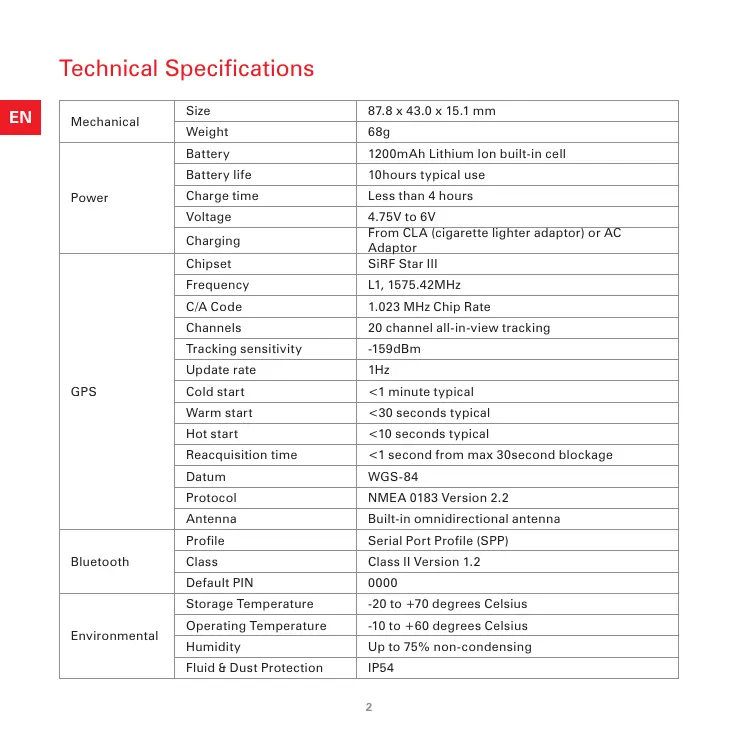
Technical Specifications
| Mechanical | Size | 87.8 x 43.0 x 15.1 mm |
| Weight | 68g | |
| Power | Battery | 1200mAh Lithium Ion built-in cell |
| Battery life | 10hours typical use | |
| Charge time | Less than 4 hours | |
| Voltage | 4.75V to 6V | |
| Charging | From CLA (cigarette lighter adaptor) or AC Adaptor | |
| GPS | Chipset | SiRF Star III |
| Frequency | L1, 1575.42MHz | |
| C/A Code | 1.023 MHz Chip Rate | |
| Channels | 20 channel all-in-view tracking | |
| Tracking sensitivity | -159dBm | |
| Update rate | 1Hz | |
| Cold start | <1 minute typical | |
| Warm start | <30 seconds typical | |
| Hot start | <10 seconds typical | |
| Reacquisition time | <1 second from max 30second blockage | |
| Datum | WGS-84 | |
| Protocol | NMEA 0183 Version 2.2 | |
| Antenna | Built-in omnidirectional antenna | |
| Bluetooth | Profile | Serial Port Profile (SPP) |
| Class | Class II Version 1.2 | |
| Default PIN | 0000 | |
| Environmental | Storage Temperature | -20 to +70 degrees Celsius |
| Operating Temperature | -10 to +60 degrees Celsius | |
| Humidity | Up to 75% non-condensing | |
| Fluid & Dust Protection | IP54 |
TomTom GPS receiver
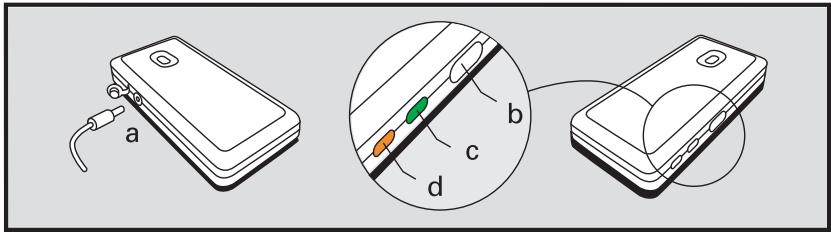
a Power supply
b On/Off button
c GPS indicator
d Charge indicator
Switching on and off
To switch the GPS receiver on or off, press and hold the power button for about 1 second.
GPS Indicator
When switched on, the GPS indicator will be lit green. Once the GPS receiver has determined your position ("has a fix"), the indicator will flash continuously.
Charge Indicator
If the GPS receiver needs charging, the Charge indicator will be lit red. When the internal battery is charging the indicator will be lit orange.
Setting up
Setting up a connection with your PDA or Smartphone
Ensure that the TomTom Wireless GPS receiver is switched on. When you open the TomTom NAVIGATOR 5 or TomTom MOBILE 5 applications, a connection to the TomTom Wireless GPS receiver will be made automatically. If you leave your GPS switched on and do not connect it to your device, it will automatically switch off after 5 minutes in order to conserve battery life.
Please refer to the Bluetooth connection setup instructions in the documentation that comes with your PDA, Smartphone or laptop. You will need to set up a Serial Port connection between the GPS receiver and your device. The GPS receiver will appear to your device as the "TomTom Wireless GPS" and its GPS signal will be output on its "GPS serial output".
To ensure ease of use, create a Bluetooth bond between your device and the GPS receiver. The pairing code is 0000. Please check specific device setup information on our support pages at www.tomtom.com.
After setting up the Bluetooth connection, you will need to modify the properties of the software on your PDA, Smartphone or laptop to use the GPS signal from the GPS receiver. Please refer to the documentation of your device, and of your software. Choose the NMEA protocol.
Press and hold the power button for 3 seconds to perform reset.
Mounting
Your TomTom Wireless GPS receiver can be used when in your pocket or bag. When using it in a vehicle, make sure it is placed correctly for optimal GPS signal reception and stays in place. You can ensure that the GPS receiver gets a proper GPS signal by testing it in a stationary situation with your PDA or Smartphone. Note that many modern vehicles have a heat reflective shield embedded in the windshield preventing good reception when the GPS receiver is placed on the dashboard. If you have problems getting a GPS signal, try placing the TomTom Wireless GPS receiver behind a rear window of your car.
Charging
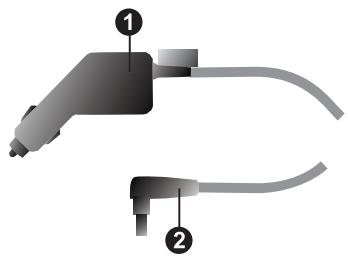
For in-vehicle charging, insert the 5V plug of the cigarette lighter adaptor into the 5V jack on the rear side of the receiver.
CLA plug
GPS receiver plug
EN
AC Charger
Use the AC charger to charge the GPS receiver at home. You can change the adaptor of the AC plug to fit your local power outlet.
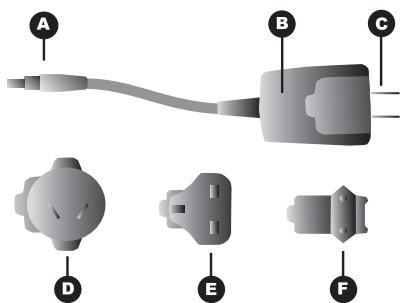
GPS receiver plug
B AC plug
Adaptor for the USA
Adaptor for Australia
E Adaptor for the UK
Adaptor for the rest of Europe
Charging
While charging, the Charge indicator on the side of the receiver will be lit orange. When charging is completed, the orange indicator switches off.
\section*{Caracteristiques techniques}
Verbinding makes met uw PDA of smartphone
b Przycisk zasilania (on/off)
c Wskaznik GPS
The Global Positioning System (GPS) is a satellite-based system that provides location and timing information around the globe. GPS is operated and controlled under the sole responsibility of the Government of the United States of America, which is responsible for its availability and accuracy. Any changes in GPS availability and accuracy, or in environmental conditions, may impact the operation of your TomTom GPS receiver. TomTom International B.V. cannot accept any liability for the availability and accuracy of GPS.
2. Use with Care
Use of the TomTom GPS receiver for navigation still means that you need to drive with due care and attention.
3. Aircraft and Hospitals
Use of devices with an antenna is prohibited on most aircraft, in many hospitals and in many other locations. The TomTom GPS receiver must not be used in these environments.
4. Battery
This product uses a Lithium-iron battery. Do not use it in a humid, wet and/or corrosive environment. Do not put, store or leave your product in or near a heat source, in a high temperature location, in strong direct sunlight, in a microwave oven or in a pressurized container, and do not expose it to temperatures over 60^ (140 F). Failure to follow these guidelines may cause the Lithium-iron battery to leak acid, become hot, explode or ignite and cause injury and/or damage. Do not pierce, open or disassemble the battery. If the battery leaks and you come into contact with the leaked fluids, rinse thoroughly with water and seek medical attention immediately. For safety reasons, and to prolong the lifetime of the battery, charging will not occur at low (below 0 C/32 F) or high (over 45 C/113 F) temperatures.
Temperatures: Standard operation: - 10 C (14 F) to + 55 C (131 F); short period storage: - 20 C (- 4 F) to + 60 C (140 F); long period storage: - 20 C (- 4 F) to + 25 C (77 F).

THE LITHIUM-ION BATTERY CONTAINED IN THE PRODUCT MUST BE RECYCLED OR DISPOSED OF PROPERLY. USE TOMTOM GPS RECEIVER ONLY WITH THE SUPPLIED DC POWER LEAD AND AC ADAPTER FOR BATTERY CHARGING.
To recycle your TomTom GPS receiver, please see your local approved TomTom service centre.
FCC Information for the User
The device used for this transmitter must not be co-located simultaneously operating in conjunction with any other transmitter.
Exposure to Radio Frequency Radiation
To comply with RF exposure requirements please maintain a separation distance of at least 20~cm/7 inches from any part of the product.
Radio and Television Interference
This equipment radiates radio frequency energy and if not used properly - that is, in strict accordance with the instructions in this manual - may cause interference to radio communications and television reception.
It has been tested and found to comply with the limits for a Class B digital device pursuant to part 15 of the FCC Rules. These are designed to provide reasonable protection against harmful interference in a residential installation. However, there is no guarantee that interference will not occur in a particular installation. If this equipment does cause harmful interference to radio or television reception, which can be determined by turning the equipment off and on, the user is encouraged to try to correct the interference by one or more of the following measures:
- Reorient or relocate the receiving antenna.
- Increase the separation distance between the equipment and the receiver.
- If you are using the equipment with a mains adapter, plug it into an outlet which is on a different circuit from that to which the receiver is connected.
- Consult an experienced radio/TV technician for help.
Important
This equipment was tested for FCC compliance under conditions that included the use of shielded cables and connectors between it and the peripherals. It is important that you use shielded cable and connectors to reduce the possibility of causing radio and television interference. Shielded cables, suitable for the product range, can be obtained from an authorised dealer. If the user modifies the equipment or its peripherals in any way, and these modifications are not approved by TomTom, the FCC may withdraw the user's right to operate the equipment. For customers in the USA, the following booklet prepared by the Federal Communications Commission may be of help: "How to Identify and Resolve Radio-TV Interference Problems". This booklet is available from the US Government Printing Office, Washington, DC 20402. Stock No 004-000-00345-4.
FCC Declaration of Conformity
Tested to Comply with FCC Standards for Home or Office Use
The TomTom GPS receiver has been tested to – and complies with – part 15 of the FCC rules. Operation is subject to the following two conditions:
- This device may not cause harmful interference.
- This device must accept any interference received, including interference that may cause undesired operation.
Responsible party in North America
TomTom, Inc., 150 Baker Ave, Concord, MA 01742
Tel: 978 287 9555 option 1
Fax: 978 287 9522
Emissions information for Canada
This equipment complies with the essential requirements of EU Directive 99/5/EC (declaration available at www. totom.com).
In line with EU Directive 2002/96/EC for waste electrical and electronic equipment (WEEE), this electrical product must not be disposed of as unsorted municipal waste. Please dispose of this product by returning it to the point of sale or to your local municipal collection point for recycling.
For more information, see www.tomtom.com
This product displays the Click to show it complies with all relevant Australian and New Zealand regulations.
Copyright information
© 2005 TomTom International B.V., The Netherlands. Patents pending. All rights reserved.
TomTom and the TomTom logo are registered trademarks of TomTom International B.V. The Netherlands. All other trademarks are the property of their respective owners. The use of TomTom products is governed by a license agreement which is included in this package and/or the products. This license contains a limited warranty and limitation of liability. You can review the license conditions at www.tomtom.com
BLUETOOTH is a trademark owned by Bluetooth SIG, Inc., U.S.A. and licensed to TomTom B.V.