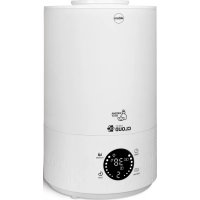
Atma NU40 - Humidifier Eldom - Free user manual and instructions
Find the device manual for free Atma NU40 Eldom in PDF.



| Product Type | Ultrasonic Air Humidifier |
| Brand | Eldom |
| Model | Atma NU40 |
| Nominal Power | 27 W |
| Supply Voltage | 220-240 V ~50/60 Hz |
| Tank Capacity | 2.8 L |
| Humidification Rate | 200 ml/h |
| Recommended Area | Up to 35 m² |
| Max Runtime (full tank) | Approximately 4 hours |
| Humidification Levels | 3 adjustable levels |
| Adjustable Hygrostat | From 45% to 90% in 5% steps |
| Timer (auto shut-off) | 1, 2, 4 or 8 hours |
| Night Mode (sleep) | Yes, dimmed screen |
| Night Light | Yes, separate control |
| Aromatherapy Function | Yes, via dedicated sponge in tank |
| Natural Ionization | Yes, by decomposition of water particles |
| Auto shut-off when water is low | Yes |
| Recommended Water Type | Cold tap water or demineralized water if hard water |
| Tank Cleaning | Every 3 days minimum |
| Descaling the Transducer | With vinegar, do not use sharp objects |
| Intended Use | Household only, do not use outdoors or in bathroom |
| Warranty | Domestic use, void if used improperly or not as intended |
| Remote Control | Yes, included |
Frequently Asked Questions - Atma NU40 Eldom
User questions about Atma NU40 Eldom
0 question about this device. Answer the ones you know or ask your own.
Ask a new question about this device
Download the instructions for your Humidifier in PDF format for free! Find your manual Atma NU40 - Eldom and take your electronic device back in hand. On this page are published all the documents necessary for the use of your device. Atma NU40 by Eldom.
USER MANUAL Atma NU40 Eldom
The disposal of used electrical and electronic equipment (applies to European Union countries and other European countries with separate waste-collection systems).
This symbol on the product or its packaging indicates that it should not be classified as household waste. It should be handed over to an appropriate company dealing with the collection and recycling of electrical and electronic equipment. The correct disposal of the product will prevent potential negative consequences for the environment and human health resulting from hazardous substances present in the product. Electrical devices must be handed over to restrict their re-use and further treatment. If the device contains batteries, remove them, and hand them over to a storage point separately. DO NOT THROW EQUIPMENT INTO THE MUNICIPAL WASTE BIN. Material recycling helps to preserve natural resources. For detailed information on how to recycle this product, please contact your local authority, the recycling company, or the shop where you bought it.
Before first use, please thoroughly read the entire manual.
- Connect the connection cable only to mains whose electrical parameters are compatible with the parameters on the nameplate.
- Pay attention not to add too many receivers to one power circuit.
- For domestic use only.
- Place the appliance on a flat and dry surface.
- Do not put your fingers or any objects into the inlet or outlet opening.
- Do not place the appliance on curtains.
- Always keep the operating appliance within sight, particularly in the vicinity of children.
- Never leave the operating appliance unattended.
- The appliance can be used by children aged 8 and older, by persons with limited physical and mental capabilities, and by persons who have no experience nor knowledge of the equipment, only under supervision or if instructed on the safe use of the appliance in way that guarantees that the associated risks are understood. Children should not play with the appliance. Children should not clean nor maintain the appliance unattended. Children under 3 years of age should be kept away, unless they are under constant supervision. Children from 3 years of age and less than 8 years of age may only turn the device on / off if it has been placed or installed in a designated place, in a normal operating position, and that they are supervised or instructed in the safe use of the device and that they understand the with this threat. Children from 3 to 8 years old are not allowed to connect, adjust or clean the maintenance of the user's device.
- Do not spray insecticides or similar products in the vicinity of the operating appliance.
- Do not use the appliance in high temperatures (above 40^ ), in places with high humidity (e.g. bathrooms), or in explosive areas.
- Use only clean, cold tap water or water with low mineral content at a temperature not exceeding 40^ .
- Do not use in the open air.
- Do not carry or lift during operation.
-
Do not touch the ultrasonic converter during operation.
-
Place the appliance away from heat sources (radiators, stoves, etc.).
- Do not start the humidification feature if the water container is not installed in the appliance.
- Do not place the appliance near vents or electrical devices.
- Do not insert any objects into the humidifier nozzle.
- Keep hands, face, and other parts of the body away from the nozzle when the appliance is switched on.
- Do not cover the humidifier nozzle when the appliance is switched on.
- Disconnect the appliance from the mains, before emptying the container or moving the appliance.
- Before switching the appliance on, make sure that all its parts have been properly installed. Do not switch the appliance on if it is not completely assembled.
- Do not hang clothes or other objects on the appliance.
- Do not use the appliance if the connecting cable is damaged. To avoid any risks, replace the damaged cable at an authorized Manufacturer's Servicing Point.
- The appliance can be repaired only at an authorized servicing center. Any upgrades or the use of non-original spare parts or components is forbidden and poses a hazard for the user.
- Eldom Sp. z o. o. is not liable for any damage resulting from improper use of the appliance.
SPECIAL INSTRUCTIONS
- Place the appliance on a hard and stable surface. It is recommended to place the humidifier at least 1m above the floor level.
Do not place the appliance on a carpet, wood flooring or on any surface that may be damaged by water or moisture. -
When placing the appliance, make sure that the power plug is always accessible.
-
The appliance should always be placed upright.
- Do not cover the air outlet and inlet.

The symbol indicates that the tank should be cleaned at least once every 72 hours.
Warning: Microorganisms that may be present in the water or the environment in which the device is used or stored may thrive in the water tank and be blown into the air, creating a very serious health hazard if the water is not replaced and the tank is not properly installed. Cleaned every 3 days.
WARNING: Plastic bag can be dangerous, to avoid danger of suffocation keep this bag away from babies and children.
INSTRUCTION MANUAL ULTRASONIC HUMIDIFIER NU40
EN
GENERAL DESCRIPTION
- Nozzle
- Cover
- Water tank
- Control panel
- Lamp
- Float 1
- Float 2
- Control tube
- Air outlet
- Oil reservoir
- Maximum water level indicator
- Ultrasonic transducer
- Remote control
CONTROL PANEL (4)/REMOTE CONTROL (13)
The ultrasonic humidifier NU40 is designed to improve air quality in living quarters. The appropriate level of air humidity improves the well-being and quality of sleep. Additionally, it is equipped with an aromatherapy function - the device can be used with aromatic water additives intended for humidifiers. Natural air ionization, resulting from the breaking of water particles, additionally cleans the humidified air and reduces the amount of bacteria present in it.
USE
- Before use, check that the appliance is complete and undamaged.
-
Do not place the appliance on a carpet, lining, parquet floor, or any surface which can be damaged by water or moisture.
-
It is recommended to place the humidifier at a minimum height of 1m from the floor.
-
Fragrant-water additives (oils, etc.) for humidifiers may be used with the appliance. The essential oil can only be poured on a sponge, which is placed in a reservoir (10).
WARNING. Pouring the oils directly into the tank (3)) can damage the humidifier. Such damage is not subject to warranty repair.
OPERATION
- Make sure the appliance is turned off and disconnected from the power supply.
- Remove the nozzle (1) with one hand on the tank (3) and remove the lid (2).
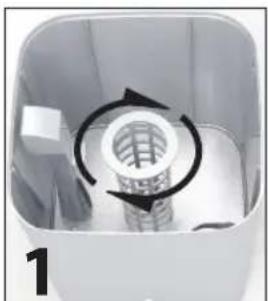
- Insert a tube (8) into the container - Fig. 1 and push the float (7).
WARNING. The device may only be switched on if a hose (8) with float (7) is fitted.
- Fill the tank (3) with water to the maximum level (11).
- Place the lid (2) on the container (3) and the nozzle (1) on it.
- Plug the appliance into the mains, complying with the parameters specified above. The appliance will enter the stand-by mode. No function is active, and the display is switched off.
All changes in the settings are confirmed with an audio signal.
ON/OFF (SWITCHING ON / SWITCHING OFF)
Pressing the button (A) will cause the display to activate. The humidifier will start running at the highest level of humidification, with the fan motor running. The humidity level is displayed. Pressing the button (A) again will switch off the unit and make it enter the stand-by mode.
HUMIDITY (MIST)
The appliance is fitted with a three-stage control of humidification. The level of humidification is changed with the button (B). Changes are displayed with the numbers 1 to 3 on the display.
HYGROSTAT (HYGROMETER)
This function allows to set the level of humidity from 45–90% in 5% steps. The appliance will start after about 3 seconds of entering
the settings. It will switch off when the current humidity is higher than the set level. The function will activate when the current relative humidity is at least 2% lower than the set value. Activation of the function is indicated with the icon on the display. Due to external conditions, an error may occur between the actual and the displayed values of humidity of up to about 5% .
TIMER
This function allows to set the time after which the appliance will automatically switch off. This function may be started only when the appliance is on. Only 1, 2, 4 or 8 hours can be set.
The function is activated with the button (D). Activation of the function is indicated with the icon on the display.
The device displays the time.
SLEEP (NIGHT MODE)
The night mode is switched on with the button (E) on the remote control or with the button (D) on the control panel. Press and hold the key (D) for about 3 s.
In this mode the display is switched off. If you touch any key, the mode is deactivated.
NIGHT LIGHT
The lamp is switched on with the button (F) on the remote control or with the button (C) on the control panel. Press and hold the button (C) for about 3 s. Switching on the function is indicated by an icon in the display.
By pressing the button (F) again or holding the button (C) the lamp is switched off.
WATERLESS
This symbol will be displayed when water is not present in the container. The appliance will switch off automatically.
CLEANING AND MAINTENANCE
- Before cleaning, unplug the appliance.
- It is recommended to clean the water tank after each use, but at least once every 3 days.
- Do not immerse the humidifier in water or other liquid substance.
- Do not use any aggressive cleaning agents.
- It happens that in the base or in the ultrasound converter a scale is formed which can be removed by pouring 30% distilled vinegar on the elements and leaving it there for 30 minutes.
PRACTICAL ADVICE
- Do not direct the nozzle towards a wall. The moisture coming out of it may cause damage of the paperwall, etc.
- Excessive moisture in the room may cause condensation of water on window panes and furniture. If this is the case, turn off the humidifier.
- Do not use the humidifier in the rooms where the moisture level exceeds 80% .
- Use tap water to fill the tank, however in case of hard tap water, distilled water is recommended.
- When the humidifier is not used for a long time, its washing and drying is recommended. Keep in a dry place.
- It is recommended to place the humidifier at least one meter above a floor.
ENVIRONMENTAL PROTECTION
- The appliance is made of materials which can be recycled.
- It should be handed over to the applicable collection point for the recycling of electrical and electronic equipment.
WARRANTY
- This appliance is designed for domestic use only.
- It cannot be used for professional purposes or for other than the intended use.
- Improper use will nullify the guarantee.
YcTpoCTBO OCHaueHO TpexypOBHeBOperynnpOBKo yBnaXHeH.NyPOBeHb yBlaXHeHNOxHO N3MeHnTB,NCNoJIb3yR KHOIky (B).
HYGROSTAT (FNRPOMETP)
ФункцяakTNbpyetc KhoNko(C).ДаннayФункцяno3BOJnEETyCTaHOBtTp6e6yEmbI yPOBeHb BnaXHocT-OT45do90% cwarom 5%.YcTpojctBOHaHTepoTyIOCTeueHmINpIn6JI.3ceKHyC MOMeHTaBBOdaHAcTPOeK.YcTpojCTBO BbIKIOHTcR, ecn Tekyuyn yPOBeH bLnXHOCTH 6yET npeBbIaTb 3aDAnHoe 3aHaeHne.ФUnKzua ABToMaTuCeCKn AKTNbpyETcR, ecn Tekyuyn yPOBeHb OTHCNTeBHO BlaNxHOCTH 6yET HnKe Ha 2% OT 3aDAnHOr.BKnUeHne FUnKzua OTObpaKaTeCn NOcBcTKoM INOKHN "HYGROSTAT"Ha Dncnnee.PpinHMaa BO BbHMaHne YcNoBn OkpykaIoSe Cpebl MoKet NMeT MeTo NOrpeWHOCTb OTo6paJaemoro 3aHaeHnBbNxHocTn IOOTHOWeHIO KΦaTNUeCKomy yPOBHO-B npdeJax 5%.
TIMER (TAIMEP)
DAnHHa FyHKUIN PO3BOJAEH HAcTPOINb BpEMn, no NCTeueHHN KOTOPORo yCtpoiCTBO aBtOMaTneCKN BblKIOuayetc. HAcTPOINK 3ToI FyHKUIN MOXHO OCUJECTBnTb TOnbKO nOcNE BkIOUeHHN yCtpoiCTBa. Bbl MoKeTe YcTaHOBnTb TOnbKO 1, 2 4 INN 8 acOB. FyHKUIN AKTNBPpyETc npn NMOUHN KONKN (D). BkIOUeHHe FyHKUIN OTObpaKaAETc NODCBETKOH NOKKN "TIMER" Ha dncnnee. YcTPOINCTBO He Yka3bIbaE npoWeJWero BpEmH pa60TbI. OuepeHoe HaxaTne KHOJIKN (D) IpOdJIeBaET BpEMn pa60TbI yBnaXHITen.
SLEEP (HOHPOXIM)
Houhno pexm BkIOuaeTc KhoNko (E) Ha nyIbe nctaHOnHO ynpabHeHn nn KhoNko (D) Ha naHenn ynpabHeHn. Khonky (D) cneNyET haoKaTB uYepKmbaB b TeueHne npMepHo 3 c. B 3OM pexm npKOCTb noCBeTKn dncnner yMeHbWaeTc. PpIKoCHOBHeH N KOHKe pnpBeTe K BblKIOUeHIno 3TOrO pexmA.
HOUHOBET
JaMa BkIIOaETc C NOMOJIbIO KHOJN (F) Ha nyIbTe DnCTaHIOHHO YnpaBHeHr IIN KHOJN (C) Ha naHEn IynpaBHeHr. KHOJNy (C) cneIyET HaxaTb I yepKnbTaB TeueHne npMepHo 3 cekHyd. AKTINBaunu FyHKunu O60Haayetra H daCnnee nnKToPammo. NOBTOpHOe Haxatne KHOJN (F) IIN ydepXaHne KHOJN (C) BblIOUaET CBT.
WATERLESS (OTCYTCTBVE BOДы)
IodcBeKa daHHoro CmBbOa TCHTc npn OTCyTCTBn BObl BEMKoCTN. UcTpoCTBO aBTOMaTHueCKN BBkLIouHTCh.
COBETbl
1.He HanpaBraTb BpaAiooeroCpaBnInTeHa CteHbI. IToK npa Mopet nobpeDntb 600 n T.D
2. BbICOKn yPOBHeB BLaRn B NOMEeHm MoKet npNBecrN K o6pa3OBaHnIO KOHeHCata Ha OKhax m6eHN. B TaKo cnTuacnn np6op cneNyET BbIKNoHTb.
3. He cneyuET nCOnb3OBA Tb np6op B NomeeHnax, rye ypoBeB BlaRn PpeBbIaet 80 %.
4. C cIeIbIO HanonHeHnpe3epByapa MOxHO IcNoJIb3OBAbTB BODOnpOBdHyIO BDOy, OHaKO JKe B CInTyauN JKeCTKoBodbl peKOMeHdyem dIcTINIIIpOBaHHyIO BDOy.
5. Ecn He nCnOJIb3yTe npI6Op dIITeIbHoe BpEma, peKoMeHdYeM pI6Op nOMbITb N BcCyUHTb. XpaHITb B CyXOM MeCTe.
6. PeKOMeHdyem yCTaHaBnBaTb yBnaXnHTenb Ha BbICOTe MNH. 1 MOT Nona.
CHCTKA IN YXOD
1.пекдунсткон отклочи пибор ot cetи.
2. PekomeHnyem peryIaRHO uNCTnTb pe3epByap Ha BOdy N OCHOBaHne.
3. 3anpeaetcno npykaTb yctpoiCTBO B BOy nnn dpnyIO KnKocTB.
4.3anpeaaetcnaonb3oBaTb cInhble nctyne cpeCTBA.
5. B OCHOBAHIN, HacaKe INI YIbTpA3ByKOBOM 3JemeHTe MoXeT 6pa3oBaTbCn HaJIe, KOTOpBm MoXHO ydaNTb, 3aINBaH 3JemeHTb CInPTobMbIM yKcCyom Ha 30 MIn. 3aNpeuaetc npkacatbCn OCTpbIM npeMetamn K ppe6pa3oBaTeJIIO.
3AUHTAOKPYXAIOUECNPEbl
SLEEP (MODO NOCTURNO)
SLEEP (MODALITA NOTURNA)


- SPECIAL INSTRUCTIONS
- INSTRUCTION MANUAL ULTRASONIC HUMIDIFIER NU40
- GENERAL DESCRIPTION
- CONTROL PANEL (4)/REMOTE CONTROL (13)
- USE
- OPERATION
- ON/OFF (SWITCHING ON / SWITCHING OFF)
- HUMIDITY (MIST)
- HYGROSTAT (HYGROMETER)
- TIMER
- SLEEP (NIGHT MODE)
- NIGHT LIGHT
- WATERLESS
- CLEANING AND MAINTENANCE
- PRACTICAL ADVICE
- ENVIRONMENTAL PROTECTION
- WARRANTY
- HYGROSTAT (FNRPOMETP)
- TIMER (TAIMEP)
- SLEEP (HOHPOXIM)
- HOUHOBET
- WATERLESS (OTCYTCTBVE BOДы)
- COBETbl
- CHCTKA IN YXOD
- 3AUHTAOKPYXAIOUECNPEbl
- SLEEP (MODO NOCTURNO)
- SLEEP (MODALITA NOTURNA)
Brand : Eldom
Model : Atma NU40
Category : Humidifier