
Hazy NU6 - Humidifier Eldom - Free user manual and instructions
Find the device manual for free Hazy NU6 Eldom in PDF.


| Product Type | Ultrasonic Humidifier |
| Brand | Eldom |
| Model | Hazy NU6 |
| Power Consumption | 30 W |
| Supply Voltage | 230 V ~ 50 Hz |
| Water Tank Capacity | 4.5 L |
| Mist Output | 300 ± 30 ml/h |
| Recommended Room Size | 15 - 20 m² |
| Operating Time (Full Tank) | ~ 15 hours |
| Mist Levels | 4 levels (Low, Medium, High, Senior) |
| Timer | 1 - 24 hours |
| Humidistat | 40 - 95% RH (adjustable by 5% steps) |
| Anion Function | Yes, can be activated separately |
| Waterless Protection | Automatic shut-off when water tank is empty |
| Filter Type | Ceramic filter (replaceable, optional use) |
| Cleaning | Use 30% distilled vinegar for descaling; clean filter monthly |
| Nozzle Direction | Rotatable 360° |
| Display | LED display for humidity, timer, and settings |
| Power Cord Length | Not specified (typical ~1.5 m) |
| Weight | Not specified (estimated ~2 kg) |
| Dimensions | Not specified (estimated 20 x 20 x 30 cm) |
Frequently Asked Questions - Hazy NU6 Eldom
User questions about Hazy NU6 Eldom
0 question about this device. Answer the ones you know or ask your own.
Ask a new question about this device
Download the instructions for your Humidifier in PDF format for free! Find your manual Hazy NU6 - Eldom and take your electronic device back in hand. On this page are published all the documents necessary for the use of your device. Hazy NU6 by Eldom.
USER MANUAL Hazy NU6 Eldom
natural_image
White and black electric water heater with digital display showing reading of 9.788 (no visible text or symbols on device body)NAWILŻACZ ULTRADŻWIĘKOWY • ULTRASONIC HUMIDIFIER • ULTRASONIC HUMIDIFIER • LUFTBEFEUCHTER • УЛЬТРАЗВУКОВОЙ УВЛАЖНИТЕЛЬ ВОЗДУХА • ULTRAZVUKOVÝ ZVLHČOVAČ • ULTRAHANGOS PÁRÁSÍTÓ • HUMIDIFICADOR ULTRASÓNICO
Eldom Sp. z o.o.
natural_image
Close-up of a white plastic component with a red curved arrow indicating rotation or movement (no text or symbols)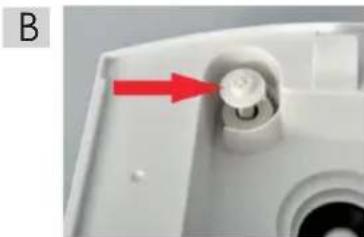
natural_image
Close-up of a white electronic device component with a red arrow pointing to a circular button (no text or symbols visible)OBSŁUGA
9. "Waterless" (Brak wody)
natural_image
Close-up of a white electronic device with a black circular component and a red arrow pointing to it, no visible text or symbols.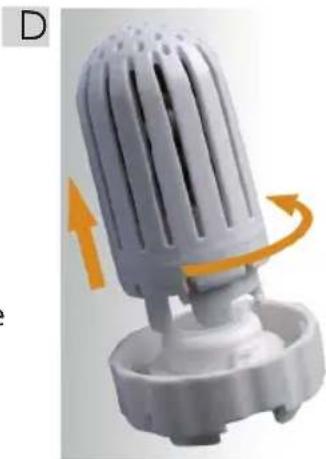
natural_image
3D rendered image of a white plastic fan or vent with orange motion arrows indicating rotation (no text or symbols)PRAKTYCZNE PORADY
Please read all these instructions carefully before using this appliance.
- Before the first use, read this entire user manual thoroughly.
- Plug in the connecting cable to an outlet with parameters specified in the manual.
- Always unplug the appliance by pulling by the plug and not by the power supply cord.
- Use only clean, cold running water or other with a small content of mineral components, at maximum temperature of 40^ C.
- Do not switch the appliance on when the water tank is empty.
- Place the appliance on a stable, dry and moisture-resistant surface.
- The device can be used by children aged 8 and older and by persons with limited physical, sensory or mental capabilities, or persons without sufficient experience and knowledge only under supervision or if previously instructed on the safe use of the appliance and the possible risks. Children shall not play with the appliance. Cleaning and maintenance that are the responsibility of the user shall not be carried out by children without supervision. Protect the appliance and the power cord against children under 8 years old.
- Make sure that children do not play with the equipment.
- The appliance is intended only for use in a household.
- Do not use in open air.
- Do not move or lift during operation. The handle (4) is intended only for carrying the tank with water (3).
-
Do not touch the ultrasound converter when the appliance is at operation.
-
Locate the appliance far from heat sources (heaters, stoves, etc.).
- Do not pour scent additives into water (essential oils, etc.) or any chemical agents.
- Do not switch on the appliance when the water tank (3) is not installed.
- Do not place the appliance near ventilation outlets and electrical devices.
- Do not insert any objects into the jet (5) of the humidifier.
- Do not put your hands, face or any other parts of the body near the moisture outlet (5) when the appliance is on.
- Do not cover the jet (5) of the humidifier when the appliance is on.
- Before emptying the tank (3) or moving the humidifier, unplug the appliance.
- Do not leave the appliance unattended.
- After the use and before cleaning and maintenance of the appliance, unplug it.
- Do not immerse the appliance in water.
- Do not use when the power cable is damaged, when the appliance was dropped or damaged in a different manner.
- Repairs of the equipment can only be performed by an authorized servicing point. Any modernizations or the use of non-original spare parts or elements of the appliance is prohibited and may cause a serious hazard to the user.
- The company Eldom Sp. z o. o. shall bear no responsibility for any possible damages resulting from the improper usage of the appliance.

INSTRUCTION MANUAL ULTRASONIC HUMIDIFIER NU6
EN
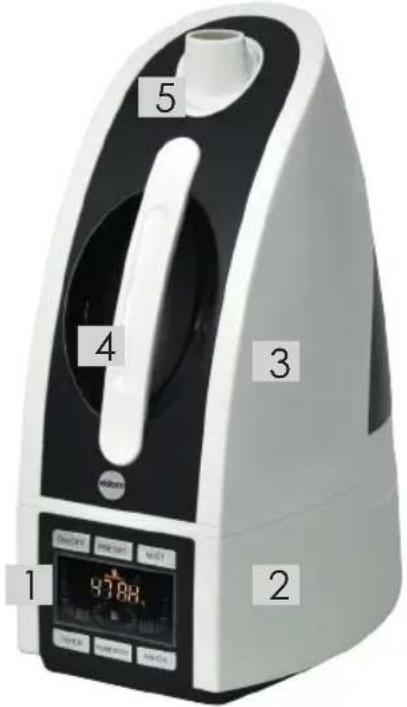
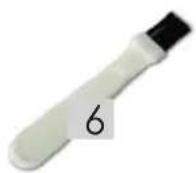
GENERAL DESCRIPTION
- Control panel
- Base
- Water tank
- Handle for carrying water tank
- Nozlle
- Brush
TECHNICAL DATA
- power: 30W
- supply voltage: 230V \~ 50Hz
- capacity 4.5l
- output 300±30ml/h
- appliance output designed for the room 15-20m2
- operation time with full water tank \~ 15 hours
OPERATION
Humidifier positioning
Position the humidifier on a hard and stable surface. Do not position the humidifier on a carpet, lining, parquet floor or surfaces which could be damaged under the influence of water or moisture.
A
natural_image
Close-up of a white plastic component with a red curved arrow indicating rotation (no text or symbols)Humidifier positioning
Position the humidifier on a hard and stable surface. Do not position the humidifier on a carpet, lining, parquet floor or surfaces which could be damaged under the influence of water or moisture.
B
natural_image
Close-up of a white plastic device component with a red arrow pointing to a circular button (no text or symbols visible)Tank filling
- Make sure the appliance is unplugged, and the switch (1) is set in the OFF position.
- Take hold of the handle (4) and take the tank (3) off the base of the appliance (2).
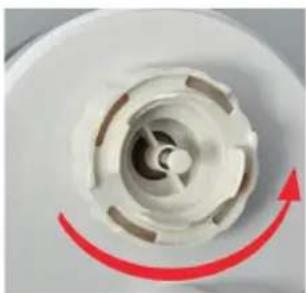
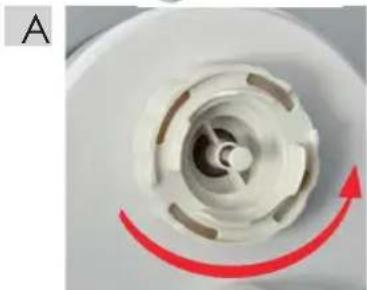
- Turn the tank, unscrew the cap A and fill the tank with water. Fix the cap turning it tight.
- Place the tank (3) on the base (2).
Humidifier operation
Every change of the settings is confirmed by a beep.
- Set the rotary jet (4).
- Plug in the appliance. the LED display will on for 2 seconds then be off. The unit stands by.
3. ON/OFF
It takes charge the electric supply of the whole unit. When press ON, the display is on, the machine operates with the lowest mist output, at the same time the fan motor works. When it is OFF, all the functions are invalid, and the display is off.
- symbol signalizes turning the unit off
- humidity level in a room
4. PRESET
When the unit stands by, press this button. The preset time can be chosen from 1 hour to 24 hours. The preset time will be counted down to work with the highest mist output.
5. MIST
4 levels from Low, Middle, Senior to High for different mist output. Changes are signalized by number of illuminated segments
6. TIMER
Settings from 1-24 hours. 0 means cancelling the settings. 3 seconds after your settings, the timer function will be counted down to work by minutes and will display with current humidity by turns for 5 seconds if having set the humidity level.
7. HUMIDISTAT
Settings from 40 -95RH% by 5RH%. 0 means cancelling the settings. 3 seconds after your settings, the humidistat works. It stops when the current humidity is more than the setting level, but the fan motor will keep working for
5 minutes. And will operate when the current humidity is 2RH% less than the setting level.
8. ANION
When the machine stands by, press the ANION button, it works whatever it is humidifying. The fan motor works at the same time. If it is not humidifying, when the ANION is off, the fan motor stops. But if it is humidifying, when the ANION is off, the fan
motor still works. Anion
9. "Waterless"
- Protection when waterless: When the tank is out of water, the Waterless lamp is on. And the machine stops. Then the settings of TIMER and HUMIDISTAT will be cancelled. When filling the water, it should be reset for the functions.
CLEANING AND MAINTENANCE
- Before cleaning, unplug the appliance.
- It is recommended to clean the water tank regularly.
- Do not immerse the humidifier in water or other liquid substance.
- Do not use any aggressive cleaning agents.
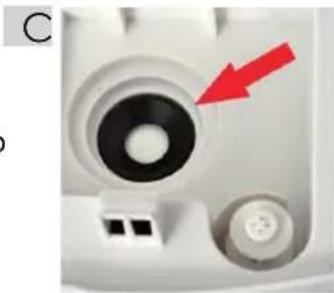
- It happens that in the base or in the ultrasound converter (C) a scale is formed which can be removed by pouring 30% distilled vinegar on the elements and leaving it there for 30 minutes.
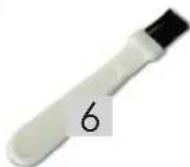
- For cleaning use the brush (6) located in the base (3).ENVIRONMENTAL
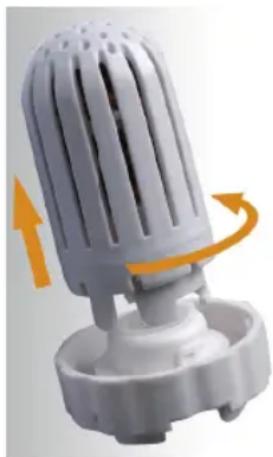
REPLACEMENT AND CLEANING OF A CERAMIC FILTER
Filter significantly reduces adverse effects (e.g. scale deposition on the ultrasound converter) resulting from the use of hard water Replacement and cleaning of a ceramic filter it is recommended to clean the ceramic filter regularly (once a month) and to replace it once a year.
In order to dismount the filter one needs to:
- make sure the appliance is unplugged,
- take hold of the handle (4) and take the tank (3) off the base of the appliance (2)
- turn the tank, unscrew the cap (D)
- turn the filter counterclockwise,
The unit may operate without an assembled filter.
The filter can be purchased from ELDOM distributors.
natural_image
Close-up of a white electronic device component with a black circular top and two connected buttons, one highlighted by a red arrow (no text or symbols visible)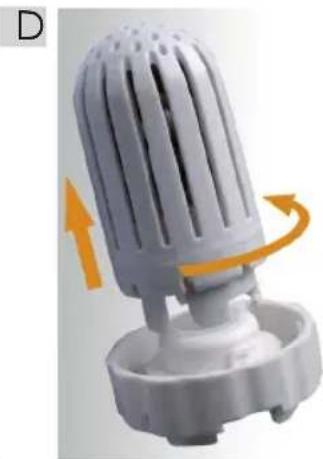
natural_image
3D rendering of a white plastic air vent with orange motion arrows indicating rotation (no text or symbols)PRACTICAL ADVICE
- Do not direct the nozzle towards a wall. The moisture coming out of it may cause damage of the paperwall, etc.
- Excessive moisture in the room may cause condensation of water on window panes and furniture. If this is the case, turn off the humidifier.
- Do not use the humidifier in the rooms where the moisture level exceeds 80%.
- Use tap water to fill the tank, however in case of hard tap water, distilled water is recommended.
- Do not use scent additives for water (essential oils, etc.)
- When the humidifier is not used for a long time, its washing and drying is recommended. Keep in a dry place.
- It is recommended to place the humidifier at least one meter above a floor.
TROUBLE SHOOTING GUIDE
Any trouble found in normal operation, please kindly refer to the following points:
| TROUBLE | POSSIBLE REASONS | SHOOTING WAY |
| LED DISPLAY IS OFF | NO POWER SUPPLY | CONNECT POWER SUPPLY |
| NOT PRESS ON | SWITCH ON | |
| LED DISPLAY IS ON, NO MIST NO WIND | TOO MUCH WATER IN THE WATER BASIN (2) | PULL OUT SOME WATER FROM THE WATER BASIN, CLOSED THE COVER OF WATER TANK TIGHTLY |
| NO WATER IN WATER TANK | FILL WATER INTO WATER TANK (3) | |
| LED DISPLAY IS ON, NO MIST BUT WITH WIND | MIST OUTPUT IS SET ON THE LOWEST LEVEL | ADJUST THE MIST OUTPUT |
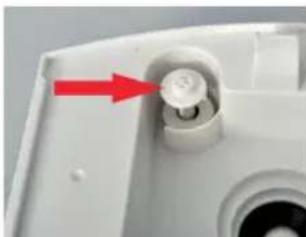
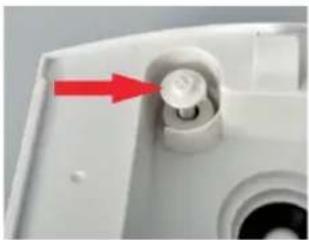
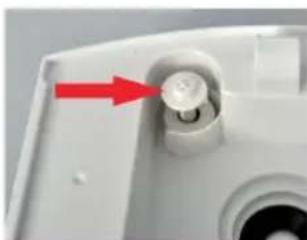
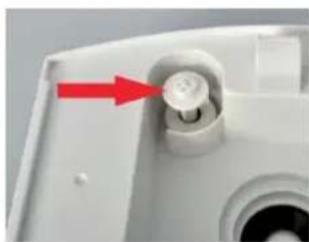
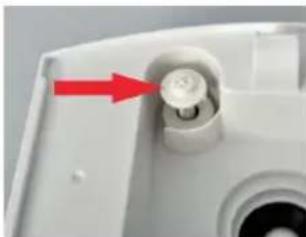
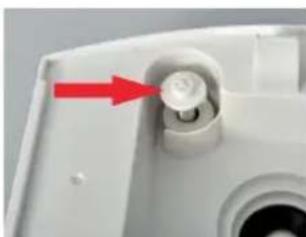
| LED DISPLAY IS ON, WITH WATER BUT SHOWS WATERLESS | FLOATER IS INTERRUPTED (FIG. 03) | WAVER THE FLOATER, KEEP IT FREE |
| ABNORMAL NOISE | RESONANT IN WATER TANK WHEN WATER IS TOO LOW | FILL WATER TANK WITH WATER |
| UNIT IS ON A UNSTABLE SURFACE | MOVE THE UNIT TO A STABLE FLAT SURFACE | |
| MIST COMING OUT AROUND THE NOZZLE | THERE ARE APERTURES BETWEEN THE NOZZLE AND WATER TANK | DIP THE NOZZLE IN WATER FOR A WHILE AND THEN FIX IT TO THE SOCKET ON WATER TANK |
| DISPLAY SHOWS BLINKING DIGITAL 30%RH | CURRENT HUMIDITY LEVEL IS LOWER THAN 30% | JUST KEEP IT WORKING |
| WATER DOESN'T COME DOWN TO BASIN (2) | BACKUP BY FILTER | RINSE THE FILTER BY TAP WATER |
PROTECTION
- the appliance is made of materials which can be recovered or recycled
- the appliance should be handed over to the appropriate centre of collection and recycling of electrical and electronic equipment
WARRANTY
- the appliance is intended for personal use at a household,
- it is not intended for professional purposes,
- in case of misuse, the warranty is rendered null and void. Warranty terms and conditions: see the attachment.
BEZPEČNOSTNÍ PODMÍNKY
natural_image
Close-up of a white plastic component with a red curved arrow indicating rotation or motion (no text or symbols)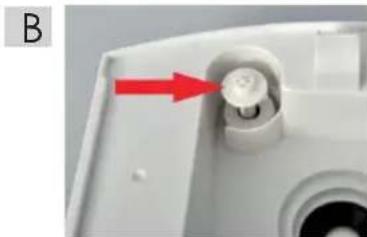
natural_image
Close-up of a white plastic device component with a red arrow pointing to a circular button (no text or symbols visible)3. ON/OFF (ZAPNUTÍ/VYPNUTÍ)
natural_image
Close-up of a white mechanical component with a black circular top and two small protrusions, one highlighted by a red arrow (no text or symbols visible)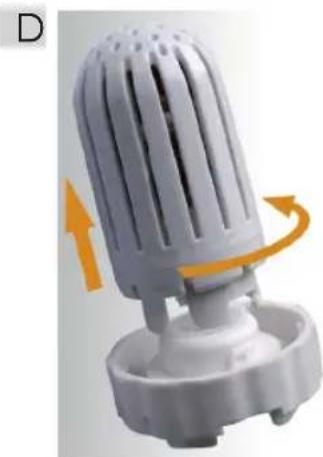
natural_image
Close-up of a white plastic air vent with orange motion arrows indicating rotation (no text or symbols)PRAKTICKÉ RADY
natural_image
Close-up of a white plastic kitchen fan with a red curved arrow indicating rotation (no text or symbols)B
natural_image
Close-up of a white plastic device component with a red arrow pointing to a circular button (no text or symbols visible)3. ON/OFF (EIN / AUS)
natural_image
Close-up of a white mechanical component with a red arrow pointing to a circular feature (no text or symbols visible)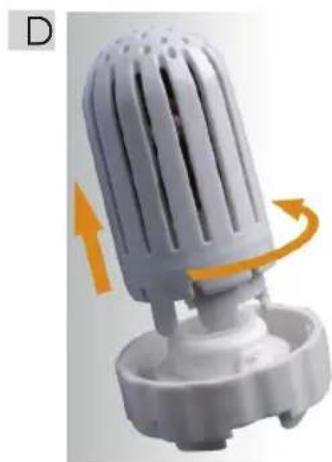
natural_image
3D rendering of a white plastic fan or vent with orange motion arrows indicating rotation (no text or symbols)natural_image
Close-up of a white plastic mechanical component with a red curved arrow indicating rotation (no text or symbols)B
natural_image
Close-up of a white plastic device component with a red arrow pointing to a circular button (no text or symbols visible)natural_image
Close-up of a white mechanical component with a black circular top and red arrow pointing to a specific area (no text or symbols visible)ЗАМЕНА И ЧИСТА КЕРАМИЧЕСКОГО ФИЛЬТРА
natural_image
White plastic air purifier with orange airflow indicator (no text or symbols)natural_image
Close-up of a white plastic mechanical component with a red curved arrow indicating rotation (no text or symbols)B
natural_image
Close-up of a white plastic mechanical component with a red arrow pointing to a circular feature (no text or symbols visible)natural_image
Close-up of a white mechanical component with a black circular top and two small buttons, one highlighted by a red arrow (no text or symbols visible)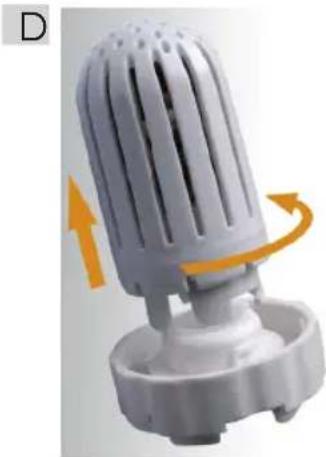
natural_image
3D rendering of a white plastic fan or vent with orange motion arrows indicating rotation (no text or symbols)natural_image
Close-up of a white plastic component with a red curved arrow indicating rotation (no text or symbols)B
natural_image
Close-up of a white mechanical component with a red arrow pointing to a circular feature (no text or symbols visible)HASZNÁLAT
natural_image
Close-up of a white plastic device with a black circular component and a red arrow pointing to it, no visible text or symbols.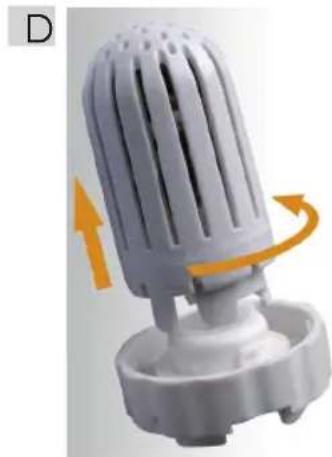
natural_image
White plastic air purifier with orange directional arrows indicating motion (no text or symbols)HASZNOS TANÁCSOK
natural_image
Close-up of a white plastic component with a red curved arrow indicating rotation (no text or symbols)B
natural_image
Close-up of a white plastic device component with a red arrow pointing to a circular button (no text or symbols visible)3. ON/OFF (ENCENDIDO/APAGADO)
natural_image
Close-up of a white mechanical component with a black circular opening and a red arrow pointing to it (no text or symbols visible)D
natural_image
White plastic air filter component with orange directional arrows indicating rotation (no text or symbols)CONSEJOS PRÁCTICOS


- OBSŁUGA
- "Waterless" (Brak wody)
- PRAKTYCZNE PORADY
- INSTRUCTION MANUAL ULTRASONIC HUMIDIFIER NU6
- GENERAL DESCRIPTION
- TECHNICAL DATA
- OPERATION
- Humidifier positioning
- Tank filling
- Humidifier operation
- ON/OFF
- PRESET
- MIST
- TIMER
- HUMIDISTAT
- ANION
- "Waterless"
- CLEANING AND MAINTENANCE
- REPLACEMENT AND CLEANING OF A CERAMIC FILTER
- PRACTICAL ADVICE
- TROUBLE SHOOTING GUIDE
- PROTECTION
- WARRANTY
- BEZPEČNOSTNÍ PODMÍNKY
- ON/OFF (ZAPNUTÍ/VYPNUTÍ)
- PRAKTICKÉ RADY
- ON/OFF (EIN / AUS)
- ЗАМЕНА И ЧИСТА КЕРАМИЧЕСКОГО ФИЛЬТРА
- HASZNÁLAT
- HASZNOS TANÁCSOK
- ON/OFF (ENCENDIDO/APAGADO)
- CONSEJOS PRÁCTICOS
Brand : Eldom
Model : Hazy NU6
Category : Humidifier