
Atmo NU9 - Humidifier Eldom - Free user manual and instructions
Find the device manual for free Atmo NU9 Eldom in PDF.


| Product Type | Ultrasonic Humidifier |
| Model | Atmo NU9 |
| Brand | Eldom |
| Dimensions (W x D x H) | 200 x 200 x 350 mm |
| Weight | 1.5 kg |
| Power Supply | AC 220-240V, 50Hz |
| Power Consumption | 25 W |
| Water Tank Capacity | 4.0 L |
| Mist Output | Up to 300 ml/h |
| Noise Level | < 35 dB |
| Recommended Room Size | Up to 30 m² |
| Main Functions | Ultrasonic humidification, adjustable mist output, automatic shut-off, aroma diffuser |
| Control Type | Touch panel with LED display |
| Material | Plastic (ABS) |
| Color | White |
| Filter Type | Replaceable (ceramic or demineralization cartridge) |
| Cleaning | Regular descaling with vinegar or citric acid |
| Safety Features | Automatic shut-off when water is empty, overheat protection |
| Spare Parts Available | Water tank, filter, atomizer |
| Warranty | 2 years |
Frequently Asked Questions - Atmo NU9 Eldom
User questions about Atmo NU9 Eldom
0 question about this device. Answer the ones you know or ask your own.
Ask a new question about this device
Download the instructions for your Humidifier in PDF format for free! Find your manual Atmo NU9 - Eldom and take your electronic device back in hand. On this page are published all the documents necessary for the use of your device. Atmo NU9 by Eldom.
USER MANUAL Atmo NU9 Eldom
natural_image
White industrial air purifier with digital display and control knob (no visible text or symbols)natural_image
Close-up of a white mechanical component with a circular feature and an arrow indicating rotational motion (no text or symbols)ON/OFF (WŁĄCZENIE/WYŁĄCZENIE)
natural_image
Close-up of a camera lens with a pointing hand gesture (no text or symbols on the lens itself)PRAKTYCZNE PORADY
Before first use, please thoroughly read the entire manual.
- Connect the connection cable only to mains whose electrical parameters are compatible with the parameters on the nameplate.
- Pay attention not to add too many receivers to one power circuit.
- For domestic use only.
- Place the appliance on a flat and dry surface.
- Do not put your fingers or any objects into the inlet or outlet opening.
- Do not place the appliance on curtains.
- Always keep the operating appliance within sight, particularly in the vicinity of children.
- Never leave the operating appliance unattended.
- The appliance can be used by children aged 8 and older, by persons with limited physical and mental capabilities, and by persons who have no experience nor knowledge of the equipment, only under supervision or if instructed on the safe use of the appliance in way that guarantees that the associated risks are understood. Children should not play with the appliance. Children should not clean nor maintain the appliance unattended.
- Do not spray insecticides or similar products in the vicinity of the operating appliance.
- Do not use the appliance in high temperatures (above 40oC), in places with high humidity (e.g. bathrooms), or in explosive areas.
- Use only clean, cold tap water or water with low mineral content at a temperature not exceeding 40^ C.
- Do not use in the open air.
- Do not carry or lift during operation.
- Do not touch the ultrasonic converter during operation.
- Place the appliance away from heat sources (radiators, stoves, etc.).
-
Do not pour flavour additives (oils, etc.) or chemicals into water.
-
Do not start the humidification feature if the water container is not installed in the appliance.
- Do not place the appliance near vents or electrical devices.
- Do not insert any objects into the humidifier nozzle.
- Keep hands, face, and other parts of the body away from the nozzle when the appliance is switched on.
- Do not cover the humidifier nozzle when the appliance is switched on.
- Disconnect the appliance from the mains, before emptying the container or moving the appliance.
- Before switching the appliance on, make sure that all its parts have been properly installed. Do not switch the appliance on if it is not completely assembled.
- Do not hang clothes or other objects on the appliance.
- Do not use the appliance if the connecting cable is damaged. To avoid any risks, replace the damaged cable at an authorised Manufacturer's Servicing Point.
- The appliance can be repaired only at an authorised servicing centre. Any upgrades or the use of non-original spare parts or components is forbidden and poses a hazard for the user.
- Eldom Sp. z o. o. is not liable for any damage resulting from improper use of the appliance.
SPECIAL INSTRUCTIONS
- Place the appliance on a hard and stable surface. It is recommended to place the humidifier at least 1 m above the floor level.
- Do not place the appliance on a carpet, wood flooring or on any surface that may be damaged by water or moisture.
- When placing the appliance, make sure that the power plug is always accessible.
- The appliance should always be placed upright.
- Do not cover the air outlet and inlet.
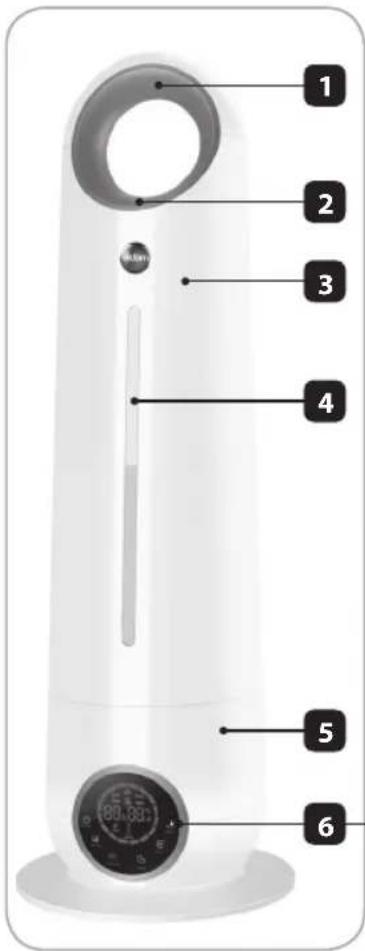
DESCRIPTION
- Handle
- Nozzle
- Water tank
- Water-level gauge
- Body
- Control panel
- Remote control
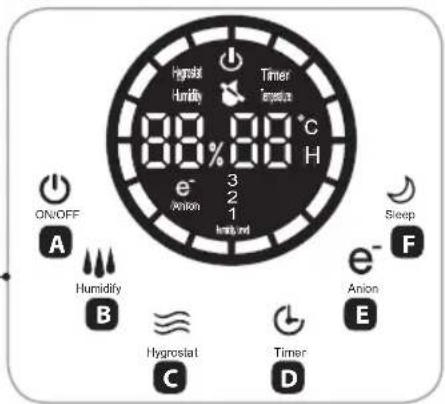
CONTROL PANEL (6)
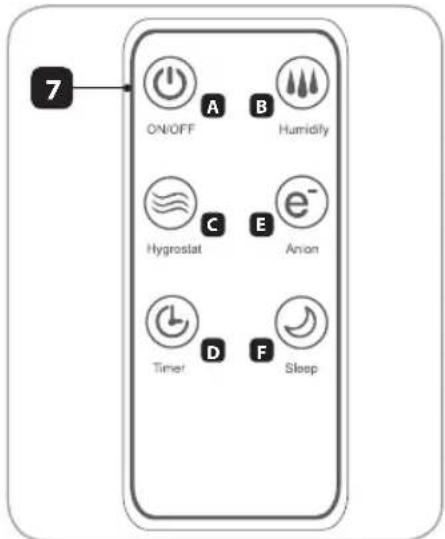
REMOTE CONTROL (7)
A ON/OFF
B SPRAY
C TIME
D HUMIDITY
E PRURIFY
F SLEEPMODE
GANION
H COMFORTABLE
TECHNICAL DATA
- power: 28 W
- supply voltage: 230V \~ 50Hz
- capacity: 41
- output: 360 ml/h
- humidifier output for a 35m ^2 room
- humidifier operation time for a full container: approx. 11 hours
INTENDED USE
The NU9 ultrasound humidifier is intended to improve quality of air in residential premises.
SETTING THE HUMIDIFIER
- Make sure the device is disconnected from the power supply.
- Remove the tank (3) by gripping the handle (1) and the body (5).
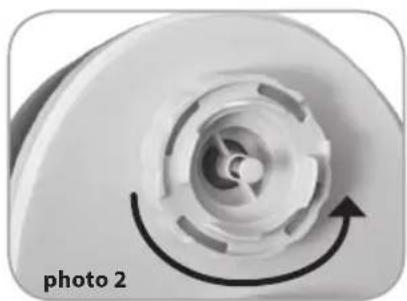
- Turn the tank, undo the nut (photo 2) and fill the tank with water. Secure the nut by tightening it firmly.
- Place the tank (3) onto the body (5).
OPERATION
All changes in the settings are confirmed with an audio signal.
- Connect the device to the power supply compatible with the parameters stated above. The appliance will enter the stand-by mode. No function is active, and the display is switched off.
natural_image
Close-up of a white plastic device with a circular vent and arrow indicator (no text or symbols on the device itself)ON/OFF (SWITCHING ON / SWITCHING OFF)
Pressing the button (A) will cause the display to activate. The humidifier will start running at the lowest level of humidification, with the fan motor running. The humidity level is displayed. Pressing the button (A) again will switch off the unit and make it enter the stand-by mode.
HUMIDITY (MIST)
The appliance is fitted with a three-stage control of humidification. The level of humidification is changed with the button (D).
HYGROSTAT (HYGROMETER)
This function allows to set the level of humidity from 40–90% in 5% steps. The appliance will start after about 3 seconds of entering the settings. It will switch off when the current humidity is higher than the set level. The function will activate when the current relative humidity is at least 2% lower than the set value. Activation of the function is indicated with the icon „D” on the display.
Due to external conditions, an error may occur between the actual and the displayed values of humidity of up to about 5%
TIME (CLOCK)
This function allows to set the time after which the appliance will automatically switch off. This function may be started only when the appliance is on. Only full hours may be set, 1 to 12.
The function is activated with the button (D). Activation of the function is indicated with the icon „TIMER” on the display. The appliance does not show the passing time. Every consecutive pressing of the button (D) will extend the time.
ANION (IONISATION)
The ionising function is started with the button (G). Activation of the function is indicated with the icon „G” on the display.
SLEEP (NIGHT MODE)
The night mode is activated with the button (F). The display is dimmed down in this mode. The mode is deactivated by pressing any button.
WATERLESS (NO WATER)
This symbol will be displayed when water is not present in the container. The appliance will switch off automatically.
CLEANING AND MAINTENANCE
-
Before cleaning, unplug the appliance.
-
It is recommended to clean the water tank and body regular.
-
Do not immerse the humidifier in water or other liquid substance.
-
Do not use any aggressive cleaning agents.
-
It happens that in the base or in the ultrasound converter a scale is formed which can be removed by pouring 30% distilled vinegar on the elements and leaving it there for 30 minutes.
PRACTICAL ADVICE
-
Do not direct the nozzle towards a wall. The moisture coming out of it may cause damage of the paperwall, etc.
-
Excessive moisture in the room may cause condensation of water on window panes and furniture. If this is the case, turn off the humidifier.
-
Do not use the humidifier in the rooms where the moisture level exceeds 80%.
-
Use tap water to fill the tank, however in case of hard tap water, distilled water is recommended.
-
Do not use scent additives for water (essential oils, etc.)
-
When the humidifier is not used for a long time, its washing and drying is recommended. Keep in a dry place.
-
It is recommended to place the humidifier at least one meter above a floor.
ENVIRONMENTAL PROTECTION
- The appliance is made of materials which can be recycled.
- It should be handed over to the applicable collection point for the recycling of electrical and electronic equipment.
WARRANTY
- This appliance is designed for domestic use only.
- It cannot be used for professional purposes or for other than the intended use.
- Improper use will nullify the guarantee.
natural_image
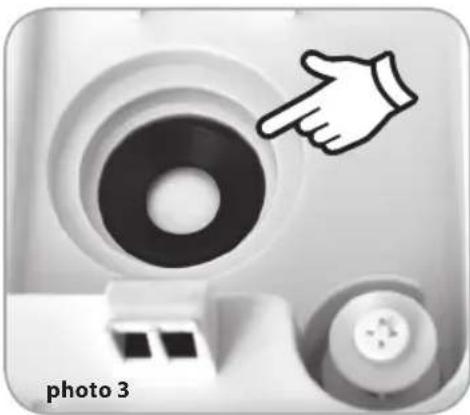
Close-up of a camera lens with a pointing hand icon, labeled 'photo 3' at bottom (no other text or symbols)BEZPEČNOSTNÍ DOPORUČENÍ
URČENÍ
natural_image
Close-up of a white mechanical component with a circular recess and an arrow indicating rotation (no text or symbols on the object itself)ON/OFF (ZAPNUTÍ/VYPNUTÍ)
natural_image
Close-up of a camera lens with a pointing hand icon, labeled 'foto 3' at bottom (no other text or symbols)PRAKTICKÉ RADY
natural_image
Close-up of a white mechanical component with a circular feature and an arrow indicating rotation (no text or symbols)natural_image
Close-up of a camera lens with a pointing hand icon, labeled 'Bild 3' (no other text or symbols)natural_image
Close-up of a white mechanical component with a circular recess and arrow indicator (no text or symbols)ON/OFF (ВКЛЮЧЕНИЕ/ВЫКЛЮЧЕНИЕ)
WATERLESS (OTCYTCTBIE BODЫ)
natural_image
Close-up of a camera lens with a pointing hand icon, no text or symbols visibleCOBETЫ
natural_image
Close-up of a white mechanical component with a circular feature and an arrow indicating rotational direction (no text or symbols)ON/OFF (ZAPÍNANIE/VYPÍNANIE)
natural_image
Close-up of a camera lens with a pointing hand icon, no text or symbols visibleOCHRANA ŽIVOTNÉHO PROSTREDIA
natural_image
Close-up of a white kitchen knife with a circular knob and an arrow indicating clockwise motion (no text or symbols on the object itself)ON/OFF (BEKAPCSOLÁS/KIKAPCSOLÁS)
natural_image
Close-up of a camera lens with a pointing hand icon and control buttons (no text or symbols on the lens itself)HASZNOS TANÁCSOK
natural_image
Close-up of a white plastic component with a circular arrow indicating rotation (no text or symbols)ON/OFF (ENCENDIDO/APAGADO)
SLEEP (MODO NOCTURNO)
natural_image
Close-up of a camera lens with a pointing hand gesture (no text or symbols)


- ON/OFF (WŁĄCZENIE/WYŁĄCZENIE)
- PRAKTYCZNE PORADY
- SPECIAL INSTRUCTIONS
- DESCRIPTION
- CONTROL PANEL (6)
- REMOTE CONTROL (7)
- TECHNICAL DATA
- INTENDED USE
- SETTING THE HUMIDIFIER
- OPERATION
- All changes in the settings are confirmed with an audio signal.
- ON/OFF (SWITCHING ON / SWITCHING OFF)
- HUMIDITY (MIST)
- HYGROSTAT (HYGROMETER)
- TIME (CLOCK)
- ANION (IONISATION)
- SLEEP (NIGHT MODE)
- WATERLESS (NO WATER)
- CLEANING AND MAINTENANCE
- PRACTICAL ADVICE
- ENVIRONMENTAL PROTECTION
- WARRANTY
- BEZPEČNOSTNÍ DOPORUČENÍ
- URČENÍ
- ON/OFF (ZAPNUTÍ/VYPNUTÍ)
- PRAKTICKÉ RADY
- ON/OFF (ВКЛЮЧЕНИЕ/ВЫКЛЮЧЕНИЕ)
- WATERLESS (OTCYTCTBIE BODЫ)
- COBETЫ
- ON/OFF (ZAPÍNANIE/VYPÍNANIE)
- OCHRANA ŽIVOTNÉHO PROSTREDIA
- ON/OFF (BEKAPCSOLÁS/KIKAPCSOLÁS)
- HASZNOS TANÁCSOK
- ON/OFF (ENCENDIDO/APAGADO)
- SLEEP (MODO NOCTURNO)
Brand : Eldom
Model : Atmo NU9
Category : Humidifier