USER MANUAL Evidence Plus EA8949 KRUPS
Dear Customer,
Thank you for purchasing your KRUPS espresso machine with bean grinder. Designed and manufactured in France to give you "cafe" quality drinks with the greatest ease, your KRUPS machine allows you to enjoy espresso, ristretto, lungo, cappuccino, latte macchiato, flat white and even more drinks all day long.
Your KRUPS espresso machine is equipped with advanced technologies and an intuitive OLED interface; in order to obtain the best extraction possible with total ease, to reveal maximum aromas and flavours from the freshly ground coffee. For the best taste experience make sure you use water fresh from the tap.
For even greater pleasure, your KRUPS EVIDENCE PLUS machine allows you to make multiple drinks automatically, at the simple touch of a button. You will appreciate the possibility of achieving great cappuccino, latte macchiato and caffe latte thanks to the milk container and its One Touch Cappuccino system.
Because not all coffees are the same, you can customise your drinks:
- By changing the coffee beans (mixture or different roast) you can discover different flavours. You will probably need several tests to find the coffee beans that suit your tastes.
- By varying the grinding fineness you can obtain coffee that is more or less full-bodied.
- By choosing your length you'll always achieve the perfect cup.
We wish you a good coffee experience and hope that your KRUPS machine will give you complete satisfaction.
The KRUPS team

Tips
- The quality of the water strongly influences the quality of the flavours. Limescale and chlorine can alter the taste of coffee. We recommend that you use the Claris Aqua Filter System cartridge, or water with low mineral content, in order to preserve all the flavours of your coffee.
- When preparing drinks we recommend using preheated cups (by passing them under hot water) of a size appropriate to the quantity you want to make. For your milk-based preparations, we recommend that you use thick glass cups for an appetising result.
- The roasted coffee beans can lose their flavour if they are not protected. We advise you to use the amount of beans equivalent to your consumption over 2-3 days and to choose 250g bags. Always store beans in an airtight container in a cool, dry place. To achieve a good crema you should always use fresh beans.
- The quality of the coffee beans is variable and tastes are subjective. Arabica will give you fine, floral flavours unlike Robusta which is higher in caffeine, more bitter and full-bodied. It is common to mix the two types of coffee to get a more balanced coffee.
- We do not recommend the use of oily and caramelised beans as these can damage the machine.
- When using a new bean roast, start at the most coarse grind setting, and adjust to taste. Be careful of flavoured beans or extra dark roast coffee as some beans become oily in the roasting process and can cause blockages in the grinders. The finer the grind setting the slower the flow of coffee to your cup. Always make a long coffee using a coarse grind.
- For a strong coffee you do not need a fine grind. Grinding fineness does not affect the strength of the coffee - it is the type of bean (dark roast/light roast etc...). Dry beans on a fine grind will produce a powder - which may block the system.
- Use fresh pasteurised, UHT, skimmed, semi-skimmed or whole milk from the fridge (3 - 5°C) for best results.
- The use of special milks: micro filtered, raw, fermented, enriched or plant milks such as rice, oat or almond milk can give results that are less satisfactory in terms of quality and quantity of froth.
CONTENTS
IMPORTANT INFORMATION CONCERNING THE APPLIANCE AND INSTRUCTIONS. p.24
TECHNICAL DATA. p.24
APPLIANCE DESCRIPTION. p.25
OVERALL VIEW 25
USING YOUR APPLIANCE
INSTALLING THE APPLIANCE . 26
BEFORE PREPARING DRINKS
IMPORTANT INFORMATION. p.28
PREPARING COFFEE DRINKS VIA DIRECT ACCESS. p.29
PREPARING MILKY DRINKS VIA DIRECT ACCESS. p.30
PREPARING TEAS. p.31
PREPARING OTHER DRINKS. p.31
OTHER FUNCTIONS. p.32
FILTER CARTRIDGE 33
GENERAL MAINTENANCE. p.34
TROUBLESHOOTING. p.36
In this manual you will find all of the important information concerning the preparation, use and maintenance of your machine.
Read the instructions carefully before using your appliance for the first time and keep them for future reference: KRUPS may not be held liable in the event of any use that does not comply with the instructions.
GUIDE TO THE SYMBOLS USED IN THE INSTRUCTIONS

Warning: Risk of serious injury or death. The lightning bolt symbol warns against electrical dangers.

Warning: Risk of possible malfunction, damage, or destruction of the appliance.

Warning: General or important note concerning the operation of the appliance.
Products supplied with your machine
Check the products supplied with your machine. If any parts are missing, contact your hotline (see p. 26: Initial settings).
Parts supplied:
- Espresso Automatic Series EA894
- 2 cleaning tablets
- 1 descaling sachet
- Milk conduit adaptable to the "One Touch Cappuccino" block
- Dismantling key for cleaning the steam circuit
- Safety instructions booklet
- Claris - Aqua Filter System cartridge with fitting accessory
- 1 stick for testing water hardness
- Instructions
- List of approved Krups service centres
- Guarantee documents
TECHNICAL DATA
| Appliance Espresso Automatic Series EA89 |
| Power supply 220-240V~ / 50 Hz | |
| Pump pressure 15 bars | |
| Coffee bean container 250 g | |
| Power consumption During operation: | 1,450 W |
| Water tank 2.3 L | |
| First use and storage Indoors, in a dry place (protected from frost). |
| Dimensions (mm) H x L x D 367 x 240 x 380 |
| Weight EA89 (kg) 8.4 | |
Subject to technical adaptations.
APPLIANCE DESCRIPTION
A Water tank lid handle B Water tank C Coffee grounds collector D Height-adjustable coffee outlets E Grid and removable drip tray F Coffee bean container lid G One Touch Cappuccino removable block
G1 Dismantling key for cleaning the steam circuit
G2 One touch cappuccino block
H Milk tube and connector
Water level float
1 Coffee bean container J Grinding fineness adjustment button K Cleaning tablet funnel L Metal grinding mill 2 Display panel M OLED screen N ON/OFF button Selection buttons
Details:
The drip tray allows you to collect the water or the coffee that flows from the appliance during and after preparations. It is important to always leave it in place and to empty it regularly or as soon as the floats indicate.
Important: Read these instructions carefully and keep them for future reference. Please follow the safety guidelines.
Manufacturer:
SAS GSM
Presentation of the control panel:
| Button | Description / General Functions |
| OK
DARK
+P
EXTRA SHOT
ESPRESSO
LONG COFFEE
CAPPUCCINO | Turn the machine on and off.
A long press is necessary when turning the machine on for the 1st time. |
| Allows you to return to the previous screen or stop a recipe in progress. |
| Navigating upwards in the menu / increment the selected parameter. |
| Navigating downwards in the menu / decrement the selected parameter. |
| Validation of the selection made. |
| Function to increase the strength of the coffee by increasing the quantity of ground coffee. |
| Function to add a shot of espresso to the selected recipe.
Accessible with the main recipes: espresso, long coffee, cappuccino, latte macchiato, caffe latte and tea. |
| Starts preparing an espresso. |
| Starts preparing a long coffee. |
| Starts preparing a cappuccino. |
| Starts preparing a latte macchiato (a large dose of milk, a shot of espresso topped with a creamy milk froth). |
| Starts preparing a caffe latte. |
| Allows you to access the menu to prepare a tea or an infusion. |
| Allows you to access additional preparations: Ristretto, doppio, americano, espresso macchiato, flat white and frothed milk. |
| Allows access to the general menu (Machine settings, maintenance and product info). |
Our interface and its buttons illuminate in an intuitive way to facilitate the use of the machine and to guide you.
- Unlit button: the corresponding function is not accessible.
- Low-lit button: the function is available and can therefore be selected.
- Lit button/bright light: the function is selected/in progress.
- Hal-lit button: the function is no longer accessible.
USING YOUR APPLIANCE INSTALLING THE APPLIANCE

Danger: Connect the appliance to an earthed 230 V mains socket. Failure to do so means that you run the risk of fatal injury due to electricity!
Respect the safety guidelines indicated in the "Safety guidelines" booklet.
Powering on
Turn on the appliance by pressing the ON/OFF button until "Hello" appears on the screen Fig. 1. For the following steps, let your appliance guide you.
Initial Settings
When using the machine for the first time, you are asked to make various settings. Follow the directions that appear on the screen. The objective of the following paragraphs is to give you a few marks of the first requested settings:
- Language: Select a display language by pressing the arrows until the language of your choice appears. Press the "OK" button to confirm.
- Unit of measurement: You can select the unit of measurement of the volume of your choice: ml or oz.
- Date and time: For setting the time, press the time format you want: 24 hr or AM/PM.
- Auto on: It is possible to schedule the time at which you want your machine to come on automatically. This setting can be adapted to your convenience: daily, weekly, or weekend. Choose the time at which you want the automatic start-up in accordance with the time format you previously selected.
- Auto off: You can also choose the length of time after which your selected appliance will automatically turn off in order to optimise your energy consumption: 15 mins, 30 mins, 1 hr, 1 hr 30 mins.
- Rinsing the coffee circuit: to ensure the quality of your coffees, the coffee circuit is rinsed at each start-up, however, you can choose to disable this for greater ease of use.
- Installing the filter: When powering up for the first time, the appliance asks you if you want to install a filter. If you want to and if the hardness of your water requires it, select "YES" and follow the instructions on the screen.
Installation of the filter cartridge in the appliance:
We advise you to use a Claris Aqua Filter System cartridge for KRUPS machines in order to remove any trace of chlorine and limescale. In addition it limits the formation of limescale and ensures the longevity of your machine.
- Turn the grey ring located on the upper end of the filter cartridge until it displays 2 months. Fig. 5
- Empty the water tank and screw the filter cartridge in the bottom of the water tank using the accessory supplied with the cartridge. Fig. 4
- Fill the water tank and put it back in place. Fig. 7-8
- Let the machine guide you to finish the installation.

It is important to replace the filter cartridge properly on the date indicated
Priming the appliance:
The machine must be primed whether the filter is installed or not. Priming allows the water circuits to be filled, so that the machine can operate.
Follow the on-screen instructions
- Place a 600 ml container under the steam outlet. Fig. 6
- The machine will start by filling the water circuits, followed by preheating and then will proceed to automatic rinsing.
- The screen will indicate the end of the installation
Water hardness
Water hardness is a high concentration of minerals, in particular calcium, that is responsible for the formation of limescale. To avoid scaling of your machine which can lead to the malfunction or alteration of the taste of your coffee, you must adjust your machine depending on the hardness of your water, between 0 and 4.
Before the 1st use and in order to be able to adjust your machine, determine the hardness of your water using the stick supplied with your machine: Fig. 2
- Fill a glass of water
- Immerse the stick
- Wait for 1 minute to get the result
- The level of hardness of the water is equal to the number of red areas on the stick. Fig. 3
It is also possible to ask your water company.
The details of the classes are given in the table below:
| Degree of hardness | Class 0
Very soft | Class 1
Soft | Class 2
Average hardness | Class 3
Hard | Class 4
Very hard |
| ° dH < 3° > 4° | > 7° > 14° > 21° | | | | |
| ° e < 3.75° | 5° > 8.75° > 17° | 5° > 26.25° | | | |
| ° f | < 5.4° | > 7.2° | > 12.6° | > 25.2° | > 37.8° |
| Appliance setting | 0 | 1 | 2 | 3 | 4 |

Be sure to perform this operation at each time you use your machine in a place where the water hardness is different or if you notice a change in the hardness of your water.
Preparing the appliance
- Remove and refill the water tank and put it back in its place. Fig. 7-8
- Remove the lid of the coffee bean container, pour in the coffee beans, and replace the lid. (Fig. 9-10)
Your machine offers pre-set drinks to obtain the best results. You can however customise your coffee depending on the result in the cup.
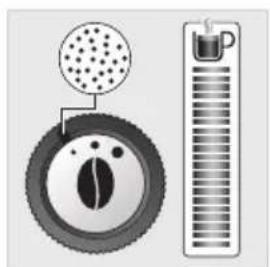
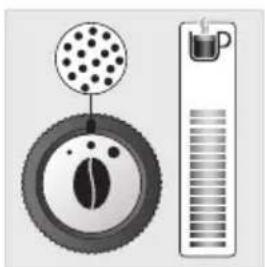
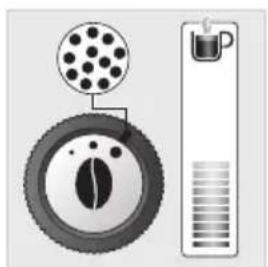
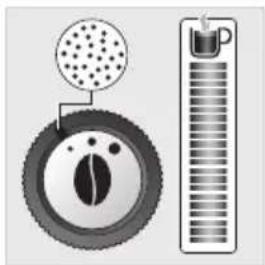
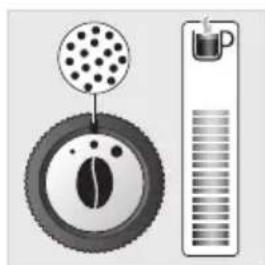
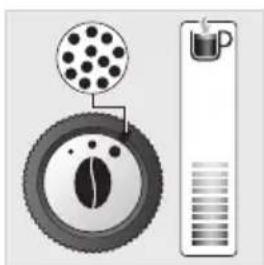
Preparing the grinder: adjust the grinding fineness (J)
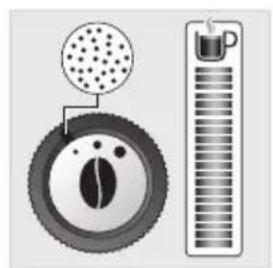
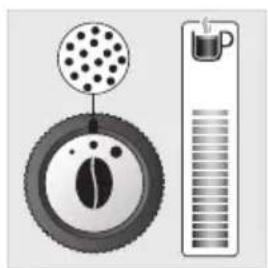
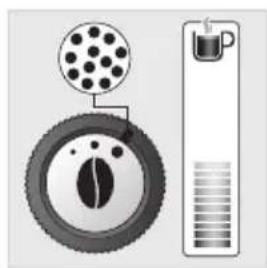
You can adjust the strength of your coffee by adjusting the grinding fineness of the coffee beans; the finer the grinder setting, the stronger and creamier the coffee. The type of coffee used can also influence the result obtained.
We recommend to use a very fine setting for ristretto, fine for espresso and more coarse for lungo.
To adjust the degree of grinding fineness:
- Turn the adjustment button located in the bean container. This adjustment must be performed during grinding and notch by notch.
- After 3 preparations you will notice a very distinct difference in taste.
The variation of grinding fineness allows:
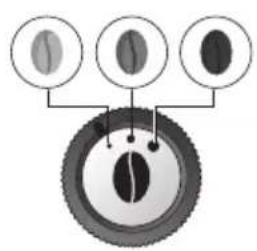
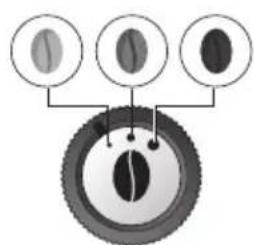
- To be able to adapt to the different types of bean: a highly roasted and rather oily bean will require a coarse grinding while a more lightly roasted bean will be drier and will require a finer grinding (dark to light bean)
Roasting:
Light
Average
Dark
- More or less flavour and power in the cup

Adjusting the coffee output
For all of the drinks proposed, you can lower and adjust the coffee outputs according to the size of your cup(s). Fig. 11
Stopping a drink mid-preparation
You can stop the preparation at any time by pressing the back button.
When a cycle is interrupted, stopping is not immediate. The machine will not be accessible for a period of time.
Preparation of two cups
Your appliance allows you to prepare two cups simultaneously. The dual cup function is valid for all directly accessible recipes and is accessible simply by pressing twice on the selected recipe (except for V and Xi). Fig. 12
DARK function UP
The DARK function allows you to increase the strength of the selected recipe by increasing the amount of ground coffee used.
This function is effective for the following drinks:


You can activate or deactivate it in different ways:
- Before each recipe, you can press DARK and then the desired recipe.
- During the making of the drink and up to the end of the grinding, you can press DARK.
You can activate it systematically for all directly accessible drinks (see above):
- Press the Settings button

- Choose "Settings" using the navigation buttons

- Go to "Drinks Settings" then press OK
- Select "DARK" using the OK button to activate it.
- You can disable the DARK function using the same steps.
To add to your drink you can use the extra shot function that allows you to add an espresso at the end of your drink. This function is effective for the following drinks: P, P, P, V, V
You can activate or deactivate it in different ways:
- Before each recipe you can press on EXTRA SHOT and then on the desired recipe.
- During the making of the drink and up to the end of the grinding you can press EXTRA SHOT.
You can activate it automatically for all directly accessible drinks:
- Press the Settings button
- Choose "Settings" using the navigation buttons
- Go to "Drinks Settings" then press OK
- Select "EXTRA SHOT" using the OK button.
- Then you can enable or disable the EXTRA SHOT function.
PREPARING COFFEE DRINKS VIA DIRECT ACCESS
Please note: when starting each drink, the machine will take into account the settings for the last drink that was made.
The full-bodied espresso with pronounced aromas is covered with a slightly bitter caramel coloured crema. We recommend that you choose a volume between 40ml and 50ml. The long coffee is an espresso of 80ml, higher in caffeine but lighter in the mouth. Very well suited to the mornings.
The stages of preparation of the drink:
- Bean grinding
- Compaction of the grinding
- Percolation
Starting a drink
- Check that there are beans in the bean tray.
- Check that there is water in the water tank: if there is not enough water the machine will tell you and ask you to fill the tank.
- Place the cup or cups under the coffee nozzles.
- Press the button for the chosen drink.
Possible settings
You can:
- Prepare one or two cups at the same time.
- Increase the strength of the coffee by pressing DARK
- Add an espresso coffee in your DRINK by pressing EXTRA SHOT L-P
- Adjust the volume of coffee being prepared using the navigation buttons
You can stop the preparation at any time by pressing
PREPARING MILKY DRINKS VIA DIRECT ACCESS
Please note: when starting each drink, the machine will take into account the settings for the last drink that was made.
The stages of preparation of the drink:
- Bean grinding
- Compaction of the grinding
- Percolation
- Preheating phase to froth the milk
Possible settings
You can:
- Prepare one or two cups at the same time.
- Increase the strength of the coffee by pressing DARK
- Add an espresso coffee in your DRINK by pressing EXTRA SHOT L-P
- Adjust the coffee volume
- Adjust the length of time for frothing the milk.
Making a Cappuccino
A cappuccino is made up of 1/3 creamy froth, 1/3 coffee and 1/3 hot milk.
- Connect the milk tube Fig. 13 to the right side of the "One Touch Cappuccino" block.
- Immerse the other end of the tube (slanted side) in a container filled with milk or directly in your milk bottle or milk pot (according to model). Fig. 14
- Place the cup or cups under the coffee nozzles. Fig. 15
- Press the cappuccino button. Fig. 16
- The preparation begins with frothing the milk
You can adjust your frothing time using the navigation buttons ∧ ∨ which allow the quantity of milk and froth to be varied.
- This process continues with the flow of coffee
You can adjust your volume of coffee using the navigation buttons if you wish.
- Your drink is ready. Fig. 17.
A latte macchiato is made up of a higher dose of milk than a cappuccino. 1/4 of creamy froth, 1/4 of coffee and 2/4 of hot milk.
We recommend that you use a cup of approximately 250 ml.
To make a latte macchiato you can follow the same steps as for cappuccino by pressing the latte macchiato button.
Fig. 18.
Making a Caffe latte U
A caffe latte is made up of an espresso mixed with a large dose of milk and topped with froth tasting slightly of coffee.
We recommend that you use a cup of approximately 250 ml.
To make a caffe latte you can follow the same steps as for cappuccino by pressing the caffe latte button.
For this recipe the coffee is poured in first and then the machine delivers the frothy milk.
Rinsing milk after making milk-based drinks.
The screen shows "Rinse milk?" at the end of each preparation.
- Press OK to perform rinsing.
- During milk rinsing, you are required to systematically dismantle and clean the milk tube and connector with hot water. Fig. 21-25
- For the best results, it is advised to clean the "One Touch Cappuccino" removable block regularly (see general maintenance chapter).

Important: If you note a change in the quality of your milk froth, do not hesitate to repeat the rinsing and cleaning process: indeed a milk system that is not well maintained may cause this type of problem.
Possible settings
Your appliance offers you the preparation of 3 types of tea (green tea, black tea and infusions).
The temperature of the water is adapted to the selected drink.
You can adjust the volume of the drink according to your tastes.
You can program an EXTRA SHOT in your tea which will allow you to achieve fashionable "tea/coffee" drinks.
Preparing a tea
- Place the cup or cups under the coffee nozzles -Press. -Press. OK
- You can change the volume using the navigation buttons

If the machine detects a lack of water during the request it will ask you to refill the tank, then the cycle will resume automatically.
PREPARING OTHER DRINKS
Please note: when starting each drink, the machine will take into account the settings for the last drink that was made.
- Press the button.
- Using the Navigation buttons select the desired drink. -Press. OK
- Adjust the volume of coffee you want.
You can stop the preparation at any time by pressing.

Ristretto:
Ristretto with a strong and powerful taste covered with a caramel coloured crema for difficult mornings. To prepare a ristretto, choose a volume between 20ml and 30ml.
Doppio:
A doppio is a double espresso, black in colour, covered with an amber crema. A double dose of coffee for a drink with strong taste and aromas.
Americano:
The americano is a double espresso into which we simply pour hot water. This order of preparation makes the crema which covers the drink disappear. Ideal for people who like long coffees.
For the recipes below:
- Connect the milk tube to the right side of the "One Touch Cappuccino" block.
- Immerse the other end of the tube (slanted side) in a container filled with milk or directly in your milk bottle or milk pot (according to model).
- Press the button.
- Using the navigation keys, select the desired drink.
- Press .OK
- Adjust the coffee volume and/or the milk frothing time if you wish.
Flat white:
The flat white is made with a double ristretto base in which a large dose of frothy milk has been poured.
Espresso macchiato
With its strong taste and consistent texture, the espresso macchiato is made up of an espresso softened with a spoon of foam milk.
Milk rinsing
Please refer to the paragraph "Milk rinsing" in the section PREPARING MILKY DRINKS
OTHER FUNCTIONS
The Settings button allows you to access the general menu (machine setting, maintenance and product info). To exit the Settings menu, press return or Settings.
Adjustments
By selecting Settings, you can adjust various settings of your machine for an optimum comfort of use, adapted to your preferences.
Main settings available:
| Date Setting the date is | necessary, particularly if using an anti-limescale cartridge. |
| Clock Setting the time/ | 12 or 24 hour clock. |
| Language Selection of | the language of your choice from 19 languages. |
| Unit of measurement | Selection of the unit of measurement: ml or oz. |
| Screen brightness To | adjust the screen brightness. |
| Coffee temperature 3 | temperature adjustment levels for your coffee drinks. |
| Tea temperature 3 | temperature adjustment levels for your tea drinks. |
| Water hardness | To adjust the hardness of the water between 0 and 4. See chapter “Measuring the water hardness”. |
| Auto-on | To turn on the machine and automatically start preheating the equipment at a chosen time. |
| Auto-off To choose the | duration after which your appliance will stop automatically. |
| Auto rinsing | You can choose to activate automatic rinsing of the coffee outlet or not when starting the machine. |
| Drinks settings | To restore the default settings, you can also permanently activate the DARK and EXTRA SHOT function for all of your drinks. Except for the drinks in MORE |
If you disconnect your machine, the settings will be retained in the memory, with the exception of the date and time.
Maintenance
The options below allow you to start the selected programs. Next, you must follow the instructions on the screen.
| Cleaning milk | Allows you to clean the One Touch Cappuccino block of the machine. Essential for ensuring good hygiene and good quality frothing. This process requires the use of KRUPS cleaning liquid. |
| Milk rinsing | Allows you to clean the One Touch Cappuccino block of the machine. Essential for ensuring good hygiene and good quality frothing. This process performs simple rinsing with warm water of the One Touch Cappuccino block. |
| Coffee cleaning | Allows you to perform cleaning and degreasing of the coffee circuit of the machine. This process requires the use of a KRUPS cleaning tablet. Ensures you optimal preservation of the aromas of your drinks. |
| Coffee flushing | Allows you to perform flushing of the coffee circuit of the machine. This process uses only hot water. Ensures the authentic taste of your coffee. |
| Descending | Allows you to perform descending. This process requires the use of KRUPS descaler sachets. Eliminates any deposit of limescale or tartar that can influence the taste of the coffee. When the number of drinks is not enough for descending to be necessary, the function is not active. |
| Filter | Allows you to access the filter setting to install it, change it or remove it. Maximises the life of your machine, removes any trace of chlorine or limescale for a more delicious coffee. |
Info
The "Info" menu gives you the opportunity to access information on:
The use of your machine
Certain steps in the life of your machine
Information of the upkeep requirements
Here we present to you the main information available.
| Drinks prepared Displays | the number of drinks made. |
| Coffee circuit cleaning | Indicates that it should be done in x cycles. |
| Descaling | Indicates that it should be done in x cycles. |
| Filter Indicates that it will | be changed in x days or x litres. |
FILTER CARTRIDGE
To access the Filter menu
- Press Settings
- Using the navigation arrows \vee \wedge go to "Maintenance" and press OK and then go to "Filter" and press OK.
Installing the filter cartridge
- In the Filter menu, select "Insert".
- Turn the grey ring located on the upper end of the filter cartridge until it displays 2 months.
- Empty the water tank and screw the filter cartridge in the bottom of the water tank using the accessory supplied with the cartridge.
- Fill the water tank and put it back in place.
- Let the machine guide you to finish the installation.
Replacement of the filter cartridge
- In the Filter menu, select "Change".
- Remove the water tank and remove the old filter cartridge.
- Turn the grey ring located on the upper end of the filter cartridge until it displays 2 months.
- Empty the water tank and screw the new filter cartridge in the bottom of the water tank using the accessory supplied with the cartridge.
- Fill the water tank and put it back in place.
- Let the machine guide you to finish.
Remove the filter cartridge
- In the Filter menu, select "Remove".
- Remove the water tank and remove the old filter cartridge.

It is important to replace the filter cartridge properly on the date indicated.
GENERAL MAINTENANCE
Carrying out proper maintenance will prolong the life of your machine and preserve the authentic taste of your coffee.
Maintenance of the coffee grounds collector and drip tray
The drip tray receives the waste water
The coffee grounds collector receives extracted coffee grounds.
When do I empty the drip tray?
When the float is in the upper position, indicating that it is too full.
When the machine shows "empty the 2 trays".
When do I empty the coffee grounds collector? Fig. 19 - 20
When the machine shows "empty the 2 trays".
You can periodically empty it before the machine asks you to.
Not performing these operations correctly can damage your machine.
Rinsing of circuits
You can perform rinsing at any time.
- Press. - Select Maintenance. - Choose 'Milk rinsing' or "Coffee rinsing".
Depending on the preparation, the machine can perform automatic rinsing during its powering off.
It is also possible to set automatic rinsing at start-up (see Settings section).
Automatic coffee circuit cleaning programs (approximately 13 minutes)
Cleaning of the coffee circuit allows you to combat residue, fatty deposits of coffee and preserve the aromas of your drinks.
To perform this cleaning you will need:
- 1 KRUPS cleaning tablet
- 1 container of a minimum of 600 ml
The cycle will link two phases:
-1 cleaning phase -1 rinsing phase
When do I run this program?
- When it is necessary to run a cleaning program, the appliance notifies you. Allow yourself to be guided by the instructions displayed on the screen.
Important: You do not have to run the cleaning program as soon as the appliance requests it, but you must do it reasonably soon after. If the cleaning is postponed the alert message will remain displayed as long as the operation has not been performed.
reasonably soon after. If the cleaning is postponed, the alert message will remain displayed as long as the operation has not been performed.
-Press.
Select Maintenance.
- Choose "Coffee cleaning".
- Important: if you unplug your machine during cleaning or in the event of electrical failure, the cleaning program will resume the current step at the time of the incident. It will not be possible to postpone this operation: it is mandatory for reasons of rinsing the water circuit. In this case a new cleaning tablet may be necessary.
Important: if you unplug your machine during cleaning or in the event of electrical failure, the cleaning program will
Resume the current step at the time of the incident. It will not be possible to postpone this operation: it is mandatory for reasons of rinsing the water circuit. In this case, a new cleaning tablet may be necessary.
Cleaning program for the "One Touch Cappuccino" block (approximately 5 minutes)
Cleaning the "One Touch Cappuccino" block allows you to fight against milk deposits and ensures the best possible hygiene.
To perform this cleaning you will need:
- KRUPS cleaning liquid
- 1 container (minimum 600 ml)
- Press the Settings button
- Select Maintenance.
- Then Milk Cleaning.
- Let yourself be guided by the instructions on the screen.
Removing the "One Touch Cappuccino" block
In addition to the rinsing it is necessary to clean the different elements of the block after each use. To remove the block follow the following instructions:
- Remove the milk tube Fig. 21
- Remove the front cover of the "One Touch Cappuccino" removable block by sliding it down and pulling it toward you. Fig. 22
- Remove the "One Touch Cappuccino" block by pulling on the upper part of the block and pull the orange cleaning tool. Fig. 23
- Completely dismantle the block. Fig. 24
- Remove the connector of the milk tube. Fig. 27
- Clean all of the dismantled parts (block, connector and milk tube) in soapy water. Then rinse them under hot water. Fig. 28
- Once the elements are cleaned and dried, assemble the block. Put it back in its original position. Fig. 32
- Reposition the front cover of the removable "One Touch Cappuccino" block.
- Replace the connector in the milk tube. Fig. 35
- Reconnect the milk tube to the "One Touch Cappuccino" removable block". Fig. 36
Automatic descending program of the steam circuit: (approximately 20 minutes)
Descale the taste of the coffee.
The frequency at which this program is run depends on the quality of the water used and whether a Claris Aqua Filter System filter cartridge is used or not. The more limescale from your water, the more often the descaling has to be carried out.

Warning: If your appliance is equipped with our Claris cartridge Aqua Filter System cartridge please remove it before the descending procedure.
To perform this cleaning you will need:
- 1 dose of KRUPS descaler
- 1 container of a minimum of 600 ml
The cycle will link two phases:
- Descaling phase - 1st rinsing phase - 2nd rinsing phase
When do I run this program?
When you need to carry out descaling, your appliance will notify you.
- Fill the water tank up to the CALC mark.
- Pour the dose of descaler into the water tank. - Press to start the descaling program.
- To postpone it, press
- Then let yourself be guided by the instructions on the screen.

Important: You do not have to run the cleaning program as soon as the appliance requests it, but you must do it reasonably soon after. If the cleaning is postponed, the alert message will remain displayed as long as the operation has not been performed.
When the number of drinks is not enough for descaling to be necessary, the function is not active.
You can also start the descaling program when you want:
- Fill the water tank up to the CALC mark.
- Pour the dose of descaler into the water tank.
- Press the Settings button
- Select Maintenance.
- Then Descaling.

Important: if you unplug your machine during cleaning or in the event of electrical failure, the descending program will resume the current step at the time of the incident. It will not be possible to postpone this operation. Complete the full descending cycle in order to remove all traces of the descending product which is harmful to health.
TROUBLESHOOTING
| PROBLEM CORRECTIVE ACTIONS | |
| OPERATION | The machine displays a fault, the software is frozen.ORYour machine has a malfunction. | Turn off and unplug the machine, remove the filter cartridge, wait a minute and restart the machine.Press and hold the on/off button for at least 3 seconds for starting. |
| The appliance does not turn on after pressing the On/Off button (for at least 3 seconds). | Check the fuses and the power socket of your electrical installation.Check that the two power plugs are correctly inserted into the socket. |
| The appliance must be disconnected and reconnected. | Unplug the appliance for 20 seconds, remove the Claris Aqua Filter System cartridge if necessary, then put it back into service. |
| A power failure has occurred during a cycle. | The appliance resets automatically when it turns back on. |
| USE | The grinder makes an abnormal noise. Foreign bodies are surely present in the grinder. |
| There is water under the appliance. | Before removing the water tank, wait 15 seconds after the flow of coffee so that the machine finishes its cycle correctly.Verify that the drip tray is well positioned on the machine. It must always be in place even when the machine is not in use.Verify that the drip tray is not full. |
| When switching off, hot water flows through the coffee outputs and the One Touch Cappuccino block. | Depending on the type of preparation the machine can perform automatic rinsing during its powering off.The cycle lasts only a few seconds and stops automatically. |
| The adjustment button for the grinding fineness is difficult to turn. | Turn the adjustment button of the grinding fineness only when the grinder is operating. |
| The appliance has not issued any coffee. | An incident has been detected during its making.The appliance is reset automatically and is ready for a new cycle. |
| You have used ground coffee instead of coffee beans. | Use your vacuum cleaner to collect the ground coffee contained in the bean container. |
| STEAM | The steam output of your machine appears to be partially or completely blocked. | Remove the end piece from its support using the dismantling key Fig. 25.
Clean the different parts and check that the hole in the tip is not blocked by residues of milk or limescale. Use the cleaning needle if necessary. Fig. 26
Replace the nozzle Fig. 31.
Launch the milk rinsing cycle of the One Touch Cappuccino block to remove any deposits. |
| No steam comes out. | Ensure that the steam output is not blocked. See above "The steam output of your machine appears to be partially or completely blocked".
If this does not work, empty the water tank and temporarily remove the Claris Aqua filter system cartridge. Fill the tank with mineral water high in calcium (>100mg/L) and make successive steam cycles (5 to 10 cycles) in a container until a continuous jet of steam is obtained.
Put the cartridge back in the tank. |
| Steam escapes from the grid of the drip tray. | Depending on the type of preparation, steam may escape from the grid of the drip tray. |
| Appearance of steam under the bean tray lid. | Close the cleaning tablet funnel located under the lid. (K) |
| MAINTENANCE | The machine asks for the drip tray to be emptied while it is not full. | The machine is programmed to ask for the emptying of the drip tray after a certain number of coffees, independently of the intermediate emptings that you make. |
| The machine does not request descaling. | The descaling cycle is requested only after a large number of uses of the steam circuit. |
| Some grounds are in the drip tray. | A small amount of ground coffee can get into the drip tray. The machine is designed to evacuate any excess ground coffee so that the percolation zone remains clean. |
| The warning message is still displayed after you have emptied the coffee grounds tray. | Reinstall the coffee grounds tray and follow the directions on the screen. |
| The warning message is still displayed on the screen after you have filled the water tank. | Check the correct positioning of the tank in the appliance.
The float at the bottom of the tank must move freely. Check and unlock the float if necessary. |
| DRINKS | After starting to make a drink, if you ask for an extra shot the machine tells you that this is not possible. | The coffee grounds collector is full and the extra shot function is not available.
Once the drink has been made, you have the option to restart an espresso after you have emptied the coffee grounds collector. |
| The One Touch Cappuccino block does not suck the milk up.
The One Touch Cappuccino block makes little or no froth. | Verify that the block is assembled correctly (including the connector in the milk tube) Fig. 35
Check that the connector Fig. 29 is not blocked or dirty; soak it in a mixture of warm water and dishwasher liquid, then rinse and dry before reassembly.
Ensure that the steam output is not blocked. If it is, see “The steam output of your machine appears to be partially or completely blocked”.
Verify that the flexible pipe is not blocked or kinked and that it is well seated in the One Touch Cappuccino block to avoid any air leaks. Check that it is properly immersed in the milk.
Rinse and clean the block (see chapters corresponding to the rinsing and cleaning of the One Touch Cappuccino block).
For the milk-based preparations, we advise you to use fresh, pasteurised or UHT milk, recently opened. It is also recommended to use a cold container. |
| The milk or the water is not flowing correctly in the cup or cups. | Check that the One Touch Cappuccino block is correctly positioned. |
| The coffee is flowing too slowly. | Turn the “fineness of grinding” button to the right (I) to obtain a coarser ground coffee (depending on the type of coffee used).
Perform one or several rinsing cycles.
Start the cleaning of the machine (see “Automatic cleaning program”)
Change the Claris Aqua Filter System cartridge (see “Installing the filter”) |
| Traces of milk are present in an americano or a hot water. | Perform a milk rinsing, or disassemble and clean the One Touch Cappuccino block before starting to prepare the drink. |
| The coffee is too light or not full-bodied enough. | Avoid the use of oily, caramelised or flavoured coffees.
Check that the bean container contains coffee and that it is moving down correctly.
Decrease the volume of the preparation and increase the strength of the preparation using the DARK function.
Turn the “fineness of grinding” button to the left to obtain a finer ground coffee.
Make your drink in two cycles using the 2-cup function. |
| The espresso or the coffee is not hot enough. | Perform a coffee rinsing circuit before you start to make your coffee.
Increase the temperature of the coffee in the Settings menu.
Heat the cup in the rinsing with hot water before starting to prepare the drink. |
| Your tea is not hot enough or is too hot. | Increase or decrease the temperature of the hot water in the Settings menu. |
Here are some example recipes to make
Café crème
Prepare a lungo in a large cup, sweeten it and then pour in thick cream. For even more luxuriousness add chocolate chips.
Moka
Run a cappuccino, sprinkle the milk foam with a teaspoon of cocoa and finally cover with whipped cream
Coffee Smoothie
For a luxurious breakfast, mix a natural yoghurt with an espresso. To soften add 1 teaspoon of liquid honey, then depending on the season, add a banana or a peach to make the smoothie more creamy.
Café Viennois
Make yourself a double espresso or doppio, sweetened, and then cover it with a generous layer of whipped cream. Those looking for something more luxurious can sprinkle with a teaspoon of cocoa and/or add chocolate sprinkles.
(Blonde) (Light French) (Brune)
DESCRIPTION OF THE APPLIANCE
A Water reservoir handle B Water reservoir C Coffee grounds container D Height-adjustable coffee spouts E Grid and removable drip tray F Coffee bean container lid G Removable One-Touch Cappuccino unit
(Blonde) (Light French) (Brune)
Then press the filter menu button
J Grind size adjustment knob K Cleaning tablet funnel L Metal grinder
2 Display panel
M OLED display N ON/OFF button Selection buttons
Details:
(Blonde) (Light French) (Brune)
Medium
Long
- More or less aroma and strength in the cup

Adjusting the coffee spout
You can lower and adjust the coffee spout according to the cup size for all drinks. Fig. 11
(Blonde) (Light French) (Brune)
(Blonde) (Light French) (Brune)
(Blonde) (Light French) (Brune)
(Blonde) (Light French) (Brune)
(Blonde) (Light French) (Brune)
These products are intended for use with the device. If any question remains, contact the manufacturer's service (see 226: Initial settings)
Products contained:
(Blonde) (Light French) (Brune)
Basic settings:
(Blonde) (Light French) (Brune)
long

- To obtain a stronger or weaker aroma intensity of the drink

To obtain a stronger or weaker aroma intensity of the drink.
dark

(Blonde) (Light French) (Brune)

Medium
Medium
Long
(Blonde) (Light French) (Brune)
Making cappuccino
PROBLEMS AND CORRECTIVE ACTIONS

Dear customer,
Thank you for purchasing an automatic coffee machine. The device, designed and created in France, allows you to prepare drinks that are not inferior in quality to professionally brewed coffee, but with much less effort. With the coffee machine, you can enjoy espresso, ristretto, lungo, cappuccino, latte macchiato, and other drinks at any time.
The automatic coffee machine KRUPS is created using modern technologies and is equipped with an intuitive display, so you can easily get drinks filled with the whole range of tastes and aromas of freshly ground coffee beans. For the best taste sensations, use fresh tap water.
The KRUPS EVIDENCE PLUS coffee machine is all the pleasure at once: it can automatically prepare several drinks with just one touch. You will discover the possibilities of making ideal cappuccino, latte, and latte macchiato thanks to the capacity and the cappuccino preparation system with one touch.
Since each coffee variant is not like the other, you can make your drink individual:
- Using different varieties of coffee beans (or different degrees of roasting), you can discover different coffee flavors. You will probably not be able to choose coffee beans to your taste from the first time.
- By changing the degree of grinding of the beans, you can get a more or less intense coffee.
- By choosing the cup height, you will find your ideal option.
We wish you many pleasant moments with coffee and hope that the KRUPS coffee machine will give you an unforgettable pleasure.
The KRUPS team

Tips
The quality of water strongly affects the aroma of the drink. Chlorine can change the taste of coffee. To preserve the aroma of coffee, we recommend using the Claris Aqua Filter System or softened water. - To prepare drinks, we recommend using pre-heated cups (for example, rinsed with hot water) that match the size of the drink you are making. - Roasted coffee beans stored in an open container may lose their aroma. We recommend using the amount of coffee beans that corresponds to your consumption for the next 2-3 days, and using packages of 250 g. - The quality of coffee beans can vary and depends on subjective perception. Arabica beans produce a drink with delicate, light aromas, while Robusta, rich in caffeine, produces a more intense and bitter drink. To obtain a balanced coffee, these two varieties are often blended. Always consult the sellers in coffee shops for advice. It is not recommended to use oily or caramelized coffee beans, as they can damage the coffee machine. - The degree of grinding affects the aroma and quality of the brew. The finer the grind, the denser the brew. In addition, the degree of grinding can be adjusted to suit the drink. - For the best result, use pasteurized, ultra-pasteurized, skimmed, semi-skimmed, or fresh cold milk (3-5°C). - When using special types of milk (microfiltered, raw, fermented, enriched, or plant-based, such as rice, oat, or almond milk), the result may be less satisfactory in terms of quantity and quality of foam.
TABLE OF CONTENTS
IMPORTANT INFORMATION ABOUT THE PRODUCT AND OPERATING INSTRUCTIONS. p. 324 TECHNICAL INFORMATION .p. 324 DESCRIPTION OF THE DEVICE. p. 325 OVERVIEW .p. 325 PREPARATION FOR USE AND INSTALLATION OF THE APPLIANCE. p. 326 IMPORTANT NOTES BEFORE PREPARING DRINKS. p. 327 QUICK PREPARATION OF DRINKS . p. 329 QUICK PREPARATION OF MILKY DRINKS . p. 330 PREPARATION OF TEA.. p. 331 PREPARATION OF FRUIT DRINKS. p. 331 OTHER FUNCTIONS . p. 332 FILTER p. 333 CLEANING p. 334 TROUBLESHOOTING AND ACTIONS TO RESOLVE THEM . p. 336
IMPORTANT INFORMATION ABOUT THE PRODUCT AND OPERATING INSTRUCTIONS
In this brief manual you will find all the important information about commissioning, operation, and technical maintenance of your coffee machine.
Read the instructions carefully before first use of the appliance and keep them. Use contrary to the instructions releases the manufacturer from any liability.
SYMBOLS USED IN THE OPERATING INSTRUCTIONS

Warning! Warning about the risk of serious injury. This symbol warns of dangers associated with the presence of electricity.

Caution! Warning about the possible occurrence of malfunctions, damage, or destruction of the device.

Important! General or important note about the operation of the device.
DETAILS OF THE COFFEE MACHINE PACKAGE
Check the device as part of the coffee machine. If any part is missing, contact us directly by phone (see page 326: Initial settings).
Supplied parts:
- Automatic coffee machine Krups series EA894 - 2 descaling tablets - 1 packet of cleaning agent
- Milk suction tube, intended for the "One Touch Cappuccino" block
- Key for dismantling the steam system adapter - Safety instructions - Filter system AquaFilter System with filter accessory - 1 test strip for determining water hardness - Operating instructions - Warranty service center list Krups - Warranty documents
Technical information
G2 One Touch Cappuccino block
And milk suction tube, adapter, float showing water level

Container for beans
Grinding degree adjustment handle, opening for placing tablet for cleaning, metal coffee grinder

Control panel
M OLED display N On/Off button 0 Touch buttons
Detailed information:
The drip tray collects water or coffee that drips from the device during preparation of drinks. Do not remove the tray and empty it regularly as it fills.

Important: Carefully read the operating instructions and keep them. Follow the safety rules.
SAS GSM
Pio Cen-JeohapΦ-53104, Maien
France
Overview
Control panel description:
You can also use the appliance with the help of an organization.
You will find information about the hardness class in the table below:
(Blonde) (Light French) (Brune)
Change the saturation and strength of the drink.
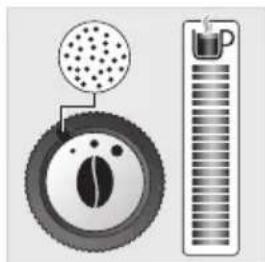
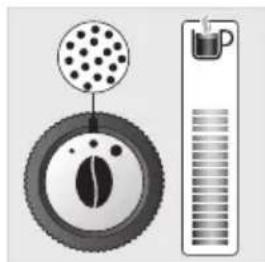
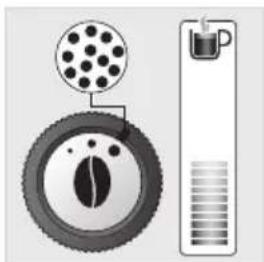
Adjusting the spouts by height
In all the proposed drinks, you can reduce or increase the height of the spouts depending on the height.
Stopping the preparation of the drink
When the preparation cycle stops, pressing the button returns to 5. When the preparation cycle stops, the process takes some time. During this time, the device is inaccessible for any action.
Preparation of two cups
The device prepares two drinks simultaneously. The function of two spouts is available for all recipes of the main menu shown on the screen, and it is activated by double-pressing the button of the selected drink (except for the vD options).
The "DARK" function

The "DARK" function allows you to increase the strength of the drink by increasing the volume of ground coffee.
This function is available for the following drinks: P, P
There are several ways to enable/disable this function:
- While the drink is being prepared, press the "DARK" button. - Press the button 一 _ 一 during the drink preparation until the end of the coffee dispensing.
This function can be enabled directly for all drinks (see above):
- Press the settings button - Select "Settings" using the navigation buttons - Select "Drink settings" and press OK - Select the "DARK" option and confirm with the OK button - Perform the same operations to disable the "DARK" function.
The drink preparation can be stopped at any moment by pressing the button.
Note: For each new drink preparation, the device takes into account the settings of the last prepared drink.
Stages of drink preparation:
- The drink is ready. Fig. 17
Preparing latte macchiato

The latte macchiato contains more milk compared to cappuccino. The latte consists of 1/4 of thick foam, 1/4 of coffee, and 2/4 of hot milk.
It is recommended to use a glass with a volume of approx. 250 ml.
To prepare latte macchiato, follow the same steps as for cappuccino, but press the «Latte Macchiato» button. Fig. 18
Preparing latte

The latte consists of one portion of espresso and a larger portion of milk, covered with a light layer of milk foam.
It is recommended to use a cup with a volume of about 250 ml.
To prepare latte, follow the same steps as for cappuccino, but press the «Latte» button.
In this recipe, coffee is dispensed first, then milk foam.
Rinsing the milk container after preparing milk-based drinks.
After each preparation, the message «Rinse milk container?» appears on the display.
- Press the rinse button. - During the rinsing of the milk container, it is necessary to periodically remove the milk suction tube and rinse it under running water. Fig. 21-25 - For optimal results, it is recommended to regularly clean the milk container with the One Touch Cappuccino (see section on cleaning).

Important information: it is recommended to perform a full cleaning of the milk-based drink preparation function after each use to maintain hygienic cleanliness of the appliance and to ensure optimal frothing results.
PREPARING TEA
Possible settings
The device allows you to prepare 3 different types of tea (green, black, and herbal).
The water temperature is set depending on the selected drink.
If necessary, the strength of the drink can be changed.
To prepare it, you can also use the "EXTRA SHOT" function to get a double shot of coffee and milk mixture.
Preparing coffee
- Place a cup or cups under the coffee spout. -Press the button
- Select the drink. -Press the OK button -You can change the drink volume using the navigation buttons
If the device is not ready, it will suggest adding water, and after filling the reservoir, the coffee machine will automatically start working.
PREPARING OTHER DRINKS
Note: For each new drink preparation, the device takes into account the settings of the last prepared drink.
-Press the button -Using the navigation buttons, select the desired drink. -Press the OK button -If necessary, change the coffee volume.
Drink preparation can be stopped at any time by pressing the button

Ristretto:
Ristretto with a strong and pronounced taste, covered with a thick layer of hazelnut-colored cream, ideal for a morning wake-up. For ristretto, a cup with a volume of 20 to 30 ml is suitable.
Doppio:
Doppio is a double espresso of light color, covered with a layer of light-colored cream. Doppio is suitable for those who like a strong and aromatic drink.
Americano:
Americano is a double espresso with the addition of hot water. During the preparation of the drink, the foam on its surface is removed. The drink is suitable for those who want the drink to be larger.
To prepare the drinks below, perform the following steps:
- Connect the milk suction tube from the right side to the One Touch Cappuccino block. - Insert the other end (with the slanted edge) into a milk container or directly into a milk bottle/carton (depending on the model). - Press the button - Select the drink using the buttons. - Press the OK button - If necessary, change the coffee volume and/or the milk frothing time.
Flat white:
Flat white is prepared on the basis of a double espresso, to which a large portion of frothed milk is added.
Espresso Macchiato
Espresso Macchiato with a strong taste and thick consistency consists of espresso, mixed with frothed milk.
Rinsing the milk block
See the paragraph "Rinsing the milk block" in the section "PREPARING MILK-BASED DRINKS".
OTHER FUNCTIONS
The "Parameters" button allows you to access the main menu (device settings, maintenance, and product information).
To exit the settings menu, press the back button or the "Parameters" button.

Settings
When selecting settings, you can make the necessary changes for optimal use of the coffee machine according to your preferences.
Main settings:
Before preparing as many drinks as the amount of scale in the device can handle, this
You can start the descaling procedure at a convenient time:
- Fill the water tank up to the CALC mark. -Add one sachet of descaling agent to the water.
-Press the settings button - select "Maintenance" - then "Descaling"

Important note: if during descaling you switch off the device or there is a power failure, the descaling program will resume at the stage where it was interrupted. It is not possible to postpone this procedure once it has started. Correctly performing the descaling procedure helps remove all limescale deposits that are harmful to health.
FAULTS AND ACTIONS TO REMEDY THEM

If any of the problems listed in the table persists, contact the KRUPS service center.
| HENCNIPABHOCThb CNOCOBbI UCTPAHENIA | |
| ФИKHIMIOPOBAHIE | Усточько coobшает о несравнoctи,погамma посятaitы.ИлелВаша кфемшина несравha. | Быклочite усточьи OTKПLOЧITE erO ot сети, ИЗВLEКITEФильт, поождITE odHy минутУ вКЛLOЧITE усточь ЗАноВ.Уderжьайо КНОКУ ВКПLOЧЕНЯ/Быклоче в Тучене He Meehe 3 сухид пязунSCa усточь. |
| Усточьо He Начиаet рботаыпослеснатя на КНОКУ ВКПLOЧЕНЯ/Быклочець (В Тучене He Meehe 3 сухид). | ПроберъпPredoхсангели и розETКу сети ЗLEКТРОПITAня.Убенисть, чTo StTekр павиьно BCTавлEN B розETКу. |
| Усточьо Травует OTКLOЧЕня иповторго ВКПLOЧЕня. | Усточьо АВТOMATССКИ ВОСТАнвАВЛВаET СВОЮ ПорраMMYпослес NOВТOPHО ПОДAVI ПИТAHIV. |
| Во врмя сизлар prinotoblenя proincXODITOTKПLOCHЕпп.TAHIV. | Усточьо АВТOMATССКИ ВОСТАнвОВЛТ pa6OTу pri ПОВТOPHOMВКПLOCHEN. |
| MSTOKL3OBAHIE | Кофемолka ИЗдаet Hexapakterhblshum.В кфем��МOLKe MOrTy HaxodntbSЯ NOCTOPOHNHe PrpeMeTbI. | |
| Пад усточьим ВOM skanлinaBaETCByBoDA. | Пered Tem КAK ChIMatb pezeRbyap ДЯя Вды, поождITE 15 сухидпослес OkONUANHЯ ПОДAVI KoΦe,чTOБИУсточь MOrIo ПраВиьноЗавшпь TсИКЛprINOTOBLEHIV.Убенисть,чTO PОДОн ДЯя сбopa Kanelь праВиьно установлENВ TСТРОДТBE.Он дOLжEN BCSERDA HAXODNTBЯ NaCBOEM MeTe,джeКorda uSTPOMCTBO He NcPONb3yETcI.Пproberbte, He nepeonlonen liпОДОн ДЯя сбopa Kanelb. |
| Во врмя OTКLOCHENя горая ВODApnoДOLЖAEТВыткathучes coIIa noDAuHkoФe n 6lOK One Touch Cappuccino. | В зависмостп OT peцenta усточь МОжET bblNilHЯТВ abTomatСССКУmpOBiBKV BO Врмя OTКПLOCHEN.ЗТа пpoцEDураДы ДИТСЯ BCERO HeCKOLbKO cekyHd i пpeKpaAaETcA abTomatСССКИ. |
| PerugЯTop CTsepeni Ромола NOBOPaunIBaETCByCуслNiem. | Поворачиайт PerugЯTop CTsepeni ПOMOLA TOLbKO Bo Врмяразы КфемолкIN. |
| Усточьо He noDAet koΦe. | HeicnpaBnOCTb BlyBnAeTcR Bo Врмя р60Ты.Усточьо abTomatСССКИ BOCSTAHOBIVLo p60Tу и rOTOBOK.HOBOMY ZUKNJy. |
| Вы IncIpььЗOBaII MOnOTbI KoΦe BmecToKoΦeHbIX ZepeH. | УдалITE MOnOTbI KoΦe n3 KONTeIHerpa ДЯя Кфемиьх ZepeHcппOMOUsbIpybIleCocA. |
| ПAP | ОтberстFE Дд ВьхODа пар, Р-ВиДIMOMу,Частчо Ил ПОЛHOCТБИЗACOPINLOCB. | СнимпгЕ насаду с Креленя Сnomошью клоча. Pnc. 25
ПрочstITE Bce Альемпь И убадиесь, чTo OTberрстFE насаду He
Засореы OстТКМ молОка Ил ИнakпьЮ.При HeobxodimocTи
ВоспальзУ�Тecь ИгOLКД Дд OчИSTК. Pnc. 26
УстовITE насаду на MeCTO. Pnc. 31
ЗаписITE ZICKII prOmbiBk MOnOchHOrO 6blOKa One Touch
Cappuccino,чтобу удаITь BOZMOЖьDE OTLOJeHINY. |
| Пар He bVbXODIIT. | ПроберъTE, He Засорено Лп OTberрстFE Дд ВьхODа пар.См.
Вышe: «ОтberстFE Дд ВьхODа пар, ПО-BиDIMOMу,ЧаStчMuNo Iл
ПОЛHOCТБИЗACOPINLOCB».
Ес们 ЗTo He nomoket, onyctoшte pezeрвayap Дд ВьдИ ВсpeMuHo
ИЗВл配电и ФильТР Claris Aqua Filter System.Заллnte pezeрвayap
MinepalNBо ВьдОи C BvICOKIM coedpaxHem Kailczry (> 100 Mr/л)
ИЗ汞ystITE ПОдразн HeckolbKO zicIKLOB BvIpa6OTKN пар в EMKoCTb
(от 5do 10ziklOB),do noluyehn HeNpepbivHOn CTpyu пар.
Вставы Te ФильТр образн В pezeрвayap. |
| ИЗ reшETКи поддОнa Дд сбopa каль
ВbIXODIIT nap. | В завсIMоCTs OT peuzenta ИЗ reшETКи поддОнa Дд сбopa каль
МожeТ БвIxODIIT Nap. |
| Пар obpa3ayetcpoind Kpbilko KonTeHepa
дд Кфeйнbix ЗерeH. | Зakpoite OTberpstFE Дд КрilskoДд пam OmeeHnna TabneTkn Dd
Очstkn.(K) |
| OBCLJUXMBAHNE | Устов STBO Tpe6byet onyctoWITь поддОн Дд
сбopa kanel, priTomЧTo ON He ЗanollNeH. | Устов STBO zanporpammmroBaHOТakmОБразOM,чTo ONo Tpe6byet
Очstoxitbpoindon Dd c6opa Kaelb поспprinotoblenia
Опр徳leHnHOrO KoluchecTBa popuzni Kofohe He3aBvCImo OTTO,
ОчstouAHI li BBy erо neped 3tIM. |
| Устов STBO He Tpe6byet npovedeHnna OчstTKn
OT NaKInn. | Zukl OчstTKN OT NaKInn Tpe6byetcnoSne HeCKOLBKnX ZicIKLOB
Истов STOBANHЯ napOBOW CnCTeMbI. |
| Молотьkofoe haxodITcR B noDDone Дд
сбopa kanel. | В He3NauchTeNbHbIX KOJIueCTBAX MOlOTbI Kofoe MojTe NonadATb B
noDDON Dd CB6opa Kaelb. UztpoiSTBO pa6OtaEТ takIM o6pa3OM,
чTo6bl ydaIaTb OCTaTKN MONOTOR Kofoe B ceIax noPdErpKaHnna
UstotbIzhOToI ZhbIbYnOg Hn6
UstotbIzhOToI ZhbIbYnOg Hn6 |
| ПосLE onyctoWeHnKonteHepa Дд
КоfoeHOnу ruzni prOdoJkaeT bIcBeeHbAtbcs
постурпсдТьHOb coo6SeHne. | Устов STBE Na MeCTo KOnTeHepr Dd KofoeHOnу ruzni n CleduyIte
Uka3aHnIM Na 3KpaHne. |
| ПосLE haboHnHnKonteHepa Дд
ВODbl prOdoJkaeT bIcBeeHbAtbcs
постурпсдТьHOb coo6SeHne. | ПроберъTE, pravilbHo Nl yctaHOBlen PezeрвayapВ uCTpoiCTBe.
ПоглвokВ Нжнeч Chactn Pezeрвayap ДджeHnDbVraTbCS
СвбODHNo.ПрobеръTE и pri HeobxODIMocTи yCTpaHNTe
постурSTBVE DBIXeHnny nonlaBka. |
| HATUMKМ | Посе заунская п riрутовления наитka р ri
Быборе Фунckши «EXTRA SHOT» устюctvo
соobшает о том, чо за невозмочно. | Контынер дд Кофейногутуши посяпеловеди, И поэтOMу Функши«EXTRA SHOT» неоступна.
Посе завершения п riрутовления наитka можно заустпь
п riрутовление одног поцул луpecco, п徴арпелов
онystошв котынер дд оразботан Horo Кофe. |
| Блok One Touch Cappuccino He BCasbyaet
MOLOKO
Блok One Touch Cappuccino He Прoin3bODIT
MOLONYU YENKU IYI ПОIN3BODIT MAnO ПЕKKI | П探测ыт, правлиьни собран SFLOK (В чASTHOCТИ, похедимь
В Trpoшke BCASIBAHA NMOKA). Prc. 35
Убадиесь, чо похедимь РUC. 29 He zacopener и He zargязэн.
Замочite erо в расторе телло ВОДы и СРСТВА Дд МьТь
пocуды, Затem onolochite erо и ВсICUshite pepej undahOBКо hy MeCTо.
П探测ыт, He zacoperoи Л OTBERCTINE Дд BvIXOda napa. EsnI
ЗTo TAK, CM. Виш: «OTBERCTINE Дд BvIXOda napa, no-BuDIMOMOу,
Ча STUCHО IYI ПОINOCSTЮЗ ZACOPILOCБ».
Убадиесь, чо Trpoшka на зacopener, He pepekpyechи и правлиьно
Всталега в SFLOK One Touch Cappuccino, tak ChTo6bI B nee He
ппадл возdUn. Yb6dIteCB,чо Trpoшka в DoCTaTOHOn Mepe
ногухже в молOKO.
ПROMОЛte и почирпite SFLOK (CM. COOTBETCTBYIOUIS paZdeleny,
пocbraшение помьгke и Ouchstke SFLOKA One Touch Cappuccino).
Дд мolyочнын hayinikov pekomehdyetcra И спOLьЗOBaTь TOLьКоч
OTKByIOE CBexjee NaCTepri3OBAHNoE Ии уlbTpanaCtePry3OBAHNoe
MOLOKO. Тackxe pekomehdyetcra И спOLьЗOBaTь XOLONDHyU emKoCTb
дд мolyOka. |
| Молокoi яи ВODа He NaHInBaIoTcR B ChAsshki
правлиьнblm образим. | П探测ыт, правлиьни сUpTahOBlen SFLOK One Touch Cappuccino. |
| Кофе пodaetca сншkom meDleHNo. | П探测нite рergларTop SteteMu NOMOLA BnPABO (J),чTo6bI polnyчltb
бОлee grupьйnomOL (В ЗависmoCTN OT TINa И спOLьЗуEMORO KoФe).
ВынOLнITE OdnIH Ии HeCKOLBko ZICKNOB prombIKBn.
Задуstite рогрamy OuchSTKN UcTPOICTBa (CM. pazdelen
«АВТOMATUWECKA prorpamma OuchSTKN»)
Заменite ФильТClaris Aqua Filter System (CM. pazdelen «UCTAHOBKa
ФильТра») |
| Сл Debу молOKA п rescутSTBYIOT B amepikaHо
ил Горaye ВODe. | Задуstite ррмьВКу мolyочHorO 6LOKA ЛбО снIMITEи
п探测п'te 6LoK One Touch Cappuccino поed Tem kak ZaynskaTb
цкл рigenTOBLeHn HANlNTka. |
| Кофе сншkom CBeTlbIи IYI NeDooCTaTOUH
Крелки. | Стапайтсь He IncPONL3OBArTB MaCIAHINCTbIe, Kapamelni3INPOBaHnble
ил apomatniznoPoBaHnble copra KoФe.
Y6dIteCB,чTo B KONTeyHepe dIЯ Кофeинbix Зерен He zacoperoH
ВыхODHoe OTBecTne.
УmenbшITE obseM NaHITka IYI yCINbTe erO KpeNoCTb C nomOuCbU
Функци «DARK».
П探测нite рergларTop SteteMu NOMOLA BInBo,чTo6bI polnyчltb
БОлee ToHKOI NOMOL.
ГOTOBTE HANITKII B Dba 3tana pri ИсponL3OBAHnN ΦyHKciN
п探测�ВОLEHn 2чaSEK. |
| Зспесco IYI Кфe HeDooCTaTOUH roprayue. | ВынOLнITE ррмьВКу сИСtemы KoФe поed зaPUSKOM ZICKla
п探测�ВОLEHn KoФe.
Увелчыte TemmpaTyRu KoФe в MelHo NaCTpoEk.
СпОLOchITE ChAшу Когуч e BoDои поed зaPUSKOM ZICKla
п探测�ВОLEHn NaHITka. |
| Чан HeDooCTaTOUH IYI сншkom rorayu. | Увелчыte IYI yMeHbShte TempepaTyRu roraye BdoB M MeHOr NaHOTko |
We present you a few recipes
Coffee with cream
Prepare coffee in a large cup, add sugar and pour in thick cream. Add chocolate shavings for a more refined taste.
Mocha
Prepare a cup of hot milk, add a spoonful of cocoa and top with whipped cream.
Coffee with spices
To enjoy a refined breakfast, mix natural yogurt with espresso. To sweeten the drink, add a teaspoon of liquid honey and, depending on the season, a banana or peach, to make the drink thicker.
Coffee with cream
Prepare a double espresso or a long coffee with sugar and top with a layer of whipped cream. For a more refined taste, you can add a teaspoon of cocoa and/or chocolate shavings.
Welcome to the world of automatic coffee machines KRUPS. The automatic coffee machine KRUPS, developed and manufactured in France, allows you to prepare espresso, risretto, lungo, cappuccino, latte macchiato, flat white and other milk-based drinks at any time quickly and easily.
The automatic coffee machine KRUPS is equipped with modern functions and an intuitive interface with a removable brewing unit, which allows you to prepare the best drinks and maximize the aroma and taste of freshly ground coffee beans. For optimal taste, use fresh tap water.
Thanks to its versatility, the KRUPS automatic coffee machine EVIDENCE PLUS can automatically prepare several drinks at the same time with a simple touch of a button. You will appreciate the quality of preparing ideal cappuccino, latte or latte macchiato thanks to the milk reservoir and the 'One-touch cappuccino' system.
Since the same coffee beans can taste differently, you can personalize your favorite coffee recipes:
- By changing the coffee beans (different variety or degree of roasting), you can discover different flavor notes of coffee. You may need to experiment a few times before choosing the variety of coffee beans that suits your taste best. - By changing the degree of grinding, you can get coffee with a milder or stronger intensity.
- By changing the amount of coffee, you can choose your ideal coffee portion.
We wish you many pleasant moments with a cup of coffee and hope that the KRUPS coffee machine will fully satisfy all your needs.
The KRUPS team

Tips
- Water quality greatly affects the aroma of coffee. Chlorine and limescale can alter the taste of coffee. We recommend using a Claris Aqua Filter System cartridge or water with low mineralization to preserve the true aroma of coffee. - For preparing drinks, we recommend using preheated cups (rinsed with hot water), sized to fit the selected quantity.
- Coffee beans can lose their aroma if stored incorrectly. We advise using a quantity of beans that matches your consumption over the next 2-3 days, and prefer packaging of 250 g. The quality of coffee beans also depends on subjective perception. Arabica has a delicate floral aroma, while Robusta contains more caffeine and has a stronger and more bitter taste. These two varieties are often blended to obtain a more balanced coffee. Do not hesitate to ask for advice from a specialist in a professional store.
- We do not recommend using burnt or caramelized beans, which can damage the coffee machine.
- Stirring the mixture is done by adding the aroma and the amount of milk. When stirring the mixture, the foam will be more creamy. In addition, the stirring level can be adjusted according to the desired filling. For the best result, you can use pasteurized, ultra-pasteurized, fresh, ultra-fresh, or whole milk from the refrigerator (3-5°C). Using special milk products: microfiltered, raw, sour, fortified, or plant-based milk (rice, oat, almond milk) may negatively affect the preparation result in terms of foam quality and quantity.
Contents
IMPORTANT INFORMATION ABOUT THE DEVICE AND OPERATING INSTRUCTIONS p. 344 TECHNICAL SPECIFICATIONS p. 344 DESCRIPTION OF THE DEVICE p. 345 CONTROL PANEL p. 345 PREPARATION FOR WORK, INSTALLING THE DEVICE p. 346 TIPS FOR PREPARING DRINKS: IMPORTANT ADVICE p. 348 MENU FOR QUICK PREPARATION OF COFFEE DRINKS p. 349 MENU FOR QUICK PREPARATION OF DRINKS WITH MILK p. 350 PREPARATION OF TEA p. 351 PREPARATION OF OTHER DRINKS p. 351 OTHER FUNCTIONS p. 352 CARTRIDGE FILTERS p. 353 PERIODIC MAINTENANCE p. 354 TROUBLESHOOTING p. 356
IMPORTANT INFORMATION ABOUT THE DEVICE AND OPERATING INSTRUCTIONS
In this instruction manual, you will find all the important information about preparing for work, using, and maintaining your device.
Before first use of the device, carefully read the operating instructions and keep them. Improper use of the device may void the warranty from KRUPS.
EXPLANATION OF SYMBOLS IN THE OPERATING INSTRUCTIONS

DANGER! Warning about possible dangerous situations or serious injuries. The image of a lightning bolt warns of danger from electric current.

CAUTION! Warning about possible malfunction, damage, or breakage of the device.

IMPORTANT! General or important note about the operation of the device.
Device package contents
Check the device package contents. If any accessory is missing, call the hotline (see page 346: Installing the device).
Device package contents:
- Automatic coffee machine Krups series EA894 - 2 tablets for descaling - 1 packet of descaling agent
- Tube for milk, recognized in the "One Touch Cappuccino" system - special key for cleaning and system for milk supply
- Instruction manual and safety instructions - Claris cartridge - Aqua Filter System with fixing accessory - cleaning for intended use - operating instructions - list of authorized Krups service centers
- Warranty documents
Technical specifications
Milk tube and cleaning - water level indicator

Coffee bean container
Grinder adjustment for coffee beans - for ground coffee or tablets - milk jug for ground coffee - for pre-ground coffee

Control panel
Display and buttons - ON/OFF button (on/off) - selection buttons
Details:
The drip tray collects water or coffee that drips from the spout during and after preparation. It is important to keep it in place and empty it regularly, or the float will signal the need for cleaning.
Important! Please read this instruction manual carefully and keep it. Follow the safety instructions.
Manufacturer:
SAS GSM
Regulation of doses
Press the 3Moro button to turn on the device. The function can be used in all direct access recipes; you can select it by simply pressing the selected recipe (except for p and E). Fig. 12
DARK L function
The DARK function increases the intensity of the selected filling, increasing the amount of used coffee.
This function can be used for the following fillings:


You can turn it on or off in different ways:
- Before each preparation, you can press the DARK button, and then select the desired filling. - During the preparation of the drink, after the grinding is complete, you can press the DARK button.
You can turn off the function of all fillings from the direct access menu (see below):
-Press the "Settings" button

-Select "Settings" using the navigation buttons -Select "Filling Settings", then press OK -Select "DARK", then confirm by pressing OK -You can turn off the DARK function in the same way.
You can start preparing the drink at any time by pressing


DIRECT ACCESS MENU FOR PREPARING DRINKS WITH MILK
Note: for each new drink preparation, the settings of the last prepared drink are taken into account.
Preparation steps:
Preparing cappuccino
For cappuccino, use more milk, their quantity: 1/4 cream milk, 1/4 coffee and 2/4 hot milk.
We recommend using a cup with a volume of about 250 ml.
The drink can be prepared either by yourself or, for cappuccino, using the appropriate button. fig. 18
Preparing tea
The tea is made from espresso, mixed with a large amount of milk, covered with a light coffee foam.
We recommend using a cup with a volume of about 250 ml.
The drink can be prepared either by yourself or, for cappuccino, using the appropriate button.
After preparing the drink, add sugar to taste, then stir with a spoon.
Rinse the milk system after each preparation of drinks with milk.
On the display, the message «Rinse the milk system?» is selected. Press the button for each preparation.
- Press OK to rinse. - During rinsing, the milk system is automatically rinsed with hot water through the milk tubes and mixer. fig. 21-25 - For optimal results, it is recommended to rinse the milk container One Touch Cappuccino (see section «Cleaning and Maintenance»).

Important: after each use of the milk-based drink preparation function, it is recommended to perform a full rinse to maintain hygienic cleanliness of the accessories for milk frothing, as well as optimal frothing results.
PREPARING TEA
Possible settings
The device offers you to prepare tea from leaves (green or black tea and herbal tea).
The water temperature is set according to the selected tea.
You can adjust the amount of drink according to your preferences.
During preparation, you can set the EXTRA SHOT function, which allows you to prepare very strong coffee drinks.
Preparation
- Place the cup under the dispenser. - Press the button. - Select the desired drink. - Press the OK button. - You can change the amount of drink using the arrow keys.
If there is not enough water in the coffee machine, it will ask you to fill the reservoir, after which the preparation will be resumed automatically.
PREPARATION OF OTHER DRINKS
Please note: before each new drink preparation, the machine rinses the previous drink.
- Press the button. - Use the arrow keys to select the desired drink. - Press the OK button. - Use the arrow keys to adjust the amount of coffee.
You can start preparation at any time by pressing
Espresso:
Espresso with a mild and pleasant taste, decorated with a delicate caramel color, will help you overcome a gloomy morning. To prepare espresso, select a volume of 20-30 ml.
Doppio:
Doppio is a full espresso, decorated with a delicate hazelnut color. A double portion of coffee for a drink with a mild taste and aroma.
Americano:
Americano is a full espresso, to which hot water is added. This preparation process preserves all the aroma, revealing the drink. It is ideal for those who like strong coffee.
To prepare milk-based drinks, you need to perform the following steps:
- Insert the milk tube into the One Touch Cappuccino block on the right. - Lower the end of the tube (with the slanted side) into a container filled with milk, or directly into a milk jug or milk frother (depending on the model). - Press the button - using the navigation keys, select the required drink. - Press the OK button - if necessary, adjust the amount of milk froth or the duration of milk frothing.
Flat White:
Flat White is made from a double ristretto, to which a small amount of frothed milk is added.
Espresso Macchiato
A small glass and thick texture - Espresso Macchiato consists of espresso topped with a little milk.
Rinsing the milk system
See the section "Rinsing the milk system" in the chapter "MENU FOR PREPARING MILK-BASED DRINKS".
Settings
The "Settings" button allows you to access the main menu (settings, maintenance, and information about the machine).
To exit the Settings menu, press the Return button - "Settings".

Settings
Having selected "Settings", you can adjust various parameters of the machine for optimal comfort of use and adaptation to your own needs.
The main settings include:
In the container, the amount of ground coffee used for brewing has been adjusted.
How to drain the last drops?
When you fill the container, point it at the overflow.
When the machine indicates "Drain 2 containers".
When you need to drain the container of the rinse aid? See 19-20
When the machine indicates "Drain 2 containers".
You can drain it after each use, before they ask you to do so.
Improper execution of operations may damage the machine.
Rinsing the system
You can perform a system rinse at any time.
- Press. - Select "Maintenance". - Select "Rinse the milk system" or "Rinse the coffee system".
According to the type of machine, it may automatically perform a system rinse before switching off.
You can also set automatic rinses at switch-off times (see section "Settings").
The automatic cleaning program of the coffee system lasts about 13 minutes.
Cleaning the coffee system helps remove coffee residues and, if necessary, preserves aromas.
(Blonde) (Light French) (Brune)
(Blonde) (Light French) (Brune)
Press the button for two cups
The button allows you to prepare drinks in two cups at the same time. The two-cup function is available for all recipes with a sufficient amount of coffee, except for the ones marked with a double cup symbol. (Fig. 12)
DARK UP function
The DARK function allows you to make the selected recipe stronger by increasing the amount of coffee used.
This function is available for the following drinks: Ristretto, Espresso, Coffee
You can activate or deactivate it in different ways:
- Before preparing a recipe, you can press DARK, then select the recipe. - During the preparation of the drink and until the end of the process, you can press the DARK button.
You can activate the function systematically for all drinks with a sufficient amount of coffee (selected by default):
- Press the button with the settings - Select "Settings" using the navigation buttons - Position yourself on "Drink settings" and press OK - Select "DARK" using the button to activate the function. - You can deactivate the DARK function by repeating the same actions.
You can stop the preparation of the drink at any moment by pressing

PREPARATION OF MILK-BASED DRINKS
Attention: at each drink dispensing, the machine will take the real settings of the last prepared drink.
Steps for preparing the drink:
- Changing the coffee dose - Dispensing the strong coffee - Filtering the coffee - Phase of preliminary heating for milk frothing
You can:
- To prepare the drink and froth the milk at the same time. - To adjust the coffee strength by pressing the DARK button. - To add an extra dose of coffee by pressing the EXTRA SHOT button. - To adjust the coffee volume. - To adjust the milk frothing time.
Preparing Cappuccino

The cappuccino consists of 1/3 cream-like foam, 1/3 coffee, and 1/3 hot milk.
- Insert the milk tube (Fig. 13) into the slot on the side of the cappuccino maker One Touch Cappuccino.
- Place a cup under the spout (with the spout tilted) and pour the milk, then place the milk container in the milk jug (as shown). Fig. 14 - Place the cup and the milk container in the correct position. Fig. 15 - Press the cappuccino button. Fig. 16 - The milk frothing process starts.
If you wish, you can adjust the milk frothing time using the adjustment buttons.
Preparing Latte Macchiato
The Latte Macchiato consists of a larger amount of milk than the cappuccino: 1/4 cream-like foam, 1/4 coffee, and 2/4 hot milk.
We recommend using a cup with a capacity of about 250 ml.
To prepare a Latte Macchiato, you can follow the same steps as for the cappuccino, but press the Latte Macchiato button. Fig. 18
Preparing Caffè Latte

The Caffè Latte consists of espresso mixed with a large amount of hot milk, topped with a light coffee foam.
We recommend using a cup with a capacity of about 250 ml.
Prepare your coffee, set the coffee strength, and select the desired coffee type by pressing the button for your coffee.
For this recipe, first add the coffee, then the machine automatically dispenses the milk.
Milk frothing for preparing milk-based specialties.
The display shows "Milk frothing?" after each preparation.
Press to perform the rinsing. After milk frothing, it is necessary to systematically perform the cleaning and rinsing of the hot milk from the milk tube and the mixer. Fig. 21-25 - For optimal results, it is recommended to clean the Cappuccino button (see the chapter with instructions for general maintenance).

Important: it is recommended to perform a complete cleaning after each use of the milk function, to ensure good hygiene and proper milk frothing.
PREPARING BEVERAGES
Possible settings
The appliance offers preparation of 3 types (espresso, coffee, or cappuccino).
The water temperature is adjusted according to the selected drink.
You can adjust the drink volume according to taste.
You can program the EXTRA SHOT function in advance, which allows you to prepare a very strong drink "long".
Preparing coffee
Place a cup under the coffee spouts. Press to select the desired coffee. Press OK. You can change the volume using the navigation buttons.
If the machine detects the water tank empty during operation, it will ask you to fill the reservoir, after which it will automatically perform the rinsing.
Attention: at each drink preparation, the machine takes the settings of the last prepared drink.
- Press the button - The selected drink is prepared. - Press OK - If you wish, adjust the coffee volume.
You can stop the drink preparation at any time by pressing
Espresso:
The espresso is prepared with a strong and intense taste, covered with a cream with caramel color, ideal for the most demanding mornings. To prepare an espresso, select a volume between 20 ml and 30 ml.
Doppio:
The Doppio is a double espresso with a dark color, covered with a hazelnut cream. A double dose of coffee for a strong taste and aroma of the drink.
Americano:
Americano is a double espresso to which hot water is added. With this preparation method, the cream that covers the drink disappears. Ideal for people who prefer a light coffee.
For special recipes:
- Insert the milk tube from the right side of the block for cappuccino One Touch Cappuccino.
- Place the other end of the tube (the slanted end) in a container with milk, directly in the milk bottle or in a milk container (according to preference). - Press the button
- Using the buttons for selection, choose the desired drink. - Press OK - If you wish, adjust the coffee volume and/or the milk dispensing time.
Flat white:
Quantity according to the recipe and according to the device, in which the maximum dose of milk is set.
Espresso macchiato
Characterized by a strong taste and creamy texture, the espresso macchiato drink consists of espresso, milk foam and milk.
Milk dispensing
Please refer to the paragraph "Milk dispensing" in the section PREPARATION OF MILK DRINKS.
OTHER FUNCTIONS
The button with parameters allows access to the main menu (machine settings, product information).
To access the settings menu, press the button for setting parameters.

Settings
By selecting "Settings", you can adjust various machine parameters for optimal performance during use and maintenance according to your preferences.
Main setting groups:
Depending on the drinks prepared, the machine can perform automatic rinsing when switching off.
It can also be set to automatically rinse when switching on (see section "Settings").
Automatic program for rinsing the coffee brewing unit (about 13 minutes)
The rinsing of the coffee brewing unit helps to prevent deposits, milk residues and coffee, and delays the aroma of the drinks.
To start the descaling program, you have the following options:
- 1 descaling tablet for KRUPS -1 with a minimum capacity of 600 ml
Instructions:
-1 phase for descaling -1 phase for rinsing
When should the program be run?
- When it is necessary to run the program, the device will inform you. Instructions shown on the screen will guide you.

Important: It is not mandatory to run the program immediately when the device informs you, but you should run it as soon as possible. If descaling is delayed, the pre-warning message remains displayed until the operation is performed.
You can also start descaling according to your preference:
(Blonde) (Light French) (Brune)
- Getting coffee with more or less aroma and strength in the cup
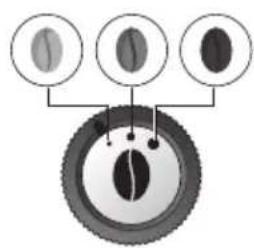
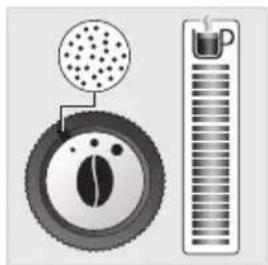
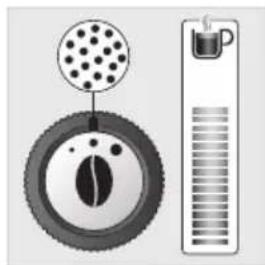
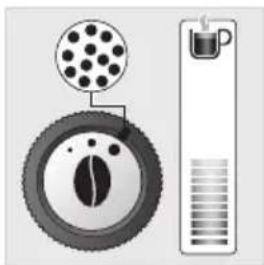
Coffee with milk (flat white):