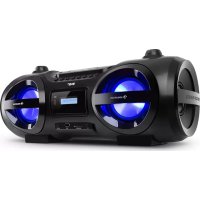
Soundblaster - Mp3 player Auna - Free user manual and instructions
Find the device manual for free Soundblaster Auna in PDF.


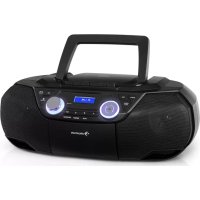
| Brand | Auna |
| Model | Soundblaster |
| Product type | Multimedia player with DAB+/FM tuner, CD player, Bluetooth, USB, SD card, AUX input |
| Article number | 10035222 |
| Power supply | 100-240 V~, 50/60 Hz (mains); batteries: 12 V= |
| Power consumption | 48 W (operation), < 0.5 W (standby) |
| RMS audio power | 12.5 x 2 W |
| Bluetooth connectivity | Version 5.0, range 10 m, frequency 2402-2480 MHz, power 2.7 dBm |
| Radio reception | FM 87.5-108 MHz; DAB+ 174.928-239.2 MHz |
| CD player | CD-DA, CD-R/RW, MP3; laser class 1 |
| Connectors | AUX 3.5 mm, headphone 3.5 mm, microphone 6.3 mm, USB, SD card reader |
| Functions | Equalizer (FLAT/CLASSIC/ROCK/POP/JAZZ), ID3 Tag, disco light, repeat (1/all/folder), random play, program, intro mode |
| Operating temperature | 5 °C to +35 °C |
| Included accessories | Device, user manual, mains cable, remote control with CR2025 battery |
| Maintenance and cleaning | Clean with a dry, clean cloth, do not use chemical solvents; for CDs, clean from center to outer edge |
| Safety | Do not expose to water/rain, do not open the casing, avoid contact with laser beam, maintain a distance of 8 cm for ventilation, disconnect if unused for extended period |
| Reparability and spare parts | Repair by qualified technician only; no user-accessible parts |
| Declaration of conformity | Directive 2014/53/EU, manufacturer: Chal-Tec GmbH, Berlin |
Frequently Asked Questions - Soundblaster Auna
User questions about Soundblaster Auna
0 question about this device. Answer the ones you know or ask your own.
Ask a new question about this device
Download the instructions for your Mp3 player in PDF format for free! Find your manual Soundblaster - Auna and take your electronic device back in hand. On this page are published all the documents necessary for the use of your device. Soundblaster by Auna.
USER MANUAL Soundblaster Auna
Member of Berlin Brands Group
Handwerkerstr. 11
15366 Dahlwitz-Hoppegarten
Deutschland
Berlin Brands Group UK Ltd
PO Box 1145
Oxford, OX1 9UW
United Kingdom
Congratulations on purchasing this equipment. Please read this manual carefully and take care of the following hints to avoid damages. Any failure caused by ignoring the items and cautions mentioned in the instruction manual are not covered by our warranty and any liability. Scan the QR code to get access to the latest user manual and other information about the product.
CONTENTS
Technical Data 28
Safety Instructions 30
Product Overview 32
Basic Function 36
Radio Operation 37
DAB Radio Mode 38
CD/MP3 Operation 40
USB/SD Card Operation 43
SD card operation 44
BT Operation 44
AUX-IN Operation 45
Compact Disc Maintenance 46
Disposal Considerations 47
Declaration of Conformity 47
| Item number 10035222 | |
| Power supply 100-240 V~ 50/60 Hz Battery: 12 V---- | |
| Power consumption 48 W | |
| Standby consumption <0.5 Watt | |
| AUX in jack 3.5 mm | |
| Microphone jack 6.3 mm | |
| Working temperature 5 °C | +35 °C |
| BT Frequency Radio-frequency power | 5.0 version 2402-2480 MHz 2.7 dBm |
| Receiver section | |
| FM frequency rage 87.5 - 108 MHz | |
| DAB+ frequency range 174.926 MHz - 239.2 MHz | |
| Compact disc section | |
| Optical pickup 3-beam laser | |
| Frequency response 100 Hz | - 16 KHz |
| Audio section | |
| Power output 12.5x2 W RMS | |
Accessories
Unit
- Instruction manual
- AC power cord
EXPLANATION OF THE WARNING SYMBOLS
| CAUTION RISK OF ELECTRIC SHOCK DO NOT OPEN | A |
| AUTION: TO REDUCE THE RISK OF ELECTRIC SHOCK AND SERIOUS PERSONAL INJURY, DO NOT REMOVE ANY COVER. NO USER-SERVICABLE PARTS INSIDE. REFER SERVICING TO QUALIFIED SERVICE PERSONNEL ONLY. | |
| WARNING. TO REDUCE THE RISK OF FIRE OR ELECTRICAL SHOCK, DO NOT EXPOSE THIS PRODUCT TO WATER, RAIN OR MOISTURE. | |
|  | Triangle with lightning plus explanation as follows: DANGEROUS VOLTAGE: The lightning flash with arrowhead symbol within the equilateral triangle is intended to alert the user to the presence of uninsulated dangerous voltage within the product's enclosure that may be of sufficient magnitude to constitute a risk of electric shock to persons. |
|  | Triangle with exclamation point plus explanation as follows: ATTENTION: The exclamation point within the equilateral triangle is intended to alert the user to the presence of important operating and maintenance (servicing) instructions in the literature accompanying this product. |
| INVISIBLE LASER RADIATION WHEN OPEN AND INTERLOCK FAILLED OR DEFEATED. AVOID DIRECT EXPOSURE TO LASER BEAN | Laser safety This equipment uses an optical laser system in the CD mechanism, which is equipped with built-in safety devices. Do not attempt to disassemble the unit, but contact qualified service personnel. Exposure to this invisible laser beam may be harmful to the human eye. |
THIS IS A CLASS 1 LASER PRODUCT. USE OF CONTROLS OR ADJUSTMENTS OR PROCEDURES OTHER THAN THOSE SPECIFIED HEREIN MAY RESULT IN HAZARDOUS EXPOSURE OF THE LASER BEAM.
SAFETY INSTRUCTIONS
Read these instructions. All uses guidelines must be read before using the device. Keep the instructions for future use.
- Children over the age of 8 and persons with reduced physical, sensory or mental capabilities or those with a lack of experience and knowledge may only use the device if they are instructed on how to do so by a person responsible for their safety, or if they are supervised and understand the hazards associated with the use of the device.
- Attention, use and security guidelines must be respected.
- The device must not be used near water or be put in contact with moisture.
- Make sure has no liquid is spilled on device and device openings.
- Move device carefully, avoid shocks.
- Do not block the breakdown of the device outputs.
- Do not place the device near from a heat source (e.g. radiator). Do not expose it to the Sun.
- Plug the device as indicate on this information form.
- This device has a connection with overload protection. Replacement should only be done by an experienced technician or the device manufacturer.
- For cleaning the device, please follow the recommendations of the notice.
- The power cord should be unplugged when not using for a long period of time.
Device shall be repaired by a qualified person when:
a. the power cord is damaged,
b. objects have fallen into the apparatus or a liquid has been spilled into device,
c. device was exposes to the rain,
d. device does not work correctly without notable exterior change,
e. device is broken.
- The user shall not try to maintain device beyond that which is described in this information form.
- The apparatus shall not be exposed to dripping or splashing and that no objects filled with liquids, such as vases, shall be placed on apparatus.
- To be completely disconnect the power input, the mains plug of apparatus shall be disconnected from the mains, as the disconnect devices is the mains plug of apparatus.
- The mains plug of apparatus should not be obstructed OR should be
easily accessed during intended use.
- Battery shall not be exposed to excessive heat such as sunshine, fire or the like.
- Excessive sound pressure form earphones and headphones can cause hearing loss.
- Minimum distance (8 cm) around the apparatus for sufficient ventilations;
- The ventilation should not be impeded by covering the ventilation opening with items such as newspaper, table-cloths, curtain etc;
- No naked flame sources such as lighted candles should be placed on the apparatus;
- Attention should be drawn to the environmental aspects of battery disposal;
The device may be used in moderate climates only. - Danger of explosion if battery is incorrectly replaced.
- Replace only with the same or equivalent type.
- The main plug shall remain readily operable.
Before use
Avoid installing this unit in places exposed to direct sunlight or close to heat radiating appliances such as electric heaters, on top of other stereo equipment that radiates too much heat, places lacking ventilation or dusty areas, places subject to constant vibration and/or humid or moist areas.
Do not attempt to clean this unit with chemical solvents as this might damage the finish. Use a clean dry cloth. Operate controls and switches as described in the manual. Before turning On the power, make certain the AC power cord is plugged in.
Power source
- This system is designed to operate on normal 100-240 V 50 Hz AC only.
- Attempting to operate from any other power source may cause damage to the system, and such damage is not covered by your warranty.
NOTE: If this plug will not fit into your outlet you probably have an outdated non-polarized AC outlet. You should have your outlet changed by a qualified licensed electrician.
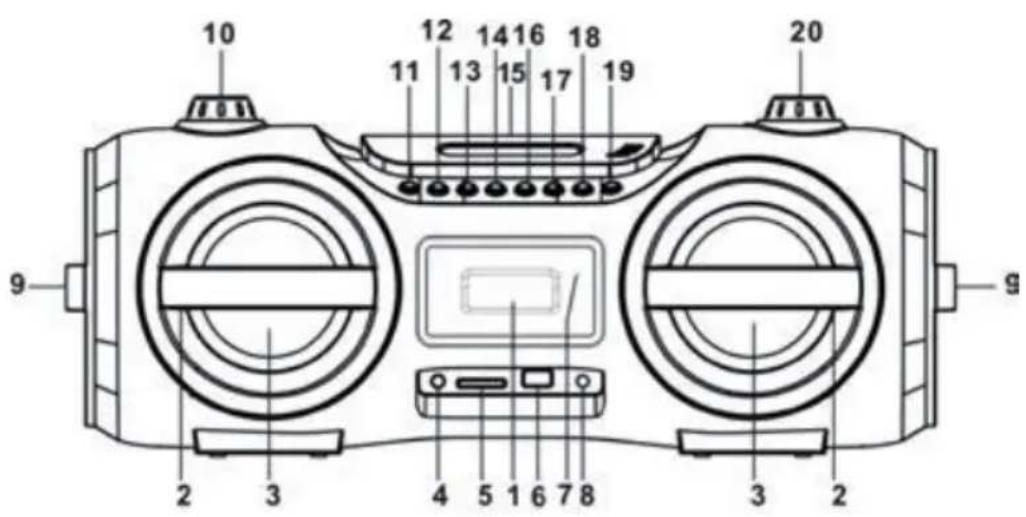
1 Display
2 Speaker decoration ring
3 Left/right speakers
4 Phones jack
5 SD card slot
6 USB port
7 Standby/pair indicator
8 Aux in jack
9 Passive speaker decoration ring
10 Volume knob
11 Function button
12 Eq/light button
13 Prog./P-mode butt
14 Back/fast backward/-10 button
15 CD door
16 Next/fast forward/+10 button
17 Stop/menu/info button
18 Play/ pause/pair/select button
19 Standby button
20 Tuning knob
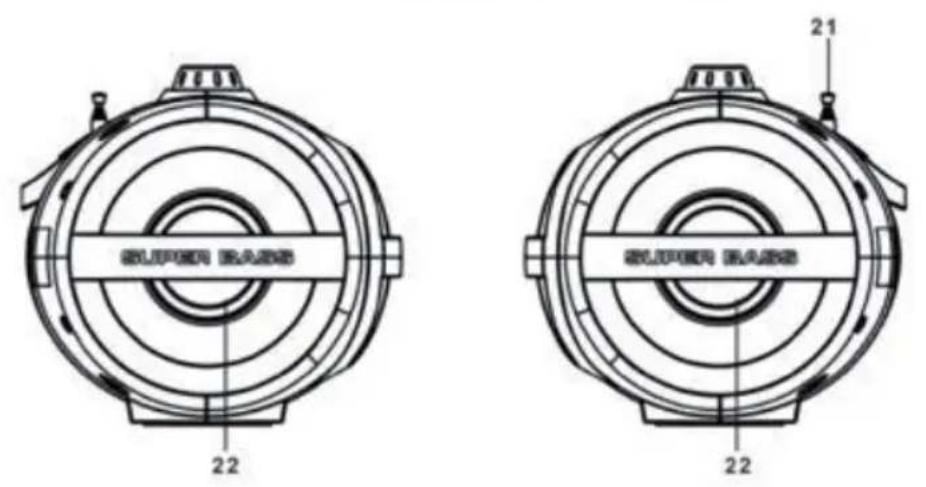
21 Antenna
22 Left/right passive speakers
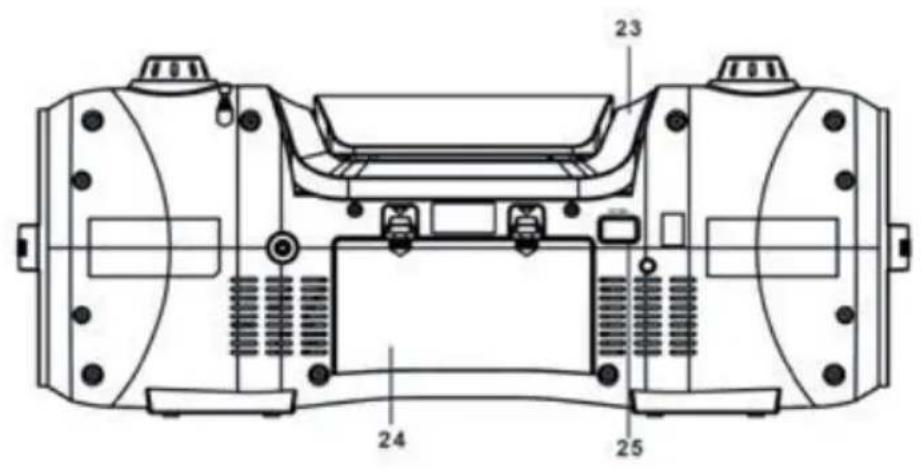
23 Handle
24 Battery door
25 AC socket
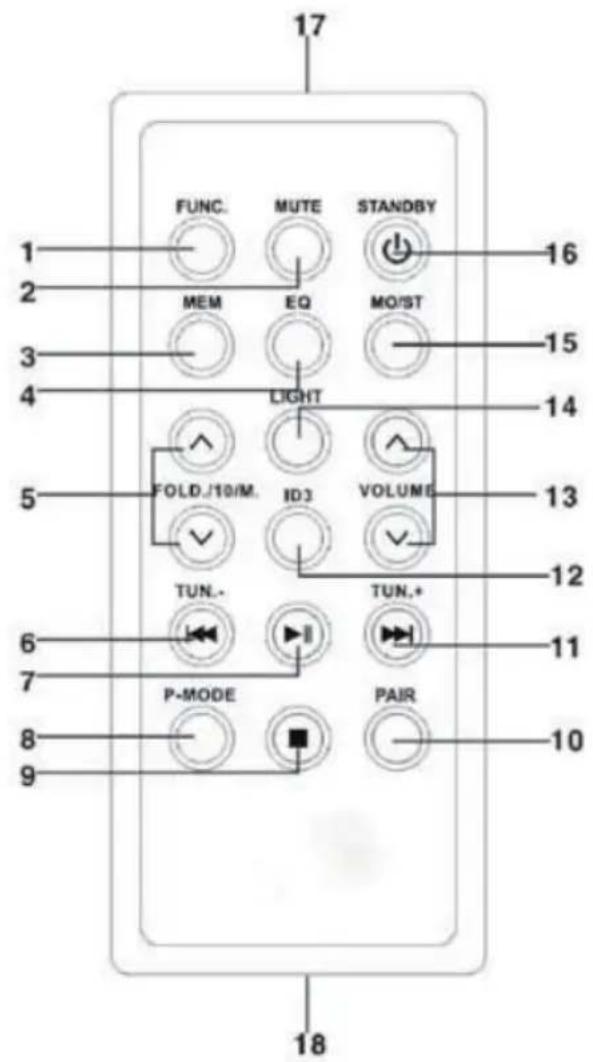
1 Function key
2 Mute key
3 Memory key
4 EQ key
5 Fold./10/M. Up/down key
6 CD b-skip down/tun.- Key
7 CD play/pause/select key
8 P-mode/info key
9 Stop/menu key
10 Pair key
11 CD f-skip up/tun.+ Key
12 ID3 key
13 Volume up/down key
14 Light key
15 Mo/st key
16 Standby key
17 Remote sensor
18 Battery compartment
Note: Please pull battery protector before using:
Remote control operation
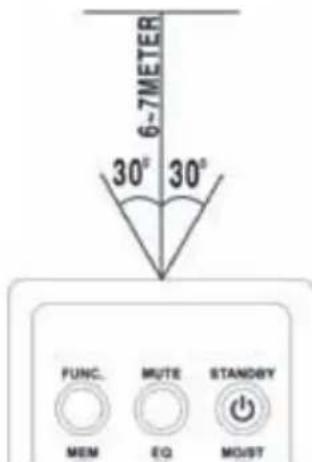
To operate the unit with the remote control, point the remote handset at the remote sensor on the front panel and press the appropriate button on the remote handset. The remote works best within a range of 6 7 meters from the front panel and on an angle of 30 degrees. Bright sunlight or room light conditions can interfere with the remote control. If the remote operation is unsatisfactory or stops working entirely, first try replacing the remote batteries, then try reducing the room lighting conditions.
Lithium battery installation of remote control
- The remote control includes one CR2025(3V) lithium battery.
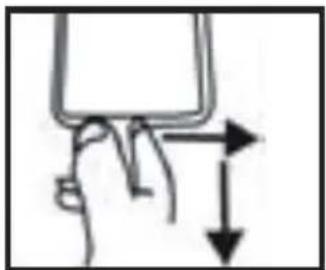
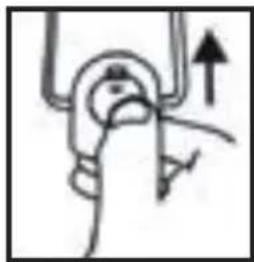
- To replace the battery, gently push the clasp to the right direction accordingly to the instruction and then pull out the battery compartment.
- Take the drained battery out and install a new lithium battery (CR-2025) in the compartment with the positive polarity upwarded. Then push the compartment back to its position with a "click" sound indicating installation finished.
Power source
This unit is designed to be operated on AC/DC.
AC operation
Plug the tail of supplied AC power cord into AC socket on unit and the plug into household AC outlet. The batteries will be automatically disconnected. This unit is designed in Switched-Mode Power Source with voltage range from 100V to 240V.
DC operation
Open the BATTERY COMPARTMENT DOOR. Install 8pcs UM-1/D size batteries (not included) into compartment. Please follow correct polarities as indicated. NOTE: when using battery, take off the AC cable from unit. CAUTION: Remove batteries if they are flat or not being used for a long period of time. Batteries contain chemical substances, so they should be disposed of properly.
BASIC FUNCTION
Switching on the unit
After connecting the power, press STANDBY button to unit or on remote control to turn on the unit. Press the FUNC. button on unit or on remote control to choose TUNER / CD / USB/ SD CARD / AUX/ BT or DAB function. NOTE: In CD/MP3/USB/SD/AUX/BT mode when the unit is not providing the main function for 15 minutes, the unit will automatically switch into standby mode. To turn on the unit again, press "STANDBY" button or replug the unit.
ESD hints - The product maybe reset or not reset to operation of control due to electrostatic discharge, just switch off and reconnect again.
Volume adjusting: Rotate the VOLUME knob on unit or press the VOLUME UP/DOWN key on remote control to increase or decrease volume.
EQ function: This unit has a built-in equalizer system, Press EQ/LIGHT button on unit or EQ key on remote control while playing to select different music style (sound tone): FLAT, CLASSIC, ROCK, POP and JAZZ.
ID3 System
This unit has a ID3 system, if the MP3 file is "ID3" format, it will automatically search the information of "TITLE NAME" "ARTIST NAME" and "ALBUM NAME" to show on the display. To turn off the show tag system, press the ID3 key on the remote control, then the unit will back to normal display.
TITLE NAME --> ARTIST NAME --> ALBUM NAME
Mute: You can quickly shut off the sound using the Mute key, press the key again to turn the sound back on.
Headphone jack
For private listening, insert a 3.5mm headphone (not included) into the EADPHONE jack (4). The SPEAKER output would be automatically cut off.
Caution: listening at a high volume over a long period is not good for your ears.
Disco light
There are eight flashing modes of the disco light, press and hold the EQ/ LIGHT button on unit or press the LIGHT KEY on remote control to choose the desired mode: "LIGHT 01" to "LIGHT 07", and "LIGHT 08" is auto-changing between different color. To turn off the disco light, press and hold the EQ/LIGHT button on the unit or press the LIGHT KEY on the remote control until "LIGHT OFF" shows on the display.
RADIO OPERATION
Tuning radio stations
- Press the FUNC. button on the unit or on the remote control to select the TUNER FUNCTION.
- Tune to desired station by rotating the TUNING knob on the unit or by pressing TUN + / 串 , or TUN-/key on remote control, the display will show the band frequency. Example: FM 97.10 MHz.
- Extend FM TELESCOPIC ANTENNA to its full length and gently move the unit back and forth to get the best reception, or place the unit in an open location.
- To turn off the radio, press the FUNC. Button on the unit or on the remote control to switch to other functions or press STANDBY button on the unit or on the remote control to turn off the unit.
Radio AUTO SCAN (SEARCH)
Press and hold the / PAIR/SELECT button on the unit or / SELECT key on the remote control, the unit will conduct auto scan and program until having found a strong signal. The unit will start to broadcast the P01 after searching finished.
Press the / + 10 or 快 / - 10 button on the unit or FOLD./10/M UP/DOWN key on the remote control to choose next programmed station.
Radio station memory operation
You may pre-store 30 (FM) radio stations in memory for your preference, so as you can listen to your desired station directly and quickly, no need to tuning and search for again.
- Rotate the TUNING knob on the unit or press TUN-/ or TUN+/ key on remote control to select a desired station.
- Press and hold the PROG/P-MODE button on the unit or press and hold MEM key on the remote control, "Preset Store" will show on the display.
- Rotate the TUNING knob on unit or press TUN-/- or TUN+/- key on remote control to choose the desired sequence you want to store, then press the PLAY/PAUSE/PAIR/SELECT button on the unit or PLAY/PAUSE/SELECT key on the remote control to confirm.
- Search another station, repeat steps (1), (2) & (3) until all desired stations stored. Up to 30 stations can be programmed.
- Press the / - 10 or / + 10 button on the unit or FOLD./10/M UP/DOWN key on the remote control to listen to the stored station directly.
DAB RADIO MODE
DAB radio mode receives DAB/DAB+ digital radio and displays information about the station and programmed/track as broadcast. Press the FUNC. button on the unit or remote control until display reads "Welcome to DAB".
- To do a full scan, press the STOP/MENU/INFO button on the unit or press STOP/MENU key on the remote control to enter menu selection, select the "full scan" option and press the PLAY/PAUSE/PAIR/SELECT button on the unit or PLAY/PAUSE/SELECT key on the remote control to confirm. Once a full scan is complete, the radio will play the first station on the station list.
- To choose between the scanned station list, rotate the TUNING knob on the unit or press TUN-/or TUN+/ on the remote control to scroll through the list of stations and press the PLAY/PAUSE/PAIR/SELECT button on the unit or PLAY/PAUSE/SELECT key on the remote control to confirm. The Now playing screen will display the new station details.
- To remove stations that are listed but unavailable, press the STOP/MENU/INFO button on the unit or press STOP/MENU key on the remote control to enter menu selection, rotate the TUNING knob on unit or press TUN-/or TUN+/key on remote control to select the "Prune" option and press the PLAY/PAUSE/PAIR/SELECT button on the unit or PLAY/PAUSE/SELECT key on the remote control to enter, and then press the PLAY/PAUSE/PAIR/SELECT button on the unit or PLAY/PAUSE/SELECT key on the remote control to choose YES or NO option, press the PLAY/PAUSE/PAIR/SELECT button on the unit or PLAY/PAUSE/SELECT
key on the remote control to confirm. This removes all invalid stations, indicated in the station list with a "?" in front of the station name.
Preset stations
To store a station in a preset memory, tune to the station that you want to save as a preset, then Press and hold the PROG/P-MODE button on the unit or press and hold MEM key on the remote control until the display shows "Preset Store". Rotate the TUNING knob on the unit or press TUN-/or TUN+/key on remote control to choose a preset memory position (for example, "preset 1"), then press the PLAY/PAUSE/PAIR/SELECT button on the unit or PLAY/PAUSE/SELECT key on the remote control to confirm. Use the TUN-/or TUN+/button on the unit or FOLD./10/M UP/DOWN key on the remote control to tune to the desired stations. Repeat this operation to save up to 30 preset stations.
Manual tune
To do a manual tune, press the STOP/MENU/INFO button on the unit or press STOP/MENU key on the remote control to enter menu selection, select the "Manual tune" option and press the PLAY/PAUSE/PAIR/SELECT button on the unit or PLAY/PAUSE/SELECT key on the remote control to confirm. Rotate the TUNING knob on the unit or press TUN-/-or TUN+ button on remote control to tune to the desired stations.
Now playing information
While a station is playing, the screen shows its name and DLS (Dynamic Label Segment) information broadcast by the station such as program name, track title and contact details. To view further information, press and hold the STOP/MENU/INFO button on the unit or press the P-MODE/INFO key each time to show next set of information, cycling through: DLS text, DL Plus information (this is only displayed if broadcast by the station), signal strength, program type, ensemble name, channel number/frequency, signal error rate and bit rate.
Dynamic range compression
(DRC) This function helps to reduce the difference between the loudest and quietest audio being broadcast. There are 3 options in this setting, the options available are: DRC off/DRC high/DRC low. To change the DRC setting, press the STOP/MENU/INFO button on the unit or press STOP/MENU key on the remote control to enter menu selection, rotate the TUNING knob on the unit or press TUN-/- or TUN+ button on remote control to select the "DRC" option then use the PLAY/PAUSE/PAIR/SELECT button on the unit or PLAY/PAUSE/SELECT key on the remote control to choose a desired option.
System
The system setting allows you to select display languages, reset to factory settings and view the software version.
Language
To select different languages for display messages. Press the STOP/MENU/ INFO button on the unit or press STOP/MENU key on the remote control to enter menu selection, rotate the TUNING knob on unit or press TUN-/- or TUN+/ on remote control to select the "System" option, and press the PLAY/PAUSE/PAIR/SELECT button on the unit or PLAY/PAUSE/SELECT key on the remote control to confirm.
Factory reset
Factory reset can help to clear all user defined settings, replacing them with the original default values, including the DAB station list and preset stations. Press the STOP/MENU/INFO button on the unit or press STOP/MENU key on the remote control to enter menu selection, rotate the TUNING knob on unit or press TUN-/- or TUN+/ on remote control to select the "System" option and press the PLAY/PAUSE/PAIR/SELECT button on the unit or PLAY/PAUSE/SELECT key on the remote control to enter, select "Factory reset" then rotate the TUNING knob on unit or press TUN-/- or TUN+/- on remote control to choose YES or NO option, then press the PLAY/PAUSE/PAIR/SELECT button on the unit or PLAY/PAUSE/SELECT key on the remote control to confirm.
Software version
This displays the current software version. Press the STOP/MENU/INFO button on the unit or press STOP/MENU key on the remote control to enter menu selection, rotate the TUNING knob on unit or press TUN-/- or TUN+/- key on remote control to select the "System" option and press the PLAY/PAUSE/PAIR/SELECT button on the unit or PLAY/PAUSE/SELECT key on the remote control to enter, select "SW version" then press the PLAY/PAUSE/PAIR/SELECT button on the unit or PLAY/PAUSE/SELECT key on the remote control to view the current software version.
CD/MP3 OPERATION
Discs for Playback
This system can playback all digital audio CD/MP3, finalized digital audio CD-Recordable (CD-R) discs, finalized digital audio CD-Rewritable (CD-RW) discs and CD-DA format digital audio CD/CD-R/CD-RW discs.
Loading a disc
- Press the FUNC. button on unit or on remote control to select "CD" mode.
- Press the PUSH TO OPEN button to open the CD door, "OPEN" will be shown on the display.
- Place an audio CD/MP3 DISC into the tray with the front side facing up.
- Close the CD door. The display will show a flashing "READING", then the total number of tracks would be shown and the playback will start from track.
- To remove the CD, press STOP button on unit or on remote control to turn off the unit, then press the PUSH TO OPEN button to open the CD compartment lid. Hold the CD by its edges, and take it out carefully.
Note:
- Make sure the disc is stopped before opening the CD DOOR.
- To ensure good system performance; wait until the unit completely reads the disc before proceeding.
- If no disc loaded into the tray, or the disc is unreadable, the display will show "NO DISC".
Playing a disc
- The playback starts from track 1 automatically when reading the disc. To pause playback, press PAIR/SELECT button on the unit or SELECT key on remote control. The current playing time will flash on the display. To resume playback, press PAIR/SELECT button on the unit or SELECT key on remote control again.
- To stop playback, press STOP button on the unit or on the remote control, the total number of tracks will show on the display.
Selecting a desired track/passage
To select a desired track
Press the / + 10 or 14 / - 10 button on the unit or "TUN + / 串 "or "TUN-/-" key on the remote control on stop mode or during playing until the desired track appears on the display. It will start play automatically.
To search for a particular passage during playback (track scanning at high speed) press and hold the / + 10 or 山 / - 10 button on the unit or TUN + / 山 or TUN-/-key on the remote control to scan the current playing track at high speed until desired point (passage) appears, then release the button for normal playback mode. Playback will start again from this point. To select a song which track number exceeds 10 for MP3 disc only.
To select a song/track which number exceeds 10, press and hold the / + 10 or / - 10 button on unit in stop mode, or press FOLD./10/M UP/DOWN button on the remote control during playback each time to skip forward
10 tracks, then press the / +10 or -10 button on the unit or TUN + / or TUN-/- key on the remote control to select desired track. To select a desired folder for MP3 disc that contains more than one folder. To select a desired folder during playback, press and hold the FOLD./10/M UP/DOWN button on the remote control to next/previous folder.
Programming tracks
Programming tracks of disc are possible when playback is stopped. Up to 20 tracks for CD disc and 99 tracks for MP3 disc can be stored in the memory in any order.
- In stop mode, press the PROG./P-MODE button on the unit or MEM key on the remote control to enter program setting, the PROG logo will be shown on the display and show P01.
- Press the / + 10 or / - 10 button on the unit or TUN + / 串 or TUN-/- on remote control to select the first desired track to be programmed. (example: track 2)
- Press the PROG./P-MODE button on the unit or MEN key on remote to enter. The display would show PROG and P02.
- Repeat steps 2 and 3 to store other desired tracks until all tracks programmed.
- Press the / PAIR/SELECT button on the unit or / SELECT key on the remote control to start playback from the first programmed track.
- Press the STOP button on the unit or on the remote control to stop program playback.
To clear the program, you may press STOP button on the unit or on the remote control when the disc stopped and open the CD compartment lid, the program will be erased. REPEAT PLAY You can play one track or all tracks on the disc repeatedly.
To Repeat a Single Track
- Press PROG./P-MODE button on the unit or press P-MODE key on the remote control during play, the display will show a steady "REP-1" and the current track will be played over and over again till you press the STOP button on the unit or on the remote control.
- To cancel repeat play, press PROG./P-MODE button on the unit or press P-MODE/INFO key on remote control until "REP-1" disappears from the display.
To repeat all the Tracks
-
Press PROG./P-MODE button on the unit or press P-MODE/INFO key on the remote control until the "REP- ALL" shows steadily on the display, all tracks on the disc will be played over and over again till you press the STOP button on the unit or on the remote control.
-
To cancel repeat play, press the PROG./P-MODE button on the unit or press P-MODE/INFO key on remote control until "REP-ALL" disappears from the display.
To repeat the folder (only for MP3 disc which contains more than one folder)
- Press the PROG./P-MODE button on the unit or press P-MODE/INFO key on the remote control until "REP-ALBUM" show steadily on the display, the current folder will be repeated over and over again till you press the STOP button on the unit or on the remote control.
- To cancel repeat play, press the PROG./P-MODE button on unit or press P-MODE/INFO key on remote control until "REP-ALBUM" disappear from the display.
RANDOM PLAY
Press the PROG./P-MODE button on the unit or P-MODE/INFO key on the remote control in play mode till the "RANDOM" shows steadily on the display, the random play will start from next track automatically, until all tracks are played over and then it will stop. Press the PROG./P-MODE button on the unit or P-MODE key on the remote control again until the "RANDOM" disappears from the display to cancel.
Intro play
Press the PROG./P-MODE button on the unit or press P-MODE/INFO key on the remote control in play mode till the "INTRO" shows steadily on the display, the intro play will start and scan 10 seconds for every track. To cancel intro play, press the PROG./P-MODE button on the unit or press P-MODE/INFO key on the remote control until "INTRO" disappear from the display.
- Press the FUNC. button on unit or on remote control to select "USB" mode.
- Connect the USB to the USB INPUT. The LCD will show the total number of tracks stored in the USB. The playback stars from track 1 automatically after reading the USB.
- To pause playback, press PAIR/SELECT button on the unit or SELECT key on the remote control. The current playing time will flash on the display. To resume playback, press PAIR/SELECT button on the unit or SELECT key on the remote control again.
- Press the STOP button on the unit or on the remote control to stop
playing. The display will show total number of USB.
- Proceed program play/repeat play (repeat 1- repeat folder - repeat all)/ random play/intro play operation as the same described in above "CD/ MP3 operation".
Attention: Do not use any USB extension cable for connecting the USB bar which may cause harmful interference.
SD CARD OPERATION
- Press the FUNC. button on the unit or on the remote control to select "CARD" mode.
- Connect the SD CARD to the SD INPUT. The LCD will show the total number of tracks stored in the SD CARD. The playback stars from track 1 automatically after reading.
- To pause playback, press /PAIR/SELECT button on the unit or /SELECT key on the remote control. The current playing time will flash on the display.
To resume playback, press PAIR/SELECT button on the unit or SELECT key on the remote control again.
- Press the STOP button on the unit or on the remote control to stop playing. The display will show total number of SD.
- Proceed program play/repeat play (repeat 1- repeat folder - repeat all)/ random play/intro play operation as the same described in above "CD/ MP3 operation".
- It supports 32GB (SD CARD)
BT OPERATION
- Press the FUNC. button on the unit or on the remote control to switch to BT function, the LCD will display "bT" and the Pair/Standby indicator will flash at high speed.
- Turn on the BT function on the device, scan the unit "Soundblaster DAB" and connect, then input the password 0000 if required, the Pair/Standby blue light will light up to indicate connection done, and the display will show "BT MODE". Press PAIR/SELECT button on the unit or play key on the device to start playback. If the unit can't connect the relative BT within 2 minutes, press the PAIR/SELECT button on the unit or PAIR key on remote control to reconnect.
- Rotate the VOLUME knob to your desired level.
- Press / + 10 or / - 10 button on the unit or TUN + / 串 or TUN-/-key on the remote control to choose the desired track.
- To stop playback, press H/PAIR/SELECT button on the unit or H/SELECT
key on the remote control.
Note: BT works best within 10 meters.
AUX-IN OPERATION
- Press the FUNC. button on the unit or on the remote control to select "AUX" mode.
- Insert the AUX line plug into the AUX IN jack (Φ3.5mm) on the player, music from the device would be amplified and exported from the speakers.
- Adjust the volume on the unit or on the device to your desired level.
- Proceed play/pause and next/previous on the device.

COMPACT DISC MAINTENANCE
-
Always use a compact disc bearing the mark as shown.
-
Notes on handling discs
-
Removing the disc from its storage case and loading it.
- Do not touch the reflective recorded surface.
- Do not stick paper or write anything on the surface.
- Do not bend the disc.
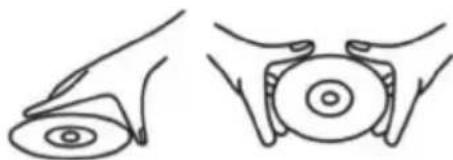
Handle disc only as shown
-
Storage
-
Store the disc in its case.
- Do not expose discs to direct sunlight or high temperatures, high humidity or dusty places.
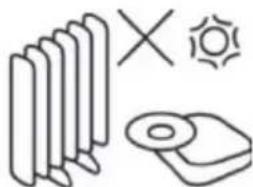
Do not store near heat
-
Cleaning a disc
-
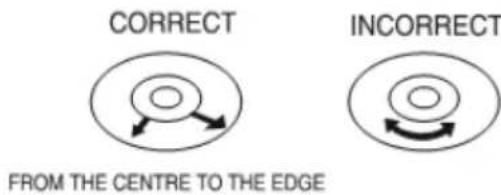
Should the disc become soiled, wipe off dust, dirt and fingerprints with a soft cloth.
- The disc should be cleaned from the center to the edge.
- Never use benzene, thinners, record cleaner fluid or anti-static spray.
- Be sure to close the CD door, so the lens is not contaminated by dust.
- Do not touch the lens.
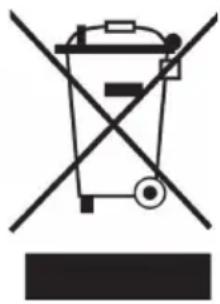
If there is a legal regulation for the disposal of electrical and electronic devices in your country, this symbol on the product or on the packaging indicates that this product must not be disposed of with household waste. Instead, it must be taken to a collection point for the recycling of electrical and electronic equipment. By disposing of it in accordance with the rules, you are protecting the environment and the health of your fellow human beings from negative consequences. For information about the recycling and disposal of this product, please contact your local authority or your household waste disposal service.
This product contains batteries. If there is a legal regulation for the disposal of batteries in your country, the batteries must not be disposed of with household waste. Find out about local regulations for disposing of batteries. By disposing of them in accordance with the rules, you are protecting the environment and the health of your fellow human beings from negative consequences.
DECLARATION OF CONFORMITY
CE UK CA
Manufacturer:
Chal-Tec GmbH, Wallstrasse 16, 10179 Berlin, Germany.
Importer for Great Britain:
Berlin Brands Group UK Ltd PO Box 1145 Oxford, OX1 9UW United Kingdom
Hereby, Chal-Tec GmbH declares that the radio equipment type Soundblaster is in compliance with Directive 2014/53/EU. The full text of the EU declaration of conformity is available at the following internet address: use.berlin/10035222
For Great Britain: Hereby, Chal-Tec GmbH declares that the radio equipment type Soundblaster is in compliance with the relevant statutory requirements. The full text of the declaration of conformity is available at the following internet address: use.berlin/10035222
Cher client,
Berlin Brands Group UK Ltd
PO Box 1145
Oxford, OX1 9UW
United Kingdom
- CONTENTS
- Accessories
- EXPLANATION OF THE WARNING SYMBOLS
- SAFETY INSTRUCTIONS
- Before use
- Power source
- Remote control operation
- Lithium battery installation of remote control
- AC operation
- DC operation
- BASIC FUNCTION
- Switching on the unit
- ID3 System
- Headphone jack
- Disco light
- RADIO OPERATION
- Tuning radio stations
- Radio AUTO SCAN (SEARCH)
- Radio station memory operation
- DAB RADIO MODE
- Preset stations
- Manual tune
- Now playing information
- Dynamic range compression
- System
- Language
- Factory reset
- Software version
- CD/MP3 OPERATION
- Discs for Playback
- Loading a disc
- Note:
- Playing a disc
- Selecting a desired track/passage
- To select a desired track
- Programming tracks
- To Repeat a Single Track
- To repeat all the Tracks
- To repeat the folder (only for MP3 disc which contains more than one folder)
- RANDOM PLAY
- Intro play
- SD CARD OPERATION
- BT OPERATION
- AUX-IN OPERATION
- COMPACT DISC MAINTENANCE
- DECLARATION OF CONFORMITY
- CE UK CA
- Manufacturer:
- Importer for Great Britain:
- Cher client,
Brand : Auna
Model : Soundblaster
Category : Mp3 player