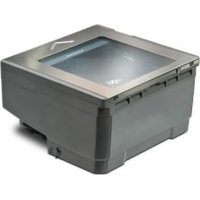
Magellan 2300HS - Barcode scanner DATALOGIC - Free user manual and instructions
Find the device manual for free Magellan 2300HS DATALOGIC in PDF.

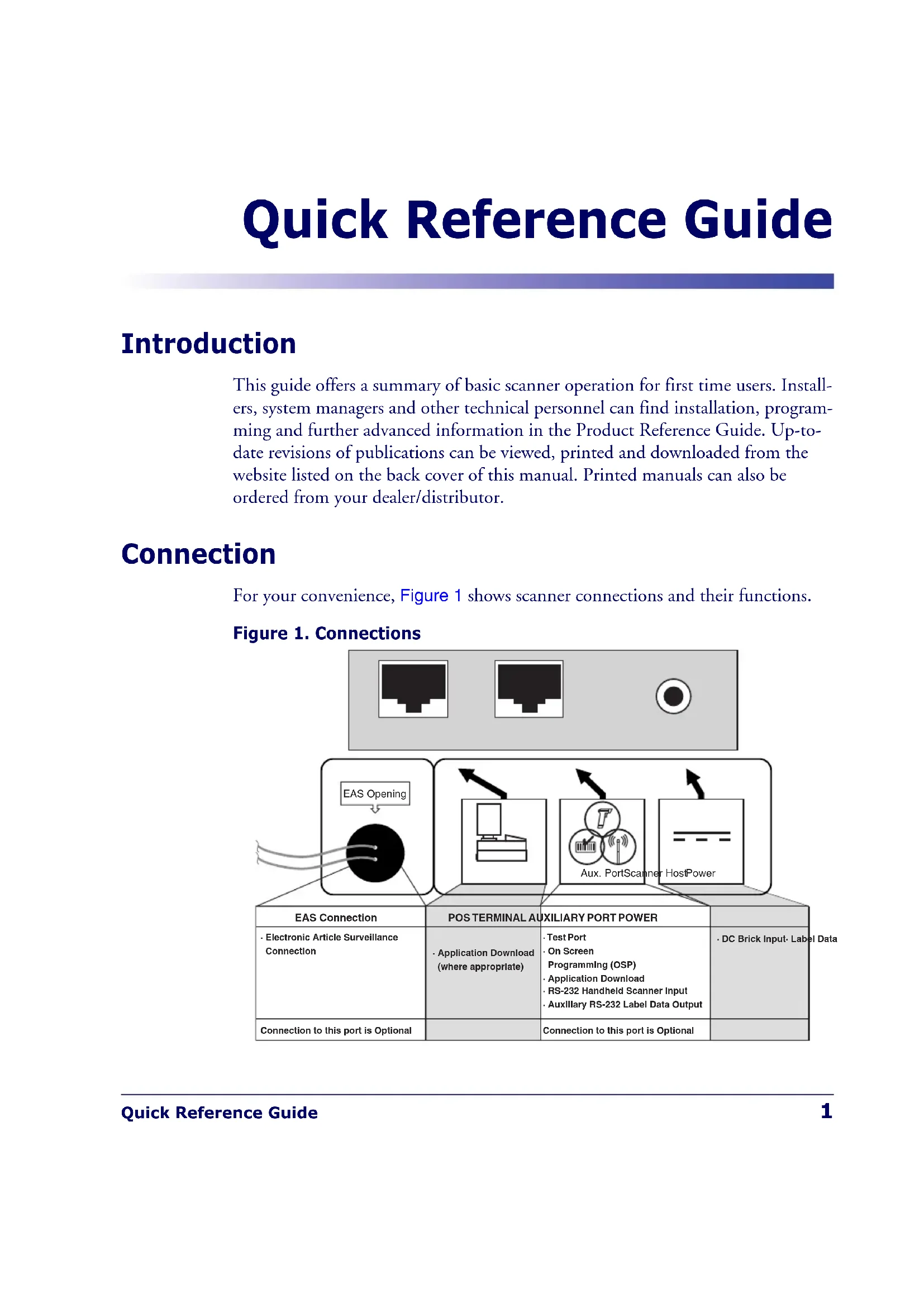


| Product Type | Laser Barcode Scanner |
| Brand | Datalogic |
| Model | Magellan 2300HS |
| Scanning Technology | Laser (Class I/II) |
| Scanning Mode | Hands-free and Presentation |
| Dimensions (L x W x H) | Approximately 210 x 150 x 80 mm (estimated) |
| Weight | Approximately 1.2 kg (estimated) |
| Power Supply | Via USB cable or external power supply |
| Power Consumption | Standby: < 1 W, Active: < 5 W |
| Interface | USB, RS-232, Keyboard Wedge |
| Supported Codes | EAN, UPC, Code 39, Code 128, etc. |
| Decoding | FirstStrike™ for difficult codes |
| LED Indicators | Green and yellow for status and scanning |
| Volume/Tone Button | Built-in, allows volume and tone adjustment |
| Additional Functions | Diagnostic mode, reset to initial state |
| Maintenance | Clean the scanning window with a soft cloth |
| Safety | Compliant with DHHS/CDRH 21CFR and IEC 60825-1:2007 |
| Spare Parts | Power supply, cables, scanning window |
| Repairability | Factory repair for optical cavity |
| General Information | Manual available in multiple languages on Datalogic website |
Frequently Asked Questions - Magellan 2300HS DATALOGIC
User questions about Magellan 2300HS DATALOGIC
0 question about this device. Answer the ones you know or ask your own.
Ask a new question about this device
Download the instructions for your Barcode scanner in PDF format for free! Find your manual Magellan 2300HS - DATALOGIC and take your electronic device back in hand. On this page are published all the documents necessary for the use of your device. Magellan 2300HS by DATALOGIC.
USER MANUAL Magellan 2300HS DATALOGIC
Datalogic Scanning, Inc.
959 Terry Street
Eugene, Oregon 97402
USA
Telephone: (541) 683-5700
Fax: (541) 345-7140
An Unpublished Work - All rights reserved. No part of the contents of this documentation or the procedures described therein may be reproduced or transmitted in any form or by any means without prior written permission of Datalogic Scanning, Inc. or its subsidiaries or affiliates ("Datalogic" or "Datalogic Scanning"). Owners of Datalogic products are hereby granted a non-exclusive, revocable license to reproduce and transmit this documentation for the purchaser's own internal business purposes. Purchaser shall not remove or alter any proprietary notices, including copyright notices, contained in this documentation and shall ensure that all notices appear on any reproductions of the documentation. Should future revisions of this manual be published, you can acquire printed versions by contacting your Datalogic representative. Electronic versions may either be downloadable from the Datalogic website (www.scanning.datalogic.com) or provided on appropriate media. If you visit our website and would like to make comments or suggestions about this or other Datalogic publications, please let us know via the "Contact Datalogic" page.
Disclaimer
Datalog has taken reasonable measures to provide information in this manual that is complete and accurate, however, Datalog reserves the right to change any specification at any time without prior notice.
Datalogic and the Datalogic logo are registered trademarks of Datalogic S.p.A. in many countries, including the U.S.A. and the E.U. All other brand and product names may be trademarks of their respective owners.
Magellan is a registered trademark of Datalogic Scanning, Inc. in many countries, including the U.S.A. and All-Weighs, FirstStrike and SurroundScan are registered trademarks of Datalogic Scanning, Inc. in the U.S.A. OmegaTek, Produce Rail, Productivity Index Reporting and SmartSentry are all trademarks of Datalogic Scanning, Inc.
This product may be covered by one or more of the following patents: 4603262 · 4639606 · 4652750 · 4672215 · 4699447 · 4709369 · 4749879 · 4786798 · 4792666 · 4794240 · 4798943 · 4799164 · 4820911 · 4845349 · 4861972 · 4861973 · 4866257 · 4868836 · 4879456 · 4939355 · 4939356 · 4943127 · 4963719 · 4971176 · 4971177 · 4991692 · 5001406 · 5015831 · 5019697 · 5019698 · 5086879 · 5115120 · 5144118 · 5146463 · 5179270 · 5198649 · 5200597 · 5202784 · 5208449 · 5210397 · 5212371 · 5212372 · 5229590 · 5231293 · 5232185 · 5233169 · 5235168 · 5237161 · 5237162 · 5239165 · 5247161 · 5256864 · 5258604 · 5258699 · 5260554 · 5274219 · 5296689 · 5298728 · 5311000 · 5327451 · 5329103 · 5330370 · 5347113 · 5347121 · 5371361 · 5382783 · 5386105 · 5389917 · 5410108 · 5420410 · 5422472 · 5426507 · 5438187 · 5440110 · 5440111 · 5446271 · 5446749 · 5448050 · 5463211 · 5475206 · 5475207 · 5479011 · 5481098 · 5491328 · 5493108 · 5504350 · 5508505 · 5512740 · 5541397 · 5552593 · 5557095 · 5563402 · 5565668 · 5576531 · 5581707 · 5594231 · 5594441 · 5598070 · 5602376 · 5608201 · 5608399 · 5612529 · 5629510 · 5635699 · 5641958 · 5646391 · 5661435 · 5664231 · 5666045 · 5671374 · 5675138 · 5682028 · 5686716 · 5696370 · 5703347 · 5705802 · 5714750 · 5723852 · 5750976 · 5767502 · 5770847 · 5786581 . ^S_理S_理S_理S_理S_理S_理S_理S_理S_理S_理S_理S_理S_理S_理S_理S _ ^S_理S_理S_理S_理S_理S_理S_理S_理S_理S_理S_理S_理S_理S_ S_ S_ S_ S_ S_ S_ S_ S_ S_ S_ S_ S_ S_ S_ S_ S_ S_ S_ S_ S_ S_ S_ S_ S_ S__ S_ S_ S_ S_ S_ S_ S_ S_ S_ S_ S_ S_ S_ S_ S_ S_ S_ S_ S_ S_ S_ S_ S__ S_ S_ S_ S_ S_ S_ S_ S_ S_ S_ S_ S_- ^S_理S_理S_理S_理S_理S_理S_理S_理S_理S_理S_理S_理S_理S_i ^S_理S_理S_理S_理S_理S_理S_理S_理S_理S_理S _ ^S _ ^S _ ^S _ ^S _ ^S _ ^S _ ^S _ ^S _ ^S _ ^S _ ^S _ ^^^ ^^ ^ ^ ^ ^ ^ ^ ^ ^ ^ ^ ^ ^ ^ ^ ^ ^ ^ ^ ^ ^ ^ ^ ^ ^ ^ ^ ^ ^ ^ ^ ^ ^ ^ ^ ^ ^ ^ ^ ^ ^ ^
DATALOGIC SCANNING, INC. MAGELLAN™ END USER LICENSE AGREEMENT
Notice to End User: The Datalogic Product you have acquired contains embedded Software, which is integral to the product's operation. This Software is being provided to you under license, subject to the terms and conditions of this Agreement. If you use the Datalogic Product, you will be deemed to have accepted the terms and conditions of this Agreement. If you do not intend to be bound to the terms of this Agreement, Datalogic is not willing to license the Software to you, you may not use the Datalogic Product or the Software, and you must contact the party from whom you acquired the Datalogic Product for instructions.
This End User Software License Agreement ("Agreement") is a legally binding agreement governing the licensing of the Software and Documentation by Datalogic, Scanning Holdings, Inc. and its subsidiaries and affiliates ("Datalogic") to the entity or person who has purchased or otherwise acquired a Datalogic Product ("End User"). For purposes of this Agreement, any software that is associated with a separate end-user license agreement is licensed to you under the terms of that license agreement. Datalogic and End User hereby agree as follows:
1. Definitions.
1.1 "Documentation" means materials such as user's guides, program reference guides, quick reference guides, manuals, or similar materials associated with or related to the Datalogic Product, whether in printed, "online", or other form.
1.2 "Proprietary Information" means: (a) source code, object code, software, documentation, and any related internal design, system design, data base design, algorithms, technology, technical data or information, implementation techniques, and trade secrets related to the Software, (b) any other trade secrets marked appropriately or identified as proprietary or confidential, and (c) any information that End User, under the circumstances, should recognize as confidential. Proprietary Information does not include any information that the receiving party can establish was (1) in the public domain, (2) already in the receiving party's possession or rightfully known prior to receipt, (3) rightfully learned from a third party not in violation of any other's proprietary rights, or (4) independently developed without access to Proprietary Information.
1.3 "Datalogic Product" means the Datalogic Magellan TM 1000i series, Magellan TM 1100i series, Magellan TM 1400i series, Magellan TM 2200VS series, Magellan TM 2300HS series, Magellan TM 3200VSi series, Magellan TM 3300HSi series, Magellan TM 8100 series, Magellan TM 8200 series, Magellan TM 8300 series, Magellan TM 8400 series, Magellan TM 8500 series, Magellan TM 9500 series, and/or Magellan SL TM series scanner and/or scanner/scale product, including all embedded Software in and all Documentation related to such product, which has been purchased or otherwise acquired by End User, whether obtained directly or indirectly from Datalogic.
1.4 "Software" means any software or computer programs of Datalogic or its third party licensors in machine readable form which is embedded in the Datalogic Product, whether obtained directly or indirectly from Datalogic, including any replacement, update, upgrade, enhancement or modification.
2. Scope Of License Granted.
2.1 Datalogic grants to End User a non-exclusive, non-transferrable, perpetual license to use the Software, solely on the Datalogic Product in which it is embedded ("designated Datalogic Product"), in machine-readable form only, solely for End User's internal business purposes. This Agreement does not convey ownership of the Software to End User. Title to the Software shall be and remain with Datalogic or the third party from whom Datalogic has obtained a licensed right. As used in this Agreement, the term "purchase" or its equivalents when applied to the Software shall mean "acquire under license." End User is not entitled to receipt or use of the source code to any Software.
2.2 End User shall not copy, modify, decompile, disassemble, reverse engineer, or otherwise reproduce or remanufacture the Software, whether modified or unmodified, nor sell, assign, sublicense, distribute, lend, rent, give, or otherwise transfer the Software to any other person or organization, for purposes other than as expressly provided in this Agreement, without Datalogic's prior written consent.
3. Transfers, Support.
3.1 Any copying, installing, reproduction, remanufacture, reverse engineering, electronic transfer, or other use of the Software on other than the designated Datalogic Product will be a material breach of this Agreement. However, Datalogic may elect not to terminate this Agreement or the granted licenses, but instead may elect to notify End User that End User is deemed to have ordered and accepted a license for each breaching use. End User shall pay Datalogic the applicable list price for such licenses as of the date of such breach.
3.2 End User shall not sell, assign, sublicense, distribute, lend, rent, give, or otherwise transfer the Datalogic Product to any third party unless such third party agrees with Datalogic in writing to be bound by the terms and conditions of this Agreement. Any such transfer of the Datalogic Product absent such agreement shall be null and void.
3.3 End User may obtain support for Software from Datalogic at Datalogic's standard support fees and under Datalogic's standard support terms and conditions in effect at the time the support is requested.
4. Intellectual Property.
End User acknowledges that the Software constitutes valuable trade secrets of Datalogic or Datalogic's third party licensors and that the Software is protected by intellectual property laws and treaties. The license set forth in this Agreement does not transfer to End User any ownership of Datalogic's or its third party licensors' copyrights, patents, trademarks, service marks, trade secrets, or other intellectual property rights and End User shall have no right to commence any legal actions to obtain such rights. End User shall not remove, modify, or take any other action that would obscure any copyright, trademark, patent marking, or other intellectual property notices contained in or on the Datalogic Product.
5. Proprietary Information.
5.1 End User acknowledges that Proprietary Information is the confidential, proprietary, and trade secret property of Datalogic and Datalogic's third party licensors and End User acquires no right or interest in any Proprietary Information.
5.2 End User shall not disclose, provide, or otherwise make available the Proprietary Information of Datalogic or its third party licensors to any person other than End User's authorized employees or agents who are under confidentiality agreement, and End User shall not use the Proprietary Information other than in conjunction with use of the Datalogic Product exclusively for End User's internal business purposes. End User shall take steps to protect the Proprietary Information no less securely than if it were End User's own intellectual property.
5.3 The provisions of this Proprietary Information Section shall survive and continue for five (5) years after the termination of this Agreement.
6. Limited Warranty.
6.1 Datalogic warrants that, under normal use and operation, the Datalogic Product will conform substantially to the applicable Documentation for the period specified in the Documentation. During this period, for all reproducible nonconformities for which Datalogic has been given written notice, Datalogic will use commercially reasonable efforts to remedy nonconformities verified by Datalogic. End User agrees to supply Datalogic with all reasonably requested information and assistance necessary to help Datalogic in remedying such nonconformities. For all defects reported to Datalogic within the warranty
period, Datalogic's liability is limited to providing End User with one copy of corrections or responding to End User's problem reports according to Datalogic's standard assistance practices. Datalogic does not warrant that the product will meet End User's requirements or that use of the product will be uninterrupted or error free, or that Datalogic's remedial efforts will correct any nonconformance. This limited warranty does not cover any product that has been subjected to damage or abuse, whether intentionally, accidentally, or by neglect, or to unauthorized repair or unauthorized installation, and shall be void if End User modifies the product, uses the product in any manner other than as established in the Documentation, or if End User breaches any of the provisions of this Agreement.
6.2 EXCEPT AS PROVIDED IN THIS AGREEMENT, THE DATALOGIC PRODUCT IS PROVIDED "AS IS" AND DATALOGIC MAKES NO WARRANTYES OF ANY KIND, EXPRESS OR IMplied, WRITTEN OR ORAL, WITH RESPECT TO THE PRODUCT, AND SPECIFICALLY DISCLAIMS THE IMPLIED WARRANTYES OF MERCHANTABILITY AND FITNESS FOR A PARTICULAR PURPOSE.
7. Infringement.
7.1 Datalogic will defend End User against any claim in a lawsuit that the Datalogic Product furnished hereunder infringe a United States patent or copyright of a third party and Datalogic will pay any damages finally awarded against End User by a court of competent jurisdiction that are attributable to such claim or will pay End User's part of any settlement that is attributable to such claim, provided that 1) End User notifies Datalogic promptly in writing of the claim, 2) Datalogic controls the defense or settlement of the claim, and 3) End User cooperates fully with Datalogic in such defense or settlement. All notices of a claim should be sent to Datalogic Scanning Holdings, Inc., Legal Department, 959 Terry Street, Eugene, OR 97402.
7.2 In the defense or settlement of any such claim, Datalogic may, at its option, 1) procure for End User the right to continue using the Datalogic Product, 2) modify the Datalogic Product so that it becomes non-infringing, 3) replace the Datalogic Product with an equivalent product not subject to such claim, or 4) provide End User an opportunity to return the Datalogic Product and receive a refund of the purchase price paid, less a reasonable allowance for use.
7.3 Datalogic shall have no liability to End User for claims of infringement based upon 1) the use of any Datalogic Product in combination with any product which Datalogic has not either furnished or authorized for use with such Datalogic Product 2) the use of any Datalogic Product designed, manufactured, or modified to the specifications of End User, or 3) End User's modification of the Datalogic Product without written authorization from Datalogic.
7.4 THE FOREGOING STATES DATALOGIC'S COMPLETE AND ENTIRE OBLIGATION CONCERNING CLAIMS OF PATENT, COPYRIGHT, OR OTHER INTELLECTUAL PROPERTY INFRINGMENT, CANCELS AND SUPERSEDES ANY PRIOR AGREEMENTS, WHETHER ORAL OR WRITTEN, BETWEEN THE PARTIES CONCERNING SUCH CLAIMS, AND WILL NOT BE MODIFIED OR AMENDED BY ANY PAST, CONTEMPORANEOUS, OR FUTURE AGREEMENTS OR DEALINGS BETWEEN THE PARTIES, WHETHER ORAL OR WRITTEN, EXCEPT AS SET FORTH IN A FUTURE WRIT-ING SIGNED BY BOTH PARTIES.
8. Limitation Of Liability
EXCEPT AS PROVIDED IN SECTION 7, DATABLOGIC SHALL NOT BE LIABLE FOR ANY CLAIMS AGAINST END USER BY ANY OTHER PARTY. IN NO EVENT SHALL DATABLOGIC'S LIABILITY FOR DAMAGES, IF ANY, WHETHER BASED UPON CONTRACT, TORT (INCLUDING NEGLIGENCE), PRODUCT LIABILITY, STRICT LIABILITY, WARRANTY, OR ANY OTHER BASIS, EXCEED THE PRICE OR FEE PAID BY END USER FOR THE DATABLOGIC PRODUCT. UNDER NO CIRCUMSTANCES SHALL DATABLOGIC BE LIABLE TO END USER OR ANY THIRD PARTY FOR LOST PROFITS, LOST DATA, INTERRUPTION OF BUSINESS OR SERVICE, OR FOR ANY OTHER SPECIAL, CONSEQUENTIAL, CONTINGENT, INDIRECT, INCIDENTAL, PUNITIVE, EXEMPLARY, OR OTHER SIMILAR DAMAGES, EVEN IF DATABLOGIC HAS BEEN ADVISED OF THE POSSIBILITY OF SUCH DAMAGES.
9. Government Restricted Rights: International Use.
9.1 Use, duplication, or disclosure of the Software by the U.S. Government is subject to the restrictions for computer software developed at private expense as set forth in the U.S. Federal Acquisition Regulations at FAR 52.227-14(g), or 52.227-19 or in the Rights in Technical Data and Computer Software clause at DFARS 252.227-7013(c)(1)(ii), whichever is applicable.
9.2 If End User is using the Datalogic Product outside of the United States, End User must comply with the applicable local laws of the country in which the Datalogic Product is used, with U.S. export control laws, and with the English language version of this Agreement. The provisions of the "United Nations Convention on International Sale of Goods" shall not apply to this Agreement.
10. Termination.
10.1 Either party may terminate this Agreement or any license granted under this Agreement at any time upon written notice if the other party breaches any provision of this Agreement.
10.2 Upon termination of this Agreement, End User immediately shall cease using any non-embedded software and shall return to Datalogic or destroy all non-embedded software covered by this Agreement, and shall furnish Datalogic with a certificate of compliance with this provision signed by an officer or authorized representative of End User. For embedded software, End User agrees to sign a waiver prepared by Datalogic concerning further use of the embedded Software. End User's resumed or continued use of the embedded Software after termination shall constitute End User's agreement to be bound by the terms and conditions of this Agreement for such use.
11. General Provisions.
11.1 Entire Agreement: Amendment. This document contains the entire agreement between the parties relating to the licensing of the Software and supersedes all prior or contemporaneous agreements, written or oral, between the parties concerning the licensing of the Software. This Agreement may not be changed, amended, or modified except by written document signed by Datalogic.
11.2 Notice. All notices required or authorized under this Agreement shall be given in writing, and shall be effective when received, with evidence of receipt. Notices to Datalogic shall be sent to the attention of Contract Administration, Datalogic Scanning Holdings, Inc., 959 Terry Street, Eugene, OR 97402, or such other address as may be specified by Datalogic in writing.
11.3 Waiver. A party's failure to enforce any of the terms and conditions of this Agreement shall not prevent the party's later enforcement of such terms and conditions.
11.4 Governing Law; Venue: This Agreement and the rights of the parties hereunder shall be governed by and construed in accordance with the laws of the State of Oregon U.S.A, without regard to the rules governing conflicts of law. The state or federal courts of the State of Oregon located in either Multinomah or Lane counties shall have exclusive jurisdiction over all matters regarding this Agreement, except that Datalogic shall have the right, at its absolute discretion, to initiate proceedings in the courts of any other state, country, or territory in which End User resides, or in which any of End User's assets are located.
11.5 Attorneys' Fees. In the event an action is brought to enforce the terms and conditions of this Agreement, the prevailing party shall be entitled to reasonable attorneys' fees, both at trial and on appeal.
-END
CONTENTS
English 1
Francais 5
Deutsch 9
Italiano 13
Espanol 17
Portugues 21
Chinese 25
Appendix A — Product Labeling 29
Appendix B — Productivity Index Reporting Option 31
Appendix C — Laser Safety 33
Appendix D - Warranty 41
NOTES
Quick Reference Guide
Introduction
This guide offers a summary of basic scanner operation for first time users. Installers, system managers and other technical personnel can find installation, programming and further advanced information in the Product Reference Guide. Up-to-date revisions of publications can be viewed, printed and downloaded from the website listed on the back cover of this manual. Printed manuals can also be ordered from your dealer/distributor.
Connection
For your convenience, Figure 1 shows scanner connections and their functions.
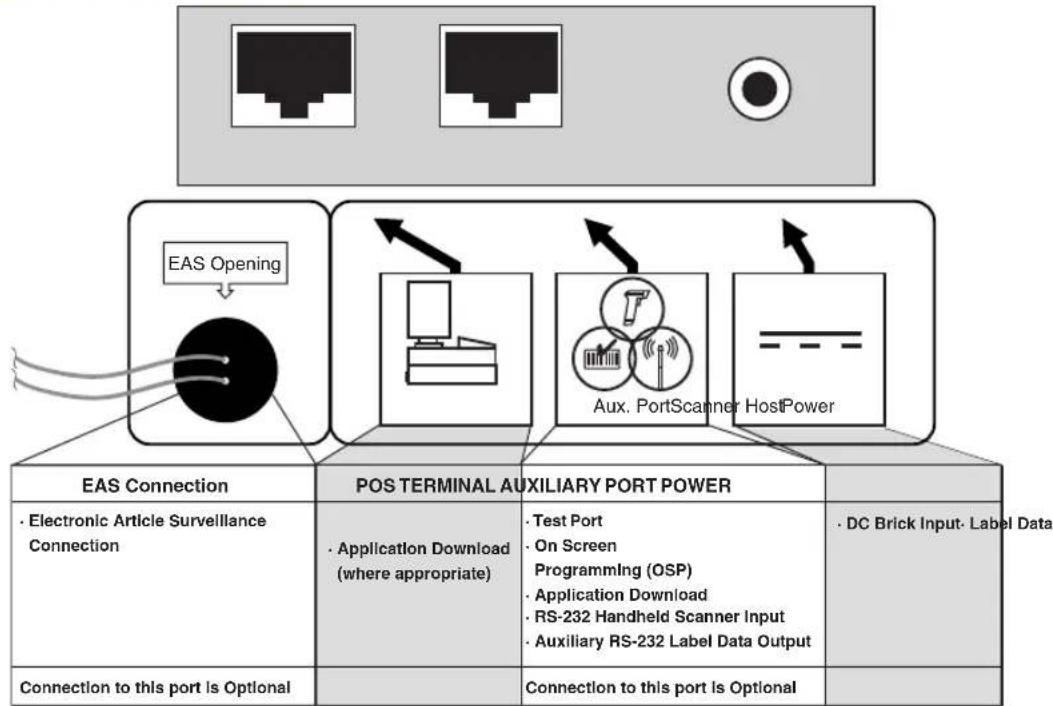
Figure 1. Connections
Operation
Scanning Items
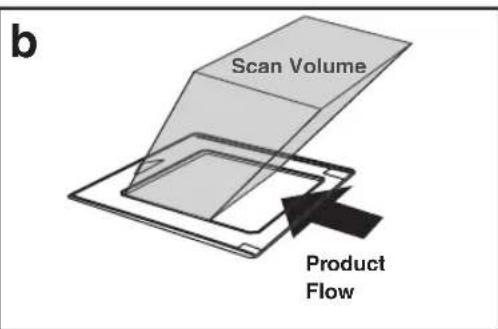
The scanner is mounted so its scan window is flush with the countertop. This allows for maximum working space, and also permits the user to slide items over its surface without having to grasp or pick them up. Bar codes are effortlessly scanned when swept through the zone projected from the substantial scan window as shown in Figure 2a.

NOTE
Facing bar code labels in the direction of scanning, or toward the scan window will optimize the scan rate. The arrow on the scanner's top cover indicates the direction scanned items should be moved (see Figure 2b).
With FirstStrike™ decoding software, the scanner can read most hard-to-read codes quickly and without excess orientation.

Figure 2. Operating the Scanner
Volume/Tone Push Button
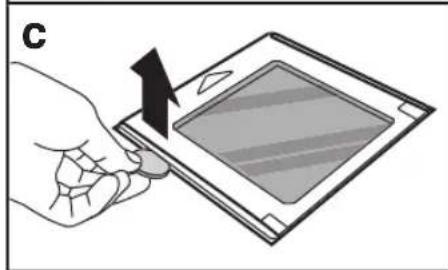
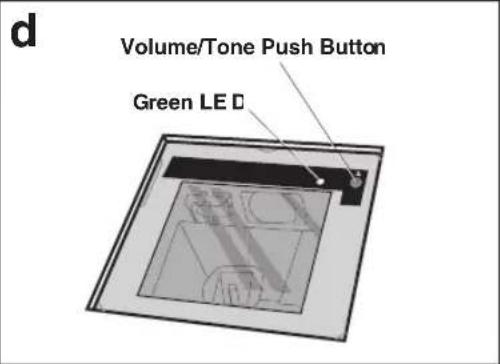
The Volume/Tone Push Button (Figure 2d — accessed by removing the Top Cover Figure 2c) also performs multiple functions depending upon the duration of time it is pressed:

NOTE
Volume changes made using the Volume/Tone Push Button are lost when the scanner is powered-down and are reset to the configured setting. If you wish to permanently change the volume, use the special programming labels in the Product Reference Guide.
Table 1. Volume/Tone Push Button Functions
| PRESS DURATION | FUNCTION COMMENT | |
| Momentary (when scanner is asleep) | Wakes scanner from Sleep Mode | Alternatively, the scanner can be awakened by: - Moving an object through the scan zone. - Scanning with an attached auxiliary scanner. |
| Momentary (when scanner is awake) | Increments volume | Press the push button momentarily to increase speaker volume. When the loudest volume is reached, a repeated press of the push button cycles volume back to the lowest setting, then volume increases on subsequent press(es). Four volume levels are available. |
| Hold, then release when the beeper sounds | Increments tone | Press the push button for approximately 2 seconds, then release. Each time this is done, the beeper will sound at one of three tones. Stop when the desired tone (high, medium or low) is sounded. |
| 4 Seconds | Scanner Diagnostics \(Mode^a\) | This mode allows system support personnel to troubleshoot problems with the scanner and is used to determine if it can read bar codes. Press the button for eight seconds or cycle power to exit Scanner Diagnostics Mode and reset the scanner. |
| 8 Seconds | \(Resets\ \mathrm{Scanner}^b\) | Only system support personnel should perform a reset. |
a. By standard default, this function is normally disabled to prevent accidental activation by users.
b. Users should not perform scanner resets except under the direction of trained systems support personnel.
Green LED Indicator
The green LED (Figure 2d) indicates scanner status as shown in the table below.
Table 2. Green LED Indications
| LED INDICATION | DURATION COMMENT | |
| \(Scanner Active^a\)(Normal Mode) | Scanner (Green) LED on steady and dim | The scanner is ready for operation. Scanning is immedi-ately available. |
| Good Read Indi-cationa | Scanner (Green) LED - bright flash | Indicates a bar code has been read and decoded. |
| Program Mode Indication | Scanner (Green) LED - Continuous flash-ing | Indicates the scanner is in Label Programming Mode.Cycle power to exit Programming Mode. |
| Sleep Mode Indi-cation | Scanner (Green) LED flashes slowly | The scanner motor and/or laser have automatically switched off and the unit has entered Sleep Mode due to extended inactivity. |
| Host Disabled | Scanner (Green) LED 1-second off, 1/10-second on | Host has disabled scanning. |
| Field Replace-able Unit (FRU) Warning (Error Mode) | Audible low tone 1 second. LED flashes continuously. | Serves notice that a fatal FRU failure has been detected. Call systems support for service. |
| FRU Indication | Scanner (Green) LED flashes a coded sequence in concert with the speaker. | Occurs ONLY upon Volume/Tone button push following a FRU warning. Enables service technicians to identify FRU failures. |
a. Certain functions of the LED are selectable to be enabled or disabled. Your scanner may not be programmed to display all indications.
Introduction
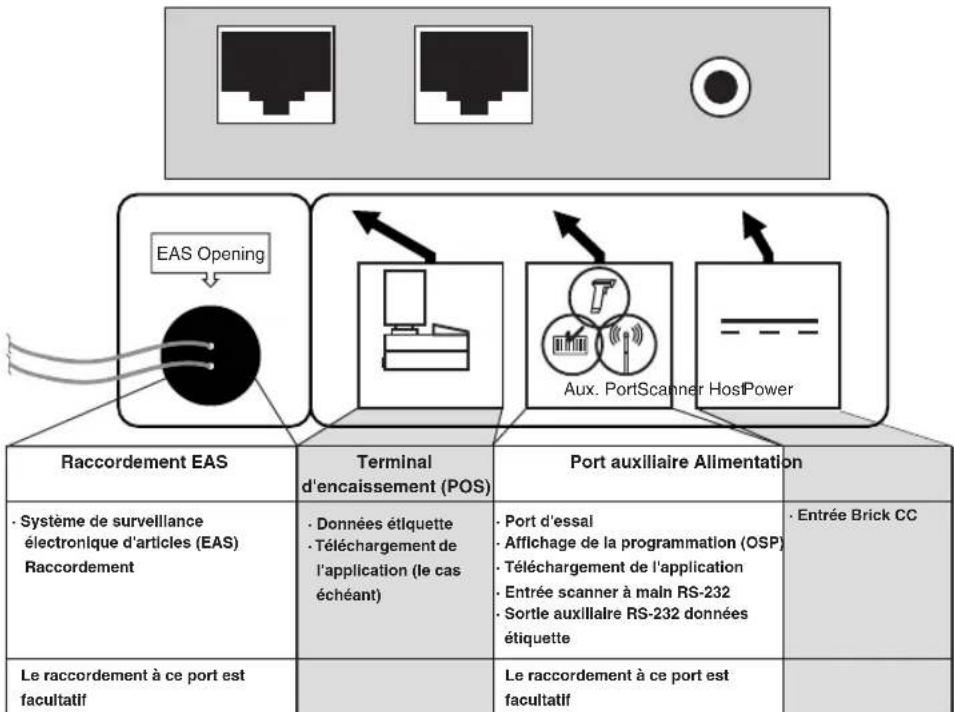
Figure 3. Raccordement
Fonctionnement
Lecture d'articles
Table 4. Green LED Indications
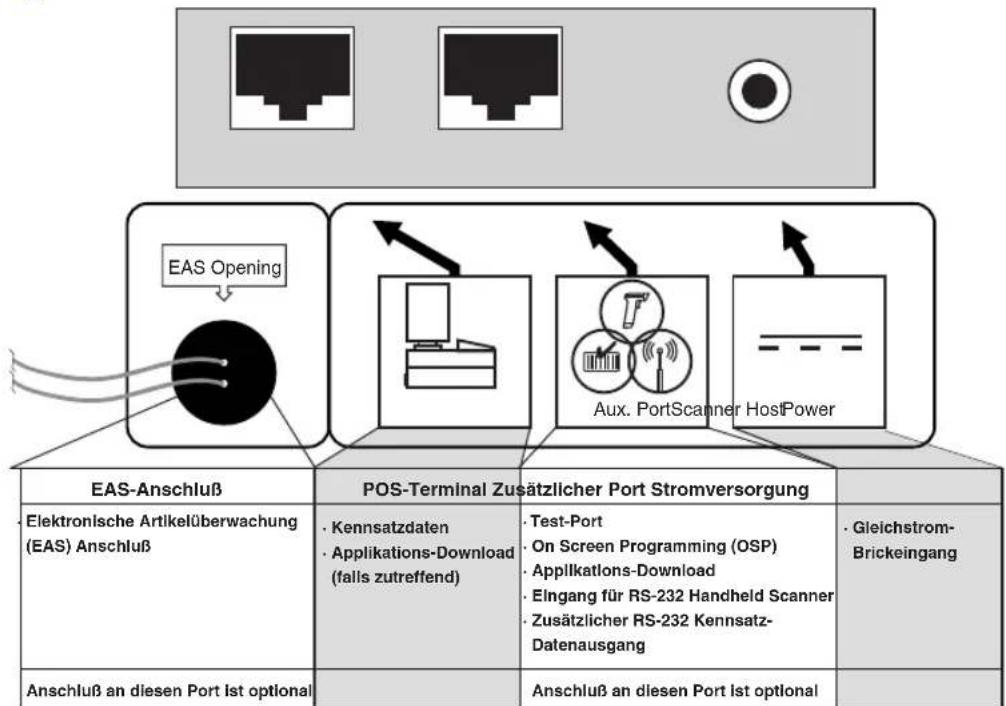
Figure 5. Anschlüsse
Bedienung
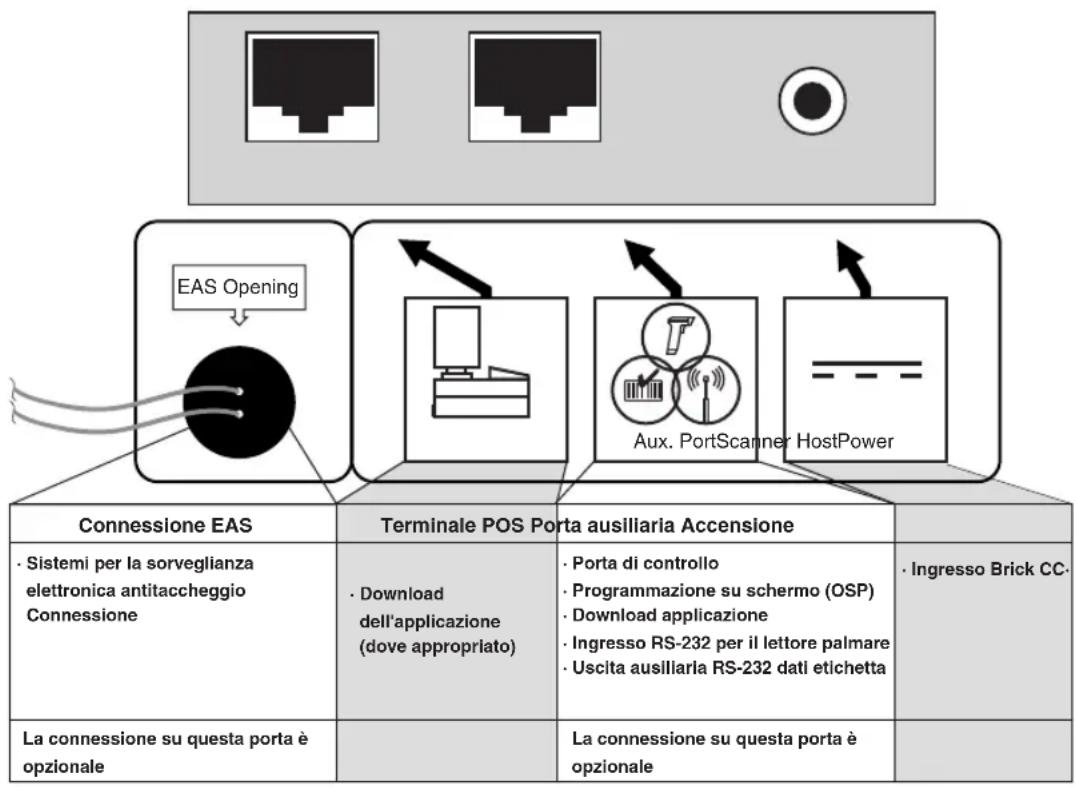
Figure 7. Concessioni
Funzionamento
Labels are shown here to illustrate their location only. Please view the labels on your product for actual details.
Power Supply
Models require either a Listed class II or class III with a Limited Power Source (LPS).
For the safety certification to be valid, class III input power sources must be IEC/ EN60950-1 (EN 60335-series, EN 60065 or relevant) approved.
Input: 100 - 240 VAC ±10% Output: 10 - 12 VDC ±10%
Max. Current: 1.5 A
NOTES
Appendix B — Productivity Index Reporting Option
Productivity Index Reporting™ Option: Your scanner may be equipped with the optional Productivity Index Reporting™ feature. This feature allows for data collection on the readability index of bar codes scanned by the scanner. This data may be transmitted to the POS Terminal where it may be easily sorted for action by the MIS department to improve bar code quality at the front end.
For additional information on how to enable Productivity Index Reporting in your scanner, please refer to the Product Reference Guide (PRG)
International Caution Statements
Class I
English This scanner is certified in the U.S. to conform to the requirements of DHHS/ CDRH 21CFR Subchapter J and to the requirements of IEC 60825-1:2007.
Class I and Class IIa products are not considered to be hazardous. The scanner contains internally a Visible Laser Diode (VLD) whose emissions do not exceed the maximum limits as set forth in the above regulations. The scanner is designed so that there is no human access to harmful laser light during normal operation, user maintenance or during prescribed service operations.
CAUTION
- Use of controls or adjustments or performance of procedures other than those specified herein may result in hazardous laser light.
- Do not attempt to open or otherwise service any component in the optics cavity. Opening or servicing any part of the optics cavity by unauthorized personnel may violate laser safety regulations. The optics system is a factory only repair item.
- Use of optical instruments with the scanner will increase eye hazard. Optical instruments include binoculars, microscopes and magnifying glasses. This does not include eye glasses worn by the user.
PNN NNNNINN,NTNNTNNTNNTNNTNNT
nynnnn nnnn nn nnnn nnnn
Pnwn nn nnnnnnnnnnnnnnnnnnnnnnnnnnnnnnnnnnnnnnnnnnnnnnnnnnnnnnnnnnnnnnnnnnnnnnnnnnnnnnnnnnnnnnnnnnnnnnnnnnnnnnn
Tn n nn nnnn nnnn nn nnnn nn
ywnywn
00
P0-0777777777777777
nnnnnnnnnnnnnnnnnnnnnnnnnnnnnnnnnnn
OTN-Byvannnbnpnnnbmynnn
noynn nn no nnnn nn nnnn
nnnnn nnnn nn nnnnnnnnnnnnnnnnnnnnnnnnnnnnnnnnnnnnnnnnnnnnnnnnnnnnn
-mpnnpnppnny-1mappnnn
ywnnynnnn nnnn nn nnnn
Appendix D - Warranty
Warranty
Datalogic warrants to Customer that this product will be free from defects in materials and workmanship for a period of 1 year from product shipment. In order to obtain service under this Warranty, Customer must notify Datalogic of the claimed defect before the expiration of the Warranty period and obtain from Datalogic a return authorization number for return of the product to designated Datalogic service center. If Datalogic determines Customer's claim is valid, Datalogic will repair or replace product without additional charge for parts and labor. Customer shall be responsible for packaging and shipping the product to the designated Datalogic service center, with shipping charges prepaid. Datalogic shall pay for the return of the product to Customer if the shipment is to a location within the country in which the Datalogic service center is located. Customer shall be responsible for paying all shipping charges, duties, taxes, and any other charges for products returned to any other locations.
Warranty is subject to the limitations and exclusions set forth in the paragraphs that follow.
WARRANTY SET FORTH ABOVE IS IN LIEU OF ANY OTHER WARRANTYES, EXPRESS OR IMPLIED, INCLUDING MERCHANT-ABILITY AND FITNESS.
Exclusions
Warranty coverage shall not apply to any claimed defect, failure or damage which Datalogic determines was caused by: abuse, neglect, improper use of product; failure to provide product maintenance, including but not limited to cleaning of the display in accordance with product reference guide; installation or service of product by other than Datalogic representatives; use of product with any other instrument, equipment or apparatus; modification or alteration of product or units with Warranty Void labels that have been tampered with. External cables and replacement of upper window/cartridge due to scratching, stains or other degradation will not be covered under the Warranty. External power supplies returned for service must be accompanied by the original product for performance of service.
Returned products that Datalogic Inc. has determined are not covered by Warranty, will be charged Datalogic Inc. standard repair rates then in effect for repair of product. Replacement of display due to scratching, stains or other degradation will not be covered under Warranty. If a product is determined to be not repairable customer will be notified and product may be returned to customer at their request. A minimum repair fee may be charged.
Limitation of Liability
DATALOGIC'S REPAIR OR REPLACEMENT OF DEFECTIVE PRODUCT AS SET FORTH ABOVE IS THE CUSTOMER'S SOLE AND EXCLUSIVE REMEDY ON ACCOUNT OF CLAIMS OF BREACH OF WARRANTY OR PRODUCT DEFECT. UNDER NO CIRCUMSTANCES WILL DATALOGIC BE LIABLE TO CUSTOMER OR ANY THIRD PARTY FOR ANY LOST PROFITS, OR ANY INCIDENTTAL, CONSEQUENTIAL INDIRECT, SPECIAL OR CONTINGENT DAMAGES REGARDLESS OF WHETHER DATALOGIC HAD ADVANCE NOTICE OF THE POSSIBILITY OF SUCH DAMAGES.
Assignment
Customer may not assign or otherwise transfer its rights or obligations under Warranty except to a purchaser or transferee of product. No attempted assignment or transfer in violation of this provision shall be valid or binding upon Datalogic.
Risk of Loss
Customer shall bear risk of loss or damage for product in transit to Datalogic. Datalogic shall assume risk of loss or damage for product in Datalogic's possession or product being returned to Customer by Datalogic, except such loss or damage as may be caused by the negligence of Customer, its agents or employees. In the absence of specific written instructions for the return of product to Customer, Datalogic will select the carrier, but Datalogic shall not thereby assume any liability in connection with the return shipment.
NOTES
EUROPEAN DECLARATION OF CONFORMITY
DATALOGIC TM
Datalogic Scanning, Inc. hereby declares that the apparatus specified below has been tested and found compliant to the following European Council Directives and Harmonized Standards:
Equipment Type: Barcode Scanning Equipment
Apparatus: Magellan 2200VS and 2300HS
Manufactured by:
Datalogic Scanning, Inc.
959 Terry St. Eugene, Oregon USA, 541-683-5700
Placed into EU Service:
Nov 2003 under PSC logo, May 2007 under Datalogic logo.
Updated July 2010
Council Directives:
EMC 2004/108/EC (2004)
Low Voltage 2006/95/EEC
Standards:
EN 55022:2006+A1:2007
Generic Emission
EN 55024:1998, A1:2001,A2:2003
Generic Immunity - ITE
EN 61000-3-2:2006
Harmonic Current (power supply)
EN 61000-3-3:1995,
A1:2001,A2:2005
Voltage Fluctuation/Flicker (power supply)
EN 60950-1:2007+A11:2009
Safety of Information Technology Equipment
EN 60825-1:2007
Safety of Laser Product
A technical construction file for this apparatus is retained at the above address.

July 19, 2010
Larry Smith
Engineering Manager
Supply Chain Operations
Datalogic Scanning, Inc.
Australia
Datalogic Scanning Pty Ltd
Telephone: [61] (2) 9870 3200
australia.scanning@datalogic.com
France and Benelux
Datalogic Scanning SAS
Telephone: [33].01.64.86.71.00
france.scanning@datalogic.com
Germany
Datalogic Scanning KK
Telephone: 81 (0)3 3491 6761
japan.scanning@datalogic.com
Latin America
Datalogic Scanning, Inc
Telephone: (305) 591-3222
latinamerica.scanning@datalogic.com
Singapore
Datalogic Scanning Singapore PTE LTD
Telephone: (65) 6435-1311
singapore.scanning@datalogic.com
Iberia
Datalogic Scanning SAS Sucursal en España
Telephone: 34 91 746 28 60
spain.scanning@datalogic.com
United Kingdom
Datalogic Scanning LTD
Telephone: 44 (0) 1582 464900
uk.scanning@datalogic.com

www.scanning.datalogic.com
Datalogic Scanning, Inc.
959 Terry Street
Eugene, OR 97402
USA
Telephone: (541) 683-5700
Fax: (541) 345-7140