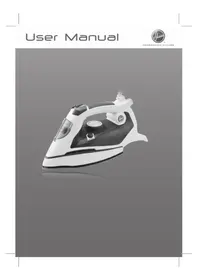
TIF2600 - Iron HOOVER - Free user manual and instructions
Find the device manual for free TIF2600 HOOVER in PDF.


| Product type | Iron |
| Brand | Hoover |
| Model | TIF2600 |
| Dimensions (L x W x H) | 28 x 12 x 14 cm (estimated) |
| Weight | 1.5 kg (estimated) |
| Power supply | 220-240 V ~ 50/60 Hz |
| Power | 2400 W (estimated) |
| Water tank capacity | 300 ml (estimated) |
| Soleplate | Stainless steel |
| Ironing types | Dry, steam, steam jet, vertical |
| Anti-drip function | Yes |
| Auto shut-off | Yes (30 s horizontal, 8 min vertical) |
| Anti-scale function | Yes (built-in cartridge) |
| Self-cleaning | Yes |
| Spray | Yes |
| Cooling fan | Yes |
| Safety | Auto shut-off, anti-drip |
| Maintenance | Self-cleaning, empty tank, clean soleplate |
| Warranty | According to reseller conditions |
Frequently Asked Questions - TIF2600 HOOVER
User questions about TIF2600 HOOVER
0 question about this device. Answer the ones you know or ask your own.
Ask a new question about this device
Download the instructions for your Iron in PDF format for free! Find your manual TIF2600 - HOOVER and take your electronic device back in hand. On this page are published all the documents necessary for the use of your device. TIF2600 by HOOVER.
USER MANUAL TIF2600 HOOVER
OAHHIEXPHSEΩE(GR) .P 89
PYKOBODCTBO NOJb3OBATEJRA (RU) .P 97
INSTRUKCAOBSLUGI (PL) P 105
NAVOD K OBSLUZE (CZ) P 113
NAVODILA ZA UPORABO (SI) .P 121
KULLANIM KILAVUZU(TR) .P 129
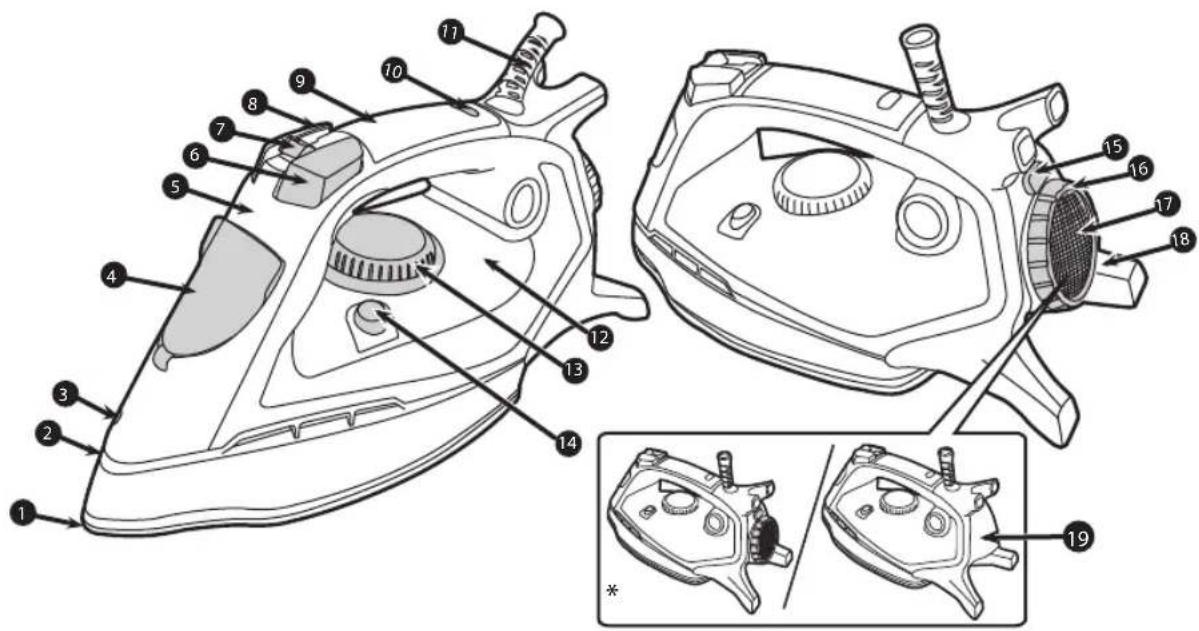
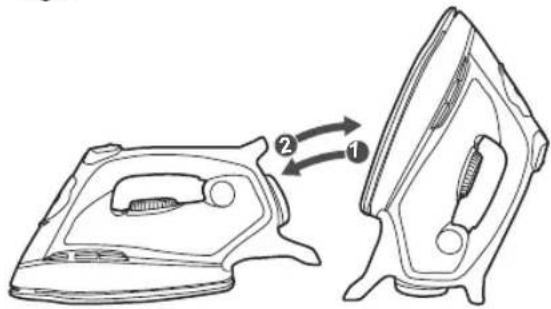
Fig.1
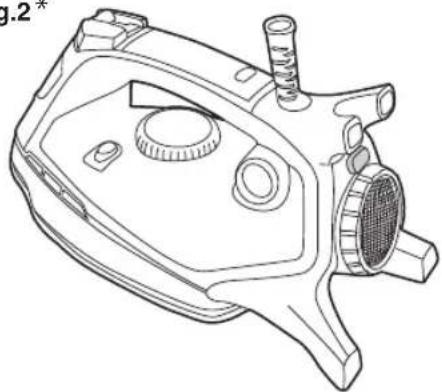
Fig.2*
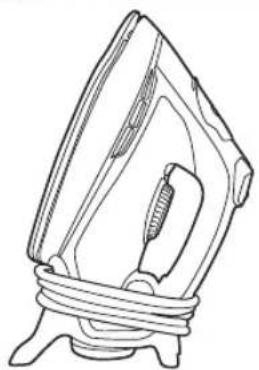
Fig.3
Introduction
Dear customer,
First of all, we would like to congratulate you for purchasing this Hoover iron and to thank you for the confidence you have in Hoover brand.
This appliance has been manufactured with great care, respecting all of our quality criteria and has been tested several times. We hope its use will fulfil your expectations. We are strongly convinced that it will make your ironing much faster and better.
Before using your new Hoover appliance, please read carefully this user's manual. If you need further information or if you encounter any trouble which are not noticed in this manual, please contact the after-sales service or your standard dealer.
Important Safety Instructions
Read this user manual carefully before you first use and save it for future reference.
This appliance can be used by children aged from 8 years and above and persons with reduced physical, sensory or mental capabilities or lack of experience and knowledge if they have been given supervision or instruction concerning use of the appliance in a safe way and understand the hazards involved. Children shall not play with the appliance. Cleaning and user maintenance shall not be made by children without supervision.
- This product has been designed for domestic use only. In case of any commercial use, inappropriate use or failure to comply with the instructions, the manufacturer is not responsible and the guarantee will not apply.
- Before connecting your appliance, check if the mains voltage is the same as the voltage indicated on your appliance and that the power outlet is connected to the earth.
-
Ensure before each use that the electric cord or any other important part is not damaged.
-
Certain Models Only
Important Safety Instructions
- Keep the iron and its cord out of reach of children less than 8 years of age when it is energized or cooling down.
- Never direct the steam towards persons or animals. Never direct the steam jet towards any other electrical or/ and electronic appliances.
- The iron is not to be used if it has been dropped, if there are visible signs of damage or if it is leaking.
- If the appliance shows evidence of breakdown, malfunction, leakages. Please make sure it is checked by an authorized Service Centre to avoid any danger.
- Always make sure the appliance is switched off, unplugged and cooled down before doing any maintenance work.
- The iron must not be left unattended while it is connected to the supply mains and before it has cooled down.
- Do not unplug the appliance by pulling on the cord or on the appliance.
- Never immerse the iron, the stand, the cable or the plugs in water. Never hold them under the water tap.
- The soleplate of the iron can become extremely hot and may cause burns if touched. Never touch the electric cords with the soleplate.
- If the supply cord is damaged, it must be replaced by the manufacturer, service agent or similarly qualified persons in order to avoid a hazard.
- When placing the iron on its heel, ensure that the surface on which the heel is placed is stable.
Important Safety Instructions
- The plug must be removed from the socket-outlet before the water reservoir is filled with water.
- The surfaces with are liable to get hot during use.
- To have a electronic copy of the instruction manual contact the after sales service in guarantee card.
- The iron must be used and rested on a stable surface.
Parts Description
| 1 Soleplate |
| 2 Air Outlet |
| 3 Spray Nozzle |
| 4 Water Fill Cover |
| 5 Front Cover |
| 6 Boost Button |
| 7 Steam Control |
| 8 Spray Button |
| 9 Soft Touch |
| 10 Lamp Cover |
| 11 Swivel |
| 12 Water Tank |
| 13 Temperature Dial |
| 14 Self Clean |
| 15 Fan Switch |
| 16 Fan Frame |
| 17 Fan Grid |
| 18 Back Plate With Fan |
| 19 Back Plate Without Fan |
Chapter 1: Preparation for Use
Place the iron on a stable and level surface, for example on the hard part of an ironing board or on a heat-resistant surface.
Chapter 1.1 : What Kind of Water May be Used?
The Hoover iron has been designed to be used with tap water only.
There is no need to use distilled or pure distilled water.
Nevertheless, in case you live in a hard water area, you can mix 50% of distilled water with 50% of tap water.
Do not use any other kind of water or do not add any other contents to water tank as it can damage your appliance.
Chapter 1.2 : Filling the Water Tank
Remove the mains plug from the wall socket before filling the iron.
Set the steam button to position "0" or "..." and open the water fill cover.
Please fill your iron with normal tap water before using for the first time.
Use the water beaker supplied to fill clean tap water into water tank until "MAX" filling level.
Push the water fill cover firmly to close and dry any spilt water around the enclosure of the appliance, do not overfill.
WARNING: Do not add vinegar, hot water, perfume, or any other kind of chemical agents or any other contents in the water tank. It could damage the steam generator and shorten its life.
Chapter 2: Using Your Iron [Fig.1]
Connect the appliance with the mains cord to an earthed socket and switch the power on. Stand the iron in the vertical position, turn the temperature dial to your desired setting, the iron will make an alarm sound and the power light on the handle will start flashing in an green colour.
Move your iron in one complete motion from the vertical position to horizontal returning to the vertical position, on completion of this movement the light on the handle will illuminate Red and the soleplate will begin heating. When the red light switches off, your appliance is ready for use.
N.B
1) The first time you use your appliance you may find some dust and smell of fumes, this is quite normal and they will quickly disappear.
2) Your Iron is fitted with a number of features for Safe use and these can be noted by the colour of light being illuminated on the handle:
a) Green light, this illuminates when the Iron is initially switched on and requires to be moved as described above.
b) Red light, this illuminates when the Iron is in the heating mode and will turn off after it has reached the set temperature.
c) Green light, this illuminate when the iron has been in the Stationary position for more than 30 secs and the power to the heating element has been cut off until the iron movement is started again.
Chapter 2.1: Regulating the Soleplate Temperature
Select the temperature of the soleplate by turning the dial on the iron to the desired position.
Wait a few moments until the temperature indicator is off.
It will indicate to you that the soleplate has reached the requested temperature.
While ironing, the temperature dial indicator may turn on and off, the temperature adjusts without interrupting your ironing.
Help
To know the best suitable temperature for each textile, check the laundry care label of the article to be ironed. Please note that during use, the temperature light goes on from time to time. It signifies that the iron is heating up to the set temperature.
If a fabric is made with various kinds of fibres always select the soleplate temperature to suit the most delicate one. If you select a lower temperature while ironing, wait until the iron has cooled down to the set temperature before you continue ironing.
If the temperature is too low, some drops of water could escape from the soleplate. Please raise up the temperature above the 2 dots ( ) to avoid this issue.
Chapter 2.2 - Ironing
Dry Ironing
For dry ironing, turn the steam control knob to "0" or "X". This will cut off the steam flow if water is in the water tank.
Turn the temperature control knob to select the desired fabric/temperature setting. The indicator power light will illuminate, ensure the iron is on a smooth and stable surface vertically.
After the indicator power light goes out, you can begin to iron.
Steam Ironing
As indicated on the temperature control and the table on the rear of the iron, steam-ironing is only possible at higher ironing temperatures (between “ ” to “MAX”).
Ensure that there is enough water in the water tank.
Stand the iron on its end; Insert the mains plug into the wall socket.
Set the temperature control knob at the required position within the steam area.
After the indicator power light has gone out and has come on again, you may start ironing.
ATTENTION: Never direct the steam towards people. Burns or serious injury may occur.
Cooling Feature \* [Fig.2]
Turn on the fan by pushing FAN SWITCH to cool the handle and user environment.
Push again to turn it off.
Chapter 2.3 - How to Choose the Correct Soleplate Temperature
To obtain the best results, it is important to set the correct temperature of the soleplate.
| Textile Soleplate T°C | |
| Jeans Max | |
| Cotton • • | |
| Linen Max | |
| Starched Clothes • • | |
| Velvet/Alcantara • | |
| Wool • | |
| Silk • | |
| Cashmere • | |
| Rayon • | |
| Polyester • | |
| Nylon • | |
| Acrylic • | |
| Lycra • | |
| Polyamid • | |
Help
When steam ironing clothes on which shiny patches may occur, we recommend you to set the soleplate temperature to a lower temperature or to iron the garment on the reverse.
Start with the fabrics that need to be ironed at a lower temperature () and finish with those that needed to be ironed at the higher temperature ( /Max) .
- Certain Models Only
Chapter 2.4 - Shot of Steam
Ensure that there is enough water in the water tank.
When the temperature control knob is set to steam setting (between "●●" to "MAX") strong steam can be used. Press the steam boost button, the soleplate will emit a strong flow of steam.
NOTE
Only use the steam boost button when the steam iron has reached the steam or maximum temperature.
Do not press the steam boost button more than 3 times repeatedly. For optimum steam output, leave an interval of at least 5 seconds between pressing the steam boost button.
The steam boost button feature can be used with Dry or Steam ironing as desired.
ATTENTION: Never direct the steam towards people. Burns or serious injury may occur.
Chapter 2.5 - Spraying
Ensure there is enough water in the water tank.
Press the spray boost button to produce a fine spray of water from the nozzle and continue ironing.
NOTE: Do not spray silk.
Chapter 2.6 - Vertical Shot Of Steam
When the temperature control knob is set to a steam setting (between “●●” to “MAX”) vertical steam can be used.
Simply hold the iron vertically, positioned in front with a slight distance from the item to be steamed, and press the steam boost button.
ATTENTION: Never direct the steam towards people. Burns or serious injury may occur.
NOTE: This is especially useful for getting wrinkles out of hanging clothes, curtains, wall hangings etc.
Chapter 2.7 - Automatic Anti-Calc Function
Your iron contains an anti-calc cartridge to reduce scale deposits. This considerably prolongs the operational life of your iron.
The anti-calc cartridge is an integral part of the water tank and does not need to be replaced.
Chapter 2.8 - Automatic Anti-Drip Function
Your iron has an anti-drip function. The iron automatically stops generating steam when the temperature is too low to prevent water from dripping out of the soleplate.
NOTE: When using the Steam function, your appliance may stop generating steam for several seconds, this is normal.
Chapter 2.9 - Self-Clean Function
Use the self clean function once every two weeks. If the water in your area is very hard, the self clean function should be used more frequently.
Make sure the iron is unplugged.
Set the steam control knob to OFF position.
Fill the water tank to the maximum level.
Put the plug in the wall socket.
Select the maximum ironing temperature.
Unplug the iron when the temperature pilot light has gone out.
Hold the iron over the sink, press and hold the self clean button and gently shake the iron to and fro.
Release the self clean button after 5-10seconds.
Repeat the self clean process if the iron still contains a lot of impurities.
NOTE
Steam and boiling water will come out of the soleplate, impurities and flakes(if any)will be flushed out.
ATTENTION: Keep hands and body away from hot water.
Do not push and hold the self clean button while ironing.
Chapter 2-10 Auto Shut off function
a. The auto-shut-off function automatically switches off the iron if it has not been moved after 30 secs in horizontal position or after 8 mins in vertical position.
b. The power light starts flashing to indicate that the iron has been switched off by the auto-shut-off function.
c. To let the iron heat up again:
1. Move your iron in one complete motion from the vertical position to horizontal returning to the vertical position.
2. if the temperature of the soleplate has dropped below the setting ironing temperature, the power light will turn on, please waiting until it goes out before you start ironing.
3. If the power light does not turn on after you move the iron, the soleplate still has the right temperature and the iron is ready to use.
Chapter 3: Maintenance and Cleaning
To prevent any risk of burns, all maintenance and cleaning operations should only be carried out when the unplugged appliance has cooled down for at least 2 hours.
Before cleaning, set the steam control knob to the "0" or "×", unplug the iron from wall socket, and allow the appliance to completely cool down, and then clean with a damp cloth, do not immerse the unit into water or other liquids.
Clean and empty the water tank after every use.
If ironing clothes with high temperature, which is not recommended on the garment table, this will cause burns to your clothes and residue left on the soleplate of the unit, it is recommended that you iron over an old cloth to remove any residue from the soleplate.
After use, set the steam control knob to the "0" or "X", disconnect the unit from mains socket, empty remaining water from water tank and then store the iron after it has been completely cooled down.
Never use scouring pads, abrasive or chemical cleaners, or solvents.
Chapter 4: Storage [Fig.3]
Empty the water tank.
Coil the power cord on the back plate.
Put the iron in the upright position on it's heel.
Wait at least 30 minutes allowing the sole plate to cool down.
Then you can take away your appliance in order to store it safely and easily.
7-GB
Important Information
Hoover Service
Should you require service at any time, please contact your local Hoover Service Office. Please see all the contact details below.
Safety
Hoo ver believes that independent approval is the best way of demonstrating safety in design and manufacture. All Hoover irons have been manufactured in compliance of all safety regulations and approved by the most qualified independent approval certification bodies.
ISO 9001
Hoover's factories have been independently assessed for quality. Our products are made using a quality system which meets the requirements of ISO 9001.
The Environment
The symbol on this appliance indicates that this appliance may not be treated as household waste. Instead it must be handed over to the applicable collection point for the recycling of electrical and electronic equipment. Disposal must be carried out in accordance with local environmental regulations for waste disposal. For more detailed information about treatment, recovery and recycling of this appliance, please contact your local city office, your household and waste disposal service or the shop where you purchased the appliance.

This product complies with the European Directives 2006/95/EC, 2004/108/EC and 2011/65/EC.
HOOVER Limited, Pentrebach, Merthyr Tydfil, Mid Glamorgan, CF48 4TU, UK
Your Guarantee
The guarantee conditions for this appliance are as defined by our representative in the country in which it is sold. Details regarding these conditions can be obtained from the dealer from whom the appliance was purchased. The bill of sale or receipt must be produced when making any claim under the terms of this guarantee.
Subject to change without notice.
Introduction
Cher Client,
Pa3delen2:IcnoIb3OBAHne yTIOra [Pnc.1]
IopKIOUHTe np60p K cetn 3eKtponHnH, BCTaNB BVNKy B po3eTKy N BKIOUH KHOKNY nITAHN. IocTaBbTe yTOB B BEPTKALbHOE NOLOXKeHne, NOBepHnte peryIaTOp TEMpePaTyb B HxHoe NOLOXKeHne. YTOB BbIaCT CnHrAIN TpeBOrn Ha pyKOATke HaHET MURaTB INDkAtop NITAHN 3eJIeHoro CBeta.
OdHIM DvNKeHnEM NepemecHTe yTOr n3 BepTKaJIbHOr ONoJKeHnB RtognOHTaJIbHoE, a 3aTeM CHOBa B BepTKaJIbHOe. B KOHcE eToro DvNKeHnJaMnoUka Ha pyKoAITke 3aROpNTcKpaChbIM, I NOIoWBA YTHOra NaHcHET HarpeBaTbcra.
Kak ToIbko KpaCha JAmNoUka NorachET, 3To O3HauaET, YTO BaIe yCTpoNCTBO rTOBO K pa6oTe.
PnmuMeaHne.
1)ПипгвOMИСПОЛБ3OBAHINIIпибopaВыМожeteобарукntbСлдыпьИиЗа nxДыMa.3ToHopMaIbHo 6bICrpoИСчe3HET.
2) BaW yTHoR ocHaunepaHOMyHKnI 6e3oNaChocTn, KOToPbI paCNo3HaOTcN o NcBETy lambli Ha pyKoRTke:
a) 3eJeha J lamnocha 3aropaetc npn nepBOM BkHoueHH yTIOra n Tpe6yeT OINcaHHbIX BbIe DeiCTBn.
b) KpacHaj lamnoquKa 3aropaeTcR, Korda yTIOr HaxoNTcB peXIMe HarpeBa, n racHeT, KaK TOnbKO OH Na6npaet 3aDaHHyToemnpaTyP.
c) 3eIeHaj lamnoyka 3aropaeTc, KOrda yTHor HaxoDntc6e3 DvnKeHnB TeueHne 30 cek., nHTaHnHarpeBaTebHoro 3JeMeHtA OTKIOUaETc. Lamnoyka rachet npu BO3O6HOBLeHn DvnKeHn yTHora.
Pazden 2.1: PeruInpoBka TempepatypbI noDoWBbl
Bb6epnte TemnepaTyPy nooWbbl, nobepHyB peryIaTOp B HxHoe nIoXeHne.
Iodoknte HeckoBko cekyH, noka noracheTnHdkaTop TemnepaTpybl.
3To 03HaayeT, yTo nooowBa Harpelacb Do HyxHoro ypOBnA.
B npouecce rnaKn HndkaTop TempeaTpyb Ha peryIaTope MoKeT nepNoDnueckN BkIoUaTbcN BBKIOUaTbcN, KoppeKnpyra CteeneH hArpeBa nooosBbl 6e3 Heo6xoImoctn npepbBaT npouecc.
Pone3hbi COBET
Haubonee nodxodnaa memnepamypda kao doo muna mkanu yka3bjaemc ha bupke c daHHbmu no yxody 3a konkpermhbim u3denuem. Obpamume bHumahue,mo e npoucese uonnb0baunr nepuoduuecku EKnUcaemc undukamop memnpamypbl. 3mo 3Naum,mo ymno Ha2peBaemc do 3adaHno memnpamypbl.
Ipu 2naKke kombunupoabHHbIX u3deu 6ce2a bbybupaume memnepamypy, npuememyio dna hauboonee deukamho mkahu.
Ipeeknouuucb 6 npouecce 2aakku Ha 6oee HuaKyu memnpampy, ndookdume hekomopoe bemna ym02 ocmbihem do BHO6ycaMaHOBneHHO2 3HaueHua.
Ipu cnuwkom Huzkou memnepamype Ha nodowbe ym02a mozym oba3oabcbcKaannu bOdbi. Ymo6bI He donycmumb 3mo2o, noobbcme memnpampy do 2 moek ( )
Cyxg rnaXka
Дяначасухи Глжкн hyжno NOBepHybperyIaTOp npa Ha "0" nIIN "".В stom clyuae npn haJIuHn BOIb B pe3epByape nepeKpbIbAetc noTOK npa.
NobepHnte peryIaTOp TemnepaTypbHaJeHeHne,OTBeuAoUe TnTuTKaHN/3HaueHNO,piMeMEmOMy IJIa N3JenIa, KOTOpoe BbI co6HpaeTecb rAaNTb.3aOpuntc HndkaTOp nITaHn, npn 3TOM yTOr DOJKeH haoDHTCBA BepTKaJIbHOM NOLOXeHn Ha POBHO uYCTOuHBOIO NobepxHoCTn.
Pocne OTKIOUeHn HINDAKATopa NITaHn MOXHO HaNuHaTb rJaNTb.
Napobaa rnaKa
Kak yka3aHo Ha peryIaTope TemnepaTpybI Ha Ta6JIuKe, pa3MeueHHO c3aDN Ha YTORE, npOBaR rnaKKa BO3MOxHa ToIbKO npi 6oJee BbICOKnx TemnepaTpyax (OT "●" do "MAX").
PpOBepbTe KOJIInHeCTBO BOdBi B pe3epByape.
IocTaBbTe yTIO HA 3aDnIK. BcTaBbTe BnIKy Bpo3eKy.
YcTaHOBnTe peryIaTOp TempePaTypb I HyKHOe NIOJKeHne B 3OHe npOBo rJaKKn.
Kak ToIbKO INHnKaTOp NITaHnN ONGaB3aTOpTcM, MoXHO HaINHaTb IaNTb.
BHIMAHNE: HnKoIa He HapabJIte ctpyIO npa Ha IIOe. 3To MoKeT cTaB npuHNO OKOROB nIN cepbe3bIX TpaBM.
Функцяохлaxдeнг\* [Pnc.2]
BKNIOHTe BENTNIAIToP c nOmoUbIO KHOPIKIN BRNIIOUEHINBEHTNIAITOPA, UTO6bIOOCTyIDNTpykY yTOra N 30Hy BOKpyr Hee.
ДлгоТКнluчehнФунки,ешpa3нхмITEKhoNky.
Pa3dien 2.3 - KaK BBi6paTb npaBnIbHyIO Tempepaty nooWbbl yTora?
Длл noIyehnna lyuwhnx pe3yIbTaTOB BaxHO npaBnIbHO yCTaHOBnTb TempepaTy pNoDOWbbl yTHora.
HaMMTe KhoNkky 6pb3raIkn, yTo6blBbInyCTnTb paCnblneHHyO CTpyo BObl n3 conla, n npdoJkaTe rAkky.
PIMMEAHNE: He nCnoJb3yIte 6pbI3raIky dJIa IeJa.
Pa3delen 2.6 -BepTnKaIbHbIy Bblnyck npa
Korda perylaTOp TemnepaTybI yTaHOBLeH Ha 30Hy npa (OT " DO "MAX"), MoXHo nOJIb3OBAtbcr BepTNkaIbHOI cTpye npa.
Ipocto DepeKHTe YTOB BepTnKaIbHO nepei N3dJIeHem Ha HeKOToPOM pacCTOaHIN OT Hero n HaxmMaTe KONKy BblNycka npa.
BHIMAHNE: HnKOrda He HapabJIte cTpyIO npa Ha IIOJe. 3To MoKeT cTaTB npuHoi OXorOB nIN cepBe3HbIX TpaBM.
PIMMEAHHE: 3To Oc6eHNO yO6Ho npu ydaHn cKaIOK Ha BncaIe OdeJKe, 3aHaBeckax, HAcTeHHo IpaHnpOBke n np.
Pa3dien 2.7 -Функця abTomatnuecko 3auntbI OT HaKINN
Baw yIor ochaueh KaptpnIxem 3aunbl OT haknn n Iy CHNXeHn KOnueCTBa OTIOxHeH. 3TO 3aMeTHO npodnaeAET cpoK cnXk6bl yTora.
KaptpnJ3aunTbIOTHaKnHBCTpOeH BpeepByap IyBoBn He Tpe6yeT aMeHbI.
Pa3dien 2.8 -Функця abTomatueckoro npedotBpauuHn o6pa3OBaHHKan
Baw yTIO OCHaUeH 3aUHToIOT o6pa3OBaHnRA KaneIb. CneuaJIbHaN CnCTema ABTomATnueckn PpeKpaAaET npOn3BOcTBo napa npn cInuKOM Hn3KOJ TeMnepaType, UTo6bl He dOnyCTtB o6pa3OBaHnRA KOHeHcTa Ha noDoWBe.
PIMMEAHNE: Pn nCnoB3OBAHm FyHKuN npa ero npOn3BOcTBo MoKet ppeKpaTaBcHa HeckoBko cekynd, 3To HopMaIbHa cTuayua.
Pa3delen 2.9 -Функця самоочистkn
IcnoB3ynte FyHKnIO cMoOuNCTK OINH pa3 KaKDbIe IBe HeJeI. EcnB B BaWeM perNoHE cnNkOM JeCTKa, cMoOuNCTKMOxHO pNOBOIDtB Yaue.
063aTeBbHO BbIHbTe BNkY n3 pO3eTKN.
YcTaHOBnTepeyIaTOpTemnepaTypbI BNoIooKeHneBbIKJI.
HanoJIHnTe pe3epByap IaI BObI Do MaKcMaJIbHOI OTMeTKN.
BcTaBbTe BnIky Bpo3eTky.
YctaHOBtpepeyIaTOpHaMaKcMmaJIbHyIO TemnepaTpy rJaKKn.
BbHbTe BnIky n3 po3eTKN, KaK TOnbKO noracHeT KOHTpoJIbHbI INHdNKaTOP.
IomeTe yTIOH aD paKOBnHO, HAKMTe N yDepKnBaTe KHOKNy cMOOuNCTKN n CJIerKa BCTPaxNBaTe YTOB BnepeiHa3a.
Yepe3 5-10 cekyHd OTnycHTe KhoNky caMOOChTKn.
EcIn ByTtore eue octaIncb acstnbcI 3arpa3HeHn, noBToPte onepaunio.
ПОНМЕЧАНЕ.
PnI NTOM n3 NOoWbbl yTlOra 6ydy T bIXoAnTb nap, rpr3b n xlonpb (ecn O6pa0BaIncb).
BHIMAHHE: He noctabla Te pyu N npyhe qacte Ta n oD ctpyO ropae BObl.
He haxmaite (H He ydepknaite) KhoNky caMoOuNCtKn B npocece rJaXkn.
Pa3dE1 2-10 ABtOMaTnueckoe BbIKIIOUeHne
a.Функца ABTomatueckoro OTKluohyehn yIora cpa6aTabBaet,ecn yTHor haoJntc8e3 DBNKeHnB TeueHne 30 cek.B rOpnsOHTaJIbHOM NOLOKeHHn NIN 8 MHN.B BepTuKaJIbHOM NOLOKeHHn.
b. INIINKATOp NITAHnHaHnHaET MIRaTb. 3TO O3HaHaeT, 4TO YTHOr 6bll OTKnIOueH ABOTMaTIueckn.
c. Yro6bl ythor cHOBa HarpeIcra:
1.ОднIM ДвижЕнем поспгутгИЗ ВерТикальНOrо пложеняВ ГориЗ�тальhoe И обpaTHOВ ВерТикальHoe..
2. EcnI TemnepaTpaNoOnBbI Naadaet Hnke 3aDaHHo, BkInuOaETcNnDnKATOp nITaHn. DoJntecb noka 3Ta lamnOvka noracHet npexJe Yem Haatb rAaNTb.
3. EcInI lamnoUka nHTaHn He BkHIOuAeTcnaocne H3MeHeHHn NOIOKeHHn YTO, 3TO 3HaHT, 4TO NOOUBBa BCE ue IopraHn, n yTOr rotOB K pa6oTe.
Pa3dE1 3:06cnyxmbaHne n ouhctka
YTo6bI He DOnyCTnTb OXorOB, BCE onepaunno 06cnykuaHIO u nCtke cneJeT npOBOITb, KOrda npH6op OTKIOUeyen (BnIka BbHyTa n3 po3eTK) nOCtbI B TeueHne He MeHee Yem 2 Yacob.
Ipeed ouhctkoy yctaHOBtpe perylAToP npa Ha "0" nIn "V", BbHbTe BnIKy n 03 po3eKn i daTe yTIOrgy NOHOCbIO OCTb. 3aTe m npotpnte erO BnaXHoI caFetKoH. He norpykaTe np6op B BOdy nI IN dpyrne KINKOCTN.
CnBaIe N uHcTne pe3epByap Iy BoDbI nOcNe KaKDoRo NcNoB3oBAHN.
IaKc TEmnepatpyo, npeBbIaIOUe peKomeHdyemble 3HaueHHN, MoKeT npBODnTB K npOxuRaHIO TkaHN, Bpe3yIbTaTe Yero Ha noDooBe Moryt ocTabc cnebl Harapa. B 3OM cnyae peKomeHdyetc nporlaNTb yTOROM KcOK CTapoTKaHN, UTO6bl ydaIITb npriropeBwne OCTaTKN.
Iocne nCnoJIb3OBaHnY yCTaHOBnTe peYJrTOp npa Ha "0" nn "F", OTcoeHNHTe np6op ot cetn 3JIeKtponITAHn, BblJeTe ocTaTKn BOdbI n3 pe3epByapa n, DoJdaBUnc b, KOrDa YTHor NOJIHoCTbIO OCTbIHET, noCTaBBte erO Ha xpaHeHne.
HnkOrda He nCnoB3yIte Ia 3Toro a6pa3nBhIe MaTePnaIbI, XmMueckne OuncntTeIN nn pactBopntEn.
Pazdien 4: Xpachenne [Pnc. 3]
Onopoknhtpe3epByapIBA.
HamotaTe 乌Hyp nHTaHnB BOKpyr 3aDnHa Ka nbIeOca.
IocTaBbTe yTIOB BepTNKaJIbHO Ha 3aDnK.
IpoJxHte He MeHee 30 MNHT, noka octbHET nooWba.
Iocne 3TO yTIOr MOxHO y6npaTb B uKaΦ Ha xpaHeHne.
Baxhna nHΦopMaζη
CepBnchoe 06cIyKbHaHne KOMnHaHo Hoover
B cnyuae Heo6xOIMOCn cepBnCHoro 6cIyXnBaHn IbIeCocA n03BOHnTe B MeCThBi CepBnCHbi UeHTp npOdykunn Hoover. KOHTaKTHUo HOpMaunu CM. HnKe.
Tpe6oBaHn8 6e3oNaChOCTn
IIO MHeHIO Hoover, He3aBcMma OeHka -3TO LyuHn cnoCo6 nOdTBePdntb HaJeXHOCTb KOHcTpyKun KaucctBO n3rotOBJIeHn np6opa.
Bce yTtH Hoover n3roTOBHeHc co6JIIODeHHem Bcex BO3MOXHbIX Tpe6OBaHn 6e3OnachOCTn Odo6peHb HAn6oJe KBAHnHnIUPOBAHbIMn He3aBNCMbIMn CePTnHkauHOHHbIMn OpraHAMn.
ISO 9001
3aObI KOMnHn Hoover npoJn HezABncmMyo OceHky Ha npEmdT co6JIIOeHn Tpe6BaHn K KaueCTBy BvInyckaemOn npOdyKcnn. Haa npOdyKcnn I3roTaBnBaetc R c npImeHHeM CnCTEmbl KaueCTba, yDobIeTBopraUoSe Tpe6BaHnM cTaNapTa ISO 9001.
Okpykaioua cpea:
CnMBOH Na daHHOM np6ope yka3bIbaet Ha To, YTO eRO HeJIb3a YTNIN3npoBaTb BMeCTe C 6blTOBbIMN OTXODAM. ERO HeO6xOIMO cdaBaTb B COOTBeTCTBYIOUm NyHK T pInema dlaNbHeJWe nepepa6OTKn 3JeKTPnuuecknx N 3JeKTPoHNbIX uacte. YtIN3aun D0JHXa IPOBOIDTBcB COOTBeTCTBN C MeCTHBIM npipOdooxpAHNTbHbIM npabINamaN NO YtIN3aun OTXODOB. 3a 6OJIe eoPb6HOH INΦOpMauneN O bpaSeHIO C daHHbIM np6obopom, eRO YtIN3aun N nepepa6OTKe 6paTntecb M MeTbIe opraHb I BlactN, B CJIyK6y YtIN3aun OTXODOB INB MaRa3HN, rDe Bbl npno6peHn DaHHbI np6op.

Даньий подукт OTbeuaet TpeбованямЕрпэйскnxДиpeктNB 2006/95/EC,2004/108/EC n 2011/65/EC.
HOOVER Limited, Pentrebach, Merthyr Tydfil, Mid Glamorgan, CF48 4TU, UK
Bawa rapaHTn
YcNoBn rapaHTn Dla DaHOro 6bITOBoro 3JeKTPnueckoro npnbopa onpeJenOTc Hauim
npedCTaBnteJIbCTBOM B Toi cTpaHe, B KOTOpO 3TO T 3JeKTPoPnp6op 6bl KynIeN. BoIee noDpo6HyIO
HHOpMaunio 06 3TxX YcNoBnx Bbl MoKeTe NoJyUHTb OT HaWero dInepa. PpI npEdbAeHNn PpeTeH3n NO
ycNoBnM DaHHbIX rapaHTnHbIX 6Ba3aTeJIbCTB Heo6xOdImo npEdbAHTb Yek NIN KBNTaHcIIO Ha npDaHHbI TOBap.
N3MeHeHnMoRyT 6bItb BHeceHbI 6e3 npEbpAtpTeJbHO rYBeOMJIeHn.
Wprowadzenie
Szanowny Kliencie!



- Introduction
- Important Safety Instructions
- Chapter 1: Preparation for Use
- Chapter 1.1 : What Kind of Water May be Used?
- Chapter 1.2 : Filling the Water Tank
- Chapter 2: Using Your Iron [Fig.1]
- N.B
- Chapter 2.1: Regulating the Soleplate Temperature
- Help
- Chapter 2.2 - Ironing
- Dry Ironing
- Steam Ironing
- Cooling Feature \* [Fig.2]
- Chapter 2.3 - How to Choose the Correct Soleplate Temperature
- Chapter 2.4 - Shot of Steam
- NOTE
- Chapter 2.5 - Spraying
- Chapter 2.6 - Vertical Shot Of Steam
- Chapter 2.7 - Automatic Anti-Calc Function
- Chapter 2.8 - Automatic Anti-Drip Function
- Chapter 2.9 - Self-Clean Function
- Chapter 2-10 Auto Shut off function
- Chapter 3: Maintenance and Cleaning
- Chapter 4: Storage [Fig.3]
- Important Information
- Hoover Service
- Safety
- ISO 9001
- The Environment
- Your Guarantee
- Pa3delen2:IcnoIb3OBAHne yTIOra [Pnc.1]
- PnmuMeaHne.
- Pazden 2.1: PeruInpoBka TempepatypbI noDoWBbl
- Pone3hbi COBET
- Cyxg rnaXka
- Napobaa rnaKa
- Функцяохлaxдeнг\* [Pnc.2]
- Pa3dien 2.3 - KaK BBi6paTb npaBnIbHyIO Tempepaty nooWbbl yTora?
- Pa3delen 2.6 -BepTnKaIbHbIy Bblnyck npa
- Pa3dien 2.7 -Функця abTomatnuecko 3auntbI OT HaKINN
- Pa3dien 2.8 -Функця abTomatueckoro npedotBpauuHn o6pa3OBaHHKan
- Pa3delen 2.9 -Функця самоочистkn
- ПОНМЕЧАНЕ.
- Pa3dE1 2-10 ABtOMaTnueckoe BbIKIIOUeHne
- Pa3dE1 3:06cnyxmbaHne n ouhctka
- Pazdien 4: Xpachenne [Pnc. 3]
- Baxhna nHΦopMaζη
- CepBnchoe 06cIyKbHaHne KOMnHaHo Hoover
- Tpe6oBaHn8 6e3oNaChOCTn
- Okpykaioua cpea:
- Bawa rapaHTn
- Wprowadzenie
Brand : HOOVER
Model : TIF2600
Category : Iron