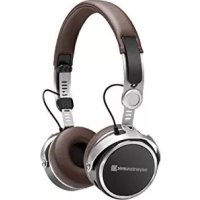
Aventho Wireless - Earphones BEYERDYNAMIC - Free user manual and instructions
Find the device manual for free Aventho Wireless BEYERDYNAMIC in PDF.

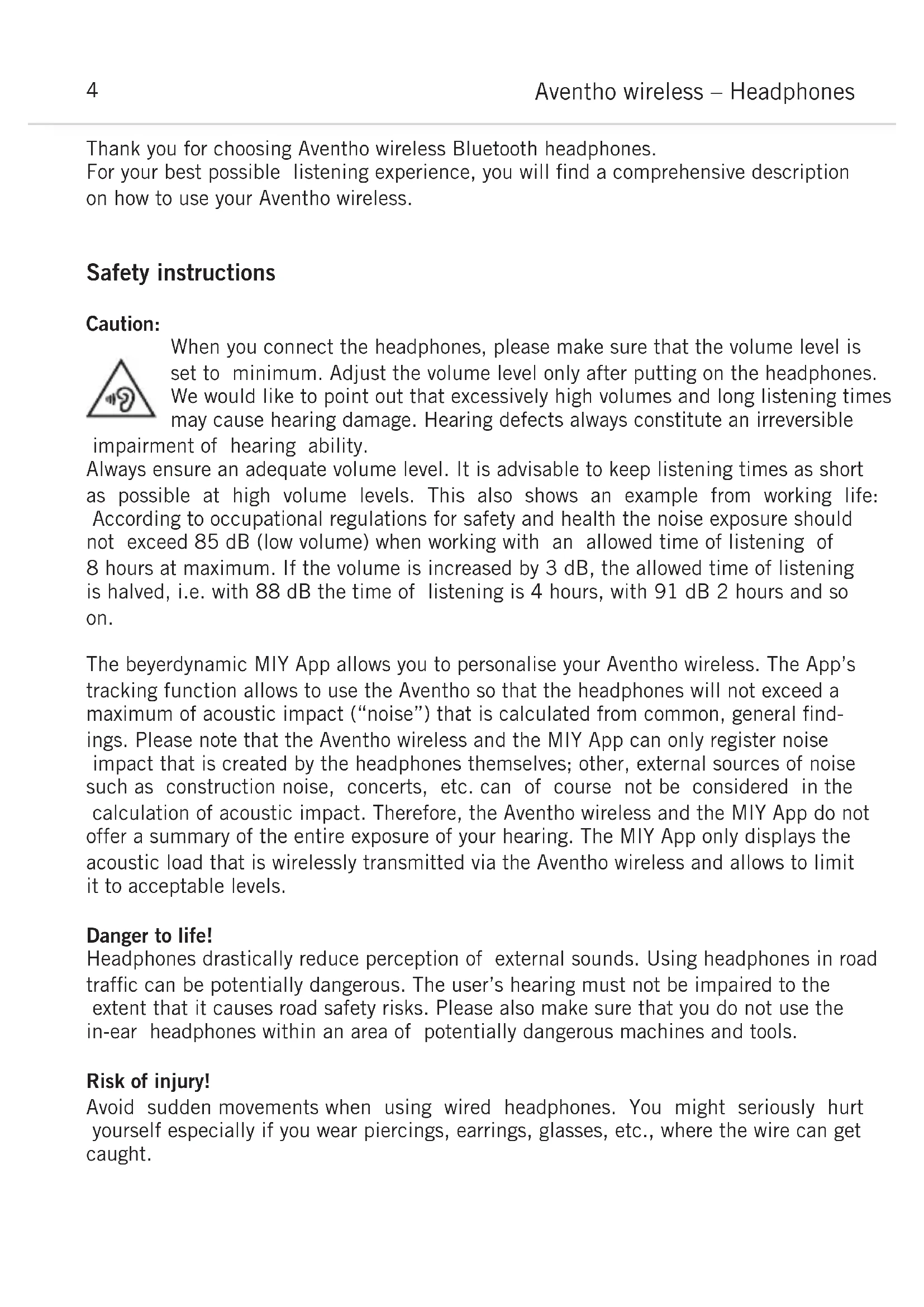


| Product Type | Circum-aural wireless headset |
| Brand | Beyerdynamic |
| Model | Aventho Wireless |
| Wireless connectivity | Bluetooth 4.2 (A2DP, HFP, HSP, AVRCP), NFC |
| Supported audio codecs | SBC, AAC, aptX, aptX HD |
| RF frequency band | 2.4000 - 2.4835 GHz |
| RF transmission power | 10 mW |
| Power supply | Rechargeable Li-ion battery via USB-C |
| Operating temperature | 0 to 40 °C |
| Storage temperature | 10 to 40 °C |
| Key features | Touch control, multipoint pairing up to 8 devices, MIY app, voice assistant (Siri/Google), voice announcements, swipe volume control |
| Control elements | 1 multifunction key, 1 touch pad, 1 microphone, status LED |
| Connectors | 3.5 mm jack socket (audio cable), USB-C socket (charging) |
| Supplied accessories | 3.5 mm audio cable, USB-A to USB-C cable, fabric carrying case, warranty booklet, quick start guide |
| Care and cleaning | Soft, dry cloth or slightly dampened with water. Do not use any cleaning agents containing solvents. |
| Safety | Risk of hearing damage with prolonged listening at high volume. Not recommended for use on public roads or near dangerous machinery. |
| Spare parts and repairability | User-replaceable ear pads. Other parts: contact Beyerdynamic customer service. Spare parts available at www.beyerdynamic.com. |
| Warranty | Current warranty conditions at www.beyerdynamic.com |
Frequently Asked Questions - Aventho Wireless BEYERDYNAMIC
User questions about Aventho Wireless BEYERDYNAMIC
0 question about this device. Answer the ones you know or ask your own.
Ask a new question about this device
Download the instructions for your Earphones in PDF format for free! Find your manual Aventho Wireless - BEYERDYNAMIC and take your electronic device back in hand. On this page are published all the documents necessary for the use of your device. Aventho Wireless by BEYERDYNAMIC.
USER MANUAL Aventho Wireless BEYERDYNAMIC
Thank you for choosing Aventho wireless Bluetooth headphones.
For your best possible listening experience, you will find a comprehensive description on how to use your Aventho wireless.
Safety instructions
Caution:
When you connect the headphones, please make sure that the volume level is set to minimum. Adjust the volume level only after putting on the headphones. We would like to point out that excessively high volumes and long listening times may cause hearing damage. Hearing defects always constitute an irreversible impairment of hearing ability.
Always ensure an adequate volume level. It is advisable to keep listening times as short as possible at high volume levels. This also shows an example from working life: According to occupational regulations for safety and health the noise exposure should not exceed 85 dB (low volume) when working with an allowed time of listening of 8 hours at maximum. If the volume is increased by 3 dB, the allowed time of listening is halved, i.e. with 88 dB the time of listening is 4 hours, with 91 dB 2 hours and so on.
The beyerdynamic MIY App allows you to personalise your Aventho wireless. The App's tracking function allows to use the Aventho so that the headphones will not exceed a maximum of acoustic impact (“noise”) that is calculated from common, general findings. Please note that the Aventho wireless and the MIY App can only register noise impact that is created by the headphones themselves; other, external sources of noise such as construction noise, concerts, etc. can of course not be considered in the calculation of acoustic impact. Therefore, the Aventho wireless and the MIY App do not offer a summary of the entire exposure of your hearing. The MIY App only displays the acoustic load that is wirelessly transmitted via the Aventho wireless and allows to limit it to acceptable levels.
Danger to life!
Headphones drastically reduce perception of external sounds. Using headphones in road traffic can be potentially dangerous. The user's hearing must not be impaired to the extent that it causes road safety risks. Please also make sure that you do not use the in-ear headphones within an area of potentially dangerous machines and tools.
Risk of injury!
Avoid sudden movements when using wired headphones. You might seriously hurt yourself especially if you wear piercings, earrings, glasses, etc., where the wire can get caught.
Box contents
• Aventho wireless headphones
- Jack connection audio cable 3.5 mm
- Charging cable USB-A to USB-C
- Soft bag
- Warranty booklet
- Quick Start Guide
Storage and removal from the packaging
Removal from the packaging
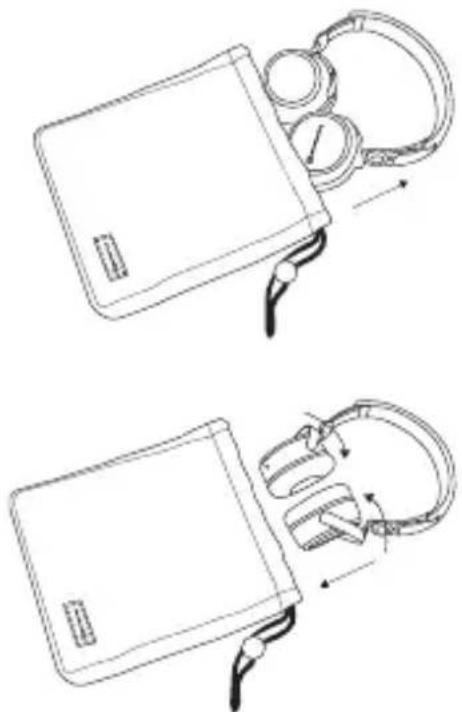
Hold the Aventho wireless on the head-band and pull it out of the soft bag. Rotate the two ear cups inward so that the ear pads are facing each other. Refer to the illustration.
Storage
Rotate the two ear cups as indicated by the arrows. Hold the Aventho wireless and put it into the soft bag with the ear cups first. Refer to the illustration.
natural_image
Line drawings of a medical device with attached earphones and tubing, showing two configurations (no text or symbols)How to adjust the headband
Before wearing the Aventho wireless for the first time you should adjust it properly to achieve the best sound and ambient noise attenuation.
Please refer to the following tips:
- Select the appropriate lock-in position on both sides of the headband.
- Adjust the angle of the ear pads.
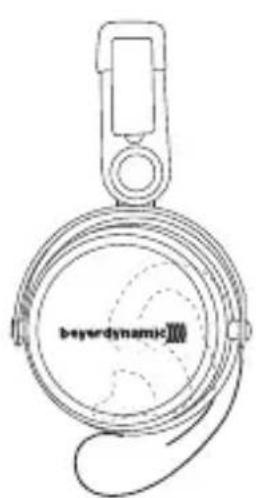
- Place the Aventho wireless centrally on your ears as shown in the middle picture.
text_image
beyonddynamic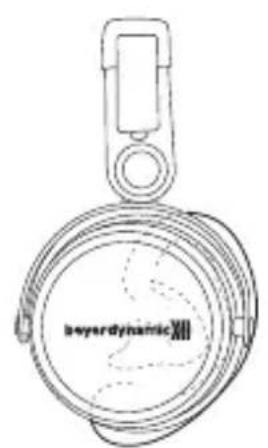
text_image
beyonddynamic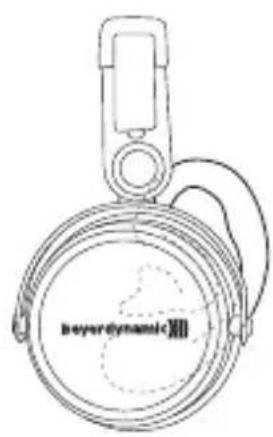
text_image
beyonddynamicXIIHeadphone is too high Perfect fit of the headphone Headphone is too low
beyerdynamic MIY app
By using the beyerdynamic MIY app you can personalise your Aventho wireless. The app is available for Apple iOS and Android and can be downloaded from both the Apple App Store and the Google Play Store.
Note firmware version 1.0
The following descriptions refer to the firmware version 1.0 installed on the present Bluetooth headphones.
Firmware Update
A more recent firmware version than installed (version 1.0) might be available. If available, you can perform this update yourself.
- Download the firmware update tool from the Aventho product page at www.beyerdynamic.com to your computer.
- Turn on the Aventho wireless and connect it to your computer using the USB charge cable ②.
- Start the update tool and follow the instructions on the screen.
Compatibility
The Aventho wireless is compatible with Bluetooth playback devices that support the following profiles:
• A2DP (for audio transmission)
• HFP (for phone operation)
- HSP (voice output)
- AVRCP (for the transmission of controls signals)
Note:
All associated functions are only available, if they are supported by the playback device.
Supported audio codecs
Within the A2DP profile, the Aventho wireless supports the audio codecs SBC, AAC, aptX ^™ and aptX ^™ HD. The best audio quality is offered by aptX ^™ HD.
Note:
Please note that only audio codecs can be used for audio transmission, which are available in the playback device.
Playback device and Aventho wireless automatically communicate on the best, commonly available codec. Note: Please note that most playback devices do not indicate which codec is active.
Controls and indicators
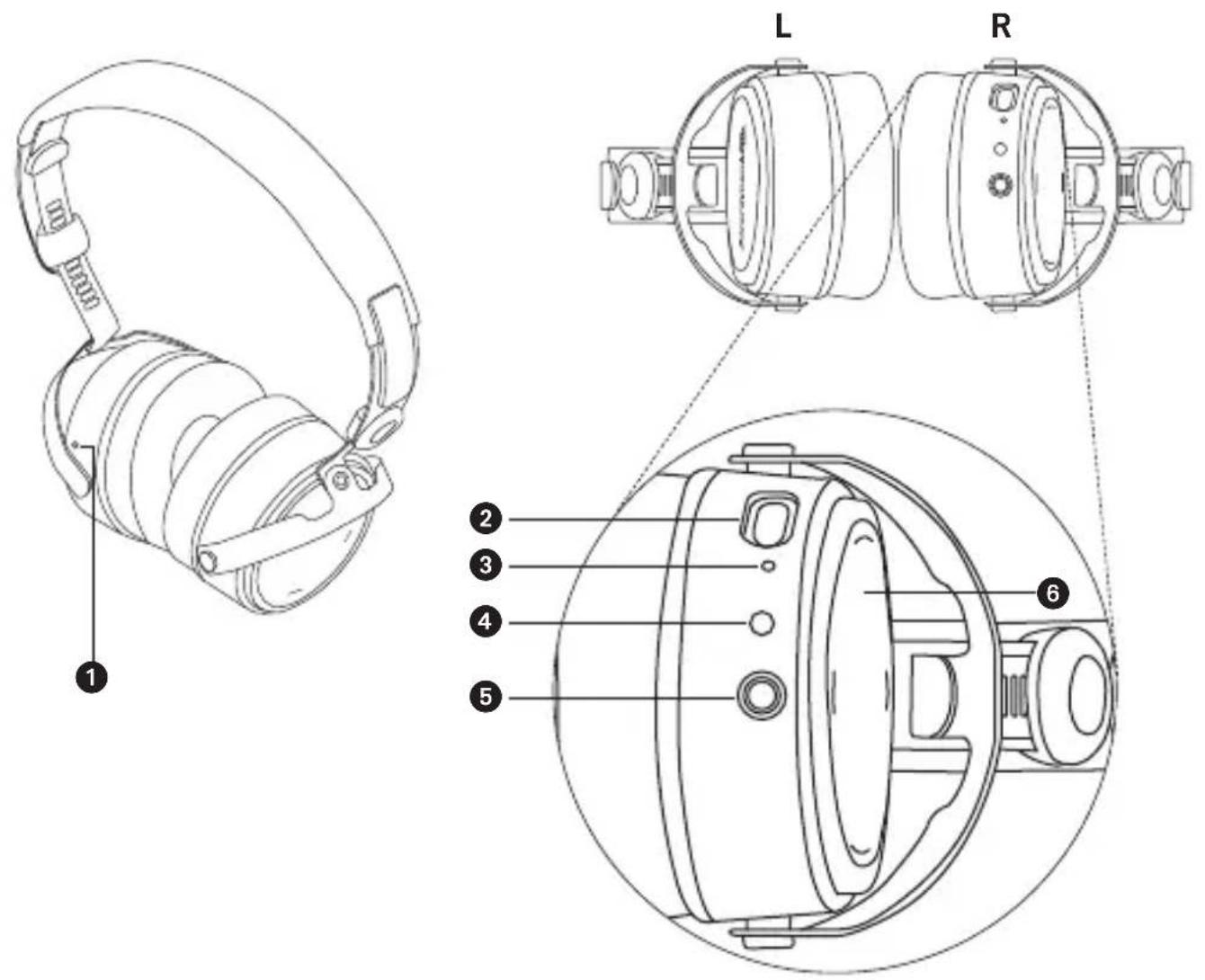
①Microphone
②USB connection for charging cable (USB-C)
③ LED
④Button
⑤Jack connector 3.5 mm for audio cable
⑥ Touch pad
Turning on / off
The functions listed below refer to the Aventho wireless when it has already been paired with a Bluetooth enabled device.
- Turning on:
Hold down the button ④ for approx. 2 seconds.
The LED ③ will illuminate red once.
- Turning off:
Hold down the button ④ for approx 6 seconds.
The LED ③ will illuminate red once and then go out.
Pairing with the player
Before you use the Aventho wireless for the first time, you have to pair it with your mobile phone or another Bluetooth enabled device. The pairing process may be different with various players. Please refer to the appropriate manual of the player.
- When the Aventho wireless is turned off, press the button ④ for 6 seconds to start the Bluetooth mode. The LED ③ will rapidly flash blue and red in turns.
- Activate the Bluetooth function on your player and, if necessary, search for new devices.
- Select “beyerdynamic Aventho wireless” under the available devices in the Bluetooth menu of your player and pair both devices. Each time when turning on, both devices are paired automatically.
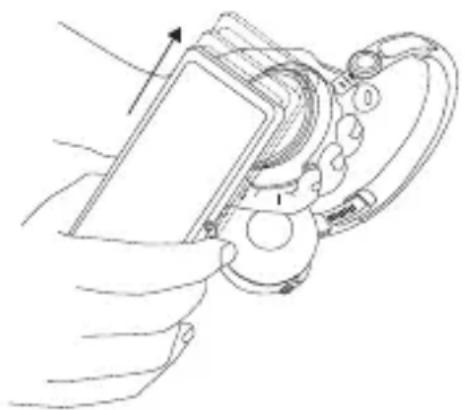
Alternatively, you can connect the Aventho wireless with an NFC-capable playback device through NFC. The Aventho must be switched on. It does not matter whether the Aventho is in pairing mode or not.
- Activate the NFC function on your playback device so that all necessary information can be transmitted to the playback device and a connection can be established.
- Hold the playback device to the left headphone housing so that the two NFC chips are close to each other. If required, test this by sliding movements.
natural_image
Line drawing of a hand holding a device with a curved handle and circular components (no text or symbols)Pairing and clearing the list of players
If there are already several players in the list of your Aventho wireless and your Aventho wireless cannot be paired with another new player, the list is full and should be cleared so that the new player can be added.
This is how to clear the list:
- Hold down the button ④ of the turned off Aventho wireless for more than 10 seconds, so that the Aventho wireless will switch into the pairing mode and clear the list of players simultaneously.
Multi point operation
The Aventho wireless can be paired to up 8 Bluetooth enabled devices. Active connections can be established with up to two devices at a time. However, playback of music and phone operation is only possible with one device at a time. Phone operation has priority over playback of music; i. e. playback of music is interrupted during phone calls. The following priorities apply during the use of playback devices:
| Priority Profile | Playback device (PD) | |
| 1 HFP (phone operation) PD 1 (device used first) | ||
| 2 HFP (phone operation) PD 2 (device used second) | ||
| 3 | A2DP (playback of music) | PD 1 (device used first) |
| 4 | A2DP (playback of music) | PD 2 (device used second) |
Setting up multi point
- Pair the Aventho wireless with the first device (refer to “pairing with the player”).
- Deactivate the Bluetooth connection on the first device.
- Switch the Aventho wireless off.
- Press the button ④ for 6 seconds to start pairing mode (LED ③ flashes slowly alternating blue and red).
- Pair the Aventho wireless with the second device (refer to “pairing with the player”).
- Re-activate the bluetooth connection to the first device that automatically connects to the Aventho wireless.
- Once both devices are paired with the Aventho wireless, the Aventho wireless automatically connects with both devices each time it is powered up.
Using up multi point
If you have connected the Aventho wireless with two devices
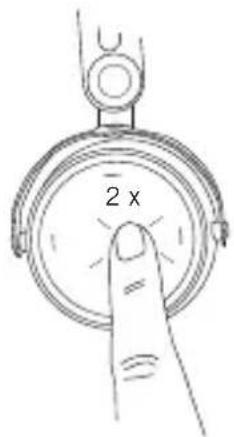
- and have just activated media playback, briefly tap the touch pad ⑥ twice to accept an incoming call.
- and have just finished a call, briefly tap the touch pad ⑥ twice to restart the media playback that was playing most recently.
Media playback
Please note that the functions described below, depend on the player and the player software and may not be available. The Aventho wireless only transmits control signals that comply with the Bluetooth standard.
Important: To avoid malfunction, use only one finger when you use the touch pad 6.
- Start / stop media playback: Briefly tap the touch pad 6 twice.
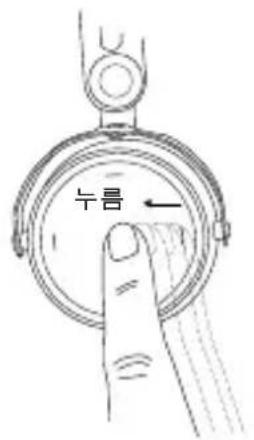
- Play next track: Drag your finger forwards on the touch pad ⑥.
text_image
2 x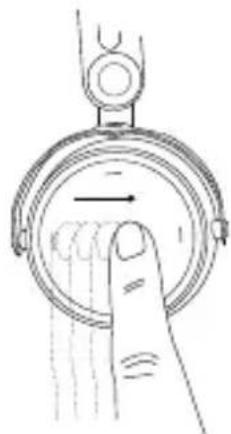
natural_image
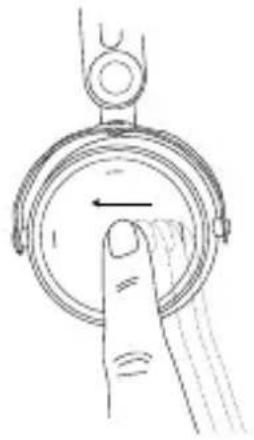
Hand pressing a button on a circular mechanical component (no text or symbols visible)- Play previous track: Drag your finger backwards on the touch pad 6.
- Fast forward: Drag your finger forwards on the touch pad ⑥ and hold it for at least one second.
- Rewind: Drag your finger backwards on the touch pad ⑥ and hold it for at least one second.
- Increase volume: Drag your finger upwards on the touch pad 6. When you drag your finger upwards and hold it, the volume is gradually increased until the maximum is achieved. An acoustic signal indicates the achieved maximum.
natural_image
Line drawing of a hand pressing a circular button with an arrow (no text or symbols)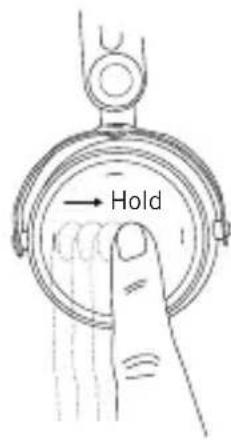
text_image
Hold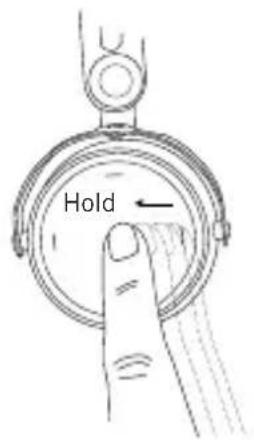
text_image
Hold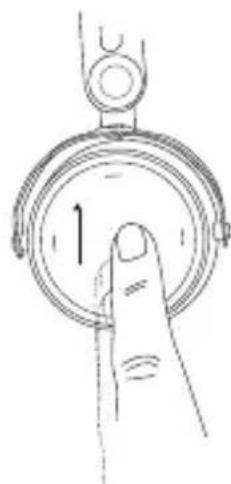
natural_image
Line drawing of a hand pressing a circular button labeled '1' (no text or symbols beyond the number)• Decrease volume:
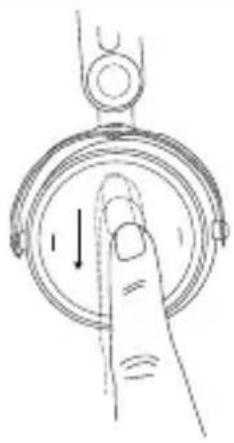
Drag your finger downwards on the touch pad 6. When you drag your finger downwards and hold it, the volume is gradually decreased until the minimum is achieved. An acoustic signal indicates the achieved minimum.
Call personal assistant
• To call the personal assistant on your smartphone or tablet such as Siri, Google Assistant etc.:
Press the centre of the touch pad ⑥ for approx. two seconds.
Call control
The following functions are used to control calls.
- Accept / end a call: Briefly tap the touch pad ⑥ twice.
- Reject a call: Press the centre of the touch pad ⑥ for approx. two seconds.
natural_image
Hand holding a circular device with a downward arrow, no text or symbols visible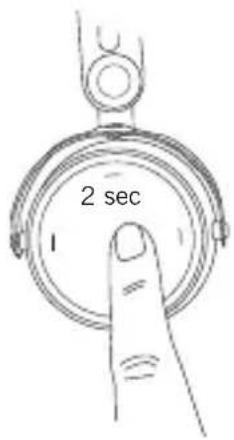
text_image
2 sec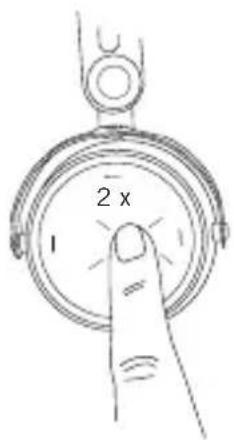
text_image
2 x 1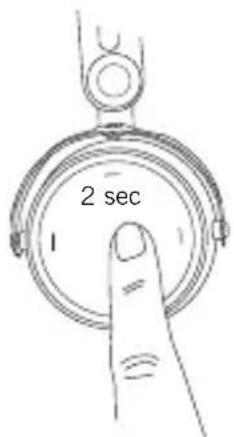
text_image
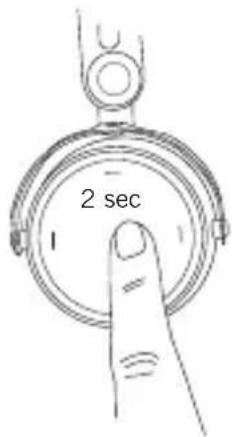
2 sec- Toggle between two callers: Press the centre of the touch pad ⑥ for approx. two seconds.
text_image
2 secCharging
- For charging the rechargeable battery we recommend using the supplied USB charging cable only.
- Connect the Aventho wireless with this USB charging cable to any USB compliant USB port supplying voltage (e.g. USB power supply).
- During charging the LED ③ is flashing red.
- As soon as the LED ③ is permanently illuminated red, the rechargeable battery is completely recharged.
- Detach the USB charging cable after the charging process.
Activating and deactivating aptX™ HD
- Activating aptX™ HD: Switch on the Aventho wireless. Then perform the following steps within two seconds:
- Hold button 4.
- Drag one finger upwards on the touch pad 6.
- Release button 4.
- Deactivating aptX™ HD: Switch on the Aventho wireless. Then perform the following steps within two seconds:
- Hold button 4.
- Drag one finger downwards on the touch pad ⑥.
- Release button 4.
Activating and deactivating voice messages
- Activating / deactivating voice messages: Switch on the Aventho wireless. Then perform the following steps within two seconds:
- Hold button 4.
- Briefly tap the touch pad ⑥ twice with one finger.
- Release button 4.
Reset to factory settings
- Switch on the Aventho wireless.
Then perform the following steps within two seconds:
- Hold button ③.
- Drag one finger backwards on the touch pad 1.
- Release button ③.
Touch pad and button functions table
Unless otherwise stated, the listed functions apply for headphones that are switched on.
| Switch on | Press button 4 for 2 seconds |
| Switch off | Press button 4 for 6 seconds |
| Paring mode Switch off headphones, then | pressbutton 4 for 6 seconds |
| Delete pairing mode list Switch off headphones, then pressbutton 4 for at least 10 seconds | |
| Start / pause | Briefly tap the touch pad 6 twice |
| Next track | Drag forwards on the touch pad 6. |
| Previous track | Drag backwards on the touch pad 6 |
| Scroll forward | Drag forwards on the touch pad 6. and hold for at least 1 second |
| Scroll backward | Drag backwards on the touch pad 6. and hold for at least 1 second |
| Accept / finish a call | Briefly tap the touch pad 6 twice |
| Reject a call | Press the touch pad 6 for 2 seconds |
| Toggle between 2 callers | Press the touch pad 6 for 2 seconds |
| Call personal assistant (Siri, Google Assistant etc.) | Press the touch pad 6 for 2 seconds |
Settings table
The listed functions apply for headphones that are switched on.
| Activating aptXTM HD: | Hold button 4 for 2 seconds and at the same time drag one finger upwards on the touch pad 6. |
| Deactivating aptXTM HD: | Press button 4 for 2 seconds and at the same time drag one finger downwards on the touch pad 6. |
| Activating and deactivating voice messages | Press button 4 for 2 seconds and at the same time briefly tap the touch pad 6 twice with one finger |
| Reset to factory settings | Press button 4 for 2 seconds and at the same time drag one finger backwards on the touch pad 6 |
Headphones LED display table
| Charging red LED flashing | |
| Fully charged LED permanently lit | |
| Switching off LED lights up one time for 1.5 sec. | |
| Battery almost empty red LED flashing fast 3 x | |
| Bluetooth connection mode active (Pairing) | red and blue LED flash alternating |
| Bluetooth connection active blue LED flashes slowly with interruptions of 7 sec. | |
| Bluetooth connection lost blue LED flashes slowly with interruptions of 3 sec. | |
| Media playback active blue LED flashes slowly with interruptions of 7 sec. | |
| Incoming call blue LED flashes fast with interruptions of 1 sec. | |
Playback device settings for your best wireless sound
To achieve your best possible Bluetooth sound with Aventho wireless, you should consider the following practical hints:
- Set the volume of the Aventho wireless to minimum, of the playback device to maximum. From then on, adjust the volume on the Aventho wireless only, not on the playback device. This applies only to playback devices that do not automatically synchronise the volume.
- On playback devices that automatically synchronise the volume (e.g. iPhone, iPad, various Android smartphones), the headphones volume is always identical to the volume of the playback device.
- Deactivate any audio effects that might exist in your player software.
- Ensure that aptX™ HD is switched on at the Aventho wireless, if supported by your playback device.
Connection of the audio cable
Included in the package contents is an audio cable with a 3.5 mm jack plug on either end. Connect one end of the audio cable to the jack socket ⑤ of the headphone housing if you want to use the headphones without Bluetooth connection. Ensure that the Aventho wireless is switched off. In this case the headphones are functioning passively so that no electricity is drawn from the battery.
Troubleshooting
| Problem Cause Solution | ||
| Aventho wireless cannot be switched on | Battery is empty or almost empty | Charge the battery |
| No audio output No Bluetooth connection Pair the Aventho wireless with the playback device | ||
| The Aventho wireless does not appear among the available Bluetooth devices on the playback device | · The Aventho wireless is switched off· The Aventho wireless is not in pairing mode· A Bluetooth connection to another playback device exists already | · Turn on the Aventho wireless· Put the Aventho wireless into pairing mode· Disconnect the Bluetooth connection to the other playback device and connect the Aventho wireless to the desired device |
| Playback volume is low, despite the Aventho wireless volume is set to maximum | The received audio signal is too low | Increase the playback volume on the playback device |
| The sound is harsh and the bass response is too low | Insufficient seal of the ear pads | Adjust the Aventho wireless over your ears so that maximum seal is achieved |
| The wireless range is too low or the connection is disrupted | There are interferences with other devices | Move away from WLAN routers and microwave ovens, ensure that your body is not between play-back device and the Aven-tho wireless |
Maintenance
- To clean the Aventho wireless use only a soft cloth - either dry or slightly damp.
- Do not use cleaners that contain solvents as they can damage the surface.
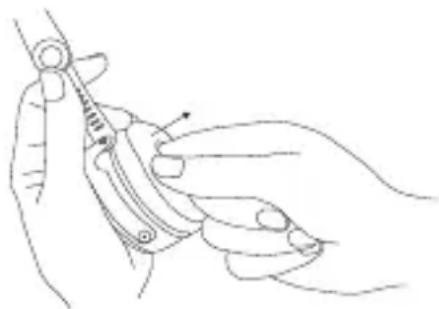
Since the ear pads are subject to natural wear, they should be replaced from time to time.
You can do this easily yourself:
- Grasp the ear pad with a finger from the inside to pull it off the headphone housing.
- Fit a new ear pad by pressing it onto the headphone housing until snaps on.
In the event that other components require replacement, please contact your local beyerdynamic representative.
natural_image
Line drawing of a hand holding a medical or surgical instrument (no text or symbols present)Notes on battery life for Li-Ion batteries
- After charging fully, disconnect the charging cable from the Aventho wireless.
- High temperatures, especially when fully charged can lead to irreversible damage.
- If the battery is not used for extended periods of time, it is recommended to charge to approx. 50 % and store it at no more than 20 °C.
Spare parts
- Spare parts for the Aventho wireless can be found on the web at: www.beyerdynamic.com under section “Service”.
Disposal
This symbol on the product, in the instructions or on the packaging means that your electrical and electronic equipment should be disposed at the end of its life separately from your household waste. There are separate collection systems for recycling in the EU. For more information, please contact the local authority or your retailer where you purchased the product.
Battery disposal
This symbol means that according to local laws and regulations your product and/or its battery shall be disposed of separately from household waste. When this product reaches its end of life, take it to a collection point designated by local authorities. The separate collection and recycling of your product and/or its battery at the time of disposal will help conserve natural resources and ensure that it is recycled in a manner that protects human health and the environment.
- Old batteries may contain substances that are harmful to your health and environment.
- Dispose used batteries always according to the applicable disposal regulations. Please do not throw used battery packs into the fire (danger of explosion) or your household rubbish, take them to your local collection points. The return is free and required by law. Please dispose discharged batteries only.
- All batteries are recycled to reclaim valuable material such as iron, zinc or nickel.
Product registration
- Using the serial number, you can register your Aventho wireless on the web at www.beyerdynamic.com.
Warranty conditions
- The current warranty conditions can be found at www.beyerdynamic.com.
Technical specifications
RF frequency range ..... 2.4000 - 2.4835 GHz
Transmission power .... 10 mW
Operating temperature range ..... 0 to 40 °C
Charging temperature range. . . . . . . . 10 to 40 °C
Detailed technical specifications can be found on the internet at:
www.beyerdynamic.com/aventho-wireless
Simplified EU Declaration of Conformity
Hereby, beyerdynamic declares that the radio equipment is in compliance with Directive 2014/53/EU. The full text of the EU declaration of conformity is available at the following internet address:
http://www.beyerdynamic.com/cod
FCC / IC Regulation
FCC ID: OSDAVENTHO
Canada IC: 3628A-AVENTHO
NOTICE:
This device complies with Part 15 of the FCC Rules and with Industry Canada licence-exempt RSS standard(s).
Operation is subject to the following two conditions:
(1) this device may not cause harmful interference, and
(2) his device must accept any interference received, including interference that may cause undesired operation.
Changes or modifications made to this equipment not expressly approved by beyerdynamic may void the FCC authorization to operate this equipment.
Radiofrequency radiation exposure information:
This device has been tested and meets the FCC / ISED exposure guidelines.
Note: This equipment has been tested and found to comply with the limits for a Class B digital device, pursuant to part 15 of the FCC Rules
These limits are designed to provide reasonable protection against harmful interference in a residential installation. This equipment generates, uses and can radiate radio frequency energy and, if not installed and used in accordance with the instructions, may cause harmful interference to radio communications. However, there is no guarantee that interference will not occur in a particular installation.
If this equipment does cause harmful interference to radio or television reception, which can be determined by turning the equipment off and on, the user is encouraged to try to correct the interference by one or more of the following measures:
– Reorient or relocate the receiving antenna.
- Increase the separation between the equipment and receiver.
- Connect the equipment into an outlet on a circuit different from that to which the receiver is connected.
- Consult the dealer or an experienced radio/TV technician for help.
Made in Germany
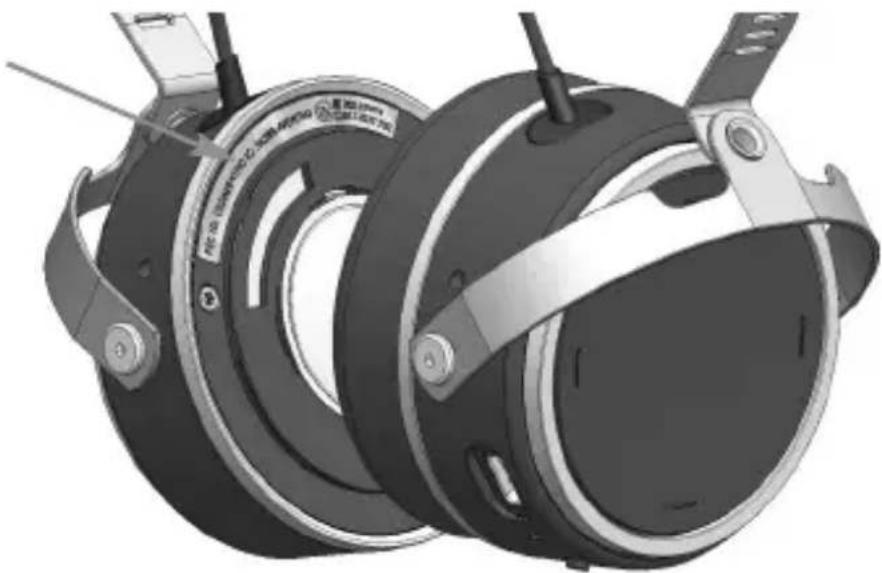
The FCC/IC/Japan registration number is found under the left ear pad. Refer to the “Maintenance” section on how you can remove the ear pad.
FCC/IC/Japan registration number
natural_image
3D rendering of a mechanical component with attached brackets and mounting feet (no visible text or symbols)This device is granted pursuant to the Japanese Radio Law (電波法) and the Japanese Telecommunications Business Law (電気通信事業法)
This device should not be modified (otherwise the granted designation number will become invalid.
natural_image
Line drawings of a blood pressure monitor and its ear device, showing internal components and adjustment arrows (no text or symbols)natural_image
Line drawing of a circular mechanical device with a handle and label 'bayerdynamic' (no readable text or symbols beyond the label)beyerdynamic MIY App
natural_image
Line drawing of a hand holding a device with a circular component, no text or symbols presentnatural_image
Hand pressing a button on a circular mechanical component (no text or symbols visible)natural_image
Line drawing of a hand pressing down on a circular mechanical component with an arrow indicating left motion (no text or symbols)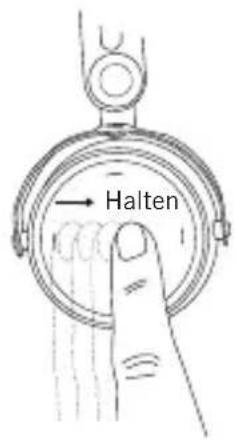
text_image
Halten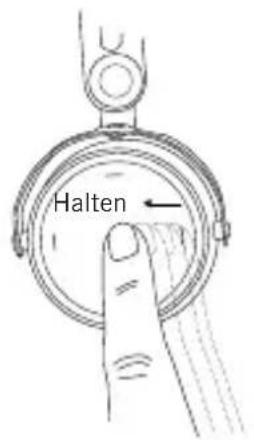
text_image
Halten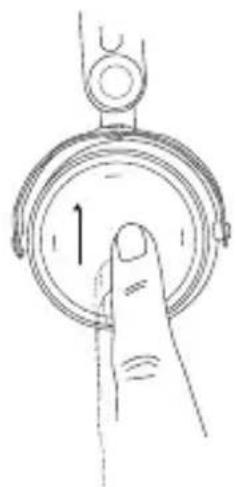
natural_image
Hand pressing a button on a circular dial (no text or symbols visible)natural_image
Hand gesture pointing to a circular dial with a downward arrow (no text or symbols)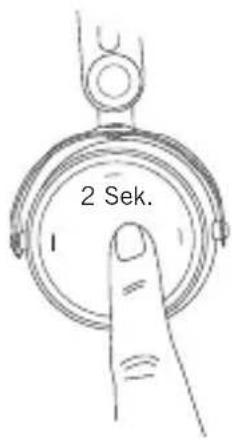
text_image
2 Sek.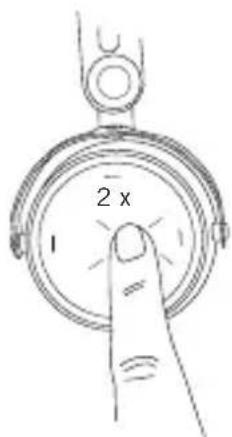
text_image
2 x 1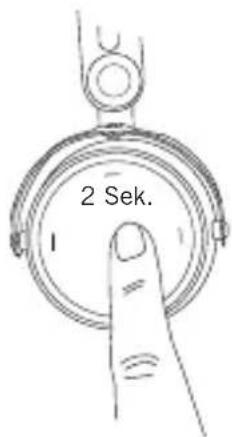
text_image
2 Sek.natural_image
Line drawing of a hand holding a medical or surgical instrument (no text or symbols present)www.beyerdynamic.com/aventho-wireless
natural_image
Line drawings of a medical or laboratory device with attached tubing and connectors, showing two sequential steps (no text or symbols)natural_image
Line drawing of a circular mechanical device with a handle and label 'bayerdynamic' (no readable text or symbols beyond the label)Codecs audios supportés
natural_image
Line drawing of a hand holding a device with a scroll wheel (no text or symbols)natural_image
Hand pressing a button on a circular device (no text or symbols visible)natural_image
Line drawing of a hand pressing down on a circular mechanical component with an arrow indicating left motion (no text or symbols)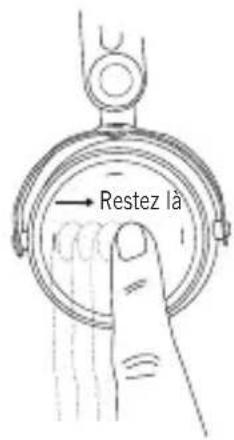
text_image
Restez là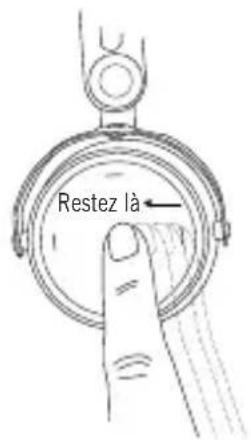
text_image
Restez là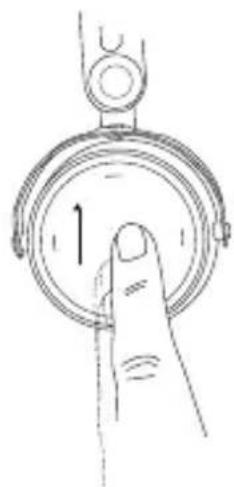
natural_image
Line drawing of a hand pressing a circular button with an arrow (no text or symbols)natural_image
Hand gesture pointing to a circular dial with a downward arrow (no text or symbols)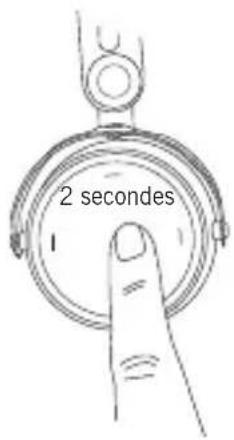
text_image
2 secondes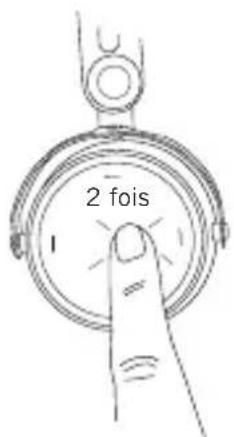
text_image
2 fois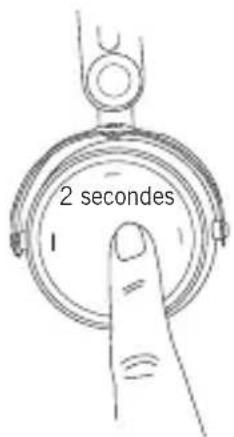
text_image
2 secondestext_image
2 secondesCharger l'accu
natural_image
Line drawing of a hand holding a syringe or needle, no text or symbols presentwww.beyerdynamic.com/aventho-wireless
natural_image
Technical line drawing showing two steps of a medical or electronic device with clamps and tubing (no text or symbols)natural_image
Line drawing of a mechanical device with a circular component and handle (no text or symbols)beyerdynamic MIY App
natural_image
Line drawing of a hand holding a device with a circular component, no text or symbols presentnatural_image
Hand pressing a button on a circular mechanical component (no text or symbols visible)- Título anterior:
natural_image
Line drawing of a hand pressing a circular button with an arrow (no text or symbols)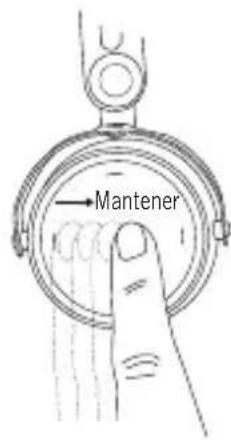
text_image
Mantener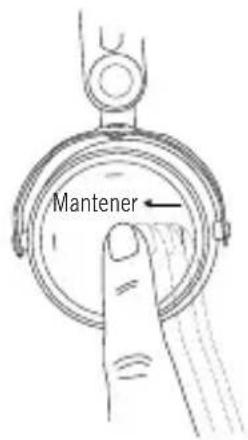
text_image
Mantener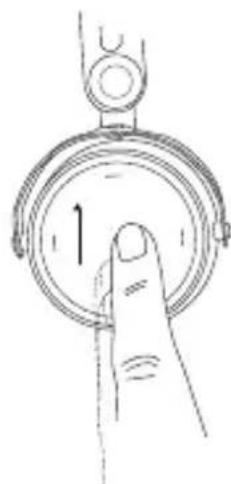
natural_image
Line drawing of a hand pressing a circular button with an arrow (no text or symbols)natural_image
Hand gesture pointing to a circular dial with a downward arrow (no text or symbols)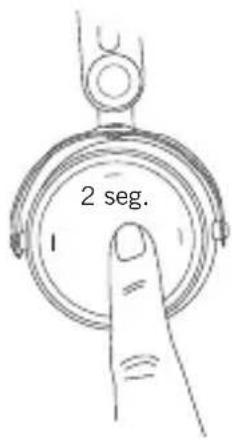
text_image
2 seg.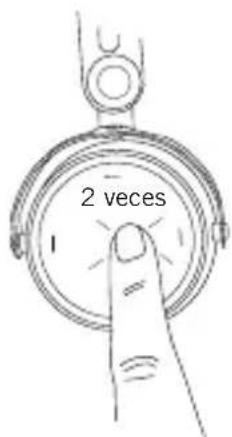
text_image
2 veces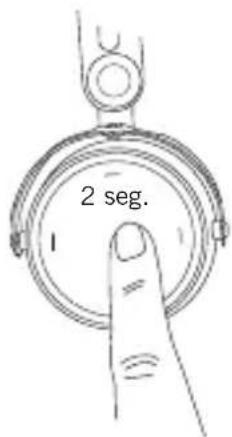
text_image
2 seg.natural_image
Line drawing of a hand holding a medical instrument with a needle inserted (no text or symbols)www.beyerdynamic.com/aventho-wireless
natural_image
Line drawings of a medical or electronic device with attached earphones and tubing, showing two configurations (no text or symbols)natural_image
Line drawing of a hand holding a device with a curved handle and circular components (no text or symbols)natural_image
Line drawing of a hand pressing down on a circular mechanical component with an arrow indicating direction (no text or symbols)natural_image
Line drawing of a hand pressing a circular button with an arrow (no text or symbols)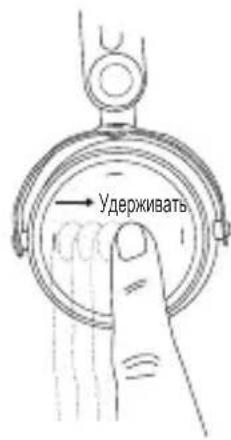
natural_image
Line drawing of a hand pressing a button on a circular dial (no text or symbols)natural_image
Hand gesture pointing to a circular dial with a downward arrow (no text or symbols)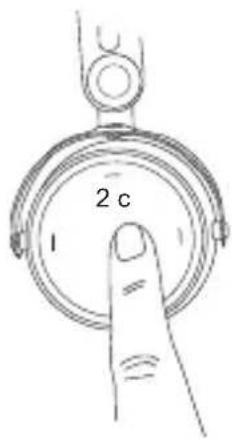
text_image
2 c 1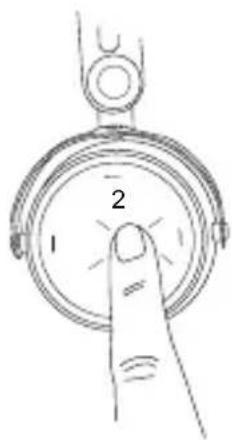
text_image
1 2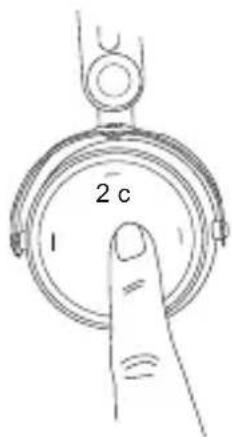
text_image
2 c 1natural_image
Line drawing of a hand holding a medical or surgical instrument (no text or symbols present)www.beyerdynamic.com/aventho-wireless
natural_image
Line drawings of a medical or electronic device with attached clamps and tubing, showing two configurations (no text or symbols)大きさの調節と装着
natural_image
Line drawing of a mechanical device with a circular component and handle (no text or symbols)natural_image
Line drawing of a hand holding a device with a curved handle and circular components (no text or symbols)接続とリスト内の再生デバイスの削除
natural_image
Hand pressing a button on a circular mechanical component (no text or symbols visible)natural_image
Line drawing of a hand pressing a circular button with an arrow (no text or symbols)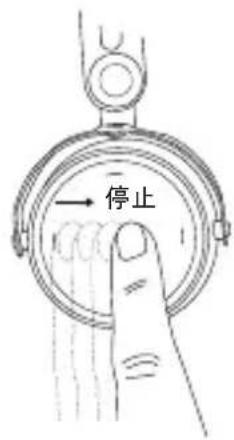
text_image
停止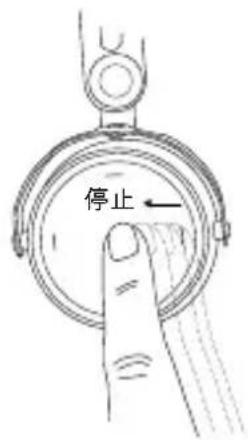
text_image
停止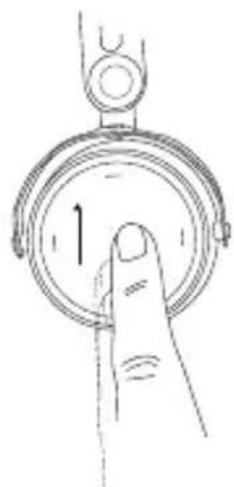
natural_image
Line drawing of a hand pressing a button on a circular dial (no text or symbols)- 音量を下げる:
natural_image
Hand gesture pointing to a circular dial with a downward arrow (no text or symbols)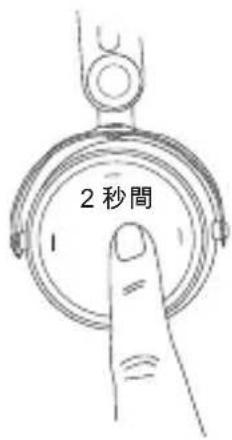
text_image
2秒間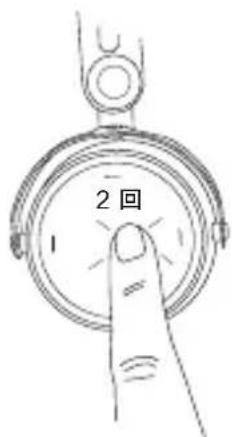
text_image
2回 1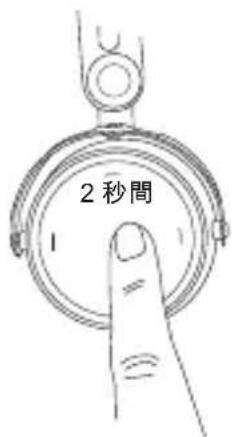
text_image
2秒間natural_image
Line drawing of a hand holding a tool with a spring, no text or symbols presentwww.beyerdynamic.com/aventho-wireless
簡略EU適合宣言
natural_image
Line drawings of a medical device with attached clamps and tubing, showing two configurations (no text or symbols)크기 조정 및 착용
natural_image
Line drawing of a mechanical device with a circular component and handle (no text or symbols)natural_image
Line drawing of a hand holding a device with a curved handle and arrow indicating direction (no text or symbols)연결 및 목록에서 재생 장치 삭제
natural_image
Line drawing of a hand pressing down on a circular mechanical component with an arrow indicating direction (no text or symbols)natural_image
Hand holding a circular mechanical component with an arrow indicating rotation (no text or symbols)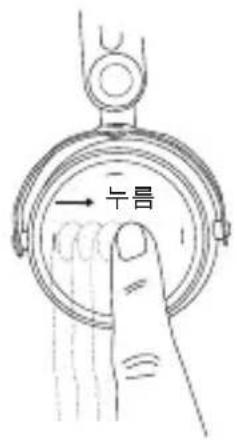
text_image
↑↑↑
text_image
누름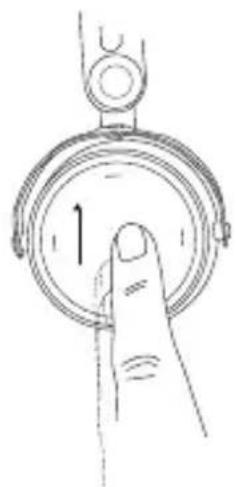
natural_image
Line drawing of a hand pressing a circular button with an arrow (no text or symbols)natural_image
Hand gesture pointing at a circular dial with a downward arrow (no text or symbols)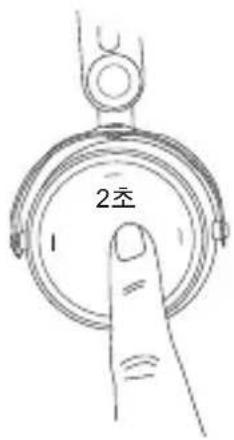
text_image
2초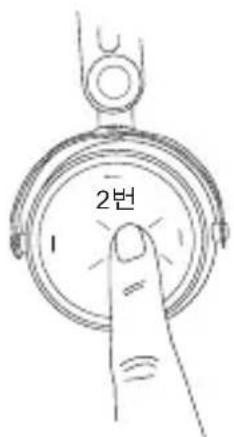
text_image
2번 1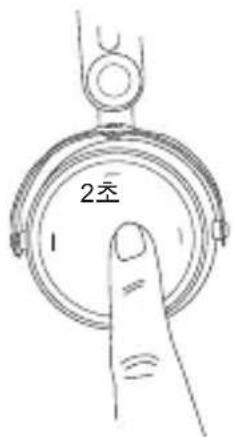
text_image
2左natural_image
Line drawing of a hand holding a medical or surgical instrument (no text or symbols present)www.beyerdynamic.com/aventho-wireless
간소화된 EU 적합성 선언
natural_image
Line drawings of a medical device with attached earthen tube and clasp, showing internal components (no text or symbols)调整大小和佩戴
natural_image
Line drawing of a mechanical device with a circular component and handle (no text or symbols)beyerdynamic MIY App
natural_image
Line drawing of a hand holding a device with a curved handle and circular components (no text or symbols)连接和删除列表中的播放设备
natural_image
Line drawing of a hand pressing a button on a circular device (no text or symbols)natural_image
Line drawing of a hand pressing a circular button with an arrow (no text or symbols)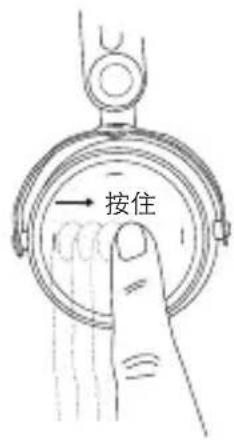
text_image
按住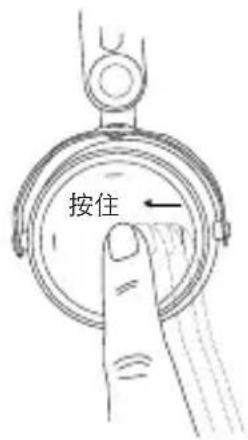
text_image
按住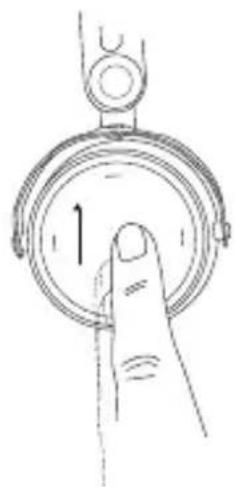
natural_image
Line drawing of a hand pressing a circular button with an arrow (no text or symbols)natural_image
Hand gesture pointing at a circular dial with a downward arrow (no text or symbols)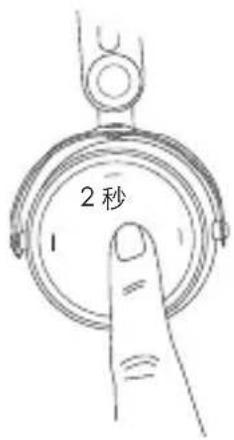
text_image
2秒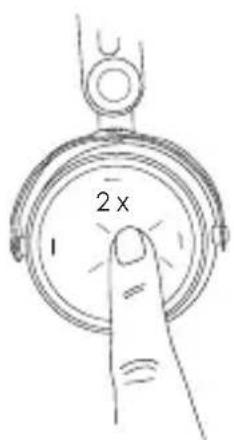
text_image
2 x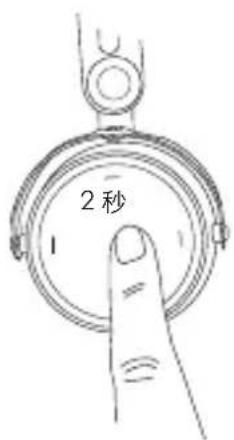
text_image
2秒natural_image
Line drawing of a hand holding a medical or surgical tool, no text or symbols present对于锂离子电池电池使用寿命的提示
www.beyerdynamic.com/aventho-wireless
简化的欧盟一致性声明
For further distributions worldwide, please go to www.beyerdynamic.com Non-contractual illustrations. Subject to change without notice.