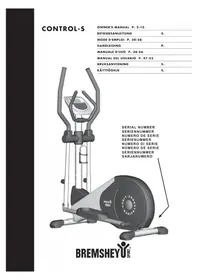
Orbit ControlS - Elliptical bike Bremshey - Free user manual and instructions
Find the device manual for free Orbit ControlS Bremshey in PDF.

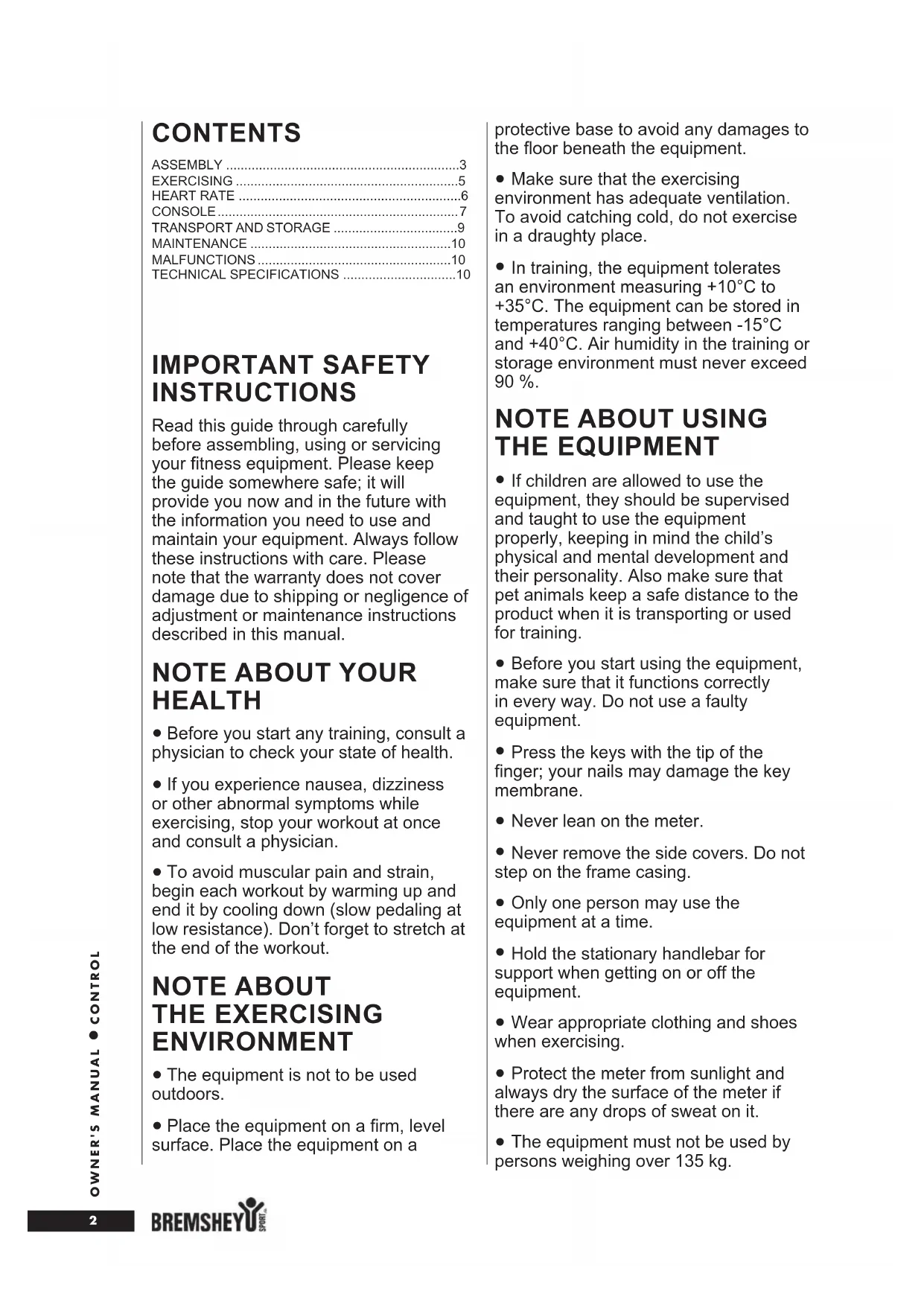


| Product type | Elliptical trainer |
| Brand | Bremshey |
| Model | Orbit ControlS |
| Dimensions (L × W × H) | 128 cm × 57 cm × 175 cm |
| Weight | 49 kg |
| Max user weight | 135 kg |
| Mains power | 230 V or 115 V (via transformer) |
| Computer batteries | 2 AA 1.5 V batteries |
| Display | Digital computer with backlight |
| Training programs | P01-P09, HRC (heart rate), Random |
| Heart rate measurement | Hand pulse sensors, ear (optional), wireless chest strap (optional) |
| Recovery function | Cardiac recovery test (rating F1 to F6) |
| Resistance | Electronically adjustable via +/- keys |
| Frame material | Steel (estimated) |
| Transport wheels | Yes, at the front of the front support tube |
| Bottle holder | Yes, included |
| Use conditions | Indoor, temperature 10 °C to 35 °C |
| Storage | Temperature -15 °C to +40 °C, humidity ≤ 90% |
| Maintenance | Clean with a soft, absorbent cloth; no detergent; check tightness regularly |
| Safety | Use on a flat surface; never leave plugged in unattended; protect cables |
| Warranty | 24 months for domestic use |
| Spare parts | Available from the distributor (list at the end of the manual) |
| Standards | CE, EN-957 |
Frequently Asked Questions - Orbit ControlS Bremshey
User questions about Orbit ControlS Bremshey
0 question about this device. Answer the ones you know or ask your own.
Ask a new question about this device
Download the instructions for your Elliptical bike in PDF format for free! Find your manual Orbit ControlS - Bremshey and take your electronic device back in hand. On this page are published all the documents necessary for the use of your device. Orbit ControlS by Bremshey.
USER MANUAL Orbit ControlS Bremshey
OWNER'S MANUAL P. 2-10
MANUALE D'USO P. 38-46
MANUAL DEL USUARIO P. 47-55
BRUKSANVISNING S.
KÄYTTÖOHJE S.
CONTENTS
ASSEMBLY 3
EXERCISING 5
HEART RATE 6
CONSOLE 7
TRANSPORT AND STORAGE 9
MAINTENANCE 10
MALFUNCTIONS 10
TECHNICAL SPECIFICATIONS 10
IMPORTANT SAFETY INSTRUCTIONS
Read this guide through carefully before assembling, using or servicing your fitness equipment. Please keep the guide somewhere safe; it will provide you now and in the future with the information you need to use and maintain your equipment. Always follow these instructions with care. Please note that the warranty does not cover damage due to shipping or negligence of adjustment or maintenance instructions described in this manual.
NOTE ABOUT YOUR HEALTH
- Before you start any training, consult a physician to check your state of health.
- If you experience nausea, dizziness or other abnormal symptoms while exercising, stop your workout at once and consult a physician.
- To avoid muscular pain and strain, begin each workout by warming up and end it by cooling down (slow pedaling at low resistance). Don't forget to stretch at the end of the workout.
NOTE ABOUT THE EXERCISING ENVIRONMENT
- The equipment is not to be used outdoors.
- Place the equipment on a firm, level surface. Place the equipment on a
protective base to avoid any damages to the floor beneath the equipment.
- Make sure that the exercising environment has adequate ventilation. To avoid catching cold, do not exercise in a draughty place.
- In training, the equipment tolerates an environment measuring +10^ to +35^ . The equipment can be stored in temperatures ranging between -15^ and +40^ . Air humidity in the training or storage environment must never exceed 90% .
NOTE ABOUT USING THE EQUIPMENT
- If children are allowed to use the equipment, they should be supervised and taught to use the equipment properly, keeping in mind the child's physical and mental development and their personality. Also make sure that pet animals keep a safe distance to the product when it is transporting or used for training.
- Before you start using the equipment, make sure that it functions correctly in every way. Do not use a faulty equipment.
- Press the keys with the tip of the finger; your nails may damage the key membrane.
- Never lean on the meter.
- Never remove the side covers. Do not step on the frame casing.
- Only one person may use the equipment at a time.
- Hold the stationary handlebar for support when getting on or off the equipment.
- Wear appropriate clothing and shoes when exercising.
- Protect the meter from sunlight and always dry the surface of the meter if there are any drops of sweat on it.
-
The equipment must not be used by persons weighing over 135kg .
-
The equipment has been designed for home use. The Bremshey warranty applies only to faults and malfunctions in home use (24 months). Further information on warranty terms can be obtained from your national Bremshey distributor. Please note that the warranty terms may vary from one country to another.
-
Do not attempt any servicing or adjustments other than those described in this guide. Everything else must be left to someone familiar with the maintenance of electromechanical equipments and authorised under the laws of the country in question to carry out maintenance and repair work.
- This product has a speed-dependent braking system.
SAVE THIS INSTRUCTION MANUAL
ASSEMBLY
Start by unpacking the equipment. Two people are needed for the assembly. Check that you have the following parts:
- Frame
- Front support
- Rear support
- Front frame tube
- Handles (2)
- Pedal cranks (2)
- Footrests (2)
8.Meter - Stationary handlebar
- Transformer
- Assembly kit (contents marked with * in the spare part list): keep the assembly tools, as you may need them c.g. for adjusting the equipment
If necessary, please contact your dealer with the model, equipment serial no. and spare part no. of the missing part. You'll find a spare part list at the back of this guide. The packaging includes a silicate bag for absorbing moisture during storage and transportation. Please dispose of the bag once you have unpacked the equipment. The directions left, right, front and back are defined as seen from the exercising position. Allow at least 100 cm of clearance around the equipment. We also recommend opening the package and assembling the product on a protective base.
REAR AND FRONT SUPPORT
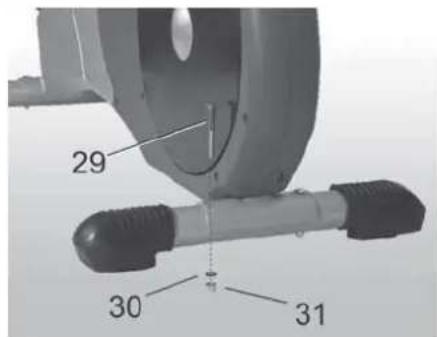
Attach the rear support to the frame with two bolts, washers and locking nuts.
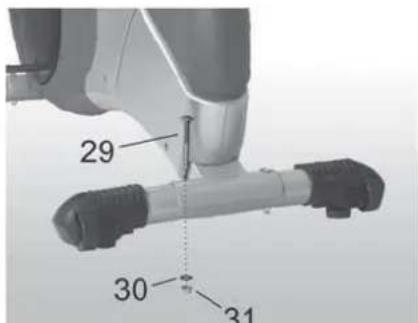
Attach the front support with transportation wheels to the frame with two bolts, washers and locking sleeves.
FRONT TUBE
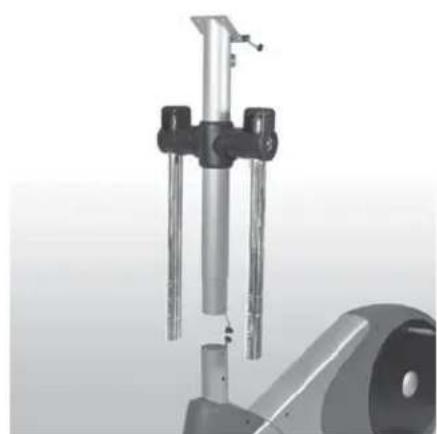
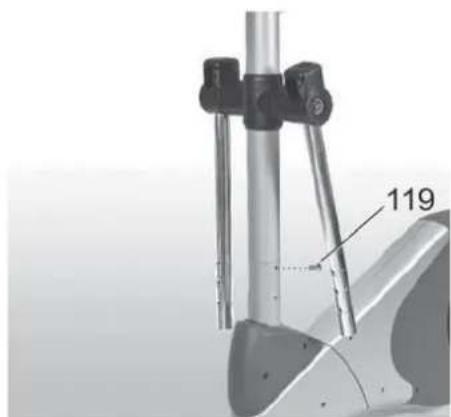
Connect the meter wire from the frame to the meter wire in the front tube. Push the front tube inside the frame tube: beware not to damage the console cable! Attach the front tube with six screws tight.
PEDAL CRANKS
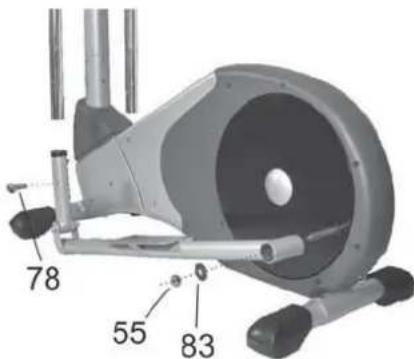
Place the rear end of the left pedal crank on the left rear shaft. Next place the washer and locking nut on the shaft. Tighten the locking nut fingertight. Repeat the procedure on the right side.
Push the front end of the left pedal crank inside the lower end of the left handle. Attach the crank to the handle with four screws fingertight. Repeat the procedure on the right side.
Tighten all cranks locking nuts and screws well and push the plastic end caps on the nuts and screws.
STATIONARY HANDLEBAR
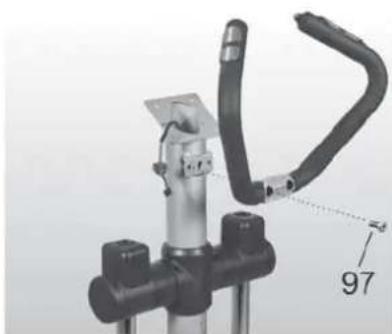
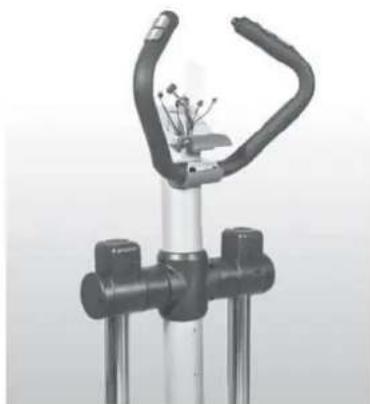
Thread the handgrip pulse cables inside the front tube and pull them out through the top end of the tube. Attach the stationary handlebar with two screws. NOTE! Beware not to damage the cables!
Place the cover parts over the handlebar attachment point and tighten with a screw.
HANDLES
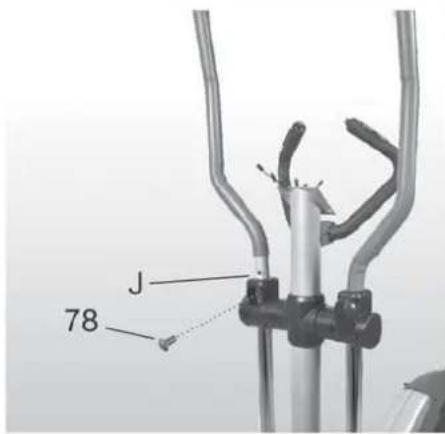
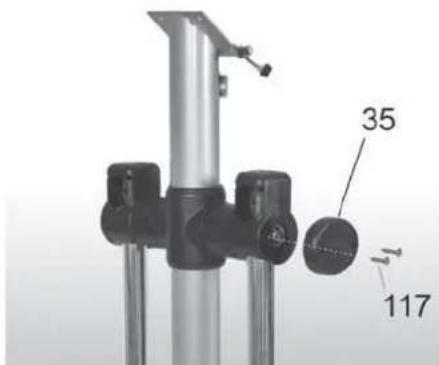
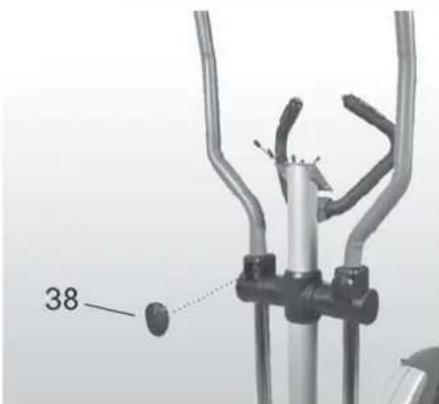
Place the handles on their places and tighten each with two screws. Attach the end plugs to the axel ends with two screws. Then press the plastic cover plugs over the screws.
CONSOLE
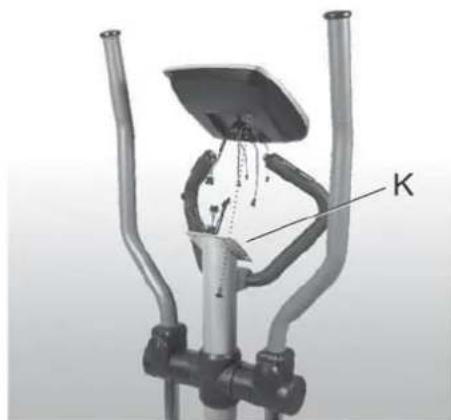
The console needs the batteries for keeping the user information in memory. Detach the lid of the battery casing at the back of the meter and place batteries (2× 1.5VAA) in the retainer.IMPORTANT! Note the + and - signs! Push the battery casing lid back into place.
Connect the cables from the front tube and console. Push the connected cables inside the front tube and place the console on top of the front tube. NOTE! Beware not to damage the cables! Attach the console with four screws. Remove the protective films from the console display.
FOOT BOARDS
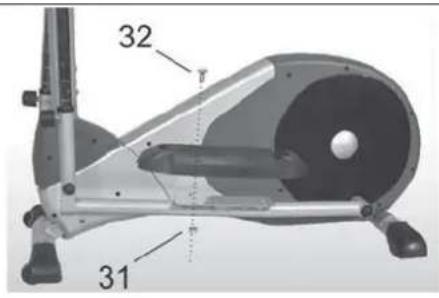
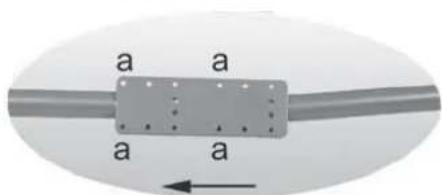
Attach the footboards to the desired place on the pedal cranks with four screws and locking nuts.
DRINK BOTTLE
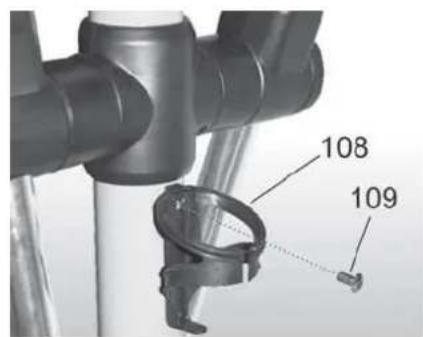
Secure the drink bottle rack with a screw.
TRANSFORMER
Before connecting the equipment to a power source, make sure that local voltage matches that indicated on the type plate: the equipment operates at either 230V or 115V (North American version). Plug the socket end of the transformer cord into the connector, just above the rear support in the center of the frame, and the other end into the wall socket.
NOTE! The equipment must be connected to a grounded wall socket. Do not use extension wires when connecting the equipment to the power source. Make sure the power cord does not run underneath the equipment.
DANGER: Always switch off the power and unplug this appliance from the electrical outlet immediately after using.
WARNING: To reduce the risk of burns, fire, electric shock, or injury to persons:
1) An appliance should never be left unattended when plugged in. Unplug from outlet when not in use, and before carrying out any maintenance or repair procedures.
2) Do not operate under blanket or other combustive material. Excessive heating can occur and cause fire, electric shock, or injury to persons.
EXERCISING
If the product is not stable, adjust the stabilizing screws under the rear support appropriately.
If you feel sidewalk play in the pedal cranks, tighten the front end shaft nuts until the play disappears.
Mount the device by grasping the fixed handle support of the device. Place your foot on the foot plate which is in the lower position and stable. Dismount the device when the pedal arms have stopped moving completely. Dismount by grasping the fixed handle support of the device.
EXERCISE LEVEL
Working out using a crosstrainer is excellent aerobic exercise, the principle being that the exercise should be suitably light, but of long duration. Aerobic exercise is based on improving the body's maximum oxygen uptake, which in turn improves endurance and fitness. The ability of the body to burn fat as a fuel is directly dependent on its oxygen uptake capacity. Aerobic exercise should above all be pleasant. You should perspire, but you should not get out of breath during the workout. You must, for example, be able to speak and not just pant while exercising. You should exercise at least three times a week, 30 minutes at a time, to reach a basic fitness level. Maintaining this level requires a few exercise sessions each week. Once the basic condition has been reached, it is easily improved, simply by increasing the number of exercise sessions. Exercise is always rewarding for weight loss, because it is the only way of increasing the energy spent by the body. This is why it is always worthwhile to combine regular exercise with a healthy diet. A dieter should exercise daily - at first 30 minutes or less at a time, gradually increasing the daily workout time to one hour.
Start your workout with slow tempo and low resistance. Gradually increase tempo and resistance according to your own condition. Keep your head up and neck long in order to avoid stress on your neck, shoulders and back. Keep also your back straight. Make sure that your feet are centered on the foot pedals and that your hips, knees, ankles and toes are facing forward. Keep your body weight centered over your lower body regardless of whether you lean forward or stand upright. Stop your workout by gradually decreasing tempo and resistance.
If you wish to strengthen your upper body muscles, lean slightly forward and focus on working with your arms. Grab the handles somewhat higher than normally to enhance the movement, but avoid getting your shoulders sore. For dual training, set the resistance sufficiently high and focus on actively using upper and lower body muscles simultaneously. You should feel the effects of training in whole body.
To develop upper body muscles, lean forward slightly and focus on pulling and pushing the handle supports with your hands. Grasping the supports somewhat higher will intensify the movement, but be careful not to get your shoulders sore. To develop upper and lower body muscles simultaneously, increase the resistance slightly and focus on using the upper and lower extremities simultaneously so that you feel resistance as they are both actively working.
HEART RATE
No matter what your goal, you'll get the best results by training at the right level of effort, and the best measure is your own heart rate.
First find your maximum heart rate i.e. where the rate doesn't increase with added effort. Control's meter calculates your approximate maximum pulse level using the following formula:
220-AGE
The maximum varies from person to person. The maximum heart-rate diminishes on average by one point per year. If you belong to a risk group, ask a doctor to measure your maximum heart rate for you.
We have defined three different heart-rate zones to help you with targeted training.
BEGINNER 50 - 60% of maximum heart-rate.
Also suitable for weight-watchers, convalescents and those who haven't exercised for a long time. Three sessions a week of at least a half-hour each is recommended. Regular exercise considerably improves beginners' respiratory and circulatory performance and you will quickly feel your improvement.
TRAINER 60 - 70% of maximum heart-rate.
Perfect for improving and maintaining fitness. Even reasonable effort develops the heart and lungs effectively, training for a minimum of 30 minutes at least three times a week. To improve your condition still further, increase either frequency or effort, but not both at the same time!
ACTIVE TRAINER 70 - 80% of maximum heart-rate.
Exercise at this level suits only the fittest and presupposes long-endurance workouts.
The heart rate is measured in three ways:
A) Using the handgrip heart rate sensors
B) Using an ear clip with cable (available as an optional extra)
c) Using a chest strap (wireless, telemetric), optional
The chest strap and receiver/adapter are available as optional extras.
Do not use more than one measuring system at the same time.
MEASURING PULSE WITH HAND SENSORS
Control measures pulse with sensors which are located in the hand supports and which measure the pulse each time the user touches both sensors simultaneously.
For reliable pulse measurement, the skin must be in continuous contact with the sensors and the skin in contact with the sensors should be slightly moist. Too dry or too moist skin will impair hand pulse measurement. Please note also that active use of the upper body muscles during exercise may interfere with hand pulse measurement: active muscles transmit similar electronic signals as the heart muscle. Therefore, we recommend that arms be kept relaxed during pulse measurement.
EAR PULSE MEASUREMENT
- Fit the ear sensor wire plug into the connecting point of the meter.
- Attach the ear sensor to the earlobe.
If the sensor does not immediately start measuring your pulse or if the earlobe is cold, rub the earlobe with the fingers to speed up circulation. Physiological differences between different people may also cause disturbances in pulse measurement. In these cases, try measuring on the inside surface of the ear or on the tip of your finger. If measuring disturbances appear while training, test the functioning of the sensor while stationary. Strong, unintentional swaying while training may also disturb measurement. If pulse values rise above 150 beats/min., earlobe measurement may be affected by the speeding up of circulation. Sometimes a strong light source, e.g. a fluorescent tube, in the immediate vicinity of the user may cause disturbances in pulse measurement. In this case, test the functioning of the sensor by turning the ear sensor the other way round on the earlobe. Pulse reading can also be affected, if the battery power of the meter is too low. Clean the car sensor after use with a damp cloth.
TELEMETRIC HEART RATE MEASUREMENT
This equipment has a built in pulse receiver, which is compatible with a telemetric Bremshey Pro Check pulse transmitter.
NOTE! If you are fitted with a pacemaker, please consult a physician before using a wireless heart rate monitor.
If you want to measure your heart rate this way during your workout, moisten the grooved electrodes on the transmitter belt with water. Fasten the transmitter just below the chest with the elastic belt, firmly enough so that the electrodes remain in contact with the skin while training, but
not so tight that normal breathing is prevented. If you wear the transmitter and belt over a light shirt, moisten the shirt slightly at the points where the electrodes touch the shirt. The transmitter automatically transmits the heart-rate reading to the meter up to a distance of about 1 meter. The heart-rate value is displayed in the meter. Follow your heart rate during the training.
REMARKS ON TELEMETRIC MEASUREMENT
If the electrode surfaces are not moist, the heart rate reading will not appear on the display. If the electrodes are dry, they must be moistened again. Allow the electrodes to warm up properly to ensure accurate heart-rate measurement. If there are several telemetric heart rate measurement equipments next to each other, the distance between them should be at least 1,5m . Similarly, if there is only one receiver and several transmitters in use, only one person with a transmitter should be within transmission range. The transmitter is switched to an active state only when it is being used for measurement. Sweat and other moisture can, however, keep the transmitter in an active state and waste battery energy. Therefore it is important to dry the electrodes carefully after use. When selecting training attire, please note that some fibers used in clothes (e.g. polyester, polyamide) create static electricity, which may prevent reliable heart rate measurement.
Please note that a mobile phone, television and other electrical appliances form an electro-magnetic field around them, which will cause problems in heart rate measurement.
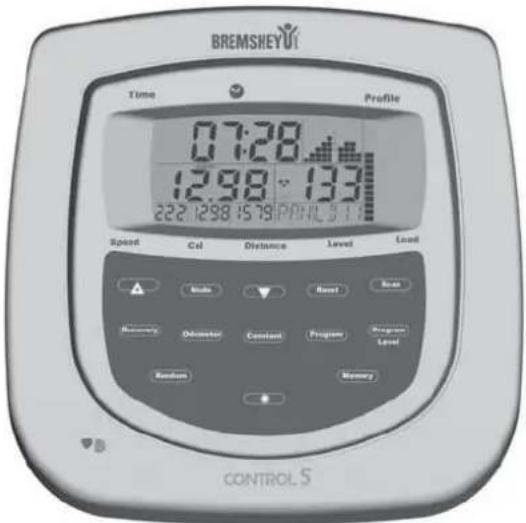
CONSOLE
Plug the transformer into the mains. An audible signal indicates that the power is connected.
The data is entered in the following order:
ENTERING THE TIME AND DATE
The time of day (hour) flashes.
AM or PM appears in the display
- Use the + / - keys to set the hour
The time is always displayed from 0:00 to 12:00, and the AM and PM indicator changes to indicate morning or afternoon.
- Press the MODE key
The minutes start flashing
-
Use the + / - keys to set the minutes
-
Press the MODE key
-
ALM (Alarm) appears in the display
The hour of the alarm flashes
-
Use the +/- keys to change the alarm time
-
Press the MODE key
The minutes start flashing
-
Use the + / - keys to set the minutes
-
Press the MODE key
ALM starts flashing
- Use the + / - keys to switch ALM on or off
If the alarm is switched on, a large bell appears in the display
- Press the MODE key
The year starts flashing
-
Use the + / - keys to change the year
-
Press the MODE key
The month starts flashing
-
Use the + / - keys to set the month
-
Press the MODE key
The day appears
-
Use the +/- keys to select the day
-
Press the MODE key
The user number "U01" starts flashing in the bottom right of the display
ENTERING USER/WORKOUT DATA
Continue entering data when the user number appears and starts flashing. If you then want to skip time input, etc. press and hold the MODE key for five seconds until "U01" starts flashing.
-
Use the + / - keys to select the memory location for this user
-
Press the MODE key
SEX appears in the display, and "M" starts flashing
-
Use the + / - keys to select "M" for male or "F" for female
-
Press the MODE key
WET (Weight) appears in the display
-
Use the + / - keys to enter your weight
-
Press the MODE key
AGE appears
-
Use the + / - keys to enter your age
-
Press the MODE key
Program "PO1-PO9/HRC" or "Random" (RND) appears.
- Press the "Program" or "Random" key
- Use the "Program" key to select program "PO1-PO9" or "HRC"
If you select "PO1-PO9", then instead of pressing the "Mode" key, change the basis of the program with the "Program Level" key (the display returns to zero if you exceed the maximum)
- Press the Mode key
If you select the heart program "HRC": - Press the Mode key
The heart rate starts flashing - Use the + / - keys to set the heart rate
- Press the Mode key
If you do not want to specify values for "Time, Distance, Calories, Kilos", you can start your workout
The time starts counting automatically and the program starts
If you want to enter workout data, for example a countdown distance, do not start exercising, but instead press the Mode key again and follow these steps:
The workout time (minutes) starts flashing
-
Use the + / - keys to set the workout time. Now enter the data as described above until the heart rate appears briefly
-
Press the Mode key
You can start exercising now
OTHER INPUT OPTIONS:
A. In Stop mode (not exercising)
- You can use the + / - keys to select a new program immediately without having to change other values.
- Press "MODE" to select a function you want to change. Use the +/- keys to adjust the values. Continue until the predefine heart rate (based on the user data) appears briefly. When the heart rate disappears, start your workout.
After the RESET key is used to delete all values, the time of day starts flashing.
Press the MODE key to enable input.
B. In Active mode
(the time display starts flashing and counting)
- Adjust the training intensity level with the + / - keys.
NOTES:
- Please note that the console needs a few seconds to handle all calculations and input (heart rate
approx. 10 seconds)
- If a program is restarted, the "SCAN" function is disabled. The speed value is also shown larger in the display
If you press the "SCAN" key, the display switches repeatedly between "Speed/Cal./Distance"
The values are displayed one after the other
If you press the "MODE" key while the Cal or Distance values are visible, you can display them in the larger window. Press the SCAN key again to return to the alternating display
The lengths of the different program stages depend on the workout time you set
The time of day, the alarm time and the date are displayed in international format:
EXAMPLES:
| 05 03 20 | 05 10 | 30 AM | 13:00 PM | |
| Month | Day | Year | AM=morning | PM=afternoon |
| 0-12 12 -24 |
B. In Active mode (the time display starts flashing and counting)
If more than one countdown function is used, the audible signal is sounded for the function that reaches zero first. If you carry on with the workout, the relevant counter automatically starts counting up again from zero.
- This device uses average values to calculate energy consumption.
However, each individual has differing capacity for producing energy (known as their efficiency), so the energy consumption displayed can only be an approximation, and cannot be used for therapeutic purposes.
The amount of energy you burn during a workout is displayed in kcal (kilocalories). You can use the following formula to convert the values into joules: 1kcal = 4.187kJ
If you are using a heart-rate workout, the console uses your age to calculate three heart rate ranges relating to your maximum heart rate.
If you want to use reference values other than the preset values, watch your current heart rate and not the percentage value.
The default time in the console is five minutes. The programs are not useful for periods of less than five minutes.
The pushbuttons on the rigid handgrip have the same functions as the +/- keys.
- Random program:
You can use this program to select from a large number of program profiles that are different every time.
After selecting a program, press the Mode key. Now enter the workout time, etc. as described above.
If you press the "Memory" key, this program profile will be saved for your next workout.
Heart rate control:
You can use this program to exercise on the basis of your heart rate. You have the option of entering your personal target heart rate. You can use the heart rate zone formula to determine your own
target heart rate. The program will keep on increasing the resistance as you exercise until the predefined heart rate is reached, and then keeps it constant. If you exceed the heart rate, a warning signal is sounded and the program reduces the resistance
until your heart rate falls again. The display also shows your heart rate range, calculated on the basis of your personal data. Heart rate measurement is required for the heart program.
RECOVERY PULSE MEASUREMENT
Measure your recovery pulse after training. The measurement can only be started if the pulse measurement is activated and the pulse value is shown on the display.
- Start the recovery pulse measurement by pressing RECOVERY.
- The measurement takes 60 seconds.
- After the measurement is finished, the display shows the result F1-F6 (F1 = best result). Please note that your results are in a relation to the pulse level in the beginning of the measurement, and that your results are personal and cannot directly be compared with any other person's results. In order to improve the reliability of recovery pulse measurement, always try to standardize the measurement situation as accurately as possible; start measuring at the same heart rate level as precisely as possible.
- To switch back to the main display by pressing RECOVERY.
TRANSPORT AND STORAGE
Please follow these instructions when carrying and moving the equipment about, because lifting it incorrectly may strain your back or risk other accidents:
The device is easy to move by pushing along on the integrated transport wheels. Tilt the device from the front and push along the floor on the wheels at the front support. We recommend that you use a protective base when transporting the equipment.
To prevent the equipment malfunctioning, store in a dry place with as little temperature variation as possible and protected from dust.
MAINTENANCE
The equipment requires very little maintenance. Check, however, from time-to-time that all screws and nuts are tight.
- After exercising, clean the equipment with a soft, absorbent cloth. Do not use solvents. Sweat may cause corrosion: we recommend therefore that you protect all metal surfaces outside the plastic covers with teflon.
- Never remove the equipment's protective casing.
CHANGING BATTERIES
The console gives a warning signal before the change of batteries is due. Detach the lid of the battery casing at the back of the meter and remove the old batteries. Place the new batteries in the holder (2× 1.5VAA) and push the battery casing lid back into place.
MALFUNCTIONS
NOTE! Despite continuous quality control, defects and malfunctions caused by individual components may occur in the equipment. In most cases it's unnecessary to take the whole device in for repair, as it's usually sufficient to replace the defective part. Always give the model, serial number of your equipment and in case of malfunctions also conditions of use, nature of malfunction and any error code.
When you encounter unusual behavior from the device, contact your local Bremshey dealer for service.
If you require spare parts, always give the model, serial number of your equipment and the spare part number for the part you need. The spare part list is at the back of this manual. Use only spare parts mentioned in the spare part list.
TECHNICAL SPECIFICATIONS
Length. 128cm
Width 57 cm
Height. 175cm
Weight. 49 kg
The Control meets the requirements of the EU's
EMC Directives on electromagnetic compatibility (89/336/EEC). This product therefore carries the CE label.
The Control meets EN precision and safety standards (EN-957).
Due to our continuous policy of product development, Bremshey reserves the right to change specifications without notice.
NOTE! The instructions must be followed carefully in the assembly, use and maintenance of your equipment. The warranty does not cover damage due to negligence of the assembly, adjustment and maintenance instructions described herein. Changes or modifications not expressly approved by Bremshey will void the user's authority to operate the equipment!
We wish you many enjoyable trainings!
INHALT
SENSORI NEL MANUBRIO
INTRODUCIR HORA, FECHA
TRANSPORT OCH FÖRVARING 63
UNDERHÄLL 63
STÖRNINGAR VID ANVÄNDNING 64
TEKNISKA DATA 64
BRUKSANVISNING
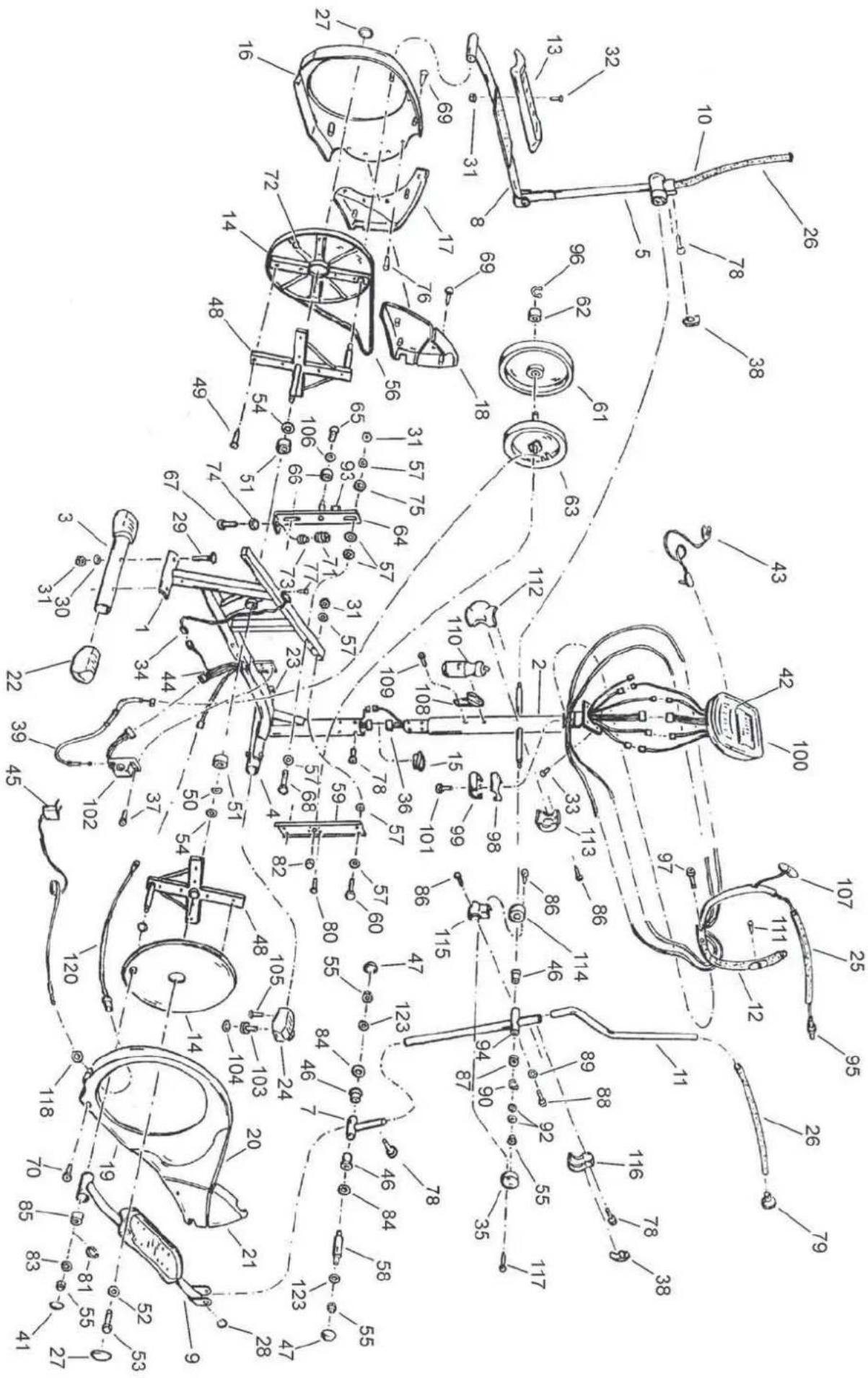
21 173 7056 20 Front cover, RH
22 533 7096 20 Rear foot cover 2
23 533 7097 20 Front foot cover, LH
24 533 7098 20 Front foot cover, RH
25 213 7021 20 Fixed handlebar grip
26 213702020 Handle grip 2
- 213702520 Handle grip,GB
27 533 7109 20 End cap 2
28 533 7100 20 End cap 2
29 M8x75 DIN 603 Screw 4
30 M8 DIN 125 Washer (^*4 pcs)
31 M8 DIN 985 Nylock nut (^*12pc) 14
32 M8x25 DIN 603 Screw 8
33 M5x10 DIN 7985 Screw 4
34 403 7075 Speed sensor 1
35 533 7107 20 End plug 2
36 403 7076 Meter cable 1
37 M6x10 DIN 7985 Screw
38 533 7108 20 End cap 2
39 223 7012 Adjusting wire 1
41 533711120 End cap 2
42 233 7036 20 Membrane 1
43 233 7034 20 Ear clip sencor
44 403 7095 Servo motor cable 1
45 403 7076 EU Transformer with mains, EUR 1
-
4037076 USA Transformer with mains, USA 1
-
4037076GB Transformer with mains, GB 1
-
4037076AUS Transformer with mains,AUS1
403 7076 JPN Transformer with mains, JPN 1
46 533 7101 Sleeve 6
47 533 7102 20 End cap
48 353 7003 Pedal tube crank, pair 1
49 4,8x19 DIN 7981 Screw 16
50 6537049 Washer
51 523 1010 Bearing 2
52 6530082 Washer
53 653 7052 Locking screw 1
54 6537045 Spacer 2
55 M10 DIN 985 Nylock nut 8
56 4437006 Belt 1
57 M8 DIN 9021 Washer 12
58 343 7027 Pedal tube shaft 2
59 503 7034 Flywheel holder bracket 1
60 M8x65 DIN 931 Screw
61 303 7012 Flywheel (incl. 62, 96)
63 373 7008 Brake unit, compl. 1
64 513 7005 Belt tightener 1
65 M6x12 DIN 7985 Screw
66 263 7009 Drive pulley 1
67 M8x30 DIN 933 Screw 1
68 M8x65 DIN 931 Screw
69 4,8x20 DIN 7981 Screw 12
70 M5x12 DIN 7985 Screw 6
71 643 7007 Spring 1
72 4031142 Magnet
73 693 7002 Spring guide 1
74 M8 DIN 934 Nut 1
75 653 7044 Slide washer 4
76 3,9x8 DIN 7981 Screw 8
77 3,5x13 DIN 7504-MScrew
*78 M8x16 ISO 7380 Allen head bolt 14
79533710320 Handlebar end cap 2
80 M6x12 DIN 7985 Screw 4
81 40 DIN 471 Retainer 2
82 6537047 Nut 1
83 M10 DIN 125 Washer 2
84 6537046 Washer 4
85 5237020 Bearing 2
86 4,2x16 DIN 7981 Screw 14
87 523 111 87 Bearing 2
88 M5x6 DIN 7985 Locking screw 2
89 M5 DIN 125 Washer
90 17 DIN 471 Retainer 2
92 M10 DIN 433 Washer
93 693 7003 Distance foam 1
94 6537050 Sleeve 2
95 403 7091 20 Push-button end cap 2
96 12 DIN 471 Retainer 1
97 M8x20 ISO 7380 Screw 2
98 173 7050 20 Upper cover 1
99 173 7051 20 Lower cover 1
100 233 7031 20 Meter (incl. 40, 42)
101 M3x10 DIN 7985 Screw 1
102 403 7078 Servo motor 1
103 533 7106 20 Adjustable foot (incl. 104) 2
104 683 7005 20 Foot pad 2
105 M5x12 DIN 7985 Screw 4
106 M6 DIN 125 Washer
107 403 7073 20 Hand pulse grip unit 2
108 593 7001 20 Bottle track
109 M5x12 DIN 7985 Screw 2
110 453 7001 20 Bottle
111 3,9x19 DIN 7982 Screw 2
112 173 7057 20 Front cover for upright tube 1
113 173 7058 20 Rear cover for upright tube
114 173 7059 20 Inner cover for swivel tube
115 173 7060 20 Front cover for swivel tube
116 173 7061 20 Rear cover for swivel tube
117 2,9x12 DIN 7981 Screw 4
118 6537057 Nut 1
120 4037098 DC-cable 1
122 423 7091 20 Label
123 6537061 Washer 4
- 583702420 Owner's manual
BREMSHEY SPORT
Austria
DoWi GmbH
Ziehrerstrasse 80
8041 Graz
Tel. +43 316 71 64 12
Fax +43 316 71 64 35
www.dowj.at
Benelux
Tunturi B.V.
Postbus 60001
1320 AA Almere
Nederland
Tel. +31 36 546 00 50
Fax +31 36 546 00 55
www.bremshey.nl
Finland
Tunturi Oy Ltd
PL750
20361 Turku
Tel. +358 2 513 31
Fax +358 2 513 3323
Germany
Tunturi GmbH
Heidenfelder Str. 5
97525 Schwebheim
Tel. +49 9723 9345 0
Fax +49 9723 9345 19
www.tunturi.de
Great Britain
Bolton Stirland International Ltd.
Boland House
Nottingham South
Industrial Lane
Wilford
Tel. +44 115 98 22844
Fax +44 115 98 17784
www.bsfitness.co.uk
USA/Canada
Accell Fitness North America Inc.
130 Hayward Ave, Suite 2
N2C 2E4
Kitchener, ON Canada
Tel. 1-888-388-6887
Fax: 1-519-576-2521
www.accellfi tness.com