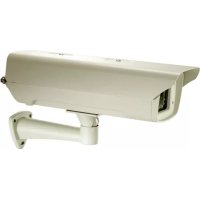
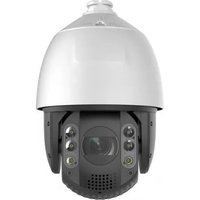
BOH1411 - Surveillance Camera LEVELONE - Free user manual and instructions
Find the device manual for free BOH1411 LEVELONE in PDF.



| Product type | Outdoor surveillance camera |
| Brand | LevelOne |
| Model | BOH1411 |
| Resolution | 2 Megapixels (1080p) |
| Viewing angle | 90° (estimated) |
| Night vision | Yes, infrared up to 20 meters |
| Protection rating | IP66 (weatherproof) |
| Power supply | 12 VDC or LevelOne high-power PoE (non-standard IEEE 802.3at/af) |
| Power consumption | 8 Watts maximum |
| Dimensions (L x W x H) | 180 x 70 x 70 mm (estimated) |
| Weight | 500 g (estimated) |
| Connectors | RJ45 (PoE), DC Jack 2.0 mm, screw terminal block |
| Main functions | Video surveillance, motion detection, remote viewing, recording on NVR |
| Installation | Wall mounting with bracket, screw fixing, protective housing |
| Maintenance and cleaning | Clean the housing with a soft dry cloth, do not use abrasive products |
| Safety | Do not expose to rain or moisture during installation, follow wiring instructions |
| Spare parts and repairability | Contact LevelOne customer service for replacement parts |
| General information | Camera designed for outdoor use, requires a LevelOne high-power PoE injector or switch (POI-4000, FSW-0513) |
Frequently Asked Questions - BOH1411 LEVELONE
User questions about BOH1411 LEVELONE
0 question about this device. Answer the ones you know or ask your own.
Ask a new question about this device
Download the instructions for your Surveillance Camera in PDF format for free! Find your manual BOH1411 - LEVELONE and take your electronic device back in hand. On this page are published all the documents necessary for the use of your device. BOH1411 by LEVELONE.
USER MANUAL BOH1411 LEVELONE
BOH-1400: Camera PoE Outdoor Enclosure
BOH-1401: Camera PoE Outdoor Enclosure, IR LEDs
BOH-1410: Camera PoE Outdoor Enclosure, FEVE Coating
BOH- 1411: Camera PoE Outdoor Enclosure, IR LEDs, FEVE Coating
Quick Installation Guide
English Portugues
Deutsch Svenska
Installing The Camera In The Housing
| 1 2 3 | ||
- Fasten camera on mounting board with 1/4 screws.
- Fasten camera mounting board to camera housing with 3x8 double washer screws.
- After internal wiring is complete, close the housing and tighten the four screws.
Installing The Bracket
| 1 2 3 | ||
- Fix the bracket onto wall.
- Through the rubber gasket, tighten up the bottom of the housing with the flat head 6x8 Hex socket cap screw.
- Adjust camera angle and tighten up the bolt as shown in the figure.
Routing the cables in the housing
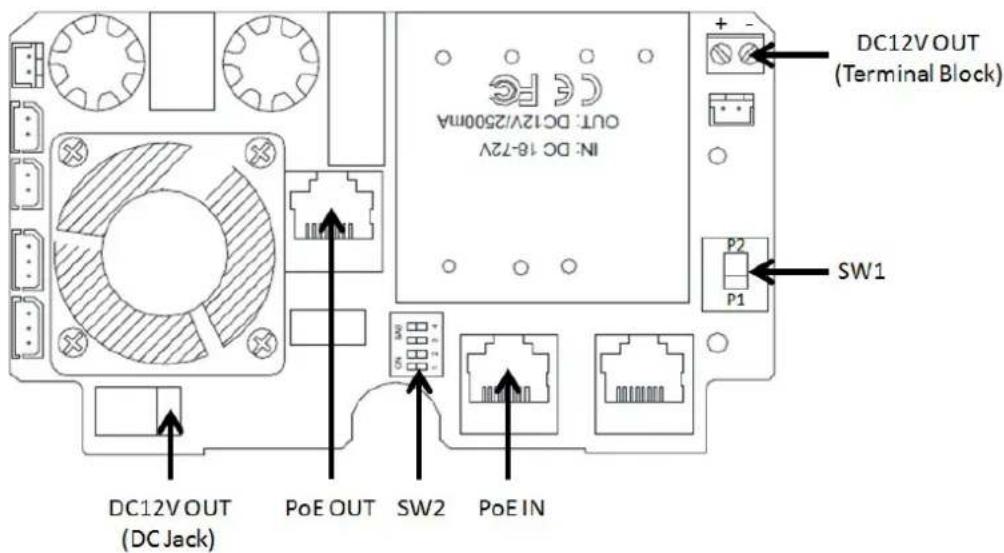
Connection for DC12V cameras
$$ \mathbf {S W 1} = \mathbf {P 1} $$
$$ S W 2 = 1 - 4 O N $$
| Cameras with 2.0mm DC Jack | ||
| DC12V OUT (Terminal Block) Red(+) Black(-) | ←→ | To Camera 2.0mm DC Jack |
| PoE OUT | ←→ | To Camera RJ45 Port |
| Cameras with DC12V Power Terminal Connectors | ||
| DC12V OUT (DC Jack) | ←→ | To Camera with Terminal Block Red(+) Black(-) |
| PoE OUT | ←→ | To Camera RJ45 Port |
English
Connection for PoE Cameras
$$ \mathbf {S W 1} = \mathbf {P 2} $$
$$ S W 2 = 1 - 4 O N $$
| PoE OUT | ← 000 → | To Camera RJ45 PoE Port |
Connecting Power to the Housing
Connect the housing (PoE IN) to a LevelOne High-Power injector/switch (POI-4000, FSW-0513).
Note: This product does not support standard IEEE 802.3at/af. Use only with LevelOne High-Power PoE products (POI-4000, FSW-0513).
Warning
To reduce the risks of an electric shock, do not expose inside of this unit to rain or moisture.
Follow all wiring instructions carefully. Altering the switches may cause damage to the housing or the camera.
Deutsch
$$ S W 2 = 1 - 4 O N $$
| PoE OUT | ← 000 → | To Camera RJ45 PoE Port |
$$ S W 2 = 1 - 4 O N $$
$$ S W 2 = 1 - 4 O N $$
| PoE OUT | ← 000 → | To Camera RJ45 PoE Port |
$$ S W 2 = 1 - 4 O N $$
| Cámaras con conductor de DC de 2,0 mm | ||
| DC12V OUT (Terminal Block) Red(+) Black(-) | To Camera 2.0mm DC Jack | |
| PoE OUT | To Camera RJ45 Port | |
| Cámaras con connectores terminales de alimentación de 12 VDC | ||
| DC12V OUT (DC Jack) | ←→ | To Camera with Terminal Block Red(+) Black(-) |
| PoE OUT | ←→ | To Camera RJ45 Port |
Espanol
$$ S W 2 = 1 - 4 O N $$
| PoE OUT | ←→ | To Camera RJ45 PoE Port |
Conectar la alimentacion a la carcasa
$$ S W 2 = 1 - 4 O N $$
| Camera's met DC-stekker van 2,0 mm | ||
| DC12V OUT (Terminal Block) Red(+) Black(-) | ←→ | To Camera 2.0mm DC Jack |
| PoE OUT | ←→ | To Camera RJ45 Port |
$$ S W 2 = 1 - 4 O N $$
| PoE OUT | ← → | To Camera RJ45 PoE Port |
$$ S W 2 = 1 - 4 O N $$
| Kameraer med 2,0 mm øvnstrømsstik | ||
| DC12V OUT (Terminal Block) Red(+) Black(-) | ←→ | To Camera 2.0mm DC Jack |
| PoE OUT | ←→ | To Camera RJ45 Port |
| Kameraer med terminalkonnektorer på 12 V jegnstrøm | ||
| DC12V OUT (DC Jack) | ←→ | To Camera with Terminal Block Red(+) Black(-) |
| PoE OUT | ←→ | To Camera RJ45 Port |
Dansk
Tilslutning til PoE kameraer
$$ \mathbf {S W 1} = \mathbf {P 2} $$
$$ S W 2 = 1 - 4 O N $$
| PoE OUT | ← 000 → | To Camera RJ45 PoE Port |
$$ S W 2 = 1 - 4 O N $$
| Telecamere con jack a c.c. da 2,0 mm | ||
| DC12V OUT (Terminal Block) Red(+) Black(-) | To Camera 2.0mm DC Jack | |
| PoE OUT | To Camera RJ45 Port | |
| Telecamere con connettori terminali di potenza da 12 V a c.c. | ||
| DC12V OUT (DC Jack) | ←→ | To Camera with Terminal Block Red(+) Black(-) |
| PoE OUT | ←→ | To Camera RJ45 Port |
Italiano
$$ S W 2 = 1 - 4 O N $$
| PoE OUT | ← 000 → | To Camera RJ45 PoE Port |
$$ S W 2 = 1 - 4 O N $$
| Káμερες με uπoδoxú DC 2,0mm | ||
| DC12V OUT (Terminal Block) Red(+) Black(-) | ←→ | To Camera 2.0mm DC Jack |
| PoE OUT | ←→ | To Camera RJ45 Port |
$$ S W 2 = 1 - 4 O N $$
| PoE OUT | ←→ | To Camera RJ45 PoE Port |
$$ S W 2 = 1 - 4 O N $$
| Cámaras com tomada DC de 2,0 mm | ||
| DC12V OUT (Terminal Block) Red(+) Black(-) | ←→ | To Camera 2.0mm DC Jack |
| PoE OUT | ←→ | To Camera RJ45 Port |
| Câmaras com connectores de alimentação DC12V | ||
| DC12V OUT (DC Jack) | ←→ | To Camera with Terminal Block Red(+) Black(-) |
| PoE OUT | ←→ | To Camera RJ45 Port |
Portugues
SW1 = P2
SW2 = 1-4 ON
| PoE OUT | ← → | To Camera RJ45 PoE Port |
Note: This product does not support standard IEEE 802.3at/af. Use only with LevelOne High-Power PoE products (POI-4000, FSW-0513).
Aviso
Anslutting for DC12V-kameror
$$ \mathbf {S W 1} = \mathbf {P 1} $$
$$ S W 2 = 1 - 4 O N $$
| Kameror med 2,0 mm DC-uttag | ||
| DC12V OUT (Terminal Block) Red(+) Black(-) | ←→ | To Camera 2.0mm DC Jack |
| PoE OUT | ←→ | To Camera RJ45 Port |
| Kameror med DC12V uttagsbleck | ||
| DC12V OUT (DC Jack) | ←→ | To Camera with Terminal Block Red(+) Black(-) |
| PoE OUT | ←→ | To Camera RJ45 Port |
Svenska
Anslutting for PoE-kameror
$$ \mathbf {S W 1} = \mathbf {P 2} $$
$$ S W 2 = 1 - 4 O N $$
| PoE OUT | ← → | To Camera RJ45 PoE Port |
$$ S W 2 = 1 - 4 O N $$
| Kamere z vtičem 2,0 mm DC | ||
| DC12V OUT (Terminal Block) Red(+) Black(-) | ←→ | To Camera 2.0mm DC Jack |
| PoE OUT | ←→ | To Camera RJ45 Port |
| Kamere z napajalnimi priključki DC 12 V | ||
| DC12V OUT (DC Jack) | ←→ | To Camera with Terminal Block Red(+) Black(-) |
| PoE OUT | ←→ | To Camera RJ45 Port |
Slovenscina
Povezava za kamere PoE
$$ \mathbf {S W 1} = \mathbf {P 2} $$
$$ S W 2 = 1 - 4 O N $$
| PoE OUT | ← → | To Camera RJ45 PoE Port |
$$ S W 2 = 1 - 4 O N $$
| Камерс разbebем посторного тoka 2,0 MM | ||
| DC12V OUT (Terminal Block) Red(+) Black(-) | ←→ | To Camera 2.0mm DC Jack |
| PoE OUT | ←→ | To Camera RJ45 Port |
| Камеры с кlerмнburnим колodдампитаня 12 B (посторный тOK) | ||
| DC12V OUT (DC Jack) | ←→ | To Camera with Terminal Block Red(+) Black(-) |
| PoE OUT | ←→ | To Camera RJ45 Port |
Pycckn
PoiKJIoueHne PoE-kaMep
$$ \mathbf {S W 1} = \mathbf {P 2} $$
$$ S W 2 = 1 - 4 O N $$

IodknueHue numanua Kkopnycy
ПодключиTe корпс (PoE IN) К Инжектopy/пeреключаTeю LevelOne High-Power (POI-4000, FSW-0513).
Приимechан. Дадныnpodукт He подерхиBaet StanДapT IEEE 802.3at/af. ИстьштToлько с npoduyktaMu LevelOne High-Power PoE (POI-4000, FSW-0513).
BHHMaHHe!
Дл п dedOTbpaueHЯ nopaxeHЯ 3JIeKtpnueckm TOKOM He noDBepraTe BHyTpeHHne DeTann yCTpoIcTBa BO3DeIcTBNIO DOJxra Nll BlaRn. TuaTeBHo co6IouaIte yKa3aHna NO npOKJaKe npOBoDob.CMeHa nepeKlIoUaTeJe nll Own6Kn npn npOKJaKe npOBoDob MOryT npNBecTu K nobpeXdEHNIO Kopnyca nll KaMepbl.
Polski
$$ S W 2 = 1 - 4 O N $$
| Kamery z gniazem zasilajęcym DC 2,0 mm | ||
| DC12V OUT (Terminal Block) Red(+) Black(-) | ←→ | To Camera 2.0mm DC Jack |
| PoE OUT | ←→ | To Camera RJ45 Port |
| Kamery ze złuczem zasilania DC12V | ||
| DC12V OUT (DC Jack) | ←→ | To Camera with Terminal Block Red(+) Black(-) |
| PoE OUT | ←→ | To Camera RJ45 Port |
Polski
$$ S W 2 = 1 - 4 O N $$
| PoE OUT | ←→ | To Camera RJ45 PoE Port |
$$ S W 2 = 1 - 4 O N $$
| 2.0mm DC 썸 힘개 기다라 | ||
| DC12V OUT (Terminal Block) Red(+) Black(-) | ←→ | To Camera 2.0mm DC Jack |
| PoE OUT | ←→ | To Camera RJ45 Port |
| DC12V 전원 출자 키버 PTR 키내 썸메라 | ||
| DC12V OUT (DC Jack) | ←→ | To Camera with Terminal Block Red(+) Black(-) |
| PoE OUT | ←→ | To Camera RJ45 Port |
韓国
PoE トマレる用 端
$$ \mathbf {S W 1} = \mathbf {P 2} $$
$$ S W 2 = 1 - 4 O N $$
| PoE OUT | ←→ | To Camera RJ45 PoE Port |
前同在
hupg(PoEIN)levelOneHigh-Powerlinck/6wch(POI-4000,FSW-0513)en
<|im_start|>assistant
查加:i 802.3at/af 而 而 LevelOne High-Power PoE
Poi-4000, FSW-0513)ohjn n
[1] [2]
$$ S W 2 = 1 - 4 O N $$
| PoE OUT | ←→ | To Camera RJ45 PoE Port |
外殼連接電源



- Installing The Camera In The Housing
- Installing The Bracket
- Routing the cables in the housing
- Connection for DC12V cameras
- English
- Connecting Power to the Housing
- Warning
- Deutsch
- Espanol
- Conectar la alimentacion a la carcasa
- Dansk
- Italiano
- Portugues
- Aviso
- Svenska
- Slovenscina
- Pycckn
- IodknueHue numanua Kkopnycy
- BHHMaHHe!
- Polski
- 韓国
- 外殼連接電源
Brand : LEVELONE
Model : BOH1411
Category : Surveillance Camera