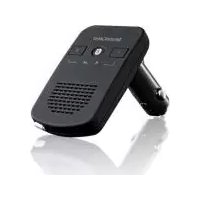
SBTF 10 C3 - Built-in kit SILVERCREST - Free user manual and instructions
Find the device manual for free SBTF 10 C3 SILVERCREST in PDF.



| Product type | Bluetooth hands-free kit for vehicle (in-dash) |
| Brand | SilverCrest |
| Model | SBTF 10 C3 |
| Supply voltage | 12-24 V === (direct current) |
| Current consumption | 1000 mA |
| Bluetooth specification | Version 3.0 + EDR, Class II, range up to 10 m |
| Supported Bluetooth profiles | HSP and HFP |
| USB output voltage | 5 V === / 1 A |
| Fuse | F2AL / 250 V |
| Dimensions (L × l × H) | approx. 16.2 × 5.5 × 2.3 cm |
| Weight | approx. 78 g |
| Operating temperature | +5 °C to +40 °C |
| Storage temperature | 0 °C to +70 °C |
| Relative humidity | 5 to 75 % (non-condensing) |
| Main functions | Hands-free calls, charging devices via USB, multipoint function (2 phones), voice command, call rejection, last number redial |
| Maintenance and cleaning | Clean with a slightly damp cloth; do not immerse; do not use aggressive products |
| Safety | Follow road safety instructions; do not open the device; do not expose to moisture or extreme temperatures |
| Spare parts and repairability | Replaceable fuse (type F2AL/250V); repair exclusively by the authorized after-sales service |
| Warranty | 3 years from the date of purchase |
| After-sales service France | Tel. 0800 919270, email: kompernass@lidl.fr |
Frequently Asked Questions - SBTF 10 C3 SILVERCREST
User questions about SBTF 10 C3 SILVERCREST
0 question about this device. Answer the ones you know or ask your own.
Ask a new question about this device
Download the instructions for your Built-in kit in PDF format for free! Find your manual SBTF 10 C3 - SILVERCREST and take your electronic device back in hand. On this page are published all the documents necessary for the use of your device. SBTF 10 C3 by SILVERCREST.
USER MANUAL SBTF 10 C3 SILVERCREST
Bluetooth® HANDS-FREE KIT
Operating instructions
NL BE
Bluetooth®-HANDSFREESET
Gebruiksaanwijzing
ES
DISPOSITIVO MANOS LIBRES Bluetooth®
Before reading, unfold the page containing the illustrations and familiarise yourself with all functions of the device.
FR BE
GB/IE Operating instructions
KOMPERNASS HANDELS GMBH
BURGSTRASSE 21
44867 BOCHUM
GERMANY
www.kompernass.com
Content
Correct Usage 24
Safety instructions 25
Introduction, trademark rights 27
Package contents (see fold-out page) 28
Technical data 28
Controls (see fold-out page) 29
Installing the hands-free appliance in a vehicle 29
Switching the hands-free appliance on and off 30
Coupling the hands-free appliance with a mobile telephone 30
Multipoint function 32
Pairing the hands-free kit with an additional mobile phone 32
Separating the connection 33
Using the hands-free appliance 33
Resetting the hands-free kit 36
Charging 5 V Devices 36
Troubleshooting 37
Cleaning and Care 38
Storage when not in use 38
Disposal 39
Notes on the EU Declaration of Conformity 39
Kompernass Handels GmbH warranty 40
Service 42
Impor ter 42
SILVERCREST
Congratulations on the purchase of your new appliance. You have clearly decided in favour of a quality product. These operating instructions are a part of this product. They contain important information in regard to safety, use and disposal. Before using the product, familiarise yourself with all of these operating and safety instructions. Use the product only as described and only for the specified areas of application. In addition, pass these documents on, together with the product, to any future owner.
Correct Usage
The Bluetooth® hands-free device SBTF 10 C3 is an information technology device intended for use in vehicles supplying an on-board voltage of 12 - 24V . The device is designed to create an open voice connection with a mobile phone via a Bluetooth® connection, in order to allow the user to make telephone calls while travelling by car, without having to hold the mobile phone to his or her ear. The handsfree phone system uses both Bluetooth® radio technology as well as a digital signal processor (DSP) to carry out telephone functions. In addition, mobile devices with an operating voltage of 5V = = (MP3 players, cell phones, etc.) can be charged via the USB port*.
This device may be used ONLY for private domestic purposes, not for industrial or commercial applications. This product is not intended for use in activities concerned with medicinal, lifesaving or life sustaining applications. All of the additional connecting cables and external devices used MUST match the safety-related, electromagnetic compatibility and shielding quality standards of the device at hand.
This appliance is not intended for any other use or for uses beyond those mentioned. Claims of any kind for damage resulting from unintended use will not be excepted. The operator alone bears liability.
*USB® is a registered trademark of USB Implementers Forum, Inc.
Safety instructions
Symbol definitions:
Danger!
A warning notice at this hazard level indicates a potentially hazardous situation. Failure to avoid this hazardous situation could result in severe injuries and even death.
- Follow the instructions in this warning notice to prevent injury.
Caution!
A warning notice at this hazard level indicates a potential for property damage.
Failure to avoid this hazardous situation could result in property damage.
- Follow the instructions in this warning notice to prevent property damage.
① Note:
- A note provides additional information that will assist you in using the appliance.
Danger! Traffic safety has priority!
-
Comply with all local laws. When driving, your hands must ALWAYS be free to operate the vehicle safely. Traffic safety must ALWAYS take priority whilst driving.
-
Only manipulate the hands-free appliance on those occasions in which the traffic situation permits it and in which you will not endanger, injure, obstruct or cause annoyance to other road users. Therefore you should only operate the hands-free set in a stationary vehicle.
-
Do not permit your concentration on the road traffic to be compromised by the manipulation and displays of the handsfree appliance!
-
Become familiar with the operation of it before driving off and practice the safe operation of the facility!
SILVERCREST
- Install the hands-free appliance in the vehicle such that your view is not obstructed and that the appliance is not located in an impact zone in the passenger compartment or in the inflation area of airbags. Read the instruction manual of the vehicle manufacturer.
General safety instructions
-
Do not attempt to open or repair the appliance. Should you do so, appliance safety can no longer be assured and the warranty becomes void.
-
Have the defective device repaired by customer service or an authorised specialist only. No liability will be accepted for damage caused by misuse, improper handling, use of force or unauthorized modification.
-
Never subject the device to moisture, extreme temperatures (greater than +70^ ) or extreme vibrations.
-
This device is not intended for use by persons (including children) with restricted physical, sensory or mental abilities or lack of experience and/or knowledge unless, of course, they are supervised by a person responsible for their safety or obtain from that person instructions on how the device should be used.
Danger!
- The packaging material is not a toy. Keep plastic sheeting, bags and all other packaging material away from children. There is a risk of suffocation.
Children should be supervised to ensure that they do not play with the device.
Attention
- Disconnect the device from the cigarette lighter socket immediately if you notice any unusual sounds or smoke.
Caution! Pairing with a mobile phone
If you wish to pair the device with a mobile phone, read its operating instructions to obtain detailed safety instructions relating to the mobile phone. Only pair compatible products.
Caution! High frequency signals in vehicles
HF signals can, under circumstances, negatively influence the function of not properly installed or not sufficiently shielded electronic systems in vehicles, e.g. electronic ABS, electronic tempo controllers and airbag systems. For further information about your vehicle or its possible ancillaries make contact with the respective manufacturer or their representative.
Introduction, trademark rights
Bluetooth® is a wireless communication system with a short range. It makes possible wireless connections between Bluetooth® appliances, such as for example mobile telephones, PDA and PCs. Bluetooth® relates itself to a worldwide standard for operation in the internationally recognised ISM Frequency Range (Industrial, Scientific and Medical). Within the ISM Frequency Range (2.402 - 2.480 GHz), a data transfer range of ca. 10 meters (class II) is achieved. The disturbance susceptibility through other users of the ISM Frequency Range, such as for example microwaves, WLAN (802.11) or garage door openers, is minimised by so-called "Frequency-Hopping". With Frequency-Hopping, a change of frequency levels takes place at up to 1600 times per second, thereby Bluetooth® is also reckoned to be relatively tap-proof. However, data transferred via a radio link can be intercepted by unauthorised third parties.
The Bluetooth® logotype and Bluetooth® logo are registered trademarks of Bluetooth SIG, Inc. (Special Interest Group). Any use of the trademarks by Kompernaß Handels GmbH is made under the provisions of a licence.
All other names and brands are the property of their owner.
The HSP (Headset-Profil) makes possible standard functions such as voice transference, as well as the acceptance and rejection of calls.
The HFP (Handsfree-Profil) makes possible the hands-free call functions of a mobile telephone, for example with the help of voice commands.
Package contents (see fold-out page)
Bluetooth® Hands-Free Kit
Operating instructions
- Take the device out of the packaging and remove all packaging materials.
① Note:
- Check the package for completeness and for signs of visible damage.
If any items are missing or damaged as a result of defective packaging or insufficient care during transportation, contact the Service hotline (see the section Service).
Technical data
Operating voltage/
current consumption: 12-24 V = = / 1000mA
Bluetooth® Specification: Version 3.0 + EDR,
up to a range of 10 meters
Supported Bluetooth®
profiles: HSP and HFP
Output voltage/
max. power via USB port: 5 V = = /1 A
Fuse: F2AL / 250 V
Dimensions: approx. 16.2 × 5.5 × 2.3 cm
Weight: approx. 78 g
Operational temperature: +5^ to +40^
Storage temperature: 0^ to +70^
Humidity: 5 to 75%
(no condensation)
Controls (see fold-out page)
Vehicle connector plug
2 Microphone
+/- Buttons (Raise/ lower the sound level)
USB port
Loudspeakers
Multi-function button
LED status indicator
Installing the hands-free appliance in a vehicle
So that the hands-free appliance can function correctly, it is connected to the vehicle cigar lighter socket or on-board power socket and provided with electricity from there.
- Ensure that the hands-free appliance engages completely and that the operation of the vehicle is not negatively influenced. The hands-free set must be easily accessible and the speaking distance kept to a minimum. The LED status indicator ⑦ blinks twice every 3 seconds and a short high signal tone sounds once. The appliance is in standby mode.
① Note:
It is possible that the cigar lighter only functions when the vehicle ignition is switched on. In cases of doubt, consult the operating instructions for the particular vehicle.
Caution!
For vehicles in which the cigar lighter, resp. the vehicle circuit plug, also functions when the ignition is switched off:
- Use the hands-free appliance only when the motor is running. Otherwise, the vehicle batteries could become discharged over an extended period of time.
(1) Note:
When you are not using the hands-free equipment remove it from the vehicles cigarette lighter socket. Store it in a dry, dust free location protected from direct sunlight.
Switching the hands-free appliance on and off
Switching on: The appliance is switched off.
- Press and hold the multi-function button 6 for 3 seconds, until a short and high signal tone is heard. The LED status indicator 7 blinks twice every 3 seconds.
① Note:
The hands-free set switches on automatically as soon as it is connected to a power supply.
Switching off: The appliance is in standby mode.
- Press and hold the multi-function button 6 for 5 seconds, until a long and deep signal tone is heard. The LED status indicator 7 extinguishes.
Coupling the hands-free appliance with a mobile telephone
The hands-free appliance has been especially developed for mobile telephones that support the Bluetooth® Profile "Handsfree (HFP) and Headset (HSP)". Further information about Bluetooth® radio technology is to be found in the operating instructions for your mobile telephone. Before you can use the hands-free appliance, you must connect it with a compatible mobile telephone (pairing).
- Check to make sure the mobile telephone is switched on.
- Programme the mobile telephone so that it searches for Bluetooth® appliances. A detailed description of how to do this is to be found in the operating instructions for your mobile telephone.
- Ensure that the hands-free appliance is correctly set up and switched off.
-
To switch the device off, press and hold the multi-function button 6 for about 5 seconds. A long, low signal tone will be heard and the LED status indicator 7 extinguishes.
-
Position the hands-free appliance and the mobile telephone so that they are not more than 1 metre away from each other.
-
Press and hold down the multi-function button 6 for 6 seconds until, after 3 seconds a short, high signal tone and after a further 3 seconds a succession of low and high signal tones are heard. The LED status indicator 7 lights up constantly and the hands-free equipment is now in the coupling mode.
-
Select the hands-free provision "Car Kit" from the list of available appliances for the mobile telephone.
-
Enter in the pre-programmed passcode "9999" and then confirm it, which couples the appliances with each other. You will hear a short, high-pitched beep followed by a short low beep and the LED status indicator ⑦ flashes every 3 seconds.
-
You can now use the hands-free appliance.
① Note:
When using the latest mobile phones, (Smartphones) those that are equipped with Bluetooth® 2.0 or a more modern version, it is possible that the pass code "9999" need not be entered. If the coupling is not completed within 2 minutes, the hands-free appliance switches itself off. The LED status indicator ⑦ extinguishes and you will hear a long and deep signal tone. With some mobile telephones it is possible that coupling does not automatically take place. In this case coupling must be carried out additionally on the mobile telephone. The LED status indicator ⑦ blinks twice every 3 seconds until this has been carried out. Further information can be found in your mobile telephone's operating instructions.
Multipoint function
The multipoint function allows you to use the hands-free kit with two mobile phones simultaneously. This is useful for users with a private and a business mobile phone.
If you have paired several mobile phones, the hands-free kit will now have several "known" devices available. This status is a prerequisite for an active connection between the hands-free kit and other mobile phones. A maximum of 8 mobile phones can be saved as "known" devices. The number of devices that can be actively linked to the hands-free kit is limited to two. As soon as one or two of the known devices come into range of the hands-free kit, connection to the devices is made automatically. In some cases, you must confirm the connection manually on your mobile phone.
If a third "known" device comes into range of the hands-free kit, the connection to this device will remain blocked until one of the two active connections is broken or one of the two devices leaves the transmission range. If the connection of one of the paired devices is broken, the link becomes free for the third (waiting) device.
If two mobile phones are connected to the hands-free kit, the ring tone will sound from the phone itself and not the hands-free kit when there is an incoming call to the second mobile phone.
Pairing the hands-free kit with an additional mobile phone
-
Make sure that the first mobile phone is not connected to the hands-free kit.
-
Switch off the hands-free kit by pressing the multifunction button 6 for about 5 seconds. You will hear a long, low beep and the LED status indicator 7 goes out.
-
Press and hold the multifunction button 6 for about 6 seconds. After 3 seconds, you will hear a short high-pitched beep followed 3 seconds later by another high-pitched beep. The LED status indicator 7 lights up permanently.
-
Select the "Car Kit" hands-free kit from the list of available devices on the mobile phone.
- Enter the preset pass code "9999" and then confirm this to pair the devices with each other. You will hear a short, low beep followed by a short, high-pitched beep and the LED status indicator ⑦ flashes every 3 seconds.
- Switch off the hands-free kit after successfully pairing the second mobile phone.
- Press and hold the multifunction button 6 for about 3 seconds until you hear a short high-pitched beep. The LED status indicator 7 flashes twice every 3 seconds.
The hands-free kit will attempt to make a connection to the last two connected mobile phones within the next few seconds. You will hear a double beep once the devices have been successfully paired.
① Note:
In some cases, it will be necessary to make the connection manually via the Bluetooth® menu on the mobile phone.
Separating the connection
If you wish separate the mobile telephone from the hands-free appliance, for example, to connect it to another Bluetooth® appliance:
- Switch the hands-free appliance off
or
- separate the connection over the Bluetooth® menu in the mobile telephone.
(1) Note:
You need not erase the coupling with the hands-free appliance in the Bluetooth® menu to separate the connection.
Using the hands-free appliance
After successful coupling, the following functions are available to you. Some of the described functions are only possible with a mobile telephone that supports the Handsfree Profile (HFP).
① Note:
The sound quality of the hands-free set is heavily dependent on where it is installed. Where possible, set up your hands-free set so that the microphone 2 is pointing in your direction.
Call function
Use your mobile telephone in the usual way to make a call.
For redialing of the last number called, shortly press the multi-function button twice.
- For activation of voice dialling, shortly press the multifunction button 6 once.
① Note:
Voice dialing is only available with mobile telephones that support this function. Further information regarding voice dialing is to be found in the operating instructions for your mobile telephone.
Accepting and ending a call
When you receive a call the LED status indicator ⑦ blinks and you hear a call tone from the hands-free appliance. If the call signal in your mobile phone is switched off, the ringing tone is nonetheless sounded via the hands-free appliance.
- Press the multi-function button ⑥ shortly once, to accept the call.
- Press the multi-function button ⑥ shortly once, to terminate the accepted call.
You can also accept and terminate the call over the mobile telephone.
Managing calls
If you have connected two mobile phones to the hands-free kit simultaneously, you can put one call on hold in order to take a call from a second mobile phone and toggle between the two calls.
① Note:
If a call comes to the second mobile phone during an ongoing call, this call will only be signalled on the second phone.
- Press the multifunction button ⑥ twice briefly to accept the call on the second mobile phone while already talking on the first mobile phone. The first call is put on hold.
- Press the multifunction button again twice to toggle between the two calls. When the current call is finished, the hands-free kit switches automatically to the second ongoing call.
- Press the multifunction button ⑤ once briefly to end the current call and automatically accept the second call.
Automatic call acceptance
If automatic call acceptance is activated in the mobile telephone, it accepts the incoming call after a determined time period and then passes it on to the hands-free appliance. Further information regarding automatic call acceptance is to be found in the operating instructions for your mobile telephone.
Rejecting a call
- Press the multifunction button 6 for about 3 seconds to reject an incoming telephone call.
Adjusting the volume of the hands-free appliance
You can adjust the sound volume level of the hands free device with the + / - buttons 3.
- During a conversation, press the + or - button ③ until the desired volume level is set. A high-pitched beep signals that you have reached maximum volume; a low-pitched beep signals that you have reached minimum volume.
Resetting the hands-free kit
The hands-free kit can be paired with up to 8 mobile phones. To delete the pairing list and reset the hands-free kit to the factory defaults, proceed as follows:
-
Ensure that the hands-free kit is in standby mode.
-
Press and hold the multifunction button for about 10 seconds until you hear two beeps and the LED status indicator flashes five times. The pairing list is deleted and the hands-free kit is reset to the factory defaults.
① Note:
After resetting to the factory default settings, the hand-s-free kit will automatically be in pairing mode when it is connected to a mobile phone.
If the hands-free kit is not connected to a mobile phone after resetting to the factory defaults it will be in standby mode.
Charging 5 V Devices
-
Check the max. input voltage (5V) and the max. power input (1000 mA) of the device which you want to charge. For this, consult the operating manual of the device.
-
Connect the device to be charged with the USB port 4 on the hands free device. The device now receives its power supply from the hands free device. If the device is equipped with a charging indicator light, this will indicate that the device is being charged.
① Note:
If the power supply does not activate automatically, you should disconnect the USB cable from the USB port 4 and re-connect it.
Troubleshooting
If you cannot connect the hands-free appliance with a compatible mobile telephone, proceed as follows:
- Ensure that the Bluetooth® function in the mobile telephone is activated.
Is the display flashing? Ensure that the hands-free appliance is correctly installed, switched on and supplied with electricity.
If you use several Bluetooth appliances, ensure that a previously created Bluetooth connection of the mobile telephone is separated. This may indicate that a previously paired device is in range.
- Ensure that the hands-free appliance is distanced a maximum of 10 metres from the mobile telephone and that there are no barriers or electronic devices between them.
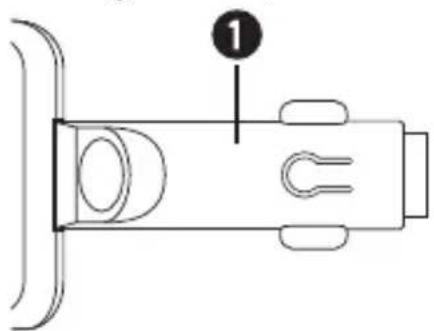
Replacing the fuse
The hands-free set is equipped with a fuse. If the device no longer works, check the fuse and replace if necessary.
-
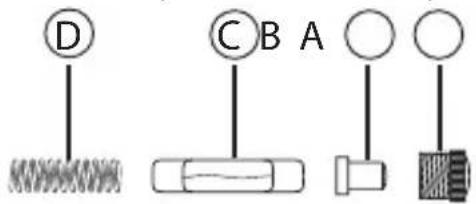
Open the vehicle connector plug ① by turning the fluted screw insert A gently anticlockwise - with pliers if necessary - and remove it.
-
Remove the plug from the fuse C and pull the fuse out. Ensure that the spring D in the vehicle connector plug 1 does not accidentally jump out and become lost.
-
Place a new fuse of type F2AL/250V into the vehicle connector plug ①, place the plug tip ⑧ onto the end of the fuse that is slightly protruding ⑤ and screw the screw insert that you removed earlier ④ back in.
Danger!
- Replace the fuse only with another of the same rating as that given on the ratings plate. Fuses with a different rating may cause fire. Smoke resulting from such a fire is poisonous.
① Note:
If these measures do not correct the problem, please contact the appropriate service partner for your country.
Cleaning and Care
Danger of electrocution!
- Before cleaning, always separate the electricity supply from the appliance!
NEVER submerse the appliance in water or other liquids! - Do not permit liquids to permeate into the housing!
- Never open the housing of the appliance! There are no user-serviceable elements inside.
- Do not use strong detergents, solvents or abrasive cleaning agents to clean the appliance. These could damage the housing surfaces.
- Clean the housing surfaces with a slightly moist soft cloth.
Storage when not in use
Caution!
The temperatures inside the vehicle can reach extreme values in summer and winter. Consequently, to avoid damage to the device, you should not store it in the vehicle.
- Store the device somewhere clean, dry, free of dust and out of direct sunlight.
Disposal
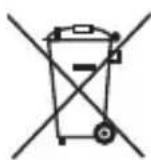
The adjacent symbol of a crossed-out wheelie bin indicates that this device is subject to Directive 2012/19/EU. This directive states that this device may not be disposed of in the household waste at the end of its useful life, but handed over to specially set-up collection recycling depots or disposal companies.
This disposal is free of charge for the user. Protect the environment and dispose of this device properly.
You can obtain further information from your local disposal company or the city or local authority.

Dispose of all packaging materials in an environmentally responsible manner.
Notes on the EU Declaration of Conformity

This appliance complies with the essential requirements and other relevant provisions of the R&TTE Directive 1999/5/EC, the Automotive EMC Directive 2004/104/EC, the Low Voltage Directive 2014/35/EU and the RoHS Directive 2011/65/EU.
You can request the full EU Declaration of conformity from the importer.
This appliance has a 3-year warranty valid from the date of purchase. If this product has any faults, you, the buyer, have certain statutory rights. Your statutory rights are not restricted in any way by the warranty described below.
Warranty conditions
The validity period of the warranty starts from the date of purchase. Please keep your original receipt in a safe place. This document will be required as proof of purchase. If any material or production fault occurs within three years of the date of purchase of the product, we will either repair or replace the product for you at our discretion. This warranty service is dependent on you presenting the defective appliance and the proof of purchase (receipt) and a short written description of the fault and its time of occurrence. If the defect is covered by the warranty, your product will either be repaired or replaced by us. The repair or replacement of a product does not signify the beginning of a new warranty period.
Warranty period and statutory claims for defects
The warranty period is not prolonged by repairs effected under the warranty. This also applies to replaced and repaired components. Any damage and defects present at the time of purchase must be reported immediately after unpacking. Repairs carried out after expiry of the warranty period shall be subject to a fee.
Scope of the warranty
This appliance has been manufactured in accordance with strict quality guidelines and inspected meticulously prior to delivery.
The warranty covers material faults or production faults. The warranty does not extend to product parts subject to normal wear and tear or fragile parts such as switches, batteries, baking moulds or parts made of glass.
The warranty does not apply if the product has been damaged, improperly used or improperly maintained. The directions in the operating instructions for the product regarding proper use of the product are to be strictly followed. Uses and actions that are discouraged in the operating instructions or which are warned against must be avoided.
This product is intended solely for private use and not for commercial purposes. The warranty shall be deemed void in cases of misuse or improper handling, use of force and modifications/repairs which have not been carried out by one of our authorised Service centres.
Warranty claim procedure
To ensure quick processing of your case, please observe the following instructions:
-
Please have the till receipt and the item number (e.g. IAN 12345) available as proof of purchase.
-
You will find the item number on the type plate, an engraving on the front page of the instructions (bottom left), or as a sticker on the rear or bottom of the appliance.
If functional or other defects occur, please contact the service department listed either by telephone or by e-mail.
You can return a defective product to us free of charge to the service address that will be provided to you. Ensure that you enclose the proof of purchase (till receipt) and information about what the defect is and when it occurred.
You can download these instructions along with many other manuals, product videos and software on www.lidl-service.com.
Service
GB Service Great Britain
Tel.: 0871 5000 720 (£ 0.10/Min.)
E-Mail: kompernass@lidl.co.uk
IE Service Ireland
Tel.: 1890 930 034
(0,08 EUR/Min., (peak))
(0,06 EUR/Min., (off peak))
E-Mail: kompernass@lidl.ie
IAN 279754
Importer
Please note that the following address is not the service address. Please use the service address provided in the operating instructions.
KOMPERNASS HANDELS GMBH
BURGSTRASSE 21
44867 BOCHUM
GERMANY
www.kompernass.com
Sommaire
KOMPERNASS HANDELS GMBH
BURGSTRASSE 21
44867 BOCHUM
GERMANY
www.kompernass.com
Inhoudsopgave
KOMPERNASS HANDELS GMBH
BURGSTRASSE 21
44867 BOCHUM
GERMANY
www.kompernass.com
Obsah
Ucel pouziti 88
Bezpečnost 89
Podporene Bluetooth® profily: HSP a HFP
Vystupni napeti / max.proud USB pripojen: 5 V = /1 A
Pojistka: F2AL / 250 V
KOMPERNASS HANDELS GMBH
BURGSTRASSE 21
44867 BOCHUM
GERMANY
www.kompernass.com
KOMPERNASS HANDELS GMBH
BURGSTRASSE 21
44867 BOCHUM
DEUTSCHLAND/GERMANY
www.kompernass.com


- Content
- SILVERCREST
- Correct Usage
- Safety instructions
- Symbol definitions:
- Danger!
- Caution!
- ① Note:
- Danger! Traffic safety has priority!
- General safety instructions
- Attention
- Caution! Pairing with a mobile phone
- Caution! High frequency signals in vehicles
- Introduction, trademark rights
- Package contents (see fold-out page)
- Technical data
- Controls (see fold-out page)
- Installing the hands-free appliance in a vehicle
- Note:
- Switching the hands-free appliance on and off
- Coupling the hands-free appliance with a mobile telephone
- Multipoint function
- Pairing the hands-free kit with an additional mobile phone
- Separating the connection
- Using the hands-free appliance
- Call function
- Accepting and ending a call
- Managing calls
- Automatic call acceptance
- Rejecting a call
- Adjusting the volume of the hands-free appliance
- Resetting the hands-free kit
- Charging 5 V Devices
- Troubleshooting
- Replacing the fuse
- Cleaning and Care
- Danger of electrocution!
- Storage when not in use
- Disposal
- This disposal is free of charge for the user. Protect the environment and dispose of this device properly.
- Notes on the EU Declaration of Conformity
- Warranty conditions
- Warranty period and statutory claims for defects
- Scope of the warranty
- Warranty claim procedure
- Service
- GB Service Great Britain
- IE Service Ireland
- Importer
- Sommaire
- Inhoudsopgave
- Obsah
- KOMPERNASS HANDELS GMBH
Brand : SILVERCREST
Model : SBTF 10 C3
Category : Built-in kit