
SBF 2 A1 - Built-in kit SILVERCREST - Free user manual and instructions
Find the device manual for free SBF 2 A1 SILVERCREST in PDF.


| Product Type | Built-in Kit |
| Brand | SilverCrest |
| Model | SBF 2 A1 |
| Dimensions (H x W x D) | 595 x 595 x 550 mm |
| Weight | 5 kg |
| Material | Galvanized steel |
| Maximum Load Capacity | 40 kg |
| Compatible Appliances | Standard ovens and microwaves |
| Installation Type | Recessed mounting |
| Included Components | Mounting frame, screws, mounting brackets, template |
| Color | Silver / Stainless steel |
| Number of Fixing Points | 4 |
| Ventilation Requirement | Integrated air gap |
| Maintenance | Wipe with a damp cloth, avoid abrasive cleaners |
| Safety Features | Secure locking mechanism, fire-resistant coating |
| Spare Parts Availability | Screws and brackets available separately |
| Repairability Index | 8/10 (easy to replace parts) |
| Certification | CE, RoHS |
| Warranty | 2 years |
| Language of Instructions | English, German, Polish, Lithuanian, Swedish |
| Manual Page Count | 175 pages |
Frequently Asked Questions - SBF 2 A1 SILVERCREST
User questions about SBF 2 A1 SILVERCREST
0 question about this device. Answer the ones you know or ask your own.
Ask a new question about this device
Download the instructions for your Built-in kit in PDF format for free! Find your manual SBF 2 A1 - SILVERCREST and take your electronic device back in hand. On this page are published all the documents necessary for the use of your device. SBF 2 A1 by SILVERCREST.
USER MANUAL SBF 2 A1 SILVERCREST
BLUETOOTH® HANDS-FREE KIT SBF 2 A1
GB
BLUETOOTH® HANDS-FREE KIT
Operation and safety notes
SE
BLUETOOTH®-HANDSFREE
GB Operation and safety notes Page 5
natural_image
Technical line drawing of a mechanical component with two views and an arrow indicating direction (no text or symbols)C
natural_image
Technical line drawing of a mechanical component with directional arrows indicating motion (no text or symbols)Warnings and symbols used .... Page 6
Introduction Page 8
Intended use....Page 9
Trademark notices ...... Page 10
Scope of delivery....Page 11
Parts description.....Page 11
Technical data ...... Page 12
General safety instructions ...... Page 14
Safety instructions for built-in rechargeable batteries...Page 20
Before use....Page 21
Using the USB charger .... Page 21
Using the Bluetooth ® headset .... Page 24
Establishing a connection with a Bluetooth ® device....Page 25
Button functions for music playback. . . . . . . . . . . . . . . . . . . . . . . . . . . . . . . . . . . . . . . . . . . . . . . . . . . . . . . . . . . . . . . . . . . . . . . . . . . Page 28
Button functions when using as a headset device ..... Page 29
Changing ear cushion .... Page 31
Cleaning Page 31
Storage when not in use .... Page 32
Troubleshooting Page 33
Disposal.... Page 35
Simplified EU declaration of conformity ..... Page 37
Warranty Page 37
| Warnings and symbols usedThe following warnings are used in this user manual: | |
 | DANGER! This symbol in combination with the signal word “Danger” marks a high-risk hazard that if not prevented could result in death or serious injury. |
 | WARNING! This symbol in combination with the signal word “Warning” marks a medium-risk hazard that if not prevented could result in death or serious injury. |
 | CAUTION! This symbol in combination with the signal word “Caution” marks a low-risk hazard that if not prevented could result in minor or moderate injury. |
 | ATTENTION! This symbol with the signal word “Attention” indicates a possible property damage. |
 | NOTE: This symbol in combination with “Note” provides additional useful information. |
 | This mandatory sign indicates to wear suitable protective gloves! Follow the instructions of this warning to avoid hand injuries caused by objects or contact with hot or chemical materials. |
 | This symbol means that the operating instructions must be observed when using the product. |
| Direct current / voltage | |
 | A warning with this sign indicates to prevent possible hearing damage, do not listen at high volume level for long period. |
 | E-mark is the European mark of conformity for the automotive industry and indicates that the necessary tests have been carried out and an ECE component type-approval has been granted. |
BLUETOOTH® HANDS-FREE KIT
● Introduction
We congratulate you on the purchase of your new product. You have chosen a high quality product. The instructions for use are part of the product. They contain important information concerning safety, use and disposal. Before using the product, please familiarise yourself with all of the safety information and instructions for use.
Only use the product as described and for the specified applications. If you pass the product on to anyone else, please ensure that you also pass on all the documentation with it.
Intended use
This USB charger with Bluetooth®theadset (hereinafter referred to as "product") is an information technology device.
It is intended for charging and operating USB devices that are charged or operated from a USB port by default. Compatible connected devices are automatically detected and supplied with the appropriate output current from the USB charger.
The product also contains a detachable Bluetooth® headset. This allows you to listen to music or make phone calls without having to pick up the connected device.
For making phone calls, the device to be connected must support the Bluetooth® 5.0 standard.
The product is intended to be used with a car socket for cigarette lighters.
The product is not intended for commercial use. The manufacturer is not liable for any damages caused by any use other than for the intended purpose.
Trademark notices
USB is a registered trademark of USB Implementers Forum, Inc.
The Bluetooth word mark and logos are registered trademarks owned by Bluetooth SIG, Inc. and any use of such marks by OWIM GmbH & Co. KG is under license.
The SilverCrest trademark and trade name is the property of their respective owners.
Any other names and products may be trademarks or registered trademarks of their respective owners.
Scope of delivery
1 x Bluetooth ® Hands-Free Kit
1 x Ear cushion - large
1 x Ear cushion - medium (pre-installed)
1 x Ear cushion - small
1 x Instruction manual
1 x Quick start guide
Parts description
(see fold-out page)
1 Charging contacts
2 Microphone
3 LED/ (multifunction button)
4 Bluetooth® headset
5 Ear cushion - medium
6 Charging pins (for Bluetooth ® headset)
7 USB port (5 V =2.1 A)
8 USB port (5 V =A)
9 USB charger
10 Negative poles of USB charger
11 Positive pole of USB charger
12 Ear cushion - large
13 Ear cushion - small

Technical data
Bluetooth® headset
Input: 5 V direct current via ---
charging sockets 1 from
charging pins 6 of USB
charger
Built-in rechargeable 3.7 V rechargeable
battery: Lithium-Ion battery, 60 mAh
Charging time: approx. 1.5 hours
Operating time approx. 2 hours
(music and phone): (at medium volume)
Wireless standard: Bluetooth ® 5.0
Supported profile: A2DP, AVRCP, HSP, HFP
Range: approx. 5 m
Dimensions: approx. 24 x 20 x 20 mm
Weight: approx. 5 g
Operating temperature: 5 to 35 °C
Humidity
(no condensation): 10 to 70 %
Storage temperature: 0 to 40 °C
Frequency band: 2402 to 2480 MHz
Max. transmitted power: <20 mW
USB charger
Input: 12 - 24 V 1.5 A
-
Output:
USBport 7: 5 V 2.1 A ---
USBport 8:5V 1A ---
Total max. output current: 3.1 A
Dimensions: approx. 73 x 40 x 20 mm
Weight: approx. 33 g
Operating temperature: 5 to 35 °C
Humidity
(no condensation): 10 to 70 %
Storage temperature: 0 to 40 °C
The specification and design may be changed without notification.
● General safety instructions
Before using the product, please familiarise yourself with all of the safety instructions and instructions for use! When passing this product on to others, please also include all the documents!

DANGER! DANGER TO LIFE AND RISK OF ACCIDENT FOR INFANTS AND CHILDREN!

DANGER! Risk of suffocation! Never leave children unsupervised with the packaging material. The packaging material poses a suffocation hazard. Children frequently underestimate the dangers. The packaging material is not a toy.
This product may be used by children age 8 years and up, as well as by persons with reduced physical, sensory or mental capacities or lacking experience and/or knowledge, so long as they are supervised or instructed in the safe use of the product and understand the associated risks. Children shall not play with the product. Cleaning and user maintenance should not be performed by children without supervision. The product is not a toy.

ATTENTION! RISK OF PROPERTY DAMAGE
This product does not contain any parts which can be serviced by the user. The rechargeable battery cannot be replaced.
- Keep the product away from moisture, dripping and splash water!
Do not place burning candles or other open fire on or next to the product.
- Check the product before every use! Discontinue use if any damage to the product is detected!
If you notice smoke or unusual noise or odour: Unplug the product from the car socket and remove all USB connections.
■ Sudden temperature changes may cause condensation inside the product.
In this case, allow the product to acclimate for some time before using it again to prevent short circuits!
Do not operate the product near heat sources, e.g. radiators or other devices emitting heat!
- Do not throw the product into fire and do not expose it to high temperatures.

WARNING! Do not try to open the product! It has no internal parts requiring maintenance.
WARNING - Radio interference
Switch the product off on airplanes, in hospitals, service rooms, or near medical electronic systems.
The wireless signals transmitted could impact the functionality of sensitive electronics.
Keep the product at least 20 cm from pacemakers or implantable cardioverter defibrillators, as the electromagnetic radiation may impair the functionality of pacemakers. The radio waves transmitted could cause interference in hearing aids.
Do not place the product near flammable gasses or potentially explosives areas (e. g. paint shops) with the wireless components on, as the radio waves emitted can cause explosions and fire. The range of the radio waves varies by environmental conditions. In the event of wireless data transmission, unauthorised third parties receiving the data cannot be excluded.
The OWIM GmbH & Co KG is not responsible for interference with radios or televisions due to unauthorised modification of the product.
The OWIM GmbH & Co KG further assumes no liability for using or replacing cables and products not distributed by OWIM.
The user of the product is fully responsible for correcting interference caused by such unauthorised modification of the product, as well as replacement of such products.

A warning with this symbol is to indicate that always remember that excessive sound pressure or volumes from headphones or earphones can lead to damage to the hearing. Always adjust the volume to a pleasant, not too loud level. If you have adjusted the volume of the headphones to be too high and use that for an extended period, it can damage the listener's hearing.
NOTE: Only use USB cables with a maximum length of 3 metres to avoid interferences.

Safety instructions for built-in rechargeable batteries
■ Never open the product. Repairs may only be carried out by qualified personnel.

CAUTION! RISK OF EXPLOSION! Do not throw the product into fire.
- Avoid extreme environmental conditions and temperatures, which could affect rechargeable batteries, e. g. radiators/direct sunlight.

If rechargeable batteries have leaked, avoid contact with skin, eyes and mucous membranes with the chemicals! Flush immediately the affected areas with fresh water and seek medical attention!
Do not cover the product during operation or charging. Otherwise the product can overheat.
This product contains a rechargeable battery, which can lead to fire, explosion or leakage of hazardous substances in case of incorrect application.
Before use
All parts have to be unpacked and the packaging material has to be removed completely.
Before use, verify the package contents are complete and undamaged!
If you notice any damage or missing parts, please contact the dealer who sold this product.
● Using the USB charger
Plug the product into a correctly installed car socket. The negative poles 10 and the positive pole 11 of the USB charger need to be connected firmly within the car socket.
■ Connect the USB plug of the device that is to be charged into the
- USB port (5 ≠ 2.1 A) 7 or the
- USB port (5 ≠ 1 A) 8.
The optimum charging current for the connected device is set automatically.
When charging is complete: Unplug your device's USB plug from the product.
■ Unplug the product from the car socket.

ATTENTION! Risk of overheating! Only
connect external devices to the product which do not require more than the maximum output current of the used USB port (2.1 A and 1 A).

ATTENTION! If you use the product under maximum loading condition, the product may get hot. This is normal because in this condition the product uses more power and therefore generates more heat.

ATTENTION! You can leave the vehicle's motor on or off when using the product.
Be aware that the battery of the car might become low because the product still consumes power when the motor is off. Disconnect the product completely from the power supply when you do not intend to charge external devices.

ATTENTION! Do not switch the ignition on or off during the charging process, as this can lead to differences or peaks in the power supply.
Using the Bluetooth®theadset
The battery must be charged before first use.
When the headset battery is drained: The LED 3 flashes red and an acoustic signal sounds. The battery should then be charged as soon as possible.
Plug the product into a correctly installed car socket.
Locate the headset charging contacts precisely to the charging pins 6 of USB charger. Put the headset fully into the slot of the USB charger.
i NOTES:
The LED remains red while charging. The LED goes off once the battery is fully charged.
The charging pins of the USB charger are intended solely for charging the Bluetooth® headset.
Any other use beyond what is specified is not intended.
- Establishing a connection with a Bluetooth® device
Switching on: Hold 3 for approx.
2 seconds. The LED 3 flashes whites and an acoustic signal sounds.
Place the headset near a switched on communication device (e.g. mobile or computer).
Pairing with a new Bluetooth® device:
- Switch off the product. - Hold 3 for approx. 4 seconds until the LED 3 flashes red and white and an acoustic signal sounds. This indicates that the headset is now in pairing mode.
The pairing mode remains active for 5 minutes.
The headset will switch off if it does not detect any Bluetooth ® device to connect within this time.
- Now, connect your communication device (mobile phone or computer) via Bluetooth® with the headset (refer to the instruction manual of your communication device).
- Select the entry SBF 2 A1 from the list of devices detected by your communication device.
Once the connection has been established: The LED 3 will briefly flash white twice every 3 seconds.
i NOTES:
- Your communication device must support Bluetooth® standard 5.0 to use all functions described herein.
If you come into range of the paired device with the headset switched on: A Bluetooth® connection will be established automatically.
You may need to approve the connection on the communication device (refer to the instruction manual of your communication device).
If you leave the range of your communication device with your headset: The LED flashes white once every 2 seconds.
If the connection is not restored within 10 minutes, the headset switches off.
Switching off the headset manually: Hold 3 for 2 seconds until an acoustic signal sounds and the LED 3 goes out.
- Button functions for music playback
■ Start a playlist on your playback device.
- Set the volume to minimum first. Put on the headset, and set to a pleasant volume.
You can adjust the headset volume only by the playback device.
Use 3 to operate the product:
- Switch the headset on/off:
Press and hold Ⓞ for approx. 2 seconds.
- Switch the headset to pairing mode:
Press and hold Ⓞ for approx. 4 seconds.
- Play/stop the music playback:
Press ⬇ briefly.
- Button functions when using as a headset device
You may also use the headset for telephone calls when used with a communication device that supports this function.
If your communication device supports the Bluetooth® standard 5.0, you will be able to use the following functions:
Function Action
| Answer/end call. | Briefly press 3. |
| Ignore call. | Hold 3 for approx.2 seconds. |
| Redial. | Briefly press 3 twice. |
Function Action
Ignore the incoming call and retain the current call. *
Press and hold 3 for approx. 2 seconds.
Switch between 2 calls (toggle). *
Briefly press 3.
* These functions must be supported by your mobile service provider.
i NOTES:
When there is an incoming call, the LED briefly flashes white.
The ringer and the caller's voice are rendered through the headset.
■ Music playback is automatically paused when a call is received.
The microphone 2 records your voice.
■ Music continues after the call has been ended.
The availability of all described functions cannot be guaranteed. These depend on the mobile device used and its firmware.
Changing ear cushion
(see fold-out page)
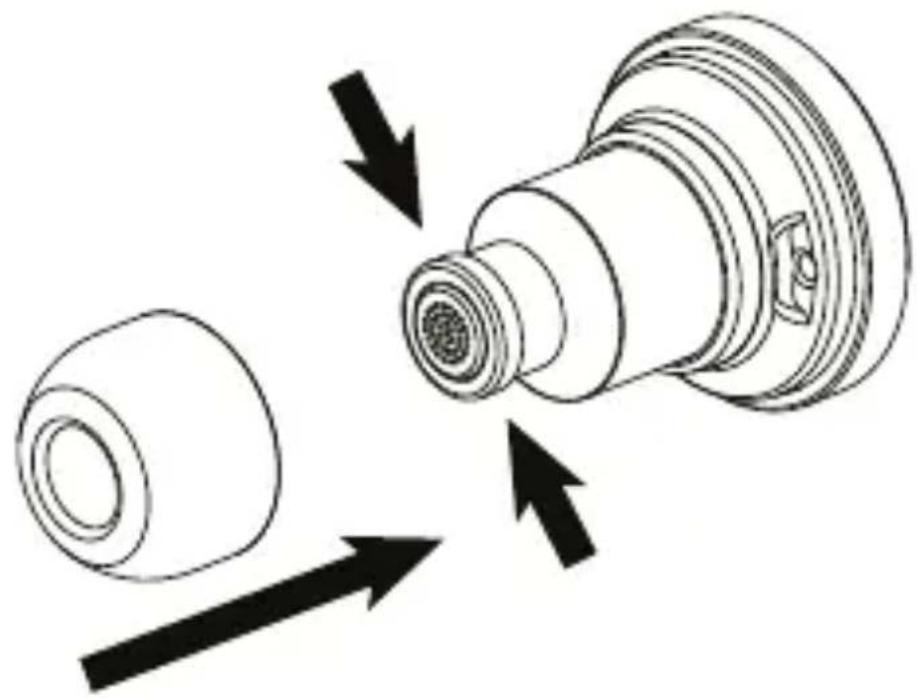
Remove the medium size ear cushions from the Bluetooth® headset 4 (Fig. B).
Select the small or large size ear cushions 13/12 and push them onto the Bluetooth® headset 4 (Fig. C).
Cleaning
■ Disconnect the product/switch the product off and remove all plugs before cleaning!
Be sure moisture does not enter the product during cleaning to prevent damage to the product and related repairs.
The ear cushions 5 /12/13 can be cleaned under running water. Completely dry the ear cushions before reinserting them into the product.
Only clean the product with a slightly dampened cloth and a mild spray!
● Storage when not in use
■ Store the product in a dry environment, protected from dust and direct sunlight.
To prevent battery deterioration, at longer storage the rechargeable battery has to be charged regularly.

Troubleshooting
Bluetooth® headset
● = Fault
● = Possible cause
O = Action
● = No functions.
● = Battery drained.
O = Recharge the battery (see "Using the Bluetooth® headset").
● = No Bluetooth ® connection.
● = Error operating the headset.
O = Switch the headset off and on again.
● = Communication device error.
O = Separate the connection to the headset and connect again.
O = Check if other devices using Bluetooth® standard 5.0 work with the communication devices.
= Bluetooth connection error.
O = Move closer to the devices connected via Bluetooth®.
● = No sound.
● = The playback device volume is set to minimum.
O = Increase the volume on the playback device.
● = Error operating the communication device.
O = Increase the volume on the playback device.
= Bluetooth connection error.
O = Move closer to the devices connected via Bluetooth®.
O = Disconnect Bluetooth® and reconnect.
● = Unable to use all functions.
● = Communication device error.
O = Verify your communication device supports all functions.
USB charger
● = External USB devices cannot be charged.
= Loose connections.
O = Check the connection between the car socket and the product. Alternatively, try another car socket.
O = Make sure the USB device's charging cable/socket is working properly.
● Disposal
Packaging:
The packaging is made of environmentally friendly materials, which may be disposed of through your local recycling facilities.
Product:
Contact your municipality for information on how to dispose of your worn-out product.

natural_image
Symbol of a trash bin crossed out by a horizontal line, representing waste sorting or disposal (no text or numbers present)The adjacent symbol of a crossed out dustbin on wheels indicates this product is subject to directive 2012/19/EU. This directive states at the end of the life this product must not be disposed of through regular household refuse but must be returned to special collection sites, recycling depots or waste management companies.
This disposal is free of charge to you.
Protect the environment and dispose of properly.
The product is recyclable, subject to extended manufacturer responsibility, and collected separately.
The built-in rechargeable battery cannot be removed for disposal. Return the product completely to a collection site for used electronics.
● Simplified EU declaration of conformity
Hereby, OWIM GmbH & Co. KG, Stiftsbergstraße 1, DE-74167 Neckarsulm, GERMANY declares that the product Bluetooth® Hands-Free Kit, HG05013, is in compliance with directives 2014/53/EU and 2011/65/EU.
The full text of the EU declaration of conformity is available at the following internet address:
www.owim.com
Warranty
The product has been manufactured to strict quality guidelines and meticulously examined before delivery. In the event of product defects you have legal rights against the retailer of this product. Your legal rights are not limited in any way by our warranty detailed below.
The warranty for this product is 3 years from the date of purchase. Should this product show any fault in materials or manufacture within 3 years from the date of purchase, we will repair or replace it – at our choice – free of charge to you.
The warranty period begins on the date of purchase. Please keep the original sales receipt in a safe location. This document is required as your proof of purchase. This warranty becomes void if the product has been damaged, or used or maintained improperly.
The warranty applies to defects in material or manufacture. This warranty does not cover product parts subject to normal wear, thus possibly considered consumables (e.g. batteries) or for damage to fragile parts, e.g. switches, rechargeable batteries or glass parts.

USB-port 8: 5 V 1 A ---
natural_image
Symbol of a trash bin crossed out by a horizontal line, representing waste sorting or disposal (no text or numbers present)Obstugiwane profile: A2DP, AVRCP, HSP, HFP
Zasięg: ok. 5 m
PortUSB 7: 5 V 2,1 A ---
PortUSB 8: 5 V 1 A ---
łączny maks. prąd
wyjściowy: 3,1 A
natural_image
Simple line drawing of a trash bin with crossed lines indicating no waste or discharge (no text or symbols)natural_image
Simple line drawing of a trash bin with crossed lines indicating no waste or discharge (no text or symbols)USB-Port 7: 5 V 2,1 A ---
USB-Port 8: 5 V 1 A ---
Max. Ausgangsstrom
(Gesamt): 3,1 A
natural_image
Symbol of a trash bin crossed out by a horizontal line, representing waste sorting or disposal (no text or numbers present)


- BLUETOOTH® HANDS-FREE KIT SBF 2 A1
- BLUETOOTH® HANDS-FREE KIT
- BLUETOOTH®-HANDSFREE
- Warnings and symbols used .... Page 6
- Introduction Page 8
- General safety instructions ...... Page 14
- Before use....Page 21
- Using the USB charger .... Page 21
- Using the Bluetooth ® headset .... Page 24
- Cleaning Page 31
- Storage when not in use .... Page 32
- Troubleshooting Page 33
- Disposal.... Page 35
- Simplified EU declaration of conformity ..... Page 37
- Warranty Page 37
- ● Introduction
- Intended use
- Trademark notices
- Scope of delivery
- Parts description
- Technical data
- Bluetooth® headset
- USB charger
- ● General safety instructions
- DANGER! DANGER TO LIFE AND RISK OF ACCIDENT FOR INFANTS AND CHILDREN!
- ATTENTION! RISK OF PROPERTY DAMAGE
- WARNING - Radio interference
- Safety instructions for built-in rechargeable batteries
- CAUTION! RISK OF EXPLOSION! Do not throw the product into fire.
- Before use
- ● Using the USB charger
- ATTENTION! Risk of overheating! Only
- Using the Bluetooth®theadset
- i NOTES:
- - Establishing a connection with a Bluetooth® device
- - Button functions for music playback
- - Button functions when using as a headset device
- Function Action
- Changing ear cushion
- Cleaning
- ● Storage when not in use
- Troubleshooting
- ● Disposal
- Packaging:
- Product:
- This disposal is free of charge to you.
- ● Simplified EU declaration of conformity
- Warranty
Brand : SILVERCREST
Model : SBF 2 A1
Category : Built-in kit