 ManualGo.com
KH 2074 - Surveillance Camera E-BENCH - Free user manual and instructions
Find the device manual for free KH 2074 E-BENCH in PDF.



Download the instructions for your Surveillance Camera in PDF format for free! Find your manual KH 2074 - E-BENCH and take your electronic device back in hand. On this page are published all the documents necessary for the use of your device. KH 2074 by E-BENCH.
USER MANUAL KH 2074 E-BENCH
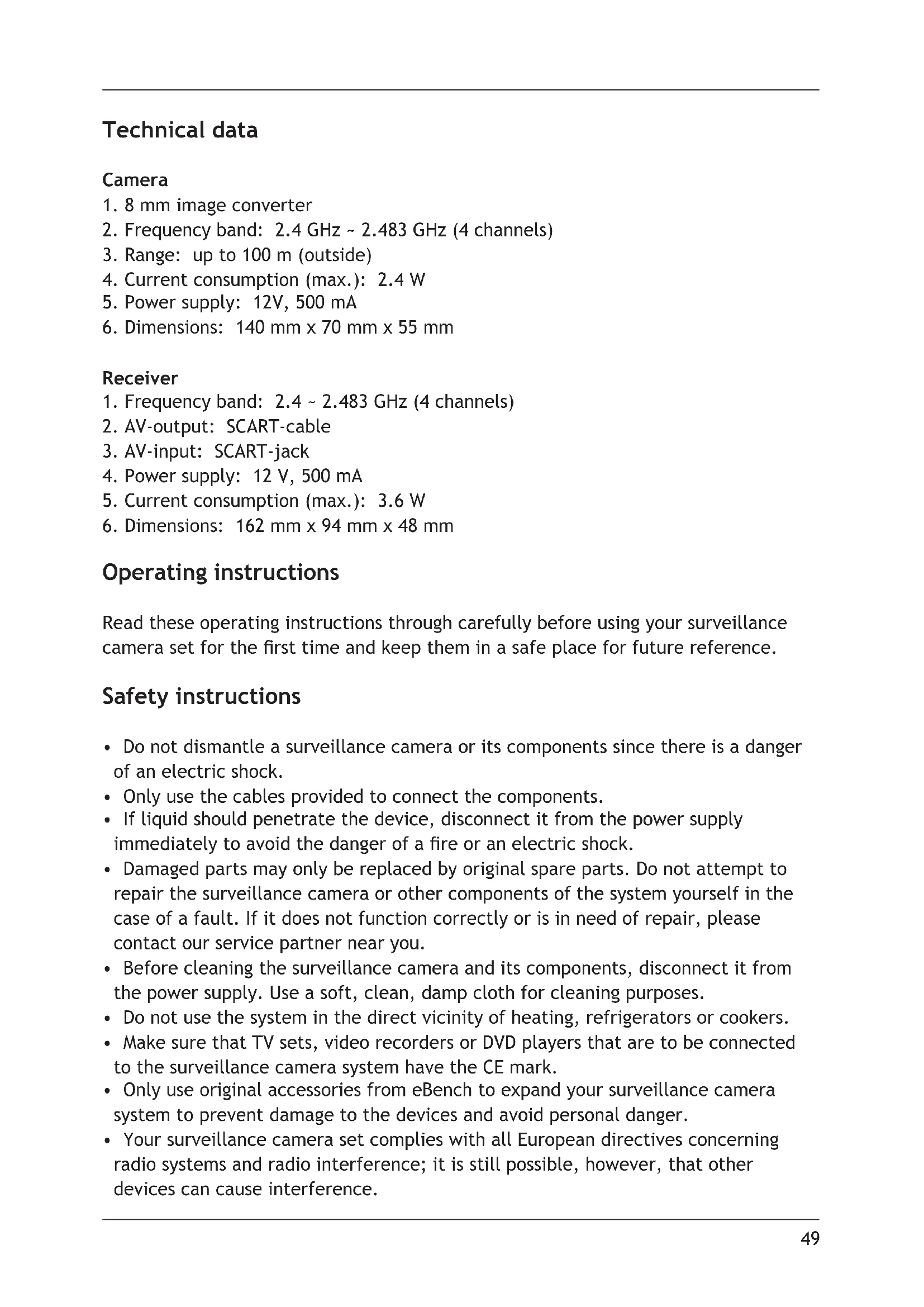
140 mm x 70 mm x 55 mm Receiver
3. Range: up to 100 m (outside)
4. Current consumption (max.): 2.4 W
5. Current consumption (max.): 3.6 W
6. Dimensions: 162 mm x 94 mm x 48 mm
Operating instructions Read these operating instructions through carefully before using your surveillance camera set for the rst time and keep them in a safe place for future reference. Safety instructions
- Do not dismantle a surveillance camera or its components since there is a danger of an electric shock.
- Only use the cables provided to connect the components.
- If liquid should penetrate the device, disconnect it from the power supply immediately to avoid the danger of a re or an electric shock.
- Damaged parts may only be replaced by original spare parts. Do not attempt to repair the surveillance camera or other components of the system yourself in the case of a fault. If it does not function correctly or is in need of repair, please contact our service partner near you.
- Before cleaning the surveillance camera and its components, disconnect it from the power supply. Use a soft, clean, damp cloth for cleaning purposes.
- Do not use the system in the direct vicinity of heating, refrigerators or cookers.
- Make sure that TV sets, video recorders or DVD players that are to be connected to the surveillance camera system have the CE mark.
- Only use original accessories from eBench to expand your surveillance camera system to prevent damage to the devices and avoid personal danger.
- Your surveillance camera set complies with all European directives concerning radio systems and radio interference; it is still possible, however, that other devices can cause interference.50
- Warranty or liability will not be accepted for damage to the device resulting from improper handling. Scope of supply 1 Camera 1 Receiver 1 Wall bracket 2 2.4 GHz aerials 2 Mains adapters (12 V ~ 500 mA) 1 SCART cable (1.5 m) Operating elements and connections on the camera A) 8 mm image converter B) Waterproof lens protector C) Microphone D) 12 V power supply cable Operating elements on the receiver E) Switch on/off (switching to the AV source) F) Red LED function control lamp G) Red LED channel display H) Cable with SCART-output
J) AV-, SCART-input K) 12 V jack for power connection Connecting the components First of all, attach the aerials to the jacks on the back of the receiver and the camera and make sure they are rmly in place. Put the three parts of the wall bracket together (see Fig.
). Then mount the wall bracket onto a suitable wall using the fastening material included; place the camera on the set screw at the top end of the bracket and tighten it using the knurled screw (see Fig.
). Fix the camera in the required position using the wing screw. Now connect the power supply cable to the power cable of the mains adapter and then insert this in a mains socket. Connect the receiver to a television set using the SCART-cable, connect the power supply cable of the mains adapter to the receiver and insert the mains adapter in a socket. When the receiver is switched on, a red control LED lights up on the front, showing the device is ready for operation.^50
Note: Outside, the transmission range of the camera is up to 100 metres, inside buildings it depends to a great extent on the construction materials used. Tip: If your television set only has one SCART connection and you would like to operate other devices with it besides your new eBench surveillance camera (video recorder, DVD player etc.), you can connect the receiver of your surveillance camera system between video recorder or DVD player and television set. To do this, connect the receiver SCART-cable to the television set and the video recorder or DVD player to the receiver per SCART-cable. When the receiver is switched on, the signal of the camera will be received, interrupting the signal of the video recorder or DVD player. When the receiver is switched off, the television set will receive the AV signal again. Once you have connected all the components together, camera and receiver must now be set to the same channel. Channel selection on the camera Remove the rubber cover from over the channel selection switch on the back of the camera. Choose the required channel by sliding the switch. Then replace the cover. Channel and interval selection on the receiver Choose the required channel by sliding the required switch to ON on the back of the device (see Figure
The receiver receives signals from up to four cameras. If you have selected channel 1 for the rst camera, you must select channels 2-4 respectively for the other cameras. If several cameras are in operation, you can use the “T” switch on the back of the receiver to change the interval at which the receiver changes channels (4 or 8 seconds), i.e. changes between the images of the individual cameras. A red LED on the front of the receiver ashes to show which channels are set. If channel 1 is selected, the LED ashes once — depending on the set interval every four or eight seconds. If channels 1 and 2 are set, the LED ashes once and then after four or eight seconds twice etc.. Setting the image focus Turn the lens protector (see Figure
) as far as it will go anticlockwise and remove it. Then turn the focus ring to the right or left until the image is sharp. Now replace the lens protector by placing it back on the lens and turning it to the right.52
Troubleshooting Problem No image or no sound. Possible solution a) Make sure that both devices are switched on. b) Check to make sure all cables and plugs are inserted rmly. c) Check whether the receiver and the camera are set to the same channel. Problem Problems with image and/or sound. Possible solution a) Check whether both aerials are pointing the same way. b) Reduce the distance between the camera and the receiver. Outside, the radio transmission range is up to 100 metres, inside buildings it depends to a great extent on the construction materials used. c) If a microwave or other electromagnetic device is in operation, switch it off and check your surveillance system again. d) Change the channel set on the camera and receiver, in other words switch both to channel 3 or 4; note that the camera and receiver must always be switched to the same channel.52
Declaration of conformity We, Kompernaß Handelsgesellschaft mbH, Burgstr. 21, D-44867 Bochum, Germany, hereby declare that this product conforms with all the applicable international safety standards, regulations and EC directives. Device type/Type: KH 2074 Bochum, 31.05.2003 Hans Kompernaß — Managing Director —