PerfectView CAM44 - Surveillance Camera WAECO - Free user manual and instructions
Find the device manual for free PerfectView CAM44 WAECO in PDF.


| Brand | WAECO |
| Model | PerfectView CAM44 |
| Product type | Surveillance camera for vehicles |
| Image sensor | Long range: 1/4" Color CMOS, approx. 290,000 pixels; Close range: 1/3" CMOS, 762×504 pixels |
| TV system | PAL |
| Viewing angle | Panoramic lens: approx. 50°; Close-up lens: approx. 140° diagonal |
| Sensitivity | < 1 Lux (without IR), 0.0 Lux with IR LED (close range) |
| Microphone | Built-in, sensitivity approx. 56 dB |
| Infrared illumination | Integrated IR LEDs for night vision |
| Protection | Motorized protective cover against dirt |
| Distance markings | 3 colored lines: green (~3 m), yellow (~1 m), red (~0.3 m) |
| Operating voltage | 12 – 16 V= |
| Power consumption | max. 4 W |
| Operating temperature | -30 °C to +70 °C |
| Storage temperature | -30 °C to +85 °C |
| Dimensions (L × H × W with bracket) | 114 × 74 × 62 mm |
| Weight | approx. 360 g |
| Protection rating | Waterproof (do not use pressurized water) |
| Mounting | At the rear of the vehicle, recommended height 230-250 cm, camera angle approx. 20° from vertical |
| Care | Clean with a soft, damp cloth; do not use sharp objects |
| Delivery contents | Camera with cover, bracket, extension cable, adapter housing, insulating plate, mounting hardware |
| Optional accessories | Control box AMP100 |
Frequently Asked Questions - PerfectView CAM44 WAECO
User questions about PerfectView CAM44 WAECO
0 question about this device. Answer the ones you know or ask your own.
Ask a new question about this device
Download the instructions for your Surveillance Camera in PDF format for free! Find your manual PerfectView CAM44 - WAECO and take your electronic device back in hand. On this page are published all the documents necessary for the use of your device. PerfectView CAM44 by WAECO.
USER MANUAL PerfectView CAM44 WAECO
natural_image
Exploded view diagram of mechanical components including housing, bracket, and motor assembly (no text or labels)PerfectView CAM44
EN 28 Rear View Video Camera
Installation and Operating Manual
natural_image
Technical diagram showing a welding process with two intersecting lines and arrows indicating motion (no text or symbols)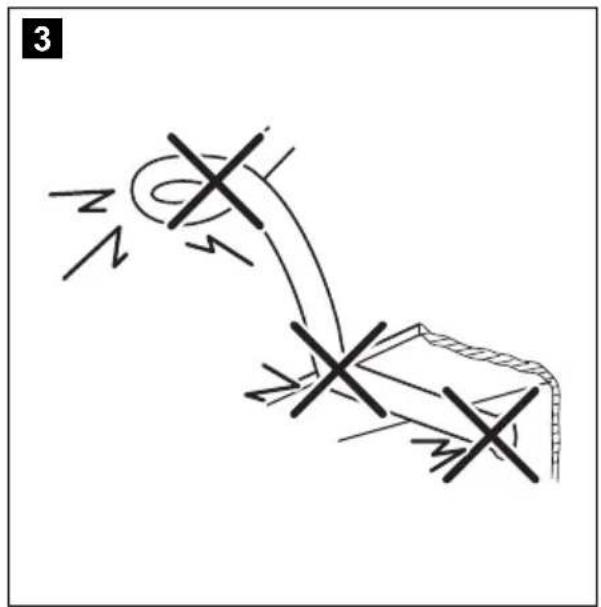
natural_image
Illustration of two hands using a tool to cut a square object with a diagonal line (no text or symbols)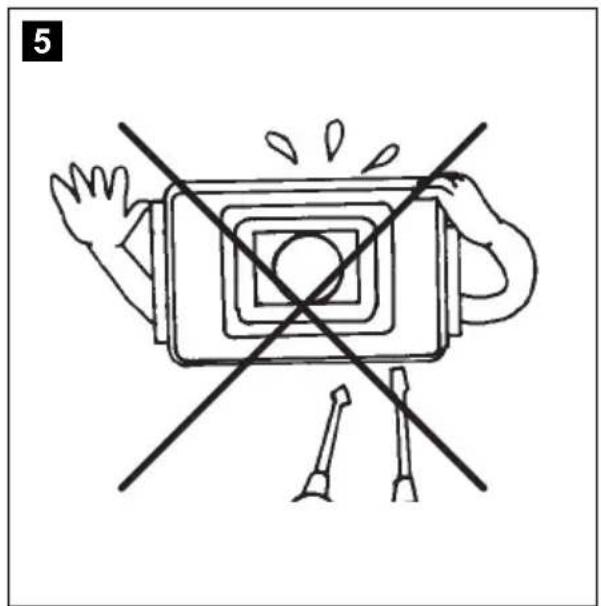
natural_image
Diagram of a device with a central square and two crossed lines, no text or symbols present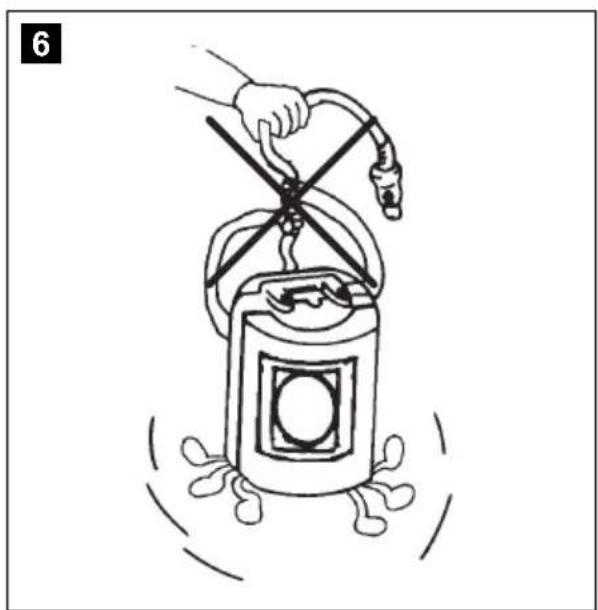
natural_image
Illustration of a hand using a spray gun to lift a cylindrical container with a handle, surrounded by motion lines (no text or symbols)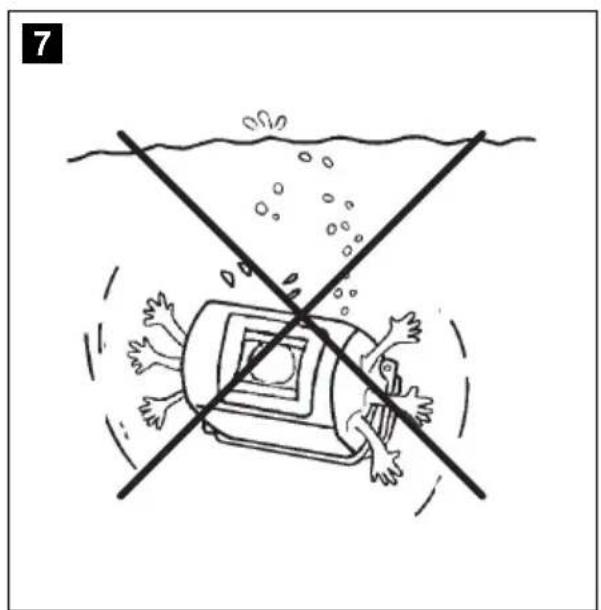
natural_image
Illustration of a person falling into a vehicle with water spray and bubbles, crossing a diagonal line (no text or symbols)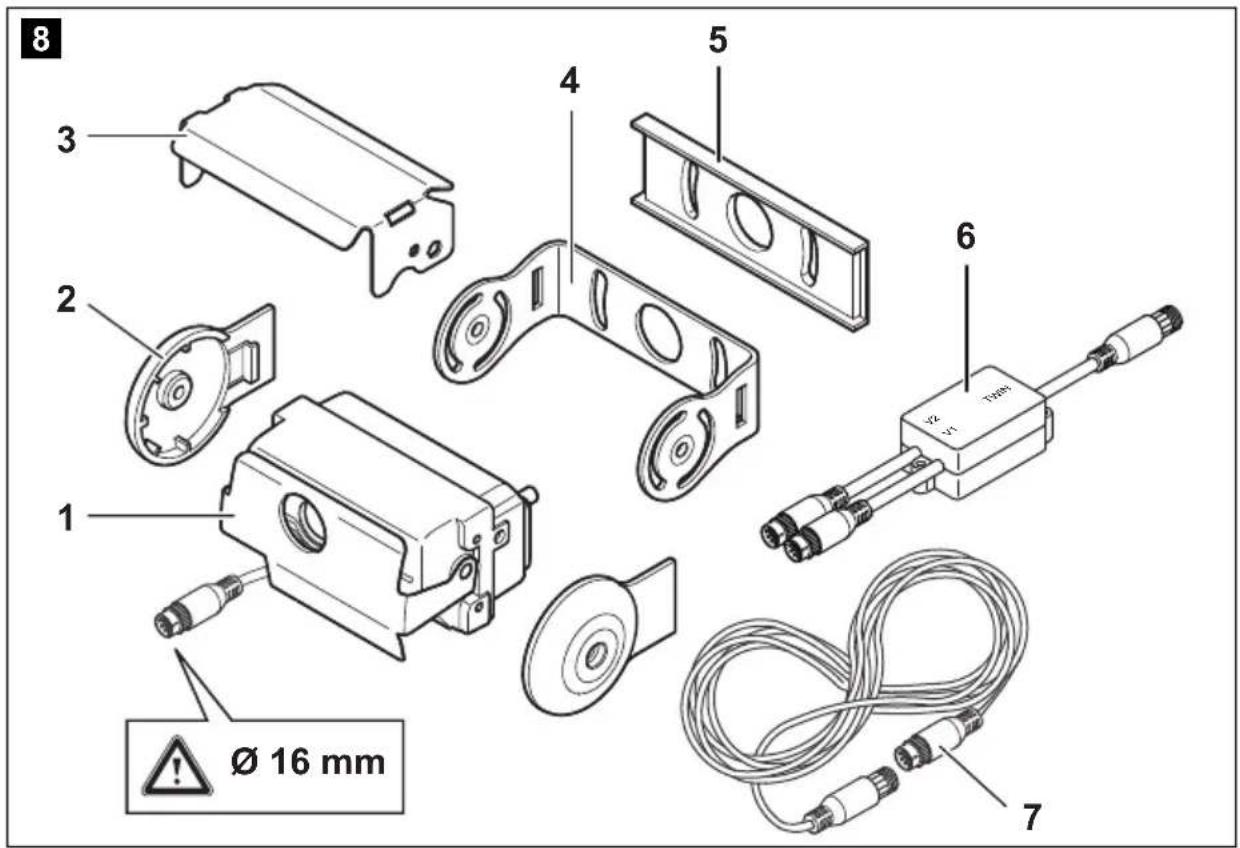
11
natural_image
Line drawing of two hands holding a small object, no text or symbols present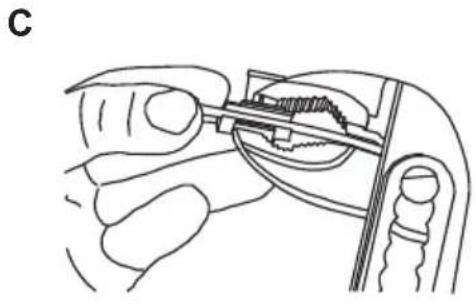
natural_image
Line drawing of a hand holding a small mechanical component, possibly a tool or device, with no visible text or symbols.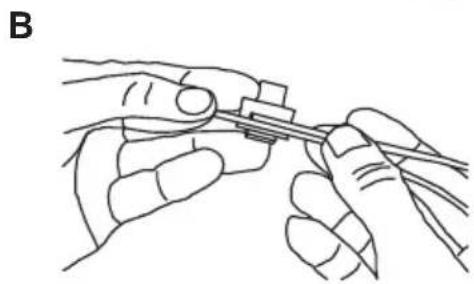
natural_image
Line drawing of two hands holding a tool, no text or symbols present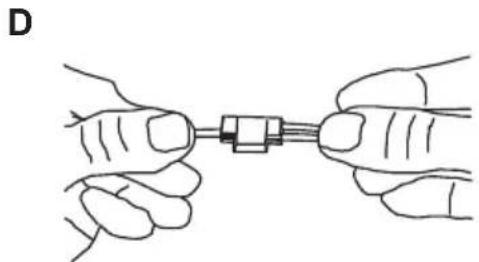
natural_image
Illustration of two hands holding a small mechanical component connected by a string (no text or symbols)12
natural_image
Diagram of a coiled tube or pipe with internal parallel grooves (no text or symbols)13
natural_image
Technical line drawing of a mechanical bracket with two circular cutouts and a hanging chain (no text or symbols)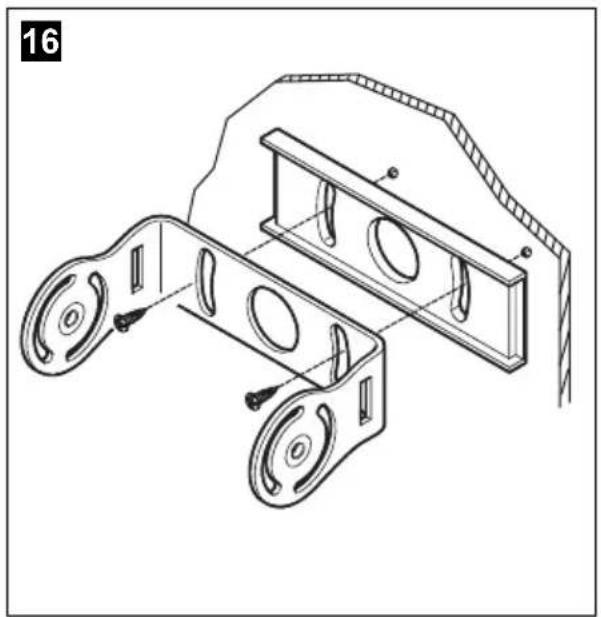
natural_image
Technical line drawing of a mechanical bracket assembly (no text or symbols)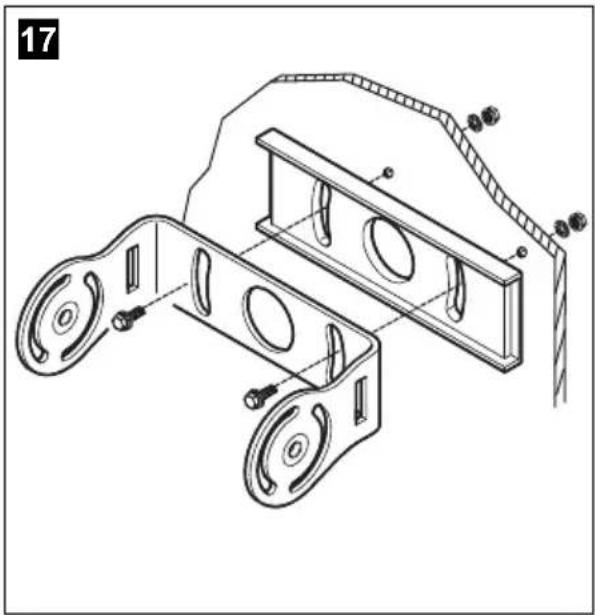
natural_image
Technical line drawing of a mechanical assembly with two circular components and a curved guide rail (no text or symbols)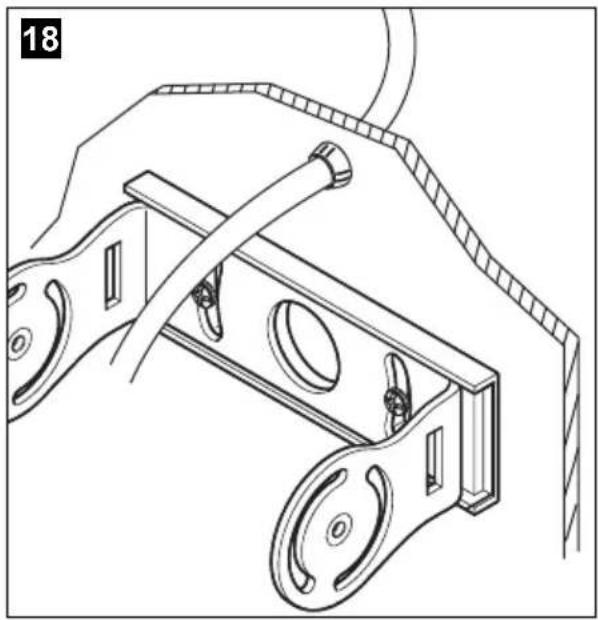
natural_image
Technical line drawing of a mechanical device with pulleys and a rope, no text or symbols present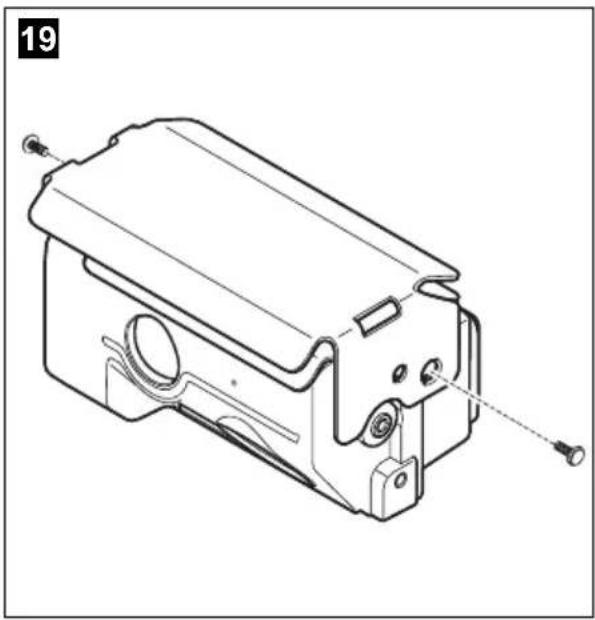
natural_image
Technical line drawing of a mechanical component with mounting holes and internal features (no text or symbols)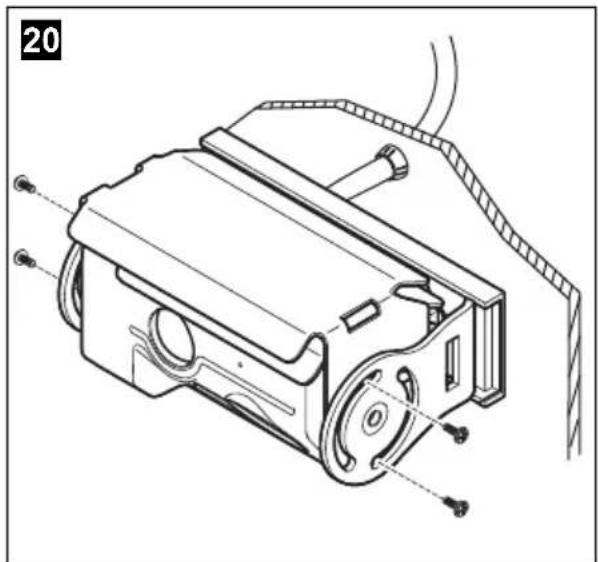
natural_image
Technical line drawing of a mechanical device with internal components and mounting holes (no text or symbols)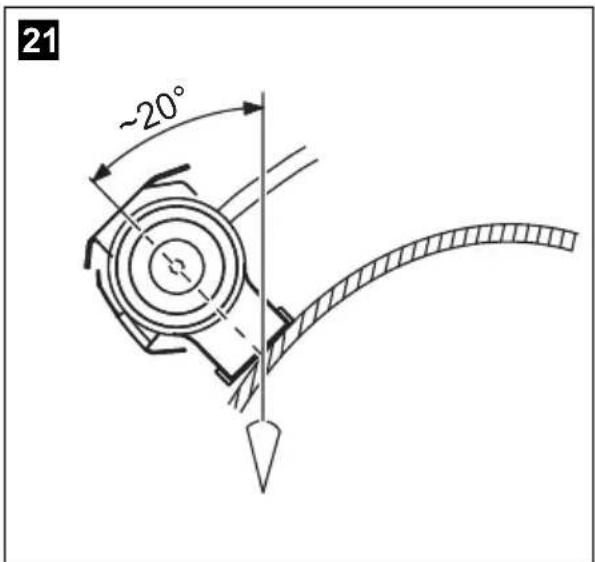
natural_image
Technical line drawing of a mechanical device with wheels and a handle (no text or symbols)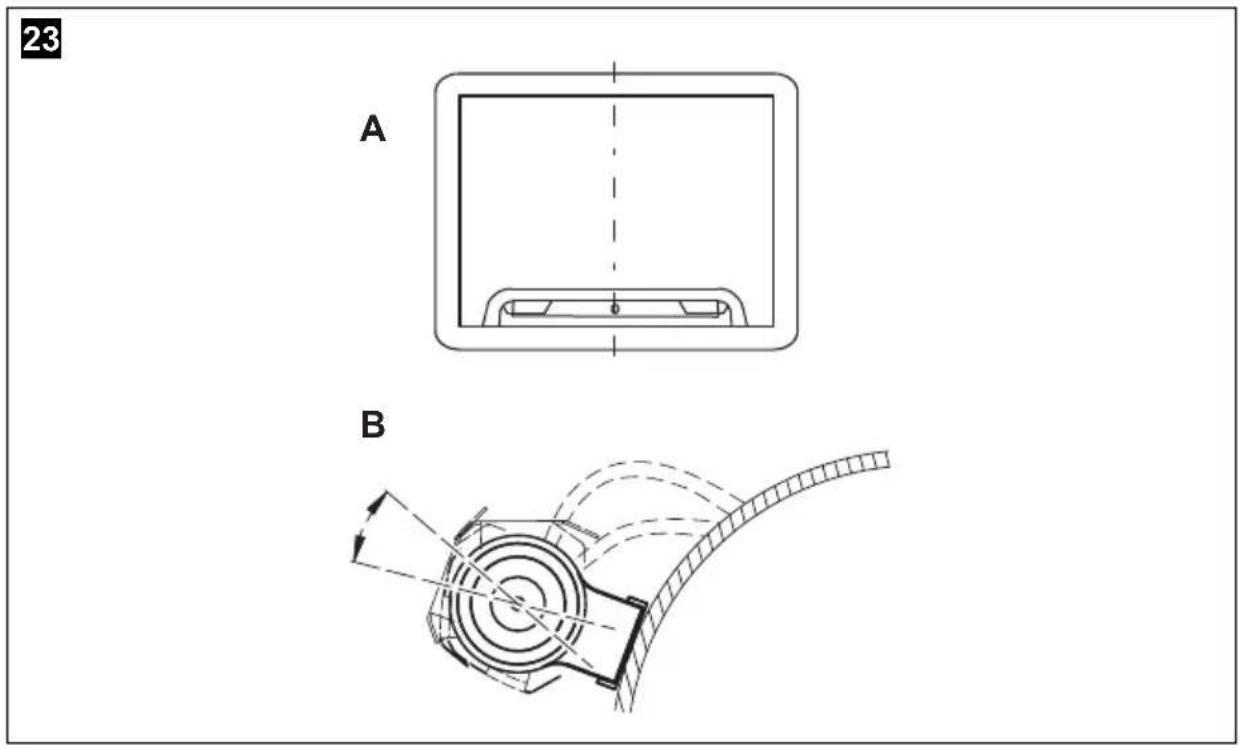
Please read this manual carefully before installing and starting up the device and store it in a safe place. If the device is handed over to another person, this operating manual must be handed over along with it.
Contents
1 Explanation of symbols 29
2 Safety and installation instructions.... 29
3 Scope of delivery 32
4 Accessories 32
5 Intended use 32
6 Technical description 33
7 Notes on the electrical connections ..... 34
8 Fitting the camera 36
9 Using the camera....43
10 Cleaning and caring for the camera. 43
11 Guarantee 43
12 Disposal 44
13 Technical data 44
1 Explanation of symbols

WARNING!
Safety instruction: Failure to observe this instruction can cause fatal or serious injury.

CAUTION!
Safety instruction: Failure to observe this instruction can lead to injury.

NOTICE!
Failure to observe this instruction can cause material damage and impair the function of the product.

NOTE
Supplementary information for operating the product.
▶ Action: This symbol indicates that action is required on your part. The required action is described step-by-step.
√This symbol describes the result of an action.
Fig. 1 5, page 3: This refers to an element in an illustration. In this case, item 5 in figure 1 on page 3.
2 Safety and installation instructions
Please observe the prescribed safety instructions and stipulations from the vehicle manufacturer and service workshops.
The manufacturer accepts no liability for damage in the following cases:
● Faulty assembly or connection
● Damage to the product resulting from mechanical influences and excess voltage
- Alterations to the product without express permission from the manufacturer
● Use for purposes other than those described in the operating manual
Please observe the following instructions:
- To prevent short circuits, always disconnect the negative terminal of the vehicle's electrical system before working on it.
If the vehicle has an additional battery, its negative terminal should also be disconnected.
● Insufficient supply line connections could result in short circuits which
- Cause cable fires
- Trigger the airbags
– Damage electronic control devices - Cause electric functions to fail (indicators, brake light, horn, ignition, lights)
- When working on the following cables, only use insulated cable terminals, plugs and flat push-on receptacles:
- 30 (direct supply from positive battery terminal)
- 15 (connected positive terminal, behind the battery)
- 31 (return cable from the battery, earth)
- 58 (reversing light)
Do not use terminal strips.
- Use a crimping tool (fig. 1 10, page 3) to connect the cables.
● Screw the cable for connections to cable 31 (earth)
- Screw on the cable using a cable terminal and serrated washer to one of the vehicle's earth bolts or
- Screw the cable to the bodywork using a cable terminal and a self-tapping screw
Make sure there is a good earth connection.
If you disconnect the negative terminal of the battery, the entire data stored in the volatile memories will be lost.
- The following data must be reset, depending on the vehicle equipment options:
- Radio code
- Vehicle clock
- Timer
- On-board computer
- Seat position
You can find instructions for making these settings in the corresponding operating manual.
Observe the following installation instructions:
- Secure the parts of the camera installed in the vehicle in such a way that they cannot become loose under any circumstances (sudden braking, accidents) or cause injuries to the occupants of the vehicle.
- Secure any parts of the system covered by the bodywork in such a manner that they cannot be come loose or damage other parts and cables or impair vehicle functions (steering, pedals, etc).
- To prevent damage when drilling, make sure there is sufficient space on the other side for the drill head to come out (fig. 2, page 4).
- Deburr all drill holes and treat them with a rust-protection agent.
● Always follow the safety instructions of the vehicle manufacturer. Some work (e.g. on retention systems such as the AIRBAG etc.) may only be performed by qualified specialists.
Observe the following instructions when working with electrical parts:
- When testing the voltage in electrical cables, only use a diode test lamp (fig. 1 8, page 3) or a voltmeter (fig. 1 9, page 3).
Test lamps with an illuminant (fig. 1 12, page 3) consume voltages that are too high and can damage the vehicle's electronic system.
- When making electrical connections, ensure that:
– They are not kinked or twisted
– They do not rub on edges
- They are not laid through sharp-edged ducts without protection (fig. 3, page 4).
● Insulate all connections.
- Protect the cables from mechanical wear (for example rubbing against existing cables) using cable binders or insulating tape.
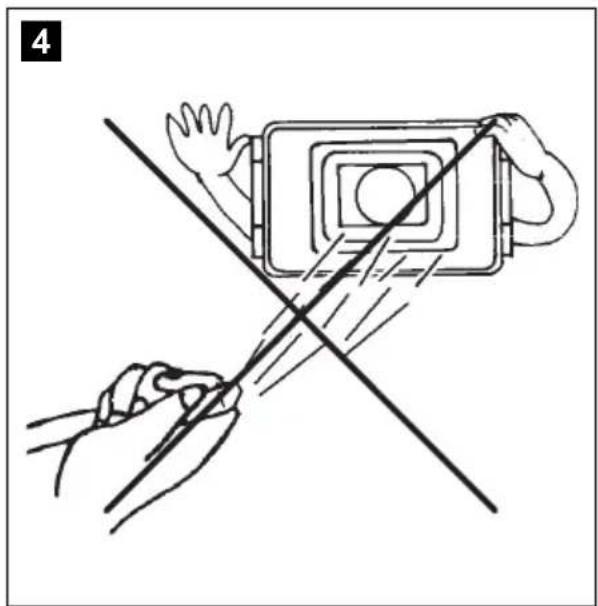
The camera is watertight. However, the seals on the camera cannot withstand a high-pressure cleaner (fig. 4, page 4). Therefore, you should observe the following instructions when handling the camera:
- Do not open the camera, as this impairs the watertightness and the function of the camera (fig. 5, page 4).
- Do not pull on the cables, as this impairs the watertightness and the function of the camera (fig. 6, page 4).
● The camera is not suitable for use under water (fig. 7, page 4)!
3 Scope of delivery
| No. in fig. 8, page 5 | Quantity Description Item no. | |
| 1 | 1 | Camera with motorised protective cover |
| 2 | 2 Cover | |
| 3 | 1 Camera guard | |
| 4 | 1 Camera bracket | |
| 5 | 1 Insulation pad | |
| 6 | 1 CAM44 adapter box 9102200078 | |
| 7 | 1 Extension cables 9102200030 | |
| - | 1 Fastening material | |
4 Accessories
Available as accessory (not included in scope of delivery):
Description Item no.
AMP100 switch box 9102200035
5 Intended use
The CAM44 camera (item no. 901200061) camera is designed primarily for use in vehicles. It can be used in rear view video systems to observe the space behind the vehicle from the driver's seat when manoeuvring or parking, for example.

WARNING!
Since rear view systems are designed merely as an additional aid for reversing, they do not relieve you of the duty to take proper care when reversing.
6 Technical description
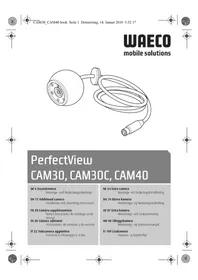
The colour camera with integrated microphone is encased in an aluminium housing and transmits image and sound to a monitor via a cable. It has a close-up lens and a long-range lens. The infrared LEDs improve night vision.
The long-distance lens shows the space behind the vehicle as if you were looking through a rear window. You can switch it on when you are not reversing.
The close-up lens (reversing camera) is a wide-angle lens, which shows the area directly behind the vehicle. It is activated when you engage reverse gear.
The camera produces three distance marks in reversing mode which are shown on a connected colour monitor as coloured lines.
The CAM44 camera is equipped with a motorised cover to protect against dirt.

NOTE
The cameras were equipped with a reverse display at the factory. Any monitor that is connected therefore needs a normal picture function.
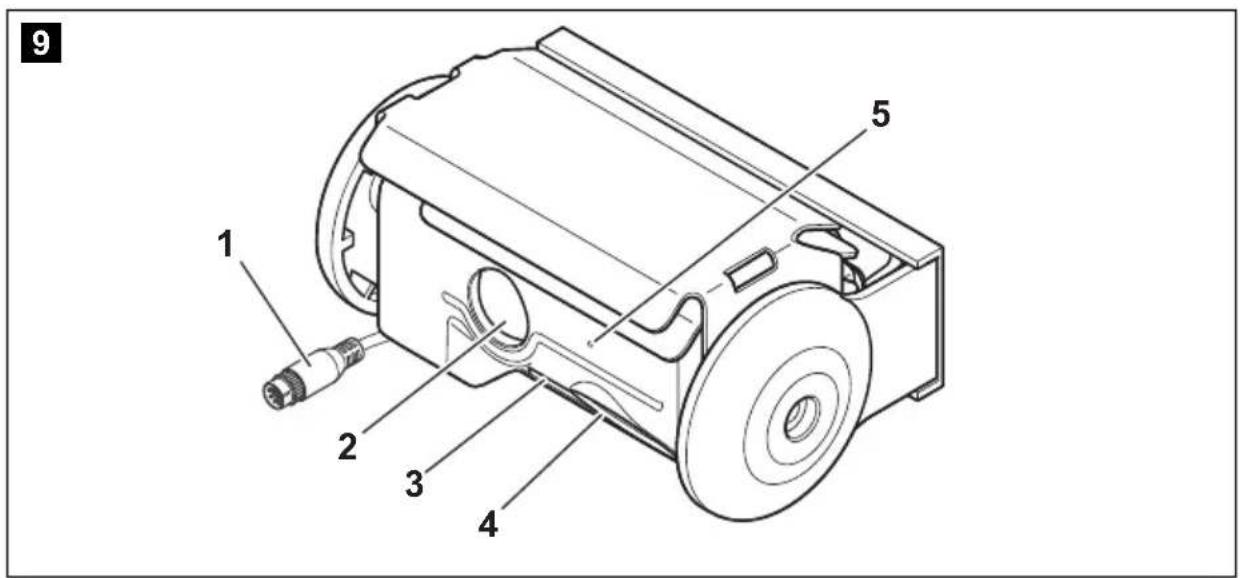
The camera consists of the following elements:
1 6-pin connection cable
2 Long-range lens
3 Infrared LEDs
4 Close-up lens (reversing camera)
5 Microphone
7 Notes on the electrical connections
7.1 Laying cables

NOTICE! Risk of damage!
- To prevent damage, when drilling ensure that there is sufficient space on the other side for the drill head to come out.
- Cables and connections which are not properly installed will cause malfunctions or damage to components. Correct installation of cables and connections is the basic prerequisite for lasting and trouble-free operation of the retrofitted components.
- The cables may not be exposed for long periods to solvents such as benzine, as the solvents can damage the cable.
Please therefore observe the following instructions:
- As far as possible, use original openings or alternative openings for the connecting cable duct, e.g. the paneling edges, ventilation grilles or blank panels. If no openings are available, you must drill holes for the cables. Check beforehand that there is sufficient room for the drill head to come out on the other side.
- Wherever possible, lay cables inside the vehicle, as they are better protected there than outside.
If you do need to lay a cable outside the vehicle, ensure that it is well fastened (use additional cable ties, insulating tape etc.). - To prevent damage to the cables, when laying them, ensure that they are far enough away from hot or moving vehicle components (exhaust pipes, drive shafts, light systems, fans, heater etc.). Use corrugated piping or other protective materials to protect against mechanical wear.
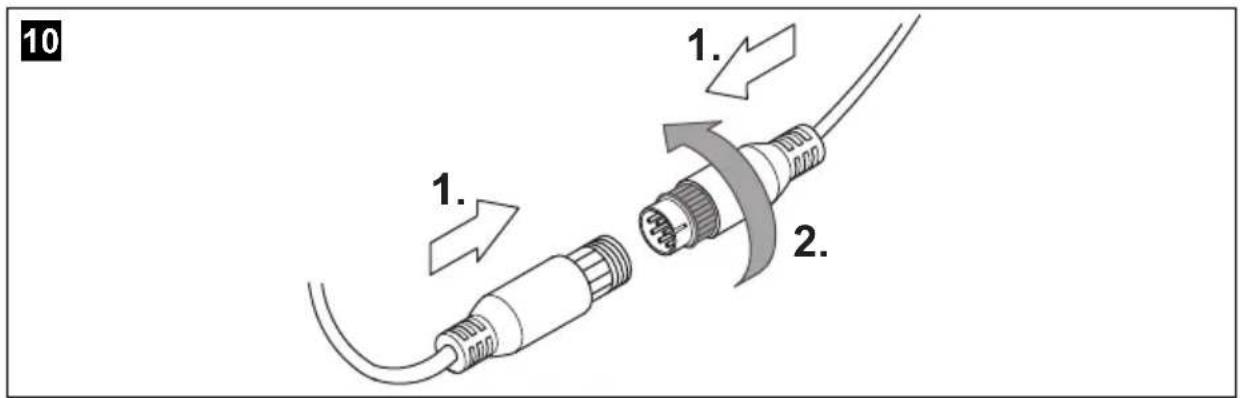
- Screw on the plug connections of the connecting cables to protect against water penetration (fig. 10, page 5).
- When laying the cables, make sure:
– They are not kinked or twisted
– They do not rub on edges - They are not laid through sharp-edged ducts without protection (fig. 3, page 4).
- Attach the cables securely in the vehicles to prevent tripping hazards. Use cable binders, insulating tape or glue the cables in place.
- Protect every through-hole made in the bodywork against water penetration, e.g. by using a cable with a sealant and by spraying the cable and the the cable sleeve with sealant.

NOTE
Only start sealing through-holes when you have completed all installation work on the camera and have laid the required cable lengths.
7.2 Using branch connectors
To prevent loose connections in the branch connectors, it is important to ensure that the cable cross sections fit into the branch connectors.
To use the branch connectors, proceed as follows:
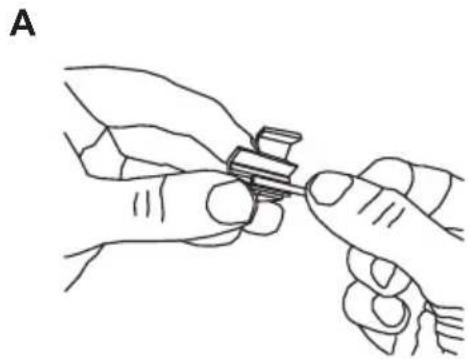
▶Insert the cable to be tapped in the front groove of the cable connector (fig. 11 A, page 6).
▶Insert the end of the new cable up to approx. 3/4 of the way into the rear groove (fig. 11B, page 6).
▶ Use a pair of combination pliers to close the connector by pressing the metal pin in. This creates an electrical connection (fig. 11 C, page 6).
▶Press down the safety cap until it snaps into place.
▶ Check that the connection is secure by gently tugging the cable (fig. 11 D, page 6).
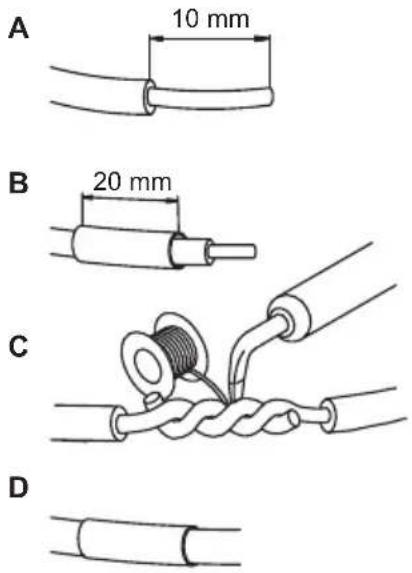
7.3 Creating clean soldering joints
Proceed as follows to solder a cable to the original cables:
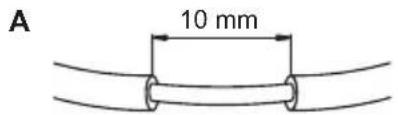
▶ Strip approx. 10 mm of insulation from the end of the original cable (fig. 12 A, page 6).
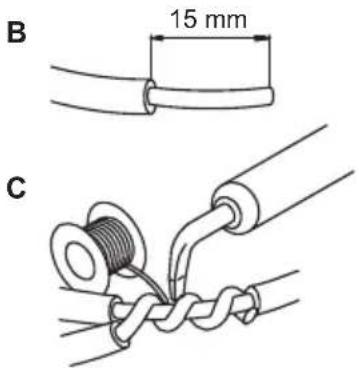
▶Strip approx. 15 mm of insulation from the end of the cable to be connected (fig. 12 B, page 6).
▶Wind the cable to be connected around the original cable and solder the two cables together (fig. 12 C, page 6).
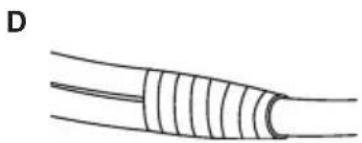
▶ Insulate the two cables with insulating tape (fig. 12 D, page 6).
Proceed as follows to solder two cables together:
▶ Strip the two cables (fig. 13 A, page 6).
▶ Place a shrink sleeve with a length of approx. 20 mm over the cable (fig. 13 B, page 6).
▶ Twist the cables together and solder them (fig. 13 C, page 6).
▶ Place a shrink sleeve over the soldered point and heat it briefly (fig. 13 D, page 6).
8 Fitting the camera
8.1 Tools required
For installation and assembly you will need the following tools:
- Drill bit set (fig. 1 1, page 3)
- Drill (fig. 1 2, page 3)
- Screwdriver (fig. 1 3, page 3)
- Set of ring or open-ended spanners (see fig. 1 4, page 3)
● Measuring ruler (fig. 1 5, page 3)
● Hammer (fig. 1 6, page 3) - Centre punch (fig. 1 7, page 3)
To establish and test the electrical connection, the following tools are required:
- Diode test lamp (fig. 1 8, page 3) or voltmeter (fig. 1 9, page 3)
● Insulating tape (fig. 1 11, page 3)
● Cable bushing sleeves (optional)
To fasten the cables you may require additional cable binders.
8.2 Fitting the camera

CAUTION!
Select a location for the camera and attach it firmly enough so that it cannot under any circumstances fall off and injure bystanders (e.g. by being knocked off by branches brushing over the roof of the vehicle).

NOTE
If installing the camera alters the vehicle height or the length specified in the vehicle documents, your vehicle must be inspected by the appropriate authorities.
Make sure that you are in possession of vehicle documents verifying that your vehicle has passed this inspection.
Observe the following installation instructions:
- Fix the camera at a height of at least two metres for an adequate view. Make sure that you have a firm place from which to work when installing the camera.
- Make sure that the installation location of the camera is sufficiently firm (e.g. to prevent the camera from being knocked down by branches that may brush the roof of the vehicle).
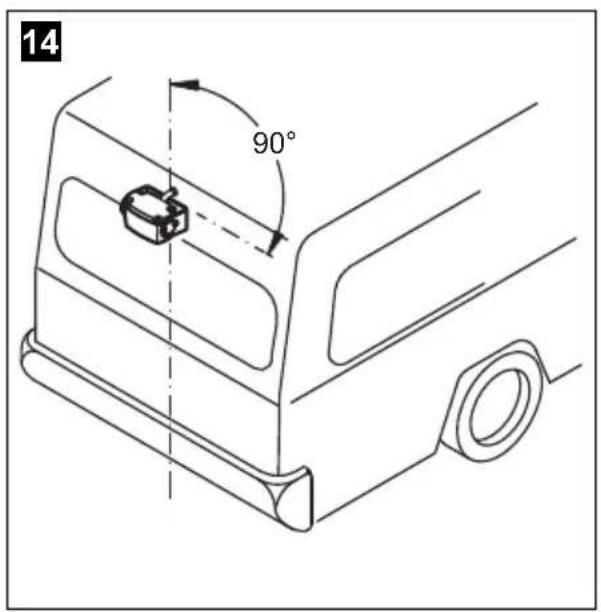
- Mount the camera horizontally and in the middle of the rear of the vehicle (fig. 14, page 7).
● Always use the supplied insulation pad (fig. 8 5, page 5). This prevents residual current caused by a poor earth connections in the vehicle. Residual current can cause lines of interference in the picture or buzzing in the loudspeakers or even damage components. - The most secure type of attachment is with screws fitted through the body. Please observe the following instructions:
- There must be sufficient space behind the chosen installation location to be able to carry out the mounting procedure.
- Suitable measures must be taken to prevent water penetrating through any holes made (e.g. by using screws and sealant and/or spraying the outer attachment parts with a sealant).
- The location on the body where you wish to attach the camera must be rigid enough to allow the camera to be tightly fastened.
- Check beforehand that there is sufficient space on the other side for the drill head to come out (fig. 2, page 4).
- If you are not sure about the location you have chosen, ask your vehicle manufacturer or dealer.

NOTE
We recommend greasing the threads of the screws to prevent corrosion.
To perform the installation, proceed as follows:
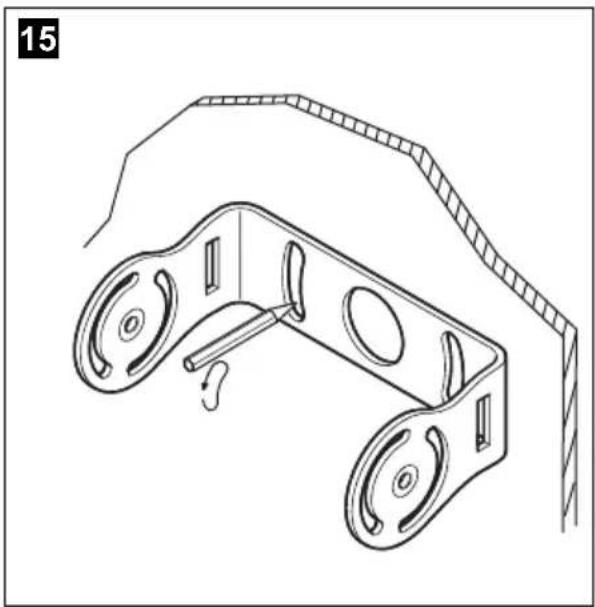
▶Hold the camera holder at the chosen location and mark at least two different points for the drill holes (fig. 15, page 7).
▶ Using a hammer and centre punch, gently pre-punch the previously marked points to prevent the drill head from slipping off.
If you want to screw on the camera with self-tapping screws (fig. 16, page 7)

NOTICE!
Self-tapping screws may only be fastened to steel metal with a minimum thickness of 1.5 mm.
▶ Drill 4 mm diameter holes at the points you just marked.
▶ Deburr all drill holes and apply rust-protection.
▶ Stick the double-sided adhesive insulation (fig. 8 5, page 5) to the assembly side of the bracket.
The insulation plate serves as a seal and protects the paint.
▶ Screw the camera bracket on with the 5 x 20 mm self-tapping screws.
If you would like to attach the camera with threaded screws fitted through the construction (fig. 17, page 7)

NOTICE!
When tightening the nuts, make sure that they cannot be pulled through the construction.
You may have to use bigger washers or plates.
▶ Drill 5.5 mm diameter holes at the points you just marked.
▶ Deburr all drill holes and apply rust-protection.
▶ Stick the double-sided adhesive insulation (fig. 8 5, page 5) to the assembly side of the bracket.
The insulation plate serves as a seal and protects the paint.
▶ Screw the camera holder on with the M5 x 20 mm threaded screws. Depending on the thickness of the construction, you may require longer threaded screws.
Creating a through-hole for the camera connection cable (fig. 18, page 8)

NOTE
If possible, use available openings – such as ventilation grilles – to feed the connection cables through. If there are no existing openings, you must drill a hole with a 16 mm diameter.

NOTICE! Risk of damage!
Ensure that there is sufficient space on the other side for the drill head to come out
▶ Drill a hole of ∅ 16 mm near the camera.
▶ Deburr all drill holes that have been made in the sheet metal and apply rust-protection.
▶Place cable sleeves in all sharp-edged ducts.
Attaching the camera and camera guard

NOTICE!
Never mount the camera without the additional camera guard. To mount the camera guard, only use the M3 x 6 mm screws provided. Longer screws will damage the camera.
▶ Push the camera guard (fig. 8 3, page 5) over the camera in such a way that:
- The fixing hole of the camera guard (fig. 19, page 8) is over the 3 mm thread of the camera.
- The two other fixing holes (fig. 20, page 8) are over the 4mm threads of the camera.
▶ Secure the camera guard with the two M3 x 6 mm screws in the hole (fig. 19, page 8).
▶ Push the camera into the bracket (fig. 20, page 8).

NOTICE!
Only use the screws supplied to mount the camera in the camera holder. Longer screws will damage the camera.
▶ Secure the camera loosely with the four M3 x 8 mm screws in the two other fixing holes (fig. 20, page 8).
The camera is now centred.
▶ Align the camera so that the lens is at an angle of approx. 20^ to the vertical axis of the vehicle (fig. 21, page 8).

NOTE
Do not tighten the four M3 x 8 mm screws until you have aligned the camera (see chapter “Checking the function and setting the camera” on page 42).
To do this you must first install and connect a monitor.
8.3 Connecting the camera

NOTE
- Lay the camera cable so that should you need to remove the camera, you can access the plug connection between the camera and the extension cable easily. This considerably eases dismantling work.
- To minimise corrosion in the plug, apply a small amount of grease – such as pin grease – inside the plug.
▶Guide the camera cable into the vehicle interior.
▶ Insert the plug of the camera cable into the socket of the extension cable.
▶Screw on the plug connections of the connecting cables to protect against water penetration (fig. 10, page 5).
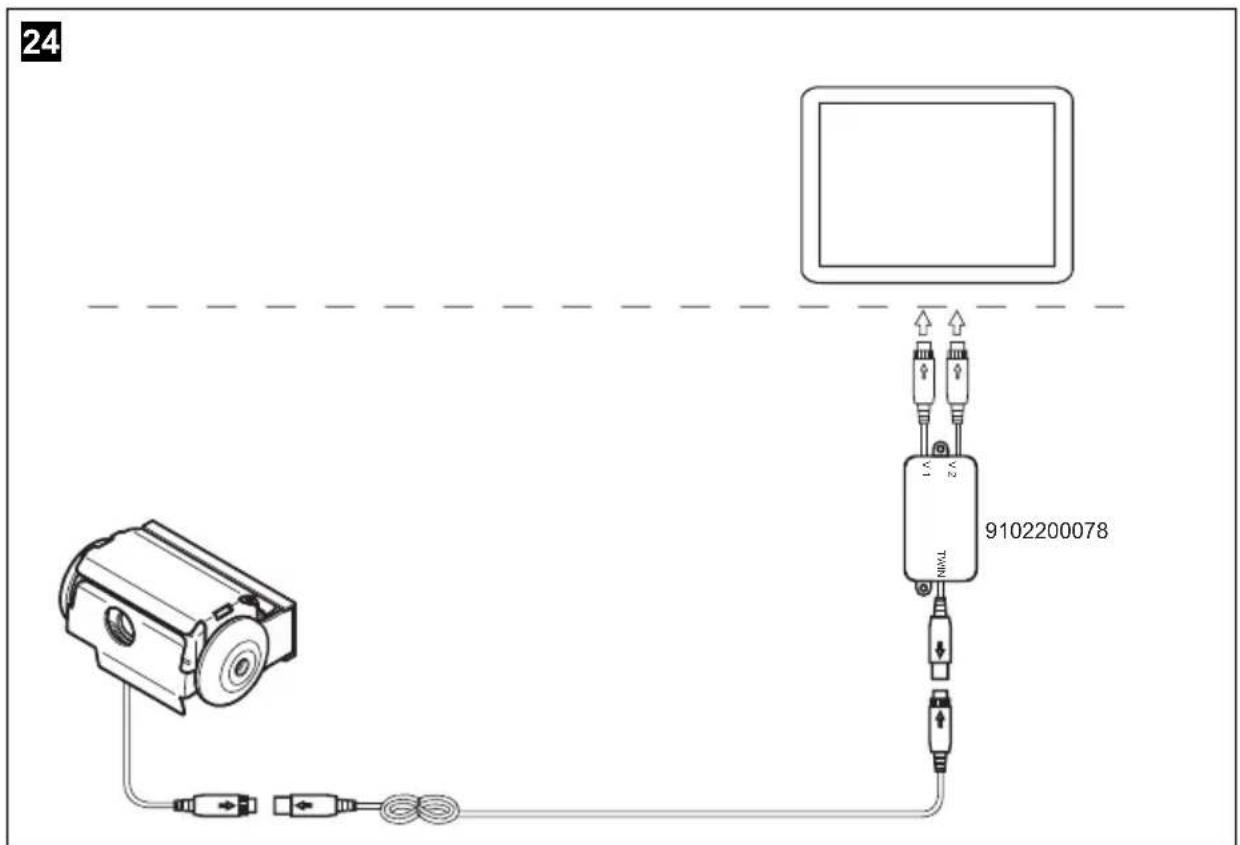
8.4 Connecting the 9102200078 switchbox (fig. 24, page 9)
The switchbox is supplied ready for installation.
▶Fasten the switchbox at a suitable point.
▶Connect the control box electrically as follows:
- Connect the camera inputs on the monitor to the "V1" and "V2" connections.
- Connect the system cable from the camera to the "TWIN" connection.
The camera is switched on and off in reverse gear or using the camera selection button on the monitor.
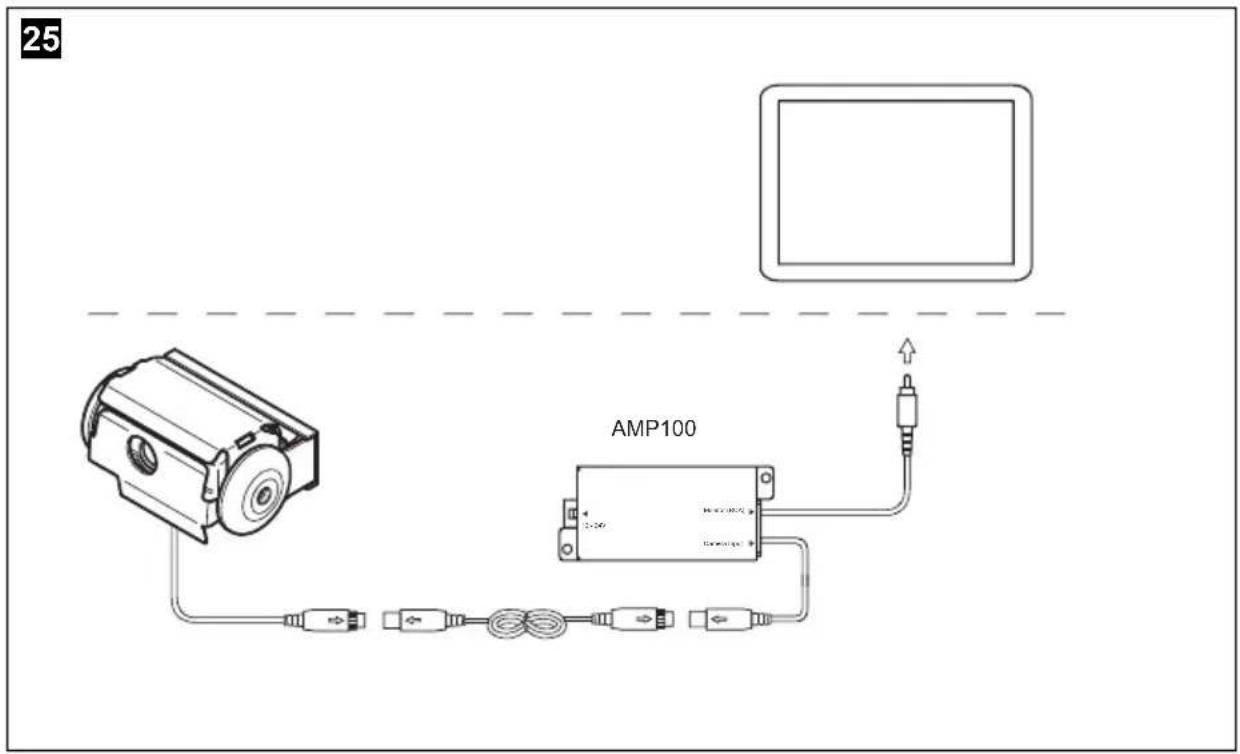
8.5 Connecting the AMP100 switchbox (fig. 25, page 10)

NOTE
If you would like to use both camera modules when driving forwards, you will need to fit the flip switch supplied (see the installation and operating manual for AMP100).
The switch box (not included in delivery) is ready for installation.
▶Mount the switchbox as described in the corresponding installation and operating manual.

NOTE
Output "2" on the switchbox is an auxiliary output, e.g. for connecting an external monitor.
▶Connect the switchbox electrically as described in the corresponding installation and operating manual.
8.6 Checking the function and setting the camera

NOTE
The distance values of the distance markers (see chapter “Estimating distances” on page 43) only apply when the camera is installed at a height of approx. 230 – 250 cm.
Check the actual installation height once you have installed the camera.
If the installation height deviates from these values, determine the actual distance values for the distance markers.
▶ Check the function of the camera after you have connected it to a monitor.
▶Align the camera using the image on the monitor to help you:
The monitor image should show the rear or the bumper of the vehicle at the bottom edge of the screen. The middle of the bumper should be in the middle of the screen (fig. 23, page 9).
▶Tighten the four fastening screws of the camera.
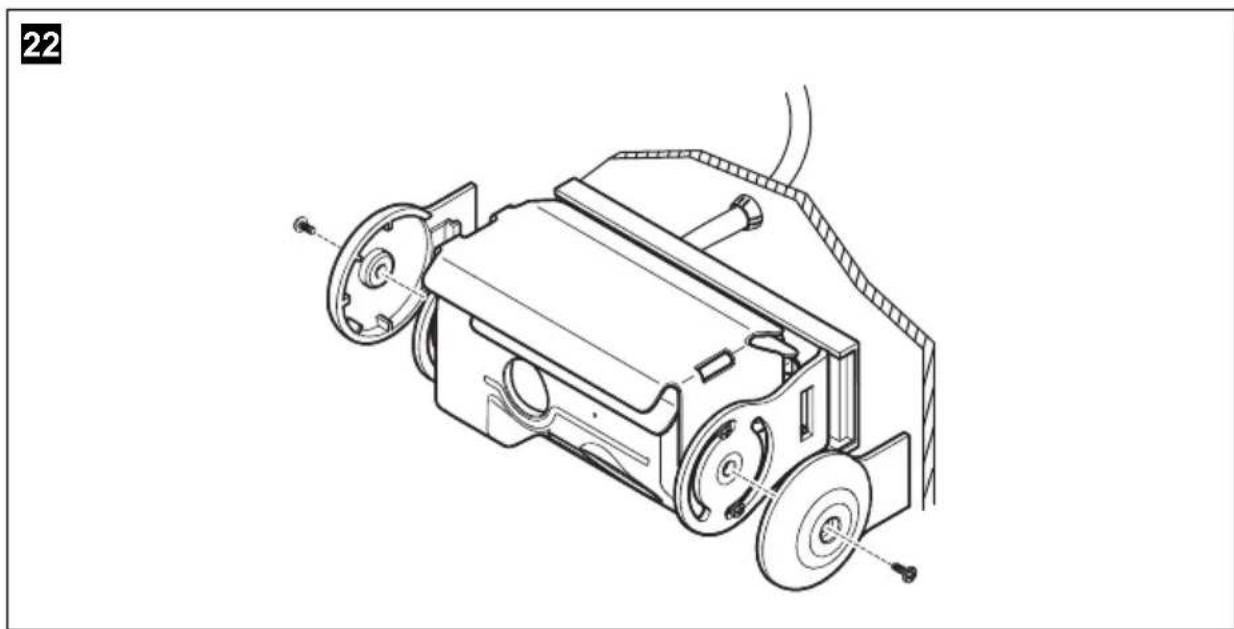
▶Place the side covers on and secure each one with a fastening screw (fig. 22, page 8).
Settings for contrast and brightness can be made on the monitor.
9 Using the camera
9.1 Estimating distances
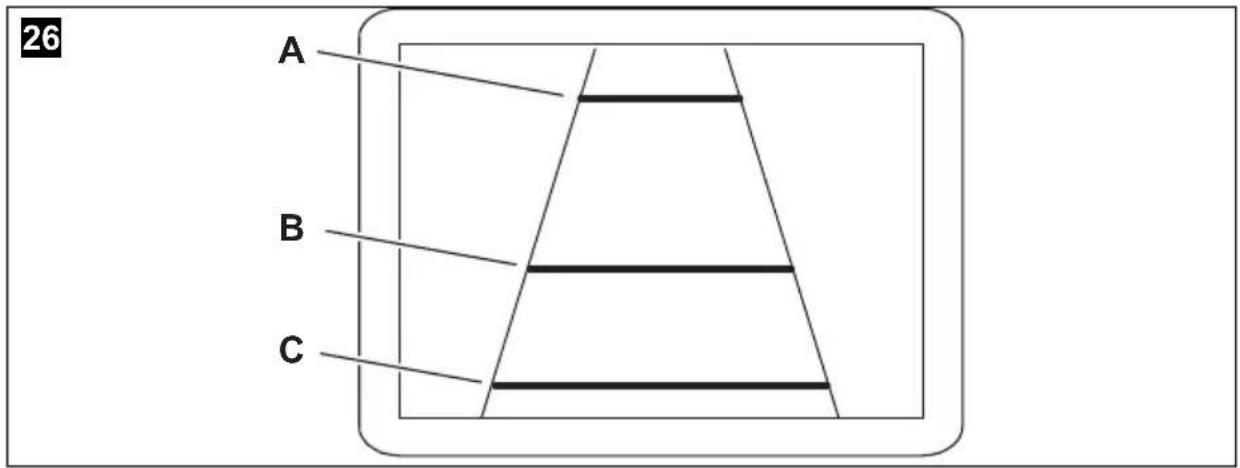
The camera produces three distance marks in reversing mode which are shown on a connected colour monitor as coloured lines (fig. 26, page 10).
The lines make it easier to estimate the distance of the vehicle to an obstacle.
When the camera is installed at a height of approx. 230 – 250 cm, the lines show the following distances:
Colour Distance
Green (A) approx. 3 m
Yellow (B) approx. 1 m
Red (C) approx. 0.3 m
10 Cleaning and caring for the camera

NOTICE!
Do not use any sharp or hard objects for cleaning since they may damage the device.
▶Clean the camera with a soft, damp cloth from time to time.
11 Guarantee
The statutory warranty period applies. If the product is defective, please contact the manufacturer's branch in your country (see the back of the instruction manual for the addresses) or your retailer.
For repair and guarantee processing, please send the following items:
- Defect components
● A copy of the receipt with purchasing date
● A reason for the claim or description of the fault
12 Disposal
▶Place the packaging material in the appropriate recycling waste bins wherever possible.
If you wish to finally dispose of the product, ask your local recycling centre or specialist dealer for details about how to do this in accordance with the applicable disposal regulations.
13 Technical data
| PerfectView CAM44 | |
| Item no.: 9102000061 | |
| Image sensor: Long-range: 1/4" | Color CMOS Sensor approx. 290000 pixels, 648(H) x 488(V)Close-up: 1/3" CMOS, 762(H) x 504(V) |
| TV system: PAL | |
| Sensitivity: < 1 lux or 0.0 lux with IR LED (close-up) | |
| Viewing angle: Long-distance lens: approx. 50°Close-up lens: approx. 140° diagonal | |
| Microphone sensitivity: Approx. | 56 dB |
| Storage temperature: -30 °C to +85 °C | |
| Operating temperature: -30 °C to +70 °C | |
| Operating voltage: | 12 – 16 V== |
| Consumption: | max. 4 W |
| Dimensions W x H x D(with holder): | 114 x 74 x 62 mm |
| Weight: | Approx. 360 g |
| Certification | 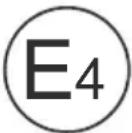 |
6 Description technique
Dometic Australia Pty. Ltd.
1 John Duncan Court
Varsity Lakes QLD 4227
+61 7 55076000
+61 7 55076001
Mail: sales@dometic-waeco.com.au
AUSTRIA
Dometic Austria GmbH
The Gateway · 25 Canton Road,
Tsim Sha Tsui · Kowloon
Hong Kong
+852 24611386
吕 +852 24665553
Mail: info@dometic-waeco.com.hk
ITALY
Dometic Italy S.r.l.
Via Virgilio, 3
I-47100 Forll
+39 0543 754901
+39 0543 756631
Mail: info@dometic.it
NORWAY
Dometic Norway AS
Skolmar 24
N-3232 Sandefjord
+47 33428450
+47 33428459
Mail: firmapost@waeco.no
POLAND
Dometic Poland Sp. z o.o.
Ul. Puławska 435A
02-801 Warszawa
Poland
+48 22 414 32 00
+48 22 414 32 01
Mail: info@dometic.pl
RUSSIA
Dometic RUS LLC
Komsomolskaya square 6-1
107140 Moscow
Russia
+7 495 780 79 39
+7 495 916 56 53
Mail: info@dometic.ru
SLOVAKIA
Dometic Slovakia s.r.o.
Tehelná 8
SK-98601 Fil'akovo
+421 47 4319 107
+421 47 4319 166
Mail: info@dometic.sk
SPAIN
Dometic Spain S.L.
Avda. Sierra del Guadarrama, 16
E-28691 Villanueva de la Cañada
Madrid
+34 902 111 042
+34 900 100 245
Mail: info@dometic.es
SWEDEN
Dometic Scandinavia AB
Gustaf Melins gata 7
Dometic Switzerland AG
Riedackerstrasse 7a
CH-8153 Rümlang (Zürich)
+41 44 8187171
吕 +41 44 8187191
Mail: info@dometic-waeco.ch
TAIWAN
WAECO Impex Ltd.
Taipei Office
2 FL-3 · No. 56 Tunhua South Rd, Sec 2
Taipei 106, Taiwan
+886 2 27014090
+886 2 27060119
Mail: marketing@dometic-waeco.com.tw
UNITED KINGDOM
Dometic UK Ltd.
Dometic House · The Brewery
Blandford St. Mary
Dorset DT11 9LS
+44 844 626 0133
吕 +44 844 626 0143
Mail: sales@dometic.co.uk
UNITED ARAB STATES
Dometic Middle East FZCO
P. O. Box 17860
S-D 6, Jebel Ali Freezone
Dubai, United Arab Emirates
+971 4 883 3858
昌 +971 4 883 3868
Mail: info@dometic.ae
UNITED STATES OF AMERICA
Dometic Marine Division
2000 N. Andrews Ave. Extension
Pompano Beach, FL 33069 USA
+1 954 973 2477
+1 954 979 4414
Mail: marinesales@dometicusa.com

- PerfectView CAM44
- EN 28 Rear View Video Camera
- Contents
- Explanation of symbols
- WARNING!
- CAUTION!
- NOTICE!
- NOTE
- Safety and installation instructions
- Scope of delivery
- Accessories
- Intended use
- Technical description
- Notes on the electrical connections
- Laying cables
- NOTICE! Risk of damage!
- Using branch connectors
- Creating clean soldering joints
- Fitting the camera
- Tools required
- Fitting the camera
- Attaching the camera and camera guard
- Connecting the camera
- Connecting the 9102200078 switchbox (fig. 24, page 9)
- Connecting the AMP100 switchbox (fig. 25, page 10)
- Checking the function and setting the camera
- Using the camera
- Estimating distances
- Colour Distance
- Cleaning and caring for the camera
- Guarantee
- Disposal
- Description technique
- Dometic Australia Pty. Ltd.
- AUSTRIA
- Dometic Austria GmbH
- ITALY
- Dometic Italy S.r.l.
- NORWAY
- Dometic Norway AS
- POLAND
- Dometic Poland Sp. z o.o.
- RUSSIA
- Dometic RUS LLC
- SLOVAKIA
- Dometic Slovakia s.r.o.
- SPAIN
- Dometic Spain S.L.
- SWEDEN
- Dometic Scandinavia AB
- Dometic Switzerland AG
- TAIWAN
- WAECO Impex Ltd.
- UNITED KINGDOM
- Dometic UK Ltd.
- UNITED ARAB STATES
- Dometic Middle East FZCO
- UNITED STATES OF AMERICA
- Dometic Marine Division
Brand : WAECO
Model : PerfectView CAM44
Category : Surveillance Camera