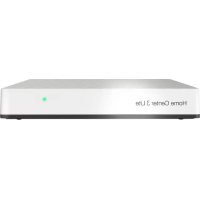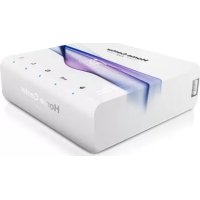
Home Center 2 - Smart Home Fibaro - Free user manual and instructions
Find the device manual for free Home Center 2 Fibaro in PDF.



Frequently Asked Questions - Home Center 2 Fibaro
User questions about Home Center 2 Fibaro
0 question about this device. Answer the ones you know or ask your own.
Ask a new question about this device
Download the instructions for your Smart Home in PDF format for free! Find your manual Home Center 2 - Fibaro and take your electronic device back in hand. On this page are published all the documents necessary for the use of your device. Home Center 2 by Fibaro.
USER MANUAL Home Center 2 Fibaro
Thank You for purchasing Home Center 2

For more information, visit our website: http://manuals.fibaro.com/home-center-2
Menu

english. 3

polski. 6

deutsch 9

français. 12

español 15

portugues. 18

pycckn 21
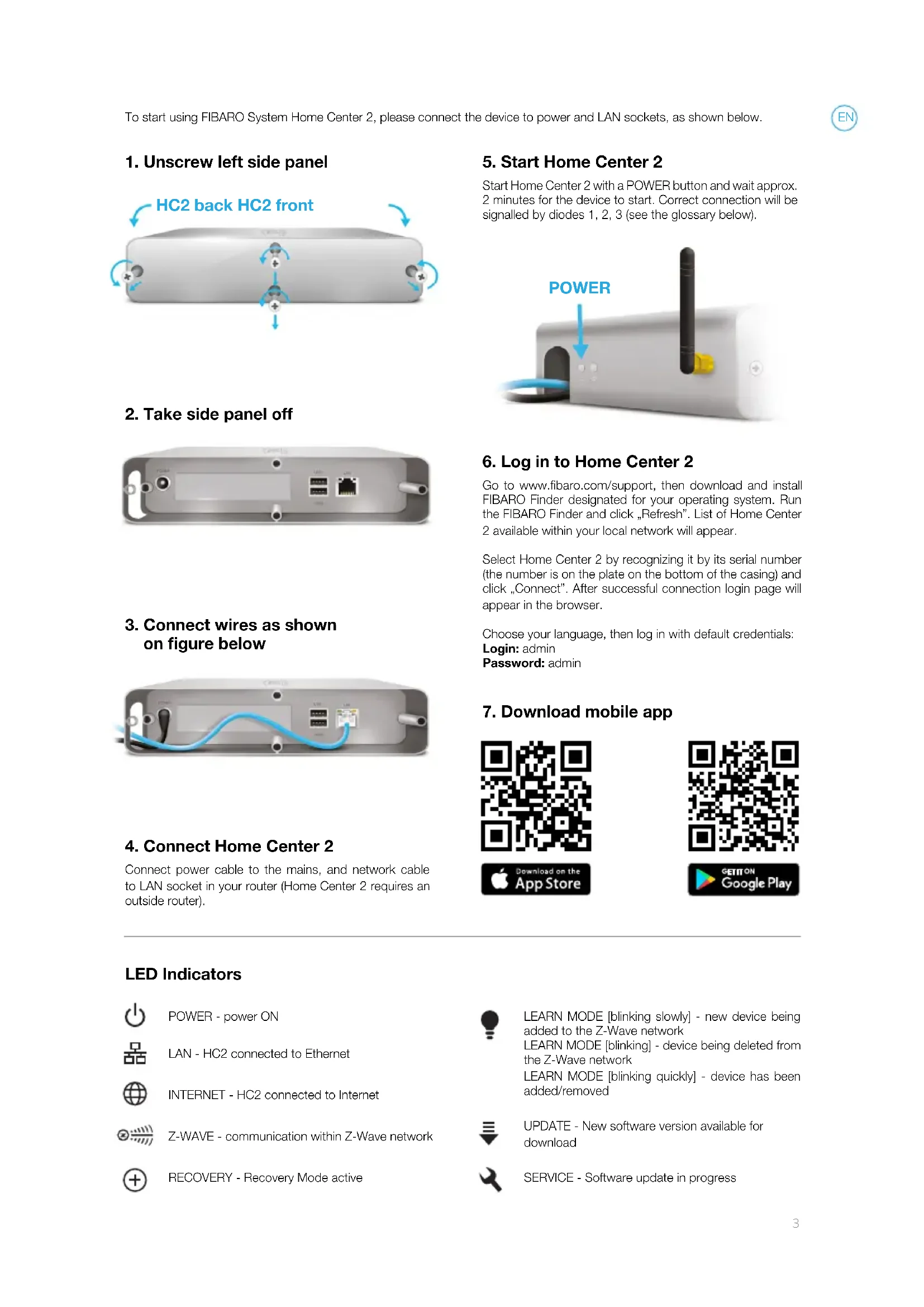
1. Unscrew left side panel
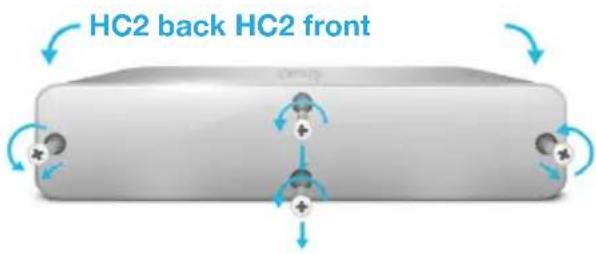
2. Take side panel off
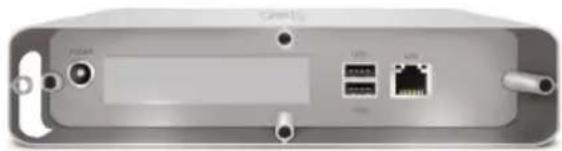
3. Connect wires as shown on figure below
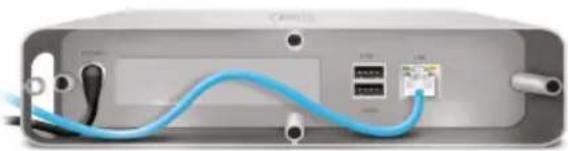
4. Connect Home Center 2
Connect power cable to the mains, and network cable to LAN socket in your router (Home Center 2 requires an outside router).
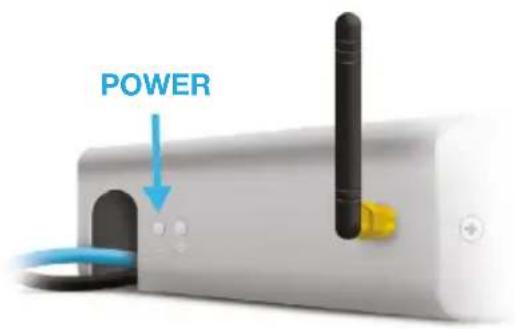
5. Start Home Center 2
Start Home Center 2 with a POWER button and wait approx. 2 minutes for the device to start. Correct connection will be signalled by diodes 1, 2, 3 (see the glossary below).
6. Log in to Home Center 2
Go to www.fibaro.com/support, then download and install FIBARO Finder designated for your operating system. Run the FIBARO Finder and click "Refresh". List of Home Center 2 available within your local network will appear.
Select Home Center 2 by recognizing it by its serial number (the number is on the plate on the bottom of the casing) and click "Connect". After successful connection login page will appear in the browser.
Choose your language, then log in with default credentials:
Login:admin
Password: admin
7. Download mobile app




LED Indicators

POWER - power ON

LAN - HC2 connected to Ethernet

INTERNET - HC2 connected to Internet

Z-WAVE - communication within Z-Wave network

RECOVERY -Recovery Mode active

LEARN MODE [blinking slowly] - new device being added to the Z-Wave network
LEARN MODE [blinking] - device being deleted from the Z-Wave network
LEARN MODE [blinking quickly] - device has been added/removed

UPDATE - New software version available for download

SERVICE - Software update in progress
Back panel buttons

POWER
- click to turn HC2 ON
- click (when HC2 ON) to reset the device
- press and hold for approx 10 seconds to turn HC2 OFF

RECOVERY
- Disconnect the power supply. Press and hold Recovery button when reconnecting the power supply (release the button after entering Recovery Mode)*.
- click once - entering Learn Mode (add new Z-Wave device),
- click twice - entering Learn Mode (delete Z-Wave device),
- press and hold to set static IP:192.168.81.1*
*Note: after setting static IP Home Center 2 will loose the router connection.

This product is not a toy. Keep away from children and animals.

Do not expose this product to moisture, water or other liquids. Never place any water carrying vessels near or on top of the unit.

Do not attempt to examine or repair this product yourself.

This product is designed for indoor use only. Do not use outside!
Simplified EU declaration of conformity

Hereby, Fibar Group S.A. declares that the device is in compliance with Directive 2014/53/EU. The full text of the EU declaration of conformity is available at the following internet address: www.manuals.fibaro.com
WEEE Directive Compliance

Device labelled with this symbol should not be disposed with other household wastes. It shall be handed over to the applicable collection point for the recycling of waste electrical and electronic equipment.
| Technical data |
| Power supply: 12V DC (included) |
| Network interface: 10/100/1000 Base-T (Gigabit) Ethernet (RJ-45) |
| Radio protocol: Z-Wave |
| Radio frequency: 868.42/868.40 MHz EU; 908.42/908.40 MHz US 919.82/919.80 MHz HK 921.42/921.40 MHz ANZ 869.02/869.00 MHz RU |
| Maximum transmit power: 0dBm |
| Range: up to 30m (depending on building structure) |
| Operating temperature: 10-40°C |
| Dimensions (W x D x H): 225 x 185 x 44 mm |
| Conformity with EU directives: RED 2014/53/EU RoHS 2011/65/EU |
Guarantee terms and conditions
- FIBAR GROUP S.A. with its registered office in Poznan, ul. Lotnicza 1, 60-421 Poznan, entered into the Register of Entrepreneurs of the National Court Register maintained by the District Court for Poznan-Nowe Miasto and Wilda in Poznan, VIII Commercial Division of the National Court Register (KRS) under number: 553265, NIP 7811858097, REGION: 301595664, share capital PLN 1,182,100 paid in full, other contact information is available at: www.fibaro.com (hereinafter "the Manufacturer") guarantees that the device sold (hereinafter: "the Device" is free from material and manufacturing defects.
- The Manufacturer shall be responsible for malfunctioning of the Device resulting from physical defects inherent in the Device that cause its operation to be incompatible with the specifications within the period of:
- 24 months from the date of purchase by the consumer,
- 12 months from the date of purchase by a business customer (the consumer and business customer are further collectively referred to as „Customer").
- The Manufacturer shall remove any defects revealed during the guarantee period, free of charge, by repairing or replacing (at the sole discretion of the Manufacturer) the defective components of the Device with new or regenerated components. The manufacturer reserves the right to replace the entire Device with a new or regenerated device. The Manufacturer shall not refund money paid for the device.
- Under special circumstances, the Manufacturer may replace the Device with a different device most similar in technical characteristics.
- Only the holder of a valid guaranty document shall be entitled to make claims under guarantee.
- Before making a complaint, the Manufacturer recommends using the telephone or online support available at https://www.fibaro.com/support/.
- In order to make a complaint, the Customer should contact the Manufacturer via the email address given at https://www.fibaro.com/support/.
- After the complaint has been properly filed, the Customer will receive contact details for the Authorized Guarantee Service ("AGS"). The customer should contact and deliver the Device to AGS. Upon receipt of the Device, the manufacturer shall inform the Customer of the return merchandise authorization number (RMA).
- Defects shall be removed within 30 days from the date of delivering the Device to AGS. The guarantee period shall be extended by the time in which the Device was kept by AGS.
- The faulty device shall be provided by the Customer with complete standard equipment and documents proving its purchase.
-
The cost of transporting the Device in the territory of the Republic of Poland shall be covered by the Manufacturer. The costs of the Device transport from other countries shall be covered by the Customer. For unjustified complaints, AGS may charge the Customer with costs related to the case.
-
AGS shall not accept a complaint claim when:
-
the Device was misused or the manual was not observed,
- the Device was provided by the Customer incomplete, without accessories or nameplate,
-
it was determined that the fault was caused by other reasons than a material or manufacturing defect of the Device
the guarantee document is not valid or there is no proof of purchase, -
The guarantee shall not cover:
-
mechanical damages (cracks, fractures, cuts, abrasions, physical deformations caused by impact, falling or dropping the device or other object, improper use or not observing the operating manual);
- damages resulting from external causes, e.g.: flood, storm, fire, lightning, natural disasters, earthquakes, war, civil disturbance, force majeure, unforeseen accidents, theft, water damage, liquid leakage, battery spill, weather conditions, sunlight, sand, moisture, high or low temperature, air pollution;
- damages caused by malfunctioning software, attack of a computer virus, or by failure to update the software as recommended by the Manufacturer;
- damages resulting from: surges in the power and/or telecommunication network, improper connection to the grid in a manner inconsistent with the operating manual, or from connecting other devices not recommended by the Manufacturer.
- damages caused by operating or storing the device in extremely adverse conditions, i.e. high humidity, dust, too low (freezing) or too high ambient temperature. Detailed permissible conditions for operating the Device are defined in the operating manual;
- damages caused by using accessories not recommended by the Manufacturer
- damages caused by faulty electrical installation of the Customer, including the use of incorrect fuses;
- damages caused by Customer's failure to provide maintenance and servicing activities defined in the operating manual;
- damages resulting from the use of spurious spare parts or accessories improper for given model, repairing and introducing alterations by unauthorized persons;
-
defects caused by operating faulty Device or accessories.
-
The guarantee shall not cover natural wear and tear of the Device and its components listed in the operating manual and in technical documentation as such elements have a defined operational life.
- The Device Guarantee shall not exclude, limit or suspend the Customer's warranty rights.
- The Manufacturer shall not be liable for damages to property caused by defective device. The Guarantor shall not be liable for indirect, incidental, special, consequential or punitive damages, or for any damages, including, inter alia, loss of profits, savings, data, loss of benefits, claims by third parties and any other damages arising from or related to the use of the Device.
919.82/919.80 MHz HK
921.42/921.40 MHz ANZ
869.02/869.00 MHz RU
Radiofrequency: 868.42/868.40 MHz EU; 908.42/908.40 MHz US
919.82/919.80 MHz HK
921.42/921.40 MHz ANZ
869.02/869.00 MHz RU
Mot de passer: admin
Alimentation: 12V DC (inclus)
Interface réseau: 10/100/1000 Base-T (Gigabit) Ethernet (RJ-45)
Protocole radio: Z-Wave
Radio frquence: 868.42/868.40 MHz EU; 908.42/908.40 MHz US
919.82/919.80 MHz HK
921.42/921.40 MHz ANZ
869.02/869.00 MHz RU
919.82/919.80 MHz HK
921.42/921.40 MHz ANZ
869.02/869.00 MHz RU
HHTEPHET - NOdklouhen K INTHepHeTy

Z-WAVE - communication within Z-Wave network

RECOVERY - PexKIM BOCCTaHOBJIeHnA kTINBbIi

LEARN MODE-MirraHoum MeDHeHNo-HOBoe yctpoiCTBO Do6abNeHo K cTeu Z-Wave LEARN MODE-MirraHoum -ycTPOiCTBO ydaJeHo n3 cTeu Z-Wave LEARN MODE-Mirraet 6bIcTpO-yCTpOiCTBO 6bilo do6abHeo/ydaJeHO

UPDATE-HobarBercnI nporpamMHoro
0ececneHn,doCTynHoro dny 3aarpzkn

SERVICE-O6HOBHeHne nporpaMMHoro 06ecneHn B npoecce
Khonkn 3aDneH naHei

POWER
HaxmTe, yTo6bIKBKnHouHTb HC2 ON
Haxmte (Korda HC2 ON) dna c6pocayctpoiCTBa
HaxMTe uydepxuBaIte B TeueHne OKo1o 10 cekyH, yTo6bI BBklnouHT HC2 OFF

RECOVERY
- OTKHouHTe NCTOCHNK NITaHn. HaxMnte n ydepxNBAIte KhoNky Recovery npn NOBTOPHOM BKNUeHN NITaHn (OTNYCTNTe KhoNky noCne BXoDa B pexnIM Recovery)*
Haxmte Odn pa3 - 3anyck (doabntb HOBoe yctpojCTBa K cetn Z-Wave), - Haxmte Daxkbl - 3anyck Learn Mode (ydaINTb yctpoiCTBO c cetu Z-Wave)
Haxmte n ydepxnBaute, yto6byyctaHOBTb IP: 192.168.81.1*
*3aMeTnTB: nOcne yCTaHOBKn CTaTnueckoro IP-Home Center 2 noTepeRt NOdkHoueHne MappyTu3aTopa.
UnpoueHHaJeKnapauncoOTBETCTBnE C

Fibar Group S.A. HactoNum 3aBnReT, yto yctpoCTBO COOTBeCTByET DnpeKtNBte 2014/53/EU. NnHbI TeKT DeKnapaunn COOTBeCTBnE EC DoctyneH No CnedyuOemy aDpcy B cTeN nHTepHeT: www.manuals. fibaro.com

3TOT npOdyKT He yBnIeTcNpyuKo. Bepueb ot Detei NKNBOTbIX!

He noDBepraute yctpoCTBO BO3deIcTBnIO BnA, BObI IIN dpyrnx XndKocTe. Hn B KOem Cnyae He Nomeuate BOOnpOBoHbte Tpy6bl 6bn3n IIN CBepx yctpoCTBa.

He nItaTecb camOCToTeBHo pemOnTIPoBaTb yCtpoiCTBO.

UcpoNCTBO npeHa3HaueHO TOIbKO DnI NcNoJIb3OBAHIN BHyTpNI NOMeueHn. He IcNoJIb3yIte yCtpoNCTBO Ha yInue!
EAC
COOTBETCTBNE dIupeKtIbe WEEE

YcTpoiCTBO, NOMeueHHoe 3TNM CUMBOJOM, He DOJIxHO yTNIN3NPOBaTbCBA MBeCTe C dpyrIMn 6BtOBbIMN OTXoAMN. YcTPOICTBO DOJIxHO 6bITbNEpeHaHO CooTBEcTByIOU mnyHK c6Opa BTOPCbPbA JyTNIN3AUm 3NeKTPnueckORIO 3NEKTPoHNO 06OpdyoBaHn.
TexHnuecka HOpMaun
UcToCHNKnTaHnA:
12V DC (BkIIOueHbI)
CetBoHHTepphiC:
10/100/1000 Base-T (Gigabit) Ethernet (Rj-45)
IpoToKoI paAnocBzaH:
Z-Wave
Pádnó yactota:
868.42/868.40 MHz EU; 908.42/908.40 MHz US
919.82/919.80 MHz HK
921.42/921.40 MHz ANZ
869.02/869.00 MHz RU
Maximum transmit power:
0dBm
Paynyc pa6o7b:
D030MeTPOB
(B 3aBnCIMOCTN OT KOHCTpyKUIN 3dAnH)
Paboua TeMnepaTya:
10-40°C
Dimensions (W× D× H)
225× 185× 44mm
CoOTBeTCTBne DnpeKtNBam EC:
RED 2014/53/EU
RoHS 2011/65/EU
YcIOBna rapaHTnN
- Kompania FIBAR GROUP S.A. C meToHaxOxKeHem B No3HaHn, no apecy: ul. Lotnicza 1, 60-421 Poznan, BHeceHHaB Peepc npnHmATEeIy TocyaapCTBeHHoro cyde6HOro peepTa PaOHnHOrO cyda No3HaHb HObE-MrTo N BuIbDa B No3HaHn, VII Kommpueckn otJen 3a Homepom: 553265, INH 7811858097, Ne REGON: 301595664, yctabHbN KaNTan PLN 1.182.100 onlaueHHbN nonHoCTbO, octaJIbHaN KOHTAKTHa INΦopMaJuaN DOCTYINH NO apecy: www. fibaro.com (danee ,PpOn3BODntel) rapANTnpyET, UTO pOdaBaemoe yCtpoiCTBO (danee : "UcTpoiCTBo") ABJareTCB6oBDhIM OT dEpeKToB MaTePunAna nnn I3ROTOBHeHn.
2.ПоиЗБОДИТЕНБ HeCET OTBeTCTBHeHOCt 3a HEnCnPbAHOCTb YcTpoIcTBa, n3-3a Φn3nuecknx HedOCTaTKOB, npCnyux YcTpoIcTBy, Bbl3bIbAIOUxN ero pa60Ty HecooTBeTcTBYIOU CneuΦnKaUmR ПоиЗБОДИТЕТВпрIoD:
24 Mecu ca co DnKynk NoTpe6nteM,
12 Meça co Σня ПOKунк 6и3Hec-KlneHTOM (notpe6ntel n 6и3Hec-KlneHT B daIbHeiJWe CMBcEThO ImeHyEmble, KIneHTOM").
- PpOu3BOoNTeB 6OBaYcTc 6ecnIaTHO ydaIITb BCE deΦekTbI, 6bHApUxEHHbI c TeueHHe rapaHTmHoro NepmoJa nyTeM pEmoHTa nn 3AmEHbI (No YCMOTpeHIO HpOu3BOoNTeJI) DeΦeKTHbIX 3JeMeHToB UcTpoiCTBa HOBbIMN nn peReHepuPoBAHHbIM. PpOu3BOoNTeB OCTaBIAET 3a co6oB npaBO Ha 3aMeHy Bcero O6OpyOBAHn HOBbIM nn peReHepuPoBAHHbIM. PpOu3BOoNTeB He Bo3BpaAae TbeHbRn 3a KynIeHHOe UcTpoiCTBO.
4.Bocobix Cnyaex, Ppon3BOnTeIb MOKeT 3aMeHHTb UcpoiCTBO dpYmC Hau6Ooe NOXOMN TexHueckmnpapaMeTpamn. - TóIbko ČePxaTeMb ČeIcTByOuIero rapaHTnHoro DOKyMeHTa MoXeT IpeDbYBnTb rapaHTnHbIe npTeH3nI.
- Ппесд ппсдьгБЕнм rapaHTин HoNппeТeH3nIпоэвдпелpeKOMeHdYET nCNoJIb3OBAtBTeleФОHHyIO ИИ OHLaIH TexHnueckyI NOДePExKy,doctynHyo no aDpecy: https://www.fibaro.com/support/.
- C ζεJBIO ΠρεДБΑΒΙΝΤΟ ΠρεTEΗΝΙΟ ΚΚΙΝΕΤ ΣΟλχΕΝΑ ΒΑΙΑΤΑΚΑ ΠΙουπΟΙΑΝΙΤΕΝΑ Μ ΘΙΝΕΚΤΡΟΗΝΟ ΜΟΥΤΕ ΛΑνραβληνΗΟ B ΑΔρες, yκαλαΗΗΝΗ ΜΑ Κτραήνις: https://www.fibaro.com/support/.
- Nocne npaBnIbHoro npedbAbleHnnpTeH3nn, KIneHT NoJyUHT KOHTAKTHYHO nHΦopMaunHO ABTOpN3oBaHOrO rapaHTnHOrO cepBuCA (AΓC"). KIneHT DoJxHe CByaTbcra C AΓC nOCTaBNTyda UcTpoiCTBO. Nocle NOnyueHn YcTpoiCTBa, POnu3BoDntJIb Co06uNT Bam HOMep 3aBKn (RMA).
- DepeKbI 6yUyt ydaJIeHb I TeueHne 30 dHe, cHTaR OT DaTbI NOCTaBKN O6OpYIOBaHn B AΓC. TapaHTnHbI CpOK npOJaIeBaTcRa H bPem, 3a KOTOpoe yCTpoiCTBO OCTaBAIOCb B AΓC.
- UcTpoiCTBO, K KOtOpOMy ppeIbIaBJIeTcra IpeTeH3nIA, DOJXHO ppeOCTaBITcra KInHeTOM BMeCTe C KOMIIneKTHbIM cTaHApThbIM O6OpYIOBaHNEM N DOKyMeHTAMU, NOdTBePxxHaOuMmN oKpNkY.
- 3aTpaTbHa TpaHcNopt YcTpoiCTBa Ha Teppitopn Pecny6nKn PoIb7a Hecet PpOn3B0dnteB. B clyuae TpaHCnopta YcTpoiCTBa n3 dpynx CtpaH, 3atpaTbHa TpaHCnopt HeCet KIneH. B clyuae Heo6ocHObaHHo raPantHIO npTeHnn, AFC mMeet npabo 6bpemHtB KIneHTaTpaTaAM, CB3aHHbIMn C pa3bAcHeHEm DeJa.
- ACROKa3bBAeTcnpnHrTB npTeH3NHO, B Cnyae: 6hApyXeHn HcNoIb3oBAnH yCTpoiCTBa HecOoTBETCTBeHHo C npEHa3HaueHnEM pyKOBOCTBOM NO kCpIyatauN, 7 npdeocTaBHeN KJIeHTOM HeKOMPKeTHoro YcTPOCTBa, 6e3 O6OpyOaHn, 6e3 WIIbDnka, 7 npDeHeHn DpyroI npUHb HeNCnPabHOCTn, 7em DeEeKT MaTePnAa Nnn N3rTOBHeHn, npcuyn
yctpoNCTBy,
HeDenCTBnTeNbHOCTn rapaHTnHOrO DOKMeHtAnOTCYTCTBnI DOKa3aTeNbCTBa NOKyIKN,
- TapaHTnHe paCnpocTpHaTcHa:
MexaHueckne NOBpeKdeHn (TpeuHbI, nepenomblnope3blcdaHbI, h3nueckar deOpmaunB p3eYbTaTe ydaPa, naedHn nn c6poc aHa YcToPoiCTBO pyrroTO npdMetna nn 3Knpyataua, HecooTBeCTBHyOaJ npdHa3AHeHuO YcToPoiCTBa, onPeJeEHHomByykoBoDCTBe no 3Knnyatau;
- NOBpeKJHnRA, BO3HnKJHme B pe3yIbTaTe BHeJHnx
PnUHH, HApnpMep HABOHeHnRA, 6ypu, noxapa, ydapa
MOHNH, CTHXnHBx 6eCTBn, 3emnetpcreHnRA
BOHbI, rpaKaDcHKX BOJIHeHn, fOpC-MaKOp,
HEpeDbNdeHHbx CnyuaeB, KpaKn, 3aJIbBa JIKKOCTbIO,
NPoTeKn 6bAtePn, NOrOdHbX yCLOBn, BO3DeJCTBnRA
COJIHeHORO CBeta, Necka, BNAfN, BblcOKoN uN HN3KoN
TEMpePaTybl, 3arpr3HeHnRA BO3dyxa;
NoBpeJdeHnB, BbI3BaHHbIe HeNpaBnIbHO pa60Tn npOrpamMHorO bcneJeHnB, B pe3yIbTaTe BpyChOH aTAkN, nIe HncNoJIb3OBaHHe O6HOBLeHn npOrpamMHorO bcneJeHnB COOTBeCTCBN C peKOMeHdaunm Ppon3BOdntel;
NobpexdHnBb3BaHHbe:CKaKaMn Hapjxehn B cETn 3eKtpoHnTaHn N/nn TelenkOMMyHnKaUu NnN pKnIOHeHm K cETn HecooTBeTcBeHNO C pyKOBoDCTBOM NkCnIyAtaUu NnN NOBdy NpKnIOueHn DpyrNX PpOyKTOB, NpKnIOeHne KOToBix He peKoMeHdyTeCn Ipon3BOuNTeHm;
NOBpeXeHnY, Bbl3BaHHbIe pa6oToi nn XpaHeHnEM YcTpoiCTBa B KpaIHe He6laFonpRTHbIX YcNoBnx, T.e. BblcOKoB BlaXHoCTn, HAnbJIeHn, CnIuKOM Hn3KoI (Mopo3) nIu CnIuKoM BblcOKoI TempePata OkyxauOe Cpebl. DeTaIbHbIe ycNoBny, np KaKnx DoynyckaTeC nCNoIb3ObaHne YcTpoiCTBa, onPeJelHaTcB pykoBOdCTBe nEKnlyaTaun;
NOBpeKdEHn, BO3HKnWne B pe3yNbTaTe HcNoJIb3OBAHnnpHaJNeXHoCTe, He peKoMeHdyEmbIX PpOn3BOuNTeIeM;
- NOBpeJdeHn, Bb3BaHHbIe HEnpaBnIbHOJ 3JIeKTPuYeCKoYcTaHOBKOIOJIb3ObaTeJIa, BTOM YNCJI npIMHeHHeM HeNpaBnIbHbIX NpeOxpaHHTeJIe;
NOBpeXeHnB03HKnWne B pe3yIbTaTe IpeKpaSeHnKaIeHToM yXoJa N O6cLyKuBaHn, IpeDyCMOTpeHHOrO pyKOBoDCTBOM NO 3KcIpyaTauIN;
NoBpeXeHnB, BO3HnKwne B pe3yIbTaTe npImeHHeHepuRnHaJIbHbIX, HnpeHa3HaueHHbIX dIaTOn Moenn 3anJacte N o6OpdyoBaHnB, BblIOJIeHNem pemOHTOB u MOnDfNkaun HeynoHOMOueHHbIMnLIzamn;
NobpeJedHn, Bo3HKuHne B pe3yIbTate npdoJenHn paOToBHe HncpAusbHm UcTpoIcTBOM nnOpOpyDabHnEM.
IapaHTnHa pacnpoctpaHReTcHa HopMaJIbHbI n3HOC Detaney UcTroPCTBa I dpyrIX 3aNtAcTei, yKa3aHHbIX B pyKOBoCTBe No EKcnIyatauIN n TexNHueckOДOKyMeHTaUN C OnPpeJEnHHbIM BpemeHem pa60tI.
RapaHTnHa YcTpoiCTBO He NCKJIIOUaET,He orpaHnUBAe TnnpOCTaHaBbNAe T npBa KIneHTa nO donoHHTbHoR rapaHTn.
PpOIN3BODNTeH He Hecet OTBETCTBEHHOCTH 3a yUep6, npuHNHeHHbI NMyUeCTBy BCNEcTBEne deFeKta YCTPOIcTBa. PpOIN3BODNTeH He Hecet OTBETCTBEHHOCTH 3a CnyAHHbI, CNeuaJIbHbI, KOCBeHHbIy bTKn nII 3a MopAJIbHbI yUe6, BKNIOJAA, cpeIN pOueero, nOtePHo npi6bln, c6peXeHH, daHHbIX, noTePHo IbROT, nPeTeH3nn co CTOpOHbTIpeTbIX nII nII dpyrVe y6bITKn, BO3NKAHOUe ne 13 nII CBRAaHHbIe C nCnOJIb3OBaHHeM YCTPOIcTBa.