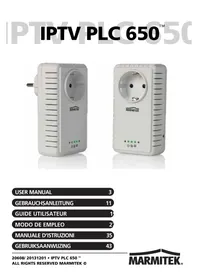
IPTV PLC 650 - Powerline Adapter MARMITEK - Free user manual and instructions
Find the device manual for free IPTV PLC 650 MARMITEK in PDF.


Frequently Asked Questions - IPTV PLC 650 MARMITEK
User questions about IPTV PLC 650 MARMITEK
0 question about this device. Answer the ones you know or ask your own.
Ask a new question about this device
Download the instructions for your Powerline Adapter in PDF format for free! Find your manual IPTV PLC 650 - MARMITEK and take your electronic device back in hand. On this page are published all the documents necessary for the use of your device. IPTV PLC 650 by MARMITEK.
USER MANUAL IPTV PLC 650 MARMITEK
- To prevent short circuits, this product should only be used inside and only in dry spaces. Do not expose the components to rain or moisture. Do not use the product close to a bath, swimming pool etc.
- Do not expose the components of your systems to extremely high temperatures or bright light sources.
- In case of improper usage or if you have altered and repaired the product yourself, all guarantees expire. Marmitek does not accept responsibility in the case of improper usage of the product or when the product is used for purposes other than specified. Marmitek does not accept responsibility for additional damage other than covered by the legal product responsibility.
- This product is not a toy. Keep out of reach of children.
- Do not open the product: the device may contain live parts. The product should only be repaired or serviced by a qualified expert.
- Only connect the adapter to the mains after checking whether the mains voltage is the same as the values on the identification tags. Never connect an adapter or power cord when it is damaged. In that case, contact your supplier.
1. INTRODUCTION
Congratulations on your purchase of the IPTV PLC 650™. Use your existing power network to turn every wall socket in your home (for example those near your AV cabinet) into a network connection for your home network (IP/Internet). It offers a guaranteed stable high-bandwidth connection for the most demanding HD video streaming devices. This includes services such as IPTV, Smart TV, video-on-demand, Media Player and, for example, a PC.
2. PACKAGE CONTENTS
2 × IPTV PLC 650^TM (Powerline adapter)
2 x RJ45 CAT5 networking cable
1 x User Manual
3. OPERATION
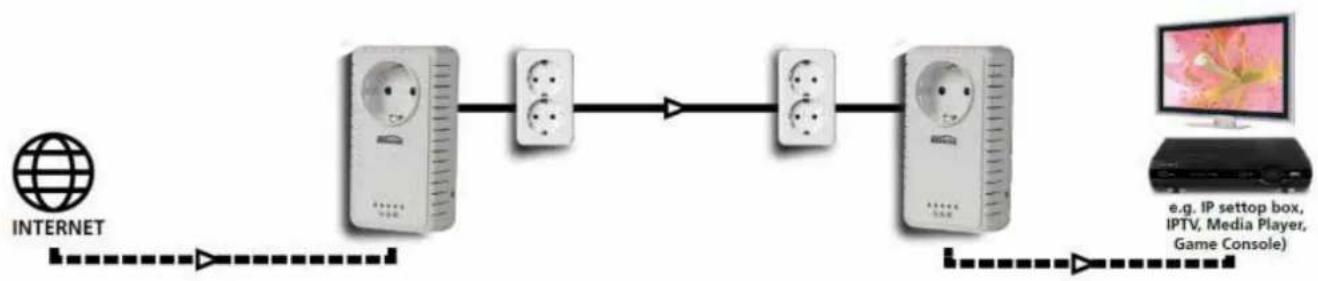
Powerline adapters are easy to install!
Creating a Powerline network using your existing power network requires at least two adapters. Would you like to share your internet signal with the rest of the home, using the power network? Just install one adapter at your home's entry point of the Internet signal (for example, near your Internet router or modem). Place the second adapter at a location where you want to have a network connection available to connect your devices to the Internet/IP. All connected devices are thus provided with an Internet signal, enabling you to use, among others, HD/3D multimedia streams from, for example, IPTV, Smart TV, video-on-demand or Media Players.
Features:
- Features HomePlug AV2 technology for the best performance of your HD/3D multimedia streams (IPTV, Smart TV, video on demand, Media Player, etc.).
- Unique SmartLink technology improves performance and increases the maximum distance between two adapters with up to 50% , for coverage anywhere in the home.
- Parameterized Quality of Service (PQoS): optimised for HD video streaming by distinguishing between data traffic for video, voice and gaming. When a large amount of data is being downloaded within the network, for example, by a PC, your AV streams will not be compromised and will be prioritised.
- With built-in filter to prevent interference by your AV equipment and keep your network clean.
- Status LED: visual display on the Powerline adapters, including signal quality, making set-up and use easy, without any IP or networking knowledge.
4.PRODUCT FEATURES
1. Network connection
Gigabit Ethernet 10/100/1000Mbps
2. Wall outlet:
Integrated wall outlet to connect your AV devices.
3. Status lights:
Power/standby LED
- Green: adapter is enabled
- Flashing red: adapter is in standby mode
- Off: adapter is disabled
Signal Quality LED
- Green: good connection, suitable for HD/3D video streaming
Orange: fair connection, suitable for SD video streaming - Red: bad connection, video streaming cannot be guaranteed
- Off: Unable to connect to another Powerline adapter through the power network
LAN/Ethernet LED:
- Green: a device is connected to the adapter and enabled
- Flashing green: communication taking place between two adapters
- Off: no device is connected to the adapter or it is disabled
4. Security button:
Button to configure your Powerline network's security (see section 6).
5. Reset button:
Press this button for 3 seconds with a pointed object to restore the adapter to factory settings.

5. INSTALLATION
5.1 Preparation
- To use the SmartLink technology, connect both adapters to a grounded power outlet. If one of the two adapters is connected to a non-grounded power outlet, a default connection will be set up, without SmartLink technology.
- If possible, connect the Powerline adapter directly into a power outlet and avoid using a power strip and/or extension cord, since these can seriously weaken the signal.
5.2 Connect your Powerline network to the Internet
To provide your Powerline network with an Internet signal, you need to connect one of the adapters to an Internet router/modem.
- Plug the Powerline adapter into a power outlet near your internet router/modem. The Power LED lights up green.
- Connect a networking cable (supplied) to the Powerline adapter's Ethernet port (1) and your Internet router/modem (usually referred to as LAN port). The Ethernet LED on the adapter lights up green.
5.3 Providing your multimedia equipment with an Internet signal
You can place up to 64 Powerline adapters in your home to provide your equipment (IP set-top box, SMART TV, Media Player, game console, etc.) with an Internet signal.
- Plug the Powerline adapter into a power outlet near the equipment you want to give an Internet signal. The Power LED lights up steady green. The Signal Quality LED indicates the quality of the connection to the other Powerline adapter.
- Connect a networking cable (supplied) to the Ethernet port (1) of the Powerline adapter and to the device you want to give an internet signal. The Ethernet LED on the adapter is switched on and lights or blinks green when the connection is active.
Please note: The IPTV PLC 650 adapters automatically go into standby mode if no LAN/Ethernet signal is detected on the Ethernet port (1) for 60 seconds. The adapter will be restarted automatically when an Ethernet signal is detected again.
6. NETWORK SECURITY (OPTIONAL)
The Powerline adapters have already been equipped with standard network security at the factory. If you experience any problems during the installation or if you want to change the default security, you can customise it yourself.
6.1 Configuring your own network security
- Press and hold the Security button for 15 seconds. The status lights (3) at the front of the Powerline adapter will be switched off and the adapter will reboot. This will erase the original network security.
- Repeat step 1 for the second Powerline adapter you want to use in the same network.
- Press and hold the Security button of both Powerline adapters for 1 to 3 seconds to set new network security. The power LED will blink shortly after this step. Both Powerline adapters will restart once more after this step is completed correctly. Please note: the maximum time between pressing the Security button on both adapters is 120 seconds.
- Both Powerline adapters now share the same network security and are mutually connected. Repeat steps 1 through 3 if not completed correctly.
Please note: it may take several minutes before the connected devices are connected to the network.
6.2 Adding a Powerline adapter to your network
- Plug the Powerline adapter you want to add to the network into the power socket and press and hold the Security button 8_for 10 seconds to erase the original network security.
- Press and hold the Security button 8 for 1 to 3 seconds until the Power LED 0 starts to flash.
- Repeat step 2 for any Powerline adapter that is already part of the network you want to connect to. Please note: the maximum time between pressing the Security button on both adapters is 120 seconds.
- The Powerline adapter is added to your network and can be used.
- Repeat steps 1 through 3 for each Powerline adapter you want to add to your network.
7. FREQUENTLY ASKED QUESTIONS
All status lights are off
- Unplug the Powerline adapter from the power outlet for 30 seconds and re-insert it.
- Try another power outlet that you know is working.
- Restore the adapter to its factory settings by using a pointy object to press the reset button (5) for 3 seconds.
Standby LED 山 continues to flash red
- Make sure the Ethernet cable is correctly connected to the Powerline adapter and the device you want to connect to.
- Make sure the device you want to share an Ethernet cable with is activated.
The Signal Quality LED is not lit
- Try another power outlet that you know is working.
- Re-configure the network security according to chapter 6.
- Restore the adapter to its factory settings by using a pointy object to press the reset button (5) for 3 seconds.
The Signal Quality LED lights red
- If possible, connect both Powerline adapters to a grounded power outlet. The SmartLink technology uses three wires from your power network (phase, neutral and earth), which allows you to increase the range and performance.
- Try using another power outlet in the same room to check if the signal quality is better there. Powerline adapters work best when used in the same group of your power network.
- Try to avoid potential noise sources such as phone chargers, halogen lights, energy saving lamps and vacuum cleaners near the Powerline adapters, as far as possible, as these may seriously weaken the signal.
Have any questions that are not answered here? Then please check out www.marmitek.com.
8. TECHNICAL INFORMATION
IPTV PLC 650™ Adapter
Power Network: 100 240VAC @ 50 / 60Hz
Max. load of power outlet:16A
Range: max. 300 metres with Smartlink
max. 200 metres without SmartLink
Network connection: 10/100/1000Mbps (Gigabit Ethernet)
Status indicator LED: Power/Standby, Signal Quality, LAN/Ethernet
HomePlug
Version: Homeplug AV2
Supported: IEEE 802.3, IEEE 802.3U, IEEE 1901,
Homplug AV2
Max. throughput speed: PHY 600Mbps, UDP 280Mbps, TCP 230Mbps
Modulation: OFDM (QAM 8/16/64/256/1024/4096, QPSK,
BPSK,ROBO)
Frequency band: 2 68 MHz
Security: 128-bit AES Link Encryption
House
Integrated power outlet: Yes
Dimensions: 112 × 62 × 42 ~mm
Weight: 210 grams
Environment
Ambient temperature: +0 to +40°C
Ambient humidity: 10% to 85%
Specifications may change without prior notice.
9. OPTICTIONALLY AVAILABLE
Additional IPTV PLC 650™ adapter (art. no. 08208/08209)
Create additional Powerline connections (IP/Internet) at several places in your home (living room, bedroom, home office, loft) through your power network. You may connect up to 64 Powerline adapters to your network.

Environmental Information for Customers in the European Union
European Directive 2002/96/EC requires that the equipment bearing this symbol on the product and/or its packaging must not be disposed of with unsorted municipal waste. The symbol indicates that this product should be disposed of separately from regular household waste streams. It is your responsibility to dispose of this and other electric and electronic equipment via designated collection facilities appointed by the
government or local authorities. Correct disposal and recycling will help prevent potential negative consequences to the environment and human health. For more detailed information about the disposal of your old equipment, please contact your local authorities, waste disposal service, or the shop where you purchased the product.
SICHERHEITSHINWEISE
Gigabit Ethernet 10/100/1000Mbps
2. Steckdose:
Modulation: OFDM (QAM 8/16/64/256/1024/4096, QPSK, BPSK, ROBO)
Frequenzband: 2 68 MHz
4. CARACTERISTIQUES DU PRODUIT
Gigabit Ethernet 10/100/1000Mbps
max. 200 metres sans SmartLink
OFDM (QAM 8/16/64/256/1024/4096,
QPSK, BPSK, ROBO)
9. DISCONTIBLE EN OPTION
Version: Homeplug AV2
Soporta: IEEE 802.3, IEEE 802.3U, IEEE 1901,
Homplug AV2
Velocidad maxima: PHY 600 Mbps, UDP 280 Mbps, TCP 230 Mbps
Modulación: OFDM (QAM 8/16/64/256/1024/4096, QPSK,
BPSK,ROBO)
Gigabit Ethernet 10/100/1000Mbps
Modulazione: OFDM (QAM 8/16/64/256/1024/4096, QPSK,
BPSK,ROBO)
VEILIGHEIDSWAARSCHUWINGEN
Gigabit Ethernet 10/100/1000Mbps
2. Stopcontact:
Modulation: OFDM (QAM 8/16/64/256/1024/4096, QPSK,
BPSK,ROBO)
Frequenieband: 2 68 MHz
Beveiling: 128-bit AES Link-versleuteling
Behuizing
Marmitek is a trademark of Pattitude B.V. IPTV PLC 650^TM is a trademark of Marmitek B.V. All rights reserved.
Copyright and all other proprietary rights in the content (including but not limited to model numbers, software, audio, video, text and photographs) rests with Marmitek B.V. Any use of the Content, but without limitation, distribution, reproduction, modification, display or transmission without the prior written consent of Marmitek is strictly prohibited. All copyright and other proprietary notices shall be retained on all reproductions.
DECLARATION OF CONFORMITY
Hereby, Marmitek BV, declares that this IPTV PLC 650^TM is in compliance with the essential requirements and other relevant provisions of the following Directives:
Directive 2004/108/ec of the european parliament and of the council of 15 December 2004 on the approximation of the laws of the Member States relating to electromagnetic compatibility
Directive 2006/95/EC of the European Parliament and of the Council of 12 December 2006 on the harmonisation of the laws of Member States relating to electrical equipment designed for use within certain voltage limits
Directive 2002/95/EC of the European Parliament and of the Council of 27 January 2003 on the restriction of the use of certain hazardous substances in electrical and electronic equipment
Commission Regulation (EC) No 278/2009 of 6 April 2009 implementing Directive 2005/32/EC of the European Parliament and of the Council with regard to ecodesign requirements for no-load condition electric power consumption and average active efficiency of external power supplies