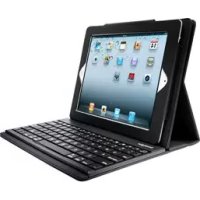
KeyFolio Pro - Keyboard KENSINGTON - Free user manual and instructions
Find the device manual for free KeyFolio Pro KENSINGTON in PDF.



| Product Type | Bluetooth Keyboard with Case for iPad |
| Brand | Kensington |
| Model | KeyFolio Pro |
| Compatibility | iPad 2 |
| Connectivity | Bluetooth |
| Battery Type | Rechargeable lithium-polymer |
| Charging | via micro-USB connector, using the iPad charger |
| Indicator lights | Power, Bluetooth status, charging |
| Standby time | Enters standby after 15 minutes of inactivity |
| Bluetooth range | Approximately 10 meters |
| Operating temperature | 10°C to 27°C |
| Maintenance | Keep dry, do not use with wet hands |
| Safety | Do not open, do not expose to fire, avoid short circuits |
| Storage | Away from heat and humidity, with at least 30% charge |
| Recycling | Do not dispose of with household waste, battery recyclable via RBRC |
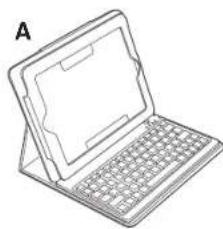
| Package contents | Keyboard, charging cable, quick start guide |
| Warranty | Technical support available at kensington.com |
Frequently Asked Questions - KeyFolio Pro KENSINGTON
User questions about KeyFolio Pro KENSINGTON
0 question about this device. Answer the ones you know or ask your own.
Ask a new question about this device
Download the instructions for your Keyboard in PDF format for free! Find your manual KeyFolio Pro - KENSINGTON and take your electronic device back in hand. On this page are published all the documents necessary for the use of your device. KeyFolio Pro by KENSINGTON.
USER MANUAL KeyFolio Pro KENSINGTON
KeyFolio™ Pro Performance Keyboard Case for iPad® 2
QUICK START GUIDE GYORSKALAUZ
GUIDE DE DEMARRAGE RAPIDE PRIRUCKA ZACINAM
SNELSTARTGIDS KPATKOE PYKOBOCTBO
GUIDA RAPIDA IIOJIb3OBATEJIA
GUIA RAPIDA MANUAL DE INICIO RAPIDO
Contents / Contenu / Inhalt / Inhoud / Contenuto / Contenido / Tartalomjegyzek / Obsah / Zawartosc opakowania / Codepzawne / Conteudo
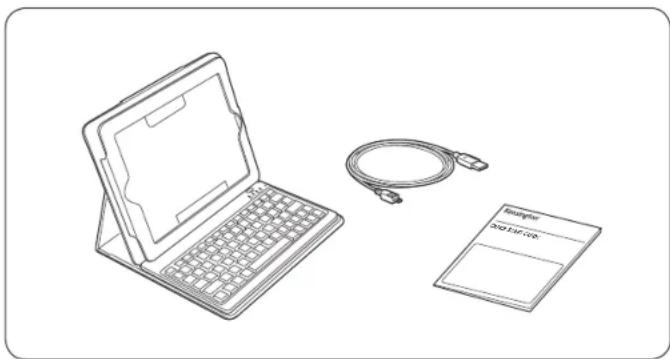
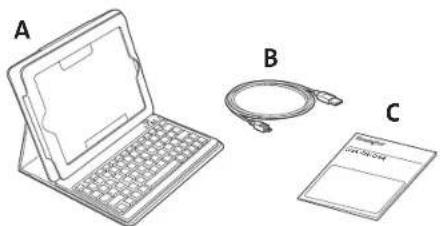
A Bluetooth Keyboard
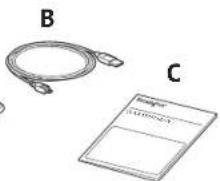
B Charging Cable
C Quick Start Guide
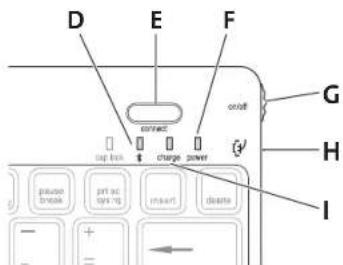
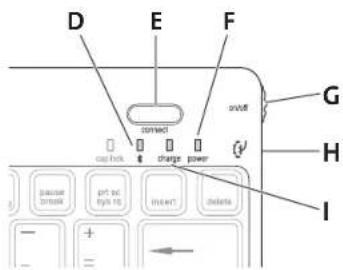
D Bluetooth Status Indicator Light
E Connect Button
F Power Indicator Light
G On/Off Switch
H MicroUSB Charging Connector
Charging Indicator Light
Connect the Keyboard to Your iPad
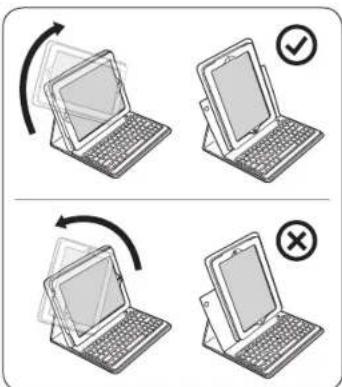
1 Insert your iPad into the Keyboard sleeve.
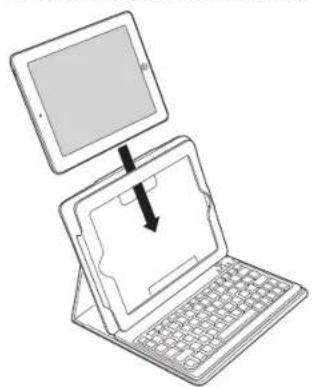
2 Turn the On/Off Switch on. The Power Indicator Light glows.
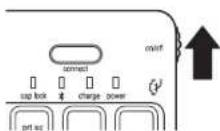
NOTE: When you first turn on the Keyboard, both the Power Indicator Light and the Bluetooth Status Indicator Light glow for 3 seconds. You cannot connect the Keyboard to your iPad until only the Power Indicator Light glows.
3 On your iPad, tap Settings.
4 Open Bluetooth and make sure Bluetooth is on.
5 On the Keyboard, press the Connect Button. The Bluetooth Status Indicator Light starts blinking.
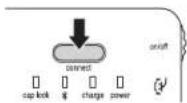
6 The Keyboard now appears on your iPad screen. Tap Bluetooth Wireless Keyboard.
7 Your iPad screen displays a passkey. Enter the passkey on the Keyboard, and press Enter.
8 Your iPad screen shows the Keyboard as Connected. On the Keyboard, the Bluetooth Status Indicator Light turns off.
9 You can now use your Keyboard to type in any app.
Note the following about the Bluetooth connection between the keyboard and your iPad:
- If the devices are connected and you turn the Keyboard off, the devices are still connected when you turn the Keyboard back on. You can simply begin typing to use the Keyboard.
- Likewise, if the devices are connected and you turn your iPad off, the devices are still connected when you turn your iPad back on. You can simply begin typing to use the Keyboard.
- If the devices are connected and you turn Bluetooth off on your iPad, when you turn Bluetooth back on, you need to connect the devices again by following the steps above.
NOTE: If the Keyboard sits idle for 15 minutes when it is connected to your iPad, the Keyboard goes into a dormant state, and the Power Indicator Light turns off. To wake up the Keyboard, press and hold the Connect Button for 3 seconds.
Charge the Battery
When the Charging Indicator Light is blinking, you need to charge the Keyboard battery.
1 Insert the small end of the Charging Cable into the micro USB Charging Connector on the Keyboard.
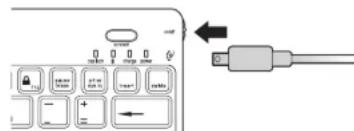
2 Insert the other end of the Charging Cable into your iPad charger.
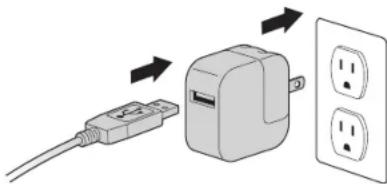
3 Plug your iPad charger into a working outlet. The Charging Indicator Light glows red.
4 When the Keyboard is fully charged, the Charging Indicator Light turns off.
Troubleshooting
I can't connect the Keyboard to my iPad.
Try the following in sequence. You can stop when the problem is fixed.
1. Make sure you have installed and set up Bluetooth correctly on your iPad. Check the documentation that came with your iPad for instructions.
2 Make sure that the Keyboard is within range of your iPad. Maximum Bluetooth range is about 10 meters/33 feet.
3 If your iPad is connected to other Bluetooth devices, you may need to disconnect some devices before you can connect to the Keyboard.
4 If you changed any Bluetooth settings on your iPad, try connecting the Keyboard to your iPad again.
5 Make sure that both your iPad battery and the Keyboard battery are sufficiently charged.
If this does not solve the problem, please contact Kensington Support at kensington.com.
Technical Support
Technical support is available to all registered users of Kensington products. Technical Support contact information can be found on the back page of this manual.
Web Support
You may find the answer to your problem in the Frequently Asked Questions (FAQ) section of the Support area on the Kensington Website: www.support.kensington.com.
Telephone Support
There is no charge for technical support except long-distance charges where applicable. Please visit www.kensington.com for telephone support hours. In Europe, technical support is available by telephone Monday to Friday 09:00 to 21:00 (Central European time). Please note the following when calling support:
Call from a phone where you have access to your device.
- Be prepared to provide the following information:
-Name,address,and telephone number
Name of the Kensington product
Make and model of your computer
System software and version
Symptoms of the problem and what led to them
WARNING IMPORTANT SAFETY INSTRUCTIONS Failure to read and follow these safety instructions could result in fire, explosion, electrical shock or other hazard, causing serious and/or fatal injury and/or property damage.
- Do not modify, disassemble, open, drop, crush, puncture, or shred the KeyFolio™ Pro Performance Keyboard Case for iPad® 2 (which will be known as the KeyFolio for the remainder of this instruction guide).
The KeyFolio contains a lithium-polymer battery, which is flammable. Keep away from open flame. - To prevent short circuit or other potential hazards, prevent metal objects such as coins or keys from coming into contact with the KeyFolio, and do not insert foreign objects into the KeyFolio or its ports.
- Keep your KeyFolio dry, and do not use with wet hands. Moisture in or on the KeyFolio may lead to electrical shock. If exposed to moisture during use, unplug the KeyFolio immediately. If your KeyFolio gets wet, have a qualified technician evaluate the product's safety before resuming use.
- Your KeyFolio may become warm during operation. This is normal. However, to prevent overheating, keep area around KeyFolio ventilated and do not place anything on or around KeyFolio during operation. Do not operate your KeyFolio near a heat source, heat vent, or in direct sunlight. Your KeyFolio should be used in temperatures between 50 - 80^ (10-27°C).
- If the KeyFolio begins to swell or expand, emits a strong odor, or becomes hot to the touch, discontinue use of the KeyFolio, and have the product examined by a qualified electronic technician.
- Inspect your KeyFolio and cables for damage before use. Have any damaged part repaired or replaced before use.
- Your KeyFolio is not user serviceable. Do not attempt to open, modify, or repair.
- If the battery inside the KeyFolio leaks for any reason, discontinue use, and do not allow the KeyFolio's contents to contact your skin or eyes. In the event of accidental contact wash the affected area with large amounts of water and seek medical attention immediately.
- Your KeyFolio is not a toy. Keep them away from children. Insure that all persons who use this product read and follow these warnings and instructions.
- Do not leave the KeyFolio on prolonged charge when not in use.
Enhancing Performance by Proper Care and Storage of your KeyFolio
- Do not store your KeyFolio either fully charged or discharged. It is best to store your KeyFolio with at least 30% charge remaining. To check the charge level of your KeyFolio press the battery indicator button.
- Avoid frequent full discharges because this puts additional strain on the battery in the KeyFolio. Charge your KeyFolio between uses even if it is not fully discharged. The lithium polymer battery used in this product has no "memory effect." Therefore, several partial discharges with frequent recharges are better than one full discharge, and will help prolong the life of your KeyFolio. Short battery life in laptops is mainly caused by heat, rather than charge/discharge patterns.
Do not store your KeyFolio at elevated temperatures (such as in your car) or in high humidity.
Disposing of your KeyFolio
- Do not incinerate or dispose of your KeyFolio in a fire or microwave.
- Do not dispose of your KeyFolio as ordinary refuse, as it contains a lithium-polymer battery. Consult your local municipal or civil authority for instructions on correctly disposing of a lithium-polymer battery.
- In the USA and Canada: This mark indicates your KeyFolio can be recycled by the Rechargeable Battery Recovery Corporation ("RBRC"). When you are ready to dispose of the KeyFolio, please contact the RBRC at 1-800-8-BATTERY or www.rbrc.org.
FEDERAL COMMUNICATIONS COMMISSION RADIO FREQUENCY INTERFERENCE STATEMENT
This device has been tested and found to comply with the limits for a Class 8 digital device, pursuant to Part 15 of the FCC Rules. These limits are designed to provide reasonable protection against harmful interference in a residential installation. This equipment generates, uses, and can radiate radio frequency energy and, if not installed and used in accordance with the Instructions, may cause harmful interference to radio communications. However, there is no guarantee that interference will not occur in a particular installation. If this equipment causes harmful interference to radio or television reception, which can be determined by turning the equipment off and on, the user is encouraged to try to correct the interference by one or more of the following measures:
Reorient or relocate the receiving antenna.
- Increase the separation between the equipment and receiver.
Connect the equipment into an outlet on a circuit different from that to which the receiver is connected.
- Consult the dealer or an experienced radio/TV technician for help.
MODIFICATIONS: Modifications not expressly approved by Kensington may void the user's authority to operate the device under FCC regulations and must not be made.
SHIELDED CABLEs: In order to meet FCC requirements, all connections to equipment using a Kensington input device should be made using only the shielded cables.
FCC DECLARATION OF CONFORMITY COMPLIANCE STATEMENT
This product complies with Part 15 of the FCC rules. Operation is subject to the following two conditions: (1) This device may not cause harmful interference, and (2) This device must accept any interference received, including interference that may cause undesired operation. As defined in Section 2.909 of the FCC Rules, the responsible party for this device is Kensington Computer Product Group, 333 Twin Dolphin Drive, Redwood Shores, CA 94065, USA.
INDUSTRY CANADA CONFORMITY
This device has been tested and found to comply with the limits specified in R5S-21.0. Operation is subject to the following two conditions: (1) This device may not cause interference, and (2) This device must accept any interference, including interference that may cause undesired operation of the device. This Class [8] digital apparatus complies with Canadian ICF5-003.
CE DECLARATION OF CONFORMITY
Kensington declares that this product is in compliance with the essential requirements and other relevant provisions of applicable EC directives. For Europe, a copy of the Declaration of Conformity for this product may be obtained by clicking on the Compliance Documentation Link at www/support.kensington.com.
INFORMATION FOR EU MEMBER-STATES ONLY
The use of the symbol indicates that this product may not be treated as household waste. By ensuring this product is disposed of correctly, you will help prevent potential negative consequences for the environment and human health, which could otherwise be caused by inappropriate waste handling of this product. For more detailed information about recycling of this product, please contact your local city office, your household council, or the City of New York.
Kensington and the ACCO name and design are registered trademarks of ACCO Brands. The Kensington Promise is a service mark of ACCO Brands. KeyFolio is a registered trade mark of ACCO Brands, iPod is a trademark of Apple Inc., registered in the U.S. and other countries. iPhone is a trademark of Apple Inc. "Made for iPod" means that an electronic accessory has been designed to connect specifically to iPod and has been certified by the developer to meet Apple performance standards. "Works with iPhone" means that an electronic accessory has been designed to connect specifically to iPhone and has been certified by the developer to meet Apple performance standards. Apple is not responsible for the operation of this device or its compliance with safety and regulatory standards. All other registered and unregistered trademarks are the property of their respective owners.
© 2012 Kensington Computer Products Group, a division of ACCO Brands USA LLC. Any unauthorized copying, duplicating, or other reproduction of the contents hereof is prohibited without written consent from Kensington Computer Products Group. All rights reserved. 08/12
Français
Contenu
Composants
Assistance technique
INDUSTRY CANADA-KONFORMITAT
CONFORMITEIT MET INDUSTRY CANADA
DEKLARACJA ZGODNOSCI WE
UcTaPaeHHe HEnCnPaBHOCTe
Hyeaemca nooknoumkbnaeaumypy kycmpocmeiPd. 1mo denamb?
BbIOnNHHTe YAc3AHHBe HNHEcEETBE, ECINyIaONoB yCtpaHbIT HeMNpAbaHOCTO, TbAnbHeMeHcEYdCTB8A BReJAtOe HEOBa3TeJIbHbIM.
1Y6eTeBTOMTXTOxHONrMaBleuothIOCTyHnHaIpABINbHOHaCTPOeHaHa yctpoCTBe iPad.Co0TBcTcByUqme INHCTpyKmC. B DOKyMeHTaUm KycTPOCTBy iPad.
2Y6eJIITcBbTOM,HTO KIaBmAtypa HaxoITnCBA 30He DeHCTBn yCTPOINCTBa iPad. MakcImaHbHpaDyuc DeCTBn Bluteoth coCTABnE npimepHO 10 metpoB.
3 Ecn yctpoCTBO iPad noKnIOHcno H KdpYIM uCTPOCTBAM BluTooth,OTKnIOHTe HEKOTOpBle yCTPOCTBA nepei noKnIOHcHmE M KlaBnAtypbl.
4 B Cnyae m3mehnHa nactpoek Bluetooth Ha yctpoiCTBe iPad, BblnoHnIte nobTOpHOe noKnIOUeHne KJIabNAtpyb KiIPad.
5y6eDnTeB TOM, yTO 6aTapen yCTpoiCTBa iPdN kNaBmAtpyb 3apAkeHb.
Ecn He ydaiopepeipnpojemy camoctoeHbO,6paTntcB Cnykby noepKKN Kensington Ha caTe www.kensington.com.
Texnueckan nopekka
Texnueckan nopepkrka noctynha forbcex zeparntpnpobaahtbix noh30baTeen n3denn KOMTahnn Kensington, KOHTAHTN hInmopoaouno TExnueckon nopepkrke mEeTcHa o6paTHO CTOPHO e6Onkkn daHORNO pyKOBQCTBa.
Be6-noDnepeKka
BbMOKeTe HauTN OTBeT Ha BaW BonPOc HA CTpaHnue OTBeTOB Ha YaCTo 3aDaBaEMble BonpoCb (FAQ) pa3dena TeXHHueckon noDpeKKn caIHa: www/support.kersington.com.
TeneoHna noDpeKka
3B0HOK B cnkybny noJeepKKn 6BeIaTHbI, 3a NckNIOHeHMe MekJyRTOPOHNIX mEeMyHApOBDHX 3B0HOK. YTObY b3HaTb yacb paobTo bny KbNo nDpePkn No TeneOHy, nocetute www.kensington.com. B Ebpone cnykbs TeHHnecko nopepKkn no TeneOHy paobotaC noNEcBnHKn no naTHuUc, c09:00 do 21:00.
PtoxanyiTa, yuTne cneykoee, korga 6dyTe 3BOHnB B cyj6y noDpeKnn:
3BOHHTeCTeneoHa,pacnoIooHeHHOrpRjOMcYcTpoCTBOM.
Bydtre roToBbl npedocTabtB cndyuoyu HFOpmauio:
-IMRAAPECHOMEPTEEPOHA
HaBaHHe n3dennKoMaHnKensington
- N3ROTOBNTeNb MOneJIb BaWero KOMNBoTepe
BaWe CnTeMHOe nporpamMHOe oecneueHHe ero Bepcn
- Pn3HaN HeNCpabHocT N TO NOcLyKINo npuNO ee BO3HKnHOBeHHa
PNEUYTPEXKDEHME.MEPbI PPEIOCTOPOKHOCTN.

Hnnppoabahe nnonoxheny TeXHHN 6e3pOaCHCTM MOKET npINbctk N NOKAPy, B3pyIB, npaKaHnIO 3NeKtpuHcck TMOK UIN KApYm HnUeIENTAM, BnKyuIm 3a co60B cepe3bHeM W/INI CmeptelbHe TpaBmW/INI npuy PmUeCTBa.
3anpeaaetcBnDnON3MeHb,pa3bipatb,BCpbbytB,pOHATb,NOMaTbNINdAeTBOTBepCTBA yctpoictBeKeyFolio"ProPerformanceKeypadCaseforiPad"2(DaneBpyKOBoCTBe《XctpoictBc KeyFolio",
- YCTOPICTBOFKeyFolio CodexPHTIHNHEIO-NIOIMEPHNO6BATapeK, KOTOPAR JAIJIHTCROr ENOHACHOJ. YCTOPICTBOFDOHNOXPOAHINBSCRDAI BYTOK OTKPHTOIORHO
TbOblpeoTbPnTbKOTPOEaAMHKAHNHeI pNOVHEOnaCHHeCtYAMJIMZANPEUAECTXAAPHTb yCTPOIECTBO KeyFolIO pAOM CMeTALNECKEMN OBeBkTAMN, HAPMPEOP, MOHETAMN IINKNHOAM. TAKGE 3NPOECAETCBATABNTB NOCTOPONHNC OBeBkTH BTOBPCTBN DAHONTO YCTPOBCTBA.
3aepaaetra 0eeprebrtyyctpOToBKeyFolio Bo3eTbTHBOIaHnE6patro EMOkblmpykam. Bnara Chapky HIN BHHTP yTOCTPOBBA MOKET PIOBCEK N IOPAKAEEN ANE KENTPHECK TMOK. Bcnyae PONADAHN BAN BO BRPMN HIOBHOBAHN, YCPOTCHOBFOI DAOJIHO BtIK HeAEMDINTELHO OKIOKHO. PEOJCEK YCM 063OBHOMITN HIOBIOBAHNOYCTPOBTA, POIEEPIUEORO BODJECTMBNOIhA, OPEKMOHEYIM PINOKOHQVTHBPOBATR BY KBAHNIWPOBBOHNGO CIEILMIAKTCA.
YcTPOCTBOKeyFolioMQKETHARpeBaBcBA BO BPEMApOaBb.3To HopMaIbHO.TMe He MeHee,IT06bl
IpeTOBAPTMBAOMOKHNEIpePeeBcBAyPoCTBOAkeyFOLIO,pekOMEHymCNIOBAtBtEOBxPOo
IpoTePBRAEMOMNPOeHMn. KPOme TOBO,BO RPEMApAOBbYyTOPTBOA3nPAePaETAHpAMEbAT
KaKeM-Ni6o PpDMbTA,KAK HA CAMOM YcPTBOCTBE,TAK NIKONO HERO.ZanPeauETCHNIOBAtB
YcTPOCTBOKeyFolio pAdCMCTOHKNAMM TENNA.OOBpeBaTANHNMI INNO pPRBMBAOMCINHEBBIM
IyAMM.YcTPOCTBOKeyFOLIOdAnMOHNOBbATCBnPI mTNMePepatye1027-C
EcnyUcTpynCTBQeYFolio HauHnaAet YbEaMuaBbCtBc,HarpeBaTcBmHnIaDaaBbCmbln3anax, PekomeHdymeHMeAaMaDInTeBHO pKePkaTbITbE rnoHcNlBbaOaHBe nIpokOHcybItnPoBaBcY KKaJIuMnIOoBaHHTO CnLIMAAHNT.
YctroKToBKO KeyFolio n KaBEnI pJOnKnHb npOBepBcHn HnAwnHne NpOeKeJHnpeJI KAnDHMn CnPONbOaBHnM. PteJeN pEmCPTyTb K nCnPbOaBHnM, peKoMeHNyE m ONuHNtB Mn 3AmeHHTb NPoBekEHINVQCTb.
- UCTP01AToK Key Folio He 6c5uJXbIaEaTc RnIb3oBAtenEM.3aPpeaTaCt OKpIb4bN pEmOHTHPOaBtUCTP01AToK CMAOTCTeRbIa
Ecln Batapeh BNHTpyCTyBRAKeyFolio Hauana npoTeKbT, heo6xOIOmoe 3aMHeHbT. HactoRtIbHO pekOMcHyEMIzAEBerAt, BO3MOKHOrOIOIanpaDJIaONCpEKoMOHOrOIOI aPatoTBAHKO KOKWIM I RTHIA. PIni CNYAHOOM KOtAKTE Heo6XIOJMOIOPOmbTbIONcPdABUIMuYUcTCKOBOINMM KOHNCTOBOLNBIHNEWMHDOBATNIK KRPV.
I npnoB3OBAHne YctpoCTBa KeyFollo npeCTABnHnE KHTOKPOy IOANCHOTy. XcTPOCTBO pONKHO XpAHITCBN HEOCTCYTHOM DnIe MTeJMeCte. 8eJeNTCe B TOM, cTO IaIa, INIOHbYIOHue daHNHMIOPOyIK, OTHAKOMINNCbN NOHOTBCBIO C0BNIOAoiDanHHe MEHP NpeDGTOPKOHXCTM.
3aPepaaetcOCTabnHHeCNonbayemoe yCtpoiCTBOKeyFolio Ha dInntelHyko 3apjky.
IpoDneHncre cPOKa cnKb6bl yctPoietCTBa KeyFolio 6naroapn HApNekaaemMy nCnoB3oBAHnIO n co6nIoDeHnIO yCNOBn XpaHeHHA
3AnpeaetachxpaHbIyycTPOCTBOKeyFolio nonHOCTbo 3apRKeHNbIMn p3apRKeHNbIM. ONITMBAHoe yCIOBHe xpaHEHnE -3to 30% OT nonHORO 3apHa, UTO6bI npOBepHTypoBeH 3apHa, YTOPOCTBOKeyFolio, HAKMITE COOTERTBYKUQHOKHOTy
BoI6eKanHe OJonHnHJIbTHbHrApy3Ok,peKoMeHNyEmeCInHbTaTeM,OTbObYcTPOBtBOKeyFokolKaKMOHOpe KoeKoAbaBIOncBIOHIOCTbIOpaZrAeHHN.UTpOcRbEOFokoldoNHOpaZrAeKbTBA BPOMEKytKaeMKdkyKcIOb3OBaHIbIMdA,JaKe cEiIN OHO He bIoIO IOHOCTbIOpaZrAeKHe. IITnoBHO-IOIOmepBeBaatapBe,ICNOIb3yEmARbI aDHOmIOpojLte,HE mEeT aOeKTezAIOMnHOH.NTOMY,AcTbUHHe PAp3ApqN uCAHTbe NOp3a3PbQn 60neE SaIbTOBPO HNIHOT HA paOby TcPoIbTaBA KeyFolio,YbEnMVAba CpOK erO cyNkb,No cpaBHeHIO cOcHObIO nHOH paPakKn. PImnHOH NoBbIbIoro CpOka cNbKbBbAtapBe HooTyke ABnNETCKopee HarpBaHHe,Ahe pErnpbnbe Pa3ApKn I3Ap4Kn
3anepaetary XapahitbYcypnBCTBOKeyFolloB MBeCTA, JBNKOTbXxapaeTbPOHnAeBcOKOy TENTEPATpy (HAnPIMpe, BMaHINHe) INIIOHNIIENHOHBIKCHOn.
Yttnnaa yctpoiCTBa KeyFolio
3aPcpaTeCHyIITINHANHObAHTyCTPOBCTBOKeyFIOJIcNOMOIOHOHNHIMNKPOBONHOHOKYHNA 3aPcpaTeCHyIBIbApCBAHBtCyTOBPOCTBOKeyFOJIcKoABOHbIeBbTOBIOBEOTXOBu,TAK KAO HOO copejIXTJNTIEHEO-NIOIAMEPHUBoATApeQ. YoBIbNoJIUYHbIHOPMFOOIOpRApaHbIHOyIITYNHIAIANTIeHO-NIOIAMEPHUHXBatapeJ, oobatnTceB bROPCKyIOADMHNHCPTaQIOIOHN H PpECDTAIBENMI RgXdAHDCKBBAACTN.
- Infloropmaiai rua CUSA i KaHAnBdi. DAnHHN 3hAK .obsoHaaeta, tio Kropnopaia ReChargeable Battery Recovery (eRBCRs) ToTora pnnHArhy TcyTOPOBToKey FBOVIO HA yTHINIA3AIOU. YTo6bI nepeBaT yCTPOBToKey FBOVIO HA yTHINIA3AIOU. c8KHTAEc k C Kropnopaia RBR NO tenefoHy 1-800-2288379 Wm epe3 aBe6-yaJIw www.rbr.org.
IIOJOKEHUE O PAIINOMEXAX FDEEPALbHOJ KOMNCCM NO CBA3N
PIMNCHAAH:DAHNOHCTO BSO NPOBCEHO INPNIHBOO COOTBCTBYQUMOH OPAMDHNHMAI HINOPDBXK YIOCTOBH KACBA B GOOTCBTTHC CACTHO 15 PBNAH DEOJIPEHAI KOAMCCN NO CBAIRI. DIAHNE OPGDHANH PAPOBTOBH, TMOB OIEEHTBAYPOMAUYI OTBPOHOY BUNNARH MNNNOKONMADHN. DAHNOH OBCOZBDH ANOHN HOOOHN HOOOHN HOOOHN HOOOHN HOOOHN HOOOHN HOOOHN HOOOHN HOOOHN HOOOHN HOOOHN HOOOHN HOOOHN HOOOHN HOOOHN HOOOHN HOOOHN HOOOHN HOOOHN HOOOHN HOOOHN HOOOHN HOOOHN HOOOHN HOOOHN HooN HOOOHN HOOOHN HOOOHN HOOOHN HOOOHN HOOOHN HOOOHN HOOOHN HOOOHN HOOOHN HOOOHN HOOOHN HOOOHN HOOOHN HOOOHN HOOOHN HOOOHN HOOOHN HOOOHN HOOOHN HOOOHN HOOOHN HOOOHN HOOOHN HOOOKN HOOOHN HOOOHN HOOOKN HOOOHN HOOOKN HOOOKN HOOOKN HOOOKN HOOOKN HOOOKN HOOOKN HOOOKN HOOOKN HOOOKN HOOOKN HOOOKN HOOOKN HOOOKN HOOOKN HOOOKN HOOOKN HOOOKN HOOOKN HOOOKN HOOOKN HOOOKN HOOOKN HOOOKN HOOOKN HOOOKnHooN
OHaKo HnHKaKoI rapaHm, 1TO nomExn He 6dyT co3daBaTbC B onpeDeneHHo OBCTAHOBKe. Ecm daHHoe
O60pyoBaHMe Co3aET NOMEX paH NTeBnHOHHOMy npHemy, HkyHO ppeNpHHTb CneIyouMe MepbI:
HephybHnpehcytnpemHyAHTy
-
IOKIOHbOOPyDobAHKe KPO3eTKe, KOtOpAa He HMeet OoUx ceneH CToH, B KOTOpYbKnKHe npHemHHK.
1000000000000000000000000000000000000000000
MIMEMH: HINHINH, He 10000000000000000000000000000000000000000000000000000000000000000000000000000
KPKAHIOBOAHBHE KAEENH. IAR COTOBCTTBAI TPCOABAHN DQePAHIOHOK COAMKIN NO BAKR, ACE NOJIKOMHON K OFOPOZAOYH C HIOVTHOHN BEXHOHO CTOPROTEY PPOHOADKTOMKANHKS KENNsEON, KOANOH BHTG KAOH
3AABJIHEHME O COBIODEHN M DEKJIAPAUIN COOTBETCTBNA FDEPAIbHOI KOMUCCN N IO CBRAH (ΦKC)
DAnHHI npOaYKOT COBETCTAY PAcADY 15PiABnΦK. PpH NcKnPyATAaunqin DAnHHKb6BuTbCoBnOeHbBAQyCnA (1) DAnHOe YcPbCTBO HcDnMHO BbHTbNtCNHMO BPeBDHO HcNCHNO. (2) DAnHOe YcPbCTBO DnMHO pNmHMA BCC nOyauMeaHnMHNHe, AnnoaouHnMHNueH, MOnuHaeNtMNHeUme, MOnyjupePnBcTaK K HeKeJnPaTeHbAoPA GoteK AnopenEnHe (2) DAnHOe YcPbCTBO, NaHnEeTcKNGcnScknnterNCsienon Products Group, 333 Twin Dolphin Drive, Redwood Shores, CA 94085, USA (CUJI).
COOTBETCTBME TPEBOAHNIMMHNCCTPBA IPIPOMblIJIENHOCTNKAHAIDI
DAnHoey yctpoCTBO npOIOcNtBnA H cOoBTeCTeY CTaNAPrty RS5-210. Ipr aKcnnyatauuaan DAnHOrO yctpoCTBA
DAnHbH bIbTHbIbTHcBcHcYbouu TpeBcHbAm (1) YcTPOCTBO He NpDOHcCoaBAtb NOMex, H (2) YcTPOCTBO pOHO
bByb YcTOHbM K NIObMb NOMxA, B Tom NCM H K TEM, KOPTOB MORY UZBaBbCb 8cb EBo rpoAboe.
DEKJIAPALIMURCOOTBETCTBMUNUPEKTMBBI COBETAEBPONbl
KoMnHAnaKngs KnsAanBnT, YOaDHaHbN pnpOyTcoBETCTByET OChOBHM Tpe6oBAHMM NpOyTHBM BACHbM YCNOBWM CooTAE7BcVIOHkOeIKTeE3C.
KoJIaIeNekAraHcO oCoTBeTCTBnIy IENbEONHa haNbnHnPnojck ToKoRcSbIbNoNcYueHa No cIaNNe'Complie
MHOPMAUMTOJbKOIOIBFOCYIAPCTB-NEHOBEC
3NtHnKHaYkBaBzAaT H aTO, 10nDAHHe KHeIe He MKeRr OTHcHbTaK C KbBbMhO XoDAM. OecBeHHuP NpBbHbYyYHbKbKaHbE KHeIe BbNOKe T I PPOETIOUZHcHbC HOTnOHTBHeHbHKX HbNTOCTBm DnOgKpyKauque (Pd)HbNHOeBcKFO KOpOeBcK, KOtOpeMoYfBbSbHBMn HbNTBOHbHbEo ETOHbEeBn
CBKHKCTCCB.CALIMMMCCTHBMTOPODCKHMQVCOM,CRYX60BBABO3BTOBOBOTXOXODVBWMAIAT3VHOM,BKOTOPOM BILKYNMIADHLNE
HabAHmN H dAAMH KENsON I ACCO ANBIMTO 3APRECTPOBBAHMOI TOBAPBOHM 3HAJIOM KOMMANOH ACCO Brands.
Kensing Promise AnbAe TBAHKO 60KANHOA BDOCCr. KeyFolio HnrrerTc 3APRECTPOBBAOHM TOBAPBOHM 3HAJOM KOMMANOH ACCO Brands. IPod nABaTOB ATOBMOH 3HAJOM KOMMANOH AppIne Ic, 3APRECTPOBBAOHM CILIAI H
Dpytce tAnh. IPoe NABaTOB TOBAPBOHM 3HAJOM KOMMANOH AppIne Ic, PometkaC-4pAHOI JIOI POBAAET, ITO
3KTHPOHOH YCOTPOBTOA PaPABoTAHO TEOCNALHO DIO NkOHNKIN KIOI IN CPESVNIPOBHO APOPAOBTHKMO HA COOTBECTBHe CTADAPTAM KOMMANOH Apie, PometkaC-4pAHOI CIPHOA OSHAAET, ITO 3KTHPOHOH YCOTPOBTOA PaPABoTAHO TEOCNALHO DIO NkOHNKIN KIOI IN CPESVNIPOBHO APOPAOBTHM KAOTBECTBHe CTADAPTAM
KOMMANOH Apie, KOWAIHA Apie He HECET OTBECTBOHOH 3a POBYA DOHTHO TRO HOI COTBECTBHe pRABAMN I
THATAGPTAM GEXNACHOCT. Bc POnuHE 3APRECTPOBBAOHBo H N EHTAPRECTPOBBAOHBO TROBOHPHE 3KTHNIRBOT
COCTBEHNOH ToCOTBECTBOHO TBOEYQUH BIAJAEHIE.
2012 Kensington Computer Products Group, npaapaacnncnKOMMANA ACCO Brands. 3anpeaaert HcnaHIOHOBAAHO KOMPOBAMH, dybIMPOBAMH mpaHONMENI hINI CTIOOUMC OoepaMOH o HocHTIOE ODOJWNTEA Ee3 NmNCHHO corncNAHKnng Kemsen Computer Group Group, Bc nnpa aauuueae. 08/12
Portugues
Contudo
Components
A Teclado Bluetooth
B Cabo de carreamento
C Guia de Iniciacao RAPida
D Luz indicadora de estado do Bluetooth
E Botao Connect (Ligar)
F Luz indicadora de Ligado/Desligado
G Interruptor On/Off (Ligado/Desligado)
H Conector de carregamento micro-USB
1 Luz indicadora de corregamento