BoomBoom 577 - Helmet MARMITEK - Free user manual and instructions
Find the device manual for free BoomBoom 577 MARMITEK in PDF.


Frequently Asked Questions - BoomBoom 577 MARMITEK
User questions about BoomBoom 577 MARMITEK
0 question about this device. Answer the ones you know or ask your own.
Ask a new question about this device
Download the instructions for your Helmet in PDF format for free! Find your manual BoomBoom 577 - MARMITEK and take your electronic device back in hand. On this page are published all the documents necessary for the use of your device. BoomBoom 577 by MARMITEK.
USER MANUAL BoomBoom 577 MARMITEK
Bluetooth headphones with aptX + aptX Low latency

natural_image
Black multi-band headband headphones with visible brand logo (no text or symbols on the device itself)USER MANUAL 3
1 Table of contents 3
2 Safety instructions .... 4
3 Your product .... 4
3.1 Introduction....4
3.2 Package contents 4
3.3 Product overview 5
3.4 LED status 6
4 Getting started 6
4.1 Starting to use the BoomBoom 577....6
4.1.1 Charging the BoomBoom 577 6
4.1.2 Pairing Bluetooth devices 6
4.2 Using the BoomBoom 577:....7
4.2.1 Activating the BoomBoom 577 7
4.2.2 Volume controls 7
4.2.3 Switching off 7
4.2.4 Connecting two smartphones, multi-pair. 7
4.2.5 Connecting to the last paired smartphone....7
4.2.6 Low battery 8
4.3 Making and answering calls 8
4.3.1 Answering a call....8
4.3.2 Rejecting a call 8
4.3.3 Ending a call 8
4.3.4 Transferring a call 8
4.3.5 Call last dialed number 8
4.4 Listening to music....8
4.4.1 Playing and pausing 8
4.4.2 Next / previous track....8
4.4.3 Adjusting the volume 8
4.5 Using the mini-jack cable....9
4.6 Audio codec 9
4.6.1 SBC 9
4.6.2 AAC 9
4.6.3 aptX 9
4.6.4 aptX Low Latency 9
5 Wearing style 9
6 Product details 10
6.1 Technical specifications.... 10
7 Frequently asked questions (FAQs) 11
8 Notification 12
8.1 Declaration of Conformity 12
8.2 Recycling 12
8.3 Copyrights....12
2 Safety instructions
Please read these instructions thoroughly before you use the device and keep them for future reference.
- Do not expose the product to extremely high or low temperatures, strong light sources or direct sunlight.
- This product is not a toy. Keep out of reach of children.
- Warnings or announcements may go unnoticed when you are using the headphones. You should be aware of ambient sounds while wearing the headphones, and recognise them as needed.
- Avoid using headphones/speakers with the volume turned up for an extended period of time. Doing so may damage your hearing. It is advisable to keep the volume at a moderate level at all times.
- The built-in rechargeable battery is not replaceable. Do not remove or replace the battery. Dispose of unit properly. Do not dispose unit in trash or fire.
- Never open the product: the device may contain parts with deadly voltage.
- Repairs or service should only be performed by qualified personnel.
- Improper use, self-installed modifications or repairs will void any and all warranties.
- Marmitek does not accept any product responsibility for incorrect use of the product or use other than for which the product is intended.
- Marmitek does not accept liability for any consequential damage other than the legal product responsibility.
3 Your product
3.1 Introduction
Congratulations on your purchase of the Marmitek BoomBoom 577. This Bluetooth headset lets you play music from a Bluetooth-technology enabled sound source, without the need to connect this source using cables. This may, for example, be a PC or a laptop with a Bluetooth USB dongle, a mobile phone with Bluetooth support, an Android phone, Android tablet, iPhone, iPad, Mac or a Bluetooth audio transmitter. The BoomBoom 577 has a range of about 10 metres, enabling you to control your music from the same or an adjacent room.
The BoomBoom 577 supports the SBC, aptX and aptX Low Latency codec.
3.2 Package contents
A. 1 x BoomBoom 577 Hi-Fi Bluetooth headset
B. 1 x Micro USB to USB cable
C. 1 x Mini-jack cable
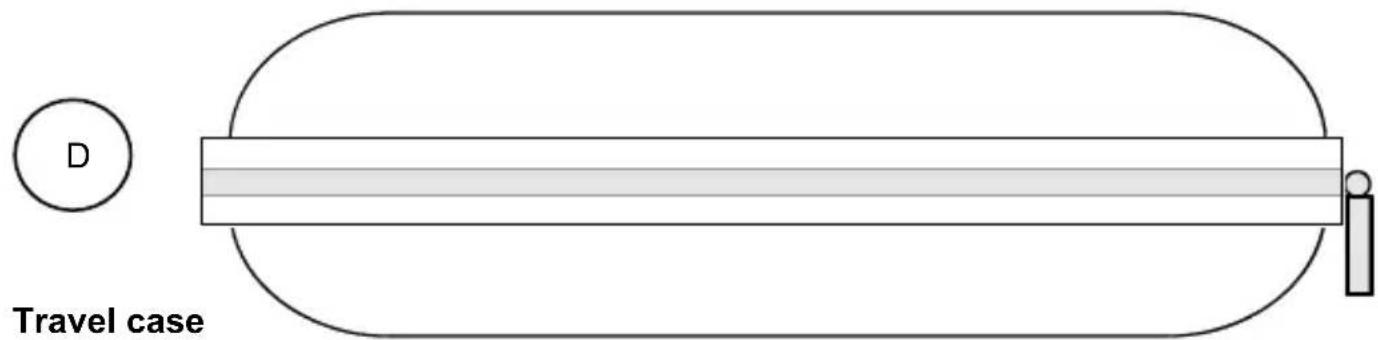
D. 1 x Travel case
E. 1 x User manual.
3.3 Product overview
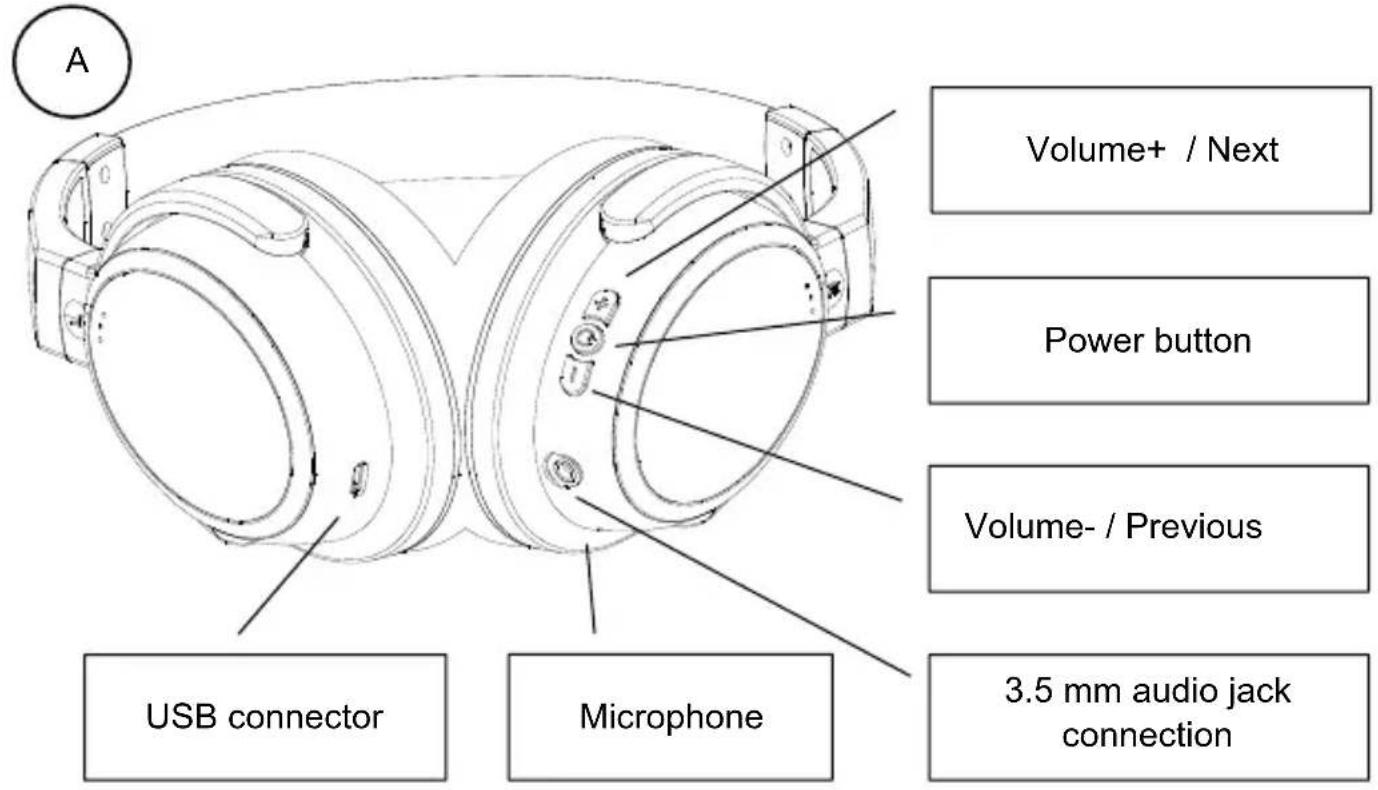
text_image
Volume+ / Next Power button Volume- / Previous USB connector Microphone 3.5 mm audio jack connection
natural_image
Pure electrical circuit lines without any symbolsMicro USB power cable
This cable enables you to charge the BoomBoom 577.

natural_image
Pure electrical circuit lines without any symbolsMini-jack cable
This cable goes into the 3.5mm jack, for a wired connection.
text_image
D Travel caseA solid, compact storage bag for your headphones and accessories.
3.4 LED status
| LED Indication instructions | ||
| Operation / State | LED indication status | method / result |
| Power on blue LED flashing | press the power button for 2s | |
| Pairing mode | red and blue LED flash alternately | press the power button for 5s |
| Disable red LED on and then off | press the power button for 4s | |
| Charging indicator | red LED on | red LED on |
| Charged | red LED goes off | red LED goes off |
| Connection | blue LED flashing flashes every 3s | |
| No connection | blue LED flashing | flashes every 2s |
| Calls | blue LED | press the power button to accept call flashing |
| Busy | blue LED flashing | flashes every 0.5s |
| Play music | blue LED slowly on/off | music is heard |
4 Getting started
Please take the following steps before using the product:
- Charging the BoomBoom 577
- Activating the Boom Boom 577
• Pairing the BoomBoom 577
We will now explain this step by step.
The text uses a smartphone as an example, but this can obviously be any device that can play music via Bluetooth.
4.1 Starting to use the BoomBoom 577
4.1.1 Charging the BoomBoom 577
The BoomBoom 577 has a built-in rechargeable battery.
We recommend fully charging this battery before the first use. Connect the included USB cable to the BoomBoom 577 and a PC, Mac or USB power adapter. The red LED will light up.
Initial charging will take approximately 4 hours. Once the BoomBoom 577's battery is fully charged, the red LED will switch off.
Note: While charging, the BoomBoom 577's Bluetooth function cannot be used.
4.1.2 Pairing Bluetooth devices
- Ensure that the BoomBoom 577 is switched off.
- Hold down the power button for 5 seconds to enter the BoomBoom 577's pairing mode. Release the power button once the LED starts to flash blue/red.
Note: When powering on, the LED will first blink blue, then blue/red. - Switch on your smartphone and go to: Settings > General > Bluetooth. Click 'Bluetooth' ON. 'BoomBoom 577' will appear on your smartphone. Click 'BoomBoom 577'. The smartphone is now connected and paired with the headphones. Enter "0000" when your smartphone requests a pairing code.
4.2 Using the BoomBoom 577:
You can use your BoomBoom 577 to listen to music, make phone calls and even pair it with 2 smartphones.
4.2.1 Activating the BoomBoom 577
Press and hold the power button for 2 seconds. The BoomBoom 577 will now produce a "start-up" tone. The blue LED will start flashing.
The BoomBoom 577 will now automatically connect to the last smartphone it was paired with. Once this link is established, the blue LED will flash slowly. Two smartphones can be simultaneously connected to the BoomBoom 577. If your smartphone does not automatically make a connection, please go to your smartphone's Bluetooth settings and select BoomBoom 577. A connection will then be established.
4.2.2 Volume controls
- Tap volume + to increase the volume. When the maximum volume is reached, an audible indication will sound.
- Tap volume - to decrease the volume. When the minimum volume is reached, an audible indication will sound.
4.2.3 Switching off
Press and hold the power button for 4 seconds to switch off the BoomBoom 577. The red LED will light up and slowly fade out; you will hear a sound to confirm that the BoomBoom 577 is switching off.
Note: BoomBoom 577 will switch off automatically after 10 minutes if it's not connected to a device.
4.2.4 Connecting two smartphones, multi-pair.
If the BoomBoom 577 was paired with a smartphone previously, it is possible to pair the BoomBoom 577 with a 2^nd smartphone.
Switch off the BoomBoom 577 and follow 4.1.2 Pairing Bluetooth devices to pair the BoomBoom 577 with the second smartphone. Then pair the first smartphone with the BoomBoom 577 again. Now, both smartphones are connected to the BoomBoom 577. You can now use the first smartphone to play music. When you stop the music on the first smartphone, the music of the second smartphone will be displayed. This allows you to play music alternating between both smartphones.
4.2.5 Connecting to the last paired smartphone.
After switching on the BoomBoom 577, it will connect with the last paired smartphone. If the connection is successful, the LED will blink every 3 seconds in standby mode. Note: If the connection cannot be made within 10 minutes, the BoomBoom 577 will switch off.
The BoomBoom 577 can remember up to 8 paired devices. Therefore, re-pairing with each subsequent connection is not required. If a 9th device is paired with the BoomBoom 577, the first smartphone that was paired with the BoomBoom 577 will be erased from its memory.
4.2.6 Low battery
If the BoomBoom 577's battery is low, you will hear an audio warning. The BoomBoom 577 will automatically switch off 3 to 5 minutes later. Please follow the previously described steps to charge the battery.
4.3 Making and answering calls
4.3.1 Answering a call
When you receive a call, you'll hear your smartphone's signal on the BoomBoom 577. Briefly press the power button to accept the call, or answer the call as you normally would on your smartphone.
4.3.2 Rejecting a call
To reject a call, press and hold the power button for 2 seconds until you hear a 'beep'. Now, you can release the button and the call will be rejected.
4.3.3 Ending a call
During a call, briefly press the power button to end the call, or end the call on your smartphone as you would normally.
4.3.4 Transferring a call
During a call, press the power button for 1 second until you hear a 'beep' to transfer the call to your smartphone's speaker through your BoomBoom 577. Repeat this procedure to transfer the call back to your BoomBoom 577.
4.3.5 Call last dialed number
Briefly press the power button twice to call the last dialed number.
Note: This feature is available only if your smartphone supports the Bluetooth handsfree profile. Please refer to your smartphone's manual for further support.
4.4 Listening to music
The following functions are available while listening to music from your smartphone on your BoomBoom 577.
4.4.1 Playing and pausing
During playback, briefly press the power button to pause the music. Briefly press it again to continue playback. If the BoomBoom 577 is playing music, the blue LED will slowly flash on/off every 3 seconds. In the pause mode, the blue LED will briefly light up every 3 seconds.
4.4.2 Next / previous track
Press the + button for 2 seconds to go to the next song.
Press the - button for 2 seconds to go to the previous song.
4.4.3 Adjusting the volume
Repeatedly press the + button to increase the volume (until you hear a high 'beep' to indicate maximum volume).
Repeatedly press the - button to decrease the volume (until you hear a low 'beep' to indicate minimum volume).
4.5 Using the mini-jack cable.
You can use the mini-jack cable to connect devices that are not equipped with Bluetooth. Even if the battery is empty, you can still use your BoomBoom 577 via the mini-jack cable.
Note: The function keys cannot be used in the wired connection mode.
4.6 Audio codec
The BoomBoom 577 supports 4 audio codecs.
4.6.1 SBC
SBC (Low Complexity Subband Coding) is the default music connection to listen wirelessly to audio with reasonable sound quality. SBC is supported by all Bluetooth audio devices.
4.6.2 AAC
AAC (Advanced Audio Coding) - AAC is supported by iOS devices. Apple implements AAC via Bluetooth at about 250 kbps.
4.6.3 aptX
With an aptX audio connection, you maintain the full integrity of the original digital audio. An aptX connection enables you to enjoy CD-quality audio.
4.6.4 aptX Low Latency
An aptX Low Latency connection provides you with the same features as an aptX connection, but the delay in the connection is less than 40 milliseconds. This ensures that you will experience no audio delay if you, for example, use the BoomBoom 577 to listen to your TV's sound.
*In order to utilise aptX and aptX Low Latency, the Bluetooth audio transmitter should also be equipped with this technology. If aptX and aptX Low Latency are not available, the BoomBoom 577 will use the SBC codec to connect. When setting up the connection, the BoomBoom 577 will sound an audio signal 1, 2 or 3 times to indicate whether this is an SBC (1), AAC (2), aptX (2) or aptX Low Latency (3) connection.
5 Wearing style
Please note the indications for left and right on the outside of the headband and the earcup. Please make sure that the operating buttons are always on the right hand side while wearing the BoomBoom 577.
Change the fit of the BoomBoom 577 by adjusting the length of the headband at the earcups.
The earcups can be rotated 90 degrees. This enables you to easily store the BoomBoom 577 or carry it with you. The ear cushions are clicked into place and easily replaceable when worn out.
6 Product details
6.1 Technical specifications
General
Bluetooth version V4.1
Supported Bluetooth profiles A2DP, AVRCP, HSP, HFP
Multipair up to 2 connections.
Supported Codec SBC, AAC, aptX ^® , aptX Low Latency ^® .
Audio Latency SBC, AAC, less than 250 ms
aptX ^® , less than 70 ms
aptX Low Latency
^® , up to 40 ms
Range Up to 10 meters with Class 2> <2 connection.
Up to 30 meters with Class 2> <1 connection.
Battery Li-ion 3.7 V
- Battery Capacity 320mAh
- Battery Charging Voltage 5V
- Charger Time 3-4 hours max
- Battery working time 15-20 hours
-Stand-by time up to 180 hours
audio input Jack 3.5mm Stereo
Operation on headphones and audio source
Phone functions answer call, end call, redial.
Audio functions Volume+, Volume-, Next song, previous song, power,
Headband fully adjustable
Weight 210 grams
Operation temperature -10^ +55^
Microphone
Microphone unit 4 x 1.5 mm
Sensitivity -42+/-3dB
Directional sensitivity omni-directional
Impedance ≤ 2,2 Kohm
Frequency response 30Hz-16,000Hz
Drivers
Driver diameter 40 mm
Impedance 32 Ohm
Sensitivity 113±3dB S.P.L.bij 1KHz
Output power 20mW RMS
Output power 50mW PMPO
Signal To Noise Ratio ≥ 82dB
Frequency response 20Hz-20,000Hz
In order to continue improving the product, Marmitek reserves the right to change specifications and/or designs without prior notice.
7 Frequently asked questions (FAQs)
I cannot pair my BoomBoom 577.
Please note the following:
- Ensure that the battery is charged.
- Ensure that your mobile phone's Bluetooth feature is on. (Please see your smartphone's manual for reference.)
- Ensure that the distance between your smartphone and the BoomBoom 577 does not exceed 10 metres and there are no major obstacles between them.
Can I pair multiple devices with my BoomBoom 577?
You can pair up to 2 devices simultaneously with your BoomBoom 577. When the BoomBoom 577 is enabled, it will automatically connect to the last paired device.
What happens if my smartphone is out of the BoomBoom 577's range?
When the connected smartphone is out of the BoomBoom 577's range, you will hear 2 short 'beeps' and the connection will be lost. Once you re-enter the BoomBoom 577's range, you will again hear 2 short 'beeps' and the connection will be restored automatically. If it takes longer than 10 minutes to get back within range of the BoomBoom 577, the BoomBoom 577 will switch off and you'll need to turn it back on. The connection will then be automatically restored.
What is SBC?
SBC (Low Complexity Subband Coding) enables you to listen wirelessly to audio with reasonable sound quality. SBC is the standard method to send audio via Bluetooth.
What is aptX?
AptX® enables you to wirelessly listen to CD-quality audio. When your device is equipped with aptX, it is no longer necessary to use the entire bandwidth to transmit music via Bluetooth. A Bluetooth connection is a sort of data pipeline between different devices. This pipeline only has a maximum width and therefore it can sometimes be difficult to send large music files through it. Aptx solves this problem by reducing the size of the music files it sends wirelessly via Bluetooth. The files can be sent through the wireless pipeline without affecting the quality of the files. This allows you to use aptX to listen to CD-quality music anytime, anywhere.
What is aptX Low Latency?
aptX Low Latency ensures a very short audio delay of less than 40 ms. With a regular Bluetooth connection, this is more than 100 ms. Both the transmitter and the receiver must have aptX Low Latency to be able to use this feature.
Do you have any other questions that have not been resolved by the above information? Please go to www.marmitek.com
8 Notification
8.1 Declaration of Conformity

Hereby, Marmitek BV, declares that this BoomBoom 577 ^™ is in compliance with the essential requirements and other relevant provisions of the following Directives:
Directive 2014/30/EU of the European Parliament and of the Council of 26 February 2014 on the harmonisation of the laws of the Member States relating to electromagnetic compatibility (recast)
Directive 2014/35/EU of the European Parliament and of the Council of 26 February 2014 on the harmonisation of the laws of the Member States relating to the making available on the market of electrical equipment designed for use within certain voltage limits.
Directive 2014/53/EU of the European Parliament and of the Council of 16 April 2014 on the harmonisation of the laws of the Member States relating to the making available on the market of radio equipment and repealing Directive 1999/5/EC.
Directive 2011/65/eu of the European parliament and of the council of 8 June 2011 on the restriction of the use of certain hazardous substances in electrical and electronic equipment. Commission Regulation (EC) No 278/2009 of 6 April 2009 implementing Directive 2005/32/EC of the European Parliament and of the Council with regard to eco-design requirements for no-load condition electric power consumption and average active efficiency of external power supplies.
8.2 Recycling

Environmental Information for Customers in the European Union. European Directive 2002/96/EC requires that the equipment bearing this symbol on the product and/or its packaging must not be disposed of with unsorted municipal waste. The symbol indicates that this product should be disposed of separately from regular household waste streams. It is your responsibility to dispose of this and other electric and electronic equipment via designated collection facilities appointed by the government or local authorities. Correct disposal and recycling will help prevent potential negative consequences to the environment and human health. For more detailed information about the disposal of your old equipment, please contact your local authorities, waste disposal service, or the shop where you purchased the product.
8.3 Copyrights
Marmitek is a trademark of Pattitude B.V. BoomBoom 577 ^™ is a trademark of Marmitek B.V. All rights reserved. Every effort has been made to ensure that the information in this manual is accurate. Marmitek is not responsible for printing or clerical errors. Copyright and all other proprietary rights in the content (including but not limited to model numbers, software, audio, video, text and photographs) rests with Marmitek B.V. Any use of the Content, but without limitation, distribution, reproduction, modification, display or transmission without the prior written consent of Marmitek is strictly prohibited. All copyright and other proprietary notices shall be retained on all reproductions. Other company and product names mentioned herein may be trademarks of their respective companies. Mention of third-party products is for informational purposes only and constitutes neither an endorsement nor a recommendation. Marmitek assumes no responsibility with regard to the performance or use of these products.
Marmitek BV - PO Box 4257 - 5604 EG Eindhoven The Netherlands
natural_image
Pure electrical connector diagram showing two USB connectors connected by a wire, with no text or symbols present.natural_image
Pure electrical circuit lines without any symbolsMiniklinkensteckerkabel
4.6.4 aptX Low Latency
aptX Low Latency, maximal 40 ms
4.6 Codec audio....29
4.6.1 SBC 29
4.6.2 AAC 29
4.6.3 aptX 29
4.6.4 aptX Low Latency 29
natural_image
Pure electrical connector diagram showing two connected components with no text or symbolsnatural_image
Pure electrical circuit lines without any symbolsCâble mini-jack
4.6.4 aptX Low Latency
aptX Low Latency, maximum 40 ms
natural_image
Pure electrical circuit lines without any symbolsnatural_image
Pure electrical circuit lines without any symbolsCable minijack
5.6.4 aptX Low Latency
4.6 Codec audio....49
4.6.1 SBC 49
4.6.2 AAC 49
4.6.3 aptX 49
4.6.4 aptX Low Latency 49
natural_image
Pure electrical connector diagram showing two connected components with a labeled B (no text or symbols beyond basic labels)natural_image
Pure electrical circuit lines without any symbolsCavo mini jack
natural_image
Simple line drawing of a cylindrical object with a circular symbol labeled D and a small icon on the right (no text or symbols on the object itself)Custodia da viaggio
4.6.4 aptX Low Latency
Profili Bluetooth supportati A2DP, AVRCP, HSP, HFP
Codec supportati SBC, AAC, aptX, aptX Low Latency.
aptX Low Latency, max. 40 ms
natural_image
Pure electrical connector diagram showing two USB connectors connected by a wire, with no text or symbols present.Micro USB voedingskabel
natural_image
Pure electrical circuit lines without any symbolsMini-jack kabel
text_image
D Travel case5.6.4 aptX Low Latency
Wat is aptX Low Latency?
Declaration of conformity
Hereby, Marmitek BV, declares that this BoomBoom 577 is in compliance with the essential requirements and other relevant provisions of the following Directives:
Directive 1999/5/EC of the European Parliament and of the Council of 9 March 1999 on radio equipment and telecommunications terminal equipment and the mutual recognition of their conformity
Directive 2011/65/EU of the European Parliament and of the Council of 8 June 2011 on the restriction of the use of certain hazardous substances in electrical and electronic equipment