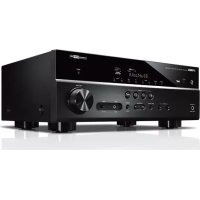
RXD485 - Home cinema amp YAMAHA - Free user manual and instructions
Find the device manual for free RXD485 YAMAHA in PDF.



| Product type | 5.1-channel home theater receiver |
| Brand | YAMAHA |
| Model | RXD485 |
| Dimensions (W x H x D) | 435 x 161 x 327 mm (with feet and protrusions) |
| Dimensions with antenna | 435 x 225.5 x 327 mm |
| Weight | 7.8 kg |
| Power supply | 230 V AC, 50 Hz (European model) |
| Power consumption | 260 W |
| Standby power consumption | 0.1 W (HDMI off) |
| Bluetooth | Version 4.2, profiles A2DP, codecs SBC, AAC |
| Wi-Fi | IEEE 802.11 a/b/g/n/ac, 2.4 GHz and 5 GHz bands |
| Radio | DAB (Band III) and FM (87.50-108.00 MHz) |
| HDMI inputs | 4 inputs, 1 output with ARC |
| Audio inputs | Optical, coaxial, analog (AUDIO1), USB |
| Speaker outputs | 5.1 channels (Front L/R, Center, Surround L/R, Subwoofer) |
| Network functions | MusicCast, Internet radio, AirPlay, NAS playback |
| Acoustic calibration | YPAO (Yamaha Parametric room Acoustic Optimizer) with supplied microphone |
| SCENE function | 4 programmable buttons for quick source and setting selection |
| Maintenance and cleaning | Soft, dry cloth, no chemical products (benzene, thinner) |
| Safety | Short-circuit protection, automatic shutdown in case of overheating, automatic standby |
| Spare parts and repairability | Contact a certified Yamaha technician for any repairs |
| General information | User manual and instruction manual available in PDF format on the Yamaha website |
Frequently Asked Questions - RXD485 YAMAHA
User questions about RXD485 YAMAHA
0 question about this device. Answer the ones you know or ask your own.
Ask a new question about this device
Download the instructions for your Home cinema amp in PDF format for free! Find your manual RXD485 - YAMAHA and take your electronic device back in hand. On this page are published all the documents necessary for the use of your device. RXD485 by YAMAHA.
USER MANUAL RXD485 YAMAHA
Precautions 2
Preparations. 7
Playback 18
English
Precautions d'usage 27
Preparations. 32
Lecture. 43
Français
The precautions listed below are to prevent risk of harm to the user and others, as well as to prevent property damage, and to help the user use this unit properly and safely. Be sure to follow these instructions.
After reading this manual, be sure to keep it in a safe place where it can be referenced at any time.
- Be sure to request inspections or repairs from the dealer where you purchased the unit or from qualified Yamaha service personnel.
- Yamaha cannot be held responsible for injury to you or damage of the products caused by improper use or modifications to the unit, or data that is lost or destroyed.
- This product is for ordinary homes. Do not use for applications requiring high reliability, such as managing lives, health care or high-value assets.

WARNING
This content indicates "risk of serious injury or death."
Power supply/power cord
-
Do not do anything that could damage the power cord.
-
Do not place it near a heater.
- Do not bend it excessively or alter it.
- Do not scratch it.
- Do not place it under a heavy object.
Using the power cord/adaptor with the core of the cord exposed could cause electric shocks or a fire.
- Do not touch the power plug or cord if there is a chance of lightning. Failure to observe this may cause electric shocks.
-
Use this unit with the power supply voltage printed on it. Failure to connect to an appropriate AC outlet may cause a fire, electric shocks, or malfunctions.
-
Check the electric plug periodically and remove any dirt or dust which may have accumulated on it. Failure to observe this may cause a fire or electric shocks.
- When setting up the unit, make sure that the AC outlet you are using is easily accessible. If some trouble or malfunction occurs, immediately turn off the power switch and disconnect the plug from the AC outlet. Even when the power switch is turned off, as long as the power cord is not unplugged from the wall AC outlet, the unit will not be disconnected from the power source.
- If you hear thunder or suspect approaching lightning, quickly turn off the power switch and pull the power plug from the AC outlet. Failure to observe this may cause a fire or malfunctions.
- If not using the unit for long periods of time, be sure to pull the power plug from the AC outlet. Failure to observe this may cause a fire or malfunctions.
Do not disassemble
- Do not disassemble or modify this unit. Failure to observe this may cause a fire, electric shocks, injury, or malfunctions. If you notice any irregularities, be sure to request an inspection or repair from the dealer where you purchased the unit or from qualified Yamaha service personnel.
Water warning
- Do not expose the unit to rain, use it near water or in damp or wet conditions, or place on it any containers (such as vases, bottles or glasses) containing liquids which might spill into any openings or places where water may drop. A liquid such as water getting into the unit may cause a fire, electric shocks, or malfunctions. If any liquid such as water seeps into the device, turn off the power immediately and unplug the power cord from the AC outlet. Then, request an inspection from the dealer where you purchased the unit or from qualified Yamaha service personnel.
- Never insert or remove an electric plug with wet hands. Do not handle this unit with wet hands. Failure to observe this may cause electric shocks or malfunctions.
Fire warning
- Do not place any burning items or open flames near the unit, since they may cause a fire.
Maintenance and care
- Do not use aerosols or spray-type chemicals that contain combustible gas for cleaning or lubrication. The combustible gas will remain inside the unit, which may cause explosion or fire.
Battery use
- Do not disassemble a battery. If the contents of the battery get on your hands or in your eyes, it can cause blindness or chemical burns.
- Do not dispose of batteries in fire. Doing so may result in the battery bursting, causing a fire or injury.
-
Do not expose a battery to high temperatures, such as direct sunlight or a fire. The battery may burst, causing a fire or injury.
-
Do not attempt to recharge batteries that are not intended to be charged. Charging could cause the battery to burst or leak, which can cause blindness, chemical burns, or injury.
- If the batteries do leak, avoid contact with the leaked fluid. If the battery fluid should come in contact with your eyes, mouth, or skin, wash immediately with water and consult a doctor. Battery fluid is corrosive and may possibly cause loss of sight or chemical burns.
Wireless unit
- Do not use this unit near medical devices or inside medical facilities. Radio waves from this unit may affect electro-medical devices.
- Do not use this unit within 15cm (6 in) of persons with a heart pacemaker implant or a defibrillator implant. Radio waves from this unit may affect electro-medical devices, such as a heart pacemaker implant or defibrillator implant.
If you notice any abnormality
-
If any of the following abnormalities occur, immediately turn off the power and disconnect the power plug. If any of the following abnormalities occur, immediately turn off any amplifiers and receivers.
-
The power cord/plug is damaged.
- An unusual smell or smoke is emitted from the unit.
Foreign material gets into the interior of the unit. - There is a loss of sound during use.
- There is a crack or damage in the unit.
Continued use could cause electric shocks, a fire, or malfunctions. Immediately request an inspection or repair from the dealer where you purchased the unit or from qualified Yamaha service personnel.
- Be careful not to drop or apply strong impact to this unit. If you suspect the unit may have been damaged due to dropping or impact, immediately turn off the power and pull the power plug from the AC outlet. Failure to observe this may cause electric shocks, a fire, or malfunctions. Immediately request an inspection from the dealer where you purchased the unit or from qualified Yamaha service personnel.

CAUTION
This content indicates "risk of injury."
Power supply/power cord
- Do not use an AC outlet where the power plug fits loosely when inserted. Failure to observe this may cause a fire, electric shocks, or burns.
- When removing the electric plug from the unit or an AC outlet, always hold the plug itself and not the cord. Pulling by the cord can damage it and cause electric shocks or a fire.
- Insert the power plug firmly all the way into the AC outlet. Using the unit when it is not plugged in sufficiently can cause dust to accumulate on the plug, causing a fire or burns.
Installation
- Do not place the unit in an unstable position where it might accidentally drop or fall over and cause injuries.
- Do not block this unit's ventilation holes (cooling slits). This unit has ventilation holes on the top/side/bottom to prevent the internal temperature from becoming too high. Failure to observe this may trap heat inside the unit, causing a fire or malfunctions.
-
When installing this unit:
-
Do not cover it with any cloth.
-
Do not install it on a carpet or rug.
-
Make sure the top surface faces up; do not install on its sides or upside down.
-
Do not use the device in a confined, poorly-ventilated location.
Failure to observe the above may trap heat inside the unit, causing a fire or malfunctions. Ensure that there is adequate space around the unit: at least 30 cm (11-3/4 in) on top, 20 cm (7-7/8 in) on the sides, and 20 cm (7-7/8 in) on the roar.
- Do not install the unit in places where it may come into contact with corrosive gases or salt air. Doing so may result in malfunction.
- Avoid being near the unit during a disaster, such as an earthquake. Since the unit may turn over or fall and cause injury, quickly move away from the unit and go to a safe place.
- Before moving this unit, be sure to turn off the power switch and disconnect all connection cables. Failure to observe this may damage the cables or cause you or someone else to trip and fall.
- For proper Installation of the outdoor antenna, make sure to have it done by the dealer from where you purchased the unit or by qualified service personnel. Failure to observe this may cause the installation to fall and result in injury. Installation requires special skills and experience.
Hearing loss
- Do not use the unit/speakers or headphones for a long period of time at a high or uncomfortable volume level, since this can cause permanent hearing loss. If you experience any hearing loss or ringing in the ears, consult a physician.
- Before connecting the unit to other devices, turn off the power for all devices. Also, before turning the power of all devices on or off, make sure that all volume levels are set to the minimum. Failing to do so may result in hearing loss, electric shock, or device damage.
- When turning on the AC power in your audio system, always turn on the amplifier or receiver LAST, to avoid hearing loss and speaker damage. When turning the power off, the amplifier or receiver should be turned off FIRST for the same reason. Failure to observe the above may cause hearing impairment or speaker damage.
Maintenance
- Remove the power plug from the AC outlet before cleaning the unit. Failure to observe this may cause electric shocks.

Handling caution

-
Do not touch the surface having this label. Doing so may cause burns. The label on the device indicates that the surface to which the label is attached may become hot during operation.
-
Do not insert your hand or fingers into the ventilation holes of this unit. Failure to observe this may cause Injury.
-
Do not insert foreign materials such as metal or paper into the ventilation holes of this unit. Failure to observe this may cause a fire, electric shocks, or malfunctions. If foreign material gets into the unit, immediately shut off the power and pull the power plug from the AC outlet and request an inspection from the dealer where you purchased the unit or from qualified Yamaha service personnel.
Do not do the following: -
put heavy items on top of the equipment.
- place the equipment in a stack.
-
apply unreasonable force to buttons, switches, input/output terminals, etc.
-
Avoid pulling the connected cables to prevent injuries or damage to the unit by causing it to fall.
Battery use
- Always replace all batteries at the same time. Do not use new batteries together with old ones. Using new ones with old ones could cause a fire, burns, or inflammation due to fluid leaks.
- Do not use batteries other than specified batteries. Doing so cause fire, burns, or inflammation due to leakage.
- Do not mix battery types, such as alkaline batteries with manganese batteries, or batteries from different makers, or different types of batteries from the same maker, since this can cause a fire, burns, or inflammation due to fluid leaks.
- Keep batteries away from children. A child could accidentally swallow a battery. Failure to observe this may also cause inflammation due to battery fluid leaks.
- Do not put in a pocket or bag, carry, or store batteries together with pieces of metal. The battery could short, burst, or leak, causing a fire or injury.
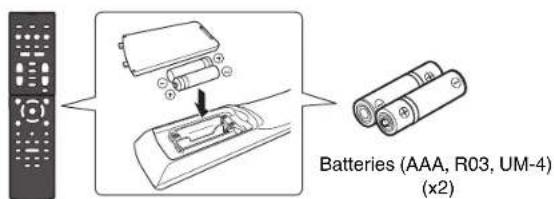
- Always make sure all batteries are inserted in conformity with the +/- polarity markings. Failure to do so might result in a fire, burns, or Inflammation due to fluid leaks.
- When the batteries run out, or if the unit is not to be used for a long time remove the batteries from the remote control to prevent possible leakage of the battery fluid.
- When storing or discarding batteries, insulate the terminal area by applying tape, or some other protection. Mixing them with other batteries or metal objects can cause a fire, burns, or Inflammation due to fluid.
Notice
Indicates points that you must observe in order to prevent product failure, damage or malfunction and data loss.
Power supply/power cord
- If not using the unit for a long period of time, be sure to pull the power plug from the outlet. Even if the (Standby/On) switch has been turned off (the screen display is off), a minute current is still flowing.
Installation
- Do not use this unit in the vicinity of other electronic equipment, such as a TV, radio, or mobile phone. Failure to observe this may cause this unit or the TV or radio to produce noise.
- Do not use this unit in a location that is exposed to direct sunlight, that becomes extremely hot, such as near a heater, or extremely cold, or that is subject to excessive dust or vibration. Failure to observe this may cause the unit's panel to become deformed, the internal components to malfunction, or for operation to become unstable.
- Install this unit as far away from other electronic equipment as possible. Digital signals from this unit may interfere with other electronic equipment.
- If using a wireless function, avoid installing this unit near metal walls or desks, microwave ovens, or other wireless network devices. Obstructions could shorten the transmission distance.
Connections
- If connecting external units, be sure to thoroughly read the manual for each unit and connect them in accordance with the instructions.
Failure to properly handle a unit in accordance with the instructions could cause malfunctions. - Do not connect this unit to industrial units.
Digital audio interface standards for consumer use and industrial use are different. This unit has been designed to connect to a consumer-use digital audio interface. Connections to an industrial-use digital audio interface could not only cause this unit to malfunction, but could also damage the speakers.
Handling
- Do not place vinyl, plastic, or rubber products on this unit. Failure to observe this may cause discoloration or deformation in the panel of this unit.
- If the ambient temperature changes drastically (such as during unit transportation or under rapid heating or cooling) and there is a chance condensation may have formed in the unit, leave the unit for several hours without turning on the power until it is completely dry before use. Using the unit while there is condensation can cause malfunctions.
Maintenance
- When cleaning the unit, use a dry, soft cloth. Using chemicals such as benzine or thinner, cleaning agents, or chemical scrubbing cloths can cause discoloration or deformation.
Batteries
- Be sure to discard used batteries in accordance with local regulations.
Information
About content in this manual
The illustrations and screens in this manual are for instructional purposes only.
- The company names and product names in this manual are the trademarks or registered trademarks of their respective companies.
Software may be revised and updated without prior notice.
Wireless communication functions
[U.K. and Europe models]
Bluetooth
Radio Frequency (Operational Frequency): 2402 MHz to 2480 MHz
Maximum Output Power (EIRP): 7.27 dBm
Wi-Fi (2.4 GHz)
Radio Frequency (Operational Frequency): 2412 MHz to 2472 MHz
Maximum Output Power (EIRP): 19.98 dBm
WI-FI (5 GHz)
Radio Frequency (Operational Frequency), Maximum Output Power (EIRP):
5170 to 5250MHz, 22.30 dBm
5250 to 5330MHz, 22.27 dBm
5490 to 5710MHz, 24.56 dBm
5735 to 5835MHz, 13.96 dBm
- Wireless devices transmitting over a 5 GHz frequency band can only be used indoors. Use of such devices outdoors is prohibited by law.
Information for users on collection and disposal of old equipment and used batteries:
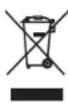
These symbols on the products, packaging, and/or accompanying documents mean that used electrical and electronic products and batteries should not be mixed with general household waste.
For proper treatment, recovery and recycling of old products and used batteries, please take them to applicable collection points, in accordance with your national legislation.

By disposing of these products and batteries correctly, you will help to save valuable resources and prevent any potential negative effects on human health and the environment which could otherwise arise from inappropriate waste handling.
For more information about collection and recycling of old products and batteries, please contact your local municipality, your waste disposal service or the point of sale where you purchased the items.

For business users in the European Union:
If you wish to discard electrical and electronic equipment, please contact your dealer or supplier for further information.
Pb
Information on Disposal in other Countries outside the European Union: These symbols are only valid in the European Union. If you wish to discard these items, please contact your local authorities or dealer and ask for the correct method of disposal.
Note for the battery symbol (bottom two symbol examples):
This symbol might be used in combination with a chemical symbol. In this case it complies with the requirement set by the EU Battery Directive for the chemical involved.
(weee_battery_eu_en_02)

Introduction
- This unit is a product for enjoying music and video at home.
- This document explains basic speaker system setup and unit configuration, followed by step-by-step instructions. Basic operations, such as playing Blu-ray Discs, DVDs, and radio content, are also explained.
The unit is equipped with a number of other functions not described in this document. For more information about this product, refer to the Owner's Manual on the Yamaha website.
Follow one of the methods described below to view the latest Owner's Manual.
In HTML format
- Scan the QR code found on the front cover of this document.
- Visit the following website.
RX-V485/RX-D485
http://avpro.global.yamaha.com/manual/avr/rxv485/
HTR-4072
http://avpro.global.yamaha.com/manual/avr/htr4072/
In PDF format
- Visit the following website.
http://download.yamaha.com/
[For U.S. customers only]
Visit the following website for additional information, FAQ's, downloads such as "Owner's Manual" and product updates.
http://usa.yamaha.com/support/
Trademarks and trade names used in this document are those of their respective owners. See the Owner's Manual for more information.
Features
The unit is also capable of the following, which are not described in this document. See the Owner's Manual to help you get the most out of the unit.
- Playing music files stored on a media server (PC or NAS)
- Playing iTunes music or iPhone/iPad/iPod touch music over a network (AirPlay)
- Playing music in multiple rooms (Zone function)
- Configuring system settings (ADVANCED SETUP menu)
For more information, see "What you can do with the unit" in the Owner's Manual.

AV SETUP GUIDE
AV SETUP GUIDE is an app that guides you through the process of connecting a TV or playback device, such as a BD/DVD or CD player, and speakers to the AV receiver. Search "AV SETUP GUIDE" on the App Store or Google Play for details.
1
Preparation
Confirming package contents Preparing cables
Remote control
The following cables (not supplied) are required to build the system described in this document.
- Speaker cables (depending on the number of speakers)
Audio pin cable (x1)
HDMI cables (x3)
Network cable (x1) (when connecting to a router via a network cable)
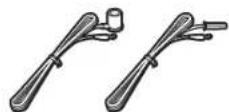
FM antenna (RX-V485/HTR-4072)
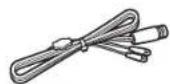
DAB/FM antenna (RX-D485)
One of the above is supplied depending on the region of purchase.
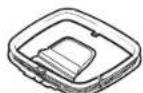
AM antenna (RX-V485/HTR-4072)
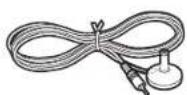
YPAO microphone
Quick Start Guide (this booklet)
2
Connecting speakers/subwoofer
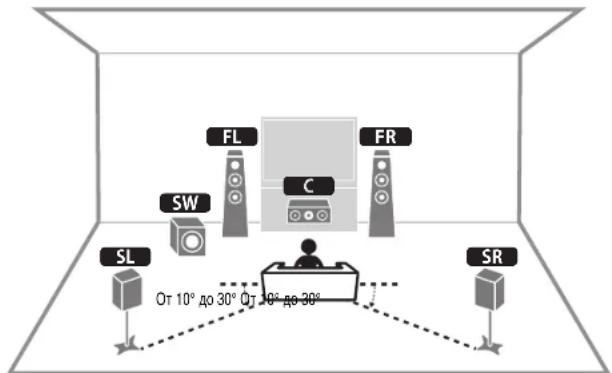
Positioning speakers
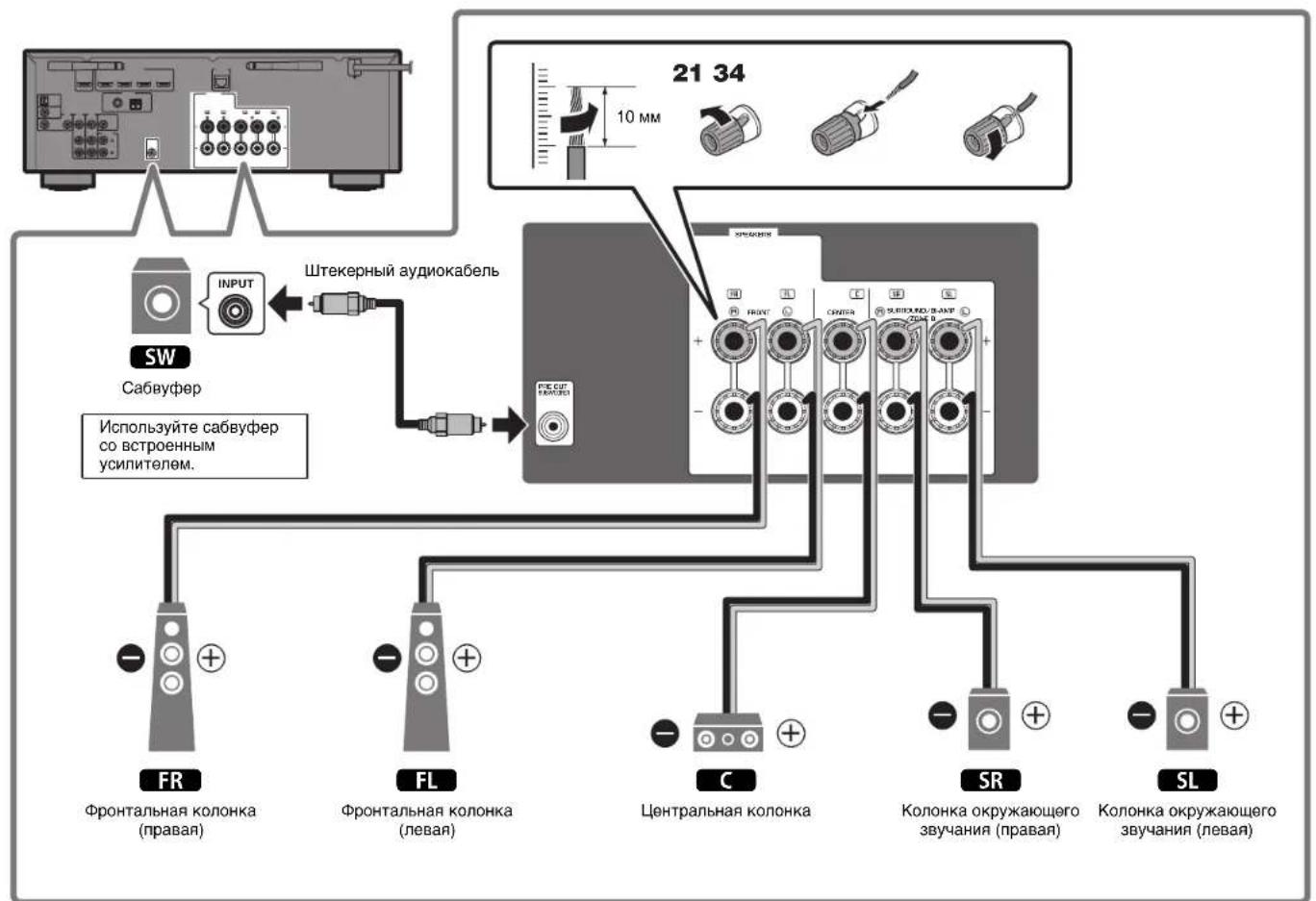
Use the diagram as a reference for positioning speakers.
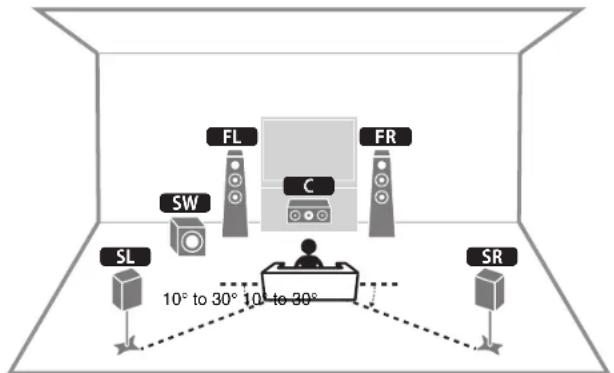
FL / FR Front speaker (L/R)
Center speaker
SL / SR Surround speaker (L/R)
SW Subwoofer
When connecting 6-ohm speakers
(U.S.A. and Canada models only)
Set the unit's speaker impedance to "6 Ω MIN". For details, see "Setting the speaker impedance" under "Connecting speakers" in the Owner's Manual.
Precautions for connecting speaker cables
- Be sure that the unit and subwoofer are turned off.
- Prepare speaker cables in a place away from the unit, to avoid accidentally dropping wire strands into the unit's interior which could result in a short circuit or malfunction of the unit.
-
Improper connection of speaker cables could cause a short circuit resulting in damage to, or malfunctioning of, the unit or speakers.
-
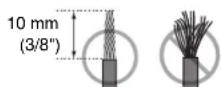
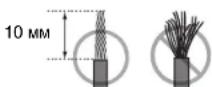
Carefully remove approximately 10mm (3/8irc) of insulation from the speakerconnection ends of the cables, and twist the bare wires of each speaker cable together firmly.
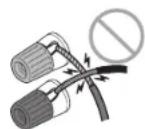
- Do not allow the bare wires of separate speaker cables to come into contact with one another.
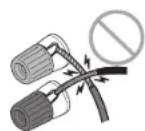
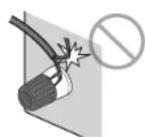
- Do not allow speaker cable bare wires to come into contact with metal parts on the unit (rear panel and screws).
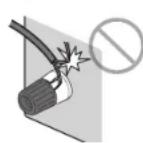
If "Check SP Wires" is shown on the front display when the unit is turned on, turn off the unit and be sure that speaker cables have not caused a short circuit.
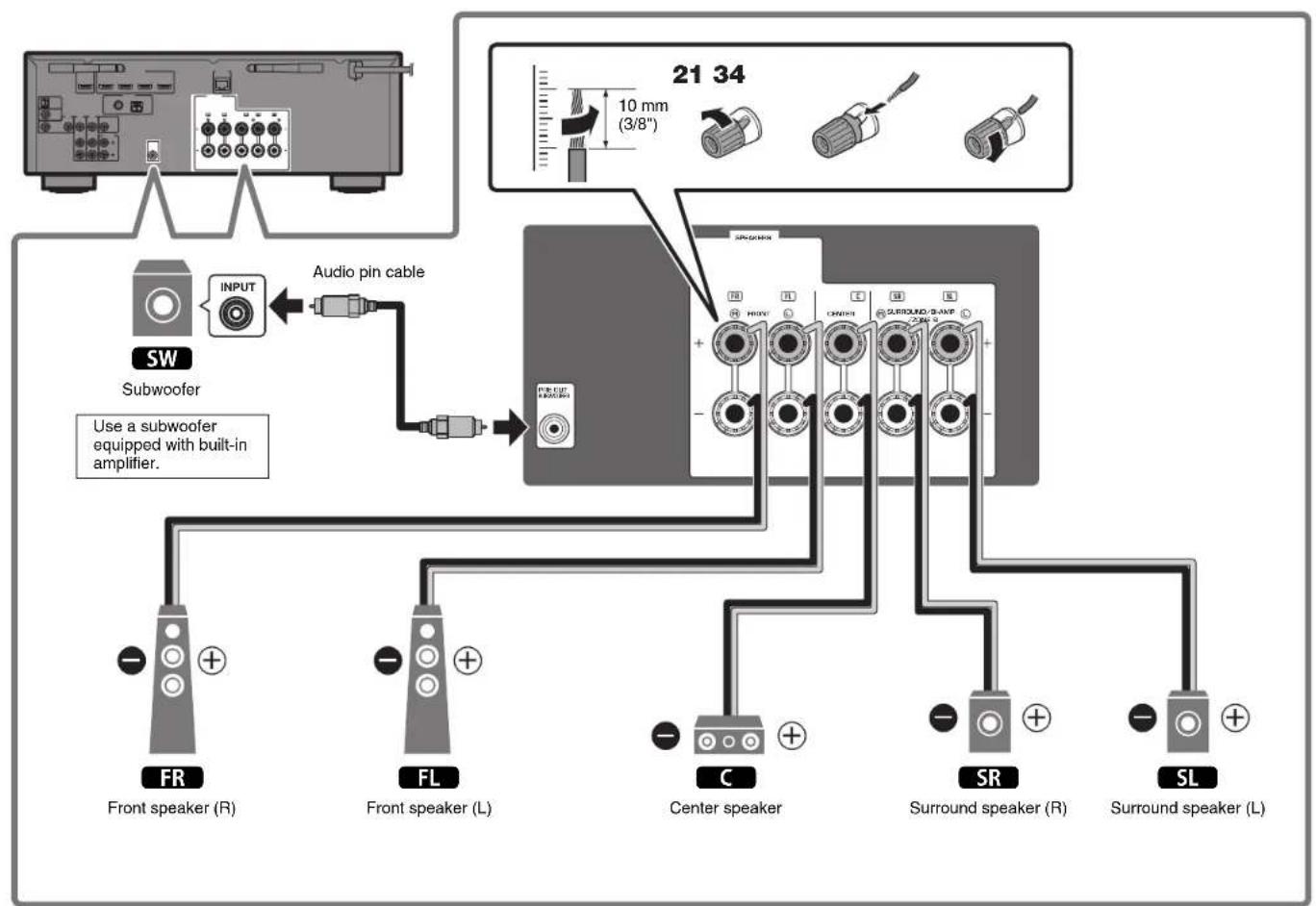
3
Connecting external devices
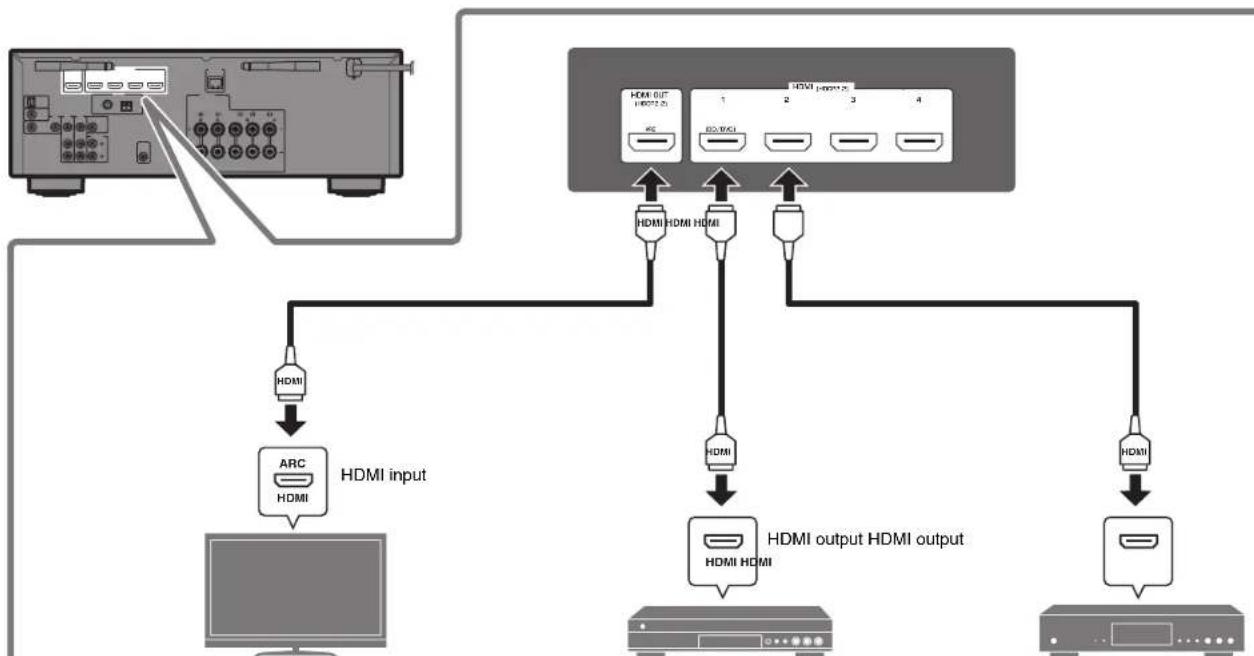
TV BD/DVD player Satellite/cable set top box
4
Connecting the radio antennas
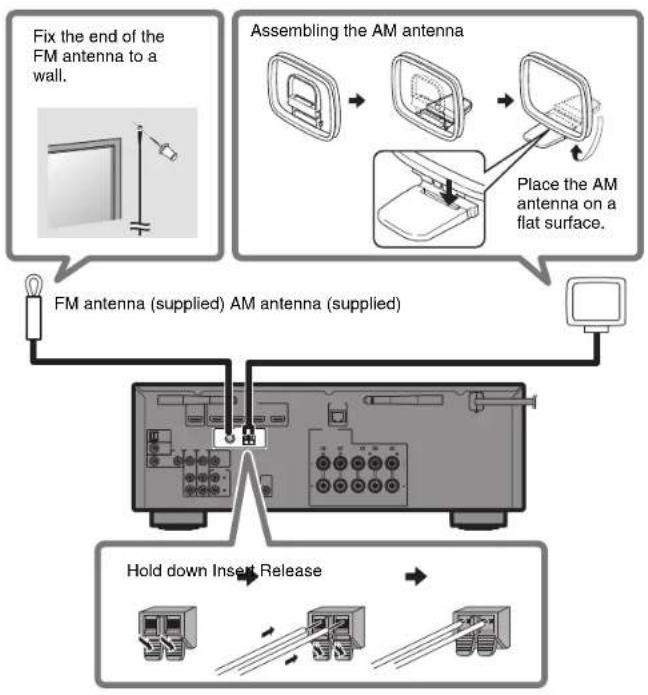
FM/AM antennas (RX-V485/HTR-4072) DAB/FM antenna (RX-D485)
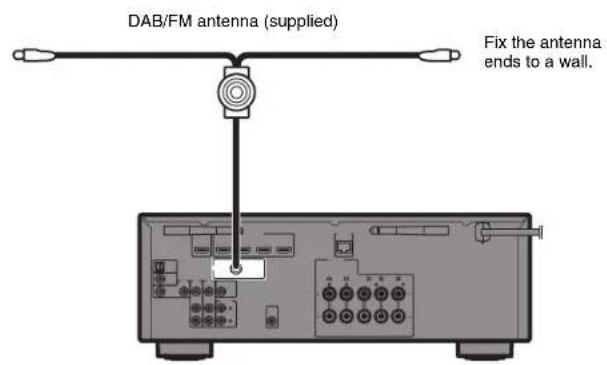
5
Preparing a network connection
Prepare a wired or wireless network connection in accordance with your network environment.
Note
The wireless antenna must be raised if the unit will be connected to a Bluetooth device.
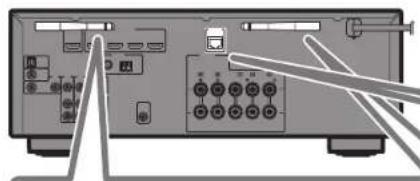
Wireless network connection
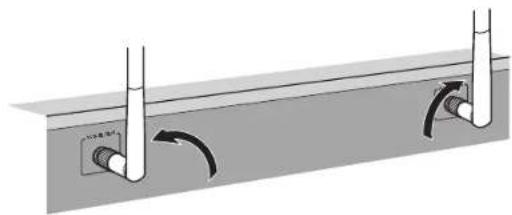
Raise the wireless antenna so that it is standing up straight. (Procedures for connecting the unit to a wireless router are described in step 8.)
Notice
Do not apply excessive force on the antenna. Doing so may damage it.
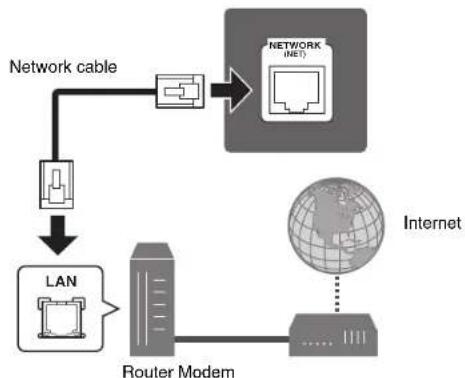
Wired network connection
6
Connecting the power cable to an AC wall outlet, and turning on the unit

Warning
Before connecting the power cable (Taiwan, Brazil, and Central and South America models only)
Set the switch position of VOLTAGE
SELECTOR according to your local voltage.
Voltages are AC 110-120/220-240 V, 50/60 Hz.
1 Plug the power cable into an AC wall outlet.
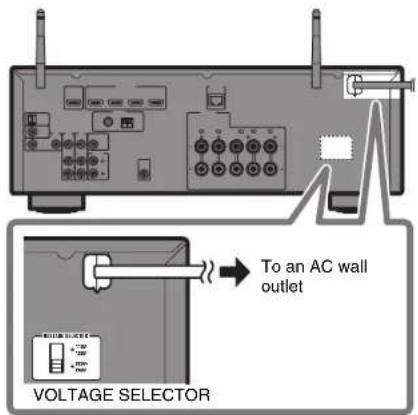
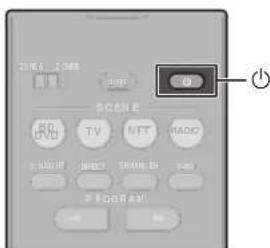
2 Press (receiver power) to turn on the unit.
3 Turn on the TV and switch the TV input to display video from the unit (HDMI OUT jack).
The Network Setup screen shown below will be displayed on the TV when the unit is turned on for the first time after purchase. It may take several tens of seconds for the screen to be displayed (WAC: Wireless Accessory Configuration).
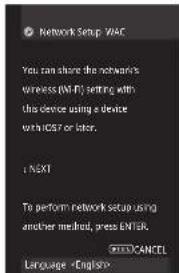

See "Setting up a wireless connection using an iOS device" under "Connecting to a network wirelessly" in the Owner's Manual when using this function to connect the unit to a network. This document explains wireless connection using the Music Cast CONTROLLER app installed on your mobile device. Follow the procedure described under "8 Setting MusicCast" (p. 16).
Note This screen will not be displayed if the unit is connected to a router via its NETWORK jack (wired connection).
7
Optimizing the speaker settings automatically (YPAO)
The Yama h t i t, and then automatically optimizes the speaker settings, such as volume balance and acoustic parameters, to suit your room.
Note the following regarding YPAO measurement
Test tones are output at high volume and may surprise or frighten small children.
Test tone volume cannot be adjusted.
- Keep the room as quiet as possible.
- Stay in a corner of the room behind the listening position so that you do not become an obstacle between speakers and the YPAO microphone.
- Do not connect headphones.
1 Turn on the subwoofer and set the volume to half.
If the crossover frequency is adjustable, set it to maximum.
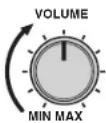
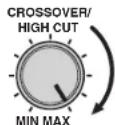
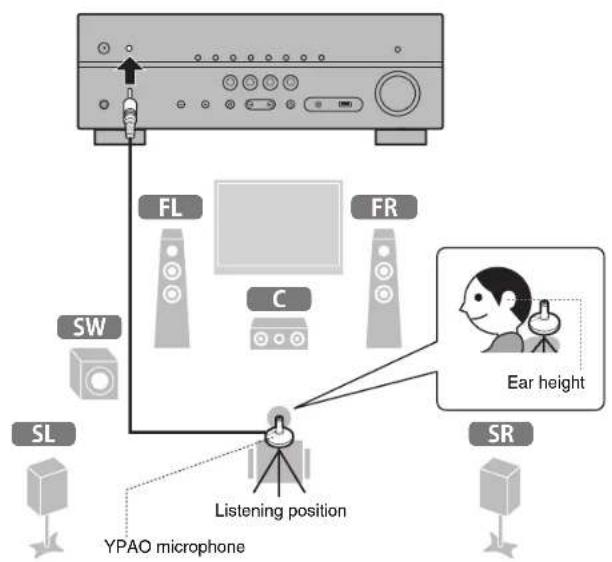
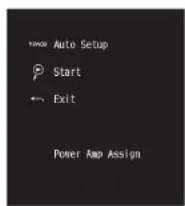
2 Place the YPAO microphone at your listening position and connect it to the YPAO MIC jack on the front panel.
The screen below appears on the TV.
Note
Place the YPAO microphone at your listening position (same height as your ears). We recommend the use of a tripod as a microphone stand. You can use the tripod screws to stabilize the microphone.
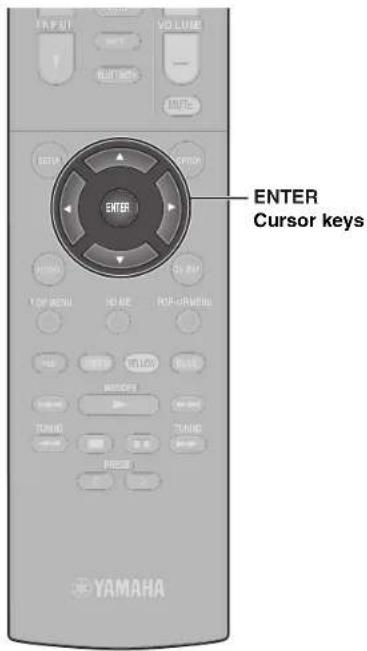
3 Press ENTER.
The measurement will start in 10 seconds.
It takes about 3 minutes to measure.
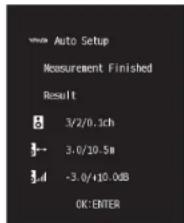
The screen below appears on the TV when the measurement finishes.
Note
If an error message (such as E-1) or warning message (such as W-2) appears, see "Error messages" or "Warning messages" under "Optimizing the speaker settings automatically (YPAO)" in the Owner's Manual.
4 Confirm the results displayed on the screen and press ENTER.
5 Use the cursor keys (< / >) to select "SAVE" (Save) and press ENTER.
6 Disconnect the YPAO microphone from the unit.
This completes optimization of the speaker settings.

Setting MusicCast
What is MusicCast
MusicCast is a brand new wireless musical solution from Yamaha, allowing you to share music among all of your rooms with a variety of devices. You can enjoy music from your smartphone, PC, NAS drive and music streaming service anywhere in your house with one easy-to-use app. For more details and a lineup of MusicCast compatible products, refer to the following site: http://www.yamaha.com/musiccast/
- Seamlessly control all MusicCast compatible devices with the dedicated app "MusicCast CONTROLLER".
- Play back music from music streaming services. (The compatible music streaming services may differ depending on your region and product).
- Configure wireless network settings of MusicCast compatible devices.
Note
See the Owner's Manual for information on other wireless connection methods if the MusicCast CONTROLLER app will not be used.
Using MusicCast CONTROLLER
To use the network features on the MusicCast compatible device, you need the dedicated app "MusicCast CONTROLLER" for the operation. Search for the free app "MusicCast CONTROLLER" on the App Store or Google Play and install it to your device.
Adding the unit to the MusicCast network
Perform the following procedure to add the unit to the MusicCast network. You can also configure the unit's wireless network settings at once.
Note
The SSID and security key for your network will be needed.
1 Tap the "MusicCast CONTROLLER" app your mobile device and tap "Setup".
Note
If you have already connected other MusicCast compatible devices to the network, tap "Settings" and then "Add New Device".
2 Follow the app's on-screen instructions.
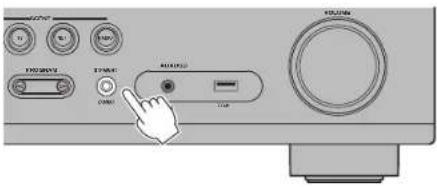
3 Press and hold the CONNECT button on the front panel of the unit for 5 seconds, as instructed by the app.
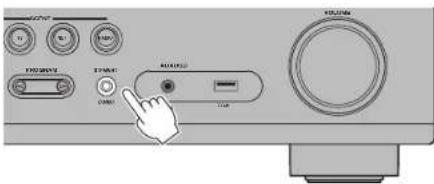
4 Follow the app's on-screen instructions to configure network settings.
When a connection has been established, "Completed" will be displayed in the front display of the unit.
Network connection with the MusicCast CONTROLLER app is now complete, and the unit has been registered as a MusicCast-enabled device.
Playback
This section describes basic operations such as playing Blu-ray Discs and DVDs, and tuning into radio stations. Most operations can be performed using the remote control.
Basic playback functions
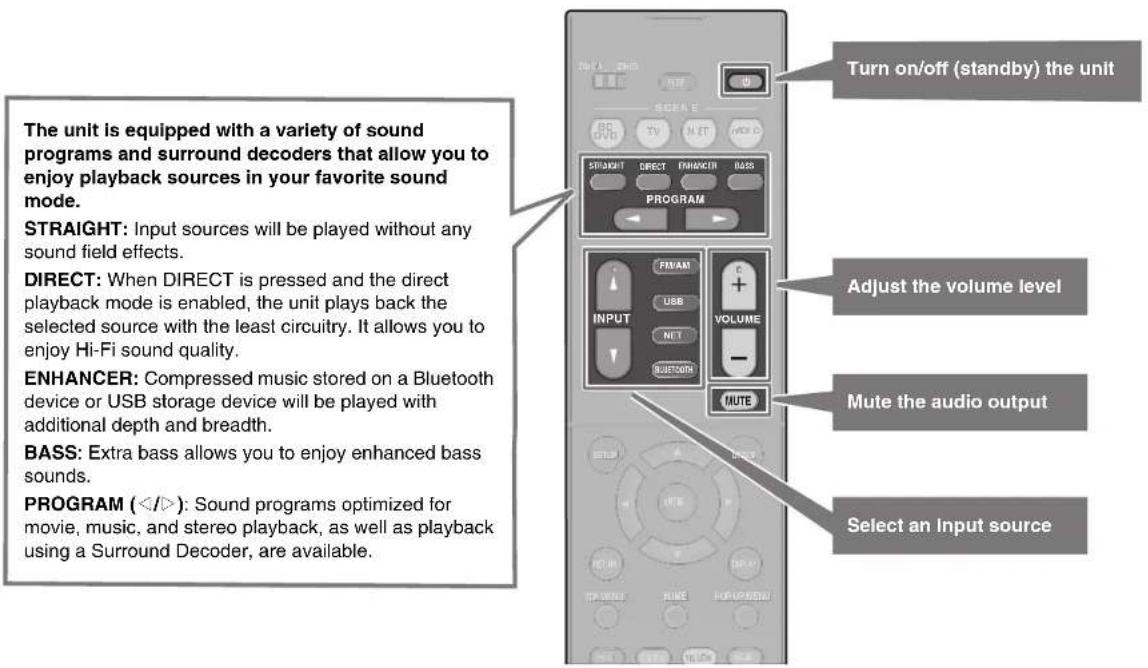
Playing a BD/DVD
We recommend playing back multichannel audio (5.1-channel or more) to feel surround sound produced by the unit.
1 Turn on the BD/DVD player.
2 Press INPUT ( / ) repeatedly to select "HDMI 1".
The name of the connected device such as "BD player" may be displayed.

Input source Device name
3 Start playback on the BD/DVD player.
4 Press STRAIGHT to select "STRAIGHT".
Note
When "STRAIGHT" (straight decode) is enabled, each speaker produces each channel audio signal directly (without sound field processing).
5 Press VOLUME to adjust the volume.
Note
When sound is not heard, or no sound is output from a specific speaker, see "TROUBLESHOOTING" in the Owner's Manual.
Listening to FM/AM radio
(RX-V485/HTR-4072)
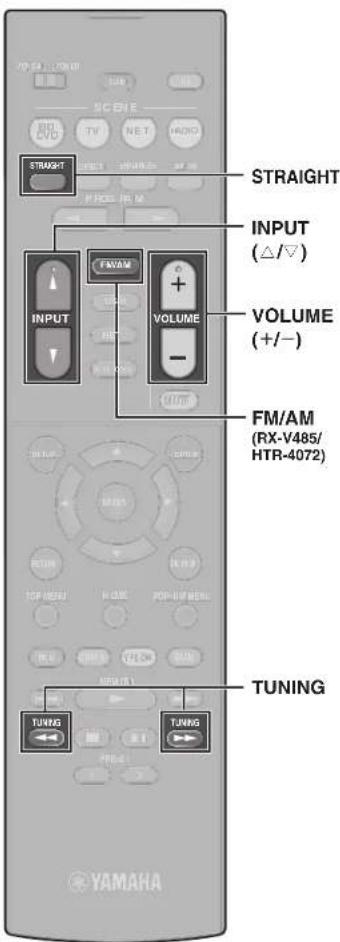
1 Press FM/AM to select "TUNER" as the input source.
2 Press TUNING to set a frequency.
Hold down the key for about a second to search stations automatically.

"TUNED" lights up when the unit is receiving an FM/AM radio station signal.
"STEREO" lights up when the unit is receiving a stereo FM radio signal.
Setting the frequency steps (Asia, Taiwan, Brazil, General, and Central and South American models only)
At the factory, the frequency step setting is set to 50kHz for FM and 9kHz for AM.
Depending on your country or region, set the frequency steps to 100kHz for FM and 10kHz for AM.
1 Set the unit to standby mode.
2 Hold down STRAIGHT on the front panel and press
3 Press PROGRAM on the front panel repeatedly to select "TU".
TU···FM50/AM9
4 Press STRAIGHT on the front panel to select "FM100/AM10".
5 Press to set the unit to standby mode and turn it on again.
Listening to DAB radio (RX-D485)
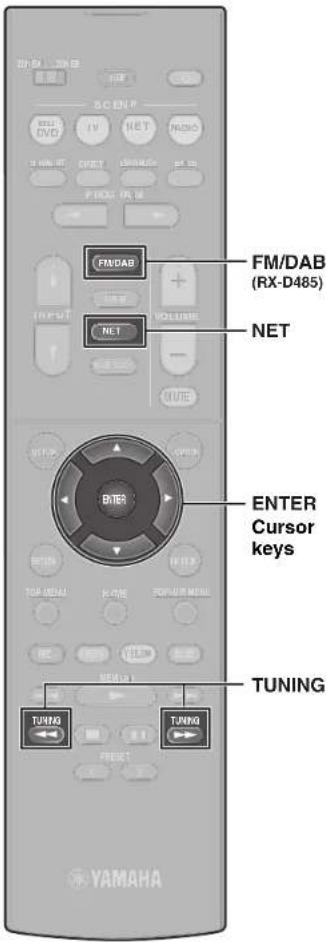
1 Press FM/DAB to select the DAB band.
The following message appears on the front panel if you have not performed an initial scan yet.

2 Press ENTER to start an initial scan.

When the initial scan finishes, the unit automatically tunes into the first DAB radio station as stored in station order.

3 Press TUNING repeatedly to select a DAB radio station.
Note
FM reception is also available on RX-D485. See the Owner's Manual for more information.
Listening to Internet radio
1 Press NET repeatedly to select "NET RADIO" as the input source.
The browse screen is displayed on the TV.
2 Use the cursor keys to select an item and press ENTER.
When an Internet radio station is selected, playback starts and the playback screen is displayed.
Note
Internet radio stations can also be selected using the MusicCast CONTROLLER app installed on your mobile device.
Listening to music from streaming services
The MusicCast CONTROLLER app installed on your mobile device can be used to receive streaming services.
1 Select a streaming service on the MusicCast CONTROLLER app screen.
2 Select a station.
Note
The following may be required, depending upon the streaming service used.
Install the streaming service app on your mobile device
- Register a streaming service account
Notes on streaming services
- Streaming services may be changed or discontinued without notice.
Supported streaming services may vary by the country or region of use.
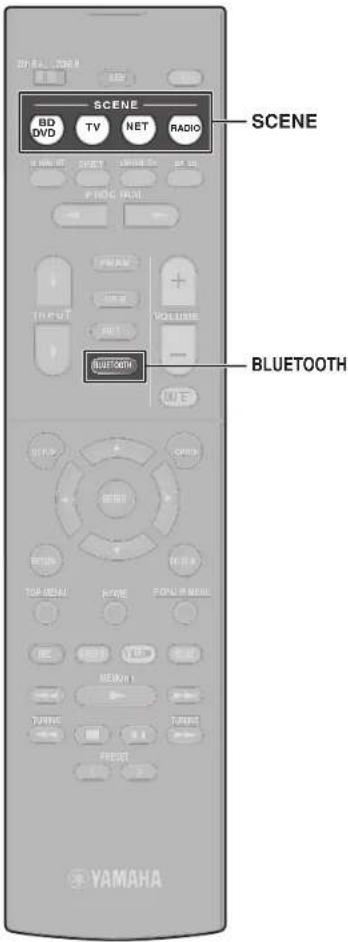
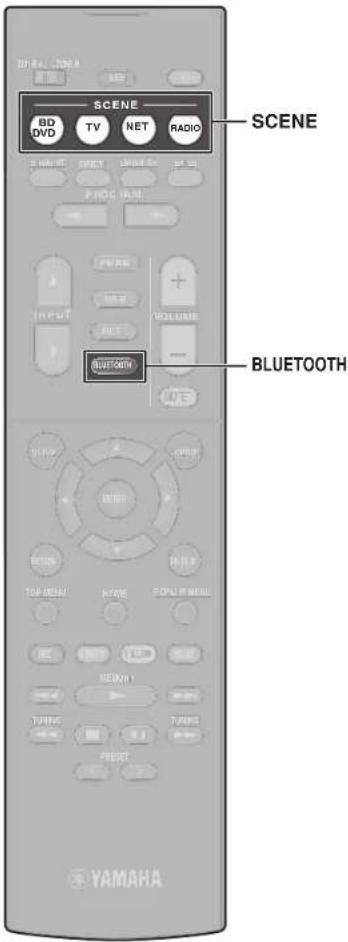
SCENE function
Unit input sources and settings that have been assigned to SCENE keys can be selected with a single touch (SCENE function). When a SCENE key is pressed, the unit turns on automatically if it is in standby mode. By default, the following settings have been assigned to each SCENE key.
| SCENE key | BD DVD | TV | NET | RADIO |
| Input HDMI1 AUDIO1 | NET RADIO | TUNER | ||
| Sound program Sci-Fi | STRAIGHT | 5ch Stereo | 5ch Stereo | |
| Compressed Music Enhancer | Off On On On | |||
| SCENE link playback | On On Off Off | |||
| Target zone Zone A Zone A Zone A Zone A | ||||
Reglsterling a scene
The settings assigned to each SCENE key by default can be changed to suit individual preferences.
- Play an input source.
- Apply settings for functions such as Sound programs and Compressed Music Enhancer.
- Press and hold a SCENE key until "SET Complete" appears on the front display.
Playing music stored on a Bluetooth® device
1 Press BLUETOOTH to select "Bluetooth" as the input source.
2 Select the unit (network name of the unit) from the available device list on the Bluetooth device.
If the passkey is required, enter the number "0000". When the connection is established, the indicator will glow in the front display.
3 Select a song and start playback on the Bluetooth device.
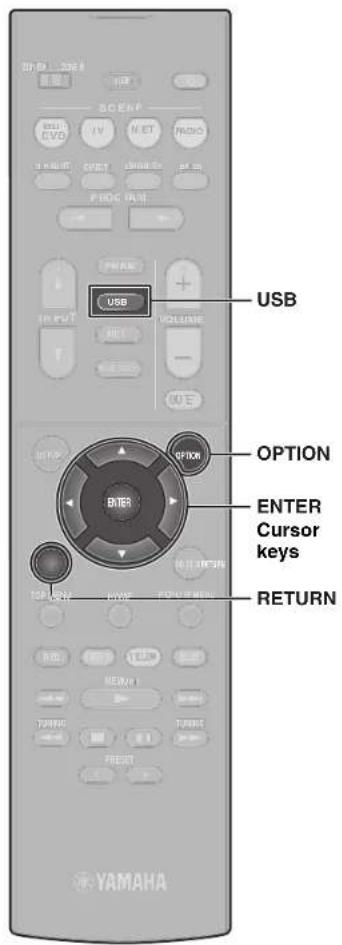
Playing music stored on a USB flash drive
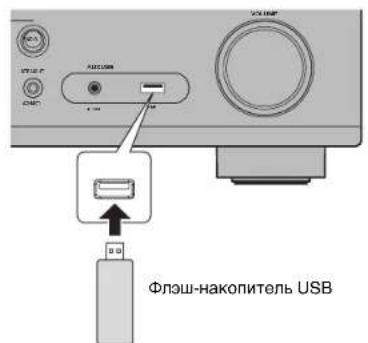
1 Connect the USB flash drive to the USB jack.
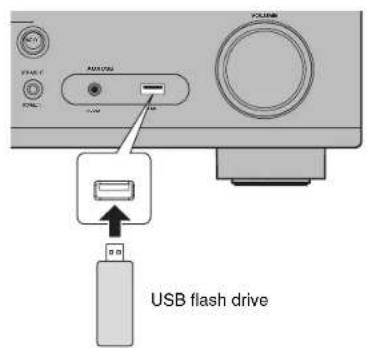
Note
Connect the USB flash drive directly to the USB jack. Do not use an extension cable.
2 Press USB to select "USB" as the input source.
The browse screen is displayed on the TV.
3 Use the cursor keys to select an item and press ENTER.
When a song is selected, playback starts and the playback screen is displayed.
Basic operation of the Option menu
This section explains basic operation of the Option menu. The Option menu can be used to configure the unit's playback functions according to the input source.
1 Press OPTION.

The Option menu is also displayed on the TV screen.
2 Use the cursor keys to select an item and press ENTER.
To return to the previous screen during menu operations, press RETURN.
3 Use the cursor keys to select a setting.
4 Press OPTION.
For more information, see "Configuring playback settings for different playback sources (Option menu)" in the Owner's Manual.
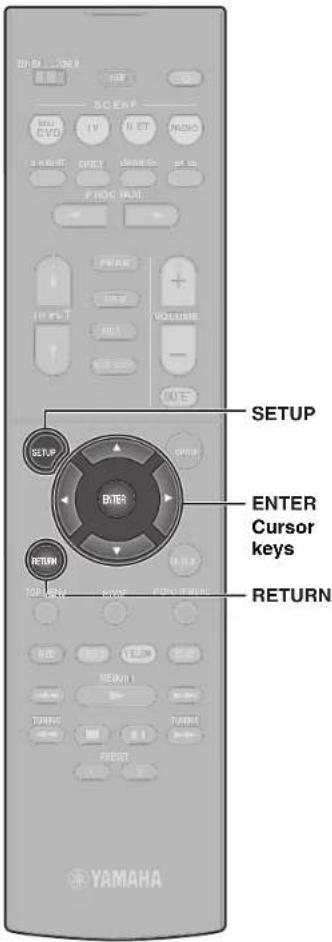
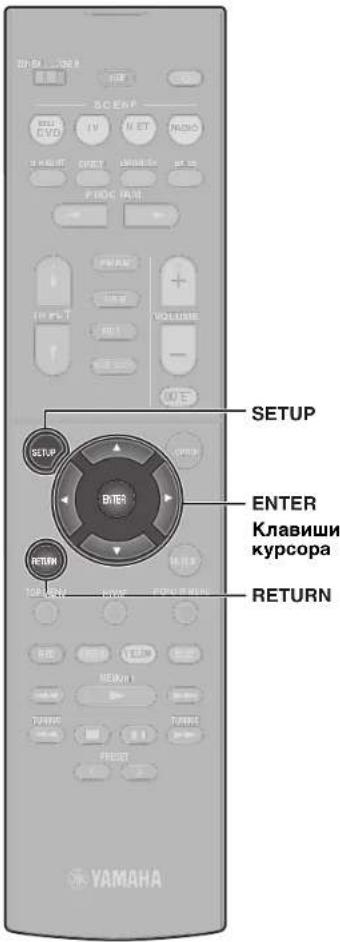
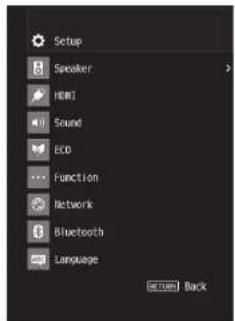
Basic operation of the Setup menu
This section explains basic operation of the Setup menu. The setup menu can be used to configure the unit's functions in detail.
1 Press SETUP.
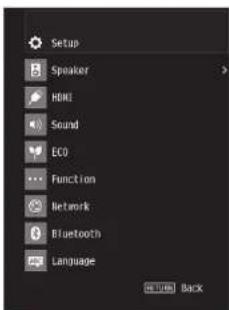
2 Use the cursor keys to select a menu and press ENTER.
To return to the previous screen during menu operations, press RETURN.
3 Use the cursor keys to select an item and press ENTER.
4 Use the cursor keys to select a setting and press ENTER.
5 Press SETUP.
For more information, see "Configuring various functions (Setup menu)" in the Owner's Manual.
Troubleshooting
If trouble occurs, first check the following:
Make sure of the following when the unit does not function properly.
The power cables of the unit, TV and playback devices (such as BD/DVD players) are connected to AC wall outlets securely.
The unit, subwoofer, TV and playback devices (such as BD/DVD players) are turned on.
- The connectors of each cable are securely inserted in to jacks on each device.
If there is no problem with the power and cables, refer to the instructions shown in the table below.
If the problem you are experiencing is not listed or if the instructions do not help, turn off the unit. disconnect the power cable and contact the nearest authorized
Yamaha dealer or service center.
| Problem Cause Remedy | ||
| The power does not turn on. The protection circuitry has been activated three times consecutively.When the unit is in this condition, the standby indicator on the unit's front panel blinks if you try to turn on the power. | As a safety precaution, capability to turn on the power is disabled. Contact your nearest Yamaha dealer or service center to request repair. | |
| The power turns off (standby mode) Immediately. | The unit was turned on while a speaker cable was shorted. | Twist the bare wires of each speaker cable firmly and reconnect to the unit and speakers (p. 8). |
| The unit is not reacting. The internal microcomputer is frozen, due to an external electric shock (such as lightning or excessive static electricity) or to a drop in the power supply voltage. | Hold down Ⓞ on the unit's front panel for more than 10 seconds to initialize and reboot the unit. (If the problem persists, disconnect the power cable from the AC wall outlet and plug it again.) | |
| No sound. | Another input source is selected. | Select an appropriate input source with the input selection keys. |
| Signals that the unit cannot reproduce are being input. | Some digital audio formats cannot be played back on the unit. To check the audio format of the input signal, use "Signal Info." in the "Option" menu (p. 22). For details, see "Checking information about the video/audio signals" in the Owner's Manual. | |
| No sound is coming from a specific speaker. | The playback source does not contain a signal for the channel. | Use "Signal Info." in the "Option" menu (p. 22) to check the audio signal. For details, see "Checking information about the video/audio signals" in the Owner's Manual. |
| The currently selected sound program/decoder does not use the speaker. | Use "Test Tone" in the "Setup" menu (p. 23) to check the speaker output. For details, see "Outputting test tones" in the Owner's Manual. | |
| Audio output of the speaker is disabled. Perform YPAO (p. 14). | Use "Configuration" in the "Setup" menu to change the speaker settings. For details, see "Configuring the speaker settings" in the Owner's Manual. | |
| No sound is coming from the subwoofer. | The playback source does not contain LFE or low-frequency signals. | Enable the Extra Bass function using the BASS key (p. 18). |
| Subwoofer output is disabled. Perform YPAO (p. 14). | ||
| Set "Subwoofer" in the "Setup" menu to "Use" (p. 23). For details, see "Setting the use of a subwoofer" in the Owner's Manual. | ||
| No video. | Another input source is selected on the unit. | Select an appropriate input source with the input selection keys. |
| Another input source is selected on the TV. Switch the TV input to display the video from the unit. | ||
| No video from the playback device connected to the unit with HDMI. | The input video signal (resolution) is not supported by the unit. | To check the information about the current video signal (resolution), see "Checking information about the video/audio signals" in the Owner's Manual. For information about video signals supported by the unit, see "HDMI signal compatibility" in the Owner's Manual. |
| The TV does not support HDCP (High-bandwidth Digital Content Protection). | Refer to the instruction manuals for the TV and check the TV's specifications. If you want to play back contents that require HDCP 2.2-compatible devices, both the TV and playback device must support HDCP 2.2. | |
| Cannot make the connection settings on MusicCast CONTROLLER. | The mobile device is not connected to the wireless router at your home. | Connect the mobile device to the wireless router and use MusicCast CONTROLLER. |
| It takes time for the app to detect the unit. | Wait a moment while making sure that your mobile device will not be in the sleep mode. | |
| Access to the network is restricted by the firewall settings of the wireless router (access point). | Check the firewall setting and the MAC address filter of the wireless router (access point). | |
Specifications
| Bluetooth | |
| Supported profile A2DP | |
| Supported codec SBC, AAC | |
| Bluetooth version Ver. 4.2 | |
| Wireless output Bluetooth Class | 2 |
| Maximum communication distance | 10 m (33 ft) without interference |
| Supported content protection method | SCMS-T |
| Network | ||
| Wi-Fi function Radio Frequency | Band 2.4 GHz, 5 GHz band | |
| Wireless LAN Standards: IEEE 802.11 a/b/g/n/ac | ||
| Security Method: WEP, WPA2-PSK (AES), Mixed Mode | ||
| Capable of WPS by PIN Method and Push-Button-Method | ||
| Capable of sharing with iOS devices by wireless connection | ||
| Tuner | ||
| Tuning Range (RX-V485/HTR-4072) | U.S.A. and Canada models [FM] | 87.5 MHz to 107.9 MHz [AM] 530 kHz to 1710 kHz |
| Asia, Taiwan, Brazil, General, and Central and South America models | [FM] 87.5/87.50 MHz to 108.0/108.00 MHz [AM] 530/531 kHz to 1710/1611 kHz | |
| China, Korea, Australia, U.K., Europe, Russia, and Middle East models | [FM] 87.50 MHz to 108.00 MHz [AM] 531 kHz to 1611 kHz | |
| Tuning Range (RX-D485) [DAB] | 174 MHz to 240 MHz (Band III) [FM] 87.50 MHz to 108.00 MHz | |
| General | ||
| Power Supply U.S.A. and Canada | models AC 120 V, 60 Hz | |
| Taiwan, Brazil, and Central and South America models | AC 110 to 120/220 to 240 V, 50/60 Hz | |
| China model AC 220 V, 50 Hz | ||
| Korea model AC 220 V, 60 Hz | ||
| Australia model AC 240 V, 50 Hz | ||
| U.K., Europe, Russia, and Middle East models | AC 230 V, 50 Hz | |
| Asia and General models AC 220 to 240 | V, 50/60 Hz | |
| Power Consumption 260 W | ||
| Standby Power Consumption HDMI Control Off, Standby Through Off | 0.1 W | |
| Standby Through Auto, INPUT: HDMI1 (HDMI no signal) | 1.0 W | |
| Standby Through On, INPUT: HDMI1 (HDMI no signal) | 1.0 W | |
| Network Standby on, Standby Through Off | 1.3 W (Wired) | |
| 1.4 W (Wireless) | ||
| Network Standby on, Standby Through On | 2.1 W (Wired) | |
| 2.2 W (Wireless) | ||
| Bluetooth Standby On, Standby Through Off | 1.4 W | |
| Bluetooth Standby On, Standby Through On | 2.0 W | |
| Maximum Power Consumption | General and Taiwan models only | 600 W |
| Dimensions (W x H x D) | 435 x 161 x 327 mm (17-1/8" x 6-3/8" x 12-7/8") | |
| Reference Dimensions (with wireless antenna upright) * Including legs and protrusions | 435 x 225.5 x 327 mm (17-1/8" x 8-7/8" x 12-7/8") | |
| Weight | 7.8 kg (17.2 lbs) | |
The contents of this manual apply to the latest specifications as of the publishing date. Refer to the Owner's Manual on the Yamaha website to confirm specifications other than described above and obtain the latest information of the unit.
PRECAUTIONS D'USAGE
LISEZ ATTENTIVEMENT AVANT DE PROCÉDER À TOUTE UTILISATION. VEILLEZ À SUIVRE CES INSTRUCTIONS.
(weee_battery EU fr 02)
Introduction
(weee_battery_eu(es_02)

Introduccion
Aunities also may be capable of doing the work. Consults to a Legal Office should be obtained by the Legal Office.
IcnoJb3ObaHne 6aTapeek
Bcerda 3aMeHre BCE 6aTapeKn OIOHbpeMeHHo. He cnoIob3yHe HOBbe 6aTapeKn BmCTe Co CTapbMn. IcNOIsbOBAHne HObHex BtapeKo MBOCTe Co CTapbMn MOkET Cstb PnHIOH NoKapa, OOKOR IN BOOINAMHEOE N3-3 aPOTeKAHNJNEKTPOITNA.
- Ncnpb3yte batapeHK TOnbKo Yka3aHHOrTo hna. Heco5nOdeHme 3TOr Tpe6oBaHmM MoKET cTaTb PnUHNOH NoKapa, OXOROB INI BocJIaMeHeHn H3-3a IPOTeKaHn BatapeHK.
He MCnoNb3yTe Bmecte 6batapeKn pa3hblx TINOB, HanpMep, eoNoHbe 6batapeKn Bmecte C mAPrAUEBbMM. INIbatapeKn PA3hblx PNO3B0DHTNEI, INoBO 6batapeKn PA3hblx TINOB ONDHO pNO3BODHTNEI, NOCKOLBY KTO MOKeT CTaTb pNPHHO NOKApA, OKORO INI BOCNNAmeHEHNI-3-3POPTekaHIJNEKTPONTHa.
XpaHnTe 6aTapeKnB MecTaX, HeoocTynHbX DnA DeTei. Pe6eHOK MoKET CnyauHIO npOrntNtB 6aTapeKy. HecO6IoJeHc 3TOr OyKaAsAHnMoKet PnBECTn K OxOYr N3-3a TyeKn 3NeKToPnIa 6aTapeKn
He nomouaTe bataeky B kapMaH nn nakET, Hc HocHTe HxpaHnTo 6batapeKy prdOM C METALYNUeCKMNI PpEIMETAMN. Pnp KOPOTKOM 3AmblKaHNi 6batapeKa MOKET B3OpBaTcR NIOI Hee MoKet npoteH 3NeKTPOPiNT, CTab pnuHNOJnKapa Hn TPABMI.
063aTeBNo yctahABnMBAte 6aTapeKn B COOTBeTCTBN C OTMeTKAMH+/-, ykaBaIaOMN NIOHPOCT. HecbNOdHeM E STOrO yka3AHm MOKe T pINBECTN K OKrAbam II03RopHaM BcNECTAne YTEeKm 2EeKpONITA.
EcnI 6atapKnpaPckbHmnncnnnnapaT,tnnBhoBpOMAH6yDTe IIOON3oBaTCB,TO N36EkaHHeBO3MOkHNOTeKN3EKnPToNtAIN3BNEKNT E6atapKnN3ynbtaIaCTAHNOHORO ynpabneHH.
- Pn xpaHEnHH mnn yTmN3aunbatapeek N3OmpyTe ObnaCTb NOHOCB C NMOUBO KNEIKo JnHTb nIpyrOg MaTePma. KOtAKc T dpyrMM bataeKAMM nn MeTALNNecCKHMn PnepDMaTM MoKet npBcETn KNOxApy, OXORAM INB30rapAHIO H3- 3a nPoTEKAHN 3eKTPONITHa.
YBeDOMJIeHne
Yka3aHn, KOtOpbIe Heo6xOdHMo Co6JIOdaTb BO n36ekaHne HEnCnpaBHOCTN, NOBpeKdEHn HIn HApUWeHn pa60TbI n3DeHn, a TAKKe NOTepn DaHHbIX.
IcTOHnK nHTaHnK Ka6eJb nTahnA
- Ecnn annapat He 6ydt NcNIOB3oBAtbC B TceHMe NnITeNbHO BPemEHN,OTcoEINHtETWNTCeB OT pO3eTKnpeMENHOro ToKa. Daxe ecnn BbIKNoHTeNB (OKmDAHME/BKnIOHeMe) BkIIOHeH (3KpaH BbIKNoH), He3HaHTeNbHbTOK 6ydt NpOdoNkTaBnpOTEkA.
YCTaHOBka
HeHCNOb3yTe daHHbI annapaT pAOM C npYIMM 3nKtPOHbIM o6OpDobAHmE, HANPMep, TENEB3OPOM, padIO INI MO6INbHM TeneFOHOm. HecoBIODeHne 3TOY kya3AnMOKET CTbPnHIOH WMyOB, CO3daBaEMbIX TENEB3OPOM INI PAIDONPHENMHKOM.
- Hcmonb3yte 3OT annapat B MeCTo, KOTopoe NDoBepKHO Bo3dEChTBIO npMR0O cOnHHeHOTo CBTa, KOtopoE MOKeT CImhOKOM CImhBO HArpeTcB (HaprHMeP, PAdOM c 6OOrPeBaTeTEM) INN OXJIaNTcB INI60 KOtopoE NODBeKHO CImhOKOM CImhBOHY BO3dEChTBIO PbINn INN BnBpaUzM. 3TO MOKeT pINBECTN K DeOpMaUZn NaHEIN annapata, B13BaTb HcNcPbAHoCTN BHYTpEHHIX KOMMIOHEHTOB INN CTaTb PpMHNO HeCTaBbHbON paBOtBu.
VCTaHaIbIaIe annapat kak MOxHO daIbIe O TpyrO 3NEKTPOHOro 06OpDobAHIA. LcPObIbe cHbIbOT annapaTAt Moryr Co3daBaTb NOMEXn dnypTO 3NEKTPOHOro 06OpDobAHIA.
-Пин сиюьзбогдсбсгсгсгсгсгсгсгсгсгсгсгсгсгсгсгсгсгсгсгсg
РДOM C MTALIYCKMIM CTHAMN INN CTONAMN, MKNPOBONHOBBIM NENAMN INN DpyIMM BCsPBOOBDHMM CTeBbIMN YcTpoCHBaMM.
ПпрNTВТВМОуT COKPATINb paCtONHmpepeDAHN.
IopknloueHn
PnipoNDKIOHNNBHNHINXyCTPOIcTBO6BAteJIbHO BNIIMATeJIbHO npOHTaTNEpyKOBOCTBO DnKaKDOYcTOYcPOIcTBaNpOKnKIOHITe INX BCOOTBeTCTBNCN HCHTPKUKNAMM.
HenpabnHbNoe Ndo KIOUHO Hne AnnapaTa, HApuOoOee HNCTpyKUn, MoKET PnBBeCTN Kero HnpabnHbHn paboTe.
He npkHnOHTeTOT anapat K npmbuHneHHbM yCTPOINCTBAM. DnBbTOBOrnpmbuHnHO HcNtOBaHNpIMMeHOTCRpa3HBeUHpOBHe ayDNIOHTpeFoebl. 3OT anapat PpeNaH3aENH DnKNOJIOHEnH K BbTOBOy UdpoBOMy AyIOHNTepFeCy. NpIKNoYHeH K npmbuHnEHOMy UDPOPOMy ayDNIOHTpeFoeCy MoKET HO TlBKO pNBEcTN K HmCnPaBHOCTH Annapata, HO nOBPeDTb DnHAMNK.
06paueHne cannnapaTOM
- He CTabHe Ta hOTAn apnAT BInHNOBbIe, NtAaTMcOobBe Ie p3NIOBbe npDeMtebl. 3TO MoKet CT ab TpNCHNDEpOPMAUIN bIIbIeTAEHAN PAHEnI ANPATA.
- Ectn npri peshKOM3MNEHmBHEUHmTEmPAPyBn (HANPMep, npTRPAHcNpTIPBOBeK ANPAPA twn npri b6bCTPOM HAPReE 0x0aXnaJdEHm) eCTb BEPHTOCH6b 03aOBAHnK OHJDECATA B anpanape, INepe IcnoIb3oBHAmem OCTaBbTe erHa HEckoJIbKO cAueH, Be KJIOnOyARITaHn, NOKA OH NE BbCXOHET NIOHcTBc. MocIb3oBHAmE Anpapar npri HAIHNuB H EM KOHDeCATA MOKET PINBECTNI K erOIOPEKeJDEHIO.
TexHnueckoe 06cnyxuBaHne
ДИРСТКА ANNAPATA NOПБЛТСЕМКОΥ TXСОУ TXСАЮВ.ИСОПБ3OBAHNE XHMNKATOB.TAKINKAK SEЗн INI pAsaBaNTeB,MOQUIXCpeCDTB INI TKAeHINI XIMMNECKOYCHTKN MOXETPNOBCTN K DEPOPMALIN INI OBOCEBQUBAHINI.
BaTapeiKu
IcIOJIb3OABHIIbeGatapeINKCIeJyETyTNIM3PO8aB B COOTBTCTBN C MecThbM 3AKOHOpDTbCBTOM.
HΦopMaun
O codepkann 3TOro pykoBoDCTBa
MIOIOCTPAUNI CHMMKN 3KPAHOB B DAHHOM PYKOBOCDBE PNBEDEHb TOnbKO B KAAeCTBE PPIMPOE.
H3aBnAHIN KOMPAnHH M3dEHN B DaHOM PYKOBOCTBae VBNIPOTCB TApoBbHMN 3HAKAMN INI 3aepfNCTPpOBaHbHM NTOBAPbHHM3HAKAMC COOTBE7CYIOUHX KOMPAHNI.
- IprpQAMMHOE 06eCneHHe MOKET N3MeHHTbCn i 06HOBNTbCn 6e3 pIeBapntbHOrO YBcDMNHO
В级以上
3TOT annapat npedctabniet c6o npodykT dna npocnyuBaHH My3bIKI nnpcMToPa BIneo Doma.
B 30m dokymente noka3aHa 6a3oBaHnacTpoKa akyctmuecko cnCTembl annapata, a taKHe cOepkAtc noWarOBei nHCTpykUn. TaKe 06bACHIOCT OCHOBHbIe onepaun, TAKHe KAK BOCpOn3BedeHne DnCKOB Blu-ray, DVD-DnCKOB nPocnyuBAnHe paNo.
Annapat OCHAEN MHOJECTBOM DpyHx (yHKn, He ONnCAHbIX B DAHOM DOKYMENTe.Дг NOIyueHnIOnOJIHNTeBHO INHOpMaUN O daHHOM 3denn CM. PyKOBOCTBO NOIb3OBaTeNHa Be6-caTeYamaHa.
BocnoIb3yItecb OndHIM 0nOncHHbx Hxke CnOCoOB DnI npocMoTa paoocneDHNx 3mHeHn B DOkyMeHTe PyKOBOCTBO NOb3oBaTeHa.
BΦopMate HTML
- CkaHpyIe QR-KoI Ha nepeDHeI O6NoXke daHHoro DOkyMeHTa.
-NepeiDHTe Ha yka3aHHbI HnXe Be6-caT.
RX-V485/RX-D485
http://avpro.global.yamaha.com/manual/avr/rxv485/
HTR-4072
http://avpro.global.yamaha.com/manual/avr/htr4072/
BΦopMaTe PDF
-NepeiDHTeHaYka3aHHbHnHexBe6-cainT.
http://download.yamaha.com/
[Tonbko dnn nokynateneB CUSA]
TocHTe CLEyIOU MBe6-caT dIa NOnyueHn DoONHtEnbHO HΦOPMaUN, YACTO 3aDaaEBMx BNPcO8, 3aRpy3K, HanpIMep, DOKyEMHa, PykoOBCTBO NoB3oBATeNn N O6HOBNeHn npOdyKTob. http://usa.yamaha.com/support/
ToBaHbIe 3nAknTopoBbIe Ha3BaHIN,NCOnIb3yEmble B DaHOM
Dokymente, npHaJnEkaT COOTBeTCTByOuMn BnaDeIbIaM. Cm.
PyKobODbTO NpOb3BaTeN DnN OnuYeuN noPdO6Hn INΦOpMaMn.
Onncanhe
Annapat Tacke cnoocob HbIINONHrtb CneDyUOme FyHKuIN, KOtOpBie He OnncabH b daHOM DOkymente. CM. PyKOBoCTBO NIOb3ObaTeJI dI INONYEHNMAKcIMMAHbOH OTdAHT ON apnata.
Bocpon3BeHne My3bIkaJIbHbIX paIIIOB, xpaHuaXcHa MeMacepBepe (IK nIN NAS)
- Bocpnon3BeDHeHne My3bIK c iTunes nIN iPhone/iPad/iPod touchYepe3 cTeB C nOmoaBIO (AirPlay)
Bocnpon3BeDHeMy3bIKB HeckoJIbKnx KOMHaTax (fYHKUN 3OH)
- Hactpoika cncTeMHbIX npaMeTpoB (MeHIO ADVANCED SETUP)
IINONYEHN IONIOHNTeBHOH NHPOpMaUN CM. "Bo3MOXHOCTn annapata" B DOKUMENTe PyKOBODCTBO NOB3OBATeN.
AV SETUP GUIDE
AV SETUP GUIDE 3To npinnoxehne, KOtopoe nomoraet BbInonHnTb npocecc NoKIOHcHn TeneBm3opa nnu yctpoiCTBa Bocnpom3BeHnA hnpimep npoirpmbaTeN KOMnKaT-DnCKOB nn BD/DVD-ndCkOB, nDnHaMnKOB KB-tpnemHky. Dnna NOnyehn doOnnHteNbHbX CbeHn BbInonHnTe nonck "AV SETUPGUIDE" Ha Be6caTe App Store nn Google Play.
1 Iopdrotobka
PacCTaBbTe KONOHKn, pyKOBoDcTByRcB npuBeDeHHO CXEMoN.

FR
ΦpoHTaBHaK KOHOHka (neBa/npaBa)

eHTpaJIbHaI KOLOHka

SR KOnOHKa OkpykaIooero 3ByaHn (JIeBaI/npaBaI)

a6Bycep
PnIOKJIIOHcN KOIOHOK c NmpeHaCom 6 O M (Tolbko moDen n CWA n KaHaB)
YcTaHOBnTE DnI NmpeHaCA KOHOK annapaT a3HaeHne "6Ω MIN".DnI nOlyeHnIO npo6HoN INFOpMaun Cm."HaCTpoika NmpeHaCA KOHOK" B pa3de "POnkIooHeMe KOHOK" B DOkUmeTe PykoBOdCTBO nonb3OBaTeN.
Mepbl npedocTopoxhoctn npn noKJIOueHm Kabeel KOHOHOK
- Y6eIITcB TOM, yTo annapaT n ca6Bypep BbIKIOueHbI.
- PnDROtOBbTe KaBEN KOJHOK Ha ydaJIeHm OT annapata, YTO6bl m36ExaTb KOPOTKOrO 3aMbKaHIN IIN NOBpeXdHn ANnapata B peYbTaTe CnyaHORo nonaDaHIn ORoJIeHHbIX KOHcOB KaBeJe BHyTpB annapata.
- HenpaBnIbHoe NOkJIIOUeHHe KaBeJIe KOJIOHOK MOKeT BbI3BaTb KOpOTKoe 3aMbIKAHne I NOBpeINb annapat NII KONOHKn.
-OctopoxHO CHMNTe np60n3HTeBho 10 MM n3OJIaHm HA KOUax Ka6eIe I NaODKnIOUChEHH KONOHOHKnAedXHO CKpyTte ORoJEnHbIe CACTn npOBoD.
-He donyckaTe cOpnKacAHn dpyr c dpyrom orOJeHHbIX KOHcOB Ka6eNei KOHOHok.
- He donyckaIte KOHTAKTa I npobodOB KAbenei KOHOK C mETALIeCKMn HaCTmN annapata (c 3aJne NaeHbIO u BnHTAMr).
Ecnn npn BkIOHEnn annapata NaIcnIe nepeJeHne naHeJI nOBHTC cooOeHHe "Check SP Wires", BbIKIOHNe annapat n npOBepTe HAnmHe KOpOTKOrO 3aMbIKAHN B KaBENIX KOLOHOK.

3
http://www.yamaha.com/musiccast/
Jlerko ynpabnTe BcemM MusicCast-coBmecTmbmU yctpoiCTbAMn C nomoosbu cneuaJIbHoro npIIOxejHn "MusicCast CONTROLLER".
Bocpoa3oDnTe My3bky C yCnyr nOTOKOBoN nepeDaH My3bIK. (CBMeCTMlbE ycLyTn nOTOKOBoN nepeDaH My3bIK MOryT OTnUaTbcR B 3aBNCIOCTN OT perHOHa N3dEJIIN.)
BbnoHnTe KOHpyauu 6ecnpoBOHOcTn MusicCast-coBmectmbix yCTPOUCTB.
PpmeHne
Cm. RykoDbTBO nnoIbOaTeIN nnnoIyHEn HIOpMaUaN OdyHXnCNOoBx 6ecPiPoAoHO rnoNkIo-ueHH, eonn pinoKoeHe MusicCAST CONTROLLER he dyet erncnloBaTcb.
Испобзовке MusicCast CONTROLLER
Длн Испьзоваим сеетьх Функши Ha MusicCast-coBmecTHMOM yctpoiCTBE He6xOdHMo cneuaJIbHoe npINOJoxHeHne "MusicCast CONTROLLER"Дл pa60tbl.БылOLHnTE nONCK npINOJoxHeHn "MusicCast CONTROLLER"Ha App StoreИng Google PlayИ yctahOBnE erо ha yctpoiCTBe.
Добальенье annapata K ceTN MusicCast
BbInonHnTe CnEduyUOHy npoueDpy dnn Do6abJeHHaNemTa K cetn MusicCast. 3aoNo TaKke MoXHo BbInonHnTb KOHpIpyauuHaCTpoek 6ecnpoBOHOcTn annapata.
PpmeuHne
PnHao68Tc SSID KnH 6e3oAHOCTm DnBaew cETM.
1 HaxmTe 3NaOk npuOxKeHnA "MusicCast CONTROLLER" MO6nIbHOM yCTpoNCTBe n HaxmTe "Setup".
PpmeaHne
EcnBbIyKeNoKnIOUynIpyrme MusicCast-coMecTmblc yCTpoiCTBa K cTeN, haxmte "Settings", a 3aTeM "Add New Device".
2 CneyuTe HnctpyKzHM Ha 3kpaHe nporpamMbI.
3 Haxmte u ydepXnBaIte 5 cekyHd KhoNky CONNECT Ha nepeDnei naHei annapata corlaCHO INHCTpyKUn npInoJxehn.
4 CneyuTe 3KpaHHbIM HnCTpyKcIyM npIIOxKeHnNo HAcTpoKe cTeBbIX NapaMeTpOB.
Iocne yctaHOBHeHn NOckNoeHn Ha dmCnnee nepeHne nane annapata noBbTc coo6ueHne “Completed”
HacrpoKa cTeBOro noKlnOHeHc n oMoIbO npIoXeHn MusicCast CONTROLLER 3aBepeHa, n annapat 3apeHCTpipoBaH KaK yctpoIcTBO C noDepKkOi MusicCast.

Ru 117
Bocnpon3VepeHne
B 3TOM pa3dene OINcBIAeTc8 OCHOBHbE ONEpaMn, TAKHe KAK BOCpOIN3BeDeHne INCKOB Blu-ray, DVD-DnCKOB n HacTpOJa Ha paAnocTaMn. BoIbHnHCTBO OpeaMHo MOnHO BbIOINHTb C NOMOJIbHO NyIbTa Dv.
OchOBhble yHKuB Bocnpn3BeHnA
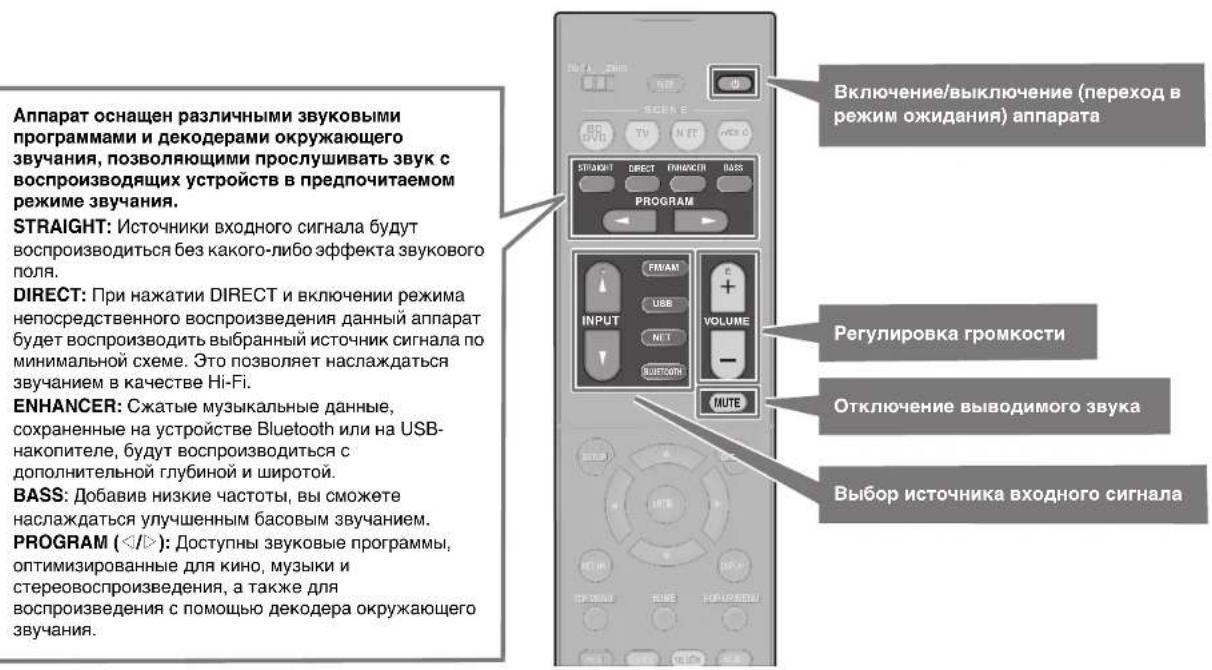
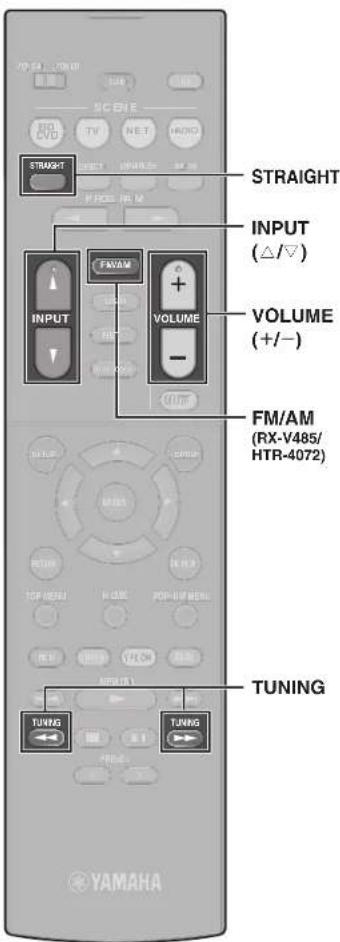
Bocnpon3BedeHne BD/DVD-dncka
HTObblnoHNOmeOpuyTbOBbEMhB3ByK, BbIaBaEmbI annpaTOM, peKoMeHdyETcR BOCpON3BOyNTMHRoKaHaNbHbIe 3ByKO3aNNCn (5.1 KaHAnOB nnn6BoJIe).
1 BkIouHe BD/DVD-nponrpbBaTeJIb.
2 HeckoIbko pa3 HaxMnte INPUT (Δ /) Anr Bb6opa "HDMI 1". MoKet OTo6paKaTcBra HaBaHMe NOKlnOeHHoro yCTpoiCTBa, HanpImep BD player".
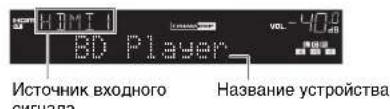
3 HaHnTe BOCpOn3BeDeHne Ha BD/ DVD-nponrpbBaTeNe.
4 Haxmnte KhoNky STRAIGHT, YTO6bl BbI6paTb "STRAIGHT".
PpmeaHne
KordaBkIOHepexnM“STRAIGHT"(npmoe 1ekOIOPAOBaH).KAKDAKOHOKABOCPNO3BOHT ayDcOINHAN KaJDORO KAHJALNAHNPMyo (6e3 06abotkn3bYkoBOrO nOJIa
5 Haxmnte KhoNky VOLUME dnypeRyInpOBKn rPOMKoCTn.
PpmeaHne
ECN 38K YN C HbIeH Nn HbBIOCTRCpeEONpEeHNNyKOLOHKY.CM "YCTPAHEHNEHECNTPABHOCTEIN DOKyMente PykoBOCTBO nOle30BaTnI.
Послuyшваиме FM/AM-pадно (RX-V485/HTR-4072)
1 Haxmte FM/AM, yTo6bI BbI6paTb "TUNER" B KaueCTBe NCTOCHKa BXoDHoro CnHana.
2 HaKMTe TUNING yCTaHOBKn YactOTbl.
HaKmnte n yepkmbaTe 3ty KhoNky np6bnnteBbHO cekHy dny aBOMATHeCKOrO NOMKa CTAHLN.

"TUNED" 3aropaetc npn npme annapatom cnHana FM/AM-paioctanm.
Pn npne me annapatom ctepeoohneckoro FMpaDnOncHara 3aRaopTaTcSTEREO
YcTaHOBka Wara HAcTpoKn YactOTbI (TONbKO moeJI nnA3nn, TaBaNn, Bpa3uNN, o6uaa moeJI n moeJI nnL eHTpAlbHOH n IOxHOJ Amepnk)
3A0ZcKMMYCTAHOBKMNNIINHARAACTOTBIANIOCTA3HNE HN B5KTQFNFMN9KTFNA
B BHCIMMOCTO NT cTAPHbI HN pENHOA MOKHO YCTAHOBHT bJAR HACTPOIN NACTOTBI 100 KfU DN FM IN 10 KfU dAN AM.
1 PpeBedeTne annapat B peKm OKnHaHn.
2UepKbTaTE SRAIGHT HnpeHneHn HnHXMITE
3 HeckonIbko p83 HxMmTE KHOJky PROGRAM Ha nepeHne HaneH, YTO6b B1oPbTb "TU".

4 HaxnITE Khonky STRAIGHT HA nepehdne naneH, YTO6bl Bb6paf "FM100/AM10".
5KAMNHTE,4TO6bIpeNEBcTeAnnapatBpEKHMOKHDAHHN,a3ETM BKLJOUHTeEO CHOA
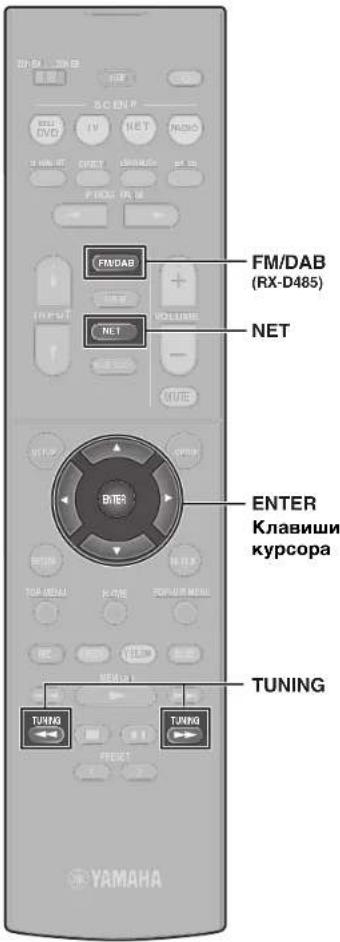
Послшане DABpaДно (RX-D485)
1 HaXMMTE FM/DAB, YTO6bI Bbl6paTb Dnana3OH DAB.
Cnedyooee coo6eHne OTo6paKaTaCn Ha nepeDnei naenn, ecn Hauhboe cKaHnpoBaHne ue He BbIOnHeHo.

2 HaKMTe ENTER, YTO6bI HaaTaB HauJIbHOe cKaHnpOBaHne.

Iocne 3aBepHEH NcXoDHorO cKaHPOBaHnA annapat abTomuHeckn HactponTcH Ha nepByo DAB-CTAHUHO, coxpaHeHHy B nepehy CTAHU.

3 HaxmTe TUNING JnBb6opa HyxHOB DAB-paNoctaHn.
PnmueyaHne
C No mohoufo RX48D M0XO HAKTE npHHMabte nepHaeau FM-pAHO. DOnnoHHTBHeLBCDEAHmCA BmHCTpyKmO NOcknpyaATm.
Порocлшване ИНтернет-разно
1 HeckoIbKO pa3 HaxMnte KhONky NET, yTo6bl BbIbpaTb "NET RADIO" B KaueCTBe nCTOuHnKa BXoHOro CnHaJa.
HaTeBn3ope OTo6pa3ntc3KpaH npocMToPa.
2 KhoNkamn Kypcopa Bbl6epnte HxhHbIM 3JemeHT n HaXMMTE ENTER.
ECN Bb6pHa INHTEPHET-paIOCTAHUHA, HauHcTcE aee BOCPON3BeDEHHe N NOBNTcA KpAH BOCPON3BeDEHn.
Приимеане
INHTEPAT-PAKHOCTAHUMI MOKO HAI TAKKE B5Bp3T C NMOUIO BPOANOOHMI MusicCast CONTROLLER, YCTAOHBENHOH MA HOHNBOHUMYOCTPBOE
PpocnyuBaHne ycnyr notokOBn nepeaMy3bIKN
PpnoXoHeMe MusicCast CONTROLLER, yctaHOBnHEHO Ha BaWEM MoBnHbKmOCTPOcTBe, moXHO HcNtobA, dna NpOyHbHa YcNyr NOTOKOB NEpeDAA.
1 Bébérète yünyrnotokoboynepeaúnha kερahe pnplokěnna MusicCast CONTROLLER.
2BbIepeTeCTAHUIO.
Приимей한е
B aharimmoTOnOTnOHToSyEmoN OyIyr NtoKoRbO npeBaHMOKeT noptoeBaTaTc cnaedoue.
- YcTaHOBnTE Ha MO6INbHOM yCTpoIcTBe npINIOXeHMe yCnyr nOTOKOBn NEpeaHn
3Apernctpyte yehTHyo 3aIncb ycnyr nTOKOBO npepaee
Pnmuehnno ycnyramnotokobnepeaun
UyTN NOTOKOBN pepeaM OMTY 6bItb OTKIOUChEB63 yBOMDIIHNA.
PDAepkXyNpyrnotokobnopeaHmOKeT 3AABCETbOTCTpHaBnpeHbBAKOTOpbIX hONCSyETcRaDHHeYcTPOCTBO.
Функци SCENE
NCTOCHNK BXoHOro CnHaHa annapaTa n HactpOnKn, Na3NaueHHbIe KnaBnHAMSCENE, MoXHO Bbl6paTb OJHMK KacAHem (fYHKnI SCENE).PnHakatnn KhoNkn SCENE annpaAT abTomAtneckn BKIOHTCR, ecn OH bIn BPexnme OxNDaan. Iy moJHAnHO KaKdo KnaBnHe Ha3NaueHbI cJeDyUOpHe HactpOnKn SCENE.
| Khoinka SCENE | BD DVD | TV | NET | RADIO |
| Вхod | HDMI1 AUDIO1 | NET RADIO | TUNER | |
| Зayковая постама | Sci-Fi | STRAIGHT | 5ch Stereo | 5ch Stereo |
| Compressed Music Enhancer | Быкл. | Вкl. | Вкl. | |
| Сразимно востrodu- зеведения—for фунkedи SCENE | Вкl. | Вкl. | Выкl. | |
| целегая зona | Zone A Zone A Zone A Zone A | |||
CoxpanenncuHbI
HactpOIMK, H3aHaeHHbIe KKaDoIKnabIue SCENE NO yMOJIaHIIIO, MOrY 6bTb N3MeHeHb B COOTBcTCTBN C INHINuDyAJIbHbIMM PpeINOHTEHMRN.
- Bocnpo3BeDnTe nCTOuHnK BXoDHoro CnHaHa
2.Применгпскрочдлфунши,наррмер, 38kyobx nporpaMM n Compressed Music Enhancer. - Haxmte u yepxmbae knabuy SCENE do noBHe "SET Complete" Ha dncnnee nepeDne naHenn.
Bocnpon3BeDeHne My3bIKN, COxpaHeHHoHa yctpoinCTbe Bluetooth®
1 HaXmTe BLUETOOTH, TTo6bI BbI6paTb B KaueCTBe NcTOHnKa BXoDHorO cnHaJa "Bluetooth".
2 Ha yctpoicTbe Bluetooth B cnncke doCTynhix ycTpoicTB bIbepnte annapat (ceTeBOE mHa annapata).
Ecno ntope6yeTc npoB, BBeDnTe "0000". Pocne yctaHOBHeH NIOKnIOeHn Ha DnCnIee nepeHn NaHEn 3arOpNTc HnDKKaTOp
3 Ha yctpoicTbe Bluetooth BbI6epnte NecHIO HAuHNTe BOCnpon3BeDeHne.
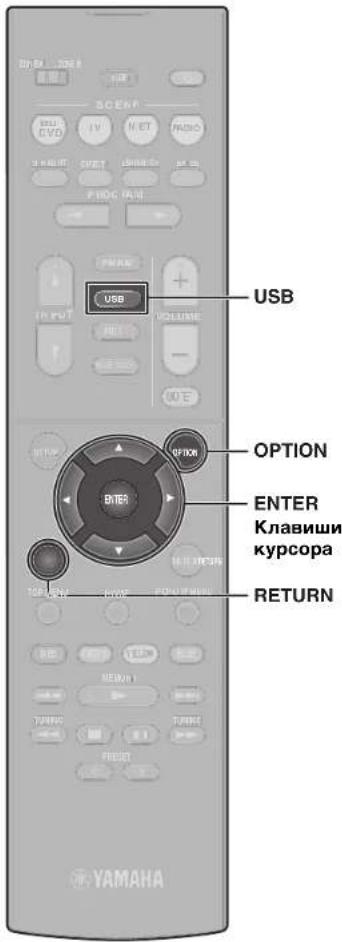
Bocnpon3BeDeHne My3bIKN, COxpaHeHHoH Na Флэш-нakОпNTeIe USB
1 NpOKJIIOHTe pJ3W-HaKOnNTeJB USB K rHe3dy USB.
PnmuMeaHne
Φnau-Hakonntb USB cneuyet noKnHouHTb HenocepdtBeHHo K rHe3y USB.He nCnoB3yTe ynnHNTb.
2 HaxMTe USB, yTo6bI Bbl6paTb KaueCTBe nCTOuHnKa BXoDHORO CnHana "USB".
Ha TeneBn3ope OTo6pa3ntc8KpAan npocMOTpa.
3 KhoNkamn Kypcopa BbIbepnte HxHbIM 3JIeMeHT n HaxMnTe ENTER.
PnBb6pe neChn HauHETcH ee BOCpOuN3BeDeHHe N IOBHTcH 3KpaH BOCpOuN3BeDeHn.
OchOBhble onepaunm MeHIO Onn
B 3OM pa3dene npnBeDeHO onuCAHHe OCHOBbIX onepaui MeHO OnuHa. MeHO Onua MoxHO nCOnIb3oBaTb dna HAcTpOKn FyHKuN BOCpON3BeDEHn AnnpaTa B COOTBECTBN C NCTOHNKOM BXoDHorO CNHana.
1 HaKMTe KJnBnWy OPTION.

Meho Onu TaKKe OTo6paKaeTcHa 3KpaHe TeneBn3opa.
2 KhoNkamn Kypcopa BbIbepnte HxHbI 3JIeMeHT n HaXMMTe ENTER.
YTo6bI BePHyTbC K npEblDyUeMy 3KpaHy MeHIO, HaxMnte RETURN.
3 BbI6epnTe HacTpoKy C nOMOuBIO KnaBnKypcopa.
4 Haxmte KnaBnwy OPTION.
nanyehn DOnJIHHTenbHO HOpMaCm. HaCTpoIka napameTPOB BOCnpO3BeHnA npa3NHyBx ITOCHNOB OBCpON3BeHnE (MeHO Onu) BOKyMeHe PyKoBOcTB0 NOb3OBaTeN.
OCHOBhIe Opeaun MeHIO HAcTpoiKa
B 3OM pa3dene npBBeHNO OHCAHNE OCHOBhIX onepaui MeHO HAcTPOKa. MeHO HaCTPOKa MoXHO nCOnb3oBaTB dNn oDpOHo HAcTPOKn FyHKuI annapata.
1 HaxmTe KlaBnuy SETUP.
2 C nomoiKnaBnKypcopa BbIePHTe MeHIO HaxMNTE ENTER.
YTo6bI BepHyTbcK npdebluyemy 3kpaH My HAKMITE RETURN.
3 KhoNkamn Kypcopa BbI6epnte HxHbI 3JIeMeHT n HaxMNTE ENTER.
4 C nomoiKnaBnKypcopa BbI6epnte HactpoNky nHaXMMTe ENTER.
5 Haxmte KlaBnuy SETUP.
HAcTpoKa pa3nHbix cyHKm (MeHIO HAcTpoKa) B DOKyMente PyKOBOCTBO NOB3OBATEA

Понск и устараенье несправност
Pn BO3HKnHOBeHHn npo6nembl cHaJana npOBepbTe cneyiouee:
Ecn annnapat yHKnOHHpyeH HnpaBnBHO, npOBepbTe cneDy
Ka6eHn nTahn annapata, TeneBn3opa n Bocnpu3Bdoaux yctpoCTB (taKx, Ka BD/DVD-npOurpbIbATEnn) HAdExHO noKnHoeHb K HAcTeHHbIM p03ETkAM nepemehHoro TOka;
-
annapat, c6Byep, TeIeBn3Op n Bocnpn3B0aJne yCtpoNCTBa (Takne, KaK BD/DVD-npOrrpbBaTei) BKIOueHb;
-
WTeKepb KaKdoRo Ka6en HaexHo BCTaBHeHb RHe3da KaKdoRo yctpoCtBa.
PnO TcYrTcBm npo6nem C nHTaHnem KabEnMaM CM. HNCTpyKu, npNBEdeHHbE B Ta6nue Hnke.
EcHHeNCnPaBHOCTb He yka3aHa B Ta6nue Hn INCHpyKmH He nOMOrn, BbIKIOHTe annapat, OTCoeDNHTe Ka6eN NITAHN IOBpaTNTecb K 6nKaIeMy ABTOIN3OBAHOMy DInepy Hn B cepBnCHb CEHTp Yama.
ImportantNotice:GuaranteelInformationforcustomers inEEA\*andSwitzerland
English
For detailed guarantee information about this Yamaha product, and Pan-LEA* and Switzerland warranty service, please either visit the website address below (Printable file is available at our website) or contact the Yamaha representative office for your country. * LEA: European Economic Area
Remarqueimportante:informationsdegarantiepour lesclientsdel'EEEtlaSuisse
Français





- WARNING
- This content indicates "risk of serious injury or death."
- Power supply/power cord
- Do not disassemble
- Water warning
- Fire warning
- Maintenance and care
- Battery use
- Wireless unit
- If you notice any abnormality
- CAUTION
- This content indicates "risk of injury."
- Installation
- Hearing loss
- Maintenance
- Handling caution
- Notice
- Indicates points that you must observe in order to prevent product failure, damage or malfunction and data loss.
- Connections
- Handling
- Batteries
- Information
- About content in this manual
- Wireless communication functions
- [U.K. and Europe models]
- Bluetooth
- Wi-Fi (2.4 GHz)
- WI-FI (5 GHz)
- Information for users on collection and disposal of old equipment and used batteries:
- For business users in the European Union:
- Pb
- Introduction
- In HTML format
- In PDF format
- [For U.S. customers only]
- Features
- AV SETUP GUIDE
- 1
- Preparation
- Confirming package contents Preparing cables
- 2
- Connecting speakers/subwoofer
- Positioning speakers
- When connecting 6-ohm speakers
- (U.S.A. and Canada models only)
- Precautions for connecting speaker cables
- 3
- Connecting external devices
- 4
- Connecting the radio antennas
- 5
- Preparing a network connection
- Note
- Connecting the power cable to an AC wall outlet, and turning on the unit
- Plug the power cable into an AC wall outlet.
- Press (receiver power) to turn on the unit.
- Turn on the TV and switch the TV input to display video from the unit (HDMI OUT jack).
- 7
- Optimizing the speaker settings automatically (YPAO)
- Turn on the subwoofer and set the volume to half.
- Place the YPAO microphone at your listening position and connect it to the YPAO MIC jack on the front panel.
- Press ENTER.
- Confirm the results displayed on the screen and press ENTER.
- Use the cursor keys (< / >) to select "SAVE" (Save) and press ENTER.
- Disconnect the YPAO microphone from the unit.
- Setting MusicCast
- What is MusicCast
- Using MusicCast CONTROLLER
- Adding the unit to the MusicCast network
- Tap the "MusicCast CONTROLLER" app your mobile device and tap "Setup".
- Playback
- Basic playback functions
- Playing a BD/DVD
- Listening to FM/AM radio
- (RX-V485/HTR-4072)
- TU···FM50/AM9
- Listening to DAB radio (RX-D485)
- Press FM/DAB to select the DAB band.
- Press ENTER to start an initial scan.
- Press TUNING repeatedly to select a DAB radio station.
- Listening to Internet radio
- Press NET repeatedly to select "NET RADIO" as the input source.
- Use the cursor keys to select an item and press ENTER.
- Listening to music from streaming services
- Notes on streaming services
- SCENE function
- Reglsterling a scene
- Playing music stored on a Bluetooth® device
- Playing music stored on a USB flash drive
- Connect the USB flash drive to the USB jack.
- Press USB to select "USB" as the input source.
- Use the cursor keys to select an item and press ENTER.
- Basic operation of the Option menu
- Press OPTION.
- Use the cursor keys to select a setting.
- Press OPTION.
- Basic operation of the Setup menu
- Press SETUP.
- Troubleshooting
- If trouble occurs, first check the following:
- Specifications
- PRECAUTIONS D'USAGE
- LISEZ ATTENTIVEMENT AVANT DE PROCÉDER À TOUTE UTILISATION. VEILLEZ À SUIVRE CES INSTRUCTIONS.
- Introduccion
- IcnoJb3ObaHne 6aTapeek
- YBeDOMJIeHne
- Yka3aHn, KOtOpbIe Heo6xOdHMo Co6JIOdaTb BO n36ekaHne HEnCnpaBHOCTN, NOBpeKdEHn HIn HApUWeHn pa60TbI n3DeHn, a TAKKe NOTepn DaHHbIX.
- IcTOHnK nHTaHnK Ka6eJb nTahnA
- YCTaHOBka
- IopknloueHn
- 06paueHne cannnapaTOM
- TexHnueckoe 06cnyxuBaHne
- BaTapeiKu
- HΦopMaun
- O codepkann 3TOro pykoBoDCTBa
- В级以上
- BΦopMate HTML
- RX-V485/RX-D485
- HTR-4072
- BΦopMaTe PDF
- [Tonbko dnn nokynateneB CUSA]
- Onncanhe
- Iopdrotobka
- PnIOKJIIOHcN KOIOHOK c NmpeHaCom 6 O M (Tolbko moDen n CWA n KaHaB)
- Mepbl npedocTopoxhoctn npn noKJIOueHm Kabeel KOHOHOK
- PpmeHne
- Испобзовке MusicCast CONTROLLER
- Добальенье annapata K ceTN MusicCast
- PpmeuHne
- Haxmte u ydepXnBaIte 5 cekyHd KhoNky CONNECT Ha nepeDnei naHei annapata corlaCHO INHCTpyKUn npInoJxehn.
- CneyuTe 3KpaHHbIM HnCTpyKcIyM npIIOxKeHnNo HAcTpoKe cTeBbIX NapaMeTpOB.
- Bocnpon3VepeHne
- OchOBhble yHKuB Bocnpn3BeHnA
- Bocnpon3BedeHne BD/DVD-dncka
- BkIouHe BD/DVD-nponrpbBaTeJIb.
- HaHnTe BOCpOn3BeDeHne Ha BD/ DVD-nponrpbBaTeNe.
- Haxmnte KhoNky STRAIGHT, YTO6bl BbI6paTb "STRAIGHT".
- PpmeaHne
- Haxmnte KhoNky VOLUME dnypeRyInpOBKn rPOMKoCTn.
- Послuyшваиме FM/AM-pадно (RX-V485/HTR-4072)
- HaKMTe TUNING yCTaHOBKn YactOTbl.
- YcTaHOBka Wara HAcTpoKn YactOTbI (TONbKO moeJI nnA3nn, TaBaNn, Bpa3uNN, o6uaa moeJI n moeJI nnL eHTpAlbHOH n IOxHOJ Amepnk)
- Послшане DABpaДно (RX-D485)
- PnmueyaHne
- Порocлшване ИНтернет-разно
- Приимеане
- Приимей한е
- Pnmuehnno ycnyramnotokobnepeaun
- Функци SCENE
- CoxpanenncuHbI
- Bocnpon3BeDeHne My3bIKN, COxpaHeHHoHa yctpoinCTbe Bluetooth®
- Bocnpon3BeDeHne My3bIKN, COxpaHeHHoH Na Флэш-нakОпNTeIe USB
- HaxMTe USB, yTo6bI Bbl6paTb KaueCTBe nCTOuHnKa BXoDHORO CnHana "USB".
- KhoNkamn Kypcopa BbIbepnte HxHbIM 3JIeMeHT n HaxMnTe ENTER.
- OchOBhble onepaunm MeHIO Onn
- KhoNkamn Kypcopa BbIbepnte HxHbI 3JIeMeHT n HaXMMTe ENTER.
- BbI6epnTe HacTpoKy C nOMOuBIO KnaBnKypcopa.
- Haxmte KnaBnwy OPTION.
- OCHOBhIe Opeaun MeHIO HAcTpoiKa
- HaxmTe KlaBnuy SETUP.
- C nomoiKnaBnKypcopa BbIePHTe MeHIO HaxMNTE ENTER.
- KhoNkamn Kypcopa BbI6epnte HxHbI 3JIeMeHT n HaxMNTE ENTER.
- Haxmte KlaBnuy SETUP.
- Понск и устараенье несправност
- Pn BO3HKnHOBeHHn npo6nembl cHaJana npOBepbTe cneyiouee:
- ImportantNotice:GuaranteelInformationforcustomers inEEA\*andSwitzerland
- Remarqueimportante:informationsdegarantiepour lesclientsdel'EEEtlaSuisse
Brand : YAMAHA
Model : RXD485
Category : Home cinema amp