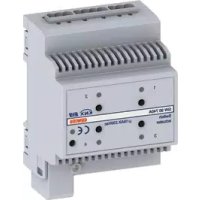
GW90742 - Smart Home Gewiss - Free user manual and instructions
Find the device manual for free GW90742 Gewiss in PDF.


| Brand | Gewiss |
| Model | GW90742 |
| Category | Smart Home |
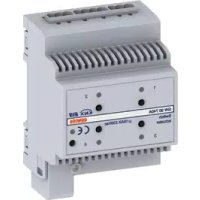
| Product Type | 4-channel 16 AX KNX actuator with manual control |
| Power Supply | KNX bus 29 V DC SELV + auxiliary power supply 230 V AC |
| Max Switching Current | 16 A (AC1), 16 AX (140 μF), max inrush current 400 A (200 μs) |
| Max Power per Channel (Incandescent/Halogen Lamps) | 3000 W |
| Max Power per Channel (Compact Fluorescent Lamps) | 80 x 23 W |
| Number of Channels | 4 independent relays with voltage-free NO contact |
| Control Elements | 1 programming button, 4 local control buttons |
| Display Elements | 1 red programming LED, 4 green output status LEDs |
| Connections | Bus terminal (2 wires), extractable screw terminals (max cross-section 4 mm²) |
| Dimensions | 4 DIN modules (width ~70 mm, height ~90 mm, depth ~65 mm) |
| Weight | Approx. 150 g |
| Protection | IP20 |
| Operating Temperature | -5 °C to +45 °C |
| Storage Temperature | -25 °C to +70 °C |
| Relative Humidity | Max. 93% (non-condensing) |
| Mounting | On 35 mm DIN rail |
| Main Functions | ON/OFF switching, delay, scenarios (8 per output), priority commands, blocking, logic functions (AND, OR, etc.), periodic monitoring |
| Configuration | Via ETS software |
| Maintenance | No maintenance required; clean with a dry cloth |
| Safety | Periodic monitoring of input object; 4 mm separation between bus and power cables |
| Standards | EN50428, EN50090-2-2; directives 2006/95/EC, 2004/108/EC |
| Certification | KNX/EIB |
Frequently Asked Questions - GW90742 Gewiss
User questions about GW90742 Gewiss
0 question about this device. Answer the ones you know or ask your own.
Ask a new question about this device
Download the instructions for your Smart Home in PDF format for free! Find your manual GW90742 - Gewiss and take your electronic device back in hand. On this page are published all the documents necessary for the use of your device. GW90742 by Gewiss.
USER MANUAL GW90742 Gewiss
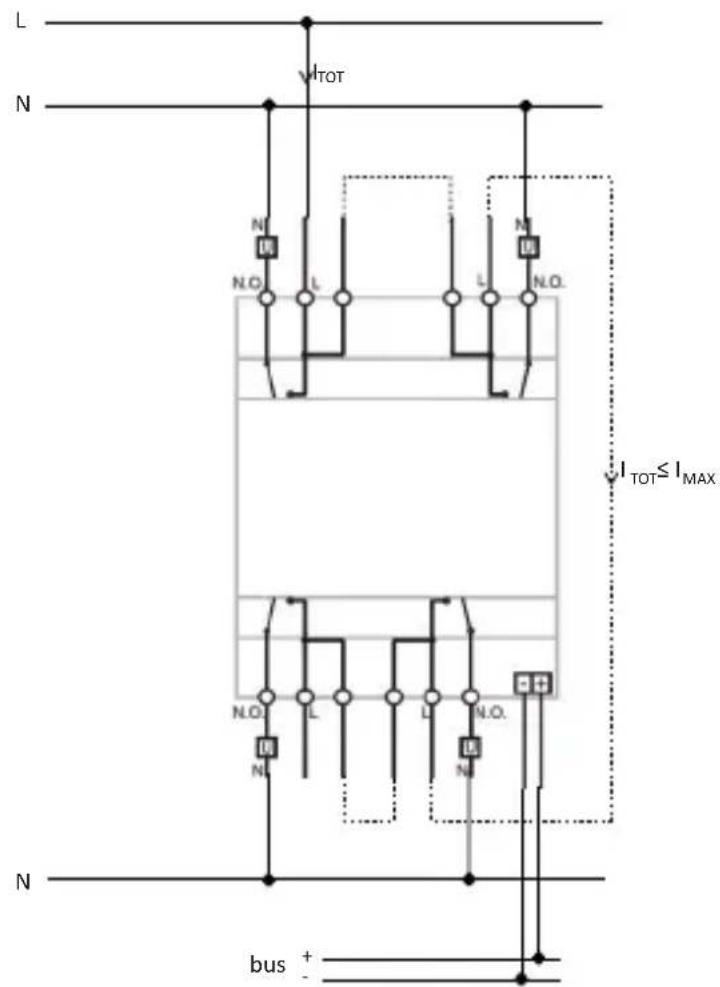
If the dual terminals are used for phase (L) entry and exit, check that the total circulating current (I_TOT) does not exceed the max current (I_MAX) indicated in the "Technical data" section of the instruction sheet.
GENERALWARNINGS
Warning! The safety of this appliance is only guaranteed if all the instructions given here are followed scrupulously.
These should be read thoroughly and kept in a safe place.
Chorus products can be installed in environments which are dust-free and where no special protection against the penetration of water is required.
They shall be installed in compliance with the requirements for household devices set out by the national standards and rules applicable to low-voltage electrical installations which are in force in the country where the products are installed, or, when there are none, following the international standard for low-voltage electrical installations IEC 60364, or the European harmonization document HD 60364.
Gewiss sales organization is ready to provide full explanations and technical data on request.
Pack Contents
n. 1 KNX 4-channel 16 AX actuator with manual control - DIN rail mounting
n. 1 Bus terminal
n. 5 Screw terminals
n. 1 Cover with screw
n. 1 User and installation manual
Briefly
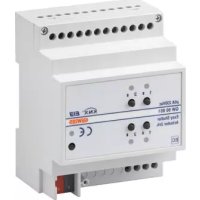
The KNX 4-channel 16 AX actuator with manual control - DIN rail mounting allows up to 4 different electrical loads to be activated/deactivated separately by means of 4 × 16 AX relays, each one fitted with 1 NO output contact. The relay switchover command can come from command devices or sensors of the Building Automation system via the KNX bus or generated locally via the front push Buttons.
The device has an auxiliary 230Vac input that makes it possible to control connected loads through the front push Buttons also without KNX BUS voltage (with 230Vac mains voltage present).
The actuator is powered from the BUS line and is equipped with 4 front green LEDs for signalling the output status. The device sends information to the bus about the relay status (ON = contact closed, OFF = contact open) when switching on, receiving a command and in the case of a command from a local push-button.
Each output channel of the actuator can be configured separately and allows the ON/OFF command of the controlled loads, execution of timed commands, scene management and execution of priority commands to force the output status. The functioning modes can be used simultaneously by means of distinct communication objects.
This means, for instance, that the device can switch a light on and off, or automatically switch it on and off after a certain pre-established time, simply on the basis of the command received.
The module is assembled on the DIN rail, inside the electric boards or junction boxes.
Functions
The actuator is configured with the ETS software to create the functions listed below.
Switchover:
- parameterisation of output behaviour (NO/NC)
- timing of stair lights and the possibility of setting its duration via the BUS
- timing of stair lights with switch-off warning function
- delayed activation/deactivation
- blinking
Scenes:
- memorisation and activation of 8 scenes (value 0 - 63) for each output
- enabling/disabling storing of scenes by the BUS
Priority commands:
- parameterisation of the output relay value at the end of forcing
Blocking command:
- parameterisation of the blocking object value and output relay value at the end of blocking
Safety functions:
- periodical monitoring of input object
Logical functions:
- AND/NAND/OR/NOR logical operation with command object (switchover, timed switchover, delayed switchover, blinking) and result of the logical operation
- using the result of the logical operation to enable the command object (swithover, timed switchover, delayed switchover, blinking, scene)
- logic operations AND/NAND/OR/NOR/XOR/XNOR up to 4 logic inputs
Output status:
- parameterisable sending to the BUS
Other functions:
- parameterisation of output behaviour with voltage fall/reset on BUS
- parameterisation of behaviour of local command push Buttons
INSTALLATION

ATTENTION: the device must only be installed by qualified personnel, observing current regulation and the guidelines for KNX installations.
Recommendations for installing the KNX
- The length of the bus in between the aduator and the power supply must not exceed 350 metres.
- Thelengh of the bus line between the actuator and the furthest way KMX device must note exceed 700 metres.
- To avoid unwanted signals and overvoltages do notuse ing druits.
- Keep a distance of atle ast 4mm between the individual lyinsulated cable of the bus line and those of the electricity line (figure C).
- Do not damage the electrical continuity conduct or the shielding (figure D).
ATTENTION: The bussignal cablesthat are not used and the electrical continuity conductor must never touch any live elements or the earthing conductor!
Assembly on the DIN rail
Mount the 4-channel actuator on a 35mm DIN rail in the following way (figure E):
- Insert the upper device coupling in the DIN rail.
- Turn the device and clock it on the DIN rail, using the fixing tab.
Electric connections

ATTENTION: disconnect mains voltage before connecting the device to the mains!
Figure B shows a diagram of the electrical connections.
- Connect the red wire of the bus cable to the red terminal (+) of the terminal and the black wire to the black terminal (-). Up to 4 bus lines can be connected to the bus terminal (same coloured wires on the same terminal) (figure F).
- Insulate the shield, the electrical continuity conductor and the other white and yellow wires of the bus cable (if a 4-conductor bus cable is being used), that are not necessary (figure D).
- Insert the bus terminal in the device's pins. The correct insertion direction is determined by the fixing guides. Insulate the bus terminal with the cover to be screwed onto the device. The cover guarantees the minimum separation distance of 4mm between the power cables and the bus cables (figure G).
- Connect the loads to the relevant supplied screw terminals, making sure the current limits specified in the Technical Data are not exceeded. Insert the terminals in the actuator output connectors, and check they are correctly inserted (figure H).
Using the local command push-button
With the local command push Buttons (figure A) you can control cyclic ON/OFF switching over, reversing the status of the relay each time it is pressed (default setting). If a priority command is active, the local commands will not be executed. It is possible to configure the behaviour of the local command push-button via ETS

ATTENTION: the local control push Buttons operate also without BUS voltage, providing that the auxiliary 230Vac voltage is present.
Maintenance
The device does not require any maintenance. Use a dry cloth if cleaning is required.
PROGRAMMING WITH ETS SOFTWARE
The device must be configured with the ETS software.
Detailed information about the configuration parameters and their values can be found in the Technical Manual
TECHNICAL DATA
| Communication | KNX Bus |
| Power supply | via the KNX bus, 29 V dc SELV |
| Auxiliary power supply | 230Vac |
| Bus cable | KNX TP1 |
| Bus current consumption | 10 mA max |
| Command elements | 1 miniature programming key |
| 4 push Buttons for local relay command | |
| Display elements | 1 red programming LED |
| 4 green LEDs for signalling output status | |
| Actuation elements | 4 16AX relays with NO potential free contact |
| Maximum switchover current | 16 A (AC1) |
| 16AX (140 μF ref. EN 60669-1) fluorescent loads with maximum surge current 400A (200 μs) | |
| Maximum power for load type | Incandescent lamps (230 Vac): 3000W |
| Halogen lamps (230Vac): 3000W | |
| Loads controlled by toroidal transformers: 3000W | |
| Loads controlled by electronic transformers: 2000W | |
| Low consumption lamps | |
| (compact fluorescent lamps): 80x23W | |
| Maximum dissipated power | 5W |
| Ambit of use | Indoors, dry places |
| Operating temperature | -5 to +45 °C |
| Storage temperature | -25 to +70 °C |
| Relative humidity | Max 93% (non condensative) |
| Bus connection | Coupling terminal, 2 pins Ø 1 mm |
| Electrical connections | Extractable screw terminals, maximum cable section: 4mm² |
| Protection ratings | IP20 |
| Dimension | 4 DIN modules |
| Reference standard | Low voltage directive 2006/95/EC |
| Electromagnetic Compatibility Directive | |
| 2004/108/EC, EN50428, EN50090-2-2 | |
| Certifications | KNX/EIB |

SOMMAIRE
CONSIGNES GENÉRALES 22
DESCRIPTION GENERALE 23
INSTALLATION 25
PROGRAMMATION AVEC LOGICIEL ETS 27
DONNEES TECHNIQUES 28
PROGRAMMATION AVEC LOGICIEL ETS
Uber KNX-Bus, 29 V DC SELV
KNX TP1
230VAC
10 mA max
Gluhlampen (230VAC): 3000W
Halogenlampen (230VAC): 3000W
According to article 9 paragraph 2 of the European Directive 2004/108/EC and to article R2 paragraph 6 of the Decision 768/2008/EC, the responsible for placing the apparatus on the Community market is:
Gewiss S.p.A Via A. Volta, 1-24069 Cenate Sotto (BG) Italy Tel: +39 035 946 111 Fax: +39 035 945 270 E-mail: qualitymarks@gewiss.com

- GENERALWARNINGS
- Pack Contents
- Briefly
- Functions
- Switchover:
- Scenes:
- Priority commands:
- Blocking command:
- Safety functions:
- Logical functions:
- Output status:
- Other functions:
- INSTALLATION
- Recommendations for installing the KNX
- Assembly on the DIN rail
- Electric connections
- ATTENTION: disconnect mains voltage before connecting the device to the mains!
- Using the local command push-button
- Maintenance
- PROGRAMMING WITH ETS SOFTWARE
- TECHNICAL DATA
- SOMMAIRE
- PROGRAMMATION AVEC LOGICIEL ETS
Brand : Gewiss
Model : GW90742
Category : Smart Home