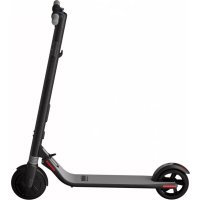
Ninebot KickScooter ES1 - Scooter SEGWAY - Free user manual and instructions
Find the device manual for free Ninebot KickScooter ES1 SEGWAY in PDF.


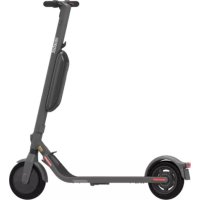
| Product type | Foldable electric scooter |
| Brand | Segway |
| Model | Ninebot KickScooter ES1 |
| Dimensions (unfolded) | 102 × 43 × 115 cm |
| Dimensions (folded) | 113 × 43 × 40 cm |
| Net weight | 11.3 kg |
| Maximum load capacity | 100 kg |
| Recommended age | 14 years and older |
| User height | 120 to 200 cm |
| Maximum speed | 20 km/h |
| Typical range | 25 km |
| Maximum slope | 10% |
| Battery type | Lithium-ion 36 V, 187 Wh |
| Charging time | 3.5 h |
| Rated motor power | 250 W |
| Maximum motor power | 500 W |
| Braking system | Electric brake + rear mechanical brake (pedal) |
| Lighting | Front LED headlight, rear LED taillight |
| Connectivity | Bluetooth 4.0, mobile app |
| Riding modes | Eco, Standard, Sport |
| Safety standards | ANSI/CAN/UL-2272 |
| Frame material | Aluminum alloy |
| Wheels | 8 inches, puncture-resistant |
| Operating temperature | -10 to 40 °C |
Frequently Asked Questions - Ninebot KickScooter ES1 SEGWAY
User questions about Ninebot KickScooter ES1 SEGWAY
0 question about this device. Answer the ones you know or ask your own.
Ask a new question about this device
Download the instructions for your Scooter in PDF format for free! Find your manual Ninebot KickScooter ES1 - SEGWAY and take your electronic device back in hand. On this page are published all the documents necessary for the use of your device. Ninebot KickScooter ES1 by SEGWAY.
USER MANUAL Ninebot KickScooter ES1 SEGWAY
The manufacturer reserves the right to make changes to the product, release firmware updates, and update this manual at any time. Visit www.segway.com or check the App to download the latest user materials. You must install the App, activate your KickScooler, and obtain the latest updates and safety instructions.
www.segway.com
ninebot KickScooter
ANSI/CAN/UL-2272 certified; ANSI/UL 2271 certified
Visite www.segway.com para baixar omanual do usuario Original Instructions
Contents Thanks for choosing the Ninebot KickScooter ES series!
1 Riding Safety 02
2 Packing List 04
3 Diagram 05
4 Assembling Your KickScooter 06
5 Installin a Second Battery Pack 07
6FirstRide 08
7Chargng 09
8 Learning to Ride 09
9 Warnings 11
10 Folding and Carrying 15
11 Maintenance 16
12 Specifications 17
13 Certifications 18
14 Trademark and Legal Statement 20
15 Contact 21
Thanks for choosing the Ninebot KickScooter (hereinafter referred to as KickScooter)!
Your KickScooter is a fashionable transportation device with mobile app. allowing you to connect with other riders.
Enjoy your ride and connect with riders world wide!
WARNING
Always use both electric brake and foot brake for emergency stopping. Otherwise your risk falls and/or collisions from not achieving the max. braking capability.
1 Riding Safety
- The Kick Scooter is a recreational transporter. Before mastering riding skills, you need to practice. Neither Nibelot Inc. (means Nibelot (Santiago) Tech Co., Ltd. and its subsidiaries and all nations) nor Seyway Inc. is responsible for any injuries or damage caused by a rider's inexperience or failure to follow the instructions in this document.
Please understand that you can reduce the risk by following all the instructions and warnings in this manual, but you cannot eliminate all the risks. Remember that whenever you ride the RideScooter you risk injury from loss of control, collisions, and falls. When orloning into public spaces always comrly with the local laws and regulations. As with other vehicles, faster speeds require longer braking distance. Sudden braking on low traction surfaces could lead to wheel slip, or falls. Be cautious and always keep a safe distance between you and other people or vehicles when riding. Be alert and slow down when entering unfamiliar areas.
3 Always wear a helmet when riding. Use an approved bicycle or skateboard helmet that fits properly with the chin stub in place and provides protection for the back of your head.
Do not attempt your first ride in any area where you might encounter children, pedestrians, cars, vehicles, bicycles, or other obstacles and potential hazards. - Respect pedestrians by always yielding the right of way Pass on the left whenever possible. When approaching a pedestrian from the front, stay to the right and slow cover. Avoid starting pedestrians. When approaching from behind, announce yourself and slow down to walking speed when passing. Please obey local traffic laws and regulations if situation is different:
In places without laws comply with the safety guidelines outlined in this manual. Neither Ninebot Inc, nor Segway Inc. is responsible for any property damage, personal injury/death, accidents, or legal disputes caused by violations of the safety instructions. - Do not allow anyone to ride your KickScooter on his/her own unless they have carefully read this manual and followed the New Ride Tutorial in the App. The safety of new riders is your responsibility. Assist new riders until they are comfortable with the basic operation of the KickScooter. Make sure each new rider wears a helmet and other protective gear.
Before each ride check for loose fasteners and damaged components. If the KickScooler makes abnormal sounds or signals an alarm, immediately stop riding. Diagnosis: your KickScooler via the Firebot by Segway App and call your dealer/distributor for service. - Be ale! Scan both for ahead and in front of your KickScooter - your eyes are your best tool for safety avoiding obstacles and low traction surfaces (including, but not limited to, wet, ground, loose sand, loose gravel, and ice).
10.To reduce risk of injury,you must read and follow all"CAUTION"and"WARNING"noicers in this document.Der notrodal an unsa
speed. Under no circumstance should you ride on roads with motor vehicles. The manufacturer recommends riders be 14+ years old. Always follow these safety instructions:
A. People who should not die the Kick Scooter include:
- Anytime under the influence of alcohol or drugs
ii. Anyone who suffers from disease that puts them at risk if they engage in strenuous physical activity
iii. Anyone who has problems with balance or with major skills that would interfere with their ability to maintain balance.
iv. Anyone whose weight is outside the stated limits (see Specifications).
Pregnant women
B. Riders under the age of 18 years old should ride under adult supervision.
C. Comply with local laws and regulations when riding this product. Do not ride where prohibited by local laws.
D. To ride safely, you must be able to clearly see what is in front of you and you must be clearly visible to others.
E. Do not ride in the snow, in a rain, or on roads which are wet: muddy, icy, or that are slippery for any reason. Do not ride over obstacles (sand, loose gravel, or stuble). Do not carry out a loss of balance or traction and could cause a fall.
- Do not attempt to charge your KickScouter if it the charger, or the power outlet is well
- As with any electronic device, use a surge protector when charging to help product; your KickScooter from damage due to power surges and voltage spikes. Only use the Sagway supplied charger. Do not use a charger from any other different product models.
- Use only Ninebot or Swayap approved parts and accessories. Do not modify your KickScoter. Modifications to your KickScoter could interfere with the operation of the KickScoter, could result in serious injury and/or damage, and could void the limited Warranty.
2 Packing List
User Materials

Second Battery Pack
Accessories
oneExtra)

M41les Wrench

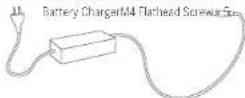
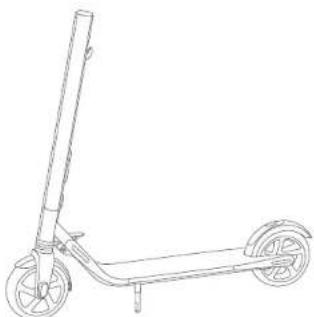
When unboing your KickScooter, please verify that the above items are included in the package. If you are missing any components: please contact your dealer/distributor or nearest service center (see contacts in the user manual). After verifying that all components are present and in good condition, you can assemble your new KickScooter.
Please retain the box and packaging materials in case you need to ship your KikScooter in the future.
Remnber to power all your KickScooter and upplg the charge cable before assembling mounting accessories, or cleaning the mainframe.
0406
3 Diagram
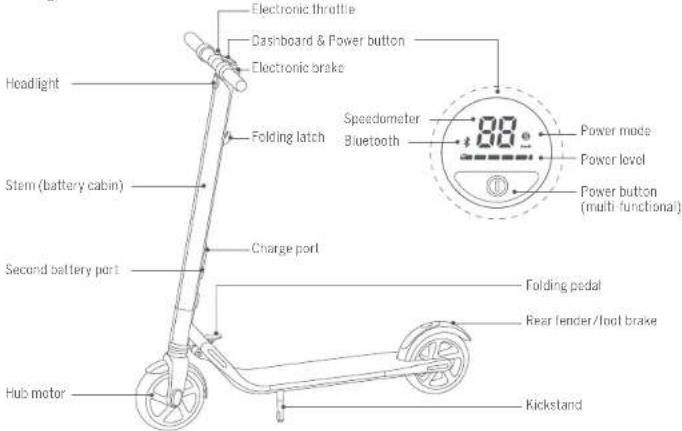
Dashboard & Power Button
Speedometer: Indicates the current speed. Also displays error codes when fault is detected.
Power level Indicates the remaining battery level with 5 bars. Each bar equates to approximately 20% power level.
Power mode (double click the power button to switch the mode)
-ied Sicon Saort mode (maximun power/speed and reduced range)
-1nS"iron-5yearindred(ironium power(cured and recovered tarea)
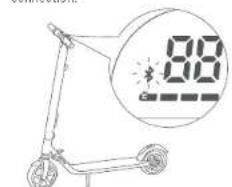
Bluetooth: A smartlink Bluetooth icon indicates that the vehicle is ready to connect. A solid Bluetooth icon indicates that the vehicle is connected to a mobile device.
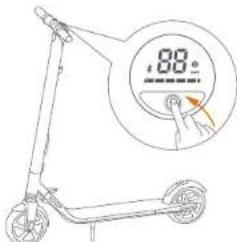
Power button: Short press to power on. Long press to power off. When powered, single click to turn on/off the headlight. Double-click to change power mode.
4 Assembling Your KickScooter
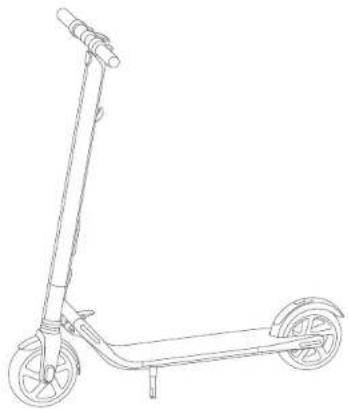
- Unfold the stem and push it until you hear a click. Then unfold the kickstand to support the scooter.
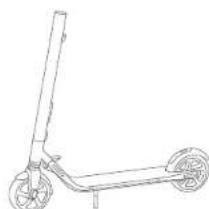
- Install four screws (two on each side) with the included hex wrench.
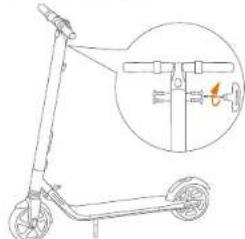
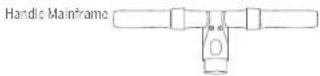
- Firmly connect the wires inside the handle and the stem. Slide the handle onto the stem. Be aware of the correct orientation.
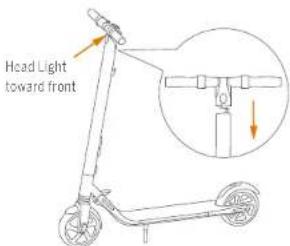
- Verify that your KickScooter powers on and off
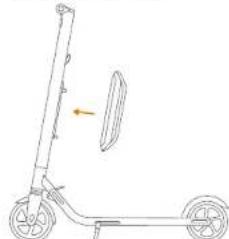
5 Installing a Second Battery Pack
Follow these steps when installing a second battery pack:
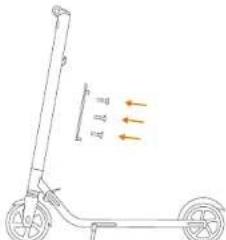
- Remove the three screws on the stem, as shown. Then remove the cover near the charge port.
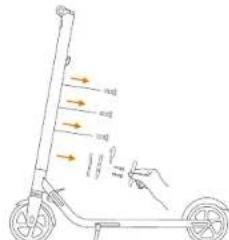
- Install the battery pack onto the support bracket and tighten the screws securely.
- Install the support bracket and fasten securely with three screws, as shown.
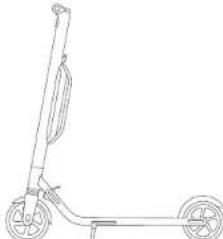
- Verify that your KickScooter powers on and off.
6 First Ride
There are safety risks when learning to ride the KickScooter. You must read the Safety Instructions via the App before your first ride.
For your safety, your new KickScooter is not activated and will becp occasionally after Power ON.
Until activated, the KickScooter maintains a very low riding speed, and can not be ridden with full function. Install the App on your mobile device (with Bluetooth 4.0 or above), connect to the KickScooter with Bluetooth, and follow the App instructions to activate your KickScooter and enjoy the full performance.
Scan the QR code to download the App (iOS 8.0 or above, Android® 4.3 or above).
1 Install the App and register/login. Power on the KickScoo2 A blinking Bluetooth
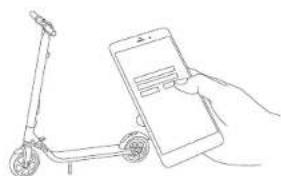
ion indicates the KickScooter is wetting for a connection.
Click "Vehicle" "Search device" to connect to your KickScatcher.
The KickScctor will be open when the connection is successful. The Bluetooth icon will stop blinking and remain illuminated.
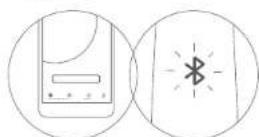
Follow the App instructions to active the KickScooter and learn how to ride safely.
You can now start to use your KickScooter, check the status with App, and interact with other users. Have fun!
(1)
7 Charging
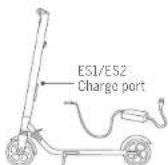
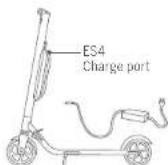
Charging step tips

Open the charge port cover.
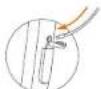
Insert the charge plug.

Close the charge port cover when finished.
WARNING
Do not connect the charger if the charge port or charge cable is wet.
Your KickScooter is fully charged when the LED on the charger changes from red (charging) to green (trickle charge).
Close the charge port cover when not charging
8 Learning to Ride
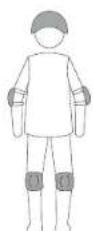
Wear an approved helmet and other protective gear to minimize any possible injury.
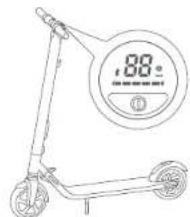
1. Power on the scooter and check the indicator lamp power level. Charge the scooter if the battery level is low.
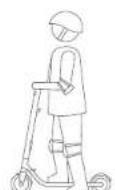
2. Stand on the footrest with one foot and push off with your foot to start gliding.
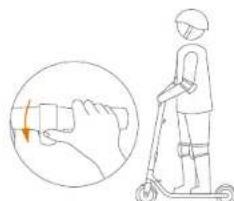
3. Put your other foot on the footrest to keep both feet stable. Press the throttle on right hand to speed up when you are balanced. Note: For your safety, the motor will not engage until the booster reaches 1.8 mph (3 km/h).
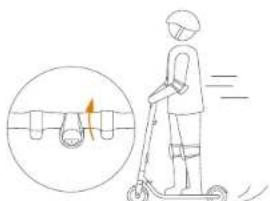
4. Slow down by releasing the throttle: stir the brake handle thumb shifter quickly and stamp the lever with foot at the same time to trigger mechanical braking in order to make a sharp brake.
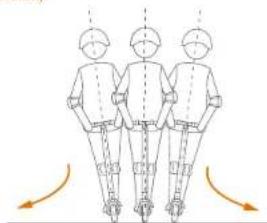
5. To turn, shift your body weight and turn the handle slightly.
WARNING
When braking rapidly you risk serious injury due to loss of traction and falls. Maintain a moderate speed and look out for potential hazards.
9Warnings
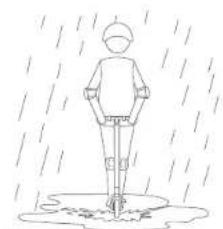
DO NOT ride the scooter in the rain.
WARNING
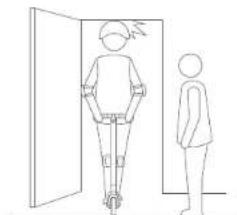
Failure to follow these instructions could lead to serious injury.
Watch your head when passing through doorways.
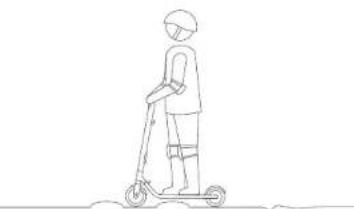
DO NOT ride over speed bumps, thresholds, or other bumps at HIGH SPEED.
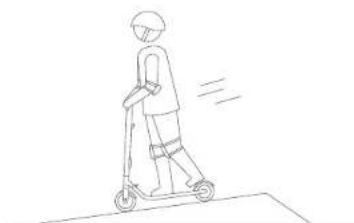
Watch your speed when traveling downhill. Use both brakes together when traveling at high speed.
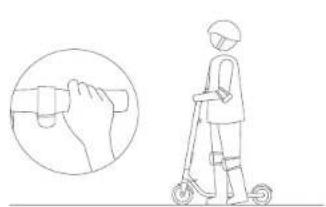

DO NOT press the throttle when walking with the scooter.
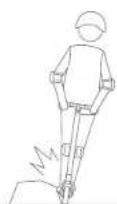
Avoid contacting obstacles with the tire/wheel.
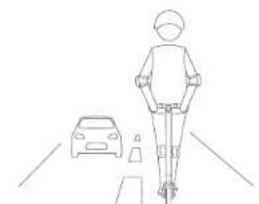
DO NOT ride on public roads, motorways, or highways.
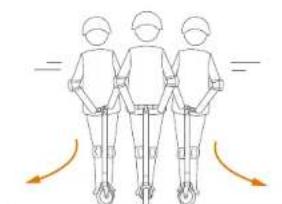
DO NOT rotate the handle violently while driving at high speed.
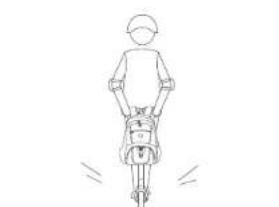

DO NOT carry heavy objects on the handlebar.
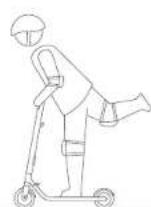
DO NOT ride the scooter with only one foot.
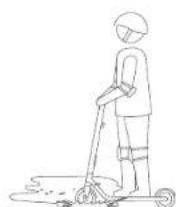
DO NOT Ride through puddles or other bodies of water deeper than 1 inch (2 cm)
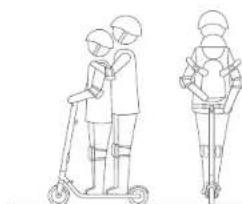
The KickScooter is for one rider only. Do not ride double or carry any passengers.Do not carry a child.
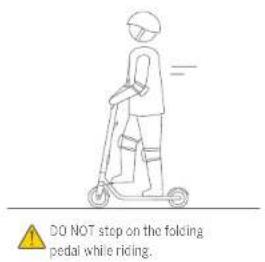
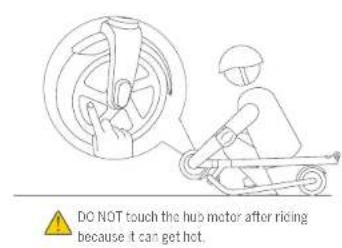

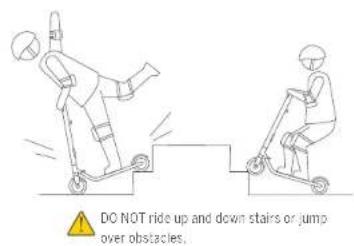
WARNING Always keep both hands on the handlebar or you risk serious injury due to loss of balance and falls.
10 Folding and Carrying
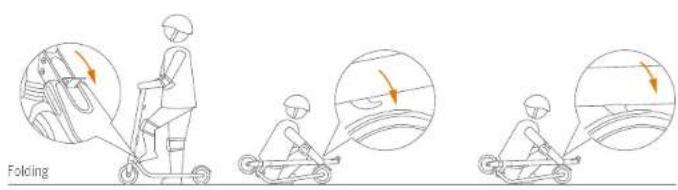
Step on the folding pedal while pushing the handlebar forward slightly. Then fold the handlebar down until it looks into the rear fender.
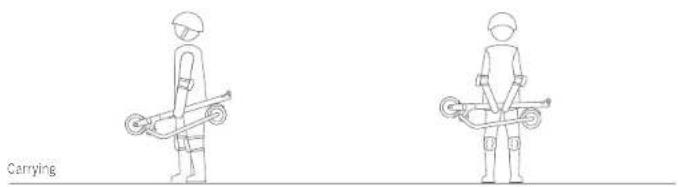
When your KickScooter is folded up, simply lift it by the stem to carry.
11 Maintenance
Cleaning and Storage
Use a soft, wet cloth to wipe the mainframe clean. Hard to remove dirt can be scrubbed with a toothbrush and toothpaste, then cleaned with a soft, wet cloth. Scratches on plastic parts can be polished with fine grit abrasive paper.
NOTE
Do not wash your Kick Scooter with alcohol, gasoline, acetone, or other corrosive/volatile solvents. These substances may damage the appearance and internal structure of your Kick Scooter. Do not wash your Kick Scooter with a power washer or hose.
VACANC
Make sure the KickScooter is powered OFF, the charging cable is unplugged, and the rubber cap on the charge port is tightly sealed before cleaning. Otherwise you may damage the electronic components.
Store your KickScorer in a cool, dry place. Do not store it outdoors for extended periods of time. Exposure to sunlight and temperature extremes (both hot and cold) will accelerate the aging process of the plastic components and may reduce battery life.
Battery Pack Maintenance
Do not store or charge the battery at temperatures outside the stated limits (see Specifications). Do not puncture the battery. Refer to your local laws and regulations regarding battery recycling and/or disposal.
A well-maintained battery can perform well even after many miles of riding. Charge the battery after each ride and avoid draining the battery completely. When at room temperature (70^ [25^]) the battery range and performance is at its best, whereas using it at temperatures below 32^ (0^) can increase range and performance. Typically, at -4^ (-20^) range can be hall unl of the same battery at 70^ (20^) . Battery range will recover when temperature rises. More details are available in the App.
NOTE
Typically, a fully charged battery should retain charge for 120-150 days in Stanley Mode. A low power battery should retain charge for 30-60 days in Stanley Mode. Remember to charge the battery after each use. Consolably draining the battery may cause permanent damage to the battery. Electronics inside the battery record the charge-discharge condition of the battery. Damage caused by over discharge or under discharge will not be covered by the Limited Warranty.
A
Do not attempt to disassemble the battery. Risk of Ira. No user serviceable parts.
WARNING
Do not ride when the ambient temperature is outside the machine operation temperature (see Specifications) because low/high temperature are will limit the maximum power/ torque. Doing so could cause personal or injury or property damage due to slip or fall.
1612
12 Specifications
| Item | ESL: ES2 ES4 | |||
| Dimensions | Infield: Length x Width x Height | 40x12x45 in (102x43x13 cm) | ||
| Fold: Length x Width x Height | 45x7x16 in (113x43x40 cm) | |||
| Weight | Net | 24.9 lbs (11.3 kg) | 27.5 lbs (12.5 kg) | 30.9 lbs (14.0 kg) |
| Rider | Payload | 55-720 lbs (25-100 kg) | ||
| Recommended Age | 14+ years | |||
| Required Height | 3' 11" - 6" (120-200 cm) | |||
| Machine Parameters | Max Speed | 12.4 mph (20 km/h) | 15.5 mph (25 km/h) | 18.6 mph (30 km/h) |
| Typical Range(1) | 15.5 miles (25 km) | 15.5 miles (25 km) | 28.0 miles (45 km) | |
| Max. Slope | 10% | 10% | 15% | |
| Traverseable Terrain | asphalt/flat pavement; obstacles < 0.4 in (1 cm); gaps < 1.2 in (3 cm) | |||
| Operating Temperature | 14-102°F (10-40°C) | |||
| Storage Temperature | -4-122°F (20-50°C) | |||
| IP Rating | PSA | |||
| Battery | Nominal Voltage | 36 VDC | ||
| Max. Charging Voltage | 42 VDC | |||
| Charging Temperature 32-104°F (0-40°C) | ||||
| Nominal Capacity | 187 Wh | 187 Wh | 374 Wh | |
| Battery Management System | Over-heating, short circuit, over-current and over-charge protection | |||
| Number Of Batteries(2) | 1 | 1 | 2 | |
| Motor | Nominal Power | 250 W | 300 W | 300 W |
| Max. Power | 500 W | 700 W | 800 W | |
| Charger | Output Power | 71 W | ||
| Input Voltage | 100-240 VAC | |||
| Output Voltage | 42 VDC | |||
| Output Current | 1.7 A | |||
| Duration of Charging | 3.5 h | 3.5 h | 7 h | |
| Features | Shock Absorber front & rear | |||
| Brake Light | reflector LED rear light | |||
| Atmosphere Light N/A Customizable | colour | |||
| Riding Modes Speed limit mode. Standard mode and Sport mode | ||||
[1]Typical RangeList with riding under full power: 2.65 lbm (75 kg), load: 27T (2EC), 60% of max speed on average or pavement. [2]All R&E accelerometer mode can cause the kinetic history. Some of the parameters would change in this case.
13 Certifications
This product has been tested to and passed ANSI/CAN/UL-2272.
Tathebteesrpees 10
The second battery pack complies with ANSI/UL 2271 and UN/DOJ 38.3.
Federal Communications Commission (FCC) Compliance Statement for USA
This device complies with part 15 of the FCC rules. Operation is subject to the following two conditions: (1) This device may not cause harmful interference, and (2) this device must accept any interference received, including interference that may cause undesired operation.
NOE
This equipment has been tested and found to comply with the limits for a Class B dig tail device, pursuant to part 15 of the FCC Rules. These limits are designed to provide reasonable protection against harmful interference in a residential installation. This equipment generates uses and can radiate radio frequency energy and, if not installed and used in accordance with the instructions, may cause harmful interference to radio communications. However, there is no guarantee that interference will not occur in a particular installation. If this equipment does cause harmful interference to radio or television reception, which can be determined by turning the equipment off and on. The user is encouraged to try to correct the interference by one or more of the following measures:
-Exorient or slocale the recapine anepa.
Increase the separation between the equipment and receiver.
-Connect the equipment into an outlet on a circuit different from that to which the receiver is connected.
- Consult the dealer or an experienced radio/TV technician for help.
This equipment complies with FCC radation exposure limits set forth for an uncontrolled environment.
Industry Canada (IC) Compliance Statement for Canada
This device complies with Industry Canada (License-Exempt PSS standard [6]). Operation is subject to the following two conditions: (1) this device may not cause interference, and (2) this device must accept any interference, including interference that may cause undesired operation of the device.
CANICES-3(B)/NMB-3(B)
Neither Segway Inc. nor Ninebot is responsible for any changes or modifications not expressly approved by Segway Inc. or Ninebot. Such modifications could void the user's authority to operate the equipment.
For model: ES1/ES2/ES4
TCCID24LS8N19527
IC:22636NT9527
European Union Compliance Statement
Battery recycling Information for the European Union

Batteries or packaging for batteries are labeled in accordance with European Directive 2006/66/EC concerning batteries and accumulators and waste batteries and accumulators. The Directive determines the framework for the return and recycling of used batteries and accumulators as applicable throughout the European Union. This law is applied to various batteries to indicate that the battery is not to be thrown away, but rather reamined upon end of life per this Directive.
in accordance with the European Directive 2005/65/TC, batteries and accumulators are labeled to indicate that they are to be collected separately and recycled as end of life. The label on the battery may also include a chemical symbol for the metal concerned in the battery (Pb for lead, Hg for mercury, and Cd for cadmium). Users of batteries and accumulators must not dispose of batteries and accumulators as unsorted municipal wastes, but use the collection framework available to customers for the return, recycling, and treatment of batteries and accumulators. Customer participation is important to minimize any potential effects of batteries and accumulators on the environment and human health due to the potential presence of hazardous substances.
Restriction of Hazardous Substances Directive (RoHS)
Ninebot products sold in the European Union, on or after 31 January 2013 meet the requirements of Directive 2017/65/EU on the restriction of the use of certain hazardous substances in electrical and electronic equipment ("RoHS:recast" or "RoHS:2").
Radio and Telecommunications Terminal Equipment Directive

Segway Europe B.V.
TU Contract Address for regulatory topics only: Logehilweg & 1101CG Amsterdam The Netherlands
Hereby, Nirebot (Changzhou) Tech Co., Ltd, declares that the wireless equipment listed in this section are in compliance with the essential requirements and other relevant provisions of Directive 2014/53/EU.
14 Trademark and Legal Statement
Ninobot and the shape icon are trademarks of Nimebot (Tianjin) Tech. Co., Ltd; Segway is the registered trademark of Segway Inc.; Ninebot by Segway is a trademark of Segway Inc. Android, Google Play are trademarks of Google Inc. App Store is a service mark of Apple Inc. The respective owners reserve the rights of their trademarks referred to in this manual.
The KickScooler is covered by relevant patents. For paten information go to http://www.sogway.com
We have attempted to include descriptions and instructions for all the functions of the KickScooter at the time of printing. However, your KickScooter may differ slightly from the one shown in this document. Visit the Apple App Store (iOS) or the Google Play Store (Android) to download and install the App.
Please note that there are multiple Norway and Netherot by Norway models with different functions, and some of the functions mentioned herein may not be applicable to your unit. The manufacturer reserves the right to change the design and functionality of the KickScooter product and documentation without prior notice.
© 2017 Nirebot (Beijing) Tech Co. Ltd. All rights reserved.
15 Contact
Contact us if you experience issues relating to riding, maintenance and safety, or errors/tauls with your KickScooter.
Americas:
0
14 Technology Drive, Bedford, NH 03100, USA
Tel: +1 (862) 278-5988
191-1003-222-00067. 0000
TAC1-603-227-5001
Toll Free:1-865-473-4929
E-mail Sales customeroperation@segway.com
E-mail Service: technicalsupport@seway.com
Website: www.segway.com
Europe, Middle East and Africa:
Segway Europe B.V.
Hogehtweg 8.1101C Amsterdam, The Netherlands
Email service: service@segway.eu.com
Website: www.segway.com
Have your KickScooler serial number on hand when contacting Segway.
You can find your serial number on the underside of your KickScooter.
or in the App under More Settings Basic Information
Serie ES
Manuel utiliseur
by SEGWAY
Seagay Inc. and Nibelot declared their responsibility for their changes in such modifications not any longer as required pursuant to the application applicable to Seagay Inc. or Nibelot. These modifications cannot susceptibles of entrainer's revocation of the authorisation or utilisation of a separate.
Fourie midele:ESL/ES2/ES4
FOO2ALS8-19627
IC:22636NT9527
© 2017 Segway Inc. All rights reserved.
15 Kontakt
CAN ICS-3(B)/NMB-3(B)
14 Technology Drive, Bedford, NH 33100, EE, U.J.
Talei:6032226000
Ex:1-603-222-6001
Numero Gratis: 1-866-473-4929
E-mail paraventes: customeroperatian@segway.com
E-mail para增值服务:technicalsupport@segway.com
Piping web www.seway.com
Europa, Orienente Media y Africa
Supayy Europe B.V.
Horohw8.1101CC Arslerdam (Paisos Bajos)
E-mail para service, service@sepyw.com
Pagina web: www.segway.com
- Contents Thanks for choosing the Ninebot KickScooter ES series!
- Riding Safety
- Packing List
- Accessories
- Diagram
- Assembling Your KickScooter
- Installing a Second Battery Pack
- First Ride
- Charging
- WARNING
- Learning to Ride
- 9Warnings
- Folding and Carrying
- Maintenance
- Cleaning and Storage
- NOTE
- VACANC
- Battery Pack Maintenance
- A
- Certifications
- Federal Communications Commission (FCC) Compliance Statement for USA
- NOE
- Industry Canada (IC) Compliance Statement for Canada
- CANICES-3(B)/NMB-3(B)
- Restriction of Hazardous Substances Directive (RoHS)
- Radio and Telecommunications Terminal Equipment Directive
- Segway Europe B.V.
- Trademark and Legal Statement
- Contact
- Americas:
- 0
- Europe, Middle East and Africa:
- Manuel utiliseur
- by SEGWAY
- Kontakt
Brand : SEGWAY
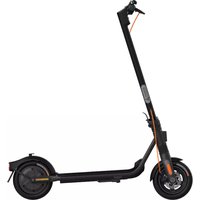
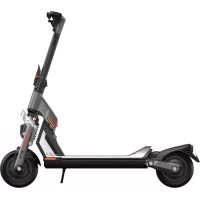
Model : Ninebot KickScooter ES1
Category : Scooter