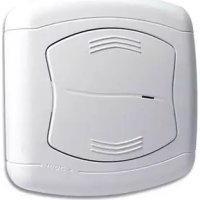
RMV - Wall socket EBODE - Free user manual and instructions
Find the device manual for free RMV EBODE in PDF.



| Product Type | Flush-mounted wall socket for controlling rolling shutters |
| Brand | ebode |
| Model | RMV |
| Supply voltage | 230 V ~ 50 Hz |
| Load type | Rolling shutter motor (up/down) |
| Number of memorizable channels | 32 channels in X10 mode, 16 channels in ebode Secure mode |
| Communication mode | X10 (default) and ebode Secure mode (switchable) |
| RF repeater function | Yes, converts and repeats radio commands to extend range |
| LED indicator | Green (radio command reception), Red (control command reception/transmission) |
| Required flush-mounting box | Diameter 65 mm, depth 40 mm |
| Housing material | Plastic (ABS) |
| Security protocol | ebode Secure mode for sensitive buildings (compatible with TPC, EM, IMRF) |
| Installation | Flush-mounted in a wall box, wiring on terminal block (L, N, up, down) |
| Certification | Compliant with directive 1999/5/EC (R&TTE) |
| Maintenance | Clean with a dry, soft cloth |
| Spare parts | No user-replaceable parts |
| Warranty | Consult the manual or the retailer |
Frequently Asked Questions - RMV EBODE
2. Wire the flush-mounted wall switch according to the diagram: L (phase 230V), N (neutral), and the up/down wires of the shutter.
3. Fix the wall switch in a flush-mounting box of 65 mm diameter and 40 mm depth.
4. Restore the power.
5. Initialize a channel (see next question).
User questions about RMV EBODE
0 question about this device. Answer the ones you know or ask your own.
Ask a new question about this device
Download the instructions for your Wall socket in PDF format for free! Find your manual RMV - EBODE and take your electronic device back in hand. On this page are published all the documents necessary for the use of your device. RMV by EBODE.
USER MANUAL RMV EBODE
natural_image
White electronic device with a circular vent and ventilation grille (no text or symbols visible)Receiver Wall-Mounted Shutter Module

User guide 5

General Security Note
For carefree and safe use of this product, please read this manual and safety information carefully and follow the instructions. Technical manipulation of the product or any changes to the product are forbidden, due to security and approval issues.
Please take care to set up the device correctly - consult your user guide. WARNING: Do Not Open! Risk of Electrical Shock. Voltages in this equipment are hazardous to life. No user-serviceable parts inside. Refer all servicing to qualified service personnel.
Important: the product must be used according to the instructions in this manual and is not suitable for other purposes.
Please avoid the following: strong mechanical wear and tear, high temperature, strong vibrations, and high humidity.
Please also respect the additional security notes in the various user guide chapters. To ensure correct set up please read the manual and security notes carefully.

Please bear in mind to shut off general mains in the electrical panel.

To connect the in-wall switch.
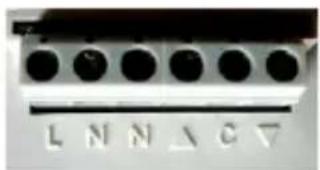
CONNECTING BLOCK
Connect all wires as indicated (refer to wiring diagram 1)

How to connect Live + Neutral Input
L : stands for input Live 230V - 50 Hz N : stands for input Neutral 230V - 50Hz
Wiring up Live + Neutral outputs

N : Neutral

LIVE UP output to Motorization

LIVE DOWN output to Motorization

Schematic 1
C : Never connect C : only for low voltage

How to install wall mount switch.
Wall insert box : dia. 65mm, 40mm deep
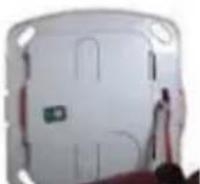
- Gently take off paddle from wall switch.
- Wire up Wall Switch within wall insert box, then fix receiver along with provided screws again wall insert box.
Please note that the general mains in the electrical panel should be turned on again before you start programming.

To learn one address on wall switch (unique addressable control)
An address is made of a HOUSE code and UNIT code, please refer to the manual of the transmitter to properly fix the code to learn by the receiver.
The following procedure consists of learning one (or even more than one) address from the transmitter into the receiver RMV.
FYI :
- Once powered on, the RMV receiver is in the mode to acknowledge X10 standard controls (To secure communication between transmitter and receiver pls refer to step 4).
- The RMV receiver responds to any RF command received from any transmitter, and translates this to X10 commands on the power line.

- Take off the paddle of the receiver.
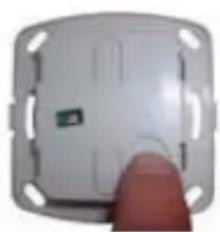
- Shortly press the PROG key, a green LED blinks quickly showing the receiver is awaiting an order from any transmitter (can be either RF or PLC mode).
- Choose and press the chosen key of a remote or transmitter (RF remote, PLC command / programmer) to automatically learn the address. Green LED turns off to acknowledge the order.
- The unique address is now confirmed.
- In case of you would like to learn more than one command (RF remote, PLC command / programmer) just proceed same way from step 2 up to 4.
- Once learning is complete, just put the paddle back onto the receiver. NOTE : For proper installation, make sure the ebode logo shown on the paddle is positioned on the bottom right side.

To switch from standard to secure communication protocol.
The secured ebode protocol can be enabled when needed. When enabled ONLY ebode transmitters like the TPC, EM and IMRF can be used to control ebode modules like RMA, RMV and RPT.
The ebode communication protocol can be associated with the professional security communication protocols, mostly used in alarm systems.
natural_image
Close-up of a white electronic device with a green indicator light and a finger pointing to it (no visible text or symbols)- Take off the paddle of the receiver.
- Press and hold the PROG key till LED lights up green (after 3 seconds).
-
Release PROG key.
-
Press/release minimum 10 times the key PROG, the LED starts blinking for 5 times then to blink off. You are now in secured mode.
-
Just put on again the paddle (make sure ebode logo is located on the bottom right side).

To erase all recorded adresses on the receiver (overall RESET). This procedure consists of erasing all addresses you may entered over time which are not valid to control your Home Automation system.

natural_image
Close-up of a white electronic device with a green indicator light and a finger pointing to it (no visible text or symbols)- Take off the paddle from the receiver.
- Press and hold the PROG key till LED lights up green (after 3 seconds).
- Release PROG key. Both green and red LEDs blinks quickly on, to turn off after several seconds (LED to blink orange). Time to erase depends on the number of entered valid addresses.
- All addresses are now erased, receiver goes back in X10 standard communication protocol.
- Put on again the paddle (make sure ebode logo is located on the bottom right side).

Operating the RMV receiver
Gently press the upper key (ON) to go up. Gently press the lower key (OFF) to go down.
Use a X10 compatible remote control, RF wall switch or programmer to check remote control of the shutter, roll blind or motorized screen.
Troubleshooting: please check FAQ and technical support on www.ebodeelectronics.eu.
RMV cannot be controlled anymore from either an RF or PLC remote/programmer?
- Check and/or change the battery of your remote.
- Go for an overall RESET of the receiver as it may have lost the address due to too many manipulations (starts from point 5), then re-initialize transmitter and receiver RMV both together (starts from point 3).
Red or Green LED blinks randomly even if no commands are given: RF or PLC interference may occur (ie Fluo lamps, Reversible A/C, PC monitor) please add either a filter FD10 in the main control panel or a plug in module FM10 to filter the product in cause.
natural_image
Exterior view of a modern office building (no signage)natural_image
Close-up of a white electronic device with a finger pointing to the side (no visible text or symbols)DOWN
natural_image
Close-up of a white electronic device with a green indicator light and a finger pointing to it (no visible text or symbols)natural_image
Close-up of a white electronic device with a green indicator light and a finger pointing to it (no visible text or symbols)natural_image
Close-up of a white plastic door with red trim and a small black object on the side (no visible text or symbols)natural_image
Close-up of a white electrical socket with a finger pointing to the side (no text or symbols visible)natural_image
Close-up of a white electronic device with a small green indicator light, being touched by a finger (no visible text or symbols)natural_image
Close-up of a white plastic door with red trim and a small green label (no visible text or symbols)natural_image
Close-up of a white plastic door with mounting flanges and a finger pointing to the side (no text or symbols visible)natural_image
Close-up of a white electronic device with a small green indicator light and a finger pointing to it (no visible text or symbols)BORNIER
natural_image
Exterior view of a modern office building (no signage)natural_image
Close-up of a white electronic device with a green indicator light and a finger pointing to it (no visible text or symbols)DOWN
natural_image
Close-up of a white plastic electronic device with a finger pointing to its side (no visible text or symbols)natural_image
Close-up of a white electronic device with a finger pointing to the side (no visible text or symbols)
natural_image
Close-up of a white rectangular door with red trim and blue buttons, partially covered by a hand holding a small object (no visible text or symbols)natural_image
Close-up of a white electrical socket with a finger pointing to the side (no visible text or symbols)natural_image
Close-up of a white plastic electronic component with a finger pointing to it (no visible text or symbols)Bloco de ligações

Como instalar o interruptor de parede.
natural_image
Close-up of a white plastic door with red trim and mounting holes (no visible text or symbols)natural_image
Close-up of a white plastic electronic component with a finger pointing to it, no visible text or symbols.natural_image
Close-up of a white electronic device with a green indicator light and a finger pointing to it (no visible text or symbols)Blocco Connettori
natural_image
Close-up of a white rectangular electronic device with a small red component, possibly a sensor or connector (no visible text or symbols)natural_image
Close-up of a white electronic component with a finger pointing to its side (no visible text or symbols)DOWN
natural_image
Close-up of a white electronic device with mounting holes and a small inset showing internal components (no visible text or symbols)natural_image
Close-up of a white electrical socket with a finger pointing to the side (no text or symbols visible)CE DECLARATION OF CONFORMITY
UK - We, BMB Electronics BV, Kortakker 10 – 4264 AE Veen – The Netherlands, herewith declare that the following designated product RMV, is in compliance with the essential requirements and other relevant provisions of Directive 1999/5/EC.
Device: The use of the symbol indicates that this product may not be treated as household waste. By ensuring this product is disposed of correctly, you will help prevent potential negative consequences for the environment and human health, which could otherwise be caused by inappropriate waste handling of this product. For more detailed information about recycling of this product, please contact your local city office, your household waste disposal service or the shop where you purchased the product.
Batteries: Do not dispose of used batteries in the household rubbish! They should be deposited at a collection point for used batteries.

Also available from ebode electronics:
On-Wall Modules
| Product Description | |
| EM 2-position | RF wall switch, ideal for retro fit installations to e.g. control blinds, shutter, home cinema screens but also lighting or appliances. |
| IMRF Single | position RF wall switch, ideal for retro fit installations to e.g. control applications or an inside or outside light. |
| RMV Control | your shutter, blind or e.g. cinema screen via the front panel keys, or remotely via any ebode / X10 compatible controller. |
| RMA Control | your appliance, light or e.g. pump via the front panel keys, or remotely via any ebode / X10 compatible controller. |
| RPA, RPL, RPT | Ideal for retro fit installations, the classic X10 plugin module in a new and stylish jacket. Control your appliance or lamps etc, via any ebode or X10 compatible controller via PLC AND RF! |
| TPC/ TMML | New stylish RF remote to control any ebode or X10 compatible RF receiver. |
In-Wall Modules
| Product Description | |
| EMML 2-position RF in-wall module to install behind any mechanical wall switch. The EMML is battery operated. | |
| RMML In-wall RF receiver, ideal for any switches lights and appliances up to 300W. | |
| PMML A package containing both the EMML and the RMML. |
Under development
| Product Description | |
| RMP | Update on existing RMV with dry contact output. Ideal to control e.g a motorized gate. |
| RMSN In-wall | RF receiver without Neutral for light applications including incandescent, halogen, fluorescent, LED (even 0.5W charge). |
ebode
www.ebodeelectronics.eu


- Receiver Wall-Mounted Shutter Module
- General Security Note
- To connect the in-wall switch.
- CONNECTING BLOCK
- How to connect Live + Neutral Input
- Wiring up Live + Neutral outputs
- How to install wall mount switch.
- Please note that the general mains in the electrical panel should be turned on again before you start programming.
- To learn one address on wall switch (unique addressable control)
- FYI :
- To switch from standard to secure communication protocol.
- Operating the RMV receiver
- RMV cannot be controlled anymore from either an RF or PLC remote/programmer?
- BORNIER
- Bloco de ligações
- Como instalar o interruptor de parede.
- Blocco Connettori
- CE DECLARATION OF CONFORMITY
- Also available from ebode electronics:
- ebode
Brand : EBODE
Model : RMV
Category : Wall socket