ET110 - Gas detector Klein Tools - Free user manual and instructions
Find the device manual for free ET110 Klein Tools in PDF.


Frequently Asked Questions - ET110 Klein Tools
User questions about ET110 Klein Tools
0 question about this device. Answer the ones you know or ask your own.
Ask a new question about this device
Download the instructions for your Gas detector in PDF format for free! Find your manual ET110 - Klein Tools and take your electronic device back in hand. On this page are published all the documents necessary for the use of your device. ET110 by Klein Tools.
USER MANUAL ET110 Klein Tools
Klein Tools ET110 is an easy-to-use meter that detects and measures concentration levels of carbon monoxide (CO), a colorless, odorless, flavorless gas that is life-threatening even at relatively low concentrations. The meter also measures temperature.
CO Measurement/Detection Range: 0 to 1000 ppm
- Resolution: 1 ppm
- Repeatability: + / - 3%
Accuracy: (Test conditions: 40 ± 10% relative humidity, 1 atm) At 32^ to 59^ (0 to 15^ ): +/- 10% 10 ppm (whichever greater) At 59^ to 77^ (15 to 25^ ): +/- 5% 5 ppm (whichever greater) At 77^ to 122^ (25 to 50^ ): +/- 10% 10 ppm (whichever greater)
- Responding Time: T90 < 60 seconds
- Sensor: Electrochemical, replaceable
- Sensor Life Expectancy: 5 years
- Alarms: Low-Level: 35 ppm
High Level: 200 ppm
Short-Term Exposure Limit (STEL): 200 ppm for 15 minutes
- Temperature Range: 32^ to 122^ F( 0^ to50^ C)
Temperature Resolution: 1^ / C
- Temperature Accuracy: + / - 5^ F / C
- Batteries: 4× AAA
- Operating Altitude: 6562 ft. (2000 m)
- Relative Humidity: <85% non-condensing
- Operating Temp: 32^ to 122^ F( 0^ to50^ C)
Storage Temp: 23^ to 131^ (-5^ to 55^)
Dimensions: 7.75^ × 2.16^ × 1.45^ (197 x 55 x 37 mm)
Weight: 6.87 oz. (195 g) including batteries
- Drop Protection: 3.3 ft. (1m)
Specifications subject to change.

WARNING
To ensure safe operation and service of the meter, follow these instructions. CARBON MONOXIDE IS LIFE-THREATENING EVEN AT RELATIVELY LOW CONCENTRATIONS. Failure to observe these warnings can result in severe injury or death.
- Read the instructions to ensure safe operation.
- Initial calibration should be performed in an area known to be free of carbon monoxide. Calibration in an area containing carbon monoxide will result in incorrect calibration and lower than actual readings.
- Meter is NOT intended as personal protection equipment (PPE).
- Meter is NOT insulated. Avoid contact with areas where energized conductive elements may be present. Shut off power to the area before starting measurements.
Always wear approved eye protection.
FEATURE DETAILS
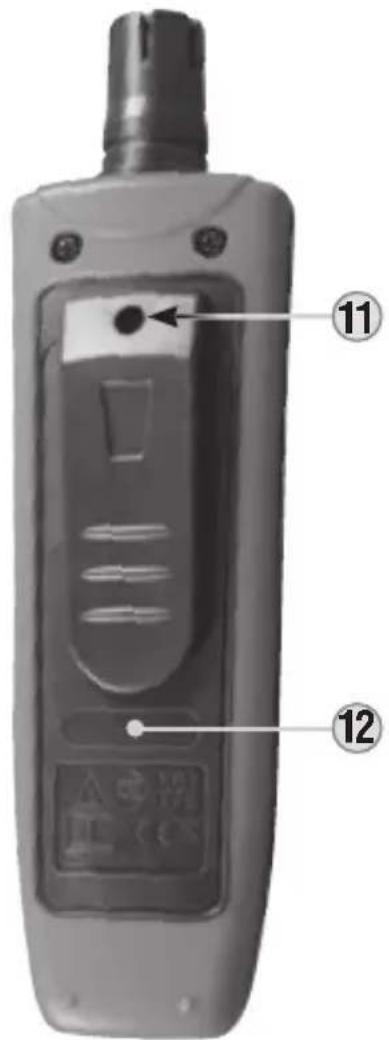
Front of Meter Back of Meter
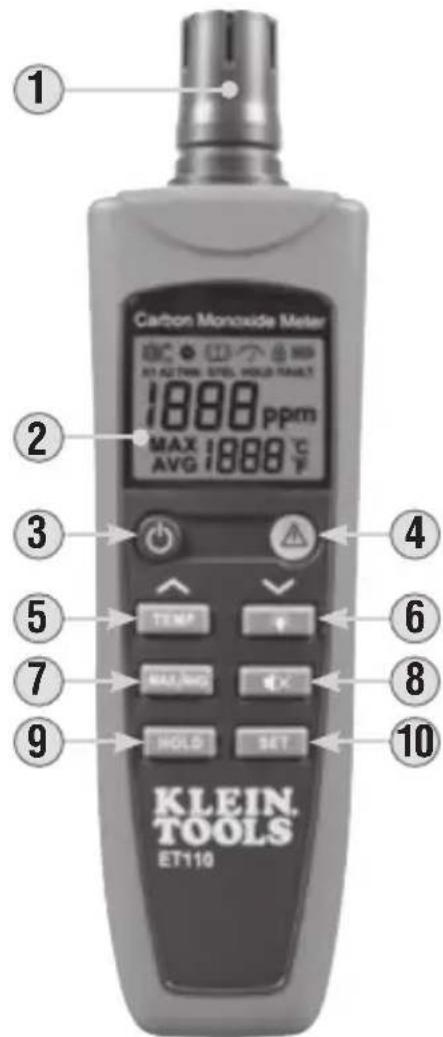
- Electrochemical Sensor
- Backlit LCD Screen
- Power Button
- Warning Indicator Light
- TEMP/ ^ Button
- Backlight /v Button
7.MAX/AVGButton - Mute Button
9.HOLDButton
10. SET Button
11. Battery Screw
12. Battery Door
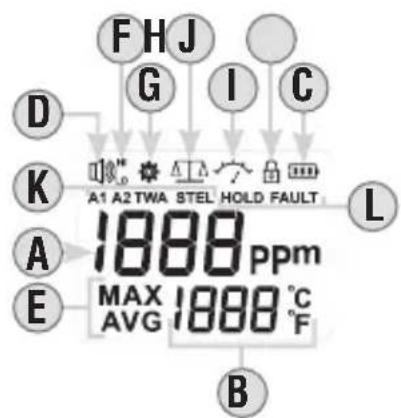
LCD Display Detail
A. CO measurement (ppm)
B. Temperature measurement (^ / ^)
C. Battery Strength Indicator
D. Audible Alarm Icon
E.MAX/AVGicons
F. HI / LO Alarm Icons
G. Shutdown Timer Icon
H. Zero-Setting Icon
1. Calibration Icon
J. Device Lock Icon
K. A1/A2/TWA/STEL Warning Icons
L. HOLD/FAULT Icons
SYMBOLS ON METER

Warning

Read instructions

Wear approved eye protection

Not intended for use as Personal Protective Equipment (PPE)
DEFINITIONS
TWA: Time-Weighted Average
STEL: Short-Term Exposure Limit
FUNCTION BUTTONS
POWER 3
A long press of the Power Button will power on and off the meter. During the setup process, a short press will exit the current screen. Meter will automatically power-off after 20 minutes of non-activity.
TEMP/^5
Press the TEMP Button to enter temperature measurement mode. Readings will be in Celsius (^) by default. Press TEMP Button again to switch to Farenheit (^) . In Set-Up mode, the TEMP Button is used to increase parameter values.
BACKLIGHT/V 6
When powered on, the backlight is off by default. Press the Backlight Button to turn the backlight on or off. Backlight will remain on until it or the meter itself is turned off. In Set-Up mode, the Backlight Button is used to decrease parameter values.
MAX/AVG ⑦
Pressing the MAX/AVG Button will display the maximum concentration value measures since powering-on, pressing again will display the average (AVG) value. A long press will clear all data.
MUTE 8
A short press of the Mute Button will stop the active alarm for 3 minutes. A long press will reset the alarm.
HOLD 9
Press the HOLD Button to hold the current measurement on the display. Press again to return to live measurement mode.
SET 10
Press the SET Button to enter Sensor Self-Test mode. For calibration, short-press to choose parameters and long-press to save current parameter values.
WARNING INDICATOR LIGHT 4
The Warning Indicator Light is NOT a button. It flashes green when conditions are safe, and flashes red with an accompanying audible alarm when the alarm level is reached.
BEFORE USING THIS METER
Carbon Monoxide (CO) is a colorless, odorless, flavorless gas that is life-threatening even at relatively low concentrations. Before using this meter, read and understand the information in the chart below pertaining to CO concentration levels.
| CARBON MONOXIDE CONCENTRATION LEVELS | |
| PPM | Explanation |
| 0-1 | Normal background levels. |
| 9 | EPA/ASHRAE levels for living areas. |
| 35 | OSHA/NIOSH maximum 8 hr exposure limit. |
| 125 | ACGIH ceiling limit of exposure. |
| 200 | OSHA/NIOSH upper limit of exposure: mild headache, fatigue, nausea and dizziness within 2-3 hours. |
| 1500 | OSHA Immediately Dangerous to Life or Health (IDHL). |
OPERATING INSTRUCTIONS
TESTING
- Long-press the power button to power-on the meter; the Zero-Setting icon H will flash. It is at this time that the zero-point is set, so ensure to power-on in an area free of carbon monoxide.
- After powering-on, press the SET Button 10 to perform a 3-minute diagnostic self-test. It is strongly suggested to perform this procedure once for every 24 hours of use.
- Place the meter into the area to monitor. The response time to reach T90 (90% of reading) is 1 minute.
- At CO concentration levels above the A1 Low Alarm limit of 35 ppm (TWA), the buzzer will sound, the light will flash at a frequency of 1Hz, and the LO icon F will appear on the display.
- At concentration levels above the A2 High Alarm limit of 200 ppm, the buzzer will sound, the light will flash at a frequency of 2Hz and the HI icon F will appear on the display.
- The STEL icon K will appear when an average of 200 ppm exposure is present for 15 minutes.
Once you have confirmed the alarm conditions, press the MUTE button to stop audible alarm for approx. 3 minutes. Press again to reactivate the audible alarm immediately.
MAINTENANCE
CALIBRATION
For best results, calibration should be performed by a professional in an environment with a known concentration of carbon monoxide.
SENSOR REPLACEMENT
When the FAULT icon appears on the display, theelectrochemical sensor must be replaced. This CANNOT be done by the user; please contact Klein Tools for more information.
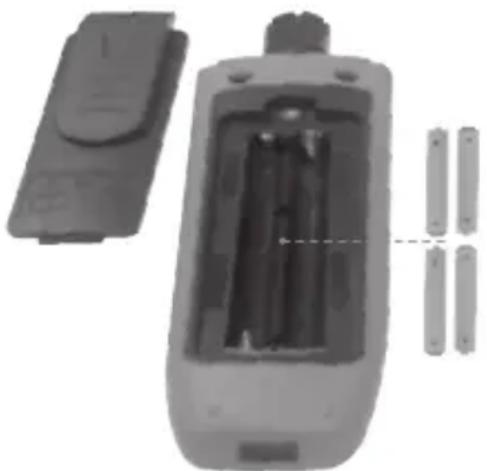
BATTERY REPLACEMENT
When the indicator is displayed, the batteries must be replaced.
- Loosen battery screw 11 and remove battery door 12.
- Remove and recycle spent AAA batteries.
- Install 4 new AAA batteries (note proper polarity).
- Replace battery door and fasten securely with screw.

To avoid risk of electric shock, do not operate meter while battery door is removed.
CLEANING
Be sure meter is turned off and wipe with a clean, dry lint-free cloth. Do not use abrasive cleaners or solvents.
STORAGE
Remove the batteries when the meter is not in use for a prolonged period of time. Do not expose to high temperatures or humidity. After a period of storage in extreme conditions exceeding the limits mentioned in the General Specifications section, allow the meter to return to normal operating conditions before using.
WARRANTY
Do not place equipment and its accessories in the trash.
Items must be properly disposed of in accordance with local regulations. Please see www.epa.gov or www.erecycle.org for additional information.
CUSTOMER SERVICE
KLEIN TOOLS, INC.
450 Bond Street Lincolnshire, IL 60069
1-877-775-5346
customerservice@kleintools.com
For Professionals... Since 1857
CE