3.5 Memory Box - Hard Drive INTENSO - Free user manual and instructions
Find the device manual for free 3.5 Memory Box INTENSO in PDF.



| Product type | External 3.5-inch hard drive |
| Brand | Intenso |
| Model | 3.5 Memory Box |
| Interface | USB 3.0 (backward compatible with USB 2.0/1.1) |
| Power supply | AC adapter 12V 2A |
| On/Off switch | Yes, on the front panel |
| LED indicator | Yes, flashes during activity |
| Compatible operating systems | Windows XP/Vista/7, Mac OS 10.x |
| Included cables | USB 3.0 cable |
| Operating temperature | 5°C to 35°C |
| Electrostatic discharge protection | Sensitive, avoid exposure |
| Safety instructions | Do not open the case or the AC adapter, risk of electric shock |
| Maintenance and cleaning | Clean with a dry cloth, avoid moisture |
| Disposal | Compliant with WEEE directive, do not dispose of with household waste |
| Legal warranty | Standard conditions, warranty sticker must not be damaged |
| Included accessories | Hard drive, USB cable, AC adapter, manual |
| Note | Do not use for commercial or medical purposes |
Frequently Asked Questions - 3.5 Memory Box INTENSO
User questions about 3.5 Memory Box INTENSO
0 question about this device. Answer the ones you know or ask your own.
Ask a new question about this device
Download the instructions for your Hard Drive in PDF format for free! Find your manual 3.5 Memory Box - INTENSO and take your electronic device back in hand. On this page are published all the documents necessary for the use of your device. 3.5 Memory Box by INTENSO.
USER MANUAL 3.5 Memory Box INTENSO
External USB 3.0 Festplatte 3,5^ (8,9cm)
Abmessungen: 190 × 114 × 34 ~mm
Transferrate max. 5 GBit /sek (USB 3.0)
Kapazität: 1MB = 1,000,000 bytes / 1GB = 1,000,000,000 bytes
Service Center (thre RMA-Mr.)
Service Hotline: +49 (0) 900 - 150 40 30
Operating Instructions
3.5
MEMORYBOX
Scope of Delivery
- Intenso High-Speed USB 3.0 hard drive (downwardly compatible)
USB 3.0 cable - Operating instructions
Power supply 12V - 2A
Technical Data
External USB 3.0 hard disk 3.5^ (8,9cm)
Dimensions: 190 × 114 × 34 ~mm
Maximal transfer 5 GBit/sec (USB 3.0)
Capacity: 1MB = 1,000,000 bytes / 1GB = 1,000,000,000 bytes
Safety Instructions
- The plug must be placed next to the device so to be easily accessible.
- Do not open the box of the line adapter. If the box is open, there is danger of life caused by electric shock. The product does not contain parts to be maintained.
- Actuate the line adapter only with plugs of AC 100-240V~, 50/60 Hz. If you are not sure about the provision of electricity at the installation point, ask your energy provider.
- Use the included line adapter and line connection cable only.
To interrupt the power supply of your equipment, unplug the adapter. While you are unplugging it, always hold the adapter. Do never pull the cable.
Instructions for use

Operational between:
5^ C to 35^ C
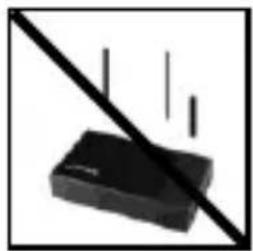
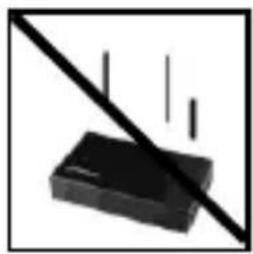
Crush, fall
Protect the device in every operation condition from crush and fall. Do not move the device during operation.

Electrostatic discharge
It is an electrostatic discharge sensitive device. Protect the device from every kind of electrostatic discharge.
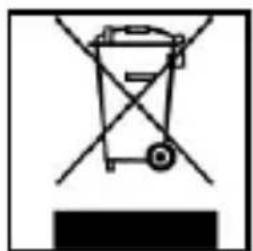
Disposal of WEEE (Waste Electrical and Electronic Equipment)
Devices marked with the WEEE logo are subject to the European Community Directive 2002/96/EC.
Waste Electrical and Electronic Equipment must be separated from household rubbish and disposed at sites that collect WEEE.
By orderly disposing WEEE you will avoid damage caused to the environment.
Installation Instructions
System Requirements:
This hard drive is compatible with the operating systems MS Windows XP / Vista / Windows 7 and Mac OS 10.x.
Please note:
For the USB 3.0 operation an USB 3.0 interface card is needed. The hard disk is downwardly compatible with the previous USB standards. Your PC's hardware configuration as well as the operating system employed can influence the compatibility of the hard drive.
Hard Drive Connection:
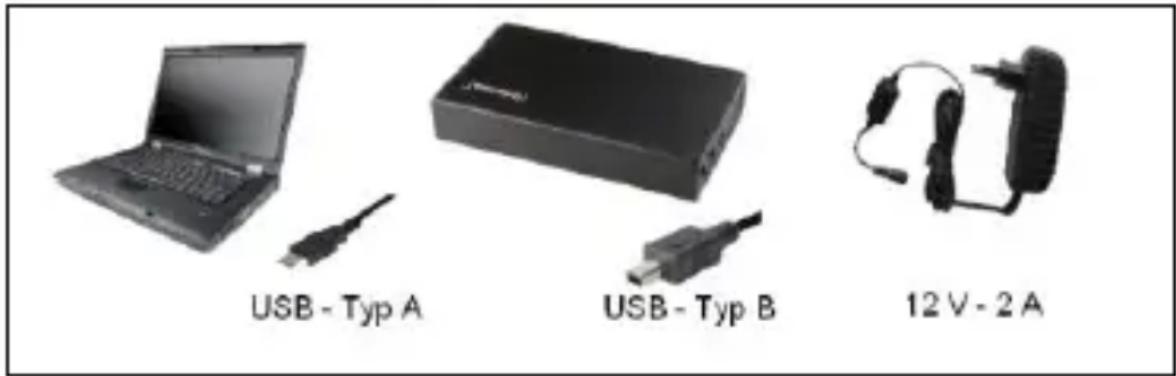
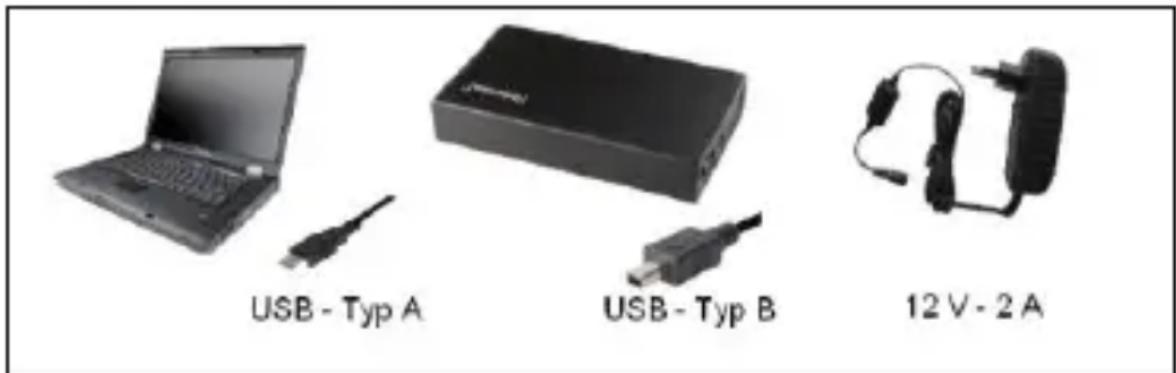
Connect the power supply provided to the external hard drive. Insert the other ending of the power supply into the plug. To switch on push the on-off switch (1/0) on the frontal side of the box.
To connect the external hard drive to your computer, please use only the USB cable provided. Connect the USB 3.0 plug type B with the Intenso hard drive and the plug of the USB 3.0 type A with your computer.
The computer automatically detects the "New Device" and installs the driver. Please wait until driver installation is completed. Your computer now shows an additional drive named "Intenso".
As soon as the hard drive is connected to your computer, the LED flashes. The LED flashes, when writing or reading procedure is carried out.
Trademark: Windows XP / Vista / Windows 7 are registered trademarks of the Microsoft Corporation. Macintosh and MAC are registered trademarks of Apple Computer. All trademarks and names of third parties are property of the respective user.
Limited guarantee conditions
The guarantee only covers the use of this Intenso product. The guarantee does not cover normal wear resulting from faulty, improper use, negligence, accidents, incompatibility or poor functionality of certain computer hardware or computer software.
Claim under guarantee does not exist in the case of noncompliance with the Intenso user manual as well as in case of improper assembly, use or defects of other devices.
Claim under guarantee does not exist in the case that the device is exposed to shock, electrostatic discharge, heat or humidity beyond the product specifications.
Intenso is not liable for data loss or any other occurring indirect damages or secondary damages, for the violation of the guarantee conditions or any other damages, no matter what the reason is.
Important information:
Please note that any claim under guarantee expires, if the capacity label (= guarantee sealing) on the rear side is damaged and if the housing of the hard disk is opened.
This product is not intended for commercial use, for medical or special applications, where a failure of the product can cause injuries, fatalities or substantial property damage.
(Intenso) WARRANTY CONDITIONS
Dear Intenso customer,

Thank you for opting for a high-quality Intenso product. All Intenso products are subject to constant quality inspections and the legal warranty period applies, of course, from the date of purchase. Please be sure therefore to save the sales receipt as proof of purchase.
Warranty conditions
The warranty only covers material and production defects. Intenso GmbH is not liable for the loss of data in units sent to us. The free of charge warranty service covers the repair or replacement of defective parts. Please understand that we cannot render any warranty services, e.g. in case of:
Misuse or improper handling, installation or use
- Damages, scratches or wear
- Modifications, manipulation or repairs by third parties
Damages through force majeure or transport
Your Intenso GmbH
CLAIM PROCEDURE
In case of a claim, please proceed as follows:
- Only returns accompanied with all accessories and sales receipt are accepted.
- In addition, a RMA number is absolutely required for return shipments. You can request this RMA number via e-mail or through the service hotline.
- Please package the product including all accessories and the sales receipt safe for transport. Please stamp the package.
- Please affix the RMA number clearly visible on the outside of the package.
Please send to the following service address:
INTENSO GMBH
Service Center (your RMA-No.)
(0.39 €/min from the landline in Germany
Usual costs apply.)
Email support@intenso.de
Internet www.intenso.de
Istruzioni d'uso
3,5"
MEMORYBOX
Volume di segna
USB 3.0 Disque Dur Externe 3,5^ (8,9cm)
Dimensions: 190 × 114 × 34 mm
Transfert Maximal 5 Gbits/sec (USB 3.0)
Capacité: 1MB = 1,000,000 bytes / 1GB = 1,000,000,000 bytes
Avis de sécurité
Service Center (Votre reference RMA)
Service Hotline: +49 (0) 900-150 40 30
Capacidade: 1MB = 1,000,000 bytes / 1GB = 1,000,000,000 bytes
Avisos de segurarca
Service Center (Seu N° ADM)
Email support@intensode
Internet www.intenso.de
Instrukcja obstugi
3,5“
MEMORYBOX
USB 3.0 BheuHnJxKcTKnDnck 3,5" (8,9cm)
Pa3Mepbl: 190 x 114 x 34 MM
Ckopooctb nepeeaH mKc. 5 TbNT /c (USB 3.0)
EMKOCb:1MB=1000006aainTOB/1GB=100000006aainTOB
Yka3aHnI NO TexHnke 6e3OpacHoCTN:
Po3emka donxHa haxodumc86n3u npubopa u donxHa 6bimb ne2ko docmynHou.
He omkpbIaMb kOpnyc cemeo2o adanmepa. Omkpblu Kopnyc cocmaeJem onachocmb dna XU3Hu, C8ra3aHnyo c nopaxehueM 3neKmpueckum mokom. Oh he codepxum demaneu, mpebyouux yxoda.
IcnoB30aMb cemeo adanmep moBko C 3a3eMneHHbIMU po3emkamu c 100-240B\~, 50/60 Tn nepemehno moka. Ecnu BbI He ybepeHbI, kakou mok nodaemcna Mecmte uCnoB3oAnu, Heobxodmo 3anpocumb unphiopmauio 6om y nocmaauka 3hepuu.
Icnonb306amb monbko npunoxeHHbu Kaebnb da cemeo2o adanmepa u nooknoueHua Kcemu.
- Ymobbl npekpaumb noday numaHn K Bawemy npubopy, bimrHume 6nok numaHn u3 poemku. Ppu ebimraueaHuu depxumecb 3a cam 6nok numaHn. Huko2da He ebimraueaute 6nok numaHn 3a npo8od.
Yka3aHnI NOJIb3OBaTeJIa

Paboua TeMepaTpa MeKdy:
5°C 035°C
yap, naeHne
3aunuaiTe npnbop B IIObOM pa6oem COCTOHNOT ynapa n pnden. He nepeBnraTe np6op B pa6oem COCTOHN.

3neKtpocTaTnueckn pa3pnd
DaHbI np6op ouHb yBCTBnTeJeH K 3JKeKtpnueckomy pa3py. 3aunuaTe np6op ot BcKnx 3JKeKtpnuecknx pa3pdoB.
Yttnn3aunr cTapbIX 3neKtpoPnp6OpOB
O6o3haueHHbIe daHHbIM CnMBOLOM npnbopbl DoJXHbI COOTBeTCTBOBaTb eBponeckOJ dIpeKtUbe 2002/96/EC. BCE 3JIeKTPoPnp6Opbl n CTapblE 3JIeKTPoPnp6Opbl DOJXHbI yTIN3uPoBAtBCa OTdJIbHO OT DOMaShero MycopaYepe3 npedycmOTpeHHbIe Inla 3TOIg TOcydApCTBOM NYHKtbl. HAdJexaasag YtINn3aunr 3JIeKTPoPnp6OpOB n CTapblx 3JIeKTPoPnp6OpOB cIyKNT ppeDToBpaUeHNIO HaHeceHna BpeDa OKpykaIoSei CpeDe.
Hnctpykncnno nHcTajn
TpeboHnK cnCTeMe:
3TOT XeCTKn DnCK COBmecTm C OpeaunOHbIMN CnCTeMaMn MS
Windows XP / Vista / Windows 7 n Mac OS 10.x.
IpeynpeXdeHue:
Дя pa6ombI c USB 3.0 Heobxoduma unmeppeuca nama USB 3.0.
Jecmkuu duck omeeaem cmahdapmam USB npedbyux cepcuu.
KoHΦuaYpaZa annapamHoZ oBeCneUe HuaEzo PK u
npumehemar onepaouHHa cucmeMa mzym 6nuaMb Ha
coBmecmumocmb xecmk02o ducka.
CoeHHHeHne JecTKoro DnCKa:
CoeHnTe npnoXeHHbI 6JOK nTahnC BHeuHM XeCTKIM DnCKOM.
BcTaBbTe dpyroKoHeC 6noka nntaHnB po3eTky. UTo6bl
BKNIOHTb np6Op, HaxMITE Ha BKNIOUaTeIb/BbIKIOUaTeIb (1/0) Ha
pepeHneI paHeJI KOpnyca.
YTo6bI NOdkJIOUHTb BHeuHn JKeCTKn DnCK K KombIoTepy, IcNoJIb3yInTe
Tolbko npinloxeHHb Ka6eIb USB. CoeHnTe pa3bem USB 3.0 Tnna B
c XeCTKIM DnCKOM INHTehCO n pa3bem USB 3.0 Tuna A Ka6eJia C
KOMNbIOTepOM.
KoMnIbIepep pacno3Haet ,HOboe annapathoe o6ecneueHne" n
HCTaJIpyeT dpaBep aBTOMaTHueCKn. IoOxIte, noka 3aBepWntc
HCTaJIpyIaIbepa. Ha „Pa6oyem MeCTe" B paCnpJxKeHn TeIepb
IMeETc8 eue OINH INCKOBOD C 06O3NaueHnem ,Intenso".
Kak TOnbKO BHeHnJ XeCTKn DnCK CoeINHeN C KOMNbIOTepom HaunHaet
MnraTb CBeToDIOJ. CBeToDIOJ MnraeT, KOrda nIeT npOceC 3aPncn IIN
UTeHnI.
Toprobamapka:WindowsXP/Vista/Windows7yBnIOTc3apeHCTpnpoBaHHbIMN ToprobimMapkamKopnpaunmMicrosoft.MacintoshnMAC-3to 3apeHCTpnpoBaHHbIE Toprobbe Mapk Apple Computer.Bce mapknHa3BaHnT TpeTbeCtOPOhblraJIOTcCo6CTBeHHOCTBIO COOTBEETCTByUeero NOplb3OBaTeJI.
OrpaHnueHHbIe ycIOBnra rapaHTn
TapaHTnBkIIOUaET TOJIbKO BO3MeUeHne npOdyKta INHTeHCO.
TapaHTnHe paCnpocTpaHareTcRaHa OBiUHbIe np3NaKn N3HOca, KOToPbIe YBJIOTcR CJIeDCTBnEM HeNpabINbHOrO n HeymeJIO rNCIOJIb3OBaHnA, He6peXHoCTn, aBaPn, HecOBMeCTmOCTn IJIH HeyIDOBJeTBOpHTeNbHO pa6Otbl OnpedeJHHO KOMbIbTePHoro
OBopyoDaHnRA IIIN pOrpaMMHOrO obScneueHnra.
TapaHTnHe paCnpocTpaHareTcRaHa CJIyauHn HeCo6JIIODeHnRAcNOBNI 3KcIIpyaTuAn, a TaKKe HeymeJIO MOHTaJa,
NcIOJIb3OBaHnRA IIIN pRn IOBpeXdEHNx DpyrIMn PpeDMTaMn. EcII npOdyKT 6bl IOBeprHyT BInrHNo COtprcEnH,
3JIeKTPoCtATuYeCKNX pa3PraIOB, TeIIa IINI BIAJXHOCTN, KOTOpbIE He BXODrB OINCAHne npOdyKta, Tpe6OBaHne Ha rapaHTnIO
TePraETcR.
IHTeHCO He OTBeuAeT 3a NotepIO DaHHbIX IIN BO3HnKUHe COnyTCTByOUsne IIN KOCBeHHbIe y6bITKn, 3a HapyuSeHne rapaHTnHBix ycNoBn IIN dpyrIe y6bITKn, He3aBnCmO OT TOrO, KaKOBa INx npuHa.