MegaView 141 UHD - Audio/video extension MARMITEK - Free user manual and instructions
Find the device manual for free MegaView 141 UHD MARMITEK in PDF.



Frequently Asked Questions - MegaView 141 UHD MARMITEK
User questions about MegaView 141 UHD MARMITEK
0 question about this device. Answer the ones you know or ask your own.
Ask a new question about this device
Download the instructions for your Audio/video extension in PDF format for free! Find your manual MegaView 141 UHD - MARMITEK and take your electronic device back in hand. On this page are published all the documents necessary for the use of your device. MegaView 141 UHD by MARMITEK.
USER MANUAL MegaView 141 UHD MARMITEK
1 Table of contents 3
2 Safety instructions 4
3 Your product. 5
3.1 Introduction 5
3.2 Benefits 5
3.3 HDMI features 5
3.4 Package contents 5
4 Getting started 8
4.1 Installation tips 8
4.2 Requirements Cat5e/Cat6 cable 8
4.3 Installing the transmitter and receiver 8
4.4 Installing the infrared return 9
4.5 Installing Power over Cable (POC) 9
5 Usage 10
6 Technical specifications. 11
7 Frequently asked questions (FAQs). 13
8 Notification. 14
8.1 Declaration of Conformity 14
8.2 Recycling 14
8.3 Copyrights 14
2 Safety instructions
- Please read these instructions thoroughly before you use the device and keep them for future reference.
- Only for indoor use.
- Do not use the product in a damp environment or near water.
- Do not expose the product to extremely high or low temperatures, strong light sources or direct sunlight.
- This product is not a toy. Keep out of reach of children.
- Do not open the product (battery panel is an exception): the device may contain live parts.
- Keep batteries out of the reach of children. Dispose of batteries as chemical waste. Never use old and new batteries or different types of batteries together. Remove the batteries when you are not using the system for a longer period of time. Check the polarity (+/-) of the batteries when inserting them in the product. Wrong positioning can cause an explosion.
- Connect the adapter to the mains only after you have verified that the line voltage corresponds to the value specified on the type plates.
- Never connect a power adapter if it's damaged. In such cases, please contact your supplier.
- Repairs or service should only be performed by qualified personnel.
- Disconnect the power adapter from the mains when this device is not in use for prolonged time.
- Improper use, self-installed modifications or repairs will void any and all warranties.
- Marmitek does not accept any product responsibility for incorrect use of the product or use other than for which the product is intended.
- Marmitek does not accept liability for any consequential damage other than the legal product responsibility.
3 Your product
3.1 Introduction
Congratulations on your purchase of the Marmitek MegaView 141 UHD™! The MegaView 141 UHD™ provides a simple way to extend an HDMI or DVI signal over a single networking cable. Extend your HDMI cable up to 70 metres over a single networking cable! Enjoy the latest Ultra HD content and watch Netflix or a Blu-ray film in 4K elsewhere in the home, while maintaining ultimate contrast and beautiful colours. All our products are designed and manufactured to the highest quality requirements.
3.2 Benefits
- HDBaseT technology (uncompressed HD video transmission including 4K60 Ultra HD, 1080p Full HD and all 3D formats).
- Remotely operate a connected A/V device using the infrared return function or Consumer Electronics Control (CEC).
- Built-in Power over Cable (POC) technology eliminates the need for a power socket for the receiver near the TV.
- LPCM7.1, Dolby TrueHD & DTS HD Master Audio (high quality audio support).
Supports HDCP 2.2 for playback of protected 4K Ultra HD content.
3.3 HDMI features
- The maximum throughput speed is 10.2 Gbit/s (gigabits per second). This allows HDMI 2.0 to display Ultra HD 4K images at 60 fps (frames per second).
- Suitable for the latest Ultra HD 4K60 resolution (3840 x 2160 / 60Hz), Deep Color and 4:2:0 chroma colours.
- Deep Color 36-bit (billions instead of millions of colours, better reproduction of subtle differences in gradation and a higher contrast ratio).
Supports all 3D formats (suitable for use with your own 3D equipment).
3.4 Package contents
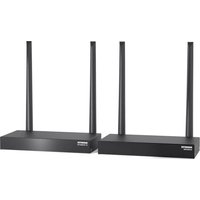
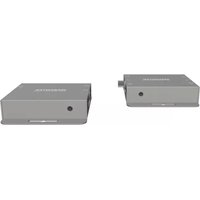
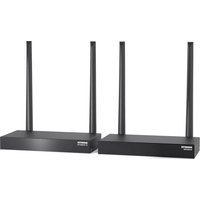
A. 1 x Ultra HD transmitter (HMDI transmitter)
B. 1 × Ultra HD receiver (HDMI receiver)
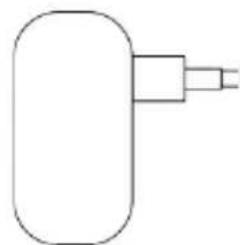
C. 1 × power adapter
D. 1 × infrared receiver cable
E. 1 x Infrared extension cable with 1 blaster LED
F. 1 x user manual
G. 1 × mounting material
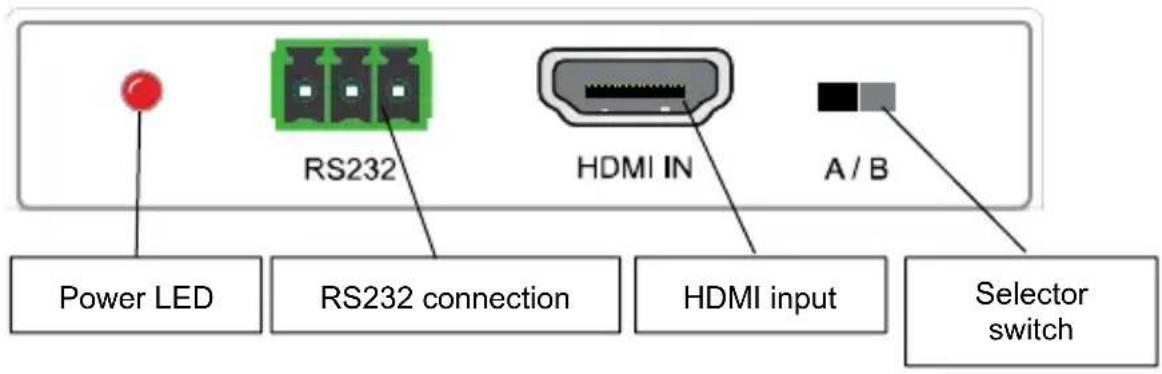
Transmitter left side
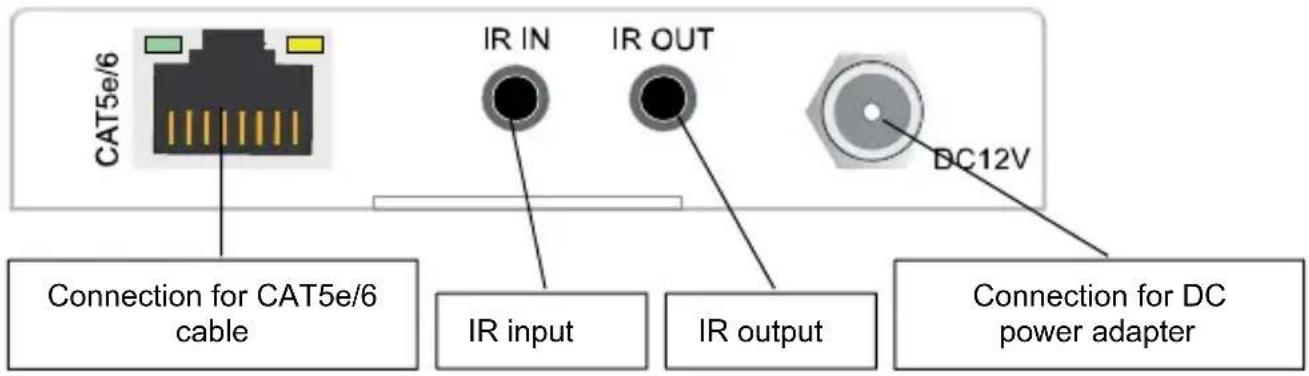
Transmitter right side
Receiver left side
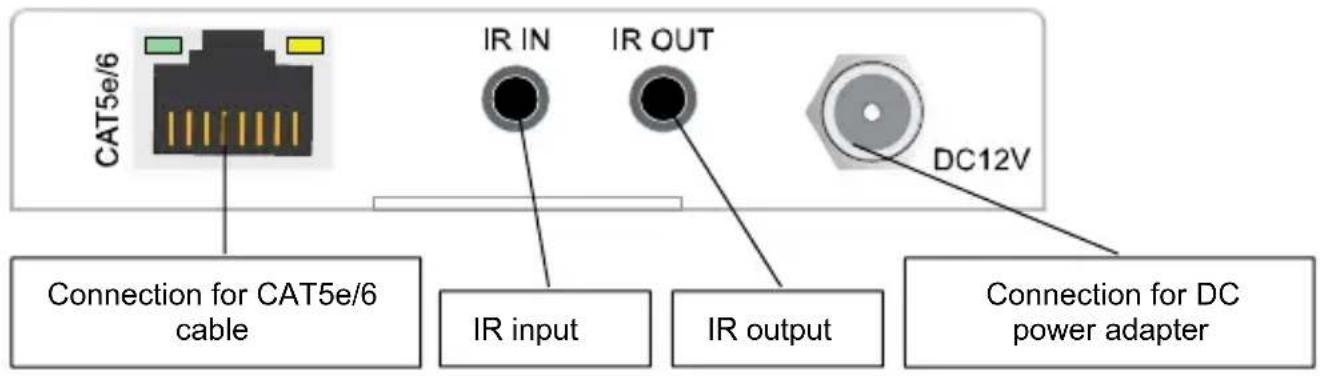
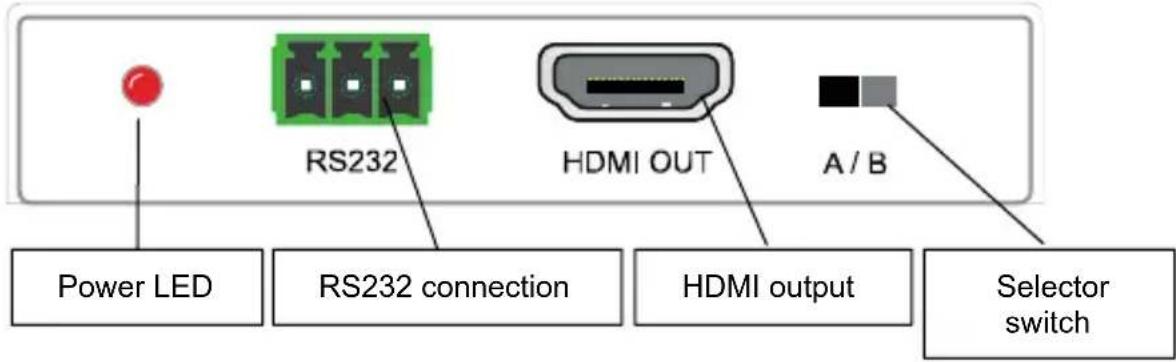
Receiver right side
Power adapter
4 Getting started
4.1 Installation tips
- First switch off all devices (TV and HDMI sources) before connecting them to the MegaView 141 UHD™. If a device cannot be turned off, please remove its plug from the wall socket.
- For the best picture and sound quality, only use High Speed HDMI® certified cables.
- Please be careful when connecting your HDMI cables. These damage easily.
4.2 Requirements Cat5e/Cat6 cable
- UTP, FTP or STP cable
24AWG or lower
Solid twisted pair
100 ohm at 1MHz - RJ-45 connection according to EIA/TIA T568B standard
Instead of a CAT5e cable, a CAT6 cable can also be used (this is of better quality). To optimise transmission quality, use solid twisted pair CAT5e or CAT6 cables.
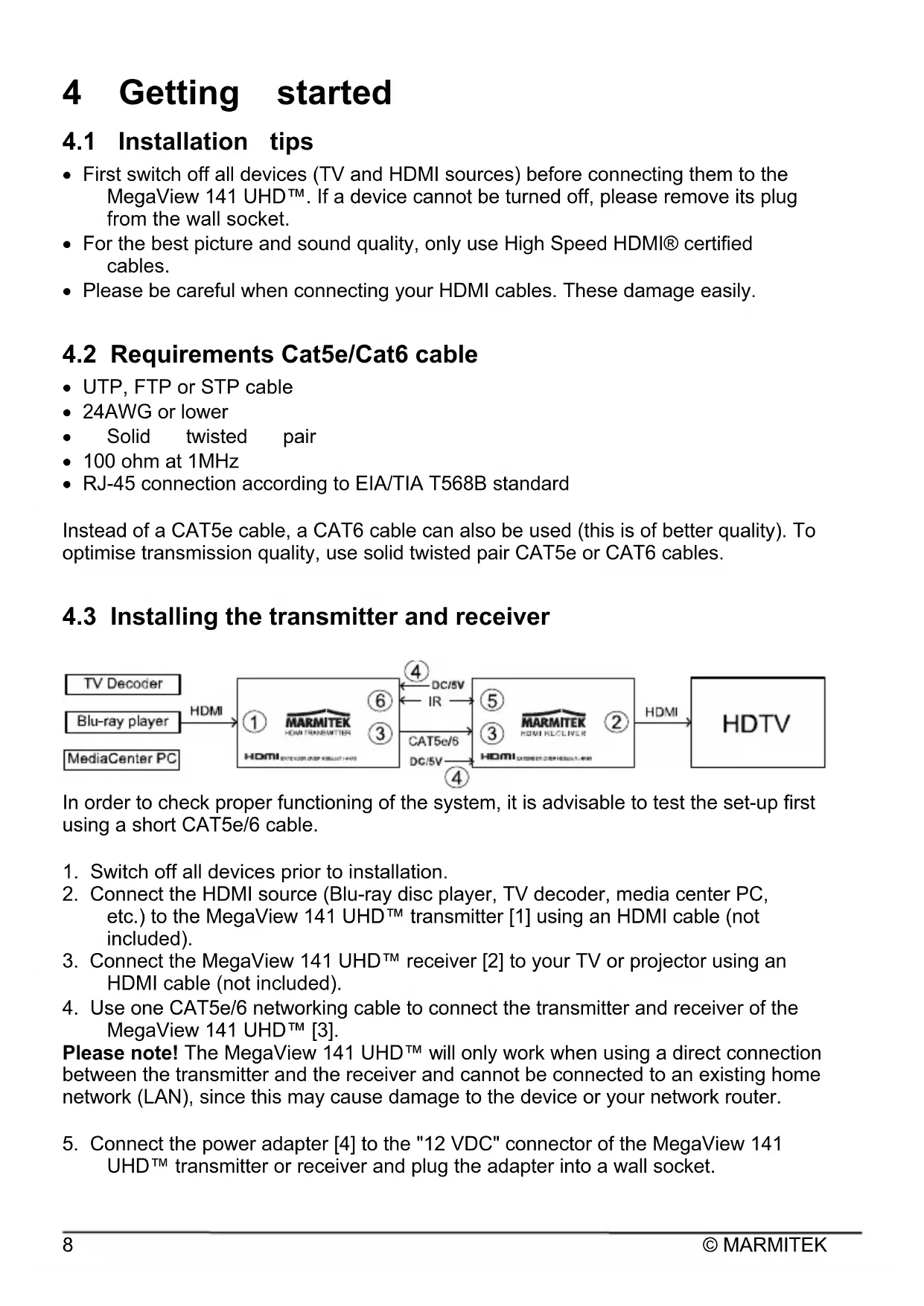
4.3 Installing the transmitter and receiver

In order to check proper functioning of the system, it is advisable to test the set-up first using a short CAT5e/6 cable.
- Switch off all devices prior to installation.
- Connect the HDMI source (Blu-ray disc player, TV decoder, media center PC, etc.) to the MegaView 141 UHD™ transmitter [1] using an HDMI cable (not included).
- Connect the MegaView 141 UHD™ receiver [2] to your TV or projector using an HDMI cable (not included).
- Use one CAT5e/6 networking cable to connect the transmitter and receiver of the MegaView 141 UHD™ [3].
Please note! The MegaView 141 UHDTM will only work when using a direct connection between the transmitter and the receiver and cannot be connected to an existing home network (LAN), since this may cause damage to the device or your network router.
- Connect the power adapter [4] to the "12 VDC" connector of the MegaView 141 UHD™ transmitter or receiver and plug the adapter into a wall socket.
Please note! Do not place the MegaView 141 UHD™ transmitter or receiver in an enclosed space such as a TV cabinet or equivalent. Provide adequate ventilation to ensure that the product is functioning properly and to protect against overheating.
4.4 Installing the infrared return
The MegaView 141 UHD™ has a built-in "infrared return channel" that allows you to use your own remote control to operate the connected device from another room or through closed cabinet doors.
- Connect the infrared (IR) receiver [D] to the "IR IN" jack of the MegaView 141™ receiver [5].
- Position it so that it is visible to your (infrared) remote control, allowing it to receive the transmitted commands (up to 6 metres).
- The most logical place for the IR receiver is in the vicinity of your TV or projector.
- Using the adhesive strip, it can be positioned virtually anywhere.
- Experiment to find the right position before definitive attachment of the IR receiver.
Please note! The adhesive strip may cause discolouration on certain surfaces, or may leave adhesive residue when removed.
- Connect the infrared (IR) extension cable [E] to the "IR OUT" jack of the MegaView 141 UHD™ transmitter [6].
- Attach the infrared (IR) blaster LED near the HDMI source.
- When positioned correctly, one blaster LED can operate all A/V devices within the same compartment of a cabinet.
- Please experiment to find the correct position before permanently attaching the IR blaster LED.
Please note! The adhesive strip may cause discolouration on certain surfaces, or may leave adhesive residue when removed.
4.5 Installing Power over Cable (POC)
The MegaView 141 UHD™ supports bi-directional Power over Cable technology, making it easy to supply power to the transmitter and receiver from a single point. This eliminates the need for a power connection for the receiver near the TV. The transmitter provides power to the receiver using the CAT5e/6 cable. This built-in technology allows you to place the receiver out of sight behind your TV, without the need for a power outlet.
5 Usage
- Switch on the HDMI source (for example, a TV decoder or multimedia PC).
- Switch on the TV or projector and select the appropriate input. This is usually done by pressing the A/V or EXT button on your remote control.
- You will immediately receive images from the connected HDMI source.
- The MegaView 141 UHD™ can also be used to operate the HDMI source from another room, by pointing your own remote control at the IR receiver and pressing a button.
6 Technical specifications
Video
Data transfer HDBaseT
Video resolution 4K(4096x2160)@60Hz and 1080p@60Hz
3D formats 1080p@24Hz and 720p@60Hz
HDMI standard HDMI 2.0b, CEC, EDID, DVI, all 3D formats
and Deep Color 36-bit
HDCP standards HDCP 2.2 and HDCP 1.4
Colour formats RGB and YCbCr 4:2:0
Colour depth 36-bit
Video bandwidth 10.2 Gbps
Clock frequency 340MHz
Audio
Audio formats DTS-HD Master Audio, Dolby TrueHD, Dolby
Digital/AC3,
DTS 5.1 and PCM stereo
Transmitter
AV input 1xHDMI input
UTP/CATx connection RJ45, EIA/TIA T568B
Dimensions (H x W x D) 16 x106 x 84 mm
Weight 250g
Receiver
AV output 1xHDMI output
UTP/CATx connection RJ45, EIA/TIA T568B
Dimensions (H x W x D) 16 x 106 x 84 mm
Weight 250g
Length CAT5e/6 cable Max. 40m@4K60Hz and 70m@1080p
HDMI cable length max. 15 metres
RS232 Euroblock/Phoenix connector
Infrared receiver
Frequency range: 30 - 60 kHz
Infrared reception range: ± 6 metres
Connection:
Cable length: 150 cm
Infrared extension cable with 1 blaster LED
Frequency range: 30 - 60 kHz
Infrared transmission range: ± 1 metres
Connection: 3.5mm jack plug
Cable length: 100 cm
General
Ambient temperature +0 to +70^ C
Ambient humidity 10% to 85%
Power supply 100-240 VAC 50/60Hz, 5 VDC 1A
Power supply technology Power over cable (POC)
Specifications may change without prior notice.
7 Frequently asked questions (FAQs)
No (or poor) image and sound
If you experience poor or no picture after connecting the MegaView 141 UHD™, try detecting the problem by connecting the devices to your TV or projector one at a time. This enables you to determine whether the problem is in the HDMI sources, the HDMI cables, the MegaView 141 UHD™ or the TV.
- Make sure the power adapter is connected and plugged in.
- For the best picture and sound quality, only use High Speed HDMI® certified cables.
- Do not use HDMI cables longer than those specified in the technical data.
- Check the HDMI cables and/or connectors for damage.
- Both the HDMI source and your TV or projector should fully support HDMI.
- Check that your HDMI sources and TV or projector support HDCP 2.2 (High Bandwidth Digital Content Protection) copy protection.
No (or poor) image and sound
- Please check that the HDMI source is switched on.
- Only use CAT5e/CAT6 cables, as specified in section 4. Requirements.
- Make sure that the CAT5e/CAT6 cable is connected well (no breakages).
- Make sure the RJ-45 is connected according to the EIA/TIA T568B standard.
- Make sure that the maximum cable length is not exceeded.
- Prevent installing your system close to RF sources (wireless devices) as much as possible.
- Set your HDMI source to a lower resolution, the CAT5e/6 cable used may not be able to handle the bandwidth of higher resolutions.
Do you have any questions that are not answered here? Then please visit www.marmitek.com
8 Notification
8.1 Declaration of Conformity
CE Hereby, Marmitek BV declares that this MegaView 141 UHD™ is in compliance with the essential requirements and other relevant provisions of the following Directives:
Directive 2014/30/EU of the European Parliament and of the Council of 26 February 2014 on the harmonisation of the laws of the Member States relating to electromagnetic compatibility (recast)
Directive 2014/35/EU of the European Parliament and of the Council of 26 February 2014 on the harmonisation of the laws of the Member States relating to the making available on the market of electrical equipment designed for use within certain voltage limits. Directive 2011/65/eu of the European parliament and of the council of 8 June 2011 on the restriction of the use of certain hazardous substances in electrical and electronic equipment.
8.2 Recycling
Environmental Information for Customers in the European Union and other European countries with separate collection systems.
This symbol on the product or on its packaging indicates that this product shall not be treated as household waste. Instead it shall be handed over to the applicable collection point for the recycling of electrical and electronic equipment. It is your responsibility to dispose of this and other electric and electronic equipment via designated collection facilities appointed by the government or local authorities.
Correct disposal and recycling will help prevent potential negative consequences to the environment and human health. For more detailed information about the disposal of your old equipment, please contact your local authorities, waste disposal service, or the shop where you purchased the product.
8.3 Copyrights
Marmitek is a trademark of Germatron B.V. MegaView 141 UHDTM is a trademark of Marmitek B.V. All rights reserved. Every effort has been made to ensure that the information in this manual is accurate. Marmitek is not responsible for printing or clerical errors. Copyright and all other proprietary rights in the content (including but not limited to model numbers, software, audio, video, text and photographs) rests with Marmitek B.V. Any use of the Content, but without limitation, distribution, reproduction, modification, display or transmission without the prior written consent of Marmitek is strictly prohibited. All copyright and other proprietary notices shall be retained on all reproductions. Other company and product names mentioned herein may be trademarks of their respective companies. Mention of third-party products is for informational purposes only and constitutes neither an endorsement nor a recommendation. Marmitek assumes no responsibility with regard to the performance or use of these products.
Marmitek BV - PO Box 4257 - 5604 EG Eindhoven The Netherlands
4.5 Installation Power over Cable (POC)
Dimensions (H x l x P) 16 x106 x 84 mm
Poids 250g
Récepteur
Dimensions (H x I x P) 16 x106 x 84 mm
Poids 250g
Longueur cable CAT 5e/6 Max. 40m@ 4K60Hz et 70m@1080p
Longueur cable HDMI maximum 15 metres
7 Foire aux question (FAQ)
RS232 Conector Euroblock/Phoenix
Extensor infrarrojo
Dimensioni (L x L x P) 16 x106 x 84 mm
Peso 250g
Ricevitore
Dimensioni (L x L x P) 16 x106 x 84 mm
Peso 250g
Lunghezza cavo CAT 5e/6 Max. 40m@ 4K60Hz e 70m@1080p
Euroblock/Phoenix connector
Frequentie bereik: 30 - 60 kHz
Infrarood ontvangst bereik: ± 6 meter
Aansluting: 3,5mm jack plug