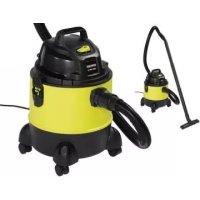
USER MANUAL PNTS 1300 C3 PARKSIDE
NASS-/TROCKENSAUGER/WET & DRY VACUUM CLEANER/ ASPIRATEUR EAU / POUSSIÈRE PNTS 1300 C3
DE AT CH
NASS-/TROCKENSAUGER
Translation of the original instructions
NL BE
NAT-/DROOGZUIGER
Before reading, unfold the page containing the illustrations and familiarise yourself with all functions of the device.
FR BE
GB / IE Translation of the original instructions Page 16
Service-Center......15
Importeur ......15
Application ......16
General description......17
Contents....17
Functional description .....17
Overview 17
Pictograms regarding the use of nozzles and filters....18
Technical data....18
Safety information......18
Symbols used in the instructions......18
General notes on safety......18
Assembly....20
Operation 20
Switching on/off 20
Nozzle usage 20
Wet vacuuming....20
Dry vacuuming....21
Blowing....21
Cleaning/Maintenance ......21
Cleaning the appliance....22
Maintenance....22
Storage....22
Disposal/Environmental protection ....22
Replacement parts/Accessories ..23
Trouble shooting 24
Guarantee 25
Repair Service....26
Service-Center......26
Importer 26
Translation of the original EC declaration of conformity......88
Exploded Drawing ......91
Introduction
Congratulations on the purchase of your new device. With it, you have chosen a high quality product.
During production, this equipment has been checked for quality and subjected to a final inspection. The functionality of your equipment is therefore guaranteed. It cannot be ruled out that residual quantities of water or lubricants will remain on or in the equipment/hose lines in isolated cases. This is not a fault or defect and it represents no cause for concern.

The operating instructions constitute part of this product. They contain important information on safety, use and disposal.
Before using the product, familiarise yourself with all of the operating and safety instructions. Use the product only as described and for the applications specified.
Keep this manual safely and in the event that the product is passed on, hand over all documents to the third party.
Application
The appliance is intended for domestic wet and dry vacuuming in, for example, the house, work room, car or garage. The appliance can also be used as a blower or to suction up water. This equipment is not suitable for commercial use.
Vacuuming of flammable or explosive materials or those which endanger health is prohibited. The manufacturer will not be held responsible for injuries resulting from use which does not comply with the directions, or from incorrect use.
General description
The illustration of the principal functioning parts can be found on the front and back foldout pages.
Contents
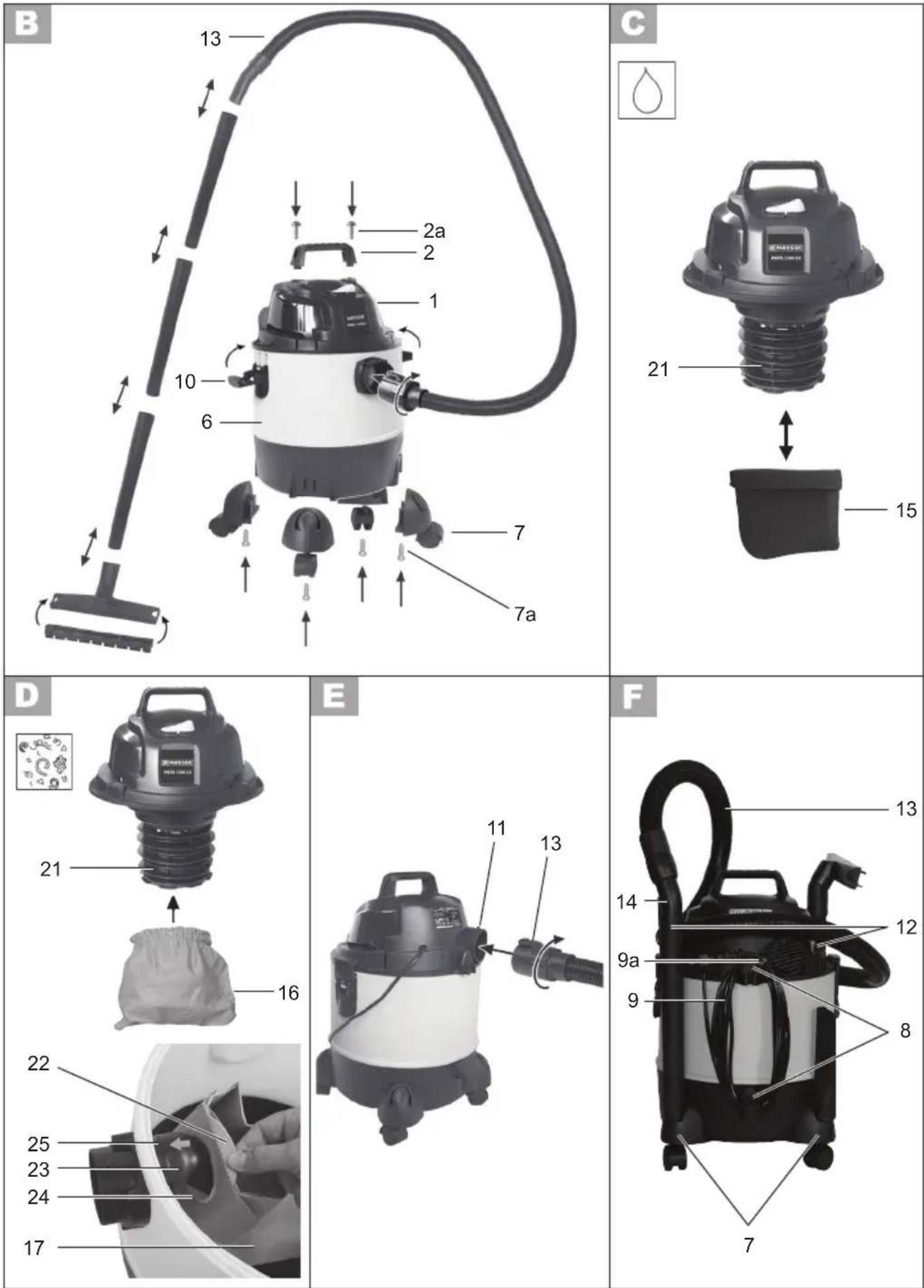
Unpack the appliance and check that it is complete. The appliance is supplied with the motor head fitted (A 1). To remove the motor head, open the securing clips (A 10).
Dispose of the packaging material properly.

1 Motor housing
2 Carrying handle
6 Waste container
7 4 feet with castors and accessory fittings
9a Cable clip
12 3-part vacuum tube
13 Vacuum hose with handle
15 Foam filter
16 Material filter (already mounted)
17 Paper filter bag
18 Floor nozzle with
20 Crevice nozzle
- 6 cross-head screws
- Instruction Manual
Functional description
The wet and dry vacuum cleaner is equipped with a robust plastic container for waste collection. The castors make the appliance very easy to manoeuvre. The suction flow is switched off by a float during wet vacuuming once the waste tank is full. The appliance is also equipped with a blower function.
The following describes the function of the operating parts.
Overview

Housing
1 Motor housing
2 Carrying handle
3 On/off switch
4 4 attachment ports for accessories
5 Suction connection
6 Waste container
7 4 feet with castors and accessory fittings
8 Cable holder
9 Mains cable
9a Cable clip
10 2 locking clips
11 Blower connection
Accessories
12 3-part vacuum tube
13 Vacuum hose with
14 Handle component
Filter
15 Foam filter for wet vacuuming
16 Material filter for dry vacuuming (already mounted)
17 Paper filter bag to vacuum
coarse dirt
Nozzles
18 Floor nozzle with
19 Turnable insert attachment with brush and rubber lip, for vacuuming carpets and smooth surfaces
20 Crevice nozzle

21 Filter basket
22 Flaps on the paper filter bag
23 Intake connections
24 Sealing ring
25 Lip on the suction pipe
Pictograms regarding the use of nozzles and filters

Nozzle to vacuum carpets.

Nozzle to vacuum smooth surfaces and hard floor surfaces.

Nozzle to vacuum dust and dirt from joints and cracks.

Specific nozzle to vacuum cushions and mattresses.

Specific nozzle to clean the car.

Filter to absorb liquids.

Filter not suitable to absorb liquids.

Filter to absorb dry dirt from the house, garage and workshop.

Filter to absorb fine dust e.g. stone dust or wood dust.
Technical data
Rated voltage ..... 220-240 V\~, 50/60 Hz
Rated power input
(Power consumption) 1300 W
Safety class ....☐ II
Protection category.....IPX4
Suction force .... 15 kPA (150 mbar)
Mains cable length....4 m
Waste tank capacity (gross)......20 l
Usable container volume (water) .....12 l
Weight (incl. all accessories) .. approx. 4.6 kg
Technical and visual modifications may be carried out due to further development without prior notice. All dimensions, information and statements provided in these Operating Instructions are therefore subject to amendment. Legal claims which are based on the Operating Instructions can therefore not be recognised.
This appliance can be used by children aged from 8 years and above and persons with reduced physical, sensory or mental capabilities or lack of experience and knowledge if they have been given supervision or instruction concerning use of the appliance in a safe way and understand the hazards involved. Children shall not play with the appliance. Cleaning and user maintenance shall not be made by children without supervision.
Symbols used in the instructions

Hazard symbols with in-
formation on prevention of
personal injury and property
damage.

Precaution symbol (explanation of precaution instead of exclamation mark) with information on prevention of harm/damage.

Notice symbol with information on how to handle the device properly.
General notes on safety

Please read the following safety guidelines in order to avoid risk of fire, electric shock, personal injury and damage to objects:
To avoid accidents and injuries:
- Never leave a machine which is ready for operation unattended at the workplace.
• People and animals must not be vacuumed with the machine.
- Do not aim the suction hose and nozzle at yourself or others during use, particularly not at the eyes and ears; there is a risk of injury.
- Do not vacuum any hot, incandescent, flammable, explosive materials, or those which endanger health. This includes hot ashes, petrol, solvents, acids or caustic solutions. Personal injury could occur.
- Nozzles and suction tubes must not reach head level whilst in use. Personal injury could occur.
To avoid accidents and injuries from electric shocks:
- Ensure that the mains cable is not damaged by being pulled over sharp edges, by jamming, or by pulling on the cable.
- Before each use, check the power supply lead and the extension cable for damage and ageing. Do not use the equipment if the cable is damaged or worn. Danger of electric shock hazard.
- If the power cable for this equipment is damaged, it must be replaced by the manufacturer, a customer service agent of the same or a similarly qualified person in order to prevent hazards.
- Switch the machine off and pull the plug under the following circumstances:
- when you are not using the device,
- transporting it or leaving it unattended;
- when you are checking the device, cleaning it or removing blockages;
- when you are carrying out cleaning or maintenance work or replacing accessories;
- when the power or extension cable is damaged; after contact with foreign bodies or in case of abnormal vibration.
- Never use the mains lead to pull the plug out of the socket or to pull the appliance. Protect the mains lead from heat, oil and sharp edges.
• Make sure that the mains voltage corresponds with the information on the rating plate.
- Only plug the appliance into a socket which is safeguarded by at least 16 A.
- The device must only be connected to a mains socket via a residual-current circuit breaker (RCD) with a rated leakage current of not more than 30 mA.
The following states how damage to the appliance and possible injury to people can be avoided:
- Ensure that the machine is correctly assembled and the filters are in the correct position.
- Do not use without the filter. This could damage the machine.
- Only use original spare parts and accessories delivered and recommended by our Service Centre (see "Spare parts/Accessories"). The use of parts by other manufacturers immediately renders the guarantee void.
- Only have repairs carried out at our authorised customer service points.
- Observe the instructions for cleaning and maintenance of the machine.
- Store the appliance in a dry place and out of reach of children.
Assembly

Pull out the mains plug.
will prevent danger of injury
from electric shock.

The appliance is supplied with the textile filter bag (A 16) fitted.

-
Attach the carrying handle (2) firmly using the cross-head screws (2a) supplied.
-
Attach the feet (7) and secure the feet using the cross-head screws (7a) supplied.
-
Insert the filter:
- Foam filter for wet vacuuming (C 15),
- Material filter ( D 16) for dry vacuuming,
- Paper filter bag ( D 17).
Nozzle usage
Floor nozzle (18) with insert attachment (A 19):
for wet and dry vacuuming of smooth surfaces and fitted carpets.
Floor nozzle (A 18) without insert attachment (A 19):
for wet and dry vacuuming of fitted carpets and for removing persistent dirt.
- Press the clips on the right and left side of the floor nozzle (A 18) and remove the insert attachment (A 19).

Mind that sensitive surfaces might get scratched if the insert attachment is not used.
Crevice nozzle (A 20):
Never vacuum without a filter! for vacuuming gaps, corners and radiators.
-
Place the motor housing (1) on top of the dirt collector (6) and close it with the clip (10).
-
Connect the vacuum hose (13) (bayonet fixing) and the accessories.
Operation

Fully unwind the suction hose (A 13) before commencing work.
Switching on/off

Connect the mains plug.
Switching on the vacuum:
On/off switch (A 3) in position "I"
Switching off the vacuum:
On/off switch (A 3) in position "O"

Wet vacuuming
- For wet vacuuming or to vacuum water, fit the foam filter (15) to the filter basket (21).
To avoid tearing the foam filter (15):
- Use only a dry filter;
- Before inserting, twist the edge of the filter slightly and then roll it back.
-
Suctioning up (draining) water: place the suction hose (A 13) on the handle (A 14) into the water tank and suction up the water.
-
Empty the waste container immediately after vacuuming because it is not designed to store liquids (see "Cleaning/Maintenance").

Never reach into the water to be suctioned up. Danger of electric shock.

If the waste container is full, a float closes the suction opening, and the vacuum operation is interrupted. Switch off the machine and empty the waste tank.

If foam or liquid exits, switch off the machine immediately.

Dry vacuuming

The appliance is supplied with the textile filter bag (A 16) fitted.
For dry vacuuming, pull the material filter (16) over the filter basket (21).

A fluted filter, which can be used instead of the fabric filter included in delivery, is optionally available (see „Replacement parts/Accessories“).
Vacuuming with the paper filter bag:

To avoid the fluted filter becoming clogged, we recommend the additional use of a paper filter bag.
Insert the material filter
- Pull the material filter (16) over the filter basket (21).
Insert the paper filter bag
-
Fold down the side flaps (22) on the paper filter bag (17) at the perforation.
-
Fit the paper filter bag (17) with the short flap (22) upwards over the intake connections (23) (see arrow ). The sealing ring (24) at the filter bag opening must completely surround the lip (25) on the suction pipe.

A fine dust filter bag made of micro filter fleece is also optionally available, which can be used in place of the included paper filter bag (see "Replacement parts/Accessories").
Vacuuming fine dust:
Specific suction processes (e.g. grinding of paints and lacquers, milling or drilling walls, grinding or drilling hard wood) can pose a risk from hazardous dust.
We recommend using the following optional filter combination, which is available, for fine dust (see "Spare parts/Accessories"):
-
Folded filter which is used in stead of the textile filter bag(16) included in the scope of delivery.
-
Fine dust filter bag made of fleece, which is used in stead of the paper filter bag (17) included in the scope of delivery.

Blowing

Operation without the use of a filter is recommended.
To blow, plug the suction hose (13) onto the connection (11) on the motor head.
Cleaning/Maintenance

Pull out the mains plug.
will prevent danger of injury
from electric shock.

Always check the appliance before use for any obvious faults such as a defective mains cable, and have these repaired or replaced.
Cleaning the appliance

Never hose the appliance down with water. Never use aggressive cleaning agents or solvents. This could damage the appliance.
• After use, empty the waste tank ( A 6).
- Clean the waste tank with a damp cloth.
- Wash the foam filter ( A 15) with lukewarm water and soap, and allow to dry. If necessary, wash with lukewarm water and soap and allow to dry.
- Beat out the material filter ( A 16).
- Replace the paper filter bag ( A 17) when full (see "Replacement parts/Accessories" for reordering).
- Tap the optionally available folded filter and clean it with a brush or hand-brush.
Maintenance
• The equipment is maintenance free.
Storage

- For storage, wind the power cord (9) around the retaining bracket (8) on the back of the device.
Fix the power supply cable using the cable clip supplied (9a).
- Insert the separated vacuum tubes (12) into the accessory holder on the appliance feet (7).
- The attachment ports on the motor part serve as nozzle storage (A 4) or on the feet (7).
- Wind the vacuum hose (13)
around the device and plug
the handle section (14) into a
vacuum tube (12).
- Store the appliance in a dry place and out of reach of children.
Disposal/Environmental protection
Be environmentally friendly. Return the tool, accessories and packaging to a recycling centre when you have finished with them.
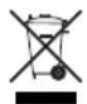
Machines must not be disposed of with household refuse.
Take the machine to a recycling point. The waste plastic and metal parts can be separated, accurately graded and passed on for recycling. Contact our Service Centre for more details.
Defective units returned to us will be disposed of for free.
Replacement parts/Accessories
Spare parts and accessories can be obtained at www.grizzly-service.eu
If you do not have internet access, please contact the Service Centre via telephone (see "Service-Center" Page 26). Please have the order number mentioned below ready.
| Position instruction manual | Position exploded drawing | Description Use Order No. |
| A 1 | 2.1 | Motor | housing |
| A 2 1 | Carrying handle | 91096886 | |
| A 6 5 | Waste container | 91096878 | |
| A 7 7 | Foot with castor and scres | 72800092 | |
| A 10 | 3 Locking clip | 91096877 | |
| A 12 | 11 | 3-part vacuum tube | 91099439 |
| A 13/14 | 10 | Vacuum hose with handle | 72800218 |
| A 15 | 12 | Foam filter (wet filter), pack of 3 | 30250101 |
| A 16 | 14 | Material filter, 20 l (blue) | 30250135 |
| A 17 | 13 | Paper filter bags, 20 l, pack of 5 | 30250132 |
| A 18/19 | 8 | Floor nozzle with turnable insert attachment | 72800217 |
| A 20 | 9 | Crevice nozzle | 72800039 |
Optionally available:
| Description | Design | Use | Order No. |
| Fine dust filter bag 20 l, pack of 5 | 2-layer micro filter fleece, white | | 30250111 |
| Fluted filter with filter cover | Without steel inner mesh | | 91092030 |
| Fluted filter without filter cover | With steel inner mesh | | 91099009 |
| Filter cover | for fluted filter | | 91092036 |
| Cushion nozzle | black | | 72800040 |
| Car nozzle | black | | 91096445 |
Trouble shooting
| Problem Possible cause | Fault correction | |
| Device does not start | Mains voltage is not present | Check plug socket, cable, line, plug and fuse, where appropriate, repair through electrical specialist |
| Defective on/off switch (A 3) | Repair through customer service |
| Worn carbon brushes |
| Defective motor |
| Low or lack of suction | Hose system (A 13/14) or jets (A 18/20) blocked | Remove obstructions and block-ages |
| Suction pipe (A 12) assembled incorrectly | Assemble suction pipe correctly |
| Container (A 6) open Close | container |
| Container (A 6) full Empty container |
| Filter (A 15/16/17) full or clogged | Empty, clean or replace filter |
| Float in filter basket (D 21) incorrectly positioned (e.g. due to jerky movements) | Switch off the equipment so the ball drops then switch on again |
| Float in the filter basket (D 21) faulty | Repair by Customer Care |
| Float does not switch the appliance off | Float in the filter basket (D 21) does not move | Release float |
| Float in the filter basket (D 21) faulty | Repair by Customer Care |
| Dust or dirt is blow out of the device | Filter (A 15/16/17) is not or not correctly assembled | Use missing filters or check the correct position of the filter |
Guarantee
Dear Customer,
This equipment is provided with a 3-year guarantee from the date of purchase.
In case of defects, you have statutory rights against the seller of the product. These statutory rights are not restricted by our guarantee presented below.
Terms of Guarantee
The term of the guarantee begins on the date of purchase. Please retain the original receipt. This document is required as proof of purchase.
If a material or manufacturing defect occurs within three years of the date of purchase of this product, we will repair or replace – at our choice – the product for you free of charge. This guarantee requires the defective equipment and proof of purchase to be presented within the three-year period with a brief written description of what constitutes the defect and when it occurred.
If the defect is covered by our guarantee, you will receive either the repaired product or a new product. No new guarantee period begins on repair or replacement of the product.
Guarantee Period and Statutory Claims for Defects
The guarantee period is not extended by the guarantee service. This also applies for replaced or repaired parts. Any damages and defects already present at the time of purchase must be reported immediately after unpacking. Repairs arising after expiry of the guarantee period are chargeable.
Guarantee Cover
The equipment has been carefully produced in accordance with strict quality guidelines and conscientiously checked prior to delivery.
The guarantee applies for all material and manufacturing defects. This guarantee does not extend to cover product parts that are subject to normal wear and may therefore be considered as wearing parts (e.g. filters or attachments) or to cover damage to breakable parts (e.g. switches, batteries, or parts made of glass).
This guarantee shall be invalid if the product has been damaged, used incorrectly or not maintained. Precise adherence to all of the instructions specified in the operating manual is required for proper use of the product. Intended uses and actions against which the operating manual advises or warns must be categorically avoided.
The product is designed only for private and not commercial use. The guarantee will be invalidated in case of misuse or improper handling, use of force, or interventions not undertaken by our authorised service branch.
Processing in Case of Guarantee
To ensure efficient handling of your query, please follow the directions below:
- Please have the receipt and identification number (IAN 270424) ready as proof of purchase for all enquiries.
- Please find the item number on the rating plate.
- Should functional errors or other defects occur, please initially contact the service department specified below by telephone or by e-mail. You will then receive further information on the processing of your complaint.
GBIE
- After consultation with our customer service, a product recorded as defective can be sent postage paid to the service address communicated to you, with the proof of purchase (receipt) and specification of what constitutes the defect and when it occurred. In order to avoid acceptance problems and additional costs, please be sure to use only the address communicated to you. Ensure that the consignment is not sent carriage forward or by bulky goods, express or other special freight. Please send the equipment inc. all accessories supplied at the time of purchase and ensure adequate, safe transport packaging.
Repair Service
For a charge, repairs not covered by the guarantee can be carried out by our service branch, which will be happy to issue a cost estimate for you.
We can handle only equipment that has been sent with adequate packaging and postage.
Attention: Please send your equipment to our service branch in clean condition and with an indication of the defect.
Equipment sent carriage forward or by bulky goods, express or other special freight will not be accepted.
We will dispose of your defective devices free of charge when you send them to us.
Service-Center
GB Service Great Britain
Tel.: 0871 5000 720
(£ 0.10/Min.)
E-Mail: grizzly@lidl.co.uk
IAN 270424
IF Service Ireland
Tel.: 1890 930 034
(0,08 EUR/Min., (peak))
(0,06 EUR/Min., (off peak))
E-Mail: grizzly@lidl.ie
IAN 270424
Importer
Please note that the following address is not a service address. Please initially contact the service centre specified above.
Service Réparations ......38
Service-Center......38
Importeur ....38
Service-Center......62
Importador 62
Service-Center....74
Importatore ....74
Service-Center......86
Importador 86
* The object of the declaration described above satisfies the provisions of Directive 2011/65/EU of the European Parliament and the Council of 8 June 2011 on limiting the use of certain harmful substances in electrical and electronic appliances.
** The last two digits of the year in which the CE marking was affixed.
informativ, informative, informatif, informatief, informativo
2015-07-31_rev02_gs
GRIZZLY TOOLS GMBH & CO. KG