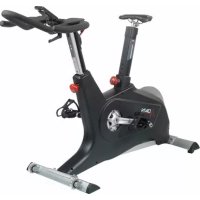
R300 - Exercise bike DKN - Free user manual and instructions
Find the device manual for free R300 DKN in PDF.



| Product type | Exercise bike |
| Brand | DKN |
| Model | R300 |
| Dimensions (L x W x H) | Approximately 100 x 50 x 130 cm |
| Weight | Approximately 35 kg |
| Power supply | 2 AA 1.5V batteries (not included) |
| Display | LCD with display of time, repetitions, calories, and heart rate |
| Main functions | Timer, stroke counter, total counter, calories, heart rate (wireless option) |
| Maximum user capacity | 120 kg |
| Warranty | 2 years against manufacturing defects |
| Use | Domestic only |
| Maintenance and cleaning | Clean with a damp cloth, no harsh chemicals. Regularly check fastenings. |
| Safety | Read instructions before use. Do not allow children to use without supervision. |
| Spare parts and repairability | Use original parts. Repairs by authorized dealer. |
| General information | Manual included. For any questions, contact dealer or info@dkn.fr |
Frequently Asked Questions - R300 DKN
User questions about R300 DKN
0 question about this device. Answer the ones you know or ask your own.
Ask a new question about this device
Download the instructions for your Exercise bike in PDF format for free! Find your manual R300 - DKN and take your electronic device back in hand. On this page are published all the documents necessary for the use of your device. R300 by DKN.
USER MANUAL R300 DKN
This guarantee covers all manufacturing and material flaws on DKN-Technology fitness products purchased from an authorized DKN-Technology dealer for a period of two years from purchase.
If you wish to make a claim under the guarantee, DKN-Technology shall be entitled to repair or replace the defective unit or part at its discretion. The owner of the unit must pay for the transport costs and any dealer's workshop costs. To make a claim under the guarantee, take your guarantee card to your dealer. The dealer will then take the necessary action. If this is not possible, contact your national DKN-Technology importer.
The following are not covered by the guarantee: normal wear and tear and the consequences of improper treatment or damage caused by the purchaser or third persons and faults which are due to other circumstances. Claims may not be made under the guarantee if modifications have been made to the original construction or equipment or if DKN original parts were not used to repair the unit. In no event the manufacturer shall be liable for incidental or consequential losses, damages or expenses in connection with exercise products.
This exerciser has been designed for home use only. Professional use, commercial or use in gym centers, will automatically cancel the manufacturers' and/or importers' product liability.
Before you start training on your exerciser, please read the instructions carefully. Be sure to keep the instructions for information, in case of repair and for spare part delivery.
This exerciser is made for home use only and tested up to a max. body weight of 120kg
- Follow the steps of the assembly instructions carefully.
- Use only original parts as delivered.
Before the assembly, be sure to check if delivery is complete by using the included parts-list.
- For assembly use only suitable tools and ask for assistance with assembly if necessary.
- Place the exerciser on an even, non-slippery surface. Because of possible corrosion, the usage of any exerciser in moist areas is not recommended.
- Check before the first training and every 1-2 months that all connecting elements are tight fitting and are in the correct condition.
- Replace defective components immediately and/or keep the equipment out of use until repair.
- For repairs, use only original spare parts.
- In case of repair please ask your dealer for advice
- Avoid the use of aggressive detergents when cleaning.
- Ensure that training starts only after correct assembly and inspection.
- For all adjustable parts be aware of the maximum positions to which they can be adjusted/tightened to.
This exerciser is designed for adults. Please ensure that children use the exerciser only under the supervision of an adult.
- Ensure that those present are aware of possible hazards, e. g. movable parts during training.
- Warning: incorrect/excessive training can cause health injuries.
- Please follow the advice for correct training as detailed in training instructions.
Consult your physician before starting with any exercise programme. He can advise on the kind of training and which impact is suitable.
- The owner's manual is only for customers' reference.
- The supplier can not guarantee for mistakes occurring due to translation or change in technical specification of the product.
All data displayed are approximate guidance and cannot be used in any medical application.
Insert 2 batteries AA 1.5 V (!Batteries are not included)
Switch on
After inserting the battery and/ or after pressing any button the display will be blinking for some seconds. If the displays fail, replace the battery. Please consult your retailer if this had already been done.
Start Training
Please see attached Training Instructions
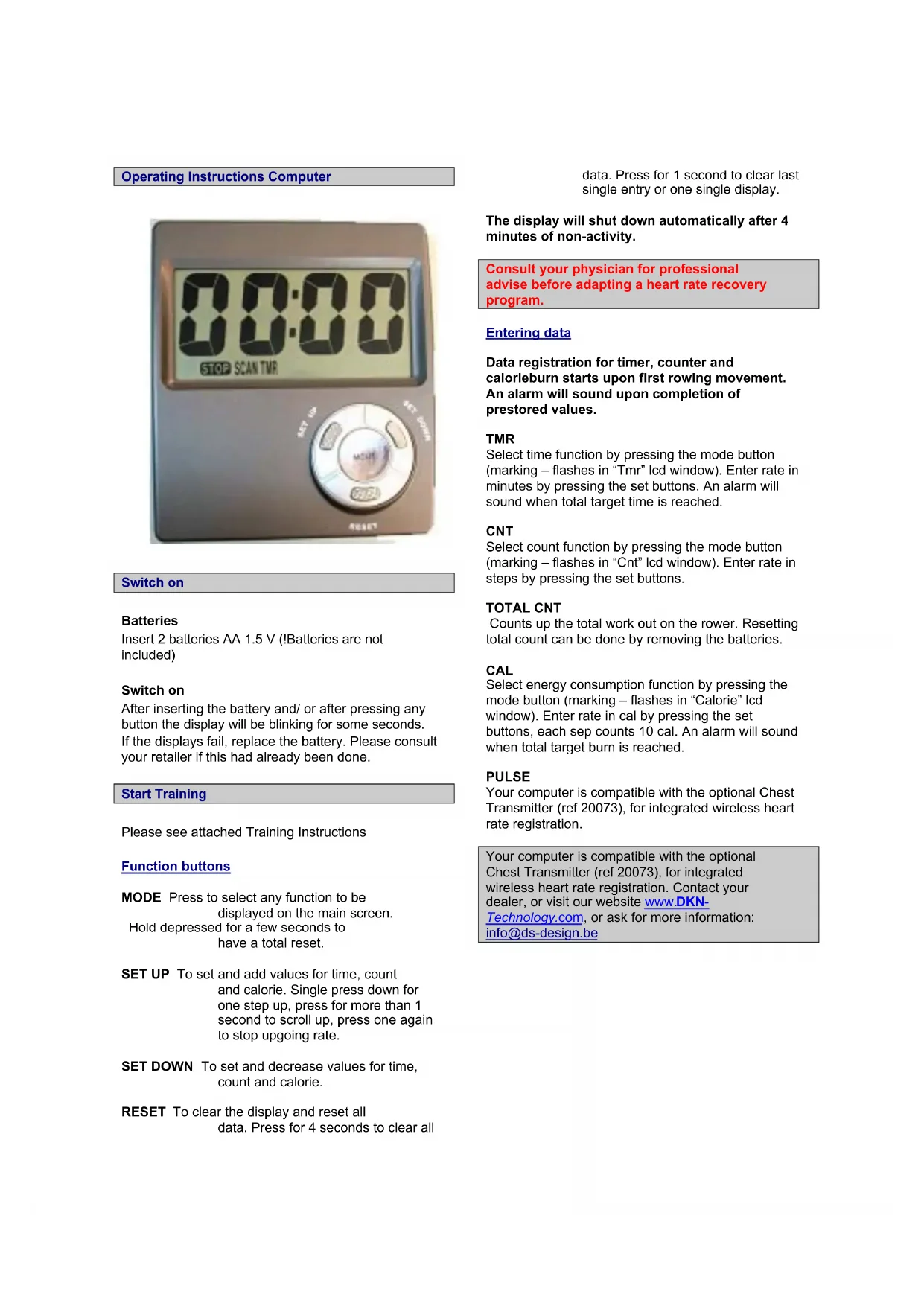
Function buttons
MODE Press to select any function to be displayed on the main screen. Hold depressed for a few seconds to have a total reset.
SET UP To set and add values for time, count and calorie. Single press down for one step up, press for more than 1 second to scroll up, press one again to stop upgoing rate.
SET DOWN To set and decrease values for time, count and calorie.
RESET To clear the display and reset all data. Press for 4 seconds to clear all
The display will shut down automatically after 4 minutes of non-activity.
Consult your physician for professional advise before adapting a heart rate recovery program.
Entering data
Data registration for timer, counter and calorieburn starts upon first rowing movement. An alarm will sound upon completion of prestored values.
TMR
Select time function by pressing the mode button (marking - flashes in "Tmr" Icd window). Enter rate in minutes by pressing the set buttons. An alarm will sound when total target time is reached.
CNT
Select count function by pressing the mode button (marking - flashes in "Cnt" lcd window). Enter rate in steps by pressing the set buttons.
TOTAL CNT
Counts up the total work out on the rower. Resetting total count can be done by removing the batteries.
CAL
Select energy consumption function by pressing the mode button (marking - flashes in "Calorie" LCD window). Enter rate in cal by pressing the set buttons, each sep counts 10 cal. An alarm will sound when total target burn is reached.
PULSE
Your computer is compatible with the optional Chest Transmitter (ref 20073), for integrated wireless heart rate registration.
Your computer is compatible with the optional Chest Transmitter (ref 20073), for integrated wireless heart rate registration. Contact your dealer, or visit our website www.DKN-Technology.com, or ask for more information: info@ds-design.be
Training Instructions
If you have not been physically active for a long period of time and also to avoid health risks you should consult your general physician before starting to exercise.
To achieve a considerable improvement of your physical resistance and your health, some aspects of how to achieve the most efficient training should be followed:
Intensity
To achieve maximum results the right intensity has to be chosen. The heart rate is used as guideline. As a rule of thumb the following formula is commonly used:
Maximum pulse rate = 220 - Age
While exercising the pulse rate should always be between 60% - 85% of the maximum pulse rate.
For your personal training rates please see the attached pulse rate chart.
When starting to exercise you should keep your rate at 70% of your maximum pulse rate in the first couple of weeks.
With increasing improvement of fitness the pulse rate should be slowly increased to 85% of your maximum pulse rate.
This is a personal orientation value. Consult your physician for professional advise before adapting a heart rate recovery program.
Fat burning
The body starts to burn fat at approx. 65% of the maximum pulse rate.
To reach an optimum at burning rate, it is advisable to keep the pulse rate between 70% - 80% of the maximum pulse rate.
The optimum training amount consists of three workouts per week 30 minutes each.
Example:
You are 52 years of age and would like to start exercising.
Maximum pulse rate = 220 - 52(age) = 168 pulse/min
Minimum pulse rate = 168 × 0.7 = 117 pulse/min
Highest pulse rate = 168 × 0.85 = 143 pulse/min
During the first weeks it is advisable to start with a pulse rate of 117, afterwards increase it to 143.
With increasing improvement of fitness the training Intensity should be increased to 70% -85% of your maximum pulse rate.
This can be done by increasing the pedalling resistance, by using a higher pedalling frequency or with longer training periods.
Training Organisation
Warm-up
Before every training session you should warm-up for 5-10 minutes.
Some stretching and pedalling with low pedalling resistance will get you started.
DKN-Technology warming-up program
Stretch or flexibility training is vital for a fit and healthy physique. By training your body to become more supple, you will improve circulation and help keep your muscles mobile. The DKN-Technology warming-up program allows you to achieve a supple and well-toned form.
If you have not focused on stretch training before, start with gentle stretches and increase the length or time of the stretch as you become more flexible over time. With a wide variety of fitness items throughout the DKN-Technology range, you will always find a product to match your fitness level.
Prior to exercise, make sure you warm up thoroughly to protect against injury and prepare yourself for the activity to come. Warm up for 8 to 10 minutes by walking or jogging lightly on the spot or use a treadmill, bike or elliptical strider. Try to include some similar movements that make up your workout, include stretches to target your tighter muscles. The duration of the warm up activity will depend on the intensity of your workout as well as your own fitness level.
Work-out
During the actual training a rate of 70% -85% of the maximum pulse rate should be chosen.
The time-length of your work out can be calculated with the following rule of thumb:
daily work-out: approx. 10 min. per unit
2-3 x per week: approx. 30 min. per unit
1-2 x per week: approx. 60 min. per unit
Cool down
To introduce an effective cool-down of the muscles and the metabolism the intensity should be drastically decreased during the last 5 - 10 minutes.
Stretching is also helpful for the prevention of muscle ache.
Success
Even after a short period of regular exercises you will realise that you constantly have to increase the pedalling resistance to reach your optimum pulse rate.
The units will be continuously easier and you will feel a lot fitter during your normal day.
For this achievement you should motivate yourself to exercise regularly. Choose fixed hours for your work out and do not start training too aggressively.
An old saying amongst sportsmen says:
"The most difficult thing about training is to start it."
Wishing you lots of fun and success with your exerciser.
All data displayed are approximate guidance and cannot be used in any medical application.
Heart rate displayed is an approximate readout, and may not be used as guidance in any cardio-vascular related medical or paramedical program.
DKN-Technology warming-up programma
| Nr. No. | Description Qty | Nr. No. | Description Qty | |||
| 1 | Frame | 1 | 32 | Pedal supporter | 1 | |
| 2 | Front stabilizer | 1 | 33 | Pedal | 2 | |
| 3 | Fly Wheel set | 1 | 34 | Carriage bolt for Pedal | 4 | |
| 4 | Axle set | 1 | 35 | Washer M6 | 4 | |
| 5 | Handle | 1 | 36 | Round nut, M6 | 4 | |
| 6 | Foam grip | 2 | 37 | Square cap | 2 | |
| 7 | End cap | 2 | 38 | Strap set | 2 | |
| 8 | Idle Wheel set 50mm | 1 | 39 | Saddle | 1 | |
| 9 | Idle Wheel set 30mm | 1 | 40 | Bracket for Saddle | 1 | |
| 10 | Bolt | 2 | 41 | Bolt for PU-wheel | 4 | |
| 11 | Washer | 2 | 42 | PU-wheel | 4 | |
| 12 | Nut | 2 | 43 | Spacer for PU-wheel | 4 | |
| 13 | Magnetic set | 1 | 44 | Washer | 4 | |
| 14 | Tension control knob | 1 | 45 | Round head Nut | 4 | |
| 15 | Bolt for tension control | 1 | 46 | Computer end cap | 1 | |
| 16 | Carriage bolt for front stabilizer | 2 | 47 | Self-screw M5 | 2 | |
| 17 | Washer M8 | 18 | 48 | Bracket for computer | 1 | |
| 18 | Round head nut M8 | 4 | 49 | Washer | 2 | |
| 19 | Front left cap | 1 | 50 | Round head Bolt M6 | 1 | |
| 20 | Front right cap | 1 | 51 | Round head Nut M6 | 1 | |
| 21 | Alu rail | 1 | 52 | Computer | 1 | |
| 22 | Stabilizer for Rail | 1 | 53 | Bolt M5 | 2 | |
| 23 | Allen bolts M8 | 14 | 54 | Round cover left | 1 | |
| 24 | Adjustable knob | 2 | 55 | Round cover right | 1 | |
| 25 | Rear end-cap | 2 | 56 | C-shape cover left | 1 | |
| 26 | End cap for rail (back) | 1 | 57 | C-shape cover right | 1 | |
| 26 | End cap for rail connect (rear) | 1 | 58 | Decoration cover | 2 | |
| 27 | Stopper block for rail | 4 | 59 | Bolt M4 | 6 | |
| 28 | Bolts M5 | 8 | 60 | Self-screw M4 | 6 | |
| 29 | Carriage bolt for Rail M8 | 2 | 61 | Sensor bracket | 1 | |
| 30 | Connect cover | 1 | 62 | Sensor | 1 | |
| 31 | Screw | 6 | 63 | Bolt | 2 |
The owner's manual is only for customers' reference.
The supplier can not guarantee for mistakes occurring due to translation or changes in technical specifications of the product.
Designed and Manufactured by
Ds-Design
Zwaarveld 58
9220 Hamme
Belgium
Dkn-France
Centre Auvergne Entreprise