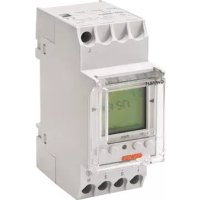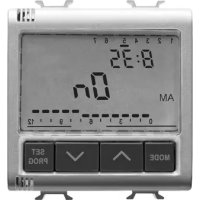
GW96846 - Digital timer switch Gewiss - Free user manual and instructions
Find the device manual for free GW96846 Gewiss in PDF.



| Product type | Digital time switch |
| Brand | Gewiss |
| Model | GW96846 |
| Dimensions (H x W x D) | 45 x 17.5 x 60 mm |
| Weight | Approx. 90 g |
| Power supply | 230 V AC (as indicated on device), 5 VA |
| Switching output | 1 potential-free changeover contact |
| Load capacity | Resistive 16 A / 250 V AC, inductive cos φ 0.6: 8 A / 250 V AC, lamp 1000 W |
| Number of programming steps | 50 |
| Minimum switching time | 1 minute |
| Power reserve | 3 years at +20°C (integrated battery) |
| Operating accuracy | Approx. ± 2.5 s/day at 20°C |
| Day block creation | Fixed or free selection |
| Status display | Yes (LCD) |
| Sealable | Yes |
| Mounting | On DIN rail |
| Operating temperature | -25°C to +55°C |
| Protection class | II |
| Maintenance and cleaning | Clean with a dry cloth. Do not use abrasive products. |
| Safety | Installation and battery replacement by a qualified electrician. Observe safety instructions. |
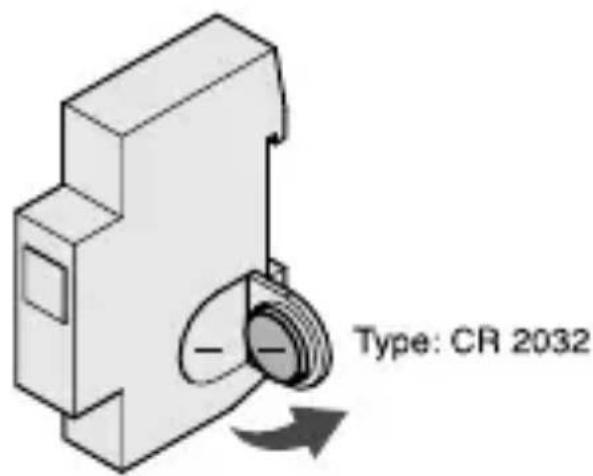
| Spare parts and repairability | Replacement battery (type CR2032) accessible after disassembly by a professional. |
Frequently Asked Questions - GW96846 Gewiss
User questions about GW96846 Gewiss
0 question about this device. Answer the ones you know or ask your own.
Ask a new question about this device
Download the instructions for your Digital timer switch in PDF format for free! Find your manual GW96846 - Gewiss and take your electronic device back in hand. On this page are published all the documents necessary for the use of your device. GW96846 by Gewiss.
USER MANUAL GW96846 Gewiss
INTERRUPTORE ORARIO DIGITALE
DIGITAL TIME SWITCH-INTERRUPTEUR HORAIRENUMERIQUE
INTERRUPTOR HORARIO DIGITAL-DIGITALE ZEITSCHALT
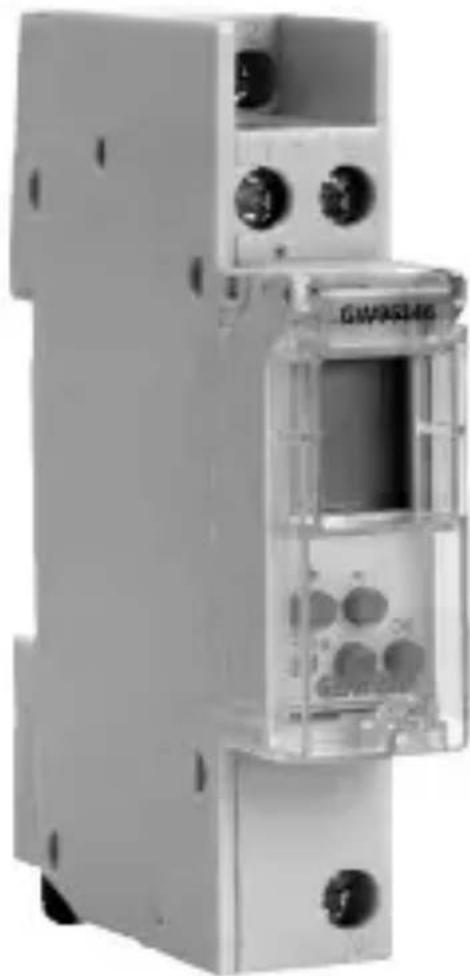
GW 96 846
Premere 1 volta = FIX ON = fix on
Premere 2 volte = FIX OFF = fix off
- The connection and installation of electrical devices may only be carried out by a qualified electrician.
- Interventions in and changes to the device result in the voiding of the warranty claim.
- Observe your national regulations and the respective safety provisions.
- Fixed and flexible conductors of up to 6mm^2 may be attached to the external terminal clips.
- Flexible cables with a cross-section ≤ 1mm^2 should not be attached.
GENERAL INFORMATION
- Deactivation commands take priority over activation commands.
- If the power supply is correct, the dots shown between the hours and minutes (HH:MM) are displayed permanently. The dots flash if the power supply is interrupted.
- If there is no power supply, the position indicator display goes out after 1 minute (sleep-function).
- The whole display flashes the battery needs to be changed for up to 2 weeks to warn that.
- This appliance requires a battery to function properly. If the battery is replaced, make sure the old battery is disposed of according to the waste regulations foreseen by your local authorities.
PRODUCT DESCRIPTION
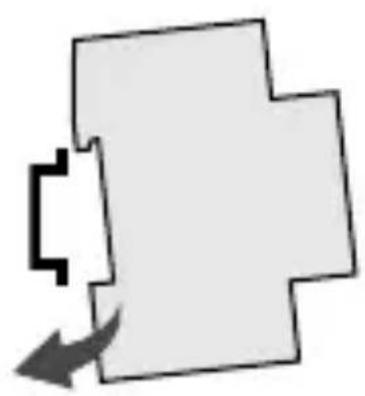
INSTALLATION ON DIN RAIL
BATTERY CHANGE
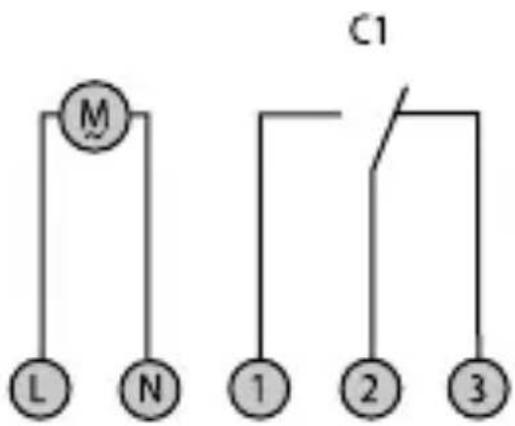
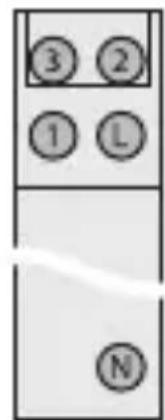
TERMINAL DIAGRAM
Attention!
- The battery change may only be carried out by a qualified electrician!
- Isolate the device before replacing the battery!
- Check battery polarity when replacing.
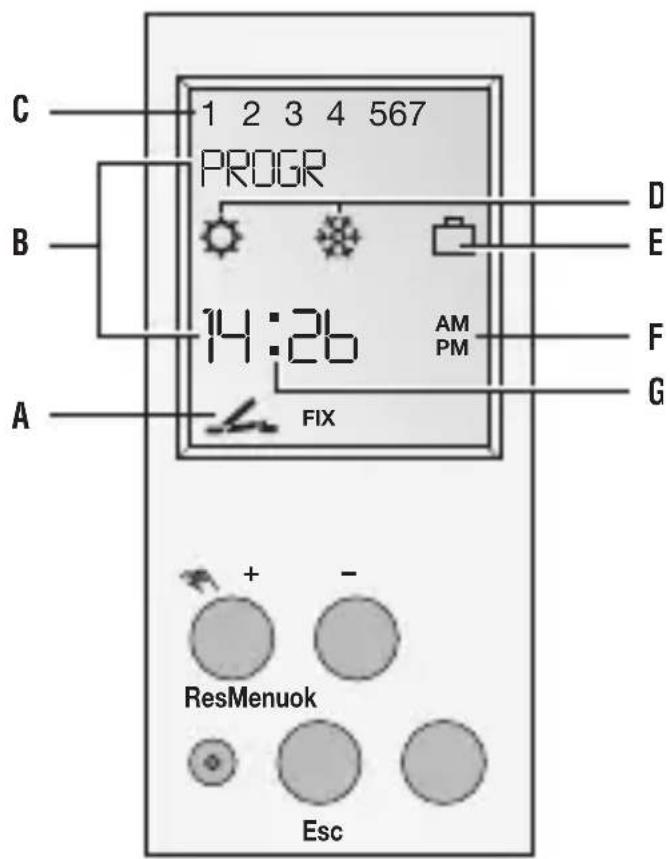
General information
- The middle communication line shows the selectable menu item. If confirmed with OK, this item is activated.
- Flashing texts or symbols require an entry.
-
If no entries are made within the next 2 minutes, the clock reverts to Auto mode.
-
The time switch has a sleep-function when not connected to power supply, that keeps screen blank. This function is activated after 2 minutes of no key board operations. All settings saved will remain in the memory.
Display
$$ \begin{array}{r l} \text {不} & = \text {C h a n n e l 1 O N} \ & = \text {C h a n n e l 1 O F F} \end{array} $$
A Channel status display
B 2 communication lines for time display, menu items, entry prompts etc...
C Day-of-week display
D Display of summer/winter time
E Holiday mode display
F Display of AM/PM
G Operating voltage (permanently lit dots) Reserve power operation (dots flash)
Buttons
- Scroll up in menu
Press briefly = +1
Press and hold (approx. 2 sec) = +5 - Scroll down in menu Press briefly = -1 Press and hold (approx. 2 sec) = -5

Manual operation in the automatic mode
Res The programs are retained in the case of a reset. The date and time must be set again. Press reset button with a blunt object (pen).
Menu Exits the Automatic mode and enters the Programming mode
Esc Press briefly = one step back Press and hold (approx. 2 sec) = return to Automatic mode
ok Make selection and apply
INITIAL START-UP - SELECTION OF MENU LANGUAGE
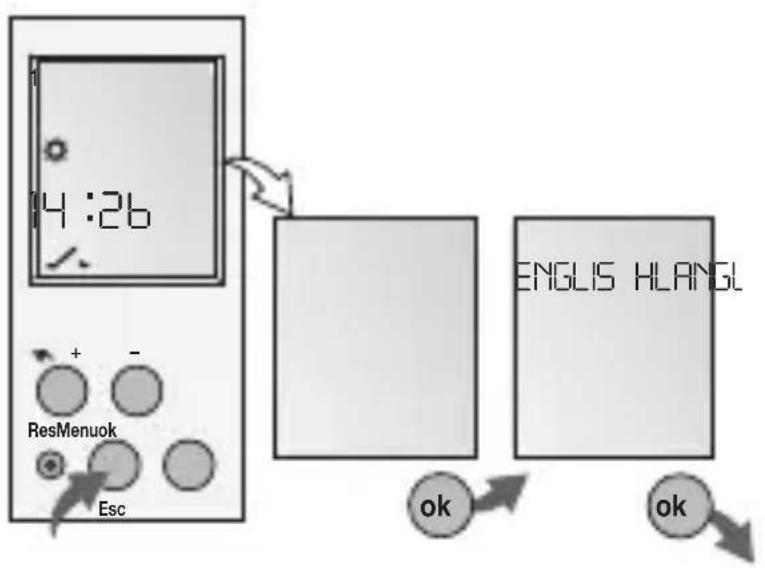
English
Deutsch
Francais
Espanol
Italiano
Info
In the delivered state the time switch is in the Auto mode with a preset time, date and the menu language English. After selecting language, the time switch jumps automatically to Program mode after 4 seconds.
PROG.
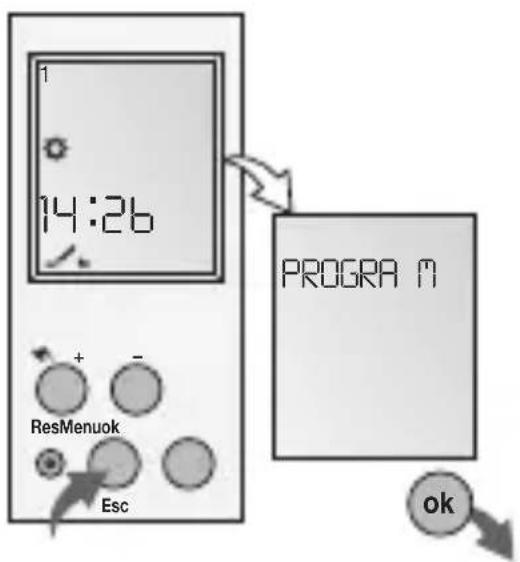
New weekly program
Info
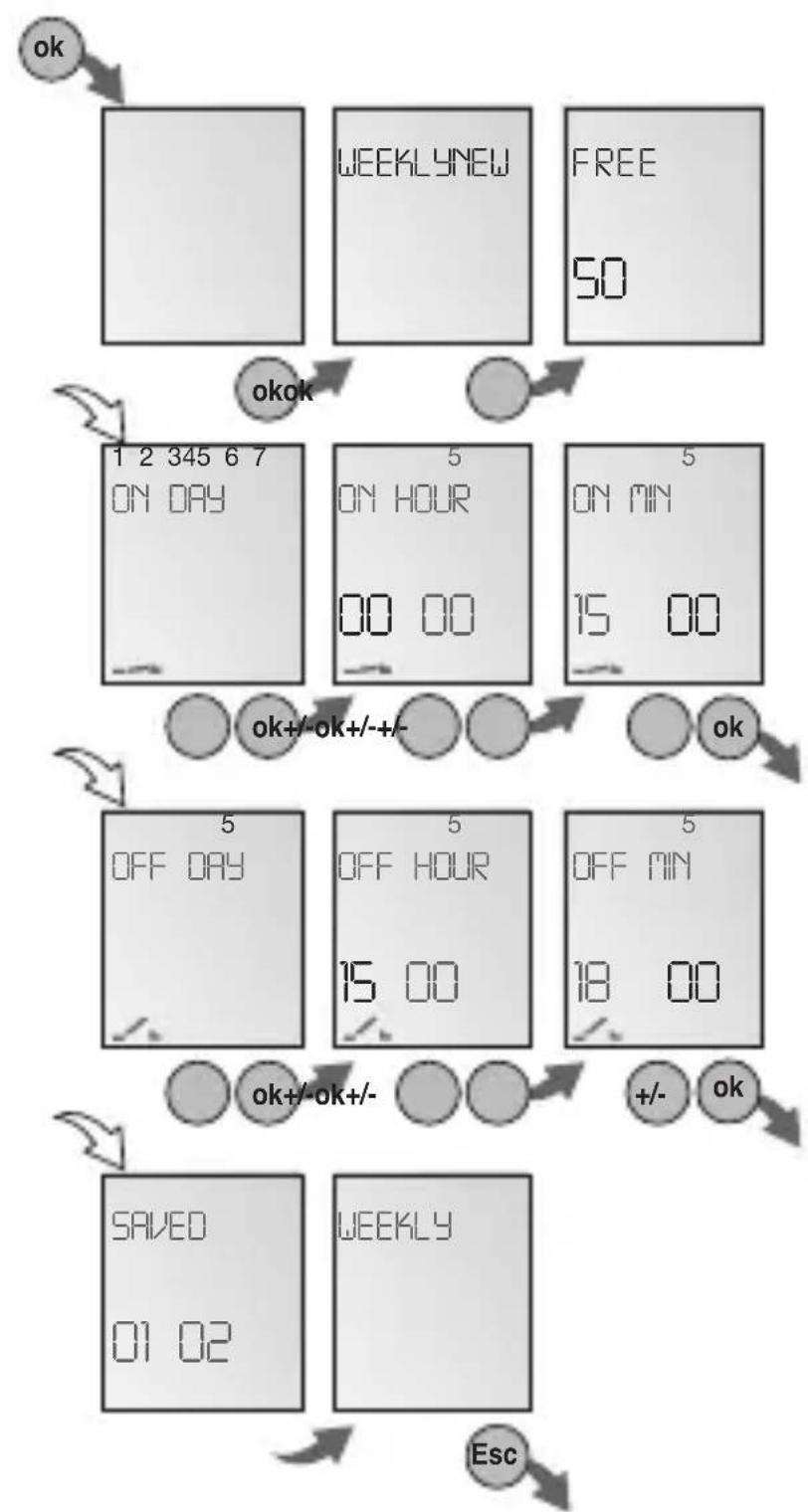
The time switch has 50 memory spaces.
Example
ON command at 3 pm. OFF command at 6 pm.
- Select NEW program and confirm with OK.
- Select WEEKLY program and confirm with OK.
The free memory spaces are briefly displayed. - Select day block or individual day (block formation as desired) and confirm with OK.
- Enter hour for ON command (+/-) and confirm with OK.
- Enter minute for ON command (+/-) and confirm with OK.
Enter hour for OFF command (+ / - ) and confirm with OK. - Enter minute for OFF command (+/-) and confirm with OK.
- Program is saved.
- Program jumps to selection WEEKLY.
Now additional programs can be created.
New holidays program
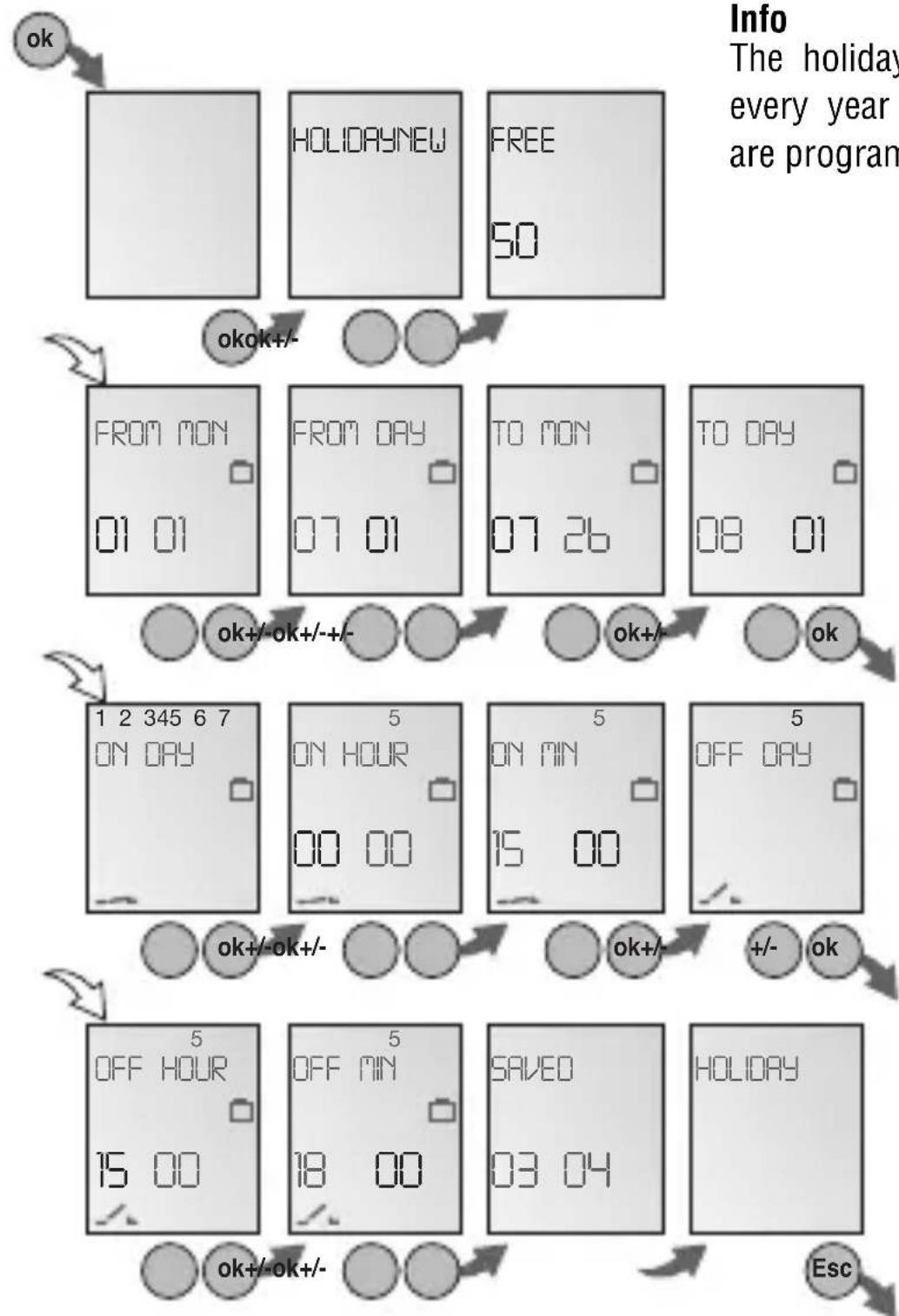
PROG.
View,edit program
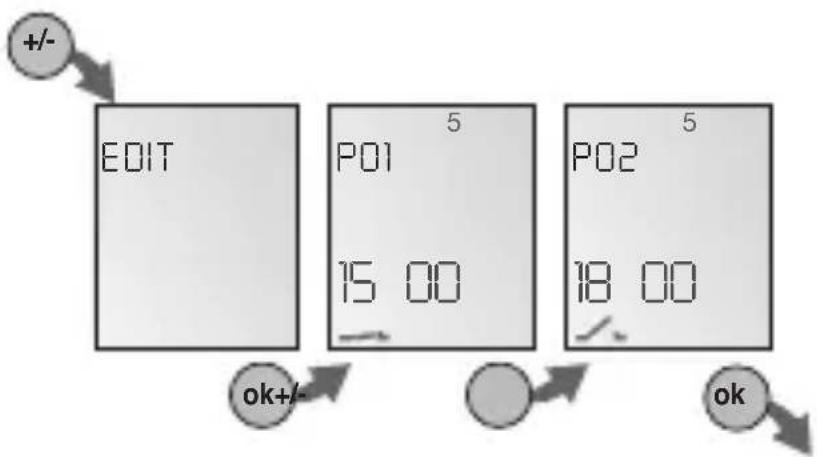
Info
The program steps can be scrolled through with + / -
The respective program can be edited by pressing OK. The procedure is the same as when creating a new program.
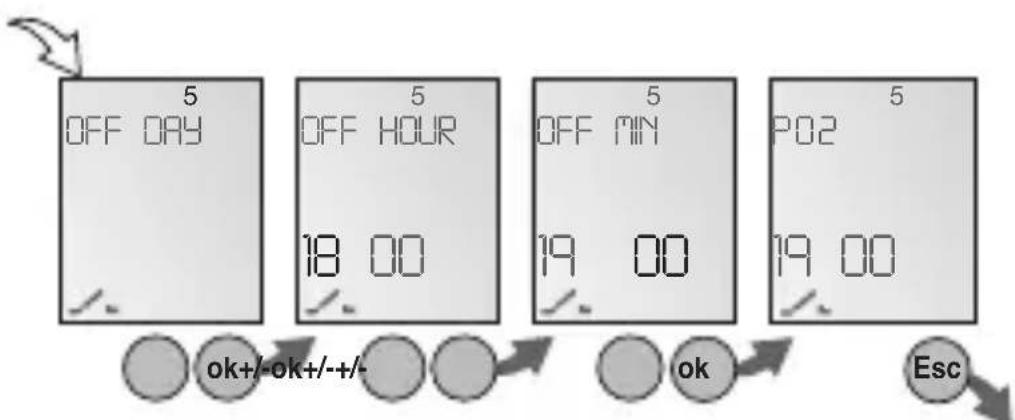
PROG.
Delete individual programs
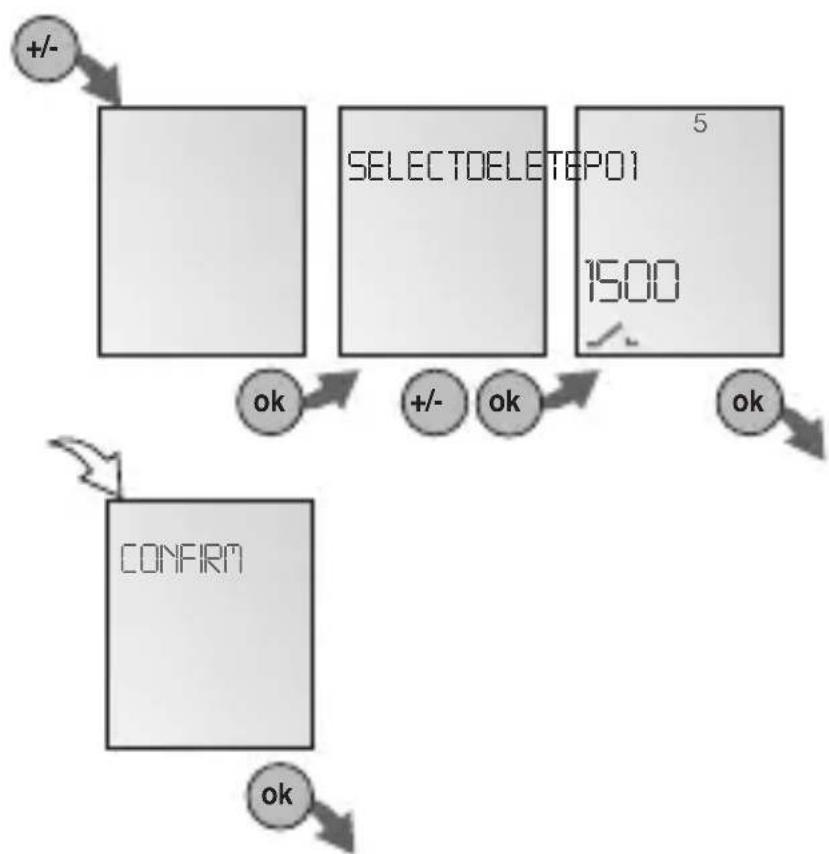
Info
When deleting individual programs, the corresponding program steps are deleted (e.g. P01 ON and P02 OFF).
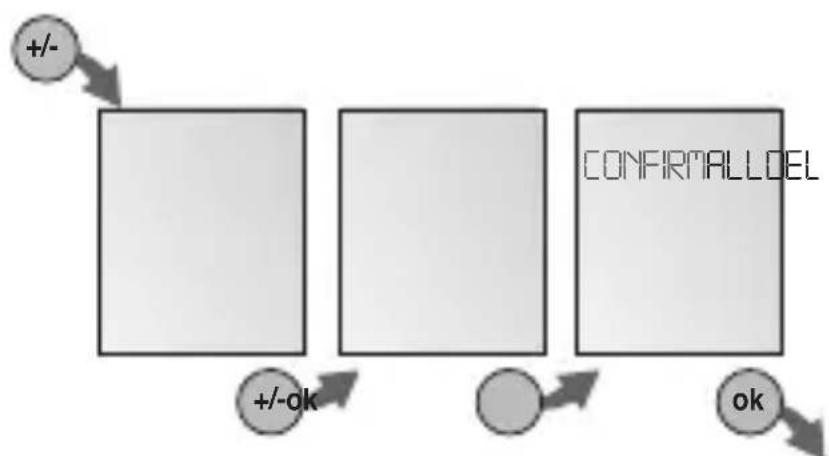
Delete all programs
Set date and time
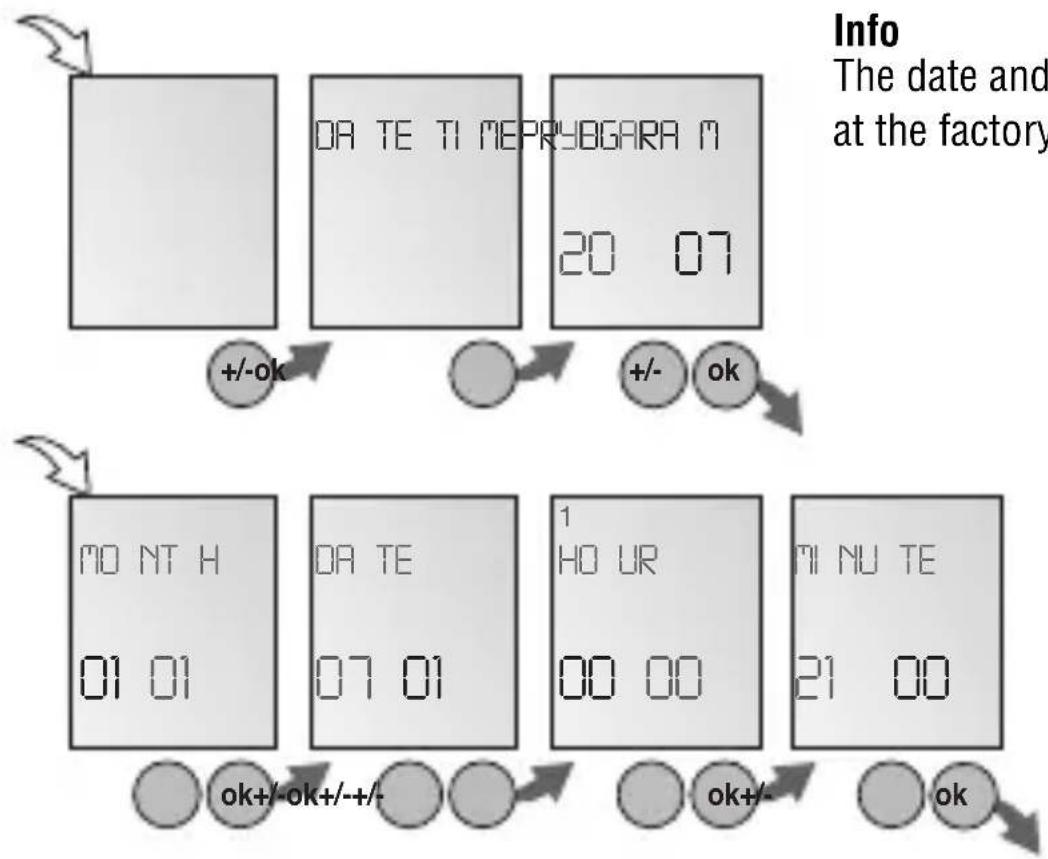
Info
The date and time are preset at the factory.
Set AM/PM (12-hour-) or 24-hour display
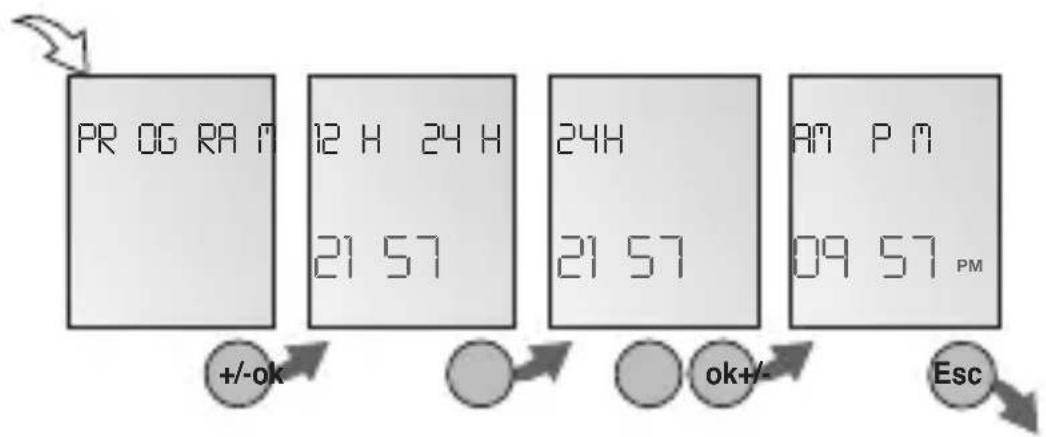
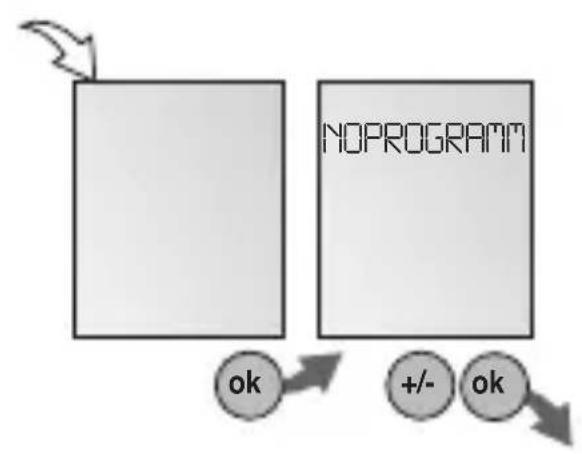
Info
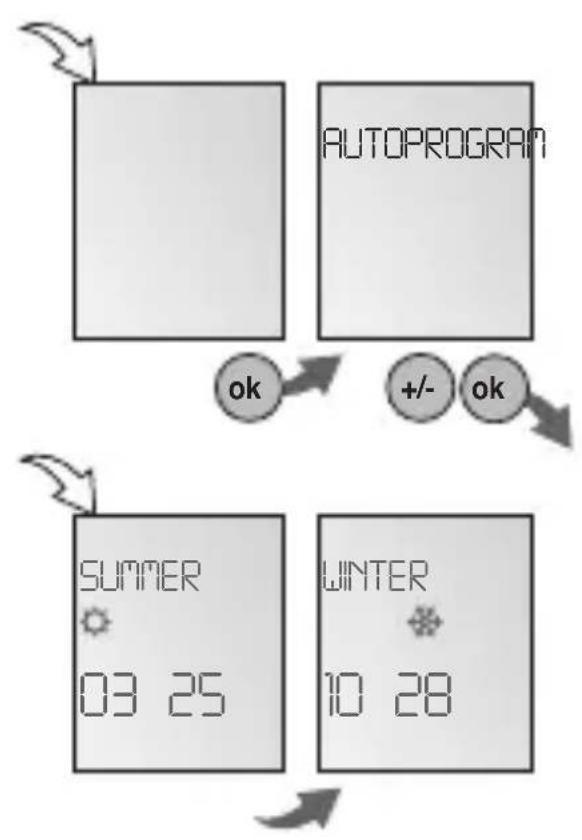
The following settings are possible:
AUTO
Factory presetting of the published calendar dates. This is automatically recalculated for each year.
NO
No switchover
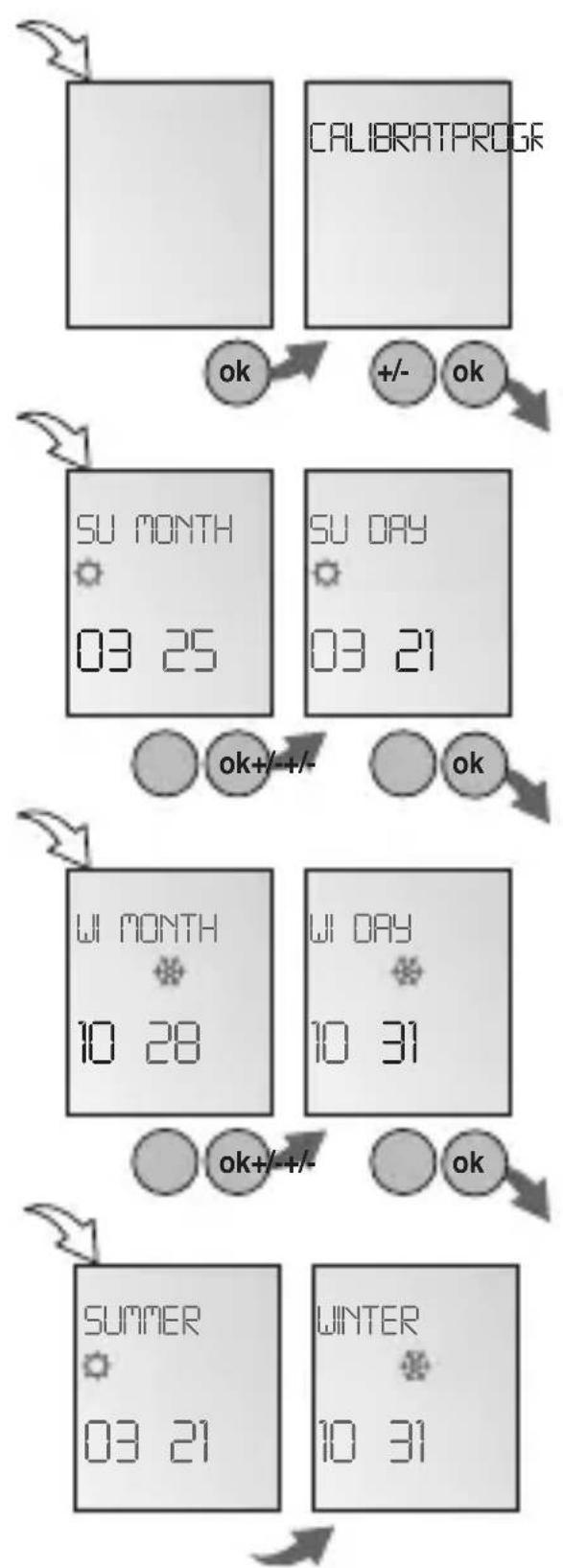
CALIBRAT
Programming. The start date of the summer time and winter time must be entered for this purpose. The factory presetting is overwritten. The programmed summer / winter time is automatically recalculated for each year.
The changeover takes place on the same specified day of the week in the same week of each month.
Example
03/21 Start summer time
10/31 Start winter time
Attention
Between the switchover it is not allowed to make settings at the time switch!
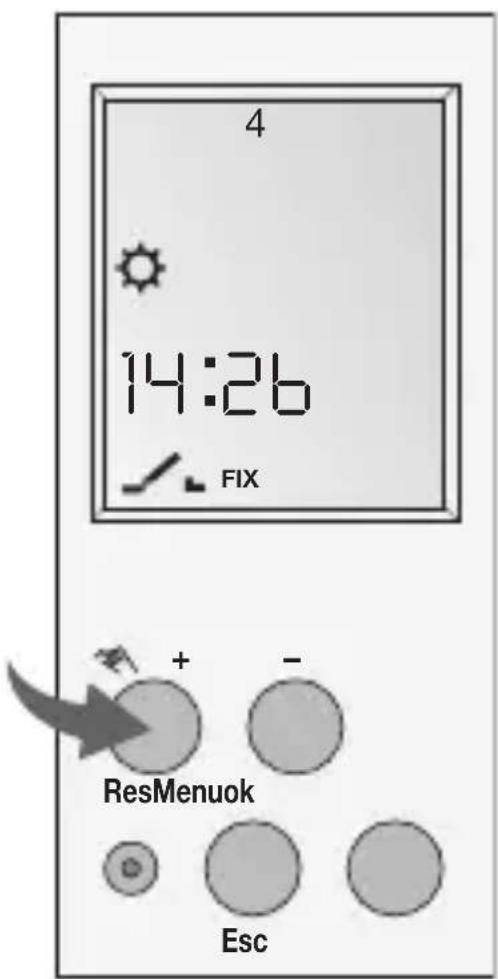
Info
Press 1 × = FIX ON = continuous ON
Press 2x = FIX OFF = continuous OFF
Press 3x = return to Auto mode
FIX ON: FIX
FIX OFF: FIX
AUTO: (no display) programmed switching times
TECHNICAL DATA
Dimensions H x W x D 45 x 17,5 x 60 mm
Weight g (approx.) 90
Supply voltage see imprint on device
Power consumption 5 VA
Switching capacity
- ohmic load 16 A/250 V AC
- inductive load cos 0.68 A/250 V AC
- Incandescent lamp load 1000 W
Switching output potential-free
Switch contacts 1 changeover contact
Ambient temperature -13°F to 131°F (-25°C to +55°C)
Protection class II
Accuracy typ. ± 2.5 s/day at 68^ (20^)
Reserve power 3 years from factory at +68^ (20^)
Shortest switching time 1 min.
Memory spaces 50
Block formation of
day of the week scelta libera/fissa
Switching status display yes
Sealable
yes
FRANÇAIS
CONSIGNES DE SECURITÉ
- Los pasos del programaSEOSEOSEOSEOSEOSEOSEOSEOSEOSEOSEOSEOSEOSEOSEOSEOSEOSEOSEOSEOSEOSEOSEOSEOSEOSEOSEOSEOSEOSEOSEOSEOSEOSEOSEOSEOSEOSEOSEOSEOSEOSEOSEOSEOSEOSEOSEOSEOSEOSEOSEOSEOSEOSEOSEOSEOSEOSEOSEOSEOSEOSEOSEOSEOSEOSEOSEOSEOSEOSEOSEOSEOSEOSEOSEOSEOSEOSEOSEOSEOSEOSEOSEOSEOSEOSEOSEOSEOSEOSEOSEOSEOSEOSEOSEOSEOSEOSEOSEOSEO SEO" ^+ -".
- Para editar el programa correspondiente pulse OK. El procedimiento es elsame que en la creacion de un nuevo programa.
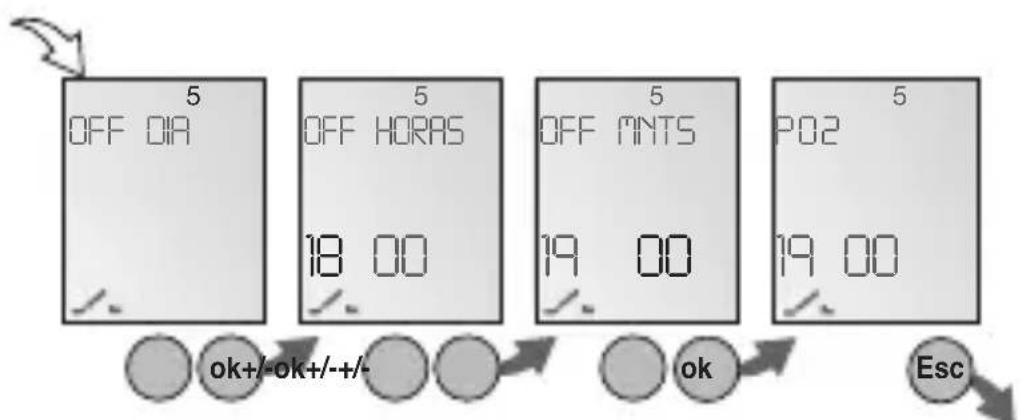
PROG.
1 x Drucken = FIX ON = Dauer EIN
2 x Drucken = FIX OFF = Dauer AUS
3 x Drucken = zurück in Auto Mode
FIX ON: FIX
FIX OFF: FIX
According to article 9 paragraph 2 of the European Directive 2004/108/EC and to article R2 paragraph 6 of the Decision 768/2008/EC, the responsible for placing the apparatus on the Community market is:
Gewiss S.p.A Via A. Volta, 1-24069 Cenate Sotto (BG) Italy Tel: +39 035 946 111 Fax: +39 035 945 270 E-mail: qualitymarks@gewiss.com