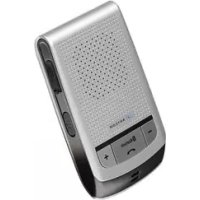
Solar CarKit - Built-in kit Anycom - Free user manual and instructions
Find the device manual for free Solar CarKit Anycom in PDF.



| Product Type | Solar-Powered Bluetooth Hands-Free Kit for Vehicle |
| Brand | Anycom |
| Model | Solar CarKit |
| Power Supply | Built-in rechargeable Li-Po battery (solar charging or via included USB charger) |
| Charging Time | About 2 hours via vehicle charger |
| Talk Time | Up to 7 hours (depending on battery condition) |
| Bluetooth Range | Up to 10 meters (30 feet) |
| Supported Bluetooth Profiles | Headset and Hands-Free |
| Phone Functions | Answer, end, reject a call, voice dialing, redial last number, call hold, call transfer, microphone mute |
| Volume Control | 8 levels via + and - buttons |
| LED Indicators | Status LED (blue) and battery LED (red) – flashes according to functions |
| Audible Signals | Beeps for power on, off, pairing, low battery, etc. |
| Mounting | On windshield (top left corner recommended) – suction cups or adhesive tape included |
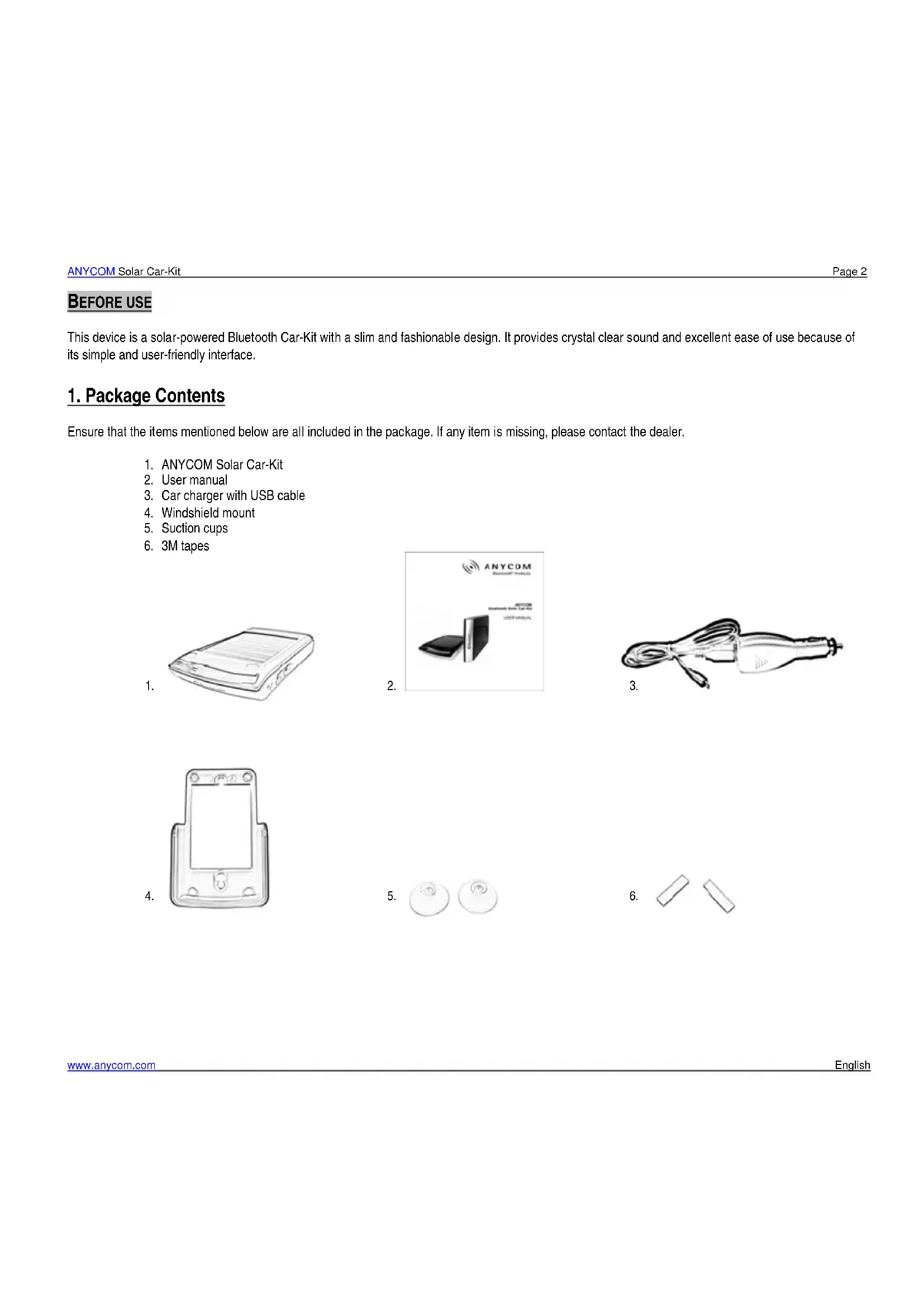
| Package Contents | Solar car kit, user manual, charger with USB cable, windshield mounting bracket, suction cups, adhesive tape |
| Care and Cleaning | Clean with a dry, soft cloth; do not use alcohol, benzene, or other solvents |
| Safety | Do not use any charger other than the one provided; do not expose to water, fire, or explosive atmospheres; keep out of reach of children |
| Spare Parts and Repairability | No user-serviceable parts; built-in battery not replaceable; contact seller for any issues |
| Certifications | CE, FCC |
| Warranty | 2 years (parts and labor) – contact ANYCOM for an RMA number |
Frequently Asked Questions - Solar CarKit Anycom
User questions about Solar CarKit Anycom
0 question about this device. Answer the ones you know or ask your own.
Ask a new question about this device
Download the instructions for your Built-in kit in PDF format for free! Find your manual Solar CarKit - Anycom and take your electronic device back in hand. On this page are published all the documents necessary for the use of your device. Solar CarKit by Anycom.
USER MANUAL Solar CarKit Anycom
This product has been tested and found to comply with Bluetooth BQB requirements, part 15 of FCC rules, R&TTE Directive 9 / 5 / EC) or CE marked requirements.
25. FCC Statement
This device complies with part 15 of the FCC Rules. Operation is subject to the following two conditions:
(1) This device may not cause harmful interference, and
(2) This device must accept any interference received, including interference that may cause undesired operation.
Note: The manufacturer is not responsible for ANY interference, for example RADIO or TV interference, caused by unauthorized modifications to this equipment. Such modifications could void the user's authority to operate the equipment.
Federal Communication Commission Interference Statement
This equipment has been tested and found to comply with the limits for a Class B digital device, pursuant to Part 15 of the FCC Rules. These limits are designed to provide reasonable protection against harmful interference in a residential installation. This equipment generates, uses and can radiate radio frequency energy and, if not installed and used in accordance with the instructions, may cause harmful interference to radio communications. However, there is no guarantee that interference will not occur in a particular installation. If this equipment does cause harmful interference to radio or television reception, which can be determined by turning the equipment off and on, the user is encouraged to try to correct the interference by one of the following measures:
- Reorient or relocate the receiving antenna.
- Increase the separation between the equipment and receiver.
- Connect the equipment into an outlet on a circuit different from that to which the receiver is connected. Consult the dealer or an experienced radio/TV technician for help.
FCC Caution: Any changes or modifications not expressly approved by the party responsible for compliance could void the user's authority to operate this equipment.
IMPORTANT NOTE:
FCC Radiation Exposure Statement:
This equipment complies with FCC radiation exposure limits set forth for an uncontrolled environment. This equipment should be installed and operated with minimum distance 20cm between the radiator & your body. This transmitter must not be co-located or operating in conjunction with any other antenna or transmitter.
26. CE-Declaration
27. Copyright
Without written permission from original manufacturer, reproduction, transfer, distribution or storage of part or all of the contents in this document in any form is prohibited.
The company reserves rights to make any changes and improvements to the product described in this document without prior notice.
Notice:
Please make sure your mobile phone supports Bluetooth profiles and network operator supports the functions described in this manual, otherwise the relative functions cannot be realized on this car-kit.
- Package contents 2
2.Description of parts 3 - Recommended Installation Position in Your Car 4
- Charging 4
- Low Battery
- Battery Status 5
- Solar Power Charging Status 5
How to use
- Power On 5
- Power Off 5
- Pairing 6
- Connecting 6
- Auto-Reconnection 6
- Answering a Call 7
- Making a Call 7
- Ending a Call 7
- Volume Control 7
- Functions During a Call 8
- Summary of Button Functions 9
- LED Indication and Signal Sound 10
Supplement
- Troubleshooting 11
- Cautions 11
- Additional Information 12
- Safety 12
- Certification and Safety Approvals 12
- FCC Statement 13
- CE-Declaration. 13
- Copyright 14
- Warranty Information 14
BEFOREUSE
This device is a solar-powered Bluetooth Car-Kit with a slim and fashionable design. It provides crystal clear sound and excellent ease of use because of its simple and user-friendly interface.
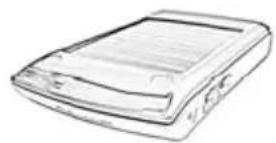
1. Package Contents
Ensure that the items mentioned below are all included in the package. If any item is missing, please contact the dealer.
- ANYCOM Solar Car-Kit
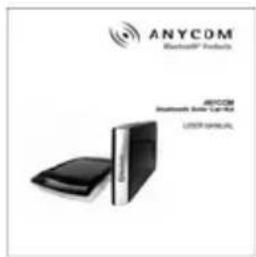
- User manual
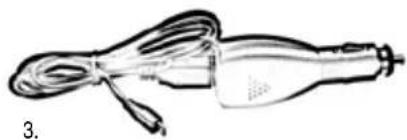
- Car charger with USB cable
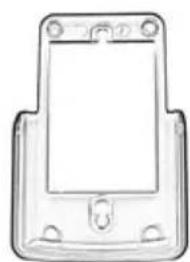
- Windshield mount
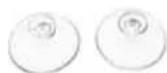
- Suction cups
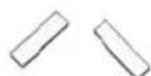
- 3M tapes
1.
2.
4.
5.
6.
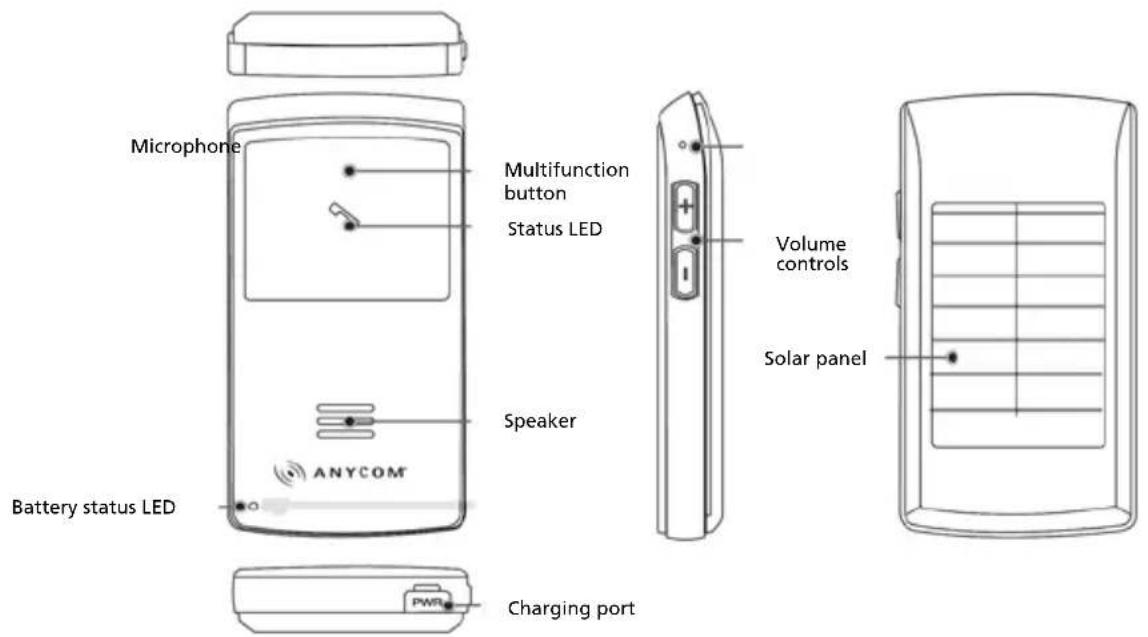
2.Description of Parts
3. Recommended Installation Position in Your Car
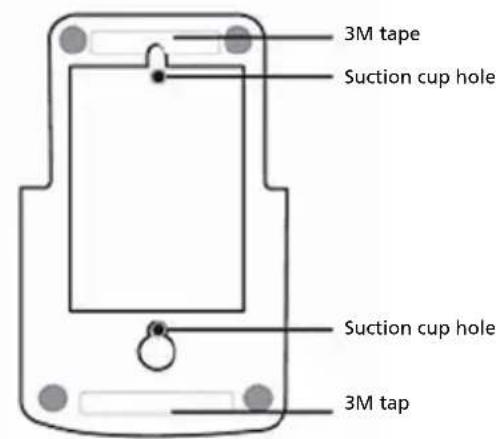
It is recommended that the ANYCOM Solar Car-Kit is positioned and installed on to the top of the left side of the windshield as shown in the picture below (The ANYCOM Solar Car-Kit can be installed using either 3M tapes or suction cups).
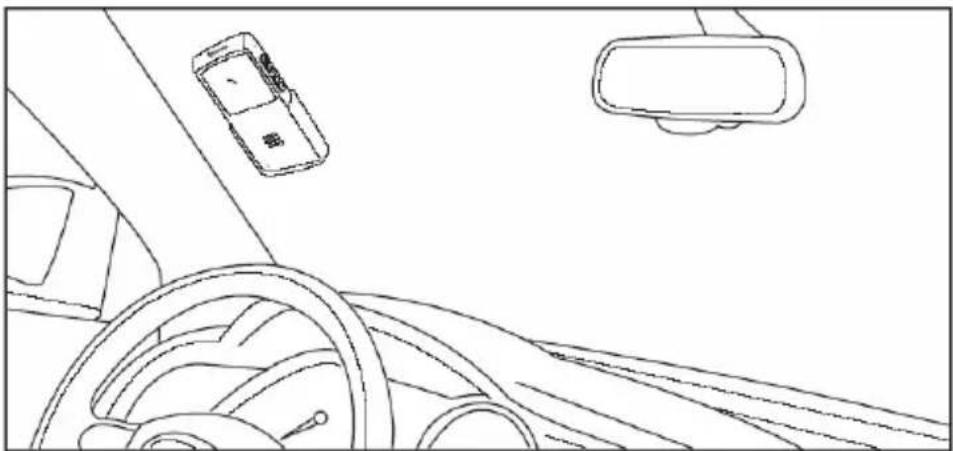
Insting the Anycom Solar Car-Kit in the recommended position will lead to more efficient solar power charging and better performance with regard to the microphone. Ensure that the Car-Kit does not obstruct the driver's view.
4. Charging
1. Using the car charger
- Open the cover on the charging port and insert the car charger completely into the charging slot until the battery status LED glows red
Charge your ANYCOM Solar Car-Kit until the battery status LED turns off. The unit will be fully charged in approximately 2 hours.
2. Using solar power
Direct the solar panel on the back side of ANYCOM Solar Car-Kit toward sun (please refer to the recommended installation position, as mentioned above).
If the ANYCOM Solar Car-Kit receives sufficient sunlight for 3h you can talk for duration of up to 30 min. When using solar power charge, the operation time (the talk time and the standby time) will be extended continuously without any additional charge required by the car charger.
- By pressing for 5 s, the solar power charging status is indicated. Please refer to the Solar power charging status below for the detailed instruction.
!WARNING: Do not attempt to charge the hands-free car kit with any charger other than the one provided. Using another charger may damage or destroy the product.
5. Low Battery
The status LED will flash blue and the battery status LED will flash red simultaneously with a periodic beeping sound when the battery status is lower than 10% out of full charge. In this low battery status, the battery status LED and the status LED will operate simultaneously in the same way.
Charge the battery as soon as the abovementioned status is detected.
ANYCOM Solar Car-Kit will turn off when the battery is not charged.
6. Battery Status
- By pressing + and - simultaneously and then releasing them briefly, the battery status is indicated by the number of red flashes with a beeping sound.
| Number of red flashes and beeps | 4 times 3 times | 2 times 1 time | ||
| Talking time More than 7 hrs More than 5 hrs More than 3 hrs Up to 3 hrs | ||||
7. Solar Power Charging Status
To check the solar power charging status, you can press for 5 s when the car kit turned on. If the car kit is receiving sufficient sunlight, the battery status LED will glow red. (Once the battery is fully charged, the battery status LED will turn off.)
Press for 5 s again to turn off the battery status LED. It is recommended to turn off the battery status LED during the solar power charging. By doing this, the battery will be charged much faster and more sufficiently.
HOW TO USE
8. Power On

for 2 s.
- You will hear a booting tone and the status LED will briefly flash blue rapidly for 5 times.
9. Power Off

- Press and hold
for 5 s.
- You will hear a shutdown tone and the status LED will briefly flash blue rapidly for 5 times.
10. Pairing
Before using your ANYCOM Solar Car-Kit with mobile phone for the first time, you must pair it with your Bluetooth mobile phone. (For the detailed set up and pairing instructions with mobile phone, please consult your mobile phone user guide).
- Begin with the ANYCOM Solar Car-Kit turned off; then, press and hold down for 5 s.
- You will hear two short beeps after the booting tone and the status LED will glow blue steadily
- Go to the Bluetooth menu in your mobile phone and search for hands-free option. You might need to search for options such as headset, audio device, etc. in case your mobile phone does not contain the hands-free option; these options, however, are subject to the model of the mobile phone being used. (Pairing with the hands-free profile is recommended since the user can utilize the various Bluetooth functions in this profile.)
- Select "ANYCOM Solar Car Kit" or "ANYCOM SCK" from the list of searched devices.
- When prompted for a passkey, enter 0000.
- A beep will sound when the devices are paired successfully.
- After you have successfully paired your phone and the ANYCOM Solar Car-Kit, you do not need to repeat these steps each time you use the ANYCOM Solar Car-Kit with your mobile phone.
The ANYCOM Solar Car-Kit will turn off automatically if it stays in the "pairing mode" for over 3 min without being paired to any device. In this case, you have to reattempt the pairing process (see abovementioned steps). The connection can be made automatically after pairing depending on the features of different models of mobile phones.
11. Connecting
To use ANYCOM Solar Car-Kit after pairing (or after losing the connection), you should connect it to the paired mobile phone. For more details regarding the connection method, please refer to the manual of your Bluetooth mobile phone.
12. Auto-Reconnection
- When ANYCOM Solar Car-Kit turns on:
The ANYCOM Solar Car-Kit will be automatically reconnected without the paring process when the ANYCOM Solar Car-Kit turns on (The mobile phone connected previously should be within 16 feet / 5 meter range from the car kit).
- Out of range:
The ANYCOM Solar Car-Kit will be automatically reconnected when it is brought back within a 16 feet / 5 meter range of the phone within 3
min. Please press once briefly to connect it immediately.
- When out of range (greater than 10 m), the connection between ANYCOM Solar Car-Kit and the mobile phone will be dropped.
- If ANYCOM Solar Car-Kit and the mobile phone have been separated for over 3 min, up to 10 min will be required for auto reconnection.
- Auto reconnection function might not be activated; this depends on the features of different models of mobile phones.
In this case, please press once briefly to connect it manually.
13. Answering a Call
The ANYCOM Solar Car-Kit and mobile phone will ring simultaneously when an incoming call is received. You can answer a call by pressing l & briefly. (The call can also be answered using the mobile phone.)
Ringing mute
In order to activate the ringing mute function when an incoming call is received, press and hold - for 1 s; this will mute the ringing sound. (This function may be used to maintain silence inside the car.) To release this mute function, press and hold - for 1 s again.
14. Making a Call
Voice dialling
Press and release once. You will hear the voice-activation tone; say the registered name on the voice dialling list.
This function is only available if your mobile phone supports the voice dialling function and ANYCOM Solar Car-Kit is paired as a hands-free device.
If your mobile phone does not support voice dialing, ANYCOM Solar Car-Kit will activate the last number radial feature. ANYCOM Solar Car-Kit may not activate any action; this depends on the features of different models of mobile phones.
Last number redialling \*
Press and hold for 1 s; this will activate the last number radial feature. Subject to different models of mobile phone, it will show you the recently dialled call list; then, you can press and hold for 1 s again to make a call.
15. Ending a Call
To end a call, briefly press
16. Volume control
Briefly press the volume up button + or volume down button - located at the side of the ANYCOM Solar Car-Kit in order to control the speaker volume. Eight (8) levels of volume control are available.
17. Functions During a Call
Transferring a call \*
Briefly press to transfer a call from your mobile phone to your ANYCOM Solar Car-Kit while on a call (the ANYCOM Solar Car-Kit and the mobile phone must be connected prior to this process). To transfer a call from your ANYCOM Solar Car-Kit to your mobile phone, press and hold + for 1 s.
Call waiting
Answer the second incoming call without ending the first call by pressing for 1 s. To return to the first call, simply press again for 1 s.
Call reject \*
To activate the call reject function, press for 1 s when an incoming call is detected.
MIC mute
To activate the mute function in order to mute a microphone, press briefly for 1 s; this will mute your voice to the other party while on a phone call. You will hear a beep periodically when the mute function is activated. To release this mute function, press briefly for 1 s again.
The * (star) mark indicates that these functions are only available with the hands-free profile, and the connected mobile phone should support this function. For additional information regarding these functions, refer to the user manual of your Bluetooth mobile phone.
- Summary of Button Functions
| Function Car-Kit status Action | ||
| Power on Power off | Press for 2 s | |
| Power off Power on | Press for 5 s | |
| Volume up Talking | Briefly press + | |
| Volume down Talking | Briefly press - | |
| Transferring a call Talking | - From the mobile phone to the car-kit: Briefly press once - From the car-kit to the mobile phone: Press and hold + for 1 s | |
| Answering a call Ringing | Briefly press | |
| Ending a call Talking | Briefly press | |
| Call waiting Talking | Press for 1 s | |
| Last number redalling Idle | Press for 1 s | |
| Voice dialling Idle | Briefly press | |
| Call reject Ringing | Press for 1 s | |
| Pairing | Power off | Press for 5 s |
| Ringing mute on Ringing | Press for 1 s | |
| Ringing mute off Ringing | Press for 1 s | |
| MIC mute on | Talking | Press for 1 s |
| MIC mute off Talking | Press for 1 s | |
| Battery status | Power on/ idle | Press + and - simultaneously then release them briefly |
| Solar power charging status on/off | Power on | Press - for 5 s |
- LED Indication and Signal Sound
| Function Signal Sound Status of LED | ||
| Power on Booting tone The status LED flashes blue 5 times rapidly | ||
| Power off Shutdown tone The status LED flashes blue 5 times rapidly | ||
| Pairing Beeps twice The status LED glows blue steadily | ||
| When the car kit and mobile phone are not connected | No beep The LED flashes blue every 3 s | |
| When the car kit and mobile phone are connected | Beeps once The LED flashes blue every 5 s | |
| Unintentional loss of connection (until the connection is recovered) | No beep | The status LED and battery status LED flashes simultaneously every 3 s |
| Activate mute function when a phone call is received | No beep The LED flashes blue every 0.5 s | |
| Activate mute function during a phone call Beeps periodically The LED flashes blue every 0.5 s | ||
| Charging using car charger No beep The battery status LED glows red | ||
| Charging completed | No beep The battery status LED is of | |
| Battery power is low | Beeps periodically | The battery status LED flashes blue and the battery status LED flashes red simultaneously |
SUPPLEMENT
20. Troubleshooting
In case the ANYCOM Solar Car-Kit does not function correctly, please follow the corrective action given in the table below. If the problem is not solved even after performing the corrective actions, please contact the dealer from whom ANYCOM Solar Car-Kit was purchased.
| Status To Check Corrective Action | ||
| ANYCOM Solar Car-Kit does not turn on | Check whether the battery of ANYCOM Solar Car-Kit is charged | Charge the battery |
| Unable to communicate using ANYCOM Solar Car-Kit | Check whether your mobile phone supports the "headset" and/or "hands-free" profile(s) | In order to use the ANYCOM Solar Car-Kit, it is essential that your mobile phone should support the "headset" and/or "hands-free" profile(s) (You might need to search for option such as headset, audio device, etc in case your mobile phone does not contain the hands-free option; these options however are subject to the model of the mobile phone being used) |
| Check whether the battery is fully charged | Charge the battery if the battery power is low | |
| Unable to pair ANYCOM Solar Car-Kit with a Bluetooth mobile phone | Check whether ANYCOM Solar Car-Kit is on | Press for 2 s to turn on ANYCOM Solar Car-Kit |
| Check whether ANYCOM Solar Car-Kit is in the pairing mode | With power off, press and hold for at least 5 s to place ANYCOM Solar Car-Kit in the pairing mode | |
| Extremely low or loud speaker volume Check the speaker volume | Press either + or - to control the volume accordingly | |
21. Cautions
- Do not drop this unit from a height
- Do not modify, repair or take apart this unit
- Do not expose this unit directly to water, alcohol, benzene, etc, for cleaning
- Do not expose this unit directly to flammables
- Do not place this unit near flammables
- Protect this unit from humidity and dust
- Do not place a heavy object on this unit
22. Additional Information
The cover range of wireless communication is within a maximum range of 30 feet (10 m) and the conditions vary according to obstacles.
The ANYCOM Solar Car-Kit can be connected only to those mobile phones that support the Bluetooth headset or hands-free profile(s). (Subject to different models of mobile phone, it will show you different options such as audio device etc.) This product is not compatible with the standard cordless phones used in homes.
As it operates in the same frequency range, the ANYCOM Solar Car-Kit can be affected by the devices that operate in the ISM band (2.402 GHz ~ 2.480 GHz), for example, wireless LAN, microwave devices, medical appliances, etc. Therefore, in order to ensure proper operation, the hands-free car kit should be away from these devices.
Please turn off your ANYCOM Solar Car-Kit in an area with a potentially explosive atmosphere (oil warehouse, explosive warehouse, etc.). In rare occurrences, this product could generate sparks. This could lead to an explosion or fire, which could result in bodily injury. Therefore follow the warning notices in those areas carefully.
If handled properly, a rechargeable battery can have a long service life. A new battery or one that has not been used for a long period of time could have reduced capacity the first few times it is used.
The standard usage time of the battery can vary depending on the usage condition of the mobile phone and ANYCOM RALOS Car-Kit.
Using solar power charge, the operation time (the talk time and the standby time) will be extended continuously without any additional charge required by the car charger.
23. Safety
- Use the charger that comes with package.
- Caution, risk of explosion if battery is replaced by an incorrect type.
Check the laws and regulations on the use of mobile phones and hands-free equipment in the areas where you drive. Always give full attention to driving and pull off the road and park before making or answering a call if driving conditions require.
Do not allow children to play with your ANYCOM Solar Car-Kit since it contains small parts that could become detached and create a choking hazard.
This device contains a Li-polymer battery. Please keep it away from fire anytime (including discarding the device) or the battery may explode.
The ANYCOM Solar Car-Kit, especially the embedded battery must be properly disposed or may be recycled, contacts your local recycling centres for disposal methods.
24. Certification and Safety Approvals
This product has been tested and found to comply with Bluetooth BQB requirements, part 15 of FCC rules, R&TTE Directive (9/5/EC) or CE marked requirements.
25. FCC Statement
This device complies with part 15 of the FCC Rules. Operation is subject to the following two conditions:
(1) This device may not cause harmful interference, and
(2) This device must accept any interference received, including interference that may cause undesired operation.
Note: The manufacturer is not responsible for ANY interference, for example RADIO or TV interference, caused by unauthorized modifications to this equipment. Such modifications could void the user's authority to operate the equipment.
Federal Communication Commission Interference Statement
This equipment has been tested and found to comply with the limits for a Class B digital device, pursuant to Part 15 of the FCC Rules. These limits are designed to provide reasonable protection against harmful interference in a residential installation. This equipment generates, uses and can radiate radio frequency energy and, if not installed and used in accordance with the instructions, may cause harmful interference to radio communications. However, there is no guarantee that interference will not occur in a particular installation. If this equipment does cause harmful interference to radio or television reception, which can be determined by turning the equipment off and on, the user is encouraged to try to correct the interference by one of the following measures:
- Reorient or relocate the receiving antenna.
- Increase the separation between the equipment and receiver.
- Connect the equipment into an outlet on a circuit different from that to which the receiver is connected. Consult the dealer or an experienced radio/TV technician for help.
FCC Caution: Any changes or modifications not expressly approved by the party responsible for compliance could void the user's authority to operate this equipment.
IMPORTANT NOTE:
FCC Radiation Exposure Statement:
This equipment complies with FCC radiation exposure limits set forth for an uncontrolled environment. This equipment should be installed and operated with minimum distance 20cm between the radiator & your body. This transmitter must not be co-located or operating in conjunction with any other antenna or transmitter.
26. CE-Declaration
27. Copyright
Without written permission from original manufacturer, reproduction, transfer, distribution or storage of part or all of the contents in this document in any form is prohibited.
The company reserves rights to make any changes and improvements to the product described in this document without prior notice.
Notice:
Please make sure your mobile phone supports Bluetooth profiles and network operator supports the functions described in this manual, otherwise the relative functions cannot be realized on this car-kit.
28. Warranty Information
ANYCOM Technologies AG or ANYCOM Technologies Inc. warrants to the original purchaser, this hardware product against defects in material and workmanship for a period of TWO (2) YEARS from the date of original retail purchase. If defect is discovered, ANYCOM, will, at its option, repair or replace this product at no charge, provided it is returned within the warranty period, complete with all hardware, cables and software to ANYCOM. For each product returned according to the terms of this warranty, an ANYCOM RMA number (Return Merchandise Authorization) is required along with your name, address, telephone number, and a copy of the original purchase receipt as proof of the original date of purchase. An ANYCOM RMA number can be obtained by calling the company direct for USA, Canada and Far East (001) (866) 553-9426 or for Europe and EMEA (049) (2161) 57630. This warranty applies only to hardware products manufactured by ANYCOM, identified by the ANYCOM trademark or logo affixed to them. This warranty does not apply if the product has been damaged by accident, abuse, misuse, unauthorized service or misapplication. ANYCOM does not warrant any products that are not ANYCOM products, including software bundled with ANYCOM products and produced by other manufacturers. Software applications produced by manufacturers other than ANYCOM and bundled with ANYCOM products are warranted by separate written statements provided by each manufacturer with their software products. The warranties set forth above are non-transferable, exclusive and in lieu of all other warranties, whether oral or written, expressed or implied, INCLUDING, WHERE ALLOWED BY LAW, ANY IMPLIED WARRANTY OF MERCHANTABILITY. ANYCOM is not responsible for incidental or consequential damages resulting from any breach of warranty, including but not limited to lost profits, downtime, damage to or replacement of equipment or property.
ANYCOM Technologies AG - Broichmühlenweg 42 - D-41066 Monchengladbach - Germany E-Mail: info@ANYCOM.com • Phone: +49 2161 57630 • Support: +49 900 1100821
ANYCOM Technologies Inc. PO Box 10127, Newport Beach CA 92658 USA E-Mail: US@ANYCOM.com • Phone: +1 866-553-9426
Disclaimer:
The information on this document is provided for informational purposes only and is subject to change without notice. It is provided "AS IS" and without any warranty. Any risk arising out of the use of the information shall remain with the reader. In no event shall ANYCOM be liable for any indirect, consequential, incidental, special, punitive or other damages whatsoever (including, without limitation, damages for loss of business profits, business interruption or loss of business information), arising out of or in connection with the availability, performance or use of the information contained, even if ANYCOM has been advised of the possibilities of such damages.
Trademarks:
ANYCOM, the ANYCOM logo, and the ANYCOM products referred to herein are either the trademarks or the registered trademarks of ANYCOM. The absence of a product name or logo on this website does not constitute a waiver of ANYCOM's trademark or other intellectual property rights concerning that name or logo. All other trademarks are property of their respective owners.
www.anycom.com
Technical support: +1 866-553-94 26

Following information is only for EU-member states:
The use of the symbol indicates that this product may not be treated as household waste. By ensuring this product is disposed of correctly, you will help prevent potential negative consequences for the environment and human health, which could otherwise be caused by inappropriate waste handling of this product. For more detailed information about recycling of this product, please contact your local city office, your household waste disposal service or the shop where you purchased the product.
MANUEL DE L'UTILISATEUR
Kit auto solaire Bluetooth
Table des matieres
Avant l'emploi
This product has been tested and found to comply with Bluetooth BQB requirements, part 15 of FCC rules, R&TTE Directive 99/5/EC) or CE marked requirements.
25. FCC Statement
This device complies with part 15 of the FCC Rules. Operation is subject to the following two conditions:
(1) This device may not cause harmful interference, and
(2) This device must accept any interference received, including interference that may cause undesired operation.
Note: The manufacturer is not responsible for ANY interference, for example RADIO or TV interference, caused by unauthorized modifications to this equipment. Such modifications could void the user's authority to operate the equipment.
Federal Communication Commission Interference Statement
This equipment has been tested and found to comply with the limits for a Class B digital device, pursuant to Part 15 of the FCC Rules. These limits are designed to provide reasonable protection against harmful interference in a residential installation. This equipment generates, uses and can radiate radio frequency energy and, if not installed and used in accordance with the instructions, may cause harmful interference to radio communications. However, there is no guarantee that interference will not occur in a particular installation. If this equipment does cause harmful interference to radio or television reception, which can be determined by turning the equipment off and on, the user is encouraged to try to correct the interference by one of the following measures:
- Reorient or relocate the receiving antenna.
- Increase the separation between the equipment and receiver.
- Connect the equipment into an outlet on a circuit different from that to which the receiver is connected. Consult the dealer or an experienced radio/TV technician for help.
FCC Caution: Any changes or modifications not expressly approved by the party responsible for compliance could void the user's authority to operate this equipment.
IMPORTANT NOTE:
FCC Radiation Exposure Statement:
This equipment complies with FCC radiation exposure limits set forth for an uncontrolled environment. This equipment should be installed and operated with minimum distance 20cm between the radiator & your body. This transmitter must not be co-located or operating in conjunction with any other antenna or transmitter.
26. Déclaration CE
27. Copyright
Without written permission from original manufacturer, reproduction, transfer, distribution or storage of part or all of the contents in this document in any form is prohibited.
The company reserves rights to make any changes and improvements to the product described in this document without prior notice.
Notice:
Please make sure your mobile phone supports Bluetooth profiles and network operator supports the functions described in this manual, otherwise the relative functions cannot be realized on this car-kit.
28. Informations concernant la garantie
Support technique: +1 866-553-94 26
This product has been tested and found to comply with Bluetooth BQB requirements, part 15 of FCC rules, R&TTE Directive (9/5/EC) or CE marked requirements.
25. FCC Statement
This device complies with part 15 of the FCC Rules. Operation is subject to the following two conditions:
(1) This device may not cause harmful interference, and
(2) This device must accept any interference received, including interference that may cause undesired operation.
Note: The manufacturer is not responsible for ANY interference, for example RADIO or TV interference, caused by unauthorized modifications to this equipment. Such modifications could void the user's authority to operate the equipment.
Federal Communication Commission Interference Statement
This equipment has been tested and found to comply with the limits for a Class B digital device, pursuant to Part 15 of the FCC Rules. These limits are designed to provide reasonable protection against harmful interference in a residential installation. This equipment generates, uses and can radiate radio frequency energy and, if not installed and used in accordance with the instructions, may cause harmful interference to radio communications. However, there is no guarantee that interference will not occur in a particular installation. If this equipment does cause harmful interference to radio or television reception, which can be determined by turning the equipment off and on, the user is encouraged to try to correct the interference by one of the following measures:
- Reorient or relocate the receiving antenna.
- Increase the separation between the equipment and receiver.
- Connect the equipment into an outlet on a circuit different from that to which the receiver is connected. Consult the dealer or an experienced radio/TV technician for help.
FCC Caution: Any changes or modifications not expressly approved by the party responsible for compliance could void the user's authority to operate this equipment.
IMPORTANT NOTE:
FCC Radiation Exposure Statement:
This equipment complies with FCC radiation exposure limits set forth for an uncontrolled environment. This equipment should be installed and operated with minimum distance 20cm between the radiator & your body. This transmitter must not be co-located or operating in conjunction with any other antenna or transmitter.
26. Declaración CEE
27. Copyright
Without written permission from original manufacturer, reproduction, transfer, distribution or storage of part or all of the contents in this document in any form is prohibited.
The company reserves rights to make any changes and improvements to the product described in this document without prior notice.
Notice:
Please make sure your mobile phone supports Bluetooth profiles and network operator supports the functions described in this manual, otherwise the relative functions cannot be realized on this car-kit.
28. Terminos de la garantía
This product has been tested and found to comply with Bluetooth BQB requirements, part 15 of FCC rules, R&TTE Directive 9 / 5 / EC) or CE marked requirements.
25. FCC Statement
This device complies with part 15 of the FCC Rules. Operation is subject to the following two conditions:
(1) This device may not cause harmful interference, and
(2) This device must accept any interference received, including interference that may cause undesired operation.
Note: The manufacturer is not responsible for ANY interference, for example RADIO or TV interference, caused by unauthorized modifications to this equipment. Such modifications could void the user's authority to operate the equipment.
Federal Communication Commission Interference Statement
This equipment has been tested and found to comply with the limits for a Class B digital device, pursuant to Part 15 of the FCC Rules. These limits are designed to provide reasonable protection against harmful interference in a residential installation. This equipment generates, uses and can radiate radio frequency energy and, if not installed and used in accordance with the instructions, may cause harmful interference to radio communications. However, there is no guarantee that interference will not occur in a particular installation. If this equipment does cause harmful interference to radio or television reception, which can be determined by turning the equipment off and on, the user is encouraged to try to correct the interference by one of the following measures:
- Reorient or relocate the receiving antenna.
- Increase the separation between the equipment and receiver.
- Connect the equipment into an outlet on a circuit different from that to which the receiver is connected. Consult the dealer or an experienced radio/TV technician for help.
FCC Caution: Any changes or modifications not expressly approved by the party responsible for compliance could void the user's authority to operate this equipment.
IMPORTANT NOTE:
FCC Radiation Exposure Statement:
This equipment complies with FCC radiation exposure limits set forth for an uncontrolled environment. This equipment should be installed and operated with minimum distance 20cm between the radiator & your body. This transmitter must not be co-located or operating in conjunction with any other antenna or transmitter.
26. CE-verklaring
27. Copyright
Without written permission from original manufacturer, reproduction, transfer, distribution or storage of part or all of the contents in this document in any form is prohibited.
The company reserves rights to make any changes and improvements to the product described in this document without prior notice.
Notice:
Please make sure your mobile phone supports Bluetooth profiles and network operator supports the functions described in this manual, otherwise the relative functions cannot be realized on this car-kit.
28. Garantie
This product has been tested and found to comply with Bluetooth BQB requirements, part 15 of FCC rules, R&TTE Directive 9 / 5 / EC) or CE marked requirements.
25. FCC Statement
This device complies with part 15 of the FCC Rules. Operation is subject to the following two conditions:
(1) This device may not cause harmful interference, and
(2) This device must accept any interference received, including interference that may cause undesired operation.
Note: The manufacturer is not responsible for ANY interference, for example RADIO or TV interference, caused by unauthorized modifications to this equipment. Such modifications could void the user's authority to operate the equipment.
Federal Communication Commission Interference Statement
This equipment has been tested and found to comply with the limits for a Class B digital device, pursuant to Part 15 of the FCC Rules. These limits are designed to provide reasonable protection against harmful interference in a residential installation. This equipment generates, uses and can radiate radio frequency energy and, if not installed and used in accordance with the instructions, may cause harmful interference to radio communications. However, there is no guarantee that interference will not occur in a particular installation. If this equipment does cause harmful interference to radio or television reception, which can be determined by turning the equipment off and on, the user is encouraged to try to correct the interference by one of the following measures:
- Reorient or relocate the receiving antenna.
- Increase the separation between the equipment and receiver.
- Connect the equipment into an outlet on a circuit different from that to which the receiver is connected. Consult the dealer or an experienced radio/TV technician for help.
FCC Caution: Any changes or modifications not expressly approved by the party responsible for compliance could void the user's authority to operate this equipment.
IMPORTANT NOTE:
FCC Radiation Exposure Statement:
This equipment complies with FCC radiation exposure limits set forth for an uncontrolled environment. This equipment should be installed and operated with minimum distance 20cm between the radiator & your body. This transmitter must not be co-located or operating in conjunction with any other antenna or transmitter.
26. Declariaço CE
27. Copyright
Without written permission from original manufacturer, reproduction, transfer, distribution or storage of part or all of the contents in this document in any form is prohibited.
The company reserves rights to make any changes and improvements to the product described in this document without prior notice.
Notice:
Please make sure your mobile phone supports Bluetooth profiles and network operator supports the functions described in this manual, otherwise the relative functions cannot be realized on this car-kit.
This product has been tested and found to comply with Bluetooth BQB requirements, part 15 of FCC rules, R&TTE Directive 99/5/EC) or CE marked requirements.
25. FCC Statement
This device complies with part 15 of the FCC Rules. Operation is subject to the following two conditions:
(1) This device may not cause harmful interference, and
(2) This device must accept any interference received, including interference that may cause undesired operation.
Note: The manufacturer is not responsible for ANY interference, for example RADIO or TV interference, caused by unauthorized modifications to this equipment. Such modifications could void the user's authority to operate the equipment.
Federal Communication Commission Interference Statement
This equipment has been tested and found to comply with the limits for a Class B digital device, pursuant to Part 15 of the FCC Rules. These limits are designed to provide reasonable protection against harmful interference in a residential installation. This equipment generates, uses and can radiate radio frequency energy and, if not installed and used in accordance with the instructions, may cause harmful interference to radio communications. However, there is no guarantee that interference will not occur in a particular installation. If this equipment does cause harmful interference to radio or television reception, which can be determined by turning the equipment off and on, the user is encouraged to try to correct the interference by one of the following measures:
- Reorient or relocate the receiving antenna.
- Increase the separation between the equipment and receiver.
- Connect the equipment into an outlet on a circuit different from that to which the receiver is connected. Consult the dealer or an experienced radio/TV technician for help.
FCC Caution: Any changes or modifications not expressly approved by the party responsible for compliance could void the user's authority to operate this equipment.
IMPORTANT NOTE:
FCC Radiation Exposure Statement:
This equipment complies with FCC radiation exposure limits set forth for an uncontrolled environment. This equipment should be installed and operated with minimum distance 20cm between the radiator & your body. This transmitter must not be co-located or operating in conjunction with any other antenna or transmitter.
Without written permission from original manufacturer, reproduction, transfer, distribution or storage of part or all of the contents in this document in any form is prohibited.
The company reserves rights to make any changes and improvements to the product described in this document without prior notice.
Notice:
Please make sure your mobile phone supports Bluetooth profiles and network operator supports the functions described in this manual, otherwise the relative functions cannot be realized on this car-kit.