EasyManual
RMB954E9VX - Fridge AEG - Free user manual and instructions
Find the device manual for free RMB954E9VX AEG in PDF.



Frequently Asked Questions - RMB954E9VX AEG
Questions des utilisateurs sur RMB954E9VX AEG
0 question sur cet appareil. Repondez a celles que vous connaissez ou posez la votre.
Poser une nouvelle question sur cet appareil
Download the instructions for your Fridge in PDF format for free! Find your manual RMB954E9VX - AEG and take your electronic device back in hand. On this page are published all the documents necessary for the use of your device. RMB954E9VX by AEG.
USER MANUAL RMB954E9VX AEG
natural_image
Simple line drawing of a refrigerator with two doors and three drawers (no text or symbols)CONTENTS
- SAFETY INFORMATION ....3
- SAFETY INSTRUCTIONS ....5
- ENVIRONMENT CONCERNS 6
- DESCRIPTION OF THE APPLIANCE 7
- INSTALLING YOUR NEW APPLIANCE 8
- DISPLAY CONTROLS ....10
- USING THE DISPENSER 15
- STORAGE FEATURES ...... 17
- CONNECTING THE WATER SUPPLY 20
- CHANGING THE FILTER 23
- INSTALLATION 24
- DOOR REMOVAL INSTRUCTIONS ...... 27
- HELPFUL HINTS AND TIPS ......29
- CLEANING AND CARE 32
- BEFORE CALLING ....33
- DISPOSAL OF THE APPLIANCE ....38
- TECHNICAL DATA 38
- NOISES ...... 39
FOR PERFECT RESULTS
Thank you for choosing this AEG product. We have created it to give you impeccable performance for many years, with innovative technologies that help make life simpler features you might not find on ordinary appliances. Please spend a few minutes reading to get the very best from it.
Visit our website to:

Get usage advice, brochures, trouble shooter, service information:
www.aeg.com
Register your product for better service:
www.registeraeg.com

Buy Accessories, Consumables and Original spare parts for your appliance:
www.aeg.com/shop
CUSTOMER CARE AND SERVICE
Always use original spare parts.
When contacting our Authorised Service Centre, ensure that you have the following data available: Model, PNC, Serial Number.
The information can be found on the rating plate.

Warning / Caution-Safety information.
General information and tips.

Environmental information.
Subject to change without notice.
1. SAFETY INFORMATION
Before the installation and use of the appliance, carefully read the supplied instructions. The manufacturer is not responsible if an incorrect installation and use causes injuries and damages. Always keep the instructions with the appliance for future reference.
1.1 Children and vulnerable people safety
- This appliance can be used by children aged from 8 years and above and persons with reduced physical, sensory or mental capabilities or lack of experience and knowledge if they have been given supervision or instruction concerning the use of the appliance in a safe way and understand the hazards involved.
- This appliance may be used by children between 3 and 8 years of age and persons with very extensive and complex disabilities, if they have been properly instructed.
- Children of less than 3 years of age should be kept away unless continuously supervised.
- Do not let children play with the appliance.
• Children shall not carry out cleaning and user maintenance of the appliance without supervision. - Keep all packaging away from children and dispose of it appropriately.
1.2 General Safety
- This appliance is for storing food and beverages only.
- This appliance is designed for single household domestic use in an indoor environment.
- This appliance may be used in offices, hotel guest rooms, bed & breakfast guest rooms, farm guest houses and other similar accommodation where such use does not exceed (average) domestic usage levels.
- WARNING: Keep ventilation openings, in the appliance enclosure or in the built-in structure, clear of obstruction.
- WARNING: Do not use mechanical devices or other means to accelerate the defrosting process, other than those recommended by the manufacturer.
- WARNING: Do not damage the refrigerant circuit.
- WARNING: Do not use electrical appliances inside the food storage compartments of the appliance, unless they are of the type recommended by the manufacturer.
- Do not use water spray and steam to clean the appliance.
- Clean the appliance with a moist soft cloth. Only use neutral detergents. Do not use abrasive products, abrasive cleaning pads, solvents or metal objects.
- Do not store explosive substances such as aerosol cans with a flammable propellant in this appliance.
- If the supply cord is damaged, it must be replaced by the manufacturer, its service agent or similarly qualified persons in order to avoid a hazard.
- If the appliance is equipped with an Ice maker or a water dispenser, fill them with potable water only.
- If the appliance requires a water connection, connect it to potable water supply only.
- The inlet water pressure (minimum and maximum) must be between 1 bar (0,1 MPa) and 10 bar (1 MPa)
- The instructions of appliances connected to the water mains by detachable hose-sets shall state that the new hose-sets supplied with the appliance are to be used and that old hose-sets should not be reused.
- To avoid contamination of food, please respect the following instructions:
- Opening the door for long periods can cause a significant increase of the temperature in the compartments of the appliance.
–Clean regularly surfaces that can come in contact with food and accessible drainage systems.
–Clean water tanks if they have not been used for 48 h: flush the water system connected to a water supply if water has not been drawn for 5 days.
-Store raw meat and fish in suitable containers in the refrigerator, so that it is not in contact with or drip onto other food.
—Two-star frozen-food compartments are suitable for storing pre-frozen food, storing or making icecream and making ice cubes.
- One-, two- and three-star compartments are not suitable for the freezing of fresh food.
- If the refrigerating appliance is left empty for long periods, switch off, defrost, clean, dry, and leave the door open to prevent mould developing within the appliance.
2. SAFETY INSTRUCTIONS
2.1 Installation

WARNING!
Only a qualified person must install this appliance.
- Remove all the packaging.
- Do not install or use a damaged appliance.
- Obey the installation instruction supplied with the appliance.
• Always be careful when you move the appliance because it is heavy. Always wear safety gloves. - Make sure the air can circulate around the appliance.
- Wait at least 4 hours before connecting the appliance to the power supply. This is to allow the oil to flow back in the compressor.
- Do not install the appliance close to radiators or cookers, oven or hobs.
- The rear of the appliance must stand against the wall.
- Do not install the appliance where there is direct sunlight.
- Do not install this appliance in areas that are too humid or too colds, such as the construction appendices, garages or wine cellars.
- When you move the appliance, lift it by the front edge to avoid scratching the floor.
2.2 Electrical connection

WARNING!
Risk of fire and electrical shock.

WARNING!
When positioning the appliance, ensure the supply cord is not trapped or damaged.

WARNING!
Do not use multi-plug adapters and extension cables.
• The appliance must be earthed
- Make sure that the electrical information on the rating plate agrees with the power supply. If not, contact an electrician.
• Always use a correctly installed shockproof socket.
- Make sure not to cause damage to the electrical components (e.g. mains plug, mains cable, compressor).
- Contact the Service or an electrician to change the electrical components.
- The mains cable must stay below the level of the mains plug.
Connect the mains plug to the mains socket only at the end of the installation. Make sure that there is access to the mains plug after the installation.
Do not pull the mains cable to disconnect the appliance. Always pull the mains plug.
2.3 Use

WARNING!
Risk of injury, burns, electrical shock or fire.

The appliance contains flammable gas, isobutane (R600a), a natural gas with a high level of environmental compatibility. Be careful not to cause damage to the refrigerant circuit containing isobutane.
- Do not change the specification of this appliance.
- Do not put electrical appliances (e.g. ice cream makers) in the appliance unless they are stated applicable by the manufacturer.
- Be careful not to cause damage to the refrigerant circuit. It contains isobutane (R600a), a natural gas with a high level of environmental compatibility. This gas is flammable.
- If damage occurs to the refrigerant circuit, make sure that there are no flames and sources of ignition in the room. Ventilate the room.
- Do not let hot items to touch the plastic parts of the appliance.
- Do not put soft drinks in the freezer compartment. This will create pressure on the drink container.
- Do not store flammable gas and liquid in the appliance.
- Do not put flammable products or items that are wet with flammable products in, near or on the appliance.
- Do not touch the compressor or the condenser. They are hot.
- Do not remove or touch items from the freezer compartment if your hands are wet or damp.
- Do not freeze again food that has been thawed.
- Obey the storage instructions on the packaging of frozen food.
2.4 Internal lighting

WARNING!
Risk of electric shock.
- This product contains a light source of energy efficiency class F.
- The type of lamp used for this appliance is for household appliances only. Do not use it for house lighting.
- Concerning the lamp(s) inside this product and spare part lamps sold separately: These lamps are intended to withstand extreme physical conditions in household appliances,
such as temperature, vibration, humidity, or are intended to signal information about the operational status of the appliance. They are not intended to be used in other applications and are not suitable for household room illumination.
2.5 Care and cleaning

WARNING!
Risk of injury or damage to the appliance.
Before maintenance, deactivate the appliance and disconnect the mains plug from the mains socket.
This appliance contains hydrocarbons in the cooling unit. Only a qualified person must do the maintenance and the recharging of the unit.
Regularly examine the drain of the appliance and if necessary, clean it. If the drain is blocked, defrosted water collects in the bottom of the appliance.
2.6 Disposal

WARNING!
Risk of injury or suffocation. Disconnect the appliance from the mains supply.
- Cut off the mains cable and discard it.
- Remove the door to prevent children and pets to be closed inside of the appliance.
- The refrigerant circuit and the insulation materials of this appliance are ozone-friendly.
- The insulation foam contains flammable gas. Contact your municipal authority for information on how to discard the appliance correctly.
- Do not cause damage to the part of the cooling unit that is near the heat exchanger.
3. ENVIRONMENT CONCERNS
Recycle the materials with the symbol Put the packaging in applicable containers to recycle it. Help protect the environment and human health and to recycle waste of electrical and electronic appliances.
Do not dispose appliances marked with the symbol 📊 with the household waste. Return the product to your local recycling facility or contact your municipal office.
4. DESCRIPTION OF THE APPLIANCE
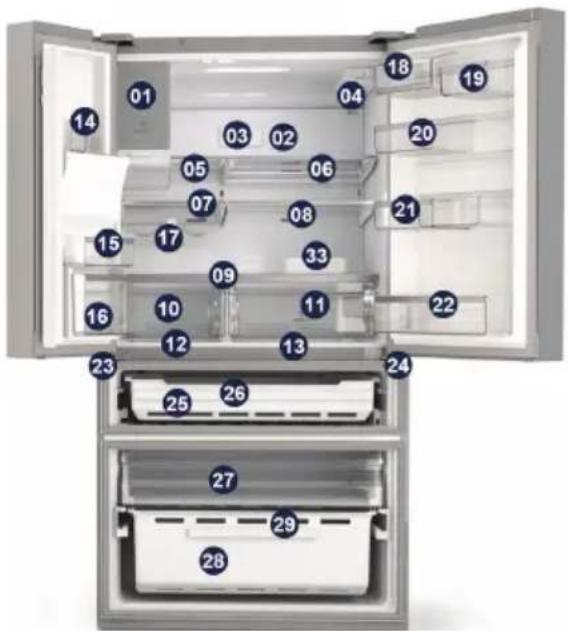
text_image
Diagram of an open refrigerator with numbered compartments and doors, highlighting interior features like doors 18-24 and 25-29.Fridge
Middle variable temperature drawer
Freezer
natural_image
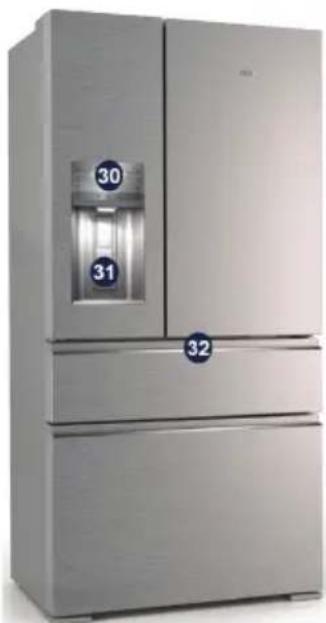
Exterior view of a modern stainless steel refrigerator with dual doors and labeled compartments (no visible text or symbols beyond numbers)Note: Due to constant improvement of our products, your refrigerator may be slightly different from the above illustration, but its functions and using methods remain the same.
natural_image
Two simple icons: a solid black circle and a warning symbol with an exclamation mark (no text or labels)1 Ice Maker
2 Multifow
3 Air Filter
4 Water Filter
5 Flip Up Shelf
6 Slide Under Shelf
7 Left Glass Shelf
8 Right Glass Shelf
9 Crisper Cover Shelf
10 Left Crisper
11 Right Crisper
12 Left Snack Zone
13 Right Snack Zone
14 Left Superior Fixed Bin
15 Left Bottom Fixed Bin
16 Tilt Bin
17 Wine Rack
18 Dairy Bin Flex 2/3
19 Door Bin Flex 1/3
20 Door Bin Flex 2/3
21 Sliding door bin flex
22 Bottle Bin
23 Left Middle Hinge
24 Right Middle Hinge
25 MultiSwitch/MultiChill drawer
26 MultiSwitch/MultiChill divider
27 Upper Freezer Drawer
28 Basket Freezer
29 Freezer Divide
30 User Interface
31 Padle
32 User Interface FlexiSpace
33 Egg Tray
Note: To get the best energy efficiency of this product, please place all shelves, drawers and baskets on their original position as the illustration above.

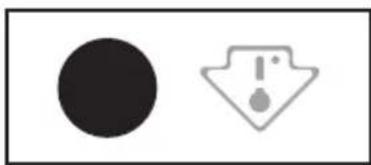
This appliance is sold in France. In accordance with regulations valid in this country it must be provided with a special device (see figure) placed in the lower campartment of the fridge to indicate the coldest zone of it.
5. INSTALLING YOUR NEW APPLIANCE
This section explains the installation of the new appliance before using it for the first time. We recommend reading the following tips.

WARNING!
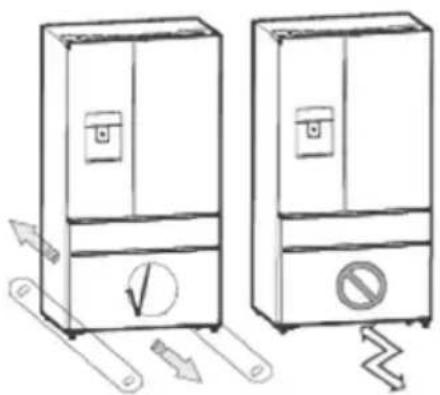
For proper installation, this refrigerator must be placed on a level surface of hard material that is the same height as the rest of the flooring. This surface should be strong enough to support a fully loaded refrigerator, or approximately 250 kg. When moving, be sure to pull out and push back the unit in straight.
natural_image
Illustration of two refrigerators with directional arrows indicating movement or control (no text or symbols present)| Class | Symbol Ambient Temperature rage (°C) |
| Extend Temperate | SN +10 to +32 |
| Temperate N +16 to +32 | |
| Subtropical ST +16 to +38 | |
| Tropical T +16 to +43 | |
This appliance is not intended to be used as a built-in appliance.
Leveling of appliance
For proper leveling and avoid vibration, this appliance is provided with adjustable feet in front. Please adjust the level by following below instructions:
- Roll the refrigerator into place.
-
Turn the adjustable feet (with your fingers or a suitable spanner) until they touch the floor.
-
Tilt back the top backwards for about 10-15 mm by turning the feet 1\~2 turn further. This will allow the doors to selfclose and seal properly.
- Whenever you want to move the appliance, remember to turn the feet back up so that the appliance can roll freely. Reinstall the appliance when relocating.
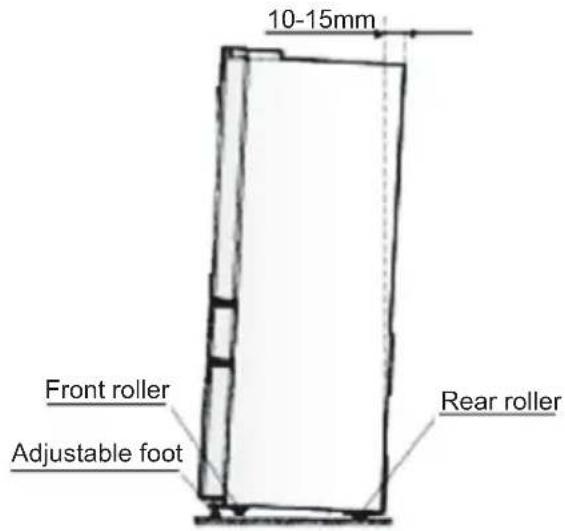
text_image
10-15mm Front roller Adjustable foot Rear roller
WARNING!
The rollers, which are not castors, should be only used for forward or backward movement. Moving the refrigerator sideways may damage your floor and the rollers.
Adjusting the doors
- Both left and right doors are equipped with adjustable axes, which are located in the lower hinges.
- Before adjusting its doors, please ensure that the refrigerator is level. Please review the previous section on "Leveling appliance". If you find the top of the doors are uneven, insert the Allen wrench into the hinge axis, and turn it clockwise to rise the door or anticlockwise to lower the door, and insert an E Ring into the gap.
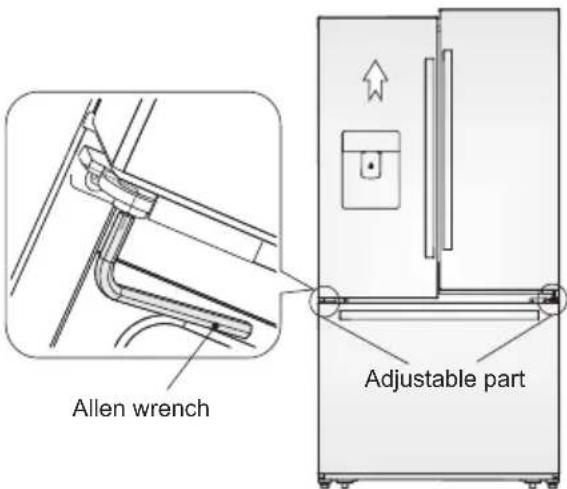
text_image
Allen wrench Adjustable partVentilation of appliance
In order to improve efficiency of the cooling system and save energy, it is necessary to maintain proper ventilation around the appliance for heat dissipation. For this reason, sufficient space should be provided around the refrigerator and the area should be clear of any obstruction that affects the air circulation. In case of different installation from freestanding, respecting space required in use dimensions, the functionality of the appliance is guaranteed but energy rating increase slightly.
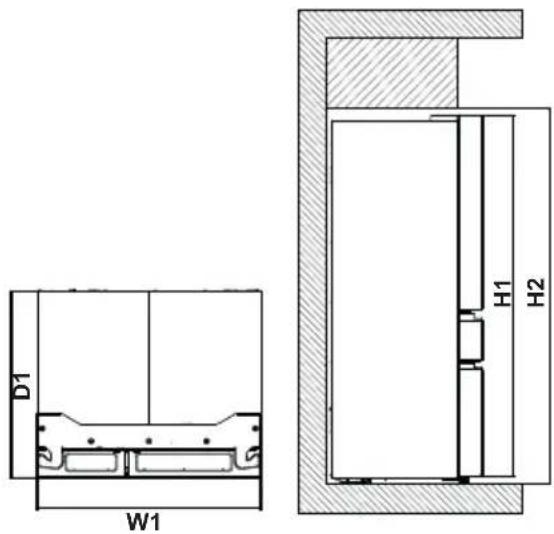
text_image
D1 W1 H1 H2| Overall dimensions * |
| H1 mm 1746 |
| W1 mm 913 |
| D1 mm 749 |
* The height, width and depth of the appliance without the handle and feet.
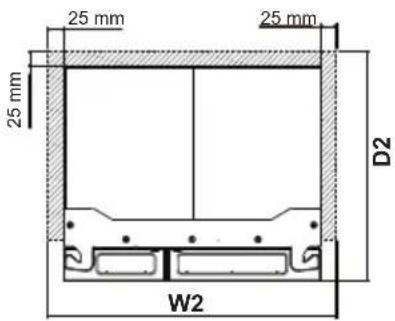
text_image
25 mm 25 mm 25 mm D2 W2| Space required in use ** |
| H2 mm 1806 |
| W2 mm 963 |
| D2 mm 774 |
** The height, width and depth of the appliance including the handle, plus the space necessary for free circulation of the cooling air.
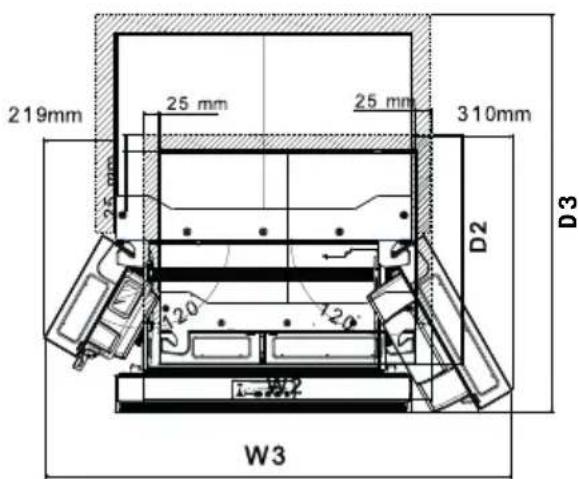
text_image
219mm 25 mm 25 mm 25 mm 310mm D2 D3 W3Overall space required in use ***
| H2 mm 1806 |
| W2 mm 963 |
| D2 mm 774 |
*** The height, width and depth of the appliance including the handle, plus the space necessary for free circulation of the cooling air, plus the space necessary to allow door opening to the minimum angle permitting removal of all internal equipment.
6. DISPLAY CONTROLS
All functions and controls of the unit are accessible from a control panel conveniently located on the door of the refrigerator. While setting of middle drawer are done with dedicated controls place inside the drawer. A keypad of touch buttons and a digital display allow easy configuration of features and setting in a simple and intuitive manner.
Important! Touch buttons require only a short press on a button to operate. The operation occurs when releasing your finger from the button, not while the button is pressed. There is no need for applying pressure on the keypad.
Please refer to those related sections of this Manual for detailed instructions.
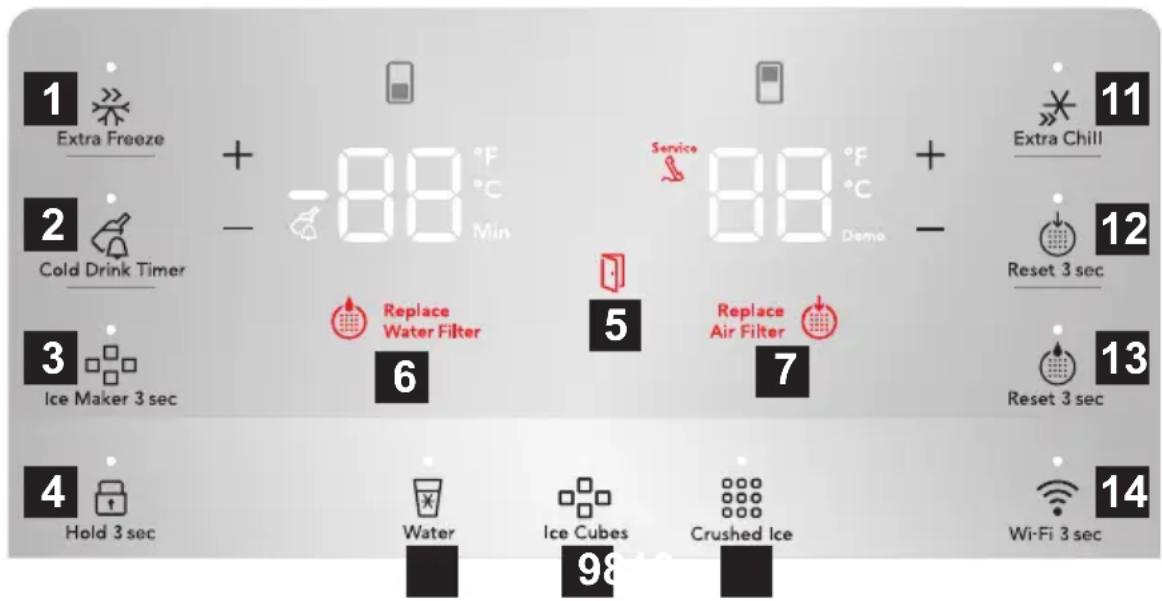
text_image
1 Extra Freeze 2 Cold Drink Timer 3 Ice Maker 3 sec 4 Hold 3 sec 5 Replace Water Filter 6 7 88 °F Min Service 88 °F Demo + - Extra Chill 11 12 Reset 3 sec 13 Reset 3 sec 14 Wi-Fi 3 sec Water Ice Cubes Crushed Ice
CAUTION!
When you set a temperature, you set an average temperature for the whole refrigerator cabinet. Temperatures inside each compartment may vary from the temperature values displayed on the panel, depending on how much food you store and where you place them. Ambient temperature may also affect the actual temperature inside the appliance.
1 ExtraFreeze
Activates a faster rate for freezing food in the freezer. Use this feature when loading several items into the freezer at one time. Automatically deactivates after 12 hours.
To freeze fresh food activate the FastFreeze function at least 24 hours before placing the food to be frozen in the freezer compartment.
Store the fresh food evenly distributed in the first compartment or drawer from the top.
2 Cold Drink Timer
Quickly chills a drink inside the freezer compartment. To enable, touch the Cold Drink Timer Key. A time value will appear on the freezer temp display (in minutes) and can be changed using the +/- buttons. A tone will sound when the time has been input. Range is from 20-45 minutes in 5 minute intervals. Drinks will freeze if temperature setting is too low or timer setting is too long.

WARNING
When using the cold drink timer, make sure to remove drinks from freezer compartment when alarm sounds. Carbonated drinks may explode if left in freezer for too long.
3 Ice Maker
Press and hold for 3 seconds to turn on/off ice maker. When indicator is lit, ice maker is on. When indicator is not lit, ice maker is in the OFF state and will stop making ice. While off, ice dispensing can continue as long as there is ice in the bucket. When ice maker is off and ice is dispensing, indicator will blink.
4 Lock
The lock button can be used to lock the display preventing it from being used in certain situations. Press and hold for 3 seconds to enable/disable. While in the locked state, non changes can be made to settings on the display. Dispensing ice and water will be disabled. The indicator will flash and an auditable warning tone is played.
5 Door Open
Illuminates whenever the doors are open. If a door is left open for 5 minutes or more, an alarm will sound and the display will be illuminated until the doors are shut. Pressing any button will mute the alarm temporarily. Check to make sure no food is blocking the doorway.
6 Replace Water Filter
Display illuminates every 6 months or when filter needs replacing. Replace filter and then press and hold 'Reset Water Filter' for 3 seconds to deactivate warning on display. See "Replacing the Filter" section for more information.
7 Replace Air Filter
Display illuminates every 6 months or when filter needs replacing. Replace filter and then press and hold 'Reset Air Filter' for 3 seconds to deactivate warning on display. See "Replacing the Filter" section for more information.
8 Water
Press the "water" key to dispense water. An indicator light will be illuminated above the active feature.
9 Cube
Press the “cube” key to dispense cubed ice. An indicator light will be illuminated above the active feature.
10 Crush
Press the “crush” key to dispense crushed ice. An indicator light will be illuminated above the active feature.
11 Cool Matic
Quick chill is a faster rate for chilling food in the refrigerator compartment. Use this feature when loading several items into the refrigerator at one time. Deactivates after 6 hours.
12 Reset Air Filter
After replacing filter, press and hold for 3 seconds to reset.
13 Reset Water Filter
After replacing filter, press and hold for 3 seconds to reset.
14 Wi-Fi Connectivity
Press and hold for 3 second to enable / disable wireless connection.
When LED is lit the product is connected.
When LED is flashing the product is connecting or during setup.
When LED is off, Wi-Fi is off.
1. WI-FI CONNECTIVITY SETUP
This chapter describes how to connect the smart refrigerator to the Wi-Fi network and to link it to your mobile device.
By this functionality you can receive notifications, control and monitor your refrigerator from your mobile device.
| Frequency/Protocol | Wi-Fi: 2.4 GHz /802.11 bgn |
| Power Wi-Fi 2.4 GHz: <20dBm |
| Encryption WPA-PSK, WPA2-PSK, WPA3-Personal |
To connect the appliance to enjoy the full range of features and services you need:
- Wireless 2.4GHz network at home with internet connection enabled.
- Mobile device connected to wireless home network.
1.1 Installing the mobile application"
When connecting the refrigerator to the application, stand near it with your mobile device (Android or iOS). Make sure that your mobile device is connected to the same wireless network you want to add your refrigerator to.
- Go to the relevant App Store on your device
- Download the dedicated application on your mobile device from Google Play (Android) or App Store (iOS) and install the application on your mobile device.
- Open the app and register to create an account.
1.2 Configuring the appliance wireless connection
- Follow the app's guidance to onboard your refrigerator. The app will ask you to start the refrigerators WiFi which your do on the appliance.
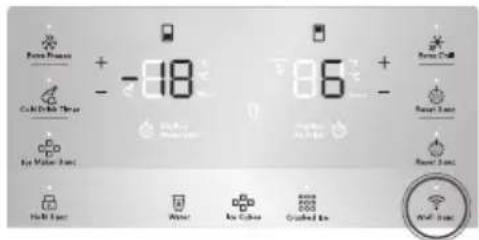
- Press and hold the Wi-Fi icon 📷 on your refrigerator for 3 seconds until you hear a beep – this will start the Wi-Fi system.
text_image
Power Source + -18 Color Balance Throat Eye Water Source 6 + - Power Cell Power Bars Power Tube Half Hour Water Eye Cable Crushed Ice Wall Tube- After few seconds the refrigerator will display AP on the user interface and will be ready to move on to the next stage in the app.
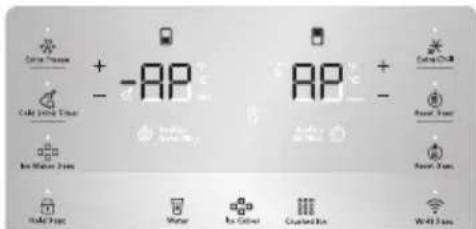
text_image
Color Pressure + -AP - Water Rain Water Zone Water Rain Color Clusted Rain + - AR Water Water Water Heat- Continue to follow the instructions in the app to complete the onboarding process.
- When the refrigerator has connected, the Wi-Fi icon will stop flashing and will stay solid and the screen will display your desired temperatures again. Continue to follow the app guidance to complete the registration and name your refrigerator.
After the successful onboarding, the Connectivity indicator stops flashing and becomes solid. Display shows the set temperatures.
1.3 Disabling / Resetting the appliance wireless connection
- You can temporarily disable the Wi-Fi connection by pressing and holding for 3 seconds the Wi-Fi button. The Wi-Fi icon will switch off and you will hear a beep. Once the Wi-Fi connection is disabled, to automatically re-establish the connection you will have to press and hold for the 3 seconds the button again.
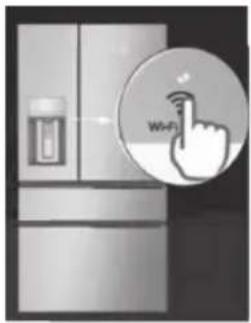
natural_image
Illustration of a refrigerator with a hand pointing at the next refrigerator (no text or symbols)
IMPORTANT
After reset, the Connectivity indicator may be off. Wait a few seconds until it turns on.
- You can reset the Wi-Fi configuration by pressing and holding for 10 seconds the Wi-Fi button and the Reset Water Filter button together. Once the configuration is reset, the refrigerator will beep and return to your desired temperatures. To then re-establish the connection, you will have to repeat all the steps at section 1.2 "Configuring the refrigerator wireless connection". Alternatively this can be done through the App.
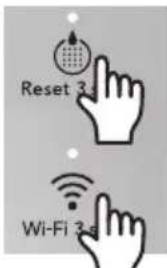
text_image
Reset 3s Wi-Fi 3s
NOTE
Control features and alarms may vary by model.
Alarms
High temperature, "HI" indicator
An increase in the temperature in the Fridge or Freezer compartment (for example due to earlier power failure) is indicated by:
- Flashing the HI on the correspondent compartment display
- Sound alarm, every 10 seconds until the alert is acknowledgment
To reset the alarm press any button or opening the door.
• The buzzer switches off
- The display shows the highest temperature reached for 10 seconds. Then show again the set temperature.
After 60 minutes, if the high temperature condition is not improved at all, please contact an Authorised Service Center.
Water Filter
When illuminated, the water filter needs to be replaced. Change the water filter every 6 months or when 450 litres of water has been dispensed. To reset, press and hold button for 3 seconds. Tone will sound once it has been reset.
Air Filter
When illuminated, air filter needs to be replaced. Change the air filter every 6 months. To reset, press and hold button for 3 seconds. Tone will sounds once it has been reset.
Door
If a door has been left open for five minutes or more, an alarm will sound and the door open indicator will illuminate on the display. The alarm can be turned off by closing the door or pressing any key. Control panel will return to normal operations after the door is closed.
Error Tone
An alarm will sound if the user tries to make a selection that is not available.
Mode Fahrenheit / Celsius degree
Press and hold for 5 seconds + and - from the refrigerator side.
After that, we will have a 'Tone Confirm' and display will change the temperature unit showing the other option directly on the numeric display. The temperature value will also change.
Demonstration mode
Pressing and holding + (freezer) and – (refrigerator) for 10 seconds will activate Demonstration mode.
- On detection of 10-sec-holding,
- Illuminate Icon "Demo"
- Play tone Confirm
- Pressing and holding + (freezer) and – (refrigerator) for 10 seconds again will deactivate Demo mode
- Illuminate Icon "Demo"
- Play tone Cancel
The software in this product contains components that are based on free and open source software. AEG gratefully acknowledges the contributions of the open software and robotics communities to the development project.
To access the source code of these free and open source software components whose license conditions require publishing, and to see their full copyright information and applicable license terms, please visit: http://aeg.opensoftwarerepository.com (folder NIUS).
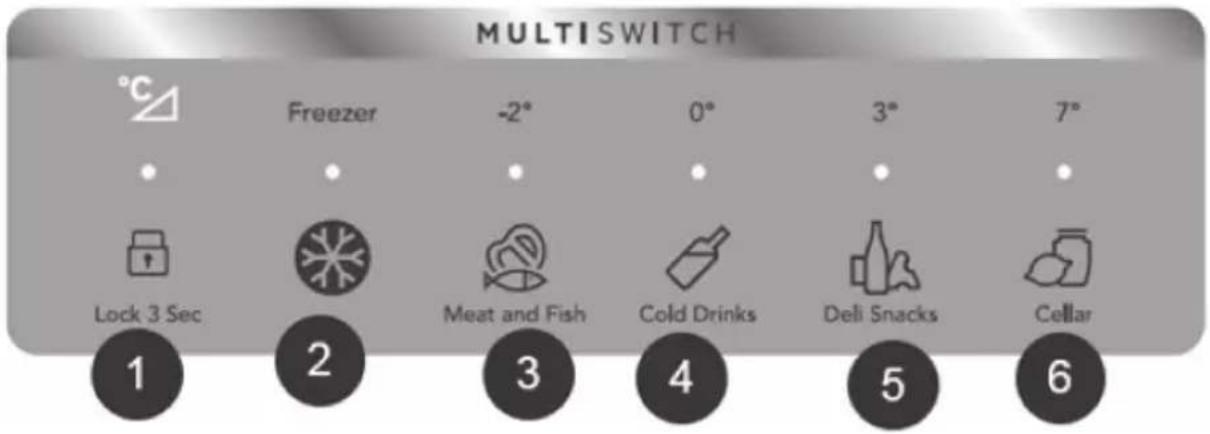
text_image
MULTISWITCH °C Freezer -2° 0° 3° 7° Lock 3 Sec 2 Meat and Fish Cold Drinks Deli Snacks Cellar 1 2 3 4 5 6
WARNING!
Do not use the MultiSwitch Drawer to store fresh produce as these items may freeze and cause damage to the fruits and leafy vegetables stored in the drawer. Using Your MultiSwitch Drawer
Using Your MultiSwitch Drawer Controls
1 The drawer automatically defaults to a locked state to prevent any unwanted use. To change the drawe's settings, it first needs to be unlocked. To unlock, press and hold the UNLOCK icon for 3 seconds. It will automatically lock after 10 seconds withlout any interaction.

WARNING!
Do not store glass bottles in the MultiSwitch Drawer when the Temperature setting is in Freezer, Meat/seafood, or Cold drink modes. The glass may break and shatter, causing physical harm and injury.
Freezer:
2 To change the drawer temperature when in the freezer temp setting, use the control panel display on the front door. Changing the temp on the display wil change both the drawer temp setting And the freezer compartment.
Refrigerator:
3 ChoosingMeat and Fish will set drawer temperature to -2°C. A tone will sound to confirm choice. Use this setting for short term storage. Any meat to be kept longer than two days should be frozen.
4 ChoosingCold Drinks will set drawer temperature to 0°C. A tone will sound to confirm choice.
5 ChoosingDeli/Snacks will set drawer temperature to 3°C. A tone will sound to confirm choice.
6 ChoosingCellar will set drawer temperature to 7°C. A tone will sound to confirm choice.
7. USING THE DISPENSER
7.1 Using the ice maker after installation
Before making ice for the first time, be sure to prime the water supply system. Air in new plumbing lines can result in two or three empty ice maker cycles. Furthermore, if the system is not flushed, the first ice cubes may be discolored or have an odd flavor.
7.2 Priming the water supply system
- Begin filling the system by pressing and holding a drinking glass against the dispenser.
- Keep the glass in this position until water comes out of the dispenser. It may take about 1½ minutes.
- Continue dispensing water for about four minutes to flush the system and plumbing connections of any impurities (stopping to empty the glass as necessary).
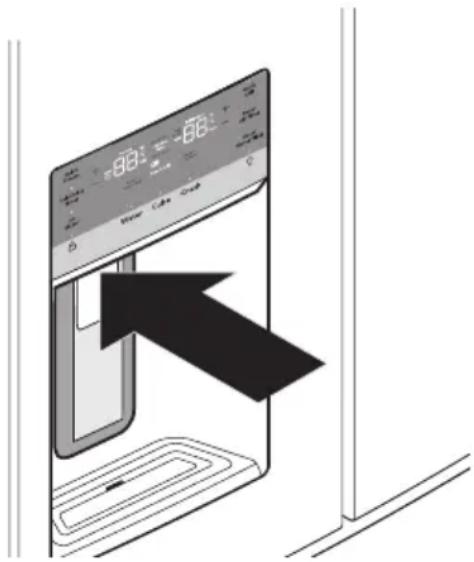
text_image
Diagram showing a digital kitchen appliance with a large black arrow pointing to the screen, indicating a directional change or operation.Dispenser

NOTE
The water dispenser has a built-in device that shuts off the water flow after three minutes of continuous use. To reset this shutoff device, simply release the dispenser paddle.

NOTE
After the initial 750 ml, water will remain room temperature until the tank has refilled and been given enough time to chill the next 750 ml of water. May take up to 8 hours to chill.
7.3 Ice maker operation & care
After the refrigerator is installed properly and has cooled for several hours, the ice maker can produce ice within 24 hours. The ice maker will fill the ice bin from the rear. Dispense some ice to force the ice forward in the bin. This will allow the bin to fill completely.
7.4 Ice Maker and Storage Bin Capacity
This ice maker should produce 1 Kilogram of ice per 24 hours. The ice bin will hold about 1,6 Kilogram of ice.
7.5 Turning the fresh food ice maker on and off

IMPORTANT
The ice maker is turned on at the factory so it can work as soon as the refrigerator is installed. If it is not possible to connect a water supply, set the ice maker's On/Off feature to Off; otherwise, the ice maker's fill valve may make a loud chattering noise when it attempts to operate without water.
Ice production is controlled by the ice maker's On/Off feature on the control panel. Pressing the On/Off feature turns the ice maker on & off.

NOTE
The ice maker also has a built-in plastic signal arm that automatically stops ice production when the ice bin is full. This signal arm should not be used to manually stop the ice maker.

IMPORTANT
Turning off the ice maker simply disables ice making. Existing ice can still be dispensed, and water can be dispensed.

IMPORTANT
On occasion, unusually small ice cubes may be noticed in the bucket or in dispensed ice. This could occur in normal operation of the ice maker. If happening frequently, it may be an indication of low water pressure or the water filter needs to be replaced. As the water filter nears the end of its useful life and becomes clogged with particles, less water is delivered to the ice maker during each cycle. Remember, if it's been six months or longer since last changing the water filter, replace it with a new one. Poor quality household water may require the filter to be changed more frequently.

CAUTION
If the water supply to the refrigerator is softened, be sure the softener is properly maintained. Chemicals from a water softener can damage the ice maker.
7.6 Ice maker/dispenser tips
-
If refrigerator is not connected to a water supply or the water supply is turned off, turn off the ice maker as described in the previous section.
• The following sounds are normal when the ice maker is operating: -
Motor running
- Ice dropping into ice bin
- Water valve opening or closing
-
Running water
-
If a large quantity of ice is needed at one time, it is best to get cubes directly from the ice bin.
- Ice cubes stored too long may develop an odd flavor. Empty the ice bin as explained below.
- When dispensing cubed ice, it is normal to have a small quantity of little pieces along with the whole cubes.
• To avoid splashing, dispense ice into the container before adding liquids. - It is normal for ice to fill to the top of the ice bin.
7.7 Cleaning the ice maker
Clean the ice maker and ice bin at regular intervals, especially prior to vacation or moving.
- Turn off the ice maker.
- Remove the ice bin by pulling straight out.
- Empty and carefully clean the ice bin with mild detergent. Do not use harsh or abrasive cleaners. Do not place in dishwasher. Rinse with clear water.
- Allow the ice bin to dry completely before replacing in the freezer.
- Replace the ice bin. Turn the ice maker on.
Remove and empty the ice bin if:
- An extended power failure (one hour or longer) causes ice cubes in the ice bin to melt and refreeze together after power is restored, jamming the dispenser mechanism.
- Ice dispenser is used infrequently. Ice cubes will freeze together in the bin, jamming the dispenser mechanism.
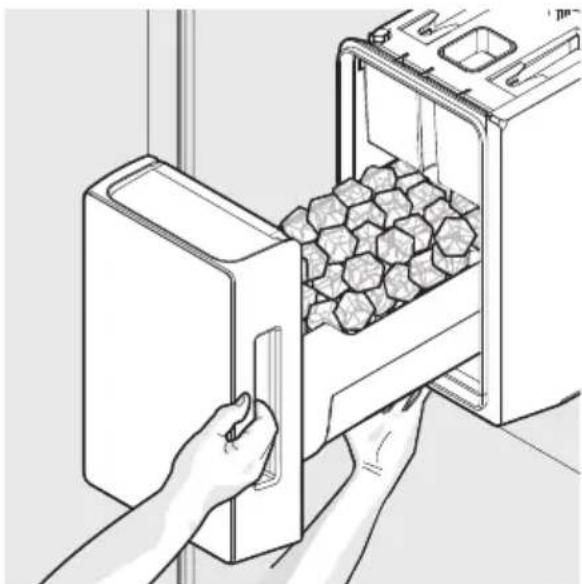
natural_image
Line drawing of hands inserting a box into an oven with granular material inside (no text or symbols)Removing Ice Bin
Remove the ice bin and shake to loosen the cubes or clean as explained above.

CAUTION
NEVER use an ice pick or similar sharp instrument to break up the ice. This could damage the ice bin and dispenser mechanism. To loosen stuck ice, use warm water. Before replacing the ice bin, make sure it is completely dry.

IMPORTANT
When removing or replacing the ice bin, avoid rotating the auger in the ice bin. If the auger is accidentally rotated, realign the auger by turning it in 45 degree turns (see below) until the ice bin fits into place with the drive mechanism. If the auger is not properly aligned when replacing the ice bin, the refrigerator will not dispense ice. The fresh food door also may not close properly causing warm air to leak into the fresh food compartment.
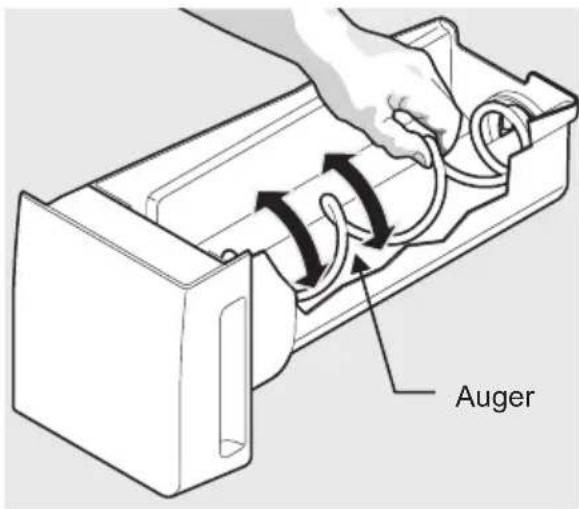
text_image
AugerAdjusting Ice Bin Auger
8. STORAGE FEATURES

CAUTION
To avoid personal injury or property damage, handle tempered glass shelves carefully. Shelves may break suddenly if nicked, scratched, or exposed to sudden temperature change. Allow the glass shelves to stabilize to room temperature before cleaning. Do not wash in dishwasher.

NOTE
Features may vary according to model.
Shelf positions can easily be adjusted in the fresh food compartments as needed. The shelves have mounting brackets that attach to slotted supports at the rear of each compartment.
8.1 Change the Position of a Shelf
- Remove all food from shelf.
-
Lift the front edge up and pull the shelf out.
-
Replace by inserting the mounting bracket hooks into the desired support slots.
- Lower the shelf and lock into position.
To adjust flip shelf:
- Remove food from shelf.
- Lift the right side edge of shelf upwards and push to the left towards ice maker.
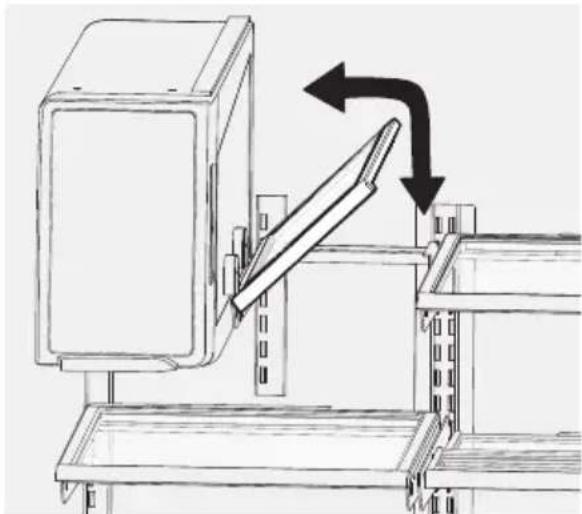
natural_image
Technical line drawing of a mechanical assembly with directional arrows indicating movement (no text or symbols)Flip Shelf
To adjust slide-under/flip shelf:
- Push front half shelf backward towards rear of cabinet until the rear half shelf drops down, then gently continue pushing front half shelf back and under the rear half shelf.
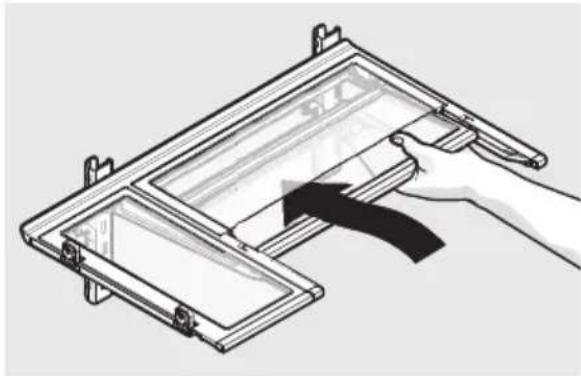
natural_image
Diagram of a hand holding a tool interacting with a mechanical device (no text or symbols visible)Flip Shelf
- With front half fully below back half, lift front of shelf to flip it upwards toward the back of the cabinet.
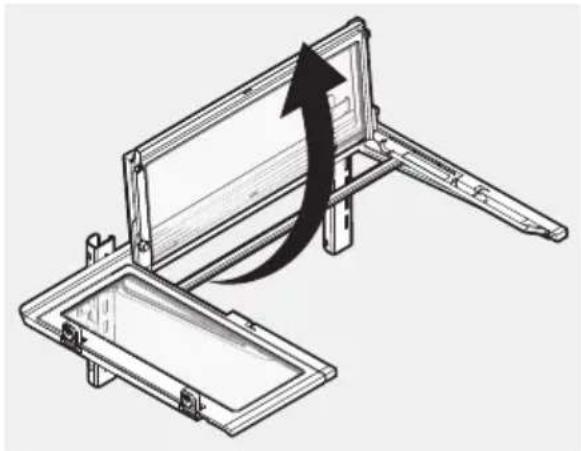
natural_image
Technical line drawing of a mechanical assembly with an arrow indicating direction (no text or symbols)Flip Shelf
8.2 Drawers
The refrigerator includes a variety of storage drawers.
Auto Ultra Fresh Crispers (with automatic humidity control)
Crisper drawers are designed for storing fruits, vegetables, and other fresh produce. Crispers have an auto humidity control (with replaceable membrane) on the side of each crisper under the humidity control cover. Order a replacement membrane at www.aeg.com.
To remove the auto humidity control membrane:
- Reach to back of humidity control cover.
- Pull up on cover.
- Pull cover towards back of cabinet and remove.
- Wash the humidity membrane with water and soap
- Replace cover by reversing the steps above. Repeat for both crispers.
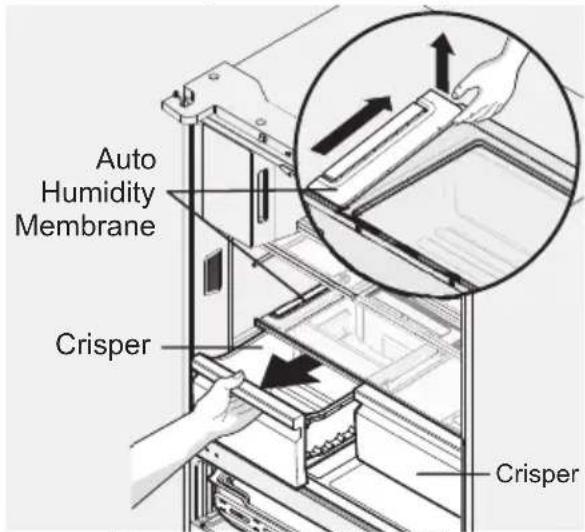
text_image
Auto Humidity Membrane Crisper CrisperRemoving Auto Humidity Control Membrane

NOTE
Producer does not recommend replacing the auto-humidity membrane unless it becomes damaged or ruined. Replacement membranes can be found on www.aeg.com
To remove the Ultra Fresh drawer for cleaning:
- Pull the drawer out until it stops.
- Lift the front slightly and remove the drawer.
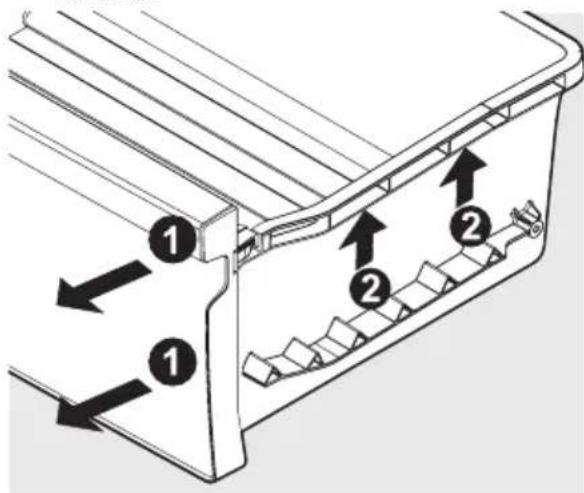
text_image
Technical diagram showing a mechanical component with numbered parts and directional arrows indicating flow or movement.Removing Ultra Fresh Drawer
Snack Zone - Recessed Snack Drawers
These drawers are ideal for storage of deli meats and cheeses.
To open: slide back the cover to allow access to the drawers.
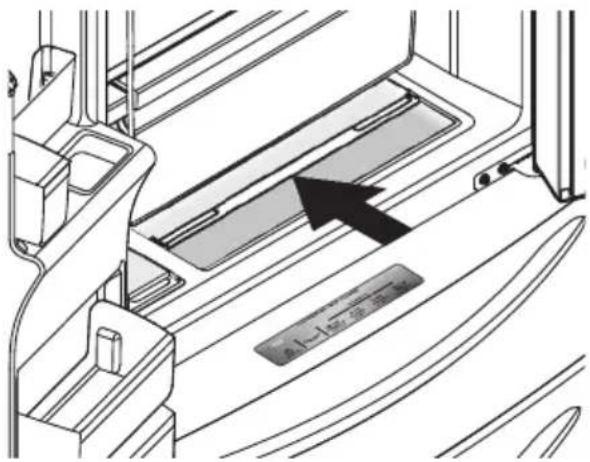
text_image
1-14 2023Opening Snack Zone Recessed Snack Drawers
To move door bin along a rail:
- Tilt bin up so the back of the bin is off the door but the hook is still engaged.
- Slide bin along rail to desired position.
- Lower bin back into place.
To move door bin from rail to rail:
- Lift bin up disengaging the hook.
- Move bin to desired rail location.
- Push bin hook into rail engaging the hook.
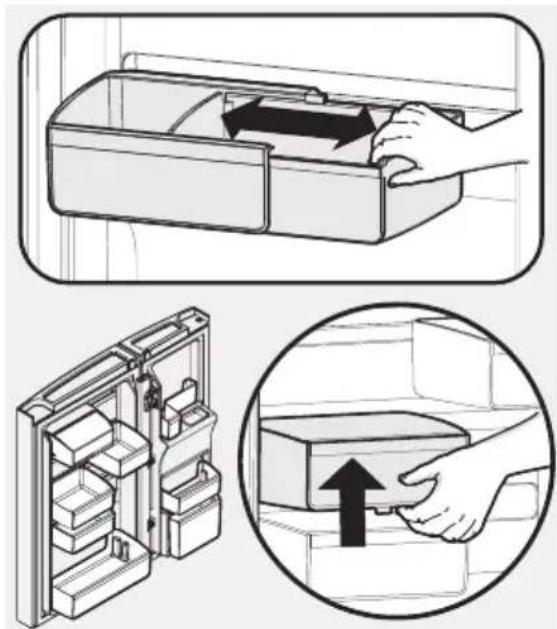
text_image
Diagram illustrating the step-by-step installation of a refrigerator drawer, showing hand positioning and internal storage compartments.8.3 Freezer Features (varies by model)
natural_image
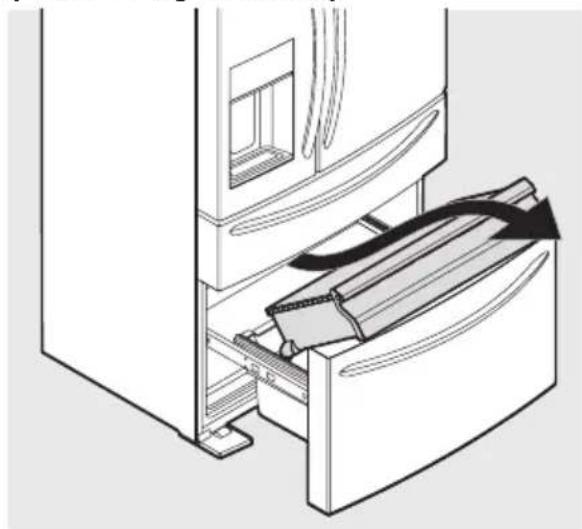
Technical line drawing of a door handle assembly with a clamped device inserted (no text or symbols)Freezer Drawer
To remove upper freezer drawer:
- Open freezer compartment completely.
- Lift up and out to remove upper freezer drawer.
Reverse the steps to reinstall drawer.

IMPORTANT
There are wheels on the bottom of the drawer. Make sure all wheels are aligned on their respective tracks for proper function. If drawer is not aligned properly, it will cause problems with the door operation.

NOTE
If basket is not resting on stabilizer bar retainer clips, the drawer will not close properly.
To remove freezer basket:
- Open freezer compartment completely.
- Lift the basket up and remove.
Reverse the steps to reinstall drawer.
8.4 Dividers
Grab hand hold on lower divider and pull up slightly to slide to next position. (The divider cannot be removed.)
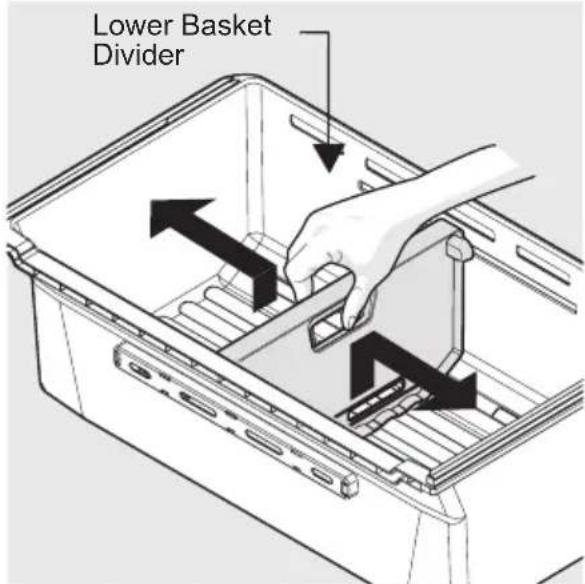
text_image
Lower Basket DividerPlastic Lower Basket Divider
9. CONNECTING THE WATER SUPPLY
Water supply kit
Check the parts below for installing water supply.
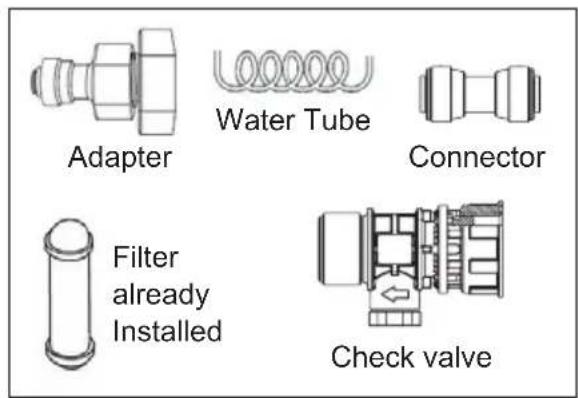
text_image
Adapter Water Tube Connector Filter already Installed Check valve
WARNING
To avoid electric shock, which can cause death or severe personal injury, disconnect the refrigerator from electrical power before connecting a water supply line to the refrigerator.
- When installing the water tubes, ensure they are not close to any hot surface.
-
The water filter only "filters" water; it does not eliminate any bacteria or microbes.
-
If the water pressure is not high enough to run the icemaker, call the local plumber to get an additional water pressure pump.
- The filter life depends on the amount of use. We recommend you replace the filter at least once every 6 months, (look at "changing the filter").
- Use sealing tape to every connection of pipes/tubes to ensure there is no water leak.
- The water tube should be connected to the cold water line.

NOTE
Please ensure that you connect the device to a water supply properly, without any kinks or twists.

NOTE
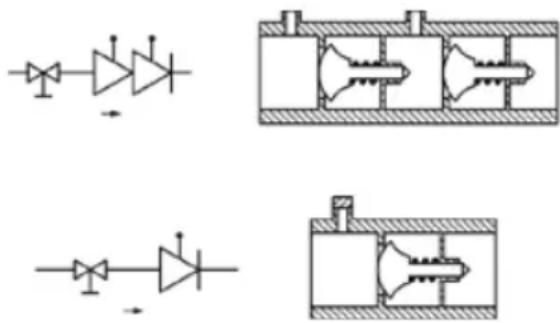
According to EN61770, this device is designed to allow water flow in only one direction to prevent backflow and contamination from returning to the main water source.

NOTE
If you need to replace the device, you must use a new water inlet.
Installation Procedure
Join Check valve to the tap water line
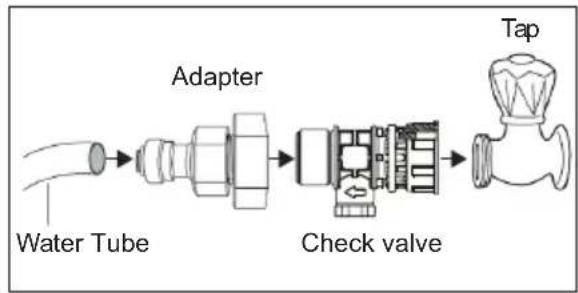
flowchart
graph LR
    A["Water Tube"] --> B["Adapter"]
    B --> C["Check valve"]
    C --> D["Tap"]
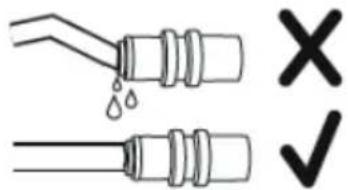
text_image
Diagram showing two pipes with water droplets and a checkmark indicating cancellation- Open the locking clips and grab water coming from the refrigerator. Remove plastic cap from water inlet fitting and discard cap. Replace the connected tubes into the clips and lock clips back in place to keep the tubing in the right position.
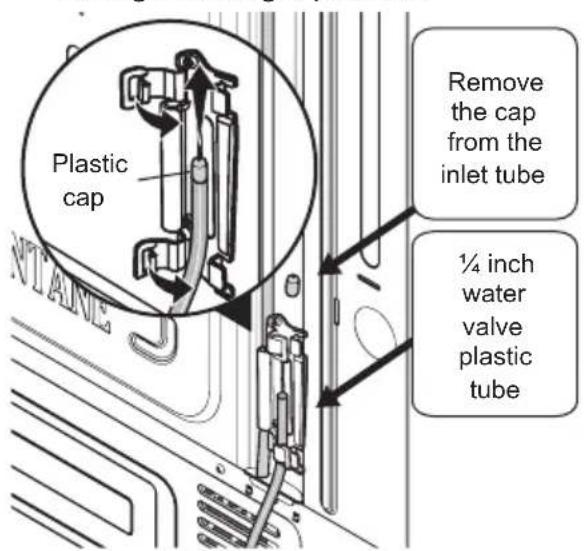
text_image
Plastic cap Remove the cap from the inlet tube ¼ inch water valve plastic tube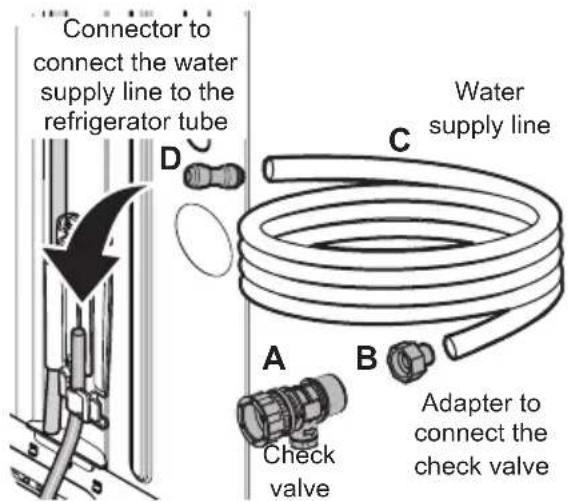
text_image
Connector to connect the water supply line to the refrigerator tube D C Water supply line A Check valve B Adapter to connect the check valve- Attach check valve (item A) to the tap water. Place the swivel nut of the check valve straight onto the male thread of the tap water. Tighten to a torque of 3 Nm. Make sure that the metal ring is correctly seated on the toothed part of the swivel nut. Connect the adapter (item B) to the check valve. Connect the water supply line (item C) to the adapter (item B). While holding the other end of the water supply line in a bucket or sink, turn on the water supply to eliminate air and clean the water supply line. Turn off the water supply.
- Remove the plastic protector from the refrigerator tube and connect the water supply line (item C) to the refrigerator tube using the connector (item D) as shown in fig. Make sure the tubes are inserted completely into the connector.
- Turn on the water supply and check for leaks at the connections. Repeat leak checks at suitable intervals.
- After installation of refrigerator and water line system, select "WATER" on your control panel and press it for 1-2 minutes to supply water into the water tank and dispenser water.
Maintenance Instructions for Check Valve
Backflow preventers are dynamic components and therefore subject to wear. In accordance with DIN EN 806-5:2012, backflow preventers of the type EA or EC are to be maintained by a regular annual inspection. Please also take individual national regulations into consideration.
Inspection
During inspection the following points should be checked:
- Is the determination of the risks, for the tapping points connected to the backflow preventer, unchanged to the technical rule DIN EN 1717 section 5, so that the backflow preventer is still suitable for securing the supply
- Cleanliness around
- No leakage, corrosion or damage
• Meets installation requirements - Accessibility
Installation Guidelines for Check Valve
The backflow preventer can be installed in any position. However, it is advantageous to install it in a horizontal pipeline with the test opening facing downwards. In this installation position, optimum drainage is guaranteed. It is important to ensure good accessibility for the periodic inspection and maintenance.
Assembly Instruction for Swivel Nuts
In order to avoid damage to the swivel nuts or leaks in the screw connections, please follow these assembly instructions.
- Place the swivel nut straight onto the thread of the male counterpart.
- Tighten the swivel nut to a torque of 3 Nm.
- Make sure that the metal ring is correctly seated on the toothed part of the swivel nut.
- Check the installation for leaks.
- Repeat the leakage check at suitable intervals.
- Only use original seals and spare parts from A. u. K. Muller.
natural_image
Pure electrical circuit diagrams without any text, numbers, or symbolsAfter the installation of the backflow preventer, the tightness should be checked.
In addition, a shut-off device (e.g. shut-off valve series 52.009.100/\~200) should be provided to ensure the devices can be safely checked.
10. CHANGING THE FILTER
10.1 Air Filter (select models)
The air filter is located in the top center of the fresh food compartment.
10.2 Replacing the Air Filter (TasteGuard)
To ensure optimal filtering of refrigerator odors, change the air filter every six months (Replace Air Filter on the Display indicates replacing the filter after six months).
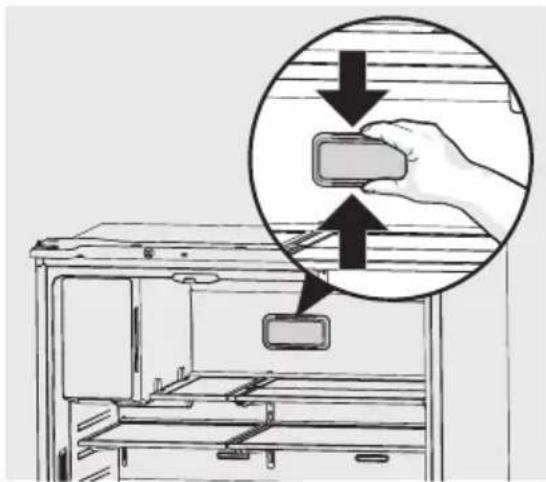
- Remove the air filter cover by squeezing the top and bottom of the cover together and removing from liner.
- Remove the old filter and discard it.
- Unpack the new filter and slide it into the housing. The open face must (carbon media) of the filter should be installed facing the air port (hole) in the multiflow.
- Replace the air filter cover by squeezing the sides and snapping it back into place.
- Press and hold the "Reset Air Filter" button on the Display for three seconds. When the indicator turns off, the status has been reset.
text_image
Diagram showing a hand holding a rectangular device inside a refrigerator, with an inset magnified view highlighting the component.10.3 Ordering Replacement Air Filters
Use original spare parts only. Please contact an Authorised Service Centre
10.4 Water Filter
The refrigerator is equipped with a water filtering system. The water filtering system filters all dispensed drinking water, as well as the water used to produce ice. The water filter is located at the top right side of the fresh food compartment.
10.5 Replacing the Water Filter
Change the water filter every six months to ensure the highest possible water quality. Replace Water Filter on the display indicates when to replace the filter after a standard amount of water (473 liters) has flowed through the system.
If the refrigerator has not been used for a period of time (during moving for example), change the filter before reinstalling the refrigerator.
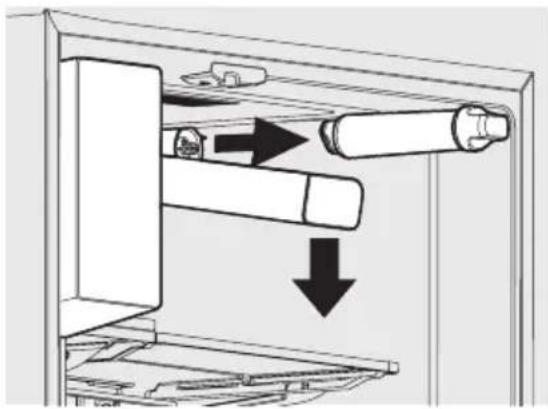
To Remove: Pull cover forwards and cover will drop down and allow access to filter.
To Reinstall: Push cover up towards liner and then push towards rear of cabinet. Filter cover will snap back into place.
natural_image
Diagram of a refrigerator interior showing internal components and directional arrows (no text or symbols)10.6 Ordering Replacement Water Filters
Use original spare parts only. Please contact an Authorised Service Centre
To replace the water filter:
It is not necessary to turn the water supply off to change the filter. Be ready to wipe up any small amounts of water released during the filter replacement.
- Turn off the ice maker by pressing and holding the Ice Maker button on the display until no longer illuminated.
- Push down on front edge of filter cover. Cover will tilt down and expose water filter.
- Remove the old filter by rotating it counter-clockwise (to the left) 90 degrees to release it.
- Slide the old filter cartridge straight out of the housing and discard it.
-
Unpackage the new filter cartridge. Slide it into the filter housing as far as it will go with the grip end horizontal.
-
Push lightly inward on the filter while rotating it clockwise (to the right). The filter will then pull itself inward as it is rotated. Rotate the filter 90 degrees until it stops and the grip end is vertical. A very light click may be heard as the filter locks into place.
- Press a drinking glass against the water dispenser while checking for any leaks at the filter housing. Any spurts and sputters that occur as the system purges air out of the dispenser system are normal.
- Continue dispensing water for 3-4 minutes. It may be necessary to empty and refill the container several times.
- Turn on the ice maker by pressing and holding the Ice Maker button on the display until it is illuminated.
- Press and hold the Reset Water Filter button on the display for three seconds. When indicator is no longer illuminated, the water filter status has been reset.
- Replace filter cover by pushing up and snapping into place.
11. INSTALLATION

WARNING!
Refer to Safety chapters.
text_image
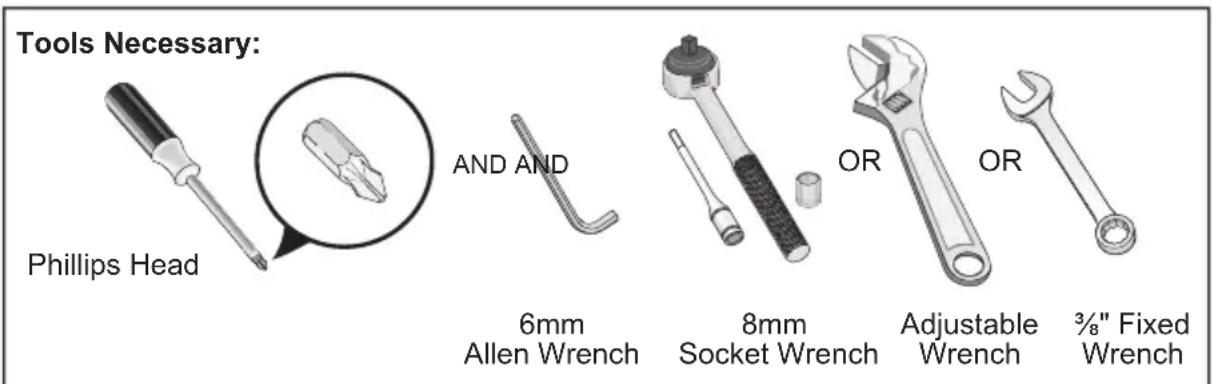
Tools Necessary: Phillips Head AND AND 6mm Allen Wrench 8mm Socket Wrench OR OR Adjustable Wrench 3/8" Fixed WrenchThis User Manual provides general installation and operating instructions for this model. We recommend using a service or kitchen contracting professional to install the refrigerator. Use the refrigerator only as instructed in this User Manual.
Before starting the refrigerator, follow these important first steps.
11.1 Location
- Choose a place that is near a grounded, non-GFCI, electrical outlet. Do Not use an extension cord or an adapter plug.
- If possible, place the refrigerator out of direct sunlight and away from the range, dishwasher, or other heat sources.
- The refrigerator must be installed on a floor that is level and strong enough to support a fully loaded refrigerator.
- Consider water supply availability for models equipped with an automatic ice maker.
- To ensure appliance's best functionality, you should not install the appliance in the nearby of the heat source (oven, stoves, radiators, cookers or hobs)

CAUTION
Do Not install the refrigerator where the temperature will drop below 10^ C or rise above 43^ C. The compressor will not be able to maintain proper temperatures inside the refrigerator.
Do Not block the toe grille on the lower front of the refrigerator. Sufficient air circulation is essential for the proper operation of the refrigerator.
11.2 Installation
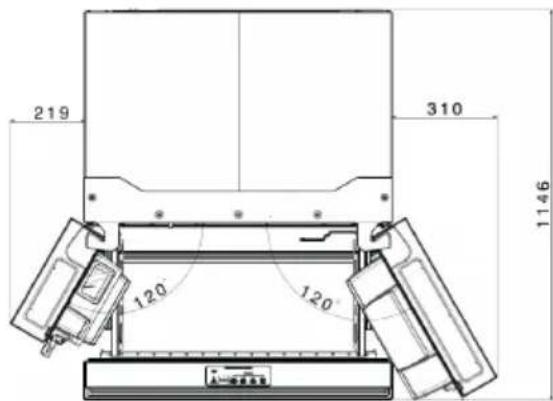
Allow the following clearances for ease of installation, proper air circulation, and plumbing and electrical connections:
Sides & Top 40 mm
Back 30 mm

NOTE
If the refrigerator is placed with the door hinge side against a wall, allow additional space so the door can be opened wider.
text_image
219 310 1146 120 12011.3 Positioning
This appliance is not intended to be used as a built-in appliance.
This appliance should be installed in a dry, well ventilated indoor position.
This appliance is intended to be used at ambient temperature ranging from 10^ C to 43^ C.
If, due to different installation, proper ventilation requirements are not respected, the appliance will function correctly but energy consumption might increase slightly.

The correct operation of the appliance can only be guaranteed within the specified temperature range.

If you have any doubts regarding where to install the appliance, please turn to the vendor, to our customer service or to the nearest Authorised Service Centre.

It must be possible to disconnect the appliance from the mains power supply. The plug must therefore be easily accessible after installation.

CAUTION
If you position the appliance against the wall, use back spacers provided or keep the minimum distance indicated in the installation instructions.

CAUTION
If you install the appliance next to a wall, refer to the installation instructions to understand the minimum distance between the wall and the side of the appliance where door hinges are to provide enough space to open the door when the internal equipment is removed (e.g. when cleaning).
11.4 Door opening
The refrigerator should be positioned to allow easy access to a counter when removing food. For best use of refrigerator drawers and freezer baskets, the refrigerator should be in a position where both can be fully opened.
11.5 Cabinet Leveling & Refrigerator Door Alignment (if necessary)
Guidelines for final positioning of refrigerator:
- All four corners of the cabinet must rest firmly on the floor.
- The front should be slightly elevated to ensure that doors close and seal properly.
- Doors should align with each other and be level.
Most of these conditions can be met by raising or lowering the adjustable front rollers.
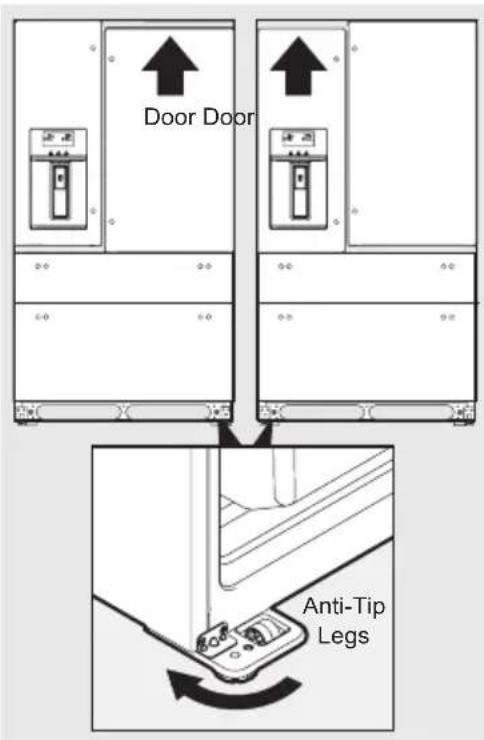
To level the cabinet using the front rollers:
- Slightly open freezer drawer.
- Lower anti-tip legs until they are both touching the floor. Once on the floor, use a pair of pliers to adjust.
To raise unit: turn leg clockwise. To lower unit: turn leg counterclockwise.
- Ensure both doors are bind-free with their seals touching the cabinet on all four sides and that cabinet is stable.
text_image
Door Door Anti-Tip LegsTo make final door height adjustments:
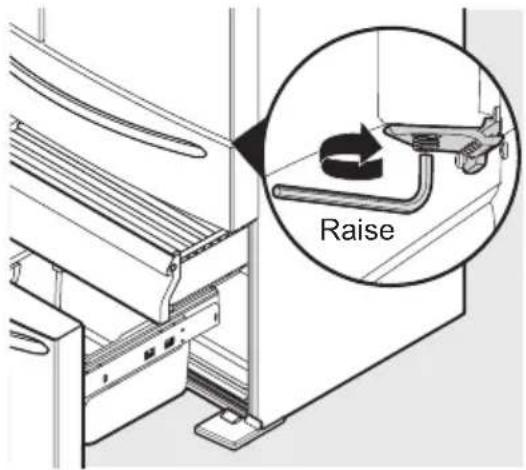
- Open freezer drawer to make lower hinge visible.
-
Insert 6mm allen wrench into the shaft of the lower hinge.
-
Adjust the height by turning clockwise or counterclockwise. Turning clockwise will lower the door. Turning counterclockwise will raise the door. Default setting is to the lowest height.
text_image
Raise11.6 Flipper Mullion
Adjust Flipper Mullion for proper connection with the mullion guide by ensuring the flipper mullion is folded and perpendicular to the fresh food door. If the mullion guide is not in the correct position, it could prevent the door from closing completely.
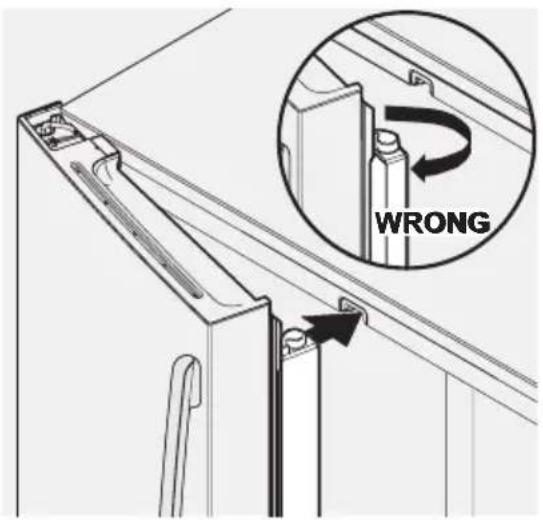
text_image
WRONG12. DOOR REMOVAL INSTRUCTIONS
12.1 Getting through narrow spaces
If refrigerator will not fit through an entrance area, doors can be removed. Check first by measuring the entrance.
To prepare for removing the doors:
- Make sure the electrical power cord is unplugged from the wall outlet.
- Remove any food from the door shelves and close the doors.
To remove the refrigerator doors:
- Open doors to 90°.
- Remove all five Phillips screws from top hinge cover and lift up.
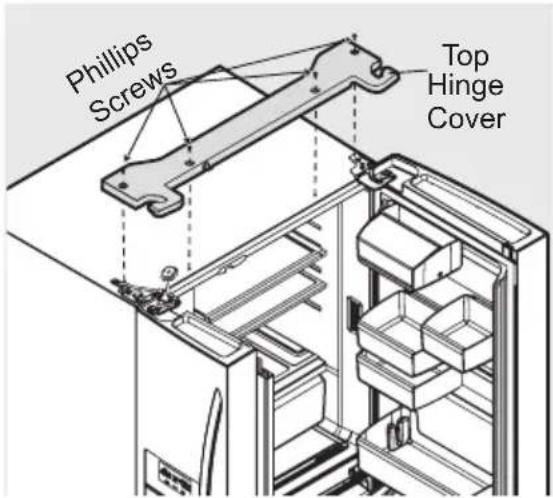
text_image
Phillips Screws Top Hinge Cover- Trace lightly around the door's top hinges with a pencil. This makes re-installation easier.
- Lift off the top hinge cover.
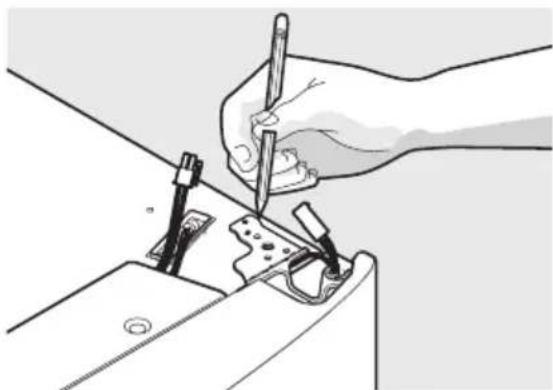
natural_image
Illustration of a hand using a tool to cut or mark a mechanical component (no text or symbols visible)- Disconnect electrical harness running from door to hinge cover.
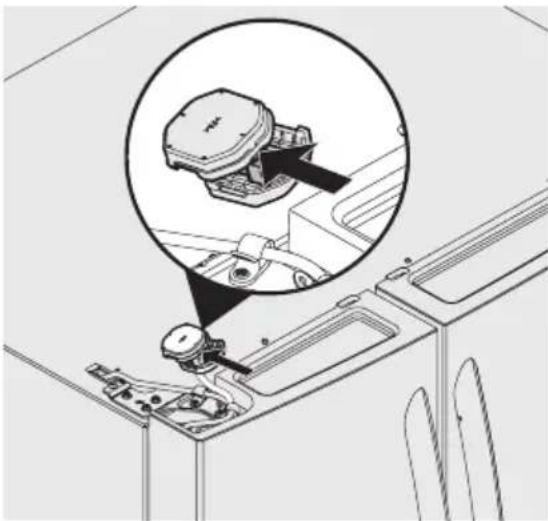
natural_image
Technical line drawing of a mechanical assembly with an inset close-up showing a component (no text or symbols)- Pull up on water line gently to remove from door.

NOTE
Use care while pulling the water tube from the door to be sure that tube does not kink.
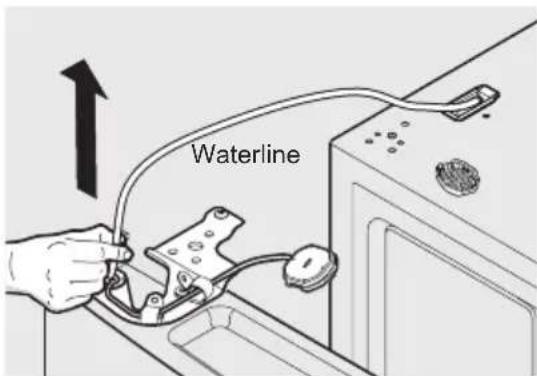
text_image
Waterline
NOTE
Approximately four feet of water tube will be pulled from the refrigerator door.
- Remove three 8mm bolts from both top hinges.
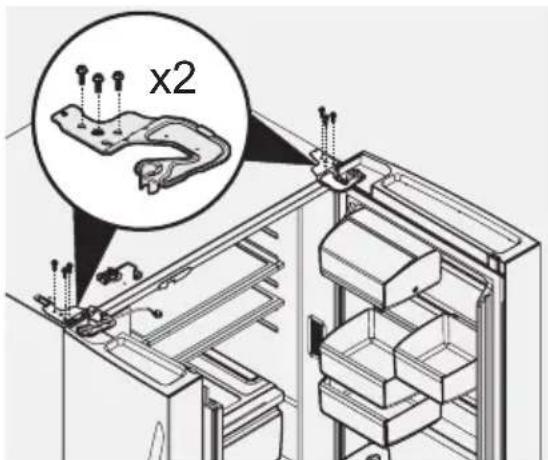
text_image
x2- To gain access to lower hinge, drawer will need to be extended. Unscrew the three lower hinge screws and slide the hinge inwards Lift up on door and remove from bottom hinge.
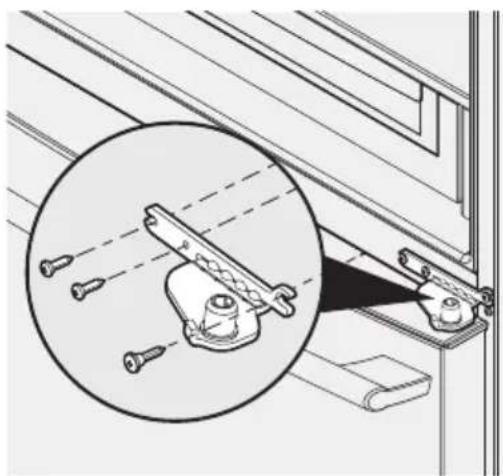
natural_image
Technical diagram showing a mechanical assembly with a magnified inset of a bracket detail (no text or symbols)Lower Hinge Removal

CAUTION
Be sure doors are set aside in a secure position where they cannot fall and cause personal injury, or damage to the doors or handles.
- To reinstall doors, reverse procedure.

IMPORTANT
Make sure water line tubing goes through hole at top of dispenser pocket. There is also a metal wrap on the tubing to prevent damage from the hinge rubbing against it. This needs to be fixed back around the tube in the proper location upon re-installation (just as long as the tube is protected from the hinge).

NOTE
When reinserting the water tube and replacing the top hinge cover, use care to be sure the tube does not kink.
Once both doors are in place, ensure they are aligned with each other and level (Please see the Installation section for more details), and replace the top hinge cover.
12.2 To remove the MultiSwitch/MultiChill drawer
- Fully open drawer.
- Remove basket from drawer.
- Unclip harness at front of drawer and move harness out of the way of drawer slides.
- Press liner clips and slide rail past clips on both sides to fully remove drawer from cabinet.
- Reverse the steps to reinstall the drawer.
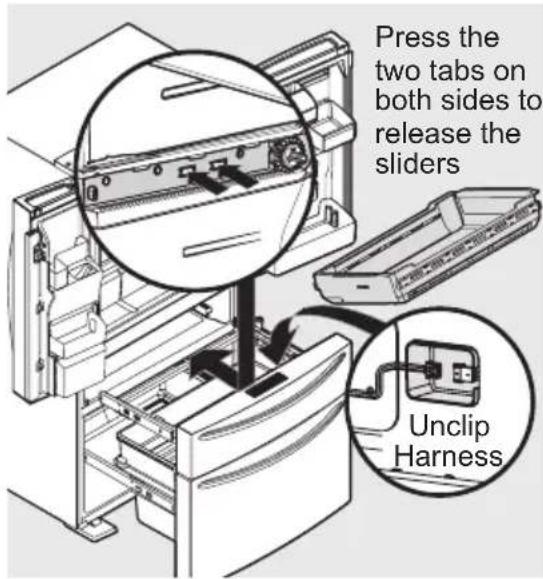
text_image
Press the two tabs on both sides to release the sliders Unclip Harness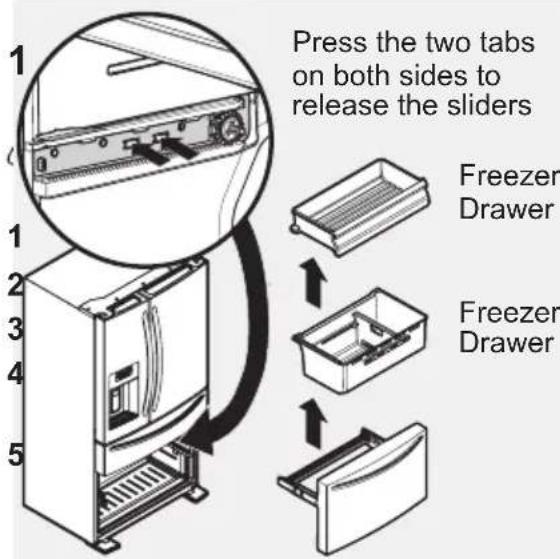
text_image
Press the two tabs on both sides to release the sliders Freezer Drawer Freezer Drawer12.4 Re-installing Freezer Drawer
- Place drawer with brackets and sliders inside the cabinet and click into place.
- Replace the basket.

NOTE
For additional instructions, see Storage Features section.
12.5 To remove the door seal

CAUTION
Please make sure that you have switched your appliance off at the mains before starting your repair.
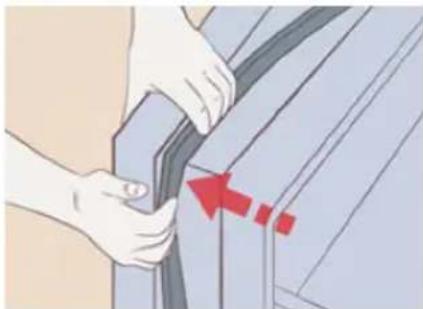
- Place your thumb underneath the seal, the best method is to start at the corner. Grab the bottom of it on the side, and pull the gasket back.
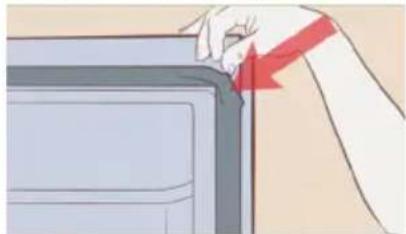
natural_image
Illustration of a hand holding a red arrow pointing to a device component (no text or symbols visible)- Then proceed to run it around the underside of your seal-and it can then be gently lifted away around the door.
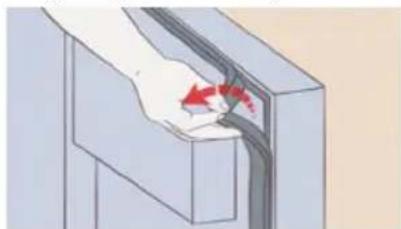
natural_image
Illustration of a hand holding a cable with red arrows indicating direction (no text or symbols)12.6 To fitting the door seal
- Take the new gasket, the best way to fit it is starting at the top corners of the refrigerator door. Push the lip of the new gasket into the channel between corners and work your way around the door. Before fitting the bottom corners and fit between. Lastly work evenly at the top then the bottom to the middle helping spread any excess evenly on the longest part of the seal.
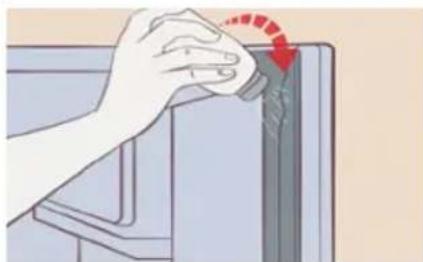
natural_image
Illustration of a hand using a tool to press or adjust a component, with no visible text or symbols.- Apply powder. Use a bit of baby powder or talcum powder to prevent sticking.
natural_image
Illustration of hands adjusting a car seatbelt with a red arrow indicating the angle (no text or symbols present)- Close the refrigerator door, and open it several times to inspect the gasket. You are looking for any warped areas of the gasket. Repeat this process several times
13. HELPFUL HINTS AND TIPS
Energy saving tips
We recommend that you follow the tips below to save energy.
- Freezer: The internal configuration of the appliance is the one that ensures the most efficient use of energy.
-
Fridge: Most efficient use of energy is ensured in the configuration with the drawers in the bottom part of the appliance and shelves evenly distributed. Position of the door bins does not affect energy consumption.
-
Do not open the door frequently or leave it open longer than necessary.
- Freezer: The colder the temperature setting, the higher the energy consumption.
- Fridge: Do not set too high temperature to save energy unless it is required by the characteristics of the food.
- If the ambient temperature is high and the temperature control is set to low temperature and the appliance is fully loaded, the compressor may run continuously, causing frost or ice formation on the evaporator. In this
case, set the temperature control toward higher temperature to allow automatic defrosting and to save energy this way.
- Ensure a good ventilation. Do not cover the ventilation grilles or holes.
Hints for fresh food refrigeration
- Fresh food compartment is the one marked (on the rating plate) with 📊
- Good temperature setting that ensures preservation of fresh food is a temperature less than or equal to +4°C.
- Higher temperature setting inside the appliance may lead to shorter shelf life of food.
- Cover the food with packaging to preserve its freshness and aroma.
• Always use closed containers for liquids and for food, to avoid flavours or odours in the compartment. - To avoid the cross-contamination between cooked and raw food, cover the cooked food and separate it from the raw one.
- It is recommended to defrost the food inside the fridge.
- Do not insert hot food inside the appliance. Make sure it has cooled down at room temperature before inserting it.
- To prevent food waste the new stock of food should always be placed behind the old one.
Hints for refrigeration
- Meat (all types): wrap in a suitable packaging and place it on the glass shelf above the vegetable drawer. Store meat for at most 1-2 days.
- Fruit and vegetables: clean thoroughly (eliminate the soil) and place in a special drawer (vegetable drawer).
- It is advisable not to keep the exotic fruits like bananas, mangos, papayas etc. in the refrigerator.
• Vegetables like tomatoes, potatoes, onions, and garlic should not be kept in the refrigerator. -
Butter and cheese: place in an airtight container or wrap in an aluminium foil or a polythene bag to exclude as much air as possible.
-
Bottles: close them with a cap and place them on the door bottle shelf, or (if available) on the bottle rack.
- Always refer to the expiry date of the products to know how long to keep them.
Hints for freezing
- Activate FastFreeze function at least 24 hours before placing the food inside the freezer compartment.
- Before freezing wrap and seal fresh food in: aluminium foil, plastic film or bags, airtight containers with lid.
- For more efficient freezing and thawing divide food into small portions.
- It is recommended to put labels and dates on all your frozen food. This will help to identify foods and to know when they should be used before their deterioration.
- The food should be fresh when being frozen to preserve good quality. Especially fruits and vegetables should be frozen after the harvest to preserve all of their nutrients.
- Do not freeze bottles or cans with liquids, in particular drinks containing carbon dioxide - they may explode during freezing.
- Do not put hot food in the freezer compartment. Cool it down at room temperature before placing it inside the compartment.
- To avoid increase in temperature of already frozen food, do not place fresh unfrozen food directly next to it. Place food at room temperature in the part of the freezer compartment where there is no frozen food.
- Do not eat ice cubes, water ices or ice lollies immediately after taking them out of the freezer. Risk of frostbites.
- Do not re-freeze defrosted food. If the food has defrosted, cook it, cool it down and then freeze it.
Hints for the storage of frozen food
- Freezer compartment is the one marked with *
• Good temperature setting that ensures preservation of frozen food
products is a temperature less than or equal to -18^ C.
- Higher temperature setting inside the appliance may lead to shorter shelf life.
- The whole freezer compartment is suitable for storage of frozen food products.
- Leave enough space around the food to allow air to circulate freely.
- For adequate storage refer to food packaging label to see the shelf life of food.
- It is important to wrap the food in such a way that prevents water, humidity or condensation from getting inside.
Shopping tips After grocery shopping:
- Ensure that the packaging is not damaged - the food could be deteriorated. If the package is swollen or wet, it might have not been stored in the optimal conditions and defrosting may have already started.
- To limit the defrosting process buy frozen goods at the end of your grocery shopping and transport them in a thermal and insulated cool bag.
- Place the frozen foods immediately in the freezer after coming back from the shop.
- If food has defrosted even partially, do not re-freeze it. Consume it as soon as possible.
- Respect the expiry date and the storage information on the package.
Switching off your appliance
If the appliance needs to be switched off for an extended period, the following steps should be taken to prevent mould on the appliance.
- Remove all food.
- Remove the power plug from the mains socket.
- Clean and dry the interior thoroughly.
- Ensure that all the doors are wedged open slightly to allow air to circulate.
Shelf life for freezer compartment:
| Type of food Shelf life (months) |
| Bread 3 |
| Fruits (except citrus) 6 - 12 |
| Vegetables 8 - 10 |
| Leftovers without meat 1 - 2 |
| Dairy food: |
| Butter 6 - 9 |
| Soft cheese (e.g. mozzarella) 3 - 4 |
| Hard cheese (e.g. parmesan, cheddar) 6 |
| Seafood: |
| Fatty fish (e.g. salmon, mackerel) 2 - 3 |
| Lean fish (e.g. cod, flounder) 4 - 6 |
| Shrimps 12 |
| Shucked clams and mussels 3 - 4 |
| Cooked fish 1 - 2 |
| Meat: |
| Poultry 9 - 12 |
| Beef 6 - 12 |
| Pork 4 - 6 |
| Lamb 6 - 9 |
| Sausage 1 - 2 |
| Ham 1 - 2 |
| Leftovers with meat 2 - 3 |
14. CLEANING AND CARE
For hygienic reasons the appliance (including exterior and interior accessories) should be cleaned regularly at least every two months.

CAUTION!
The appliance must not be connected to the mains during cleaning. Danger of electrical shock! Before cleaning switch the appliance off and remove the plug from the mains socket.
Exterior cleaning
To maintain good appearance of your appliance, you should clean it regularly.
- Wipe the digital panel and display panel with a clean, soft cloth.
- Spray water onto the cleaning cloth instead of spraying directly on the surface of the appliance. This helps ensure an even distribution of moisture to the surface.
- Clean the doors, handles and cabinet surfaces with a mild detergent and then wipe dry with a soft cloth.

CAUTION!
- Don't use sharp objects as they are likely to scratch the surface.
- Don't use Thinner, Car detergent, Clorox, ethereal oil, abrasive cleansers or organic solvent such as Benzene for cleaning. They may damage the surface of the appliance and may cause fire.
Interior cleaning
- You should clean the appliance interior regularly. It will be easier to clean when food stocks are low. Wipe the inside of the fridge freezer with a weak solution of bicarbonate of soda, and then rinse with warm water using a wrung-out sponge or cloth. Wipe completely dry before replacing the shelves and baskets. Thoroughly dry all surfaces and removable parts.
-
Although this appliance automatically defrosts, a layer of frost may occur on the freezer compartment's interior walls if the freezer door is opened frequently or kept open too long. If the frost is too thick, choose a time when the supply of food stocks are low and proceed as follows:
-
Remove existing food and accessories baskets, unplug the appliance from the mains power and leave the doors open. Ventilate the room thoroughly to accelerate the thawing process.
-
When defrosting is completed, clean your freezer as described above.

CAUTION!
Don't use sharp objects to remove frost from the freezer compartment. Only after the interior is completely dry should the appliance be switched back on and plugged back into the mains socket.
Door seals cleaning
Take care to keep door seals clean. Sticky food and drinks can cause seals to stick to the cabinet and tear when you open the door. Wash seal with a mild detergent and warm water. Rinse and dry it thoroughly after cleaning.

WARNING!
The LED light must not be replaced by the user! If the LED light is damaged, contact the customer helpline for assistance.

CAUTION!
Only after the door seals are completely dry should the appliance be powered on.
15. BEFORE CALLING
| Concern Potential Cause Common Solution | ||
| Automatic Ice Maker | ||
| Ice maker is not making any ice. | · Ice maker is turned off. | · Turn on ice maker. For the fresh food ice maker, press ice maker on-off button once. |
| · Refrigerator is not connected to water line or water valve is not open. | · Connect the unit to the household water supply and ensure the water valve is open. | |
| · The water supply line is kinked. | · Ensure that the supply line does not kink when the refrigerator is pushed into place against the wall. | |
| · The water filter is not seated properly. | · Remove and re-install the water filter. Be sure to seat it fully into the locked position. | |
| · The water filter may be clogged with foreign material. | · If water dispenses slowly or not at all, or if the filter is six months old or older, it should be replaced. | |
| Ice maker is not making enough ice. | · Ice maker is producing less ice than expected. | · The ice maker will produce approximately 1 kg of ice (fresh food ice maker) every 24 hours depending on usage conditions. |
| · The water filter may be clogged with foreign material. | · If water dispenses slower than normal, or if the filter is six months old or older, it should be replaced. | |
| · The water supply line is kinked. | · Ensure that the supply line does not kink when the refrigerator is pushed into place against the wall. | |
| · Water pressure is extremely low. Cut-off and cut-on pressures are too low (well systems only). | · Have someone turn up the cut-off and cut-on pressure on the water pump system (well systems only). | |
| · Reverse osmosis system is in regenerative phase. | · It is normal for a reverse osmosis system to be below 20 psi during the regenerative phase. | |
| Ice cubes are freezing together. | · Ice cubes are not being used frequently enough or interruption of power for prolonged time. | · Remove ice container and discard ice. The ice maker will produce fresh supply. Ice should be used at least twice weekly to keep the cubes separated. |
| · Ice cubes are hollow (shells of ice with water inside). The hollow cubes break open in the bin and leak their water onto existing ice, which causes it to freeze together. | · This generally occurs when the ice maker does not get enough water. This is usually the result of a clogged water filter or restricted water supply. Replace the water filter and if the condition still occurs, check to see if the water valve is not turned on all the way or if there is a kinked water supply line. | |
| Dispenser (Ice & Water) | ||
| Dispenser will not dispense ice. | · There is no ice in the bin to be dispensed. | · See the “Ice maker is not making any ice” section. |
| · The refrigerator doors are not completely closed. | · Be sure the refrigerator doors are completely closed. | |
| · Dispenser paddle has been pressed too long and the dispenser motor has overheated. | · The motor overload protector will reset in about three minutes and then ice can be dispensed. | |
| Ice dispenser is jammed. | · Ice has melted and frozen around auger due to infrequent use, temperature fluctuations, and/or power outages. | · Remove ice container, thaw, and empty the contents. Clean container, wipe dry, and replace in proper position. When new ice is made, dispenser should operate. |
| · Ice cubes are jammed between ice maker and back of ice container. | · Remove ice cubes that are jamming the dispenser. | |
| Dispenser will not dispense water. | · Water filter not seated properly. | · Remove and reinstall the water filter. For Puresource Ultra II, be sure to rotate it to the right until it stops and the grip end is vertical. |
| · Water filter is clogged. | · Replace filter cartridge. Be sure to rotate it to the right until it stops and the grip end is vertical. | |
| · Household water line valve is not open. | · Open household water line valve. See CONCERN column AUTOMATIC ICE MAKER. | |
| Water not cold enough. | · As warmer tap water goes through the filter and enters the water supply system, the chilled water is pushed through to the dispenser. Once the chilled water is used up, it will take several hours to bring the freshly replaced water to a cooler temperature. | · Add ice to cup or container before dispensing water. Note: Only first 750 ml are chilled. |
| Water has an odd taste and/or odor. | · Water has not been dispensed for an extended period of time. | · Draw and discard 10-12 glasses of water to freshen the supply. |
| · Unit not properly connected to cold water line. | · Connect unit to cold water line that supplies water to the kitchen faucet. | |
| Opening/Closing Of Doors/Drawers | ||
| Door(s) will not close. | Door was closed too hard, causing other door to open slightly.Refrigerator is not level.It rocks on the floor when moved slightly.Refrigerator is touching a wall or cabinet.Check gasket and cabinet interface for any obstructions. | Close both doors gently.Ensure floor is level and solid, and can adequately support the refrigerator.Contact a carpenter to correct a sagging or sloping floor.Ensure floor is level and solid, and can adequately support the refrigerator.Contact a carpenter to correct a sagging or sloping floor.Clean the refrigerator door gaskets and interface with warm, soapy water to remove any grease, dirt and grime from the surface.Wipe clean with a dry cloth.Inspect the gasket to make sure it is thoroughly clean. |
| Drawers are difficult to move. | Food is touching shelf on top of drawer.Track that drawers slide on is dirty. | Remove top layer of items in drawer.Ensure drawer is properly installed on track.Clean drawer, rollers, and track. See Care & Cleaning. |
| Running of Refrigerator | ||
| Compressor does not run. | Refrigerator is in defrost cycle.Plug at electrical outlet is disconnected.House fuse blown or tripped circuit breaker.Power outage. | This is normal for a fully automatic defrost refrigerator.The defrost cycle occurs periodically, lasting about 30 minutes.Ensure plug is tightly pushed into outlet.Check/replace fuse with a 15 amp time- delay fuse.Reset circuit breaker.Check house lights. Call local electric company. |
| Refrigerator seems to run too much or too long. | The variable speed compressor is designed to run 100% of the time except during the defrost cycle.At times it will run faster, such as after a defrost cycle. | It is normal for the compressor to run continuously except during defrost mode. |
| Digital Temperature Setting Display | ||
| Digital temperature displays an error. | Electronic control system has detected a performance problem. | Contact Electrolux Customer Care for assistance. |
| Water/Moisture/Frost Inside Refrigerator | ||
| Moisture collects on inside of refrigerator walls. | Weather is hot and humid.Flipper mullion | The rate of frost build-up and internal sweating increases.Adjust flipper mullion. (See “To adjust the flipper mullion” in the Installation section.) |
| Water collects on bottom side of drawer cover. | Vegetables contain and give off moisture. | It is not unusual to have moisture on the bottom side of the cover.Both crispers contain an automatic humidity control, which should adjust automatically to the varying levels of moisture inside the drawer without creating additional condensation or drying out the air inside the crisper drawer, works with various types of produce. If excess moisture is noticed, check to verify humidity membrane is not damaged and replace as necessary. |
| Water collects in bottom of drawer. | Washed vegetables and fruit drain while in the drawer. | Dry items before putting them in the drawer. Water collecting in bottom of drawer is normal. |
| Water/Moisture/Frost Outside Refrigerator | ||
| Moisture collects on outside of refrigerator or between doors. | Weather is humid. This is normal in humid weather. When humidity is lower, the moisture should disappear. | |
| Food/Drinks in Fresh Food Compartment/Multi Switch drawer | ||
| Food is freezing. | Temperature setting is too low.Temperature sensor is covered by food (right side of fresh food area).Food is covering the air ports. | Move the setting to a higher degree.Allow space for air flow to the sensor.Allow space between the air ports and the food. |
| Cold Drink Timer | ||
| Drinks are freezing. | Temperature setting is too low.Cold drink timer is set too long. | Move temperature setting higher.Reduce time of cold drink timer accordingly. |
16. DISPOSAL OF THE APPLIANCE
The refrigerator is built from reusable materials. It must be disposed of in compliance with current local waste disposal regulations. The appliance contains a small quantity of refrigerant (R600a) in the refrigerant circuit. For your safety please refer to the section of “the refrigerant and risk of fire” in this Instruction Manual before scrapping the
appliance. Please cut off the power cord to make the refrigerator unusable and remove the door seal and lock. Please be cautious of the cooling system and do not damage it by puncturing the refrigerant container and/or bending the tubing, and/or scratching of the surface coating.
Correct Disposal of this product
This symbol on the product or in its packing indicates that this product may not be treated as household waste. Instead, it should be taken to the appropriate waste collection point for the recycling of electrical and electronic equipment. By ensuring this product is disposed of correctly, you will help prevent potential negative consequences for the environment and human health, which could otherwise be caused by the inappropriate waste handling of this product. For more detailed information about the recycling of this product, please contact your local council your household waste disposal service, or the shop where you purchased the product.
17. TECHNICAL DATA
| Dimension |
| Height 1782 mm |
| Width 913 mm |
| Depth 746 mm |
| Rising Time 14 h |
| Voltage 220-240 V |
| Frequency 50 Hz |
The technical information are situated in the rating plate on the internal left side of the appliance and in the energy label.
The technical information is situated in the rating plate on the internal side of the appliance and on the energy label.
The QR code on the energy label supplied with the appliance provides a web link to the information related to the performance of the appliance in the EU EPREL database. Keep the energy label for reference together with the user manual and all other documents provided with this appliance.
It is also possible to find the same information in EPREL using the link https://eprel.ec.europa.eu and the model name and product number that you find on the rating plate of the appliance.
See the link www.theenergylabel.eu for detailed information about the energy label.
18. NOISES
There are some sounds during normal running (compressor, refrigerant circulation).
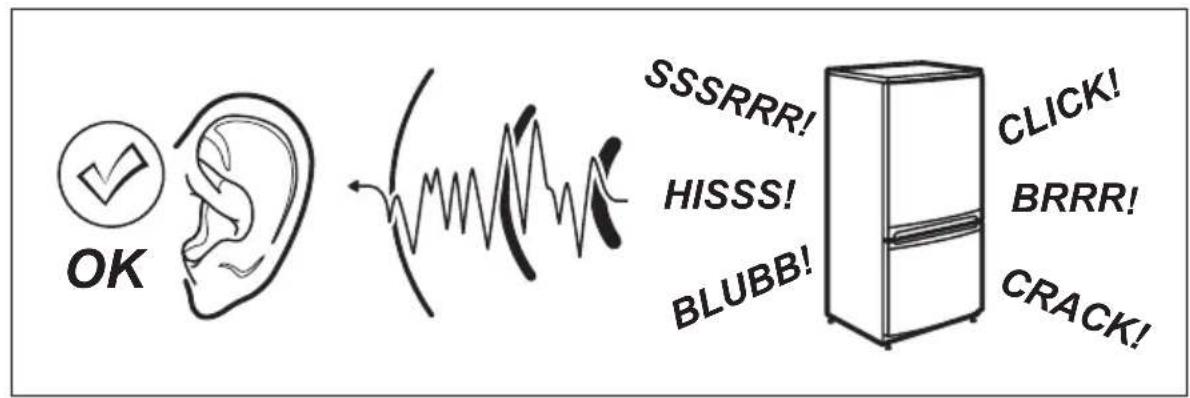
text_image
OK SSSRRR! HISSS! BLUBB! CLICK! BRRR! CRACK!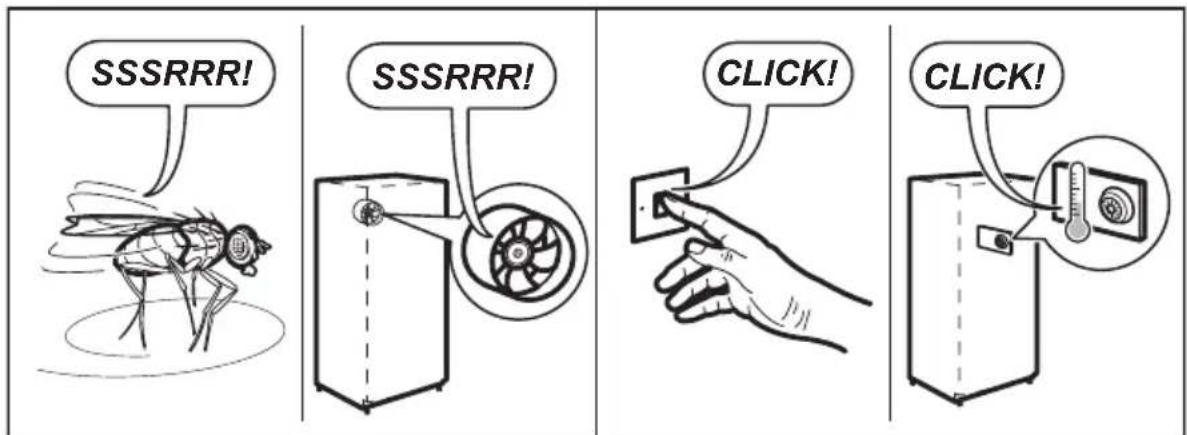
text_image
SSSRRR! SSSRRR! CLICK! CLICK!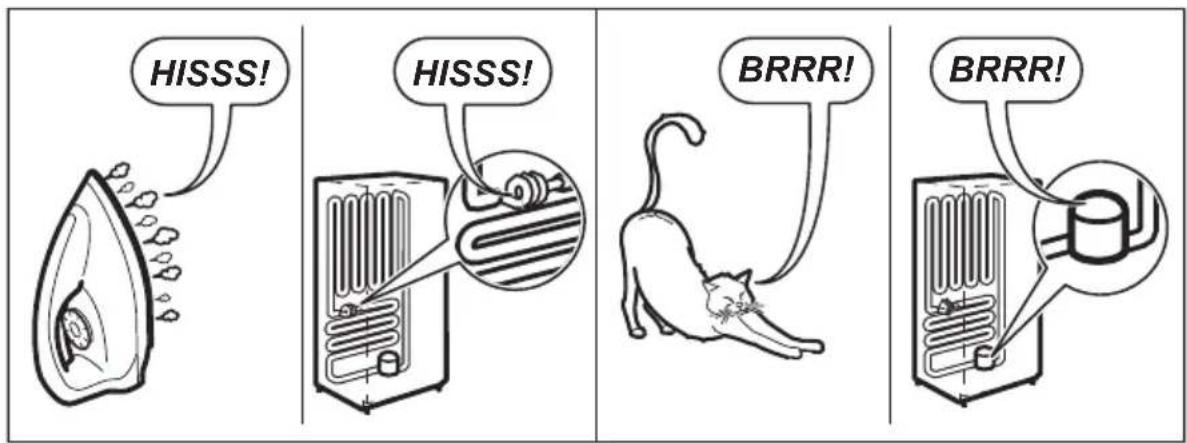
text_image
HISSS! HISSS! BRRR! BRRR!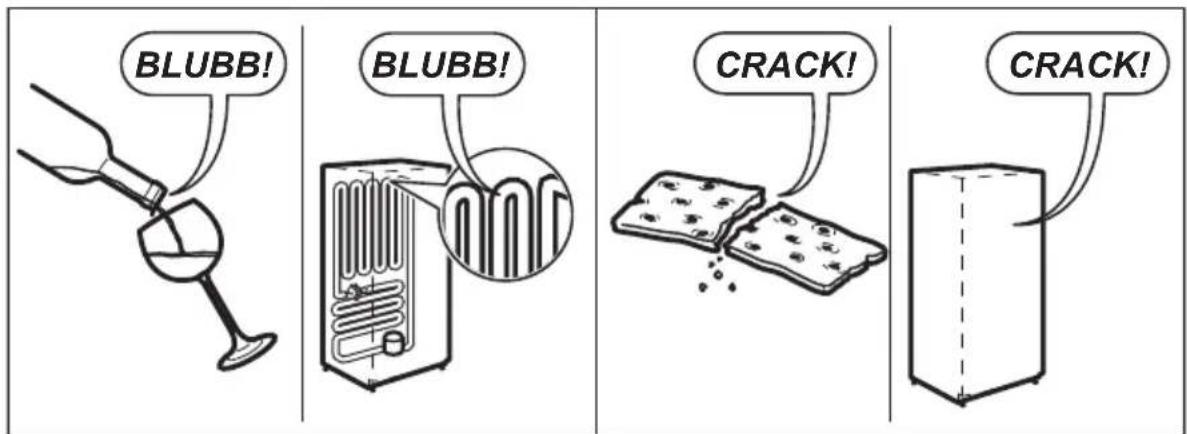
text_image
BLUBB! BLUBB! CRACK! CRACK!INDHOLD
- SIKKERHEDSOPLYSNINGER 41
- ANVISNINGER VEDR. SIKKERHED 43
- MILJ∅HENSYN 44
- BESKRIVELSE AF APPARATET 45
- INSTALLATION AF DIT NYE APPARAT 46
- DISPLAYSTYRINGER 48
- BRUG AF DISPENSEREN 53
- OPBEVARINGSFUNKTIONER ....55
- TILSLUTNING AF VANDFORSYNING 59
- UDSKIFTNING AF FILTER 61
- INSTALLATION ......63
- VEJLEDNINGER TIL LÅGEFJERNELSE 65
- NYTTIGE OPLYSNINGER OG RÅD 68
- RENG∅RING OG PLEJE 71
- INDEN DU RINGER 72
- BORTSKAFFELSE AF PRODUKTET 77
- TEKNISKE DATA ....77
- LYDE 78
FOR PERFEKTE RESULTATER
text_image
Labeled diagram of an open refrigerator with numbered compartments and doors showing interior structureKøleskab
Mellem variabel temperaturskuffe
Fryser
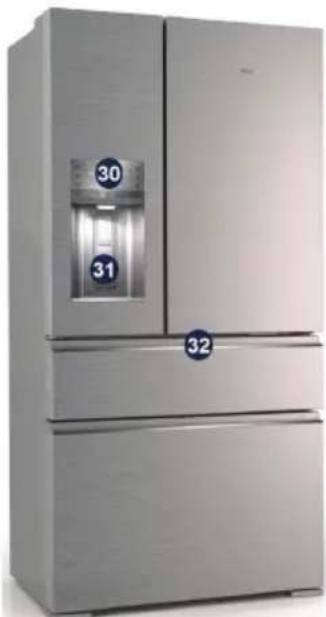
natural_image
Exterior view of a modern stainless steel refrigerator with dual doors and water level control panel (no visible text or symbols)natural_image
Simple diagram with a black circle and a warning symbol (no text or labels)5. INSTALLATION AF DIT NYE APPARAT
natural_image
Illustration of two refrigerators with directional arrows indicating movement or control (no text or symbols present)| Klasse | symbol Rumtemperatur (°C) |
| Udvidet temperering | SN +10 til +32 |
| Tempereret N +16 til +32 | |
| Subtropis ST +16 til +38 | |
| Tropis T +16 til +43 | |
text_image
Warm Climate + -18 Cold White, Free Air Water, Free 6 + - Warm Cold Warm Heat Warm Heat Warm Heat Warm Heat Warm Heat Warm Heat Warm Heat Warm Heat Warm Heat Warm Heat Warm Heat Warm Heat Warm Heat Warm Heat Warm Heat Warm Heat Warm Heat Warm Heat Warm Heat Warm Heat Warm Heat Warm Heat Warm Heat Warm Heat Warm Heat Warm Heat Warm Heat Warm Heat Warm Heat Warm Heat Warm Heat Warm Heat Warm Heat Warm Heattext_image
Cold Climate Cold Climate Rain Water Water Water Ice Green Air Air Air Air + -AP - AP + - Sound Zone Sound Zone Sound Zone Warm Heat Warm Heatnatural_image
Illustration of a refrigerator with a hand pointing to the right side of its door (no text or symbols present)
VIGTIGT!
text_image
Diagram showing a device with a digital display and an arrow pointing to it, indicating a process or operation.Beholder

BEMÆRK
natural_image
Line drawing of a hand opening a refrigerator with granular material inside (no text or symbols)natural_image
Technical line drawing of a mechanical assembly with directional arrows indicating movement (no text or symbols)Vippehylde
natural_image
Diagram of a hand inserting a component into a tray-like device (no text or symbols visible)Flexi-hylde
natural_image
Technical line drawing of a mechanical assembly with an arrow indicating motion or force (no text or symbols present)Flexi-hylde
8.2 Skuffer
text_image
Technical diagram of a mechanical component with numbered parts and directional arrows indicating flow or movement.text_image
Technical diagram showing a mechanical component with an arrow pointing to a labeled section, likely indicating a measurement or assembly.natural_image
Illustration of a hand placing a rectangular object into a drawer with an arrow indicating direction (no text or symbols)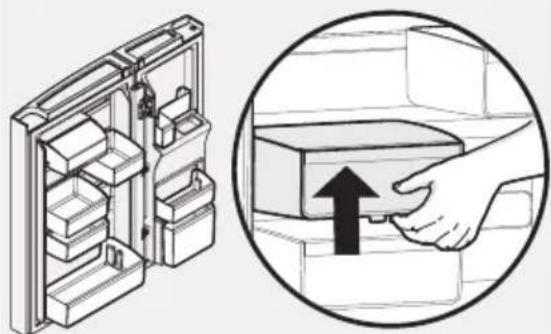
natural_image
Diagram showing a refrigerator with internal compartments and a magnified view of the door handle (no text or symbols)Tilpassede Flex-lågebeholdere
natural_image
Technical line drawing of a refrigerator interior with a door handle and drawer slot (no text or symbols)Fryseskuffe
text_image
Diagram showing two pipes with water droplets and a checkmark indicating cancellationnatural_image
Pure electrical circuit lines without any symbolstext_image
Diagram showing a hand holding a rectangular device inside a refrigerator, with an inset magnified view highlighting the component.natural_image
Diagram of a refrigerator interior showing internal components and directional arrows (no text or symbols)natural_image
Illustration of a hand using a tool to adjust or install a mechanical component (no text or symbols visible)natural_image
Line drawing of a car interior showing a hand valve and dashboard with an inset close-up of the device (no text or symbols)natural_image
Technical line drawing of a mechanical bracket assembly with a magnified inset showing pin alignment (no text or symbols)natural_image
Illustration of a hand placing a red arrow on a device panel (no text or symbols visible)natural_image
Illustration of a hand holding a cable with red arrows indicating direction (no text or symbols)natural_image
Illustration of a hand turning a component with a red circular arrow indicating rotation (no text or symbols)- Påfør pudder. Brug lidt babypulver eller talkumpudder for at undgå, at forseglingen klæber.
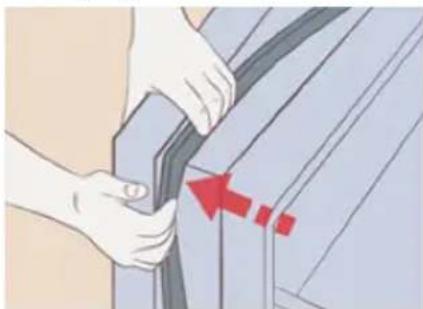
natural_image
Illustration of hands adjusting a car seatbelt with a red arrow indicating the angle (no text or symbols present)text_image
Labeled diagram of an open refrigerator with numbered compartments and doors showing interior structureJääkaappi
natural_image
Exterior view of a modern stainless steel refrigerator with water dispenser and numbered compartments (no visible text or symbols)natural_image
Simple diagram with a black circle and a warning symbol (no text or labels)5. UUDEN LAITTEEN ASENTAMINEN
natural_image
Illustration of two refrigerators with directional arrows indicating movement or control (no text or symbols present)text_image
Cold Water + -18°C Cold Water + -6°C Cold Water + - Water + - Ice Cover + - Control Box + - Power Tube + - WIFI Tubetext_image
Battery + -AP - -AP + -AP + - Battery CRR Battery Temp Battery Temp Battery Temp Electric Field Water Air Camera Cloud Kit W-L Tempnatural_image
Illustration of a refrigerator with a hand cursor pointing at the next refrigerator (no text or symbols on the refrigerator itself)
HUOMIO
text_image
-86 Water Call CrashAnnostelija

HUOMAA
natural_image
Line drawing of hands inserting a box into an oven with granular material inside (no text or symbols)natural_image
Technical line drawing of a mechanical assembly with directional arrows indicating movement (no text or symbols)Kääntöhylly
natural_image
Diagram of a hand inserting a component into a device frame (no text or symbols)FlexiShelf
natural_image
Technical line drawing of a mechanical assembly with an arrow indicating direction (no text or symbols)FlexiShelf
8.2 Laatikot
text_image
Technical diagram showing a mechanical component with numbered parts and directional arrows indicating flow or movement.text_image
Technical diagram showing a mechanical component with an arrow pointing to a labeled section, likely indicating assembly or inspection.natural_image
Illustration of a hand inserting a rectangular object into a container (no text or symbols)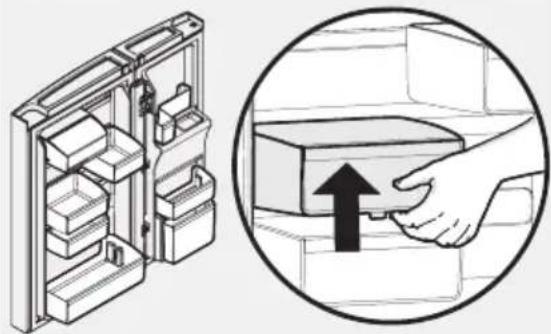
natural_image
Diagram showing a refrigerator with internal compartments and a magnified view of the door handle (no text or symbols)Custom Flex -ovilokerot
natural_image
Technical line drawing of a refrigerator with an air duct being inserted into the drawer (no text or symbols)Pakastuslaatikko
text_image
Diagram showing two pipe fittings with liquid dripping, accompanied by a 'X' and '√' symbols indicating cancellation or rejection.natural_image
Pure electrical circuit lines without any symbolsnatural_image
Illustration of a hand placing a rectangular object into a rack, with arrows indicating direction (no text or symbols)natural_image
Diagram of a refrigerator interior showing internal components and directional arrows (no text or symbols)natural_image
Illustration of a hand using a tool to adjust or install a mechanical component (no text or symbols visible)natural_image
Diagram of a car interior showing a mechanical device with a magnified inset highlighting a component (no text or symbols present)natural_image
Technical diagram showing a mechanical assembly with pins and a magnified inset (no text or symbols)Alasaranan poistaminen

HUOMIO
natural_image
Illustration of a hand placing a red arrow on a device panel (no text or symbols visible)natural_image
Illustration of a hand holding a cable with red arrows indicating force or direction (no text or symbols)natural_image
Illustration of a hand turning a button into a device with a red circular arrow indicating rotation (no text or symbols)natural_image
Illustration of hands adjusting a car seatbelt with a red arrow indicating the angle (no text or symbols present)text_image
Labeled diagram of an open refrigerator with numbered compartments and doors showing interior structureKjøleskap
Midt variabel temperatur skuff
Fryseskap
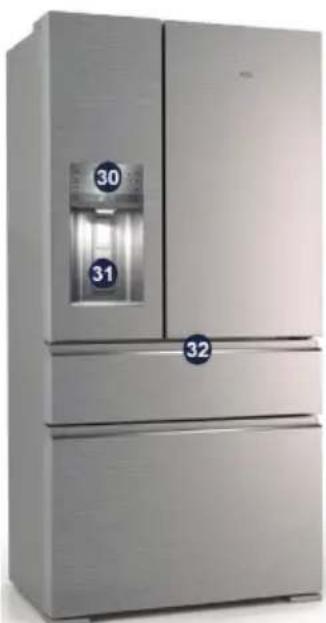
natural_image
Exterior view of a modern stainless steel refrigerator with dual doors and a water dispenser (no visible text or symbols)natural_image
Two simple symbols: a solid black circle and a warning sign with an exclamation mark (no text or labels)
natural_image
Line drawing of two refrigerators with directional arrows indicating movement or control (no text or symbols)| Klasse | Symbol Omgivelsestemperatur-område (°C) |
| Utvidet temperert sone | SN +10 to +32 |
| Temperert sone | N +16 to +32 |
| Subtropisk sone | ST +16 to +38 |
| Tropisk sone | T +16 to +43 |
text_image
Sedan冰箱 + - -18 86 + - Lemon Cell Power Tube Power Tube Cold Tube Water Ice Cover Charged Water Welt Tubetext_image
Energy Cold Air Air Water Water Hot Water Cold Gas Air Gas Water Air Gas Cold Gas Power Zone Power Zone Power Zone Water Zonenatural_image
Illustration of a refrigerator with a hand pointing to a Wi-Fi button (no text or symbols on the appliance)
VIKTIG
text_image
Diagram showing a device with a digital display and an arrow pointing to it, indicating a process or operation.Dispenser

MERK
natural_image
Line drawing of hands inserting a box into a refrigerator with granular material inside (no text or symbols)natural_image
Technical line drawing of a mechanical assembly with directional arrows indicating movement (no text or symbols)Flip hylle
For å justere glidelås / fliphylle:
natural_image
Diagram of a hand holding a tool interacting with a transparent panel or tray (no text or symbols visible)FlexiShelf
natural_image
Technical line drawing of a mechanical assembly with an arrow indicating direction (no text or symbols)FlexiShelf
8.2 Skuffer
text_image
Technical diagram showing a mechanical component with numbered parts and directional arrows indicating flow or movement.Snack Zone - Innfelt Snack Skuffer
Disse skuffene er ideelle for lagring av delikatesser og oster.
natural_image
Technical diagram of a vehicle interior showing a door, seat, and window (no text or symbols)natural_image
Illustration of a hand placing a rectangular box into a drawer with arrows indicating direction (no text or symbols)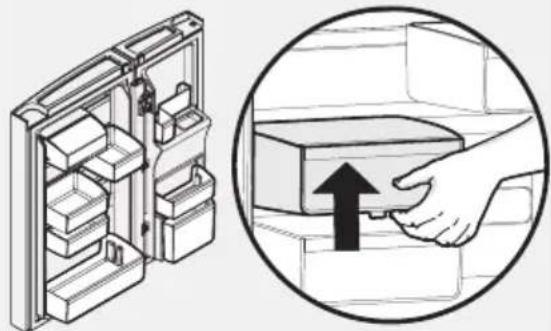
natural_image
Diagram showing a refrigerator with internal compartments and a hand holding an appliance, alongside a magnified view of the appliance's handle (no text or symbols present)natural_image
Technical line drawing of a mechanical device inside a cabinet or enclosure, showing internal components and airflow direction (no text or symbols)Fryseskuffe
text_image
Nedre kurv Delertext_image
Diagram showing two pipes with water droplets and a checkmark indicating cancellationtext_image
Diagram showing a hand placing a rectangular object into a refrigerator with an arrow indicating direction, accompanied by a magnified inset highlighting the component.natural_image
Diagram of a refrigerator interior showing internal components and directional arrows (no text or symbols)10.6 Bruk kun originale reservedeler
Bruk kun originale reservedeler. Kontakt et autorisert servicesenter
Slik bytter du vannfilter:
11.6 Flipper Mullion
natural_image
Illustration of a hand using a tool to adjust or install a mechanical component (no text or symbols visible)natural_image
Technical line drawing of a mechanical assembly with an inset showing a component detail (no text or symbols)natural_image
Technical diagram showing a mechanical assembly with pins and a magnified inset (no text or symbols)natural_image
Illustration of a hand pressing down on a device component with a red arrow indicating the handle (no text or symbols present)natural_image
Illustration of a hand holding a cable with red arrows indicating force or direction (no text or symbols)natural_image
Illustration of a hand turning a component into a device with a red arrow indicating rotation (no text or symbols)natural_image
Illustration of hands adjusting a car seatbelt with a red arrow indicating the angle (no text or symbols present)INNEHÅLLSFÖRTECKNING
- SÄKERHETSINFORMATION .... 155
- SÄKERHETSINSTRUKTIONER 157
- MILJÖSKYDD 158
- BESKRIVNING AV PRODUKTEN 159
- INSTALLERA DEN NYA HUSHÅLLSAPPARATEN 160
- KONTROLLPANEL 162
- ANVÄNDA DISPENSERN 167
- FÖRVARINGSFUNKTIONER 169
- ANSLUTA VATTENFÖRSÖRJNING 172
- BYTE AV FILTER 175
- INSTALLATION ....176
- ANVISNINGAR FÖR AVLÄGSNANDE AV DÖRRARNA 179
- PRAKTISKA RÅD OCH TIPS 181
- RENGÖRING OCH SKÖTSEL 184
- INNAN DU RINGER ....185
- KASSERING AV KYLSKÅPET 189
- TEKNISKA DATA 189
- LJUD .... 190
FÖR PERFEKTA RESULTAT
text_image
Labeled diagram of a refrigerator interior showing numbered compartments and doors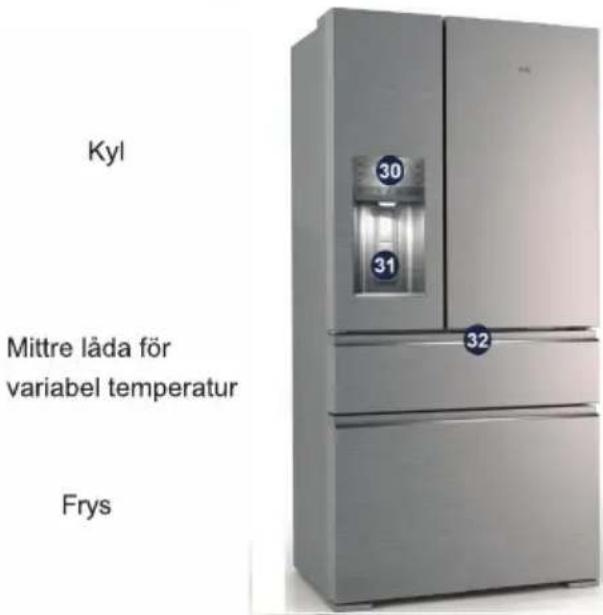
natural_image
Two simple icons: a solid black circle and a warning symbol with an exclamation mark (no text or labels)natural_image
Two identical refrigerators with directional arrows indicating movement, no text or symbols presentKlass Symbol Omgivningstem- peratur (°C)
text_image
Extra Climate + -18 Cold Air, Ice Air Water Source 6 + - Extra Cell Power Source Power Source Water Source Water Air Cavity Crushed Air WAC Sourcetext_image
Cold Climate Cold Climate Tissue Air Water Source - -AP AP + - Cold Oil Power Source Power Source Air Source Water Air Culture Crushed Air W-LT Sourcenatural_image
Illustration of a refrigerator with a hand cursor pointing at the next refrigerator (no text or symbols)
VIKTIGT!
text_image
Diagram showing a device with a digital display and a black arrow pointing to the screen, indicating a process or operation.Dispenser

OBS!
natural_image
Line drawing of a hand opening a refrigerator with a tray holding a lid (no text or symbols)Avlägsna isfack
natural_image
Technical line drawing of a mechanical assembly with directional arrows indicating movement or force (no text or symbols)Vända hylla
natural_image
Diagram of a hand inserting a component into a plastic tray (no text or symbols)FlexiShelf
natural_image
Technical line drawing of a mechanical assembly with an arrow indicating direction (no text or symbols)FlexiShelf
8.2 Lådor
text_image
Technical diagram showing a mechanical component with numbered parts and directional arrows indicating flow or movement.text_image
Diagram illustrating refrigerator door lock mechanism with hand placement and close-up of internal compartmentsCustomFlex dörrfack
natural_image
Technical line drawing of a mechanical assembly with a clamping device inserted into a cabinet (no text or symbols)Fryslåda
text_image
Diagram showing two pipes with water droplets and a checkmark indicating cancellationtext_image
Diagram showing a hand holding a rectangular device inside a refrigerator, with an inset magnified view highlighting the component.natural_image
Diagram of a refrigerator interior showing internal components with arrows indicating movement (no text or symbols)natural_image
Illustration of a hand using a tool to adjust or install a mechanical component (no text or symbols visible)natural_image
Technical line drawing of a mechanical device with an inset close-up showing a component (no text or symbols)natural_image
Illustration of a hand connecting a cable to a microwave oven with a handle, showing electrical connections (no text or symbols)
OBS!
natural_image
Technical diagram of a mechanical assembly with a magnified inset showing a component detail (no text or symbols)natural_image
Diagram of a refrigerator with an open door and scroll, showing internal components and a curved arrow indicating rotation (no text or symbols present)natural_image
Three-step diagram showing a device with a lid, showing internal structure and assembly (no text or symbols)Frys Låda
Frys Korg
natural_image
Illustration of a hand pressing down on a computer monitor with a red arrow indicating the handle (no text or symbols present)natural_image
Illustration of a hand holding a cable with red arrows indicating direction (no text or symbols)12.6 Montera dörrtätningen
natural_image
Illustration of a hand using a tool to adjust or install a component, with no visible text or symbols.natural_image
Illustration of hands adjusting a car seatbelt with red arrows indicating movement (no text or symbols)4. BESCHRIJVING VAN HET APPARAAT
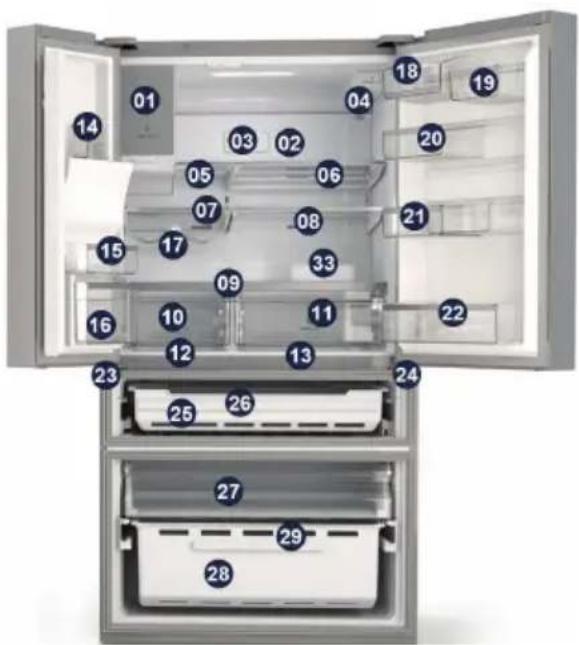
text_image
Labeled diagram of an open refrigerator with numbered compartments and doors for identificationKoelkast
natural_image
Exterior view of a modern stainless steel refrigerator with dual doors and water compartments (no visible text or symbols)natural_image
Simple diagram with a black circle and a warning symbol (no text or labels)1 Ijsmaker
2 Multifow
3 Luchtfilter
4 Waterfilter
5 Opklapbaar plateau
6 Onderschuifplateau
7 Linker glazen koelkastplateau
8 Rechter glazen koelkastplateau
9 Afdekplaat groentelade
10 Linker groentelade
11 Rechter groentelade
12 Linker snackzone
13 Rechter snackzone
14 Linker vast bovenvak
15 Linker vast ondervak
16 Kantelbaar vak
17 Wijnrek
18 Zuivelvak Flex 2/3
19 Deurvak Flex 1/3
20 Deurvak Flex 2/3
21 Schuifdeurvak flex
22 Flessenvak
23 Linker middenscharnier
24 Rechter middenscharnier
25 MultiSwitch/MultiChill drawer
26 MultiSwitch/MultiChill divider
27 Bovenste vrieslade
28 Vriesmand
29 Scheidingsplaat vriezer
30 Gebruikersinterface
31 Hendel
32 Gebruikersinterface FlexiSpace
33 Eierbakje
natural_image
Diagram of two refrigerators with directional arrows indicating movement or control (no text or symbols present)text_image
Rainy Freeze Cold Dryer Timer Ice Moist Color + -18 °C + 6 °C - + Rainy Cool Rural Time Rural Time Water Ice Color Crushed Ice Wet Timetext_image
Charge Cache + -AP Cell Drive Timer Air Washer Fee - AP + - Air Washer Fee Air Washer Fee Wireless Water Air Color Cranked Air Wirelessnatural_image
Illustration of a refrigerator with a hand pointing to the right side of its door (no text or symbols present)
BELANGRIJK
text_image
Diagram showing a device with a large screen displaying 'Digital Phone' and a black arrow pointing to the screen, indicating a process or operation.Watertap

OPMERKING
natural_image
Line drawing of a hand opening a refrigerator with granular material inside (no text or symbols)Ijsvak verwijderen
natural_image
Technical line drawing of a mechanical assembly with directional arrows indicating movement or force (no text or symbols)Klapbaar plateau
natural_image
Diagram of a hand holding a tray with an arrow indicating direction (no text or symbols present)FlexiShelf
natural_image
Technical line drawing of a mechanical device with an arrow indicating direction (no text or symbols)FlexiShelf
8.2 Lades
text_image
Technical diagram showing a mechanical component with numbered parts and directional arrows indicating flow or movement.text_image
Diagram illustrating refrigerator door lock mechanism with hand placement and lifting instructionsnatural_image
Technical line drawing of a refrigerator with an open drawer and handle, showing internal components (no text or symbols)Vrieslade
natural_image
Pure electrical circuit lines without any symbolstext_image
Diagram showing a hand placing a rectangular object into a refrigerator with an arrow indicating direction, accompanied by a magnified inset highlighting the process.10.3 Vervangende luchtfilters bestellen
natural_image
Diagram of a refrigerator interior showing internal components and directional arrows (no text or symbols)10.6 Vervangende waterfilters bestellen
natural_image
Illustration of a hand using a tool to cut or mark a mechanical component (no text or symbols visible)natural_image
Technical line drawing of a mechanical device with an inset close-up showing a component (no text or symbols)natural_image
Technical diagram showing a mechanical assembly with pins and a magnified inset (no text or symbols)natural_image
Illustration of a hand pressing down on a device component with a red arrow indicating compression (no text or symbols)natural_image
Illustration of a hand holding a cable with red arrows indicating direction (no text or symbols)natural_image
Illustration of a hand turning a button into a device with a red arrow indicating rotation (no text or symbols)natural_image
Illustration of hands adjusting a car seatbelt with a red arrow indicating the angle (no text or symbols present)16. AFVALVERWERKING VAN HET APPARAAT
text_image
Labeled diagram of an open refrigerator with numbered compartments and doors for identificationRéfrigérateur
natural_image
Exterior view of a modern stainless steel refrigerator with dual doors and water level control (no visible text or symbols)natural_image
Simple black circular icon next to a warning symbol with exclamation mark (no text or numbers)natural_image
Two identical refrigerators with directional arrows indicating movement, no text or symbols presenttext_image
Electric Pressure + -AP - + Cold/Short-Timer Water Heat/Short-Timer Air Washer Zone + AP - + Treated Area + - Power Zone + - Power Zone + - Power Zone + - Field Zone Water Ice Colors Crushed Area Wall Zonenatural_image
Illustration of a refrigerator with a hand pointing to the right side of its door (no text or symbols present)
IMPORTANT
text_image
Water Cabs ColdDistributeur

Remarque
natural_image
Line drawing of a hand opening a refrigerator with a tray holding a lid (no text or symbols)natural_image
Technical line drawing of a mechanical assembly with directional arrows indicating movement (no text or symbols)Clayette rabattable
natural_image
Diagram of a hand inserting a component into a device frame (no text or symbols visible)FlexiShelf
natural_image
Technical line drawing of a mechanical assembly with an arrow indicating direction (no text or symbols)FlexiShelf
8.2 Tiroirs
text_image
Technical diagram showing a mechanical component with numbered parts and directional arrows indicating flow or movement.natural_image
Technical diagram of a vehicle interior showing structural components and a highlighted section (no text or symbols)text_image
Diagram illustrating the step-by-step assembly of a refrigerator into a drawer, with magnified views showing internal components and a hand inserting a component.natural_image
Technical line drawing of a refrigerator with an open drawer and internal compartments (no text or symbols)text_image
Diagram showing two pipes with water droplets and a checkmark indicating cancellationnatural_image
Pure mechanical schematic diagrams showing three different valve or actuator configurations without any text, numbers, or symbols.natural_image
Diagram showing a hand placing a rectangular object into a rack inside an oven, with arrows indicating direction (no text or symbols present)natural_image
Diagram of a refrigerator interior showing internal components and directional arrows (no text or symbols)natural_image
Illustration of a hand using a tool to cut or mark a piece of paper (no text or symbols visible)natural_image
Technical line drawing of a mechanical device with an inset close-up showing a component (no text or symbols)natural_image
Technical diagram of a mechanical assembly with a magnified inset showing a bracket and pin alignment (no text or symbols)natural_image
Illustration of a hand holding a red arrow pointing to a device panel (no text or symbols visible)natural_image
Illustration of a hand holding a cable with a red arrow indicating force or direction (no text or symbols)natural_image
Illustration of a hand turning a button into a device with a red arrow indicating rotation (no text or symbols)natural_image
Illustration of hands adjusting a car seatbelt with a red arrow indicating the angle (no text or symbols present)text_image
Labeled diagram of an open refrigerator with numbered compartments and doors for identificationnatural_image
Exterior view of a modern stainless steel refrigerator with labeled doors (no visible text or symbols beyond numbers)natural_image
Two simple icons: a solid black circle and a warning symbol with an exclamation mark (no text or labels)natural_image
Two identical refrigerators with directional arrows indicating movement or control (no text or symbols)text_image
Battery + - -AP + - AP + - Sensor Ctrl Cable Tube, Timer Cable Tube, Timer Cable Tube, Timer Cable Tube, Timer Cable Tube, Timer Cable Tube, Timer Cable Tube, Timer Cable Tube, Timer Cable Tube, Timer Cable Tube, Timer Cable Tube, Timer Cable Tube, Timer Cable Tube, Timer Cable Tube, Timer Cable Tube, Timer Cable Tube, Timer Cable Tube, Timer Cable Cable Cable Cable Cable Cable Cable Cable Cable Cable Cable Cable Cable Cable Cable Cable Cable Cable Cable Cable Cable Cable Cable Cable Cable Cable Cable Cable Cable Cable Cable Cable Cable Cable Cable Cable Cable Cable Cable Cable Cable Cable Cable Cable Cable Cable Cable Cable Cable Cable Cable Cine Cable Cine Cable Cine Cable Cine Cable Cine Cable Cine Cable Cine Cable Cine Cable Cine Cable Cine Cable Cine Cable Cine Cable Cine Cable Cine Cable Cinetext_image
Diagram showing a refrigerator with a Wi-Fi button icon and a magnified view of the right side of the refrigerator.
ACHTUNG
text_image
-88° Honey Color ChipSpender

HINWEIS
natural_image
Line drawing of hands inserting a box into an oven with a tray filled with granular material (no text or symbols)natural_image
Technical line drawing of a mechanical assembly with directional arrows indicating movement or force (no text or symbols)Flip-Regal
natural_image
Diagram of a hand holding a tool interacting with a metal frame structure (no text or symbols visible)Flexi-Regal
natural_image
Technical line drawing of a mechanical assembly with an arrow indicating direction (no text or symbols)Flexi-Regal
8.2 Schubladen
text_image
Technical diagram showing a mechanical component with numbered parts and directional arrows indicating flow or movement.text_image
Diagram illustrating the step-by-step installation of a refrigerator into a drawer, with magnified views showing internal components.natural_image
Diagram of a refrigerator interior with a door handle and drawer, showing internal components (no text or symbols)Gefrierfach-Lade
text_image
Diagram showing two pipe fittings with liquid dripping, accompanied by a 'X' and '√' symbols indicating cancellation or rejection.text_image
Diagram showing a hand holding a rectangular device inside a refrigerator, with an inset magnified view highlighting the component.natural_image
Diagram of a refrigerator interior showing internal components and directional arrows (no text or symbols)natural_image
Illustration of a hand using a tool to adjust or install a sewing machine component (no text or symbols visible)natural_image
Technical line drawing of a mechanical assembly with an inset showing a component detail (no text or symbols)natural_image
Technical diagram showing a mechanical assembly with a magnified inset of a bracket component (no text or symbols present)natural_image
Illustration of a hand holding a red arrow pointing to a screen (no text or symbols visible)natural_image
Illustration of a hand holding a cable with red arrows indicating direction (no text or symbols)natural_image
Hand turning a button into a device with a red circular arrow indicating rotation (no text or symbols)natural_image
Illustration of hands adjusting a car seatbelt with a red arrow indicating the angle (no text or symbols present)natural_image
Simple line drawing of a trash bin with two crossed x-axes (no text or symbols)text_image
Labeled diagram of an open refrigerator with numbered compartments and doors showing interior structureFrigorifero
natural_image
Exterior view of a modern stainless steel refrigerator with water dispenser and numbered compartments (no visible text or symbols)natural_image
Simple diagram with a black circle and a warning symbol (no text or labels)natural_image
Line drawing of two refrigerators with directional arrows indicating movement or control (no text or symbols)| Classe Simbolo Intervallo di Temperatura ambiente (°C) | |
| Temperato esteso | SN da +10 a +32 |
| Temperatura N da +16 a +32 | |
| Subtropicale ST da +16 a +38 | |
| Tropicale T da +16 a +43 | |
text_image
Extra Freezer + - Cold Debris Timer Ice Maker Tone -18 6 + - Extra Cool Power Pulse Power Tone Wind Tone Mature Ice Cavity Cryogenic Heat WIFI Tonetext_image
Delta Current Cold Drink Time Ice Motion Time + -AP - AP + - LPG Cl# Sound Time Sound Time Cold Time Water Ice Catar Crushed Ice RMT Timetext_image
Diagram showing a device with a digital display and an arrow pointing to a screen, indicating a process or operation.Erogatore

NOTA
natural_image
Line drawing of hands inserting a box into an oven filled with granular material (no text or symbols)natural_image
Diagram of a hand operating a mechanical device with coiled spring and directional arrows indicating motion (no text or symbols)natural_image
Technical line drawing of a mechanical assembly with directional arrows indicating movement (no text or symbols)Ripiano a ribalta
natural_image
Diagram of a hand holding a tool interacting with a transparent panel or fixture (no text or symbols visible)Ripiano flexi
natural_image
Technical line drawing of a mechanical device with an arrow indicating motion or force (no text or symbols present)Ripiano flexi