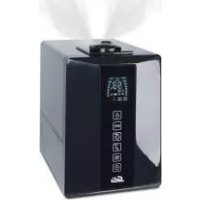
Digisonic 7151 - Humidifier Solis - Free user manual and instructions
Find the device manual for free Digisonic 7151 Solis in PDF.


| Product type | Ultrasonic humidifier |
| Brand | Solis |
| Model | Digisonic 7151 |
| Dimensions (L × W × H) | 240 × 260 × 310 mm |
| Empty weight | 3.0 kg |
| Power supply | 230-240 V / 50 Hz |
| Power consumption | 40 W (without pre-heating) / 125-140 W (with pre-heating) |
| Water tank capacity | 5.0 liters |
| Humidification output | 400 g/h (without pre-heating) / 550 g/h (with pre-heating) |
| Recommended room size | up to 60 m² / 150 m³ |
| Noise level | < 25 dB(A) |
| Humidity adjustment (hygrostat) | Adjustable range, recommended value 40-60 % RH |
| Timer | 1 to 8 hours + continuous operation (CO) |
| Mist intensity | 3 levels (low, medium, high) |
| Pre-heating function | Yes, heats water to 80 °C, mist at 40 °C |
| Automatic mode | Yes, maintains optimal humidity according to temperature |
| Sleep mode | Yes, target humidity 50-65 %, duration 6 h, pre-heating activated |
| Empty tank indicator | Yes, on display (symbol L) |
| Cleaning indicator | Yes, every 15 days of use (symbol M) |
| Dry-run protection | Automatic shut-off if tank empty |
| Regular maintenance | Weekly cleaning of tank and basin; descaling of membrane |
| Anti-scale cartridge | Replacement every 2 to 3 months (depending on water hardness) |
| Optional accessories | Anti-scale cartridge, Ionic Silver Stick (ISS) for water conservation |
| Warranty | Valid subject to use without additives (oils, perfumes, etc.) |
| Manufacturer | Solis SA, CH-8152 Glattbrugg-Zurich, Switzerland |
Frequently Asked Questions - Digisonic 7151 Solis
User questions about Digisonic 7151 Solis
0 question about this device. Answer the ones you know or ask your own.
Ask a new question about this device
Download the instructions for your Humidifier in PDF format for free! Find your manual Digisonic 7151 - Solis and take your electronic device back in hand. On this page are published all the documents necessary for the use of your device. Digisonic 7151 by Solis.
USER MANUAL Digisonic 7151 Solis
By actuating this significance you have chosen a first-class product. Which will provide you with a very good deal of satisfaction for a long time to come. The displacement has passed a very costly test. Our warranty covers the repair or any defective part on which the date of delivery is recorded on the sales slip. The unit is to be returned to us with out of stock items and used in the future. Damage as a result of normal wear, heat, or replacement of broken parts is not covered by the warranty and we cannot be held liable for damage. The absence is used commercially, the warranty period is 12 months.
Instructions for use
Ionic Silver Stick® (ISS)
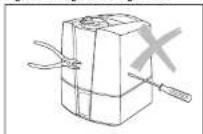
Figure 1 Figure 2 Figure 3
Figure 4 Figure 5 Figure 6
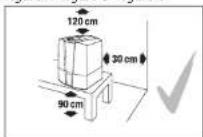
Figure 7 Figure 8 Figure 9
MISE EN SERVICE
Désemballage
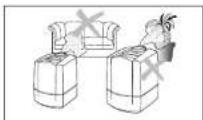
Figure 10 Figure 11 Figure 12
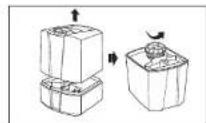
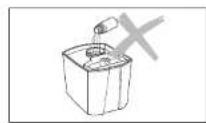
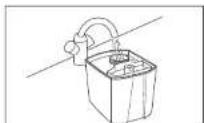
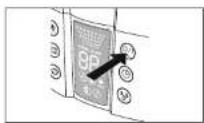
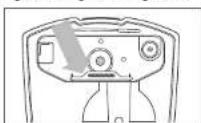
Figure 13 Figure 14 Figure 15
Figure 16
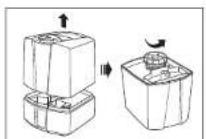
Figure 25 Figure 26 Figure 27
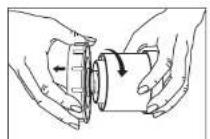
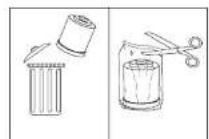
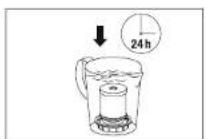
Figure 28 Figure 29 Figure 30
Ionic Silver Stick® (ISS)
Ionic Silver Stick* (ISS)
Please read the instructions carefully before using the product and keep this user manual for future reference.
General information
A comfortable indoor atmosphere is achieved at a relative humidity of between 40 and 60% . Your appliance automatically controls the humidity level according to your chosen setting. If the air is too dry, the unit will automatically switch on. As soon as the desired humidity level is reached, it will automatically switch off.
SAFETY INSTRUCTIONS
- Read the operating instructions carefully before using the appliance and keep them in a safe place for later reference.
- Connect the unit only to an AC supply with a voltage according to the rating label.
- Only use the appliance indoors and within the parameters stated in the technical specifications. Using the appliance for a purpose for which it is not intended could pose a serious hazard to health and life.
- Children cannot recognize the hazards associated with the usage of electrical appliances. For this reason, always supervise children when they are near the appliance (image 1).
Persons who are unfamiliar with the operating instructions, as well as children and persons under the influence of medication, alcohol or drugs are not permitted to operate the appliance, or are only permitted to operate it under supervision. - Never use the appliance if there is any damage to the appliance or cable (2), after malfunction has occurred, after the appliance has been dropped (3) or damaged in any other way.
- Only operate the appliance when it is completely assembled.
- Repairs to electrical appliances may only be carried out by qualified service engineers (4).
- Improper repair work can pose a considerable hazard to the user.
- Disconnect the appliance from the mains power before filling/emptying the water tank, before cleaning, before assembling/dismantling of individual parts and before moving the appliance.
- Do not reach inside the rebuliser space during operation. The high frequency oscillation causes the membrane to become hot.
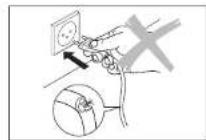
- Never pull the plug from the mains socket by the cable or with wet hands.
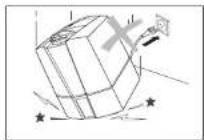
Always place the appliance on a dry, level surface (5). - Do not place the appliance directly on the floor or next to heating. If the mist comes in contact with the floor before it has fully evaporated, the surface could be damaged (6). We do not accept any liability for damages due to the incorrect placement of the unit.
The unit should be placed in an elevated position (7), e.g. on a table, chest, etc. - Do not pour water into the mist outlet of the appliance.
- Do not immerge the main body in water or other liquids.
-
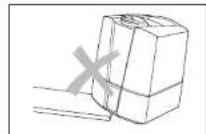
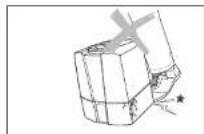
Position the appliance where it cannot be easily knocked over (8).
Always disconnect from the mains power when not in use.
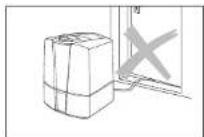
Do not run the power cord under a carpet or other objects. Position the appliance so that you will not trip over the cord. -
Do not use the appliance in areas where combustible materials, gases or vapours are present.
- Do not expose the appliance to rain, and do not use it in damp locations.
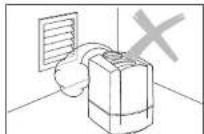
Do not insert foreign objects in the device. - Do not block the air intake or mist outlet.
- Do not sit, stand or place any heavy objects on the appliance.
- The use of fragrances, such as essential oils, water conditioners and aromas will damage your appliance! Appliances that are damaged by such additives will not be covered by the manufacturer's warranty.
The high frequency vibrations cannot be heard by humans or animals, and are completely safe. - We recommend the installation of a residual current circuit-breaker to provide additional protection when using electrical appliances. It is advisable to use a circuit-breaker with a nominal fault current of maximum 30 mA. Your local electrician can advise you.
WARNING:
DO NOT DEPEND ON THE ON/OFF BUTTON SWITCH AS THE SOLE MEANS OF DISCONNECTING POWER.
WHEN SERVICING OR MOVING THE HEATER, ALWAYS UNPLUG THE POWER CORD.
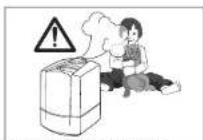
Figure 1 Figure 2 Figure 3
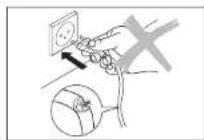
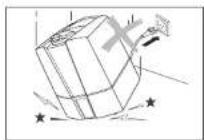
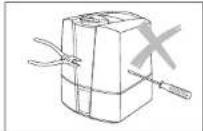
Figure 4 Figure 5 Figure 6
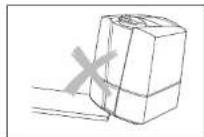
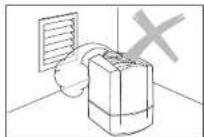
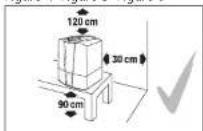
Figure 7 Figure 8 Figure 9

- Carefully remove the unit from its box.
- Remove the unit from the plastic bag.
Review the information given on the rating plate about the mains supply.
Use the original packaging for storing the appliance at you do not use it all year round.
Putting into operation
Find the ideal location for your appliance.
- Do not place it directly next to a radiator or on a floor with floor heating. The moisture of the mist can damage the floor surface (6 and 7) (see Safety Instructions).
- The mist outlet must not be pointed directly at plants or other objects. Keep a distance of at least 50 cm (10).
Soak the demineralisation cartridge in a bowl of water for at least 24 hours before using it.
The granules have to absorb water to reach full performance.
- On average the demineralisation cartridge should be replaced every 2-3 months.
This interval can be shorter or longer depending on the hardness of your water.
- Read the instructions under «Filling the Tank» for filling the water tank (12).
- Place the water tank onto the base (13)
- Insert the plug into the mains socket and switch on the appliance using the orvoff switch (15).
The appliance will reach full capacity about 10 to 15 minutes after being switched on.
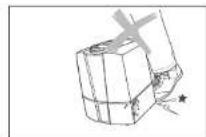
- Make sure that the power cord is not pinched anywhere (9). Do not operate the appliance if the cord is damaged (2).
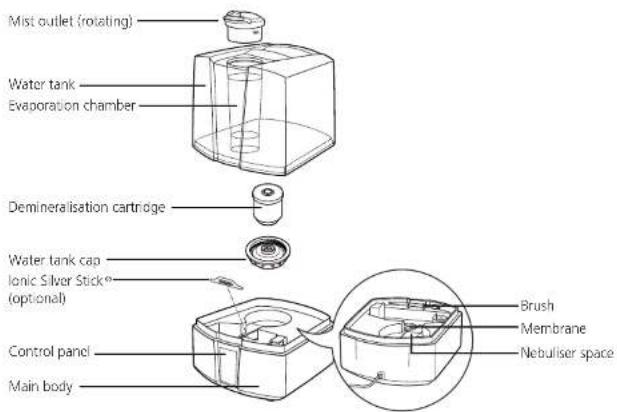
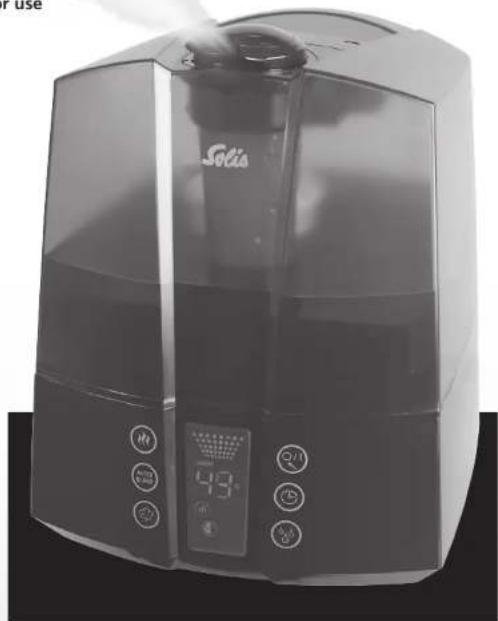
Description of the appliance
4041
Filling the tank

is switch off the appliance before removing the water tank. It reach inside the unbiliser space while the appliance is running!
Do not operate the appliance when the water tank is empty! When the water reaches the minimum level, the unit switches off automatically.
Make sure that there are no foreign objects inside the water tank.
- Remove the water tank cap from the tank (11). Fill the tank with clean, cold tap water (12)
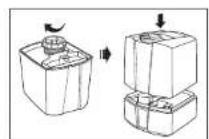
Close the cap of the water tank securely! Place the water tank onto the base (13). Do not add any additives to the water (14)!
- Insert the plug into the power socket and switch on the appliance (15).
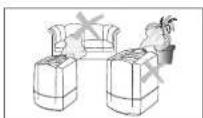
Figure 10 Figure 11 Figure 12
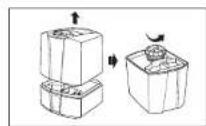
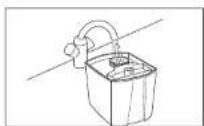
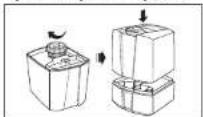
Figure 13 Figure 14 Figure 15
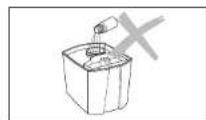
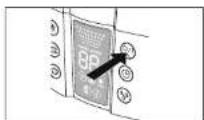
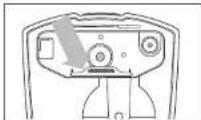
Figure 16
Water quality maintenance (recommended optional accessory)
The Ionic Silver Stick® (ISS) utilizes the antimicrobial property of silver and provides a year of optimum water quality maintenance in all SOLUS humidifiers. The ISS begins working as soon as it comes into contact with water—even if the unit is switched off. The ISS is intended exclusively for use in humidifiers. Look at picture 16 for the position of the ISS in the appliance. Do not reach inside the nebuliser space during operation. Switch off the unit first.
Do not use additives
Water additives (e.g. essential oils, fragrances, water conditioners etc.) must NOT be used! Even a small amount can cause damage to the tank material. The material is not suitable for the use of such additives. One drop is enough to damage the tank and render the appliance unusable. Appliances that are damaged by such additives will not be covered by the manufacturer's warranty.
OPERATION
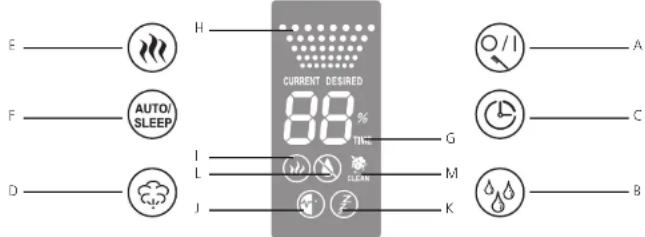
A Switching on/off
You can switch the unit on or off by pressing button A. This button is also used to reset the cleaning indicator light (by holding down).
B Hygrostat (pre-set moisture level)
By pressing button B you can set the desired moisture level in %. A relative moisture of between 40 and 60% is recommended. The accuracy of measurement is +/-5% . The unit will switch off when the moisture level exceeds the desired setting. During selection the target value is displayed (symbol DESIRED). The display will automatically show the current humidity value after a few seconds (symbol CURRENT).
C Timer
Using button C, the operation time can be set - adjustable between 1 and 8 hours, or continuous operation (CO). Symbol G shows the operating period that has been set (1h/2h/3h/4h/5h/6h/7h/8h/CO). The display will automatically show the current value after a few seconds.
D Controlling mist output and Evaporator output
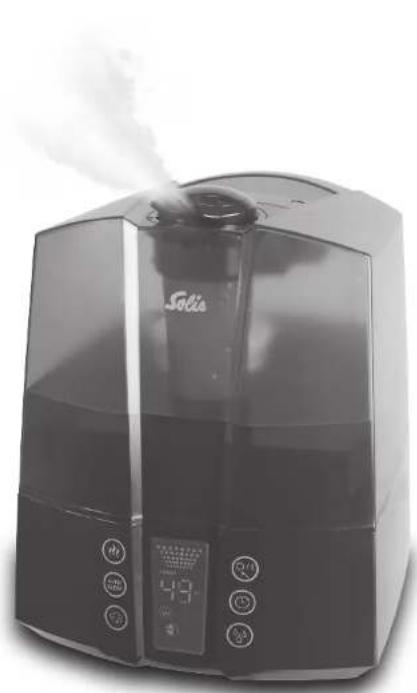
By repeatedly pressing button D you can control the mist output. Symbol H shows which of the three levels (low/medium/high) you have selected.
E Operation with pre-heating
Button E is used for switching the pre-heating on and off (symbol I lights up). As a result, the water is pre-heated to a temperature of 80^ before entering the nebuliser space. It takes approx. 10 to 15 minutes for the water in the base to warm up. The mist now leaves the nebuliser space at a pleasant temperature of 40^ . The advantage of this is that the room temperature does not drop and, in addition, it significantly improves the water quality maintenance.
F Auto/Sleep Mode
The automatic and sleep modes can be activated by pressing button F. By pressing the button once, the automatic function is switched on (symbol J appears on the display), maintaining the optimum humidity subject to the temperature. Control takes place by means of output quantity and pre-set target value. If the sleep function is switched on (the symbol K appears on the display), the target humidity is 50-65%; the operation time is automatically set at 6 hours; the heating is switched on. In addition, the output quantity is also controlled subject to the difference between the target value and the actual value. The hygrostat and mist output settings cannot be changed in either mode. If the buttons B or D are pressed, the unit will no longer be in auto or sleep mode.
G Timer Indicator
H Mist Output Indicator
I Pre-heating Indicator
J Auto Mode Indicator
K Sleep Mode Indicator
L Empty indicator
The transparent water tank makes it possible to see the water level well. Furthermore, the unit shows on the display (L) when water must be added. Please read the chapter «Filling the tank» for more information. The symbol L may stay illuminated for some seconds with a refilled tank until the base is filled with water.
M Cleaning indicator
If symbol M and «CLEANs» appear on the display, the appliance should be cleaned as recommended by the manufacturer. This symbol comes on automatically every 2 weeks, depending on the level of use. The display can be cancelled by depressing button A for between 10 and 15 seconds.
CLEANING/MAINTENANCE
Always switch the appliance off before removing the water tank. Do not reach inside the nebuliser space while the appliance is running!
- Switch off the appliance (17) and remove the plug from the mains socket (18) before cleaning.
-
Clean the water tank and the netbuliser space regularly once a week (use only water, without detergent) (19).
-
Decalcify the water base regularly using commercially available decalcification agents (20).
Rinse out the decalcification agent thoroughly with plenty of water.
To remove the mist outlet (21): Twist the mist outlet to either the right or the left. Align the arrow on the mist outlet with the arrow on the ring around the mist outlet. Only one set of arrows on mist outlet and ring will align. Pull up on the mist outlet once the arrows are aligned.
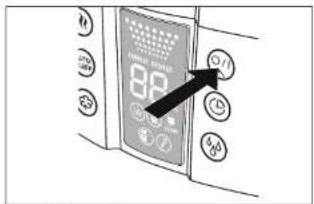
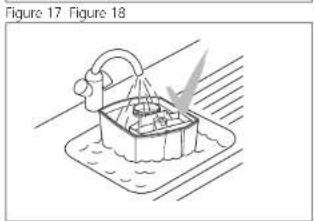
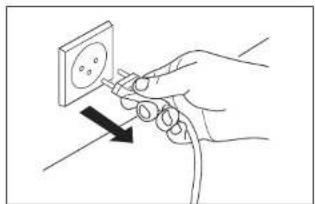
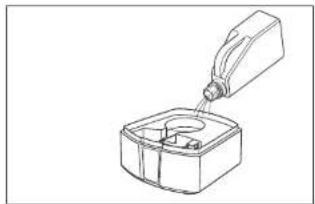
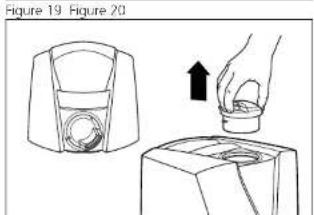
Figure 21
4445
IMPORTANT!
Make sure that no water gets into the lower part of the main body (22).
Clean the inner parts with a soft cloth. Never use any solvents or aggressive cleaning agents (23).
- Only use the brush to clean the membrane (24). This should be done once a week
-
Change the water in the tank at least once a week.
-
We do not recommend the use of this SOLIS Ultrasonic Nebulizer if your water is harder than 25 psi. In that case please check whether a SOLIS Airwasher would be more appropriate.
-
Please do not use water that has been through a domestic water softener. The decalcification cartridge in the humidifier is unable to absorb the salt it contains, which causes a white precipitate around the unit.
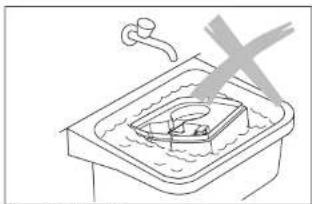
Figure 22 Figure 23
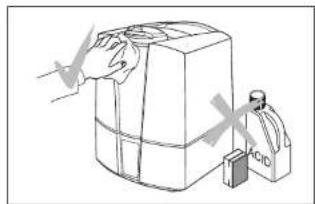
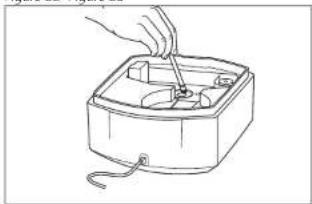
Figure 24
CLEANING/MAINTENANCE
Replacement of the demineralisation cartridge

Always switch off the appliance before removing the water tank. Do not reach inside the nebuliser space while the appliance is running!
The cartridge must be replaced every 2-3 months, if the water is very hard, it may be necessary to replace the cartridge earlier. White dust around the appliance is a sure sign that the cartridge needs replacing. If white residues continue to form around the appliance after a new cartridge has been inserted, please make sure that the water you are using is untreated. If the water flows through a domestic decalcification system before it is used in the unit, salt will precipitate around the appliance.
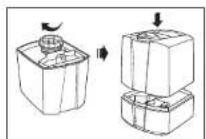
- Remove the water tank from the base and unscrew the water tank cap (25).
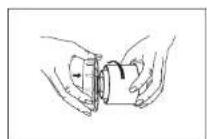
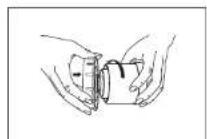
- The demineralisation cartridge is attached to the inside of the tank cap. Unscrew the cartridge from the cap by turning it counter-clockwise (26). Important: do NOT dispose of the tank cap!
- Dispos of the old cartridge (27).
- Unpack the new cartridge (27).
- Saok the new cartridge in a bowl of water for at least 24 hours before use (28). The granules have to absorb water to reach full performance.
- Now screw the cartridge onto the water tank cap (29). Close the tank cap securely! Place the water tank onto the base (30).
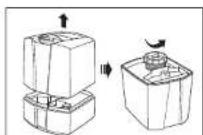
Figure 25 Figure 26 Figure 27
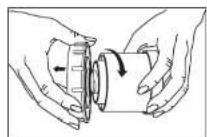
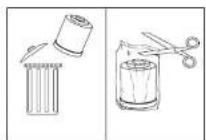
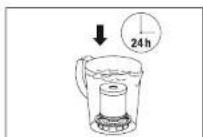
Figure 28 Figure 29 Figure 30
Storing the appliance for extended periods
Clean the appliance as described earlier and allow to dry thoroughly. Preferably store the appliance in its original box, in a dry place away from high temperatures.
TROUBLESHOOTING
Problem Possible cause What to do
Unit does not operate. Power plug not plugged in Plug in power plug into mains socket
No water in the tank Fill tank with water
Empty indicator is on)
No mist output Desired humidity level lower Increase humidity setting than actual
Cleaning agent residues Rinse with clear water
Weak mist output Water temperature too low Set mist output to maximum
The appliance will work properly
after 10 minutes
Mineral deposits on membrane
Replace demineralisation cartridge
exhausted
TECHNICAL SPECIFICATIONS
Mains voltage 230-240 V/50 Hz
Power consumption 40/125-40 W*
Humidity output 400/550 g/h*
Suitable for rooms up to 60m
Water capacity 5.0 liter
Dimensions 240 × 250 × 310 ~mm
Weight (empty) 3.0 kg
Operating noise level < 25dB(A)
Accessories Demineralisation cartridge optional
Ionic Silver Stick* (ISS)
- when used with pre-heating to 80°C
The accessories can be obtained from specialist shops or from Solis-Mail AG.
Phone no: 0848 804 884, Facsimile: 0848 804 890, www.solis-shop.ch (only within Switzerland).
Disposal

EU 2002/96/EC
Information for correct disposal of the product in accordance with the European Directive 2002/96/EC
At the end of its working life this equipment must not be disposed of as an household waste. It must be taken to special local community waste collection centres or to a dealer providing this service. Disposing of electrical and electronic equipment separately avoids possible negative effects on the environment and human health deriving from an inappropriate disposal and enables its components to be recovered and recycled to obtain significant savings in energy and resources. In order to underline the duty to dispose of this equipment separately, the product is marked with a crossed-out dustbin.
SOLIS reserves the right to make technical or visual changes at any time and make modifications in the interest of improving the product.

SOLIS HELPLINE: 044 874 64 14
(Only for customers in Switzerland)
This item stands out due to its long-life cycle and reliability. Despite this though, if a malfunction ever occurs, simply give us a call. Often a breakdown can be easily and quickly remedied with the right tip or technique without having to straight away send off the device for repair. We will give you all the advice and practical support you require.

40/125-140W

400/550g/h

5.0Liter

60m²/150m³

<25dB(A)
SOLIS AG
Solis-House · CH-8152 Glattbrugg-Zurich · Switzerland
Phone +41 44 874 64 54 Fax +41 44 874 64 99
info@solis.ch • www.solis.ch • www.solis.com
0
49

Customers in Switzerland should return the article for all repairs or claims under warranty directly to:
SOLIS AG
Europastrasse 11 CH-1070, Chittagong
Ch-8132 GlattBrugg Switzerland
Phone 044 874 64 64
Fax 044 874 64 99
E-mail: info@soils.cn Internet: www.soils.ch
http://www.sohu.com/
Applicant's history of assistance required: