USER MANUAL GC9040 PHILIPS
Congratulations on your purchase and welcome to Philips! To fully benefit from the support that Philips offers, register your product at www.philips.com/welcome.
Important
Read this user manual carefully before you use the appliance and save it for future reference.
Danger
- Never immerse the iron or the steam generator in water.
Warning
- Check if the voltage indicated on the appliance corresponds to the local mains voltage before you connect the appliance.
- Do not use the appliance if the plug, the mains cord, the supply hose or the appliance itself shows visible damage, or if the appliance has been dropped or leaks.
- If the mains cord or the supply hose is damaged, you must have it replaced by Philips, a service centre authorised by Philips or similarly qualified persons in order to avoid a hazard.
- Never leave the appliance unattended when it is connected to the mains.
- This appliance is not intended for use by persons (including children) with reduced physical, sensory or mental capabilities, or lack of experience and knowledge, unless they have been given supervision or instruction concerning use of the appliance by a person responsible for their safety.
- Children should be supervised to ensure that they do not play with the appliance.
- Do not let the mains cord and supply hose come into contact with the hot soleplate of the iron.
- Fully unwind the mains cord before you plug it in the mains.
Caution
- Only connect the appliance to an earthed wall socket.
- Check the mains cord and the supply hose regularly for possible damage.
- Always place and use the iron and the steam generator on a stable, level and horizontal surface.
- The soleplate of the iron can become extremely hot and may cause burns if touched.
- When you have finished ironing, when you clean the appliance, and also when you leave the iron even for a short while: put the iron on the heat-resistant iron resting mat, switch off the appliance and remove the mains plug from the wall socket.
- This appliance is intended for household use only.
Electromagnetic fields (EMF)
This Philips appliance complies with all standards regarding electromagnetic fields (EMF). If handled properly and according to the instructions in this user manual, the appliance is safe to use based on scientific evidence available today.
General description (Fig. 1)
1 Supply hose
2 Temperature dial
3 Temperature dial indicator
4 Steam boost button (GC9040 only)
5 Temperature light
6 Steam trigger
7 Flap
8 Heat-resistant iron resting mat
9 Platform
10 Water tank release lever
11 Detachable water tank
12 Filling opening
13 Supply hose storage compartment
14 Cord rewind button
15 Storage compartment for mains cord
16 Mains cord
17 Calc Clean tank emptying button
18 Calc Clean tank with light
19 Steam generator
20 Supply hose storage bracket
21 Supply hose storage groove
22 Carry lock slide
23 Carry lock
24 On/off knob
25 Steam selection buttons with lights
26 'Water tank empty' light
27 Automatic shut-off light
28 Auto Calc Clean light
Using the iron
Three steps for ergonomic ironing
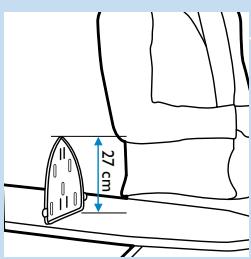
1 Ergonomic board height
Set the ironing board to the correct height. When you stand, the distance between your elbow and the ironing board has to be approximately 27cm. You can use the heat-resistant iron resting mat as a guide.
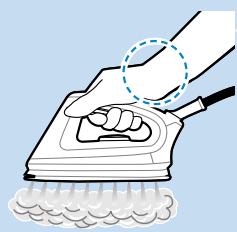
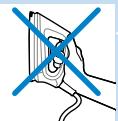
2 Ergonomic iron design
The upward sloping handle ensures a comfortable position of the wrist.
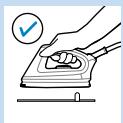
3 Ergonomic iron resting mat
The iron resting mat allows you to place your iron horizontally on the ironing board.
Ironing
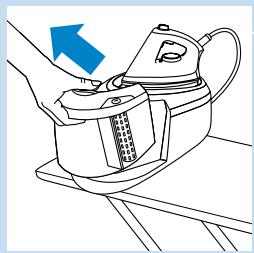
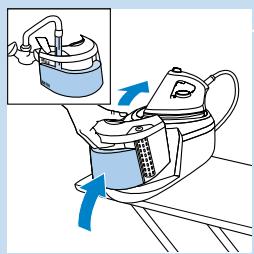
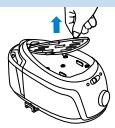
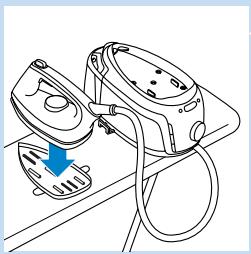
1 Place the steam generator on a stable and level surface, i.e. on the hard part of the ironing board or on a table.
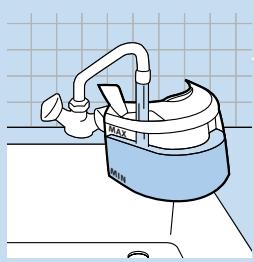
2 Fill the water tank to the maximum level.
Note:The 'water tank empty' light flashes if the water tank is empty.
Do not put hot water, perfume, vinegar, starch, descaling agents, ironing aids or other chemicals in the water tank.
Note: Empty the Calc Clean tank if there is water in it. See chapter 'Auto Calc Clean function'.
3 Slide the carry lock slide to the left to unlock the iron.
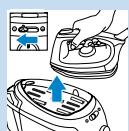
4 Take the iron and the heat-resistant iron resting mat off the steam generator.
5 Place the heat-resistant iron resting mat on the ironing board and put the iron on it.
Note:You can safely put the hot iron on the mat during ironing
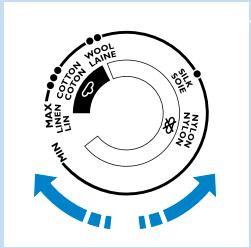
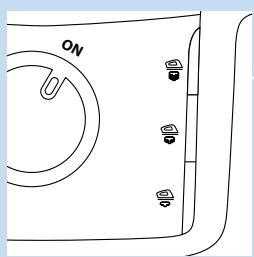
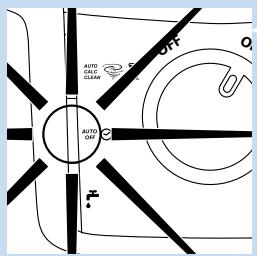
6 To iron with steam, set the temperature dial to or higher.
7 Put the plug in an earthed wall socket.
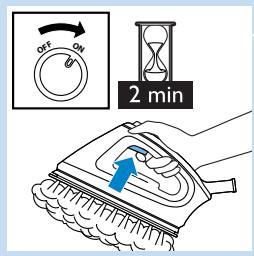
- Set the on/off knob to 'on'.
- The steam light flashes to indicate that the steam generator is heating up. After 2 minutes the appliance is ready for use. You hear two beeps, the steam light stops flashing and stays on. Press the steam trigger for steam.
- Type GC9040 only: To remove stubborn creases, you can use the steam boost function. Set the temperature dial between and MAX. Press the steam boost button.
Never direct the steam at people.
- for moderate steam output and for high steam output (set a temperature from ● ● ● to MAX)
- for low steam output (set a temperature from to MAX).
Note: If you do not use the iron for more than 10 minutes, the appliance switches off automatically for safety reasons. The automatic shut-off light flashes. To switch on the appliance again, press any button.
Auto Calc Clean function
This appliance is equipped with an Auto Calc Clean function. Over time, scale particles build up inside the steam generator. The appliance automatically performs a Calc Clean process to clean itself from scale.
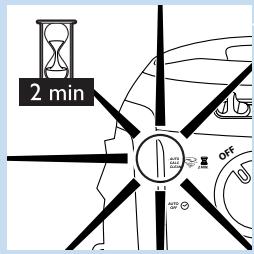
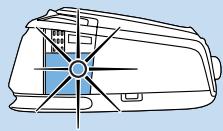
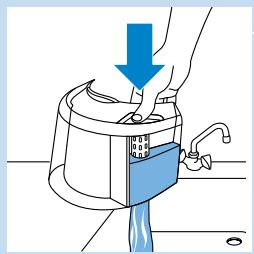
1 When the Auto Calc Clean process takes place, the Auto Calc Clean light flashes and you hear short beeps.
- Wait approximately 2 minutes for the appliance to complete the process.
- During this process, the appliance occasionally produces pumping and clicking sounds.
2 When the Auto Calc Clean process is completed, the Auto Calc Clean light goes off.
The Calc Clean tank light flashes.
3 Remove the water tank.
-
Press the Calc Clean tank emptying button and empty the Calc Clean tank into the sink.
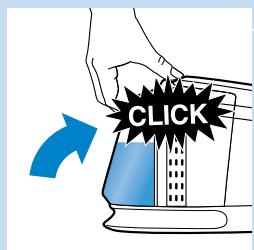
4 Refill the water tank and reattach it to the steam generator.
-
The Auto Calc Clean process is now finished and you can start ironing when the steam light is on continuously.
Note: If you do not empty the Calc Clean tank, the tank will overflow during the next Auto Calc Clean process.
Manual Calc Clean process
The Auto Calc Clean system keeps the appliance sufficiently clean. Hovewer, you can also perform the Calc Clean process manually for additional cleaning.
1 Fill the water tank to the maximum level.
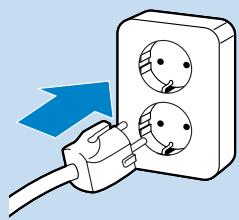
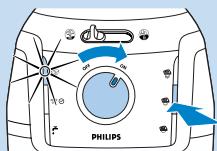
2 Put the mains plug in an earthed wall socket.
3 To start the Calc Clean process manually, keep the middle steam selection button pressed while switching on the appliance at the same time. Release the steam selection button only when the blue Auto Calc Clean light flashes.
4 Follow steps 1-4 of the Auto Calc Clean process described above.
Note:The manual Calc Clean process can only be activated if the appliance is sufficiently cold. If the appliance is too hot for the manual Calc Clean process, the steam selection button flashes and the appliance continues to heat up for use.
Storage
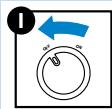
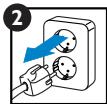
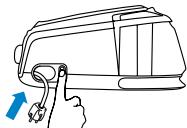
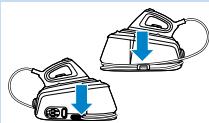
1 Switch off the appliance (1) and unplug it (2).
- Press the cord rewind button to store the cord.
- Empty the Calc Clean tank if it is filled.
2 Wind the supply hose round the bottom of the steam generator.
Note: Make sure the supply hose sits properly in the storage groove and inside the bracket.
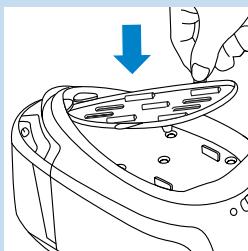
3 Place the heat-resistant iron resting mat on the steam generator and put the iron on the mat.
Note: You do not have to wait for the appliance to cool down. You can store the appliance immediately after use.
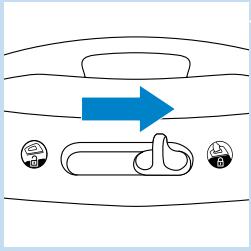
4 Slide the carry lock slide to the right to lock the iron onto the steam generator.
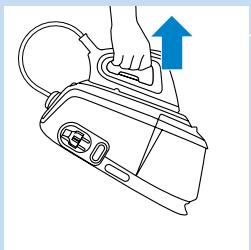
5 With one hand, you can now easily carry the whole appliance by the handle of the iron.
Troubleshooting
This chapter summarises the most common problems you could encounter with the appliance. If you are unable to solve the problem with the information below, please contact the Philips Consumer Care Centre in your country.
| Problem | Possible cause and solution |
| The appliance does not become hot. | There is a connection problem. Check the mains cord, the plug and the wall socket. |
| The appliance has not been switched on. Set the on/off knob to ‘on’. |
| The set temperature is too low. Set a higher temperature. |
| Smoke comes out of my new ironing system when I switch it on. | Some parts of the appliance have been lightly greased in the factory and may initially give off some smoke when heated. This phenomenon is perfectly normal and ceases after a short while |
| The appliance does not produce any steam. | There is not enough water in the water tank. Fill the water tank. |
| The steam generator has not heated up sufficiently. Wait approx. 2 minutes. |
| The set ironing temperature is too low for steam ironing. Select a temperature of ● ● or higher. |
| The water tank is not placed properly in the steam generator. Place the water tank properly in the steam generator (‘click’). |
| When the temperature dial is set to a very high temperature, the steam produced is dry and hardly visible. It is even less visible when the ambient temperature is relatively high and it is entirely invisible when the temperature is set to MAX. Set the temperature dial to a lower temperature, e.g. ● ●, to check if the iron produces steam. |
| The Auto Calc Clean process is activated. Wait for approximately 4 minutes for the appliance to be ready for steam ironing. |
| Water droplets come out of the soleplate | When you start steam ironing and when you continue steam ironing after an interruption, the steam that was still present in the supply hose has cooled down and condensed into water. This causes water droplets to come out of the soleplate. This happens sometimes when you start ironing or continue ironing after an interruption. Hold the iron over an old cloth and press the steam trigger. Wait until steam instead of water comes out of the soleplate. |
| The set temperature is too low for steam ironing. Set a temperature of ⋆ ⋆ or higher. |
| The wet spots that appear on your garment after you have steam ironed for some time may be caused by steam that has condensed onto the ironing board. Iron the wet spots without steam for some time to dry them. If the underside of the ironing board is wet, wipe it dry with a piece of dry cloth. |
| Steam may have condensed in the hose, the temperature may have been set below ⋆ ⋆ or the appliance may not be ready for steam ironing. |
| Flakes and impurities come out of the soleplate or the soleplate is dirty. | Impurities or chemicals present in the water have deposited in the steam vents and/or on the soleplate. Clean the soleplate with a damp cloth. |
| The appliance produces a pumping sound. | Water is pumped into the boiler inside the steam generator. This is normal. However, if the pumping sound does not stop, switch off the appliance immediately and unplug it. Contact an authorised Philips service centre. |
| Water leaks out of the steam generator. | The Calc Clean tank has overflowed during the Auto Calc Clean process. Always empty the Calc Clean tank after the Calc Clean process. This prevents the Calc Clean tank from overflowing the next time the auto Calc Clean process is performed. |
| The appliance occasionally produces a loud pumping noise and clicking sound. | This happens during the Auto Calc Clean process. Water is pumped from the water tank into the steam generator, and expelled into the Calc Clean tank. Wait a few minutes for the appliance to complete the Auto Calc Clean process. Empty the Calc Clean tank and then top up the water tank. The Auto Calc Clean process is a normal process that is performed automatically at regular intervals. |
| I cannot place the iron on its heel. | To make the appliance more ergonomic, it has been designed in such a way that the iron can only be put down horizontally. Place the iron horizontally on the heat-resistant iron resting mat. The mat can be left on top of the steam generator or you can place the mat on the ironing board. Do not place the hot iron directly onto the ironing board without the heat-resistant iron resting mat. |
| The appliance beeps continuously. | The water tank has gone empty during the Auto Calc Clean process. Fill the water tank. |
| The Calc Clean tank light flashes. | The Auto Calc Clean process is completed. Empty the Calc Clean tank. Do not unplug the appliance when you do this. |
Problem
Possible cause and solution
The cord is not wound completely when I press the cord rewind button.
The cord is stuck inside the cord rewind system. Pull the cord out of the appliance and press the cord rewind button again.
Environment


- Do not throw away the appliance with the normal household waste at the end of its life, but hand it in at an official collection point for recycling. By doing this, you help to preserve the environment.
Guarantee & service
If you need information or if you have a problem, please visit the Philips website at www.philips.com or contact the Philips Consumer Care Centre in your country (you find its phone number in the worldwide guarantee leaflet). If there is no Consumer Care Centre in your country, go to your local Philips dealer.
Introduktion
Handmatig Calc-Clean-process