EasyManual
NC 340 - Coin and bill counter OLYMPIA - Free user manual and instructions
Find the device manual for free NC 340 OLYMPIA in PDF.



Frequently Asked Questions - NC 340 OLYMPIA
User questions about NC 340 OLYMPIA
0 question about this device. Answer the ones you know or ask your own.
Ask a new question about this device
Download the instructions for your Coin and bill counter in PDF format for free! Find your manual NC 340 - OLYMPIA and take your electronic device back in hand. On this page are published all the documents necessary for the use of your device. NC 340 by OLYMPIA.
USER MANUAL NC 340 OLYMPIA
DEATCH Banknotenprügerat NC 330/NC 340
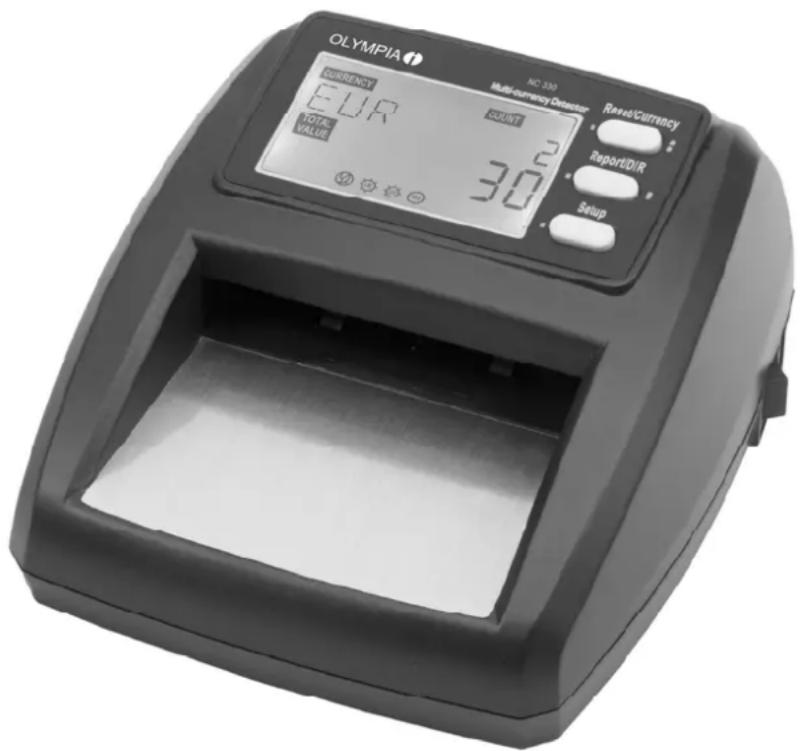
GBIE Bank Note Validator NC 330 / NC 340
NL BE Geldcontrolleapparaat NC 330 / NC 340
FRBECH Deteur d'argent NC 330/NC 340
ITCH Verificatore di banconote NC 330/NC 340
ES Verificadora de dinero NC 330/NC 340
Inhaltsverzeichnis
Service-Center Hattingen
Zum Kraftwerk 1
45527 Hattingen
1 Introduction 11
2 Intended Use 11
3 Scope of Delivery. 11
4 Safety Information 11
5 Operation 12
5.1 Operating elements 12
5.1.1 Plan view 12
5.1.2 Rear view. 13
5.1.3 Display 13
5.2 Starting up 13
5.2.1 Bank note validator NC 330 13
5.2.2 Bank note validator NC 340 13
5.3 Setting options on the bank note validator 14
5.3.1 Selecting the currency to be validated 14
5.3.2 Selecting the discharge side 14
5.4 Validating bank notes and reading totals 14
5.5 Resetting the value and count displays 15
5.6 Connecting to a PC 15
6 Display Indicators in the Status Line 15
6.1 Error indicators 15
6.2 Status indicators 16
7 Cleaning. 16
8 Transport and Storage 16
9 Technical Data 16
10 Service 17
1 Introduction
We are very pleased that you have chosen a product from our company. We hope that this bank note validator simplifies your everyday work involving bank notes and provides more security in respect of counterfeit money.
All the most important information on the bank note validator is provided below. However, if you have any queries do not hesitate to contact us.
The bank note auditor operates using the latest technology and is one of the leading products on the market. The bank note auditor is equipped with sensors to monitor the security features.
Note: The control/security features cannot be switched off or manipulated manually because they are controlled by the respective software.
Please note that this bank note validator must be cleaned regularly to ensure optimum counting results and a long service life (refer to Chapter 7). If problems should occur, despite correct service and maintenance of the bank note validator, our team of service technicians is available to you (refer to Chapter 10).
2 Intended Use
The bank note validator serves to check bank notes are valid within the scope of your daily monetary transactions.
Any other use is considered unintended use. The operator of the bank note validator is deemed liable for any damage resulting from unintended use.
3 Scope of Delivery
- Bank note validator
- Operating instruction manual (various languages)
- Power adapter plug
Please check that the delivery is complete on opening the bank note validator package and that the equipment contained shows no signs of damage.
4 Safety Information
Read the safety information thoroughly before starting to use the equipment! Please pay attention to the warnings and notes in order to prevent damage to the bank note validator and injuries to persons.

Warning
It is essential to observe this warning; failure to do so could result in serious or even fatal injuries (e.g. through an electric shock).

Attention
It is essential to observe this warning; failure to do so could result in damage to the bank note validator.
Disconnect the power plug if the bank note validator will not be used for a longer period or it is to be transported.
Never pull the power plug from the power socket by the cable to prevent damaging the cable and the risk of an electric shock.
| Please ensure that your fingers, hair, tie nor other items can be drawn into the device during a counting operation. |
| Ensure that the bank notes to be validated are not damaged or creased and that no foreign bodies are attached to them, e.g. paper clips, paper, etc. |
| Wait at least 2 seconds between switching the bank note validator off and on again to prevent damaging the integrated computer chip. |
| Do not expose the bank note validator to smoke, vapours, dust or direct sunlight. |
| Do not shake or drop the bank note validator or expose it to any impacts. |
| The bank note validator may only be used with the power adapter plug supplied. |
| Do not open or disassemble the bank note validator. This could alter the position and/or direction of the sensors. The bank note validator may only be opened by authorised service staff to prevent damage to the bank note validator and injuries to users. |
| When cleaning the device, do not use any aerosol sprays with inflammable gases (e.g. LPG). |
| The bank note validator must not be operated by children! |
5 Operation
5.1 Operating elements
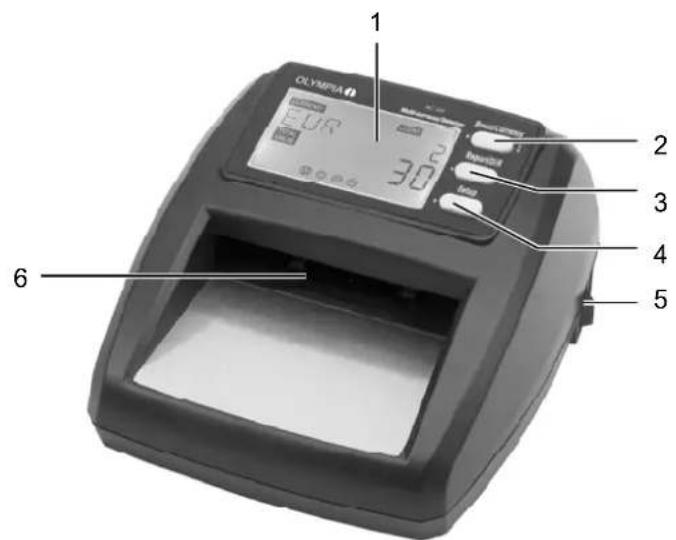
5.1.1 Plan view
1 Display
2 Reset/Currency button
3 Report/DIR button
4 Setup button
5 On/Off switch
6 Front infeed/discharge slot
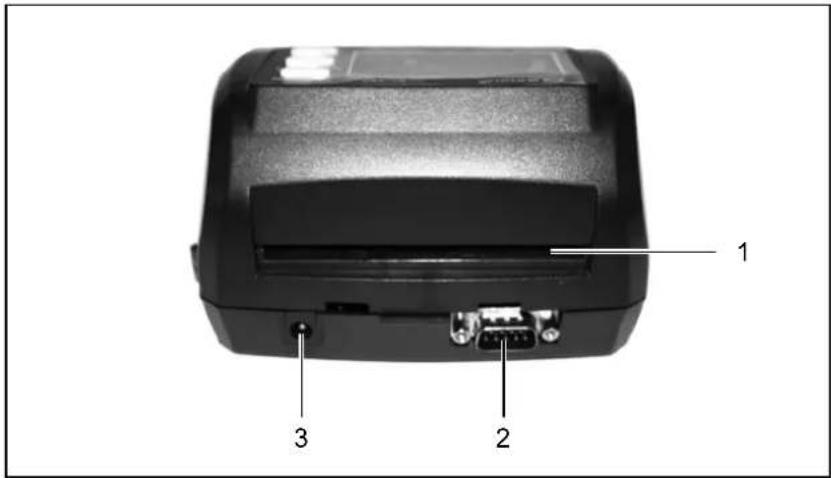
5.1.2 Rear view
1 Rear discharge slot
2 Serial port (to connect a PC)
3 Connection for power adapter plug
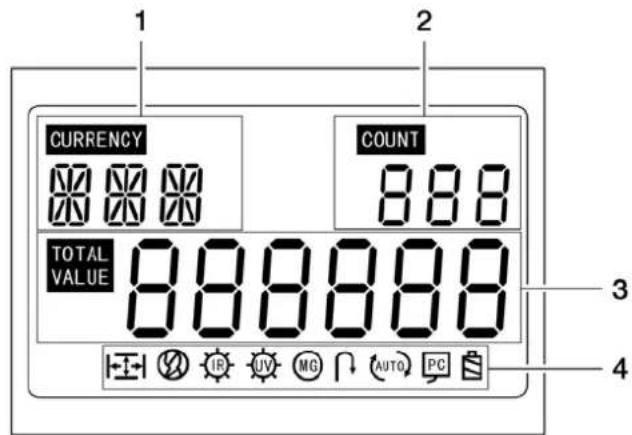
5.1.3 Display
1 Indicates the currency to be validated
2 Indicates the number of bank notes checked (count display)
3 Indicates the total value of bank notes validated (value display)
4 Status line with error indicators and status indicators (also refer to Chapter 6)
5.2 Starting up
Set the bank note validator down on a stable, level surface.
Note: Position the NC 330 near a power socket.
Note: If the bank note validator has been exposed to cold temperatures for a longer period, wait for at least 2 hours until the bank note validator has reached room temperature before switching it on.
5.2.1 Bank note validator NC 330
The power supply to the bank note validator is only provided via the power adapter plug.
- Ensure that the bank note validator is switched off at the On/Off switch.
- Connect the power adapter plug to the NC 330 on the rear side of the bank note validator.
- Then connect the power adapter plug to an appropriate power socket (AC 110V~240V, 50Hz/60Hz).
5.2.2 Bank note validator NC 340
The power supply to the bank note validator can be provided via the power adapter plug or an integrated rechargeable battery. If the NC 340 bank note validator is powered via the power adapter plug, the battery is charged at the same time. The status of the battery is indicated in the status line by mean of the corresponding icon.
When the battery is fully charged, the bank note validator can be operated for maximally 90 minutes without the power adapter plug.
Note: If the bank note validator is operated without the power adapter plug and remains unused for 5 minutes, it switches off automatically.
5.3 Setting options on the bank note validator
5.3.1 Selecting the currency to be validated
The bank note validator can control two different currencies whereby one currency is always the Euro.
- Switch the bank note validator on.
- Press the Reset/Currency button twice in succession to switch between the two possible currencies.
5.3.2 Selecting the discharge side
The bank note auditor is provided with two discharge sides for validated bank notes. The bank notes can be discharged either on the rear side of the bank note auditor or fed back to the front of the device.
Note: Counterfeit or unrecognised bank notes are generally discharged at the front.
- Switch the bank note validator on.
- Press and hold the Report/DIR button for 2 seconds.
Note: When the corresponding icon is displayed in the status line, the bank notes are discharged at the front (refer to Chapter 6.2).
5.4 Validating bank notes and reading totals
To prevent incorrect counting and damage to the bank note validator, the following bank notes should be sorted out prior to the validation process:
adhered bank notes
- washed bank notes
- heavily soiled bank notes
- damaged bank notes
Note: Smoothen any creased or kinked bank notes before feeding them into the bank note validator.
- Switch the bank note validator on: Set the On/Off switch to Position I.
After the bank note validator is switched on, it completes an automatic self-diagnosis (alternating display indicators, acoustic signals), the corresponding error icon appears in the display in the case of problems. When the bank note validator is ready to use, the value and count indicators display zeros.
- If necessary, select the currency to be validated (refer to Chapter 5.3.1).
Note: The programmed currencies cannot be mixed and validated. The currency to be validated must be defined at the beginning of the process.
-
If necessary, select the discharge side for the validated bank notes (refer to Chapter 5.3.2).
-
Feed the bank note lengthways in the front infeed/discharge slot. The bank note is drawn in by the motor and controlled. All the information on the bank note just controlled appears in the display (refer to Chapter 5.1.3 and Chapter 6).
Note: If a bank note is not inserted correctly in the bank note validator or in the case of counterfeit money, the bank note is ejected at the front of the bank note validator, an error indicator appears in the display (refer to Chapter 6.1) and an acoustic signal alerts you to this bank note.
- Feed further bank notes into the device in the same way. The Count indicator displays the number of valid bank notes controlled and the Value indicator displays the total value of validated bank notes (refer to Chapter 5.1.3).
Note: The Value display is a six-digit display and can show a maximum value of Euro 999,999.
After you have controlled all the bank notes:
- Press the Report/DIR button several times to display, in succession, how many bank notes have been controlled for each individual denomination (5 Euro, 10 Euro, 20 Euro etc.) until now. The denomination value appears in the display underneath VALUE. The number of bank notes is indicated in the Count display (refer to Chapter 5.1.3). The total value of each denomination value appears in the Value display (refer to Chapter 5.1.3).
Note: A few seconds after pressing the Report/DIR button for the last time, the display returns to the previous mode.
Note: When the bank note validator is not in use, switch it off and cover it up to prevent it getting dusty.
5.5 Resetting the value and count displays
In order to reset the Value and Count displays to zero, press the Reset/Currency button once.
Note: After switching the device off and on again, all the counters are also reset to zero.
5.6 Connecting to a PC
If you connect the bank note validator to a PC, it is possible to save the data compiled in the bank note validator on the PC or, if necessary, to print it out from there. When the PC is provided with an Internet connection, you can also load software updates on the bank note validator.
A special programme, which can be downloaded from the Olympia homepage, is required to connect the bank note validator and PC.
- Open the Olympia homepage at www.olympia-vertrieb.de.
- Navigate to the Download area and download the instructions regarding the update and the update programme.
6 Display Indicators in the Status Line
6.1 Error indicators
If a bank note is suspected of being counterfeit, the corresponding error icon flashes in the status line. An acoustic signal is also sounded.
| Error indicator | Cause and procedure |
| ↓→ | The bank note was not inserted in the machine correctly. The bank note is possibly folded or creased. Please validate the bank note again in a different longitudinal direction. If the error indication is repeated, reject the bank note. |
| ∅ | The graphical representation or dimensions (length, width) of the bank note are incorrect. The bank note is possibly folded or creased. Please validate the bank note again in a different longitudinal direction. If the error indication is repeated, reject the bank note. |
| IR | The test of the infrared properties was not conclusive. Please validate the bank note again in a different longitudinal direction. If the error indication is repeated, reject the bank note. |
| UV | The test using ultraviolet light (UVL) was not conclusive. Please validate the bank note again in a different longitudinal direction. If the error indication is repeated, reject the bank note. |
| MG | The magnetic security feature was not detected conclusively. Please validate the bank note again in a different longitudinal direction. If the error indication is repeated, reject the bank note. |
6.2 Status indicators
| Display icon | Significance |
| Discharge of the bank note occurs at the front infeed/discharge slot | |
| PC | The bank note validator is connected to a PC. |
| Battery charge status (full, empty) (only NC 340) |
7 Cleaning
Note: Disconnect the power plug before staring cleaning work.
- Clean the bank note validator regularly using a lint-free, dry, soft cloth or soft brush.
- If necessary, clean the sensors with a soft cloth moistened with a little soapy water.
8 Transport and Storage
Pack the bank note validator carefully before transporting or storing it.
Note: Observe the information regarding temperature and relative humidity (refer to Chapter 9).
Note: Do not let the bank note validator fall or expose it to any impacts.
9 Technical Data
| Dimensions (W x H x L): 138 x 80 x 162 mm | |
| Weight: | 0.8 kg |
| Speed: 2 bank notes / second | |
| Power consumption: Max. 6.5 W | |
| Power supply: AC 110V~240V, 50Hz/60Hz | |
| Rechargeable battery (NC 340): | 1 lithium-ion battery 11.1 V / 700 m Ah 50 x 30 x 15 mm (not changeable) |
| Operating time with fully charged battery and no power adapter plug (NC 340): | Max. 90 minutes |
| Temperature, operation: 0 °C ~ 40 °C | |
| Temperature, storage: -15 °C ~ 50 °C | |
| Temperature, transport (max. 7 days): | -25 °C ~ 55 °C |
| Rel. humidity, operation: 30% ~ 90% | |
| Rel. humidity, storage: | Max. 80% (at 25°C) |
| Rel. humidity, transport (max. 7 days): | Max. 98% (at 25°C) |
10 Service
In the case of a defect, please return the device together with the receipt and original packing material to the point-of-sale.
Inhoudsopgave
GB IE CY The manufacturer hereby declares that the equipment complies with the stipulations defined in the following guidelines and standards: