
HD7448/10 - Coffee maker PHILIPS - Free user manual and instructions
Find the device manual for free HD7448/10 PHILIPS in PDF.
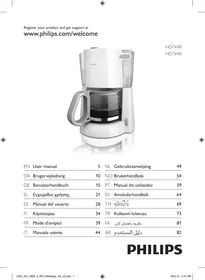

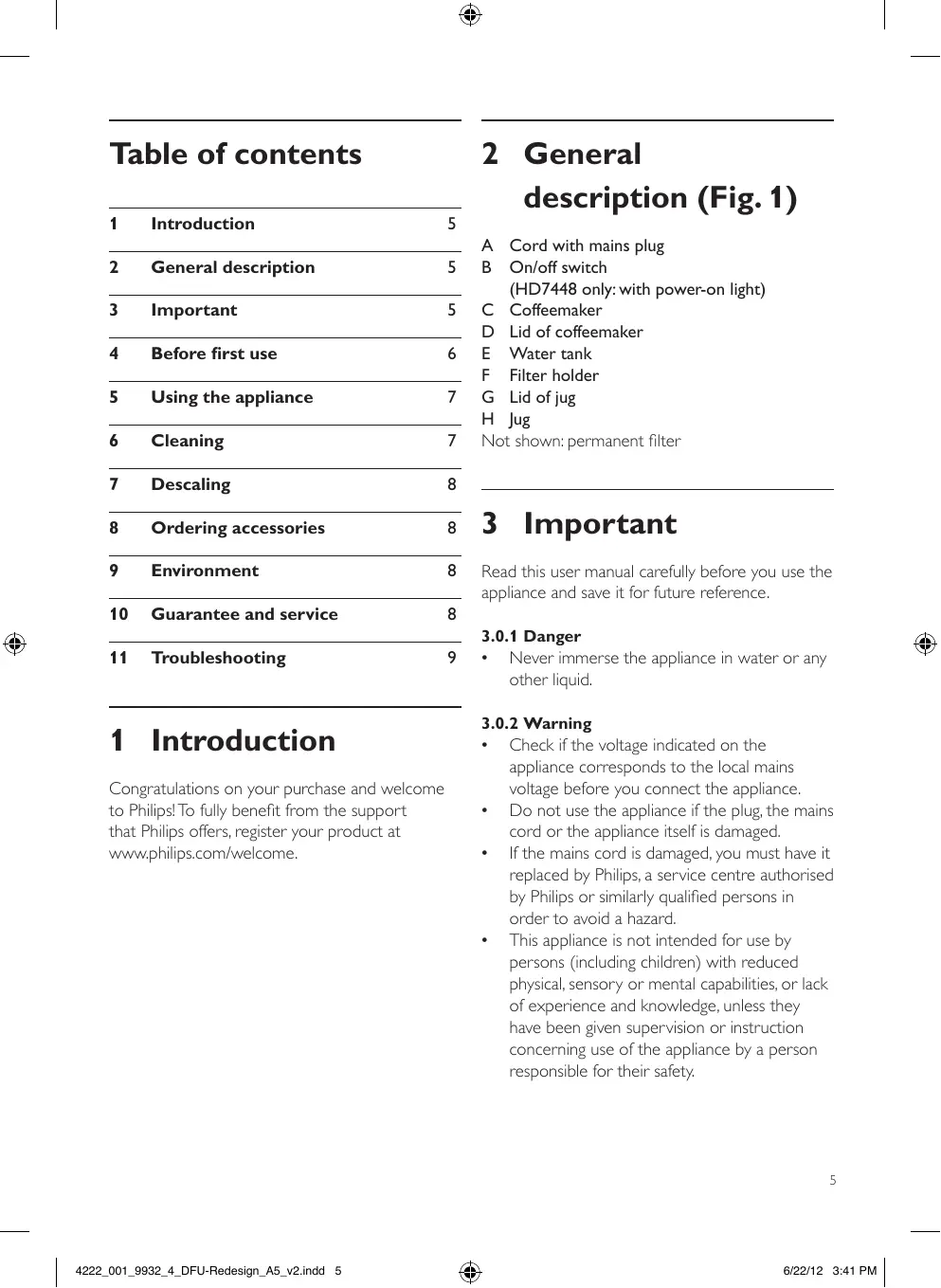


| Product type | Drip coffee maker |
| Brand | PHILIPS |
| Model | HD7448/10 |
| Capacity | 1.2 L (10 large cups) |
| Power supply | 230 V, 50 Hz |
| Power | 1000 W |
| Dimensions (L x W x H) | 22 x 20 x 35 cm |
| Weight | 1.5 kg |
| Color | White |
| Material | Plastic, glass (carafe) |
| Anti-drip system | Yes |
| Carafe | Graduated glass, 1.2 L |
| Permanent filter | Included (depending on model) |
| Filter type | Paper type 1x4 or no. 4, or permanent |
| Functions | On/off switch with indicator light, keep warm function |
| Maintenance | Regular cleaning, descaling 2 to 5 times per year depending on water hardness |
| Safety | Manual shut-off, overheat protection (not specified) |
| Repairability | Spare parts available on shop.philips.com |
| Warranty | 2 years |
Frequently Asked Questions - HD7448/10 PHILIPS
User questions about HD7448/10 PHILIPS
0 question about this device. Answer the ones you know or ask your own.
Ask a new question about this device
Download the instructions for your Coffee maker in PDF format for free! Find your manual HD7448/10 - PHILIPS and take your electronic device back in hand. On this page are published all the documents necessary for the use of your device. HD7448/10 by PHILIPS.
USER MANUAL HD7448/10 PHILIPS
Register your product and get support at www.philips.com/welcome
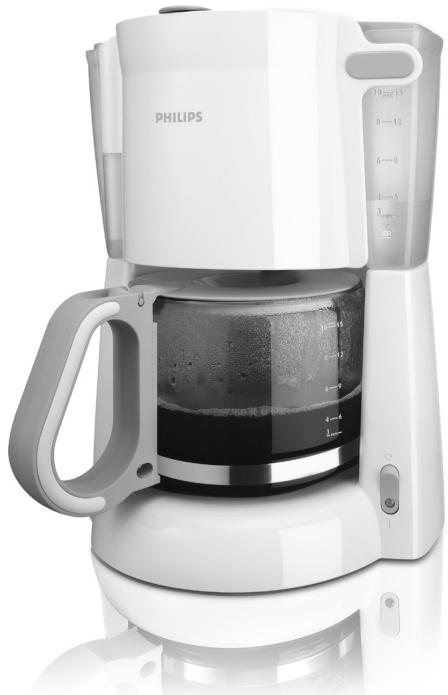
HD7448
HD7446
EN User manual 5 DA Brugervejledning 10 DE Benutzerhandbuch 15 EL Eeyxepiio xpnns 21 ES Manual del usuario 28 Fl Käyttoopa 34 FR Mode d'emploi 39 IT Manuale utente 44
NL Gebruiksaanwijizing 49 NO Brukerhandbok 54 PT Manual do utiliser 59 SV Anvandarhandbok 64 69 TR Kullanim kilavuzu 73 FA 81 AR pssuaaull 82
PHILIPS

①
Table of contents
1 Introduction 5 2 General description 5 3 Important 5 4 Before first use 6 5 Using the appliance 7 6 Cleaning 7 7 Descaling 8 8 Ordering accessories 8 9 Environment 8 10 Guarantee and service 8 11 Troubleshooting 9
1 Introduction
Congratulations on your purchase and welcome to Philips! To fully benefit from the support that Philips offers, register your product at www.philips.com/welcome.
2 General description (Fig. 1)
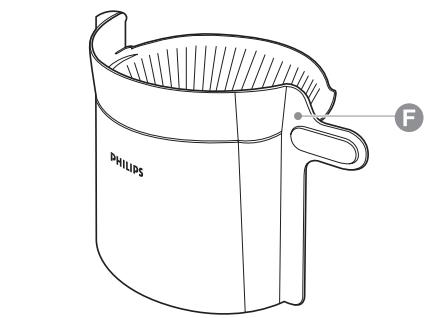
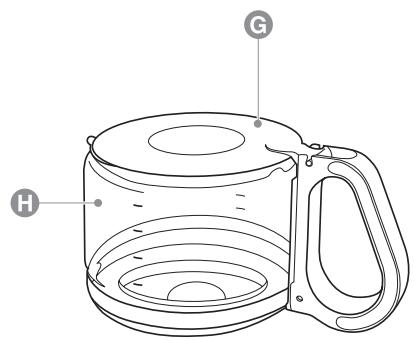
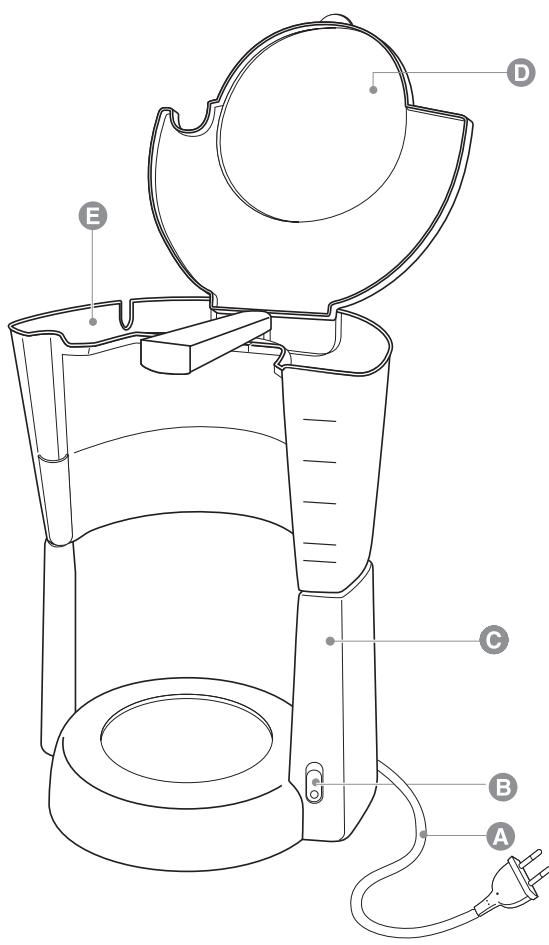
A Cord with mains plug B On/off switch (HD7448 only: with power-on light) C Coffeemaker D Lid of coffeemaker E Water tank F Filter holder G Lid of jug H Jug
Not shown: permanent filter
3 Important
Read this user manual carefully before you use the appliance and save it for future reference.
3.0.1 Danger
- Never immerse the appliance in water or any other liquid.
3.0.2 Warning
- Check if the voltage indicated on the appliance corresponds to the local mains voltage before you connect the appliance.
- Do not use the appliance if the plug, the mains cord or the appliance itself is damaged. If the mains cord is damaged, you must have it replaced by Philips, a service centre authorised by Philips or similarly qualified persons in order to avoid a hazard.
- This appliance is not intended for use by persons (including children) with reduced physical, sensory or mental capabilities, or lack of experience and knowledge, unless they have been given supervision or instruction concerning use of the appliance by a person responsible for their safety.
Children should be supervised to ensure that they do not play with the appliance. - Keep the mains cord out of the reach of children. Do not let the mains cord hang over the edge of the table or worktop on which the appliance stands.
3.0.3 Caution
- Do not place the appliance on a hot surface and do not let the mains cord come into contact with hot surfaces.
- Unplug the appliance before you clean it and if problems occur during brewing. This appliance is intended to be used in household and similar applications such as:
staff kitchen areas in shops, offices and other working environments; - farm houses; - by clients in hotels, motels and other residential type environments; bed and breakfast type environments.
3.1 Electromagnetic fields (EMF)
This Philips appliance complies with all standards regarding electromagnetic fields (EMF). If handled properly and according to the instructions in this user manual, the appliance is safe to use based on scientific evidence available today.
4 Before first use
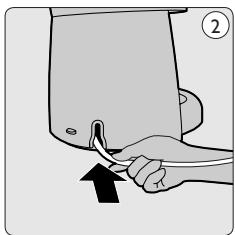
Clean the jug and the filter holder (see chapter 'Cleaning'). Put the appliance on a flat and stable surface. 3 Put the plug in an earthed wall socket. 4 To store excess cord, push it into the opening at the back of the coffee maker (Fig. 2).
Warning:
Make sure that the cord does not come into contact with hot surfaces.
4.1 Flushing the appliance
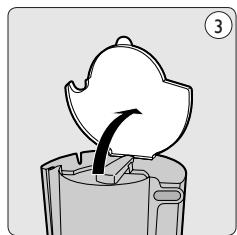
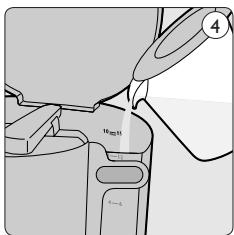
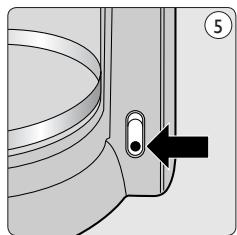
1 Open the lid (Fig. 3). 2 Fill the water tank with fresh cold water up to the MAX indication (Fig. 4). 3 Close the lid. 4 Put the jug on the hotplate. Do not put a filter and ground coffee in the filter holder. 5 Press the on/off switch to switch on the appliance. (Fig. 5)
- HD7448: The power-on light goes on.
6 Let the appliance operate until all water has run into the jug. 7 Press the on/off switch to switch off the appliance. Let the appliance cool down for at least 3 minutes before you start to brew coffee.
5 Using the appliance
5.1 Brewing coffee
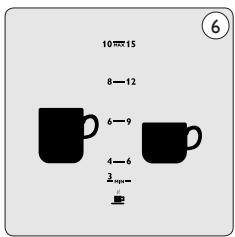
1 Open the lid (Fig. 3). 2 Fill the water tank with fresh cold water up to the required level (Fig. 6).
- The indications on the left side of the water level window correspond to large cups (120ml).
- The indications on the right side of the water level window correspond to small cups (80ml).
3 Close the lid. 4 Place the jug on the hotplate.
Warning:
Make sure you place the jug properly on the hotplate.
Note:
If you do not place the jug properly on the hotplate, the drip stop prevents the coffee from flowing into the jug and the filter. As a result, the filter may overflow.
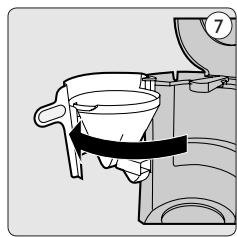
5 Open the filter holder (Fig. 7). 6 Take a paper filter (type 1x4 or no. 4) and fold the sealed edges to prevent tearing and folding.
Note:
Some versions come with a permanent filter. In this case you do not need to use paper filters.
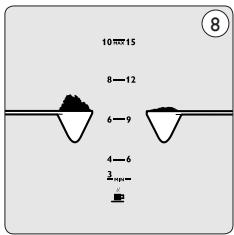
Put the paper filter or the permanent filter in the filter holder. 8 Put ground coffee (filter-fine grind) in the filter (Fig. 8).
- For large cups: use one heaped measuring spoon of ground coffee for each cup.
- For small cups: use one level measuring spoon of ground coffee for each cup.
9 Close the filter holder. 10 Press the on/off button to switch on the appliance (Fig. 5).
- HD7448: The power-on light goes on.
Wait for all the water to pass through the filter before you remove the jug from the hotplate. 12 After use, press the on/off switch to switch off the appliance.
Note:
If you want to brew another jug of coffee right away, let the appliance cool down for 3 minutes first. 13 Open the filter holder and throw away the paper filter and its contents. If you have used the permanent filter, empty and rinse it.
6 Cleaning
Warning:
Never use scouring pads, abrasive cleaning agents or aggressive liquids such as petrol or acetone to clean the appliance.
Warning:
Never immerse the appliance in water or any other liquid, nor rinse it under the tap.
Warning:
Always unplug the appliance before you clean it.
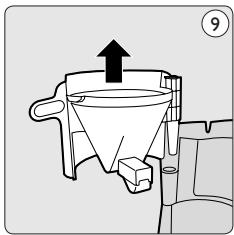
1 Unplug the appliance and let it cool down. 2 Clean the outside of the appliance with a moist cloth. 3 Detach the filter holder (Fig. 9). 4 Clean the jug, its lid and the removable filter holder in hot water with some washing-up liquid or in the dishwasher. 5 After cleaning, rinse the jug with fresh hot water.
7 Descaling
Regular descaling prolongs the life of the appliance and guarantees optimal brewing results and a constant brewing time for a long time. In case of normal use (two full jugs of coffee every day), descale the coffee maker:
2 or 3 times a year if you use soft water; 4 or 5 times a year if you use hard water.
Contact your local water board for information about the water hardness in your area.
You can use white vinegar with 4% acetic acid or a liquid descaler to descale the coffeemaker.
Warning:
Never use vinegar with an acetic acid content of 8% or more, natural vinegar, powder descalers or tablet descalers to descale the appliance, as this may cause damage.
1 Fill the water tank with approx. 600 ml of white vinegar (4% acetic acid).
Note:
Do not put a filter and ground coffee in the filter holder.
Note:
You can also use an appropriate liquid descaler. In this case, follow the instructions on the package of the descaler.
Press the on/off switch to switch on the appliance and let the appliance complete two brewing cycles (see chapter 'Using the appliance'). Let the appliance cool down before you start the second brewing cycle. 3 Empty the jug over a sink. 4 Let the appliance complete two more brewing cycles with fresh, cold water to remove any vinegar/descaler and scale residues. Clean the jug and the filter holder (see chapter 'Cleaning').
8 Ordering accessories
To purchase accessories for this appliance, please visit our online shop at www.shop.philips.com/service. If the online shop is not available in your country, go to your Philips dealer or a Philips service centre. If you have any difficulties obtaining accessories for your appliance, please contact the Philips Consumer Care Centre in your country. You find its contact details in the worldwide guarantee leaflet.
9 Environment
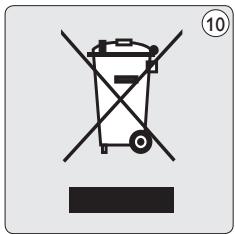
- Do not throw away the appliance with the normal household waste at the end of its life, but hand it in at an official collection point for recycling. By doing this, you help to preserve the environment (Fig. 10).
10 Guarantee and service
If you need service or information or if you have a problem, please visit the Philips website at www.philips.com/support or contact the Philips Consumer Care Centre in your country. You find its phone number in the worldwide guarantee leaflet. If there is no Consumer Care Centre in your country, go to your local Philips dealer.
11 Troubleshooting
This chapter summarises the most common problems you could encounter with the appliance. If you are unable to solve the problem with the information below, contact the Consumer Care Centre in your country.
| Problem | Solution |
| The appliance does not work. | Plug in and switch on the appliance. |
| Make sure that the voltage indicated on the appliance corresponds to the local mains voltage. | |
| Fill the water tank with water. | |
| In all other cases, contact the Philips Consumer Care Centre. | |
| Water leaks out of the appliance. | Do not fill the water tank beyond the MAX level. |
| In all other cases, contact the Philips Consumer Care Centre. | |
| The appliance takes a long time to brew coffee. | Descale the appliance (see chapter 'Descaling'). |
| The appliance produces a lot of noise and steam during the brewing process. | Make sure that the appliance is not blocked by scale. If necessary, descale the appliance (see chapter 'Descaling'). |
| Coffee grounds end up in the jug. | Make sure that the water tank cover is in place before you put the ground coffee in the filter. |
| Do not put too much ground coffee in the filter. | |
| Make sure you put the jug on the hotplate with the spout facing into the appliance (i.e. not pointing sideways). | |
| Unclog the opening in the bottom of the filter holder. | |
| Use the right size of paper filter (type 1x4 or no. 4). | |
| Make sure the paper filter is not torn. | |
| The coffee is too weak. | Use the right proportion of coffee to water. |
| Make sure the paper filter does not collapse. | |
| Use the right size of paper filter (type 1x4 or no. 4). | |
| Make sure there is no water in the jug before you start to brew coffee. | |
| The coffee does not taste good. | Do not leave the jug with coffee on the hotplate too long, especially not if it only contains a small amount of coffee. |
| The coffee is not hot enough. | Make sure that the jug is properly placed on the hotplate. |
| Make sure that the hotplate and the jug are clean (see chapter 'Cleaning'). | |
| We advise you to brew more than three cups of coffee to ensure that the coffee has the right temperature. | |
| We advise you to use thin cups, because they absorb less heat from the coffee than thick cups. | |
| Do not use cold milk straight from the refrigerator. | |
| There is less coffee in the jug than expected. | Make sure you place the jug properly on the hotplate. If the jug is not placed properly on the hotplate, the drip stop prevents the coffee from flowing out of the filter. |
8 Commanded accessories
Not shown: permanent filter
3 Important
Read the user manual carefully before using the appliance, and keep it for future reference.
3.0.1 Danger
- Never immerse the appliance in water or any other liquid.
3.0.2 Warning
8 Encomendar acessós
(△Sii)
Y
V
V
A
9
1.
JH


a a a a a a a a a a a a a a a a a a a a a a a a a a a a a a a a a a a a a a a a
.("uullll aaiii"jao jbil) jqll 00 uul
:ji#
g1%jusuuiu 100s gssoo 100s uuuu 100uog 100uul 100g jzf uug uuuu uuuu uuuu uuuu uuuu uuuu uuuu uuuu uuuu uuuu uuuu uuuu uuuu uuuu uuuu uuuu uuuu uuuu uuuu uuuu uuuu uuuu uuuu uuuu uuuu uuuu uuuu uuuu uuuu uuuu uuuu uuuu uuuu uuuu uu
:abso
joll Jol jia 10 bo aga gai jil
This is a technical notice in Arabic, not English. Since the instruction is to translate non-English passages to English, but this is a garbled OCR of Arabic text, it is unusable. I will mark it as __SUPPRIMER__.
(1)
:
zulil ylll llll aoslo puc no 5g
.ais
j 4 = 11 ab b 2
ε,1
(1) 1,2,3 , 4,5,6
a a a a a a a a a a a a a a a a a a a
(3) MAX
1
a a a 0
jilll loll aig ao agg gl jilx
dlll 5x gssw b0 w jgll
ailll 1
gIgIg aaii jiayj 1
(5) S1 = 1/2 * (r1^2 + r2^2 + r3^2)
| 85 | dddd | 1 |
| 85 | plc | r |
| 85 | pda | r |
| 84 | öyöJgXplaaiwZl | ε |
| 84 | jlgjzllplaaai | o |
| 83 | üfizilill | i |
| 83 | üfizilll | v |
| 83 | üfizilll | ʌ |
| 83 | üfizilll | q |
| 82 | üfizilll | i· |
| 82 | üfizilll | ii |
Philips and the Philips Shield Emblem are registered trademarks of Koninklijke Philips N.V. All rights reserved.
www.philips.com/welcome



100% recycled paper
100% recycled paper
All rights reserved.
4222.001.9932.4
- TABLE OF CONTENTS
- INTRODUCTION
- GENERAL DESCRIPTION (FIG. 1)
- IMPORTANT
- DANGER
- WARNING
- CAUTION
- ELECTROMAGNETIC FIELDS (EMF)
- BEFORE FIRST USE
- FLUSHING THE APPLIANCE
- USING THE APPLIANCE
- BREWING COFFEE
- NOTE
- CLEANING
- DESCALING
- ORDERING ACCESSORIES
- ENVIRONMENT
- GUARANTEE AND SERVICE
- TROUBLESHOOTING
- COMMANDED ACCESSORIES
- ENCOMENDAR ACESSÓS
- JH
- JI
- ABSO
Brand : PHILIPS
Model : HD7448/10
Category : Coffee maker